Before you’re tempted to attach yourself to a cable subscription, maybe it’s time to consider a live TV streaming service and let the cord go. The number of packages available today — for every kind of budget — is on the rise; however, live TV streaming services allow you to avoid those annoying contracts. They also offer a variety of channels, DVR and the ability to stream sports and other content. Plus, most services let you watch on your laptop or phone.
Monthly pricing and regional sports networks can make it a challenge when choosing a live TV streamer but six main services to consider (we’re not including smaller ones) are Fubo, Philo, Sling TV, DirecTV, YouTube TV and Hulu Plus Live TV.
Advertisement
It really boils down to the channels, right? We’ve examined which platforms feature the most top 100 channels in their main lineups to help you determine which one is best for your household.
The Big Chart: Top 100 channels compared (updated Feb. 2026)
The main difference between the services lies in their channel selection. All of them offer different lineups of channels for various prices.
Below, you’ll find a chart that shows the top 100 channels across all six services. Note that not every service has a worthy 100. There are actually seven listed because Sling TV has two “base” tiers, Orange and Blue. And if you’re wondering, I chose which “top” channels made the cut. Sorry, AXS TV, Discovery Life, GSN and Universal HD.
Fubo and NBCUniversal still have not resolved their carriage dispute, resulting in a gap in Fubo’s channel lineup but a drop in monthly subscription prices. DirecTV offers signature streaming packages, and its basic plan starts at $90 per month, plus fees (excluding promotional rates). With channel losses and price hikes, some of the services may seem less appealing.
Advertisement
Sling TV has made some changes to its Blue package in 2026. The price is $46 a month if you don’t have any local stations but the price has increased by $4 for those who do. If you have one or two local networks, such as NBC or Fox, the monthly rate is $50. Customers with three or more local stations in their Sling Blue package now pay $55 per month.
Philo offers a small roster but packages HBO Max, Discovery Plus and AMC Plus access with it at no extra charge. But costs continue to go up and those changes are reflected in the chart below where applicable.
Some more stuff to know about the chart:
Yes = The channel is available on the cheapest pricing tier. That price is listed next to the service’s name.
No = The channel isn’t available at all on that service.
$ = The channel is available for an extra fee, either a la carte or as part of a more expensive package or add-on.
Regional sports networks — local channels devoted to showing regular-season games of particular pro baseball, basketball and hockey teams — are not listed. DirecTV’s $130 tier has the most RSNs by far, but a few are available on other services. You can also check out its MySports package for $70 and Xfinity’s sports and news offering.
Local ABC, CBS, Fox, NBC, MyNetworkTV and The CW networks are not available in every city. Because the availability of these channels varies, you’ll want to check the service’s website to verify that it carries your local network.
Local PBS stations are only currently available on DirecTV, Hulu Live and YouTube TV. Again, you’ll want to check local availability.
Sling Blue subscribers in cities like Philadelphia, Chicago, Los Angeles and New York City pay extra for access to channels like NBC and ABC. Check Sling’s site to see which local channels are available in your area.
Fubo subscribers get an $11 price decrease on its Pro and Elite plans amid the NBCU carriage dispute, but you may find that the ACC Network and SEC Network are included with the TV package at no extra cost. Check availability for your state.
The chart columns are arranged in order of price, so if you can’t see everything you want, try scrolling right.
Philo vs. Sling TV vs. Fubo vs. YouTube TV vs. DirecTV vs. Hulu: Top 100 channels compared
Advertisement
Channel
Philo ($33)
Sling Orange ($46)
Sling Blue ($46)
Fubo ($74)
YouTube TV ($83)
DirecTV ($90)
Hulu with Live TV ($90)
Total channels:
43
24
34
39
78
56
75
ABC
No
No
No
Yes
Yes
Yes
Yes
CBS
No
No
No
Yes
Yes
Yes
Yes
Fox
No
No
Yes (some markets)
Yes
Yes
Yes
Yes
NBC
No
No
Yes (some markets0
No (due to carriage dispute)
Yes
Yes
Yes
PBS
No
No
No
No
Yes
Yes
Yes
CW
No
No
No
Yes
Yes
Yes (limited)
Yes
MyNetworkTV
No
No
No
No
Yes
Yes
Yes
Channel
Philo ($33)
Sling Orange ($46)
Sling Blue ($46)
Fubo ($74)
YouTube TV ($83)
DirecTV ($90)
Hulu with Live TV ($90)
A&E
Yes
Yes
Yes
No
No
$
Yes
ACC Network
No
$
No
Yes
Yes
$
Yes
Accuweather
Yes
No
No
Yes
No
Yes
No
AMC
Yes
Yes
Yes
No
Yes
Yes
No
Animal Planet
Yes
No
No
No
Yes
Yes
Yes
BBC America
Yes
Yes
Yes
No
Yes
Yes
No
BBC World News
Yes
$
$
No
Yes
$
No
BET
Yes
Yes
Yes
Yes
Yes
Yes
Yes
Big Ten Network
No
No
$
Yes
Yes
$
Yes
Bloomberg TV
No
Yes
Yes
Yes
No
Yes
Yes
Boomerang
No
$
$
No
No
Yes
$
Bravo
No
No
Yes
No (due to carriage dispute)
Yes
Yes
Yes
Channel
Philo ($33)
Sling Orange ($46)
Sling Blue ($46)
Fubo ($74)
YouTube TV ($83)
DirecTV ($90)
Hulu with Live TV ($90)
Cartoon Network
No
No
Yes
No
Yes
Yes
Yes
CBS Sports Network
No
No
No
Yes
Yes
$
Yes
Cheddar
Yes
No
No
Yes
Yes
Yes
Yes
Cinemax
No
No
No
No
$
$
$
CMT
Yes
$
$
Yes
Yes
Yes
Yes
CNBC
No
No
$
No (due to carriage dispute)
Yes
Yes
Yes
CNN
No
Yes
Yes
No
Yes
Yes
Yes
Comedy Central
Yes
Yes
Yes
Yes
Yes
Yes
Yes
Cooking Channel
Yes
$
$
$
No
$
$
Destination America
Yes
$
$
$
No
$
$
Discovery Channel
Yes
No
Yes
No
Yes
Yes
Yes
Disney Channel
No
Yes
No
Yes
Yes
Yes
Yes
Disney Junior
No
$
No
Yes
Yes
Yes
Yes
Disney XD
No
$
No
Yes
Yes
Yes
Yes
E!
No
No
Yes
No (due to carriage dispute)
Yes
Yes
Yes
ESPN
No
Yes
No
Yes
Yes
Yes
Yes
ESPN 2
No
Yes
No
Yes
Yes
Yes
Yes
ESPNEWS
No
$
No
$
Yes
$
Yes
ESPNU
No
$
No
$
Yes
$
Yes
Channel
Philo ($33)
Sling Orange ($46)
Sling Blue ($46)
Fubo ($74)
YouTube TV ($83)
DirecTV ($90)
Hulu with Live TV ($90)
Food Network
Yes
Yes
Yes
No
Yes
Yes
Yes
Fox Business
No
No
$
Yes
Yes
Yes
Yes
Fox News
No
No
Yes
Yes
Yes
Yes
Yes
FS1
No
No
Yes
Yes
Yes
Yes
Yes
FS2
No
No
$
Yes
Yes
$
Yes
Freeform
No
Yes
No
Yes
Yes
Yes
Yes
FX
No
No
Yes
Yes
Yes
Yes
Yes
FX Movies
No
No
$
$
Yes
$
Yes
FXX
No
No
$
Yes
Yes
Yes
Yes
FYI
Yes
$
$
No
No
$
Yes
Golf Channel
No
No
$
No (due to carriage dispute)
Yes
$
Yes
Hallmark
Yes
$
$
Yes
Yes
Yes
Yes
HBO/Max
No
No
No
No
$
$
$
HGTV
Yes
Yes
Yes
No
Yes
Yes
Yes
History
Yes
Yes
Yes
No
No
$
Yes
HLN
No
$
Yes
No
Yes
Yes
Yes
IFC
Yes
Yes
Yes
No
Yes
Yes
No
Investigation Discovery
Yes
Yes
Yes
No
Yes
Yes
Yes
Lifetime
Yes
Yes
Yes
No
No
$
Yes
Lifetime Movie Network
Yes
$
$
No
No
$
Yes
Channel
Philo ($33)
Sling Orange ($46)
Sling Blue ($46)
FuboTV ($74)
YouTube TV ($83)
DirecTV ($90)
Hulu with Live TV ($90)
Magnolia Network
Yes
$
$
No
Yes
$
Yes
MeTV
Yes
Yes
Yes
Yes
No
Yes
No
MGM+
$
$
$
No
$
$
No
MLB Network
No
$
$
$
No
$
Yes
Motor Trend
Yes
Yes
No
No
Yes
Yes
Yes
MSNBC
No
No
Yes
No (due to carriage dispute)
Yes
Yes
Yes
MTV
Yes
$
$
Yes
Yes
Yes
Yes
MTV2
Yes
$
$
$
Yes
Yes
$
National Geographic
No
No
Yes
Yes
Yes
No
Yes
Nat Geo Wild
No
No
$
$
Yes
$
Yes
NBA TV
No
$
$
$
Yes
$
No
NFL Network
No
No
Yes
Yes
Yes
$
Yes
NFL Red Zone
No
No
$
$
$
No
$
NHL Network
No
$
$
$
No
$
No
Nickelodeon
Yes
No
No
Yes
Yes
Yes
Yes
Nick Jr.
Yes
Yes
Yes
Yes
Yes
$
Yes
Nicktoons
Yes
$
$
$
Yes
$
$
OWN
Yes
No
No
No
Yes
$
Yes
Oxygen
No
No
$
Yes
Yes
$
Yes
Paramount Network
Yes
$
$
Yes
Yes
Yes
Yes
Science
Yes
$
$
$
No
$
$
Channel
Philo ($33)
Sling Orange ($46)
Sling Blue ($46)
FuboTV ($74)
YouTube TV ($83)
DirecTV ($90)
Hulu with Live TV ($90)
SEC Network
No
$
No
$
Yes
$
Yes
Showtime
No
$
$
$
$
$
$
Smithsonian
Yes
No
No
Yes
Yes
$
Yes
Starz
$
$
$
$
$
$
$
Sundance TV
Yes
$
$
No
Yes
Yes
No
Syfy
No
No
Yes
No (due to carriage dispute)
Yes
Yes
Yes
Tastemade
Yes
$
$
Yes
Yes
$
No
TBS
No
Yes
Yes
No
Yes
Yes
Yes
TCM
No
$
$
No
Yes
$
Yes
TeenNick
Yes
$
$
$
Yes
Yes
$
Telemundo
No
No
No
Yes
Yes
$
Yes
Tennis Channel
No
$
$
$
No
$
No
TLC
Yes
No
Yes
No
Yes
Yes
Yes
TNT
No
Yes
Yes
No
Yes
Yes
Yes
Travel Channel
Yes
Yes
Yes
No
Yes
$
Yes
TruTV
No
$
Yes
No
Yes
$
Yes
TV Land
Yes
$
$
Yes
Yes
Yes
Yes
USA Network
No
No
Yes
No (due to carriage dispute)
Yes
Yes
Yes
VH1
Yes
$
$
Yes
Yes
Yes
Yes
Vice
Yes
Yes
Yes
No
No
$
Yes
WE tv
Yes
$
$
No
Yes
Yes
No
Channel
Philo ($33)
Sling Orange ($46)
Sling Blue ($46)
FuboTV ($74)
YouTube TV ($83)
DirecTV ($90)
Hulu with Live TV ($90)
James Martin/CNET
Hulu Plus Live TV, which includes access to Disney Plus, Hulu on-demand and ESPN Plus, is one of the most expensive platforms, now at $90 a month for its base package. Its channel selection isn’t as robust as YouTube TV, but Hulu’s significant catalog of on-demand content sets it apart. ABC shows like High Potential and exclusive titles such as Shōgun, The Bear and Only Murders in the Building give it a content advantage.
Live TV subscribers also receive unlimited DVR that includes fast-forwarding and on-demand playback — at no additional cost. It’s a move that has aligned Hulu with its competitors in terms of features but the channel lineup may still be a deciding factor. It’s pricier than YouTube TV, which has more channels, but the access to Disney Plus and ESPN may make it a more appealing choice for you. Read our Hulu Plus Live TV review.
Advertisement
James Martin/CNET
Apart from its current carriage dispute with Disney, YouTube has an excellent channel selection, easy-to-use interface and best-in-class cloud DVR. Typically, the $83-per-month service is one of the best cable TV replacements. It offers a 4K upgrade add-on for an additional price, but the downside is that there isn’t much to watch at present unless you watch select channels. If you don’t mind paying a bit more than the Sling TVs of the world, or want to watch live NBA games, YouTube TV offers a high standard of live TV streaming. Read our YouTube TV review.
If you want to save a little money and don’t mind missing out on local channels, Sling TV is the best of the budget services. Its Orange and Blue packages start at $46 per month, and you can combine them for a monthly rate of $61 (more in some regions). The Orange option nets you one stream, while Blue gives you three. It’s not as comprehensive or as easy to navigate as YouTube TV, but with a bit of work, including adding an antenna or an AirTV 2 DVR, it’s an unbeatable value. We’ll also add that the service offers local channels such as ABC and CBS in some regions, where the monthly rate is $50 or $55. Read our Sling TV review.
Zooey Liao/CNET
Advertisement
DirecTV’s base signature streaming package costs more than all the other platforms on this list except Hulu Plus Live TV, and its stiffest competition is still Hulu and YouTube TV. With its channel selection, it’s ideal for sports fans who want to watch local or national games.
The service does have its benefits, though — for example, it includes the flipper-friendly ability to swipe left and right to change channels. Additionally, it includes some channels that some other services can’t, including nearly 250 PBS stations nationwide. The $90 Entertainment package may suit your needs with its 90-plus channels and the inclusion of ESPN Unlimited. But for cord-cutters who want to follow their local NBA or MLB team, DirecTV’s pricier Choice package is a more robust live TV streaming pick because it has access to more regional sports networks than the competition. Nonetheless, you’ll want to make sure your channel is included here and not available on one of our preferred picks before you pony up. Read our DirecTV streaming service review.
Ty Pendlebury/CNET
Advertisement
There’s a lot to like about Fubo — it offers a wide selection of channels and its sports focus makes it especially attractive to soccer fans or NBA, NHL and MLB fans who live in an area served by one of Fubo’s RSNs. It’s also a great choice for NFL fans because it’s one of three services, alongside YouTube TV and Hulu, that offer NFL Network and optional RedZone. The biggest hole in Fubo’s lineup is the lack of Warner Bros. Discovery networks, including Cartoon Network, CNN, Food Network, HGTV, TBS and TNT — especially as the latter two carry a lot of sports content, in particular MLB, NBA and NHL. Its current dispute with NBCU is causing more channel losses (no ABC, Bravo, etc.). Those missing channels, and the $74 price tag for the base plan, make it less attractive than YouTube TV for most viewers. Read our Fubo review.
Sarah Tew/CNET
Philo’s Core plan is now $33 and includes the AMC Plus bundle and HBO Max at no extra cost, and it’s still a cheap live TV streaming service with a variety of channels. But it lacks sports channels, local stations and big-name news networks — although BBC News and Cheddar are available. Philo offers bread-and-butter cable staples like Comedy Central, Hallmark Channel and Nickelodeon, and specializes in lifestyle and reality programming. It’s also one of the most affordable live services that streams Paramount, home of Yellowstone, and includes a cloud DVR, as well as optional add-ons from Hallmark Plus and Starz. We think most people are better off paying a few bucks more for Sling TV’s superior service, but if Philo has every channel you want, it’s a decent deal. Read our Philo review.
Kia’s combustion-powered Seltos has grown up and glowed up with more space and bigger tech inside.
Antuan Goodwin
Antuan started out in the automotive industry the old-fashioned way, by turning wrenches in a driveway and picking up speeding tickets. He now has nearly 20 years of expertise and experience behind the wheel of hundreds of cars, including electric, hybrid, plug-in hybrid, hydrogen, and traditional combustion vehicles.
For each car he tests, Antuan covers more than 200 miles behind the wheel and evaluates driving dynamics; acceleration and braking performance; range; and efficiency.
Antuan’s goal is to use his extensive car knowledge to educate CNET readers and help with their next car-related buying decision. Whether you’re EV-curious, an EV-enthusiast or a combustion-car loyalist, Antuan will bring you the unbiased advice, reviews, best lists and news you need.
Eighteen months ago, Legora was a Stockholm startup with a handful of law-firm clients and roughly $1 million in annual recurring revenue. On Tuesday, the company told Business Insider that it has crossed $100 million in ARR, a milestone that in enterprise software typically takes the better part of a decade. Max Junestrand, Legora’s 26-year-old cofounder and chief executive, framed the number as a reflection of demand rather than salesmanship. “This is a reflection of how quickly our customers are pushing the industry forward,” he said in a statement. “They’re redefining how legal work gets done, and AI is becoming the core infrastructure for the profession.”
The claim, if verified independently, would place Legora among the fastest-growing software companies in European history and firmly establish it as the most serious challenger to Harvey, the San Francisco-based legal AI company that currently leads the market. Harvey, which was last valued at $11 billion after raising $200 million in late March, said it had crossed $200 million in ARR and now serves more than 100,000 lawyers across 1,300 organisations. Legora’s customer base has grown to more than 1,000 firms and legal teams, according to the company, up from around 800 at the time of its Series D financing in early March.
The revenue figure helps explain a valuation that, until now, looked difficult to justify on the numbers alone. Legora raised $550 million in a Series D round led by Accel on 10 March, with the round pricing the company at $5.55 billion. At the time, its publicly disclosed ARR was approximately $23 million, putting the valuation at a staggering 240 times revenue. If the company was already running closer to $100 million, the multiple drops to roughly 55 times, still aggressive but within the range investors have accepted for high-growth vertical AI businesses. Among the backers in that round were Benchmark, Bessemer Venture Partners, General Catalyst, ICONIQ, Redpoint Ventures, Menlo Ventures, Salesforce Ventures, Bain Capital, and Y Combinator, which backed Legora in its Winter 2024 batch. Total funding now stands at $816 million.
Junestrand’s biography reads like a case study in the argument thatEurope should bet bigger on young founders. He was 23 when he started Legora with Sigge Labor, the company’s chief technology officer, and August Erséus, having previously competed in professional gaming, studied machine learning and business at KTH and the Stockholm School of Economics simultaneously, and worked at McKinsey. None of the three founders had practised law. They met Labor’s early prototype of software that could automate simpler legal tasks during the pandemic, but the state of large language models at the time limited what it could do. When the models improved, Legora launched.
Advertisement
The 💜 of EU tech
The latest rumblings from the EU tech scene, a story from our wise ol’ founder Boris, and some questionable AI art. It’s free, every week, in your inbox. Sign up now!
The product now covers the full arc of legal work that firms have historically staffed with junior associates: tearing through data rooms during due diligence, comparing contracts clause by clause, drafting briefs, and running multi-document reviews. In November 2025, the company launched Portal, a platform designed to let law firms productise their expertise and deliver it to in-house legal teams through custom AI workflows and intelligent document sharing. Design partners on Portal include Linklaters, Cleary Gottlieb, Goodwin, Deloitte, and Bird & Bird, with general availability scheduled for the first quarter of 2026. On 12 March, days after closing the Series D, Legora acquired Walter AI, a Canadian startup building agentic legal workflows, integrating its nine-person team into Stockholm and establishing a Toronto office under Walter’s former chief customer officer.
Legora’s trajectory has been shaped by a legal industry that appears to have moved past the question of whether AI belongs in the practice of law. A Thomson Reuters survey published in January found that law-firm spending on technology and knowledge-management tools grew 9.7 and 10.5 per cent respectively in 2025, the fastest real growth the sector has recorded. Separate research suggests that 55 per cent of lawyers are already using AI in some form. The global legal AI market, estimated at between $2.7 billion and $5.6 billion depending on whose definition of “legal AI” you accept, is projected to grow at compound annual rates of 17 to 22 per cent through the end of the decade.
Advertisement
The competitive landscape is narrowing. Harvey and Legora have emerged as the two dominant platforms for large law firms, with most other entrants either acquired, consolidated, or relegated to niche applications. Harvey’s advantage is depth of penetration: its tools are embedded in the daily workflows of some of the world’s largest firms, including those in the Am Law 100 and Magic Circle. Legora’s advantage is breadth and speed. The company expanded from 250 firms in May 2025 to more than 1,000 in less than a year, growing its headcount from 40 to more than 400 and opening offices in London, New York, and Sydney alongside its Stockholm headquarters. It becamethe fastest Y Combinator company to reach unicorn status, hitting $1.8 billion in its Series C in October 2025, just 13 months after its YC batch.
That speed carries risks. Legora’s valuation has roughly tripled every five months since its Series B, a pace that leaves almost no margin for a revenue deceleration. The $5.55 billion price assumes the company will continue scaling at rates that would place it in the top fraction of enterprise software businesses globally. If the $100 million ARR figure is accurate and growth sustains through 2026, Legora’s investors will look prescient. If the legal market’s appetite for AI tools plateaus, or if firms begin consolidating around a single platform rather than running both Harvey and Legora in parallel, the arithmetic gets considerably harder.
The broader question is what the legal AI boom tells us about theacceleration of AI adoption across professional services. Law was supposed to be resistant to automation: high-stakes, relationship-driven, riddled with jurisdictional complexity, and governed by professional regulators who move slowly. Instead, it has become one of the fastest-adopting verticals in enterprise AI, driven partly by the economics of the billable hour, which makes the value of time savings immediately and precisely quantifiable. A tool that lets a junior associate complete a document review in two hours instead of ten does not merely improve productivity. It changes the unit economics of the firm.
TheEuropean deep-tech paradox, in which the continent produces world-class research but struggles to build world-scale companies, finds an unusual counter-example in Legora. A Swedish company, built by founders in their mid-twenties with no legal background, has raised more than $800 million, grown to $100 million in ARR in a year and a half, and is now competing head-to-head with a Silicon Valley rival that has the backing of Sequoia, GIC, and the OpenAI ecosystem. Whether Legora can sustain that trajectory, or whether the extraordinary growth rates of 2025 and early 2026 represent a peak rather than a baseline, will depend on something no language model can yet predict: whether the lawyers who adopted these tools in a rush of enthusiasm will still be paying for them in three years’ time.
Advertisement
For now, the numbers suggest they will. The legal profession, it turns out, has been waiting for someone to automate the parts of the job that nobody enjoyed doing in the first place. Legora and Harvey are both betting that the parts nobody enjoyed doing also happen to be the parts that generated most of the revenue. That tension, between efficiency and economics, betweenthe promise of AI and the structures it disrupts, is the real story behind the $100 million milestone. The software works. The question is what the profession looks like once everyone is using it.
NASA’s Artemis II mission has launched four astronauts around the moon and back, marking humanity’s first crewed lunar voyage in 53 years and the first test flight of NASA’s Orion capsule and Space Launch System (SLS) with people on board. Five minutes into the flight, Commander Reid Wiseman saw the team’s target: “We have a beautiful moonrise, we’re headed right at it,” he said from the capsule. The Associated Press reports: Artemis II set sail from the same Florida launch site that sent Apollo’s explorers to the moon so long ago. The handful still alive cheered this next generation’s grand adventure as the Space Launch System rocket thundered into the early evening sky, a nearly full moon beckoning some 248,000 miles (400,000 kilometers) away.
Artemis II commander Reid Wiseman led the charge into space with “Let’s go to the moon!” accompanied by pilot Victor Glover, Christina Koch and Canada’s Jeremy Hansen. It was the most diverse lunar crew ever with the first woman, person of color and non-U.S. citizen riding in NASA’s new Orion capsule.
Carrying three Americans and one Canadian, the 32-story rocket rose from NASA’s Kennedy Space Center where tens of thousands gathered to witness the dawn of this new era. Crowds also jammed the surrounding roads and beaches, reminiscent of the Apollo moonshots in the 1960s and ’70s. It is NASA’s biggest step yet toward establishing a permanent lunar presence. Visit NASA’s Artemis II Launch Day blog for the latest updates.
Reuters reports that SpaceX has confidentially filed for a U.S. IPO, reportedly targeting a valuation above $1.75 trillion. Reuters reports: SpaceX puts more rockets in space than any other company and promises a chance to invest in humanity’s return to the moon and attempt to colonize Mars. The company aspires to put artificial intelligence data centers in space, while running a lucrative satellite communications system that opens up much of the earth to the internet and is increasingly used in war. […]
A public listing at a potential valuation of more than $1.75 trillion comes after SpaceX merged with Musk’s artificial intelligence startup xAI in a deal that valued the rocket company at $1 trillion and the developer of the Grok chatbot at $250 billion. SpaceX is hosting an analyst day on April 21, encouraging research analysts to attend in person, […]. The company is also offering analysts an optional visit to xAI’s “Macrohard” data center site in Memphis, Tennessee, on April 23, and plans to hold a virtual session on May 4 to discuss financial models with banks’ research analysts, the source said.
The Modern No-Code Creator Bundle is an extensive online curriculum specifically developed to enable individuals to construct professional websites, applications & automated workflows without the necessity of writing any code. It has five courses, covering leading no-code platforms and tools like ChatGPT, Mendix, and Tabnine. It is ideally suited for novices and non-technical professionals, empowering users to successfully launch digital products independently of developer assistance. It’s on sale for $20.
Note: The Techdirt Deals Store is powered and curated by StackCommerce. A portion of all sales from Techdirt Deals helps support Techdirt. The products featured do not reflect endorsements by our editorial team.
In late 2024, the federal government’s cybersecurity evaluators rendered a troubling verdict on one of Microsoft’s biggest cloud computing offerings.
The tech giant’s “lack of proper detailed security documentation” left reviewers with a “lack of confidence in assessing the system’s overall security posture,” according to an internal government report reviewed by ProPublica.
Advertisement
Or, as one member of the team put it: “The package is a pile of shit.”
For years, reviewers said, Microsoft had tried and failed to fully explain how it protects sensitive information in the cloud as it hops from server to server across the digital terrain. Given that and other unknowns, government experts couldn’t vouch for the technology’s security.
Such judgments would be damning for any company seeking to sell its wares to the U.S. government, but it should have been particularly devastating for Microsoft. The tech giant’s products had been at the heart of two major cybersecurity attacks against the U.S. in three years. In one, Russian hackers exploited a weakness to steal sensitive data from a number of federal agencies, including the National Nuclear Security Administration. In the other, Chinese hackers infiltrated the email accounts of a Cabinet member and other senior government officials.
The federal government could be further exposed if it couldn’t verify the cybersecurity of Microsoft’s Government Community Cloud High, a suite of cloud-based services intended to safeguard some of the nation’s most sensitive information.
Advertisement
Yet, in a highly unusual move that still reverberates across Washington, the Federal Risk and Authorization Management Program, or FedRAMP, authorized the product anyway, bestowing what amounts to the federal government’s cybersecurity seal of approval. FedRAMP’s ruling — which included a kind of “buyer beware” notice to any federal agency considering GCC High — helped Microsoft expand a government business empire worth billions of dollars.
“BOOM SHAKA LAKA,” Richard Wakeman, one of the company’s chief security architects, boasted in an online forum, celebrating the milestone with a meme of Leonardo DiCaprio in “The Wolf of Wall Street.” Wakeman did not respond to requests for comment.
It was not the type of outcome that federal policymakers envisioned a decade and a half ago when they embraced the cloud revolution and created FedRAMP to help safeguard the government’s cybersecurity. The program’s layers of review, which included an assessment by outside experts, were supposed to ensure that service providers like Microsoft could be entrusted with the government’s secrets. But ProPublica’s investigation — drawn from internal FedRAMP memos, logs, emails, meeting minutes, and interviews with seven former and current government employees and contractors — found breakdowns at every juncture of that process. It also found a remarkable deference to Microsoft, even as the company’s products and practices were central to two of the most damaging cyberattacks ever carried out against the government.
FedRAMP first raised questions about GCC High’s security in 2020 and asked Microsoft to provide detailed diagrams explaining its encryption practices. But when the company produced what FedRAMP considered to be only partial information in fits and starts, program officials did not reject Microsoft’s application. Instead, they repeatedly pulled punches and allowed the review to drag out for the better part of five years. And because federal agencies were allowed to deploy the product during the review, GCC High spread across the government as well as the defense industry. By late 2024, FedRAMP reviewers concluded that they had little choice but to authorize the technology — not because their questions had been answered or their review was complete, but largely on the grounds that Microsoft’s product was already being used across Washington.
Advertisement
Today, key parts of the federal government, including the Justice and Energy departments, and the defense sector rely on this technology to protect highly sensitive information that, if leaked, “could be expected to have a severe or catastrophic adverse effect” on operations, assets and individuals, the government has said.
“This is not a happy story in terms of the security of the U.S.,” said Tony Sager, who spent more than three decades as a computer scientist at the National Security Agency and now is an executive at the nonprofit Center for Internet Security.
For years, the FedRAMP process has been equated with actual security, Sager said. ProPublica’s findings, he said, shatter that facade.
“This is not security,” he said. “This is security theater.”
Advertisement
ProPublica is exposing the government’s reservations about this popular product for the first time. We are also revealing Microsoft’s yearslong inability to provide the encryption documentation and evidence the federal reviewers sought.
The revelations come as the Justice Department ramps up scrutiny of the government’s technology contractors. In December, the department announced the indictment of a former employee of Accenture who allegedly misled federal agencies about the security of the company’s cloud platform and its compliance with FedRAMP’s standards. She has pleaded not guilty. Accenture, which was not charged with wrongdoing, has said that it “proactively brought this matter to the government’s attention” and that it is “dedicated to operating with the highest ethical standards.”
Microsoft has also faced questions about its disclosures to the government. As ProPublica reported last year, the company failed to inform the Defense Department about its use of China-based engineers to maintain the government’s cloud systems, despite Pentagon rules stipulating that “No Foreign persons may have” access to its most sensitive data. The department is investigating the practice, which officials say could have compromised national security.
Microsoft has defended its program as “tightly monitored and supplemented by layers of security mitigations,” but after ProPublica’s story published last July, the company announced that it would stop using China-based engineers for Defense Department work.
Advertisement
In response to written questions for this story and in an interview, Microsoft acknowledged the yearslong confrontation with FedRAMP but also said it provided “comprehensive documentation” throughout the review process and “remediated findings where possible.”
“We stand by our products and the comprehensive steps we’ve taken to ensure all FedRAMP-authorized products meet the security and compliance requirements necessary,” a spokesperson said in a statement, adding that the company would “continue to work with FedRAMP to continuously review and evaluate our services for continued compliance.”
The program was an early target of the Trump administration’s Department of Government Efficiency, which slashed its staff and budget. Even FedRAMP acknowledges it is operating “with an absolute minimum of support staff” and “limited customer service.” The roughly two dozen employees who remain are “entirely focused on” delivering authorizations at a record pace, FedRAMP’s director has said. Today, its annual budget is just $10 million, its lowest in a decade, even as it has boasted record numbers of new authorizations for cloud products.
Advertisement
The consequence of all this, people who have worked for FedRAMP told ProPublica, is that the program now is little more than a rubber stamp for industry. The implications of such a downsizing for federal cybersecurity are far-reaching, especially as the administration encourages agencies to adopt cloud-based artificial intelligence tools, which draw upon reams of sensitive information.
The General Services Administration, which houses FedRAMP, defended the program, saying it has undergone “significant reforms to strengthen governance” since GCC High arrived in 2020. “FedRAMP’s role is to assess if cloud services have provided sufficient information and materials to be adequate for agency use, and the program today operates with strengthened oversight and accountability mechanisms to do exactly that,” a GSA spokesperson said in an emailed statement.
The agency did not respond to written questions regarding GCC High.
A “Cloud First” World
About two decades ago, federal officials predicted that the cloud revolution, providing on-demand access to shared computing via the internet, would usher in an era of cheaper, more secure and more efficient information technology.
Advertisement
Moving to the cloud meant shifting away from on-premises servers owned and operated by the government to those in massive data centers maintained by tech companies. Some agency leaders were reluctant to relinquish control, while others couldn’t wait to.
In an effort to accelerate the transition, the Obama administration issued its “Cloud First” policy in 2011, requiring all agencies to implement cloud-based tools “whenever a secure, reliable, cost-effective” option existed. To facilitate adoption, the administration created FedRAMP, whose job was to ensure the security of those tools.
FedRAMP’s “do once, use many times” system was intended to streamline and strengthen the government procurement process. Previously, each agency using a cloud service vetted it separately, sometimes applying different interpretations of federal security requirements. Under the new program, agencies would be able to skip redundant security reviews because FedRAMP authorization indicated that the product had already met standardized requirements. Authorized products would be listed on a government website known as the FedRAMP Marketplace.
On paper, the program was an exercise in efficiency. But in practice, the small FedRAMP team could not keep up with the flood of demand from tech companies that wanted their products authorized.
Advertisement
The slow approval process frustrated both the tech industry, eager for a share in the billions of federal dollars up for grabs, and government agencies that were under pressure to migrate to the cloud. These dynamics sometimes pitted the cloud industry and agency officials together against FedRAMP. The backlog also prompted many agencies to take an alternative path: performing their own reviews of the products they wanted to adopt, using FedRAMP’s standards.
It was through this “agency path” that GCC High entered the federal bloodstream, with the Justice Department paving the way. Initially, some Justice officials were nervous about the cloud and who might have access to its information, which includes highly sensitive court and law enforcement records, a Justice Department official involved in the decision told ProPublica. The department’s cybersecurity program required it to ensure that only U.S. citizens “access or assist in the development, operation, management, or maintenance” of its IT systems, unless a waiver was granted. Justice’s IT specialists recommended pursuing GCC High, believing it could meet the elevated security needs, according to the official, who spoke on condition of anonymity because they were not authorized to discuss internal matters.
Pursuant to FedRAMP’s rules, Microsoft had GCC High evaluated by a so-called third-party assessment organization, which is supposed to provide an independent review of whether the product has met federal standards. The Justice Department then performed its own evaluation of GCC High using those standards and ruled the offering acceptable.
By early 2020, Melinda Rogers, Justice’s deputy chief information officer, made the decision official and soon deployed GCC High across the department.
Advertisement
It was a milestone for all involved. Rogers had ushered the Justice Department into the cloud, and Microsoft had gained a significant foothold in the cutthroat market for the federal government’s cloud computing business.
Moreover, Rogers’ decision placed GCC High on the FedRAMP Marketplace, the government’s influential online clearinghouse of all the cloud providers that are under review or already authorized. Its mere mention as “in process” was a boon for Microsoft, amounting to free advertising on a website used by organizations seeking to purchase cloud services bearing what is widely seen as the government’s cybersecurity seal of approval.
That April, GCC High landed at FedRAMP’s office for review, the final stop on its bureaucratic journey to full authorization.
Microsoft’s Missing Information
In theory, there shouldn’t have been much for FedRAMP’s team to do after the third-party assessor and Justice reviewed GCC High, because all parties were supposed to be following the same requirements.
Advertisement
But it was around this time that the Government Accountability Office, which investigates federal programs, discovered breakdowns in the process, finding that agency reviews sometimes were lacking in quality. Despite missing details, FedRAMP went on to authorize many of these packages. Acknowledging these shortcomings, FedRAMP began to take a harder look at new packages, a former reviewer said.
This was the environment in which Microsoft’s GCC High application entered the pipeline. The name GCC High was an umbrella covering many services and features within Office 365 that all needed to be reviewed. FedRAMP reviewers quickly noticed key material was missing.
The team homed in on what it viewed as a fundamental document called a “data flow diagram,” former members told ProPublica. The illustration is supposed to show how data travels from Point A to Point B — and, more importantly, how it’s protected as it hops from server to server. FedRAMP requires data to be encrypted while in transit to ensure that sensitive materials are protected even if they’re intercepted by hackers.
But when the FedRAMP team asked Microsoft to produce the diagrams showing how such encryption would happen for each service in GCC High, the company balked, saying the request was too challenging. So the reviewers suggested starting with just Exchange Online, the popular email platform.
Advertisement
“This was our litmus test to say, ‘This isn’t the only thing that’s required, but if you’re not doing this, we are not even close yet,’” said one reviewer who spoke on condition of anonymity because they were not authorized to discuss internal matters. Once they reached the appropriate level of detail, they would move from Exchange to other services within GCC High.
It was the kind of detail that other major cloud providers such as Amazon and Google routinely provided, members of the FedRAMP team told ProPublica. Yet Microsoft took months to respond. When it did, the former reviewer said, it submitted a white paper that discussed GCC High’s encryption strategy but left out the details of where on the journey data actually becomes encrypted and decrypted — so FedRAMP couldn’t assess that it was being done properly.
A Microsoft spokesperson acknowledged that the company had “articulated a challenge related to illustrating the volume of information being requested in diagram form” but “found alternate ways to share that information.”
Rogers, who was hired by Microsoft in 2025, declined to be interviewed. In response to emailed questions, the company provided a statement saying that she “stands by the rigorous evaluation that contributed to” her authorization of GCC High. A spokesperson said there was “absolutely no connection” between her hiring and the decisions in the GCC High process, and that she and the company complied with “all rules, regulations, and ethical standards.”
Advertisement
The Justice Department declined to respond to written questions from ProPublica.
A Fight Over “Spaghetti Pies”
As 2020 came to a close, a national security crisis hit Washington that underscored the consequences of cyber weakness. Russian state-sponsored hackers had been quietly working their way through federal computer systems for much of the year and vacuuming up sensitive data and emails from U.S. agencies — including the Justice Department.
At the time, most of the blame fell on a Texas-based company called SolarWinds, whose software provided hackers their initial opening and whose name became synonymous with the attack. But, as ProPublica has reported, the Russians leveraged that opening to exploit a long-standing weakness in a Microsoft product — one that the company had refused to fix for years, despite repeated warnings from one of its engineers. Microsoft has defended its decision not to address the flaw, saying that it received “multiple reviews” and that the company weighs a variety of factors when making security decisions.
In the aftermath, the Biden administration took steps to bolster the nation’s cybersecurity. Among them, the Justice Department announced a cyber-fraud initiative in 2021 to crack down on companies and individuals that “put U.S. information or systems at risk by knowingly providing deficient cybersecurity products or services, knowingly misrepresenting their cybersecurity practices or protocols, or knowingly violating obligations to monitor and report cybersecurity incidents and breaches.”
Advertisement
Deputy Attorney General Lisa Monaco said the department would use the False Claims Act to pursue government contractors “when they fail to follow required cybersecurity standards — because we know that puts all of us at risk.”
But if Microsoft felt any pressure from the SolarWinds attack or from the Justice Department’s announcement, it didn’t manifest in the FedRAMP talks, according to former members of the FedRAMP team.
The discourse between FedRAMP and Microsoft fell into a pattern. The parties would meet. Months would go by. Microsoft would return with a response that FedRAMP deemed incomplete or irrelevant. To bolster the chances of getting the information it wanted, the FedRAMP team provided Microsoft with a template, describing the level of detail it expected. But the diagrams Microsoft returned never met those expectations.
“We never got past Exchange,” one former reviewer said. “We never got that level of detail. We had no visibility inside.”
Advertisement
In an interview with ProPublica, John Bergin, the Microsoft official who became the government’s main contact, acknowledged the prolonged back-and-forth but blamed FedRAMP, equating its requests for diagrams to a “rock fetching exercise.”
“We were maybe incompetent in how we drew drawings because there was no standard to draw them to,” he said. “Did we not do it exactly how they wanted? Absolutely. There was always something missing because there was no standard.”
A Microsoft spokesperson said without such a standard, “cloud providers were left to interpret the level of abstraction and representation on their own,” creating “inconsistency and confusion, not an unwillingness to be transparent.”
But even Microsoft’s own engineers had struggled over the years to map the architecture of its products, according to two people involved in building cloud services used by federal customers. At issue, according to people familiar with Microsoft’s technology, was the decades-old code of its legacy software, which the company used in building its cloud services.
Advertisement
One FedRAMP reviewer compared it to a “pile of spaghetti pies.” The data’s path from Point A to Point B, the person said, was like traveling from Washington to New York with detours by bus, ferry and airplane rather than just taking a quick ride on Amtrak. And each one of those detours represents an opportunity for a hijacking if the data isn’t properly encrypted.
Other major cloud providers such as Amazon and Google built their systems from the ground up, said Sager, the former NSA computer scientist, who worked with all three companies during his time in government.
Microsoft’s system is “not designed for this kind of isolation of ‘secure’ from ‘not secure,’” Sager said.
A Microsoft spokesperson acknowledged the company faces a unique challenge but maintained that its cloud products meet federal security requirements.
Advertisement
“Unlike providers that started later with a narrower product scope, Microsoft operates one of the broadest enterprise and government platforms in the world, supporting continuity for millions of customers while simultaneously modernizing at scale,” the spokesperson said in emailed responses. “That complexity is not ‘spaghetti,’ but it does mean the work of disentangling, isolating, and hardening systems is continuous.”
The spokesperson said that since 2023, Microsoft has made “security‑first architectural redesign, legacy risk reduction, and stronger isolation guarantees a top, company‑wide priority.”
Assessors Back-Channel Cyber Concerns
The FedRAMP team was not the only party with reservations about GCC High. Microsoft’s third-party assessment organizations also expressed concerns.
The firms are supposed to be independent but are hired and paid by the company being assessed. Acknowledging the potential for conflicts of interest, FedRAMP has encouraged the assessment firms to confidentially back-channel to its reviewers any negative feedback that they were unwilling to bring directly to their clients or reflect in official reports.
Advertisement
In 2020, two third-party assessors hired by Microsoft, Coalfire and Kratos, did just that. They told FedRAMP that they were unable to get the full picture of GCC High, a former FedRAMP reviewer told ProPublica.
“Coalfire and Kratos both readily admitted that it was difficult to impossible to get the information required out of Microsoft to properly do a sufficient assessment,” the reviewer told ProPublica.
The back channel helped surface cybersecurity issues that otherwise might never have been known to the government, people who have worked with and for FedRAMP told ProPublica. At the same time, they acknowledged its existence undermined the very spirit and intent of having independent assessors.
A spokesperson for Coalfire, the firm that initially handled the GCC High assessment, requested written questions from ProPublica, then declined to respond.
Advertisement
A spokesperson for Kratos, which replaced Coalfire as the GCC High assessor, declined an interview request. In an emailed response to written questions, the spokesperson said the company stands by its official assessment and recommendation of GCC High and “absolutely refutes” that it “ever would sign off on a product we were unable to fully vet.” The company “has open and frank conversations” with all customers, including Microsoft, which “submitted all requisite diagrams to meet FedRAMP-defined requirements,” the spokesperson said.
Kratos said it “spent extensive time working collaboratively with FedRAMP in their review” and does not consider such discussions to be “backchanneling.”
FedRAMP, however, was dissatisfied with Kratos’ ongoing work and believed the firm “should be pushing back” on Microsoft more, the former reviewer said. It placed Kratos on a “corrective action plan,” which could eventually result in loss of accreditation. The company said it did not agree with FedRAMP’s action but provided “additional trainings for some internal assessors” in response to it.
The Microsoft spokesperson told ProPublica the company has “always been responsive to requests” from Kratos and FedRAMP. “We are not aware of any backchanneling, nor do we believe that backchanneling would have been necessary given our transparency and cooperation with auditor requests,” the spokesperson said.
Advertisement
In response to questions from ProPublica about the process, the GSA said in an email that FedRAMP’s system “does not create an inherent conflict of interest for professional auditors who meet ethical and contractual performance expectations.”
GSA did not respond to questions about back-channeling but said the “correct process” is for a third-party assessor to “state these problems formally in a finding during the security assessment so that the cloud service provider has an opportunity to fix the issue.”
FedRAMP Ends Talks
The back-and-forth between the FedRAMP reviewers and Microsoft’s team went on for years with little progress. Then, in the summer of 2023, the program’s interim director, Brian Conrad, got a call from the White House that would alter the course of the review.
Chinese state-sponsored hackers had infiltrated GCC, the lower-cost version of Microsoft’s government cloud, and stolen data and emails from the commerce secretary, the U.S. ambassador to China and other high-ranking government officials. In the aftermath, Chris DeRusha, the White House’s chief information security officer, wanted a briefing from FedRAMP, which had authorized GCC.
Advertisement
The decision predated Conrad’s tenure, but he told ProPublica that he left the conversation with several takeaways. First, FedRAMP must hold all cloud providers — including Microsoft — to the same standards. Second, he had the backing of the White House in standing firm. Finally, FedRAMP would feel the political heat if any cloud service with a FedRAMP authorization were hacked.
DeRusha confirmed Conrad’s account of the phone call but declined to comment further.
Within months, Conrad informed Microsoft that FedRAMP was ending the engagement on GCC High.
“After three years of collaboration with the Microsoft team, we still lack visibility into the security gaps because there are unknowns that Microsoft has failed to address,” Conrad wrote in an October 2023 email. This, he added, was not for FedRAMP’s lack of trying. Staffers had spent 480 hours of review time, had conducted 18 “technical deep dive” sessions and had numerous email exchanges with the company over the years. Yet they still lacked the data flow diagrams, crucial information “since visibility into the encryption status of all data flows and stores is so important,” he wrote.
Advertisement
If Microsoft still wanted FedRAMP authorization, Conrad wrote, it would need to start over.
A FedRAMP reviewer, explaining the decision to the Justice Department, said the team was “not asking for anything above and beyond what we’ve asked from every other” cloud service provider, according to meeting minutes reviewed by ProPublica. But the request was particularly justified in Microsoft’s case, the reviewer told the Justice officials, because “each time we’ve actually been able to get visibility into a black box, we’ve uncovered an issue.”
“We can’t even quantify the unknowns, which makes us very uncomfortable,” the reviewer said, according to the minutes.
Microsoft and the Justice Department Push Back
Microsoft was furious. Failing to obtain authorization and starting the process over would signal to the market that something was wrong with GCC High. Customers were already confused and concerned about the drawn-out review, which had become a hot topic in an online forum used by government and technology insiders. There, Wakeman, the Microsoft cybersecurity architect, deflected blame, saying the government had been “dragging their feet on it for years now.”
Advertisement
Meanwhile, to build support for Microsoft’s case, Bergin, the company’s point person for FedRAMP and a former Army official, reached out to government leaders, including one from the Justice Department.
The Justice official, who spoke on condition of anonymity because they were not authorized to discuss the matter, said Bergin complained that the delay was hampering Microsoft’s ability “to get this out into the market full sail.” Bergin then pushed the Justice Department to “throw around our weight” to help secure FedRAMP authorization, the official said.
That December, as the parties gathered to hash things out at GSA’s Washington headquarters, Justice did just that. Rogers, who by then had been promoted to the department’s chief information officer, sat beside Bergin — on the opposite side of the table from Conrad, the FedRAMP director.
Rogers and her Justice colleagues had a stake in the outcome. Since authorizing and deploying GCC High, she had receivedaccolades for her work modernizing the department’s IT and cybersecurity. But without FedRAMP’s stamp of approval, she would be the government official left holding the bag if GCC High were involved in a serious hack. At the same time, the Justice Department couldn’t easily back out of using GCC High because once a technology is widely deployed, pulling the plug can be costly and technically challenging. And from its perspective, the cloud was an improvement over the old government-run data centers.
Advertisement
Shortly after the meeting kicked off, Bergin interrupted a FedRAMP reviewer who had been presenting PowerPoint slides. He said the Justice Department and third-party assessor had already reviewed GCC High, according to meeting minutes. FedRAMP “should essentially just accept” their findings, he said.
Then, in a shock to the FedRAMP team, Rogers backed him up and went on to criticize FedRAMP’s work, according to two attendees.
In its statement, Microsoft said Rogers maintains that FedRAMP’s approach “was misguided and improperly dismissed the extensive evaluations performed by DOJ personnel.”
Bergin did not dispute the account, telling ProPublica that he had been trying to argue that it is the purview of third-party assessors such as Kratos — not FedRAMP — to evaluate the security of cloud products. And because FedRAMP must approve the third-party assessment firms, the program should have taken its issues up with Kratos.
Advertisement
“When you are the regulatory agency who determines who the auditors are and you refuse to accept your auditors’ answers, that’s not a ‘me’ problem,” Bergin told ProPublica.
The GSA did not respond to questions about the meeting. The Justice Department declined to comment.
Pressure Mounts on FedRAMP
If there was any doubt about the role of FedRAMP, the White House issued a memorandum in the summer of 2024 that outlined its views. FedRAMP, it said, “must be capable of conducting rigorous reviews” and requiring cloud providers to “rapidly mitigate weaknesses in their security architecture.” The office should “consistently assess and validate cloud providers’ complex architectures and encryption schemes.”
But by that point, GCC High had spread to other federal agencies, with the Justice Department’s authorization serving as a signal that the technology met federal standards.
Advertisement
It also spread to the defense sector, since the Pentagon required that cloud products used by its contractors meet FedRAMP standards. While it did not have FedRAMP authorization, Microsoft marketed GCC High as meeting the requirements, selling it to companies such as Boeing that research, develop and maintain military weapons systems.
But with the FedRAMP authorization up in the air, some contractors began to worry that by using GCC High, they were out of compliance. That could threaten their contracts, which, in turn, could impact Defense Department operations. Pentagon officials called FedRAMP to inquire about the authorization stalemate.
The Defense Department acknowledged but did not respond to written questions from ProPublica.
Rogers also kept pressing FedRAMP to “get this thing over the line,” former employees of the GSA and FedRAMP said. It was the “opinion of the staff and the contractors that she simply was not willing to put heat to Microsoft on this” and that the Justice Department “was too sympathetic to Microsoft’s claims,” Eric Mill, then GSA’s executive director for cloud strategy, told ProPublica.
Advertisement
Authorization Despite a “Damning” Assessment
In the summer of 2024, FedRAMP hired a new permanent director, government technology insider Pete Waterman. Within about a month of taking the job, he restarted the office’s review of GCC High with a new team, which put aside the debate over data flow diagrams and instead attempted to examine evidence from Microsoft. But these reviewers soon arrived at the same conclusion, with the team’s leader complaining about “getting stiff-armed” by Microsoft.
“He came back and said, ‘Yeah, this thing sucks,’” Mill recalled.
While the team was able to work through only two of the many services included in GCC High, Exchange Online and Teams, that was enough for it to identify “issues that are fundamental” to risk management, including “timely remediation of vulnerabilities and vulnerability scanning,” according to a summary of the team’s findings reviewed by ProPublica.
Those issues, as well as a lack of “proper detailed security documentation” from Microsoft, limit “visibility and understanding of the system” and “impair the ability to make informed risk decisions.”
Advertisement
The team concluded, “There is a lack of confidence in assessing the system’s overall security posture.”
A Microsoft spokesperson said in a statement that the company “never received this feedback in any of its communications with FedRAMP.”
When ProPublica read the findings to Bergin, the Microsoft liaison, he said he was surprised.
“That’s pretty damning,” Bergin said, adding that it sounded like language that “would’ve generally been associated with a finding of ‘not worthy.’ If an assessor wrote that, I would be nervous.”
Advertisement
Despite the findings, to the FedRAMP team, turning Microsoft down didn’t seem like an option. “Not issuing an authorization would impact multiple agencies that are already using GCC-H,” the summary document said. The team determined that it was a “better value” to issue an authorization with conditions for continued government oversight.
While authorizations with oversight conditions weren’t unusual, arriving at one under these circumstances was. GCC High reviewers saw problems everywhere, both in what they were able to evaluate and what they weren’t. To them, most of the package remained a vast wilderness of untold risk.
Nevertheless, FedRAMP and Microsoft reached an agreement, and the day after Christmas 2024, GCC High received its FedRAMP authorization. FedRAMP appended a cover report to the package laying out its deficiencies and noting it carried unknown risks, according to people familiar with the report.
It emphasized that agencies should carefully review the package and engage directly with Microsoft on any questions.
Advertisement
“Unknown Unknowns” Persist
Microsoft told ProPublica that it has met the conditions of the agreement and has “stayed within the performance metrics required by FedRAMP” to ensure that “risks are identified, tracked, remediated, and transparently communicated.”
But under the Trump administration, there aren’t many people left at FedRAMP to check.
While the Biden-era guidance said FedRAMP “must be an expert program that can analyze and validate the security claims” of cloud providers, the GSA told ProPublica that the program’s role is “not to determine if a cloud service is secure enough.” Rather, it is “to ensure agencies have sufficient information to make these risk decisions.”
The problem is that agencies often lack the staff and resources to do thorough reviews, which means the whole system is leaning on the claims of the cloud companies and the assessments of the third-party firms they pay to evaluate them. Under the current vision, critics say, FedRAMP has lost the plot.
Advertisement
“FedRAMP’s job is to watch the American people’s back when it comes to sharing their data with cloud companies,” said Mill, the former GSA official, who also co-authored the 2024 White House memo. “When there’s a security issue, the public doesn’t expect FedRAMP to say they’re just a paper-pusher.”
Meanwhile, at the Justice Department, officials are finding out what FedRAMP meant by the “unknown unknowns” in GCC High. Last year, for example, they discovered that Microsoft relied on China-based engineers to service their sensitive cloud systems despite the department’s prohibition against non-U.S. citizens assisting with IT maintenance.
Officials learned about this arrangement — which was also used in GCC High — not from FedRAMP or from Microsoft but from a ProPublica investigation into the practice, according to the Justice employee who spoke with us.
A Microsoft spokesperson acknowledged that the written security plan for GCC High that the company submitted to the Justice Department did not mention foreign engineers, though he said Microsoft did communicate that information to Justice officials before 2020. Nevertheless, Microsoft has since ended its use of China-based engineers in government systems.
Advertisement
Former and current government officials worry about what other risks may be lurking in GCC High and beyond.
The GSA told ProPublica that, in general, “if there is credible evidence that a cloud service provider has made materially false representations, that matter is then appropriately referred to investigative authorities.”
Ironically, the ultimate arbiter of whether cloud providers or their third-party assessors are living up to their claims is the Justice Department itself. The recent indictment of the former Accenture employee suggests it is willing to use this power. In a court document, the Justice Department alleges that the ex-employee made “false and misleading representations” about the cloud platform’s security to help the company “obtain and maintain lucrative federal contracts.” She is also accused of trying to “influence and obstruct” Accenture’s third-party assessors by hiding the product’s deficiencies and telling others to conceal the “true state of the system” during demonstrations, the department said. She has pleaded not guilty.
There is no public indication that such a case has been brought against Microsoft or anyone involved in the GCC High authorization. The Justice Department declined to comment. Monaco, the deputy attorney general who launched the department’s initiative to pursue cybersecurity fraud cases, did not respond to requests for comment.
Advertisement
She left her government position in January 2025. Microsoft hired her to become its president of global affairs.
A company spokesperson said Monaco’s hiring complied with “all rules, regulations, and ethical standards” and that she “does not work on any federal government contracts or have oversight over or involvement with any of our dealings with the federal government.”
Switching phones is always a gamble. You expect something new, something exciting – maybe even something better. And to be fair, the Galaxy S26 Ultra delivers on that promise in many ways. It is one of the most technically impressive smartphones available today, packing a 6.85-inch 2K LTPO AMOLED display with a 120Hz refresh rate, peak brightness reaching up to 2,600 nits, and Qualcomm’s Snapdragon 8 Elite Gen 5 chip, which offers roughly a 10–15% performance boost over its predecessor.
But after spending time with it, I found myself in a strange position. The more I appreciated what Samsung had built, the more I started missing my iPhone 17 Pro.
The Privacy Display has got some real trade-offs
The standout feature this year is easily Samsung’s Privacy Display. It uses pixel-level light control to restrict viewing angles, effectively making your screen unreadable from the sides. In theory, it’s brilliant. In practice, it’s genuinely useful – especially in public spaces like flights or metros where shoulder surfing is a real concern.
Samsung deserves credit here because this isn’t just software trickery. It’s hardware-driven innovation, and that’s increasingly rare in modern smartphones.
Advertisement
The Samsung Galaxy S26 Ultra, angled for its Privacy Display.Tom Bedford / Digital Trends
But the moment you turn it on, the compromises become clear. The display dims noticeably, color accuracy takes a slight hit, and the overall viewing experience feels constrained. This is particularly noticeable because the S26 Ultra’s panel is otherwise one of the brightest and most vibrant in the industry.
And that’s when the contrast hits you.
Apple doesn’t offer a privacy display. But it also doesn’t introduce features that degrade the core experience. The iPhone approach is slower, more conservative – but also more refined. You don’t get experimental features, but you also don’t deal with their trade-offs.
Camera improvements that don’t change the outcome
On paper, the S26 Ultra’s camera system sounds upgraded. The main sensor now features a wider f/1.4 aperture, while the telephoto sits at f/2.9, theoretically improving low-light performance. The phone retains its triple 50MP setup, including a periscope zoom lens.
In isolation, the results are excellent. Photos are sharp, bright, and social-media ready.
Advertisement
iPhone 17 ProUnsplash
But compared to the S25 Ultra, the differences are minimal. In most real-world scenarios, you would struggle to tell which phone took which shot unless you were actively looking for it. Even benchmark comparisons and side-by-side tests suggest that the improvement is incremental rather than transformative.
Tom Bedford / Digital Trends
Meanwhile, the iPhone continues to excel in areas that matter day to day – video consistency, color accuracy, and optimization for apps like Instagram and Snapchat. Apple’s computational photography may not always push boundaries, but it delivers predictability.
Samsung is innovating. Apple is refining. And more often than not, refinement wins in daily use.
Performance and AI: Powerful, but overwhelming
There is no denying the raw power of the S26 Ultra. The Snapdragon 8 Elite Gen 5 delivers top-tier performance, and the device handles everything – from gaming to multitasking – effortlessly. But the real focus this year is AI.
Samsung has packed the phone with features: AI image editing, generative fill, object insertion, writing assistants, real-time translation, and contextual suggestions through tools like Now Brief or Now Nudge. These features are technically impressive, but they come with limitations. AI-generated images often output at lower resolutions – which doesn’t match the phone’s native display. Editing images can reduce quality by up to 20–30%, making them less practical for long-term use.
Digital Trends
More importantly, many of these tools feel optional rather than essential. They are features you try, not features you rely on.
And over time, that starts to feel exhausting.
Advertisement
The iPhone, by comparison, takes a different approach. It integrates AI more quietly, focusing on tasks that improve existing workflows rather than introducing entirely new ones. It does less – but it does it more consistently.
The irony of it all
The S26 Ultra didn’t make me dislike Android. It reminded me why I liked iOS.
Because while Samsung is experimenting with bold features – privacy displays, AI tools, camera tweaks – Apple is focusing on stability, consistency, and polish. And that difference becomes more noticeable the longer you use both. The features you admire aren’t always the ones you miss.
My final take
The Galaxy S26 Ultra is an exceptional device. It is powerful, innovative, and packed with features that push the boundaries of what a smartphone can do. But using it didn’t feel like an upgrade in my daily life. It felt like stepping into a different philosophy. And sometimes, that’s enough to make you realize that what you value isn’t innovation for its own sake – but how seamlessly everything fits together.
Advertisement
And in that regard, I found myself missing my iPhone 17 Pro more than I expected.
Hackers have targeted TrueConf conference servers in attacks that exploit a zero-day vulnerability, allowing them to execute arbitrary files on all connected endpoints.
The flaw is tracked as CVE-2026-3502 and received a medium severity score. It stems from a missing integrity check in the software’s update mechanism, which can be used to replace the legitimate update with a malicious variant.
TrueConf is a video conferencing platform that can run as a self-hosted server. Although it also supports cloud deployments, it is generally designed for closed, offline environments.
According to the vendor, more than 100,000 organizations transitioned to TrueConf during the COVID-19 pandemic for remote online business activities. Among TrueConf users are military forces, government agencies, oil and gas corporations, and air traffic management companies.
Advertisement
CheckPoint researchers have been tracking a campaign they track as TrueChaos that, since the beginning of the year, has exploited CVE-2026-3502 in zero-day attacks targeting government entities in Southeast Asia.
“An attacker who gains control of the on-premises TrueConf server can replace the expected update package with an arbitrary executable, presented as the current application version, and distribute it to all connected clients,” CheckPoint says.
“Because the client trusts the server-provided update without proper validation, the malicious file can be delivered and executed under the guise of a legitimate TrueConf update.”
The flaw affects TrueConf versions 8.1.0 through 8.5.2, and following CheckPoint’s report to the vendor, a fix was released in version 8.5.3 in March 2026.
Advertisement
“TrueChaos” operation
CheckPoint has moderate confidence in attributing the TrueChaos activity to a Chinese-nexus threat actor, based on tactics, techniques, and procedures (TTPs), the use of Alibaba Cloud and Tencent for hosting the command and control (C2) infrastructure, and victimology.
The attacks spread through a centrally managed government TrueConf server, impacting multiple agencies, pushing malicious files via fake updates to all connected TrueConf clients.
TrueConf update notice Source: Check Point
The infection chain includes DLL sideloading and the deployment of reconnaissance tools (tasklist, tracert), privilege escalation (UAC bypass via iscicpl.exe), and the establishment of persistence.
The researchers were unable to recover the final payload, but noted that network traffic pointed to Havoc C2 infrastructure, making it highly likely that the Havoc implant was used.
Overview of the TrueChaos attack chain Source: Check Point
Havoc is an open-source C2 framework capable of executing commands, managing processes, manipulating Windows tokens, executing shellcode, and deploying additional payloads on compromised systems.
It has previously been used by the Chinese threat cluster ‘Amaranth Dragon’ in attacks with a similar targeting scope.
Advertisement
CheckPoint’s report shares indicators of compromise (IoCs) as well as multiple infection signals. Strong signs of a breach include the presence of poweriso.exe or 7z-x64.dll, and suspicious artifacts like %AppData%\Roaming\Adobe\update.7z or iscsiexe.dll.
Automated pentesting proves the path exists. BAS proves whether your controls stop it. Most teams run one without the other.
This whitepaper maps six validation surfaces, shows where coverage ends, and provides practitioners with three diagnostic questions for any tool evaluation.
Decentralized finance company Drift says it has suspended withdrawals and deposits after confirming a security incident.
The crypto platform said in a post on X that it was “experiencing an active attack,” and that it was working to “contain the incident.”
Security researchers and public blockchain data suggest the losses could be significant. Blockchain security firm CertiK said on X that hackers may have stolen around $136 million, while crypto analytics firm Arkham put the figure at around $285 million stolen.
If confirmed, this would make the Drift hack the largest crypto theft of the year, according to the Rekt leaderboard, a site that tracks crypto thefts by size.
Advertisement
It’s not clear who is behind the attack, and a spokesperson for Drift did not immediately respond to a request for comment.
Security firms say North Korea was behind the most crypto thefts last year, netting at least $2 billion in stolen cryptocurrency, funds the regime is believed to use to finance its nuclear weapons program and skirt international sanctions that restrict its access to the global financial system.
Electro-permanent magnets (EPMs) are pretty nifty concepts, and if you aren’t familiar with them, they are permanent magnets with the ability to be electrically switched on or off. Unlike an electromagnet — which maintains a magnetic field only while power is applied — an EPM can remain “on” even when power is removed. Want to see one work? There’s a video embedded below that shows one off, but if you’d like to know how they work, we have you covered.
Inside are two types of magnet, one of which is permanent and the other being a semi-hard magnet paired with an electromagnetic coil. A semi-hard magnet’s flux can be changed by exposing it to a strong enough magnetic field, and that’s the key to making it work.
Being able to electrically switch a permanent magnet on or off is a neat trick.
When both magnets work together, the EPM is “on” and acts like a permanent magnet. To turn the EPM off, the polarity of the semi-hard magnet is flipped with a short and powerful electromagnetic pulse, after which the two magnets oppose one another and more or less cancel each other out. So rather than generating a magnetic field, an EPM more accurately reconfigures it.
As intriguing as EPMs are, we haven’t really seen one properly in action until it was brought to our attention that [Dave Jones] of EEVblog tried one out last year. He received a Zubax FluxGrip EPM, which is intended for drone and robotic applications and can hold up to 25 kg. Watch [Dave] fire it up in the video (link is cued up to the 7:30 mark), it’s pretty interesting to see one of these actually work.
Advertisement
EPMs are not prohibitively expensive but they are not exactly cheap, either. But if a switchable magnet sounds up your alley and you can’t afford an EPM, consider an alternative “switchable” magnet design that works by momentarily canceling out a permanent magnet with a paired electromagnet. Unlike an EPM, it’s not a permanent switch but it would be enough to drop a payload.
















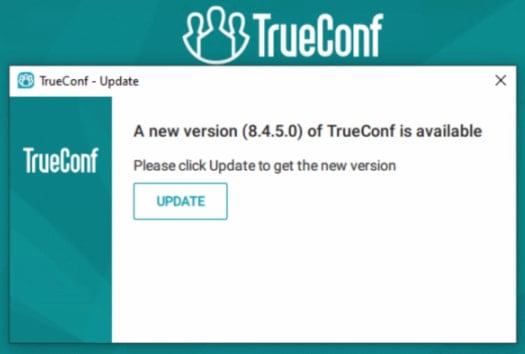
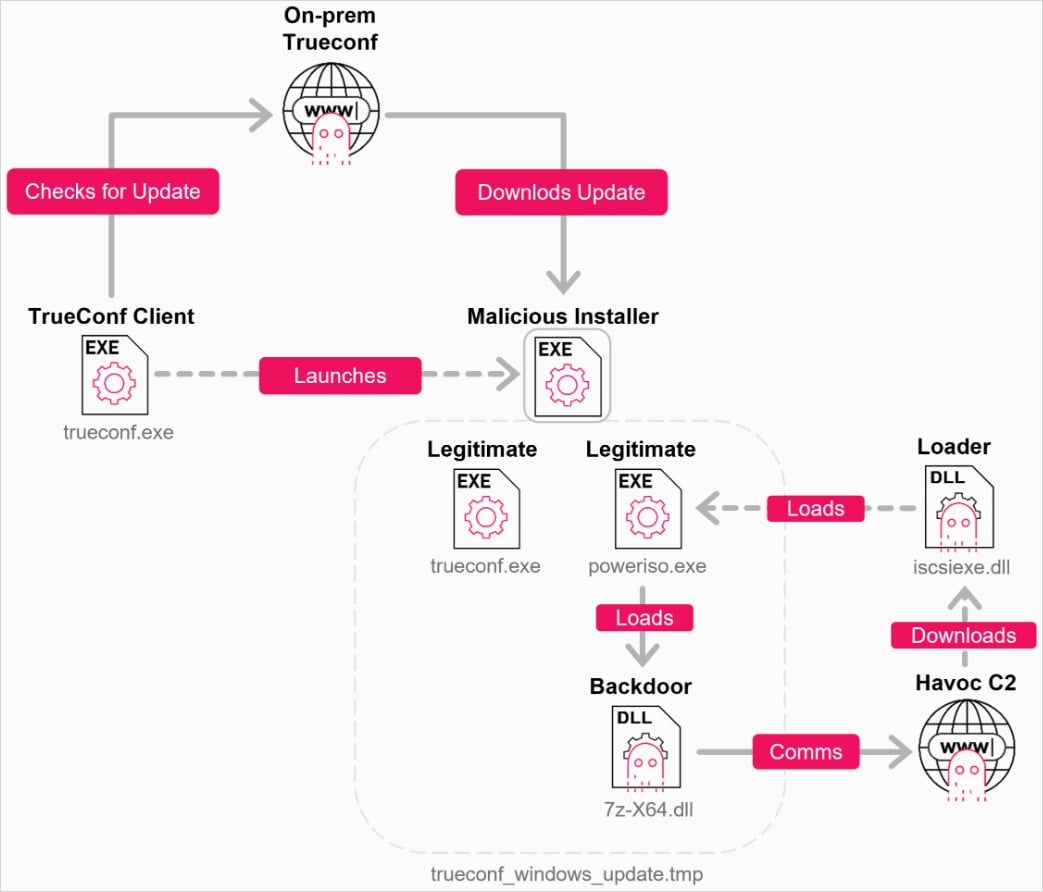








































You must be logged in to post a comment Login