







Connect with us
DAPA Banner

Tech

Scientists Observe Atoms Existing in Two Places at Once

Published

on

Australia ANU Scientists Two Atoms Exist Different Locations
Australian researchers have pulled off something that quantum theory predicted but nobody had managed to actually observe in matter until now. Working with pairs of helium atoms, they captured the particles existing in two different locations simultaneously, their behavior frozen in a way that has no equivalent in everyday experience. It is the first direct observation of this phenomenon in matter rather than light, and it opens a new window into how the fundamental building blocks of our world actually behave.


The team at Australian National University started with a cloud of helium atoms cooled to just above absolute zero, at which point the atoms slow down enough to behave more like overlapping waves than solid particles. Releasing the cloud from its magnetic trap allowed two groups to collide head on, and that collision created exactly the right conditions for something remarkable. Measure one atom moving in a particular direction and its counterpart will instantly appear moving the opposite way, no matter how far apart the two have traveled.

Sale


National Geographic Mega Science Lab – Kit for Kids with 75 Easy Experiments, Featuring Earth Science…
  • THREE SCIENCE KITS IN ONE – This kit contains 45 of our most popular Earth science, chemistry, and science magic experiments along with a bonus guide…
  • EXPLORE EARTH SCIENCES – Kids will build and erupt a volcano, grow a glow in the dark crystal, create water tornadoes, and dig up a real fossil…
  • DIVE INTO CHEMISTRY – The chemistry set in this kit has everything kids need to make gooey worms and worm eggs, create bubbling reactions, launch a…

To confirm the atoms were genuinely sharing an existence across two locations rather than simply traveling on predictable paths, the team sent the scattered pairs through an apparatus using laser pulses that acted like a half silvered mirror, splitting each atom along two separate routes at the same time. The atoms were then allowed to fall briefly before detectors recorded exactly where each one landed. The interference pattern that emerged left no room for doubt. Each atom had traveled both paths simultaneously right up until the moment it was measured, with one member of a pair appearing on the left side of the detector while its partner showed up on the right, yet the data made clear that both had been exploring both locations all along.

Advertisement

Australia ANU Scientists Two Atoms Exist Same Time Different Location
The significance of the result comes down to what the atoms actually are. Previous experiments of this kind used photons, which have no mass and are unaffected by gravity. Helium atoms are a different matter entirely, heavy enough to feel the pull of the Earth, yet they still display this split existence. The connection between the pairs was strong enough to violate Bell’s inequality, a well established test that rules out any classical explanation for the behavior. Measuring one atom instantly determined the state of its partner regardless of the distance between them, exactly as quantum theory has always predicted but nobody had seen demonstrated with matter until now.

Australia ANU Scientists Two Atoms Exist Same Time Different Location
Lead researcher Yogesh Sridhar spent years refining the setup because earlier attempts always fell short. “Experimentally, it is extremely hard to demonstrate this,” he said. His colleague Dr. Sean Hodgman put the strangeness into plain words: “It is really weird for us to think that this is how the universe works. You can read about it in a textbook, but it is really weird to think that a particle can be in two places at once.”
[Source]

Source link

Continue Reading
Click to comment

You must be logged in to post a comment Login

Leave a Reply

Tech

4 Things Your Nintendo Switch 2 Can Do That Most Owners Don’t Know About

Published

on


People who own the original version of the Nintendo Switch have had a lot of time to discover the various cool things the gaming console could do. You can use it as a TV remote control. You can use it to charge an iPhone. You can surf the web on it. Apart from the unusual uses, there are a number of things you can do on the Switch to enhance your game-playing experience. For example, you can change the button mapping on your controllers, use a mouse or a keyboard, or even play games in portrait mode. While these examples are fun, the list of possibilities got a bit longer with the Nintendo Switch 2.

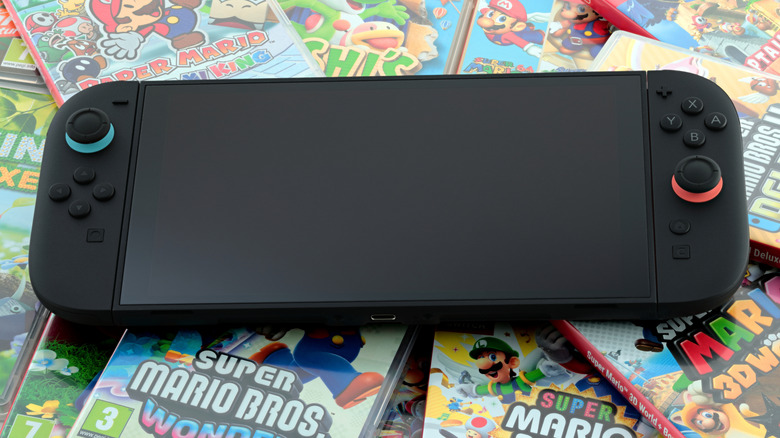
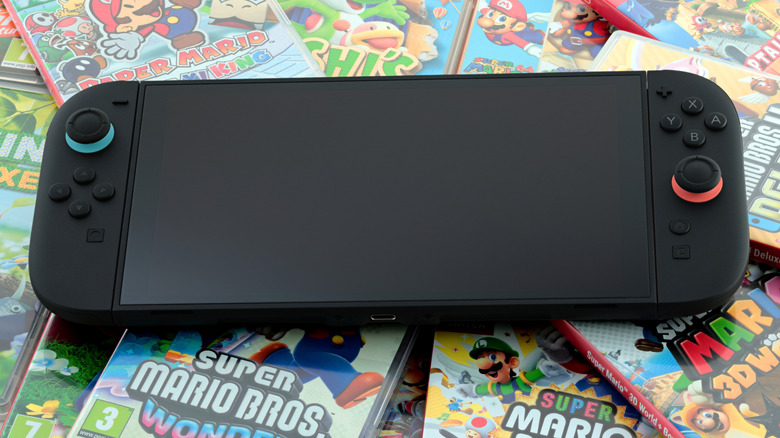
The release of the Nintendo Switch 2 was highly anticipated because of the eight-year gap in between console versions. As someone who has both, I can attest, almost everything is improved in the Switch 2. The screen is larger and has better display quality. The Joy-Con 2 controllers are magnetically attached and feel more secure. There’s an additional USB-C port on top of the console that lets you charge the device while using the kickstand or plug in additional accessories. Furthermore, there are several hidden new features on the Switch 2 you may not know about.

Advertisement

The Joy-Con 2 controller can be used as a mouse

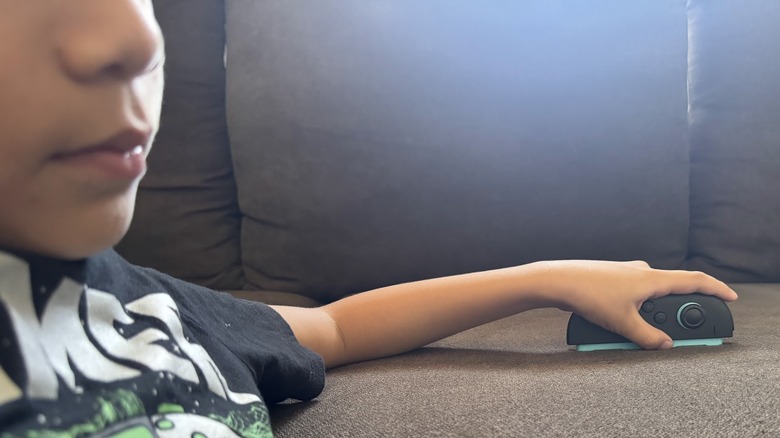
One of the cool things about the Switch 2 is that you can use a myriad of compatible gadgets with it to make your gaming experience more efficient and enjoyable. In fact, if you’re wondering what it would be like to use an accessory with your gaming console, there’s no need to look further than what’s already in your hand — just detach the Joy-Con 2 controller and start using it as a mouse. It doesn’t matter whether you’re left- or right-handed. Both Joy-Con 2 controllers have a side-rail sensor, so you can use them interchangeably.

There are a few instances wherein the Joy-Con 2’s mouse mode feature could be particularly useful. If you happen to be playing a game that requires intensive menu navigation — such as “Factorio” or “Civilization 7” — it may be more convenient and feel more natural to use a cursor over the Joy-Con 2’s directional pad. It’s also the more portable option as it takes away the need to carry an extra mouse.

Another perk offered by the mouse feature of the Joy-Con 2 is its ease of use. Simply lay the controller flat on its side and the Switch 2 should automatically detect the surface and activate the cursor on some compatible games. For others, you may need to fiddle with the in-game controller settings to get it to work as intended.

Advertisement

There are some limitations to this feature. Since the Joy-Con 2 is thinner than a standard mouse, it can be harder to wield for a longer period of time. It also may not work on certain surfaces — based on testing, mouse mode doesn’t kick on when used on glass or similarly reflective tabletops.

Advertisement

Locally host and stream a supported Switch 2 game you own

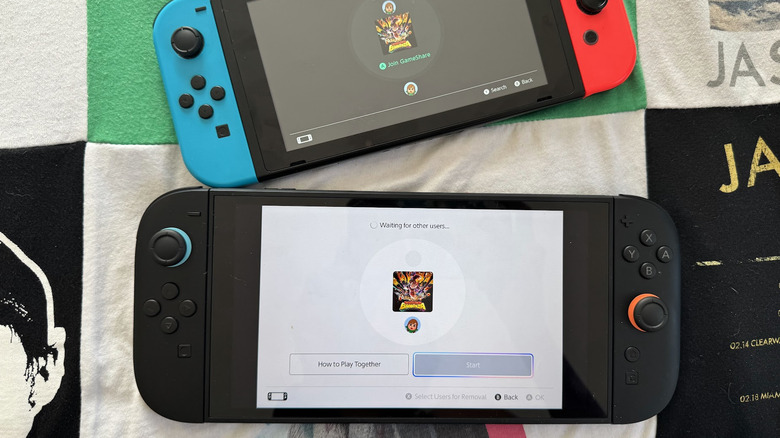
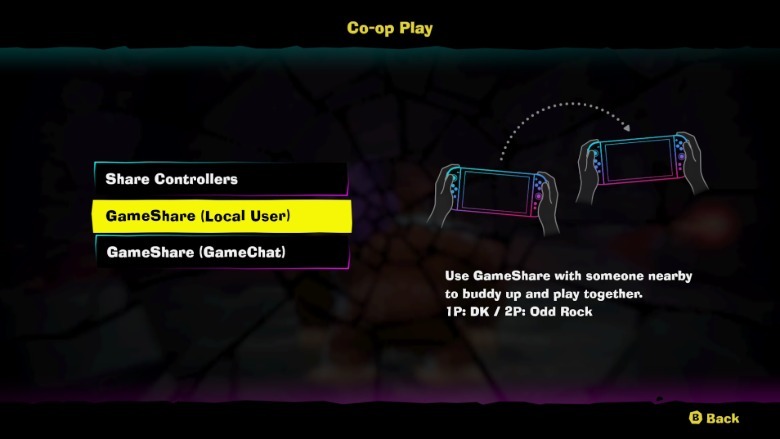
GameShare was one of the highly anticipated features of the Nintendo Switch 2 when it was first announced. It allows a Switch 2 user to essentially act as a host, stream a game that is GameShare-compatible, and allow nearby Switch users (including the original version of the Switch) connected to the same Wi-Fi network to play with them, whether or not they own the game themselves. This particular feature is great for families who own multiple Switch consoles as well as game players who have friends visiting and want to play co-op using their own Switch devices. It’s a cost-effective way of enjoying compatible games that offer multiplayer functionality.

To activate GameShare on a supported Switch 2 game, the host needs to launch the game first and find the co-op or multiplayer option in the game’s main menu. Other players can then hit the GameShare icon on the home screen of their respective Switch consoles and find the correct GameShare session to join.

There are a few things to note regarding the GameShare feature. There are two ways to start a GameShare session — locally among consoles connected to the same Wi-Fi network, or online via GameChat. The former is compatible across all versions of the Switch, while the latter is only available for the Switch 2. Consoles with GameChat will need to have the feature set up before they can participate in a long-distance gaming session.

Another important factor to consider is GameShare’s current availability across the Nintendo game catalog. As of this writing, there are 33 Switch 2 games that allow GameShare with local users, such as “Donkey Kong Bonanza,” “Mario Tennis Fever,” and “Pokémon Pokopia.” Meanwhile, there are 23 games that offer GameShare over GameChat among Switch 2 users.

Advertisement

Cap the maximum battery charge

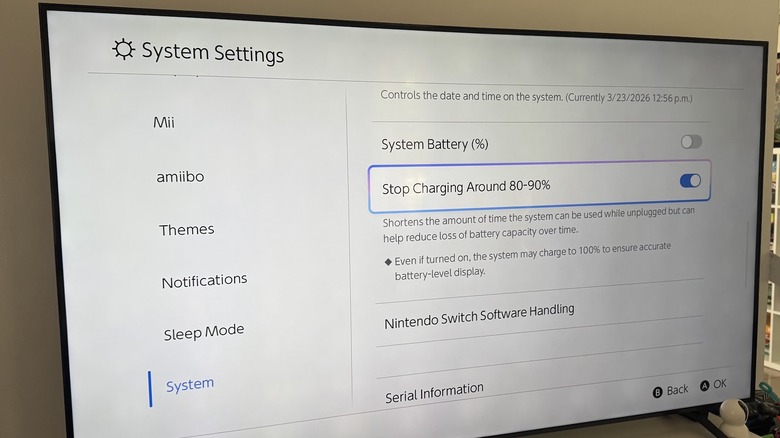
As is the case for most modern devices, battery health matters. A quick way to lose battery capacity over time is keeping your device plugged or charging. If you have your Switch 2 console perennially docked, you are essentially charging it to 100% at all times, which is not advisable if you want your console to last longer. To make your Switch 2 perform better and ensure that you don’t overcharge the gaming device, there’s a new system feature that you can enable that lets you limit its capacity to charge its internal battery to lower than 100%. Here’s how to find it:

  1. Select the System Settings icon on the home screen.
  2. Scroll down to System on the left-side panel.
  3. Enable the toggle next to “Stop Charging Around 80-90%.”
  4. While you’re at it, enable the toggle next to System Battery as well so the number is visible on the home screen.

You will see a message underneath the toggle that warns you that enabling the feature may shorten your playtime when the Switch 2 is used while unplugged, but you may find the reduction of battery degradation worth it in the long term. Also note that even with the feature enabled, the Switch 2 may sometimes charge to a full 100% “to ensure accurate battery-level display.”

Advertisement

Label people on your Friend list

Nintendo recently released Version 22.0.0 of its system update for both the original Nintendo Switch and Switch 2. One of the key additions included is the ability to add notes to users listed in your Friends list. You basically can tack on a label on top of a user’s username on Nintendo.

If you’re a wide-ranging Switch 2 user who enjoys making friends within the games you play as well as in-real-life gaming communities, then you probably have a substantial list of contacts accumulated in your Switch account. Having the ability to include a visual reminder on how you met a user or what games you play with them could make it easier to plan your future games. A good thing about the Add Note feature is that it’s only visible to you, so you can be as descriptive about the people you’re connected with as you want, though people who use your Switch 2 device may be able to see what you’ve written.

To use the new feature, select your profile on the home screen of your Switch 2. Next, select Friend List from the side panel. When you click on a friend’s user tile, you should see the Add Note option underneath their avatar.

Advertisement


Source link

Continue Reading

Tech

Do Emergency Microsoft, Oracle Patches Point to Wider Issues?

Published

on

“Emergency out-of-band fixes issued by enterprise IT giants Microsoft and Oracle have shone a spotlight on issues around both update cycles and patching,” reports Computer Weekly:


Microsoft’s emergency update, KB5085516, addresses an issue that arose after installing the mandatory cumulative updates pushed live on Patch Tuesday earlier this month. According to Microsoft, it has since emerged that many users experienced problems signing into applications with a Microsoft account, seeing a “no internet” error message even though the device had a working connection. This had the effect of preventing access to multiple services and applications. It should be noted that organisations using Entra ID did not experience the issue.

But Microsoft’s emergency patch comes just days after it doubled down on a commitment to software quality, reliability and stability. In a blog post published just 24 hours prior to the latest update, Pavan Davuluri of Microsoft’s Windows Insider Program Team said updates should be “predictable and easy to plan around”.
Michael Bell, founder/CEO of Suzu Labs tells Computer Weekly that Microsoft’s patch for the sign-in bug follows “separate hotpatches for RRAS remote code execution flaws and a Bluetooth visibility bug. Three emergency fixes in eight days does not shout reliability era.”

Oracle’s patch, meanwhile, addresses CVE-2026-21992, a remote code execution flaw in the REST:WebServices component of Oracle Identity Manager and the Web Services Security component of Oracle Web Services Manager in Oracle Fusion Middleware. It carries a CVSS score of 9.8 and can be exploited by an unauthenticated attacker with network access over HTTP.

Advertisement

Source link

Continue Reading

Tech

One UI 8.5 beta brings new life to older Galaxy phones

Published

on

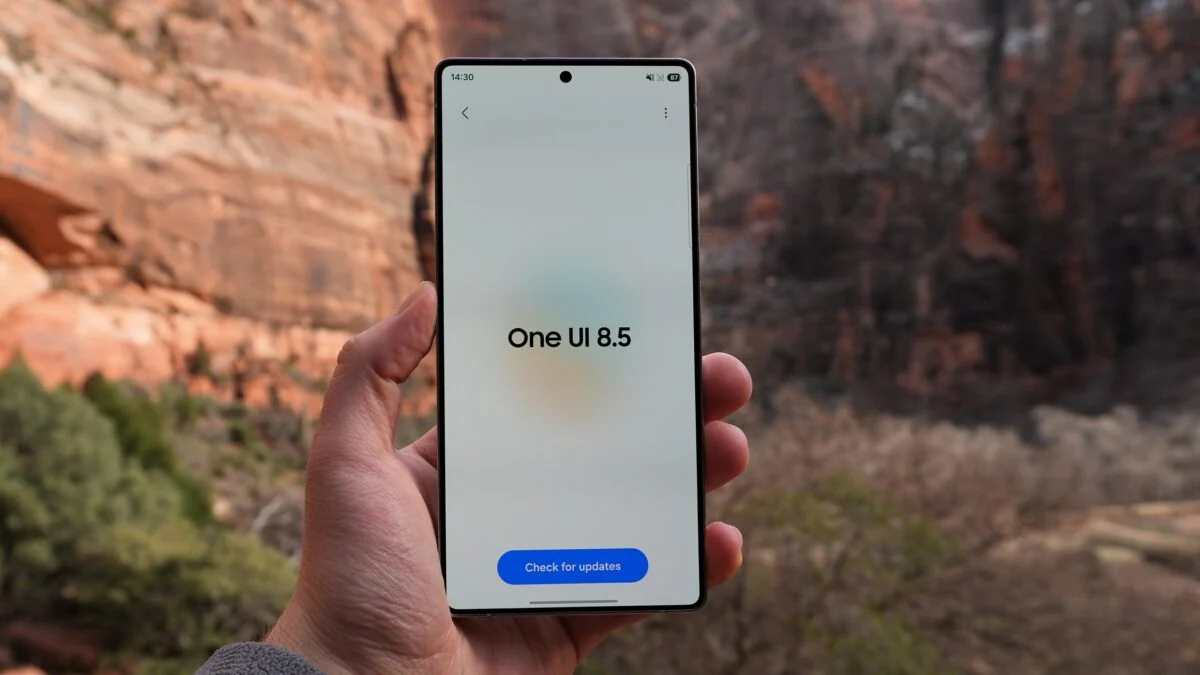
Samsung is widening the reach of its next big Android update, with One UI 8.5 beta now rolling out to a wave of older Galaxy devices. This is not just rolling out to its latest flagships.

After spending months in testing on the Galaxy S25 series, the beta programme is expanding to include last year’s premium phones, foldables and even tablets. Newly supported devices include the Galaxy S24 lineup, Galaxy Z Fold 6 and Flip 6.

In addition, the Galaxy Tab S11 range is supported as well. This is a clear sign Samsung is speeding up its software rollout strategy.

The update is currently available in select regions including the UK, US, Korea and India. Users are able to sign up through the Samsung Members app. Once enrolled, a banner guides you through the process. Notably, Samsung tweaked this process slightly with the One UI 8 release.

Advertisement

This wider rollout lands alongside continued testing on newer hardware. The Galaxy S25 range is already on its eighth beta. Meanwhile, the Galaxy Z Fold 7 and Flip 7 are on their second, suggesting Samsung is getting closer to a stable release.

Advertisement

While Samsung hasn’t detailed every new feature in this phase, One UI 8.5 is expected to refine the experience introduced with One UI 8. Likely, it will focus on performance tweaks, UI polish and AI-driven features rather than a complete overhaul. Furthermore, it also ships pre-installed on the upcoming Galaxy S26 series. Therefore, this gives us a good idea of where Samsung’s software is heading next.

For owners of slightly older Galaxy devices, this is a notable shift. Samsung has been steadily improving its update commitment. Also, bringing beta access to a broader range of devices earlier in the cycle is part of that push.

Advertisement

There’s no exact date for the full release just yet, but Samsung says more devices will join the beta programme in April. So, if your phone isn’t on the list yet, it might not be waiting long.

Source link

Advertisement
Continue Reading

Tech

Dolby sues Snap over video codec patents tied to AV1 and HEVC

Published

on


In a complaint filed in the US District Court for the District of Delaware, Dolby accuses Snap of infringing four video compression patents through Snapchat’s use of both HEVC and AV1. The filing argues that AV1 implementations incorporate proprietary inventions that Dolby never licensed on royalty-free terms and that the…
Read Entire Article
Source link

Continue Reading

Tech

I took a ride in an Nvidia-powered autonomous Mercedes at GTC 2026 – and it’s convinced me this is the future

Published

on

As AI and robotics become an ever-more important presence in everyday life, the use cases are quickly going from science fiction to real life.

One of the most popular areas of interest is autonomous vehicles, self-driving cars able to navigate the roads and get us to our destination without needing to touch the wheel.

Source link

Advertisement
Continue Reading

Tech

From Bot Signups to Account Takeovers

Published

on

A bot conducting fraud

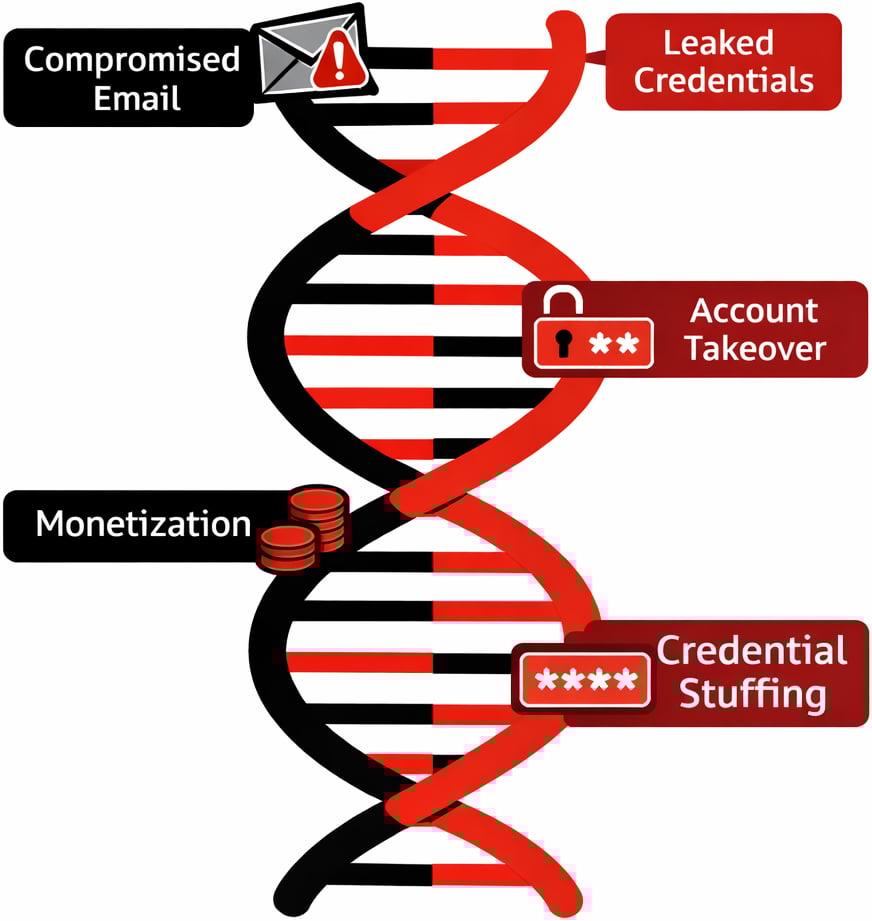
Modern fraud attacks look like a relay race where different tools and actors handle each stage of the journey from signup to cash-out.

When you only inspect one signal at a time, such as IP or email, attackers simply shift to a different part of the chain and still succeed.

Bot characteristics

Anatomy of a Modern Fraud Chain

A typical attack chain starts with automation to create scale. Attackers use bots and scripts to open large numbers of accounts with minimal human effort, often rotating infrastructure to avoid rate limits and simple bot rules.

Those bots are usually powered by “aged” or compromised emails and leaked credentials so that every account looks like it belongs to a long standing user instead of something created yesterday.

Advertisement

Residential proxies then mask traffic behind real consumer IP ranges, making traffic appear like normal home users rather than data centers or known VPN services.

Once those accounts are established, they shift tactics from automation to slower, human driven sessions to blend into normal usage.

At this point the chain reaches account takeover and monetization, using malware links, phishing, and credential stuffing outputs to log in, change details, and push through high value transactions.

Throughout this lifecycle, the tools are mixed and matched. A single actor may move from a headless browser and proxy at signup to a mobile device emulator and different proxy provider at login, then hand off access to another party who specializes in draining funds or exploiting promo campaigns.

Advertisement

This is exactly why a point in time, single signal check rarely tells the full story

Bot DNA

False Positives from Siloed Checks

When teams lean on one dominant signal, such as IP reputation, false positives become a daily problem. Legitimate users on shared Wi Fi, mobile carrier NATs, or corporate VPNs can inherit the poor reputation of a small number of bad actors on the same ranges, even though their intent is clean.

Blocking by email alone has similar issues, since free webmail domains are used by both sophisticated attackers and completely normal customers.

Identity centric controls on their own also hit a wall. Static data checks, like simple name and document matches, are easy to spoof for synthetic identities built from real data fragments.

Advertisement

Device centric controls that only look for rooted phones or emulators can miss fraudsters operating on seemingly normal devices that have been compromised earlier in the chain. Even bot specific solutions can create blind spots when they work alone.

Once a credential stuffing campaign ends and attackers pivot to manual logins with the same stolen credentials, pure bot tools see only “human” traffic and approve it. The result is a pattern where high risk users are blocked while determined adversaries adapt and slip through.

Multi-Signal Correlation in Practice

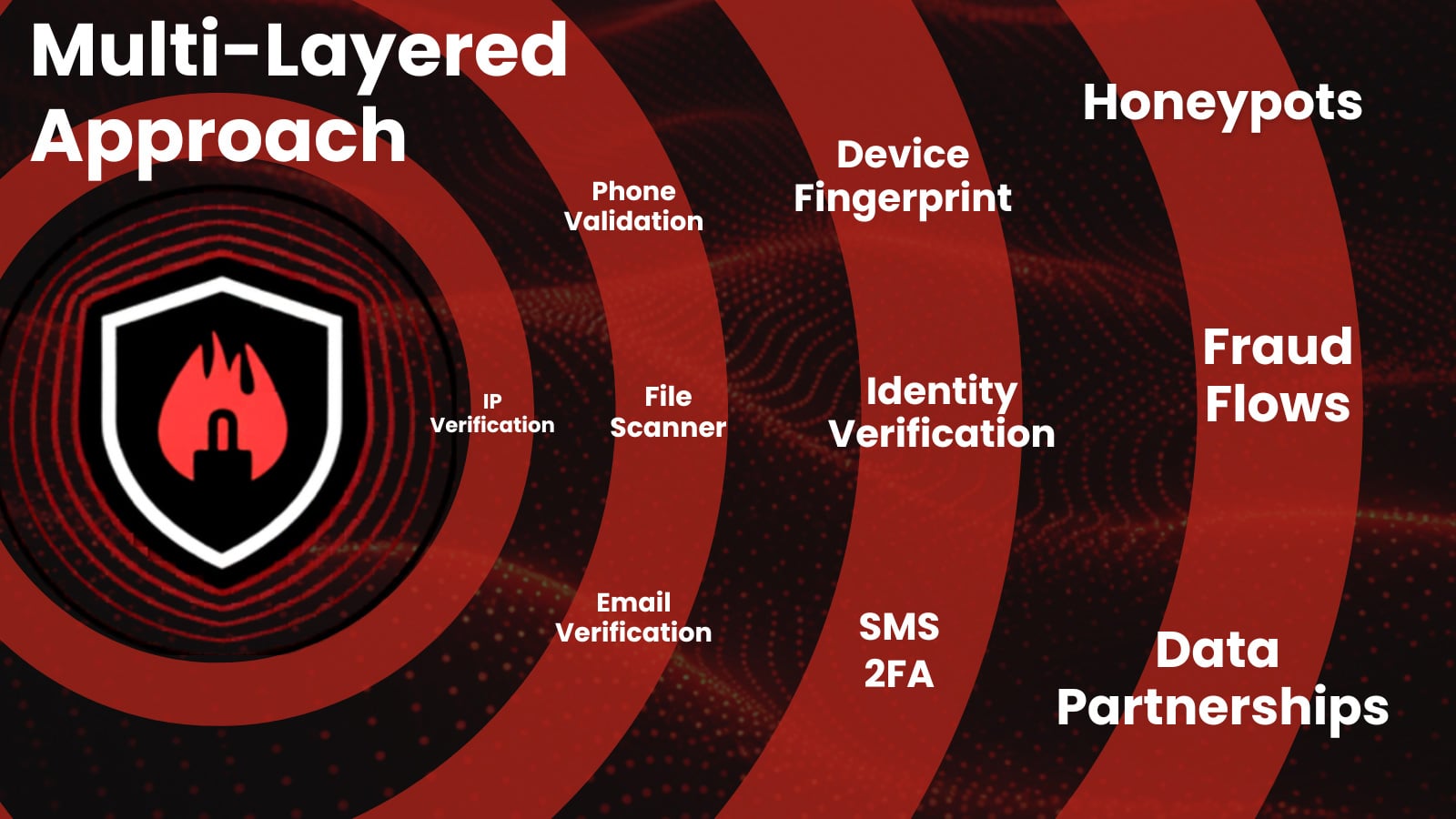
Effective fraud defense comes from correlating IP, identity, device, and behavioral signals at every step of the journey instead of evaluating each one in isolation.

An IP that looks slightly suspicious on its own becomes clearly abusive when tied to dozens of new accounts on the same device fingerprint and similar behavioral patterns during the first session.

Advertisement

Likewise, a user with an apparently normal device and clean email reputation can still be high-risk if login behavior reflects credential stuffing patterns or access follows known malware distribution campaigns.

Modern decision engines improve accuracy by weighing hundreds or thousands of data points together rather than enforcing rigid rules on a single attribute.

For organizations, that means unifying what were once separate views. IP intelligence, device fingerprinting, identity verification, and behavioral analytics should feed the same risk model so that each event is scored in context, not as a disconnected log line.

This multi signal approach is the most reliable way to raise the bar for attackers while reducing friction for genuine customers.

Advertisement

Prevent chargebacks. Stop account takeover. Recover revenue. 

Leading enterprises use IPQS data to power their fraud prevention strategies, don’t leave yourself vulnerable. Seamlessly integrate with our APIs to reduce friction, prevent more fraud, and secure your business.

Free Sign Up

Case Study: Stopping Coordinated Signup Abuse

Consider a self service SaaS platform that offers a generous free tier and trials. As the product grows, abuse appears in the form of thousands of signups used to scrape data, test stolen cards, or resell access under the radar.

Early countermeasures rely on blocking certain IP ranges and obvious disposable email domains, but this only dents the problem and begins to impact small teams and freelancers on shared networks.

Advertisement

By shifting to a multi-signal model, the platform starts scoring signups across IP, device, identity, and behavior together.

New accounts that reuse the same device fingerprint with different emails, come from IPs recently seen in automated traffic, or immediately exhibit scripted behavior are grouped into coordinated abuse clusters instead of being evaluated one by one.

This lets the team apply precise responses, such as challenging only high risk clusters with additional verification or silently limiting their capabilities while letting low risk signups proceed without friction.

Over time, feedback from confirmed abuse and confirmed good users trains the scoring model, driving down false positives while pushing organized attackers to spend more effort for less return.

Advertisement

Outpacing Fraud Trends

Attackers are no longer tied to a single tool or weak point in your stack. They combine proxies, bots, synthetic identities, leaked credentials, and malware infrastructure across multiple stages, which means that single signal defenses will always lag behind.

Multi layered approach

To keep pace, fraud teams need correlation across IP, identity, device, and behavior in one coherent risk view rather than a collection of disconnected checks.

From here, the conversation shifts to how to operationalize that unified model, integrate it into existing workflows, and measure its impact on both loss reduction and customer experience.

Book a free consultation with a fraud expert today!

Advertisement

About IPQS

IPQS is a founder-led, self-funded company built on a simple principle: fraud prevention should be driven by real intelligence and a multi-layered approach. From day one, we’ve focused on owning the full lifecycle of our technology—developing and maintaining our own global data network, honeypots, and fraud intelligence specialists. This approach gives our customers a distinct advantage: faster insights, greater accuracy, and complete transparency into how decisions are made. By staying independent, we prioritize long-term innovation over short-term gains, continuously evolving our platform to stop fraud before it starts.

Sponsored and written by IPQS.

Source link

Advertisement
Continue Reading

Tech

Watch Electricity Slosh: Visualizing Impedance Matching

Published

on

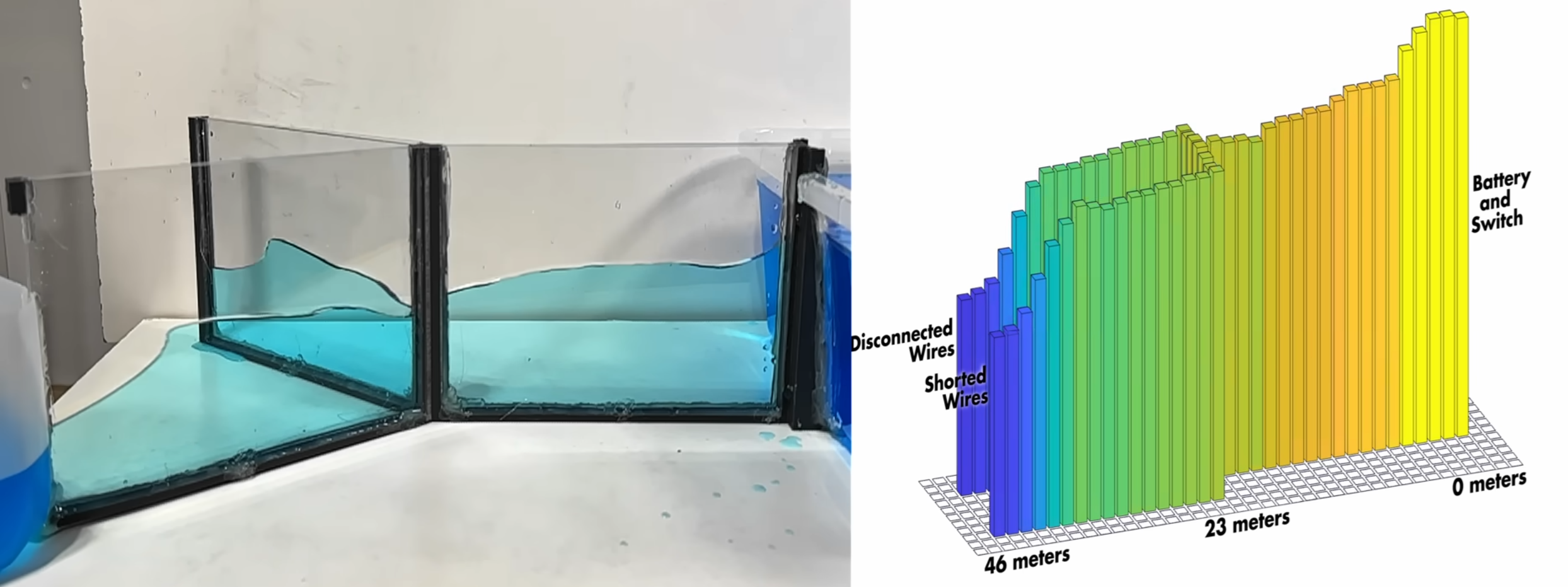
It’s one thing to learn about transmission lines in theory, and quite another to watch a voltage pulse bounce off an open connector. [Alpha Phoenix] bridges the gap between knowledge and understanding in the excellent videos after the break. With a simple circuit, he uses an oscilloscope to visualize the propagation of electricity, showing us exactly how signals travel, reflect, and interfere.

The experiment relies on a twisted-pair Y-harness, where one leg is left open and the other is terminated by a resistor. By stitching together oscilloscope traces captured at regular intervals along the wire, [Alpha Phoenix] constructs a visualization of the voltage pulse propagating. To make this intuitive, [Alpha Phoenix] built a water model of the same circuit with acrylic channels, and the visual result is almost identical to the electrical traces.

For those who dabble in the dark art of RF and radio, the real payoff is the demonstration of impedance matching in the second video. He swaps resistors on the terminated leg to show how energy “sloshes” back when the resistance is too high or too low. However, when the resistor matches the line’s characteristic impedance, the reflection vanishes entirely—the energy is perfectly dissipated. It really makes it click how a well-matched, low SWR antenna is crucial for performance and protecting your radio.

Advertisement

[Alpha Phoenix] is a genius at making physics visible. He even managed “film” a laser beam traveling at light speed.

Advertisement

Source link

Continue Reading

Tech

Irish AI start-up Jentic joins OpenClaw push with Jentic Mini

Published

on

The next era of software ‘will be built for agents, by agents’, said Jentic CEO Sean Blanchfield.

Irish AI start-up Jentic is jumping on the OpenClaw frenzy with ‘Jentic Mini’, a free, open source, self-hosted offering for developers building with the product.

The months-old OpenClaw project has taken the developer world by storm, but security issues associated with letting personal agents access computers has already led to a number of different iterations from big-name brands such as Nvidia, with its open source stack NemoClaw, and Anthropic, which recently integrated OpenClaw’s text features into Claude.

Jentic Mini also markets itself to be safer to use in real-world software environments. Jentic said that the API execution layer gives developers a better way to govern how agents access tools, APIs and workflows to help reduce risks that come with broad and unmanaged credential exposure.

Advertisement

Jentic Mini is available on the start-up’s website, as well as on GitHub. It can also be used with other general-purpose agents including NemoClaw.

With more than 10,000 APIs, agents created using Jentic Mini will come with a “machine-usable map” of the tools and workflows that can be used, while enabling a more structured and controlled way to connect agents to real systems, the company said. Jentic’s standard model is available as a verified connector in Claude.

“The next era of software will not be built for humans. It will be built for agents, by agents,” said Sean Blanchfield, the CEO and co-founder of Jentic.

“Jentic Mini gives developers a free, open source foundation for that shift, connecting general-purpose agents to real systems through an AI-curated catalogue of more than 10,000 APIs and workflows. We want to make it dramatically easier to deploy agents that do real work.”

Advertisement

Jentic became the first Irish company to be selected for the AWS generative AI accelerator last year. The selection followed a €4m pre-seed raise in 2024, one of the largest in Ireland that year.

Don’t miss out on the knowledge you need to succeed. Sign up for the Daily Brief, Silicon Republic’s digest of need-to-know sci-tech news.

Source link

Advertisement
Continue Reading

Tech

I’m finally playing Eastshade, and it’s turned me into a travelling painter who really cares about artistic composition

Published

on

Chill, walking simulator-cross-traveling painter game Eastshade has been in my backlog for a while now. If memory serves, it’s because I found mention of it having wonderful virtual landscapes during a time when I was writing about that aspect of games.

From the Backlog

Every gamer has a backlog — and that’s no different for us at TechRadar Gaming. From the Backlog is a series about overdue first-plays, revisiting classics, returning to online experiences, or rediscovering and appreciating established favorites in new ways. Read the full series here.

Now, years on, I’ve finally made it into the world of EastShade and have fully embraced my role as a visiting painter for hire, intent on fulfilling some last requests by their late mother.

Advertisement

Source link

Advertisement
Continue Reading

Tech

This app makes your MacBook moan when you slap it, and it's going viral

Published

on


The idea came from social media. Catapano posted a short Instagram clip of himself slapping his MacBook, complete with sound effects and a mock groan. When the clip unexpectedly went viral, he decided to turn the gag into an app.
Read Entire Article
Source link

Continue Reading

Trending

Copyright © 2025