Apple released iOS 26.4 on Tuesday, about a week after the tech giant released iOS 26.3.1 (a), the company’s first Background Security Improvement update. The most recent update brings a slew of features to your iPhone, including new emoji and video podcasts, plus more than two-dozen bug fixes and security patches.
You can download iOS 26.4 now by going to Settings and tapping General. Next, select Software Update, tap Update Now and follow the prompts on your screen.
Here are some of the new features iOS 26.4 brings to your iPhone.
The Unicode Consortium is responsible for creating emoji, and it approved these eight in September as part of Unicode 17.0. But this is the first time the emoji are showing up on iPhones.
Advertisement
Watch this: Don’t Wait: iOS 26.4 Brings New Emoji, Keyboard Fixes, AI Playlists
Video podcasts come to Apple Podcasts
The iOS 26.4 update also brings video to your Podcasts app. To view these video podcasts, open the Podcasts app and start listening to an episode with the video player icon in the top right corner of the title card. Once you’re listening, open the media player and tap the Turn Video On button near the podcast’s progress bar. The podcast’s artwork will be replaced with the video. To turn the video off again, tap Turn Video Off and the podcast’s artwork will return.
Video podcasts are a fun addition to the Podcasts app.
Advertisement
Apple/Screenshots by CNET
Reduce some Liquid Glass effects across your device
Apple’s iOS 26.4 update adds another setting to minimize Liquid Glass effects across your device: Reduce Bright Effects. Here’s where to find this setting.
1. Tap Settings. 2. Tap Accessibility. 3. Tap Display & Text Size. 4. Scroll down the menu to find Reduce Bright Effects.
Reduce Bright Effects can eliminate some Liquid Glass effects.
Advertisement
Apple/Screenshot by CNET
Apple says the setting will minimize highlighting and flashing when interacting with on-screen elements, such as buttons or the keyboard. So if you find certain flash elements annoying, you can now disable them.
Playlist Playground in Apple Music
The iOS 26.4 update also introduces a playlist generator for Apple Music subscribers called Playlist Playground. Apple says the feature can create a playlist based on your description. Once you enter your description, it will create a playlist with a title, tracklist and general description.
To access Playlist Playground, first you have to be an Apple Music subscriber. Then, open Apple Music and go to your Library. In your Library, you’ll see a new icon at the top of your screen with a plus and a few lines next to it. Tap this, and you’ll be prompted to describe your playlist.
Advertisement
Playlist Playground can generate a playlist for you in no time.
Apple/Screenshots by CNET
Apple notes this feature is still in beta, so it might create unexpected results. So you might ask for a good gym mix and end up with some Whitney Houston — but who’s to say Whitney isn’t good gym music?
Find nearby concerts with the aptly named Concerts feature
iOS 26.4 brings a Concerts feature to your Apple Music app.
“Concerts helps you discover nearby shows from artists in your library and recommends new artists based on what you listen to,” Apple writes in the update’s description. That way, you can easily find nearby shows.
Advertisement
To find Concerts, tap the magnifying glass icon at the bottom of your Apple Music screen, then tap Concerts. The feature may ask for your location the first time you use it. Then you’ll see popular shows nearby, along with their dates, times and locations. Tapping into any of these shows gives you more information on the show, as well as a link to buy tickets.
The Concerts tab in Apple Music makes it easy to see upcoming shows in your area.
Apple/Screenshot by CNET
Shazam works offline, kind of
With iOS 26.4, your Control Center’s Shazam app can work in more ways. Now, if you aren’t connected to the internet and use the Control Center app to identify a song, the app will eventually tell you the song’s identity once you’re back online.
Advertisement
Ambient Music home screen widgets
Apple introduced two new Ambient Music widgets for your home screen with iOS 26.4. These widgets let you easily access the four Ambient Music playlists: Sleep, Chill, Productivity and Wellbeing. You can quickly turn on a relaxing playlist to unwind after a long day, or one to help you focus on the task at hand.
The Ambient Music widget makes it easy to play music for just the right setting.
Apple/Screenshot by CNET
Apple introduced these playlists to your iPhone alongside iOS 18.4 in 2024. However, you could only access those playlists from your Control Center at the time.
Advertisement
Let other adults in your Family pay for themselves
In iOS 26.4, other adults in your Family sharing group can now use their own payment instead of depending on the group organizer’s payment method. That means if you’re an adult and have a family sharing group with your own parents, siblings or other family members, you can now purchase a game, movie or something else with your own information instead of using someone else’s information and then paying them back.
This can be a helpful feature that allows you to avoid the hassle of paying someone else back for using their payment information. And if you’re the person whose card is always used, it can be a nice way to ensure others pay for their own stuff and don’t freeload off you.
More caption options when viewing videos
With iOS 26.4, you can easily change the caption style while watching content in certain apps, such as Apple TV.
To see these options, start playing a video, then tap the speech bubble icon in the bottom-right corner of your screen to open the subtitle menu. Tap Style, and you’ll see the subtitle options Classic (the default setting), Large Text, Outline Text and Transparent Background. So if you and a few others are watching something on your iPhone and want to make sure everyone can see the captions, you might choose Large Text.
Advertisement
You can adjust the subtitles in some apps thanks to iOS 26.4.
Apple/Screenshot by CNET
More control over wallpaper Collections
The iOS 26.4 update also gives you more control over which wallpaper Collections are on your iPhone. Now, if you go to Settings > Wallpaper > Add New Wallpaper, you can tap Get under Collections like Weather and Astronomy.
If you want to delete a Collection from your device, tap the check mark to the right of the downloaded Collection, and the option to Remove from Gallery appears. Tap this to delete the Collection from your iPhone, saving you some precious space.
Advertisement
You can remove wallpaper Collections from your iPhone if you want to save a little space.
Apple/Screenshot by CNET
Here are the release notes for iOS 26.4.
Apple Music
Advertisement
Playlist Playground (beta) generates a playlist from your description, complete with a title, description and tracklist.
Concerts helps you discover nearby shows from artists in your library and recommends new artists based on what you listen to.
Offline Music Recognition in Control Center identifies songs without an internet connection and delivers results automatically when you’re back online.
Ambient Music widget for Sleep, Chill, Productivity and Wellbeing brings curated playlists to the Home Screen.
Full-screen backgrounds give album and playlist pages a more immersive look.
Accessibility
Reduce bright effects setting minimizes bright flashes when tapping on elements like buttons.
Subtitle and caption settings are available from the captions icon while viewing media, making them easier to find, customize and preview.
Reduce Motion setting more reliably reduces the animations of Liquid Glass for users sensitive to on-screen motion.
This update also includes the following enhancements:
Support for AirPods Max 2.
8 new emoji, including an orca, trombone, landslide, ballet dancer and distorted face, are available in the emoji keyboard.
Freeform gains advanced image creation and editing tools, and a premium content library, joining Apple Creator Studio.
Mark reminders as urgent from the Quick Toolbar or by touching and holding, and filter for urgent reminders in your Smart Lists.
Purchase Sharing lets adult members in Family Sharing groups use their own payment method when making purchases, without relying on the family organizer.
Improved keyboard accuracy when typing quickly.
For more iOS news, check out what features were included in iOS 26.3 and iOS 26.2. You can also take a look at our iOS 26 cheat sheet for other tips and tricks.
The Global Tech Ecosystem Index for 2026 tracks start-up ecosystems in 325 cities across 77 countries through three categories.
European cities account for 10 of the top 20 densest tech ecosystems in the world, according to a new report by innovation tracking platform Dealroom.
The ‘Global Tech Ecosystem Index’ for 2026 tracks start-up ecosystems in 325 cities across 77 countries through three categories: scale, per capita performance – or density – and growth, aiming to provide a “multidimensional view of the global innovation landscape”.
In density ratings, 45 European cities feature in the global top 100, ahead of North America’s 40. The rankings measure innovation output per capita, including start-up activity, enterprise value creation, ‘unicorns’ and university affiliations.
Advertisement
Cambridge, London, Stockholm, Ghent, Lausanne, Oxford, Tallinn, Copenhagen, Munich and Amsterdam are among the 20 global density leaders. The UK’s Cambridge is third in this metric, behind only the Bay Area and Boston, both in the US.
US ecosystems account for nine entries overall for density leaders.
Europe is one of six global macro regions monitored by the index – alongside North America; Latin America; Asia-Pacific; Middle East and North Africa; and Sub-Saharan Africa – for economic ties, investment flows and tech ecosystem integration.
The index suggests this approach reflects how innovation ecosystems operate in practice, connected by trade, talent and capital rather than by strict geography alone.
Advertisement
In the index’s scale rankings, tracking the “world’s largest and most successful tech ecosystems”, London (fourth), Paris (eighth) and Stockholm (19th) feature in the top 20, with 11 places occupied by North American cities.
Istanbul, Zagreb and Kyiv are European entries in the top 20 growth locations globally.
“As Europe struggles with entrenched low growth, political leaders see tech and innovation as a fundamental building block of economic competitiveness,” said Yoram Wijngaard, Dealroom’s founder and CEO.
“Innovation is seen as a route not only to securing growth but also national resilience and strategic autonomy. What stands out is not just the strength of leading hubs like London and Paris, but the rise of high-performing smaller ecosystems often built around leading research and academic institutions.”
Advertisement
In the AI sector, European ecosystems account for 10 of the index’s global top 20 by density, with Cambridge ranking second for the category. Tel Aviv, Israel and nine US cities complete the category.
In the index’s defence sector top 20 by density, European cities account for six entries, with Munich ranking second for the category.
Dealroom said: “The rankings reflect Europe’s distinctive innovation model – globally competitive ecosystems built around research institutions, technical talent and specialised industries rather than scale alone. Across the continent, smaller cities are increasingly producing outsized impact in areas such as AI, biotech, climate-tech and advanced manufacturing.”
According to Dealroom, its database draws from four sources: aggregated public information such as news, filings, registries, job boards; community-submitted data from start-ups, investors and accelerators validated by Dealroom; direct government API connections; and third-party data partnerships.
Advertisement
Don’t miss out on the knowledge you need to succeed. Sign up for the Daily Brief, Silicon Republic’s digest of need-to-know sci-tech news.
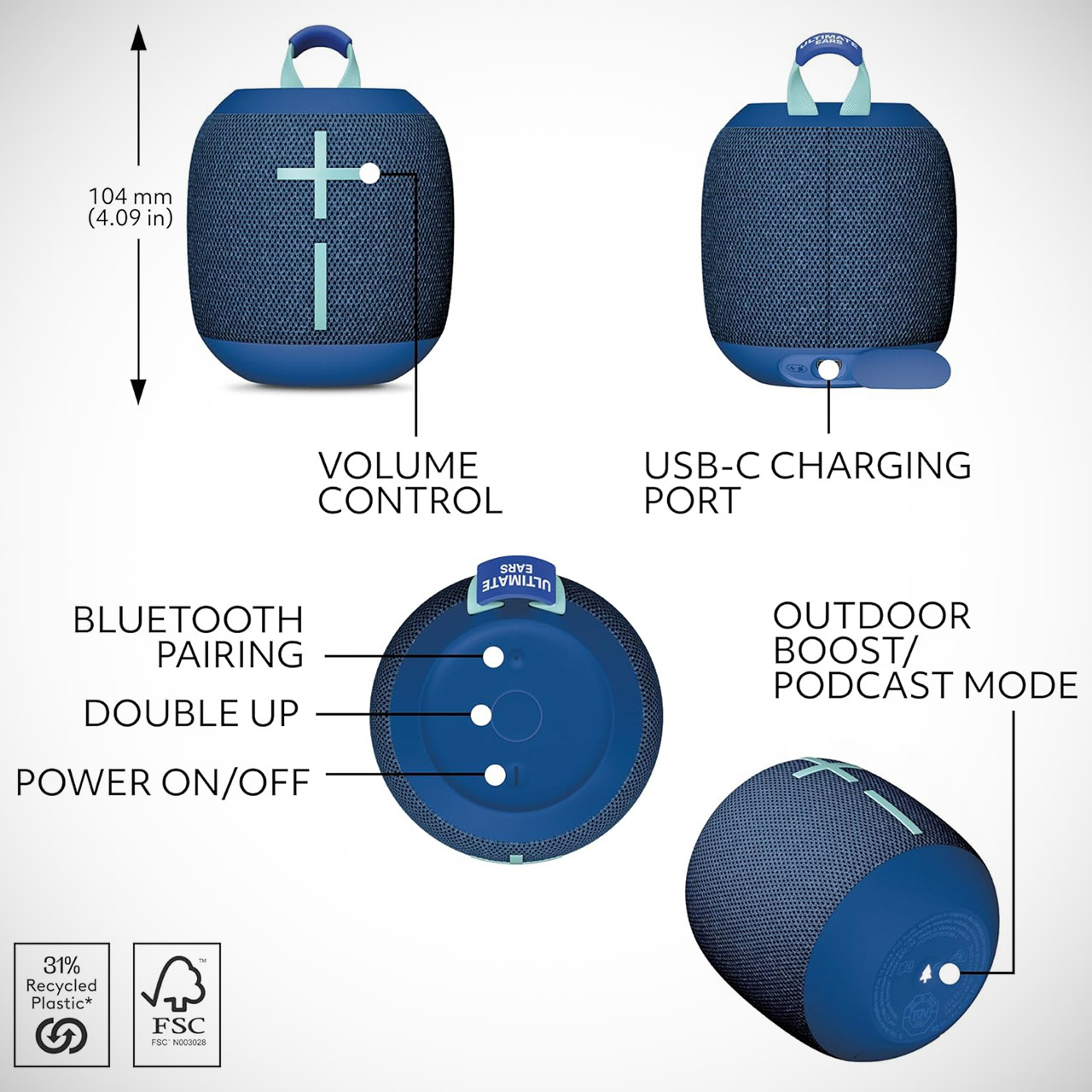
Looking for a portable Bluetooth speaker that will not disappoint in terms of performance? The Ultimate Ears WONDERBOOM 4, priced at $51.44 (was $100), is an ideal fit. It fits neatly into daypacks or backpacks without adding weight, yet produces music that penetrates through even small spaces and outdoor gatherings with startling power.
This speaker is 4 inches tall and weighs 15 ounces, making it easy to pick up and move with one hand, whether you’re setting it up or simply repositioning it. On top, there is an elastic loop that can be clipped into your backpack or bike handle without bulking up. The device is coated in a fabric finish and has some excellent rubberized portions at the ends to keep it gripping even when your hands are damp and soggy. Plus, it’s made to withstand some punishment: the IP67 rating means you can put it in a muddy puddle and still know it’ll work, and the fact that it floats means that if you drop it in a pool or lake, it’s less of a nightmare and more of a ‘oh well, I’ll just fish it out’.
Balanced 360-Degree Sound: The WONDERBOOM 4 portable waterproof Bluetooth speaker features 360-degree sound in a petite package; boosted sound for up…
Outdoor Boost and Podcast Mode: Engineered for full stereo sound; tap the Outdoor Boost button for outdoor environments; use the new Podcast Mode to…
14 Hours of Boom: With a rechargeable battery that lasts throughout the day, this waterproof portable speaker booms on with up to 14 hours of…
The sound is, frankly, pretty impressive all things considered. See, the configuration of the two active drivers and some passive radiators is set up such that it’s nice and open, which is wonderful news for anyone who wants to use it from a table or on the ground, and it works nicely no matter how you hold it, so you don’t have to worry about setting it perfectly. The bass, while not ridiculously deep, has a great weight to it, and the vocals are audible whether you’re listening to a podcast or just chilling out to some music.
Advertisement
There are also some extremely cool features to look out for. For example, tapping the button at the bottom activates the Outdoor Boost feature, which helps cut through background noise and get the sound through loud and clear. You can even pair a second WONDERBOOM 4 to get proper stereo separation, which is a game changer for larger rooms or sharing with a friend because it provides a considerably wider soundscape without requiring any additional cords or downloading anything. It also has multipoint Bluetooth connections, which allow you to couple with two devices at the same time and effortlessly switch between them.
The controls are simple to use, with volume buttons right up front for quick adjustments on the go. Everything else, including power, pairing, and playback controls, is conveniently located up top. The good news is that you don’t have to be a tech whiz to get started; simply plug it in, flip the switch, and you’re ready to go. You’ll have up to 14 hours of gameplay, which should provide for a road trip, a few shorter sessions, or a full day of work, plus some evening listening before you need to recharge. When you’re done, simply grab a standard USB-C cable to get back up and running.
Dutch authorities have taken offline a massive botnet of 17 million devices and seized more than 200 servers at a local provider that supported the operation.
The action was carried out following an investigation from the Police in collaboration with the country’s cybersecurity agency, the National Cyber Security Centre (NCSC).
According to the authorities, the seized servers controlled “computers, tablets, and smartphones to carry out cyberattacks.”
Botnets are networks of compromised devices used for illegal activities such as distributed denial-of-service (DDoS) attacks, malicious traffic proxying, or cryptocurrency mining.
Advertisement
“The investigation revealed that the botnet consisted of at least 17 million infected devices and that the 200 servers used to host the infrastructure were located in the Netherlands,” the NCSC said.
“ The police subsequently seized several botnet servers from a hosting provider for investigation purposes. The hosting provider took the botnet offline because it was being used for criminal activities.”
Although the authorities did not name the botnet, local media reported that it was linked to a service called Asocks, which advertises itself as a “universal proxy service” with 7 million IP addresses, 150 locations, and 100,000 clients.
The platform offers corporate, residential, and mobile proxies for monthly subscriptions between $5 and $15, with discounts for bulk purchases.
Advertisement
Although such services often comprise IPs that voluntarily donate bandwidth by using a specialized client in exchange for a fee, NCSC’s action indicates that the owners of the devices that were part of the botnet did not knowingly participate in supporting cybercrime operations.
BleepingComputer has contacted Asocks with a request for a comment on the allegations, but we have not received a response by publication time.
To protect networking devices from botnet infections, ensure the default credentials have been changed to something unique and strong, the latest firmware update has been applied, and remote administration panels are disabled when not needed.
Automated pentesting tools deliver real value, but they were built to answer one question: can an attacker move through the network? They were not built to test whether your controls block threats, your detection rules fire, or your cloud configs hold.
This guide covers the 6 surfaces you actually need to validate.
The cable news channel has accused the AI company of “massive copyright infringement.”
Hapabapa/Getty Images
CNN has joined the growing ranks of media companies suing Perplexity for copyright infringement. The cable news network has accused the AI search company of “massive copyright infringement” that includes wrongfully scraping its website and copying more than 17,000 pieces of its content.
The lawsuit, which was filed Thursday, claims that the AI company “unlawfully crawls, scrapes, copies, and distributes CNN’s content from CNN Digital Platforms and third-party platforms.” It also accuses the AI tools of reproducing “verbatim copies” of its articles, including paywalled stories, in query responses to users. Perplexity’s AI tools allegedly have incorrectly attributed “hallucinated” content to CNN, which the company says in the suit violates its trademark.
“CNN’s lawsuit stands for the proposition that Perplexity, a company valued at tens of billions of dollars, should not be able to steal from entities that create the original content Perplexity exploits,” a CNN spokesperson said in a statement to the outlet. “The public rely on high quality news journalism reported by human beings to understand their world, which is frequently dangerous and expensive to produce. Commercial operators can and must pay to make use of it.”
Advertisement
CNN is far from the first media company to sue Perplexity for scraping content without permission. The New York Times, Chicago Tribune, Reddit, Merriam-Webster, Encyclopedia Britannica and Nikkei have also filed lawsuits against the company. “You can’t copyright facts,” Perplexity’s Chief Communications Officer Jesse Dwyer said in a statement to CNN.
Interestingly, it seems that Perplexity was at one point trying to strike a deal with CNN that would have allowed it to use some of the network’s content. According to the lawsuit, the two companies were in negotiations last year that would have made paywalled CNN content available to Perplexity’s paid subscribers. The deal ultimately fell through, but Perplexity continued to use CNN’s name and content in its products despite warnings from the TV network’s legal team. Perplexity never responded, the lawsuit says.
The reboot of the classic Xbox series is now coming out in February 2027.
Fable, a reboot of the Xbox fantasy RPG series developed by Playground Games, has been delayed. The game’s release date is shifting from fall 2026 to February 2027 “so it can have the dedicated moment it deserves,” according to a post from Xbox on X. The new release date will give developers more time to polish the game before it comes out, while also moving it out of the blast radius of Grand Theft Auto VI, which is scheduled for release on November 19.
This isn’t the first time the reboot has been delayed, and as Microsoft notes in its announcement post, the back half of the year is particularly stacked with big releases like Call of Duty: Modern Warfare 4, Control Resonant and the aforementioned Grand Theft Auto VI. Moving to 2027 rather than duking it out with those more hotly anticipated titles could give Fable more time to shine. It does make a long development cycle even longer than it was before, though. The Fable reboot was originally announced in 2020, and Microsoft didn’t share proper gameplay footage of the game until January of this year. That means from announcement to release, Fable will have taken seven years to make, and that’s likely not taking into account work that went into the project ahead of its original announcement.
Advertisement
This is year is packed with incredible games for XBOX players to enjoy, from Halo: Campaign Evolved, Gears of War: E-Day and Call of Duty Modern Warfare 4 to Control Resonant, Star Wars: Galactic Racer and Grand Theft Auto VI. In order to plan our game launches through the… pic.twitter.com/eNXiA9ebn4
During its earlier 2026 showcase, Microsoft demoed Fable‘s detailed character creator and ambitious approach to simulating NPCs. The company also shared that the game would be available on PlayStation 5, alongside Xbox Series X/S, PC via Steam and Xbox and Game Pass Ultimate. While Fable won’t be available this year, Microsoft says it will show off “a major new look“ at the game during its Xbox Games Showcase on June 7.
You have probably experienced the following scenario yourself. A website suddenly stops loading, a login page times out, or an online service becomes unreachable at the worst possible moment. Sometimes the cause is not an internal outage, but a Distributed Denial-of-Service (DDoS) attack designed to overwhelm the service from the outside.
DDoS attacks have long been one of the simplest ways to disrupt an online service:flooding it with enough traffic, exhausting its infrastructure, and making it unreachable without breaking into the target’s systems. Now more than ever DDoS is being packaged, branded, and sold with the language of a mature online service, and the impact is well recorded in the real world.
Cloudflare reported blocking a 7.3 Tbps attack in 2025 and later said it mitigated a 31.4 Tbps attack in its Q4 2025 DDoS report. Microsoft also said Azure mitigated a 15.72 Tbps attack in October 2025, attributing the activity to the Aisuru botnet.
Behind those incidents, underground sellers are competing over the same buyers with an increasingly polished pitch. Recent underground activity analyzed by Flare researchers describe attack panels, API access, monthly plans, reseller options, customer support, botnet-backed capacity, game-server methods, and Cloudflare bypass claims.
Advertisement
A comparison of two datasets of DDoS-related underground activity from the first five months of 2023 and the first five months of 2026, shows how quickly that offer has changed. What once appeared more frequently as scripts, tutorials, leaked tools, and scattered forum posts is now more often presented as a repeatable product that is easier to buy and operate.
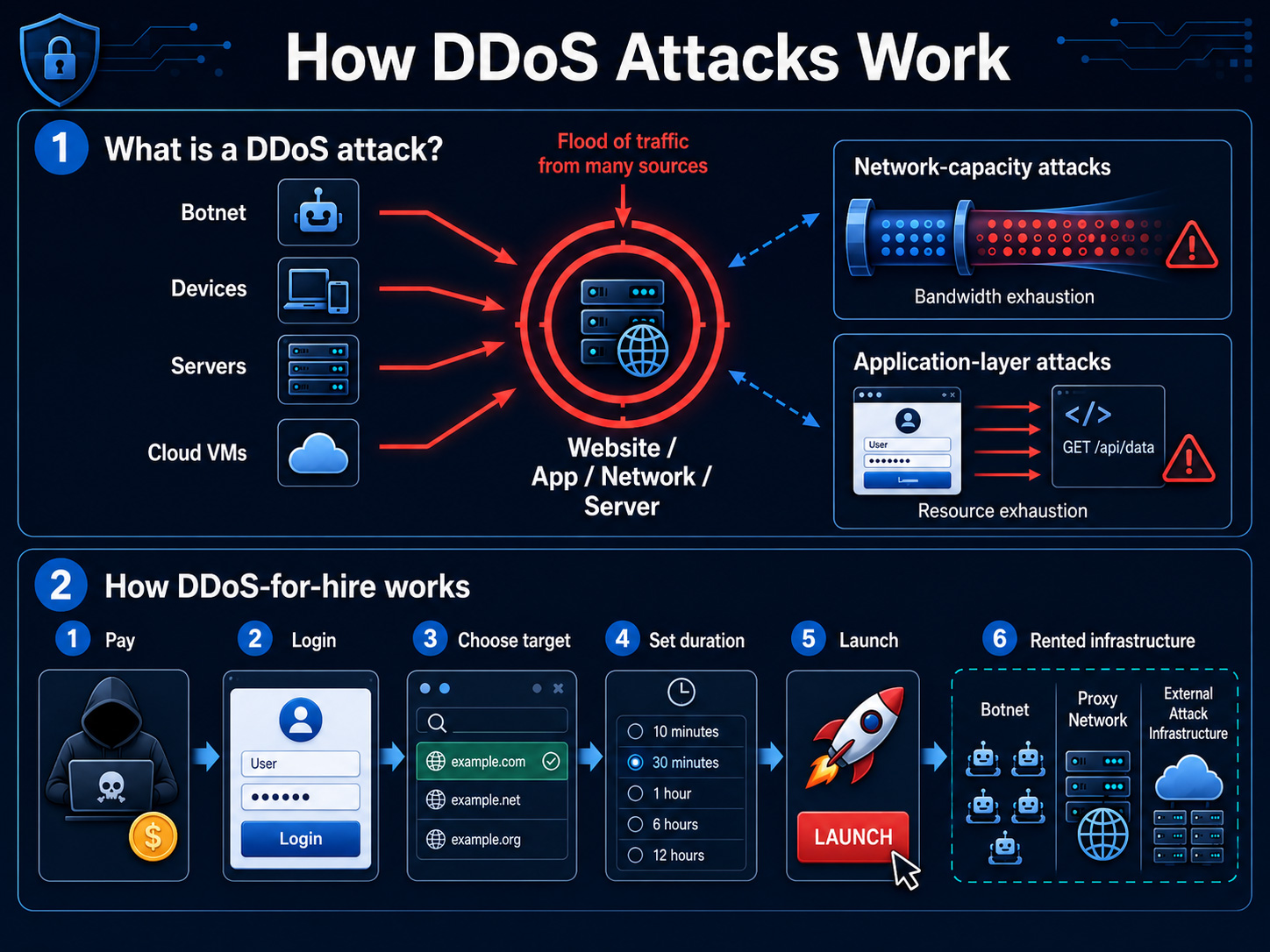
A DDoS attack attempts to overwhelm a website, application, network, or server with traffic from many sources at once. Some attacks target network capacity, while others focus on application layer resources such as login pages and APIs. The objective is usually simple: make the service unavailable, unstable, or expensive to operate.
DDoS-as-a-service lowers the barrier further. Instead of building infrastructure, an attacker can pay for access to a web panel, choose a target, select a duration, and rely on someone else’s botnet, proxy network, or third-party attack infrastructure.
A flow chart that illustrates how DDoS attacks work
Flare Researchers Analysis
Flare researchers searched for DDoS-related underground activity from two periods in time. The first was the fivefirst months of 2023 and the second was the first five months of 2026. The team cleaned the data, curated it and found some important insights.
Topic
Advertisement
2023
2026
Change
Volume of records
4,403
Advertisement
4,964
Slight increase
High-signal DDoS service ads
38
364
Advertisement
~10x increase
Unique ad clusters
31
123
~4x increase
Unique actors
Advertisement
15
41
~3x increase
Sources observed
22
Advertisement
43
~2x increase
An important disclaimer, in this research we focused on distributed DoS. There’s another category, which is denial of service.
Technically it is a bit different in the way a server is targeted, but the goal is the same. In this research we only focused on DDoS offerings and did our best to exclude the DoS offerings.
DDoS-as-a-service platforms are openly advertised across dark web forums and cybercrime communities — the same sources Flare monitors continuously.
Advertisement
Flare tracks underground marketplaces, botnet infrastructure chatter, and threat actor activity across thousands of dark web sources, so your security team sees emerging threats before they impact your operations.
The topics in the posts from 2023 are more diverse. Many offerings revolved around scripts, leaked tools, tutorials, or generic “botnet service” advertisements.
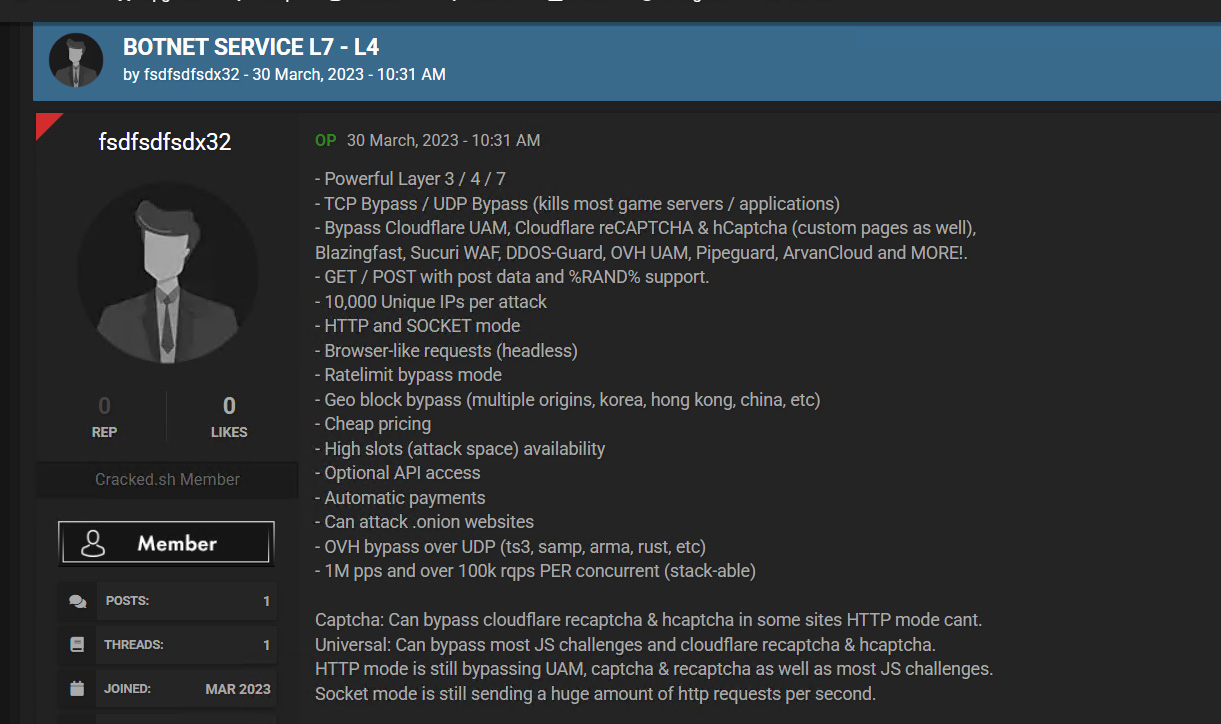
One repeated type of post from 2023 (as seen in the screenshot below) promoted a “Botnet Service L7 – L4” and claimed Layer 3, Layer 4, and Layer 7 capability, optional API access, automatic payments, high attack slots, game-server targeting, and bypasses for Cloudflare-related protections. The same advertising text appeared across multiple sources and actors, suggesting copying, reselling, or recycling marketing.
A post from 2023 offering Botnet services
While the post from 2023 was focused about the services, more recent posts from 2026 are focused around the price and the offering they give.
An advertisement of “SatelliteStress” described the service as an IP stresser with a user-friendly panel, API access, game-server support, and monthly plans starting at €20. The same post claimed the service was “100% botnet-powered” and did not rely on downstream APIs, a positioning meant to distinguish it from resellers that depend on another provider’s infrastructure.
Advertisement
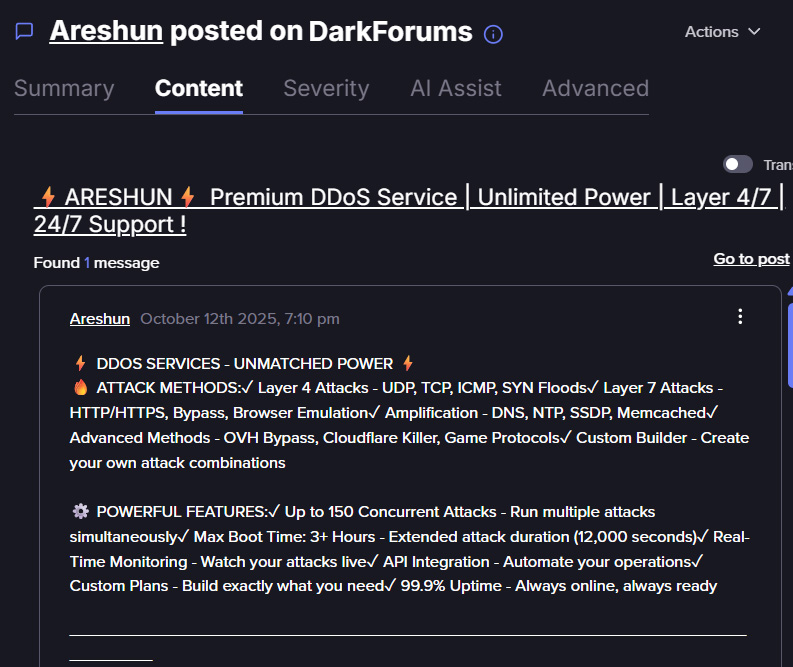
As illustrated in the screenshot below, Areshun, which is another post that offers a “Premium DDoS Service” with Layer 4 and Layer 7 attacks, monitoring, API integration, custom plans, 24/7 support, and promotional discount codes is also pinpointed on specific service and its price.
Screenshot taken from Flare’s platform. Sign up for the free trial to access if you aren’t already a customer.
Another similar example is of “RebirthStress”, which is similarly marketed as a botnet-powered IP and web stressing device, a free Layer 7 hub, more than 400 slots, reselling suitability, and plans starting at $15 per month.
If you go over these posts, one-by-one and make the comparison, you see a distinct trend. The post in 2026 is more focused on a product, the sellers are competing one against another on customers. They package everything nicely, offer shiny features: ease of use, fully automated, full support, privacy promised, reselling capacity, and reliability.
The technical details have not disappeared, they became part of the sale pitch. In 2026 ads more commonly bundle Layer 4 and Layer 7 claims (means the service support both network-level attacks and application-layer attacks) words such as “panel,” “API,” “slots,” “bypass,” “monitoring,” “uptime,” and “support.”
One THORCC-related advertisement claimed more than 7,000 active Layer 4 bots and promoted bandwidth analytics and attack-vector statistics. Another Russian and English post presented “professional stress testing” while claiming Cloudflare and DDoS-Guard bypasses, high concurrency, and long attack durations.
Advertisement
Sellers are possibly exaggerating about their capabilities. However, the consistency of their marketing language remains important intelligence.
It shows what buyers are being encouraged to value beyond raw traffic volume, including web panels, automation, bypass claims, and the ability to launch or resell attacks with minimal effort.
The pricing of a DDoS attack in 2026 is very cheap. We’ve seen the following offers:
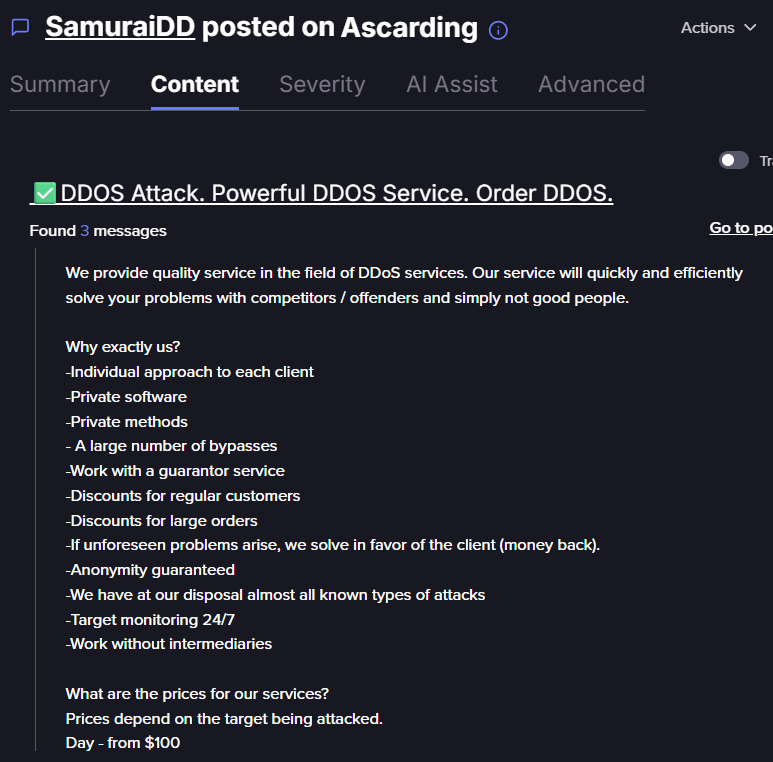
There are some more expensive offerings. An actor named “SamuraiDD” advertised attacks starting at $100 per day (see in the screenshot below).
Advertisement
Screenshot taken from Flare’s Platform. Sign up for the free trial to access if you aren’t already a customer.
Another actor named “POWERDDOS” used a tiered model of $5 tests, $100 per day for “weak” target, $200 per day for “medium” target, and $500 per day for “strong” or protected targets.
Lastly, we’ve also seen some “premium” offerings which included infrastructure-style targeting, including a DDoS botnet attack network advertised for $2,000.
The pattern shows a market segmented by buyer type. Cheap tests and short attacks for low-skill users, daily pricing for one-off disruption, private negotiation for longer campaigns, and higher-value infrastructure or reseller-style offers for more serious customers.
Public reporting on the booter economy (a paid DDoS-for-hire service that lets users launch attacks through someone else’s infrastructure) also aligns with this low-cost access model, with Akamai noting that some DDoS booter services can cost less than $25 per month and may offer limited trials.
Conclusions
DDoS-as-a-service is no longer only about traffic volume. The market is dropping down the entry bar, enabling easier purchase, easier operation, and easier to resell. What matters is not only how powerful an attack is, but how easy it is to launch an attack through a panel, various plans, full support, API access, and rented infrastructure.
Advertisement
This lowers the barrier for several types of actors. Low-skill users can buy short, cheap attacks. More serious customers can negotiate longer or higher-volume campaigns. Resellers can help expand the reach of the original service. As a result, defenders should not assume that disruptive DDoS activity requires a sophisticated attacker behind the keyboard.
In the near future, this market will likely continue moving toward more polished service models. As clearer pricing tiers, more automation, stronger reseller programs, and heavier branding around “bypass” capabilities and attack reliability.
Steeper discounts have resulted in the lowest prices ever on numerous M5 Pro and M5 Max 14-inch MacBook Pro configurations, with every model on sale.
Whether you’re looking for the standard M5 Pro 14-inch MacBook Pro that’s marked down to $1,999 at Amazon and B&H, or if you’d like to maximize your savings with Expercom’s record-breaking $1,300 markdown on a loaded M5 Max spec, there are a variety of deals to choose from this weekend.
Astell&Kern is bringing the A&ultima SP4000T Vacuum Tube DAP and Clarus In-Ear Monitor to High End Vienna 2026, and the timing feels right. The Vienna show opens June 4 at the Austria Center, just as wired IEMs are enjoying one of their strongest runs in years. CanJam NYC 2026 made that hard to miss, with in-ear monitors and portable audio electronics pulling heavy traffic from listeners who have not surrendered the 4.4mm balanced cable to the Bluetooth empire just yet.
A&K has earned some goodwill from us recently. The A&ultima SP3000T showed that a tube-equipped DAP could be more than a glowing party trick, while the SP3000 impressed with its resolution, timbre, and natural presentation. The SP4000T and Clarus now give Astell&Kern an opportunity to show whether its next portable flagship pairing can deliver the kind of wired listening experience that has personal audio buzzing again.
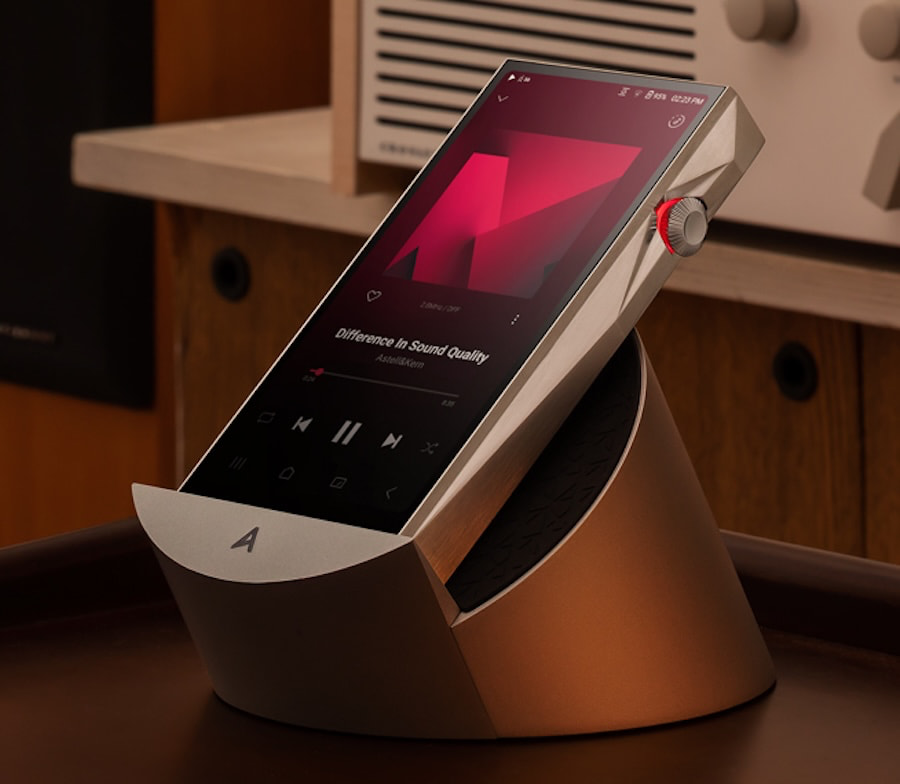
The A&ultima SP4000T
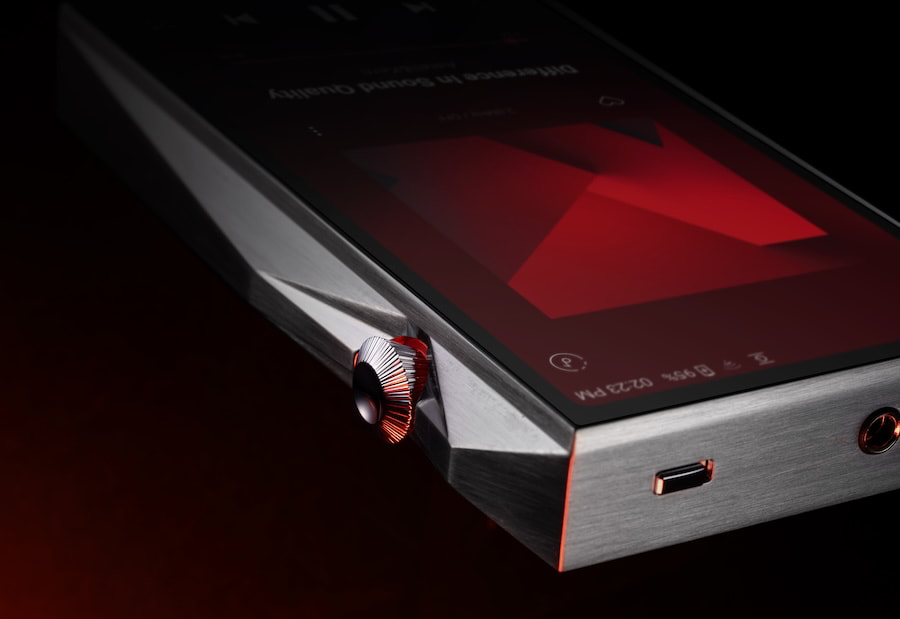
The A&ultima SP4000T gives Astell&Kern a new flagship tube DAP by combining modern digital audio processing with a more traditional analog output stage. The headline feature is its use of four RAYTHEON JAN6418 MIL-Spec vintage vacuum tubes in a quad configuration, making it the first portable digital audio player to use that tube arrangement. It is the kind of spec that will get the portable audio crowd leaning forward, assuming they have not already spent the rent money on cables and IEMs.
Raytheon Tubes Inside the SP4000T
The SP4000T uses an independent dual tube structure with four tubes in total, divided between the left and right channels. That type of channel separated tube design is more commonly associated with home audio tube amplifiers than portable digital audio players.
Each tube is measured for noise and gain characteristics before matching. Astell&Kern says the tube section is isolated through independent modular flexible PCBs and a multi layered internal architecture, which is important in a portable design where noise, heat, vibration, and consistency are all factors.
Advertisement
The SP4000T also introduces Triple Tube Mode, which Astell&Kern describes as a first for the DAP category. Combined with the company’s T Series Signature Triple AMP Mode and adjustable Tube Current settings, the player offers up to 54 possible sound combinations.
Astell&Kern offers three tube modes on the SP4000T. Triode Mode is intended to emphasize harmonic richness, warmth, and a more rounded presentation. Pentode Mode is designed for higher output and stronger dynamic impact while retaining tube character. Ultra Linear Mode sits between the two, balancing the tonal weight of Triode Mode with the control and drive of Pentode Mode.
The larger goal is to combine Astell&Kern’s TERATON ALPHA platform, quad vacuum tube architecture, and OP AMP design in a portable player that can deliver high resolution digital playback with adjustable analog tube character.
Amplifier Mode Support
The SP4000T gives listeners three amplifier options. OP AMP Mode uses the player’s solid state output stage and is intended to deliver lower noise, stronger control, and a more direct presentation. TUBE AMP Mode routes playback through the vacuum tube section for listeners who prefer a warmer tonal balance and a more spacious presentation.
Advertisement
HYBRID AMP Mode blends the OP AMP and tube stages across five selectable levels, allowing users to adjust how much tube character is added to the signal. The goal is to give listeners more control over the SP4000T’s output character without requiring external hardware or EQ.
Noise Suppression
The SP4000T introduces an upgraded 5-stage second-generation Anti-Microphonic Architecture (up from the previous 4-stage design) to suppress microphonic noise (noise generated in vacuum tubes from even the most minor external vibrations).
Advertisement. Scroll to continue reading.
Streaming and Wi-Fi
The SP4000T runs Android 15 and includes Google Play Store support, giving users broader access to streaming apps than earlier closed-platform DAPs. To preserve playback quality, Astell&Kern uses its ADP, or Astell&Kern Direct Path, technology to bypass Android’s standard sample rate conversion. That allows compatible streaming services to deliver lossless, bit-perfect playback through the player rather than being forced through Android’s normal audio path.
Advertisement
The SP4000T also introduces Astell&Kern’s first dual Wi-Fi antenna design. The goal is faster and more stable wireless streaming and downloads, especially on 5GHz networks. According to Astell&Kern’s internal testing, the new design can deliver up to twice the 5GHz download speed of previous models, although real-world performance will still depend on network conditions, router quality, and distance from the access point.
DACs and Processing
The SP4000T uses a discrete circuit architecture that separates digital and analog signal processing. Its DAC section is built around dual AKM AK4499EX DACs and dedicated AK4191EQ processors for each channel, a layout intended to reduce noise and preserve signal integrity across the playback chain.
Based on Astell&Kern’s SP4000 platform, the SP4000T also includes High Driving Mode, which uses a parallel OP AMP configuration to increase output capability and improve control with more demanding IEMs and headphones.
Astell&Kern’s ESA, or Enhanced Signal Alignment, technology is included to improve timing accuracy across the frequency range. The goal is cleaner imaging, better clarity, and a more stable soundstage. The SP4000T also includes DAR, or Digital Audio Remaster, which applies upsampling to PCM and DSD files with the aim of improving perceived detail and harmonic texture.
Advertisement
Additional internal refinements include Any Layer HDI PCB technology and a 99.9% pure copper shield, both used to reduce signal loss, noise, and electromagnetic interference inside the player.
Connectivity and Display
The SP4000T includes 256GB of internal storage, with microSD expansion up to 1.5TB. It supports native playback up to 32-bit/768kHz PCM and DSD512, giving it the file compatibility expected from Astell&Kern’s flagship DAP lineup.
The player uses a 6-inch Full HD touchscreen and supports dual-band Wi-Fi, DLNA networking, USB audio output, and USB DAC operation with Mac and Windows computers.
Bluetooth support includes aptX Adaptive and LDAC, giving users higher-quality wireless options when a cable is not practical. BT Sink mode also allows the SP4000T to receive Bluetooth audio from an external device, such as a smartphone, and function as a portable Bluetooth DAC.
Advertisement
Other usability features include ReplayGain, AK File Drop for wireless file transfers, USB PD 3.0 fast charging, and customizable battery protection settings.
Crossfeed
For extended listening comfort, the SP4000T includes advanced Crossfeed controls that recreate a more speaker-like listening experience through headphones, allowing users to fine-tune spatial presentation and reduce listening fatigue over long sessions.
Packaging
The SP4000T is packaged with a premium leather “Cognac’ colored case crafted using ‘MINERVA’ leather from ‘BADALASSI CARLO‘, a renowned leather workshop located in the San Miniato district of Florence, Italy.
Advertisement. Scroll to continue reading.
Advertisement
Two additional premium leather cases will be available for the SP4000T. A black case, crafted from soft cowhide by GRUPPO MASTROTTO, delivers an exceptionally soft touch, with a uniform surface quality and a distinctively vibrant Italian colouration. An olive-coloured case, crafted from premium vegetable-tanned leather by BADALASSI CARLO, is crafted through a proprietary tanning and dyeing process. Both cases feature a standing mechanism on the back to provide greater convenience in use.
Astell&Kern Clarus IEM
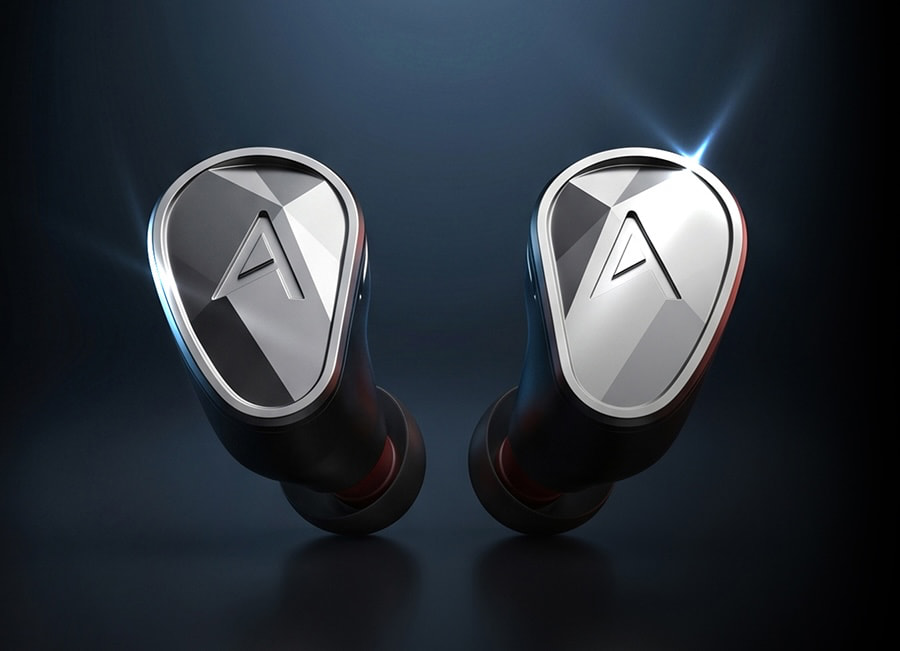
In addition to the SP4000T, Astell&Kern will show its Clarus IEMs for the first time at High End Vienna 2026.
Clarus is the fourth model in Astell&Kern’s IEM series, developed around the company’s goal of delivering a transparent, low distortion presentation for high resolution portable listening.
The Clarus uses a new 9-driver Tribrid architecture. Each side combines dynamic, balanced armature, and MEMS drivers, with each driver assigned to its own frequency range rather than being asked to cover too much of the spectrum. The shells are crafted from premium grade 6061-T6 aluminum, a material chosen for its rigidity, durability, and ability to support a more stable acoustic structure.
The technical goal is a more controlled full range presentation, with bass handled by the dynamic driver, midrange and treble detail managed by the BA drivers, and the most delicate high frequency information reproduced by the MEMS drivers. In theory, that division of labor should help Clarus deliver stronger separation, cleaner imaging, and a more open sense of space without forcing one driver type to do all of the heavy lifting.
Advertisement
The Bottom Line
The SP4000T is not the first DAP to use vacuum tubes, and Cayin’s N8iii is an important reminder that Astell&Kern is not operating in an empty lane. What makes the SP4000T different is the combination of four Raytheon JAN6418 MIL-Spec tubes in a quad configuration, three selectable tube modes, hybrid amp control, Android 15 with Google Play Store support, and A&K’s flagship DAC and processing platform in one portable player.
It is too early to judge the sound, but Astell&Kern did not build its reputation in the DAP category by making timid moves. The SP4000T looks like a deliberate attempt to bridge high resolution digital playback with adjustable analog tube character. The real question is whether analog focused listeners will hear this as meaningful engineering or another very expensive pocket-sized argument for staying up too late with IEMs.
Price & Availability
The Astell&Kern SP4000T and Clarus will make their global debut at the High End Show, 4–7 June at booth HX4, M04, Austria Center Vienna.
Pricing and availability for the SP4000T in Stainless Steel and Copper editions will be announced shortly.
Advertisement
Clarus will be available for demo in the Astell&Kern booth at High End Vienna 2026. Pricing, availability, and further details will be confirmed in due course.
Apple products are not cheap, that’s no secret. Only perhaps a select few, like the MacBook Neo, the Mac Mini, and the AirPods 4 could be considered budget or midrange in their respective product categories. For deal-hunters, there’s also a surprisingly good Certified Refurbished program that rigorously tests and resells used products with warranties, free delivery, and even trade-in options. But if that’s not good enough, you can always buy used. A number of Apple products are totally worth grabbing off the secondhand market — even when saving money isn’t the primary objective.
We want to look at Apple products you could buy today and still be plenty happy with. We say that with the caveat that this does not always mean you can use them as-is; be prepared for the possibility of battery replacements, repairs, OS updates or limitations, and, if nothing else, compromises that naturally come with aging tech. Having said that, these five products surprise us by getting the job done in 2026 despite being made by a company that tries every tactic to get you to upgrade.
Advertisement
iPod Classic
Apple may have discontinued the iPod lineup after the iPod Touch, but it can’t totally kill something so iconic. Younger generations are seeing the magic of “vintage” tech, particularly iPods, and buying them in droves anywhere they can, particularly the iPod Classic. Aside from the audio jack-only listening experience and the nostalgia, an iPod can still hold its own today; 30-160 GB of storage is plenty for your music, it supports high bitrate AAC, MP3, and Apple lossless file formats, and it was originally rated for 36 hours of music listening.
Advertisement
Despite the increasing scarcity of these devices, you can find working pre-owned and new sealed units on eBay in the $100 to $500 range. Assuming everything else is functional, the only thing you’d really need to do is replace the battery. Apple has long since discontinued service for these iPod Classic models, but iFixit says you can replace the aging battery. We recommend sending it to an expert if you’re not confident doing it yourself.
You have two choices when buying an iPod Classic: using it vanilla, as Apple intended, or modding it. Some would swear by the former since it adds a lot of intentionality to the experience (e.g., you have to manually add songs over the wire with, yes, iTunes), and thus it’s more meaningful. Taking the latter route, however, gives you all the benefits of the iPod Classic form factor plus modern conveniences like Bluetooth, USB-C, modern SSD storage, and customizable operating systems. Really, you can change so much that the iPod starts to feel like a Ship of Theseus. The wheel, the screen, the front plate, even the case can be swapped.
Advertisement
An older MacBook
It’s not uncommon for people to rock a MacBook a decade old. Apple’s vintage category still supports MacBooks dating back to around 2012, meaning occasional security updates and limited repair support. Compare that to Windows laptops, which seem to need life support to function around year 3 (in my experience). If you need a computer to do the basic stuff like web surfing and checking emails, buy a used MacBook.
Definitely replace the battery if possible. For example, the MacBook Air 13-inch from 2017 has a moderately challenging (10 to 20 minutes) battery replacement, according to iFixit. We’d highly recommend avoiding certain Mac models entirely, such as those that had the infamous butterfly keyboard. The next question you have to ask yourself is what you’re going to do with the OS, assuming this is a MacBook that is no longer getting security updates. For most people, we’d recommend using something like OpenCore Legacy Patcher, which can bring supported models up to date with the latest version of macOS.
If that doesn’t work — or you’re a bit more adventurous — installing Linux on an old MacBook is almost always an option. YouTuber Action Retro shows the installation of Ubuntu on a MacBook Pro from 2011 and gets a buttery-smooth, usable experience, especially after replacing the hard drive with a modern SSD. Linux gives your MacBook another lease on life since Linux distributions are known to support hardware for decades, including security patches and support for the latest version of modern apps. And if you don’t like Ubuntu, you can always try macOS-like Linux distributions such as elementary OS.
Advertisement
MacBook M1 (or any older M-series device)
Every year, Apple introduces the latest iteration in its M-Series lineup of MacBooks; it recently introduced the M5, M5 Pro, and M5 Max chips, with M6 slated for 2026. Thus, the pattern will probably continue. Except Apple made one big mistake: it created chips so good that people can’t find reasons to upgrade even years in the chip’s tenure. The original M1 MacBook Airs released in 2020 continue to perform smoothly and reliably now and, by all accounts, will probably continue to do so for years to come.
Advertisement
As proof, look at the surfeit of user reviews of M1 MacBook Airs in 2026 drawing the same conclusion: unless you’re a power user or professional in need of top-tier, bleeding-edge performance, this will get the job done. Even then, some professionals see no need to upgrade for the situations where it would matter. YouTuber Becca Farsace bought a used M1 MacBook Pro to edit videos, thinking she’d upgrade once she had spare cash. She loved it so much that she never did.
Case in point, if you’ve been eyeballing the latest M-Series MacBooks and you’re not interested in today’s prices, an older model is still a strong option. You’ll likely be astounded by how good it is, especially if you don’t need a ton of power. This is in steep contrast to Windows laptops, which — again, based on personal experience — would be in desperate need of Linux or the trash bin after six years. The only caveat is support longevity; it’s unclear how much longer Apple will support M1 MacBooks, with around eight years being a generous estimate. Once again, though, the “aging” M1 can always turn to OpenCore Legacy Patcher and Linux if Apple decides to leave behind such potent tech.
Advertisement
iPads (that support at least iPadOS 15)
Fewer and fewer people upgrade their phones to the latest model, and that’s when talking about a daily driver device that needs to be snappy and reliable. A device you use much less frequently — like an iPad — has an even lower bar to clear. We’d guess most people only use iPads to do very lightweight productivity and entertainment tasks like web browsing and streaming, something you don’t need the latest iPad M5 for. Luckily, there’s little reason to buy current-gen iPads since older iPads are still great.
As an extreme example, take this 2015 iPad Pro we reviewed way back when. It’s 11 years old at the time of writing, but it still receives regular security updates, even though it has been thoroughly left behind feature-wise. Modern reviews of the device paint it in a positive light, though of course some aspects of the hardware show their age. Popular apps like YouTube and HBO Max still support iPadOS 16, and likely a good chunk of the apps you want to use do as well.
We’re not necessarily saying you should go out and buy the oldest supported iPad, but rather that you consider older options. To give an example, the iPad 7th generation released in 2019 sells for around $100 on eBay and supports up to iPadOS 17. That’s a nice discount compared to the newest iPad, which starts at $349. Granted, the battery replacement on this device is rated as “difficult” by iFixit, and there’s no telling how much longer apps will be supported on it, so you’ll have to decide for yourself if that discount is worth it.
Advertisement
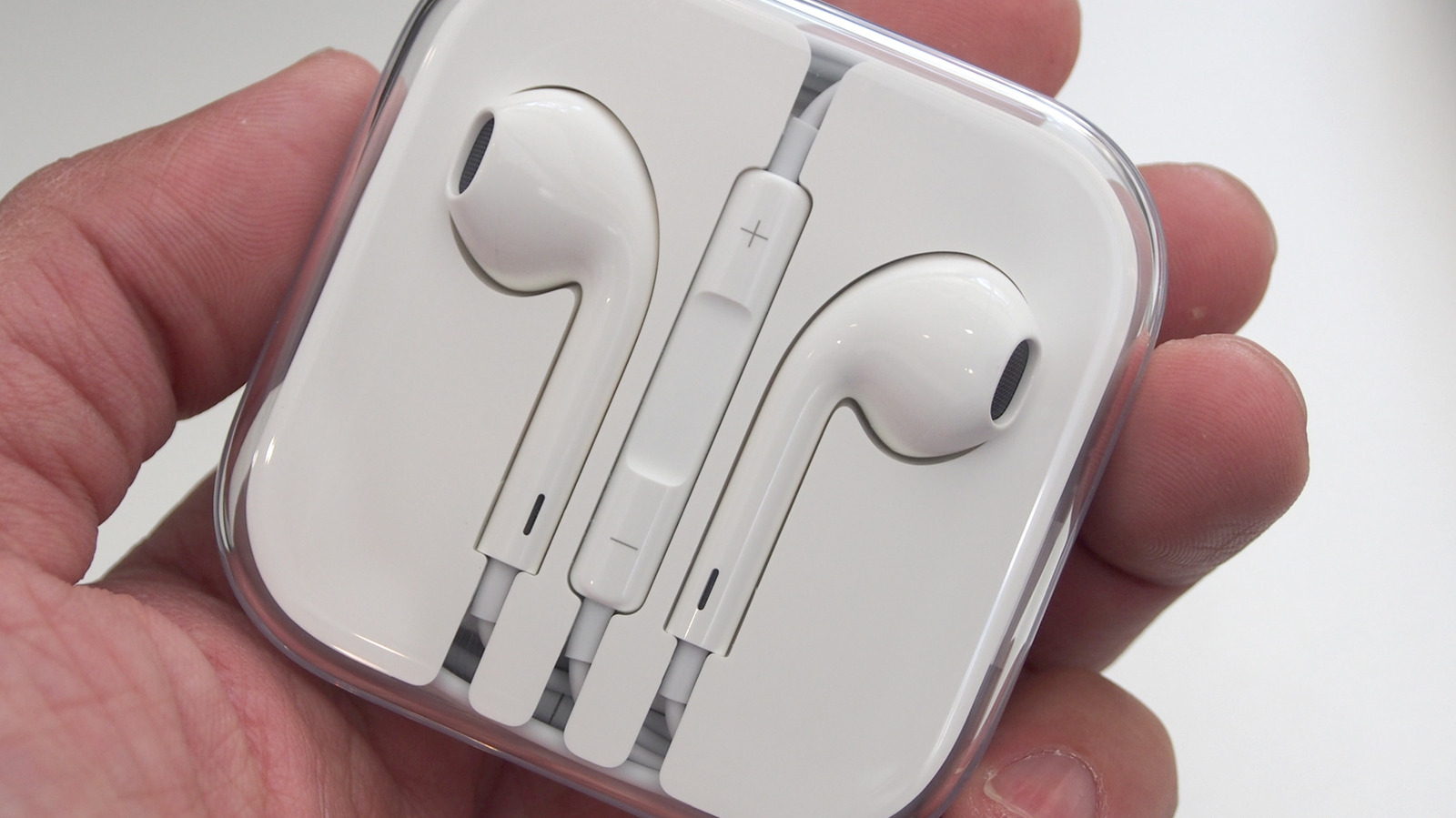
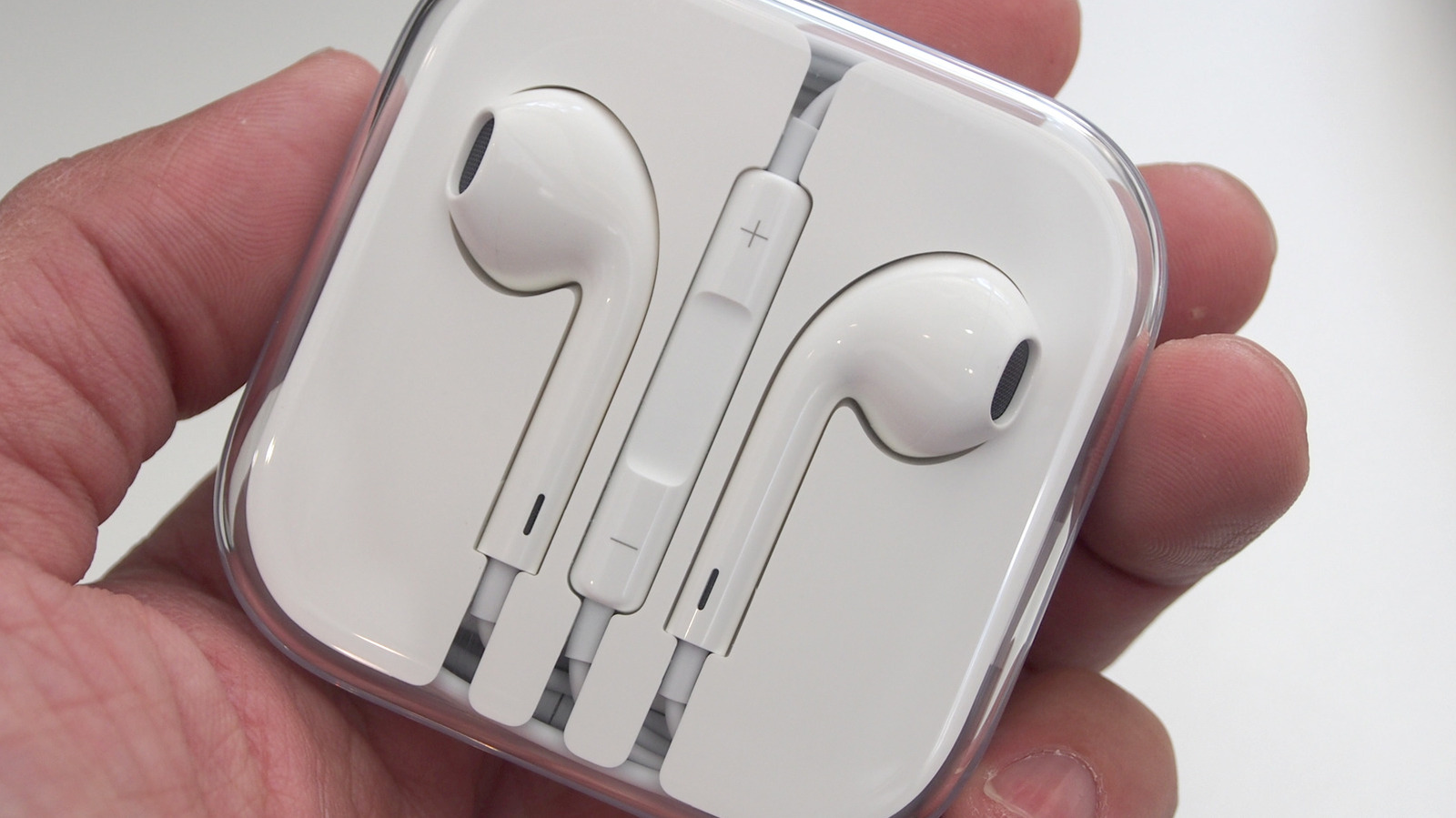
EarPods
EarPods seem to be officially over. These were Apple’s wired headphones before AirPods, which transitioned to Lightning and USB-C varieties once the headphone jack was gone and somehow survived the wireless explosion till recently. Major retailers have already stopped stocking them (some exceptions exist, like Best Buy and Amazon), but the fact that you can’t find them on Apple’s website says it all. And that’s a shame, because Apple EarPods still have promise for those who miss their headphone jacks.
Advertisement
These definitely aren’t the best earbuds or IEMs that you can buy, but at the roughly $20 price point they sell for, they still surprise with their simplicity and performance. Some people praise them even today. You’d have to deal with the annoying trade-off of not being able to charge your iPhone when they’re plugged in, sure, but you’d have a pair of wired earbuds that work with laptops, handheld game consoles, and anything else that has a spare USB-C port — or a headphone jack, if you get the 3.5mm model of EarPods.
All the benefits of wired earbuds apply: no batteries to charge, no easily dropped and lost AirPods, no Bluetooth connection woes, just hassle-free music and calls. Another area where EarPods hold their own is microphone quality. It’s astoundingly good even if you leave it dangling below your chin where it normally is, and gives the top-end AirPods Pro 3 a run for their money. I’d personally recommend grabbing a budget pair of IEMs near that $20 price point before EarPods, but if you find them, they’re more than worth the price of entry.
Authorities in the Netherlands said they dismantled a botnet that comprised more than 17 million devices and were managed by 200 servers in a joint operation by the police and the National Cyber Security Center.
The action, announced Thursday, came about after a security researcher reported the sprawling network to authorities. The host infrastructure was located in the Netherlands.
Used for criminal purposes
“The police then seized several botnet servers from a hosting provider for investigation,” the NCSC said. “The botnet was taken offline by the provider because it was used for criminal purposes.”
According to a report Thursday by the NL Times, the botnet was linked to ASOCKS, a Russia-based company that provides residential proxy services. These services cater to people and organizations who want to obscure their locations or identities by proxying their Internet traffic through third-party devices. Proxy services are often used for illicit or unethical purposes such as performing DDoS attacks, running botnet command-and-control servers, operating phishing operations, and scraping website content.
Advertisement
Ars was unable to independently confirm the NL Times report, but the claim checks out. Thursday’s NCSC post linked to a separate post that the nonprofit organization published a day earlier. That post, in turn, was updated to add a link to Thursday’s post. Wednesday’s post, headlined “Residential proxies and their major impact on digital security in the Netherlands,” warned: “Residential proxies are used to maintain anonymity and circumvent geographical restrictions. In this way, a Dutch organization can be attacked with Dutch proxies that have similarities with ‘regular’ traffic, making cybercrime mitigation more difficult.”





























































You must be logged in to post a comment Login