Apple is at a transformational point in its product history. The company is making a record amount of money with a rich product portfolio, fumbled its AI strategy, and just had a leadership change.
Tim Cook is out as the CEO, and engineering veteran John Ternus is taking over the chief role. Interestingly, it seems Apple is also making the biggest shift in its product development history, with no less than ten categories of devices planned for the coming years.
Apple
What’s next from Apple?
It seems Apple planned the leadership change at a crucial point in its product development phase, with the focus being on Ternus delivering some knockout products early in his leadership tenure. According to Bloomberg, the first of these buzzy product reveals is going to be the iPhone Fold (or the iPhone Ultra), the first foldable smartphone by the company.
Apple is years late to the race, but the excitement around the upcoming “pocketable but not pocket-friendly” phone is pretty high. “Ternus is poised for an even bigger flood of products. Including the foldable iPhone, Apple will enter roughly 10 new product categories within the next few years. That means Ternus could quickly eclipse his predecessor by this measure,” says the report.
The launch of ten product categories is pretty ambitious, as Cook’s tenure only witnessed the launch of three new segments, two being mass-market wearables (AirPods and Apple Watch) and one XR hardware in the misfiring Vision Pro.
Advertisement
iPhone Fold CAD-based renderAI Visualization
A truly transformational roadmap
Apple has played it relatively safe with its wearables, but it seems the company is going all-in across the board. Starting with the AirPods, the company is reportedly planning to launch a camera-equipped version, dramatically boosting their health potential as well as understanding of the world around them using multi-modal AI. Think of Visual Intelligence, but instead of pointing your iPhone’s camera, the earbuds in your ears do the job.
It’s an immensely promising idea that will also be pretty hard to execute. Yet, if products like the Meta-Ray Ban AI glasses are anything to go by, Apple can execute it. And it’s not an outlandish idea, either. Experts at the University of Washington recently showcased the VueBuds, packing cameras on off-the-shelf earbuds that are capable of world-understanding and assisting with translation, among other AI-powered tricks. And let’s not forget Apple’s partnership with Google, which essentially puts Gemini at the foundations of Apple’s AI revival plans.
AI-generation concept of Apple smart-glasses with a holographic display.Gemini AI
Aside from the earbuds, the following is the list of other product categories that are reportedly in development at the company, many of which have been delayed due to Apple’s hobbled AI efforts:
Mythos, unveiled in a limited launch earlier this month, vastly outperforms other AI models in vulnerability detection and exploitation, according to its creator.
Anthropic has only given access to the model to a closed but growing group of companies and financial institutions, including Apple, Google, Microsoft, Nvidia and JP Morgan Chase, to test and bolster their cybersecurity.
Advertisement
UK financial institutions are set to start using Mythos this week, while Japan and Canada are in discussions with their biggest banks on Mythos. Bank of Ireland told SiliconRepublic.com that it is keeping the matter under review.
Last week, Ireland’s National Cyber Security Centre’s director Richard Browne told an Oireachtas Joint Committee that the technology would be in the hands of bad actors within months.
However, a source has now told Bloomberg that a handful of users gained access to Mythos weeks ago, on the same day Anthropic announced its limited launch. The group has been using Mythos regularly since, but not for malicious purposes, the source added.
“We’re investigating a report claiming unauthorised access to Claude Mythos Preview through one of our third-party vendor environments,” Anthropic told news publications in a statement.
Advertisement
Mythos has sent shocks through the tech industry, which is scrambling to bolster its security systems in light of the powerful AI model. Soon after its launch, US authorities told Wall Street leaders to take the matter seriously.
But not all authorities have taken an equally serious approach, with Deutsche Bank commenting that Germany’s financial institutions are well-prepared for cyber risks posed by the model.
“Naturally everyone is trying to get access, but I think it’s entirely appropriate that this access remains restricted for the time being,” said Deutsche Bank CEO Christian Sewing earlier this week.
Don’t miss out on the knowledge you need to succeed. Sign up for the Daily Brief, Silicon Republic’s digest of need-to-know sci-tech news.
The $99 price tag aligns with Valve’s decision not to subsidize its new hardware. The company announced the Steam Controller in late 2025 alongside a new Steam Machine and the Steam Frame VR headset. Read Entire Article Source link
We spend hours testing every product or service we review, so you can be sure you’re buying the best. Find out more about how we test.
Adobe Illustrator began development in 1985, with its initial release coming out in 1987. 39 years in an eternity in computing terms, and it’s amazing this venerable piece of software is still the ruling king when it comes to design, illustrations and vector-based work.
We’ve long championed it as one of the best graphic design software apps around – but now I’m taking a look at some of the new features that are being introduced with the latest version, Adobe Illustrator 2026 (I explored version 30.3).
Advertisement
Adobe Illustrator: Pricing & plans
Subscription-only but the price befits its status as the king of the hill
Cheaper alternatives available like Canva’s Affinity
But they lack all the features and integration with other Adobe software
Adobe Illustrator is a professional app, and as such, is part of Adobe’s Creative Cloud Pro subscription. As has been the case for years now, you can’t purchase the software, you can only rent it.
Creative Cloud Pro includes over twenty high end software packages, including Photoshop, InDesign, and of course, Illustrator, and will cost you $35 a month for the first three months on an annual subscription (after that deal, the price reverts to $70 a month for the remainder of your agreement).
If that’s too much for you, you can subscribe to Illustrator on its own for $23 a month. Students and educational institutions can also get it or the entire suite at a steep discount.
Be aware though that every time you use generative AI, you’ll be spending credits. You get a set number every month with your plan, but also have the option of purchasing more separately, either as a one-off, or as part of another subscription.
Advertisement
OK, time to take a look at some of the new features that caught my eye in Adobe Illustrator’s new release.
Sign up to the TechRadar Pro newsletter to get all the top news, opinion, features and guidance your business needs to succeed!
Adobe Illustrator: Features
(Image credit: Adobe // Future)
Loads of new features added
I especially like those focused on interface improvements like color artboards
Great tools for refining your designs including snapping to tangents
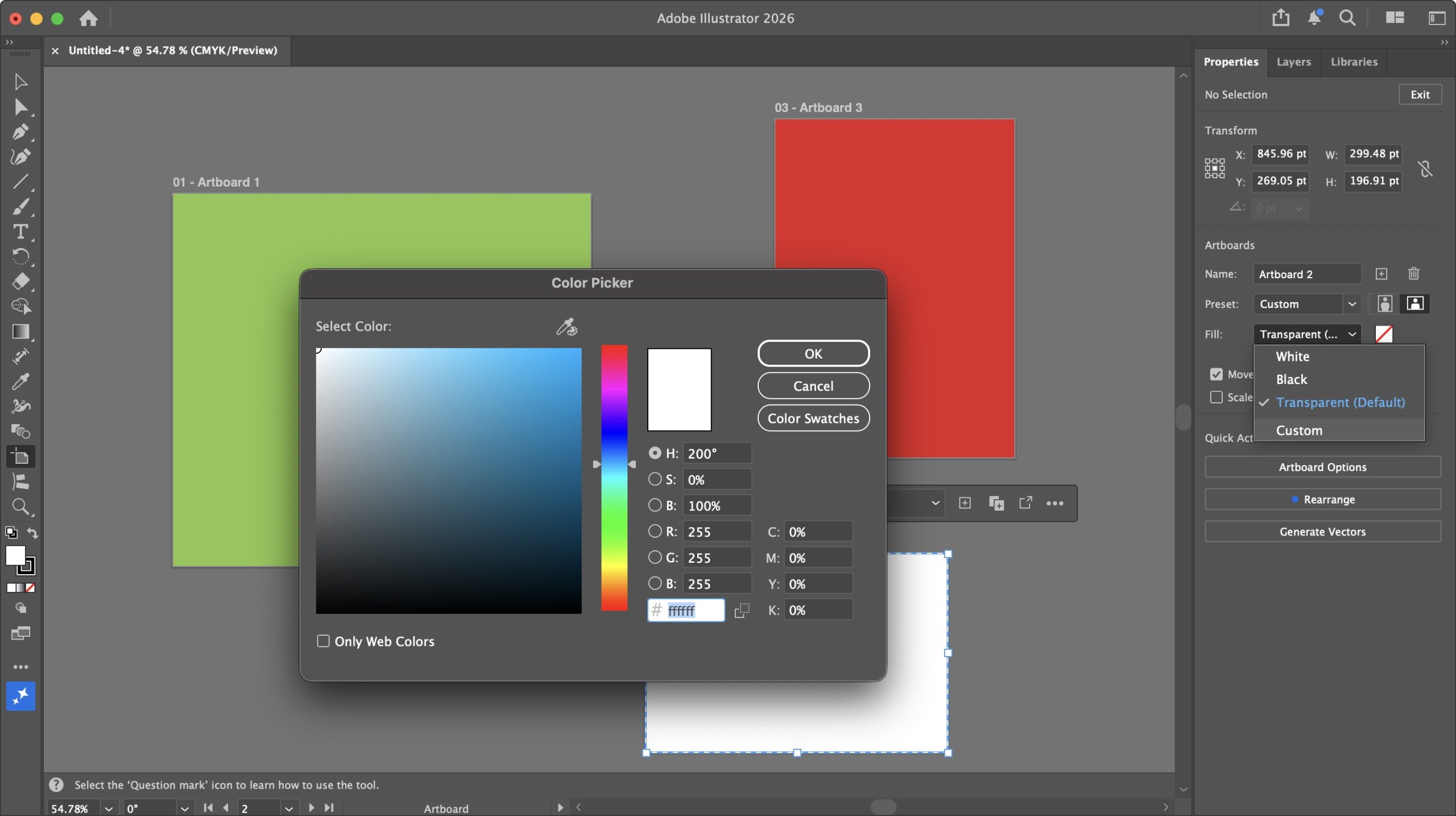
Let’s start with some simple improvements to do with Artboards. Up to now, if you needed them to have colored backgrounds, you’d have to create a rectangle, apply a color to it and use that as your backdrop, which, although doable, was cumbersome.
Now, finally, you can apply different colors to each of your Artboards, right from the Properties panel, through its Fill dropdown menu. By default, it’s set to transparent, but you can also choose either black or white, and if that’s not enough, selecting ‘Custom’ gains you access to a virtually unlimited gamut of colors.
Advertisement
Right-clicking on the canvas offers some handy options to manage your document’s artboards. You’re able to rename, duplicate, or delete them, or even create new ones with ease. There’s also the option to lock a selected artboard, but sadly no option to unlock it – to do that you need to go to Window > Artboards, and click on its lock icon from the popup window. So, I guess ‘cumbersome’ hasn’t completely gone away.
(Image credit: Adobe // Future)
But it’s still an improvement. And speaking of improvements, the classic Eyedropper tool has been enhanced, and I found it works more reliably than before. A single click, for instance, will now properly copy the color and stroke of a selected object (you can extract more of course, but that depends on what you selected in the Eyedropper options).
There’s also shift-clicking. Press and hold the shift key, and you’ll get a large circle around the eyedropper cursor. The bottom half represents the current color, while the top half is the color it’ll change to once you click.
A color picker that works as advertised and has added functionality, I can work with that.
Advertisement
(Image credit: Adobe // Future)
This leads us to some subtle additions you probably never knew you needed, like how the end of a straight line now snaps to a circle’s tangent, or how one line snaps perpendicularly to another. Those are on by default and will make precise designs much easier.
And speaking of much easier, how about gradients with fewer banding – or no banding at all, even? Depending on how close you get to a gradient, you’ll start to notice lines along it as the one color changes to another. This latest version of Illustrator introduces two options to dissipate those lines, creating a much smoother gradient.
(Image credit: Adobe // Future)
The first one is via a new menu in the gradient Properties called “Method”. By default, it’s set to ‘Classic’, but change it to ‘Perceptual’, and it should look more like it would in real life – at least that’s the intention. The change can be quite subtle depending on the complexity of your gradient, and in my experience, it ranged from no discernible change, to a pleasing improvement.
The second option is a ‘Dither’ tick box. This one works in either ‘Method’, and when toggled, it adds a mesh of subtle imperfections to the gradient to conceal any banding, and I found the results to be very effective.
Advertisement
Adobe Illustrator: AI tools
(Image credit: Adobe // Future)
Introduces impressive AI-based tools to expand your creation’s horizons
But why do all the hard work when you can let a complex algorithm do it all for you, right? Right? Well… not quite, but Adobe Illustrator now comes with some interesting “AI” tools to broaden your digital creations, like Generative Expand.
Triggering the tool will give you handles which you then drag beyond the confines of your original creation. This will create pink borders, making it clear where Illustrator needs to apply itself. When you’re ready (and you have enough credits), click on ‘Generate’ and the machine will get to work.
It should only take a few seconds but I found the end results, like Generative Expand on Photoshop, to be impressive – and I don’t particularly like AI! The results weren’t perfect, mind, but it should be much easier to manually refine the output as opposed to creating all that expanded area yourself.
(Image credit: Adobe // Future)
Another complex algorithm feature I was impressed by is Turntable. It’s designed to turn a 2D vector graphic into a 3D one. Your results may vary, and the tool itself warns you if it thinks the image you’ve selected might not yield good results. That warning may, or may not be correct – sometimes the only way to know for sure is to spend your credits and try it out.
Advertisement
The objects I experimented with, varied in their success. The globe was… interesting, but then again Illustrator did warn me it might not work as expected, so kudos for the warning. The butterfly was mostly flawless, and the horse’s head (a sketch of a head, not a Godfather triggering nightmare) was perfect.
So yes, your mileage may vary, but when it works great, it’s eye opening (but not in A Clockwork Orange way). Once done, you’re able to rotate your now-3D object 360 degrees using a slider. To the right of it are Up and Down arrows; these allow you to see your design from above or below by a maximum of 30 degrees either way.
All in all, Illustrator keeps getting refined with each update. The improvements are most welcome, and the new features will certainly please a lot of artists. There’s something here for everyone which is always a positive thing.
Advertisement
Should I buy?
(Image credit: Adobe // Future)
Buy it if… You need a powerful vector-based illustration system with a steady stream of improvements and new features to make the expensive subscription worthwhile
Don’t buy it if… You’re not a fan of the increasing incursion of AI into the software, or despite all its features, the asking price is just too much for you.
Get caught up on the latest technology and startup news from the past week. Here are the most popular stories on GeekWire for the week of April 19, 2026.
Microsoft is offering a one-time voluntary retirement program for the first time in its 51-year history, giving thousands of long-serving U.S. … Read More
Amazon CEO Andy Jassy added AWS infrastructure leader Prasad Kalyanaraman to the company’s S-team and promoted Dave Brown to senior vice president, according to an internal memo viewed by GeekWire. … Read More
Microsoft is dropping Xbox Game Pass Ultimate from $29.99 to $22.99 a month, but future Call of Duty games will no longer be available at launch. … Read More
Seattle’s mayor is exploring a moratorium on new data centers, but the city’s real utility challenges — skyrocketing electricity prices, a looming capacity gap, and an eastside water defection — have nothing to do with data centers. … Read More
Seattle venture capitalist Nick Hanauer responds to Chris DeVore’s recent call for Democrats to embrace capitalism, arguing that the real question isn’t whether to support free markets but which version of capitalism America should be building. … Read More
Qualtrics CEO Jason Maynard shook up the company’s senior leadership team on Friday at its dual headquarters in downtown Seattle and Provo, Utah, less than three months after taking the helm of the experience management technology company. … Read More
Starbucks is laying off workers in its technology organization as new CTO Anand Varadarajan, who joined from Amazon in January, restructures the team. … Read More
Sheetz is an American gas station and convenience store chain concentrated in seven Mid-Atlantic and Midwestern states with over 829 locations in 493 cities. According to the American Customer Satisfaction Index 2025 Convenience Store Study, the company recently tied with Wawa for second place as the best U.S. convenience store. The largest number of Sheetz locations are in its home state of Pennsylvania, where 316, or 38% of all Sheetz stores are based. After Pennsylvania, the next most Sheetz-populous state is North Carolina with 142 stores, followed by Ohio with 135, Virginia with 124, West Virginia with 61, Maryland with 44, and Michigan with seven stores.
The name Sheetz goes back to Jerry Sheets, who married a woman from a family that owned a large dairy business in Altoona, Pennsylvania. When his nametag was misspelled as “Sheetz” as he attended a dairy conference, he liked it enough to officially change his last name to Sheetz. The Sheetz business empire traces its roots to 1952, when Jerry’s son Bob purchased one of Jerry’s unprofitable dairy stores located in Altoona and founded the Sheetz company. Altoona remains the home of Sheetz to this day.
The Sheetz family owns and operates the company with a 90% share, while the employees own the rest through an employee stock ownership plan. Sheetz family members at the helm include Travis Sheetz as president and CEO, Joe Sheetz as chairman of the board, and Stan Sheetz as board director, with additional family members in positions like EVP of operations, EVP of marketing and supply chain, and EVP of strategy and information technology.
Advertisement
What else should you know about Sheetz?
George Sheldon/Shutterstock
Some Sheetz milestones include the first self-service gas pumps in 1973, the introduction of its Made To Order, or MTO, menu in the mid-1980s, and its memorable “Free My Beer” campaign, which successfully led to the state of Pennsylvania allowing the sale of beer in convenience stores that also sold gasoline in 2016. Sheetz will also let you charge your EV at certain locations that have had chargers installed.
The journey from a single store to the current count of 829 took 74 years and the efforts of numerous members of the Sheetz family. Bob’s brother Steve had the idea to expand the Sheetz venture in 1969, and by 1972, there were 14 Sheetz stores. By 1983, Sheetz boasted 100 stores, and Bob turned over the business to Steve. By 1995, Bob’s son, Stan, became president of Sheetz. Stan added Sheetz-branded coffee and bakery products to the stores’ lineups, as well as a touchscreen ordering system. In 2013, Joe S. Sheetz, who was Bob’s nephew, became president and CEO, succeeded by current CEO Travis Sheetz in 2022.
Advertisement
Sheetz gas stations and convenience stores continue to expand their empire, far from their original location in Altoona, Pennsylvania. A newly opened Sheetz location in Macomb County, Michigan, recently dropped its gas price below $2 as a way to generate local customer traffic. It may take some time before gas prices get that low again.
Apple will announce its second-quarter financial results for 2026 on April 30. Here’s what happened in the quarter, and what analysts think is going to be revealed.
Apple CEO Tim Cook
The Q2 2026 financial results will be shared by Apple in a press release on April 30. A short time after, at 5 P.M. Eastern, it will hold its usual analyst and investor conference call. That call will involve both current CEO Tim Cook and CFO Kevan Parekh discussing the quarter and providing guidance for future quarters. There will also be questions from analysts about the quarter and expectations for Q3 and beyond. Continue Reading on AppleInsider | Discuss on our Forums
As a gamer, I’m enjoying the current renaissance of video game adaptations. Whether it’s the new 3D-animated Super Mario Galaxy Movie or Sonic movies or award-winning TV series like The Last of Us, Fallout and Cyberpunk: Edgerunners, Hollywood is now filled with creators who are actually fans of the games they’re adapting, a shift from the 1990s when licenses were often purchased just to cash in on younger audiences.
On Monday, A24 revealed the cast of the live-action adaptation of the Elden Ring movie, which will be directed by Alex Garland (Civil War, Annihilation) and released on March 3, 2028. While this looks promising on paper, it’s hard to ignore the scale of the challenge to adapt a game known for its personality-less protagonist, cryptic lore and multiple endings. Still, there is reason to believe this could become one of the most successful video game adaptations.
To start, A24, the studio behind the production, is known for acclaimed films such as The Brutalist, Moonlight and Everything Everywhere All at Once — all very different films following unique, humanistic visions. While the studio typically produces smaller films with budgets under $50 million, the Elden Ring movie is reportedly set to exceed a $100 million budget.
Advertisement
Filming is already underway, and leaked set photos show what appears to be an almost perfect recreation of locations and scenes from the game. On Wednesday, a video uploaded to YouTube showed a crowd cheering during the hanging of a character known as the Dung Eater, closely mirroring a moment from the game’s opening intro cinematic.
Watching that short clip of a character who isn’t central to the story, yet is depicted with such accuracy, is astonishing. My biggest concern, though, is Elden Ring’s story. Unlike some other adaptations in development, such as Death Stranding, The Legend of Zelda and Resident Evil, Elden Ring is just one game with one DLC (Shadow of the Erdtree) and one multiplayer spinoff (Nightreign). That’s it.
Even so, developer FromSoftware packs an immense amount of lore into the game, though not in the traditional sense through dialogue or readable documents. Instead, as in its other titles, the studio distributes background details about characters and the world through descriptions of items, weapons, armor and spells.
Advertisement
This approach to world-building, which FromSoftware first used in 2009’s Demon’s Souls, is like a jigsaw puzzle. But instead of assembling pieces to form a picture, it’s about taking two or three sentences and building an entire book. Literally, fans who create YouTube videos about the game’s lore are now publishing a 400-page book.
Not only is there a vast amount of lore to dig into, the Elden Ring’s sheer scope is immense. The game’s main story follows the player character’s journey to become an Elden Lord in the Lands Between, a god over mysterious undying lands. That quest is shaped by wars and betrayals that occurred long before the events of the game. It unfolds like a season of Game of Thrones, which is fitting given that George R. R. Martin helped develop Elden Ring’s story.
— 🧸 JustGavinBennett 🧸 (@JustGavNBennett) April 22, 2026
Fortunately, there’s hope that director Alex Garland understands the assignment when it comes to adapting Elden Ring. Unlike earlier video game adaptations, where screenwriters were often tasked with making sense of stories from games they hadn’t played and forcing them into a 90-minute structure, this production is being led by a fan of the game.
Advertisement
A New Yorker article about A24 last year recounted an anecdote involving Garland and Noah Sacco, the studio’s head of film. Sacco visited Garland, who had been enthusiastic about the game, and proposed a film adaptation. Sacco approved the idea, and Garland went on to write a 200-page script that includes 40 pages of visuals. The two later traveled to Japan to seek approval from the game’s director, Hidetaka Miyazaki. Miyazaki was reportedly impressed with Garland’s knowledge of the game, which came from completing it at least seven times — a sizable feat considering it takes 60 hours or more to beat.
We still don’t know which time period the Elden Ring movie will explore. One assumption is that it could serve as a prequel, focusing on the Shattering, the in-game historical event that set the stage for the game’s present-day story. Extensive lore surrounds those events, and because FromSoftware leaves many details open to interpretation, there’s room for Garland to develop a compelling narrative while staying true to the source material.
Looking at all the elements of this production, the pieces are in place for a successful film. An award-winning studio is making one of its largest investments in a video game adaptation, led by a director who is a devoted fan. He has the approval of the game’s creator, who was not quick to grant licensing rights, and Martin is also involved as a producer. The Elden Ring movie has the potential to be not just a worthy adaptation, but one of the best video game adaptations ever made.
It appears that all of life is becoming one big subscription fest. There’s Netflix, Spotify, Xbox Game Pass, PlayStation Plus, food order subscriptions, Duolingo, Amazon, and YouTube. Can you believe there’s even a subscription for buying socks? Look, the list could go on, but I don’t want to bore you or myself.
Subscription services are here to stay, and there’s nothing you or I can do about it. As much as we hate them draining our money every month, if we want the goods, we must accept that, in return, we have to part with our hard-earned cash.
Even though we can’t avoid subscriptions, there is an easy way to manage them, and it’s called Orbit. Yes, the irony is not lost on me. In an attempt to get a grip on our subscriptions, I’m recommending subscribing to another app. It’s just the way it is, I’m afraid.
Advertisement
Article continues below
Homescreen heroes
This is part of a regular series of articles exploring the apps that we couldn’t live without. Read them all here.
Advertisement
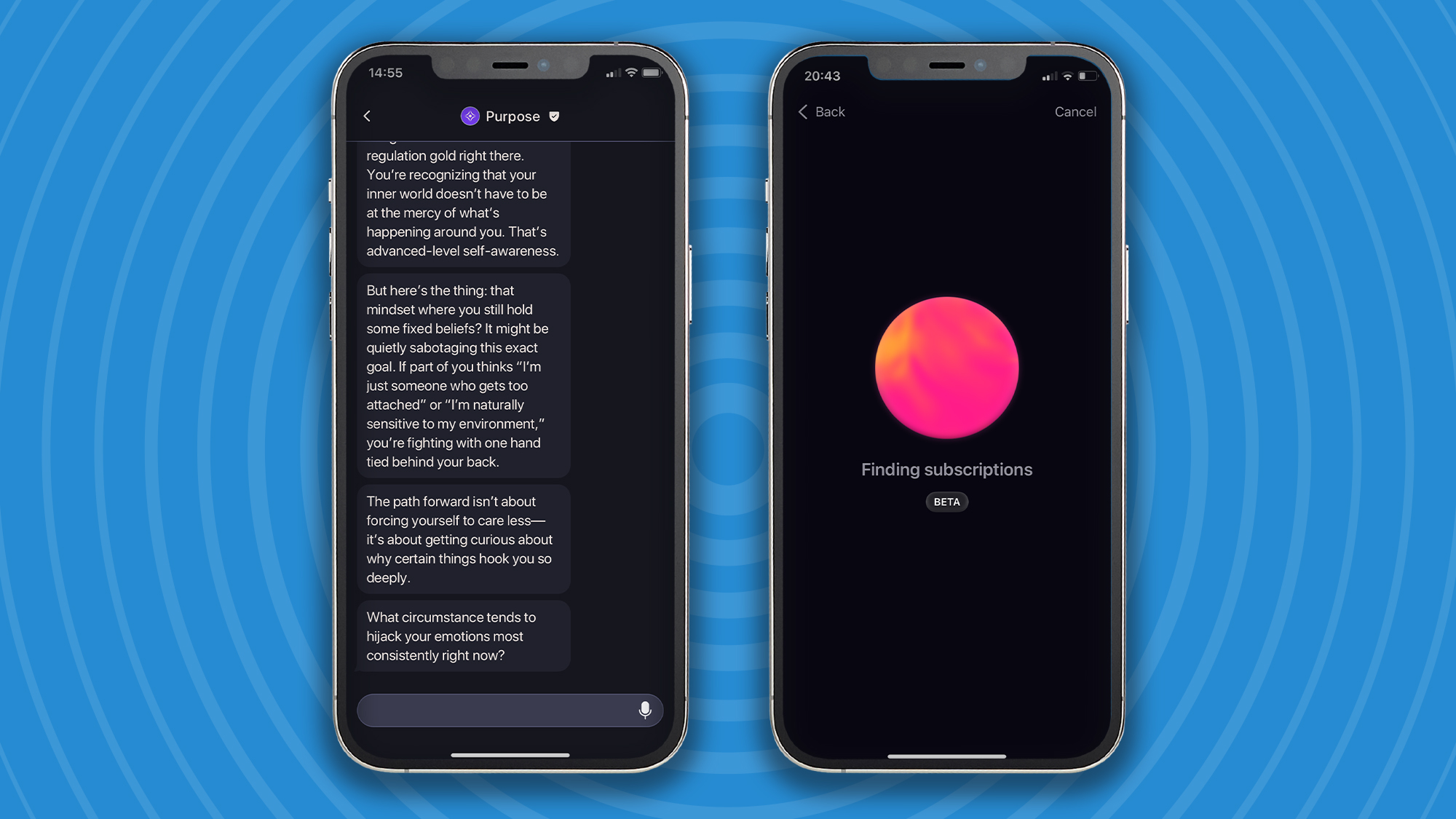
Orbit is a beautifully designed subscription tracker app that is designed to solve the growing problem of subscription creep. It acts as a financial watchdog that uncovers every bill draining your account and centralizes them into one elegant interface. This all but eliminates the stress of surprise charges and helps you reclaim control over your wallet.
(Image credit: Future / Paul Hatton)
Adding subscriptions was easier than I thought
I was expecting to have to add each individual subscription manually, and even though this functionality is present in the app, there’s actually a much smarter way to load all your subscriptions into Orbit.
It’s called Magic Import, and it simplifies the tedious task of manual entry by capturing financial information directly from screenshots, bank statements, CSV files, or PDFs.
Advertisement
This is made possible through a mix of very clever AI and OCR (Optical Character Recognition), and I have to say it’s very good indeed. I uploaded a number of different files and found Orbit reliably picked up what I needed it to.
Sign up for breaking news, reviews, opinion, top tech deals, and more.
On the very odd occasion that Orbit interprets specific details of subscriptions incorrectly, it’s easy enough to dive into that particular subscription and adjust any number of data fields, including its billing cycle, which list you want it in, and whether it’s a free trial or not. These changes can be made when you import a subscription or further down the line if you spot a mistake.
(Image credit: Future / Paul Hatton)
Advertisement
Tracking subscriptions like a pro
The main homescreen lets you see your subscriptions in a list format, but the calendar view shows you when the money is actually going to leave your pocket. This helps you spot heavy payment days or times of the month where multiple subscriptions are bunched together. Armed with this type of information, you can plan ahead to make sure you’ve got the money set aside in your bank account.
The calendar view also includes readouts for the total cost of subscriptions throughout the month as well as a live countdown of how much money you still need to account for before the month ends. I process information visually and have found the calendar invaluable for tracking my own personal subscriptions.
There are also notifications that act as a proactive defense and are designed to bridge the gap between knowing you have a subscription and acting before you are charged. This is maybe most critical when you add a service marked as trial. Orbit will calculate the expiration date and send you a notification, usually 24–48 hours, before the trial period ends.
Advertisement
It’ll also send you renewal reminders for recurring bills. This is incredibly useful for cash flow management, especially for services that cost a lot of money. No one likes being surprised by a sudden large financial deduction, and notification reminders minimize the chances of it happening.
(Image credit: Future / Paul Hatton)
Go premium for the full experience
So, if you’ve ever subscribed to a service only to realize that a number of months down the line, you’re no longer using the service but you’re still paying for it, Orbit is designed just for you. It’s for those people who have anxiety around the build-up of bills and want a simple one-app solution for managing it all.
The free version is extremely limited, so I’d recommend paying the lifetime fee of $24.99 / £24.99 to gain access to the full range of premium features. These include unlimited tracking, magic import, iCloud backup, custom lists, and support for multiple currencies.
Advertisement
Orbit has a number of soon-to-be-released features that include family sharing, a dedicated Mac app, and advanced spending insights. With these new additions, Orbit will go from strength to strength and become increasingly helpful to users who want complete control over their spending.
As it vies to catch up with rivals like OpenAI and Anthropic, SpaceX has done a deal to enable purchase of the fast-growing AI coding start-up Cursor.
In a post on X, SpaceX said the companies were “now working closely together to create the world’s best coding and knowledge work AI” and that “Cursor has also given SpaceX the right to acquire Cursor later this year for $60bn or pay $10bn for our work together”.
In its own statement, Cursor confirmed it was partnering with SpaceX “to accelerate our model training efforts”, which it said had been stymied by lack of compute.
“With this partnership, our team will leverage xAI’s Colossus infrastructure to dramatically scale up the intelligence of our models,” it said.
Advertisement
Cursor had been widely reported to be raising a $2bn round at a $50bn valuation in recent days, as it sought investment to increase compute, but that raise will now be halted as the SpaceX deal will offer it all the capacity it needs to expand, according to Bloomberg sources.
It is likely that the reason SpaceX has bought the rights to purchase Cursor, rather than acquiring it immediately, is that the space tech and AI giant is keen to win the race to IPO, and any acquisition of such a size would require it to refile for IPO.
Reports have suggested a SpaceX IPO between April and June, which means it would precede speculated listings by rival AI giants OpenAI and Anthropic in the near future.
Elon Musk has consolidated various businesses over the past year to arrive at a mooted $1.75trn valuation. In February, SpaceX acquired xAI, which in March 2025 had acquired X.
Advertisement
Revenue growth from SpaceX’s Starlink satellite broadband service is widely and largely credited for the foundation of the valuation. Starlink currently dominates the global satellite internet service industry, with more than 9,000 satellites in orbit and roughly 9m customers.
The February merger deal valued xAI at around $250bn, but preceded the departure of all 11 of Musk’s co-founders from that company. Now Musk looks set to buy in the talent he believes he needs to compete with his major rivals.
Cursor is one of the fastest-growing AI start-ups right now, and well-regarded, boasting some very high-profile investors, including Nvidia, Andreessen Horowitz, Google – and indeed, OpenAI’s venture fund. It remains to be seen whether the expensive acquisition goes ahead, or whether both companies could take up the agreed alternative within the deal to pay $10bn for their collaborative work.
Don’t miss out on the knowledge you need to succeed. Sign up for the Daily Brief, Silicon Republic’s digest of need-to-know sci-tech news.
This holder works for Kindles and tablets alike, and even my Nintendo Switch. The clamp base lets you attach it to tables and furniture, and it’s easy to position in front of or even above you if you wanted to lie down and read.
Lamicall
Tablet Pillow Stand Holder
If you want something that’s freestanding, this pillow tablet stand holder works great for a Kindle. I use it on the couch, and I can sit up or lounge back and adjust the stand arm to suit my position. There are also two built-in cup and snack holders. Lamicall says they’re food safe, but I just use it to hold my tea mug and phone.
Advertisement
A Freestanding Charger
Looking to keep your Kindle charged without adding another cord to the floor of your desk or bedside table? Same. Here’s a more stylish solution if you have one of the Signature editions.
Anker
Wireless Charging Dock for Kindle
This wireless charging dock is made by Anker for Kindles, specifically for Kindle Paperwhite and Colorsoft’s seven-inch Signature editions. Those versions have wireless charging capabilities, and this stand takes advantage of that with charging coils that line up with the back of the Kindle, where the wireless charging is. You’ll want to take off any MagSafe cases; leaving mine on made the little light on the charging dock flash until I took it off.
A Kindle Page Turner
Advertisement
The hottest new item to get as a Kindle lover is a page turner. They’re especially handy for holders like the ones above, where your hands aren’t already on the device, and can make for a great accessibility accessory for readers with different needs.
My biggest irritation with these devices so far is that you have to charge them both individually, and if one runs out of battery, the whole thing is useless. I also don’t love that the turner does tend to block at least one letter while I read, and you can’t place it on the lower or upper margins since it’ll activate the menus instead of turning the page. Still, it makes reading ultra comfortable, especially for my strained wrists.
Here’s my favorite one so far, that’s been solid at holding a charge, and next I’m testing this remote ($15) with a wearable ring clicker instead of a remote.


























































You must be logged in to post a comment Login