Mythos, unveiled in a limited launch earlier this month, vastly outperforms other AI models in vulnerability detection and exploitation, according to its creator.
Anthropic has only given access to the model to a closed but growing group of companies and financial institutions, including Apple, Google, Microsoft, Nvidia and JP Morgan Chase, to test and bolster their cybersecurity.
Advertisement
UK financial institutions are set to start using Mythos this week, while Japan and Canada are in discussions with their biggest banks on Mythos. Bank of Ireland told SiliconRepublic.com that it is keeping the matter under review.
Last week, Ireland’s National Cyber Security Centre’s director Richard Browne told an Oireachtas Joint Committee that the technology would be in the hands of bad actors within months.
However, a source has now told Bloomberg that a handful of users gained access to Mythos weeks ago, on the same day Anthropic announced its limited launch. The group has been using Mythos regularly since, but not for malicious purposes, the source added.
“We’re investigating a report claiming unauthorised access to Claude Mythos Preview through one of our third-party vendor environments,” Anthropic told news publications in a statement.
Advertisement
Mythos has sent shocks through the tech industry, which is scrambling to bolster its security systems in light of the powerful AI model. Soon after its launch, US authorities told Wall Street leaders to take the matter seriously.
But not all authorities have taken an equally serious approach, with Deutsche Bank commenting that Germany’s financial institutions are well-prepared for cyber risks posed by the model.
“Naturally everyone is trying to get access, but I think it’s entirely appropriate that this access remains restricted for the time being,” said Deutsche Bank CEO Christian Sewing earlier this week.
Don’t miss out on the knowledge you need to succeed. Sign up for the Daily Brief, Silicon Republic’s digest of need-to-know sci-tech news.
Running a fan page for your favorite celebrity is harder than you think. Once you pull back the curtain on what actually goes into managing these accounts, you realize that it’s far more demanding than most people would expect.
The BBC reported on how admiration for a public figure often turns into something closer to a full-time job, complete with pressure, expectations, and constant online scrutiny.
Why running a fan account isn’t all fun and games
Cottonbro Studio / Pexels
Fan accounts don’t run themselves. Many of these pages are updated constantly and consistently, tracking every appearance, post, or public mention of a celebrity. The goal here is to stay relevant, fast, and visible in an algorithm-driven ecosystem.
This translates to late nights, early updates, and an always-on mindset. Missing a single major update can cost engagement, which is everything in the world of social media fandom.
When fandom starts to feel like work
These aren’t anonymous content farms. The people behind these accounts are often deeply connected to the celebrities they follow, which brings its own set of challenges. The report highlights fans running large accounts dedicated to global pop stars like Taylor Swift and K-pop acts such as BTS, where expectations are especially intense.
Advertisement
Some admins described spending hours each day editing videos, translating content, and tracking updates just to keep their pages active. Fan page admins often find themselves pulled into arguments with rival fandoms, where even small disagreements can spiral into targeted harassment.
From the outside, fan pages might seem like a stream of edits, clips, and appreciation posts. In reality, they run on constant effort, emotional energy, and a need to keep up with a fast-moving internet culture. It might still seem worth it for many. But the idea that it’s easy or effortless doesn’t hold up once you see what’s happening behind the screen.
Sequoia Capital co-steward Alfred Lin distributed 200 custom-engraved, numbered Mac Minis at the firm’s “AI at the Frontier” event, each loaded with easter eggs and designed by Sequoia’s design principal. The Mac Mini has become the unofficial hardware of OpenClaw, the open-source AI agent framework that surpassed React as GitHub’s most-starred project and caused Apple hardware shortages. Sequoia did not invest in OpenClaw — there is no company to invest in — but the giveaway positions the firm at the cultural centre of the agentic AI layer, the infrastructure connecting models to real-world actions where Lin believes the next wave of venture-backable companies will emerge.
Sequoia Capital co-steward Alfred Lin personally purchased 200 Mac Minis, had each one custom-engraved with a design mixing old cartography and machine learning contour plots, and distributed them to attendees at Sequoia’s “AI at the Frontier” event. Each machine contained two easter eggs: Sequoia’s ethos statement about creative spirits and underdogs, and a quote generated by an AI model. The engraving was designed by Andreas Weiland, Sequoia’s design principal. The Mac Minis were numbered. They are, by all accounts, beautiful objects. They are also $599 computers that have become the unofficial hardware of OpenClaw, the open-source AI agent framework that surpassed React as the most-starred project on GitHub in March, caused Apple to sell out of base Mac Minis in the United States, and established itself as the fastest-growing open-source project in the history of the platform. Sequoia did not invest in OpenClaw. There is no OpenClaw Inc. to invest in. The firm is distributing the hardware for a project it does not own, and that is the point.
Advertisement
The project
OpenClaw was built by Peter Steinberger, an Austrian developer who previously founded PSPDFKit, a PDF software kit used by applications serving roughly a billion people, which was acquired by Insight Partners for an estimated $100 million in 2024. Steinberger stepped away from coding after the sale. He returned in November 2025 when he started building what he initially called WhatsApp Relay, then Clawdbot, then OpenClaw. It is a free, open-source AI agent framework that runs locally on consumer hardware and integrates with external language models including Claude, GPT, and DeepSeek. Users interact through messaging services they already use: WhatsApp, Signal, Telegram, Discord, Slack. The agent orchestrates multi-step workflows: managing calendars, booking flights, sending emails, executing code, conducting research across multiple sources. By March 2026, it had approximately 247,000 GitHub stars and 47,700 forks. Jensen Huang called it “the next ChatGPT.”
The reason Mac Minis became the preferred hardware is Apple’s unified memory architecture, which is well-suited for running local AI inference. The $599 base model with 16 gigabytes of RAM became the entry point. Higher-memory configurations sold out first. By April 22, the base Mac Mini had sold out from Apple’s US online store. eBay markups reached $795 to $979 for base models. Delivery times for high-memory units stretched from six days to six weeks.Mac Mini and Mac Studio stock shortagesare driven by a combination of OpenClaw demand and a broader DRAM shortage, but OpenClaw established the Mac Mini as the reference hardware for running local AI agents in a way that no other project has managed. On April 4, Anthropic banned OpenClaw from Claude Pro and Max subscriptions, citing API abuse, which pushed even more users toward local inference and intensified the hardware demand.
The ecosystem
In February, Sam Altman announced that Steinberger was joining OpenAI to build “next-generation personal agents.” The hire was effectively an acqui-hire: OpenAI recruited Steinberger, not the software. OpenClaw transitioned to an independent open-source foundation, sponsored by OpenAI but not controlled by it. Steinberger had also received and rejected an offer from Meta. No acquisition price was publicly disclosed, though social media speculation ranged from the plausible to the satirical. The project’s commercial value lies not in the codebase itself but in the ecosystem that formed around it: 168 startups building hosting, deployment, and plugin services on top of OpenClaw, collectively generating approximately $400,000 per month in revenue.Tencent built its enterprise AI agent platform ClawPro on OpenClaw, adopting it for more than 200 organisations in beta.Nvidia built NemoClaw on top of OpenClawto add enterprise-grade security and privacy guardrails, announced at GTC 2026. Cisco launched DefenseClaw in response to a security crisis that exposed 42,665 publicly accessible OpenClaw instances and a supply-chain attack on the ClawHub marketplace that identified over 800 malicious skills.
The security problems are real and significant. A critical remote code execution vulnerability, CVE-2026-25253 with a CVSS score of 8.8, was discovered by researcher Mav Levin. The supply-chain attack on ClawHub, dubbed “ClawHavoc,” traced to a coordinated operation that seeded 341 malicious skills into the marketplace, growing to more than 800 before detection. These are the growing pains of an open-source project that went from a weekend hack to the most popular repository on GitHub in four months, without the security infrastructure that enterprise software demands. OpenAI’s sponsorship of the foundation and Nvidia’s NemoClaw are both attempts to add that infrastructure retroactively, which is cheaper than building it from scratch but harder than building it correctly from the start.
Advertisement
The thesis
Alfred Lin has publicly stated that “software code is no longer a moat.” This is the thesis that makes the engraved Mac Minis legible as strategy rather than swag. If the value in AI is shifting from models, which are commoditising rapidly, to the agentic infrastructure that connects models to real-world actions, then the open-source project that defines that infrastructure layer is the most important thing in venture capital that cannot be invested in.Sequoia’s $7 billion late-stage expansion fund, raised under Lin and co-steward Pat Grady after Roelof Botha stepped down in November 2025, is the largest fund in the firm’s history and is positioned squarely around AI. The fund includes stakes in OpenAI, Anthropic, and Physical Intelligence, a robotics company. The Mac Mini giveaway is Sequoia placing itself at the cultural centre of a movement it cannot own equity in, because the movement is open source and its creator was hired by a portfolio company before Sequoia could write a cheque.
Sequoia’s willingness to lead a $1 billion seed round for David Silver’s Ineffable Intelligence, which would be the largest seed round ever in Europe, shows the firm’s appetite for making defining bets in AI at every stage. The OpenClaw giveaway operates on a different logic. It is not a bet on a company. It is a bet on a layer, the agentic infrastructure layer where AI models connect to messaging apps, calendars, email, and code execution environments, where the value is captured not by the model provider but by whoever builds the best orchestration, the best plugins, the best security, and the best developer experience. Sequoia cannot buy OpenClaw. But it can be the firm that gave 200 numbered, engraved Mac Minis to the people building the ecosystem around it, which in venture capital is another way of saying: we were here first, and when the companies that emerge from this layer need a Series A, they will remember who handed them the hardware.
The symbol
The engraved Mac Mini is the Patagonia vest of the AI era. The Patagonia vest signalled membership in a financial elite that valued the appearance of rugged practicality over the display of wealth. The numbered Sequoia Mac Mini signals membership in an AI elite that values local inference, open-source tools, and the ability to run an agent framework on a $599 computer rather than paying for cloud API access. Both are status symbols disguised as utility objects. Both are distributed by institutions that benefit from the culture they promote. Goldman Sachs gave out vests to signal that its bankers were unpretentious operators. Sequoia gives out Mac Minis to signal that its partners understand the technology well enough to know which $599 computer matters. The difference is that the Mac Mini actually does something. It runs OpenClaw. It connects to language models. It orchestrates the workflows that the next generation of AI-native companies will be built on. The vest just kept you warm on the trading floor. The Mac Mini is a piece of infrastructure that happens to also be a branding exercise, which is what makes it more interesting than the average venture capital stunt. Sequoia is not sponsoring a conference. It is distributing the means of production for the agentic AI layer, one numbered machine at a time, with its ethos engraved on the bottom.
My morning coffee routine is one of my most sacred rituals, and there are plenty of affordable accessories that can make that first cuppa feel even more special. That’s true whether you rely on a dedicated coffee machine, a French press, a stovetop coffee maker or an AeroPress for your caffeine hit. (Me? I own all of the above, and switch between them depending on the occasion. No, I don’t have a problem.)
Below I’ve rounded up a selection of accessories that will give your coffee station an instant boost. All come in under $50, but most are sub-$20, and all can make a small but notable difference to your caffeine routine. My top pick is a Yeti travel mug, which is is equally great whether you’re sipping slowly at home or rushing around trying to get chores done. I have the Rambler travel ‘bottle’ and it’s completely leak-proof (even if I chuck it upside-down in my bag) and keeps my drink hot all morning. I’m also a huge fan of the fun range of colors you can choose from.
Quick side-note before we get started — US Mother’s Day is coming up (10 May) and if your mom is a coffee fan, I think any of these would make an excellent gift.
This article is part of a series of sustainability-themed articles we’re running to observe Earth Day 2026 and promote more sustainable practices. Check out all of our Sustainability Week 2026 content.
Do you have a broken kitchen appliance lurking at the back of a cabinet? Perhaps an air fryer that’s stopped heating, or a blender with a broken seal? You’re not alone. According to research from appliance manufacturer Tefal, 88% of British people have at least one unused appliance at home, and over a third have three to five in what Patrick Lucereau, Marketing Director at Tefal UK, calls a “kitchen graveyard”.
The problem is partly due to recycling awareness; people know they can recycle paper and glass, but many don’t realize that small appliances can be recycled too.
Advertisement
However, the best thing to do is keep your appliances out of the “kitchen graveyard” in the first place by taking proper care of them, with careful cleaning and maintenance. Here’s how to show your small appliances some love and give them a long and useful life.
Article continues below
Also remember that if a small part of an appliance breaks (like a lid or a seal), the manufacturer often sells replacements or can send you one if you write to their support department.
Air fryers
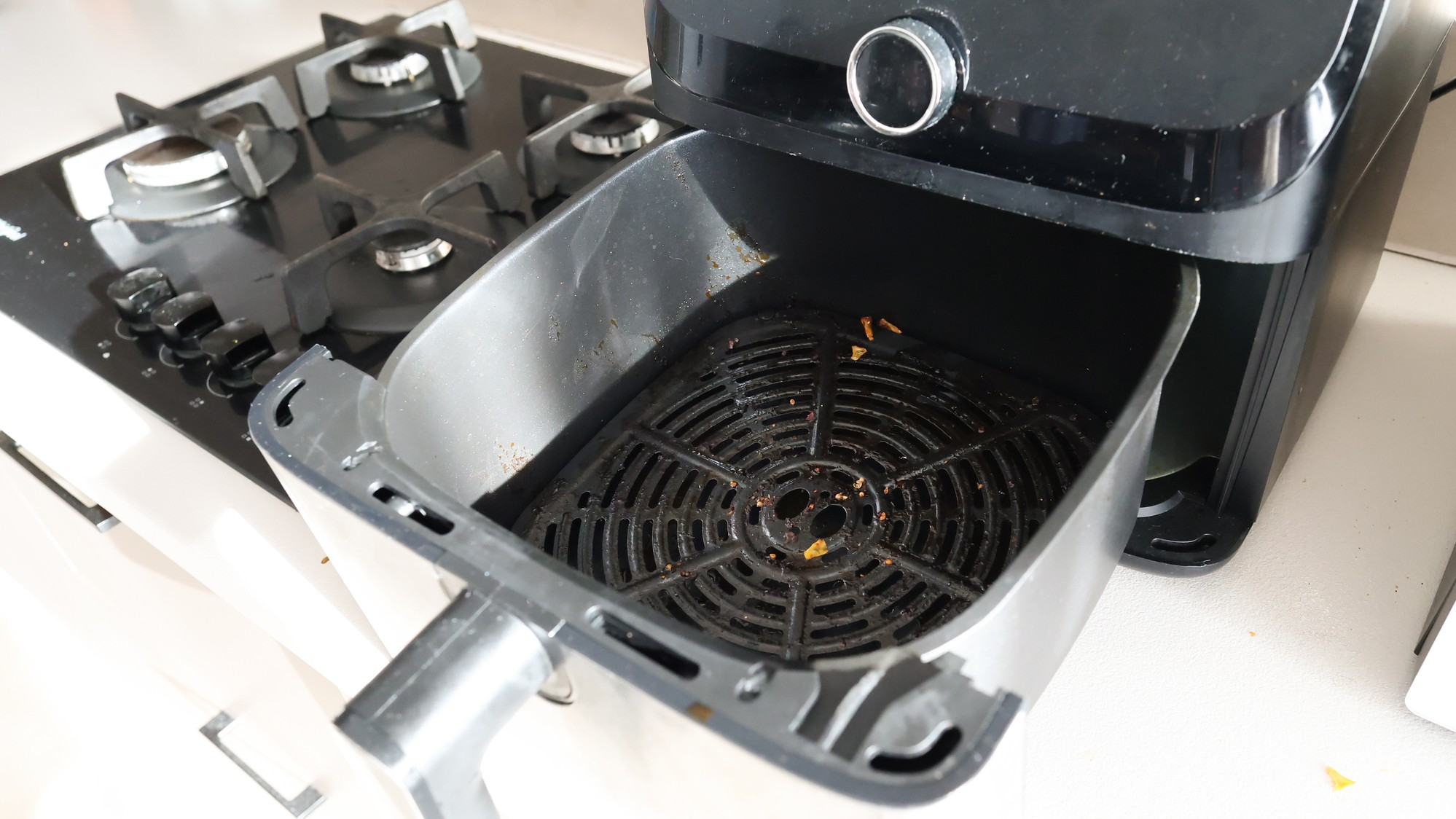
Air fryers get greasy — it’s in their nature — but regular deep cleaning will help prevent dirt building up and causing problems like overheating and bad smells.
Most of your air fryer’s components, including the baskets, racks, and trays, are removable for easy cleaning, and the basket almost certainly has a non-stick coating that prevents food and dirt from getting truly stuck on. Always read the instruction manual before you start washing, and avoid harsh and abrasive cleaning products that could damage the surface.
Advertisement
Don’t have the manual anymore? Find your air fryer on the manufacturer’s website, and you should be able to download a PDF copy.
Sign up for breaking news, reviews, opinion, top tech deals, and more.
It’s a fact of life that air fryers get dirty, but staying on top of cleaning will keep yours working like new (Image credit: Getty Images / KNataliia)
When it’s time to give your air fryer a proper deep clean, start by unplugging it and making sure it’s cool, then soak a cloth in warm, soapy water, wring it out so it’s just damp, and use it to clean any grease and fingermarks from the outside of the appliance. When that’s done, rinse the cloth, wring it out again, and wipe the machine down to remove any soap left behind.
Don’t be tempted to use glass cleaner if your fryer has a window; the next time it heats up, so will any residue left on the glass, releasing fumes. Instead, clean it the same way as the rest of the exterior, then buff away any streaks with a dry cloth.
Advertisement
Now look inside your air fryer. If you notice food stuck to the fan blades or heating element, clean it off with a new toothbrush. If the model allows it, remove the rubber or silicone seal, give it a good wash with warm, soapy water, rinse, and let it dry before replacing it. Dirty seals are a common cause of odors, so keep on top of maintenance to avoid unpleasant smells.
Whatever you do, don’t be tempted to submerge your air fryer in water or try to clean it by using it to heat water or cleaning chemicals.
Advertisement
Espresso machines
Espresso machines also benefit from deep cleaning, which will keep them brewing like new. Every part of the machine that comes into contact with beans, water, or milk is a potential breeding ground for bacteria (and can even grow mold), so it pays to keep up with maintenance.
You should give your coffee maker a quick clean each time you use it, a thorough clean at the end of the day, and a descaling every month, or after brewing 100 cups of coffee (whichever comes first).
Each time you prepare a brew with a manual espresso machine, make sure you rinse the brew group, purge the steam wand, and wipe the outside of the wand with a damp cloth. At the end of the day, empty and wash the drip tray, wipe out the portafilter basket with a damp cloth, and hand-wash the handle and basket.
Your automatic espresso machine’s manual will explain how to access the grinder so you can clean the burrs with a small, stiff-bristled brush (Image credit: Future)
If you have an automatic coffee maker, things are more complicated because moisture and stray coffee grounds inside the machine create a perfect environment for things to grow. At the end of the day, remove the side panel, take out the brewing group, and rinse it according to the manufacturer’s instructions. Remove the waste coffee grounds container, empty it, and wash it with soapy water. Empty and wash the drip tray, too, then use a damp cloth to clean up any coffee grounds you can see inside the machine.
Advertisement
When you’re done, leave everything out to dry thoroughly overnight, and leave the side panel off the machine so moisture can evaporate.
Whatever type of espresso machine you have, also clean the water tank at night and fill it with fresh, clean water in the morning.
It’s also worth cleaning the bean hopper and grinder from time to time, since oils from coffee beans can build up and eventually go rancid, while debris can get caught in the grinder burrs and cause them to stick.
Advertisement
Blenders
With the right care, your blender can last for 10 years or more — trust me, my faithful Dualit has been going even longer!
You should never immerse your blender’s motor unit in water. Instead, detach the jug or blending cup and wipe the outside of the base with a damp cloth. If the jug is dishwasher-safe, this will be the easiest way to get it completely clean, but make sure you read the manual to see how you should clean the blade unit and seal.
If the jug isn’t dishwasher-safe, fill your blending jug about a third of the way up with warm but not boiling water. You can add a very small amount of dish soap at this stage, too, but not too much, or you’ll end up with a mountain of suds.
(Image credit: Getty Images, Grace Cary)
Turn the blender on to give the soapy mixture a good whizz around before emptying the jug and rinsing it with water. Leave the blending jug to fully dry before placing the lid back on, as this could cause damp odors to build up.
Advertisement
If there are any pieces of food left around the blade assembly, remove them with a small, stiff-bristled cleaning brush or an unused toothbrush.
Recycling
All of these tips will help ensure your kitchen appliances have a long, useful life, but eventually a motor will wear out, or a heating element will give up the ghost. When it does, don’t stuff the broken gadget in a cupboard and forget about it — a surprising number of small household appliances can be recycled, and it’s easier than you might expect.
In the US, Best Buy accepts small kitchen appliances for recycling in-store, or you can request a mailing box if you can’t take them in person. Staples and Walmart also offer programs that will accept e-waste, including kitchen appliances. Take a look at MRM Recycling and Earth 911, where you can enter your ZIP code to see e-waste recycling facilities near you.
Advertisement
In the UK, Currys and B&Q take small electrical items for recycling, and your local recycling center might accept them, too. To see your options, visit recyclemyelectricals.org.uk and enter your postcode or address, then enter the type of appliance you want to get rid of. Depending on the type of item you have and its condition, you can choose whether you’d like to donate, repair, or recycle it, and the site will show you locations within a five-mile radius where you can do that.
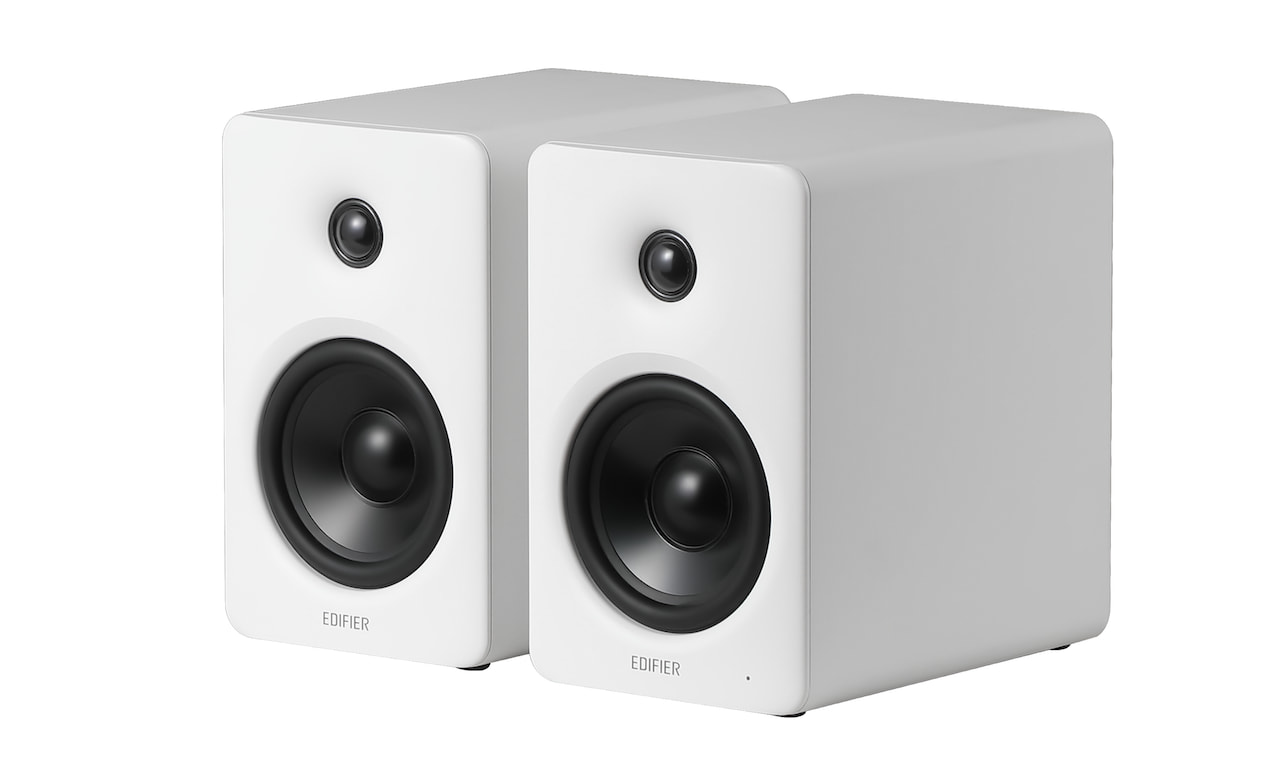
Edifier has built its reputation on delivering affordable, feature-rich speakers that don’t feel like compromises, and the new M90 continues that strategy with a compact active design aimed at both desktop and small room use. First introduced at CES 2026, where we got an early look and listen, the M90 is positioned as a flexible all-in-one solution that can move easily between nearfield listening and casual living room duty. After spending time with the system, it’s clear Edifier is targeting listeners who want simplicity, solid performance, and a smaller footprint at an affordable price.
About My Preferences:
This review is subjective, shaped by how I listen and what I value. I do my best to stay objective, but let’s be honest, bias doesn’t just pack up and leave the room.
My ideal sound leans toward controlled sub-bass, textured mid-bass, a slightly warm and natural midrange, and treble that extends cleanly without turning harsh. I also have mild treble sensitivity, so anything overly bright or aggressive tends to stand out quickly.
Testing equipment and standards can be found here.
Advertisement
Edifier M90 Specifications and Key Features:
The Edifier M90 is a compact active speaker system priced at $369.99, with cabinet dimensions of 133 x 212 x 225 mm (approximately 5.2 x 8.3 x 8.9 inches), making it easy to place on a desk, shelf, or media console. It uses a two-way, bi-amped design built around a 4-inch long-throw mid-bass driver and a 1-inch silk-dome tweeter, with dedicated amplification for each driver.
Total system power is rated at 100 watts RMS, split between 35 watts for the mid-bass and 15 watts for the tweeter per channel, and it can reach up to 100 dB SPL. That’s enough for nearfield listening or smaller living spaces without overreaching.
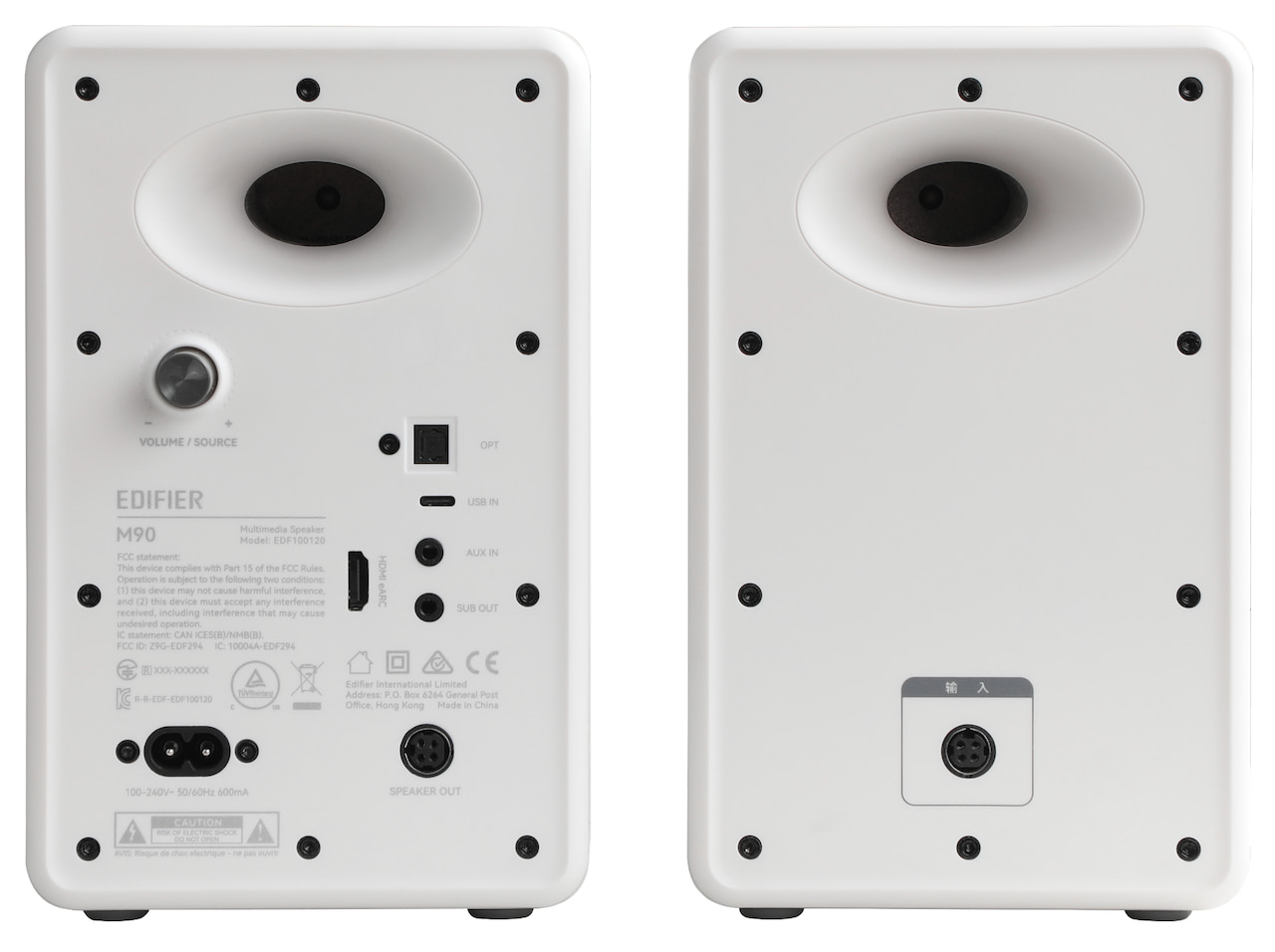
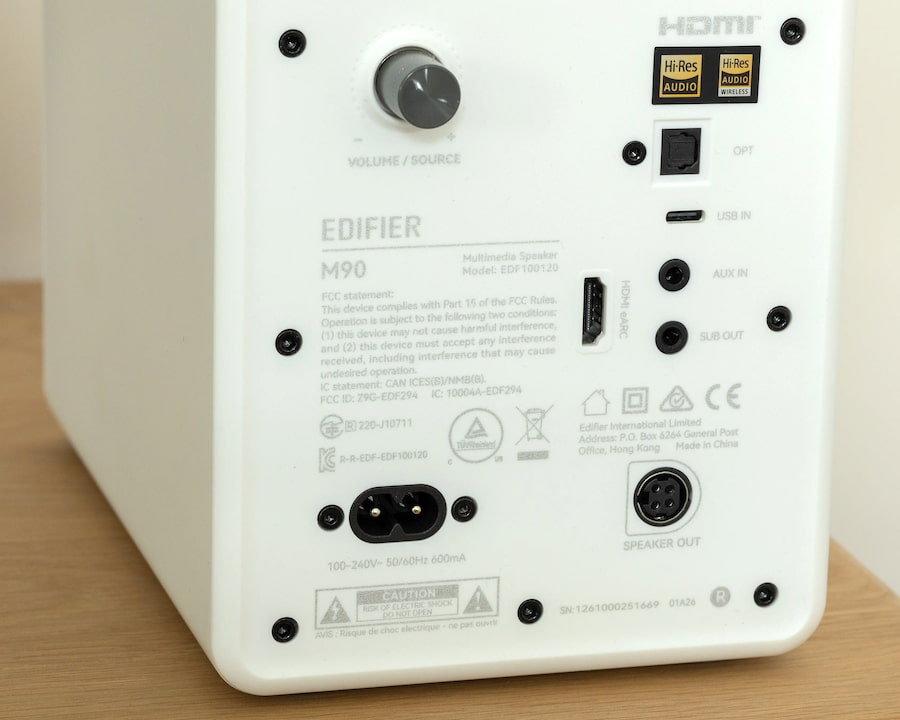
Connectivity is one of the M90’s stronger plays. Around back, you get HDMI eARC, optical, USB-C, and a standard AUX input, which covers everything from TVs and laptops to legacy gear. Wireless playback is handled by Bluetooth 6.0 with LDAC and multipoint support, so you can stream higher-quality audio and switch between devices without the usual friction. The system also supports up to 24-bit/96kHz audio depending on the source.
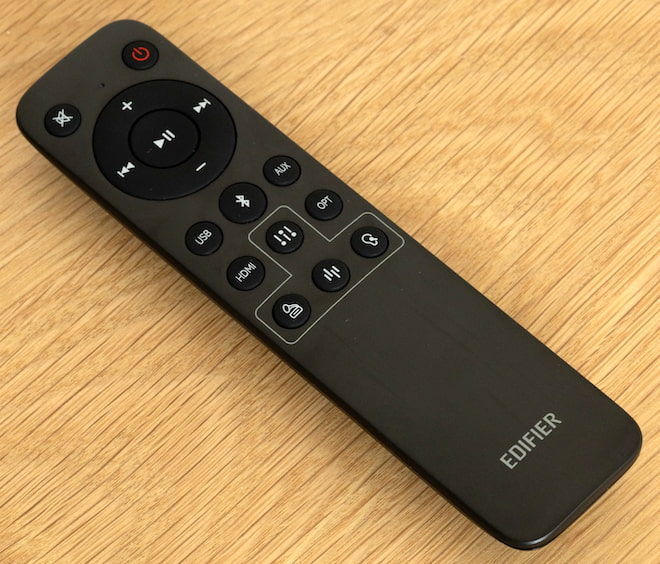
Ease of use hasn’t been overlooked either. The M90 includes onboard controls for quick adjustments, an omnidirectional remote that actually works from across the room, and support for the Edifier ConneX app on iOS and Android for additional control and setup. DSP is doing a lot of the heavy lifting behind the scenes, managing how the speakers handle music, movies, and gaming to keep performance consistent across different types of content.
Advertisement
Build Quality
The M90 feels well-built in the hand and features high-quality paint finishes. It doesn’t look out of place on a desk filled with high-end gear, which should suite deskscape enthusiasts well. The ports on the rear of the device are firmly set within the active speaker’s chassis, leaving no room for wobble or wiggle.
The included remote is a little basic, but is still put together well. The buttons and responsive and sized well, making them easy to manipulate in a dark room. It has plenty of range too, so even larger living and theater rooms shouldn’t run into distance issues.
I did find the M90 to be a little clumsy when used at my desk, however. Other desktop speakers often feature a front-facing selection of controls such as volume and power. The M90 does not, so you’ll need to use the wireless remote to manipulate its state even when sitting right next to it. Well, that or stand up and reach behind the right speaker , which isn’t a viable option for a wide (and cluttered) desk like mine.
Advertisement. Scroll to continue reading.
Advertisement
Listening
The M90 is a pretty flexible pair of speakers, but it feels most at home when running through your favorite album. Its default tuning is well-balanced, delivering crisp treble and an articulate upper-midrange. The M90 renders vocals nicely, capturing a strong share of nuance, particularly during quieter passages. The M90’s lower mids sit slightly back in the mix and aren’t overly emphasized, contributing to a more neutral, audiophile-leaning tonality.
This, paired with the speakers’ linear bass performance, give it a resolving, but sterile, timbre. You’ll want to pair the M90 with a discrete subwoofer to get a truly full-range experience, as the mid-bass woofer on the speaker doesn’t dig down much further than 150Hz.
Cycling through the other presets add varying degrees of warmth back in to the mix, giving guitars and drums additional substance. This also relaxes the upper-midrange, allowing vocals to settle back towards the middle of the sound-stage rather than center-front. I don’t like the “Monitor” and “Dynamic” presets as much as the “Classic” tuning, but then again, I don’t have any particular need for a pre-calibrated studio-monitor profile.
If you want to dive into personalization and fine-grained customization, the Edifier app allows you to configure and apply your own tuning via a 9-band software EQ. It works pretty and well and is responsive. The app is utilitarian in appearance, but functions smoothly and without bugs on Android.
Strong Gaming Performance
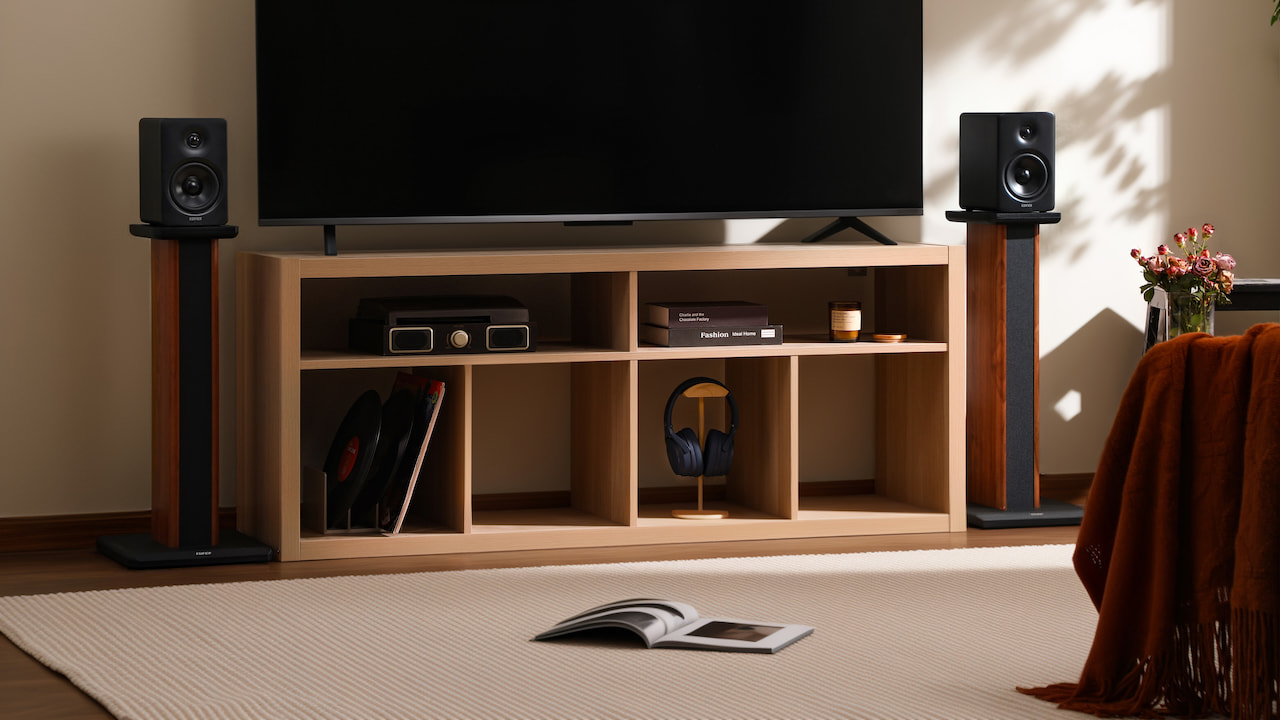
The M90 is a great couch-gaming set of speakers. Hooking it up to my TV via HDMI eARC was easy, and before I knew it I had high-headroom, low-latency audio ready to go. First-person shooters are pretty playable on the M90, even in fairly small rooms. In my gaming den, the speakers are positioned about 10 feet from my chair, flanking a 65-inch OLED TV. In this setup, the M90 delivers its best spatial rendering.
Advertisement
Cramming the M90 on to my work desk delivered somewhat less-exciting results. Its sound-field operates best at longer distances, and my desk (60″ x 38″) didn’t give me enough depth for gunshots and subtle footsteps to accurately render in titles like Call of Duty: Black Ops 7.
Frustrating Quirks, Fixed via Firmware Update
The M90’s excellent performance and great pricing is hamstrung by a few odd-ball choices made on its default firmware. If you’re experiencing unpredictable fade-in behavior or are noticing that the M90 falls asleep during quiet passages in video content, then install the Edifier Connect app and update its firmware. That behavior is a bug that was fixed as of 4/12/2026.
Likewise, if you’ve plugged a subwoofer in to the M90’s line out and found its gain to be too low, you’ll need to update the M90’s firmware and then adjust the gain in the app. This is the only way to adjust the line-out gain, so if you’re not a smartphone owner, you’re out of luck. I’d have liked to have seen additional physical controls for sub-out gain so I can more-easily fine-tune my sub’s output.
Edifier M90 (also available in black)
The Bottom Line
The M90 is a solid, cost-effective speaker for those that want to take advantage of modern eARC capabilities. Its strong technical capabilities, combined with its wide feature-set, make it a compelling proposition, especially when measured against its more-expensive peers. After updating the M90’s firmware, it becomes a capable and hassle-free companion for high-performance audio, especially for those that plan on deploying it in the living room.
Advertisement
Pros:
Wide soundstage
Lots of headroom
Articulate and performant
Customizable via EQ and tuning presets
Solid directional abilities for gaming
Includes responsive wireless remote
Supports wide variety of input modes including HDMI eARC
Cons:
Requires a subwoofer to get full-range sound
Not suited for smaller desktops
Some arrangements may require angled desk stands
No front-facing physical volumes controls, awkward for desktop use
The $99 price tag aligns with Valve’s decision not to subsidize its new hardware. The company announced the Steam Controller in late 2025 alongside a new Steam Machine and the Steam Frame VR headset. Read Entire Article Source link
We spend hours testing every product or service we review, so you can be sure you’re buying the best. Find out more about how we test.
Adobe Illustrator began development in 1985, with its initial release coming out in 1987. 39 years in an eternity in computing terms, and it’s amazing this venerable piece of software is still the ruling king when it comes to design, illustrations and vector-based work.
We’ve long championed it as one of the best graphic design software apps around – but now I’m taking a look at some of the new features that are being introduced with the latest version, Adobe Illustrator 2026 (I explored version 30.3).
Advertisement
Adobe Illustrator: Pricing & plans
Subscription-only but the price befits its status as the king of the hill
Cheaper alternatives available like Canva’s Affinity
But they lack all the features and integration with other Adobe software
Adobe Illustrator is a professional app, and as such, is part of Adobe’s Creative Cloud Pro subscription. As has been the case for years now, you can’t purchase the software, you can only rent it.
Creative Cloud Pro includes over twenty high end software packages, including Photoshop, InDesign, and of course, Illustrator, and will cost you $35 a month for the first three months on an annual subscription (after that deal, the price reverts to $70 a month for the remainder of your agreement).
If that’s too much for you, you can subscribe to Illustrator on its own for $23 a month. Students and educational institutions can also get it or the entire suite at a steep discount.
Be aware though that every time you use generative AI, you’ll be spending credits. You get a set number every month with your plan, but also have the option of purchasing more separately, either as a one-off, or as part of another subscription.
Advertisement
OK, time to take a look at some of the new features that caught my eye in Adobe Illustrator’s new release.
Sign up to the TechRadar Pro newsletter to get all the top news, opinion, features and guidance your business needs to succeed!
Adobe Illustrator: Features
(Image credit: Adobe // Future)
Loads of new features added
I especially like those focused on interface improvements like color artboards
Great tools for refining your designs including snapping to tangents
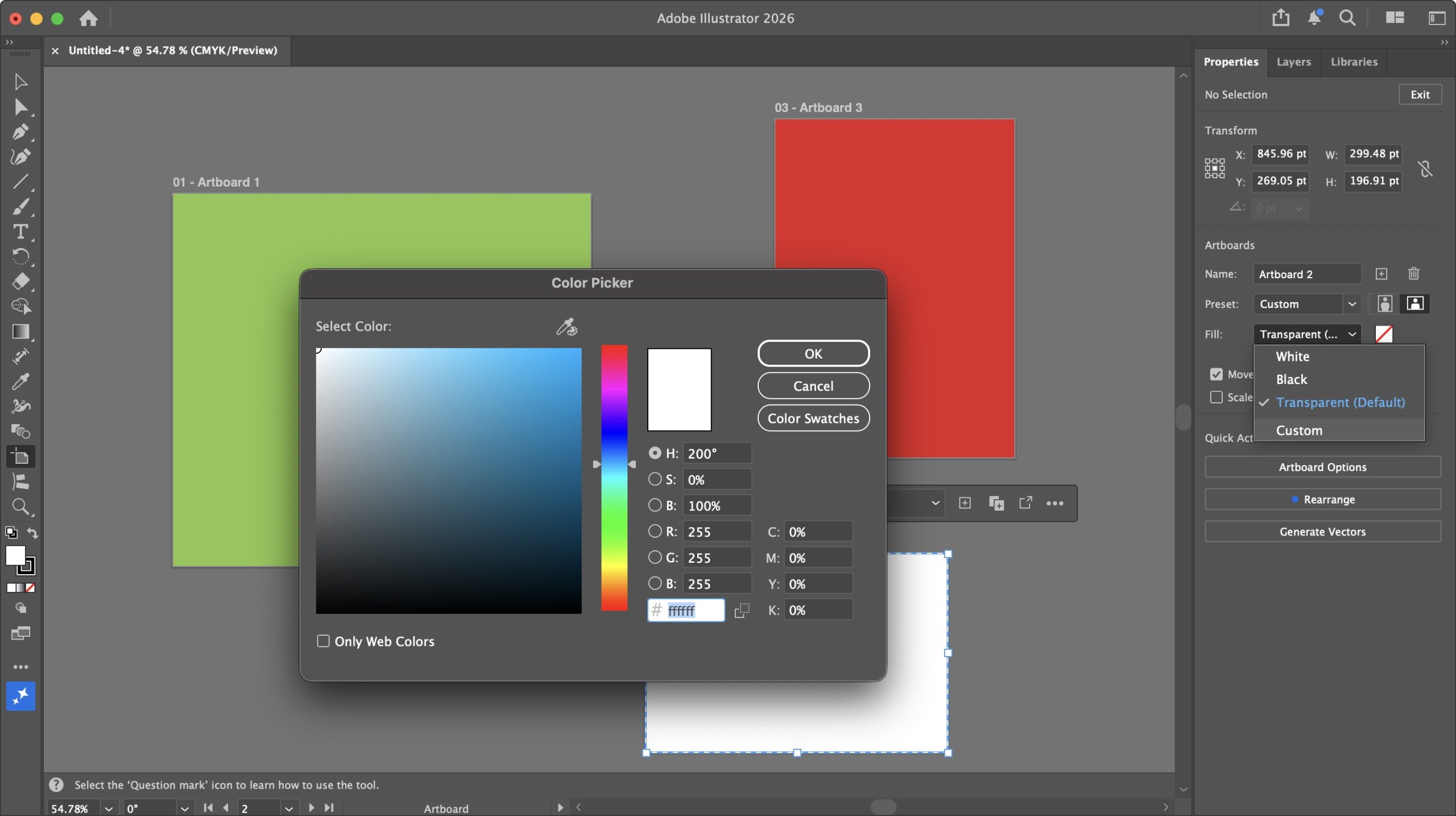
Let’s start with some simple improvements to do with Artboards. Up to now, if you needed them to have colored backgrounds, you’d have to create a rectangle, apply a color to it and use that as your backdrop, which, although doable, was cumbersome.
Now, finally, you can apply different colors to each of your Artboards, right from the Properties panel, through its Fill dropdown menu. By default, it’s set to transparent, but you can also choose either black or white, and if that’s not enough, selecting ‘Custom’ gains you access to a virtually unlimited gamut of colors.
Advertisement
Right-clicking on the canvas offers some handy options to manage your document’s artboards. You’re able to rename, duplicate, or delete them, or even create new ones with ease. There’s also the option to lock a selected artboard, but sadly no option to unlock it – to do that you need to go to Window > Artboards, and click on its lock icon from the popup window. So, I guess ‘cumbersome’ hasn’t completely gone away.
(Image credit: Adobe // Future)
But it’s still an improvement. And speaking of improvements, the classic Eyedropper tool has been enhanced, and I found it works more reliably than before. A single click, for instance, will now properly copy the color and stroke of a selected object (you can extract more of course, but that depends on what you selected in the Eyedropper options).
There’s also shift-clicking. Press and hold the shift key, and you’ll get a large circle around the eyedropper cursor. The bottom half represents the current color, while the top half is the color it’ll change to once you click.
A color picker that works as advertised and has added functionality, I can work with that.
Advertisement
(Image credit: Adobe // Future)
This leads us to some subtle additions you probably never knew you needed, like how the end of a straight line now snaps to a circle’s tangent, or how one line snaps perpendicularly to another. Those are on by default and will make precise designs much easier.
And speaking of much easier, how about gradients with fewer banding – or no banding at all, even? Depending on how close you get to a gradient, you’ll start to notice lines along it as the one color changes to another. This latest version of Illustrator introduces two options to dissipate those lines, creating a much smoother gradient.
(Image credit: Adobe // Future)
The first one is via a new menu in the gradient Properties called “Method”. By default, it’s set to ‘Classic’, but change it to ‘Perceptual’, and it should look more like it would in real life – at least that’s the intention. The change can be quite subtle depending on the complexity of your gradient, and in my experience, it ranged from no discernible change, to a pleasing improvement.
The second option is a ‘Dither’ tick box. This one works in either ‘Method’, and when toggled, it adds a mesh of subtle imperfections to the gradient to conceal any banding, and I found the results to be very effective.
Advertisement
Adobe Illustrator: AI tools
(Image credit: Adobe // Future)
Introduces impressive AI-based tools to expand your creation’s horizons
But why do all the hard work when you can let a complex algorithm do it all for you, right? Right? Well… not quite, but Adobe Illustrator now comes with some interesting “AI” tools to broaden your digital creations, like Generative Expand.
Triggering the tool will give you handles which you then drag beyond the confines of your original creation. This will create pink borders, making it clear where Illustrator needs to apply itself. When you’re ready (and you have enough credits), click on ‘Generate’ and the machine will get to work.
It should only take a few seconds but I found the end results, like Generative Expand on Photoshop, to be impressive – and I don’t particularly like AI! The results weren’t perfect, mind, but it should be much easier to manually refine the output as opposed to creating all that expanded area yourself.
(Image credit: Adobe // Future)
Another complex algorithm feature I was impressed by is Turntable. It’s designed to turn a 2D vector graphic into a 3D one. Your results may vary, and the tool itself warns you if it thinks the image you’ve selected might not yield good results. That warning may, or may not be correct – sometimes the only way to know for sure is to spend your credits and try it out.
Advertisement
The objects I experimented with, varied in their success. The globe was… interesting, but then again Illustrator did warn me it might not work as expected, so kudos for the warning. The butterfly was mostly flawless, and the horse’s head (a sketch of a head, not a Godfather triggering nightmare) was perfect.
So yes, your mileage may vary, but when it works great, it’s eye opening (but not in A Clockwork Orange way). Once done, you’re able to rotate your now-3D object 360 degrees using a slider. To the right of it are Up and Down arrows; these allow you to see your design from above or below by a maximum of 30 degrees either way.
All in all, Illustrator keeps getting refined with each update. The improvements are most welcome, and the new features will certainly please a lot of artists. There’s something here for everyone which is always a positive thing.
Advertisement
Should I buy?
(Image credit: Adobe // Future)
Buy it if… You need a powerful vector-based illustration system with a steady stream of improvements and new features to make the expensive subscription worthwhile
Don’t buy it if… You’re not a fan of the increasing incursion of AI into the software, or despite all its features, the asking price is just too much for you.
Get caught up on the latest technology and startup news from the past week. Here are the most popular stories on GeekWire for the week of April 19, 2026.
Microsoft is offering a one-time voluntary retirement program for the first time in its 51-year history, giving thousands of long-serving U.S. … Read More
Amazon CEO Andy Jassy added AWS infrastructure leader Prasad Kalyanaraman to the company’s S-team and promoted Dave Brown to senior vice president, according to an internal memo viewed by GeekWire. … Read More
Microsoft is dropping Xbox Game Pass Ultimate from $29.99 to $22.99 a month, but future Call of Duty games will no longer be available at launch. … Read More
Seattle’s mayor is exploring a moratorium on new data centers, but the city’s real utility challenges — skyrocketing electricity prices, a looming capacity gap, and an eastside water defection — have nothing to do with data centers. … Read More
Seattle venture capitalist Nick Hanauer responds to Chris DeVore’s recent call for Democrats to embrace capitalism, arguing that the real question isn’t whether to support free markets but which version of capitalism America should be building. … Read More
Qualtrics CEO Jason Maynard shook up the company’s senior leadership team on Friday at its dual headquarters in downtown Seattle and Provo, Utah, less than three months after taking the helm of the experience management technology company. … Read More
Starbucks is laying off workers in its technology organization as new CTO Anand Varadarajan, who joined from Amazon in January, restructures the team. … Read More
Sheetz is an American gas station and convenience store chain concentrated in seven Mid-Atlantic and Midwestern states with over 829 locations in 493 cities. According to the American Customer Satisfaction Index 2025 Convenience Store Study, the company recently tied with Wawa for second place as the best U.S. convenience store. The largest number of Sheetz locations are in its home state of Pennsylvania, where 316, or 38% of all Sheetz stores are based. After Pennsylvania, the next most Sheetz-populous state is North Carolina with 142 stores, followed by Ohio with 135, Virginia with 124, West Virginia with 61, Maryland with 44, and Michigan with seven stores.
The name Sheetz goes back to Jerry Sheets, who married a woman from a family that owned a large dairy business in Altoona, Pennsylvania. When his nametag was misspelled as “Sheetz” as he attended a dairy conference, he liked it enough to officially change his last name to Sheetz. The Sheetz business empire traces its roots to 1952, when Jerry’s son Bob purchased one of Jerry’s unprofitable dairy stores located in Altoona and founded the Sheetz company. Altoona remains the home of Sheetz to this day.
The Sheetz family owns and operates the company with a 90% share, while the employees own the rest through an employee stock ownership plan. Sheetz family members at the helm include Travis Sheetz as president and CEO, Joe Sheetz as chairman of the board, and Stan Sheetz as board director, with additional family members in positions like EVP of operations, EVP of marketing and supply chain, and EVP of strategy and information technology.
Advertisement
What else should you know about Sheetz?
George Sheldon/Shutterstock
Some Sheetz milestones include the first self-service gas pumps in 1973, the introduction of its Made To Order, or MTO, menu in the mid-1980s, and its memorable “Free My Beer” campaign, which successfully led to the state of Pennsylvania allowing the sale of beer in convenience stores that also sold gasoline in 2016. Sheetz will also let you charge your EV at certain locations that have had chargers installed.
The journey from a single store to the current count of 829 took 74 years and the efforts of numerous members of the Sheetz family. Bob’s brother Steve had the idea to expand the Sheetz venture in 1969, and by 1972, there were 14 Sheetz stores. By 1983, Sheetz boasted 100 stores, and Bob turned over the business to Steve. By 1995, Bob’s son, Stan, became president of Sheetz. Stan added Sheetz-branded coffee and bakery products to the stores’ lineups, as well as a touchscreen ordering system. In 2013, Joe S. Sheetz, who was Bob’s nephew, became president and CEO, succeeded by current CEO Travis Sheetz in 2022.
Advertisement
Sheetz gas stations and convenience stores continue to expand their empire, far from their original location in Altoona, Pennsylvania. A newly opened Sheetz location in Macomb County, Michigan, recently dropped its gas price below $2 as a way to generate local customer traffic. It may take some time before gas prices get that low again.
Apple will announce its second-quarter financial results for 2026 on April 30. Here’s what happened in the quarter, and what analysts think is going to be revealed.
Apple CEO Tim Cook
The Q2 2026 financial results will be shared by Apple in a press release on April 30. A short time after, at 5 P.M. Eastern, it will hold its usual analyst and investor conference call. That call will involve both current CEO Tim Cook and CFO Kevan Parekh discussing the quarter and providing guidance for future quarters. There will also be questions from analysts about the quarter and expectations for Q3 and beyond. Continue Reading on AppleInsider | Discuss on our Forums




























































You must be logged in to post a comment Login