Across the country, thousands of students are waving goodbye to high school and preparing to head off to college. If you know one such student, and want to gift them a gadget to send them off in style, you’ve come to the right place. I’ve rounded up what I think are the best high school graduation gifts you can buy, at a range of different budgets.
All of these gifts will come in handy in college, whether for work, play or general student life. I’ve included noise-cancelling headphones to block out distractions while studying, robust Bluetooth speakers for when it’s time to bring the party, and budget-friendly coffee makers for an instant boost in time for morning seminars.
I’ve also included some top, student-friendly laptops and tablets, but we have a separate guide to the best student laptops if you can’t find exactly what you’re looking for here. I’ve separated my suggestions into budget bands, for easier browsing.
Advertisement
Under $50
For under $50 you can pick up some really great compact Bluetooth speakers — the Tribit Stormbox Micro 2 is the standout here, scoring a perfect five stars in our review. In this price bracket, I’d also be looking at quirky desk accessories that boost productivity and deliver a smile, and colorful water bottles and insulated coffee cups, to keep your new student refreshed on the go.
Advertisement
$50-$100
In the $50-$100 bracket, I love Kodak’s instant-printing digital cameras, tapping into the retro tech trend and giving your student an easy way to decorate their dorm room. There are also a few strong, budget-friendly gadgets worth considering: the Sony Pro HQ51 are our favorite cheap, noise-cancelling headphones, and the dinky Instant Vortex Mini air fryer is ideal for kitting out a cramped kitchen.
$100-$200
Looking to spend over $100? Great news: there’s plenty of excellent tech to choose from in this price bracket. An e-reader makes a stellar gift for literature students or anyone who loves to read in their spare time — both the Kindle and Kobo are worth considering.
Advertisement
On the kitchen front, Ninja has a couple of appliances we rate really highly. For caffeine addicts, the DualBrew Pro is a capable coffee maker that can make a range of brews in different styles and sizes, while the Crispi is an innovative air fryer that uses the same glass containers for cooking and storage — perfect for batch cooking in small kitchens.
Sign up for breaking news, reviews, opinion, top tech deals, and more.
$200-$300
Want to spend a bit more? In the $200-$300 bracket, we have gadgets that are more of a long-term investment. The Sony WH-1000XM5 are some of the best noise-cancelling headphones on the market, and will have no trouble blocking out noisy roommates or crowded cafeterias so your student can focus. In the tablet market, we rate the Lenovo Idea Tab Pro as an excellent iPad alternative for an ultra-competitive price.
Advertisement
Over $300
Looking to spend over $300? I’ve picked a selection of laptops and tablets that would make an excellent study companion for a new student, including the new MacBook Neo that everyone’s talking about at the moment. For more options, head to my college tablet and laptop guide.
One of the best interfaces for your car’s infotainment screen is Android Auto. You can use the same media, navigation, and entertainment apps without worrying about syncing progress between your car and your phone. To get started with Android Auto, all you need is a compatible vehicle and a smartphone with Android 9.0 or newer. Depending on what your car supports, you simply connect your phone using a data cable or via Bluetooth.
Most of what you will be doing on Android Auto will likely be navigation or music playback through services like Google Maps and Spotify. That’s not all the platforms can handle, though. There are dozens of free Android Auto apps you can find use for — some may already be services you use on a daily basis that you didn’t realize have Android Auto support built-in.
If you’re curious to see what else you can accomplish with Android Auto in your vehicle, here are some apps worth trying. All of them are free to use and elevate your driving experience in one way or another.
Advertisement
SpotHero
Cosmin4000/Getty Images
Perhaps the only thing more infuriating than driving bumper to bumper in traffic is successfully trying to find a parking spot that’s convenient. If this is something you struggle with, SpotHero is an app you should definitely consider installing. It works by listing available parking locations nearby, including locations like airports or garages. You can enter specific dates and times, and the app will fetch you the best parking spaces around the area. For locations that support it, you can then reserve the parking spot and pay via Google Pay.
SpotHero works in all major cities in the U.S. and supports Android Auto. Being able to scan through unfamiliar areas to find affordable parking is a convenience everyone will appreciate. SpotHero also displays the best parking locations around ongoing events like concerts. The app has a 4.4-star rating on the Google Play Store and has over a million installs.
Advertisement
Audible
Ascannio/Shutterstock
A lot of us enjoy listening to music during our commutes. Apps like Spotify and YouTube Music have Android Auto support that makes playback control easier. Plus, you can always summon Google Assistant or Gemini to skip through tracks or play specific ones using voice commands. However, if you’re an avid audiobook listener, then you’d be glad to know that Audible supports Android Auto too. There are plenty of cheaper alternatives to Audible, but it remains the gold standard if you’re looking for a large library that you can enjoy on practically every platform available.
Audible has you covered even if your vehicle doesn’t support Android Auto. On the mobile app, you can navigate to Profile > Settings > Player and enable the “Automatic Car Mode” toggle. It automatically switches to a larger, more simplified interface with playback controls when you connect to your car via Bluetooth.
Advertisement
Vivaldi Browser
Zamrznuti tonovi/Shutterstock
Android Auto can be as useful as you want it to be — you just need to get acquainted with the right apps. There are plenty of Android Auto tips and tricks that can elevate the experience, like personalizing the experience with a different wallpaper or trying out more powerful alternatives to popular services. Just when you think you’ve maxed out the functionality that your car’s infotainment screen can provide, there’s Vivaldi Browser.
The app unlocks a way for you to surf the web through a web browser that’s designed to work with Android Auto. It comes with an ad blocker built-in and a few other privacy-oriented features that let you access virtually any website on your car’s infotainment display. If you have any specific streaming platforms that don’t have Android Auto support natively, you can use Vivaldi Browser to watch content when you’re safely parked.
Advertisement
You also get a decent bit of customizability with the browser. For instance, you can swap between light and dark modes, change the background of the start page, and capture screenshots if you happen to find something interesting. Vivaldi gets you the usual lot of features you find in other web browsers, like the ability to bookmark pages, view recently closed tabs, or switch to a friendly reader view that gets rid of clutter on web pages.
Advertisement
GameSnacks
Adnan Ahmed/SlashGear
We’ve all found ourselves seated in parking lots or outside a friend’s home waiting for them to come out. GameSnacks is a service by Google that’s designed to accommodate you during these situations. It’s a collection of simple games that you can play on your car’s infotainment screen.
You have titles like “Classic Solitaire” and match-three games like “Fruit Cube Blast.” There is a healthy catalog of classic games to choose from, and there are even a few multiplayer games you can enjoy if you’re accompanied by a passenger. GameSnacks is great for killing time, but only when you’re parked safely — playing games while driving a vehicle is obviously a no-go. By the way, since these games are based on HTML5, you can also play them on a browser on any device.
The saga of Trump suing his own IRS for $10 billion just got weirder. What started as a brazenly corrupt attempt to personally pocket $10 billion in taxpayer money has now morphed into something arguably worse: a $1.7 billion patronage slush fund — unappropriated by Congress — that Trump could dole out to loyal MAGA allies who claim they were “victimized” by the Biden administration.
As you’ll recall, Trump sued his own IRS over something that a contractor (who has already been convicted and is currently serving in prison) did: leaking some tax returns Trump had promised to release, but never did. He asked for $10 billion, in a situation where he, himself, would decide if he got paid or not. When his own DOJ told the court that it was negotiating a settlement, the judge pointed out that she was concerned that it looked an awful lot like a single party negotiating with itself over how much of the Treasury it should receive.
The judge — Kathleen Williams — asked for further briefing from “both” parties on this, and the deadline is coming up quickly, which is why various purported “settlements” are leaking to the press. A few days ago it was going to be that Trump and all of his family and all of his related businesses would magically have all IRS audits dropped, which would be an astoundingly brazen level of corruption.
But now ABC is reporting about another potential “settlement” (again, “settlement” is the wrong word — it’s Trump’s legal team negotiating with Trump’s DOJ, which is run by his former legal team. It’s one team negotiating with itself) which is just as egregious and corrupt: Trump would apparently agree to drop his case against the IRS in exchange for… a $1.7 billion slush fund of taxpayer money that he could dole out to his friends who whine to the government that they were “targeted” for retribution by a “weaponized” Biden administration.
Advertisement
President Donald Trump is expected to drop his $10 billion lawsuit against the Internal Revenue Service in exchange for the creation of a $1.7 billion fund to compensate allies who claim they were wrongfully targeted by the Biden administration, sources familiar with the matter told ABC News.
The commission overseeing the compensation fund would have the total authority to hand out approximately $1.7 billion in taxpayer funds to settle claims brought by anyone who alleges they were harmed by the Biden administration’s “weaponization” of the legal system, including the nearly 1,600 individuals charged in connection with the Jan. 6 Capitol attack as well as potentially entities associated with President Trump himself.
So, yeah, a $1.7 billion slush fund for Trump supporters who (in some cases) literally engaged in insurrection to overturn the results of a free and fair election, or for various hangers-on who play the victim every chance they get and pretend the Biden administration “weaponized” the government against them.
It’s not worth getting into the possibility of using this slush fund to pay off the ~1,600 Trump supporters who were duly convicted in a court of law for various crimes, all of whom were later pardoned by Trump (even as dozens of them have been re-arrested for other crimes, which should put to rest any remaining notion that Trump is the “law and order” president — but of course it won’t).
But we can talk about the various claims of “weaponization” because we covered many of them. Remember, Jim Jordan got himself appointed as the anti-weaponization czar in Congress, and used that to actually weaponize the government to investigate and attack individuals and organizations who were not the government, but who Jordan felt unfairly pointed out disinformation and lies from those MAGA supported.
Advertisement
The supposed investigations into the “weaponization” of the government to suppress speech served only to suppress the First Amendment protected speech of academic researchers and organizations. And now all those who falsely insisted that the Biden administration “censored” them, even as all the evidence showed that social media companies removed content because they found that the content violated their own rules, will get to line up at the trough to get free money from American taxpayers.
This is Donald Trump handing out American taxpayer money that has never been appropriated by Congress for this purpose — shoveling it to anyone who claims victimhood under his banner, whether convicted insurrectionists, Trump allies who want their legal bills paid, or propagandists who got called out for spreading disinformation. We’re already seeing this play out. This week, Trump’s DOJ “settled” with the pandemic’s wrongest man, Alex Berenson, who got suspended from Twitter not because of any government action, but because Twitter felt that he violated their rules against spreading health misinformation.
Berenson has been suing over this for years (and mostly losing), but this week Trump agreed to pay him $150,000 and “admit” that the Biden administration tried to censor him. While some are trying to present this as some sort of big victory, getting Donald Trump to blame Joe Biden for something that didn’t happen — while shoveling taxpayer money to a man who publicly supports Trump — is not exactly a landmark legal victory. It’s almost expected in the Trump era.
The Berenson payout is a preview. Once the $1.7 billion fund is running, expect a line out the door of Trump’s groveling fans making false claims about Biden “weaponizing” the government — all of it paid for by taxpayers, none of it appropriated by Congress.
Owners can continue reading ebooks that they’ve already downloaded, and they can also still sideload books using a USB cable (from, for example, Project Gutenberg). And PCMag points out that “There are plenty of e-stores where you can buy DRM-free novels legally, such as ebook.com and Smashwords. If you want to try this process for free, public-domain repositories such as the one at Standard Ebooks are a great place to start.” (eBook files can be converted for the Kindle with the open source tool Calibre.)
New ebooks can no longer be purchased directly from Amazon. But most of Amazon’s affected devices “have not received firmware updates for over a decade,” notes the blog OMG Ubuntu, “and most lost on-device access the Kindle Store.” Some Kindle owners are taking things even further: You can unlock the firmware of older devices to add extra functionality (custom screensavers, epub support) or run entirely different software. On the hardware hacks side, some choose to turn old Kindles into photo frames or online dashboards. TechCrunch offers some caveats about jailbreaking: This process allows users to install custom fonts, new screensavers, alternative reading apps, and even third-party tools that expand the Kindle’s functionality… [I]t’s important to note that jailbreaking a Kindle might violate Amazon’s terms of service. In many jurisdictions, jailbreaking isn’t considered a criminal offense for personal use, but it may become a crime if it involves copyright infringement, illegal software distribution, or the sale of modified devices. Many Kindle owners who opt to jailbreak view it as a method to gain control over a device they purchased that is still functional, rather than being forced to buy a new device. However, jailbreaking is technical and carries risks, including the possibility of rendering the device unusable if something goes wrong. It also isn’t possible on every Kindle model or firmware version, so before proceeding, Kindle owners should first spend some time researching if their device is compatible. Alternately, PCMag notes, “If you’re feeling particularly virtuous, you can donate your old Kindle to a local library or send it back to Amazon free of charge via its electronic recycling program.”
Given that some of the more famous demos were by Honda and Tesla, you might be forgiven for thinking you need pockets as deep as a car company to get into humanoid robotics — and maybe that was true once, but now Asimov v1 is here. It doesn’t have a positronic brain, and you’ll have to code in the Three Laws for yourself, but at least you have the freedom to, because Asimov is open source.
It’s not exactly cheap: the kit version comes with a target price of $15,000 USD, but they do provide the Bill of Materials on the GitHub repository so you can try and hunt down some deals. Still, compared to the millions poured into these sorts of robots in the early days, we have to consider it accessible. With 25 total degrees of freedom, you’ll have to source a lot of actuators, but at least the onboard compute will be easy to get. Rather than begging CERN for spare positrons, you’ only need a Raspberry 5 and a Radaxa CM5.
No word on if this robot can write a symphony — though we’ve seen software that can — and its 5 kg personal best for squats and 18 kg single-arm lat raises aren’t going to impress the bros at the gym. But hey, at least now you have someone to shake your chair for sim gaming. If you’re wondering what the deal with these androids is, well, so were we.
Users may not be able to combine Microsoft software with competitors’ products effectively, the CMA has been told.
The UK’s competition watchdog has launched an investigation into Microsoft’s enterprise software ecosystem over interoperability concerns.
The Competition and Markets Authority (CMA) probe will consider whether Microsoft should be given a ‘strategic market status’ (SMS) designation reserved for companies that dominate the UK market in a particular digital activity.
The investigation will also assess whether Microsoft’s product bundling, limits in interoperability for users, and default settings prevent customers from switching to competing services. This will include probing how Microsoft’s AI competitors are able to integrate with its business software.
Hundreds of thousands of UK organisations across public and private sectors use Microsoft’s enterprise software daily, spanning the Windows operating system, Microsoft 365 suite and Copilot AI.
The CMA finds that Microsoft has more than 15m commercial UK-based users across its ecosystem, making it a key provider of productivity tools in the country.
The competition watchdog said it has received information that users may not be able to combine Microsoft software with competitors’ products effectively.
Advertisement
In its probe, it will examine Microsoft’s wide range of products, including productivity software, personal computer and server operating systems, database management systems and security software.
The investigation will take up to nine months to complete. The authority has invited organisations based in the UK and around the world, including rival tech companies and business software customers, to share their experiences.
This is the fourth SMS investigation opened by the CMA since the UK’s digital markets competition regime came into force in January 2025. The law gives the CMA additional powers to propose remedies and improve market competition in the country. Early last year, it opened a probe into Apple and Google over their mobile ecosystems,
The designation would also allow the CMA to potentially intervene on concerns from a separate investigation into Microsoft’s software licensing in the cloud market.
Advertisement
“Business software is a cornerstone of how the UK economy functions, from small businesses to major public services and infrastructure. Hundreds of thousands of customers in the UK rely on Microsoft’s systems, which is why it’s so important to ensure these services are delivering good outcomes,” said Sarah Cardell, the CMA’s CEO.
“Our aim is to understand how these markets are developing, Microsoft’s position within them and to consider what, if any, targeted action may be needed to ensure UK organisations can benefit from choice, innovation and competitive prices.”
Don’t miss out on the knowledge you need to succeed. Sign up for the Daily Brief, Silicon Republic’s digest of need-to-know sci-tech news.
For AI systems to keep improving in knowledge work, they need either a reliable mechanism for autonomous self-improvement or human evaluators capable of catching errors and generating high-quality feedback. The industry has invested enormously in the first. It’s giving almost no thought to what’s happening to the second.
I’d argue that we need to treat the human evaluation problem with just as much rigor and investment as we put into building the model capabilities themselves. New grad hiring at major tech companies has dropped by half since 2019. Document review, first-pass research, data cleaning, code review: Models handle these now. The economists tracking this call it displacement. The companies doing it call it efficiency. Neither are focusing on the future problem.
Why self-improvement has limits in knowledge work
The obvious pushback is reinforcement learning (RL). AlphaZero learned Go, chess, and Shogi at superhuman levels without human data and generated novel strategies in the process. Move 37 in the 2016 match against Lee Sedol, a move professionals said they would never have played, didn’t come from human annotation. It emerged from AI self-play.
What enables this is the stability of the environment. Move 37 is a novel move within the fixed state space of Go. The rules are complete, unambiguous, and permanent. More importantly, the reward signal is perfect: Win or lose, and immediate, with no room for interpretation. The system always knows whether a move was good because the game eventually ends with a clear result.
Advertisement
Knowledge work doesn’t have either of those properties. The rules in any professional domain are dynamic and continuously rewritten by the humans operating in them. New laws get passed. New financial instruments are invented. A legal strategy that worked in 2022 may fail in a jurisdiction that has since changed its interpretation. Whether a medical diagnosis was right may not be known for years. Without a stable environment and an unambiguous reward signal, you cannot close the loop. You need humans in the evaluation chain to continue teaching the model.
The formation problem
The AI systems being built today were trained on the expertise of people who went through exactly that formation. The difference now is that entry-level jobs that develop such expertise were automated first. Which means the next generation of potential experts is not accumulating the kind of judgment that makes a human evaluator worth having in the loop.
History has examples of knowledge dying. Roman concrete. Gothic construction techniques. Mathematical traditions that took centuries to recover. But in every historical case, the cause was external: Plague, conquest, the collapse of the institutions that hosted the knowledge. What’s different here is that no external force is required. Fields could atrophy not from catastrophe but from a thousand individually rational economic decisions, each one sensible in isolation. That’s a new mechanism, and we don’t have much practice recognizing it while it’s happening.
When entire fields go quiet
At its logical limit, this isn’t just a pipeline problem. It’s a demand collapse for the expertise itself.
Advertisement
Consider advanced mathematics. It doesn’t atrophy because we stop training mathematicians. It atrophies because organizations stop needing mathematicians for their day-to-day work, the economic incentive to become one disappears, the population of people who can do frontier mathematical reasoning shrinks, and the field’s capacity to generate novel insight quietly collapses. The same logic applies to coding. Our question is not “will AI write code” but “if AI writes all production code, who develops the deep architectural intuition that produces genuinely novel systems design?”
There is a critical difference between a field being automated and a field being understood. We can automate a huge amount of structural engineering today, but the abstract knowledge of why certain approaches work lives in the heads of people who spent years doing it wrong first. If you eliminate the practice, you don’t just lose the practitioners. You lose the capacity to know what you’ve lost.
Advanced mathematics, theoretical computer science, deep legal reasoning, complex systems architecture: When the last person who deeply understands a subfield of algebra retires and no one replaces them because the funding dried up and the career path disappeared, that knowledge isn’t likely to be rediscovered any time soon.
It’s gone. And nobody notices because the models trained on their work still perform well on benchmarks for another decade. I think of this as a hollowing out: The surface capability remains (models can still produce outputs that look expert) while the underlying human capacity to validate, extend, or correct that expertise quietly disappears.
Advertisement
Why rubrics don’t fully substitute
The current approach is rubric-based evaluation. Constitutional AI, reinforcement learning from AI feedback (RLAIF), and structured criteria that let models score models are serious techniques that meaningfully reduce dependence on human evaluators. I’m not dismissing them.
Their limitation is this: A rubric can only capture what the person who wrote it knew to measure. Optimize hard against it and you get a model that’s very good at satisfying the rubric. That’s not the same thing as a model that’s actually right.
Rubrics scale the explicit, articulable part of judgment. The deeper part, the instinct, the felt sense that something is off, doesn’t fit in a rubric. You can’t write it down because you need to experience it first before you know what to write.
What this means in practice
This isn’t an argument for slowing development. The capability gains are real. And it’s possible that researchers will find ways to close the evaluation loop without human judgment. Maybe synthetic data pipelines get good enough. Maybe models develop reliable self-correction mechanisms we can’t yet imagine.
Advertisement
But we don’t have those today. And in the meantime, we’re dismantling the human infrastructure that currently fills the gap, not as a deliberate decision but as a byproduct of a thousand rational ones. The responsible version of this transition isn’t to assume the problem will solve itself. It’s to treat the evaluation gap as an open research problem with the same urgency we bring to capability gains.
The thing AI most needs from humans is the thing we’re least focused on preserving. Whether that’s permanently true or temporarily true, the cost of ignoring it is the same.
Ahmad Al-Dahle is CTO of Airbnb.
Welcome to the VentureBeat community!
Advertisement
Our guest posting program is where technical experts share insights and provide neutral, non-vested deep dives on AI, data infrastructure, cybersecurity and other cutting-edge technologies shaping the future of enterprise.
Read more from our guest post program — and check out our guidelines if you’re interested in contributing an article of your own!
Need something new for your reading list? This week, we recommend Cecile Pin’s Celestial Lights and the new Image Comics series, If Destruction Be Our Lot.
Celestial Lights
Henry Holt and Co.
Another melancholic narrative about love, loss and the consequences of human ambition, with space as the backdrop? Oops, I might have a type. Cecile Pin’s Celestial Lights is a short and contemplative novel about Oliver Ines, or Ollie, a man who has always been drawn to the stars and is one day chosen to lead a 10-year mission to one of Jupiter’s moons, Europa. It hops through time, following Ollie’s memories across his life and weaving in logs from the mission.
While space exploration is part of it, this isn’t a book to grab if you’re looking for excitement and adventure. Celestial Lights is, as the blurb explains, “A portrait of a complicated man and a breathtaking tale of memory, personal choices, and the relationships that define us.”
Advertisement
If Destruction Be Our Lot
Image Comics
The first issue of this series came out at the beginning of the month, and oh does it feel like the start of something really, really great. The main character is, absurdly, an Abraham Lincoln robot whose purpose appears to be regurgitating quotes said by the 16th president of the US. He’s one of countless robots still running decades after humans have gone extinct. And, unlike most of the droids around him, he’s pretty caught up on what the meaning of his life is now that his original, human-assigned purpose is moot.
When things go awry during a bus ride one day — the vehicle being Abe’s autonomously driving friend, Bus — his world suddenly seems to expand, for better or worse. I loved the art style and tone, which is kind of darkly funny but also a bit serious. Super promising premiere issue. If Destruction Be Our Lot is by writers Mark Elijah and Matthew Rosenberg and artist Andy MacDonald.
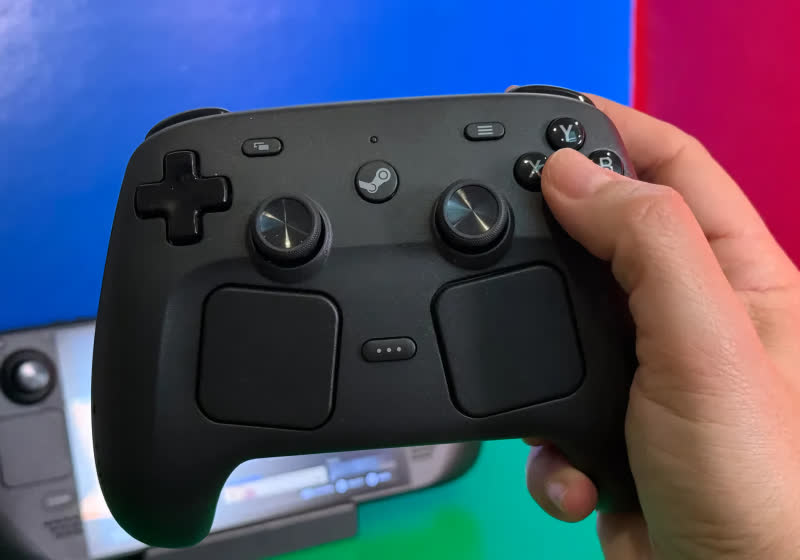
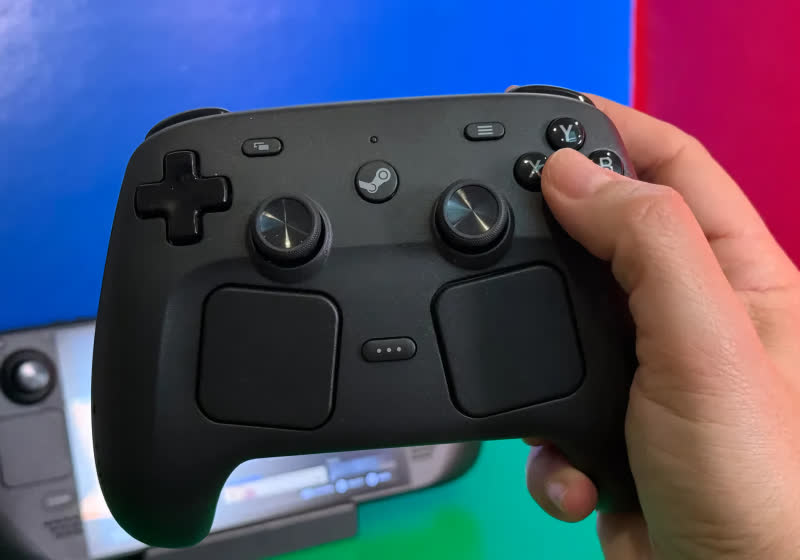
The second-gen Steam Controller launched to much fanfare on May 4 priced at $99. The high-end gamepad sold out within half an hour thanks in large part to scalpers scooping them up in bundles and reselling them for massive profits. A newly implemented reservation system looks to address the issue… Read Entire Article Source link
An image from an Epic Games video mocking Apple’s 1984 ad – Image Credit: Epic Games
Ahead of the return to District Court for the continued appeals process in the Apple-Epic legal fight, the two companies have made a schedule to discuss a change in App Store fees for outbound links.
The May 6 decision by the Supreme Court to decline Apple’s request for a stay on a mandate to meet Epic Games to negotiate a new commission rate means more legal action in the coming months. In preparation, the two sides have agreed on a few ground rules for that meeting.
In a joint filing to the U.S. District Court for the Northern District of California on May 15, there is a multi-point schedule of actions and activities for the two companies.
Advertisement
The list starts with Apple being given 45 days to file with the court a “proffer,” namely a good-faith offer of evidence, testimony, documents, or some form of evidence to the court. This proffer will propose commissions for any “linked-out purchases,” along with supportive evidence, in a document that’s up to 30 pages long.
Up to ten days after the proffer, Apple will hand Epic all non-privileged documents about the decision-making process to create the proffer’s proposal. This includes fee proposals and a privilege log.
Within five days of that action, Apple will meet with Epic to discuss the privilege log and whether Epic needs any extra material to evaluate the Apple proposal. Epic can then designate up to 10% of the documents on that privilege log for further review by a third party.
Within 60 days from the latter of Apple’s proffer filing or Apple’s completion of document production, Epic will then file its own response to Apple’s proffer to the court. This too can be up to 30 pages in length, and if Epic makes an objection, it must include evidence supporting that move.
Advertisement
Once that has been filed, Apple has another 30 days to file its reply, though with a 15-page limit. After all that, the court can then hold a status conference or decide any further proceedings.
Based on all parties taking the last possible moments to complete each stage in the schedule, it could be 150 days or five months before the court schedules another meeting.
How Apple got here
Apple and Epic have endured a six-year legal battle that started with “Fortnite” allowing players to make in-app purchases using a third-party payment processor. Epic also made demands, including allowing alternate app storefronts in iOS and a change in the commission structure.
For the most part, Apple succeeded against Epic, but the court found against Apple’s anti-steering measures, which prevented developers from directing users to other ways to pay. Apple was ordered to make changes, and it claimed it did.
Advertisement
Epic responded, arguing Apple didn’t follow the spirit of the law, convincing a court in April 2025 to its viewpoint. The court viewed Apple’s moves as a “gross miscalculation” of acceptability.
We spend hours testing every product or service we review, so you can be sure you’re buying the best. Find out more about how we test.
GameSir G8+ MFi: One-minute review
The GameSir G8+ MFi is the controller that the G8 Galileo probably should have been from the start. It takes the same full-size grips, Hall effect thumbsticks and triggers, and programmable back buttons that made the original one of the best mobile grips going, then layers on MFi certification for iPhone and iPad Mini, swappable ABXY button caps, dual vibration motors, and crucially, improved case compatibility.
Best of all? It’s still the same $79.99 / £79.99 / AU$129.99 asking price.
Advertisement
Having tested both of these mobile controllers side by side on the same phones and games, the G8+ MFi addresses just about every gripe I had with the G8 Galileo. The case compatibility improvements alone are worth shouting about, with magnetically swappable silicone pads and a camera bump panel that let you adjust clearance depending on whether your phone is cased or caseless.
Latest Videos From
The screenshot button has been nudged further from the D-pad, and the ability to physically swap button caps to match your layout is a nice bonus for anyone who switches between Xbox and Nintendo-style mapping. The core controller feel, including the high stick sensitivity and trigger response, is identical to the G8 Galileo, but the GameSir app now works on both iOS and Android.
There are vibration motors in each grip now, which should be a nice add-on, but sadly, they go completely unused by every game I tested on both Android and iOS. Admittedly, that’s more the fault of developers than GameSir, however. With that oversight, there’s probably not quite enough here to justify replacing an original G8 if you’re an Android user. But for everyone else, this is the version to buy.
(Image credit: Future)
Advertisement
GameSir G8+ MFi: Price and availability
List price: $79.99 / £79.99 / AU$129.99
Available via Amazon, GameSir, and major retailers
Same price as the G8 Galileo it effectively replaces, but both are available
GameSir launched the G8+ MFi in late 2025, two years after the G8 it’s built on, but despite the upgrades, it retains the same $79.99 / £79.99 / AU$129.99 price tag. That sees it continue to undercut rivals like the Backbone One 2nd Gen ($99.99 / £99.99), though it can now stack up head-to-head with them on compatibility thanks to the added MFi certification.
GameSir’s naming across the G8 range remains confusing, and a shared price point doesn’t help matters. The G8+ comes in both Type-C (wired, that I’m reviewing here) and Bluetooth variants.
Sign up for breaking news, reviews, opinion, top tech deals, and more.
There’s also the original G8 Galileo, which is Android-only. Sometimes it’s called the G8+, sometimes it’s the G8 Plus. Sometimes Galileo gets a shoutout in there, sometimes he doesn’t. If you’re shopping, double-check you’re getting the right version for your device and not selling yourself short on feature set.
Advertisement
GameSir G8+ MFi: Specs
Swipe to scroll horizontally
Row 0 – Cell 0
GameSir G8+ MFi
Price
$79.99 / £79.99 / AU$129.99
Advertisement
Dimensions
9.02 x 4.20 x 2.13in / 229 x 106.8 x 54.2mm
Weight
10.72oz / 304g
Advertisement
Connection
Wired USB-C (pivoting connector)
Compatibility
iPhone (USB-C), iPad mini 6+, Android 8.0+
Advertisement
Software
GameSir App (iOS and Android)
GameSir G8+ MFi: Design and features
Familiar G8 ergonomics with a wider platform and stretch for iPad mini compatibility
Swappable ABXY button caps and improved case compatibility
Works natively with both Android and iOS devices
If you’ve used the GameSir G8 Galileo, the G8+ MFi will feel immediately familiar. In fact, if you’ve used an Xbox 360 or Series controller, the G8+ will feel familiar too. The full-size, contoured grips are the same chunky shape as Xbox’s offering, and the same laser-engraved texturing carries over from the G8.
It’s noticeably comfortable to hold and feels like a proper device rather than a homebrew solution to gaming on your phone. The same overall build quality remains, too: it’s robust, doesn’t flex or creak, and materials feel premium.
Advertisement
Placed side by side with its sibling, the G8+ MFi’s phone deck is noticeably wider, but in isolation, I’m not sure you’d actually clock the difference. It’s heavier too, at 304g versus the G8’s 252g, though again the extra weight didn’t really register during testing. The light grey-and-white colorway is an improvement from the G8 Galileo’s uniform, darker grey for my eye. It looks a little more refined in this brighter skin, but that’s personal taste, and you don’t get a choice anyway.
The MFi certification is the headline upgrade and a welcome addition for Apple fans. Where the G8 Galileo only officially supported Android, the G8+ MFi is certified for iPhones with USB-C and the iPad mini 6 and newer. It auto-detects which platform it’s connected to and switches mode accordingly, which worked without issue across both my POCO X5 Pro 5G and iPhone 17 Pro during testing. The GameSir app recognized the controller on both phones, too, which wasn’t the case with the G8.
The wider stretch range, a full 30mm increase over the original, means the G8+ MFi can now accommodate an iPad mini, though without one to hand, I’ll have to take GameSir’s word for it. What I did appreciate was the removable magnetic back panel on the left side of the phone deck. This easily pops off to create more clearance for phones with larger camera bumps. It’s a nice quality of life addition that did its job perfectly with my cased iPhone, though
I’m not sure what GameSir thinks I’m going to do with that easily losable piece. A slot to tuck it into or even a magnetic spot on the back to stow it would have been much appreciated. I imagine we’ll see a lot of G8 Plus’ with a black stripe on the left side over time.
Advertisement
(Image credit: Future)
Case compatibility is where the G8+ MFi makes its biggest practical design improvement over the G8. GameSir now includes magnetic silicone pads of different thicknesses to change the buffer size around the port.
I played with my iPhone case on, and the controller accommodated it comfortably, which was something I couldn’t manage on the G8 Galileo without worrying about the USB-C connector angle. It’s probably still not going to handle a chunky Otterbox, but standard slim cases are no longer a problem. For all the clever tweaks and design changes, the USB-C connector is still my favorite choice GameSir made, and I’m glad it’s unchanged on the G8+. It pivots freely up and down, which makes seating and removing your device a doddle.
The magnetic faceplate system on the grips carries over from the G8, too, but the G8+ MFi adds swappable ABXY button caps on top of the interchangeable thumbstick options. You can physically rearrange the face button layout to match Xbox or Nintendo mapping, which is a nice complement to the software remapping available in the app. Three replacement thumbstick caps are included (short, tall, dome), but you still only get one of each.
(Image credit: Future)
Advertisement
GameSir G8+ MFi: Performance
Hall effect sticks and triggers, including hair-trigger mode
Two customizable M buttons on the back
Vibration motors in each grip, though they’re rarely used
When it comes to gaming with the GameSir G8+ MFi, the bits that were great before are still just as great here; en-something-ification clearly isn’t in the GameSir dictionary. The Hall effect thumbsticks and triggers are, as far as I can tell, identical to those on the GameSir G8 Galileo.
The sticks are smooth and precise with a high level of sensitivity. If you’re coming from a cheaper controller, you may need some time to adjust, but increased control is certainly worth the effort.
The triggers have full analog travel along with a hair-trigger mode that’s snappy and reliable, perfect for shooters. If you’re upgrading from the G8, there’s no change in input quality here, which is no bad thing, but don’t jump across expecting an even better experience. Deadzone and hair-trigger settings are configurable through the GameSir app, and the app now working on iOS means iPhone users get the same tuning options Android users have always had.
The G8+ MFi’s d-pad has a slightly mushy wobble, though a snappy, clicky feel when you fire it off. Travel distance is short with a clear click for each direction, including diagonally. The screenshot button has been repositioned slightly further from the D-pad down compared to the G8, and the improvement was both noticeable and very welcome. I didn’t accidentally trigger it during testing, which was a recurring frustration for me previously
Around the back of the G8+ are two programmable buttons, labeled M1 and M2 (compared to L4 and R4 on the last model). They’re something of a rarity for mobile controller grips at this price, with the likes of the Backbone One skipping them entirely. I found them well-sized and positioned just about perfectly.
Advertisement
They’re close to where your fingers naturally rest without getting in the way, taking just the right amount of force to avoid accidental presses. They ship unbound by default, so you’ll need the GameSir app to assign functions, and you can only mirror existing buttons on them, no macros.
(Image credit: Future)
The dual asymmetric vibration motors are the one new feature that falls flat. They work fine in the GameSir app’s test mode, delivering both strong and subtle vibrations that feel perfectly capable, if a little slow to spin up. The problem is that no game I tested, on either Android or iOS, actually utilized them.
Fortnite, Call of Duty Mobile, Forza Horizon 5,and Shadow of the Tomb Raidervia Xbox cloud gaming, nothing. I believe this is actually a mobile gaming ecosystem issue rather than a GameSir problem; developers just aren’t bothering or don’t have the means to communicate this information to devices. That may well change in the future, but right now, don’t go grabbing the G8+ expecting haptic feedback as you’d get on console.
The GameSir G8+ MFi features passthrough USB-C charging and a 3.5mm headphone jack, which carry over from the G8 Galileo, and both worked without issue again throughout testing. Passthrough charging reported fast charge speeds on both the POCO X5 Pro and iPhone 17 Pro with no overheating.
Advertisement
The headphone jack remains a welcome inclusion for latency-free wired audio The dedicated GameSir button on the controller has inconsistent behavior on Android, sometimes acting as a home button and occasionally opening the GameSir app instead. On iOS, it seemed to do nothing at all, but it will light up a different color to confirm you’re in the right compatibility mode for your device.
(Image credit: Future)
Shoudl you buy the GameSir G8+ MFi?
Buy it if…
Advertisement
Don’t buy it if…
Also consider…
Can’t decide if the GameSir G8+ MFi is the one to get? Here’s how it compares to other, similar controller grips.
Swipe to scroll horizontally
Row 0 – Cell 0
GameSir G8+ MFi Galileo MFi
Razer Kishi Ultra
Advertisement
Backbone One 2nd Gen
Price
$79.99 / £79.99 / AU$129.99
$149.99 / £149.99 / AU$269.95
Advertisement
$99.99 / £99.99 / AU$179.99
Dimensions
9.02 x 4.20 x 2.13in / 229 x 106.8 x 54.2mm
9.64 x 4.36 x 2.53in / 244.8 x 110.8 x 64.3mm
Advertisement
6.93 x 3.70 x 1.34in / 176 x 93.98 x 34.03mm
Weight
10.72oz / 304g
9.38oz / 266g
Advertisement
4.86oz / 138g
Connection
Wired (USB-C)
Wired (USB-C)
Advertisement
Wired (USB-C / Lightning)
Compatibility
Android, iOS
Android, iOS
Advertisement
Android, iOS
Software
GameSir App
Razer Nexus
Advertisement
Backbone App
GameSir G8+ MFi: One-minute review
I spent a few days testing on both an iPhone 17 Pro and POCO X5 Pro
I played Fortnite, Call of Duty Mobile, Need for Speed No Limits, plus Forza Horizon 5 and Shadow of the Tomb Raider via Xbox Cloud Gaming
I played with the various customization options and tried to get the rumble working, unsuccessfully
I approached testing the GameSir G8+ MFi with the question of not only how it fared in general, but specifically how it compared to the G8 Galileo upon which it was built. I used the same two phones and the same set of games to put them directly head-to-head. This allowed me to isolate exactly what’s changed between the two controllers and whether those changes are meaningful in practice.
I tested case compatibility with a slim iPhone case, tried all swappable thumbstick and button cap configurations, checked vibration motor response across multiple games on both platforms, and verified that the GameSir app provided full functionality on both iOS and Android. I also investigated the GameSir button behavior on both operating systems and tested passthrough charging on both devices.






























































You must be logged in to post a comment Login