The Jaye Band is a new, minimalist smartwatch device
Its primary job is showing you your most important phone notifications
There are no on-board apps or sensors to get in the way
Left unchecked, the phones we carry around with us at all times can become overwhelmingly distracting. A new wearable called the Jaye Band wants to do something about that, acting as a simple filter for everything that happens on your phone.
It’s now raising funds on Kickstarter (via Android Authority), and sells itself as “the minimalist smartwatch designed for the modern attention crisis”. It promises to “reclaim your brain” and give you “a wearable built to filter your distractions, not add to them”.
The idea is that the band becomes a discreet window for your most important notifications, while everything else gets left on your phone. You can set blocks of ‘do not disturb’ time, and there’s no tracking or health monitoring.
Latest Videos From
In theory, your phone stays in your pocket for much more of the day, so you’re not constantly checking for new alerts, switching between apps, and scrolling through feed after feed on social media to find a new distraction.
Advertisement
Pricing and shipping
You can set notification rules via the companion app (Image credit: Jaye Band)
Hardware wise, the Jaye Band sports a small, monochrome OLED display, intended to be shown on the inside of your wrist. The device measures just 38mm x 14.5mm x 7mm (that’s 1.5 inches x 0.6 inches x 0.3 inches), so it’s very lightweight.
The wearable has already gone through three rounds of design and refinement, the developers say, and now needs funding for the production push. It’s already blown past its $5,000 goal, and has raised $35,749 at the time of writing.
There’s an early bird price deal currently available which lets you reserve your band for $129 (about £97 / AU$184, though shipping to Australia doesn’t seem to be offered). When the device launches fully, it’ll retail for $249 (about £188 / AU$355).
Advertisement
Sign up for breaking news, reviews, opinion, top tech deals, and more.
Shipping is scheduled for December 2026, but as always with Kickstarter, there may be delays and production problems along the way. If you’re looking for a more minimal tech experience day-to-day, the Jaye Band could be the answer.
What began as a tool for social connection has evolved into the primary catalyst for a shadow communication era, where enterprise messaging is often conducted in the palm of a hand, often entirely out of sight of the organization.
Advertisement
Latest Videos From
Roger Woodend
Head of North America, Movius.
Once viewed primarily as a consumer messaging platform dominant outside the United States, WhatsApp has increasingly become embedded in global business workflows as the go to enterprise messaging platform.
Cross-border client relationships, hybrid work environments, and international collaboration have accelerated adoption among U.S.-based professionals, particularly in industries such as legal services, finance, healthcare, and consulting. For example, monthly active WhatsApp users on iOS in the U.S. have increased 39% since 2020.
Advertisement
Unfortunately, the platform’s ease of use and worldwide adoption have led it to become a ticking time bomb for organizations across all sectors. We are no longer dealing with a minor IT headache, we are facing a multi-billion-dollar legal and operational liability.
The Regulatory Great Awakening
In the last two years, global regulators have signaled a permanent shift in how they view corporate communication. The era of firms looking the other way while employees use consumer apps for speed, is over.
Advertisement
Sign up to the TechRadar Pro newsletter to get all the top news, opinion, features and guidance your business needs to succeed!
Regulators are no longer treating off-channel messaging as isolated employee misconduct. Increasingly, enforcement actions point to systemic governance failures where organizations lacked the controls, oversight, and technology needed to manage modern communication behavior.
The Paradox of Privacy vs. Compliance
The very features that make WhatsApp a boon for personal privacy make it a blind spot for corporate oversight. This creates a fundamental breakdown in three key areas:
Advertisement
Record-Keeping Failures: The “Delete for Everyone” feature is loathed when it comes to regulatory requirements. If a message can be scrubbed from existence at the whim of a user, the firm has failed its duty to maintain an immutable audit trail.
The Encryption Trap: End-to-end encryption is essential for protecting communications from external threats. However, when organizations rely on consumer-grade encrypted apps without enterprise oversight, they may lose the ability to retain records, supervise business communications, or respond effectively to audits and litigation.
The Global Compliance Gap: Utilizing consumer apps often leads to a jurisdictional nightmare. Data flows across borders without the safeguards required by GDPR, while U.S. organizations face growing exposure under HIPAA, SEC and FINRA recordkeeping obligations, and state privacy frameworks such as CCPA and CPRA. The challenge is no longer isolated to financial services or healthcare—it now spans any organization where sensitive customer, legal, or operational conversations occur on unmanaged channels.
Advertisement
Data exposure
We’ve already seen what happens when encrypted messaging apps claim to be secure and then fall victim to breaches, resulting in private and sensitive communications being exposed online. This not only exposes a company financially but puts their brand and reputation at stake.
Law firms are facing a particularly difficult balancing act. The legal sector’s growing embrace of mobile-first communication is reshaping client expectations. Recent industry analysis found that 89% of Am Law 200 firms now deploy mobile applications for client communication or matter management, increasing pressure on firms to balance convenience with governance and discovery obligations.
Clients increasingly expect the speed and convenience of mobile messaging, while firms remain responsible for preserving communications, protecting privileged information, and meeting discovery obligations. This tension is pushing many firms to reevaluate whether consumer messaging apps can coexist with enterprise-grade governance requirements.
Advertisement
Mitigating Off-Channel Risks: A Practical Roadmap
Ignoring the WhatsApp phenomenon is no longer a viable strategy. Organizations must proactively transition from shadow messaging to secure, governed ecosystems. To avoid regulatory or security exposure, leadership should consider the following steps:
1. Conduct a Reality Audit: Acknowledge that your employees are likely already using these tools. Survey your teams to understand why—is it the interface, the speed, or the client’s preference?
2. Define the “Off-Channel” Policy: It is no longer enough to have a broad policy. Firms must explicitly define what constitutes business communication and mandate that these conversations occur only on approved, captured platforms.
Advertisement
3. Research Enterprise-Grade Alternatives: The goal isn’t to take away the convenience of mobile messaging, but to provide a compliant version of it. This means implementing solutions that offer WhatsApp messaging experiences for the user while ensuring data is captured, archived, and owned by the enterprise.
4. Analyze Security and Compliance: Before fully adopting a solution, ensure it meets your business needs. Is it compliant with the necessary regulatory bodies? Is archived communication securely transferred and retained? Checking these boxes could make or break your organization’s success.
5. Prioritize Data Sovereignty: Ensure that your communication ecosystem allows you to separate personal and professional data on a single device, protecting employee privacy while maintaining corporate control over business records.
6. Vet Communications Partners Carefully: Organizations should evaluate whether a communications provider can support multiple channels and devices, integrate with existing compliance and archiving systems, provide immutable audit trails, and support regional data residency requirements. Flexibility and interoperability are becoming increasingly critical in globally distributed workplaces.
Advertisement
The Path Forward
The WhatsApp time bomb detonates when an organization waits for a regulator to knock before addressing its communication gaps. In an era where a single deleted message can lead to an eight-figure fine, the transition to secure, compliant communication is no longer an IT project, it is a core pillar of corporate survival.
Organizations that thrive in this new landscape will be those that embrace transparency and governance, turning their communication ecosystems from a liability into a strategic asset.
This article was produced as part of TechRadar Pro Perspectives, our channel to feature the best and brightest minds in the technology industry today.
The views expressed here are those of the author and are not necessarily those of TechRadarPro or Future plc. If you are interested in contributing find out more here: https://www.techradar.com/pro/perspectives-how-to-submit
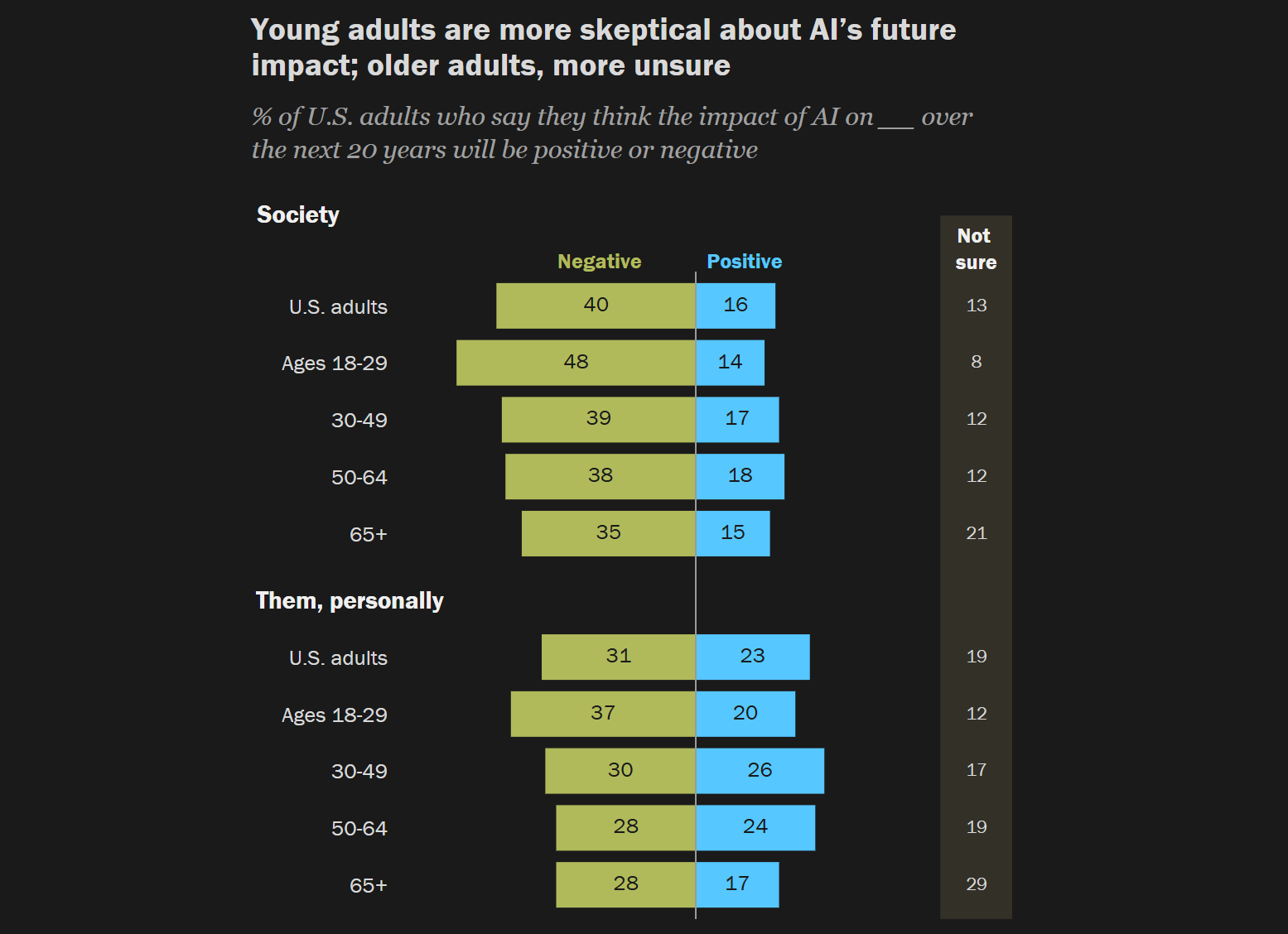
The takeaway: Despite the apparent growth of an anti-generative AI movement, more Americans are using chatbots than ever before, according to a new survey. But somewhat paradoxically, just 16% of participants believe the technology will have a positive impact on society over the next 20 years, while 40% think the impact will be negative.
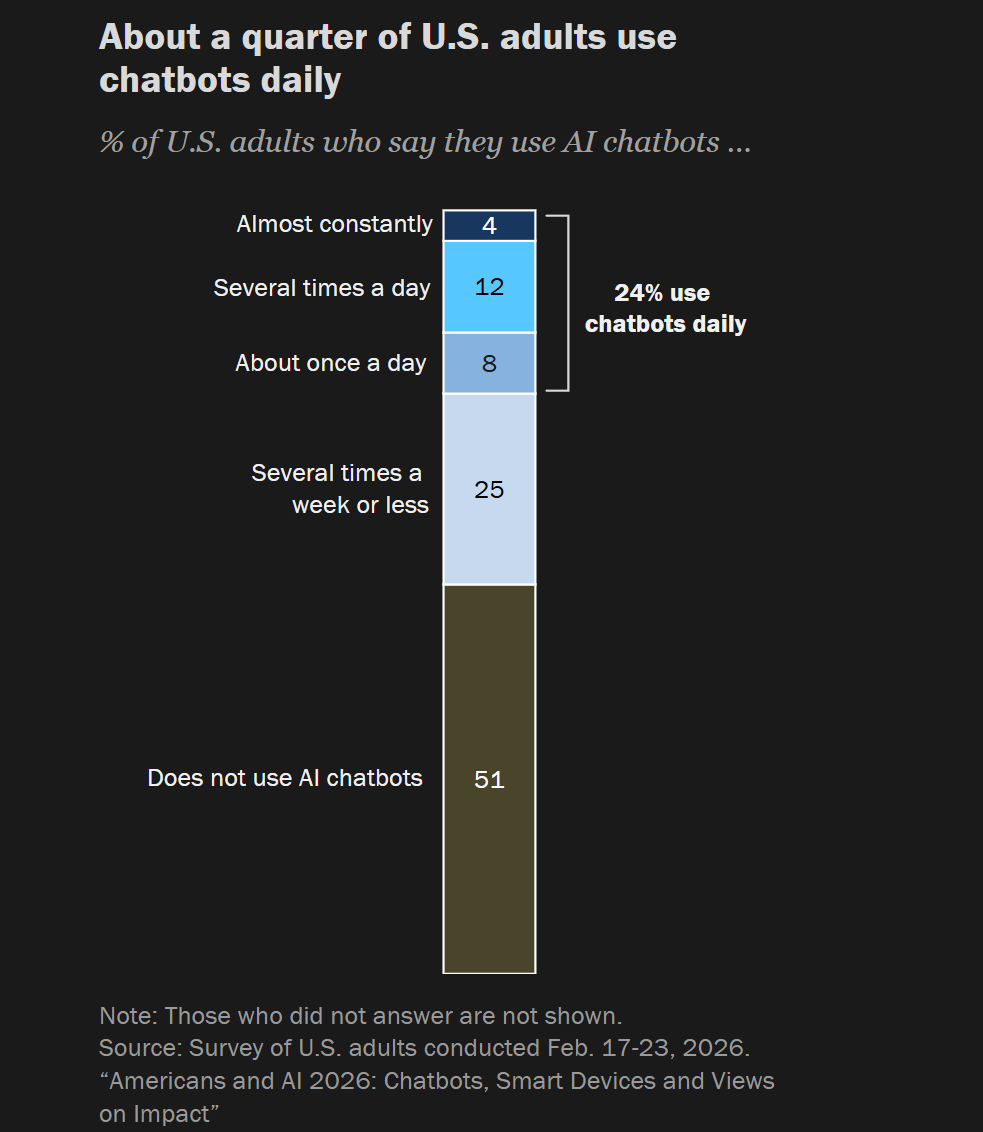
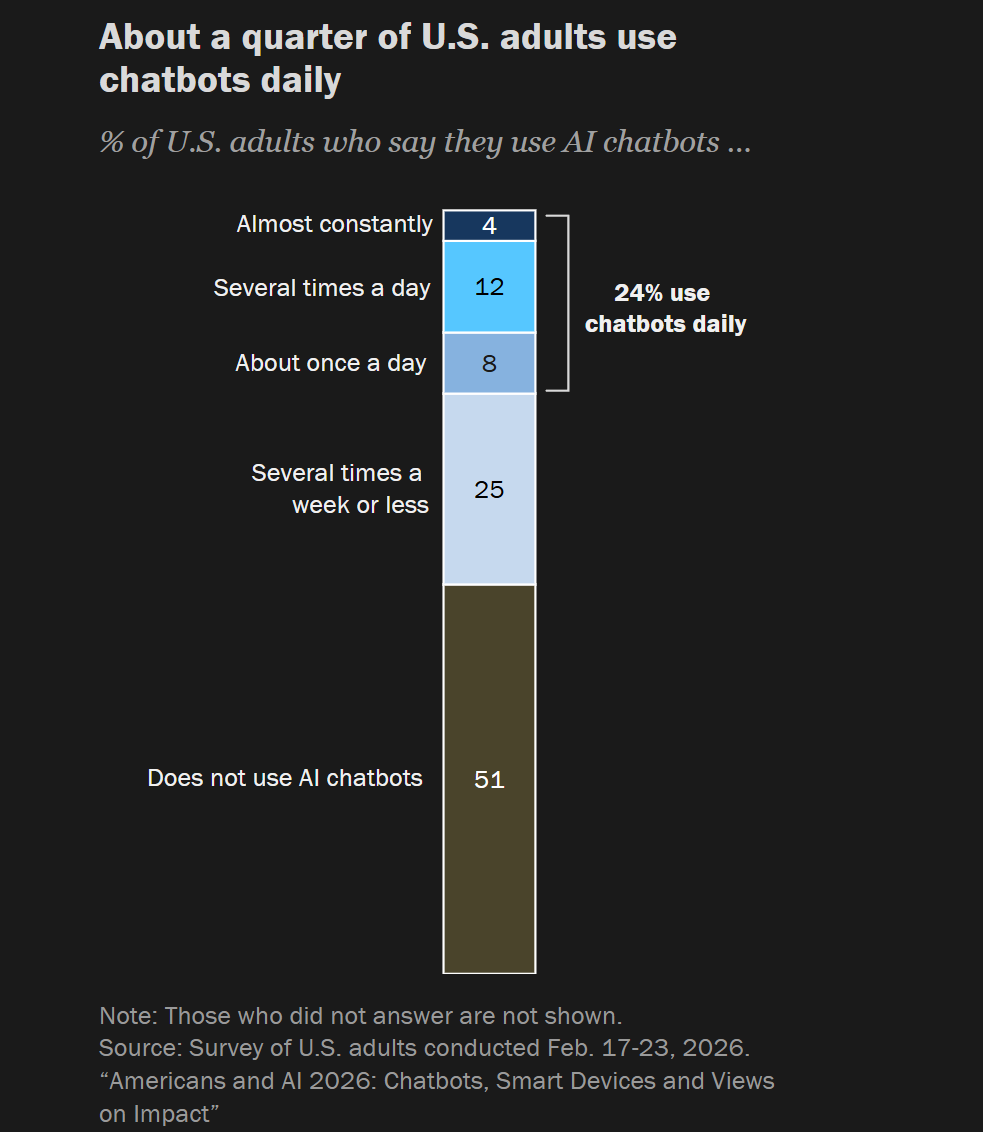
The Pew Research Center found that 49% of US adults now use chatbots, up from 33% two years ago. This includes roughly one in four who use these tools on daily basis. Fifty-one percent say they don’t use chatbots at all, the majority of whom are 50 and older.
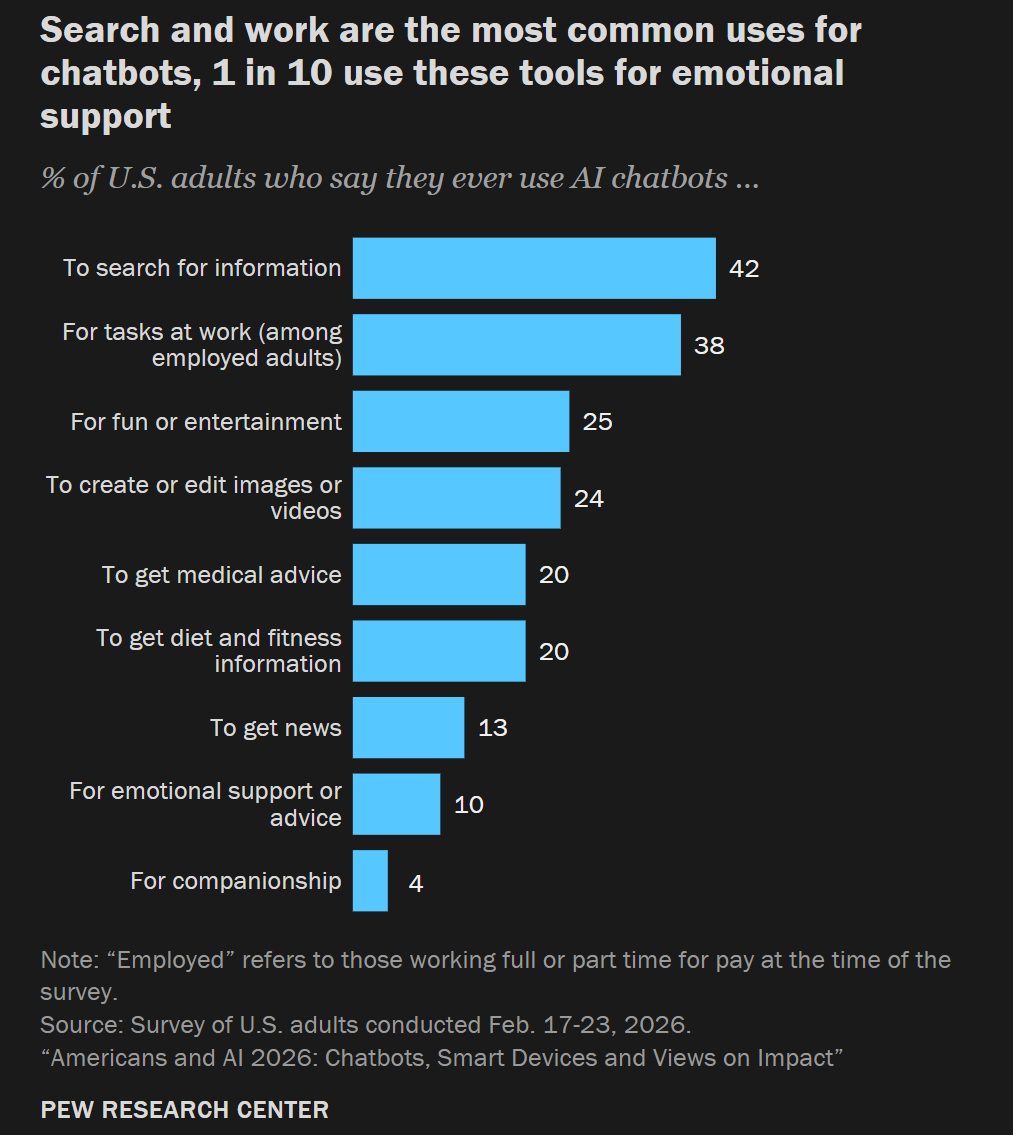
Most people use the bots to search for information, illustrating how many people are now using the likes of ChatGPT instead of visiting websites to find information, eroding the web’s business model.
Work tasks, fun or entertainment, and creating or editing images are the other most popular use cases. Using them for medical and diet/fitness advice is also popular, though even the chatbots’ makers advise users against relying on their tools for medical advice, diagnoses, or treatment recommendations.
Advertisement
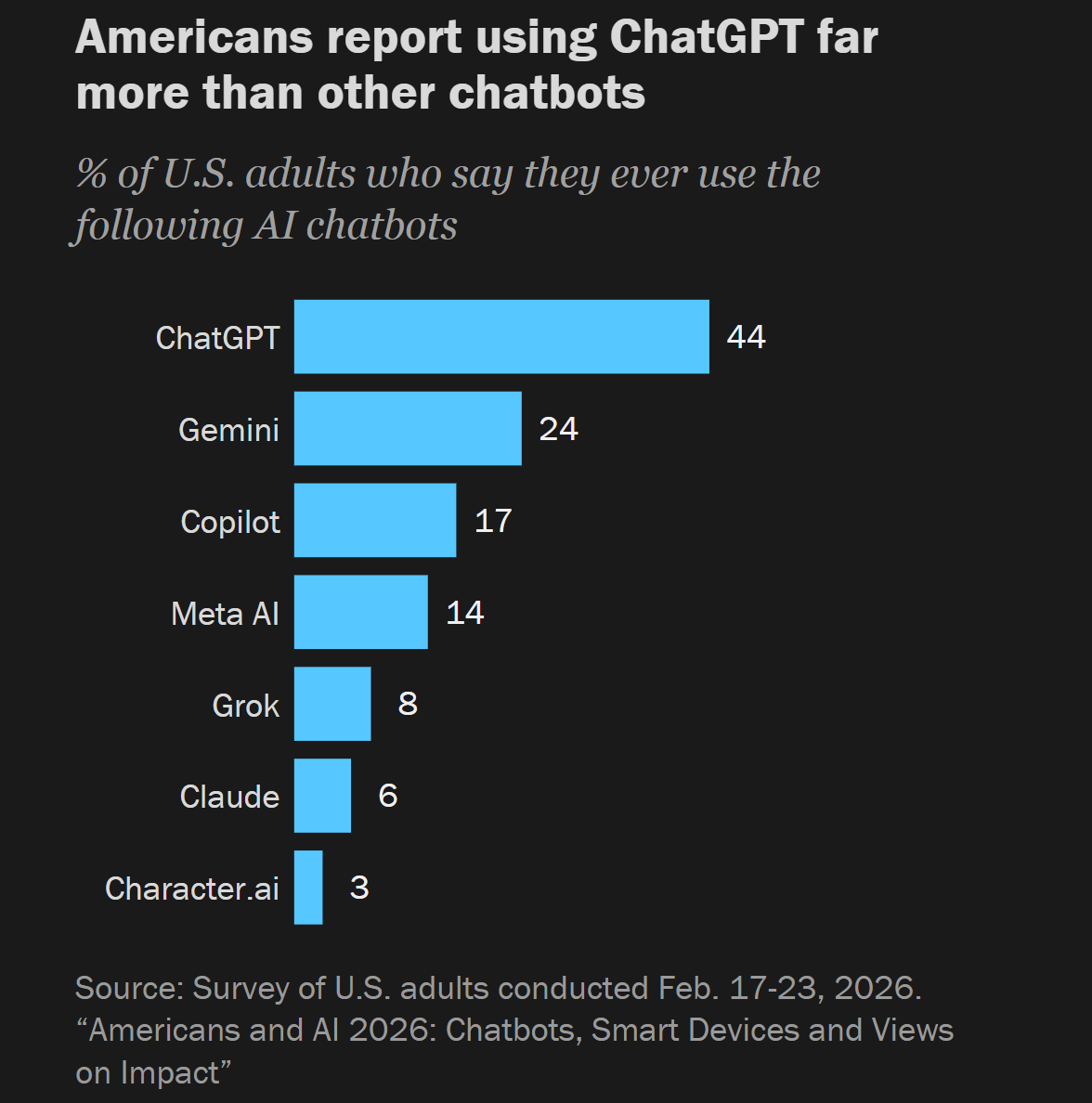
The survey also found that about a quarter of adults use the chatbots daily, while the other quarter use them several times a week or less. And while some of its rivals are catching up, ChatGPT remains the most popular chatbot (44%). It’s followed by Gemini (24%), Copilot (17%), and Meta AI (14%).
Despite the increased usage, most Americans predict AI will be bad rather than good for society (40% vs. 16%), while one in three believes the effect will be equally positive and negative.
More people also expect it will have a negative rather than positive effect on their own lives (31% vs. 23%).
Unsurprisinglye group most concerned about AI’s impact on society and their own lives is adults ages 18 to 29. The technology continues to drive mass job losses, though some execs now argue that it is creating just as many.
Advertisement
Another interesting finding is that around two-thirds of Americans think AI is advancing too quickly. This has been a concern since the generative AI revolution began, and has picked up steam since Anthropic called Mythos too dangerous to release.
Participants expressed other concerns: most think AI will make their personal information less secure, 67% have little to no confidence in the government to regulate AI effectively, and about six in ten adults are not confident in companies to develop and use these tools responsibly.
Another sign that generative AI use is growing in parallel with its dislike came from market intelligence firm Sensor Tower. It reported that ChatGPT has become the fastest app ever to reach one billion monthly app users (MAUs), beating the previous record holder, Google Maps.
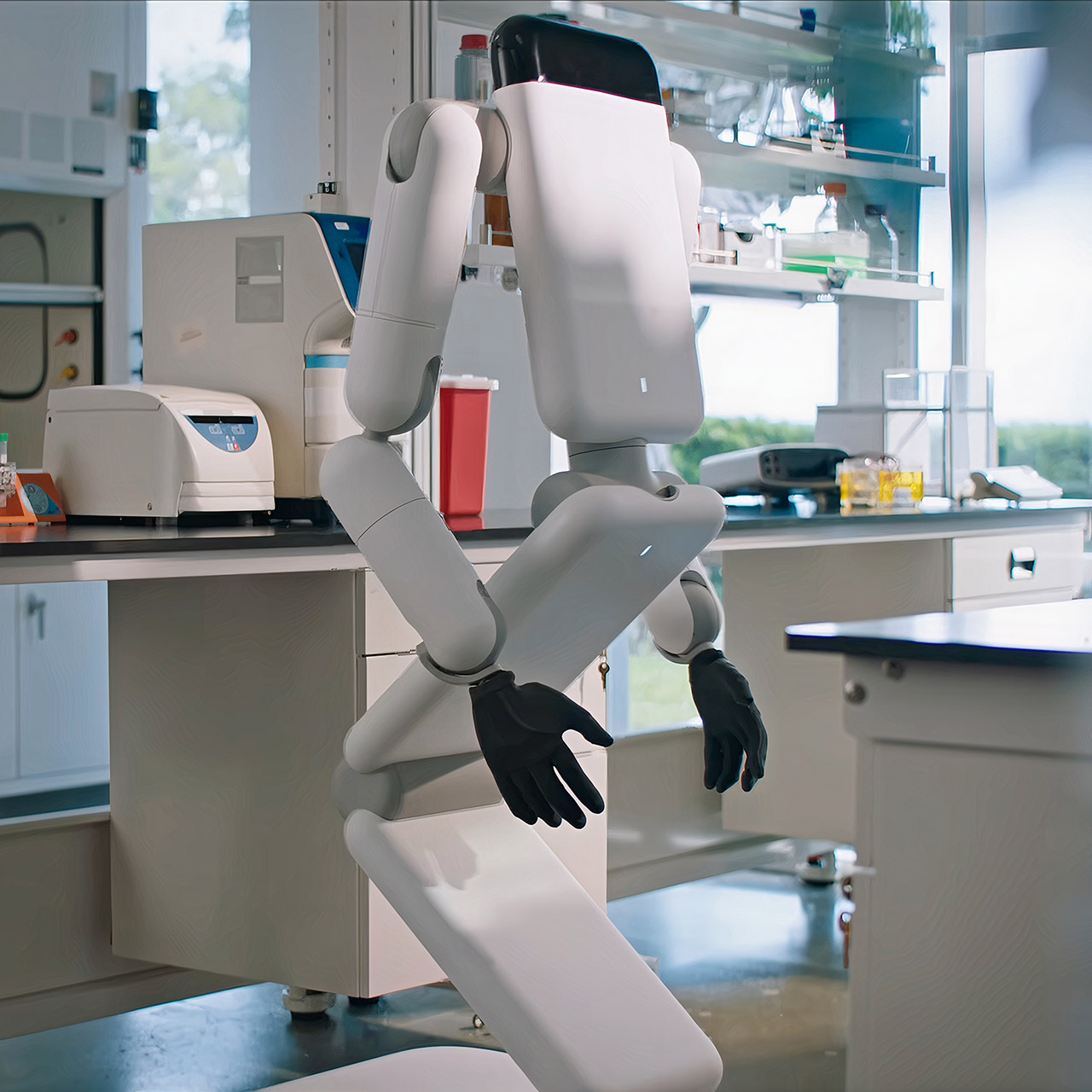
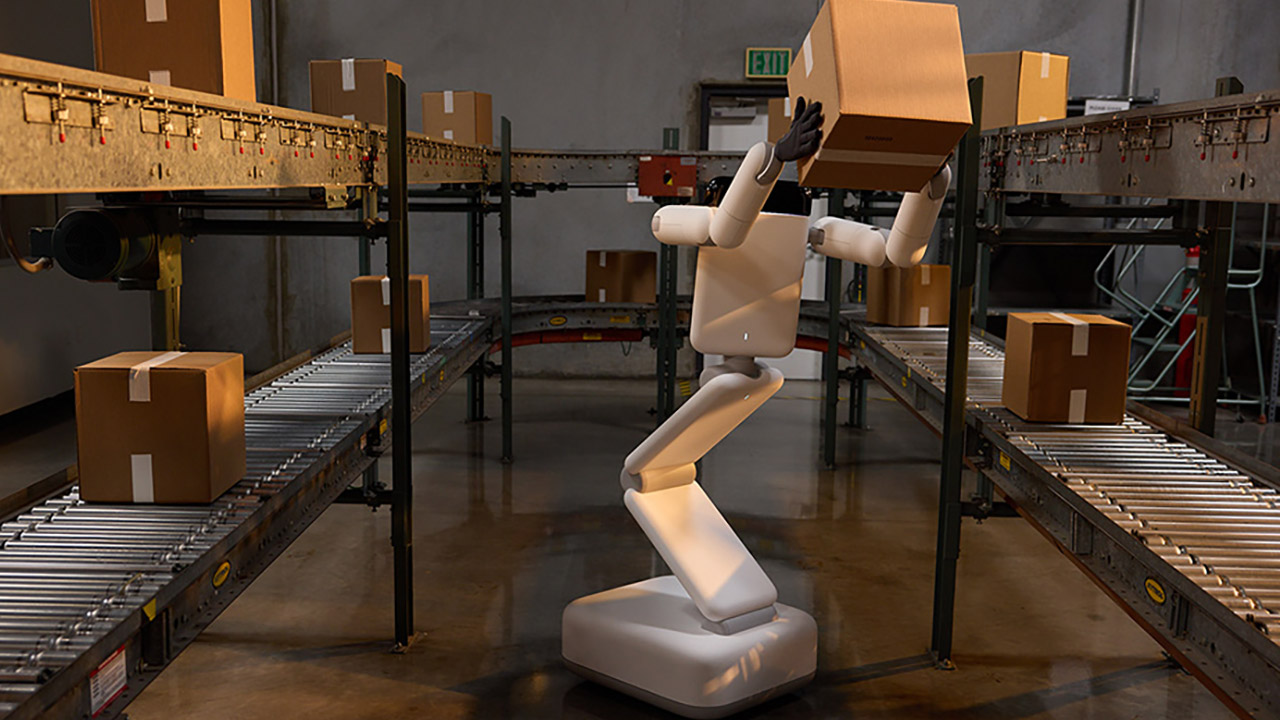
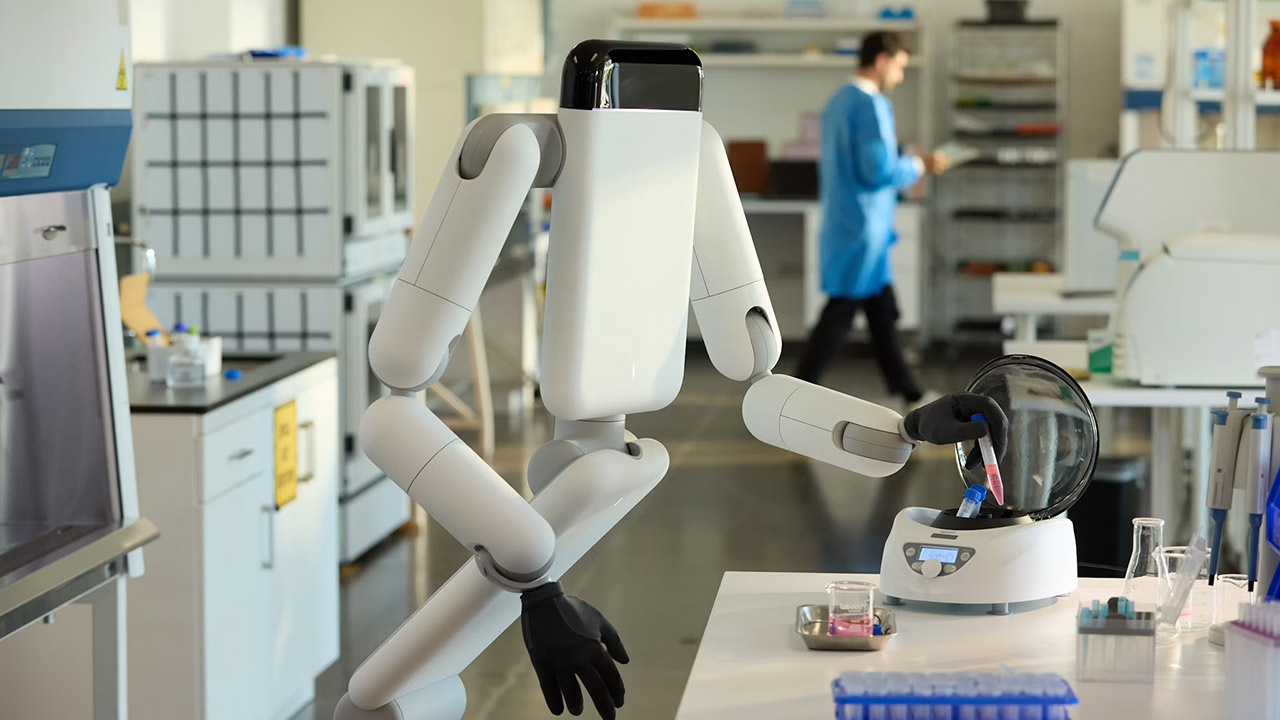
Genesis AI introduced Eno this month as its first general-purpose robot, and the machine immediately stands apart from nearly everything else in the crowded field. It rolls on a wheeled base rather than walking on legs. A compact tower of articulated panels rises and tilts to set the working height and reach, then folds down tight when the job ends. Two arms carry hands that match human size and proportion almost exactly. There is no head, no face, and no attempt to hide the fact that this machine was never meant to pass for a person.
The team’s design choices began with a simple question: what does this robot need to accomplish its job properly in settings where people already work? The areas it will be working, those flat factory floors, lab benches, hospital halls, and eventually even home, are all very flat, and let’s be honest, they rarely demand climbing up and down stairs or balancing on two feet. So a wheeled foundation makes sense in those circumstances since it requires less energy and is much more sturdy. However, the folding panels tell a different story. When the robot has completed a task, it can fold itself up and roll into a corner or storage area without taking up too much space or calling too much attention to itself.
Three models, one lightweight platform R1 Air (20 DOF, monocular camera), R1 (26 DOF, binocular camera, head+waist joints), and R1 Edu (26 DOF…
Easy setup – no coding required for basic use Unbox, power on, and start. Manual teaching feature: physically pose the robot, and it replays the…
More DOF = more expressive movement 26‑DOF models (R1 / R1 Edu) add head and waist articulation for smoother dance and running. For safety reasons…
The hands receive the most attention because each has approximately twenty degrees of mobility and fingers of varied lengths that reflect the way real fingers are configured. The joints are back-drivable, so when Eno makes contact with something, they yield slightly rather than locking in place. The robot’s fingertips and palms contain miniature cameras and tactile sensors, allowing it to see and feel what it is touching. In early demos, the hands allowed Eno to accomplish things like tape up wire bundles, catch its own slides, and move liquids between containers without requiring any additional assistance or adjustments to the equipment surrounding it.
It has a payload capacity of three to five kilograms per arm, which is sufficient for most light assembly, stocking, and lab-support duties. Battery life is now between four and six hours under normal workloads, but the team is continuously working to improve it. When Eno desires, the entire upper structure can stretch up to adult height and then fold back down to a much smaller size.
All of this hardware is compatible with GENE, Genesis AI’s own foundation model created exclusively for robotics. The system treats Eno as a single, coherent unit, rather than a collection of distinct elements that require regular human interaction. It may look at a larger goal, break it down into steps, adjust when circumstances change, remember what has previously occurred, and simply carry the work through to completion on its own. This is a significant improvement over the conventional pattern of single, pre-programmed movements, allowing Eno to handle larger sequences of activity that last minutes or hours. Genesis AI created both the robot and the model simultaneously, as evidenced by how well the body and brain work together. The optional screen version has a little display on the upper panel that allows those close to see what Eno is currently thinking or intending, eliminating the need for them to guess or interpret its actions.
Customer deployments are scheduled to begin with industrial sites in manufacturing, logistics, and laboratories by the end of 2026, with service contexts like as hotels and hospitals following later, and, if all goes well, consumer settings. Eno is still in the early stages of development, with work being done on the battery, payload, and overall robustness. A legged version is still viable if there is a demand for it later on, but the company’s first focus is on the wheeled method. [Source]
Sampling patients’ breath may save lives and emergency room resources
Many people worry about what AI knows, but what about an AI Nose that can smell what disease you might have?
Ainos, an AI and biotech company that is developing smell technology, is working with National Taiwan University (NTU) to explore whether its platform can help diagnose patients by analyzing volatile organic compounds (VOCs) in exhaled breath.
Advertisement
The year-long research effort, which starts in July, will examine individuals who present with dyspnea, or shortness of breath, said to be one of the most common symptoms seen in emergency departments.
Dyspnea can be a symptom of many conditions, including acute exacerbation of chronic obstructive pulmonary disease (AECOPD) and acute decompensated heart failure (ADHF), each of which requires different treatments.
Ainos and NTU hope to develop and evaluate a system to analyze VOC-based breathprints to detect AECOPD and/or ADHF in patients.
Ainos’s Smell AI platform relies on an AI Nose module that features multiple micro-electro-mechanical system (MEMS) sensors and an integrated digital processor. Sensor resistance increases in the presence of detectable gases, and this is converted to a digital signal that is interpreted in much the way the human nose interprets scents, according to Ainos.
Advertisement
That interpretation is handled by by a proprietary Smell Language Model that has been developed to learn, classify, and contextualize complex scent patterns.
“AI Nose was originally developed with medical diagnostic applications in mind, where non-invasive sensing, accuracy, and real-world validation are essential,” said Ainos CEO Eddy Tsai.
“This research program brings that experience back into a high-value clinical setting and extends our Smell AI platform into digital breath intelligence.”
Not content with “digital breath intelligence,” a term we must confess to not being too familiar with, the the company frames the research as part of its broader vision of “building Smell ID data and Smell Language Model capabilities across healthcare, industrial, and physical AI environments.”
Advertisement
If successful, the research could help create a breathprint database for dyspnea and support future studies for emergency, outpatient, and even home-monitoring settings.
The research follows a separate program testing the AI Nose in an active emergency department at National Taiwan University Hospital. The system has been deployed to monitor respiratory infections and overcrowding in waiting areas, treatment areas, and observation zones. ®
Roblox is expanding its safety features for younger players. The platform has launched Roblox Kids and Roblox Select Accounts in India. The new system is designed for users under 16. The platform uses age checks to place users into either Roblox Kids or Roblox Select Accounts. Each account is provided with security features and restrictions regarding access to certain types of content. Over time, the user’s level of protection changes as they move into a new age group.
Roblox Kids Accounts for Ages 5 to 8
Roblox Kids Accounts are designed for children ages 5 to 8. These accounts include the platform’s highest level of default safety protections. Users can access only selected games that carry Minimal or Mild content ratings. Chat features remain disabled by default to provide a safer experience. The company also reviews and approves eligible games before making them available to these users.
Roblox Select Accounts for Ages 9 to 15
The creators of Roblox have launched a feature called Select Account aimed at older children and teenagers. These accounts allow players ages 9 to 15 to gain wider access to more games at Moderate maturity levels. Chat availability depends on the user’s age and region. Roblox also continues to enforce protections for all users under 16.
As children grow, Roblox automatically adjusts their account experience. Players move from Roblox Kids Accounts to Roblox Select Accounts when they turn 9. Once users turn 16, Roblox automatically places them in a standard account and updates their account settings accordingly. The platform gradually expands access to features while updating safety protections as users get older.
Advertisement
New Parental Controls Coming to Roblox
The new rollout expands Roblox’s parental control system. The parents can monitor gameplay activity and check the friends’ list from their linked account. They will have control over parameters such as screen time, spending limits, and communication restrictions. The new game-blocking options give them increased control over content. Parents can also grant permission for selected games outside the default account settings.
As part of the latest update, Roblox is adding more protections for users under 16. Facial age verification will play a larger role in accessing some chat features. Users who do not complete the process may lose access to certain communication tools. The platform also blocks links, images, and videos from being shared in chat. New restrictions will also prevent users under 16 from viewing or sharing social media links across the platform.
This year, Roblox will start using the International Age Rating Coalition (IARC) rating system. By using IARC, Roblox hopes to provide better age guidelines for its experiences. The IARC age recommendations will be integrated into Roblox’s age-specific accounts.
Now bring back the Microsoft Zune, I double dare you.
Andrei Antipov/Shutterstock
We may receive a commission on purchases made from links.
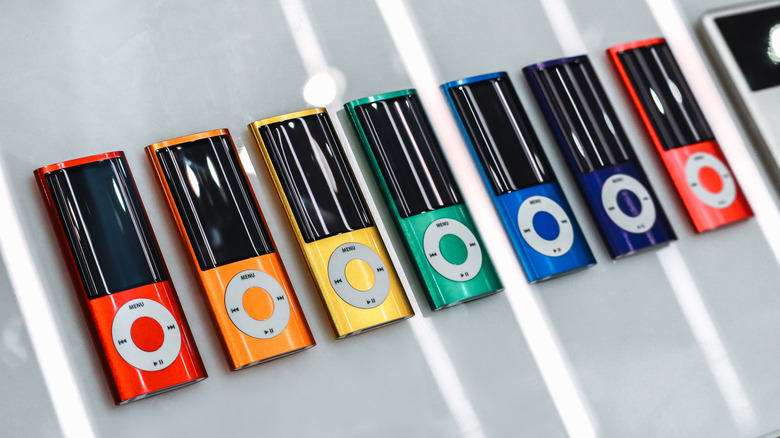
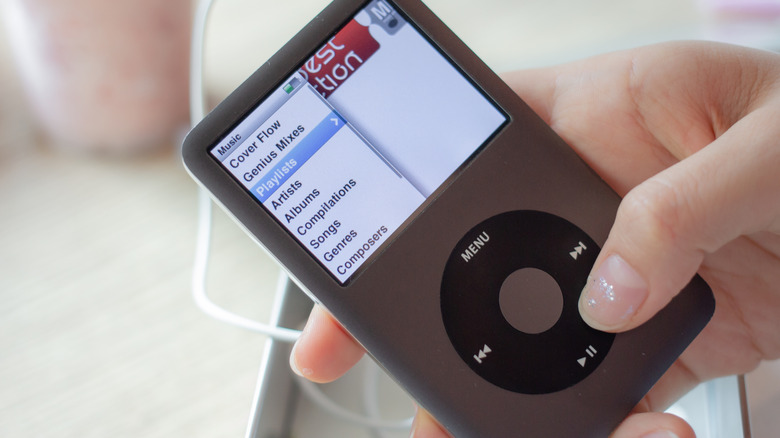
As technology continues to protrude uncomfortably into more of our lives, some younger folks are pretty much over it. It’s not just generative artificial intelligence, which Gen Z is slowly souring on, but current technology as a whole. The younger generation isn’t ditching tech entirely, but they’re rolling things back to the late 2000s. Yes, while those who lived through that period will primarily remember the horrors of the financial crisis, it seems today’s youths have decided we were also living through the era of peak gadgets. Case in point? The iPod is making a comeback.
Apple hasn’t released a new iPod since 2019, when it launched the final version of the iPod Touch. The iPhone had by that point swallowed the iPod along with many other standalone gadgets, obviating the need for what had previously been the company’s largest moneymaker. But now, old iPods are in high demand with the youth. In February, Axios reported that eBay searches were up for the iPod Classic and iPod Nano by 25% and 20%, respectively. While a large portion of iPod buyers are older, 32% of respondents to an informal survey by Emily White, a plurality, were Gen Z.
Advertisement
The iPod was once an object of cultural homogeneity. It was the epitome of cool, so embedded in the public consciousness that its advertisements often showed nothing more than a dancing silhouette with telltale white earbud wires flailing in the air. How ironic, then, that the same gadget which once identified its owners as a part of the dominant zeitgeist now signals the exact opposite, a type of retrograde iconoclasm defined by its rejection of the latest iPhone. Why not buy an old Zune, wayward youths? Now that would be truly countercultural.
Connection fatigue and a desire for more control appear to drive iPod sales
Amp.pan/Shutterstock
The trend toward tech gadgets from two decades ago appears driven primarily by exhaustion with the current state of technology. That exhaustion cuts across generations, but Gen Z was not able to experience the early days of the PC and Internet. That generation of young people, the oldest of whom are on the cusp of their thirtieth birthday and the youngest of whom are just starting high school, have seen only a precipitous and ongoing decline in digital privacy and the relentless enshittification of once useful products and platforms.
Emily White’s survey found that Gen Z was driving the resurgence in iPod ownership, motivated primarily by a desire to minimize distractions, listen to music more intentionally, and to assert ownership over their music and listening experience. There’s a lot to be said for those desires. Are you truly taking in an album if your phone’s notifications are interrupting it interstitially, distracting you with emails and social media drama? And, as for ownership, we’ve seen music streaming services shuttered before (RIP Google Play Music). If Spotify were to delete your account tomorrow without giving you your playlist data, how would you even begin to rebuild your music collection?
Advertisement
Those who lived through the iPod’s heyday may remember the holdouts who continued to collect vinyl and CDs while the rest of us loaded our digital media players with more music than they could fit in their entire homes. In many ways, though, those stalwarts had a point. How many among us have managed to lose our old music files, whether due to forgetfulness or to a corrupted hard drive? Today’s iPod nostalgics may well be to the streaming era what those vinyl collectors were to early digital adopters.
iPods aren’t the right choice for every music fan in 2026
What’s clear about iPod adopters, young or old, is that they’re generally not audiophiles. There are plenty of modern devices which cater to Hi-Fi heads with niche features while also supporting Hi-Fi streaming services like Apple Music, Tidal, and Qobuz. An old iPod, however well preserved since the mid-2000s, is less capable than you might think. In addition to lacking support for high-resolution audio formats, it may have experienced internal component degradation over the years which could affect sound quality. Moreover, syncing an iPod is no longer a convenient, plug-and-play affair. With iTunes dead and buried, iPod owners must now turn to independently developed software. There’s a time-consuming DIY element to contemporary iPod ownership.
Advertisement
Unless what you’re after is a dose of blog-era nostalgia you can’t get from any other media player, it’s worth looking outside Apple’s ecosystem. iPod Classic models are selling for up to $300 on eBay at press time, which is a lot of money considering you’ll miss out on modern conveniences like Bluetooth connectivity and support for high-resolution audio. Modern digital audio players (DAPs) from companies like Sony, Fiio and HiBy are built from the ground up for an audiophile-grade listening experience. They bridge the gap between the iPod and iPhone eras by running custom Android versions packed with under-the-hood system tweaks and user-facing software to prioritize and customize sound quality.
Granted, these newer devices can bleed your wallet at the high end, commanding multi-thousand-dollar price tags, but there are plenty of options at every price point. For $320, you can pick up the HiBy Digital M500 X Hatsune Miku, a device themed around the titular virtual pop star and stuffed with enthusiast audio features. It also has an array of physical buttons along the side, reminiscent of an old, Walkman-style cassette player. Speaking of which, those looking to go even cheaper can take a gander at the wonderfully chintzy Fiio SnowKky Echo Mini, which is even more Walkman-inspired and packs a lot of value for $60 despite missing out on some enthusiast features. Splitting the difference are products like the Fiio JadeAudio JM21, which, at $180, impresses even the notoriously hard to please Hi-Fi community by including features like a balanced 4.4mm TRS output alongside the classic 3.5mm headphone jack.
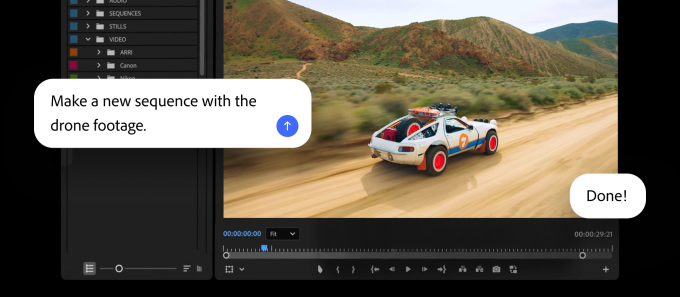
Adobe is updating its Firefly AI assistant with new chops, and adding it to Premiere, Illustrator, InDesign and Frame.io.
The company has given the assistant new abilities to make brand kits, product videos, and storyboards . Plus, the Firefly app now lets users save whatever they’ve created as an element that can be used across projects.
Image Credits:Adobe
In Premiere, users can use the AI assistant to sort assets into bins, batch-rename clips, identify interview questions and add markers. And in Illustrator, the assistant can do things like reorganize layers across a document or check for missing fonts.
Firefly is already usable with Express, Photoshop, and Acrobat, and is supported by ChatGPT, Claude and Copilot. Adobe said that it plans to add support for Google Gemini and Slack soon.
Firefly updates
Adobe is slowly transforming Firefly to increasingly resemble Canva, at least when it comes to AI features, loading up the app with AI tools that can generate images, videos and storyboards. The company is now adding a new feature called Elements that can save AI-generated characters, objects and locations for later use.
Advertisement
Firefly is also getting a Projects feature that can store existing assets in one place, and share context. This could be useful for teams creating a video series or brand campaigns. Both of these features are currently available in a private beta.
Image Credits: AdobeImage Credits:Adobe
The company said users can now describe a brand and its style, or upload existing collateral, in Firefly to have it generate a brand kit, complete with logos, brand identity and color palettes, or even generate product videos from photos. Users can also create storyboards to create videos.
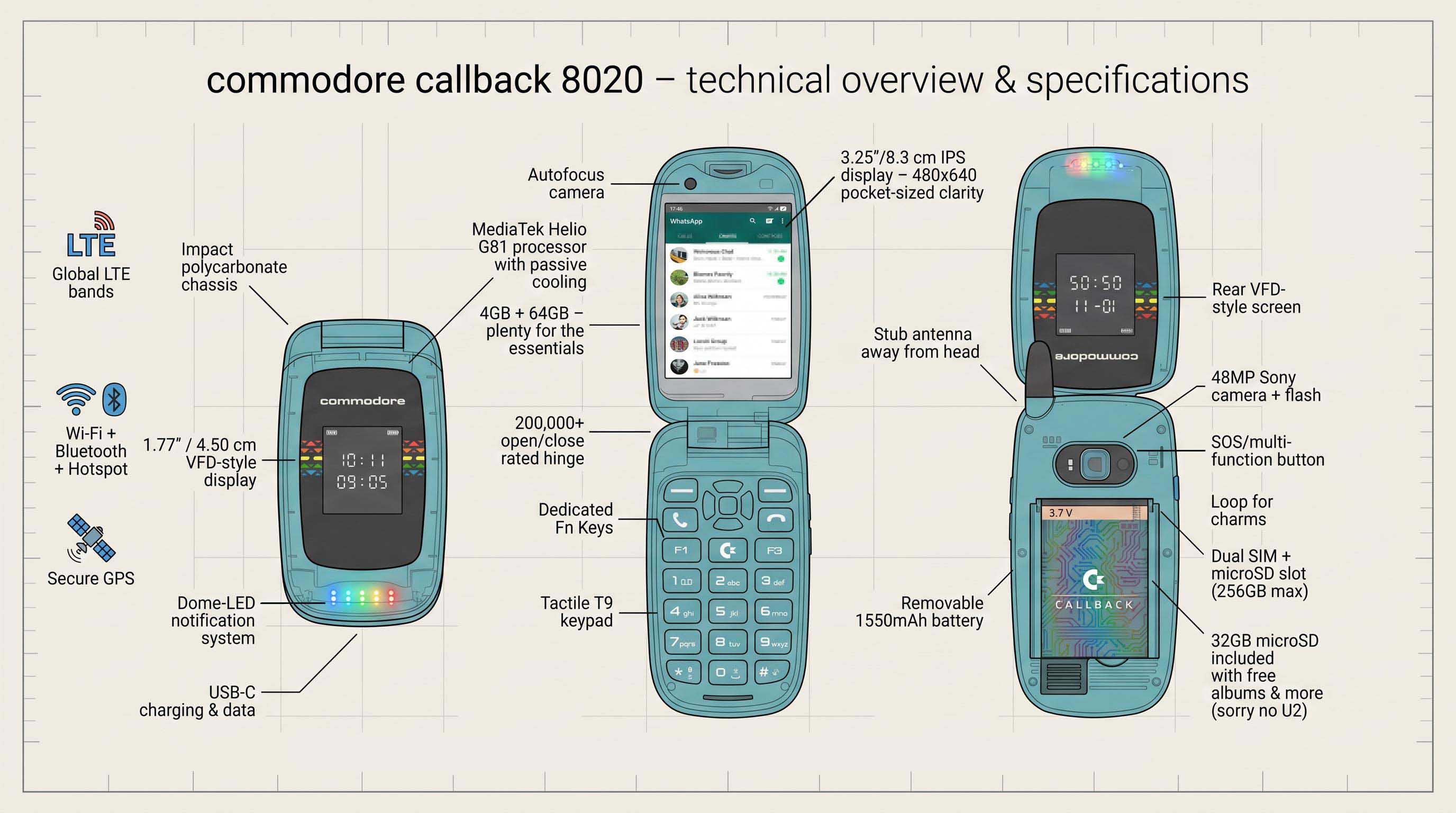
Whatever happens with the new incarnation of the Commodore corporation, we’ll always remember the old one fondly. Well, we’ll remember certain of its products fondly, at any rate, if not the corporate leadership that drove them under. About that, perhaps the less said the better. That’s why we’re looking at the revived Commodore’s latest offering with equal parts interest and trepidation — is there really a market for a Linux-based, Commodore branded flip phone in 2026 and beyond?
The official reveal trailer, which you can watch below, can only be described as weaponized nostalgia for the late 90s, which tracks because the revived C-64 is more-or-less the same thing for the 8-bit era. That said, between replaceable batteries, actually having a decent camera — a 48MP Sony module — quality Cirrus Logic DAC for audio, and running the Linux-based, Android-app-compatible Sailfish OS, the “Callback 8020” ticks all the boxes. Except for price, that is. Many will find the $499 USD launch price a little tough to swallow in this economy, so we hope they aren’t betting the farm on this one being a mass hit.
Still, compared to other premium “digital minimalist” products like the LightPhone III, the price looks reasonable — and with web browsing and social media explicitly excluded from the app store, this phone is firmly in that category. At least this one comes with some sweet Commodore branded headphones, which double as an FM antenna just like they did on your Nokia back when.
While it doesn’t come with DOOM from the factory, it does come with Snake and a selection of emulated C64 games . Ringtones are SID samples, but of course there’s no actual SID chip in the phone, any more than there’s a 6502. That said, if someone builds a phone around a 6502, please let us know.
Advertisement
No, it’s not a new Amiga, as so many of us were hoping for, but by putting quality modern components into the flip phone form-factor, at least they’re trying to innovate (or perhaps retrovate) and we have to respect that. Only time will tell if the market does.
Intel’s stock has risen after Trump announced that the company will make chips for Apple, but it’s not clear when chips will get delivered, how many will ship, or how much the deal is worth.
Following initial rumors that Apple was in discussion with Intel over manufacturing processors, it was revealed in May 2026 that test production had begun.
Now in a late-night posting on Truth Social, Trump announced that “Apple has agreed to work with Intel to design and build its chips in America.” Consequently, according to CNBC, Intel stock rose 8.8% in premarket trading, while Apple was up 0.6%.
The posting comes after Trump reportedly discussed the semiconductor supply chain at the G7 summit. Plans to reduce dependence on Taiwan chip production were key topics at this summit.
Advertisement
In a note to investors by Dan Ives at Wedbush seen by AppleInsider, the deal with Intel is a substantial multi-year one.
There were no further details, and the announcement appears to only confirm the news from May 2026.
What the deal entails
It’s believed that Apple’s deal with Intel concerns production of older or lower-end processors. Intel will not be making the chips for the forthcoming iPhone 18 Pro Max, for instance, nor the M5 or later ones for the Mac.
What’s most likely is that Intel will produce older M-series chips for devices such as the iPad Pro and MacBook Air. It may also make processors for the non-Pro versions of the iPhone.
Advertisement
Someone other than TSMC making processors for Apple has historical precedent. For example, Samsung used to make the A-series chips for Apple.
The most likely scenario here is tapping a capacity-limited TSMC only for the newest Apple processors, such as the latest 2 nanometer design expected in the iPhone 18 range.
Intel has only just recently entered very limited scale testing of the 18A-P process. That means that Intel will not reach full chip production for Apple until mid-2027 at the earliest.
Trump’s US manufacturing push
It is true that Apple and Intel’s deal was prompted by Trump. this follows Apple’s continued increased investment, or re-announcing of previous investments, into US manufacturing.
Advertisement
The deal and such announcements have already seen Intel’s stock price rise dramatically. The rise follows Trump’s administration investing in Intel in return for shares.
“They were worth around 100 Billion Dollars when we made our offer,” posted Trump. “Now they are worth over 600 BILLION DOLLARS!”
As well as responding to political pressure, Apple has reportedly been forced by the global chip shortage to consider alternatives to its main supplier, TSMC. That’s because the worldwide demand for AI processors has led to Apple losing its position as TSMC’s largest customer to Nvidia.
Apple has generally managed to avoid the shortage problems better than most of its rivals, due to its size and buying power, plus its long-term deals. However, as the shortage continues, even Apple has said it is going to have to raise prices.
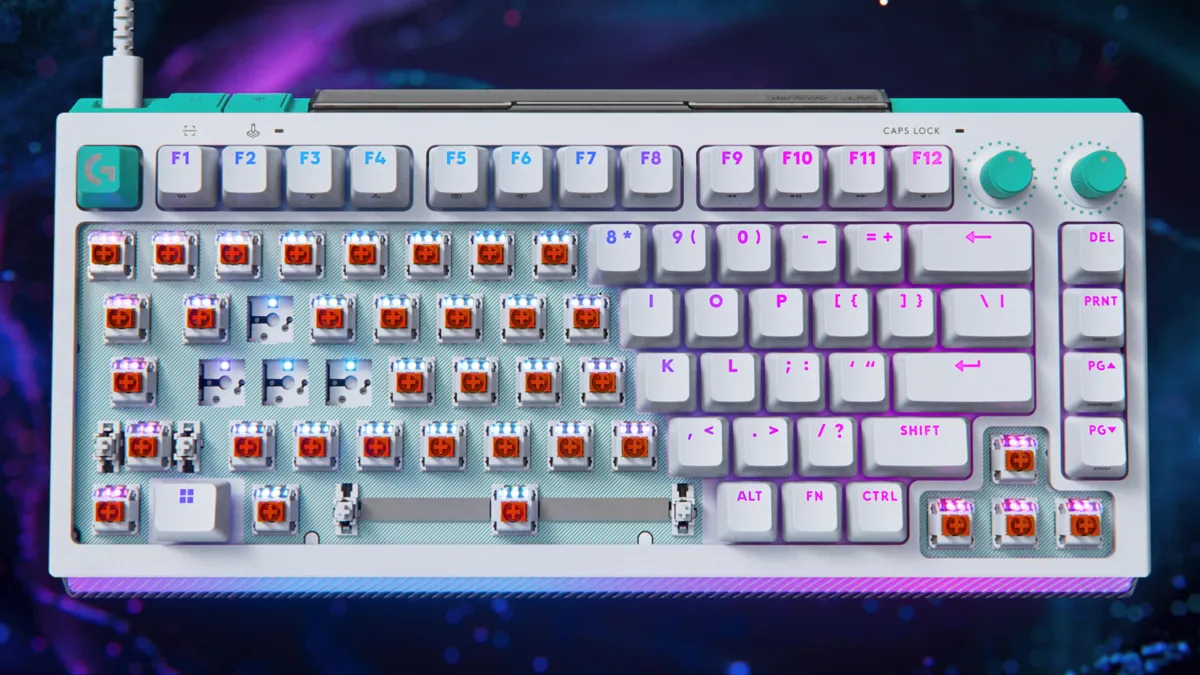
A recent trend in gaming accessories is the move to Hall effect and tunneling magnetoresistance technology. It started in controllers a few years ago, and it was only a matter of time before it made its way into gaming keyboards. There are now dozens of great HE and TMR keyboards to choose from. So now, as with controllers, the question becomes: Is it really worth upgrading?
There are certainly advantages to magnetic keys, but there are also some compromises. The granular levels of customization and significantly shorter response times can make a big difference in competitive games. On the other hand, the typing experience takes some getting used to, the battery life can be shorter and they’re often more expensive than their traditional mechanical cousins.
If you’re on the fence about upgrading, it can be hard to know if and when it’s worth it. For me, though, the answer is now a resounding “Yes, but.” Let me explain.
The concept of magnetic switches is simple: Instead of compressing a physical spring or rubber membrane as part of a mechanism to send an electrical signal that signifies a keypress, magnetic sensors are used to detect when a key is pressed more precisely and with less friction. This leads to some noticeable benefits.
Durability
The most obvious benefit for most casual gamers is the greater durability. Without the mechanical friction caused by the rubbing of physical components, HE and TMR switches can last much longer. Most mechanical switches are rated to last anywhere between 50 and 100 million keystrokes, which averages to about 10 to 15 years (of course, this could vary wildly depending on your usage). HE and TMR switches, on the other hand, are rated for more than 100 million keystrokes, so 15 to 20 years or more. It’s likely the keyboard’s other components will give out before the switches.
The second benefit is technologically much more profound, but also not nearly as useful for the vast majority of gamers. Some HE and TMR switches can, according to their manufacturers, register inputs (called the actuation point) as small as 0.05 millimeters of travel. By comparison, most traditional mechanical switches have an actuation point of between 1 and 2mm. This means that a key needs to travel far less before the keyboard and computer register the movement, greatly increasing response times. That may not seem like a big difference, but in the world of competitive gaming, that shorter actuation point is significant.
What’s even more interesting is that these switches can be customized far more granularly than their mechanical counterparts. So, not only can the actuation point be set to almost nothing, but most HE and TMR keys can store up to four actuation points per keystroke. That means you can perform four separate actions with a single press of the key; two actions on the downstroke and two on the release. For example, you could use the same single keypress to go from crouch to prone, prime and then throw a grenade. Or enter a vehicle, turn on the lights and then start the engine, all in one keypress.
Advertisement
This advanced customization can be useful in all kinds of games, including shooters, roleplaying games, multiplayer online battle arenas and massively multiplayer online roleplaying games like Elden Ring, League of Legends and World of Warcraft. Imagine being able to use a potion, cast a shield, cast an attack buff, then attack all by pressing a single key. There’s a whole world of possibilities. Again, most gamers probably won’t need that much control, and the amount of benefit depends largely on what genre you prefer. But that level of customization can really change the way you play your favorite games.
The shorter actuation levels also means response times are much shorter than with traditional mechanical switches. Again, to preface this, if you’re not a hardcore gamer or someone who plays FPS games a lot, you might not notice a difference. However, the more you do notice and practice with it, the harder it becomes to go back. Once you build the muscle memory of not having to fully press the keys to perform an action, going back to a traditional mechanical keyboard might actually start to feel like a chore.
Advertisement
The best pianists learn how to essentially bounce their fingers across the keys, especially when playing faster, more challenging works, and it’s similar here. Once you learn how to bounce your fingers on the keys, you’ll get faster and be able to react to what’s happening in the game. While 0.05mm versus 2mm might not seem like a big difference, in most games, simply starting your attack or trigger pull before the other guy almost always determines who wins the encounter (or how much health you lose during the fight).
That’s not all. Most magnetic keyboards have a feature that ensures all keypresses register, even if two keypresses overlap. With traditional switches, the first key has to return all the way to the top before the next keypress can register. With magnetic switches, the second keypress can register the moment the first keypress reaches the actuation point. This lets you do things like strafing and peeking around corners more quickly.
Are there downsides to magnetic switches?
With all their potential benefits, Hall effect and tunneling magnetoresistance switches have some drawbacks.
Cost
Advertisement
The Redragon FIDD K683.
Redragon
Like most technologies that aren’t widespread yet, magnetic keyboards are generally more expensive than traditional mechanical keyboards. That’s certainly not true across the board. There are some magnetic keyboards like the Redragon FIDD K683 for as low as $30, but on average, you’ll have to pay a bit more for magnetic switches, particularly TMR ones.
Keep in mind that keyboards vary widely in their materials as well as the types of switches. Arguably, the biggest determining factor in the price of a keyboard is the materials for the rest of the keyboard (you can even get one made of concrete if you want). So, if you want to just test out magnetic switches before investing in a more premium keyboard, pick up a couple of cheaper ones to make sure you like the feel of them before upgrading to a nicer model.
Daily typing
Advertisement
The Keychron K6 HE keyboard.
Keychron
Ever since I started testing magnetic keyboards (about two years ago, when they became more widely available), it’s been hard to find one I can also use as my daily typing keyboard. The typing experience on almost all of them has never quite matched the feel and sound of my mechanical keyboards. They are getting better, and I know enthusiasts are shouting loud enough for me to hear that you can change the springs on the switches. Even so, there’s still a way to go.
I say “almost all” because there is one glorious exception, the Keychron Q3 HE 8K. I say this unequivocally: the Q3 HE 8K is by far the best keyboard I have ever typed on. I’ve typed on many keyboards in my lifetime, and I am well aware that there are hundreds, if not thousands, I have never tried, but the Q3 HE 8K is my absolute favorite of the ones I’ve tested.
The Q3 uses Keychron’s custom Lime Magnetic Switches, which are hot-swappable. It has a full metal body, a gasket mount design and polybutylene terephthalate, or PBT, keycaps. I don’t know why or how, but the unique combination of everything on this keyboard adds up to an absolutely superb typing experience. Plus, the gaming benefits of the magnetic switches make it one of the best gaming keyboards you can buy.
Advertisement
A closeup of the Keychron Q3 HE 8K switches.
Keychron
Battery life
Most magnetic keyboards have significantly shorter battery life than their mechanical brethren. That’s mostly due to how the technology works: Magnetic-switch keyboards have to continuously scan their sensors. They have to continually process the exact location of every switch, and the ones with rapid-trigger and low-latency features (most of them) use a high polling rate, typically around 8,000 Hz.
All this puts a lot of strain on the battery, which is why many magnetic keyboards, such as the Q3, are wired only. It’s also why the wireless ones suffer from short battery life. While many mechanical keyboards can last well over 1,000 hours with backlighting off, magnetic keyboards typically last between 100 and 200 hours. This will vary depending on which features you keep on or off, but it’s still a fraction of a mechanical keyboard’s battery life.
Advertisement
Should you buy a magnetic keyboard?
As I said at the beginning, “Yes, but…” The extreme levels of customization, rapid response time and greater durability are wonderful benefits for any gamer. However, by and large, they’re benefits that only the most competitive gamers will truly be able to appreciate. There are tons of fantastic gaming keyboards out there that don’t have magnetic switches, and any gamer can enjoy them.
If you have the money or really want to invest in improving your gaming, then a magnetic keyboard is absolutely worth it. It’s taken a few years for them to get this good, but it’s safe to say that if you’ve thought about upgrading, they’re ready for you.















































You must be logged in to post a comment Login