For students who need an affordable tablet that includes a stylus and offers great side-by-side multitasking for productivity on the go, the Lenovo Idea Tab Plus is an easy option to recommend.
Stylus included
A great screen and software for multitasking
256GB as standard
Limited software updates
MediaTek chipset has its limits
Not the best stylus experience from Lenovo
Squirrel Widget
Advertisement
Key Features
Review Price:
£299.99
Advertisement
PC Mode:
Resize and minimise apps like on your desktop
Advertisement
12.1-inch 2.5K 90Hz display:
ideal for multitasking and entertainment
Advertisement
Lenovo Tab Pen included:
Indulge in digital drawing and note-taking
Introduction
Need an inexpensive yet work-capable tablet for your time at college or university? The Lenovo Idea Tab Plus might be exactly what you’re after.
Advertisement
As an iPad obsessive for the better part of two decades and as someone who got through the majority of their studies using an iPad Mini as opposed to a dedicated laptop, I’ve always preferred the simplicity of tablet computers, not to mention the portability they bring to the table.
Although I’m fairly knee-deep in the iPadOS ecosystem at this point, I am constantly amazed by the value that Apple’s more affordable Android competitors provide.
Advertisement
The OnePlus Pad Go 2 was easily my favourite budget tablet of last year, and I’ve been continually impressed by others including the even cheaper OnePlus Pad Lite, not to mention more expensive but brilliantly compact Lenovo Yoga Tab.
Advertisement
At £299.99/$259.99, the Lenovo Idea Tab Plus slots itself snugly at the higher end of the budget range, but that’s crucially a lower price than the entry-level iPad A16. The question is, does the Idea Tab Plus do enough to tempt potential buyers away from team Apple (and competing Android tablets)? After testing the tablet myself, here’s what I have to say on the matter.
Design
Sleek aluminium build
Slim at just 6.29mm
No magnetic housing for the stylus
One of the first things I noticed about the Lenovo Idea Tab Plus is that, when picked up, it’s a great example of just how far the market surrounding the best cheap tablets has come. With a smooth aluminium backing and frame, particularly when paired with the Luna Grey colourway of my review unit, Lenovo has done all that it can here to convince you that the Idea Tab Plus is anything but cheap.
Image Credit (Trusted Reviews)
Advertisement
It just feels wonderfully smooth in the hand (or both hands as it’s too large for one-handed use), and the fact that it’s just 6.29mm thick makes it easy enough to fling in a backpack or messenger bag and never feel that it’s taking up more space than it should.
The total weight of 530g is also just at the right level where you can hold the tablet for quite some time without any sense of fatigue, although Lenovo does expect you to bring a keyboard case into the mix to have the tablet propped up on a table, owing to the three-point connector at the base of the device.
The only area where the Idea Tab Plus does lose out to the entry-level iPad A16 is in the variety of colourways available. For Lenovo’s tablet, you can choose between the Luna Grey model featured here, and a slightly more eye-catching Sand Rose alternative, but that’s it. Compared to the four vibrant colours that Apple’s contender offers, there isn’t quite as much freedom for expression here, but you can always mitigate that with a case.
Advertisement
Arguably more detrimental is the complete lack of any housing for the included Lenovo Tab Pen. On the Lenovo Yoga Tab, there’s a magnetic strip along the top of the device so the included Pen Pro can sit there securely when it’s not in use, but there’s no equivalent here, meaning that the stylus sits around awkwardly on your desk.
Even though the Tab Pen doesn’t operate via wireless charging and instead uses a AAA battery, it would still have been nice to have a dedicated spot to keep it out of the way when you don’t need it.
Screen
12.1-inch 2.5K IPS LCD
90Hz refresh rate for smooth scrolling
Plenty of space for multitasking
Advertisement
Even though the Idea Tab Plus is aimed at the budget market, I think Lenovo understands very well that if you have a great screen to go with your tablet, much of the user experience naturally falls into place. That’s certainly the case here.
You’re getting a large 12.1-inch 2.5K IPS LCD panel that gets fairly bright, with a peak of 800 nits, along with a smooth 90Hz refresh rate that immediately gives the device an edge over the now-ancient-feeling 60Hz cap of the standard iPad.
Advertisement
Image Credit (Trusted Reviews)
What I like about the display is its wide 16:10 ratio, which makes it feel brilliantly suited not just to streaming (films feel wonderfully cinematic here), but also multitasking, as there’s plenty of space to have multiple apps take up the screen and never feel as if you’re squinting at any of them. This is handy too, as the tablet has fairly robust multitasking software built in, so it all works in tandem to make this a solid buy for light productivity tasks.
When streaming a bit of Disney Plus and my go-to film of Avengers: Infinity War for testing tablet displays, the climactic battle in Wakanda did wow me with the colours on display. I’ve been a bit spoiled as of late, having moved over to using the uber premium Samsung Galaxy Tab S11 Ultra in between reviews, but even with that knowledge of how good the high-end can be, I still had a very enjoyable experience watching the film on the Idea Tab Plus.
While I do appreciate the 90Hz refresh rate, especially as it makes simple things like web browsing or scrolling through social media feel nice and smooth, it is worth mentioning that the OnePlus Pad Go 2 does have it beat with a 120Hz refresh rate for not that much more at the checkout. That tablet uses an alternative 7:5 aspect ratio, which I do prefer for work, although it isn’t quite as well-suited for entertainment.
Advertisement
Cameras
13MP rear-facing camera
8MP 1080P selfie camera
Gets the job done for scanning and Zoom calls
For the cameras on the Lenovo Idea Tab Plus, you’re looking at a single 13MP rear-facing sensor, along with an 8MP 1080p front camera for work calls and chatting with friends or family. It’s the standard setup you’d expect for a tablet at this price, which is to say it’s functional but should never be used instead of your phone if you can help it.
The back camera can pick up a decent bit of colour with the right amount of light involved, but if you get too close then the colour reproduction can look a bit off, as I soon discovered when taking pictures of my Matcha Green Kindle. It’s best used for scanning documents that can then be interacted with via the Lenovo Tab Pen.
Advertisement
It’s a similar situation with the front-facing camera – other people on a call will be able to see your face well enough, but don’t expect them to pick up on the finer details of your complexion.
Performance
MediaTek Dimensity 6400 chipset
Works well with everyday activities
Struggles with high-end games
Advertisement
Much like the design of the Lenovo Idea Tab Plus, the other aspect that showed me just how far the budget market has come was the tablet’s performance.
Unlike super-cheap tablets such as the OnePlus Pad Lite or the Oppo Pad SE, which are best designed for light entertainment and web browsing only, the Idea Tab Plus can work as a genuine productivity device, so long as your workload includes less intensive apps like Chrome, Google Docs and Canva.
Powering the show is the MediaTek Dimensity 6400 chipset, and in everyday use, it’s a fine CPU that delivers the right level of performance for most people, especially students. Moving through the app tray is smooth, as is jumping from one app to another, and you can delve into a bit of side-by-side multitasking without issue.
Advertisement
Image Credit (Trusted Reviews)
I had Lenovo’s Notepad app open on one side, letting me doodle away, whilst watching YouTube on the other to catch up on the recent glut of trailers for the latest video games. For when you’re studying in the library and need to have Google Docs open alongside a browser for research, the Idea Tab Plus works exactly as you’d hope.
You can have three apps open at one time, wherein two of them are split into quarter blockers on one side of the screen, but this is where I did notice a bit of slowdown, as the tablet didn’t register my drawings at quite the same speed as before, so I don’t recommend it.
Advertisement
An area that left me feeling disappointed was the stylus itself. I’ve been spoiled by years of using Remarkable tablets to know how good the digital writing experience can be, and although I’m not usually a fan of using a stylus on a glass display, the Lenovo Yoga Tab won me over with the Lenovo Pen Pro’s haptic feedback, which recreated the feeling of moving a pencil across a piece of paper.
It’s a great bit of tech, but one that’s unfortunately missing on the standard Lenovo Tab Pen, so although the tablet can respond quickly to your inputs, the whole experience just doesn’t feel as fun or as intuitive as what you’ll find elsewhere.
Advertisement
Image Credit (Trusted Reviews)
When diving into a bit of gaming, a quick round of Call of Duty: Mobile was a fun and engaging experience with no visible lag and a fast pace, bolstered by the 90Hz refresh rate.
Much like with multitasking, however, if you push the Dimensity 6400 chipset even further with a game like Honkai: Star Rail, that’s where you’ll see the limits pretty quickly. By default, Star Rail sets its graphical quality to Low, where the title runs well enough, but change the settings to anything higher than that, and you’ll see the whole thing turn into a slideshow.
Regardless of whether you’re gaming or simply streaming a bit of Netflix, the tablet’s quad-speaker setup does a great job of enveloping you in its soundscape. When cranking the volume up on Avengers: Infinity War, I was able to pick up on a few layers of the overall track that I’d forgotten were there as they can get lost in the overall mix.
Advertisement
The fact that you’re getting 256GB storage as standard, plus the ability to expand that with a Micro SD card slot, means that you won’t have to worry when it comes to downloading tons of films and TV shows for a long journey.
Advertisement
Image Credit (Trusted Reviews)
For those who prefer to be untethered from a Wi-Fi signal when they work, there is a 5G-compatible model of the Idea Tab Plus available to buy.
Software
Lenovo ZUI overlay
PC Mode is great for productivity
A bit of bloatware to contend with
Just like other tablets from the brand, the Idea Tab Plus runs the Lenovo ZUI Android overlay. It’s easily one of the least offensive of its kind, but equally, it’s not enough to stand out as a selling point in itself.
The aforementioned multitasking software feels very much like it’s taken a leaf from OnePlus’ Open Canvas feature, which is exactly why this tablet is such a good fit for students who want to have more than one app open at a time during lectures or while studying at the library.
Advertisement
If you want to take the productivity experience even further, you can delve into the surprisingly efficient PC mode, which replicates the look of a typical desktop and lets you resize apps at your leisure and minimise them for quick access later.
It all works with a higher level of performance than my ageing iPad 10th Gen, and the fact that this is a tablet with a £299.99/$299.99 RRP but can often be found for less, just makes this a bit of a bargain compared to Windows laptops. If you throw in a wireless keyboard like the Logitech Keys-to-Go 2 into the mix then the whole experience feels even more intuitive.
Advertisement
Image Credit (Trusted Reviews)
There is a fair bit of bloatware to deal with once you boot up the Idea Tab Plus for the first time. Not only are there Lenovo’s own-brand apps, but there are third-party apps like Opera, WPS Office and Candy Crush Saga. It’s not quite as abrasive or in your face as what I’ve seen with MagicOS on Honor brand tablets, but it doesn’t surpass the relatively bloat-free look of OxygenOS on OnePlus devices.
The Idea Tab Plus’ biggest hang-up is that Lenovo is only promising a total of two OS upgrades from launch. That is bolstered somewhat by four years of security patches, but it’s a long way from the support provided by the likes of Apple and Samsung.
With that in mind, it’s just enough of an update cycle to get you through your studies, but I’d hesitate to recommend the Idea Tab Plus to an adult who might be looking for a tablet they can use long-term.
Advertisement
Battery life
10,200mAh capacity
45W charging speed
Plenty of juice for all-day working
One of the more eye-catching specs of the Lenovo Idea Tab Plus is that it carries a massive 10,200mAh battery, which is quite a rarity even amongst the more premium crowd. The only other tablets I’m aware of that come close at this end of the market are the OnePlus Pad Go 2 (10,050mAh) and the Honor Pad 10 (10,100mAh).
What you get with that cell, according to Lenovo, is the ability to stream up to 13 hours of YouTube, which I think is more than enough to keep most people satisfied over the course of a day. This means that if you have a long-haul flight ahead of you and you’d rather tune into your own curated library of entertainment, then you’ll have more than enough juice to see you through to your destination.
Advertisement
Image Credit (Trusted Reviews)
Seen another way, if you decide to venture away from the library for a few hours and study with friends at a cafe, then you won’t have to worry about making sure that you’re seated next to a charging outlet.
When it comes time to top up the battery, however, you can rely on 45W speeds over a wired connection, which is faster than the 33W cap of the OnePlus Pad Go 2, so you won’t have to wait long before the battery is full once more.
Advertisement
Squirrel Widget
Should you buy it?
Advertisement
You’re a student in need of a solid productivity tablet on a budget
With a price that undercuts the entry-level iPad, not to mention having a larger display and slick multitasking software, the Lenovo Idea Tab Plus is great for all-day studying.
Advertisement
You want a long-term Android tablet
With a fairly limited cycle of support, the Idea Tab Plus is immediately bettered by the likes of Apple and Samsung for anyone who wants a long-term upgrade.
Advertisement
Final Thoughts
If I were just about to head into university and had about £300/$300 to spend on a new tablet to see me through my studies, then the Lenovo Idea Tab Plus is exactly the option that I’d want to buy. The fact that you’re getting a larger (and faster) 12.1-inch 90Hz display over the iPad A16, and a stylus included, is just too good a package to overlook from a pure value standpoint.
For those who do want a slightly more compact tablet, the Lenovo Yoga Tab is available. Although I also love that tablet for its superior processor and writing experience, when it comes to side-by-side multitasking, I do prefer the Idea Tab Plus because you have more room for apps to spread out.
I do think that you get a better screen and software experience with the OnePlus Pad Go 2, but the Idea Tab Plus still comes out on top for battery life and charging speed.
Advertisement
If Lenovo were to support the Idea Tab Plus beyond the promised two-year OS update cycle, I would just as easily recommend it to adults as well, but for now, it’s just a great buy for students on a budget.
How We Test
We test every mobile phone we review thoroughly. We use industry-standard tests to compare features properly and we use the phone as our main device over the review period. We’ll always tell you what we find and we never, ever, accept money to review a product.
Used as a main tablet for over a week
Tested and benchmarked using respected industry tests and real-world data
FAQs
Does the Lenovo Idea Tab Plus come with a stylus?
Yes, the Lenovo Tab Pen is included with the tablet.
Advertisement
Does the Lenovo Tab Pen have wireless charging?
No, unlike the Tab Pen Pro, the standard Lenovo Tab Pen requires a AAA battery to run.
JBL packed a color touchscreen into the charging case of the Live Beam 3 earbuds, priced at $99.95 (was $149.95). That addition changes how people interact with their audio gear during a normal day. Someone heading to work or hitting the gym can open the case and swipe through options right there. Volume goes up or down with a touch. Playback pauses or skips without pulling out a phone. ANC modes switch from full noise blocking to letting in some surroundings. Even EQ presets become accessible on the go.
A tap wakes up the display, which shows the battery levels for both the buds and the casing at a glance. Users can pick a favorite photo as the background, and it rotates appropriately when the lid opens, allowing guests to see it right side up. A flashlight option brightens the screen for quick light in a pinch. Shortcuts remain adjustable in the companion app, so only the most often used tools appear. This setup addresses a major complaint about many wireless earphones. Touch controls on the buds handle basic commands but frequently need sacrifices. Adjusting one thing results in losing simple access to another. The case screen eliminates this limitation and keeps everything in one easy location that goes with the buds anyway.
The sound quality backs up the convenience, as these earbuds provide a dynamic presentation with plenty of detail and strong bass that sounds engaging across a variety of music styles. Listeners that prefer a little more vitality in their songs will find it enjoyable. Advanced codec compatibility enables compatible phones and players to send higher-quality audio when available. Those who wish to fine-tune their EQ can use an app.
The battery life is outstanding, with a single charge lasting nine to ten hours with noise canceling turned on. If you turn off ANC, it will last about twelve hours. The enclosure increases the total playback time to nearly two full days of use. When time is of the essence, a quick ten-minute charge via USB-C adds an extra four hours.
Silicone tips provide fit by forming a seal that is beneficial to both sound quality and noise reduction. The buds’ IP55 rating ensures that sweat from exercises or unexpected rain will not be an issue. Many individuals find the stem style comfortable for lengthy usage, however results vary depending on ear shape, as with most in-ear designs. Active noise canceling works nicely in this price range. It successfully minimizes traffic noise, train noise, and workplace chatter, making it suitable for everyday commutes or concentrated work. Adaptive modifications are made automatically based on the surroundings and fit. Calls come through clearly thanks to multiple beamforming microphones that eliminate wind and background interference. Multipoint Bluetooth allows the buds to connect to two devices at once, making it easy to swap between a phone and a laptop or tablet.
It’s not often we mention the Kardashian-Jenner clan here at Trusted Reviews, but Kylie Jenner’s surprise collaboration with Meta is all I’ve been thinking about.
In case you missed it, the youngest Jenner recently unveiled her own pair of Meta smart glasses. Coined Starfire, the oval-shaped specs are not only framed as a trendy choice but they’re fitted with Meta’s controversial features, including Meta AI and, most notably, the built-in 12MP camera.
Kylie’s collaboration with Meta is surprising and disappointing for so many reasons. Firstly, in a viral interview back in May, she recalled how scary and invasive growing up with paparazzi essentially stalking her for photos was.
Like her eldest sister, she’s known for keeping certain parts of her life private. For example, she hid her first pregnancy entirely from the media, and then later was reluctant to share photos of her second child online. This is completely understandable, as everyone has a right to privacy and absolutely shouldn’t feel any need to share images online.
Advertisement
With the above in mind, why on earth is Kylie therefore promoting smart glasses that have the power to take privacy away from pretty much anyone who has the bad luck of walking past a desperate aspiring content-creator-slash-creep?
Advertisement
Meta glasses have a terrible reputation for being a complete privacy nightmare, especially when it comes to women and girls’ safety. Back in May, the BBC reported that a woman was going about her day when a man approached her, without a camera or phone in hand. Instead, he was wearing smart glasses, and she had “no idea she was being filmed”.
The video was then posted online and viewed thousands of times, with the woman only finding out when a friend sent it to her.
Advertisement
While we don’t know the exact brand of smart glasses the man was wearing, Meta glasses all have a light that comes on when you’re filming, which technically should show people that they’re being filmed. However, and I’ve seen this for myself, that light literally couldn’t be any smaller. I would totally understand if someone passed off the light as a simple reflection or maybe even just a large scratch on the glasses.
Meta Starfire as shown on Kylie Jenner. Image Credit (Meta)
That’s not the only worrying story. As uncovered by Wired last month, Meta has recently embedded face-recognition technology into the Meta AI app. While it’s not currently accessible by users, it will identify people captured by the glasses’ camera and alert the wearer when it recognises someone.
This has, unsurprisingly, caused concern. Experts who spoke to The Independent earlier this year feared this technology could pose a “direct and serious risk” to domestic abuse survivors as it could enable their abusers to locate and track (in other words, stalk) them, without them even knowing.
Advertisement
Plus, the fact that anyone who walks past a Meta glasses wearer’s image will be “cropped, indexed, and saved to a folder marked ‘pending’” is incredibly unnerving. What if your neighbour or the fellow commuter who always gets the same train as you is wearing Metas? Will your image be consistently stored for them to see? Will Meta actually note that you’re a frequent passer-by and attempt to identify you?
Advertisement
What are the merits of smart glasses?
I’ve had hands-on experience with both the Meta Ray-Bans 2 and the Oakley Meta Vanguard too. The latter I somewhat understand the purpose of more, as they’re used as sports glasses and enable you to capture your surroundings, get real-time stats and more without needing to reach for your phone. The Ray-Bans 2 and similar glasses, on the other hand, are a different story.
Ray-Ban Meta 2. Image Credit (Trusted Reviews)
Yes, Meta glasses allow you to do interesting things like translate live, but so do AirPods and many of the best Android phones. And yes, the glasses also give you real-time answers with Meta AI without you needing to reach for your phone, but is anything really that urgent?
I admit, I just can’t get on board with smart glasses, and maybe it’s because I’m not the target audience. But once you factor in the high price, the limited style options and, most notably, the serious privacy concerns, the cons surely vastly outweigh the pros.
Advertisement
However, Kylie Jenner’s influence is undeniable, and Meta clearly knows this as she’s one of the most followed users on Instagram. Her collaboration with Meta is not only hypocritical from someone who publicly states how much she favours privacy, but it will undoubtedly attract a new demographic of younger users who grow to think it’s simply fine to film people without their knowledge.
Advertisement
Obviously (and very unfortunately) it’s not as easy to say “let’s just ban smart glasses”, but there undoubtedly needs to be more regulation of filming and sharing content online.
A new Quordle puzzle appears at midnight each day for your time zone – which means that some people are always playing ‘today’s game’ while others are playing ‘yesterday’s’. If you’re looking for Sunday’s puzzle instead then click here: Quordle hints and answers for Sunday, July 5 (game #1623).
Quordle was one of the original Wordle alternatives and is still going strong now more than 1,500 games later. It offers a genuine challenge, though, so read on if you need some Quordle hints today — or scroll down further for the answers.
Enjoy playing word games? You can also check out my NYT Connections today and NYT Strands today pages for hints and answers for those puzzles, while Marc’s Wordle today column covers the original viral word game.
Advertisement
SPOILER WARNING: Information about Quordle today is below, so don’t read on if you don’t want to know the answers.
Latest Videos From
Quordle today (game #1624) — hint #1 — Vowels
How many different vowels are in Quordle today?
• The number of different vowels in Quordle today is 4*.
* Note that by vowel we mean the five standard vowels (A, E, I, O, U), not Y (which is sometimes counted as a vowel too).
Advertisement
Quordle today (game #1624) — hint #2 — repeated letters
Do any of today’s Quordle answers contain repeated letters?
• The number of Quordle answers containing a repeated letter today is 0.
Quordle today (game #1624) — hint #3 — uncommon letters
Do the letters Q, Z, X or J appear in Quordle today?
• No. None of Q, Z, X or J appear among today’s Quordle answers.
In the mid-noughties, when music by the Killers and Franz Ferdinand blared out of every pub and nightclub I passed, I spent my days and nights struggling through a Ph.D. in applied mathematics. My research focused on simulating how special light waves interact in liquid crystals and using simple equations to approximate and understand those interactions. When I look back at my thesis now, liquid crystal technology is old hat, and I imagine my work could be completed with AI assistance in a matter of days—maybe hours.
But the same cannot be said for the work of the pure mathematics Ph.D. students with whom I shared a cramped office at the University of Edinburgh. At the time, I felt sorry for these colleagues, who day after day sat at their desks, seemingly tearing their hair out and making no progress. (Though I was struggling too, I was at least always making some headway.) When we finished and went our separate ways, some hadn’t even published a paper.
Now, in hindsight, I finally understand why they toiled for years on abstract mathematical problems that only a handful of people in the world care about. It wasn’t arrogance, as I thought at the time; they weren’t trying to prove their superior intelligence by being the first to solve a seemingly intractable mathematical problem. It wasn’t even a form of masochism (which was my second guess)—penance for some imagined inadequacy. I realized they derived joy, satisfaction, and meaning from the long journey toward understanding.
Advertisement
“Sometimes, understanding just strikes you as being very beautiful. Sometimes it’s a feeling of accomplishment, like completing a marathon,” muses Carnegie Mellon University mathematician Jeremy Avigad. “But it’s not quite either of those: It’s just a wonderful feeling when you’ve been thinking long and hard about something complex, difficult, and then—all of a sudden—it just comes together.”
This feeling has driven mathematicians throughout history. Likewise, the way mathematicians pursue that feeling has changed little over the centuries. They notice or imagine links, patterns, or properties in numbers, shapes, or logical structures. From this, they write conjectures—unproven statements of their speculation. They or other mathematicians then use logical reasoning and the tools of mathematics in often creative ways to prove or disprove those conjectures. Finally, yet other mathematicians verify (or challenge) the proofs.
Invariably, this process requires a whole heap of thinking time. “I went to a pure maths camp with classes where we would sit with hard maths problems for half an hour and no one would say anything—everyone was just thinking,” says Krystal Maughan, a mathematician and computer scientist about to get her Ph.D. at the University of Vermont. “But then we would work together and kind of tease out the problem.”
This is the age-old joy of math in action. But today’s AI systems are starting to make inroads into bypassing this slow, deliberative process. Taking this trend to its logical conclusion, what happens if AI makes the mathematician’s struggle completely unnecessary? Might AI even sideline humanity completely?
Advertisement
AI’s Growing Role in Mathematics
For decades, computation has accelerated mathematical progress. This began 50 years ago, when mathematicians used a computer to prove the four-color theorem, which asks whether any map can be colored using no more than four colors, with no adjacent regions sharing the same color. The answer is yes, and the computer proved it, controversially, by checking 1,936 cases in a way no human could realistically verify.
Yet throughout this computational era, even in proofs relying on massive computational resources, the role of the human mathematician has remained central. Humans propose conjectures, guided by intuition. They devise strategies to prove them, guided by creativity and experience. And humans verify whether those proofs are correct.
Now AI is challenging the status quo. In just a few years, large language models (LLMs) have evolved from “stochastic parrots,” capable of little more than regurgitating basic mathematics scraped from the internet, into advanced mathematical reasoning machines.
Last summer, systems from Google DeepMind and OpenAI reached a level equivalent to the world’s most mathematically gifted high school students, achieving gold-medal status at the International Mathematical Olympiad. In this annual competition, contestants must solve six notoriously difficult problems from various areas of mathematics.
Advertisement
Earlier this year, Google DeepMind’s experimental AI system Aletheia achieved an even more significant milestone when it autonomously produced publishable Ph.D.-level research results. While the work itself is obscure mathematically—calculating structure constants in arithmetic geometry—the significance lies in the complex reasoning it displayed in tackling an unsolved mathematical problem. And more recently, a new general-purpose AI system from OpenAI disproved an important conjecture in combinatorial geometry. This result would have been worthy of publication in a major mathematics journal if humans had been the authors, and top mathematicians hailed the feat as a milestone for AI in mathematics, demonstrating independent, original, and sophisticated thinking.
Another shift has come from combining LLMs with mathematical tools known as proof assistants, which have been around for more than a decade. These systems—such as Isabelle, Lean, and Rocq—are specialized programming languages that check mathematical proofs step-by-step, verifying their logical correctness. Traditionally, mathematicians have had to translate their theorems and proofs into this machine-readable format by hand, a laborious process known as formalization. Now, LLMs are starting to remove this bottleneck, automating the translation of informal proofs into formal code that proof assistants can verify.
Versions of such systems, sometimes called reasoning agents, are becoming highly sophisticated. In February, for example, the AI company Math, Inc. used its aspirationally named reasoning agent Gauss to formalize a proof that had earned the mathematician Maryna Viazovska, of EPFL, in Switzerland, a Fields Medal in 2022. Gauss first helped human mathematicians complete the formalization of Viazovska’s solution to the 8-dimensional sphere-packing problem in a matter of days, and then autonomously formalized the more complicated 24-dimensional case in just two weeks.
Such achievements suggest that AI is already capable of handling some mathematical tasks long considered uniquely human. As the technology advances, more of the day-to-day work of human mathematicians is likely to become fair game for AI.
Advertisement
Mathematicians Debate AI’s Role in Discovery
Gluekit
Human mathematicians could become “priests to oracles.” —Yang-Hui He, London Institute for Mathematical Sciences
In September 2025, I attended the 12th Heidelberg Laureate Forum—an annual conference that brings hundreds of young mathematicians and computer scientists together with their intellectual idols. AI dominated the conversation and, from the get-go, tension was in the air.
Speakers described a future in which superhuman AI mathematicians transcend human knowledge and capabilities: forming conjectures, searching solution spaces, proving conjectures, and finally verifying the proofs and generalizing the results, all without human involvement. If this future comes to pass, Yang-Hui He of the London Institute for Mathematical Sciences memorably declared, human mathematicians could become “priests to oracles.”
Advertisement
While such startling predictions were being voiced on stage, my gaze was drawn to the audience. Frowning, fidgeting, and exchanging furtive glances—the crowd’s unease was palpable. Trill White, a student at Australia’s Deakin University, later recalled sitting in that hall and thinking: “ ‘That’s devastating. What will people have to contribute to mathematics? Will it become something that no one understands?’ I did get a sense that this is going to change everything.”
Gluekit
“We certainly started realizing AI has the potential to replace us.” —Jessica Randall, Google Developer Groups
Jessica Randall, a South African mathematician for Google Developer Groups, says she sensed a collective existential dread rising among the young mathematicians. “I could feel everyone was worried, because they hadn’t thought that far ahead,” she says. “It was like a big bombshell that hit us, and we certainly started realizing AI has the potential to replace us.”
Advertisement
Some established mathematicians, including He, seem comfortable with AI taking on tasks that are currently the preserve of human mathematicians. That’s because they just want to know the answers to the biggest questions in mathematics—such as the six remaining Millennium Prize Problems—even if AI does it all. “A lot of mathematicians are pragmatic and just want to understand. They would sell their soul for the solution to a problem,” jokes Avigad. “Whatever it takes, right?”
But this “just want to know” camp is by no means the only faction: Most mathematicians do not hope or expect AI to replace them entirely. Instead, two broad alternatives are emerging. The first is a human-centric aspiration that prioritizes human understanding of mathematics and treats AI as a tool, much like a calculator. The second is a collaborative “teamwork makes the dream work” vision, where humans and AI work together to tackle problems neither could solve alone.
The Human Role in Mathematics
Gluekit
Numbers are “a way of bringing us to agreement.” —Akshay Venkatesh, Princeton University
Advertisement
Fields Medalist and Princeton mathematician Akshay Venkatesh has been thinking about this topic from the human-centric viewpoint for years. In 2022, he used his Fields Medal Symposium to implore the mathematics community to deeply consider what AI might mean for the practice of mathematics. At the time, the idea that AI could replace mathematicians seemed far-fetched. Now, he says, “we’re reaching the point where, for at least some tasks with abstract mathematical reasoning, computers are becoming competitive with humans.”
For Venkatesh, the question is not just what computers can do, but what mathematics is for. “Sometimes I think when we use numbers, it’s not so much that we are describing phenomena that are intrinsically numerical, but that we can all agree exactly what the numbers mean,” he says. “It’s a way of bringing us to agreement.”
Maia Fraser of the University of Ottawa argues that mathematics is more than finding answers. For her, the struggle to understand a problem is one of the discipline’s greatest rewards.
Markian Lozowchuk
Advertisement
Mathematician and machine learning expert Maia Fraser, of the University of Ottawa, shares this sentiment. She says the joy she derives from mathematics is something distinctly human that integrates the subconscious and conscious mind. She describes starting with an intuitive sense that a certain thing should be true and gradually bringing out something that she can express in a rigorous proof. Communicating and sharing these deep-born thoughts is “a form of collective intelligence that is something beautiful about the human spirit,” she says.
By these arguments, an AI proof of a mathematical conjecture that has stubbornly resisted human efforts would be useful only if comprehensible to humans. “That the statement can be proved by AI is already useful information,” concedes Fraser. “But then it’s still an open problem to come up with an elegant, beautiful human proof.” Even if no such proof exists, she says, searching for it “is still a valuable endeavor.”
AI and the Future of Mathematical Collaboration
A more collaborative approach to AI in mathematics comes from Terence Tao, who first competed in the math Olympiad at the age of 10. In 1986, 1987, and 1988, he won bronze, silver, and gold medals, respectively, making him the youngest winner of each of the three medals in Olympiad history. Now a Fields Medalist and professor at the University of California, Los Angeles, he has earned a reputation as one of the most gifted mathematicians alive.
Unlike some of his peers, Tao is neither dismissive of AI nor fearful. Instead, he sees it as the catalyst for a fundamental shift in the discipline—a transition toward what he calls “big mathematics.” He envisions a future of large-scale, decentralized collaborations between humans and machines, where complex mathematical tasks can be diced and sliced, with humans claiming the creative parts and AI doing the lion’s share of the technical grunt work.
Advertisement
Already, Tao is experimenting with this concept, working on problems alongside scores of online collaborators, some using AI tools. “A hundred years ago, almost every mathematics paper was single author,” he says. “But now I collaborate with people I’ve never met—and maybe in the future, I won’t even know if they are AI or real people.”
The key to Tao’s vision is uniquely mathematical: formalization. When a proof is translated into code and checked step-by-step by proof assistants, it removes any chance of human error or dishonesty. This approach changes how collaboration works, because trust is established through verification rather than reputation or rapport. An idea from an unknown researcher or even an amateur can be taken seriously if it has a formal proof.
“If it wasn’t for this formal verification layer, opening projects up without any safeguards would just be a disaster,” adds Tao. “But in math, we can completely check and verify outputs, and this really filters out a lot of the rubbish.”
The Risks of AI in Mathematics
From the young researchers at the Heidelberg Laureate Forum to some of the biggest names in the field, mathematicians all seem to agree on one point: AI has the potential to transform their discipline. But there’s far less consensus on what that transformation will mean in practice.
Advertisement
Some worry about the accessibility of AI tools. Traditionally, mathematicians have required little more than intuition, training, and a pen and paper to advance their field. If this slow, deliberative process is no longer valued by society, and particularly by research funders, then mathematics could become an elitist activity, only practiced by select organizations that can afford to work with proprietary AI models.
Another concern is motivation. As AI systems take on more of the work, the incentive to engage deeply with difficult problems may weaken. Princeton’s Venkatesh says that the long human process of formulating and understanding a proof may be hard to justify, not just to funders, but even to mathematicians themselves. “There have been times where I’ve spent years thinking about something, and I’ve slowly struggled to understand it,” he says. “If your computer can do large chunks of that for you, will you have the motivation to spend that time?”
That concern extends to the next generation. If students can use AI to jump straight to answers, they most likely will. But every time they skip the struggle, they miss an opportunity to build the foundations of their own unique intuition. Over time, some worry, the next generation of mathematicians may suffer from a form of intellectual atrophy, unable to think outside the AI box that trained them.
In response to such fears, the mathematics community is taking action. Individuals are writing essays, organizing workshops, and debating in journals, while institutions and community groups are developing guidelines for how AI should be used in research and publication. Indeed, mathematicians are applying the same rigor and curiosity that they use every day to reckon with the challenges of AI. Taken together, these efforts reflect a broad effort to try to retain control over the direction of mathematics in the era of AI.
Advertisement
So, is AI sucking the soul out of math? In one way, it is doing the opposite. It is forcing mathematicians to confront deep questions about what mathematics is, why they have devoted their lives to it, and the purpose math serves in society. At the same time, though, it is reshaping the practice of mathematics in a way that may be difficult to reverse.
“Mathematics makes me a better problem solver at normal problems, because it frames my mind to think in a very logical, rational way,” says Randall, who noted the existential dread at the Heidelberg Forum. “It helps with every aspect of my life.” As AI transforms mathematics, many researchers wonder whether future mathematicians will be able to say the same.
Portable computers in the mid-1980s were finally small enough to carry, yet their screens kept pulling users back toward desks and power outlets. The BBC program Micro Live used a January 1986 episode to lay out exactly why that gap existed and what might close it.
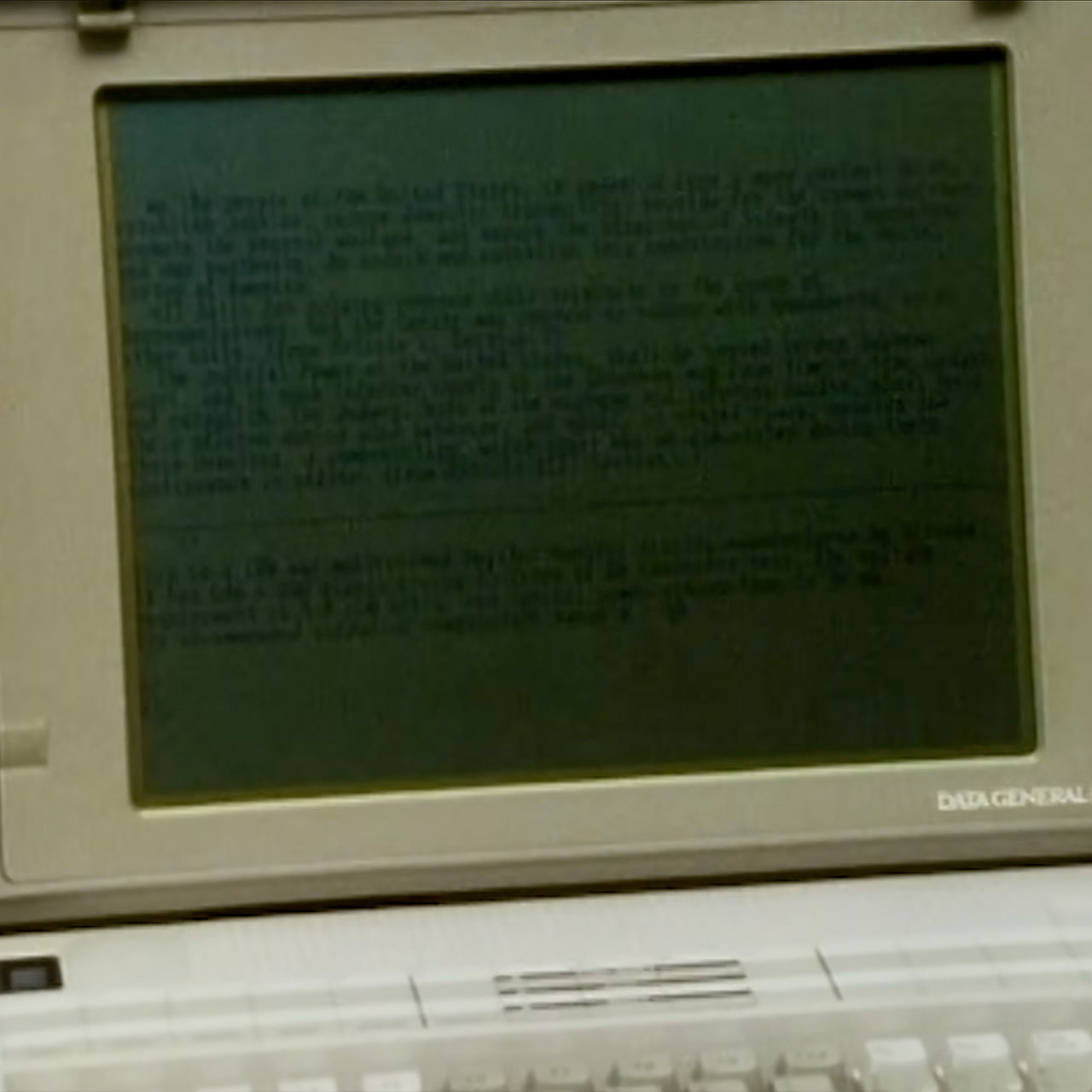
The segment began at the Which Computer Show, where two new approaches were presented side by side. Sharp provided a laptop with a backlit liquid crystal display. The extra light made the image easier to read in normal surroundings, but the underlying LCD still confined users to a narrow sweet zone directly in front of the screen. When I moved slightly to the side, the contrast collapsed. Colors and details simply disappeared. Toshiba displayed a plasma panel beside it. A fine grid of wires spanned inside the screen, illuminating a gas in bright spots when voltage crossed the lines. On camera, the image appeared clear and vivid. In actuality, the design consumed significantly more electricity than a battery could provide for an extended period of time, ran hot, and required frequent refreshing. That refresh cycle produced apparent flicker, which many users previously blamed for tired eyes after extended sessions.
Full HD Portable Monitor – MNN 15.6inch portable laptop monitor with 1920*1080 resolution, advanced IPS matte screen support 178° full viewing angle…
Double Type-C Port -For Plug & Play, the MNN monitor provides 2 Full Feature Type-C ports. Only One USB Type-C Cable is required to connect to the…
Lightweight Ultra Slim for Travel – As a portable external monitor,MNN portable laptop monitor easily accommodate to every suitcase and backpack and…
Presenters pointed out the common flaws without drama. LCDs remained cool and consumed little electricity while providing poor contrast and narrow viewing angles. Plasma screens provided more brightness and greater angles in some situations, but they required mains electricity and caused the flutter associated with constant image refreshes. Neither provided the clarity that people expected from paper or typical desk monitors. One presentation summarized the aim that everyone kept missing. What portable users actually required, he claimed, was a screen that remained vast in area while being compact overall, cost little to make, emitted no radiation, remained flicker-free, provided strong contrast, traveled smoothly, and consumed nearly no power.
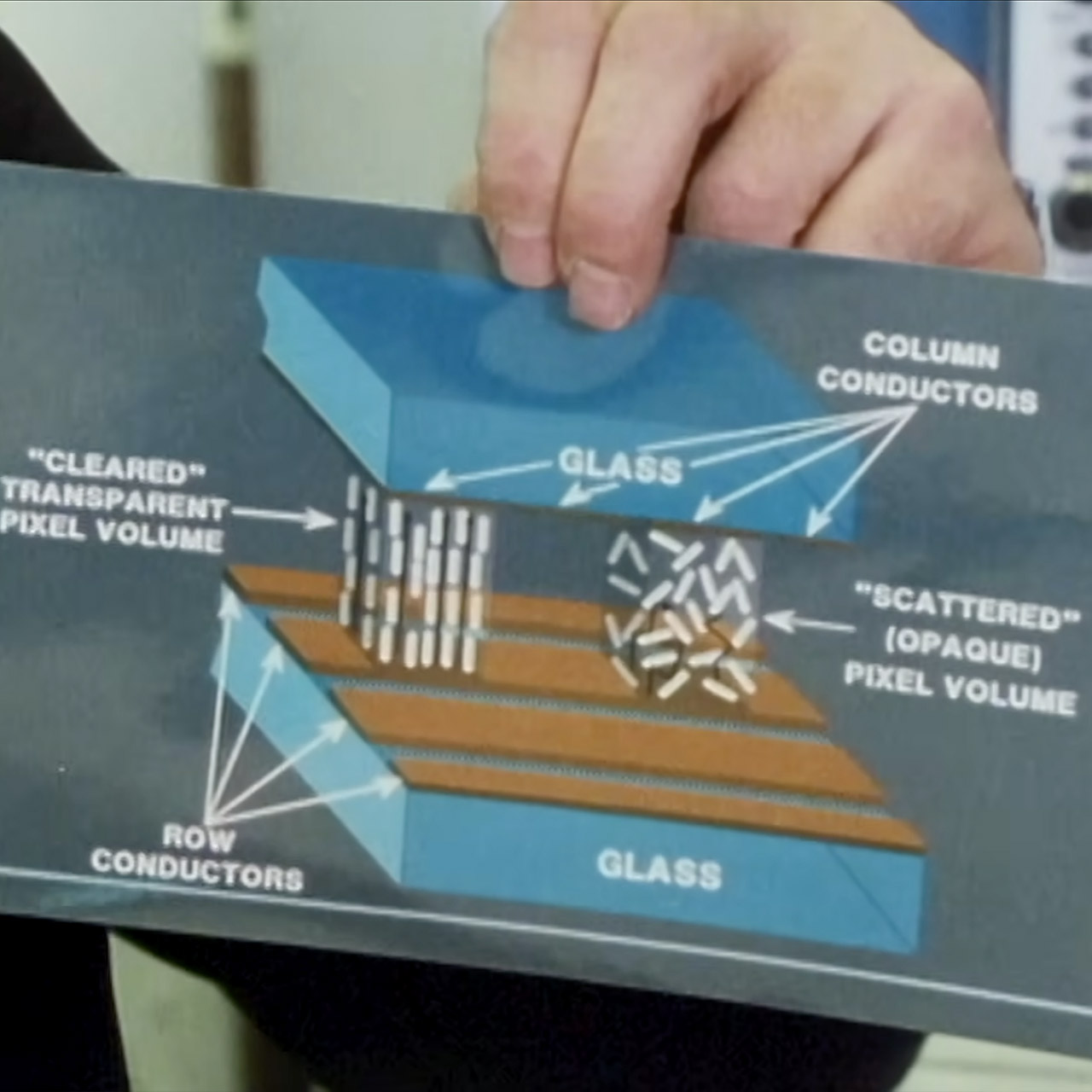
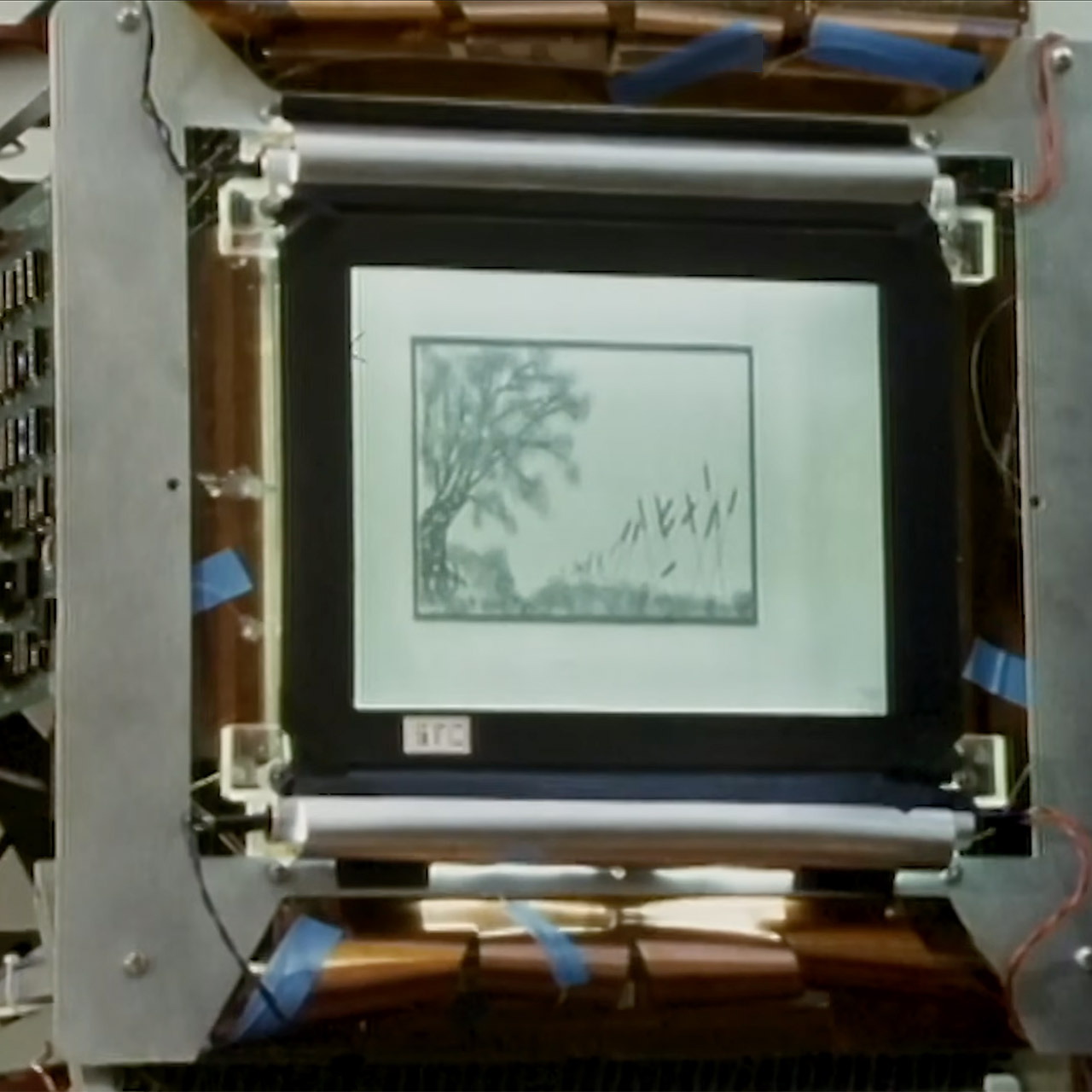
The program then moved to Harlow’s research laboratory. Engineers had created a functioning prototype that approached the refresh problem from a new perspective. Two sheets of glass were only 11 microns apart. Tiny glass threads kept the gap stable. The tight slot was filled with a unique fluid that required only a few drops to cover the entire panel. Each glass sheet had parallel lines of conductive material. Each crossing of those lines produced a controllable point on the image. The fluid behaved differently based on the electrical signal used. A high-frequency pulse aligned the molecules, allowing light to pass right through. Instead, they were scattered by a low-frequency signal, which blocked or redirected light. Once the molecules had settled into any arrangement, they remained there. No further electrical push was required to hold the image. As a result, the prototype could maintain a stable image even after power had been removed from the panel, something ordinary LCD and plasma panels could not.
Demonstrations made the difference clear, since a typical laptop screen went black when the power was turned off and lost detail as the viewer switched position. The new panel kept its image viewable and the contrast consistent across far broader angles. The effect was more like to a printed page than the flickering electrical displays most people had seen on portable devices. Because the design did not include the polarizing filters that are often required by LCD displays, construction remained easier. Fewer layers resulted in less light loss and potentially lower manufacturing costs. Once an image was saved, power consumption remained minimal because nothing needed to cycle to keep it.
Practical hurdles remained, as each pixel required approximately 200 volts to flip states, which was far more than typical logic voltage. A full-size prototype has hundreds of thousands of discrete connections along its edges. Engineers have already begun gluing special driver chips directly to the glass, reducing the number of external cables.
Nearly 1 million people have lost a total of $3.8 billion after buying President Donald Trump’s $TRUMP memecoin, according to cryptocurrency analytics firm Nansen.
The New York Times reports that Nansen’s analysis is based on transactions that are publicly visible on the blockchain, showing that 988,905 accounts had lost money on the memecoin as of the end of June. That represents around two out of three $TRUMP buyers.
Trump announced the memecoin three days before his inauguration in 2025. He’d previously co-founded a crypto startup, World Liberty Financial, with his sons. The $WLFI coin has also declined significantly in value.
Advertisement
In a recent financial disclosure, the president revealed that he made $636 million from the $TRUMP memecoin, accounting for nearly half of the $1.4 billion that the president made from the crypto industry last year.
According to the post, each processor combines 6 “Coyote Cove” P-cores, 12 “Arctic Wolf” E-cores, and 4 LP-E cores. That mix suggests a design that balances compute throughput with background and low-power tasks, rather than just piling on more performance cores. Read Entire Article Source link
A new NYT Connections puzzle appears at midnight each day for your time zone – which means that some people are always playing ‘today’s game’ while others are playing ‘yesterday’s’. If you’re looking for Sunday’s puzzle instead then click here: NYT Connections hints and answers for Sunday, July 5 (game #1120).
Good morning! Let’s play Connections, the NYT’s clever word game that challenges you to group answers in various categories. It can be tough, so read on if you need Connections hints.
What should you do once you’ve finished? Why, play some more word games of course. I’ve also got daily Strands hints and answers and Quordle hints and answers articles if you need help for those too, while Marc’s Wordle today page covers the original viral word game.
Advertisement
SPOILER WARNING: Information about NYT Connections today is below, so don’t read on if you don’t want to know the answers.
Latest Videos From
NYT Connections today (game #1121) – today’s words
(Image credit: New York Times)
Today’s NYT Connections words are…
ATOM
BUMBLEBEE
TNT
THUNDERBOLT
VOLCANO
TINDERBOX
DNA
ROCKET SKATES
MATCHA
BOMBSHELL
EARTHQUAKE
PILLS
REVELATION
SOLAR SYSTEM
GRIND RAIL
SHOCKER
IRON BIRD
SEED
NYT Connections today (game #1121) – hint #1 – group hints
What are some clues for today’s NYT Connections groups?
Advertisement
YELLOW: Astounding information
GREEN: School project
BLUE: As used by Looney Tunes character
PURPLE: Romantic beginnings
Need more clues?
We’re firmly in spoiler territory now, but read on if you want to know what the four theme answers are for today’s NYT Connections puzzles…
Sign up for breaking news, reviews, opinion, top tech deals, and more.
Advertisement
NYT Connections today (game #1121) – hint #2 – group answers
What are the answers for today’s NYT Connections groups?
YELLOW: STUNNING NEWS
GREEN: SCIENCE FAIR MODEL SUBJECTS
BLUE: ACME PRODUCTS USED BY WILE E. COYOTE
PURPLE: STARTING WITH DATING APPS
Right, the answers are below, so DO NOT SCROLL ANY FURTHER IF YOU DON’T WANT TO SEE THEM.
Advertisement
NYT Connections today (game #1121) – the answers
(Image credit: New York Times)
The answers to today’s Connections, game #1121, are…
GREEN: SCIENCE FAIR MODEL SUBJECTS ATOM, DNA, SOLAR SYSTEM, VOLCANO
BLUE: ACME PRODUCTS USED BY WILE E. COYOTE EARTHQUAKE PILLS, IRON BIRD SEED, ROCKET SKATES, TNT
PURPLE: STARTING WITH DATING APPS BUMBLEBEE, GRIND RAIL, MATCHA, TINDERBOX
My rating: Hard
My score: 1 mistake
I would use cultural differences as the reason why I didn’t see SCIENCE FAIR MODEL SUBJECTS, but it is such a sitcom trope that I have no real excuse for being blind to the concept of a cardboard VOLCANO exploding with vinegar and red food coloring.
Much easier was spotting STARTING WITH DATING APPS, made easier by seeing tiles for BUMBLEBEE and TINDERBOX beside each other.
My mistake came with the blue group — I wasn’t thinking about catching a roadrunner, but I did I think that EARTHQUAKE PILLS, IRON BIRD SEED and ROCKET SKATES did all sound like crazy inventions, so I added THUNDERBOLT thinking it might be some kind of tool.
Advertisement
After getting one away, I realized ACME PRODUCTS was the link.
Yesterday’s NYT Connections answers (Sunday, July 5, 2026, game #1120)
PURPLE: WHAT “W” MIGHT STAND FOR TUNGSTEN, WEST, WIN, WITH
What is NYT Connections?
NYT Connections is one of several increasingly popular word games made by the New York Times. It challenges you to find groups of four items that share something in common, and each group has a different difficulty level: green is easy, yellow a little harder, blue often quite tough and purple usually very difficult.
On the plus side, you don’t technically need to solve the final one, as you’ll be able to answer that one by a process of elimination. What’s more, you can make up to four mistakes, which gives you a little bit of breathing room.
Advertisement
It’s a little more involved than something like Wordle, however, and there are plenty of opportunities for the game to trip you up with tricks. For instance, watch out for homophones and other word games that could disguise the answers.
It’s playable for free via the NYT Games site on desktop or mobile.
Apple’s iPhone Fold is expected to be the driving force of a 2026 rebound for foldable smartphone orders, falling only just behind Samsung’s hardware.
Apple is expected to unveil its first folding iPhone in late 2026. Though the move will mark the company’s entry into new smartphone territory, the iPhone Fold could also have a significant impact on overall orders for foldable phone screens.
According to Counterpoint Research, the iPhone Fold will account for 29% of all folding smartphone display orders in 2026. Huawei, meanwhile, is expected to take 24% of the market, while Samsung will likely remain in the lead with 31% of overall orders for folding smartphone displays.
Per Wednesday’s report, Apple’s iPhone Fold orders will also drive the competition towards higher average selling prices. High-end book-style foldables have reportedly replaced value-oriented clamshell folding devices as the mainstream form factor, but “the growth of in-fold is not entirely dependent on Apple.”
Advertisement
Meanwhile, tri-fold devices like the Huawei Mate XT series and Samsung Galaxy Z TriFold reportedly won’t become mass-market products anytime soon. The yield challenges and complexities of tri-fold designs will continue to serve as factors that limit widespread adoption.
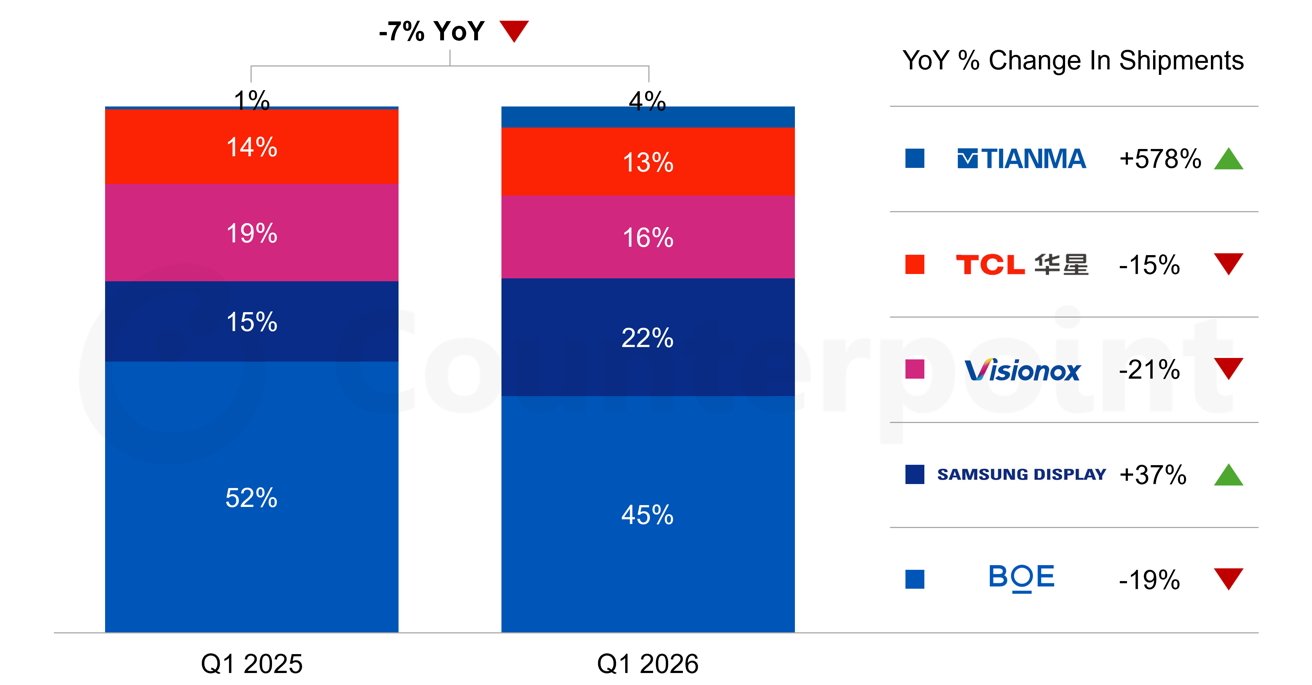
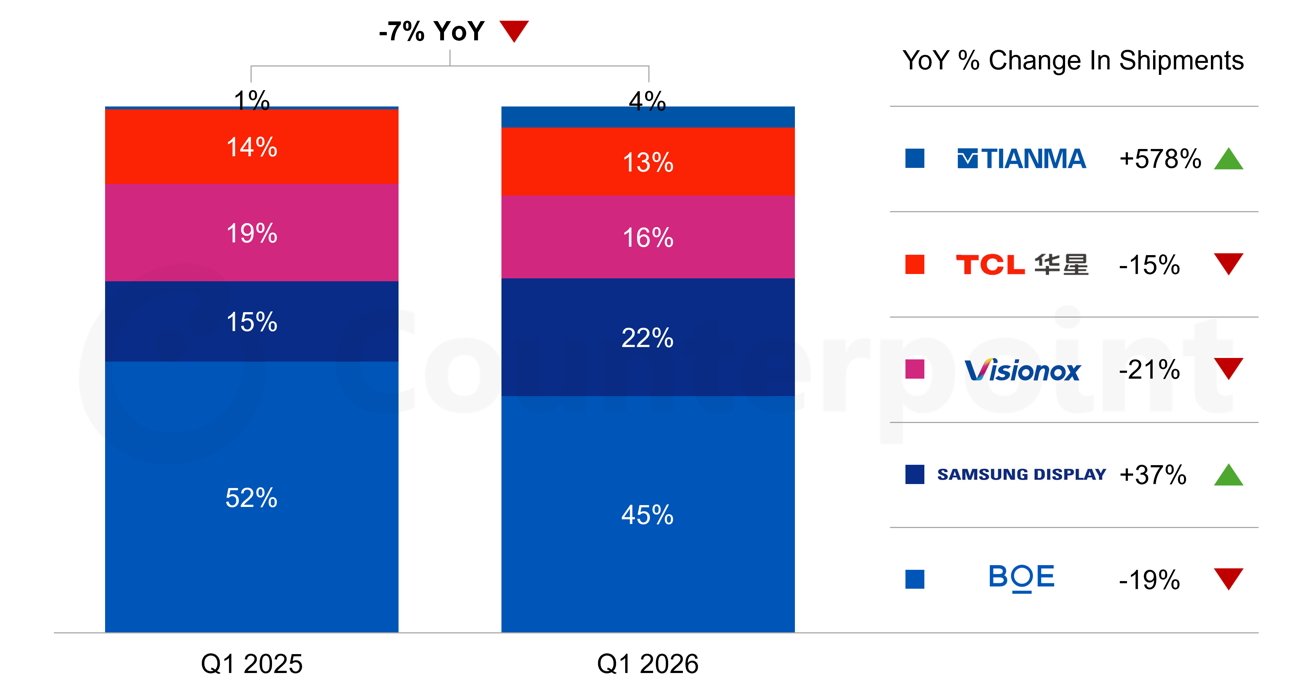
According to multiple sources and rumors, Apple’s supplier for iPhone Fold OLED panels will be Samsung Display, which held 22% of the foldable smartphone screen market in Q1 2026. This is up from 15% in Q1 2025.
Samsung Display’s share of foldable smartphone display shipments rose to 22% in Q1 2026, while BOE’s share decreased from 52% to 45%. Image Credit: Counterpoint Research.
Foldable smartphone screen shipments are still dominated by BOE, though, which held 45% of the market in Q1 2026, down from 52% in 2026.
Advertisement
An April 2026 rumor said that Apple had decided against using BOE OLED panels for the upcoming iPhone 18 Pro. We likely won’t see BOE hardware on the iPhone Fold either.
As a whole, though, global shipments of foldable smartphone screens are expected to reach approximately 27.5 million units for the entirety of 2026. This means orders will be up roughly 24% compared to 2025, and iPhone Fold panel orders are sure to be a key contributing factor.
The all-in-one amplifier has had a good run over the past 3 years. Streamer, DAC, phono stage, room correction, HDMI eARC, Bluetooth, an app that requires three software updates and a blood offering to connect properly. Useful? Sometimes. What everyone is looking for? Not always.
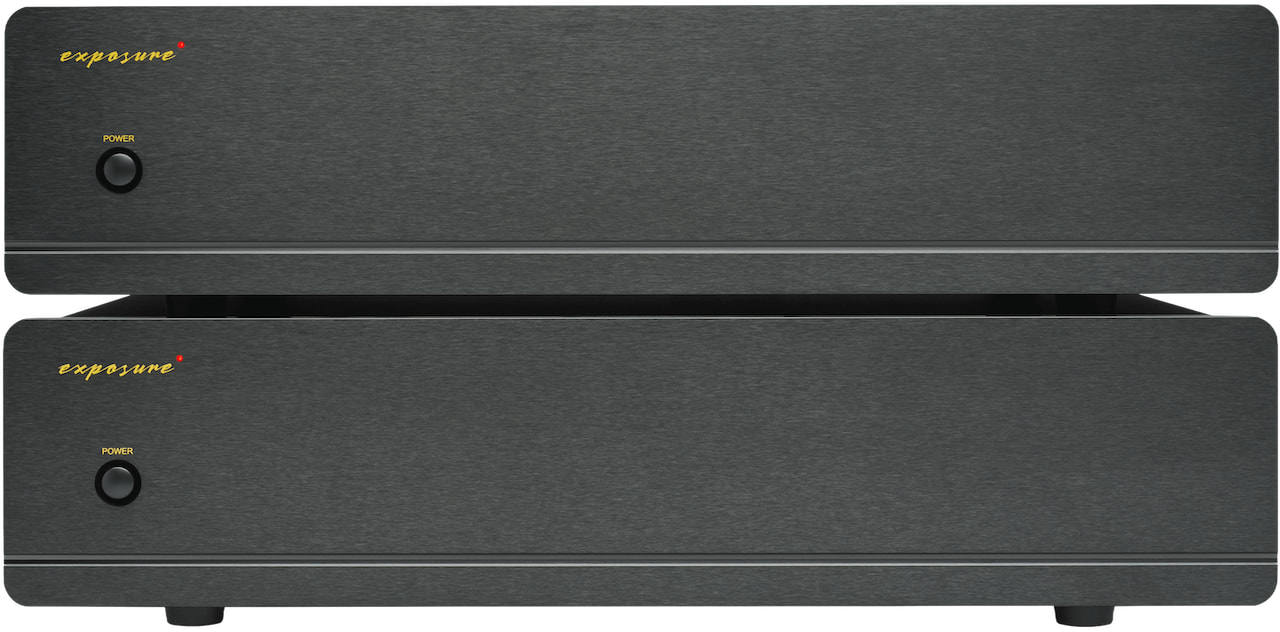
Exposure Electronics is taking a different route with its new 5510 Mono Power Amplifiers, completing a proper flagship separates system built around its 5510 Pre-Amplifier. Each monoblock delivers 200 watts into 8 ohms and 370 watts into 4 ohms, which should be enough to make a wide range of demanding loudspeakers sit up straight and behave themselves.
The new amplifiers are not trying to be lifestyle components. There is no streaming platform, touchscreen, HDMI input, or features list designed to impress someone who has not listened to a record since college. Exposure is betting that buyers at this level want power, low noise, strong channel separation, and a signal path that does not resemble an airport security line at Heathrow.
Related Reviews:
Advertisement
Technology
Each 5510 Mono uses a large custom toroidal transformer, screw-terminal smoothing capacitors, a fully bipolar transistor circuit, and a fully DC-coupled topology. That last part matters because Exposure is clearly aiming for speed, grip, and control without inserting unnecessary clutter into the signal path.
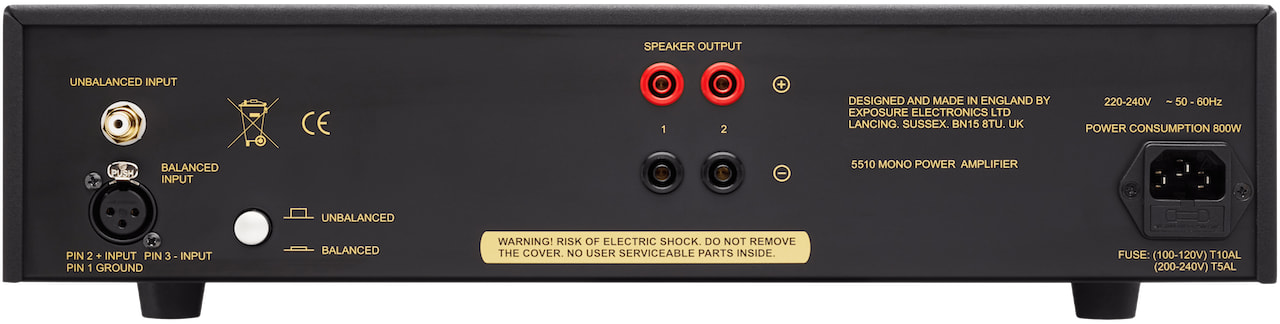
Balanced XLR and unbalanced RCA inputs are provided, along with bi-wire loudspeaker outputs using shrouded 4mm terminals. The chassis is all aluminum, finished in black, and incorporates both non-invasive overload protection and thermal protection. In other words, these are serious amplifiers, but not the sort that require a structural engineer and a reinforced equipment rack.
The 5510 Mono Power Amplifiers make the most sense with Exposure’s recently introduced 5510 Pre-Amplifier, which offers six line-level inputs, balanced XLR and RCA outputs, a 99-step relay-controlled volume system, and optional MM, MC, or DS Audio optical phono modules. A plug-in DAC option is also available for those who want digital playback without turning the entire system into another software ecosystem.
That creates a three-chassis 5510 system for listeners who still believe that separating signal control from power delivery has value. It also gives Exposure a more credible flagship ladder: start with the 5510 Integrated Amplifier, then move into dedicated preamp and monoblock territory when the speakers, room, and appetite for expensive speaker cable begin to evolve.
Protection: Non-invasive overload protection and thermal trip
Power consumption: Less than 800VA into an 8-ohm load
Dimensions: 440 x 115 x 300mm
Weight: 14kg each
Finish: Black
Warranty: Three years
Price: £7,300 per pair including VAT
The Bottom Line
At £7,300 per pair including VAT in the UK, the 5510 Mono Power Amplifiers are not inexpensive. U.S. and Canadian pricing has not been announced yet, so North American buyers will have to wait before deciding how much damage this particular British amplifier stack will inflict on the household budget.
What is clear is that Exposure is not chasing the compact streaming amplifier crowd. The 5510 Monos are a traditional high-end solution for listeners who want the preamp to control the music and the power amplifiers to do the heavy lifting without constantly asking for a Wi-Fi password.




































































You must be logged in to post a comment Login