Huawei’s laptop that opens into an 18-inch OLED screen already looked pretty futuristic when it first debuted. But the 2026 update makes the laptop even better. The company has improved performance and display durability, which brings another layer of interaction.
The refreshed Huawei MateBook Fold Ultimate Design unfolds into an 18-inch, 3296 x 2472 dual-layer OLED display with a 4:3 aspect ratio, 1,600 nits of peak brightness, and a 92% screen-to-body ratio. Fold it into a laptop shape, and each half becomes a more portable 13-inch, 3:2 screen. Despite that enormous panel, the device weighs 1.16kg without its detachable keyboard. It measures 7.3mm at its thinnest point when open and 14.9mm when closed.
Huawei toughened up the enormous folding screen
The headline display specifications remain largely familiar, but Huawei has redesigned the protective structure covering the OLED. Its new composite ultra-thin glass layer now supports the Huawei M-Pen 3 and offers a claimed 90% improvement in impact resistance over the previous MateBook Fold.
Huawei’s new folding notebook has also received an SGS five-star certification for whole-device screen drop and impact resistance. Those figures come from Huawei’s internal testing, so independent durability testing will still matter.
Advertisement
Huawei
Stylus support substantially expands what you can do with the unfolded screen. Huawei shows the M-Pen 3 being used for handwritten notes, document annotations, drawing, presentations, and design work. The pen can also operate as a remote pointer and page-turning controller in supported apps.
This genuinely opens up the true potential of this large 18-inch canvas. Huawei adding stylus support makes the laptop more versatile and improves its overall functionality. So aside from the various refinements, this seems like the most obvious upgrade.
A new Kirin chip powers the folding spectacle
Inside sits Huawei’s new Kirin X90 Plus, operating at up to a 28W TDP. Huawei claims the combination of its new processor and HarmonyOS 6.1 improves overall system performance by 25% compared with the previous-generation MateBook Fold. Although oo independent benchmarks are available yet.
Huawei
HarmonyOS 6.1 also brings foldable-specific multitasking, cross-device clipboard sharing, phone and tablet integration, offline meeting transcription, and an AI system capable of detecting face-swapping during supported video calls. The refreshed MateBook Fold starts at an eye-watering 24,999 yuan in China (roughly $3,700), 1,000 yuan more than the original model’s launch price. It comes in Streaming Gold, Sky White, and Phantom Black. Huawei has not announced international pricing or availability.
The latest NVMe specifications add SSD-level virtualization that can simplify live VM migration by preserving storage identities across servers. The updates also introduce support for post-quantum cryptography, controller-based rate limiting, voltage monitoring, and factory-reset capabilities. The Register reports: Announced by the NVM Express consortium, all 11 of the suite of NVMe specs have been updated with new features and engineering change notices. These represent the next step in the evolution of the standard, it says, which was created as a protocol to support storage devices connected to a system’s PCIe bus. Perhaps the most significant new capability is PCIe Exported NVM Subsystem Migration. This extends existing NVMe virtualization to locally-attached PCIe SSDs. It does this by abstracting the physical drives into host-defined virtualized NVM subsystems, to allow for virtual machine (VM) mobility without storage reconfiguration.
When a VM moves from one server to another, its storage also needs to move with it in a way that’s non-disruptive to any applications running in that VM. “With NVM Subsystem Migration, NVMe SSDs can present exported NVM subsystems that hide the complexity of the underlying hardware,” says Mike Allison, a senior director at SSD maker Samsung and NVM Express board member. “Instead of interacting with physical controllers and namespaces, the host only sees exported controllers and namespaces. This creates a clean separation between what the VM sees and what’s happening under the hood,” Allison explains on an NVM Express blog.
“One of the key innovations here is providing the host with control over exported identifiers. During migration, those identifiers can be carried over exactly from the source to the destination. That consistency is crucial: even if the underlying hardware uses different internal IDs, the VM sees no change and can pick up right where it left off with no storage reconfiguration required,” he says. In effect, the NVMe layer now enables the virtual machine manager (VMM) to rely on virtualization built into the SSD. The flash drive itself exposes logical, virtualized storage constructs, offloading this complexity from the VMM. You can learn more about the updated NVMe specifications here.
Nearly three decades after Alucard first stepped into that inverted castle, a small team of fans has handed the original PlayStation version of Castlevania: Symphony of the Night a native home on Windows, with builds also reaching Linux and macOS. BlackLabelHQ’s SymphonyRecomp is still marked as an open beta, yet the full game already runs from the opening monologue to the final credits without needing an emulator.
Players must provide their own legitimate North American PS1 disk images, namely the bin and cue files specified by the project. Once those files are in the correct folder, the recompilation procedure converts the old PlayStation code into a standard PC executable. Things have gone a lot smoother recently, thanks to the inclusion of an automatic updater and simple launch scripts, so installing it now feels like any other normal indie title. No more tampering with plugin settings or BIOS files.
From Jan. 2028, newly released games on PlayStation will be available for purchase on PlayStation Store and at retailers in digital format only. Discs…
PlayStation 5 Console – 1TB, includes wireless controller, 1TBSSD, Disc Drive, 2 Horizontal Stand Feet, HDMI cable, AC power cord, USB cable, printed…
1TB of Storage, keep your favorite games ready and waiting for you to jump in and play
Widescreen support is arguably the most significant improvement here. In the castle’s vast corridors and outdoor areas, the camera zooms back to display more of the scenery on either side, and the original pixel graphics still looks amazing in proportion. Menus and smaller rooms continue to use the original 4:3 frame, and a few background objects poke out at the corners, but everything feels natural on a modern monitor. The aspect ratio settings allow you to choose between turning widescreen or remaining with the original framing.
The controls receive the same straightforward treatment, with keyboard and gamepad bindings fully adjustable via a settings menu, and the input feels tight and precise, exactly as it should for double jumps, backdashes, and spell casting. There is no noticeable lag, which is more than can be said for certain compatibility layers.
There is a built-in randomizer that alters item locations and forces you to find different paths across the castle, but combat and mobility remain unchanged. Seeds from the popular sotn.io website function perfectly with the recomp, giving old players a new reason to jump back in without needing to utilize the native version. Quality-of-life options include an infinite jump option for unrestricted exploration, a colorblind mode, the ability to restore the Fairy Nocturne track that was removed from the original PlayStation release, separate volume controls for different channels, UI scaling, and a borderless fullscreen option. An item tracker and map overlay keep your inventory and progress visible without requiring any additional tools.
Early mod support is already available via a dedicated folder system, although finished community material is yet somewhat restricted. Recent beta patches have actually corrected certain room transitions in widescreen, resolved some difficulties with entity spawning so that doors appear correctly at the boundaries of the wider view, and ensured that your quality-of-life settings are retained between sessions. Hardware requirements are still rather basic. At a minimum, you’ll need an OpenGL 4.5-compatible GPU,.NET 10, and OpenAL. If you just want to get started, pre-built packages are available on the project’s GitHub releases page, and the most recent 0.3b build even includes ARM packages for Apple Silicon Macs, as well as disc-region validation that alerts you if you’ve entered the wrong game version. [Source]
In 1991 hip-hop had moved from the margins into living rooms and shopping malls. MC Hammer and Vanilla Ice filled charts, Fresh Prince of Bel-Air played on television, and kids everywhere wanted to sound like the records. Casio answered with a plastic keyboard that claimed to do nearly everything a working rap group needed. They called it the Rapman, model RAP-1, and marketed it as the world’s first keyboard built specifically for rap.
The Rapman, which was about twenty inches long and weighed slightly more than three pounds, ran on batteries or a small adapter and included its own built-in speaker for your convenience. Thirty-two keys extend across the front, both medium and exactly the perfect size. A simple power switch allows you to flip between play and rap modes; in play mode, the Rapman transforms into a fairly rudimentary three-note polyphonic keyboard; flick the switch to Rap, and one of thirty built-in patterns begins looping as the keys all drop down to single note melody duty. There are two tempo buttons that allow you to slightly change the speed, although they are a little strange, and the default is about 107 beats per minute, give or take.
Next-Gen Music Production and Beat Maker Essential – USB-powered MIDI keyboard controller with 25 mini velocity-sensitive keys, optimized for studio…
Real-Time Control and Navigation – 8x assignable 360° knobs, a vibrant full-color screen and push/turn encoder for hands-on access to settings…
Iconic MPC Pads with RGB Feedback – 8 velocity- and pressure-sensitive MPC pads deliver an iconic finger-drumming experience, plus dynamic visual…
The Rapman’s predefined routines are essentially its meat and potatoes. You’ve got twelve drum loops with that thin, punchy 808 sound, plus eighteen more with basic bass lines and chord stabs mixed in. Heavy Rap and Hip-Hop 1 through 4, as well as Mellow Rap, Funk, R&B, and House, all have names that indicate what they are about. Some of them have that unmistakable bounce to them, like old club records from the late 1980s, while others sound more like theme tunes for whatever TV show was on the air at the time. They all have one thing in common: none of them can be modified or edited in any way, and yet, some of them still sound like they’re worth using for brief little drawings today, even if they are a little rough around the edges.
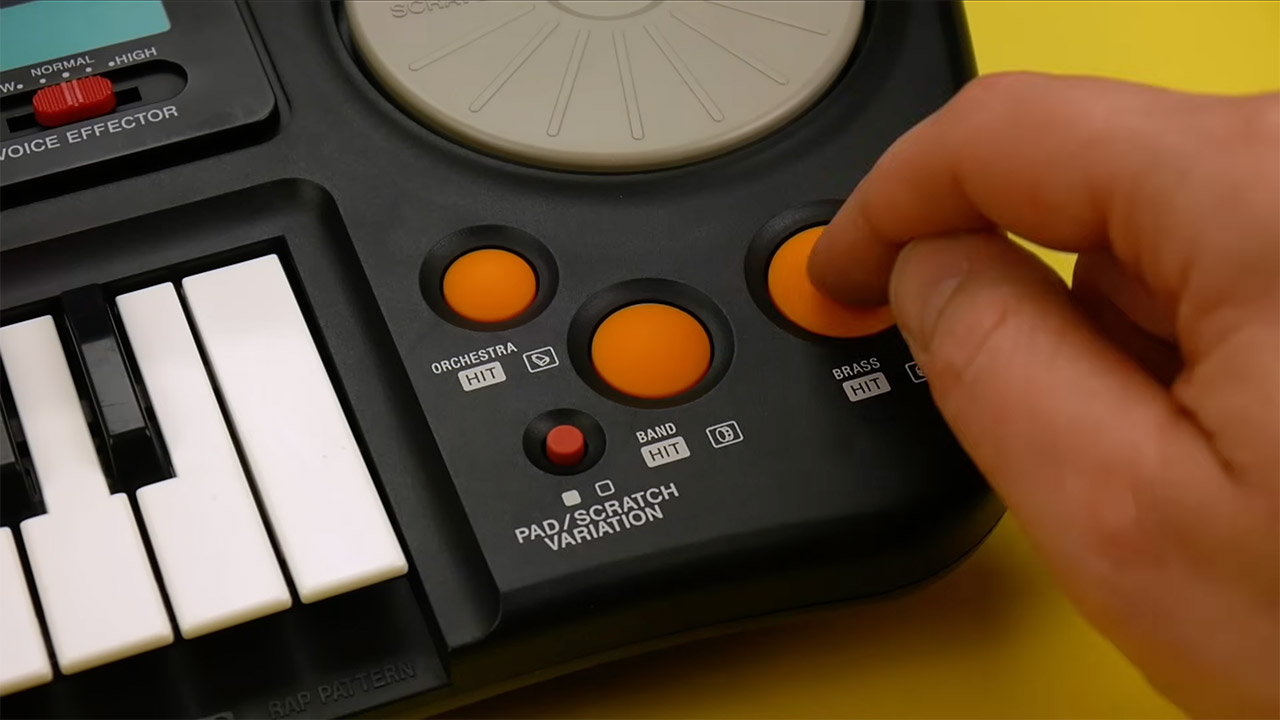
There are three small rubber effect pads to the right of the keys. The mode button allows you to choose between two separate sets of pads: one with agogo, kick, and snare, and the other with orchestra hit, band hit, and brass hit. Alongside the pads is a tiny little plastic disc that resembles a miniature record. Spin it around to hear short scratch samples. The disk is simply a spring-loaded rocker that presses two contacts together, so the scratches are short and to the point. But the gesture of sliding your hand across the top of it felt appropriate for the situation.
Casio also included a tiny plug-in microphone, the EM-4131 type, as well as a five-position slider for adjusting the pitch of anything you’re speaking into the microphone. Let me tell you, the effect is rather grainy and digital-sounding. Push the slider one way, and your voice will sound like a chipmunk, while pushing it the other way will result in a low, scratchy monotone. You can also use this circuit to take keyboard noises and feed them back into the mic, resulting in ugly, harsh feedback that some more experimental users enjoyed using for all sorts of odd textures. It’s worth mentioning that no other consumer keyboard at the time had a built-in pitch-shifting microphone, as it simply wasn’t available anyplace else.
The remaining sound set on this device consisted of twenty-five pre-programmed tones. You had your brass ensemble and echo brass, but there was also metal guitar, electric bass, and an electric organ that stunned everyone with how good it sounded. A vocoder patch produced a short looping vocal-like effect, which many owners still believe is the best sound on the device. There were orchestral hits, a car horn, an ambulance, and an emergency alert to fill out the sound. Most of the tones were similar to those used in Casio’s SA-series toys: thin and bright, with a restricted number of notes that could be played at once and no real feeling of dynamics. When you started a rhythm, everything collapsed down to one note, thus all chord work vanished as soon as the beat began.
You can only send the output one way: through a 3.5 mm connector. There was no midi, no sequencing memory, and no mechanism to preserve what you created. For $99 in the United States or roughly £90 in the United Kingdom, you received a package clearly intended at bedrooms rather than studios. Nonetheless, experienced musicians noticed this. Peter Gabriel apparently began playing with one at a dinner table, and session participants began to order multiples.
Apple requires all browsers to use WebKit on iPhone, so a report suggests every browser is affected by three separate leaks that can hand off information around a proxy or iCloud Private Relay.
When users install proxy browsers or Tor, they expect absolute privacy while navigating the web. However, one developer has discovered that three separate data leaks can occur while using WebKit browsers on iOS or macOS.
According to the Mysk blog, DNS prefetching, WebAuthn for Passkeys, and WebTransport can all reveal data about the user in spite of proxy use or iCloud Private Relay. Tor browsers, proxy apps, and Safari are affected, but VPNs are not since they’re acting at a system level to encrypt all traffic.
Of course the developer works on the Psylo app and has shared that all three vulnerabilities are fixed in the latest update. It required turning off the features, which are useful to have, and users will need to manage them on a per-site basis within the app.
Advertisement
The blog shared exactly how each of the three WebKit leaks are occuring:
DNS prefetching: data leak exposed in iOS 26 resolves hostnames through the normal DNS path instead of proxy
WebAuthn: introduced in iOS 18, Passkey validation file fetched from device revealing IP address
WebTransport: active since iOS 26.4, opens a direct HTTP/3 connection exposing the real IP address
Each system is meant to help the user with speed of access and convenience, but they have inadvertently affected security. There is only one exception, and that’s Onion Browser’s “Silver” security level that makes WebKit configure with Lockdown Mode, so that specifically is unaffected by the WebTransport data leak.
The leaks were discovered after a Psylo user reported a DNS leak and the investigation uncovered all three problems. Users can test the leaks using a proof-of-concept website provided by the developer.
Apple will have to address all three WebKit issues in a future update, though it may take time. Now that the issue has been shared publicly, it may accelerate a fix from Apple.
Users need not take action beyond being aware that proxies and Tor alone may not hide every detail about themselves. The use of a VPN will ensure no data is shared outside of the device.
Earie Salmon explains why soldering skills are only the start
ARCHAEOLOGIC Repairing and restoring vintage computer hardware has grown increasingly popular, but keeping decades-old machines alive presents different challenges from fixing modern kit.
Earie Salmon, of the YouTube channel Earie’s 8-Bit Workshop, is one of many tinkerers documenting the process of keeping retro computers ticking over and building new examples of obsolete or never-released kit.
Advertisement
Based in Australia, Salmon’s entry point into the hobby is all too familiar – a bit of nostalgia mixed with “what would I like to have had if given the chance”.
My biggest frustration with sourcing parts are counterfeit chips. You will confidently order a big bag of 74LS logic ICs to find they are in fact not 74LS.
Worse, most IC testers will say ‘oh yes it’s a 00 IC and works fine’ but it’s had the label sanded off and re‑etched, it’s a different family of logic chips and won’t work in your computer
Earie Salmon
Advertisement
In the early 1980s, his brother had a ZX81 and Commodore VIC 20. “I was somewhat jealous and he rationed my access,” recalled Salmon. The experience clearly stayed with him. “I bought the system I would like to have had at the same time he had his ZX81, an Acorn Atom, then on into the realms of C64 and Amiga.”
“However, the personal connection, or at least tenuous link, to the computers after that point disappeared when I realized I had the makings of a collection.”
The collecting bug bites plenty of people in the tech industry, and Salmon reckons he currently has between 35 and 40 systems “in various states of disrepair.”
These days, Salmon is an IT professional and refreshingly agnostic about retro hardware. “Repairing half a dozen BBCs or Spectrums in one hit gets a little dull,” he said, preferring to plug holes in his collection, or even build computers from scratch. “Last year, I built a notional successor to the TI‑99/4A, the TI‑99/22 designed by Dan Werner, and an Acorn Atom replica designed by Hackjunk.”
Advertisement
Skills-wise, readers will be unsurprised to learn that knowing your way around soldering and desoldering equipment is a prerequisite, although Salmon cautioned against grabbing some vintage hardware and “cracking on.” Better to practice on a Vero board with some disposable components before hitting something decades old with components that might be decidedly difficult to track down.
“Finding parts is definitely the biggest challenge… Anything custom, any custom IC such as a ULA that hasn’t been built since the production stopped on the original computer.
“Getting hold of some of these parts isn’t too bad but a lot of them are now only available from ‘dead’ systems. It just seems wrong to harvest parts but it’s unavoidable now.”
Salmon acknowledged that there were modern replicas of some devices, but many rarer computers lacked the same support.
Advertisement
“My biggest frustration with sourcing parts are counterfeit chips. You will confidently order a big bag of 74LS logic ICs to find they are in fact not 74LS. Worse, most IC testers will say ‘oh yes it’s a 00 IC and works fine’ but it’s had the label sanded off and re‑etched, it’s a different family of logic chips and won’t work in your computer. I learnt that one the hard way.”
Then there are the schematics. Learning to read them and see what should go where is another core skill Salmon recommends, assuming the documents can be found in a language the repairer understands. “A lot of the Japanese computers, NEC or MSX, say, not only were the designs never published but the documentation isn’t even googlable unless you know Japanese as it’s not been translated.”
Salmon’s most rewarding work involved a BBC Model B. “Had I known what I was letting myself in for, I might not have started it, but once you get the cover off you feel sort of obliged to get it running again,” he said.
The repair involved undoing somebody else’s efforts: bodge wires running to the wrong places, blown ICs, broken traces, and more. Salmon reckons that some of the soldering had been done with a hot spoon. “I don’t want to talk anyone down,” he said, “but… their confidence exceeded their skills.” Best not to look at some of the Raspberry Pi computers this writer has destroyed over the years after experience took a back seat to enthusiasm.
Advertisement
Salmon has strong feelings about the repairability of modern hardware, which makes the ’70s, ’80s, and ’90s seem like a golden age. “Equipment designed from the mid-noughties adopted the ‘look how small we got it’ approach which coincidentally, and almost certainly with no intent, also results in ‘look how unrepairable we made it, this is fantastic, now we can force everyone to buy a brand new phone/laptop/tablet every couple of years.’”
“In the Nineties and early Noughties, computers were really quite modular so if a bit broke then you only needed to replace that part where previously you could replace the component.
“Then from mid-Noughties, the replacement part was suddenly the whole unit. Where previously electronics would be built to last say ten years because you wanted as few returned in the first three as you could get away with, now you want it to last only for the warranty period plus one day. The science behind that to calculate just the right life span of components must be crazy!”
Salmon is, unsurprisingly, a huge supporter of the right-to-repair movement.
Advertisement
Finally, Salmon’s biggest “don’t” for budding repairers concerns plugging in the hardware. “Don’t work with mains voltage until you know what you are doing and always keep the mains voltage covered to prevent you accidentally touching it.”
“It’s probably happened to everyone who has worked with electronics where you concentrate on placing a probe and your hand accidentally touched a high‑side power component, so get it out of the way or cover it! It might be the only mistake you ever make.” ®
Aikido researchers uncovers ChainDrop, a Shai‑Hulud variant infecting 1,300+ npm packages with an infostealer
Attackers compromised GitHub accounts tied to popular libraries (Keyv, Cacheable, flat‑cache, file‑entry‑cache) and pushed tainted releases with 2B monthly downloads
Malware exfiltrates developer/cloud credentials and secrets to a public GitHub repo; admins should treat affected systems as compromised even after removal
Another Shai-Hulud variant has been discovered in the wild, infecting more than 1,300 npm packages with an infostealer.
Security researchers Aikido reported finding “at least 868 packages (across 1381 versions) that have been compromised by the worm.”
Shai-Hulud is a self-propagating supply chain malware that targets software developers by compromising open-source packages and CI/CD pipelines. It steals credentials, API keys, and access tokens and then uses those stolen secrets to publish additional malicious packages.
Latest Videos FromTechRadar
Advertisement
What to do in case of an infection
In May 2026, actors claiming to be associated with the TeamPCP group publicly released the Shai-Hulud worm’s source code, saying they were “open sourcing the carnage” and inviting other threat actors to adopt and modify the code. Since then, there were multiple copycat campaigns and variants, including this one which Aikido dubbed ‘ChainDrop’.
Aikido said the attackers compromised the GitHub account of the person maintaining Keyv and Cacheable, widely used open source JavaScript libraries for caching data in Node.js applications. From there, they were able to move into other popular utilities such as flat-cache and file-entry-cache, as well as packages associated with organizations such as Deliveroo, Ornikar, OneReach, Picsart, Qlik, and ServiceTitan.
The malware was pushed directly into the projects’ main branches, and then generated additional package releases. The compromised packages have a combined 2 billion monthly downloads.
Aikido says the infostealer grabs developer and cloud credentials, encrypts them, and then sends them to a public GitHub repository called “Shai-Hulud: Here We Go Again.”
Sign up to the TechRadar Pro newsletter to get all the top news, opinion, features and guidance your business needs to succeed!
It also steals local configuration files, GitHub PATs, workflow tokens, and other ghp_, gho_, and ghs_ tokens, certain npm tokens, GitHub Actions secrets, AWS credentials, Kubernetes secrets, and more.
Advertisement
The researchers are saying system admins who installed a tainted package should treat their developer workstation or CI/CD runner as compromised, even if they removed the package.
You can slide the projector up or down on the base for a vertical shift up a wall or ceiling. For a horizontal tilt, you can fold out the base’s two feet and point the projector at a slight angle on the ceiling. No matter the direction, it’s easy to slide around but also stays put.
The projector only has one HDMI port, which you can use for ARC 5.1 pass- through audio or connecting to another source, like a gaming console. There’s a USB-A port and a USB-C port, both for connecting a thumb drive or a hard drive (or charging a gadget), plus a 3.5-mm port. The GV50 does not have an Ethernet port and uses Wi-Fi 5, which is older and not as widely compatible or as speedy as modern standards like Wi-Fi 6E or Wi-Fi 7. I had some connection issues with my Google Nest mesh network where the projector couldn’t connect.
Photograph: John Brandon
Advertisement
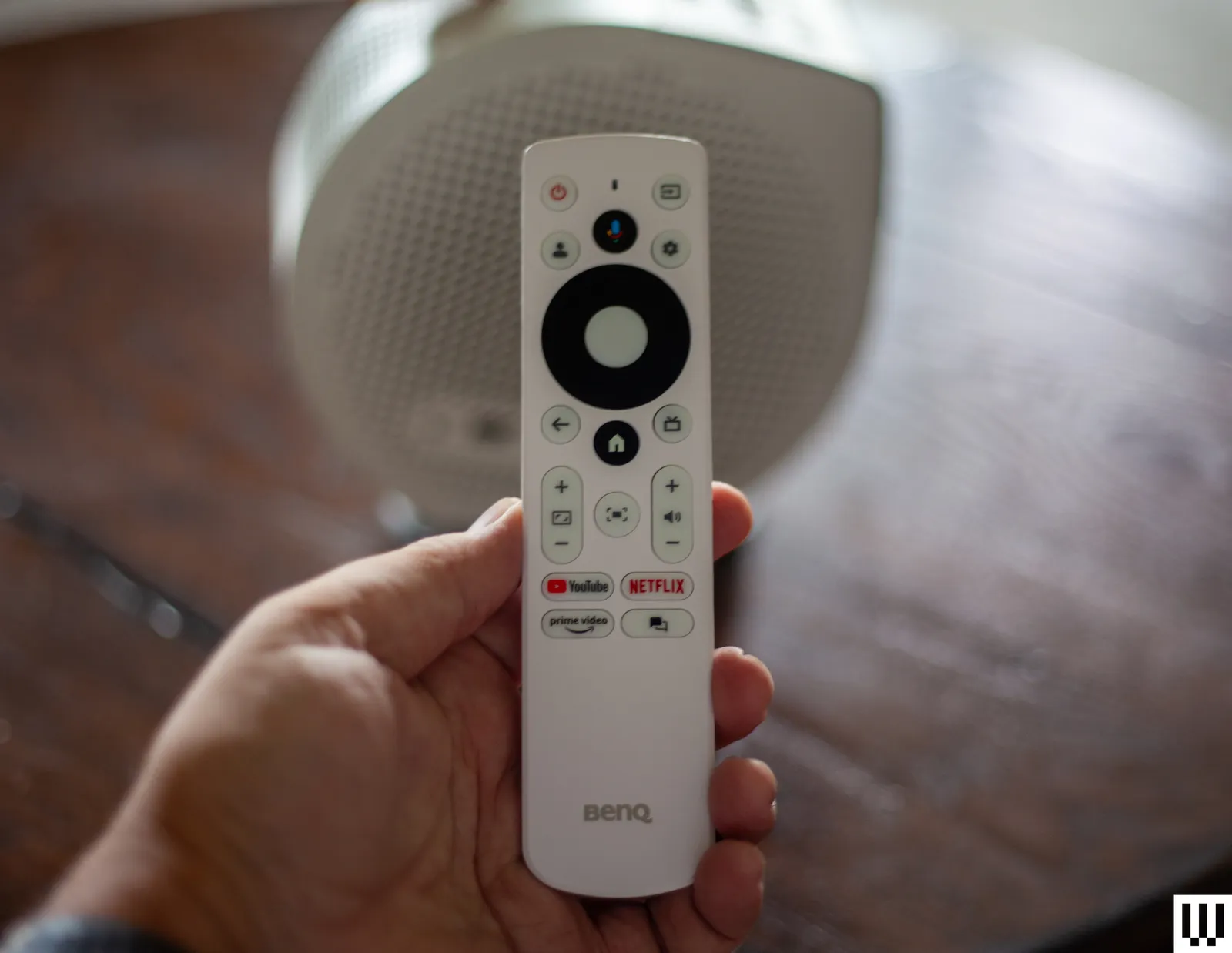
Aside from needing to complete a system update that took about 45 minutes, setup was ultra-smooth and mostly involved using the Google Home app to scan a QR code and install the apps. The GV50 used auto-keystoning to map to my projector screen, and it worked well. When I used the projector on a wall and on the ceiling, the keystoning also worked—I only made a few minor adjustments to the size. The GV50 remote uses the typical, intuitive BenQ layout with a Home button in the center, a setup button that’s easy to find, and shortcut buttons for Netflix, YouTube, and Prime.
Not only can the GV50 run on battery power, but it also has plenty of settings to manage its efficiency, including powering down automatically after a set period. I found Battery mode to be marginally helpful, since I use the device in my house, connected to a wall outlet, but the capability does add portability should you want to use the projector while camping or living anywhere else that outlets are sparse. You can use the projector on battery charge alone for a few hours, but the device will dim a little bit to save power.
Picture Quality and More
The GV50 is not trying to be a cinematic marvel by any means, but the projector failed my typical Spears & Muncil benchmark tests. I noticed the skin tone tests were about average for a midrange model like this, not showing much tonal variation. In the demo reel tests, the 1080p quality and lack of good contrast and brightness were much more obvious. A red cactus and yellow flower lacked vividness, and trees in the foreground of a mountain scene looked too dark and mixed into the inky black background. Butterflies that should have looked bright and colorful looked dull, flat, and a bit lifeless.
When I switched to streaming from my iPhone 17 Pro and an iPad 12.9-inch, the GV50’s slow processing speed became an issue. While both Google Cast and Apple AirPlay were functional, the playback was choppy and jittery. If I tried to fast-forward, the stream would pause or fail altogether due to the paltry 2 GB of RAM and 1.5-GHz processor.
HBO takes a lot of the credit for the rise of prestige TV. Shows such as The Sopranos, The Wire, Sex and the City and Game of Thrones were appointment viewing and that tradition lives on with newer series such as Industry, Euphoria and more. Its streaming service, HBO Max, is also the home of tons of great movies, live sports and excellent documentaries.
One of the things HBO Max does best is documentaries, and this August, there are two series we can’t wait for. First up is a new season of the great football series Hard Knocks, which focuses on the Super Bowl-winning Seattle Seahawks during its training camp this season. We’re also excited for Monsters of God, another series about a group of people obsessed with exotic animals from the same filmmaker who gave us Tiger King and Chimp Crazy.
Also arriving this month is the hotly anticipated new DC series Lanterns, which stars Aaron Pierre and Kyle Chandler as two members of the Green Lanterns, along with the third season of Conan O’Brien Must Go.
These titles and many others are out this August on HBO Max. Here’s what you need to know to tune in.
Advertisement
Aug. 4HBO Max
Hard Knocks: Training Camp With the Seattle Seahawks (season 22)
Hard Knocks, the HBO sports documentary that gives an inside look at an NFL team during its annual training camp, will return on Aug. 4 for a new season. This year, the cameras follow the Seattle Seahawks’ preseason, as the team comes off its second Super Bowl win. The season will consist of five episodes, which will air weekly.
Aug. 6HBO Max
Monsters of God (limited series)
Monsters of God is a docuseries from filmmaker Eric Goode, as he explores the world of exotic animal smuggling. The five-episode series, produced by A24, will introduce us to a motley crew of characters, many of whom are obsessed with rare animals and are willing to break whatever laws they need to in order to get their hands on them. (For a similarly shocking tale of animal obsession, check out Chimp Crazy, the 2024 docuseries also produced by Goode, which is one of those “truth is stranger than fiction” tales that takes viewers on a truly wild ride.)
Aug. 7Lionsgate
The Strangers: Chapter 2
Renny Harlin directs The Strangers: Chapter 2, the second film in the new Strangers trilogy starring Madelaine Petsch as Maya Lucas, a young woman who is tormented and tracked down by three masked perpetrators known as the Strangers. The film picks up after the death of her boyfriend, Ryan, but the Strangers still have it out for Maya when they realize she’s alive.
Aug. 14
Advertisement
Normal
Bob Odenkirk has proven he can work in any genre. Comedy, drama, action — there’s nothing he hasn’t excelled at. After the success of his gruesome action thriller Nobody (and its sequel), he’s back for Normal, a neo-Western where he stars as Ulysses, the sheriff of a small Minnesota town called Normal. But after a bank robbery in town goes horribly awry, Ulysses learns that the town is mixed up with a whole lot of bad guys, including the Yakuza. The film costars Henry Winkler as the town’s crooked mayor, plus Lena Headey and Peter Shinkoda.
Aug. 16
Lanterns (season 1)
In the new eight-episode DC Studios drama series Lanterns, Aaron Pierre plays John Stewart, a newly recruited Lantern, the intergalactic peacekeepers of the DC Universe. Stewart works alongside Hal Jordan (Kyle Chandler) as they investigate a murder in Nebraska that’s just a small piece of a wider mystery. Kelly Macdonald, Nicole Ari Parker and Nathan Fillion costar. The first episode of Lanterns arrives on Aug. 16, and new episodes drop weekly.
Aug. 21HBO Max
Conan O’Brien Must Go (season 3)
For the past several years, Conan O’Brien has hosted his podcast, Conan O’Brien Needs a Friend, which features conversations with celebrities and fans of the comedian. In his travel series Conan O’Brien Must Go, O’Brien drops in on some of these fans (often to their surprise), imposing on them and insisting they show him around their home countries and introduce him to their cultures. It’s classic Conan, absurd and offbeat, blending travelogue with comedy, as he traipses all over the globe. This season consists of four episodes, which will arrive weekly.
A24
Mother Mary
In the A24 psychodrama Mother Mary, Anne Hathaway stars as a global pop icon who is about to return to the stage after enduring a tragic accident. With just three days before her major comeback performance, she has a meltdown and reaches out to Sam (Michaela Coel), her former collaborator and designer. The two women haven’t spoken in years, falling out after an intimate but contentious relationship. As Sam and Mary let each other back into their lives, they experience something altogether supernatural. The film arrives on HBO Max on Aug. 21.
Liz Kocan has spent the last 20 years covering TV, entertainment and working behind the scenes in digital production. While at VH1.com, she won a Webby Award and was nominated for a Shorty Award as a producer. She has also contributed her writing to USA Today, Decider, Vulture, and many other publications, and has seen every episode of 30 Rock more times than her mind grapes can remember.
See full bio
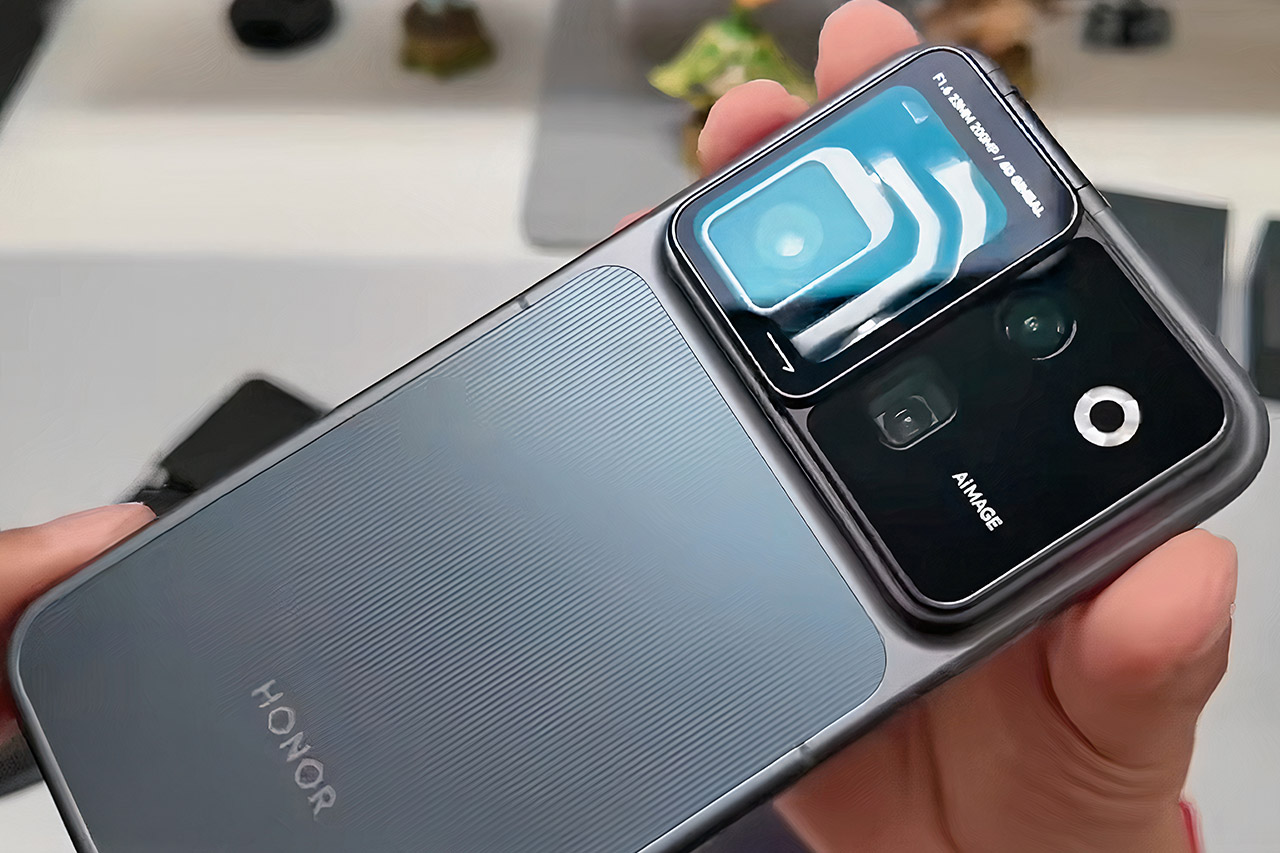
Honor’s unusual Robot Phone, already spotted filming celebrations at the 2026 FIFA World Cup final and demoed at trade shows, now has a leaked unboxing video circulating online. The clip shows the packaging and the mechanical arm in motion just days ahead of the August 12 China launch. Full hardware details have also surfaced, filling in what the company has only hinted at until now.
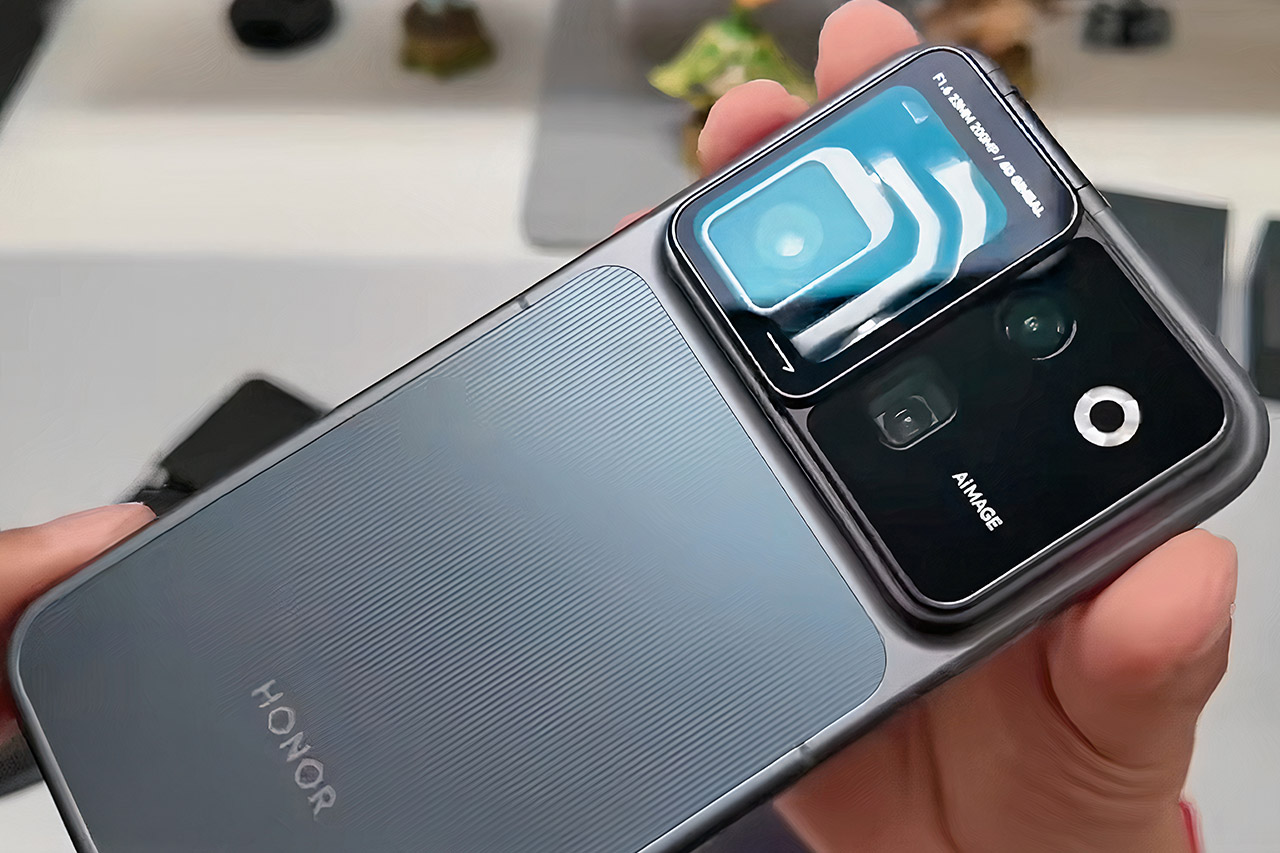
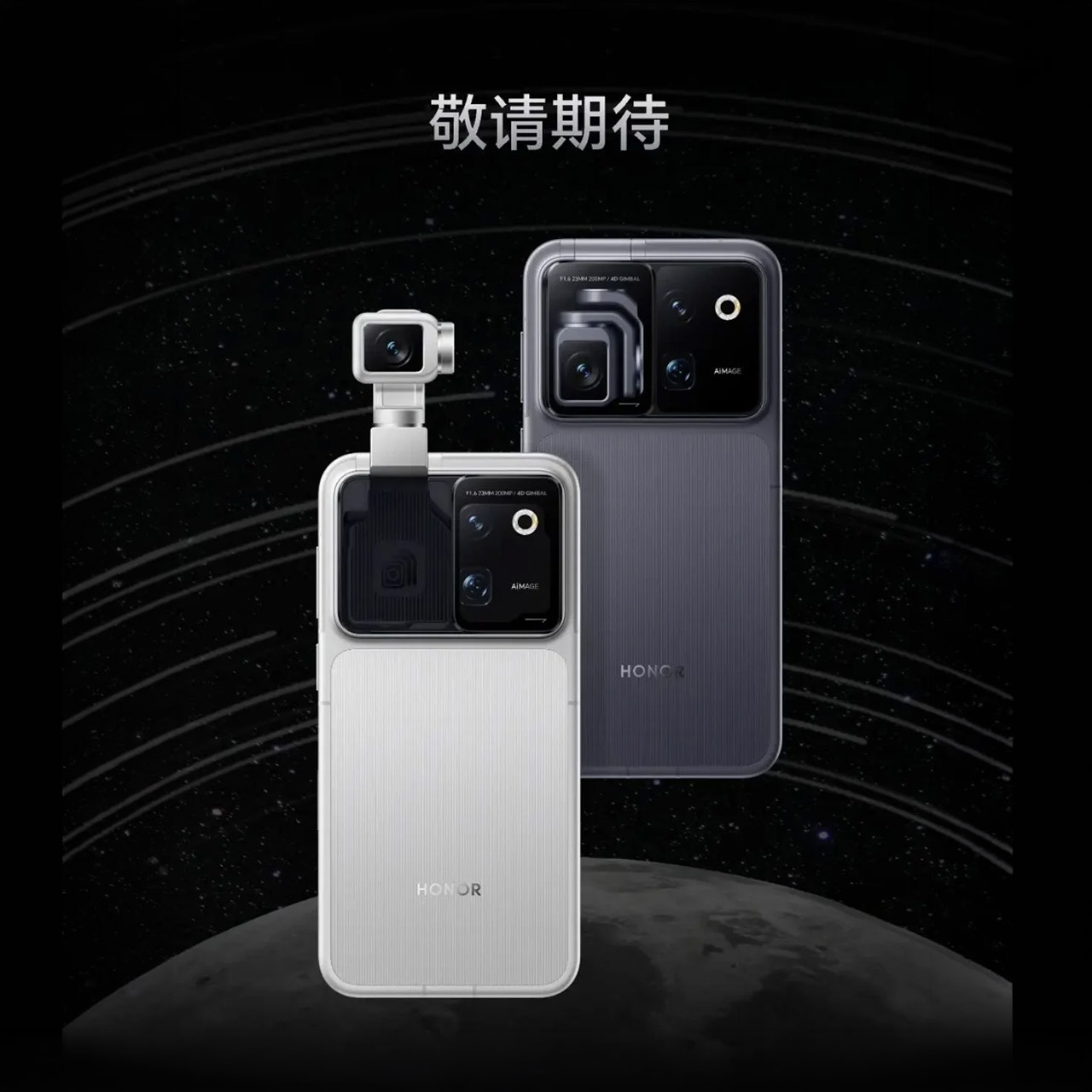
When you open the box, you will find the phone nestled in a snug little spot on the left side, with the simple message “Your First Robot Phone” on the right. Inside, you’ll find a protective case, a USB-C cord, and a 120-watt charger to keep you charged on the go. Then there’s the back, which houses a huge rectangular camera module. Give the cover on the left a nudge, and a titanium arm comes into action, unfolding in around 0.8 seconds to lift the main camera clear of the phone body. As the phone moves into place, the screen flickers to life with a quick animation. When the arm snaps back into place, the phone feels exactly like any other slab in your hand.
PRE-ORDER NOW: Get an Amazon gift card when you pre-order Samsung Galaxy Z Fold8. You will receive an email once your gift card is available after the…
CREATED FOR YOUR CONTENT: Any way you turn it, the new Galaxy Z Fold8 gives you a fuller viewing experience. Designed with your content in mind, this…
WORLD’S LIGHTEST FOLD¹: Galaxy Z Fold8 is the newest foldable phone for content on the go. Unfolded, it fits movies and books for an immersive…
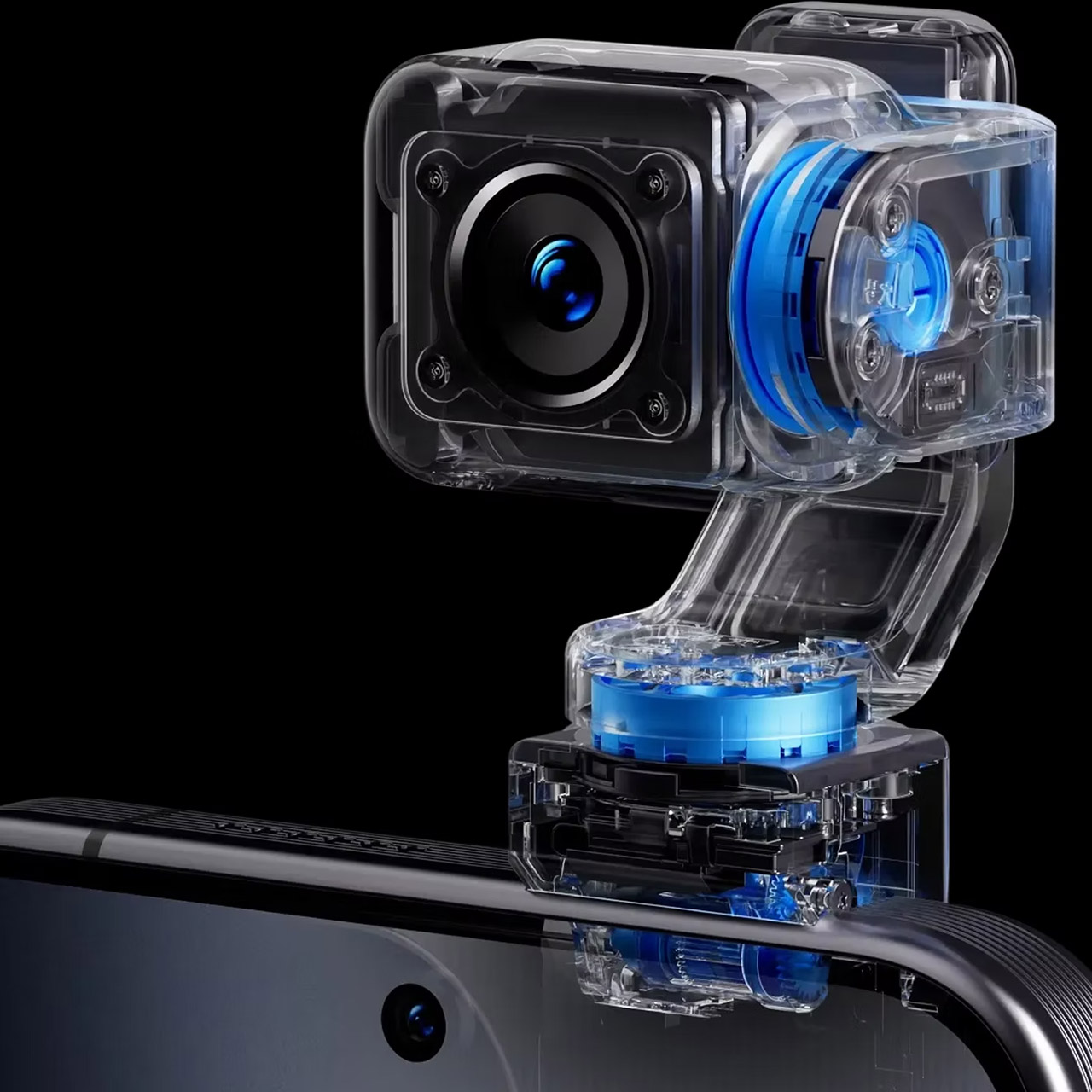
The whirly droid in the camera is the major attraction. Honor calls it a 4DoF gimbal and claims it has the industry’s tiniest micro motor, which is 70% smaller than what you’d ordinarily see. The arm can swivel, tilt, and rotate about 360 degrees and will cheerfully track whatever or anybody you’re pointing it at, maintaining level no matter how much you jiggle the phone. If you’re feeling fancy, you can even do one-handed spin shots in 90- and 180-degree modes, and the mechanism allows the phone to nod in agreement, shake its head in displeasure, or simply flail around in rhythm with the music. During video calls, the camera remains focused on the person on the other end, even if the phone is moving around. Honor collaborated with cinema camera gurus ARRI to offer Log-C3 recording, on-device LUT grading, and a Cinema mode that borrows some of the color science from their professional film gear.
Recent leaks from Digital Chat Station appear to have revealed all of the other gadgetry. The screen is a wonderful, huge 6.3-inch flat LTPO OLED measuring 2640 by 1216 pixels, with a peak brightness of 6,800 nits and a sophisticated anti-reflective coating for outdoor use. The Qualcomm Snapdragon 8 Elite Gen 5 processor keeps things running, with three special Honor-designed processors assisting with specific tasks: the C1 handles radio communications, the E2 handles electricity, and the H1 manages the camera system. A 7,060 mAh battery powers everything, and the packaging includes a quick 120-watt charger. Memory and storage come in two sizes: 12GB of RAM with 512GB of storage, or 16GB with 1TB.
The camera lineup is consistent with what Honor stated earlier. The main sensor is a 200-megapixel unit on a 1/1.28-inch sensor with an f/1.6 aperture and a 23mm focal length, mounted on a wiggly arm. Next to it is a 200-megapixel telephoto with a 1/1.4-inch sensor, f/2.6 aperture, and a snappy 2.7x optical zoom, and the rear trio is completed by a 50-megapixel ultra-wide. The H1 chip conducts all of the imaging heavy lifting on the device, such as adjusting exposure, white balance, and glare reduction. Honor claims that over 100 patents protect the entire mechanical and software apparatus, and you’ll be able to choose between Star Trail Silver and Moon Shadow Gray on launch day. Pre-orders ($70 USD) are now open in China, but availability is expected to be limited initially, with pricing likely starting at $2,200 for the base (16GB + 512GB) model.
A 2-in-1 machine, the Ninja Slushi Twist Frozen Drink Maker FS702UKBR can make two flavours are once all at the touch of a button. Brilliantly simple to use, this machine makes fantastic slushies fast. Its party trick is that you can spin the dial to mix drinks together, although it’s a bit fiddly to get brilliant-looking results.
Two flavours on the go
One-touch operation
Good capacity
Fiddly to get a neat spiral mix
Key Features
Introduction
Have you been tempted by a Ninja Slushi machine, but the thought of only being able to make one flavour is putting you off? Well, the Ninja Slushi Twist Frozen Drink Maker FS702UKBR is here for you.
Advertisement
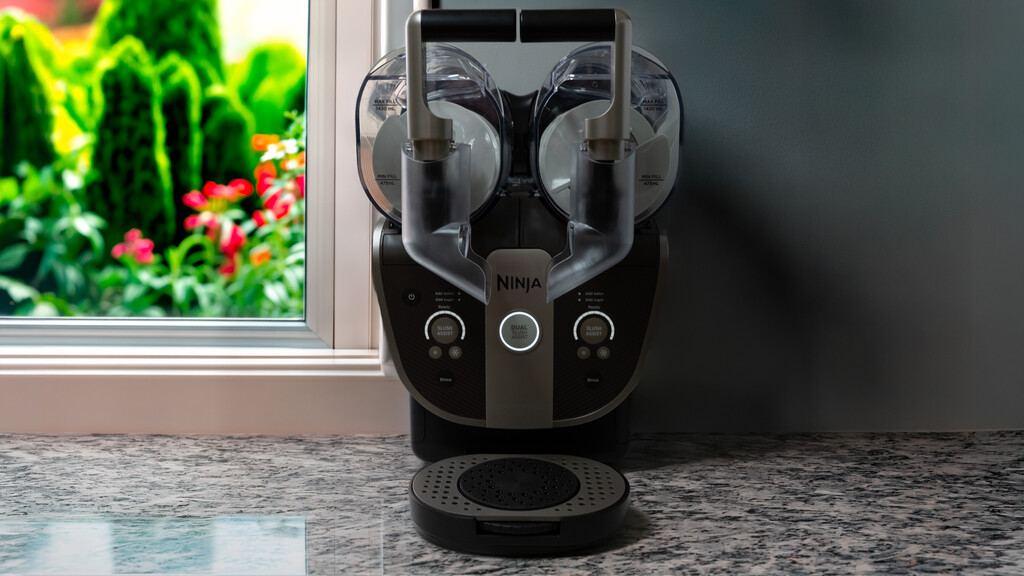
Like two Slushi machines in one, the Twist can make two drinks at once, letting you choose one flavour or use the novelty spinning drip tray to mix them as you pour.
So, is this a gimmick gone too far or an essential for the hot weather (and beyond)?
Of course, the main difference is that the Twist has two tanks for making two flavours of drink at once, either independently or, via the new mode, together with the idea that you mix the flavours together.
Advertisement
Image Credit (Trusted Reviews)
If you’ve ever felt that the previous machines were a little too limited, then two drinks on tap should be of interest.
As with the previous machines, the Slushi Twist is quite a beast, taking up virtually the full depth of a kitchen counter. It’s also quite a bit wider than the other machines, with room required for the two tanks. This isn’t an easy machine to store.
Advertisement
In total, the Slushi Twist can make 2.84L of drink, split evenly between each side, which has a maximum fill of 1.42L and a minimum of 475ml. That’s the same minimum as on the original, although that could take a maximum of 1.9L of fluid.
With the larger Slushi Max, you can make 3.31L in total, so it remains the better choice if you want maximum capacity and just one flavour.
Advertisement
With the Slushi Twist, each side is a full individual machine. Each side’s parts are labelled and only fit one way.
To fill with drink, the containers have a large flap that opens at the top, and you can then fill past the minimum level, up to the maximum, with the liquid of your choice. You need to have enough sugar content, so some low-calorie drinks will need some sugar added; if you’re using alcohol, you can add anything up to 20% alcohol.
Image Credit (Trusted Reviews)
Controls are simplified compared to the previous models. First, you need to turn the machine on using the flip switch at the back. It’s at the top, just in case you can’t find it.
Advertisement
Image Credit (Trusted Reviews)
For single drinks, you don’t have the selector to choose the type of drink you want, such as frozen cocktail or milkshake. Instead, there’s just a single Slush Assist button.
Hit this, and the impeller starts up, and the machine begins to mix and freeze your drink. Once the consistency has been evaluated, an automatic freezing level is set, and Slushi Twist keeps going until the drink is ready.
Advertisement
Image Credit (Trusted Reviews)
If there’s not enough sugar, the Add sugar button lights up. If there’s too much alcohol, the add water button lights up.
There are buttons to adjust the target level, making a drink more or less frozen, which changes the consistency of the drink.
Advertisement
Image Credit (Trusted Reviews)
Controlled like this, the Slushi Twist aims to make the best standard drinks, ready to be gulped down.
If you want to use the Slushi Twist like this, you’ll want to attach the straight spouts on the front of the machine, so you can dispense the drink of your choice into a glass. You’ll also want the standard drip tray.
Image Credit (Trusted Reviews)
As the real point of the Slushi Twist is to mix two drinks together in a nice pattern, there’s also a middle button, labelled Dual Slush Assist. Hit this and both sides start to slush at the same time.
Again, the machine automatically sets the slush level, but in this mode, the Slushi Twist aims to make drinks with a thicker consistency that blend better. You can adjust the consistency of each side individually, in case you’re not getting the right pour.
Advertisement
Advertisement
In this mode, the angled spouts should be attached, which aim both sides at one glass. They’re a little fiddly to clip on, and need a bit of a shove to lock them into place.
You’ll then want the Twist drip tray, which has a thumb-operated turntable that lets you spin your glass to get a spiral mixture of drinks. I found that it took a bit of work to line up a glass so that it would spin centrally, but the actual turntable works well, only requiring a bit of a push to get it going.
Image Credit (Trusted Reviews)
Whichever drip tray you’re not using can be attached to the clip on the side of the Slushi.
Image Credit (Trusted Reviews)
When you’re finished, the Slushi Twist needs to be cleaned. There’s a dedicated Rinse mode that just turns the impeller without adding any cooling. Just fill each side to the maximum line with hot water, hit Rinse and then leave the machine long enough to remove any trace of mess.
Advertisement
Advertisement
Image Credit (Trusted Reviews)
Once done, you can drain, and then the plastic covers slide off when their handles are released.
Image Credit (Trusted Reviews)
Each impeller can be removed and washed in the sink, and the main cylinders can be wiped down.
Image Credit (Trusted Reviews)
You should also remove the condensate tray on each side and handwash these. Overall, tidying up isn’t difficult, but there’s quite a bit of handwashing to do.
Advertisement
Image Credit (Trusted Reviews)
Performance
Works fast
Excellent flavours
Hard to get a nice spiral mix
I started by using two flavours of Fanta, both for looks and because this drink has the required sugar levels. Getting the Slushi Twist to work was easy: just a tap of a button did the job, and it didn’t take too long before my drink was ready: under 20 minutes.
Image Credit (Trusted Reviews)
The consistency of the Slushi was quite thick, but that’s to be expected: if there’s any liquid in there, the drinks will blend, rather than layering on top of each other. So, you need a certain amount of thickness to get everything to work.
Trying to pour drinks in a perfect spiral is exceptionally difficult. Getting the glass to spin is easy, but getting both drinks to pour at the same rate is not. With my fairly thick drink, the Slushi tends to plop out in blobs, rather than pouring nicely at a consistent rate. My first attempt wasn’t pretty.
Advertisement
Image Credit (Trusted Reviews)
With the default consistency, I found it easier to layer the drinks, creating a spoon-ready finish with, admittedly, delish flavoured ice drink. I think it looks quite good.
Image Credit (Trusted Reviews)
Back to the spiral test. As mentioned, it’s possible to adjust the drink consistency, but each time you do it’s recommended that you wait 10 minutes, check consistency and then adjust again as necessary. It’s quite a lot of effort, and each adjustment takes quite a lot of time.
Go too cold with some drinks, such as my Fanta, and you get something much more frozen and pale in colour, with gaps between the ice crystals.
Advertisement
Image Credit (Trusted Reviews)
Advertisement
Go the other way, and you get something more drinkable, but you don’t get layers. With the right consistency, I could get a nice mix, even if I couldn’t achieve a perfect spiral.
Image Credit (Trusted Reviews)
I tried again with fruit juice. With the Dual mode, the result is closer to a sorbet than a slushy drink; again, you need that for layers. Consistency was excellent, and the taste spot-on. Again, getting perfect spirals was beyond me, but I think I ended up with a nice blend.
Image Credit (Trusted Reviews)
Using the single mode, you get a more traditional slushy from juices: frozen enough to be an ice-drink, but liquid enough that I could drink it through a straw.
Similarly, you get very similar results from the Slushi Twist for single drinks as you do with the single versions, such as the Slushi Max, whether that’s a milkshake or a frozen cocktail.
Advertisement
Image Credit (Trusted Reviews)
Should you buy it?
You want two drinks on the go
Advertisement
Whether you’re mixing or not, having the option for two flavours (or even two different drinks) is a compelling one.
Advertisement
You want the highest capacity
If you’re happy with one flavour and want more of the same, the Max is cheaper and has a higher overall capacity.
Advertisement
Final Thoughts
Much simpler to use than the single-drink versions, the Slushi Twist lets you make two individual shippable slushies or more spoonable drinks that you can mix.
I’m not convinced that the turntable is much more than a gimmick, but if you want two types of slushi on the go (to mix or not), then the Twist isn’t much bigger than the standalone ones. It is quite a bit more expensive, so if you’re happy with a single drink and want more volume, the Ninja Slushi Max might be a better choice.
How We Test
We test every slushie maker we review thoroughly over an extended period of time. We use standard tests to compare features properly. We’ll always tell you what we find. We never, ever, accept money to review a product.
Find out more about how we test in our ethics policy.
Advertisement
Used as our main slushie maker Tested with a variety of drinks
FAQs
What’s the difference between the Ninja Slushi Twist Frozen Drink Maker FS702UKBR’s two modes?
The single mode makes a more sippable drink; the dual mode makes a thicker drink that’s better for mixing.






































































You must be logged in to post a comment Login