
Here’s a non-exhaustive list of things that, as recently as seven years ago, we could reliably do without a smartphone:
Tech
You should be able to live without a smartphone


- Read a restaurant menu while seated inside, and pay your check.
- Enter a concert or sporting event
- Use a parking garage or park your car on the street
- Receive packages or retrieve purchases
- Complete the sign-in process for work, banking, or government services
- Attend school events or communicate with your kid’s school
- Access health care and other kinds of appointments
- Take public transit
- Get a taxi
- Get into a gym or fitness class
I’ve been thinking about this drift toward mandatory apps and QR codes a lot lately, as a new millennial parent unhappy with my addictive tendency to mindlessly scroll near my baby. I also know that, parent or not, the research on ways that heavy smartphone use negatively affects our own well-being, attention spans, and relationships has become near-impossible to ignore. And people don’t need meta-analyses to be convinced: It’s why so many are turning to tools and hacks that aim to help us limit our phone use, or at least time spent scrolling on certain apps. It’s also why we’re seeing a wave of new clubs and social events that are proudly phone-free.
I think these “digital detoxes” are encouraging, and I’ve been researching so-called dumb phones myself. But none of these trends will really matter if we’re continually forced into a world of apps for every element of daily life.
Late last month, Meta agreed to pay at least $12.1 billion to settle claims that it deliberately designed Facebook and Instagram to addict children, and announced it would be redesigning the platforms for younger users to include daily time limits, overnight lockouts, and restrictions on like counts and beauty filters.
It’s a start, but we have to think bigger than just the algorithms that keep us glued to our phones. Because they’re not the only forces that make quitting so hard. Increasingly, it’s just basic access to services and companies and public institutions that are making a smartphone exit feel elusive.
You should not have to have an addictive device in your pocket at all times in order to do ordinary things. We should be pushing for a world where adults can meaningfully reduce their smartphone use, or quit it altogether if they want.
And it’s not just about personal self-improvement. The status quo has already been long untenable for many people, especially the elderly, the disabled, the unhoused, and anyone who just can’t afford a data plan.
Pushing for a non-smartphone option is about accessibility, affordability, and agency. It’s about demanding the kind of freedom in a society we deserve to have. There should never be any essential service that requires phones as the only way in.
We can fix this, and some people are already showing how.
Even if it takes us another decade to unwind, it’s important to remember these changes are less than ten years old.
Smartphone ownership exploded over the 2010s, rising from 35 percent of US adults in 2011 to 81 percent in 2019, according to Pew. It has since climbed to roughly 9 in 10.

In other words, smartphones stopped being a device many people had and started becoming a device every institution could assume you had. What happened next was part real improvements in convenience, part cost-cutting that pandemic-era policy made easier to justify, and part what sociologists call “isomorphism” — organizations converging on a practice not because it works best, but because everyone else has adopted it.
Isomorphism is one of my favorite concepts I learned in college, and you know it when you see it. For example, you’re planning a conference, and somewhere along the way it became true that a “good” conference has its own app, even though nobody wants to download an app to learn when lunch is on the schedule. Or it’s the way every mission statement sounds like every other mission statement.
I’d say the charitable reason we drifted toward handling so much by smartphone is that a lot of it genuinely is better, faster, and harder to lose. Tapping a turnstile with my phone, and never wondering whether I left my DC metro card at home, has made my life easier.
The less benign reasons are that digital systems let companies and governments cut labor and operating costs. Apps and QR codes replace cashiers, waitstaff, printed materials, and customer service reps, and shift new work onto us, the customer. The smartphone systems also generate a lot of personalized data which companies love to collect, and sometimes sell.
Then there’s control, which companies certainly like. Not all of it is sinister. (Think blocking tickets from being resold, or prices and menus being updated instantly.) But when sellers control the interface and know a lot about us, two people can open the same app at the same moment and see different prices. Economists call this price discrimination, and it’s much easier to pull off when there’s no posted price we can compare against.
But just because inertia is leading us toward a universal smartphone society, that doesn’t mean it’s where we’ll end up. We have options to push back.
Let’s protect the non-smartphone option
Smartphones aren’t going anywhere. But it’s eminently reasonable to demand that whatever cost a company or government pays to keep a viable non-smartphone option is a cost worth paying.
While the “march of digitization” might feel inevitable, Clare Morell and Brad Littlejohn of the conservative Ethics and Public Policy Center remind us that Americans have a long history of taking on technology in the name of humanity, from automobiles to firearms, and forcing some reasonable accommodations. There has been a push in recent years to preserve paper options for people who struggle to apply for benefits online. Some cities also have laws requiring businesses to accept cash. New York state just passed a ban on “cashless establishments,” which ensures people will still be able to dine out or shop without needing to go through a QR code or app.
Morell and Littlejohn point to other solutions, like the Americans with Disabilities Act, which they say could be read to require businesses to serve customers who don’t use apps, or adding smartphone ownership to state anti-discrimination statutes.
Europeans have gotten further with this than we have. In 2023, the Council of Europe’s Parliamentary Assembly urged member states to keep non-digital access to public services available, and in early 2025, a coalition of anti-poverty, disability, and digital-rights groups delivered an open letter asking the European Parliament to guarantee offline access to all essential services. Their argument is that the EU wants everything online by 2030 while more than 40 percent of Europeans still lack basic digital skills.
In the US, we’re also learning that Big Tech isn’t unstoppable. On top of the Meta settlement, school phone bans have spread to at least 40 states, with school districts now considering policies to limit laptop and tablet time, too.
Focusing on child safety first makes sense both morally and politically. Reformers have amassed a decent track record of getting companies and governments to redesign products around children’s vulnerability, and such redesigns rarely stay confined to kids. In 1997, cigarette mascot Joe Camel was dropped under federal pressure over marketing to kids, but the advertising restrictions that followed reshaped how cigarettes were ultimately sold to everyone. I’d be surprised if Meta keeps a chronological feed and a nighttime cutoff walled off for teens alone.
And yet, we shouldn’t rely solely on osmosis from kid reforms to fix our adult problems. For starters, reforms don’t always trickle down. Congress passed COPPA in 1998 to keep companies from harvesting kids’ data online, and the rest of us still have no equivalent federal safeguard.
Not every fix would require regulation. Afreka Ebanks, a spokesperson for Dumb.co, which sells smartphone alternatives, told me she’s optimistic that pressure on individual businesses can spark change, in part because marketing has shifted so heavily toward community and belonging in recent years. Companies that want to seem grounded in their neighborhoods, she argued, are more susceptible to locals asking for a non-phone option. She’s been asking her own gym to bring back the key fobs it used to issue, so members can leave their phones at home while they exercise.
Dumb.co is also betting that if enough people give up smartphones — not a majority, but a large enough minority — businesses won’t want to lose those customers. She cited Capital Bikeshare in Washington, DC, which still makes it easy for riders to unlock bikes with a physical key even as most users go through the app. “They do want to serve those people who aren’t carrying around phones,” she said.
At the end of the day, we’re not going to restore less phone-dependent childhoods for our kids if we can’t also build a less phone-dependent society for the rest of us. And we deserve to have that choice. Opting out just cannot be functionally impossible.

Continue Reading


Memory prices are finally slowing down, and the reason is not that supply improved. It is that buyers ran out of money.
TrendForce expects conventional DRAM contract prices to rise 13% to 18% quarter on quarter in Q3. Dan Robinson reported the forecast for The Register. He paired it with separate European shipment numbers that show what the squeeze has done to the market.
The Taiwanese analyst calls that growth rate a moderation, and by recent standards it is. Rising contract prices drove a 59.5% quarter-on-quarter jump in DRAM industry revenue in Q2, to $154.73bn.
Why it is slowing
TrendForce gives two reasons, and the second is the interesting one.
Demand is shifting away from high-capacity RDIMMs towards lower-capacity parts. And then there is what the analyst calls “the limited ability of PC and smartphone customers to absorb further price increases”.
That is a market hitting a ceiling rather than finding a balance. Supplier inventories are still at historic lows and bit shipments are expected to grow only modestly. Nothing about the supply side has eased. Prices are rising more slowly because the people at the end of the chain cannot pay any more.
Note who TrendForce names as the constraint: PC and smartphone customers. Phones use the same memory and face the same maths, and the handset market has spent a decade training buyers to expect more storage each year for roughly the same money. That expectation is now colliding with the price of the parts.
And 13% to 18% in a single quarter is not relief. It is a smaller increase on top of a year of increases.
Europe is where the bill lands
The market intelligence firm Context expects European PC shipments to fall hard as component costs push system prices up.
Laptop shipments are forecast to drop 6.4% year on year in Q3, then 20% in Q4. Desktops look worse: down around 20% in Q3 and almost 30% in Q4.
Those are severe numbers for a mature market, and they describe a straightforward mechanism. Memory got more expensive, so machines got more expensive, so European buyers stopped replacing them.
Corporate buyers are stretching refresh cycles and buying only when they have no choice, according to Context. “The PC refresh cycle has not disappeared, but the economics around it have changed,” said senior analyst Marie-Christine Pygott.
Stretching a refresh cycle is not free, though it looks free on a budget line. Older machines run slower, fail more often, and eventually fall off support, which is a security problem rather than a productivity one. European IT departments are taking that risk because the alternative costs more today.
Falling volumes, rising profits
PC makers are not suffering, which is the part that explains why nothing corrects.
Higher prices have more than covered the lost volume so far. The Register reported in May that Lenovo had dodged the worst of the memory crisis by pushing customers towards premium devices. The strategy worked.
That is a rational response to scarcity and it also removes the pressure to fix it. If selling fewer, dearer machines makes more money than selling more cheap ones, a manufacturer has no reason to fight for volume.
The same logic has been visible up and down the market for months. AMD raised Radeon prices in August, days after Nvidia did the same. Nvidia is putting up AI server prices by more than 15% from next year, citing memory costs. Everyone passes it on.
The AI PC did not save anyone
Manufacturers spent two years promising that AI-capable PCs would trigger a mass upgrade. Context says that is not what happened.
The end of Windows 10 support drove recent buying, not artificial intelligence. AI PCs are taking a growing share of machines entering the European supply chain. That is mostly because the capability is becoming standard, though, rather than because anyone is choosing it.
So the upgrade wave came from a support deadline, and it has now largely passed. What is left is a market with higher prices, no compelling reason to buy, and a stack of machines that will stay in service longer.
Who the memory is going to instead
None of this is happening to the AI industry. It is happening because of it.
The three big memory makers are concentrating on high-end products for AI buyers. Samsung has benefited from moving early into HBM4 mass production. SK hynix had the highest proportion of HBM in its bit shipments of the three. Micron is prioritising higher-priced server DRAM.
That leaves the mature-process business to second-tier manufacturers such as Nanya, Winbond and PSMC, who are supplying DDR4 and DDR3. The squeeze has already reached parts nobody expected, including DDR2, a standard from 2003, and the capacitors that carmakers need.
Europe watches most of this from the outside. SK hynix chose Indiana for its $4bn memory packaging hub after a Polish plant fell through, which means the continent absorbs the price rises without hosting much of the capacity.
What would actually change it
Two things, and neither is close.
The first is supply. Inventories are at historic lows and bit shipments are growing modestly, so relief needs new capacity, which takes years to build and is currently being pointed at HBM rather than at the parts in a laptop.
The second is AI demand cooling, which nobody in the industry expects and which would bring its own problems.
Until one of those happens, the pattern holds. AI buyers pay a premium for the memory they want. Everyone else pays a premium for the memory that is left. And the moderation TrendForce is forecasting is a description of European buyers reaching their limit, not of the shortage ending.

Shopping for a car can be a daunting challenge at the best of times, and having a bunch of different fuel types doesn’t help. Do you get a car that takes regular gas, premium, flex fuel, E85, a hybrid, and so on? Then you have diesel, a fuel type normally associated with commercial vehicles, full-size pickup trucks, and strange European cars. What’s the deal with those?
If you’re just buying a car with no consideration to how it works, not much changes if you end up with a diesel, apart from which nozzle you use at the gas station — diesel is the green one, by the way. For the most part, a modern diesel car will behave just like any other car in traffic, albeit with a lower tachometer and a deeper, droning sound to it. But let’s say you’re shopping for something specific — why would you want to buy or avoid a diesel car?
While their function may be the same, diesel engines function very differently from gasoline engines, and therefore have different strengths and weaknesses. A diesel operates on compression alone rather than spark — basically you’re compressing the fuel so much that it spontaneously ignites. Diesel fuel is actually very stable, meaning it takes a lot of energy to ignite it. So you get a piston with a long, heavy stroke, which is great for torque, but lacks high-end RPM, hence why so many trucks use diesels. However, that comes at the cost of factors like emissions, specialized parts, and expensive fuel costs, at least in the States. Let’s explore more.
Pros of diesel engines

A diesel engine’s operating principle means that the engine itself is somewhat simpler and more robust than an equivalent gasoline-powered variant. For one, diesels don’t have spark plugs, but rather glow plugs acting kind of like the heating element in an induction stove. The engine blocks themselves are also more resilient, with diesel engines typically lasting far longer than gasoline engines — sometimes 30 years or more. Their low RPM and high torque load requirements make for a vastly understressed design, which is why so many classic Power Strokes are still around today.
High torque also means the engine can accept high loads, hence why they’re so good for towing. This is because of the relationship between torque and horsepower — put simply, horsepower is how fast the wheels can spin, but torque is how easily they spin. To put it another way, picture riding a bike. A low gear means you’re able to get going easier because the bigger gear acts like a torque multiplier. The higher gear means you go faster, but you have less leverage to get up to speed, so your legs struggle. The same principle applies to your engine.
Lastly, there’s the matter of fuel efficiency, which diesel engines in particular excel with. Diesel fuel is more energy-dense than gasoline, meaning you don’t need as much of it to produce the same amount of power. Combined with lower RPMs — less times fuel gets injected into the cylinder — makes for a far more efficient design. Then you add in multifuel diesels; in short, these engines are truly exceptionally flexible.
Cons of diesel engines

Unfortunately, for every upside, diesel engines have at least one downside. To start with, diesel fuel produces a ton of emissions, enough that governments all over the world mandate specialized parts on the exhaust to keep the soot from polluting the air, mainly all the harmful greenhouse gases like nitrogen oxide emissions.
Moreover, that means that diesel engines have bonus maintenance costs tacked onto the already generally more expensive sticker price — stuff like diesel exhaust fluid (DEF), DPF canisters, EGR valves, and so on, which all need periodic servicing. That service life shortens if you don’t consider diesel regen – the diesel particulate filter gets clogged up if you take a lot of short trips without the engine running at operating temperature for long, and has to regenerate. All of this compounds with fuel costs as well, meaning driving diesels can be a double-edged sword on your wallet.
Then there’s the operation of a diesel engine. Diesels are generally noisier and more rumbly than gasoline engines; all the moving parts are going slower and travel longer distances, so you notice those vibrations more. Older diesel engines also have the problem of cleanliness. Without modern emissions equipment, diesels spew smelly black soot at high loads, which was such a problem, the U.S. government enacted policies to improve emissions across the board — hence the DPF, DEF, etc. These changes weren’t kind to every diesel, either. The most infamous creature from the Diesel Emissions Reduction Act lagoon was the 6.0 Power Stroke, nicknamed ‘Six Point Blow’ because it’s so bad.

The fuel for a fully reusable rocket that can unlock truly low-cost access to space isn’t methane or liquid oxygen. It’s cash, and Stoke Space Technologies is tanking up. The company has now “completed the initial closing” of a $1 billion Series E round intended to help it reach orbit and prepare a new, larger rocket for operations.
“This round is really to scale,” CEO Andy Lapsa told TechCrunch. “To lay the infrastructure, to scale in production and flight frequency, and importantly to fund the development of the second generation vehicle.”
The round was led by Point72 Ventures (hedge fund billionaire Steve Cohen’s tech investment vehicle), and Spark Capital, and included investment from General Innovation, Glade Brook Capital, US Innovation Technology, Washington Harbour Partners, Woven Capital and Y Combinator, among others.
Stoke is one of a handful of startups attempting to compete with Elon Musk’s SpaceX in the low-cost rocket launch space. SpaceX was built around the Falcon 9, which has a reusable booster stage, and now Musk and company are trying to field a huge, fully-reusable rocket, Starship.
But unlike its rivals Rocket Lab, Relativity Space or Firefly Aerospace, Lapsa’s company is aiming straight at that holy grail: A rocket where both the booster stage and the payload-carrying second stage come back to Earth so they can be reused cheaply. It’s never been done before.
Such ambition and technical feats require capital. SpaceX has spent well over $10 billion on Starship over the last decade, and the vehicle still hasn’t yet reached orbit, although that may change on its next flight. Now, Stoke has raised $2.3 billion in total.
In particular, SpaceX has struggled to identify the right materials and configuration for the components that shield the second stage of the rocket from the extreme heat caused when it is reentering the atmosphere. Stoke instead flows super-cooled liquid hydrogen through its thermal shielding, a unique active cooling solution that Lapsa says has been tested exhaustively on the ground and will be deployed on the first flight.
“We can flow excess coolant — more than we think we need in order to overcool the surface of the vehicle — and take a conservative stance from that perspective in early flights,” he said.
Lapsa said that he expects Stoke’s first vehicle, the Nova Pathfinder, to take flight in early 2027. In a business known for delays, he’s confident sharing that target following a series of structural and operational tests on the rocket’s first stage at the company’s Moses Lake facility. Next up is test-firing each stage of the rocket on the ground to ensure they are ready for flight.
“The ground system is checked out to the extent that we can do it without the rocket, and the rocket’s checked out to the extent that we can do it without the launch pad,” Lapsa said. “So the next step is to do them together.”
The startup has already sold launch contracts on the vehicle, which can carry three metric tons to low-Earth orbit — that will be, Lapsa believes, the largest debut vehicle of any U.S. rocket maker. That said, few rockets get off the ground on time or with total success, and simply getting to orbit would be an achievement.
“We have multiple Pathfinder vehicles in production, and we have confidence that we will bring Pathfinder to market and into orbit regardless of this round,” Lapsa said.
Stoke also revealed plans for an even bigger rocket, the Nova Block 2, that has been under development for the past few years. Based on the same technologies as the Pathfinder, including the engines and the company’s novel heat shield, that vehicle will be able to bring 15 metric tons to low-Earth orbit, slightly more than the Falcon 9.
The goal is to deploy it in 2029, right when, according to Musk, the Falcon 9 will be phased out. Is Lapsa drooling at the possibility of picking up increasingly desperate launch customers just as SpaceX pulls back?
“It amplifies the mismatch between launch supply and demand for launch, there’s no question about that,” he admits. “Regardless of Falcon 9 retiring or not retiring, the space industry and the space economy scales exactly as fast as rockets get off the ground, particularly rockets that serve third-party customers.”
That last remark is a dog whistle that satellite operators will surely hear: When SpaceX’s Starship takes flight, companies and government agencies looking to buy tickets will be competing with the space company’s internal projects, and might have to pay a premium to use the big rocket. Stoke, on the other hand, has not revealed plans to operate its own space assets.
“Now is the time to get moving […] so that we can finally start deploying a lot of the constellations and applications that we aspire to as an industry but have been stuck on the ground,” Lapsa said.
When you purchase through links in our articles, we may earn a small commission. This doesn’t affect our editorial independence.


Appeals Centre Europe began providing dispute resolution services in Ireland in 2024.
UK-based independent press regulator Impress is launching a new service in Ireland to help take down illegal content, such as AI-generated deepfakes, from social media.
Impress Dispute Resolutions Services – Impress’ Dublin subsidiary – is an out-of-court dispute settlement (ODS) body certified by Ireland’s media regulator Coimisiún na Meán.
Launching today (8 September), it is offering a free of charge, independent mechanism for EU citizens to contest harmful content and platform decisions under the EU’s Digital Services Act (DSA). IDR’s scheme is available to users in Ireland and the EU and covers major platforms including Instagram, Facebook, TikTok and YouTube.
The DSA mandates that online platforms must provide a clear and accessible means to lodge complaints against illegal content. They must also allow users to request a review if they disagree with a platform’s decision.
In addition, the law also provides users the ability to turn to ODS bodies, which offer a faster and more cost-effective way to settle disputes with social media platforms when compared to the much more tedious judicial routes. These bodies are generally provide services at a low or no cost.
While ODS bodies cannot impose a binding settlement, platforms and users are required to engage with them in good faith.
“Over the past decade, we’ve supported thousands of people harmed in the media – and demand has never been higher,” said Impress Dispute Resolutions co-founder Gia Thom. “We’re non-profit by design, which keeps IDR independent, credible and focused on strengthening the information ecosystem.”
The EU has 11 listed ODS services spread across the bloc, including the Appeals Centre Europe, which began providing ODS services in Ireland in 2024.
Safety on social media has come to a head in recent years, with parents and lawmakers moving to shield children from the provable harms posed online by banning popular platforms.
Meanwhile, the proliferation of illegal content is getting compounded by AI, which enables bad actors to generate realistic-looking (often non-consensual and sexual) images and videos in seconds.
IDR, in addition to dealing with AI deepfakes, can also help users navigate disputes around illegal or harmful speech, the negative impacts on civic discourse or elections, and data protection, among other areas.
“Impress has delivered independent and effective redress for the public harmed by the media for over a decade, and we are very pleased to extend our proven service to those harmed by decisions of tech platforms,” said Impress CEO Lexie Kirkconnell Kawana.
“We know intimately and rise to the challenge of balancing the rights of individuals, groups and organisations while upholding the law and protecting free speech. Impress represents integrity in all that we do, and we will continue to embody this principle in providing fair outcomes for all participants to our scheme.”
Don’t miss out on the knowledge you need to succeed. Sign up for the Daily Brief, Silicon Republic’s digest of need-to-know sci-tech news.

A rumored “Silo” spinoff could keep Apple TV’s dystopian franchise alive beyond its planned finale, but the books’ author is pushing back on the claim.
“Silo” is a dystopian science-fiction drama about a society living underground after humanity has been driven from the surface. The Apple TV series is based on the bestselling “Silo” trilogy, “Wool,” “Shift,” and “Dust,” by Hugh Howey.
While it was well liked, Apple TV had told the creators that the series would end after the fourth season. The third season just returned to the small screen in July, with the fourth season anticipated to release in Summer 2027.
Even though the series is facing down its inevitable end, it may not be time to say goodbye just yet.
Allegedly, there’s a chance “Silo” may be getting its own spinoff, set to begin pre-production in late 2026. It is expected to tie into Hugh Howey’s upcoming “Silo 40” trilogy, which is set to release in 2027.
This tantalizing tidbit was shared by Apple TV enthusiast Sigmund Judge on Threads.
One minute later, however, a very significant figure refuted the claim. Speaking up was the “Silo” author, Hugh Howey.
“Yo, this is news to me,” Howey says in the replies. “So probably not true.”
“I appreciate you wanting to keep a surprise,” Judge says in response. “Love everything you do.”
Judge says that he’s got some further evidence in response to “a denial,” presumably Howey’s. Judge says that hires for the upcoming project have begun, and that the main sets used for “Silo” have remained, even after production on the fourth season wrapped in March.


As great as echolocation is, things can get rather messy once it’s not just you chirping away, but also hundreds of your buddies in roughly the same area. This is the scenario that the typical colonies of bats have to deal with. In a recent study by [Haruhito Matsumoto] et al. in Journal of Comparative Physiology they investigated how colonies of greater Japanese horseshoe bats deal with this issue.
Echolocation in animals can use a variety of methods, including frequency modulation (FM, varying the pitch) or constant frequency (CF), with both having their uses during hunting as well as obstacle avoidance. One big advantage of CF is that it can be used for Doppler shift, giving very precise information about location and velocity of objects in the environment, but if used in a busy colony the acoustic interference would effectively render them blind.
What researchers have found is that the CF component frequencies differ per bat colonies, with the mixing of wild-caught and resident horseshoe bats in this experiment showing them adjusting the dominant second harmonic (CF2) to match, with bats using a lower frequency CF2 adjusting it upwards. In this way frequency convergence is used as a strategy to avoid acoustic interference using a so-called ‘silent spectral window’.
As this spectral window for effective Doppler tracking is found above the CF2 frequency, it therefore makes sense that the bats at a lower CF2 harmonic would adjust their CF upwards to match that of their neighbors. Although more research is required to fully confirm these findings, it sheds some more light on the use of echolocation by these amazing flying mammals.

HoverAir Aqua
MSRP $1,299.00

“A brilliant specialist with a short attention span.”
Pros
- Rights itself and launches from open water every single time
- Tracking at 15 mph is steady enough to pass for a chase boat
- The Lighthouse wearable handles launch, landing, and following
- Onboard screen lets you replay clips on the water with no phone
- Dead battery? It lands softly on the surface and floats
Cons
- I measured 10 and 13 minutes of flight against an advertised 23
- The Lighthouse shows no battery level at all
- No obstacle avoidance
- The battery is only fully waterproof while it sits in the drone
Quick Take
I spent two weeks on an Oregon river trying to break this thing — off an eFoil, out of a kayak, and by throwing it into the water on purpose. The HoverAir Aqua is the first consumer drone actually built to live on open water, and after two weeks I still stop what I’m doing to watch it launch. Throw it in the river upside down, and it flips upright, shakes the water off its props, pops into a low hover, and waits for you. Strap the Lighthouse beacon to your forearm, and it will follow you across the river at eFoil speed with your hands never touching a controller.
Let me be blunt, because this is the most important thing to know before you buy: there are two battery problems. HoverAir prints 23 minutes on the box. I measured 10 minutes and 13 minutes with the drone actively tracking me. And the wearable never tells you how much charge is left. So this is a drone I love, packed in a dry bag next to a fistful of spare batteries I resent having to carry.
HoverAir Aqua specs: A quick peek at the innards
| Weight | Under 249 g, light enough to skip FAA registration for recreational U.S. flight |
| Waterproofing | IP67; floats and rights itself; battery fully waterproof only while installed |
| Camera | 4K at up to 100 fps through a heated lens that sheds fog and spray |
| Altitude sensing | Millimeter wave radar that reads wave height for low passes over water |
| Display and storage | 1.6-inch onboard AMOLED; 128GB internal storage, no SD card |
| Battery | 2,013 mAh smart battery; rated 23 min; I measured 10 and 13 min while actively tracking |
| Charging | About 55 minutes with the battery inside the drone |
| Controller | Lighthouse waterproof wearable (launch, land, track, auto recall) with no battery readout |
| Obstacle avoidance | None |
| Recognition | CES 2026 Innovation Awards honoree; Red Dot Award |
| Test conditions | Two weeks on an Oregon river; eFoil at about 15 mph plus kayak sessions |
HoverAir Aqua design & build: A pool toy with flagship chops

The first thing I noticed pulling the Aqua out of the box is the fat ring of safety-orange foam around its body, the same shade as a life vest. It looks like a pool toy. That’s deliberate. The foam keeps the drone buoyant, cushions the props, and makes the aircraft easy to spot from fifty yards out when it sets down on dark green water. The whole package carries an IP67 rating and weighs under 249 g, which keeps recreational pilots in the U.S. under the FAA registration threshold.
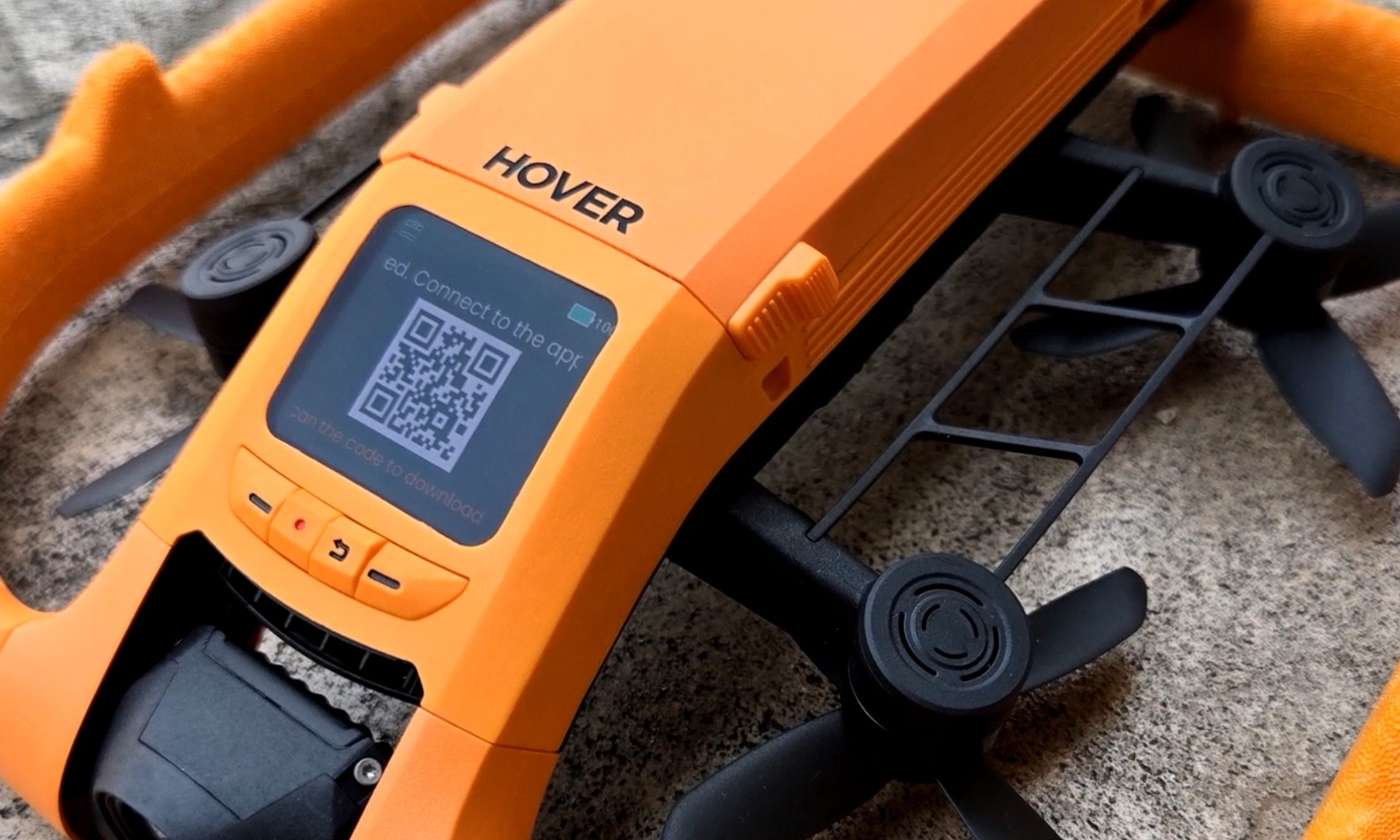
My favorite piece of hardware here is also the smallest. A 1.6-inch AMOLED screen sits on the drone’s spine, and it stays readable even with glare coming off the water. It’s there to pick flight modes, but I mostly used it to review what I’d just shot — sitting on the board, dripping, thumbing back through a run while the river went past. Two weeks in, I was still reaching for it instead of my phone. Storage is 128GB and internal, so there’s no SD card to lose, forget, or flood.
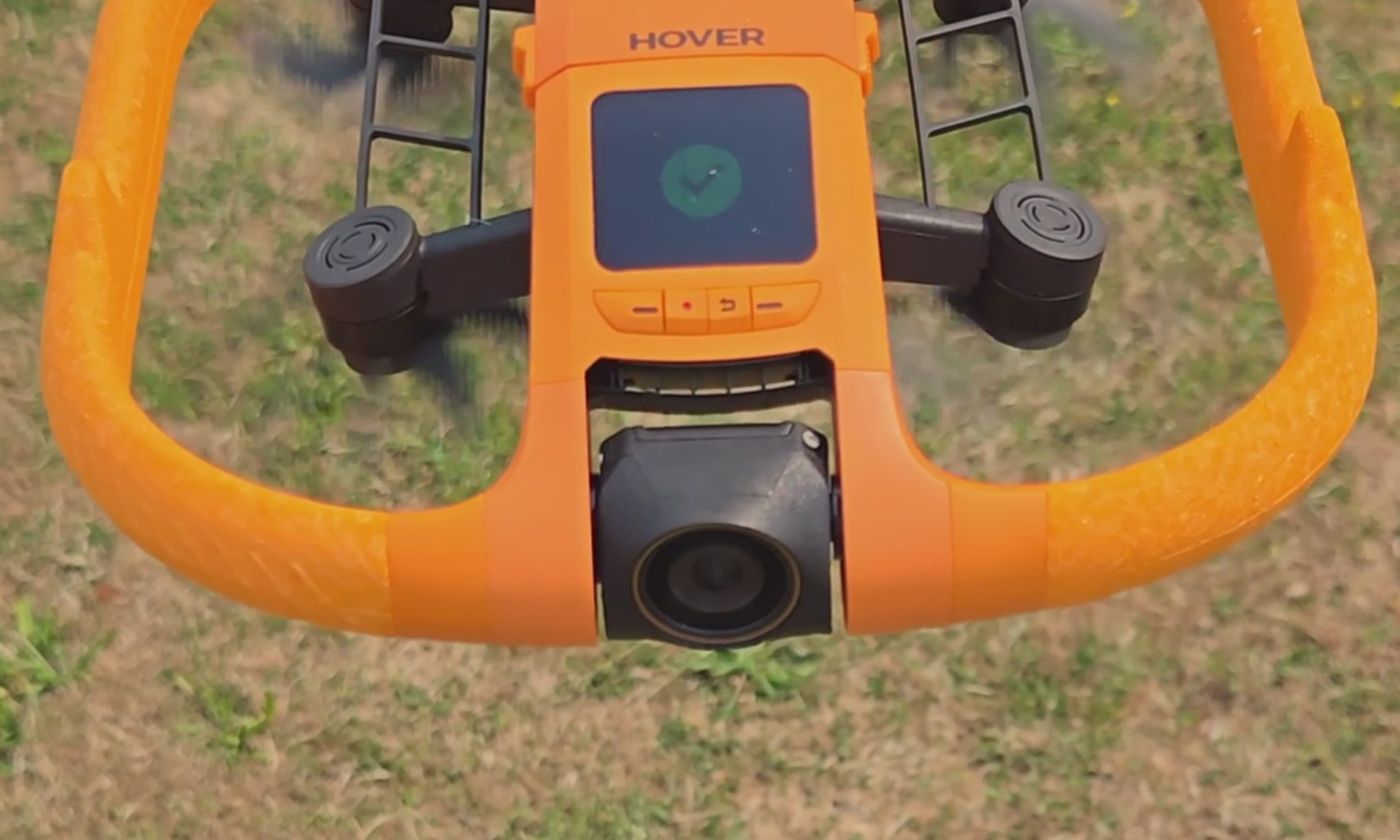
The camera records 4K at up to 100 fps for slow motion through a heated lens, which keeps fog from forming and makes water bead off instead of smearing across the glass. Underneath the airframe is the strangest line I have ever typed about a consumer drone: millimeter wave radar that reads the height of the waves rolling beneath it, so the Aqua can skim low over moving water without clipping a crest.
For those of you unfamiliar with the term, and since the spec sheets never bother explaining it, millimeter wave radar bounces very short-wavelength radio off a surface to measure distance to it — here, a surface that will not hold still. The industry noticed. The Aqua premiered at CES 2026 as an Innovation Awards honoree and collected a Red Dot Award along the way.
HoverAir Aqua water launch: Throw it in, it flies out

The water launch is the feature every bystander will ask you to do twice, and I tested it from the kayak with my kids leaning over the side to watch. You toss the drone into the river upside down, carelessly. However, it happens to leave your hand. It bobs for a beat. Then the props bite, it rolls upright, and it climbs into a hover a few feet off the surface to wait for you to start moving. It did that every single time I asked, and I asked a lot. Not once did I have to paddle over and fish it out or reset anything. In a category where water has always meant total loss, that is a bigger deal than a party trick sounds.
HoverAir Aqua subject tracking: A chase boat on your forearm
Most of my testing happened on my eFoil at around 15 miles per hour, with the waterproof Lighthouse strapped to my forearm like a chunky watch. One button sends the drone up. One button brings it home. Everything between those two presses is automatic.



The footage surprised me. My wake unspooling behind the board in a long white seam, the tree line sliding by, and me held in the center of the frame for the entire run. The best material came when the drone swung out ahead of the board and shot back at me, spray kicking off the foil, the whole river opening up behind.
It never fell behind, and it never wandered. When I drifted too far, it closed the gap on its own. When I slipped off the board and sat chest-deep in the water beside it, it stayed locked on and waited. The kayak sessions at lazier speeds went the same way: steady framing, no fuss, the family paddling along with a small orange aircraft holding formation off the bow. This is the closest thing to a camera operator you can wear on your wrist.
HoverAir Aqua Battery Life: High on the box, dips in the water
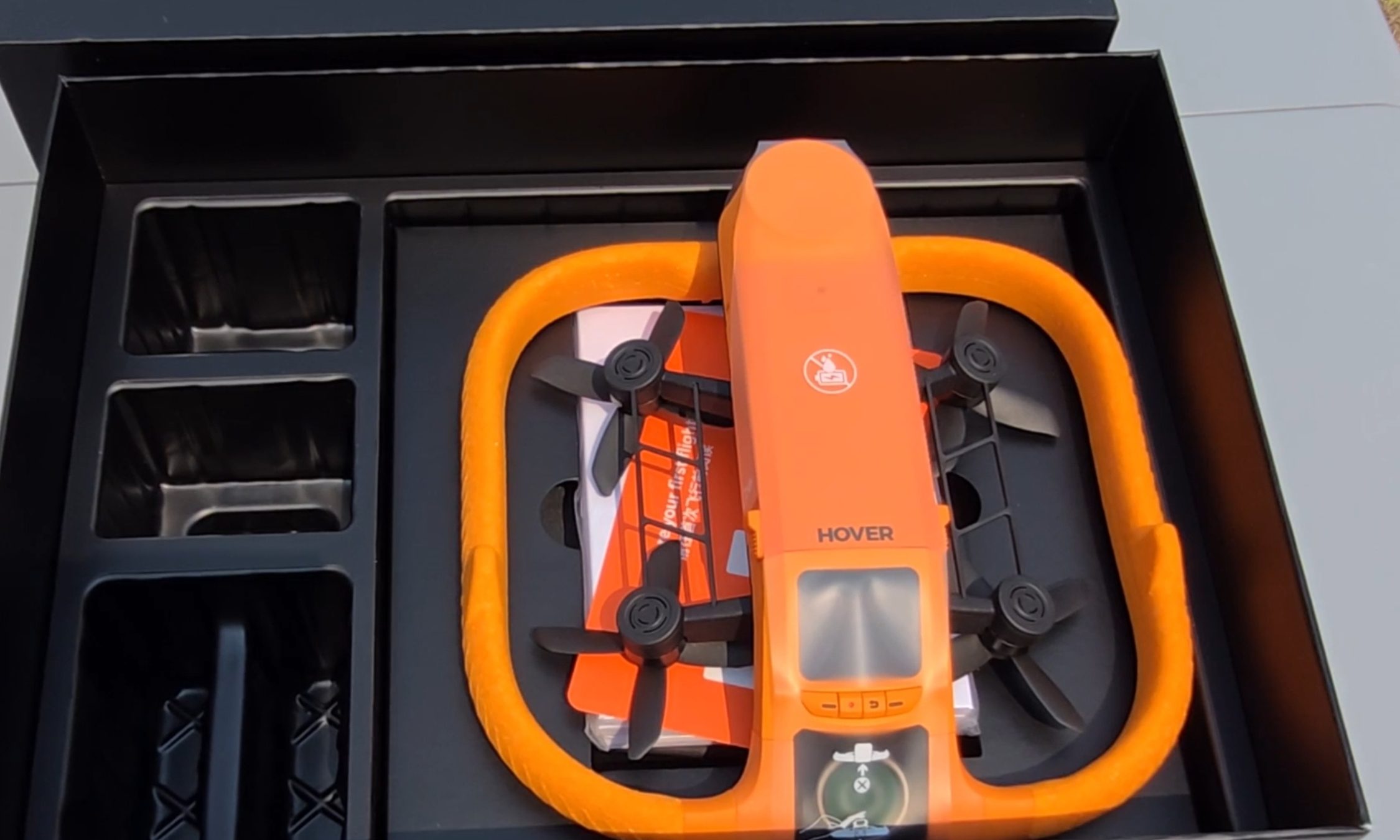
Now, the part the box will not tell you. HoverAir advertises 23 minutes of flight from the 2,013mAh smart battery. My first battery, actively tracking me on the foil, gave me 10 minutes before the drone called it quits. I rode back to shore, clicked in a fresh one, and went back out. Thirteen minutes. Doing the exact job you bought it for, you get about half the number on the sticker.
It’s worth noting that drone makers rate flight time in windless conditions with no tracking load, and you should not expect that figure in the real world. Even allowing for that, half is a wide gap. At least the ending is graceful.
When the charge runs out, you get a warning that the drone will land in 15 seconds, and then it sets down on the surface, orange side up, rocking on the chop until you come get it. Nothing dramatic happened in two weeks of testing. Recharging takes about 55 minutes with the battery inside the drone, and because a battery is only fully waterproof while it’s installed, HoverAir includes a dedicated waterproof pouch for hauling spares out on the water. Read that accessory list again. The company is telling you, in its own way, that you will be swapping batteries mid-session.
HoverAir Aqua Lighthouse Wearable: Great controller, no fuel gauge

The second problem makes the first one worse. The Lighthouse is otherwise the best thing about this product, and it tells you nothing about the battery. No percentage. No halfway warning. No blinking light as the level sinks. Mid-run, I had no idea whether the drone above me had eight minutes left or thirty seconds.

When the entire budget is 10 to 13 minutes, that silence turns every session into a guessing game. Both times a battery died on me, my only notice was the 15-second landing warning, right when I felt like I was getting going.
Should you buy
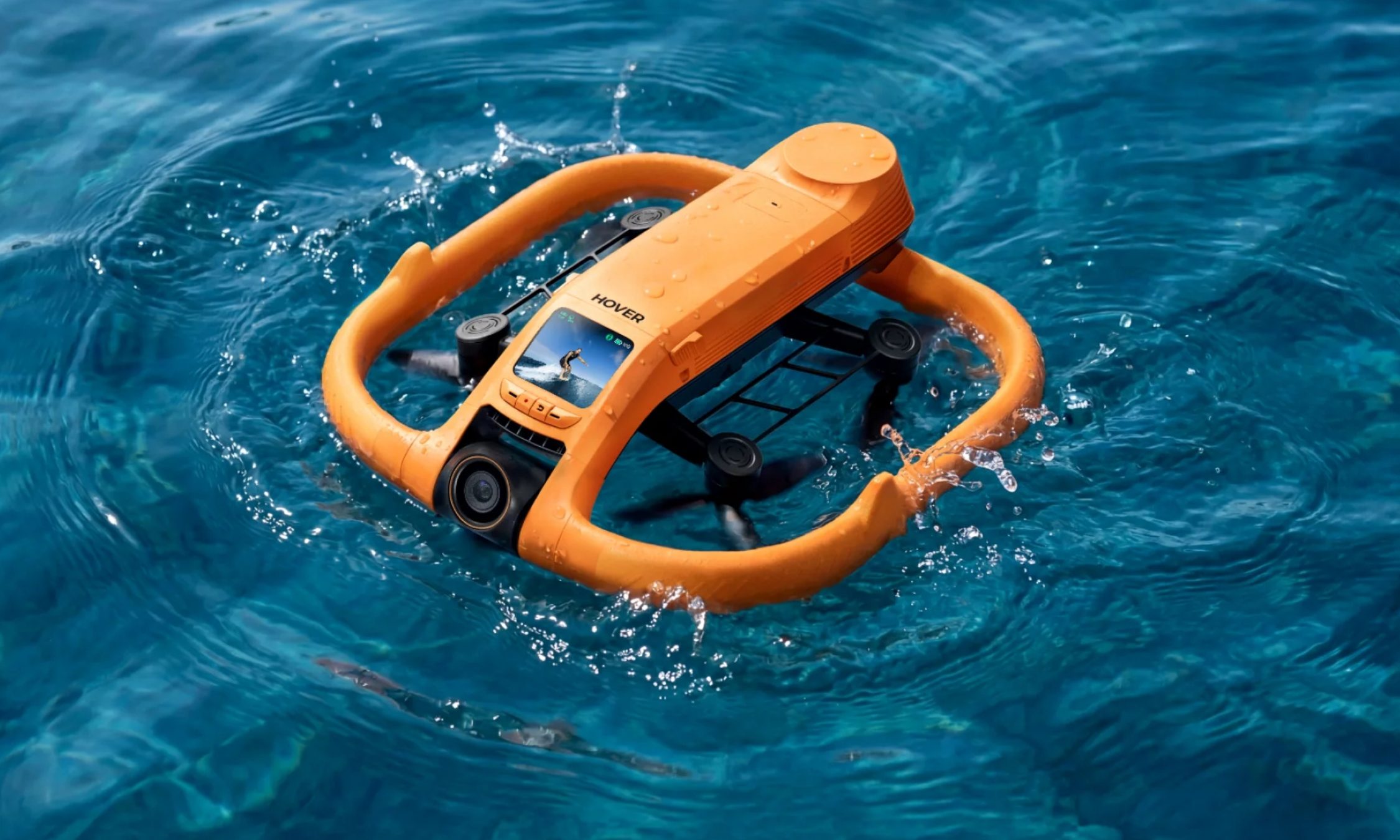
The good here is genuinely good. The footage is beautiful, the Aqua keeps pace with a foil at speed, it launches itself out of open water, and it runs hands-off enough that you forget it exists until you sit down to replay the clips. As a piece of engineering built for a hostile environment, it is the real deal.
The battery is what makes me hesitate, and I am not going to soften that. Plan a full session around this drone, and you are packing a pocketful of spares and guessing when to burn them.
So here is the fork. If what you want is a quick promo shot or a fast social clip off the water, this is the drone doing that job, and I don’t know of another one built to take the punishment. If you want to shoot an entire session, wait and watch for a firmware update that pushes battery data to the Lighthouse.
That one change would make this an easy recommendation for anyone who makes content on the water. As it stands, the Aqua is a brilliant specialist with a 10-minute attention span, and I keep taking it out anyway.
Why not try?
HOVERAir X1 PROMAX — Priced significantly lower at $700, this one offers hands-free auto-follow tracking and Lighthouse wearable perks, can shoot up to 4K 120fps footage, and stands out with a foldable design. It’s slightly slower and doesn’t offer a waterproof build, but makes up for it with collision-sensing tech.
DJI Mini 4 Pro — Another option that is more affordable as well, DJI’s drone offers impressive aerial capture capabilities with omnidirectional obstacle sensing and a reliable 4K camera that can capture high dynamic range videos. Plus, the battery packs can extend the flight time by up to 45 minutes, while the transmission performance is also fantastic. But an impending ban casts a shadow of skepticism over long-term support and after-sales experience.
FAQs (Frequently Asked Questions)
Who needs the HoverAir Aqua?
It’s a waterproof, self-flying 4K camera drone. If you’re into activities such as kayaking and wakeboarding, it’s an appropriate choice.
Is it capable of taking off and landing directly on water?
Yes, the positive buoyancy engineering allows it to float on water. And yes, it can take off and land from the surface of water. Moreover, it also comes with a Turtle Flip feature that lets it correct its position instantly, even if it’s flipped upside.
Is the build really waterproof?
The HoverAir Aqua has an IP67-certified build, featuring corrosion-resistant components, while the camera sensor is protected by a hydrophobic, anti-fog lens.
Do you need a license to fly it?
It falls under the prescribed FAA weight limit, so you don’t need a license to fly it.
Can it fly and capture without a phone?
Yes, the wearable Lighthouse controller relies on Real-Time Kinematics (RTK) positioning to let the drone track you and capture videos without requiring a cellular link or base stations.
What is the top speed and battery life?
The HoverAir Aqua can fly at a speed of up to 34 miles per hour, and it is claimed to last over 20 minutes on a single charge.
Can you fly it manually?
Yes, using the Beacon & JoySticks accessory.

In a nutshell: Despite Nvidia losing fans over the last few years as its focus on gamers diminishes (or disappears), the company’s GPUs have dominated the sales charts. But that status quo is starting to change: Amazon’s top 10 best-selling GPU list is an even split between Team Red and Team Green, with the highest position held by a Radeon 9000-series card. Meanwhile, in Germany, AMD is the one that’s dominating sales – at least at one retailer.
The rise of RDNA 4 was highlighted by TechEpiphany on X.
– TechEpiphany (@TechEpiphanyYT) September 6, 2026
The Amazon best-selling list has changed slightly since the post, but the Radeon RX 9070 XT is still the top GPU. This Gigabyte version is priced at $749, which, of course, is considerably higher than the GPU’s $599 launch MSRP.
The other AMD cards in the chart are an Asus model of the 9070 XT, an Asrock 9070, and an Asus 9060 XT. Nvidia also holds four positions with its RTX 5070, RTX 5060 Ti, and two RTX 5080 models.

Things appear even more favorable for Lisa Su’s firm in Germany. The figures, which come from Mindfactory, show AMD accounting for almost 56% of all GPUs sold over the last week, while Nvidia holds a 40% share. Again, the RX 9070 XT is the most popular card by far, followed by the RX 9060.
It’s worth remembering that Mindfactory has a reputation for favoring AMD, offering promotions, discounts, and bundles featuring its products, which help push up sales figures. The store’s AMD cards have outsold Nvidia’s in the past.
However, these charts do illustrate the impact of the memory crisis on the graphics card market. All GPUs are more expensive, but AMD’s are often cheaper than equivalent Nvidia cards.
The other reason is likely simple availability. The Amazon chart shows three AMD cards in stock, while Nvidia only has one – a Gigabyte RTX 5080 for a colossal $1,599, and that’s with a 6% discount.
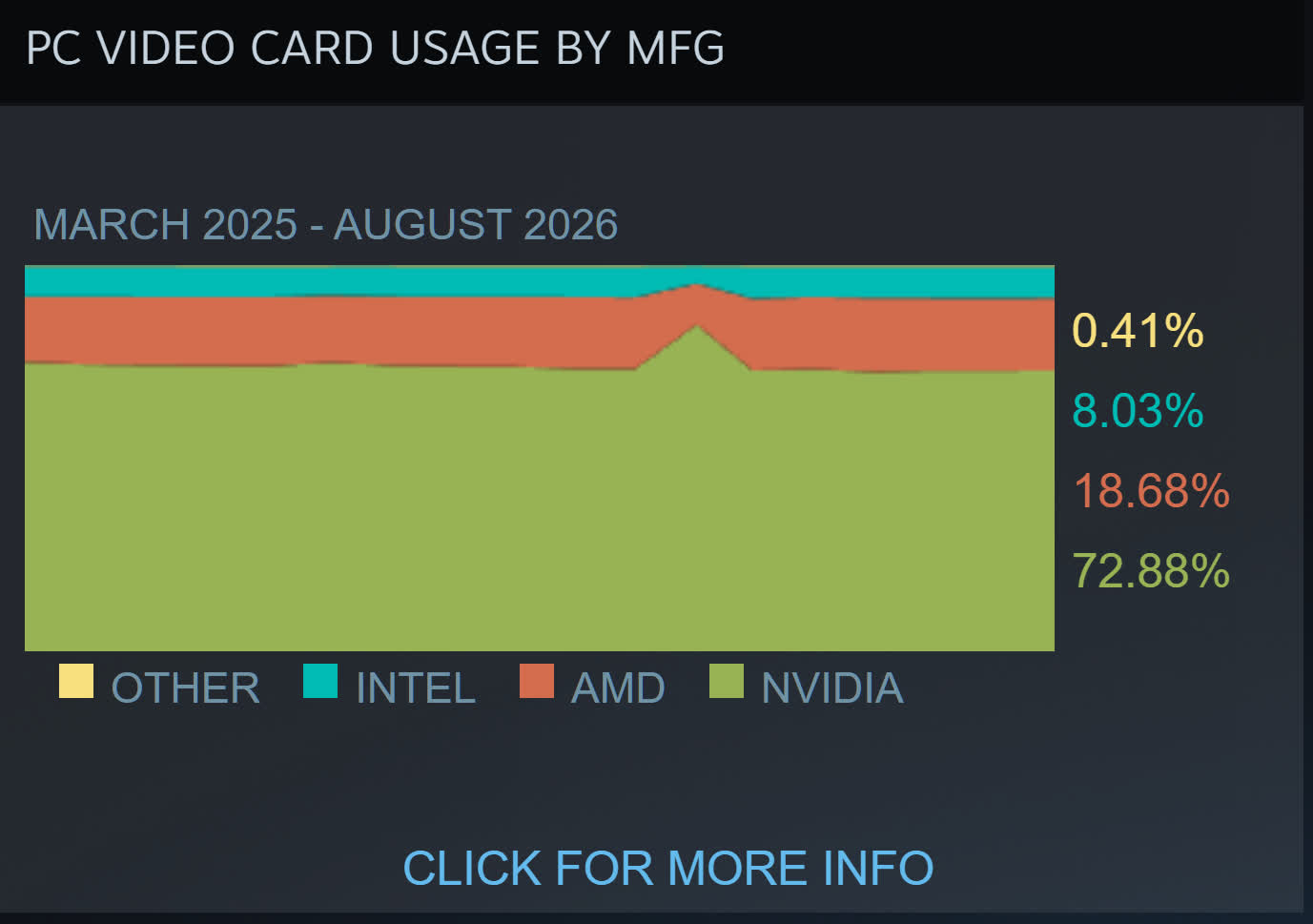
Only one company dominates the Steam survey GPU chart
TechEpiphany’s claim of AMD “dominating everywhere” might be a bit of an exaggeration, but there are signs of consumers opting for its cards because of the cheaper prices – or just buying them because there are no Nvidia alternatives. The most valuable company in the world still has GPUs in almost 73% of Steam survey participants’ machines, compared to AMD’s 18.6%, so we’re not seeing a red revolution just yet.
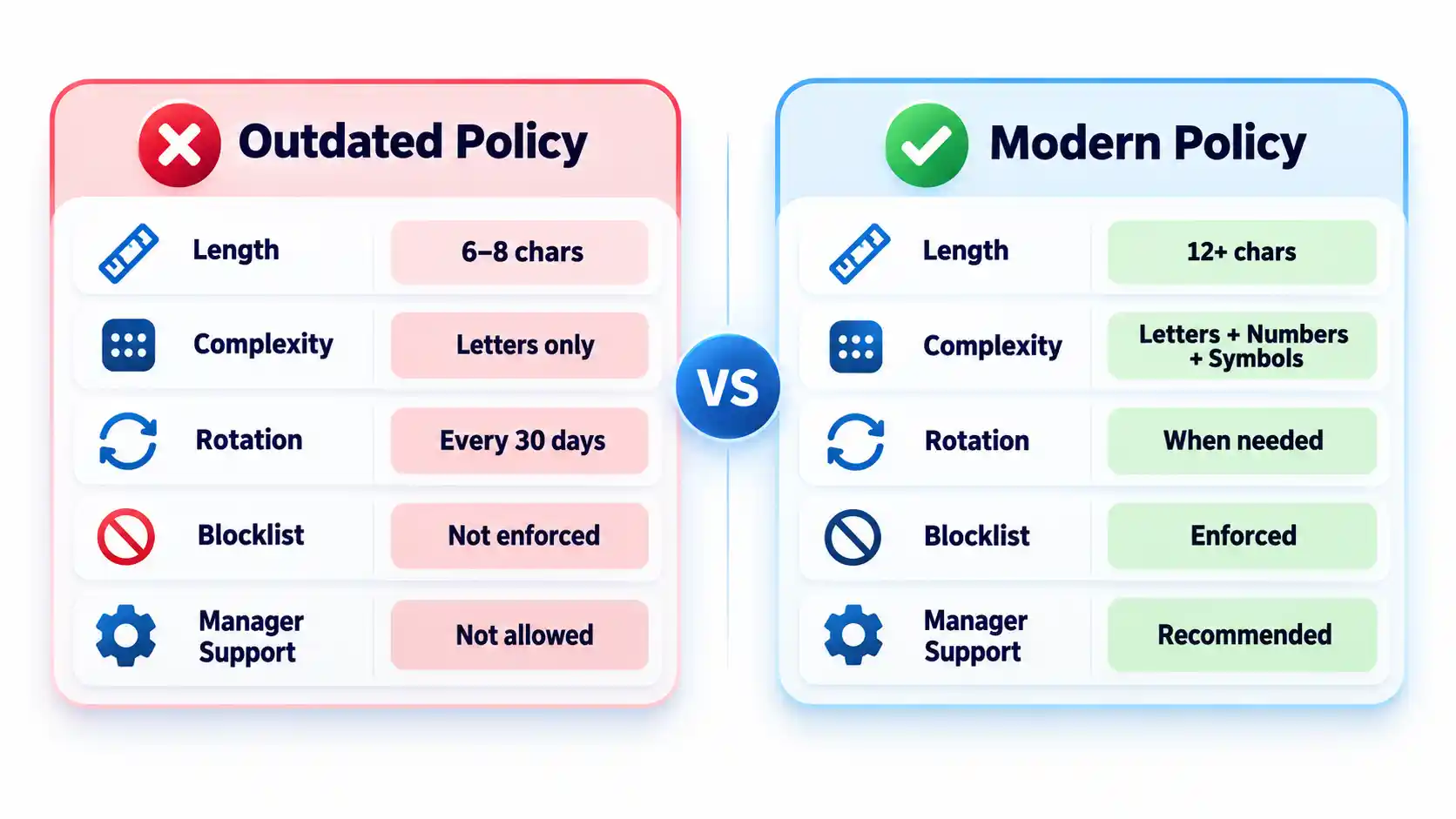
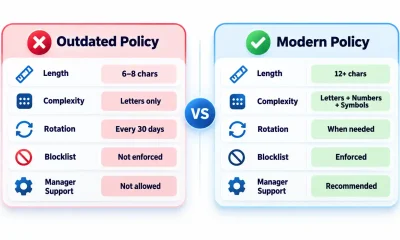
Create a strong password policy by prioritizing length and uniqueness, blocking compromised passwords, allowing password managers and autofill, removing arbitrary complexity and expiration rules, and requiring MFA for important accounts. Deploy the policy with a managed password vault, secure recovery procedures, and tests that confirm the written rules work in every covered system.
Quick Take
- Require at least 15 characters when a password is the only authentication factor.
- Allow passwords of at least 64 characters, including spaces.
- Do not require arbitrary mixtures of uppercase letters, numbers, and symbols.
- Replace scheduled password expiration with changes triggered by suspected compromise.
- Reject commonly used, predictable, and previously compromised passwords.
- Allow password managers, paste, and autofill on login forms.
- Protect important accounts and cloud-synchronized vaults with MFA.
- Test login, recovery, export, offboarding, and session-revocation controls.
These requirements follow current NIST authenticator guidance. They are a security baseline rather than proof that a particular policy satisfies every law, contract, or industry framework.
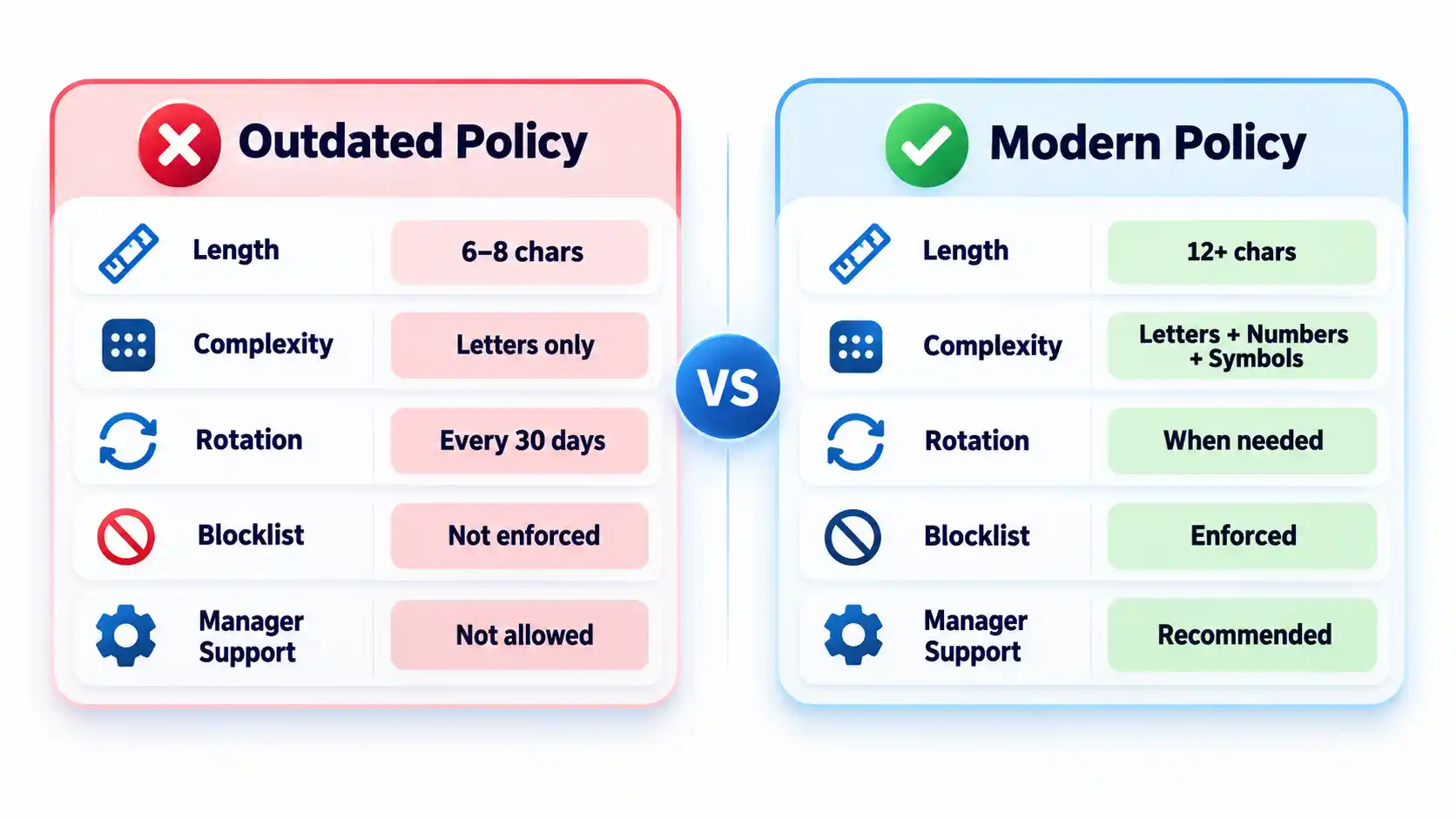
Prerequisites and Ownership
Identify the accounts in scope
Inventory the systems that accept passwords before writing the rules. Include workforce accounts, customer accounts, administrator access, cloud services, remote-access tools, shared credentials, and legacy applications. Record which systems use single-factor authentication, MFA, or single sign-on.
Keep machine credentials in a separate category. API keys, database secrets, certificates, service-account tokens, and CI/CD credentials require secrets-management controls rather than an ordinary employee password vault. A dedicated article on business secrets management should cover those systems.
Assign responsibility
Name a policy owner, identity-platform administrator, security reviewer, help-desk recovery owner, and departmental access approver. A policy without named owners tends to fail at exceptions, recovery, and offboarding rather than during ordinary password creation.
Document technical constraints
Record each system’s minimum and maximum length, supported characters, MFA options, password-history rules, breached-password screening, paste and autofill behavior, recovery process, and session controls. Legacy systems that cannot meet the baseline should enter a documented exception process with compensating controls and a retirement or remediation date.
Step-by-Step: Create the Password Policy
-
Define which accounts the policy covers
State whether the policy applies to employees, contractors, administrators, customers, service providers, and shared accounts. Classify higher-risk accounts such as email, identity-provider, financial, cloud-administrator, source-code, and password-vault accounts.
Where possible, replace shared accounts with individually attributable accounts. If sharing is unavoidable, use a managed vault that records access and lets administrators revoke membership.
Expected result: Every covered account type has an owner, risk classification, authentication method, and exception status.
-
Set length and input requirements
Require at least 15 characters when a password is the only authentication factor. NIST permits passwords used only as part of an MFA process to be shorter, but they must contain at least 8 characters. Organizations may adopt a longer minimum when users can rely on a password generator.
Permit passwords of at least 64 characters. Accept spaces and broad character sets, process the entire submitted password, and never silently truncate it. Systems that mishandle spaces or long generated values should be corrected or documented as exceptions.
Expected result: Users can create long passphrases or generated passwords without encountering unnecessary input restrictions.
-
Remove mandatory composition rules
Do not require every password to contain a prescribed mixture of uppercase letters, lowercase letters, numbers, and symbols. Current NIST rules prohibit these composition requirements because users commonly satisfy them with predictable patterns.
Symbols remain acceptable when a generator selects them or a service requires them. The policy should not imply that a short password becomes safe simply because one letter was replaced with a familiar symbol. NIST’s public password creation guidance prioritizes length and recommends long passphrases when a password must be created manually.
Expected result: Users can choose long, usable passwords without following predictable formatting recipes.
-
Replace scheduled expiration with event-driven changes
Do not force users to change passwords every 30, 60, or 90 days without evidence of risk. Require a change when a password is known or suspected to have been disclosed, appears in relevant breach data, was transmitted insecurely, or may remain known to someone whose access has ended.
A password change must be accompanied by session revocation when an attacker could already be signed in. Changing the secret alone may not invalidate active browser sessions, application tokens, or remembered devices.
Expected result: Password changes respond to compromise and access changes rather than an arbitrary calendar.
-
Block weak and compromised passwords
Compare new and changed passwords against a blocklist containing commonly used, expected, and compromised values. Include context-specific choices such as the organization’s name, service name, username, and predictable derivatives.
Explain why a proposed password was rejected and ask the user to choose a genuinely different value. Do not reveal whether another person uses that password. Avoid enormous blocklists that create excessive false rejections without meaningfully improving protection against rate-limited online guessing.
Expected result: Users cannot enroll values that attackers are likely to guess early or already possess from breach collections.
-
Add controls around the password
Require MFA for email, identity-provider, financial, remote-access, cloud-administrator, source-code, and password-manager accounts. Prefer phishing-resistant methods such as passkeys or hardware-backed security keys where the service and user environment support them.
Rate-limit or progressively delay failed attempts. Monitor suspicious logins, protect account recovery, avoid knowledge-based questions as a sole recovery method, and provide a way to revoke sessions after suspected compromise. The OWASP authentication guidance treats password controls, MFA, recovery, session handling, and login monitoring as connected parts of account security.
Expected result: A guessed or disclosed password is harder to convert into persistent account access.
-
Require password-manager-compatible login forms
Allow users to paste and autofill credentials. Use standard password fields and avoid scripts or form designs that block managers. NIST requires verifiers to allow password managers and autofill and recommends permitting paste when autofill interfaces are unavailable.
Do not interpret clipboard blocking as a security control. It can push users toward shorter passwords they can type manually or toward storing credentials in insecure notes.
Expected result: Users can generate, store, and enter unique credentials without weakening them for convenience.
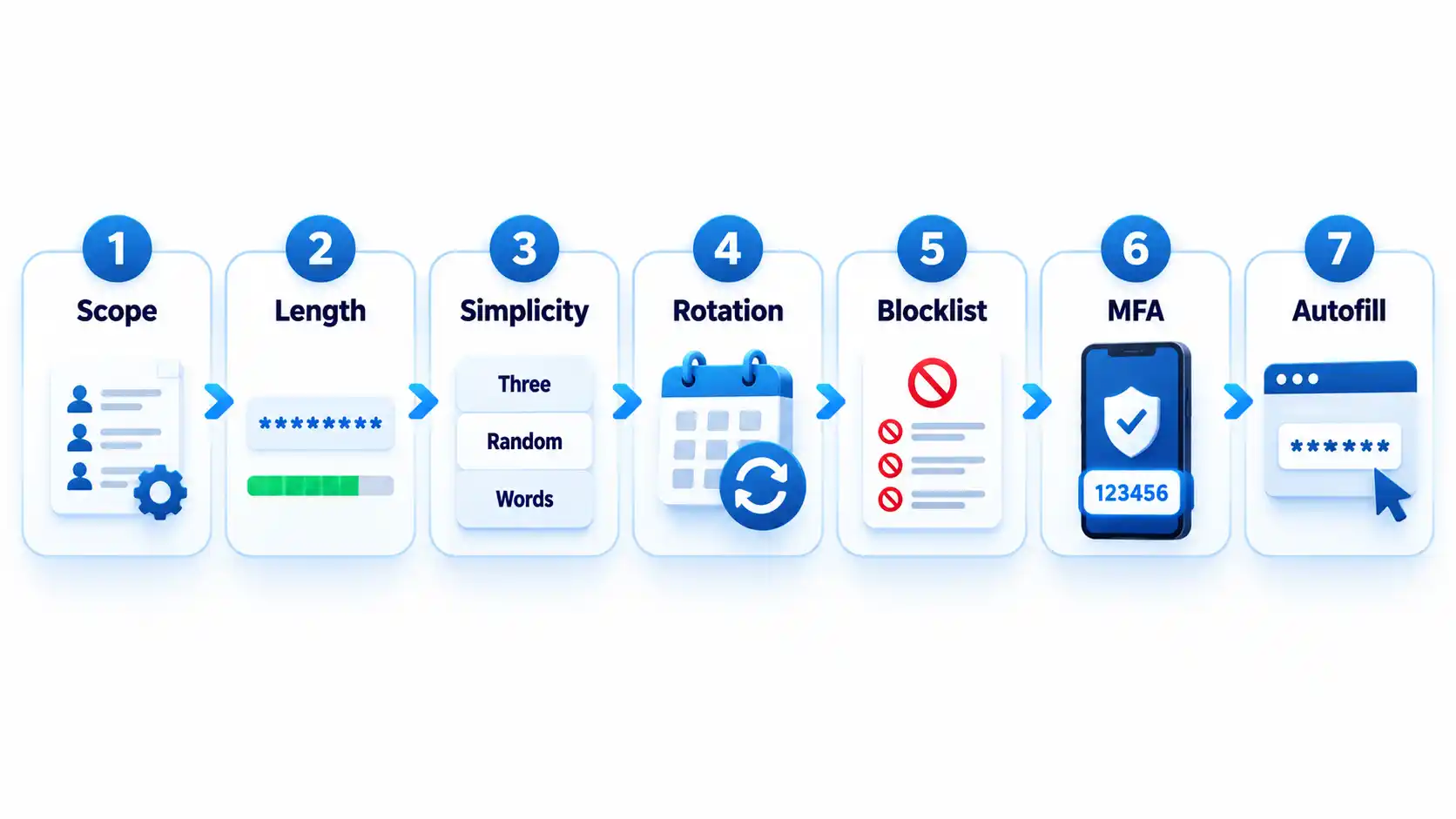
How to Choose a Password Manager
Select a manager by deployment fit, recovery design, security controls, and usability rather than by the length of its feature list. The NCSC buyers guide emphasizes that an unusable manager will leave insecure workarounds in place.
| Manager type | Best fit | Principal advantage | Main limitation |
|---|---|---|---|
| Browser or platform manager | People using one primary browser or device ecosystem | Low setup friction and integrated autofill | Potential platform lock-in and fewer team controls |
| Standalone cloud-sync manager | Mixed-device users and small teams | Cross-platform access and centralized synchronization | Remote account and recovery paths require strong protection |
| On-device manager | Narrow or offline use cases | Reduced dependence on a cloud service | Limited synchronization and more difficult recovery |
| Enterprise-managed vault | Organizations requiring governance and offboarding | Managed sharing, audit records, policy enforcement, and provisioning | Greater administrative complexity and recurring cost |
Evaluate the following capabilities before deployment:
- Protection of credentials and metadata at rest.
- Who controls or can recover the vault’s decryption key.
- MFA, passkey, and approved-device support.
- Recovery options and the people authorized to use them.
- Secure sharing without revealing passwords in email or chat.
- Role-based administration, audit records, and offboarding controls.
- Restrictions or alerts for bulk export.
- Supported browsers, operating systems, and mobile devices.
- Update delivery and the provider’s vulnerability-disclosure process.
- A practical method for leaving the service without permanent lock-in.
Browser and device managers can be appropriate when convenience and ecosystem integration matter most. A reputable standalone manager may fit mixed-device environments or teams requiring advanced sharing and administration. The NCSC’s updated password-manager guidance recommends evaluating reputation, device security, recovery, MFA, and platform needs instead of assuming one type fits everyone.
How to Deploy and Use the Password Manager
1. Protect the vault account
Create a long, unique primary passphrase that is never used elsewhere. Enable the strongest practical MFA and secure every registered device with updates, automatic locking, and a local PIN or biometric unlock.
Store recovery keys or emergency instructions separately from the vault. Avoid circular recovery in which the only way to access the email account is through the vault while the only way to recover the vault is through that email account.
2. Import credentials carefully
Some managers migrate credentials through a CSV file. That export may contain readable usernames and passwords. Create it only on a trusted device, import it immediately, verify that the records arrived, and delete the exported file from the original folder, recycle bin, cloud synchronization, and temporary storage.
Do not perform a vault migration over an unfamiliar hotspot. Review the precautions in this public Wi-Fi security guide before accessing sensitive accounts away from a trusted connection.
3. Replace reused passwords in risk order
- Secure the password-manager account and its recovery channels.
- Change email and identity-provider credentials.
- Change banking, payment, payroll, and financial credentials.
- Change administrator, cloud, source-code, and remote-access credentials.
- Change shopping, social-media, subscription, and lower-impact accounts.
Do not change dozens of accounts without confirming that each new password was saved. Keep the old session open until the new credential has been tested in a separate private window or another approved device.
4. Configure generation and autofill
Generate a different random password for every compatible service. Match the site’s supported length and character rules while avoiding needless manual edits. If autofill does not appear, check the exact domain before searching the vault and copying the password.
Autofill may help resist phishing because a manager should associate credentials with the legitimate domain. It is not infallible. Users must still inspect unusual addresses, subdomains, redirects, and browser warnings.
5. Configure team sharing and offboarding
Store business credentials in organization-controlled collections rather than personal vaults. Grant access by role, assign an accountable owner, review membership, and remove access promptly when someone changes roles or leaves.
Revoking vault access prevents future retrieval, but it cannot make a password unknown to someone who already viewed or copied it. Rotate credentials when a departing user could retain them. Teams protecting software repositories should connect this process to the controls in the guide to preventing source-code theft.

Verify That the Policy Works
Test the deployed controls instead of assuming a written setting was applied consistently.
Checklist
- Confirm that a 15-character single-factor password is accepted.
- Confirm that long passphrases, spaces, paste, and autofill work.
- Confirm that the application processes the full password without truncation.
- Attempt to enroll a known common password and verify that it is rejected with useful guidance.
- Confirm that uppercase, number, and symbol mixtures are not mandatory.
- Verify that routine expiration is disabled and compromise-driven resets work.
- Trigger repeated failed attempts in an approved test account and verify rate limiting or progressive delay.
- Test MFA, recovery, session revocation, emergency access, and lost-device procedures.
- Remove a test user from a shared collection and verify that access ends.
- Verify that export actions are restricted, logged, or both.
Record exceptions and failed tests with an owner and target correction date. Repeat the checks after identity-platform changes, password-manager migrations, or major policy revisions.
Failure Modes and Troubleshooting
| Failure | Likely cause | Security consequence | Corrective action |
|---|---|---|---|
| Long generated password is rejected | Legacy length or character restriction | User shortens or reuses a password | Correct the restriction or document a temporary exception |
| Autofill does not appear | Unsupported form, disabled extension, or domain mismatch | User may copy into the wrong page | Verify the domain and manager permissions before manual entry |
| Credentials fill on an unexpected subdomain | Overly broad saved-domain matching | Password may reach an unintended service | Narrow the saved address and report unsafe matching |
| Primary passphrase is lost | Recovery was not configured or documented | Vault data may become inaccessible | Use the approved recovery process and reset affected accounts if recovery fails |
| MFA device is lost | No backup factor or recovery key exists | User is locked out or bypasses policy | Use pre-established recovery and revoke the lost device |
| Exported CSV remains on disk | Migration cleanup was missed | Passwords remain exposed in plaintext | Delete all copies and rotate credentials if exposure is possible |
| Former worker retains a shared password | Vault removal occurred without credential rotation | Continued unauthorized access remains possible | Rotate the credential and review account activity |
| Legacy system requires frequent changes | Obsolete platform rule | Users may create predictable variations | Apply compensating controls and schedule remediation |
| Vault and email recovery depend on each other | Circular recovery design | One lost factor can lock out both services | Create an independent recovery route and protect it offline |
Operational Limits and Edge Cases
- Concentrated value: A vault makes unique passwords practical, but a successful vault compromise can expose many accounts. Protect the primary account and registered devices accordingly.
- Compromised endpoints: Malware or someone using an unlocked computer may capture credentials after the vault decrypts them. A password manager does not replace device protection. Organizations can evaluate those controls separately in this endpoint protection guide.
- Recovery trade-off: Recovery improves availability but creates another path that an attacker may target. Document who can recover a vault and what evidence is required.
- Shared accounts: A vault improves sharing, but individual accounts remain preferable because they provide attribution and cleaner revocation.
- Offline access: Emergency recovery material needs physical protection, named custodians, and periodic verification.
- Phishing: Passwords themselves are not phishing-resistant. Adopt passkeys where appropriate and evaluate the differences in a future passkeys versus passwords guide.
Key Takeaways
- Use length, uniqueness, blocklists, and login protections instead of frustrating composition rules.
- Require at least 15 characters when a password is the only authentication factor.
- Do not force periodic changes without evidence of compromise.
- Allow password managers, paste, autofill, and long values.
- Protect the password vault, email, identity provider, and administrator accounts with MFA.
- Select a manager based on security, recovery, usability, platform support, export, and governance.
- Replace reused passwords in risk order and verify each change.
- Test recovery, offboarding, exports, and session revocation before an incident.
Frequently Asked Questions
Should contractors use the company password manager?
Contractors should use an organization-controlled vault when they need access to company credentials. Place them in restricted groups, set an access end date where supported, and avoid mixing business credentials with their personal vaults. At contract completion, revoke access and rotate any credential they could have copied.
Should a password manager store the code for its own MFA?
Storing a service’s password and MFA code in one vault is convenient, but storing the vault’s own second factor inside that same locked vault creates a circular dependency. Protect the manager itself with a separate authenticator, passkey, hardware key, or securely stored recovery code.
What happens if the password manager company shuts down?
A usable exit plan should let authorized users export or transfer credentials to another manager. Confirm the export format before deployment and document how migration would work. Because exports may be plaintext, continuity planning should not involve leaving permanent backup exports on ordinary drives.
Can administrators see employees’ passwords in a business vault?
That depends on the manager’s encryption, sharing, recovery, and administrative design. Some administrators can recover accounts or manage shared collections without seeing every private credential. Others may have broader recovery powers. Review the product’s key-ownership and recovery documentation before adoption.
Should personal and work passwords be kept in the same vault?
Separate vaults or clearly separated organization-controlled and personal spaces are preferable. The company must be able to manage, audit, and revoke business access without gaining control over personal credentials. Employees should also retain their personal passwords after leaving without exporting company secrets.
What should happen when a password appears in a data breach?
Change the affected password, revoke active sessions, review account recovery methods, inspect recent activity, and replace the same password anywhere it was reused. Follow a documented data breach response checklist so the reset does not overlook tokens, forwarding rules, or connected applications.

Business39 seconds ago
Newcastle’s Advanced Healthcare Group expands further into Scotland with acquisitions

Crypto World2 minutes ago
Explore SHR miner cloud mining and earn $4,777

Politics4 minutes ago
Danny Boyle’s Use Of AI In New Film Ink ‘Disappoints’ Fans

Business2 hours ago
Egyptian TV Presenter Sarah Khalifa, 11 Others Sentenced To Death In Major Drug Trafficking Case In Cairo

Tech2 hours ago
Strong Password Policy and Password Manager Guide

Entertainment2 hours ago
The 10 Most Influential Books of the 20th Century, Ranked

News Videos7 minutes ago
BIS Reveals Banks Will Require A Minimum Of 19,998 XRP To Process 20 Billion Transactions At Scale!

News Videos15 minutes ago
3 Kunci yang Bisa Bawa Kamu Financial Freedom #financialfreedom #keuangan

News Videos22 minutes ago
money making machine|| part -2 || #short #shorts #shortsfeeds
-
 Business2 hours ago
Egyptian TV Presenter Sarah Khalifa, 11 Others Sentenced To Death In Major Drug Trafficking Case In Cairo
-
 Tech2 hours ago
Strong Password Policy and Password Manager Guide
-
Entertainment2 hours ago
The 10 Most Influential Books of the 20th Century, Ranked
-

 Crypto World3 hours ago
Stablecoins could save South Korean merchants up to $3.8 billion a year, budget office says
-
 Crypto World2 hours ago
Hyperliquid Season 3 Airdrop Wait Fuels a Meme Coin Machi Big Brother Promotes
-

 Crypto World2 hours ago
How Democrats Plan to Investigate Trump’s Ballroom
-

 Sports2 hours ago
Rob Baxter: Exeter boss says England should pick English-based players
-
 NewsBeat2 hours ago
‘Shocking, disappointing, woeful’: Reaction to Wales’ fall in the global schools Pisa scores – live
-

 Crypto World2 hours ago
Tracking cocoa may be just the beginning for PwC, Merck, Hashgraph provenance system
-

 Crypto World2 hours ago
Visa expands stablecoin card network to 160 programs
-

 Sports2 hours ago
Lindermann back to his best in 2026 Chelmsford Stakes
-

 News Videos2 hours ago
Get Ready: Bitcoin About To Explode Higher?
-

 Tech2 hours ago
How Bats Prevent Doppler Acoustic Interference
-

 News Videos2 hours ago
The Man Who Cracked The Crypto Algorithm Reveals Next Great 10x Opportunity | Crypto Banter
-

 Tech1 hour ago
Apple TV may be planning a ‘Silo’ spinoff
-

 Politics1 hour ago
Splits Emerge In Reform Over Masked Anti-Migration Protesters
-

 NewsBeat1 hour ago
Paul Scholes urges Michael Carrick to drop Man Utd star against Man City | Football
-

 Tech1 hour ago
New Irish dispute body to tackle illegal online content launched
-

 Sports1 hour ago
“How Ridiculous”: Jason Gillespie Fires Back At Sacked Pakistan Coach Umar Gul
-

 Politics1 hour ago
Susan Sarandon Claims She Lost Film Work Due To Her Support For Palestine
You must be logged in to post a comment Login