In a nutshell: Despite Nvidia losing fans over the last few years as its focus on gamers diminishes (or disappears), the company’s GPUs have dominated the sales charts. But that status quo is starting to change: Amazon’s top 10 best-selling GPU list is an even split between Team Red and Team Green, with the highest position held by a Radeon 9000-series card. Meanwhile, in Germany, AMD is the one that’s dominating sales – at least at one retailer.
The rise of RDNA 4 was highlighted by TechEpiphany on X.
The Amazon best-selling list has changed slightly since the post, but the Radeon RX 9070 XT is still the top GPU. This Gigabyte version is priced at $749, which, of course, is considerably higher than the GPU’s $599 launch MSRP.
The other AMD cards in the chart are an Asus model of the 9070 XT, an Asrock 9070, and an Asus 9060 XT. Nvidia also holds four positions with its RTX 5070, RTX 5060 Ti, and two RTX 5080 models.
Advertisement
Things appear even more favorable for Lisa Su’s firm in Germany. The figures, which come from Mindfactory, show AMD accounting for almost 56% of all GPUs sold over the last week, while Nvidia holds a 40% share. Again, the RX 9070 XT is the most popular card by far, followed by the RX 9060.
It’s worth remembering that Mindfactory has a reputation for favoring AMD, offering promotions, discounts, and bundles featuring its products, which help push up sales figures. The store’s AMD cards have outsold Nvidia’s in the past.
However, these charts do illustrate the impact of the memory crisis on the graphics card market. All GPUs are more expensive, but AMD’s are often cheaper than equivalent Nvidia cards.
The other reason is likely simple availability. The Amazon chart shows three AMD cards in stock, while Nvidia only has one – a Gigabyte RTX 5080 for a colossal $1,599, and that’s with a 6% discount.
Advertisement
Only one company dominates the Steam survey GPU chart
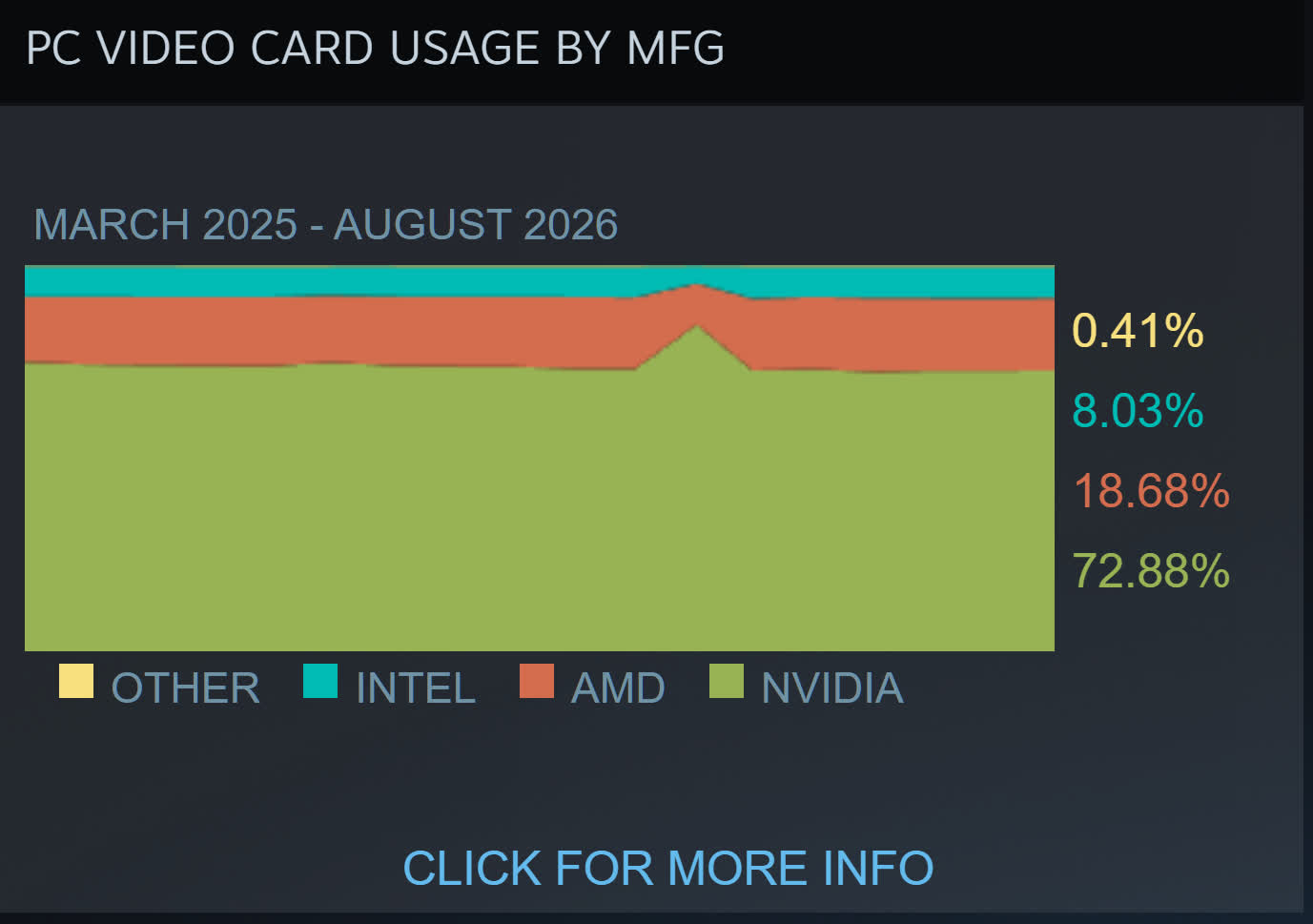
TechEpiphany’s claim of AMD “dominating everywhere” might be a bit of an exaggeration, but there are signs of consumers opting for its cards because of the cheaper prices – or just buying them because there are no Nvidia alternatives. The most valuable company in the world still has GPUs in almost 73% of Steam survey participants’ machines, compared to AMD’s 18.6%, so we’re not seeing a red revolution just yet.
“A brilliant specialist with a short attention span.”
Pros
Rights itself and launches from open water every single time
Tracking at 15 mph is steady enough to pass for a chase boat
The Lighthouse wearable handles launch, landing, and following
Onboard screen lets you replay clips on the water with no phone
Dead battery? It lands softly on the surface and floats
Cons
I measured 10 and 13 minutes of flight against an advertised 23
The Lighthouse shows no battery level at all
No obstacle avoidance
The battery is only fully waterproof while it sits in the drone
Quick Take
I spent two weeks on an Oregon river trying to break this thing — off an eFoil, out of a kayak, and by throwing it into the water on purpose. The HoverAir Aqua is the first consumer drone actually built to live on open water, and after two weeks I still stop what I’m doing to watch it launch. Throw it in the river upside down, and it flips upright, shakes the water off its props, pops into a low hover, and waits for you. Strap the Lighthouse beacon to your forearm, and it will follow you across the river at eFoil speed with your hands never touching a controller.
Let me be blunt, because this is the most important thing to know before you buy: there are two battery problems. HoverAir prints 23 minutes on the box. I measured 10 minutes and 13 minutes with the drone actively tracking me. And the wearable never tells you how much charge is left. So this is a drone I love, packed in a dry bag next to a fistful of spare batteries I resent having to carry.
HoverAir Aqua specs: A quick peek at the innards
Weight
Under 249 g, light enough to skip FAA registration for recreational U.S. flight
Waterproofing
IP67; floats and rights itself; battery fully waterproof only while installed
Camera
4K at up to 100 fps through a heated lens that sheds fog and spray
Altitude sensing
Millimeter wave radar that reads wave height for low passes over water
Display and storage
1.6-inch onboard AMOLED; 128GB internal storage, no SD card
Battery
2,013 mAh smart battery; rated 23 min; I measured 10 and 13 min while actively tracking
Charging
About 55 minutes with the battery inside the drone
Controller
Lighthouse waterproof wearable (launch, land, track, auto recall) with no battery readout
Obstacle avoidance
None
Recognition
CES 2026 Innovation Awards honoree; Red Dot Award
Test conditions
Two weeks on an Oregon river; eFoil at about 15 mph plus kayak sessions
HoverAir Aqua design & build: A pool toy with flagship chops
Ian Bell / Digital Trends
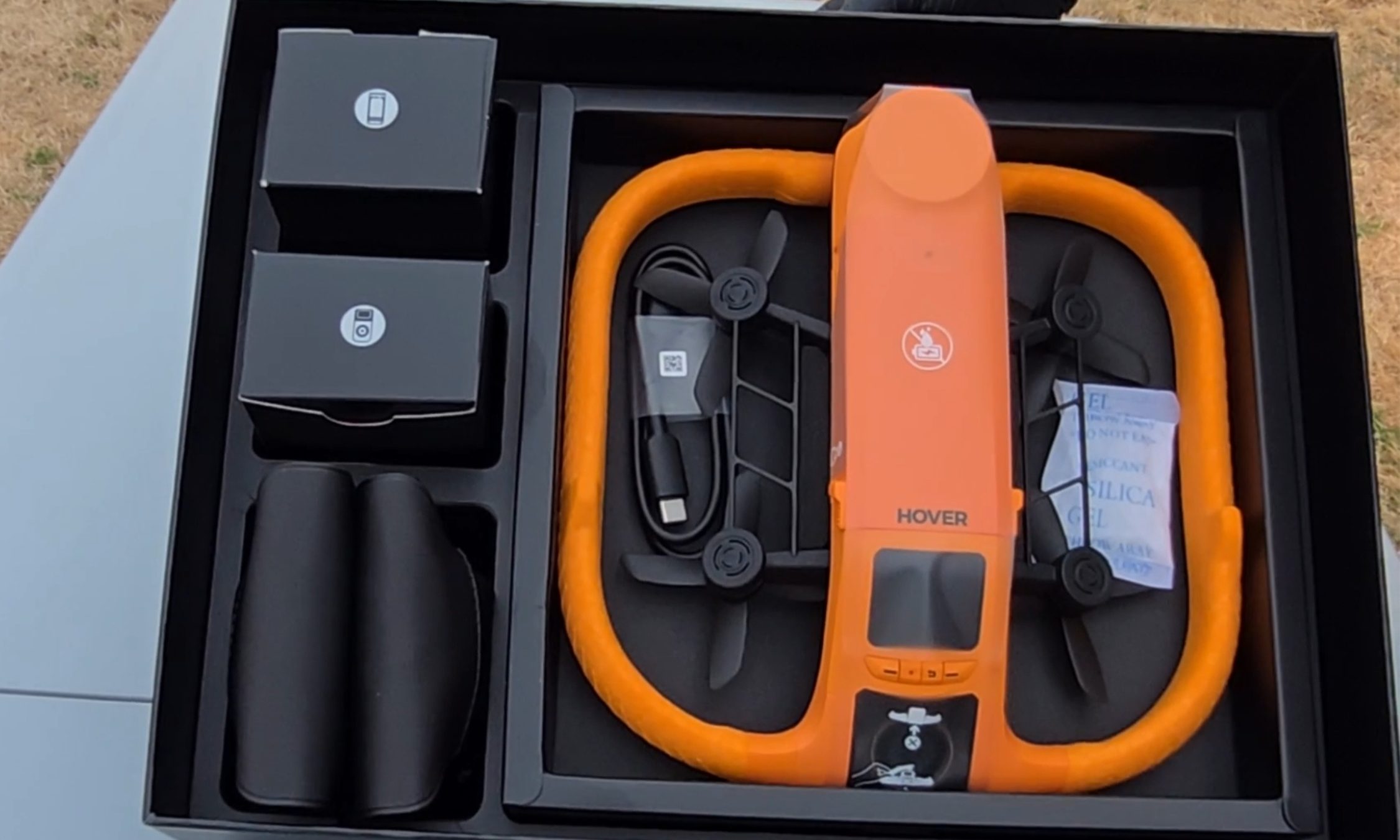
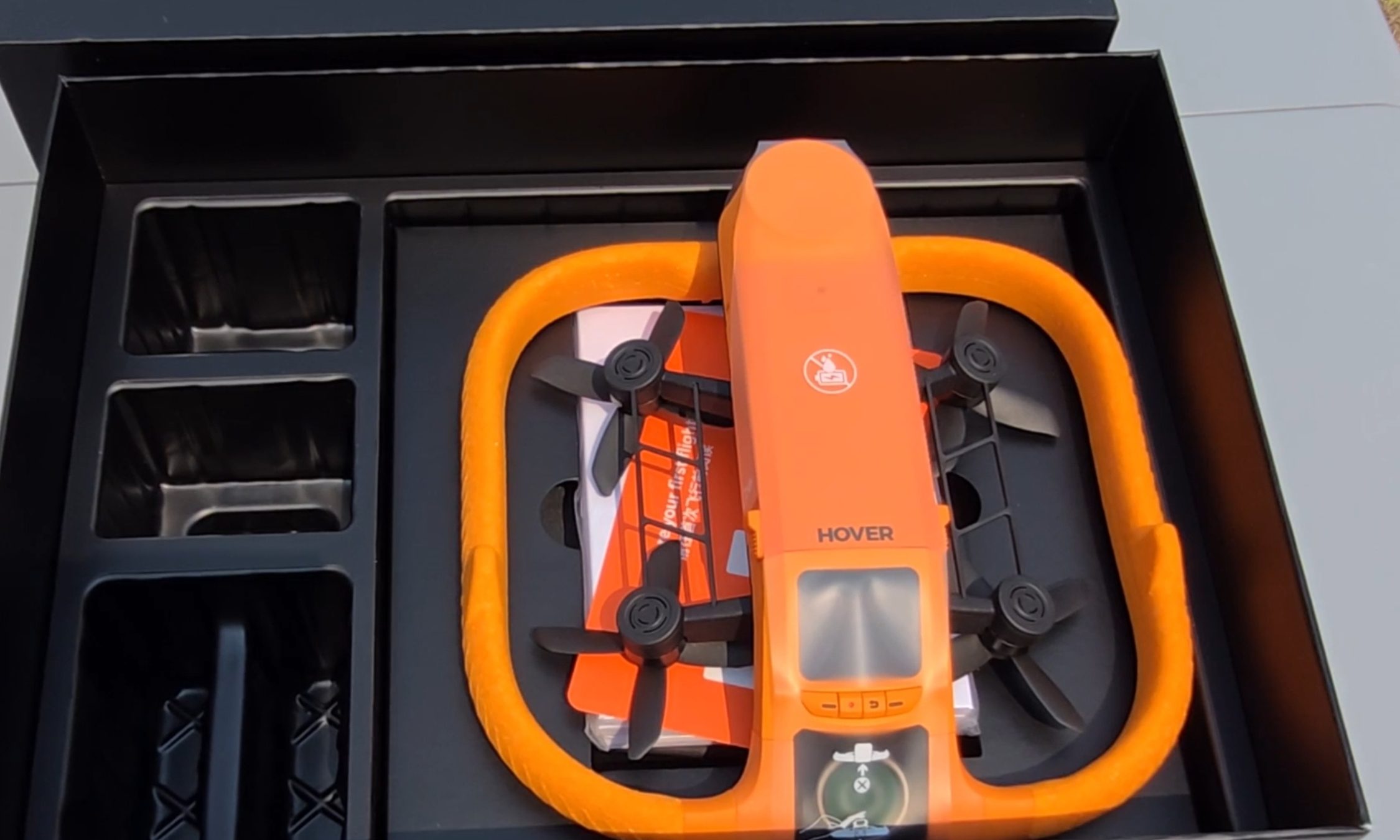
The first thing I noticed pulling the Aqua out of the box is the fat ring of safety-orange foam around its body, the same shade as a life vest. It looks like a pool toy. That’s deliberate. The foam keeps the drone buoyant, cushions the props, and makes the aircraft easy to spot from fifty yards out when it sets down on dark green water. The whole package carries an IP67 rating and weighs under 249 g, which keeps recreational pilots in the U.S. under the FAA registration threshold.
Ian Bell / Digital Trends
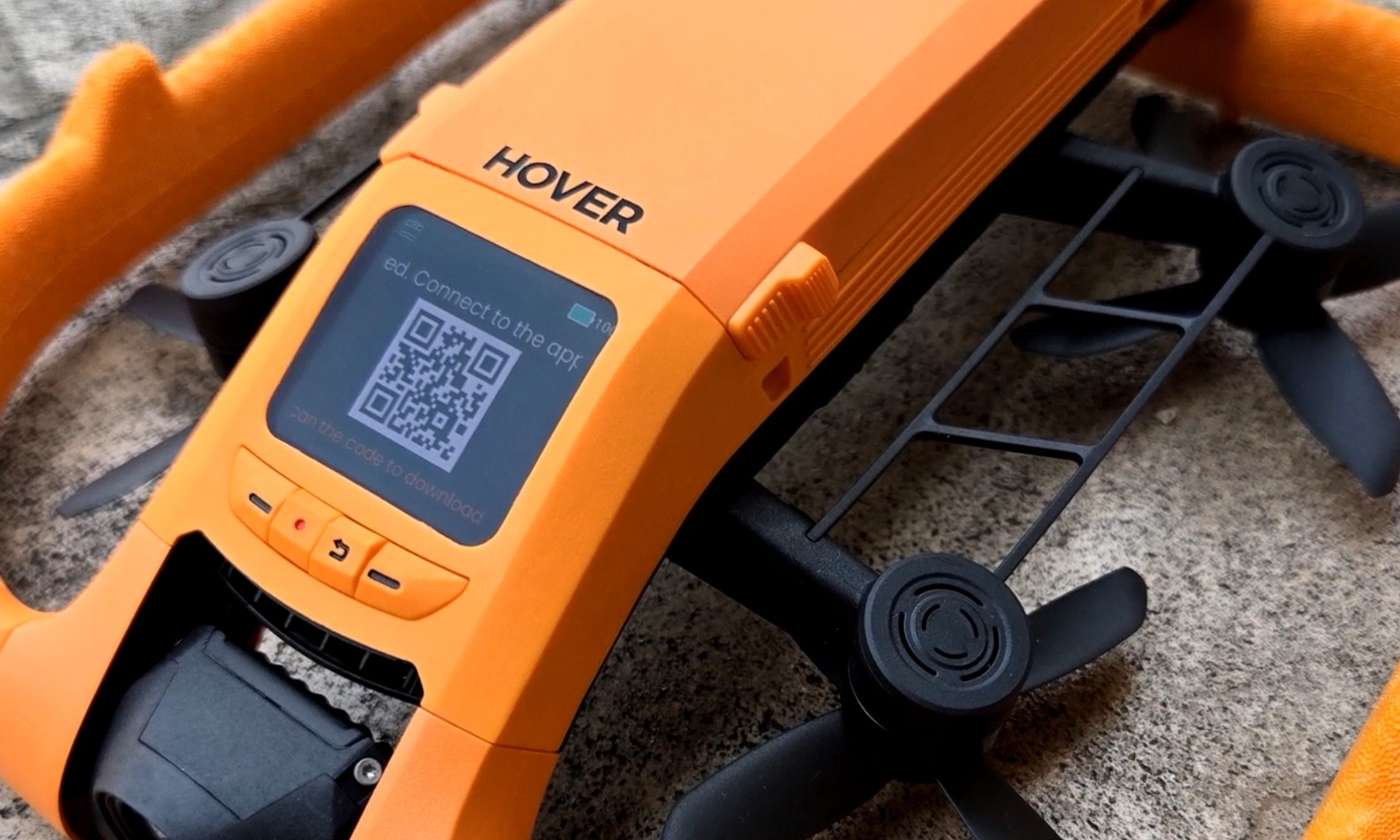
My favorite piece of hardware here is also the smallest. A 1.6-inch AMOLED screen sits on the drone’s spine, and it stays readable even with glare coming off the water. It’s there to pick flight modes, but I mostly used it to review what I’d just shot — sitting on the board, dripping, thumbing back through a run while the river went past. Two weeks in, I was still reaching for it instead of my phone. Storage is 128GB and internal, so there’s no SD card to lose, forget, or flood.
Ian Bell / Digital Trends
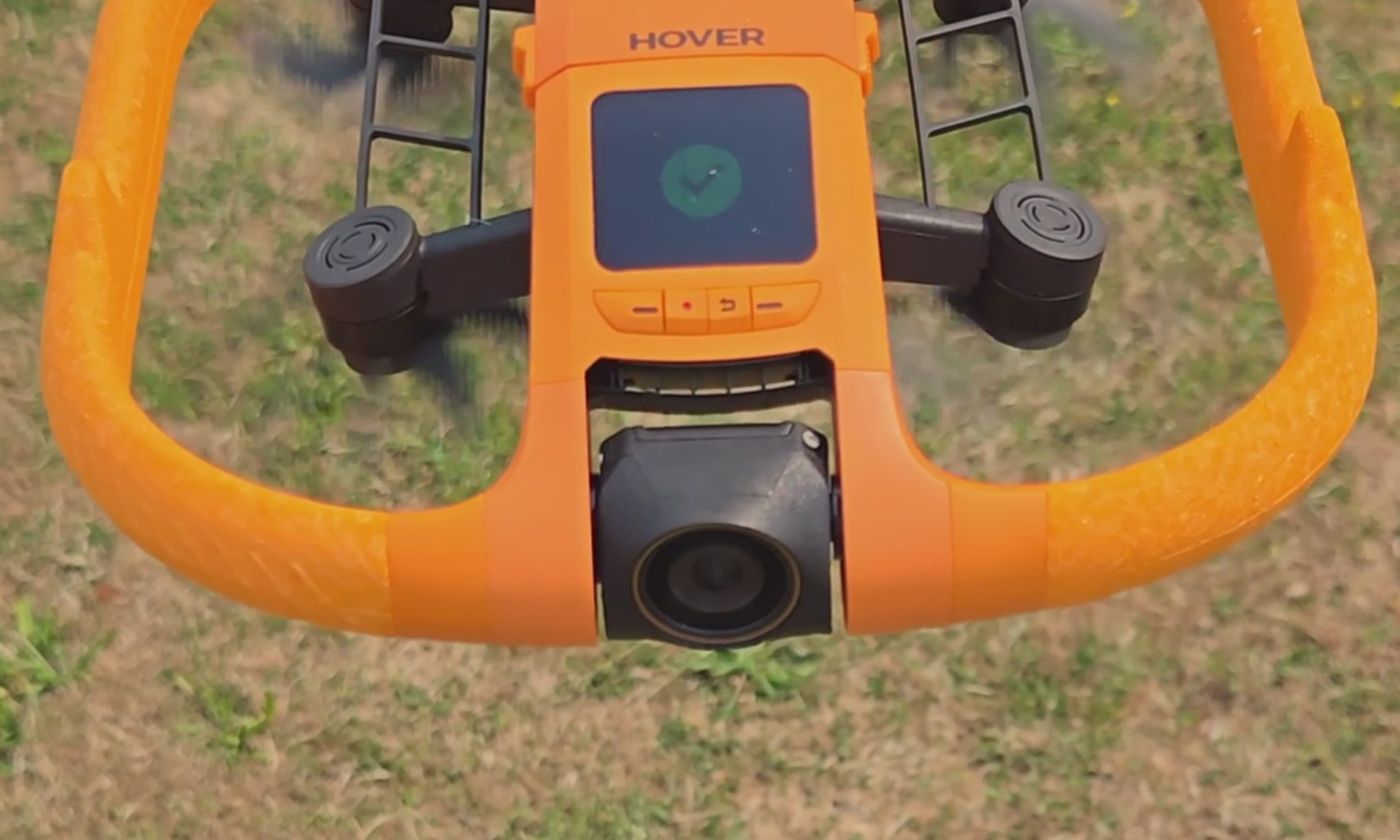
The camera records 4K at up to 100 fps for slow motion through a heated lens, which keeps fog from forming and makes water bead off instead of smearing across the glass. Underneath the airframe is the strangest line I have ever typed about a consumer drone: millimeter wave radar that reads the height of the waves rolling beneath it, so the Aqua can skim low over moving water without clipping a crest.
For those of you unfamiliar with the term, and since the spec sheets never bother explaining it, millimeter wave radar bounces very short-wavelength radio off a surface to measure distance to it — here, a surface that will not hold still. The industry noticed. The Aqua premiered at CES 2026 as an Innovation Awards honoree and collected a Red Dot Award along the way.
HoverAir Aqua water launch: Throw it in, it flies out
Ian Bell / Digital Trends
The water launch is the feature every bystander will ask you to do twice, and I tested it from the kayak with my kids leaning over the side to watch. You toss the drone into the river upside down, carelessly. However, it happens to leave your hand. It bobs for a beat. Then the props bite, it rolls upright, and it climbs into a hover a few feet off the surface to wait for you to start moving. It did that every single time I asked, and I asked a lot. Not once did I have to paddle over and fish it out or reset anything. In a category where water has always meant total loss, that is a bigger deal than a party trick sounds.
HoverAir Aqua subject tracking: A chase boat on your forearm
Most of my testing happened on my eFoil at around 15 miles per hour, with the waterproof Lighthouse strapped to my forearm like a chunky watch. One button sends the drone up. One button brings it home. Everything between those two presses is automatic.
Advertisement
Not the actual resolution captured by the HoverAir Aqua. The image has been resized.Ian Bell / Digital TrendsNot the actual resolution captured by the HoverAir Aqua. The image has been resized.Ian Bell / Digital TrendsNot actual resolution captured by the HoverAir Aqua. The image has been resized.Ian Bell / Digital Trends
The footage surprised me. My wake unspooling behind the board in a long white seam, the tree line sliding by, and me held in the center of the frame for the entire run. The best material came when the drone swung out ahead of the board and shot back at me, spray kicking off the foil, the whole river opening up behind.
It never fell behind, and it never wandered. When I drifted too far, it closed the gap on its own. When I slipped off the board and sat chest-deep in the water beside it, it stayed locked on and waited. The kayak sessions at lazier speeds went the same way: steady framing, no fuss, the family paddling along with a small orange aircraft holding formation off the bow. This is the closest thing to a camera operator you can wear on your wrist.
HoverAir Aqua Battery Life: High on the box, dips in the water
Ian Bell / Digital Trends
Now, the part the box will not tell you. HoverAir advertises 23 minutes of flight from the 2,013mAh smart battery. My first battery, actively tracking me on the foil, gave me 10 minutes before the drone called it quits. I rode back to shore, clicked in a fresh one, and went back out. Thirteen minutes. Doing the exact job you bought it for, you get about half the number on the sticker.
It’s worth noting that drone makers rate flight time in windless conditions with no tracking load, and you should not expect that figure in the real world. Even allowing for that, half is a wide gap. At least the ending is graceful.
When the charge runs out, you get a warning that the drone will land in 15 seconds, and then it sets down on the surface, orange side up, rocking on the chop until you come get it. Nothing dramatic happened in two weeks of testing. Recharging takes about 55 minutes with the battery inside the drone, and because a battery is only fully waterproof while it’s installed, HoverAir includes a dedicated waterproof pouch for hauling spares out on the water. Read that accessory list again. The company is telling you, in its own way, that you will be swapping batteries mid-session.
HoverAir Aqua Lighthouse Wearable: Great controller, no fuel gauge
Ian Bell / Digital Trends
The second problem makes the first one worse. The Lighthouse is otherwise the best thing about this product, and it tells you nothing about the battery. No percentage. No halfway warning. No blinking light as the level sinks. Mid-run, I had no idea whether the drone above me had eight minutes left or thirty seconds.
Ian Bell / Digital Trends
When the entire budget is 10 to 13 minutes, that silence turns every session into a guessing game. Both times a battery died on me, my only notice was the 15-second landing warning, right when I felt like I was getting going.
Should you buy
HoverAir
The good here is genuinely good. The footage is beautiful, the Aqua keeps pace with a foil at speed, it launches itself out of open water, and it runs hands-off enough that you forget it exists until you sit down to replay the clips. As a piece of engineering built for a hostile environment, it is the real deal.
The battery is what makes me hesitate, and I am not going to soften that. Plan a full session around this drone, and you are packing a pocketful of spares and guessing when to burn them.
Advertisement
So here is the fork. If what you want is a quick promo shot or a fast social clip off the water, this is the drone doing that job, and I don’t know of another one built to take the punishment. If you want to shoot an entire session, wait and watch for a firmware update that pushes battery data to the Lighthouse.
That one change would make this an easy recommendation for anyone who makes content on the water. As it stands, the Aqua is a brilliant specialist with a 10-minute attention span, and I keep taking it out anyway.
Why not try?
HOVERAir X1 PROMAX — Priced significantly lower at $700, this one offers hands-free auto-follow tracking and Lighthouse wearable perks, can shoot up to 4K 120fps footage, and stands out with a foldable design. It’s slightly slower and doesn’t offer a waterproof build, but makes up for it with collision-sensing tech.
DJI Mini 4 Pro — Another option that is more affordable as well, DJI’s drone offers impressive aerial capture capabilities with omnidirectional obstacle sensing and a reliable 4K camera that can capture high dynamic range videos. Plus, the battery packs can extend the flight time by up to 45 minutes, while the transmission performance is also fantastic. But an impending ban casts a shadow of skepticism over long-term support and after-sales experience.
Advertisement
FAQs (Frequently Asked Questions)
Who needs the HoverAir Aqua?
It’s a waterproof, self-flying 4K camera drone. If you’re into activities such as kayaking and wakeboarding, it’s an appropriate choice.
Is it capable of taking off and landing directly on water?
Yes, the positive buoyancy engineering allows it to float on water. And yes, it can take off and land from the surface of water. Moreover, it also comes with a Turtle Flip feature that lets it correct its position instantly, even if it’s flipped upside.
Is the build really waterproof?
The HoverAir Aqua has an IP67-certified build, featuring corrosion-resistant components, while the camera sensor is protected by a hydrophobic, anti-fog lens.
Do you need a license to fly it?
It falls under the prescribed FAA weight limit, so you don’t need a license to fly it.
Advertisement
Can it fly and capture without a phone?
Yes, the wearable Lighthouse controller relies on Real-Time Kinematics (RTK) positioning to let the drone track you and capture videos without requiring a cellular link or base stations.
What is the top speed and battery life?
The HoverAir Aqua can fly at a speed of up to 34 miles per hour, and it is claimed to last over 20 minutes on a single charge.
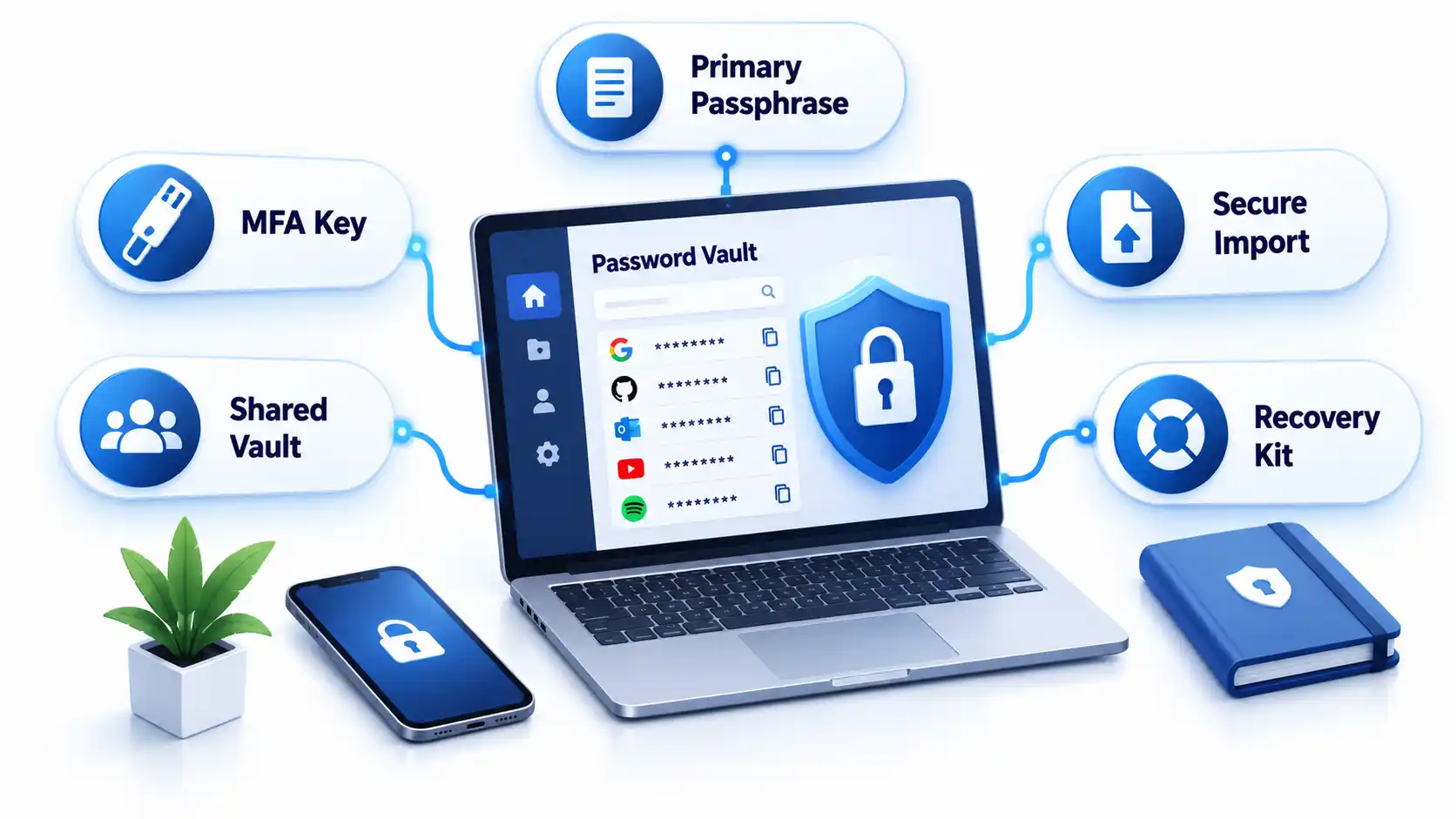
Create a strong password policy by prioritizing length and uniqueness, blocking compromised passwords, allowing password managers and autofill, removing arbitrary complexity and expiration rules, and requiring MFA for important accounts. Deploy the policy with a managed password vault, secure recovery procedures, and tests that confirm the written rules work in every covered system.
Quick Take
Require at least 15 characters when a password is the only authentication factor.
Allow passwords of at least 64 characters, including spaces.
Do not require arbitrary mixtures of uppercase letters, numbers, and symbols.
Replace scheduled password expiration with changes triggered by suspected compromise.
Reject commonly used, predictable, and previously compromised passwords.
Allow password managers, paste, and autofill on login forms.
Protect important accounts and cloud-synchronized vaults with MFA.
Test login, recovery, export, offboarding, and session-revocation controls.
These requirements follow current NIST authenticator guidance. They are a security baseline rather than proof that a particular policy satisfies every law, contract, or industry framework.
Prerequisites and Ownership
Identify the accounts in scope
Inventory the systems that accept passwords before writing the rules. Include workforce accounts, customer accounts, administrator access, cloud services, remote-access tools, shared credentials, and legacy applications. Record which systems use single-factor authentication, MFA, or single sign-on.
Keep machine credentials in a separate category. API keys, database secrets, certificates, service-account tokens, and CI/CD credentials require secrets-management controls rather than an ordinary employee password vault. A dedicated article on business secrets management should cover those systems.
Assign responsibility
Name a policy owner, identity-platform administrator, security reviewer, help-desk recovery owner, and departmental access approver. A policy without named owners tends to fail at exceptions, recovery, and offboarding rather than during ordinary password creation.
Advertisement
Document technical constraints
Record each system’s minimum and maximum length, supported characters, MFA options, password-history rules, breached-password screening, paste and autofill behavior, recovery process, and session controls. Legacy systems that cannot meet the baseline should enter a documented exception process with compensating controls and a retirement or remediation date.
Step-by-Step: Create the Password Policy
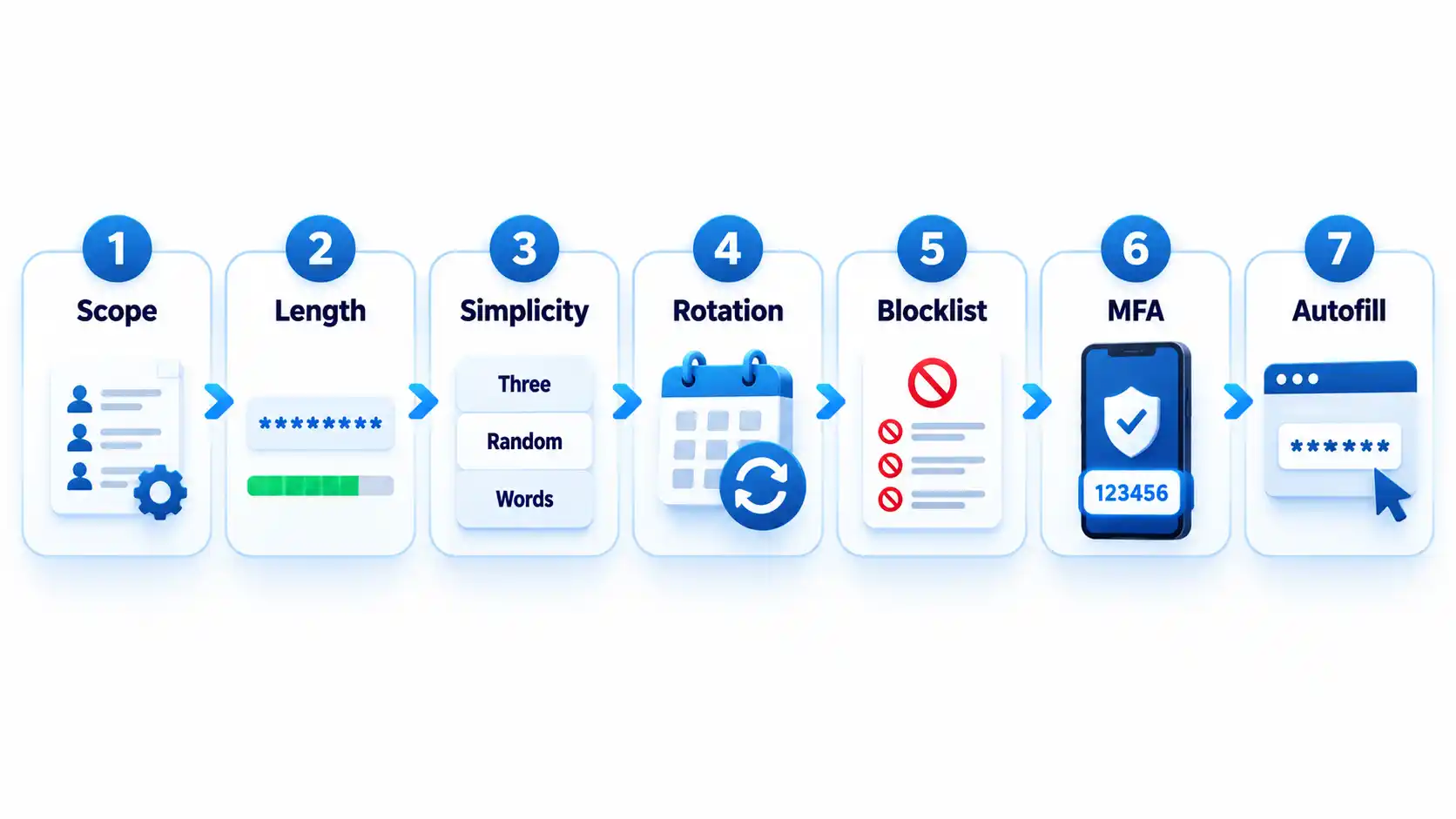
Define which accounts the policy covers
State whether the policy applies to employees, contractors, administrators, customers, service providers, and shared accounts. Classify higher-risk accounts such as email, identity-provider, financial, cloud-administrator, source-code, and password-vault accounts.
Where possible, replace shared accounts with individually attributable accounts. If sharing is unavoidable, use a managed vault that records access and lets administrators revoke membership.
Expected result: Every covered account type has an owner, risk classification, authentication method, and exception status.
Set length and input requirements
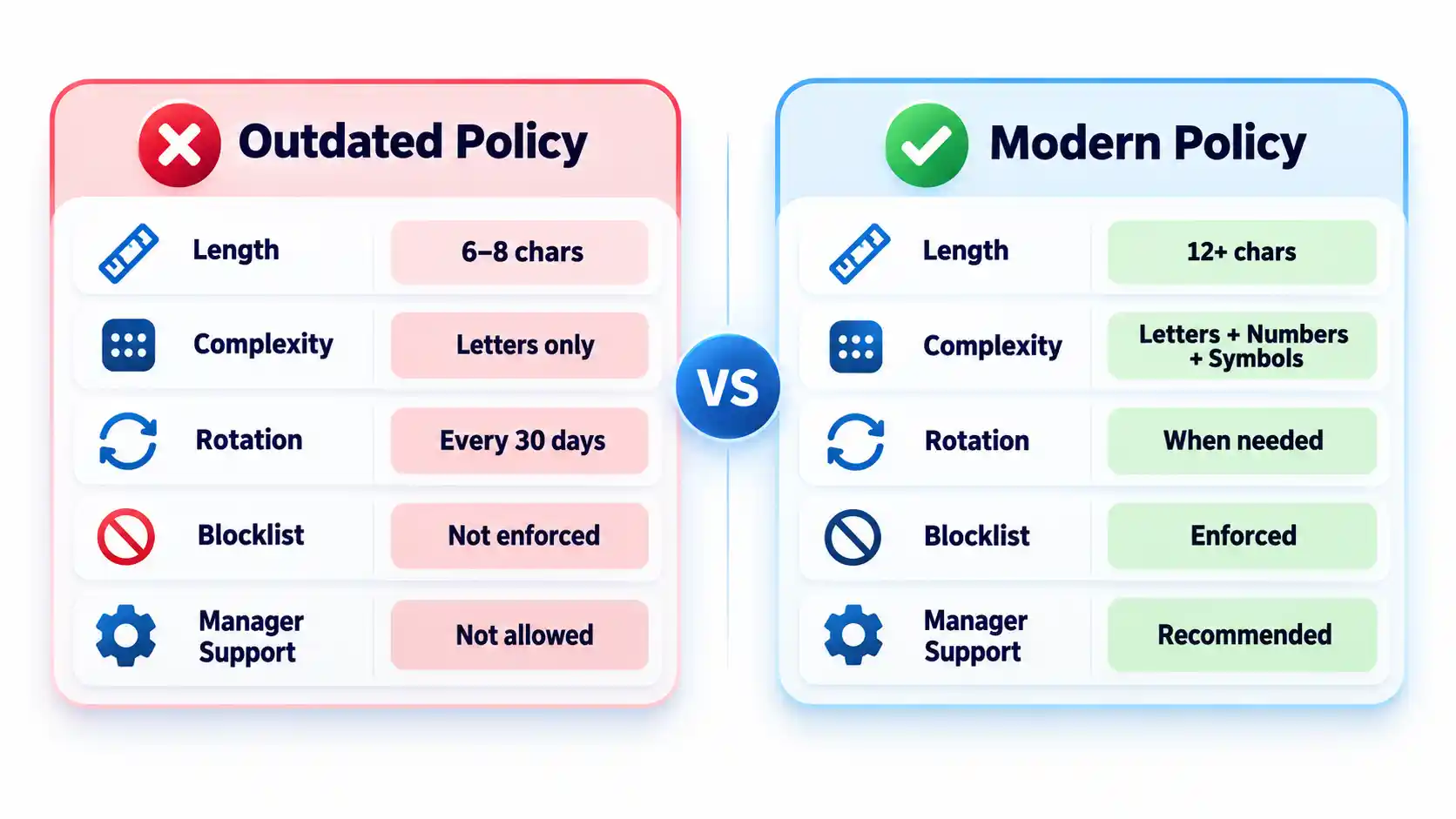
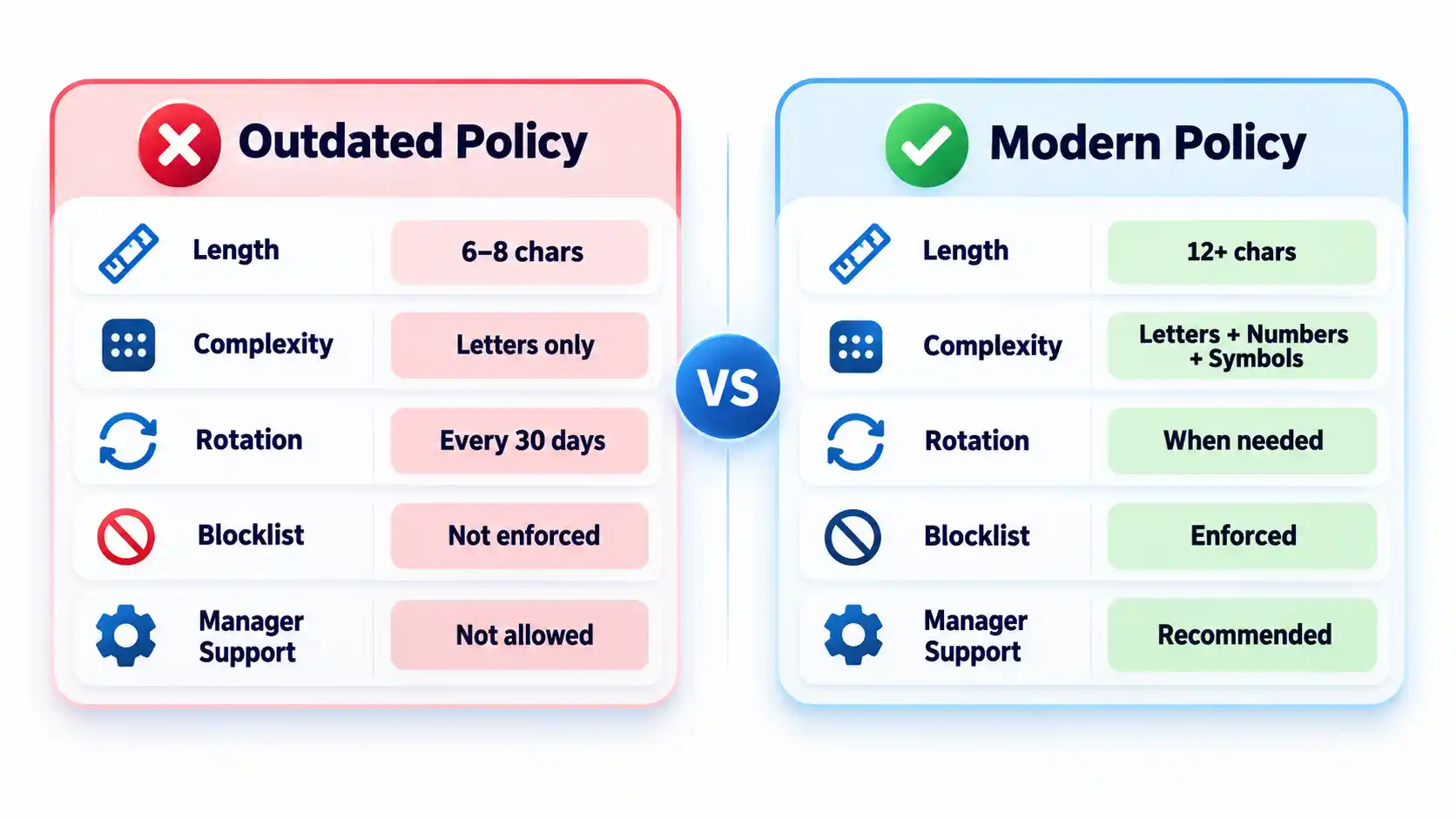
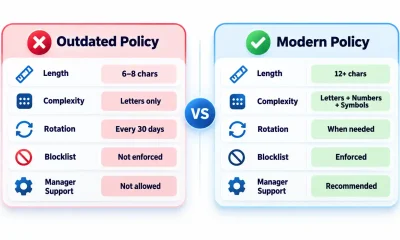
Require at least 15 characters when a password is the only authentication factor. NIST permits passwords used only as part of an MFA process to be shorter, but they must contain at least 8 characters. Organizations may adopt a longer minimum when users can rely on a password generator.
Permit passwords of at least 64 characters. Accept spaces and broad character sets, process the entire submitted password, and never silently truncate it. Systems that mishandle spaces or long generated values should be corrected or documented as exceptions.
Advertisement
Expected result: Users can create long passphrases or generated passwords without encountering unnecessary input restrictions.
Remove mandatory composition rules
Do not require every password to contain a prescribed mixture of uppercase letters, lowercase letters, numbers, and symbols. Current NIST rules prohibit these composition requirements because users commonly satisfy them with predictable patterns.
Symbols remain acceptable when a generator selects them or a service requires them. The policy should not imply that a short password becomes safe simply because one letter was replaced with a familiar symbol. NIST’s public password creation guidance prioritizes length and recommends long passphrases when a password must be created manually.
Expected result: Users can choose long, usable passwords without following predictable formatting recipes.
Replace scheduled expiration with event-driven changes
Do not force users to change passwords every 30, 60, or 90 days without evidence of risk. Require a change when a password is known or suspected to have been disclosed, appears in relevant breach data, was transmitted insecurely, or may remain known to someone whose access has ended.
A password change must be accompanied by session revocation when an attacker could already be signed in. Changing the secret alone may not invalidate active browser sessions, application tokens, or remembered devices.
Advertisement
Expected result: Password changes respond to compromise and access changes rather than an arbitrary calendar.
Block weak and compromised passwords
Compare new and changed passwords against a blocklist containing commonly used, expected, and compromised values. Include context-specific choices such as the organization’s name, service name, username, and predictable derivatives.
Explain why a proposed password was rejected and ask the user to choose a genuinely different value. Do not reveal whether another person uses that password. Avoid enormous blocklists that create excessive false rejections without meaningfully improving protection against rate-limited online guessing.
Expected result: Users cannot enroll values that attackers are likely to guess early or already possess from breach collections.
Add controls around the password
Require MFA for email, identity-provider, financial, remote-access, cloud-administrator, source-code, and password-manager accounts. Prefer phishing-resistant methods such as passkeys or hardware-backed security keys where the service and user environment support them.
Rate-limit or progressively delay failed attempts. Monitor suspicious logins, protect account recovery, avoid knowledge-based questions as a sole recovery method, and provide a way to revoke sessions after suspected compromise. The OWASP authentication guidance treats password controls, MFA, recovery, session handling, and login monitoring as connected parts of account security.
Advertisement
Expected result: A guessed or disclosed password is harder to convert into persistent account access.
Require password-manager-compatible login forms
Allow users to paste and autofill credentials. Use standard password fields and avoid scripts or form designs that block managers. NIST requires verifiers to allow password managers and autofill and recommends permitting paste when autofill interfaces are unavailable.
Do not interpret clipboard blocking as a security control. It can push users toward shorter passwords they can type manually or toward storing credentials in insecure notes.
Expected result: Users can generate, store, and enter unique credentials without weakening them for convenience.
How to Choose a Password Manager
Select a manager by deployment fit, recovery design, security controls, and usability rather than by the length of its feature list. The NCSC buyers guide emphasizes that an unusable manager will leave insecure workarounds in place.
Advertisement
Comparison of password-manager deployment models
Manager type
Best fit
Principal advantage
Main limitation
Browser or platform manager
People using one primary browser or device ecosystem
Low setup friction and integrated autofill
Potential platform lock-in and fewer team controls
Standalone cloud-sync manager
Mixed-device users and small teams
Cross-platform access and centralized synchronization
Remote account and recovery paths require strong protection
On-device manager
Narrow or offline use cases
Reduced dependence on a cloud service
Limited synchronization and more difficult recovery
Enterprise-managed vault
Organizations requiring governance and offboarding
Managed sharing, audit records, policy enforcement, and provisioning
Greater administrative complexity and recurring cost
Evaluate the following capabilities before deployment:
Protection of credentials and metadata at rest.
Who controls or can recover the vault’s decryption key.
MFA, passkey, and approved-device support.
Recovery options and the people authorized to use them.
Secure sharing without revealing passwords in email or chat.
Role-based administration, audit records, and offboarding controls.
Restrictions or alerts for bulk export.
Supported browsers, operating systems, and mobile devices.
Update delivery and the provider’s vulnerability-disclosure process.
A practical method for leaving the service without permanent lock-in.
Browser and device managers can be appropriate when convenience and ecosystem integration matter most. A reputable standalone manager may fit mixed-device environments or teams requiring advanced sharing and administration. The NCSC’s updated password-manager guidance recommends evaluating reputation, device security, recovery, MFA, and platform needs instead of assuming one type fits everyone.
How to Deploy and Use the Password Manager
1. Protect the vault account
Create a long, unique primary passphrase that is never used elsewhere. Enable the strongest practical MFA and secure every registered device with updates, automatic locking, and a local PIN or biometric unlock.
Store recovery keys or emergency instructions separately from the vault. Avoid circular recovery in which the only way to access the email account is through the vault while the only way to recover the vault is through that email account.
2. Import credentials carefully
Some managers migrate credentials through a CSV file. That export may contain readable usernames and passwords. Create it only on a trusted device, import it immediately, verify that the records arrived, and delete the exported file from the original folder, recycle bin, cloud synchronization, and temporary storage.
Advertisement
Do not perform a vault migration over an unfamiliar hotspot. Review the precautions in this public Wi-Fi security guide before accessing sensitive accounts away from a trusted connection.
3. Replace reused passwords in risk order
Secure the password-manager account and its recovery channels.
Change email and identity-provider credentials.
Change banking, payment, payroll, and financial credentials.
Change administrator, cloud, source-code, and remote-access credentials.
Change shopping, social-media, subscription, and lower-impact accounts.
Do not change dozens of accounts without confirming that each new password was saved. Keep the old session open until the new credential has been tested in a separate private window or another approved device.
4. Configure generation and autofill
Generate a different random password for every compatible service. Match the site’s supported length and character rules while avoiding needless manual edits. If autofill does not appear, check the exact domain before searching the vault and copying the password.
Autofill may help resist phishing because a manager should associate credentials with the legitimate domain. It is not infallible. Users must still inspect unusual addresses, subdomains, redirects, and browser warnings.
5. Configure team sharing and offboarding
Store business credentials in organization-controlled collections rather than personal vaults. Grant access by role, assign an accountable owner, review membership, and remove access promptly when someone changes roles or leaves.
Advertisement
Revoking vault access prevents future retrieval, but it cannot make a password unknown to someone who already viewed or copied it. Rotate credentials when a departing user could retain them. Teams protecting software repositories should connect this process to the controls in the guide to preventing source-code theft.
Verify That the Policy Works
Test the deployed controls instead of assuming a written setting was applied consistently.
Checklist
Confirm that a 15-character single-factor password is accepted.
Confirm that long passphrases, spaces, paste, and autofill work.
Confirm that the application processes the full password without truncation.
Attempt to enroll a known common password and verify that it is rejected with useful guidance.
Confirm that uppercase, number, and symbol mixtures are not mandatory.
Verify that routine expiration is disabled and compromise-driven resets work.
Trigger repeated failed attempts in an approved test account and verify rate limiting or progressive delay.
Test MFA, recovery, session revocation, emergency access, and lost-device procedures.
Remove a test user from a shared collection and verify that access ends.
Verify that export actions are restricted, logged, or both.
Record exceptions and failed tests with an owner and target correction date. Repeat the checks after identity-platform changes, password-manager migrations, or major policy revisions.
Failure Modes and Troubleshooting
Common password policy and manager deployment failures
Failure
Likely cause
Security consequence
Corrective action
Long generated password is rejected
Legacy length or character restriction
User shortens or reuses a password
Correct the restriction or document a temporary exception
Autofill does not appear
Unsupported form, disabled extension, or domain mismatch
User may copy into the wrong page
Verify the domain and manager permissions before manual entry
Credentials fill on an unexpected subdomain
Overly broad saved-domain matching
Password may reach an unintended service
Narrow the saved address and report unsafe matching
Primary passphrase is lost
Recovery was not configured or documented
Vault data may become inaccessible
Use the approved recovery process and reset affected accounts if recovery fails
MFA device is lost
No backup factor or recovery key exists
User is locked out or bypasses policy
Use pre-established recovery and revoke the lost device
Exported CSV remains on disk
Migration cleanup was missed
Passwords remain exposed in plaintext
Delete all copies and rotate credentials if exposure is possible
Former worker retains a shared password
Vault removal occurred without credential rotation
Continued unauthorized access remains possible
Rotate the credential and review account activity
Legacy system requires frequent changes
Obsolete platform rule
Users may create predictable variations
Apply compensating controls and schedule remediation
Vault and email recovery depend on each other
Circular recovery design
One lost factor can lock out both services
Create an independent recovery route and protect it offline
Operational Limits and Edge Cases
Concentrated value: A vault makes unique passwords practical, but a successful vault compromise can expose many accounts. Protect the primary account and registered devices accordingly.
Compromised endpoints: Malware or someone using an unlocked computer may capture credentials after the vault decrypts them. A password manager does not replace device protection. Organizations can evaluate those controls separately in this endpoint protection guide.
Recovery trade-off: Recovery improves availability but creates another path that an attacker may target. Document who can recover a vault and what evidence is required.
Shared accounts: A vault improves sharing, but individual accounts remain preferable because they provide attribution and cleaner revocation.
Offline access: Emergency recovery material needs physical protection, named custodians, and periodic verification.
Phishing: Passwords themselves are not phishing-resistant. Adopt passkeys where appropriate and evaluate the differences in a future passkeys versus passwords guide.
Key Takeaways
Use length, uniqueness, blocklists, and login protections instead of frustrating composition rules.
Require at least 15 characters when a password is the only authentication factor.
Do not force periodic changes without evidence of compromise.
Allow password managers, paste, autofill, and long values.
Protect the password vault, email, identity provider, and administrator accounts with MFA.
Select a manager based on security, recovery, usability, platform support, export, and governance.
Replace reused passwords in risk order and verify each change.
Test recovery, offboarding, exports, and session revocation before an incident.
Frequently Asked Questions
Should contractors use the company password manager?
Contractors should use an organization-controlled vault when they need access to company credentials. Place them in restricted groups, set an access end date where supported, and avoid mixing business credentials with their personal vaults. At contract completion, revoke access and rotate any credential they could have copied.
Should a password manager store the code for its own MFA?
Storing a service’s password and MFA code in one vault is convenient, but storing the vault’s own second factor inside that same locked vault creates a circular dependency. Protect the manager itself with a separate authenticator, passkey, hardware key, or securely stored recovery code.
What happens if the password manager company shuts down?
A usable exit plan should let authorized users export or transfer credentials to another manager. Confirm the export format before deployment and document how migration would work. Because exports may be plaintext, continuity planning should not involve leaving permanent backup exports on ordinary drives.
Advertisement
Can administrators see employees’ passwords in a business vault?
That depends on the manager’s encryption, sharing, recovery, and administrative design. Some administrators can recover accounts or manage shared collections without seeing every private credential. Others may have broader recovery powers. Review the product’s key-ownership and recovery documentation before adoption.
Should personal and work passwords be kept in the same vault?
Separate vaults or clearly separated organization-controlled and personal spaces are preferable. The company must be able to manage, audit, and revoke business access without gaining control over personal credentials. Employees should also retain their personal passwords after leaving without exporting company secrets.
What should happen when a password appears in a data breach?
Change the affected password, revoke active sessions, review account recovery methods, inspect recent activity, and replace the same password anywhere it was reused. Follow a documented data breach response checklist so the reset does not overlook tokens, forwarding rules, or connected applications.
Apple is being forced to detail fees it wants to charge for outbound links in its continuing legal fight with Epic, and now it’s only got 24 hours to file them.
The ever-ongoing legal battle between Apple and Epic Games over what Apple should charge apps within the App Store has hit a snag for the iPhone maker. In the current phase, the two are fighting in the U.S. District Court for the Northern District of California over new fee proposal.
According to X posts by Epic Games founder and CEO Tim Sweeney on Tuesday, Apple attempted to delay a filing of proposed fees to the court. To Sweeney’s glee, that stay was denied.
Apple’s stay was denied! Now they have 24 hours to file their proposed menu of junk fees with The Court, and Epic will have 60 days to file our legal analysis in advance of a court hearing on the topic.
As a consequence, Apple’s legal team now has just 24 hours to file the proposal with the court. After that Epic will have 60 days to analyze the proposal and make its own filing with the court.
Sweeney continued with a second post to X about the legal activity, asking if Apple will “honestly document their costs for human reviewer time and seek to recoup them?” Alternately, he proposes Apple may “fabricate outlandish new notions of cost previously unknown to mankind.”
As it stands, Epic and commentators have another 24-hour wait before finding that out.
How Apple got here
Apple and Epic have been in a lengthy battle that started with “Fortnite” letting players make in-app purchases using a third-party payment processor, against App Store rules. Epic also made demands that included allowing alternate app storefronts in iOS, and a change in the commission structure.
Advertisement
Apple did come out of the lawsuit pretty well, succeeding in many areas but failing to fend off changes to anti-steering measures, namely preventing developers from sending users to other processors to pay. Apple was ordered to make changes.
Epic convinced a court in April 2025 that Apple didn’t follow the spirit of the law, which led to more legal activity.
The latest action is midway through a schedule to discuss changes in App Store fees for outbound links, which goes back to May 2026.
Apple was given 45 days to file a “proffer,” or a good-faith offer of evidence and testimony to the court, with a 10-day timer to hand Epic non-privileged documents about the decision-making process after that. Five days later, Apple was to meet with Epic to discuss the privilege log and decide what documents warrant further review by a third party.
Advertisement
Today’s stay denial is at this point in the process.
Afterwards, Epic has 60 days to file its own response to the court, in a 30-page document. Apple would then have another 30 days to file a reply.
A Fortnite foible
While Sweeney’s tweets are chiefly about the lawsuit, there was an odd element about “Fortnite” and the Mac. In response to a question about what the decision means for the game on macOS, Sweeney said “We are rapidly approaching an endgame that will determine that one way or another.”
Currently, “Fortnite” is unavailable on macOS, but it seems to be less about being blocked and more Epic refusing to use the platform for its premier game.
Advertisement
At the time of the initial legal fight, Epic’s developer accounts were frozen out by Apple. However, in March 2024, Epic confirmed that Apple would reinstate its account in the EU.
Though celebratory in tone for the prospect of getting the game out on iOS, Epic didn’t discuss macOS at all.
As it stands, there doesn’t seem to be anything standing in Epic’s way from releasing “Fortnite” on macOS at all.
It has its own Epic Games Store on macOS, which can be used to make purchases completely outside of Apple’s App Store system. Also, developers can send Mac apps for notarization and still be distributed outside of the App Store itself, which Epic surely could handle with its reinstated developer account.
Parents who are stressed out are more likely to rely on screens and devices to keep their kids busy or calm — and less likely to enforce screen time limits. That’s the takeaway from a new screen time study from Florida International University’s Center for Children and Families. Researchers said the effects were more than a child acting out.
Screen time is one way to keep kids busy, especially when school’s out. The time spent on tablets and laptops can be a break for parents to complete tasks or take a break. But readjusting to early mornings, class time and homework can be a big shift for both parents and kids when school is back in session.
Jeff Temple, a professor and psychologist with UTHealth Houston, who was not affiliated with the FIU study, agrees. “For many families, screens become one of many tools that help everyone get through the day – and that’s mostly OK,” he told CNET. “The challenge comes when the structure of summer doesn’t transition back to the structure of the school year.”
Screen time isn’t a parenting failure, but experts have concerns and recommendations to help families strike a healthy balance for the back-to-school season.
Advertisement
Screen time is determined by parents’ stress
FIU’s study evaluated 822 caregivers of children ages 4 to 8 through online surveys on the child’s behaviors, parenting stress and screen time strategies. The findings show that parents opt for more screen time when a child’s behavior seems difficult and how much time is usually less enforced.
Shayl Griffith, an assistant professor in FIU’s Department of Counseling, Recreation and School Psychology and senior author of the study, said in a news release that parents shouldn’t be afraid to ask for help. The study’s recommendation is to focus on screen time and media that are “meaningful, engaging and appropriate for their child’s age.”
“When caregivers have the resources they need, they are better able to set consistent boundaries and engage with their children in ways that promote healthy development,” Griffith said.
The fine line between digital media discipline and disruption
Youth screen time is a growing concern. In January, the American Academy of Pediatrics published findings on correlations between digital media use and age-related development to help determine screen time rules for your child and monitor behavior.
Advertisement
Toddlers and kindergarteners who use digital media for high-quality educational content can benefit from good social behaviors and language — especially when a caregiver is viewing the screen and interacting with the child. However, young children who use tablets for hours, but the AAP says too much screen time is linked to angry outbursts.
School-aged children, ages 6 to 12, can benefit from thoughtful educational digital media in moderation, the AAP study found. But again, there are risks. Too much media use can lead to lower academic achievement, attention control and cognition. Some media can be problematic for kids, like apps encouraging purchases, those focused on gaming with not much educational value and content that is dangerous or risky. And there’s a big callout included in the list: school devices that give access to “distracting video games, videos and other platforms.”
Managing stress, school and screen time is tricky
With summer wrapping up and school approaching, the big question is: How should stressed parents think about screen time? School may be the solution.
“School can help provide a reprieve for families who do not have access to childcare in the summertime months and serve as a helpful jumping-off point to re-evaluate digital media habits, given the change in routine already,” said Dr. Tiffany Munzer, a professor of pediatrics at the University of Michigan Medical School. It can also mean more time for in-person interactions, which is important for social connection, Munzer added.
Advertisement
However, making the switch from summer to back-to-school season can be challenging. And adjusting screen time while managing life stresses may not be easy. Munzer recommends making incremental changes. For example, if your child loves watching do-it-yourself videos, find a way to recreate what they’re seeing, Munzer said. Or if digital media is a way to calm kids, look for alternative activities such as reading or walking, Munzer added.
Jason Nagata, an associate professor of pediatrics at the University of California, San Francisco, said the back-to-school season is a good time to revisit family screen time rules and routines.
“Rather than simply trying to return to an old set of rules, families can consider what makes sense for the child’s current age, developmental stage, school schedule and use of devices for schoolwork and communication,” said Nagata. “A family media plan should be dynamic; it may reasonably look different during the school year than during summer or holidays, and on weekdays compared with weekends.”
The AAP recommends creating a Family Media Plan based on your family’s needs. The plan is an agreement that lets you prioritize healthy, safe and consistent screen time boundaries. That includes creating a list of approved media kids can choose from, a schedule of screen-free time, how to choose good media content and outlets for your family.
Advertisement
Experts also recommend the AAP’s 5 C’s of Media Use, tailored to your child’s age. The five C’s are Child, Content, Calm, Crowing Out and Communication. They can help you set and communicate screen time guidelines based on your child, their emotions, the content and how it affects them. That may not help the stress that parents face, but it could help regulate your child’s screen time without guilt.
Nagata encourages parents to pay attention to their children’s time and relationship with screen time. Look out for warning signs like difficulty cutting back on screen time despite trying, becoming preoccupied with social media or a phone, experiencing conflict because of screen use and using screens to escape problems. And pay attention to see if screen use is interfering with sleep, school relationships or other activities so you can make more adjustments sooner.
Dashia is the consumer insights editor for CNET. She specializes in data-driven analysis and news at the intersection of tech, personal finance and consumer sentiment. Dashia investigates economic shifts and everyday challenges to help readers make well-informed decisions, and she covers a range of topics, including technology, security, energy and money. Dashia graduated from the University of South Carolina with a bachelor’s degree in journalism. She loves baking, teaching spinning and spending time with her family.
See full bio
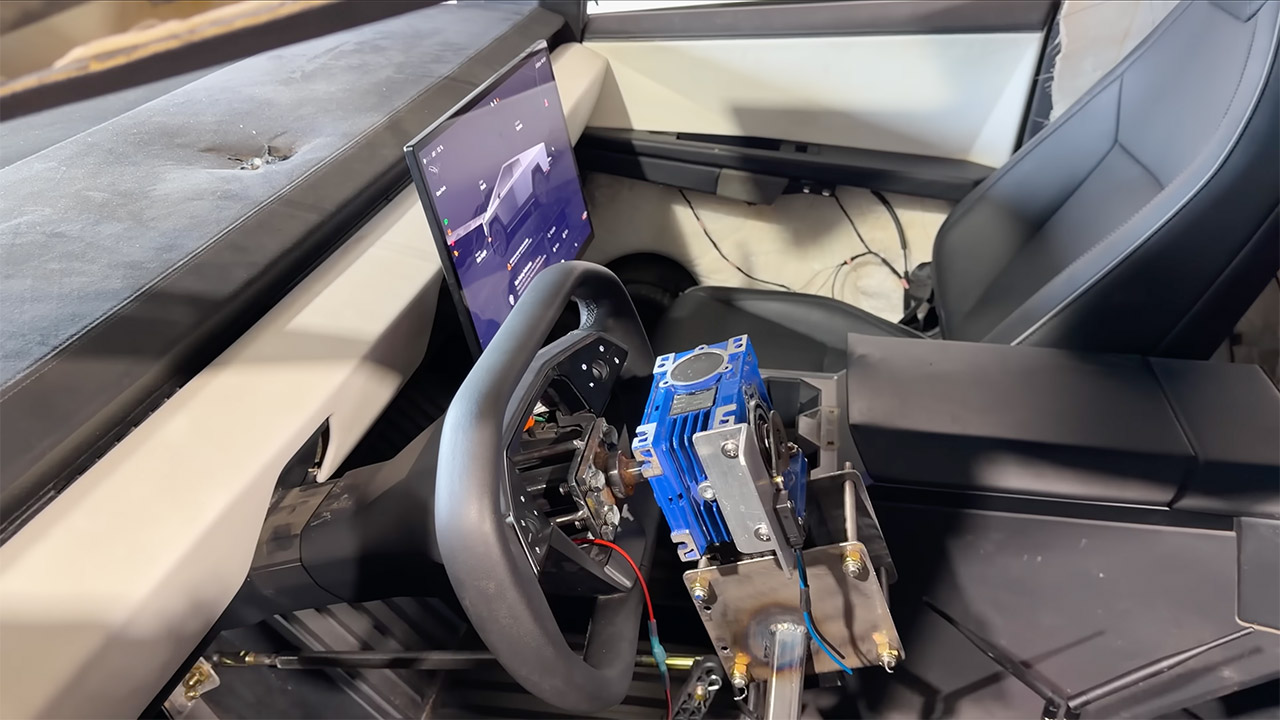
Prop Department set a simple goal for a recent build: take a full-size Tesla Cybertruck and turn it into something anyone could drive from a distance. There is no driver in the seat, and there are no complex software overrides of the truck’s own systems. Instead, there are motors, linkages, and painstaking wiring that allow someone outside the vehicle to handle the steering, throttle, transmission, and brakes. The project belonged to WhistlinDiesel, whose videos often end with expensive machinery in pieces, so the finished truck needed to work well enough for a high-speed run that might not go gently.
Three days passed, and that was all the calendar allowed, as the parts were fashioned from what was already in the shop rather than ordering new ones. To make more space, the front seats were pushed out. A special frame with laser-cut brackets was installed next, all screwed down tightly to ensure it stayed there even when things got bumpy. A stepper motor was mounted to the steering wheel using a previously constructed adapter flange that matched the Cybertruck’s column. That motor handled the left and right turns naturally. A couple of servo motors took care of the rest, with one kicking the accelerator pedal, another working the small fingers on the gear selector buttons, and a ground wire dealing with the capacitive sensors. Then there were the power supply, which used four different voltages to keep everything running. The stepper motor received 48 volts from the truck’s mid-voltage battery. Smaller transformers reduced the voltage to 24 volts for the servos, 12 volts for the relay bank, and 5 volts for the Arduino that controlled the display.
Due to platform compatibility issue, the DJI Fly app has been removed from Google Play. DJI Neo must be activated in the DJI Fly App, to ensure a…
Lightweight and Regulation Friendly – At just 135g, this drone with camera for adults 4K may be even lighter than your phone and does not require FAA…
Palm Takeoff & Landing, Go Controller-Free [1] – Neo takes off from your hand with just a push of a button. The safe and easy operation of this drone…
The brakes were a challenge to fix since a pneumatic cylinder kept the foot pushed down at all times, waiting for a remote signal to let it go again.Because the OEM air tank couldn’t stay charged for long, an air compressor had to ride shotgun in the backseat. Without the ‘dead-man’ setup, the truck might just continue rolling away when our signal failed. One final stumbling block remained: the cabin sensors, which were designed to identify a live human in the driver’s seat, would shift the truck into Park as soon as that seat was empty. The solution was to simply tear off the module, and the truck stopped insisting on a body in the wheelchair.
Now that the FPV camera was mounted on a strong bracket, the driver could see clearly via their goggles. In early tests, the remote signals got mixed up with a racing simulator’s motion platform and gyroscope, but screen slowness and HDMI peculiarities put the notion on hold for a later edition. Uncomplicated radio control worked flawlessly, with steering responding, throttle kicking in, gears shifting, and the emergency brake locking up just as instructed.
WhistlinDiesel drove the finished truck to a private race track. Full acceleration down the strip pushed the speedometer to 111 mph when the Cybertruck smashed into a motionless Ford F-150 parked broadside. The Ford’s cab was ripped completely off its frame in a firestorm. The Cybertruck crumpled violently in the front, yet remained intact and did not even light its battery pack. Both trucks were scrapped at the end of the day, but the remote system did exactly what it was supposed to do.
Things have already taken a near-fatal turn in Lioness season 3, which is something I didn’t expect to happen so soon. Indeed, last week, we saw two unnamed Russian agents posing as police officers turn up at Joe’s door and demand to enter her home, only for them to be killed in the process.
The entire team is called out to investigate, but when a group of “watchers” are spotted on a nearby roof, the Lionesses wonder if it’s a trap… if they’re here, they’re not looking elsewhere.
For now, the answer hangs in the balance. So, when does season 3 episode 3 arrive on Paramount+?
Advertisement
Latest Videos FromTechRadar
What time can I watch Lioness season 3 episode 3 on Paramount+?
Lioness | Season 3 Official Trailer | Paramount+ – YouTube
When I first downloaded the McDonald’s app years ago, I signed up for its loyalty program hoping to get better deals. Why not get some cheap French fries? While I understood that this would entail some type of data tracking, I didn’t grasp how the information would be used to algorithmically predict my next purchase.
As a California resident, I have the legal right to access the data a company stores about me. So, I decided to request that information from McDonald’s to better understand what one of the major fast-food companies is collecting about its customers. A few days after I visited the McDonald’s Privacy Rights Center site and requested access, I received a 515-page file in my inbox with the iconic golden arches stamped across the top.
When customers sign up for loyalty programs, like the one offered through the McDonald’s app, they might not fully realize the extent to which their data is being aggregated and used in predictive models.
“McDonald’s secret sauce is really commercial surveillance,” says Jeff Chester, executive director at the Center for Digital Democracy, a group that advocates for consumer protections. Privacy experts I spoke with said this level of detail may feel invasive, but it’s fairly standard for how large companies in America run their loyalty programs.
Advertisement
“This report contains specific pieces of personal information about you that were identified by searching McDonald’s systems which contain information about our customers,” read the report’s intro. It was lengthy and difficult to parse, so I used a generative AI tool to extract key information before verifying details with the original document and reaching out to privacy experts.
“McDonald’s takes data privacy and security seriously, and we take robust steps to safeguard customer information,” a McDonald’s spokesperson tells WIRED via email. “Like many digital loyalty programs, we use information such as past purchases to provide a more engaging, personal customer experience—like delivering the most relevant deals, offers and messages. Our customers continue to have privacy choices available to them as outlined in our privacy statement.”
Much of my data report contains a detailed account of past McDonald’s transactions as well as offers the fast food company sent me and how many loyalty points I accumulated. Essentially, every time I opened up the app to grab a bite to eat, it created a detailed record about when, where, and what I purchased. The log was even more thorough than I anticipated, including a record of every time I’ve scanned a code as part of its returning Monopoly sweepstakes along with the prize I received.
sciencehabit shares a report from Science Magazine: For more than half a century, physicists have searched for one of the strangest particles predicted by modern theory. It would be made almost entirely of gluons, the elusive subatomic particles that carry the strong nuclear force. Now, using a particle collider in Beijing, researchers say they have effectively proved the existence of such a “glueball.”
In a preprint posted last month on arXiv and in a presentation last week at the International Conference on High Energy Physics (ICHEP), the researchers argue that a particle called X(2370), which they produced by smashing electrons into positrons at high energies, has the properties expected of a glueball. “It’s an experimental triumph,” says Colin Morningstar, a particle physicist at Carnegie Mellon University who was not involved in the finding. “It’s the strongest evidence yet that particles dominated by a glueball component can exist in nature.”
Ryanair has signed a five-year data and AI partnership with Google Cloud, rolling out Google Workspace and Google Cloud services to 35,000 employees and making Gemini Enterprise, Google’s agentic AI platform, the centrepiece of how Europe’s largest carrier intends to run itself.
The airline has tied the deal explicitly to its growth target of 300 million passengers a year by 2034, roughly a 44% increase on the 208.4 million it carried in the financial year to March.
Gemini Enterprise will be used, in the companies’ description, to automate decision-making, optimise flight crew logistics, and support corporate productivity generally.
Ryanair plans to use Google DeepMind models, naming AlphaEvolve and WeatherNext, to support fleet operations and maintenance scheduling.
Advertisement
WeatherNext is DeepMind’s forecasting family, which for an airline running around 3,900 flights a day out of 95 bases is not a peripheral application. It also plans to replace its existing collaboration systems outright with Workspace and Gemini.
Running underneath all of it is a resilience argument that Ryanair has put ahead of the AI one. The airline describes the arrangement as a “dual-cloud strategy”, in which Google Cloud helps build a system flexible enough that if one provider has problems, critical services keep running.
“Ryanair is on an incredible growth journey to 300 million passengers by 2034,” said Eddie Wilson, Ryanair’s chief executive.
“To support this growth, we need to ensure we have excellent infrastructure resilience, and our new dual-cloud strategy provides this, alongside technology partners that match our speed and relentless focus on efficiency.”
Advertisement
Maureen Costello, Google Cloud’s vice-president for the UK, Ireland, and sub-Saharan Africa, put the case in industry terms. “Aviation is an industry defined by precision, and Ryanair is a pioneer in operational execution,” she said.
“This agreement demonstrates how deploying generative AI at scale, coupled with modern collaboration tools for frontline workers, can help industry leaders scale securely, reduce operational costs, and redefine the travel experience.”
The scale Ryanair is buying for is real. It ended the last financial year with 647 aircraft, having taken delivery of all 210 Boeing 737-8200 Gamechangers, and has 300 737 MAX-10s on order, split evenly between firm orders and options.
Boeing expects certification of that aircraft late this summer, with the first fifteen due to Ryanair in spring 2027. Pre-exceptional profit after tax for the year was €2.26bn, up 40%.
Advertisement
What the release does not say is as notable as what it does. There is no named migration of specific workloads, no BigQuery or Vertex AI commitment, no disclosed contract value, and no timeline for when any of the AI applications reach production.
Airlines have been announcing operational AI for the better part of a decade; the difference here is the size of the seat count and the explicit link to a passenger target eight years out.
Ryanair is not new to building software, whatever its reputation for spending nothing.
It runs Ryanair Labs, an in-house technology operation with hubs in Dublin, Madrid, and Wrocław, and has spent years pushing passengers towards direct booking, a campaign that produced a €255m Italian antitrust fine in December 2025 over its treatment of online travel agents and a settlement with Booking Holdings the previous August.
If you know anything about Techdirt, you know we’re big fans of the EFF and its decades of advocacy for digital rights and the open internet. Recently, the organization went through a big change in the form of a new executive director: legal expert and long-time leader in the space Nicole Ozer. On this week’s episode, Nicole joins the podcast to talk about her new role and what’s coming next for the EFF.





































![How far can I walk from my house surviving only from money I find on the ground? [PART 1]](https://wordupnews.com/wp-content/uploads/2026/09/1788864064_maxresdefault-80x80.jpg)


































You must be logged in to post a comment Login