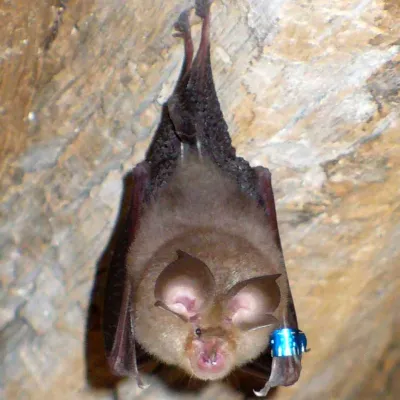
Lesser horseshoe bat. (Credit: Lylambda, Wikimedia)
As great as echolocation is, things can get rather messy once it’s not just you chirping away, but also hundreds of your buddies in roughly the same area. This is the scenario that the typical colonies of bats have to deal with. In a recent study by [Haruhito Matsumoto] et al. in Journal of Comparative Physiologythey investigated how colonies of greater Japanese horseshoe bats deal with this issue.
Echolocation in animals can use a variety of methods, including frequency modulation (FM, varying the pitch) or constant frequency (CF), with both having their uses during hunting as well as obstacle avoidance. One big advantage of CF is that it can be used for Doppler shift, giving very precise information about location and velocity of objects in the environment, but if used in a busy colony the acoustic interference would effectively render them blind.
What researchers have found is that the CF component frequencies differ per bat colonies, with the mixing of wild-caught and resident horseshoe bats in this experiment showing them adjusting the dominant second harmonic (CF2) to match, with bats using a lower frequency CF2 adjusting it upwards. In this way frequency convergence is used as a strategy to avoid acoustic interference using a so-called ‘silent spectral window’.
As this spectral window for effective Doppler tracking is found above the CF2 frequency, it therefore makes sense that the bats at a lower CF2 harmonic would adjust their CF upwards to match that of their neighbors. Although more research is required to fully confirm these findings, it sheds some more light on the use of echolocation by these amazing flying mammals.
A rumored “Silo” spinoff could keep Apple TV’s dystopian franchise alive beyond its planned finale, but the books’ author is pushing back on the claim.
“Silo” is a dystopian science-fiction drama about a society living underground after humanity has been driven from the surface. The Apple TV series is based on the bestselling “Silo” trilogy, “Wool,” “Shift,” and “Dust,” by Hugh Howey.
While it was well liked, Apple TV had told the creators that the series would end after the fourth season. The third season just returned to the small screen in July, with the fourth season anticipated to release in Summer 2027.
Even though the series is facing down its inevitable end, it may not be time to say goodbye just yet.
Advertisement
Allegedly, there’s a chance “Silo” may be getting its own spinoff, set to begin pre-production in late 2026. It is expected to tie into Hugh Howey’s upcoming “Silo 40” trilogy, which is set to release in 2027.
This tantalizing tidbit was shared by Apple TV enthusiast Sigmund Judge on Threads.
One minute later, however, a very significant figure refuted the claim. Speaking up was the “Silo” author, Hugh Howey.
“Yo, this is news to me,” Howey says in the replies. “So probably not true.”
Advertisement
“I appreciate you wanting to keep a surprise,” Judge says in response. “Love everything you do.”
Judge says that he’s got some further evidence in response to “a denial,” presumably Howey’s. Judge says that hires for the upcoming project have begun, and that the main sets used for “Silo” have remained, even after production on the fourth season wrapped in March.
“A brilliant specialist with a short attention span.”
Pros
Rights itself and launches from open water every single time
Tracking at 15 mph is steady enough to pass for a chase boat
The Lighthouse wearable handles launch, landing, and following
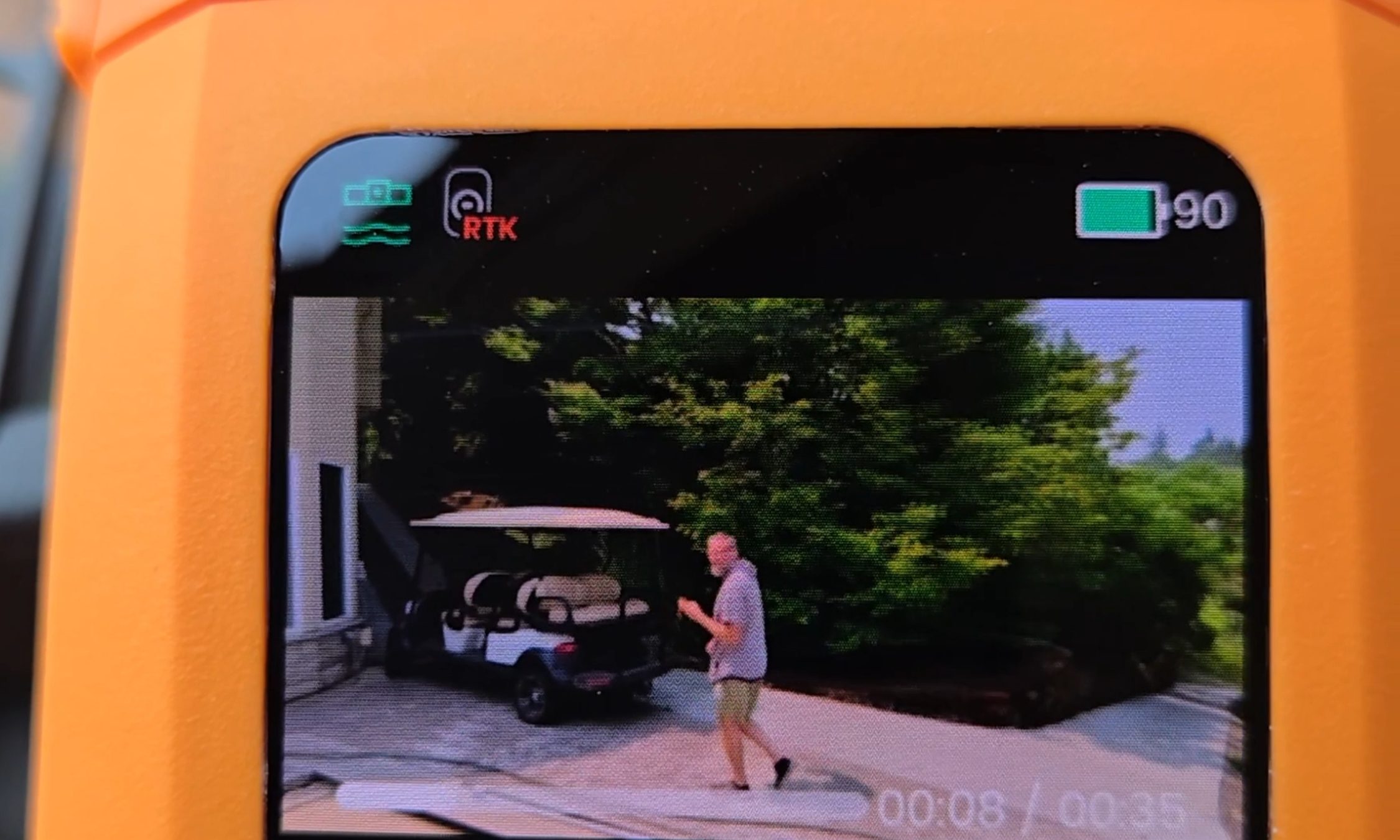
Onboard screen lets you replay clips on the water with no phone
Dead battery? It lands softly on the surface and floats
Cons
I measured 10 and 13 minutes of flight against an advertised 23
The Lighthouse shows no battery level at all
No obstacle avoidance
The battery is only fully waterproof while it sits in the drone
Quick Take
I spent two weeks on an Oregon river trying to break this thing — off an eFoil, out of a kayak, and by throwing it into the water on purpose. The HoverAir Aqua is the first consumer drone actually built to live on open water, and after two weeks I still stop what I’m doing to watch it launch. Throw it in the river upside down, and it flips upright, shakes the water off its props, pops into a low hover, and waits for you. Strap the Lighthouse beacon to your forearm, and it will follow you across the river at eFoil speed with your hands never touching a controller.
Let me be blunt, because this is the most important thing to know before you buy: there are two battery problems. HoverAir prints 23 minutes on the box. I measured 10 minutes and 13 minutes with the drone actively tracking me. And the wearable never tells you how much charge is left. So this is a drone I love, packed in a dry bag next to a fistful of spare batteries I resent having to carry.
HoverAir Aqua specs: A quick peek at the innards
Weight
Under 249 g, light enough to skip FAA registration for recreational U.S. flight
Waterproofing
IP67; floats and rights itself; battery fully waterproof only while installed
Camera
4K at up to 100 fps through a heated lens that sheds fog and spray
Altitude sensing
Millimeter wave radar that reads wave height for low passes over water
Display and storage
1.6-inch onboard AMOLED; 128GB internal storage, no SD card
Battery
2,013 mAh smart battery; rated 23 min; I measured 10 and 13 min while actively tracking
Charging
About 55 minutes with the battery inside the drone
Controller
Lighthouse waterproof wearable (launch, land, track, auto recall) with no battery readout
Obstacle avoidance
None
Recognition
CES 2026 Innovation Awards honoree; Red Dot Award
Test conditions
Two weeks on an Oregon river; eFoil at about 15 mph plus kayak sessions
HoverAir Aqua design & build: A pool toy with flagship chops
Ian Bell / Digital Trends
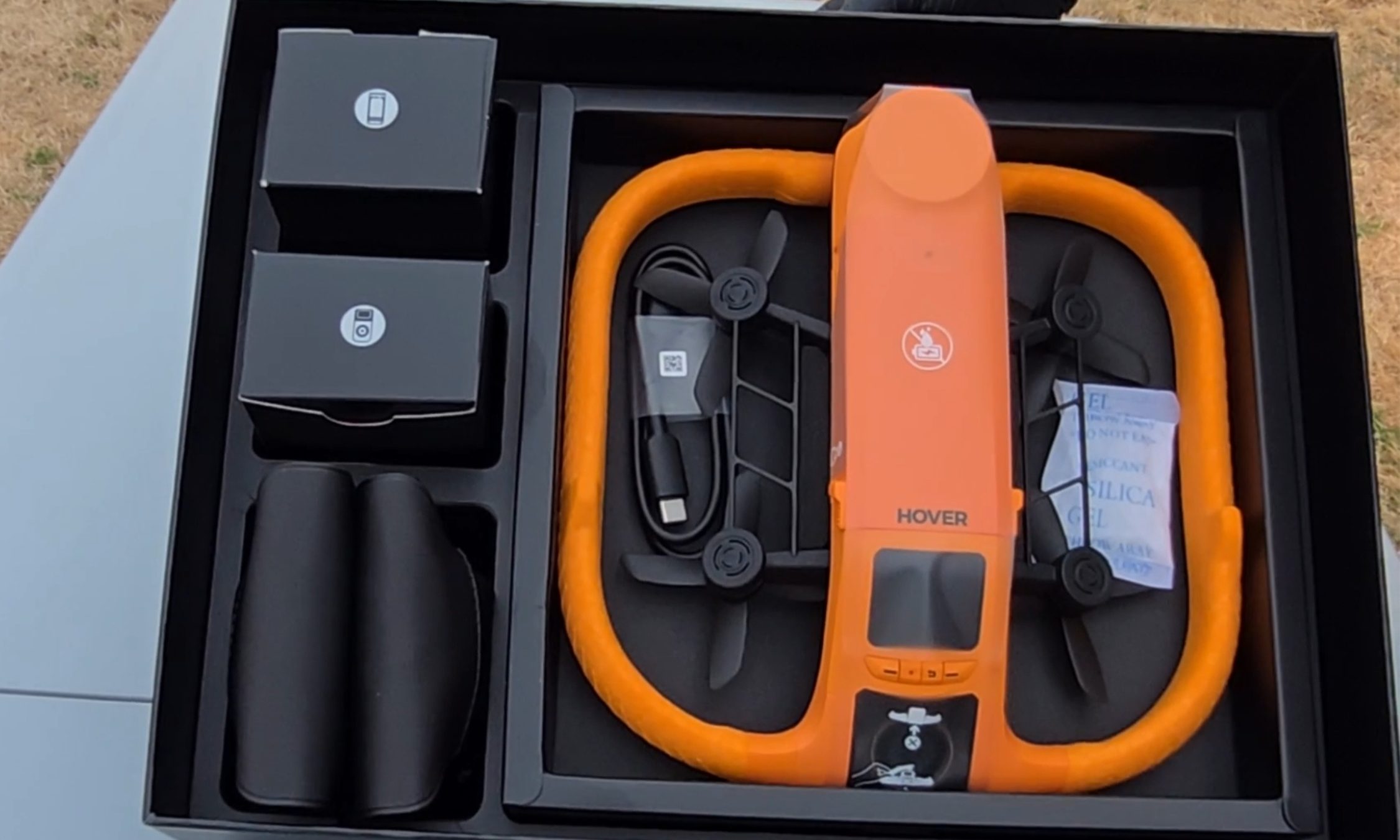
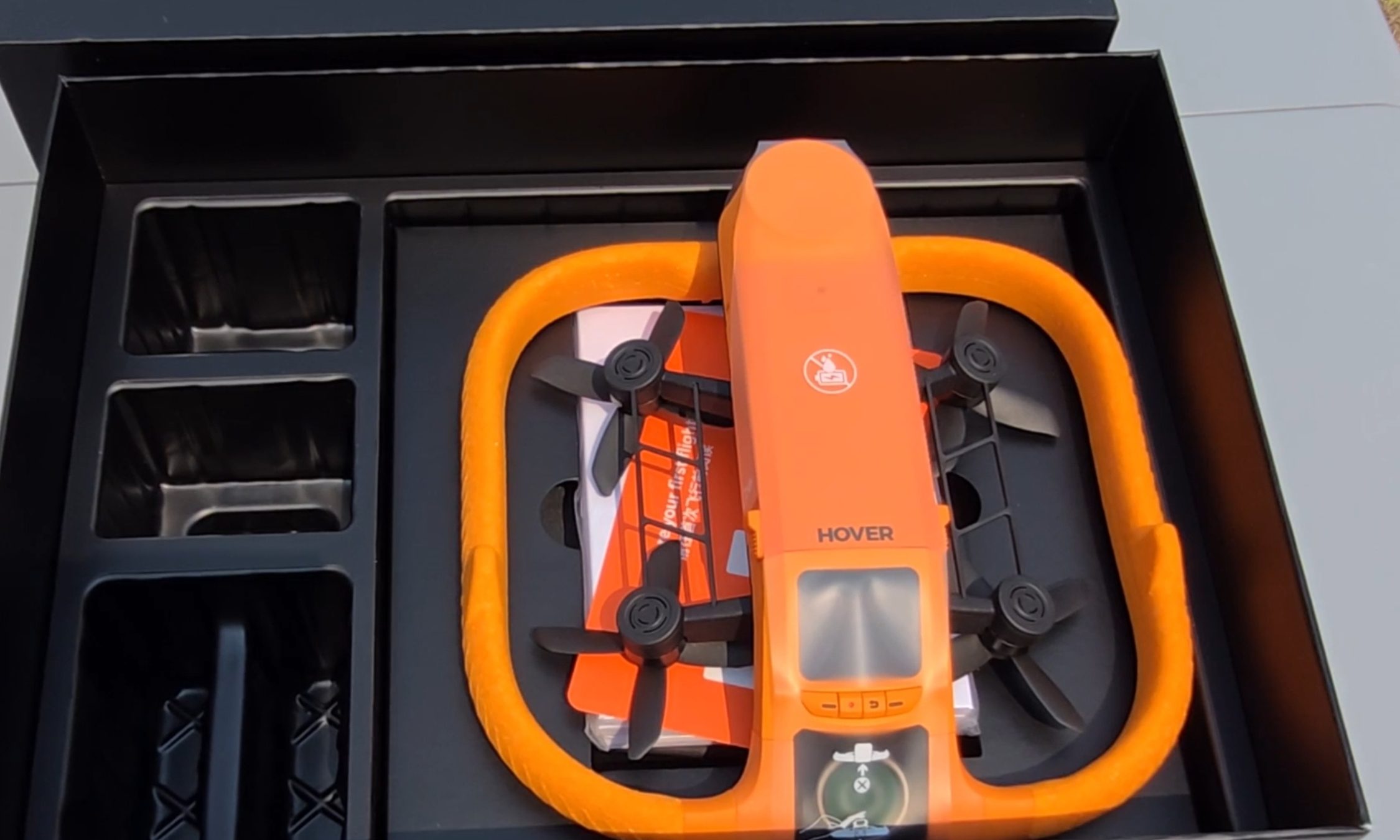
The first thing I noticed pulling the Aqua out of the box is the fat ring of safety-orange foam around its body, the same shade as a life vest. It looks like a pool toy. That’s deliberate. The foam keeps the drone buoyant, cushions the props, and makes the aircraft easy to spot from fifty yards out when it sets down on dark green water. The whole package carries an IP67 rating and weighs under 249 g, which keeps recreational pilots in the U.S. under the FAA registration threshold.
Ian Bell / Digital Trends
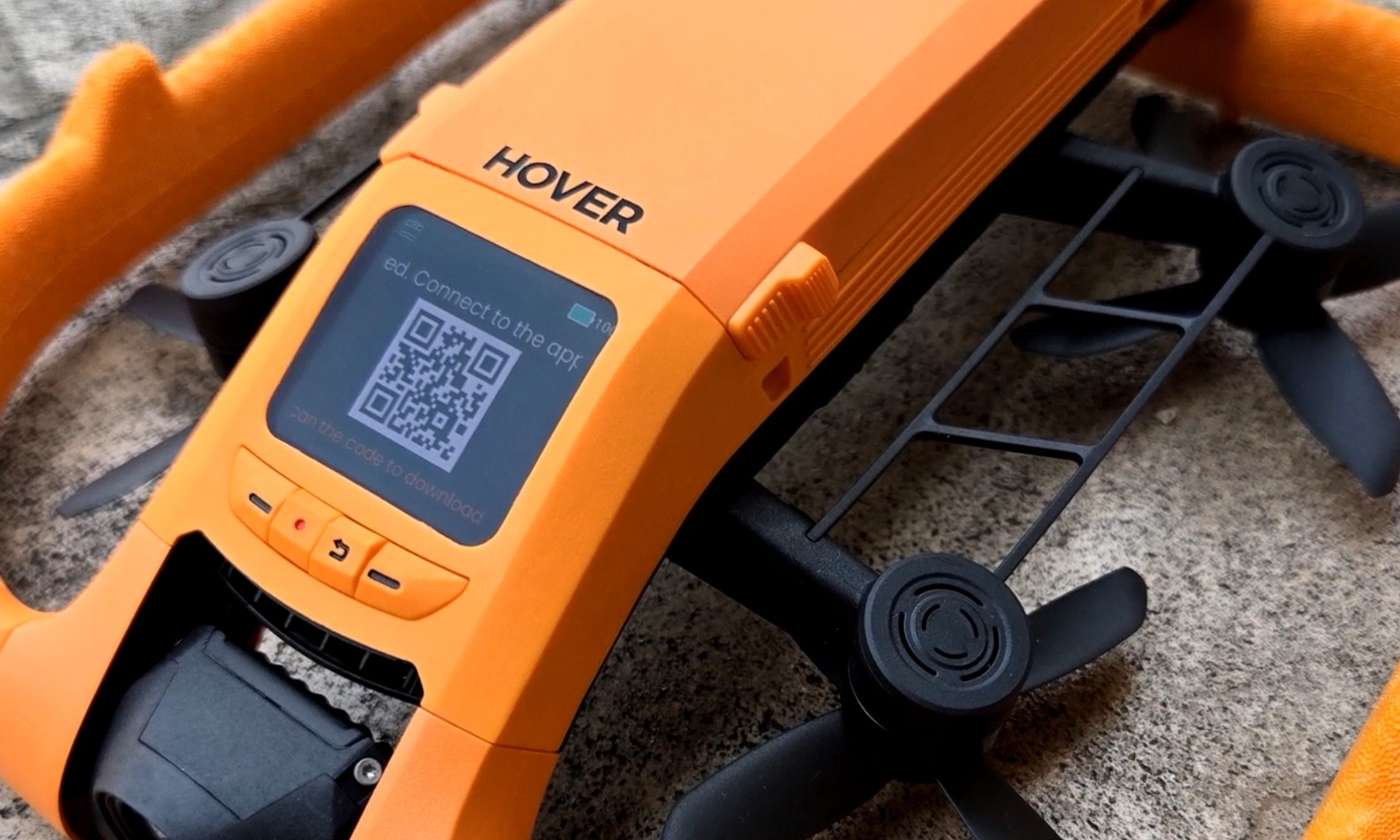
My favorite piece of hardware here is also the smallest. A 1.6-inch AMOLED screen sits on the drone’s spine, and it stays readable even with glare coming off the water. It’s there to pick flight modes, but I mostly used it to review what I’d just shot — sitting on the board, dripping, thumbing back through a run while the river went past. Two weeks in, I was still reaching for it instead of my phone. Storage is 128GB and internal, so there’s no SD card to lose, forget, or flood.
Ian Bell / Digital Trends
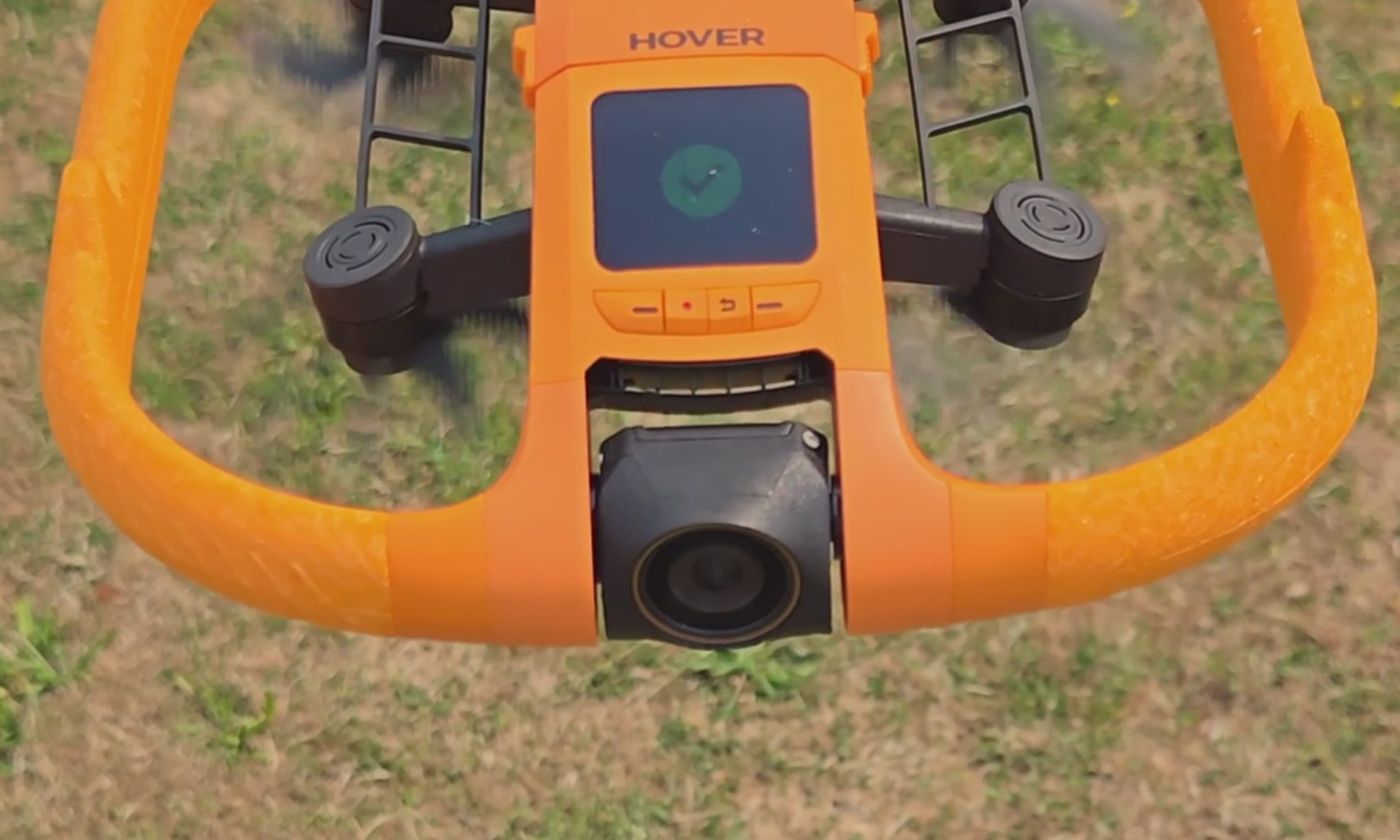
The camera records 4K at up to 100 fps for slow motion through a heated lens, which keeps fog from forming and makes water bead off instead of smearing across the glass. Underneath the airframe is the strangest line I have ever typed about a consumer drone: millimeter wave radar that reads the height of the waves rolling beneath it, so the Aqua can skim low over moving water without clipping a crest.
For those of you unfamiliar with the term, and since the spec sheets never bother explaining it, millimeter wave radar bounces very short-wavelength radio off a surface to measure distance to it — here, a surface that will not hold still. The industry noticed. The Aqua premiered at CES 2026 as an Innovation Awards honoree and collected a Red Dot Award along the way.
HoverAir Aqua water launch: Throw it in, it flies out
Ian Bell / Digital Trends
The water launch is the feature every bystander will ask you to do twice, and I tested it from the kayak with my kids leaning over the side to watch. You toss the drone into the river upside down, carelessly. However, it happens to leave your hand. It bobs for a beat. Then the props bite, it rolls upright, and it climbs into a hover a few feet off the surface to wait for you to start moving. It did that every single time I asked, and I asked a lot. Not once did I have to paddle over and fish it out or reset anything. In a category where water has always meant total loss, that is a bigger deal than a party trick sounds.
HoverAir Aqua subject tracking: A chase boat on your forearm
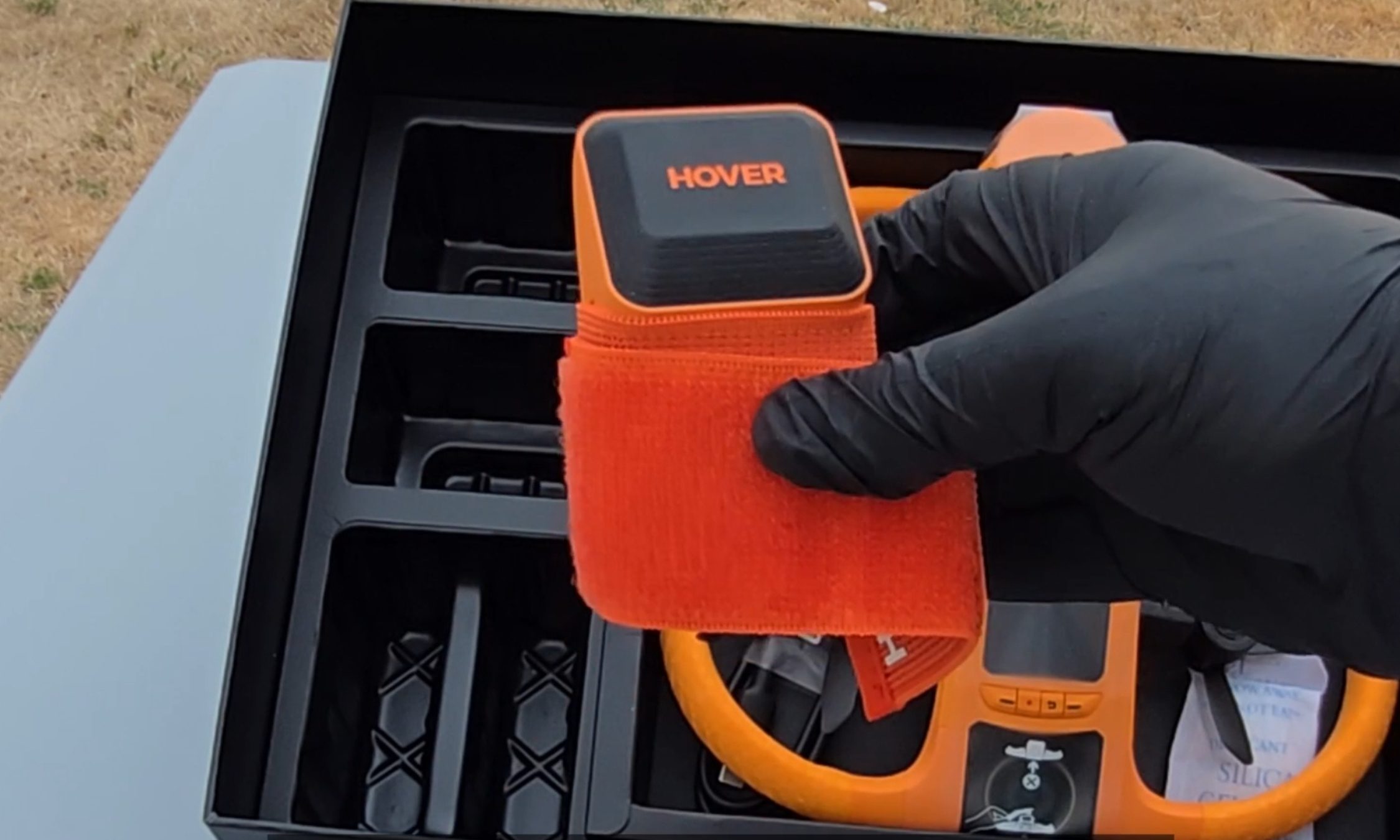
Most of my testing happened on my eFoil at around 15 miles per hour, with the waterproof Lighthouse strapped to my forearm like a chunky watch. One button sends the drone up. One button brings it home. Everything between those two presses is automatic.
Advertisement
Not the actual resolution captured by the HoverAir Aqua. The image has been resized.Ian Bell / Digital TrendsNot the actual resolution captured by the HoverAir Aqua. The image has been resized.Ian Bell / Digital TrendsNot actual resolution captured by the HoverAir Aqua. The image has been resized.Ian Bell / Digital Trends
The footage surprised me. My wake unspooling behind the board in a long white seam, the tree line sliding by, and me held in the center of the frame for the entire run. The best material came when the drone swung out ahead of the board and shot back at me, spray kicking off the foil, the whole river opening up behind.
It never fell behind, and it never wandered. When I drifted too far, it closed the gap on its own. When I slipped off the board and sat chest-deep in the water beside it, it stayed locked on and waited. The kayak sessions at lazier speeds went the same way: steady framing, no fuss, the family paddling along with a small orange aircraft holding formation off the bow. This is the closest thing to a camera operator you can wear on your wrist.
HoverAir Aqua Battery Life: High on the box, dips in the water
Ian Bell / Digital Trends
Now, the part the box will not tell you. HoverAir advertises 23 minutes of flight from the 2,013mAh smart battery. My first battery, actively tracking me on the foil, gave me 10 minutes before the drone called it quits. I rode back to shore, clicked in a fresh one, and went back out. Thirteen minutes. Doing the exact job you bought it for, you get about half the number on the sticker.
It’s worth noting that drone makers rate flight time in windless conditions with no tracking load, and you should not expect that figure in the real world. Even allowing for that, half is a wide gap. At least the ending is graceful.
When the charge runs out, you get a warning that the drone will land in 15 seconds, and then it sets down on the surface, orange side up, rocking on the chop until you come get it. Nothing dramatic happened in two weeks of testing. Recharging takes about 55 minutes with the battery inside the drone, and because a battery is only fully waterproof while it’s installed, HoverAir includes a dedicated waterproof pouch for hauling spares out on the water. Read that accessory list again. The company is telling you, in its own way, that you will be swapping batteries mid-session.
HoverAir Aqua Lighthouse Wearable: Great controller, no fuel gauge
Ian Bell / Digital Trends
The second problem makes the first one worse. The Lighthouse is otherwise the best thing about this product, and it tells you nothing about the battery. No percentage. No halfway warning. No blinking light as the level sinks. Mid-run, I had no idea whether the drone above me had eight minutes left or thirty seconds.
Ian Bell / Digital Trends
When the entire budget is 10 to 13 minutes, that silence turns every session into a guessing game. Both times a battery died on me, my only notice was the 15-second landing warning, right when I felt like I was getting going.
Should you buy
HoverAir
The good here is genuinely good. The footage is beautiful, the Aqua keeps pace with a foil at speed, it launches itself out of open water, and it runs hands-off enough that you forget it exists until you sit down to replay the clips. As a piece of engineering built for a hostile environment, it is the real deal.
The battery is what makes me hesitate, and I am not going to soften that. Plan a full session around this drone, and you are packing a pocketful of spares and guessing when to burn them.
Advertisement
So here is the fork. If what you want is a quick promo shot or a fast social clip off the water, this is the drone doing that job, and I don’t know of another one built to take the punishment. If you want to shoot an entire session, wait and watch for a firmware update that pushes battery data to the Lighthouse.
That one change would make this an easy recommendation for anyone who makes content on the water. As it stands, the Aqua is a brilliant specialist with a 10-minute attention span, and I keep taking it out anyway.
Why not try?
HOVERAir X1 PROMAX — Priced significantly lower at $700, this one offers hands-free auto-follow tracking and Lighthouse wearable perks, can shoot up to 4K 120fps footage, and stands out with a foldable design. It’s slightly slower and doesn’t offer a waterproof build, but makes up for it with collision-sensing tech.
DJI Mini 4 Pro — Another option that is more affordable as well, DJI’s drone offers impressive aerial capture capabilities with omnidirectional obstacle sensing and a reliable 4K camera that can capture high dynamic range videos. Plus, the battery packs can extend the flight time by up to 45 minutes, while the transmission performance is also fantastic. But an impending ban casts a shadow of skepticism over long-term support and after-sales experience.
Advertisement
FAQs (Frequently Asked Questions)
Who needs the HoverAir Aqua?
It’s a waterproof, self-flying 4K camera drone. If you’re into activities such as kayaking and wakeboarding, it’s an appropriate choice.
Is it capable of taking off and landing directly on water?
Yes, the positive buoyancy engineering allows it to float on water. And yes, it can take off and land from the surface of water. Moreover, it also comes with a Turtle Flip feature that lets it correct its position instantly, even if it’s flipped upside.
Is the build really waterproof?
The HoverAir Aqua has an IP67-certified build, featuring corrosion-resistant components, while the camera sensor is protected by a hydrophobic, anti-fog lens.
Do you need a license to fly it?
It falls under the prescribed FAA weight limit, so you don’t need a license to fly it.
Advertisement
Can it fly and capture without a phone?
Yes, the wearable Lighthouse controller relies on Real-Time Kinematics (RTK) positioning to let the drone track you and capture videos without requiring a cellular link or base stations.
What is the top speed and battery life?
The HoverAir Aqua can fly at a speed of up to 34 miles per hour, and it is claimed to last over 20 minutes on a single charge.
In a nutshell: Despite Nvidia losing fans over the last few years as its focus on gamers diminishes (or disappears), the company’s GPUs have dominated the sales charts. But that status quo is starting to change: Amazon’s top 10 best-selling GPU list is an even split between Team Red and Team Green, with the highest position held by a Radeon 9000-series card. Meanwhile, in Germany, AMD is the one that’s dominating sales – at least at one retailer.
The rise of RDNA 4 was highlighted by TechEpiphany on X.
The Amazon best-selling list has changed slightly since the post, but the Radeon RX 9070 XT is still the top GPU. This Gigabyte version is priced at $749, which, of course, is considerably higher than the GPU’s $599 launch MSRP.
The other AMD cards in the chart are an Asus model of the 9070 XT, an Asrock 9070, and an Asus 9060 XT. Nvidia also holds four positions with its RTX 5070, RTX 5060 Ti, and two RTX 5080 models.
Advertisement
Things appear even more favorable for Lisa Su’s firm in Germany. The figures, which come from Mindfactory, show AMD accounting for almost 56% of all GPUs sold over the last week, while Nvidia holds a 40% share. Again, the RX 9070 XT is the most popular card by far, followed by the RX 9060.
It’s worth remembering that Mindfactory has a reputation for favoring AMD, offering promotions, discounts, and bundles featuring its products, which help push up sales figures. The store’s AMD cards have outsold Nvidia’s in the past.
However, these charts do illustrate the impact of the memory crisis on the graphics card market. All GPUs are more expensive, but AMD’s are often cheaper than equivalent Nvidia cards.
The other reason is likely simple availability. The Amazon chart shows three AMD cards in stock, while Nvidia only has one – a Gigabyte RTX 5080 for a colossal $1,599, and that’s with a 6% discount.
Advertisement
Only one company dominates the Steam survey GPU chart
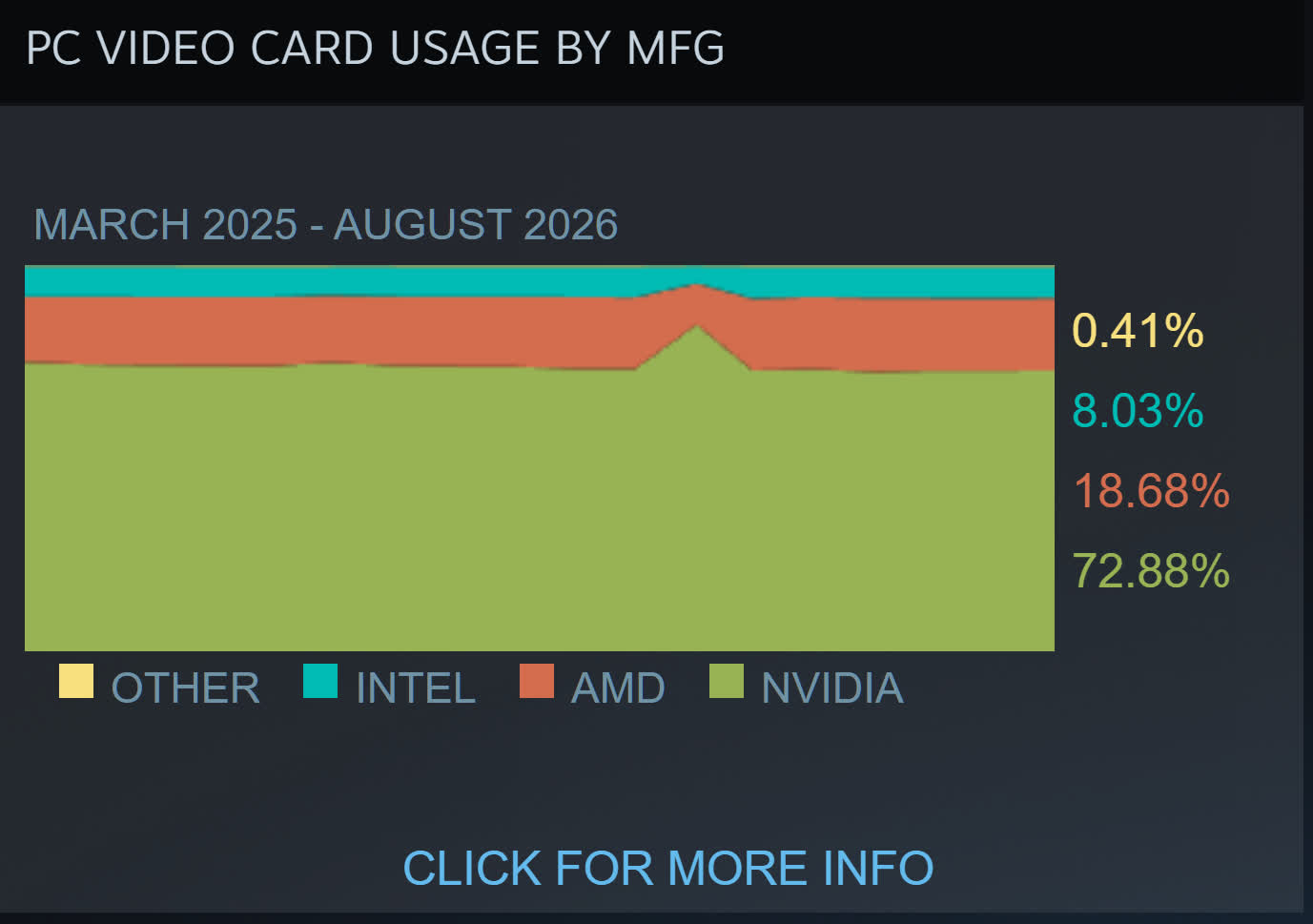
TechEpiphany’s claim of AMD “dominating everywhere” might be a bit of an exaggeration, but there are signs of consumers opting for its cards because of the cheaper prices – or just buying them because there are no Nvidia alternatives. The most valuable company in the world still has GPUs in almost 73% of Steam survey participants’ machines, compared to AMD’s 18.6%, so we’re not seeing a red revolution just yet.
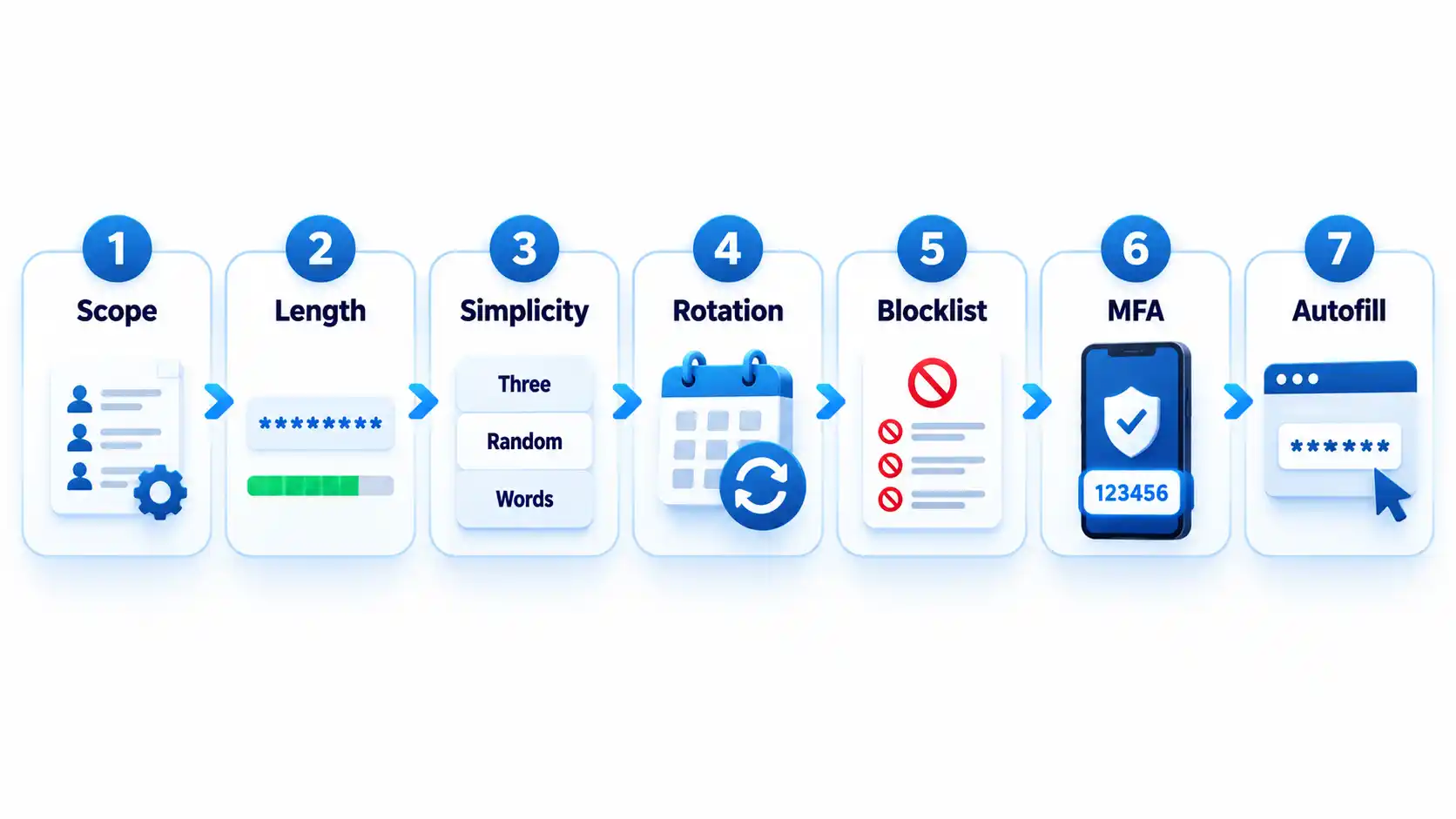
Create a strong password policy by prioritizing length and uniqueness, blocking compromised passwords, allowing password managers and autofill, removing arbitrary complexity and expiration rules, and requiring MFA for important accounts. Deploy the policy with a managed password vault, secure recovery procedures, and tests that confirm the written rules work in every covered system.
Quick Take
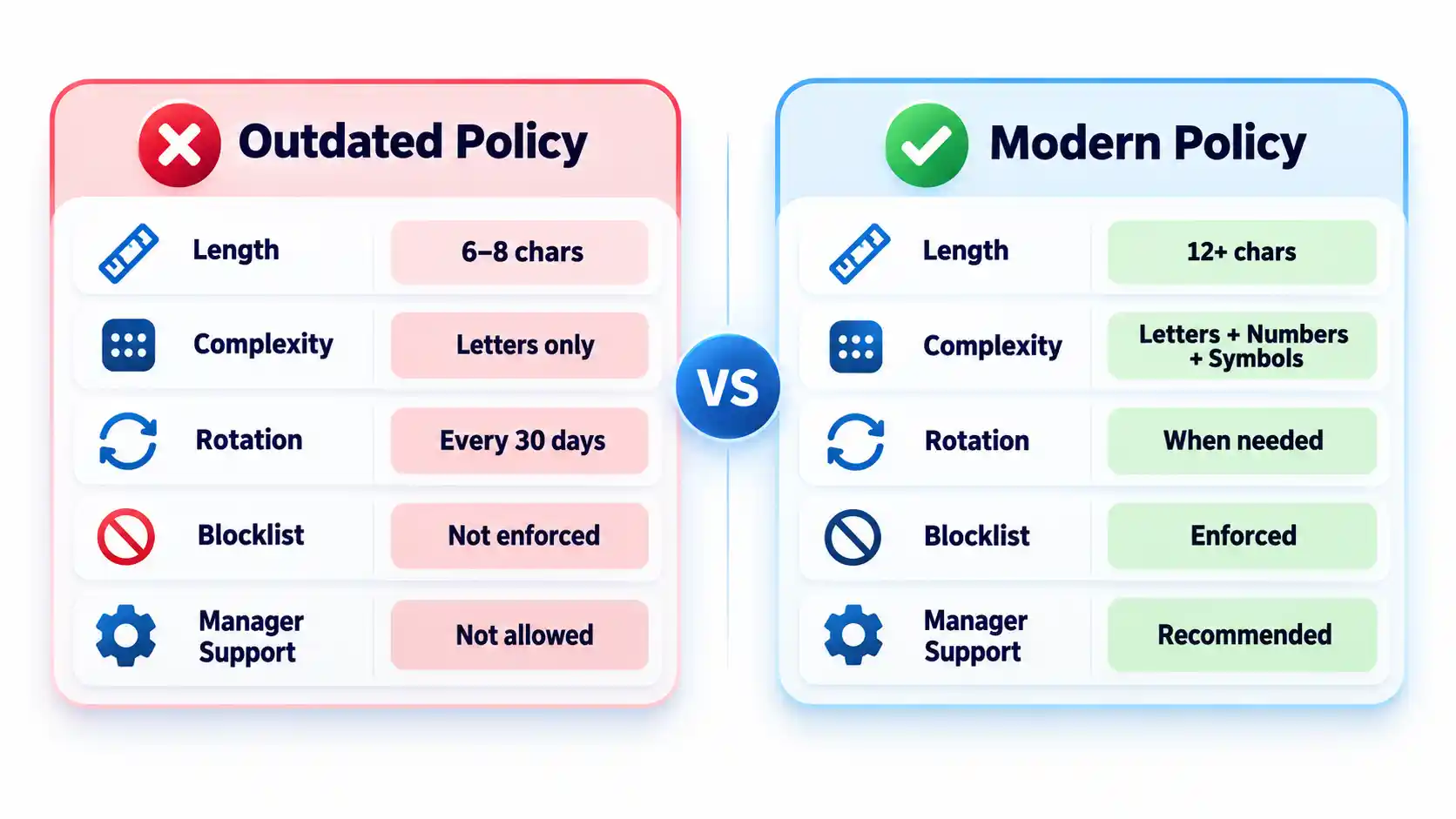
Require at least 15 characters when a password is the only authentication factor.
Allow passwords of at least 64 characters, including spaces.
Do not require arbitrary mixtures of uppercase letters, numbers, and symbols.
Replace scheduled password expiration with changes triggered by suspected compromise.
Reject commonly used, predictable, and previously compromised passwords.
Allow password managers, paste, and autofill on login forms.
Protect important accounts and cloud-synchronized vaults with MFA.
Test login, recovery, export, offboarding, and session-revocation controls.
These requirements follow current NIST authenticator guidance. They are a security baseline rather than proof that a particular policy satisfies every law, contract, or industry framework.
Prerequisites and Ownership
Identify the accounts in scope
Inventory the systems that accept passwords before writing the rules. Include workforce accounts, customer accounts, administrator access, cloud services, remote-access tools, shared credentials, and legacy applications. Record which systems use single-factor authentication, MFA, or single sign-on.
Keep machine credentials in a separate category. API keys, database secrets, certificates, service-account tokens, and CI/CD credentials require secrets-management controls rather than an ordinary employee password vault. A dedicated article on business secrets management should cover those systems.
Assign responsibility
Name a policy owner, identity-platform administrator, security reviewer, help-desk recovery owner, and departmental access approver. A policy without named owners tends to fail at exceptions, recovery, and offboarding rather than during ordinary password creation.
Advertisement
Document technical constraints
Record each system’s minimum and maximum length, supported characters, MFA options, password-history rules, breached-password screening, paste and autofill behavior, recovery process, and session controls. Legacy systems that cannot meet the baseline should enter a documented exception process with compensating controls and a retirement or remediation date.
Step-by-Step: Create the Password Policy
Define which accounts the policy covers
State whether the policy applies to employees, contractors, administrators, customers, service providers, and shared accounts. Classify higher-risk accounts such as email, identity-provider, financial, cloud-administrator, source-code, and password-vault accounts.
Where possible, replace shared accounts with individually attributable accounts. If sharing is unavoidable, use a managed vault that records access and lets administrators revoke membership.
Expected result: Every covered account type has an owner, risk classification, authentication method, and exception status.
Set length and input requirements
Require at least 15 characters when a password is the only authentication factor. NIST permits passwords used only as part of an MFA process to be shorter, but they must contain at least 8 characters. Organizations may adopt a longer minimum when users can rely on a password generator.
Permit passwords of at least 64 characters. Accept spaces and broad character sets, process the entire submitted password, and never silently truncate it. Systems that mishandle spaces or long generated values should be corrected or documented as exceptions.
Advertisement
Expected result: Users can create long passphrases or generated passwords without encountering unnecessary input restrictions.
Remove mandatory composition rules
Do not require every password to contain a prescribed mixture of uppercase letters, lowercase letters, numbers, and symbols. Current NIST rules prohibit these composition requirements because users commonly satisfy them with predictable patterns.
Symbols remain acceptable when a generator selects them or a service requires them. The policy should not imply that a short password becomes safe simply because one letter was replaced with a familiar symbol. NIST’s public password creation guidance prioritizes length and recommends long passphrases when a password must be created manually.
Expected result: Users can choose long, usable passwords without following predictable formatting recipes.
Replace scheduled expiration with event-driven changes
Do not force users to change passwords every 30, 60, or 90 days without evidence of risk. Require a change when a password is known or suspected to have been disclosed, appears in relevant breach data, was transmitted insecurely, or may remain known to someone whose access has ended.
A password change must be accompanied by session revocation when an attacker could already be signed in. Changing the secret alone may not invalidate active browser sessions, application tokens, or remembered devices.
Advertisement
Expected result: Password changes respond to compromise and access changes rather than an arbitrary calendar.
Block weak and compromised passwords
Compare new and changed passwords against a blocklist containing commonly used, expected, and compromised values. Include context-specific choices such as the organization’s name, service name, username, and predictable derivatives.
Explain why a proposed password was rejected and ask the user to choose a genuinely different value. Do not reveal whether another person uses that password. Avoid enormous blocklists that create excessive false rejections without meaningfully improving protection against rate-limited online guessing.
Expected result: Users cannot enroll values that attackers are likely to guess early or already possess from breach collections.
Add controls around the password
Require MFA for email, identity-provider, financial, remote-access, cloud-administrator, source-code, and password-manager accounts. Prefer phishing-resistant methods such as passkeys or hardware-backed security keys where the service and user environment support them.
Rate-limit or progressively delay failed attempts. Monitor suspicious logins, protect account recovery, avoid knowledge-based questions as a sole recovery method, and provide a way to revoke sessions after suspected compromise. The OWASP authentication guidance treats password controls, MFA, recovery, session handling, and login monitoring as connected parts of account security.
Advertisement
Expected result: A guessed or disclosed password is harder to convert into persistent account access.
Require password-manager-compatible login forms
Allow users to paste and autofill credentials. Use standard password fields and avoid scripts or form designs that block managers. NIST requires verifiers to allow password managers and autofill and recommends permitting paste when autofill interfaces are unavailable.
Do not interpret clipboard blocking as a security control. It can push users toward shorter passwords they can type manually or toward storing credentials in insecure notes.
Expected result: Users can generate, store, and enter unique credentials without weakening them for convenience.
How to Choose a Password Manager
Select a manager by deployment fit, recovery design, security controls, and usability rather than by the length of its feature list. The NCSC buyers guide emphasizes that an unusable manager will leave insecure workarounds in place.
Advertisement
Comparison of password-manager deployment models
Manager type
Best fit
Principal advantage
Main limitation
Browser or platform manager
People using one primary browser or device ecosystem
Low setup friction and integrated autofill
Potential platform lock-in and fewer team controls
Standalone cloud-sync manager
Mixed-device users and small teams
Cross-platform access and centralized synchronization
Remote account and recovery paths require strong protection
On-device manager
Narrow or offline use cases
Reduced dependence on a cloud service
Limited synchronization and more difficult recovery
Enterprise-managed vault
Organizations requiring governance and offboarding
Managed sharing, audit records, policy enforcement, and provisioning
Greater administrative complexity and recurring cost
Evaluate the following capabilities before deployment:
Protection of credentials and metadata at rest.
Who controls or can recover the vault’s decryption key.
MFA, passkey, and approved-device support.
Recovery options and the people authorized to use them.
Secure sharing without revealing passwords in email or chat.
Role-based administration, audit records, and offboarding controls.
Restrictions or alerts for bulk export.
Supported browsers, operating systems, and mobile devices.
Update delivery and the provider’s vulnerability-disclosure process.
A practical method for leaving the service without permanent lock-in.
Browser and device managers can be appropriate when convenience and ecosystem integration matter most. A reputable standalone manager may fit mixed-device environments or teams requiring advanced sharing and administration. The NCSC’s updated password-manager guidance recommends evaluating reputation, device security, recovery, MFA, and platform needs instead of assuming one type fits everyone.
How to Deploy and Use the Password Manager
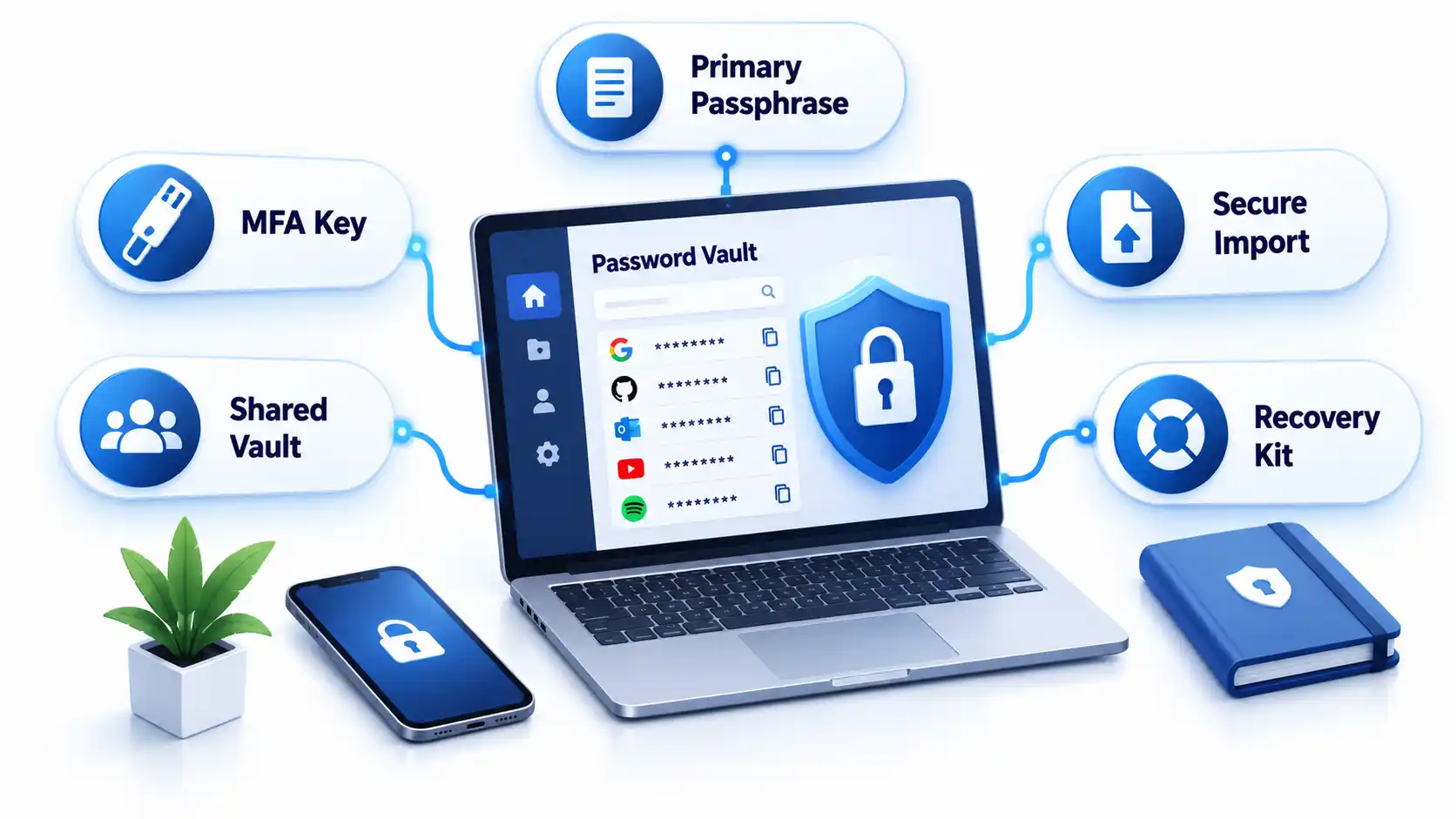
1. Protect the vault account
Create a long, unique primary passphrase that is never used elsewhere. Enable the strongest practical MFA and secure every registered device with updates, automatic locking, and a local PIN or biometric unlock.
Store recovery keys or emergency instructions separately from the vault. Avoid circular recovery in which the only way to access the email account is through the vault while the only way to recover the vault is through that email account.
2. Import credentials carefully
Some managers migrate credentials through a CSV file. That export may contain readable usernames and passwords. Create it only on a trusted device, import it immediately, verify that the records arrived, and delete the exported file from the original folder, recycle bin, cloud synchronization, and temporary storage.
Advertisement
Do not perform a vault migration over an unfamiliar hotspot. Review the precautions in this public Wi-Fi security guide before accessing sensitive accounts away from a trusted connection.
3. Replace reused passwords in risk order
Secure the password-manager account and its recovery channels.
Change email and identity-provider credentials.
Change banking, payment, payroll, and financial credentials.
Change administrator, cloud, source-code, and remote-access credentials.
Change shopping, social-media, subscription, and lower-impact accounts.
Do not change dozens of accounts without confirming that each new password was saved. Keep the old session open until the new credential has been tested in a separate private window or another approved device.
4. Configure generation and autofill
Generate a different random password for every compatible service. Match the site’s supported length and character rules while avoiding needless manual edits. If autofill does not appear, check the exact domain before searching the vault and copying the password.
Autofill may help resist phishing because a manager should associate credentials with the legitimate domain. It is not infallible. Users must still inspect unusual addresses, subdomains, redirects, and browser warnings.
5. Configure team sharing and offboarding
Store business credentials in organization-controlled collections rather than personal vaults. Grant access by role, assign an accountable owner, review membership, and remove access promptly when someone changes roles or leaves.
Advertisement
Revoking vault access prevents future retrieval, but it cannot make a password unknown to someone who already viewed or copied it. Rotate credentials when a departing user could retain them. Teams protecting software repositories should connect this process to the controls in the guide to preventing source-code theft.
Verify That the Policy Works
Test the deployed controls instead of assuming a written setting was applied consistently.
Checklist
Confirm that a 15-character single-factor password is accepted.
Confirm that long passphrases, spaces, paste, and autofill work.
Confirm that the application processes the full password without truncation.
Attempt to enroll a known common password and verify that it is rejected with useful guidance.
Confirm that uppercase, number, and symbol mixtures are not mandatory.
Verify that routine expiration is disabled and compromise-driven resets work.
Trigger repeated failed attempts in an approved test account and verify rate limiting or progressive delay.
Test MFA, recovery, session revocation, emergency access, and lost-device procedures.
Remove a test user from a shared collection and verify that access ends.
Verify that export actions are restricted, logged, or both.
Record exceptions and failed tests with an owner and target correction date. Repeat the checks after identity-platform changes, password-manager migrations, or major policy revisions.
Failure Modes and Troubleshooting
Common password policy and manager deployment failures
Failure
Likely cause
Security consequence
Corrective action
Long generated password is rejected
Legacy length or character restriction
User shortens or reuses a password
Correct the restriction or document a temporary exception
Autofill does not appear
Unsupported form, disabled extension, or domain mismatch
User may copy into the wrong page
Verify the domain and manager permissions before manual entry
Credentials fill on an unexpected subdomain
Overly broad saved-domain matching
Password may reach an unintended service
Narrow the saved address and report unsafe matching
Primary passphrase is lost
Recovery was not configured or documented
Vault data may become inaccessible
Use the approved recovery process and reset affected accounts if recovery fails
MFA device is lost
No backup factor or recovery key exists
User is locked out or bypasses policy
Use pre-established recovery and revoke the lost device
Exported CSV remains on disk
Migration cleanup was missed
Passwords remain exposed in plaintext
Delete all copies and rotate credentials if exposure is possible
Former worker retains a shared password
Vault removal occurred without credential rotation
Continued unauthorized access remains possible
Rotate the credential and review account activity
Legacy system requires frequent changes
Obsolete platform rule
Users may create predictable variations
Apply compensating controls and schedule remediation
Vault and email recovery depend on each other
Circular recovery design
One lost factor can lock out both services
Create an independent recovery route and protect it offline
Operational Limits and Edge Cases
Concentrated value: A vault makes unique passwords practical, but a successful vault compromise can expose many accounts. Protect the primary account and registered devices accordingly.
Compromised endpoints: Malware or someone using an unlocked computer may capture credentials after the vault decrypts them. A password manager does not replace device protection. Organizations can evaluate those controls separately in this endpoint protection guide.
Recovery trade-off: Recovery improves availability but creates another path that an attacker may target. Document who can recover a vault and what evidence is required.
Shared accounts: A vault improves sharing, but individual accounts remain preferable because they provide attribution and cleaner revocation.
Offline access: Emergency recovery material needs physical protection, named custodians, and periodic verification.
Phishing: Passwords themselves are not phishing-resistant. Adopt passkeys where appropriate and evaluate the differences in a future passkeys versus passwords guide.
Key Takeaways
Use length, uniqueness, blocklists, and login protections instead of frustrating composition rules.
Require at least 15 characters when a password is the only authentication factor.
Do not force periodic changes without evidence of compromise.
Allow password managers, paste, autofill, and long values.
Protect the password vault, email, identity provider, and administrator accounts with MFA.
Select a manager based on security, recovery, usability, platform support, export, and governance.
Replace reused passwords in risk order and verify each change.
Test recovery, offboarding, exports, and session revocation before an incident.
Frequently Asked Questions
Should contractors use the company password manager?
Contractors should use an organization-controlled vault when they need access to company credentials. Place them in restricted groups, set an access end date where supported, and avoid mixing business credentials with their personal vaults. At contract completion, revoke access and rotate any credential they could have copied.
Should a password manager store the code for its own MFA?
Storing a service’s password and MFA code in one vault is convenient, but storing the vault’s own second factor inside that same locked vault creates a circular dependency. Protect the manager itself with a separate authenticator, passkey, hardware key, or securely stored recovery code.
What happens if the password manager company shuts down?
A usable exit plan should let authorized users export or transfer credentials to another manager. Confirm the export format before deployment and document how migration would work. Because exports may be plaintext, continuity planning should not involve leaving permanent backup exports on ordinary drives.
Advertisement
Can administrators see employees’ passwords in a business vault?
That depends on the manager’s encryption, sharing, recovery, and administrative design. Some administrators can recover accounts or manage shared collections without seeing every private credential. Others may have broader recovery powers. Review the product’s key-ownership and recovery documentation before adoption.
Should personal and work passwords be kept in the same vault?
Separate vaults or clearly separated organization-controlled and personal spaces are preferable. The company must be able to manage, audit, and revoke business access without gaining control over personal credentials. Employees should also retain their personal passwords after leaving without exporting company secrets.
What should happen when a password appears in a data breach?
Change the affected password, revoke active sessions, review account recovery methods, inspect recent activity, and replace the same password anywhere it was reused. Follow a documented data breach response checklist so the reset does not overlook tokens, forwarding rules, or connected applications.
An excellent mid-range OLED from LG that delivers fantastically balanced and colour-rich picture quality. The sound system isn’t too bad either and it’s well stocked for features. This might end up being LG’s best OLED model of 2026
Excellent picture
Approachable interface
Quick to assemble
165Hz for PC gamers
Impressive upscaling
Need an LG account to access apps
Bigger sizes offer brighter performance
Key Features
Advertisement
Review Price:
£2999
Hyper Radiant Colour Tech
Advertisement
Brighter, more colouful pictures
VRR
Advertisement
Up to 165Hz with PC games
AI
Advertisement
Google Gemini and Microsoft Copilot
Introduction
LG’s C-series OLED has undergone some changes for 2026, which may or may not please some.
They’re still the mid-range model, sitting between the G-series and B-series, with six sizes ranging from 42- to 83-inches, but the 77- and 83-inches feature similar brightness-boosting technology that’s in the G-series model; the 55- and 65-inches – reviewed here – miss out on that boost.
Advertisement
They are brighter than their C5 predecessors, but not quite as bright as their bigger siblings, which may prove to be a little controversial, but the OLED65C6 makes a compelling argument that bigger might not be better when the performance is this good.
Advertisement
Design
Quick to assemble
Strong viewing angles
Decent with reflections
The design for the 55- and 65-inch C-series models hasn’t changed dramatically, though I do like the marble-like material that’s on the back of the TV. You won’t see it for the vast majority of the TV’s lifespan, but it does look pretty.
There’s a wide stand to perch the TV on, though not too wide that you need a freakishly large piece of furniture to sit it on (I’m looking at you Sony).
Assembling the TV is fairly quick – around two minutes – and less time-consuming than adding the stand to the G6. The C6 is made to LG’s high standards: minimalist, well-packaged and good-looking, you can wall-mount but it will jut out from wall thanks to the little bump on the rear.
Image Credit (Trusted Reviews)
Advertisement
The OLED65C6 seems to use a similar anti-reflection solution as the G6 but does it reduce reflections? I’m not too convinced it does. In dark rooms I can clearly see what’s in the room, though it does refract ambient light sources without affecting black levels. There’s also a purple-ish hue to the screen when light shines on it, just like with the G6.
Advertisement
Viewing angles are massively wide if you’ve got family and friends over. The C6 keeps its colour and brightness at more acute angles and far away, though it’s not as bright as the G6.
Connectivity
Four HDMI 2.1 inputs
Plenty of wireless options
It does feel as if this section repeats previous years, but as is standard, there are four HDMI 2.1 inputs with HDMI 2 for plugging your soundbar into. All HDMI inputs support ALLM and the various forms of VRR too.
Image Credit (Trusted Reviews)
An Ethernet port offers the means to hardwire straight to your router if you find the Wi-Fi 6E connection flaky. There’s an optical audio output, two RF inputs, three USB 2.0 inputs and a CI slot.
Advertisement
Bluetooth 5.3 is supported, and Wi-Fi brings support for Google Cast and Apple’s AirPlay 2.
User Experience
Slick and fast interface
Some customisation possible
Old LG remote
Image Credit (Trusted Reviews)
The webOS platform hasn’t changed much from previous years. You’ve got your Quick Cards made up of gaming, radio, art (you have to pay a subscription for complete access), and lifestyle apps. Portal is new, offering a mix of video content, trending news and podcasts.
There’s also LG’s Channels, its hub for free-to-view TV and on-demand content (through Rakuten TV) as a sort-of alternative to Freely. It’s got a decent selection of programming to watch, and logging into your account (more on that shortly) also means that if you quit a show or film, you can resume where you dropped off.
Advertisement
Image Credit (Trusted Reviews)
Advertisement
But that doesn’t mean the C6 ignores the UK catch-up apps, which are all present, and there’s the big global apps accounted for in the likes of Netflix, Disney+, Apple TV and HBO Max.
The problem here is that LG now requires you sign up to access any app, an annoying change from where you could access some apps without restrictions.
The interface itself is swift and responsive, and refrains from offering too much content for users to get lost and confuse in. The number of rows isn’t that much to scroll down, and content is easily highlighted. Yes there are ads but I don’t find them intrusive, and most of them are advertisements for LG products or popular TV series.
Image Credit (Trusted Reviews)
Swipe to the left and you’ll come across ‘My Page’, which offers personalised content. All of this is protected by LG Shield to keep your data safe, and the OLED65C6 will receive security updates until 2030.
The Magic Remote returns and it’s getting to the point where it’d be nice if we could get access to the USB-C remote available in other countries. It can’t cost too much to add, and while the Magic Remote is fine (I don’t get cranky about it), a rechargeable USB-C remote is better than one that runs on battery power.
Advertisement
Advertisement
Image Credit (Trusted Reviews)
Gaming
Nvidia and AMD VRR
Quick input lag
Cloud gaming options
All HDMI 2.1 inputs support ALLM and VRR (Nvidia G-Sync, HDMI VRR and AMD FreeSync). Refresh rates have been boosted up to 165Hz for PC gaming.
Input lag stays the same at 12.9ms and Boost mode can bring it down to 9.4ms (same as before).
If you don’t have a console, the C6 supports plenty of cloud gaming options in the Xbox app, Blacknut, Amazon Luna, Boosteroid et al.
With the Game Optimiser menu you can change settings to alter the performance as you want. Want a black level performance that allows you see where others might be hiding? Some may call that cheating…
Advertisement
Advertisement
There’s HGiG, which are guidelines for optimal HDR performance, and there’s Dolby Vision Gaming support (4K/120Hz) for those of you with an Xbox Series console.
Features
AI features
Dolby Vision x Filmmaker mode
FlexConnect support
LG’s Home Hub supports smart platforms such as its own ThinQ, Matter, Google and Apple Home. Voice control and search is possible through Google Gemini and Microsoft Copilot.
There’s more AI with LG’s AI Concierge that provides personalised recommendations, with In This Scene offering insight into cast and crew of a film and programme (like Prime Video’s X-Ray feature). There’s also the option to create Generative AI images… if you’re interested.
Image Credit (Trusted Reviews)
The UK finally has the Voice ID feature that remembers your voice and can automatically log you into a profile when you press the AI button and speak.
Advertisement
Advertisement
On the picture and sound front, it’s all overseen by LG’s Alpha 11 AI Processor 4K Gen3 with Dual AI Engine that can improve brightness, upscale to 4K and produce a more 3D image in real-time. With audio it’s a 60W, 4.2 channel system with AI Object Remastering Ultra that brings clarity to vocals and can boost audio to 11.1.2 virtual channels of sound with Dolby Atmos.
There’s no DTS support, which is a shame, but there is Dolby Atmos FlexConnect if you buy LG’s Sound Suite audio system. On the HDR front there’s HDR10, HLG, Dolby Vision and the Dolby Vision x Filmmaker Mode.
Image Credit (Trusted Reviews)
Picture Quality
Bright, natural images
Very good motion
Good Vivid mode
It’s been a while since I last reviewed a 65-inch C-series model, but this year’s effort feels like a substantial step-up.
There’s still an issue with the Filmmaker x Dolby Vision mode in that it’s not adaptive by default, and even when I turn the feature on, it’s still not as balanced as it should be. I’d avoid using that HDR mode for now, but aside from that, the LG OLED65C6 is a stunner.
Advertisement
Advertisement
Dark detail is well handled so you’re seeing most of the detail in the darkest parts of the image (though I wouldn’t say all the detail is visible with a watch of Zero Dark Thirty).
Image Credit (Trusted Reviews)
Levels of detail and sharpness are excellent with Alien: Romulus, and colours strike me as looking close to what they should be.
Highlights are bright, contrast is very good (though the extra brightness of the G6 is even better) and there’s a three-dimensionality and sense of depth thanks to the TV’s processing that you don’t get from rivals. It may not be strictly natural but it’s a nice effect all the same.
Image Credit (Trusted Reviews)
A 4K Blu-ray of Speed Racer looks terrific with colours that are punchy, bright and wide-ranging – the TV explodes with colour with black levels that are substantial in terms of depth but not impenetrable.
Advertisement
An HLG stream of The Capture on iPlayer offers excellent levels of fine detail and sharpness – the show looks phenomenally good in 4K HDR with saturated colours and terrific detail to the point of being able to see the fuzz on someone’s jacket or the pores on someone’s skin. Complexions are both natural looking and balanced, highlights are bright but not overwhelming. It looks fantastic.
Advertisement
Image Credit (Trusted Reviews)
And the Vivid mode that worked so well on the G6 has been translated to the C6. With Cinderella, there’s a boost to colours and brightness, and the film still looks relatively balanced and natural. There were moments where that wasn’t the case – some noise here and there, and complexions that seem too hot – and it’s not as bright or as sharp as the G6, but colours take on a vivid and punchy look that’s among the best I’ve seen from any TV this year.
Motion is mostly excellent. Smooth and Natural (ironically) still produce judder, stutter and motion blurring; but Cinematic is best for a smooth look without issues, and if you go down the User route, in the region of 4/5 De Blur/De Judder seems the best fit.
Image Credit (Trusted Reviews)
Upscaling
Sharp and detailed
Colours look a little dark
Advertisement
The good times keep rolling when the OLED65C6 has to upscale films and TV series to 4K.
Whether it’s a DVD of Jaws or a Blu-ray of Succession, colours look natural. Detail levels are resolutely solid with HD content, while There Will Be Blood, Inglorious Basterds and Jaws on DVD exhibit some noise and lack of detail, that doesn’t derail the presentation as the C6 manages noise well, and ensures jagged edges don’t stick out.
Image Credit (Trusted Reviews)
You’ll only notice the lack of detail in wider shots or jagged subtitles, but in close ups of actors it comes up trumps despite the lower resolution.
The Kissed by Fire episode from Game of Thrones season three features colours that are well judged, though not the most spectacular with the action taking place north of the wall. But clarity and detail looks super, especially a shot of Jamie Lannister and his muddied face.
Advertisement
The same can be said with a Bu-ray of Tomorrowland. Bright, colourful but natural looking – picture-wise there doesn’t feel like there’s a weakness the TV has.
Advertisement
Image Credit (Trusted Reviews)
Sound Quality
Punchy sense of bass
AI Sound Pro mode
Good with dialogue
I won’t hide that I was a little disappointed with the OLED65G6’s performance. However, I’d rate the C6’s built-in sound system as being better.
There’s a choice of two modes: Standard and AI Sound Pro. Standard is not as loud, as detailed or as sharp. It’s better for native stereo or mono content.
AI Sound Pro is for immersive audio. It’s sharper, louder, more detailed and outputs more energy through the TV’s 60W speaker.
Advertisement
Image Credit (Trusted Reviews)
Advertisement
I play my usual test discs starting with Civil War. Gunshots feature good detail and explosions have weight to them, though it’s not as powerful, detailed or carries as much heft as TVs from other brands I’ve tested in the past (notably Panasonic and Philips). It spreads its sound across the width of the screen and further, with sounds placed accurately on the screen where they originate from. There are times where I can hear dialogue beyond the width of the TV’s frame.
To my ears it sounds better at lower and higher volumes than the G6 did, and while it’s not the most exciting listen through the action scenes, it maintains a good hold on dialogue clarity throughout them.
With Dune the bass frequencies don’t feature much depth from the speakers. That’s not to say there isn’t bass present, but it’s not powerful and in some scenes there’s a little distortion with the bass.
With The Housemaid the C6 has a better handle on bass levels (when it needs to go deep, it struggles), but lows are clear and detailed; plus dialogue sounds natural.
Advertisement
Image Credit (Trusted Reviews)
Returning to Alien: Romulus and again, like the G6, it’s not the most dynamic and energetic performance, but the C6 sounds a bassier with the low frequencies. Dialogue is clear and sharp, highs are also clear, and soundstage is spacious. Aside from some slight distortion, this was better than I was expecting from the C-series.
Advertisement
I’d still recommend a soundbar, and LG’s own M7 is an expensive but good choice. Expect to see that review soon. Otherwise, there’s a few to choose from in our best soundbar and best Dolby Atmos soundbar guide.
Should you buy it?
Well-rounded midrange OLED TV
Advertisement
Great picture, better than expected sound and the usual competence when it comes to smarts and features. It’s hard to knock the OLED65C6.
Advertisement
The bigger models are brighter
We know LG wants to sell more big-screen TVs, but it feels a little controversial to deny the smaller sizes the brighter OLED panels.
Advertisement
Final Thoughts
The C6 is the best C-series model I’ve tested from LG. The picture is fabulous for the price, and yes, while you’re missing out on the increased brightness from the bigger sizes, it doesn’t feel like a massive miss given the quality present with the OLED65C6.
If you’re a gamer, it’s got what you need; it’s well stocked for entertainment options, there are plenty of smarts and sound system is better than expected. As an all-round package, the C6 has to rank as one of 2026’s best TVs.
How We Test
The 65-inch LG C6 OLED TV was tested for a month with real-world use and benchmark tests that included measuring brightness, input lag and using the Spears and Munsil Benchmark UHD disc to test viewing angles and colour accuracy.
Tested with real world use
Tested for a month
Benchmarked with Spears and Munsil disc
Test Data
LG OLED65C6
Contrast ratio
Infinite
Input lag (ms)
12.9 ms
Peak brightness (nits) 5%
1360 nits
Peak brightness (nits) 2%
1517 nits
Peak brightness (nits) 10%
1510 nits
Peak brightness (nits) 100%
238 nits
Set up TV (timed)
120 Seconds
Advertisement
Full Specs
LG OLED65C6 Review
Manufacturer
LG
Screen Size
64.5 inches
Size (Dimensions)
x x INCHES
Size (Dimensions without stand)
826 x 1441 x 24.3 MM
Weight
17.4 G
Operating System
webOS
Release Date
2026
Resolution
3840 x 2160
HDR
Yes
Types of HDR
HDR10, HLG, Dolby Vision, Filmmaker Mode
Refresh Rate TVs
50 – 165 Hz
Ports
Four HDMI 2.1, Digital Optical Audio Out, Three USB 2.0, CI slot, Two RF, Ethernet
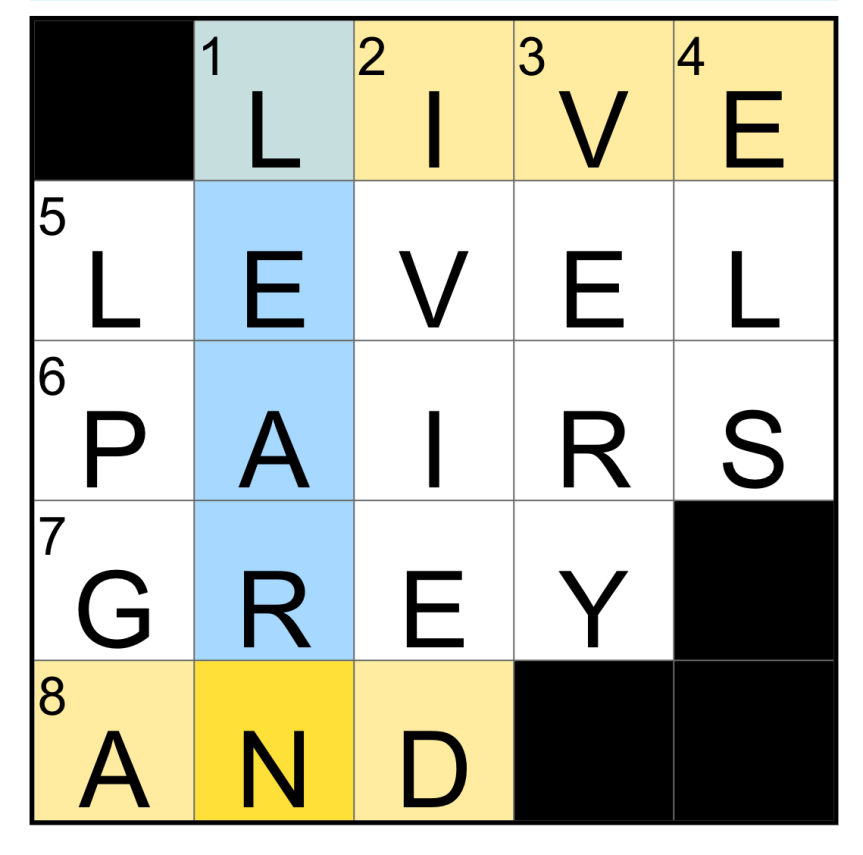
Need some help with today’s Mini Crossword? It’s one of those tricky ones, where three clues all depend on each other. Read on for all the answers.
Mini across clues and answers
1A clue: With 8-Across and 1-Down, grow from your own mistakes Answer: LIVE
5A clue: Video game section Answer: LEVEL
6A clue: Figure skating duos Answer: PAIRS
Advertisement
7A clue: ___ Poupon (mustard brand) Answer: GREY
8A clue: See 1-Across Answer: AND
The completed NYT Mini Crossword puzzle for July 31, 2026.
Mini down clues and answers
1D clue: See 1-Across Answer: LEARN
2D clue: Like the outfield walls of Wrigley Field Answer: IVIED
3D clue: Extremely Answer: VERY
Advertisement
4D clue: Letters capitaLized in this cLue Answer: ELS
5D clue: Sports org. for Nelly Korda Answer: LPGA
Get CNET’s top-rated VPN for privacy and usability
Advertisement
CNET editor Gael Fashingbauer Cooper, a journalist and pop-culture junkie, is co-author of “Whatever Happened to Pudding Pops? The Lost Toys, Tastes and Trends of the ’70s and ’80s,” as well as “The Totally Sweet ’90s.” She’s been a journalist since 1989, working at Mpls.St.Paul Magazine, Twin Cities Sidewalk, the Minneapolis Star Tribune, and NBC News Digital. She’s Gen X in birthdate, word and deed. If Marathon candy bars ever come back, she’ll be first in line.
See full bio
A bipartisan roster of former top-level FCC officials have submitted a filing to the Trump FCC blasting the agency’s ongoing violations of the First Amendment and urging it to terminate its phony “investigations” into ABC — including the unprecedented early ownership review of the company’s broadcast licenses.
In the filing, former FCC officials allied under the banner of the Protect Democracy Project outline how the early “ownership review” of ABC’s eight broadcast licenses is really just a pretense to punish ABC and Disney for broadcasting speech the Trump administration doesn’t like, the coalition calling it “a grave violation of both the Communications Act and the Constitution.”
A companion announcement features numerous FCC officials lining up to express their disgust at Brendan Carr and his often-illegal assault on the First Amendment.
“Chairman Carr seems to be laboring under the ill-conceived notion that broadcasters have only partial rights to free speech under the First Amendment,” said Mark Fowler, a Republican who served as Chairman of the FCC from 1981 to 1987. “Just because the FCC issues licenses doesn’t make it the speech police. With this senseless early renewal proceeding, Carr is demonstrating that he has completely lost touch not just with the role of the FCC, but also with his own job description.”
Advertisement
Earlier this year, Trump Republicans were upset that The View hosted Texas Democratic hopeful James Talarico. That triggered an entire fake “investigation” and a threatened revocation of ABC’s broadcast licenses by Carr, who falsely claimed the show had violated the FCC’s dated and irrelevant “equal time” rule requiring that TV stations give equal time to political candidates from both parties.
The FCC has been engaged in several other simultaneous phony investigations of ABC, hoping to punish the company for journalism and comedy critical of the president. The efforts are legally unsupportable assaults on free speech and the First Amendment designed not really to go to court, but to signal to media companies that there are costly legal headaches in store if they joke about, criticize, or simply just platform journalism that’s honest about Trump.
Several of the same former FCC officials participating in this coalition filed a petition with the FCC late last year, urging it to rescind the agency’s news distortion policy, a tool Chairman Carr has abused to try and trample free speech and journalistic freedom.
Advertisement
“This proceeding is an effort to punish ABC and Disney for poorly disguised political reasons,” said Rachelle Chong, a Republican who served as Commissioner of the FCC from 1994 to 1997. “The early review and the allegations are unusual in a typical FCC license review which suggests it is more about a desire to silence speech.”
While the effectiveness of these threats have waned in parallel with Trump’s sagging health and political power; they’ve still been embarrassingly effective at times. The View, for example, has shied away from hosting any politicians at all to avoid further agitating the kakistocracy. And ABC in late 2024 paid Trump $15 million to settle a baseless lawsuit the company would have likely won.
This latest filing was signed by other former FCC officials including Kathryn C. Brown, Rachelle B. Chong, Jerald N. Fritz, Rosemary Harold, William T. Lake, Ruth Milkman, Dennis R. Patrick, Peter Pitsch, Alfred C. Sikes, Gloria Tristani, Tom Wheeler, and Christopher J. Wright.
The filing and complaint are curiously lacking in statements from Democrats, who have been a feckless no show when it comes to competent media reform for the better part of a quarter century. At the same time, many Republicans who have proven solid on free speech issues during authoritarianism, have quietly supported the administration’s assault on the regulatory state and what’s left of competent corporate oversight, the impact of which will have very different, but very fatal, reverberations for decades.
Advertisement
A broad array of other Republican-leaning groups, including the Center for Individual Freedom, Citizens Against Government Waste, and Americans for Tax Reform, also filed complaints this week at the FCC over its ongoing harassment of ABC, showing just how ideologically alone Brendan Carr has become as he wages a sad and desperate war on the First Amendment at the behest of a bumbling tyrant.
Samsung has largely stuck with traditional designs for its Galaxy Buds lineup over the years, with the bean-shaped Galaxy Buds Live standing out as the one truly radical departure. But that appears to be changing, as Samsung experiments with designs its rivals have embraced for years. Just a day after leaked renders offered an early look at the clip-on Galaxy Buds On, a new leak has shed light on another upcoming pair of Galaxy Buds targeted at gym-goers and athletes.
A design built for movement
According to SamMobile, Samsung is working on another pair of buds internally codenamed “Buds Canal 5.” Leaked renders suggest that they may be aimed squarely at users who want earbuds for workouts and running rather than everyday listening.
SamMobile
The renders show flat ear hooks paired with an ear tip that sits in the ear canal, a layout previously seen in countless other fitness-focused earbuds already on the market. It’s not immediately clear if the tips form a full in-ear seal for stronger noise isolation or a half in-ear fit that trades isolation for a more open, breathable feel.
Either way, the hook itself is the highlighting feature. It’ll help keep the earbuds in place during physical activity, something no other earbuds in Samsung’s current lineup are really designed to do. The leak doesn’t reveal any details beyond the design, so it’s unclear whether Samsung plans to include features like active noise cancellation or a dust and water resistance rating.
Why a workout-specific design makes sense
Samsung’s current earbuds catalog sticks to one traditional stem-based design, be it with silicone tips, like the Galaxy Buds 4 Pro, or without them, like the regular Buds 4. With the upcoming Galaxy Buds On, Samsung will cater to buyers who prefer awareness over isolation, leaving a gap for those wanting a pair of earbuds that won’t fall out when they go for a jog or to the gym.
Advertisement
The ear hook design will fill that gap and help Samsung better compete with other brands in that segment. If you’ve been holding out for Samsung earbuds that won’t fall out mid-run, this is worth keeping an eye on. Just don’t expect an announcement anytime soon. Samsung hasn’t made anything official, and there’s still no word on specifications, pricing, or even what they’ll ultimately be called.
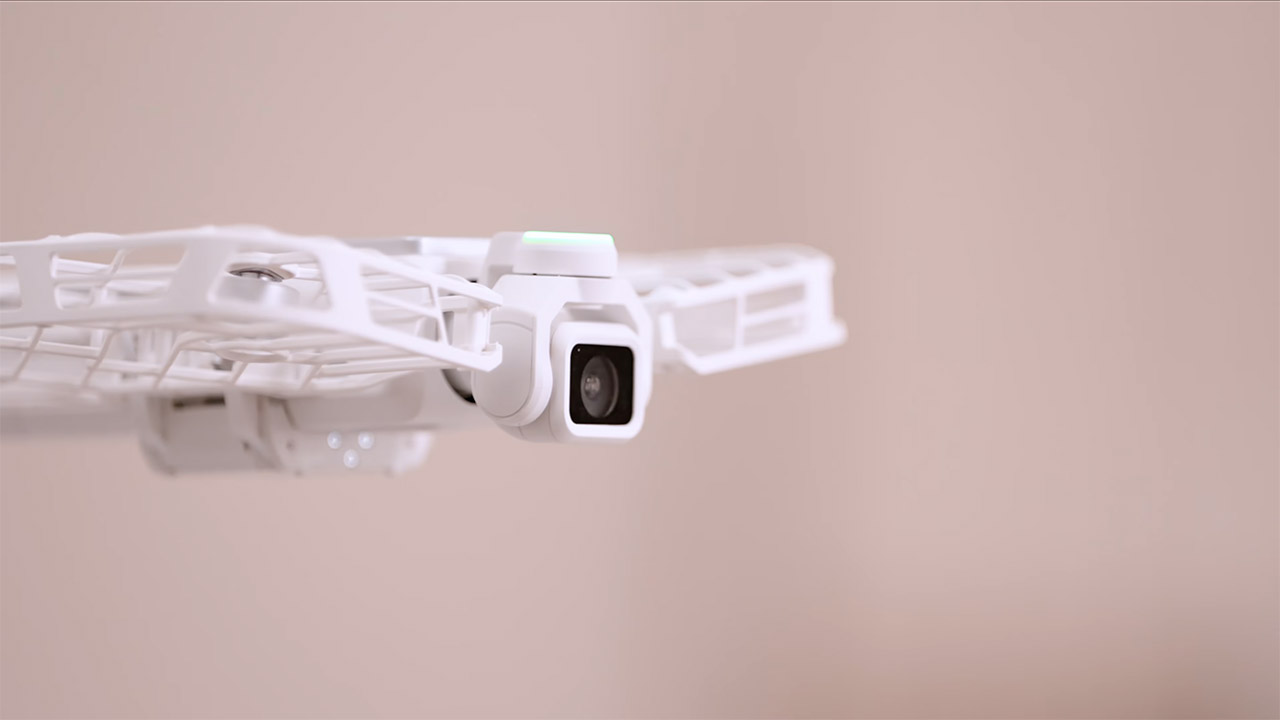
HOVERAir just revealed Versa, a camera that lives in two worlds at once. Hold it and you get a compact, three-axis stabilized shooter small enough for a pocket. Snap on a set of protected wings and the same module lifts off, follows you, and films from the air without a controller or any flying skill.
In the hand, it functions similarly to handheld gimbal cameras that content creators are already accustomed with. You have a built-in screen to preview and check your shots right there on the spot. The 3-axis gimbal keeps motion smooth whether you’re walking, sprinting, or simply turning, and it’s really useful. Their papers indicate that the image processor is well-tuned for recording strong dynamic range, which should result in clean colors in bright city streets, deep shadows, and even decent low-light performance after the sun begins to set. For the time being, the exact sensor size and resolution remain unknown.
Dual Leica Lenses, Pro-Grade Imaging System: Dual Leica lens design combines a 1″ main sensor with a pro-grade telephoto lens featuring a…
Cinematic 8K HDR Video: This vlog camera shoots in up to 8K30fps with Dolby Vision, capturing vivid color, high contrast, and lifelike detail for…
Pro Telephoto Zoom with Natural Bokeh: Get closer with up to 6× lossless zoom and a 12× zoom range. The telephoto lens delivers true optical…
The real magic happens when you transform it. You can quickly and easily attach the camera module to a flyable frame in one motion. The propellers are carefully stored in protective cages, as they have been with previous models. Once attached, the device transforms into a completely autonomous camera capable of taking off from your palm and flying away on its own. On-board systems take over, including an AI tracking engine that keeps your subject right in the middle of the frame. You get a variety of automated cinematic moves, like follow, orbit, zoom out, bird’s eye view, and many more that fans of their past cameras will recognize and enjoy.
There is no need for a remote or even a practice session because the system will just pick up the person in front of it and follow the chosen course on autopilot. When it’s finished, it gently flies back into your waiting hand. The module can then be removed and used as a standard handheld camera with no difficulty. However, one notable mode goes above and beyond. In 3D Worlds, the camera whizzes around the environment in a precise 360-degree circuit, taking a series of stills and stitching them together into a 3D model that you can flip around on your phone or computer to share. HOVERAir explains that because this technology relies on image stitching rather than fancy laser scanning, it is now best suited to interior or small outdoor locations.
AI even joins in on the fun when it comes to composition, as the system scans the environment, offers a better location for the camera, and then applies an intelligent crop after the shot is locked in. The goal is to get professional-level framing without the hassle. HOVERAir spent years honing the concept of a self-flying camera, beginning with the original Hover Camera, progressing to the X1 series, which included palm launches and auto-tracking, and the waterproof Aqua for aquatic activities. Versa just takes that and folds the handheld and airborne responsibilities into a single gadget. Earlier models stayed under the 250g mark, avoiding all those bothersome registration regulations in many countries; whether Versa will be able to follow suit will be determined once the exact specs are released.
Price and availability are currently unknown. The company is still gathering interest on its website and promises to provide more technical information soon. Until then, it’s clear to see what’s in store: a single little camera that you can hold in your hand for everyday videos or leave on the ground and film from the air as needed.
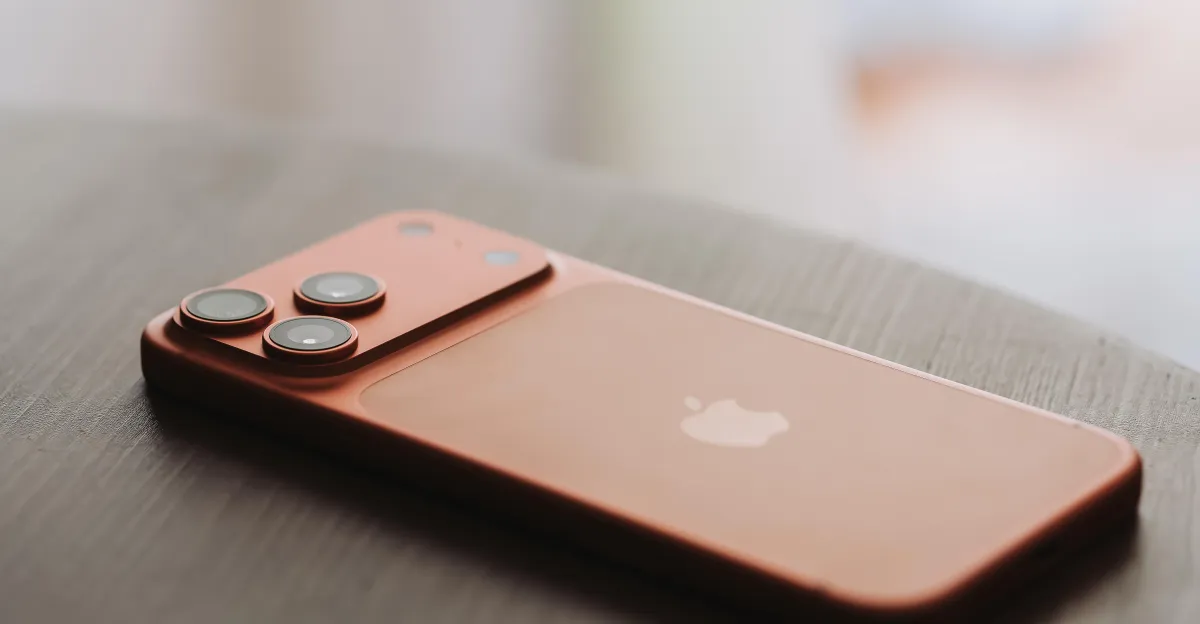
When I first heard about the new Apple Upgrade program, which lets you lease devices like iPhones and MacBooks for a monthly fee, I was offended. It amounts to paying a tithe to one of the world’s richest companies just to borrow devices for a couple years, rather than buying them outright. You could then choose to purchase the device, which is outdated at that point, or upgrade and keep paying that monthly fee. You may never own an iPhone again.
Then, as my mind wandered to the stack of old phones in my closet, it occurred to me: What’s so great about owning these things to begin with?
Apple, of course, would love to sell you a new iPhone for keeps. Its most advanced model, the iPhone 17 Pro Max, will set you back $1,200, a price that’s expected to rise soon due to the global shortage of storage and memory chips. You can sign up for an installment plan — most carriers offer these, as does Apple through its credit card — and pay it off in two to three years. Or you could lease the thing for $35 a month under the new Apple Upgrade program. You can pick a 12-, 24-, or 36-month lease, depending on the device, and you don’t get to keep the phone at the end of the term unless you decide to buy it by paying off the remainder of the retail price in one lump sum. (This is similar to the controversial rent-to-own model you find at places like Rent-a-Center.)
For the financial side of the new program, Apple has partnered with none other than Klarna, the “buy now, pay later” giant. When you go to lease a new device, Klarna runs a soft credit check and decides if you’ll be able to cover the monthly payments. When I asked Klarna, the company did not tell me where it draws the line here, but it’s worth noting that critics have accused Klarna of a lack of underwriting and of lending to people with subprime credit scores. If you miss three consecutive payments, Klarna will terminate the lease agreement and possibly send a collection agency after you.
Advertisement
“How do I know people aren’t getting a good deal here? If they were, Apple wouldn’t be offering it.”
— Aaron Perzanowski, University of Michigan law professor
While there was some speculation last week that Apple might lock people out of leased devices if they failed to pay their bill, Apple confirmed to me that it will not put limitations on device functionality due to missed payments or default. If you want to cancel the lease, you face an early termination fee. If you choose to keep paying the monthly fee, you can keep upgrading with new lease agreements for new devices every few years, existing in this cycle indefinitely.
If you’re someone who likes to get a new iPhone or MacBook on a regular basis, Apple’s new leasing option might make a lot of sense. The monthly fee to lease these devices is cheaper than the payment plan to buy them, and electronics are depreciating assets. If you own one, you can sell it or trade it in for credit toward a new device, but they’re all worth less and less as time goes on. Furthermore, Apple eventually stops supporting old devices through software updates, so they might just stop working at a certain point. Put another way: You may own the phone, but you’re still just licensing the software that makes it work.
Renting an iPhone does sound bleak, though. The United States is suffering through an affordability crisis as prices across the board rise in the face of new tariffs and new wars. Meanwhile, AI is promising to transform the way we work if it doesn’t simply steal our jobs first, adding further insecurity, and the data center boom is making electronics more expensive. This era of economic anxiety is pushing people to use “buy now, pay later” services like Klarna and Affirm to pay for groceries or a tank of gas. (These companies faced scrutiny by state attorneys general a few years ago for operating like predatory lenders.) And now Apple, surely suspecting that many people can’t afford to pay full price for new phones, is inviting us to rent our devices at a monthly fee that undercuts the path to ownership.
Apple could have just called this the Apple Rental program, by the way. Lease sounds nicer, though, like something you do with a car.
“It is funny that they frame it as not a loan but as a lease,” Louis Hyman, a history professor at Johns Hopkins University and author of Debtor Nation: The History of America in Red Ink. He added that “leasing” has class implications, suggesting that you’re either someone who needs to have the newest things but can’t afford them, or that you’re so wealthy, you’re indifferent to money.
Advertisement
Suffice it to say, the bulk of people who will soon be leasing their iPhones are probably not the ones who are indifferent to money.
Apple adopts its final form
The new Apple Upgrade program is the company’s latest customer acquisition strategy. As the rising price of hardware has made cheaper Android devices or the refurbished market more attractive, Apple is offering upgrade enthusiasts and budget-minded users, including people who simply couldn’t afford to buy Apple products in the past, a deal to join the company’s ecosystem. After all, keeping people supplied with new iPhones and MacBooks also helps keep them subscribed to Apple services, like iCloud, which now makes the company more money than Mac, iPad, Apple Watch, and other accessories combined.
If Apple’s financial future hinges on getting more and more people to subscribe to these services, it’s only natural that the company would want to lower the barrier to entry. So Apple is betting that by letting people use but not own its products, it will extract more profit in the long run through lease payments and subscription fees. After all, it wasn’t that long ago that it seemed like nobody was interested in upgrading their iPhone, since the new phones looked so much like the old ones. Now, Apple is just trying to get everyone on autopay, effectively subscribing so that they get the latest devices when they come out.
Advertisement
There’s not necessarily any harm in giving people a cheaper way to access expensive but useful products. For more than a century, installment plans have enabled people to buy modern conveniences like sewing machines, radios, and eventually, televisions. Leasing is a popular way to keep yourself in a new car, sometimes with free maintenance. Meanwhile, cellular carriers have a long history of helping their customers buy phones. Nearly two decades ago, you could get an iPhone 3G for $199, thanks to subsidies from AT&T, which the company recouped in service fees over the course of your contract. Sprint and T-Mobile have even offered unlimited upgrades through leasing programs of their own in years past.
Apple previously worked with Citizen One Bank to offer loans to customers who wanted the option to upgrade their iPhones every year. The payments were higher and they included a fee for AppleCare, but every year, you could trade in your current phone for a new one. If you didn’t want to upgrade, you could simply keep paying the installments, and you’d eventually own the phone. Most carriers now give you the option to set up a payment plan to purchase a new device that simply amounts to the retail price of the gadget divided by the number of months you’ll need to pay it off, usually 24 or 36, with zero interest. That makes it easier to get your hands on an iPhone Pro Max, and if you pay it off in full, it’s yours for life — or until Apple convinces you to buy another new iPhone.
The difference between paying those monthly installments and paying a monthly lease agreement, of course, is that the former puts you on the path to ownership. The latter simply puts you on a path to make a decision: Do you want to buy the thing and recoup some of the money you’ve already spent, or do you want to keep making payments?
“What ownership ideally gets us is independence,” Perzanowski said. “It gives us autonomy. It gives us the ability to function in the world without relying on third parties.” He went on to explain how moving from owning a product to leasing it means you’re stuck with that third party. “I’m tied to that manufacturer in a way where they get to exert a fair amount of control over my behavior,” Perzanowski said. “Historically, we’ve been primed, especially in the United States, to resist and reject that kind of control.”
Advertisement
One great thing about owning an iPhone or a MacBook outright is that if you lose your job to AI, you don’t have to come up with a monthly payment in order to keep using those devices to apply for new jobs. Another great thing about ownership is that should you need a couple hundred bucks, you can sell that old phone or laptop and pocket the cash. Maybe the best thing about owning these devices is that you can repair them and keep using them for many years — or at least until Apple stops supporting them.
That doesn’t mean leasing never makes sense. If your digital life revolves around always having the newest devices and you upgrade every year or two no matter what, you might actually save money by doing so through Apple’s leasing program. If you need an iPhone or MacBook right away but can’t afford to pay full price or even cover the monthly payments on an installment plan, a one-year lease could be a good solution.
Invariably, when you lease anything, you’re entering into a contract, one that comes with consequences if you break it. Leasing an iPhone means you’re tied not only to Apple but also to Klarna for the next 12 to 36 months. If something goes wrong — you lose your job, you lose or break your phone, or you simply don’t want the device any more — you’re subject to the terms and conditions of these big tech companies. If you keep renewing your lease, you may very well end up spending more on a phone than you would have if you’d bought it outright. That would be fine with Apple, of course. It has shareholders to please.
Correction, July 30, 1 pm: This story originally misstated how the previous Apple upgrade loan program worked; it allowed phone trade-ins every year, not every two years.


































![How far can I walk from my house surviving only from money I find on the ground? [PART 1]](https://wordupnews.com/wp-content/uploads/2026/09/1788864064_maxresdefault-80x80.jpg)

































You must be logged in to post a comment Login