The site of the Chornobyl Nuclear Power Plant (ChNPP) remains a unique location, as what’s left of the No. 4 reactor is the only place in the world where you can find significant amounts of what is called corium. An amalgamation of nuclear fuel, fuel rod cladding and whatever materials like concrete that the molten mass came into contact with, Soviet scientists initially struggled to make sense of this material, leading them to even have it shot at to get samples.
In this video documentary by [That Chernobyl Guy] these struggles by scientists both in and outside the USSR to comprehend this wholly new material are detailed. Much like trinitite – created by a US nuclear weapons test – these are amalgamations of material combined under extreme conditions. In the case of the ChNPP accident, the botched turbine spin-up test and disabling of all safeties by the operators allowed the bottom core chain reaction to run unconstrained, producing the massive steam explosion that flipped the biosafety lid of the RBMK reactor, while also fully melting the core material that then melted through the concrete below the reactor.
Although this Elephant’s Foot is only a tiny fraction of the total mass of corium inside the No. 4 reactor, it got rather infamous for supposedly being highly radioactive and lethal. In reality it’s one of the least dangerous parts of the exposed corium, and repeated sampling attempts along with internal degradation due to radioactive decay and weathering before the NSC shelter was installed have led to it mostly turning into slightly radioactive, rusty-looking dust at this point.
Advertisement
Also covered in the video is how the corium in the destroyed reactor is likely to be retrieved for final disposal, with robots cutting into the sides of the reactor building rather than trying to navigate destroyed corridors and staircases. This way it might be possible to remove most of the material without the issues that stymied Soviet engineers in the 1980s during their sampling attempts.
It isn’t new to use AI when planning and booking a vacation — people have been using AI tools like ChatGPT and Copilot, and on vacation sites like Booking.com and TripAdvisor, for years now. But if you’re looking to plan a Disney vacation, the entertainment giant is now about to launch its own AI engine running behind its booking site and app.
The tool, which will be launching in beta soon, will allow you to ask all your booking questions conversationally — for instance, “My children really like The Little Mermaid, want to spend time in the pool and have easy transport to the Magic Kingdom park, which hotel should we stay at?” — and it’ll provide suggestions that best suit your needs.
You can also ask the Disney AI chatbot to compare a few resorts across features like location and pricing to help you decide where to stay. Much like Google’s AI Overviews in search, Disney will provide AI-generated summaries on information like rates and availability when you search. The chatbot will direct you to booking links when it finishes making recommendations.
Google’s AI offering, Gemini, will be the foundation for the Disney chatbot, but it will only scrape information from official Disney data rather than the broader internet.
Advertisement
“We’re partnering with Google Cloud on the AI portion of this, but we are using Disney sources and data underpinning that,” a Disney representative said during a media briefing.
Disney said AI summaries and bookings won’t extend to its Lightning Lane service or dining reservations at launch, and it will only be available for Walt Disney World. The beta experience will be provided to “randomly selected guests” in Canada and the US, and Disney will use their feedback to improve the AI tool before a wider phased launch.
Disney is also continuing to test its AI summaries with cast members to ensure they’re pulling accurate information from official Disney sources that will save guests time.
Corinne Reichert
Senior Editor
Advertisement
Corinne Reichert (she/her) grew up in Sydney, Australia and moved to California in 2019. She holds degrees in law and communications, and currently writes news, analysis and features for CNET across the topics of electric vehicles, broadband networks, mobile devices, big tech, artificial intelligence, home technology and entertainment. In her spare time, she watches soccer games and F1 races, and goes to Disneyland as often as possible.
See full bio
I have seen Rush 19 times and own every album in multiple pressings, which either qualifies me as a fan or suggests that someone should have intervened years ago. Probably both. But I have never placed the band’s self titled 1974 debut anywhere near the top of their catalog.
“Finding My Way,” “What You’re Doing,” and especially “Working Man” absolutely earned their places in Rush history, but Rush was the sound of three young Toronto musicians still figuring out exactly what they wanted to become. They were already very good at being loud, but they were not yet Rush in the form that would dominate the next decade.
More than 52 years later, Mobile Fidelity Sound Lab has returned to the album for a numbered 180 gram 45 RPM 2LP edition priced at $59.99. It is the first 45 RPM vinyl release of the album, and after comparing it with the other copies in my collection, I am comfortable saying something I did not necessarily expect going in: this version wipes the floor with them.
Not because Mobile Fidelity has somehow transformed Rush into Moving Pictures. The songs are still the songs, John Rutsey is still behind the drum kit, and nobody secretly discovered a missing synthesizer track or 17 minute science fiction suite in the vault. What MoFi has done is give this rather lean recording something my other pressings have always lacked which was actual tonal weight.
Advertisement
Related Reading:
Before The Professor
Rush performing in 2004 (left to right): Alex Lifeson, Geddy Lee, Neil Peart
The timing could hardly be more appropriate. Geddy Lee and Alex Lifeson are back on the road in 2026 with the Fifty Something tour, accompanied by German drummer Anika Nilles, who has accepted the rather unenviable job of sitting behind the kit where Neil Peart once established one of rock music’s most intimidating standards.
Peart, who died on January 7, 2020 at the age of 67, would have turned 74 on September 12, 2026. But as every Rush fan already knows, and anyone spending $60 on this particular record really ought to know, the Professor does not appear anywhere on the band’s debut. That chair belonged to John Rutsey.
Rush officially released Rush in March 1974 on its own Moon Records label. Only about 3,500 copies of the initial Canadian pressing were manufactured before “Working Man” found an enthusiastic supporter in WMMS Cleveland DJ Donna Halper. Mercury subsequently picked up the album for wider distribution, and Rush suddenly had something resembling an actual career.
2026 Rush Fifty Something Tour
The recording itself was hardly the product of unlimited studio budgets. Early sessions were produced by Dave Stock at Eastern Sound in Toronto, where the band booked inexpensive late night studio time because they were paying for everything themselves. Unhappy with those initial results, Lee, Lifeson, and Rutsey moved to Toronto Sound Studios and produced the subsequent sessions themselves. Terry Brown handled the remix, while Gilbert Kong mastered the original album at Masterdisk in New York.
Nobody should approach Rush expecting the sonic polish or studio architecture that would define the band later in the decade. They were barely able to afford the room, never mind construct the kind of widescreen progressive rock spectacle that would arrive a few albums later.
Advertisement
Before Rush Became Rush
The musical transformation that occurred after this album remains difficult to overstate. The debut is rooted heavily in blues based hard rock, with plenty of Led Zeppelin and Cream in its bloodstream, and only occasional hints of the band Rush would become.
Fly By Night became the hinge. Rutsey left the band in July 1974, and Peart arrived just before Rush’s first U.S. tour. Along with a completely different approach to drumming, he assumed primary lyric writing duties and pushed Lee and Lifeson toward something more literary, ambitious, and structurally adventurous.
Advertisement. Scroll to continue reading.
From there cameCaress of Steel, 2112, A Farewell to Kings, Hemispheres, Permanent Waves, Moving Pictures, Signals, Grace Under Pressure, and Power Windows. It was an extraordinary evolution from bar band hard rock into something almost nobody else could duplicate, which leaves the debut in a slightly strange position. It is historically indispensable without being remotely indispensable musically.
Advertisement
“Working Man” obviously transcends the album. Its heavy, lumbering riff and working class directness made it the song that broke Rush in the United States, and it remained part of the band’s live vocabulary decades later. “Finding My Way” has the swagger and guitar attack of a young band that already knew it could play, while “What You’re Doing” locks Lee, Lifeson, and Rutsey into one of the record’s most convincing grooves.
Elsewhere, things become less essential. “Need Some Love” and “Take a Friend” are perfectly competent early 1970s hard rock songs, but nobody was sitting through “La Villa Strangiato” in 1978 thinking, “This is nice, but when are they going to play ‘Need Some Love’?”
“In the Mood” is catchy, direct, and unmistakably from a band whose lyrical universe had not yet expanded to Cygnus X-1. “Here Again” slows everything down and gives Lifeson considerably more room to stretch out, while “Before and After” may be the most revealing deep cut because its quieter opening and gradual transition into heavier material provide an early glimpse of the dynamic contrasts Rush would soon explore much more aggressively.
The Mobile Fidelity Edition
The technical details matter because this is not an AAA release. Mobile Fidelity says its numbered 180 gram 45 RPM 2LP edition was sourced from the original analog master tapes and mastered by Krieg Wunderlich using the following chain:
Advertisement
1/4 inch, 15 IPS Dolby A analog master → DSD 256 → analog console → lathe
The records are pressed at Fidelity Record Pressing and housed in a Stoughton gatefold jacket. This is also the first time Rush has been issued as a 45 RPM vinyl release.
Anyone still fighting the Great MoFi Digital War can adjust their blood pressure accordingly. There is a DSD 256 stage, and there is also an exceptionally good sounding record sitting on my turntable. The latter strikes me as the more useful thing to discuss.
The physical presentation is superb. Both records in my review sample were pristine, perfectly centered, and exceptionally quiet. The jacket feels substantial, the inner sleeves are high quality, and the entire package feels like a premium release rather than a standard record with an audiophile sticker attached to the shrink wrap.
Advertisement
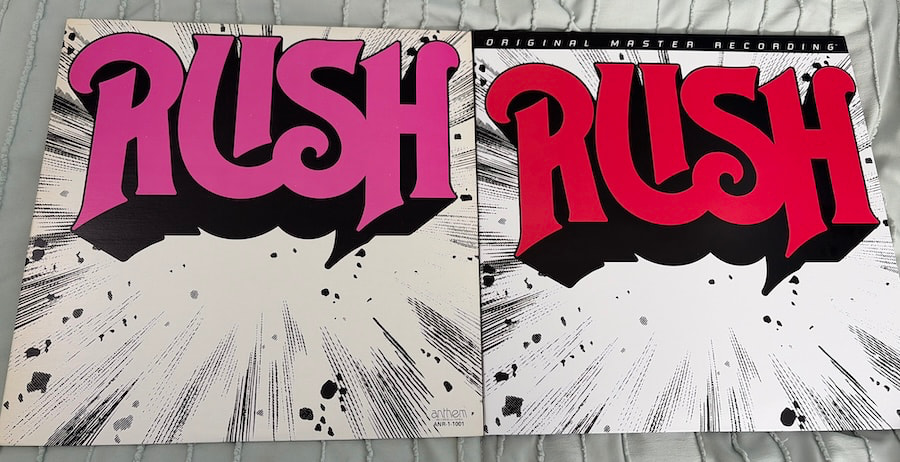
Back Cover: Original vs MoFi Editions
How Does It Sound?
My biggest complaint with every other copy of Rush that I own has always been the same: it sounds thin. Not unlistenable and not painfully bright, but lacking the tonal density and physical impact that three musicians playing this kind of music should possess.
The MoFi changes that immediately. Geddy Lee’s bass has considerably more mass and definition, giving the entire album a stronger foundation. Instead of merely following the guitar, the bass becomes an equal participant in the mix and gives songs like “Finding My Way” and “What You’re Doing” far greater physical momentum.
Lee’s vocals also benefit. There is still plenty of youthful Gary Weinrib in the upper registers, and Mobile Fidelity has not performed an exorcism, but the presentation is less strident than on my other copies. His voice has more body through the middle and does not leap forward with quite the same wiry edge, which makes the album considerably easier to listen to at realistic levels.
Advertisement. Scroll to continue reading.
Advertisement
The percussion also gains substantially more heft. Rutsey’s kick drum and toms carry more weight, and the rhythmic foundation feels less lightweight without becoming artificially bloated. That is important because Rutsey was a perfectly capable rock drummer. History has simply handed him the cruelest possible comparison.
Rutsey And The Man Who Came Next
Listening to this MoFi edition actually increased my appreciation for John Rutsey. He plays hard, stays locked to Lee, and gives Lifeson enough space to move around without turning every fill into an announcement. His drumming suits the directness of the material, and there are moments where the three musicians sound remarkably tight considering how quickly much of the album was recorded.
And then you remember who joined the band next.
That comparison is unavoidable, but it is also useful because the difference was not merely one of technical ability. Neil Peart changed the motion of Rush. Rutsey drives these songs like a very good hard rock drummer, while Peart approached the material with greater power, precision, complexity, and forward momentum.
Advertisement
When Rush revisited early material with Peart behind the kit, the music acquired a completely different center of gravity. Rutsey played the songs very well; Peart would eventually reshape what people thought a Rush song could even be.
That is not a criticism of Rutsey. There might not have been five drummers on the planet who would have enjoyed being measured against the Professor during his prime.
And What About Lerxst?
Alex Lifeson, Lerxst for those keeping score at home, benefits from the improved clarity, but his guitar does not suddenly dominate the presentation. That surprised me because on this pressing, Lifeson often feels positioned slightly behind Lee’s vocal and bass guitar, particularly through the middle of the soundstage.
His guitar remains extremely clean and easy to follow, with better texture around distorted chords and more definition when he moves into lead work, but the mastering does not push him aggressively forward. The effect works because this is not an album built around enormous spatial depth or studio trickery. Giving Lee’s bass additional authority while preserving the guitar’s separation makes the trio sound more substantial without pretending the source recording is something it was never meant to be.
Advertisement
Front Cover: Original vs MoFi Editions
Worth The Money?
Sixty dollars for a 52 year old album that I already own more than once is not a rational purchasing decision. Neither is seeing the same band 19 times, so we passed rational several exits ago somewhere outside of the 416.
The more relevant question is whether Mobile Fidelity has produced a version of Rush that offers a meaningful improvement over more ordinary pressings, and the answer is yes. The fuller bass response, less aggressive presentation of Lee’s vocals, stronger percussion, cleaner instrumental separation, silent surfaces, excellent centering, and first rate packaging combine to make this easily the most enjoyable version of the album in my collection.
That does not suddenly elevate the debut into the upper tier of Rush albums for me. Musically, it still sits near the bottom because the gulf between this record and what Lee, Lifeson, and Peart would accomplish from 2112 through Power Windows is enormous.
That is also part of what makes listening to the debut so fascinating. You are not hearing a legendary progressive rock band operating at full power; you are hearing three young musicians standing at the edge of becoming one.
Advertisement
Advertisement. Scroll to continue reading.
For the first time on one of my vinyl copies, they finally sound as heavy as they probably did in the room.
Morefine MNAS-X1 stacks four hard drives directly above the processor to escape heat
The MNAS-X1 packs an 800W power supply into a 15.6L chassis
Four spring-latch drive bays let users swap storage without any tools
Morefine has released an AI workstation PC that stacks its storage drives on top of the chassis instead of beside the processor.
The MNAS-X1 arrives with a four-bay hard drive tray fixed directly above the motherboard rather than tucked beside it.
This unusual layout follows a fairly straightforward principle, since warm air naturally rises while cool air tends to settle lower, keeping the drives clear of the hottest components below them.
Latest Videos FromTechRadar
Advertisement
A candybar body built for drive swaps
The chassis measures 218mm by 193mm by 372mm, giving a 15.6L footprint wrapped in a white aluminum alloy shell over a steel frame.
A glossy purple panel breaks up the front, and vents line the left, right, rear, and top surfaces for airflow.
Each of the four 3.5-inch bays has a spring latch release, letting drives slide out without tools once the side button is pressed.
Connectivity runs to one USB4 port, several USB-A ports, dual 10G RJ45 network jacks, an SD card slot, and a single HDMI 2.0 output for 4K at 60Hz.
Sign up to the TechRadar Pro newsletter to get all the top news, opinion, features and guidance your business needs to succeed!
Inside sits an AMD Ryzen 7 Pro 8845HS chip, an 8-core, 16-thread Zen4 chip with a 3.8GHz base clock and a 5.1GHz boost, paired with a Radeon 780M graphics core rated at 2700MHz.
Advertisement
An onboard XDNA NPU adds 16 TOPS on its own and 38 TOPS when the CPU, GPU, and NPU work together.
Two DDR5 SO-DIMM slots hold up to 96GB, three M.2 2280 slots take PCIe 4.0 x4 SSDs at 4TB each, and the four SATA bays add up to 30TB apiece for a combined ceiling near 132TB.
Advertisement
Room for a full-size GPU and real benchmark numbers
The three-slot PCIe 4.0 x16 opening accepts cards up to 330mm long and 66mm thick, backed by an 800W CRPS power supply built to the 2.0 specification with an 80 PLUS Platinum rating.
Fitted with 64GB of RAM, a 500GB M.2 SSD, and an RTX 5070 with 12GB of VRAM running in x8 mode, a review unit posted a Cinebench R23 score of 16271 pts multi-core and 1794 pts single-core, plus a PCMark 10 total of 9966.
Local language model testing through ONNX Runtime returned scores of 3511, 3714, 3163, and 3408 across the Phi 3.5, Mistral, Llama 3.1, and Llama 2 benchmarks, respectively.
That Cinebench multi-core figure lands in roughly the same range as an eight-core desktop chip like the Ryzen 7 5800X, while the PCMark total edges past what most mid-range gaming laptops score.
Advertisement
During a 21-minute full-load stress run, CPU power held at 54W with an average die temperature of 86℃, while the GPU drew 250W and averaged 80℃.
Morefine has not confirmed pricing for the MNAS-X1, and the unit is currently listed for inquiry only through its regional distributor.
Stacking the storage above rather than beside the board is a small design choice, but it turns a routine barebones NAS build into something closer to a hybrid server.
Whether that trade-off proves practical will likely come down to how much heat a fully loaded GPU pushes upward once the drive bay sits directly in its path.
Ukraine’s navy has claimed victory over a Russian drone boat in the first recorded seaborne drone battle
The exchange took place in the Black Sea
Russia has yet to confirm that its craft was sunk by the Ukrainian Sargan-3000 closed
An unmanned Ukrainian naval vessel has destroyed a Russian drone boat in what is thought to be the first military exchange of its kind. The uncrewed vessels encountered each other in the Black Sea, with the Ukrainian Sargan-3000 destroying the enemy craft using its Protector RWS turret.
While described as a first, the claim has not yet been independently verified. Ukraine has not confirmed the date, time, or location of the engagement. In addition, Russia has so far declined to confirm whether the exchange took place, or that it lost a vessel.
The news, however, follows an increase in seaborne drone activity by Ukraine, and comes just a few months after launching the Sargan-3000 into service.
Latest Videos FromTechRadar
Advertisement
What is a Sargan-3000?
Introduced into active service in April 2026, the Sargan-3000 was described as a “multi-purpose platform” which suggests the craft can be easily modified to house weapons, sensors. The term typically indicates a design that can house mission-specific modules, and the Sargan-3000 seems to have been involved in a wide variety of missions since its commissioning.
Ukraine has expanded maritime drone operations within the Black Sea and the Sea of Azov during 2026, with 105 Russian vessels known to have been attacked in the Sea of Azov. The Sargan-3000 has been described as “highly maneuverable”, but its physical characteristics are currently unknown.
We do know, however, that it can carry a Protector RWS, itself a modular system capable of mounting various weapons systems: machine guns, grenade launchers, and anti-tank missiles.
A remote-controlled 12.7mm machine gun turret (possibly an M2 Browning, or an NSV) was used in the encounter with the Russian vessel.
Sign up to the TechRadar Pro newsletter to get all the top news, opinion, features and guidance your business needs to succeed!
Advertisement
Drone engagements
Ukraine has other unmanned sea vessels at its disposal. While the Sargan-3000 is under the Ukrainian navy, a craft called Sea Baby is used by the Security Service of Ukraine. This 6 meter long boat is believed to have a 1,000 km range, and can carry a payload of around 850 kg. It is believed to be used primarily against moored (anchored) targets, which suggests it can be deployed pretty quickly.
The Magura V5, meanwhile, is under the Defence Intelligence group. This is a shorter craft with a lighter payload and cannot manage the same range as the Sea Baby, but has a similar role.
In the most recent incident, we’re told that the Russian vessel was identified by Ukraine’s Defense Intelligence Directorate, clearing the Ukrainian Navy unmanned craft to engage with the enemy. An earlier incident, in July 2026, featured a similar Ukrainian vessel remotely sink a Russian craft in the Black Sea.
Taking place off Gelendzhik, the Russian border patrol ship PSKR Izumrud was a casualty of an overall strategy that has seen Ukraine force Russia’s Black Sea Fleet into retreating from Crimea.
Sunlight from the Deep: A team of Chinese researchers has developed a novel approach to solar power generation in environments where sunlight is scarce. Perovskite solar cells can be treated to operate underwater, with surprisingly good results in terms of reliability and endurance.
A newly published study describes a “robust” strategy for reliably generating power underwater. Several Chinese researchers developed a new type of submerged perovskite solar cell that can operate a few meters below sea level and harvest solar energy for years while retaining high efficiency.
In recent years, perovskite-based cells have essentially hijacked research efforts focused on new solar power breakthroughs. First discovered in 1839 beneath the Ural Mountains in Russia, perovskite is a highly flexible class of compounds that is used in ultrasound machines, memory chips, solar cells, and more.
Moisture can have a destructive impact on perovskite cells, but the Chinese researchers have apparently found a way to make their underwater setup run reliably and efficiently for years. The team “tweaked” the chemical mixture of the perovskite cells, producing a material that can both absorb the dim wavelengths reaching the seafloor and withstand degradation in seawater.
Advertisement
The tweaked perovskite cells are also covered by a water-repelling layer, which should help keep moisture-related degradation in check. By using larger crystal configurations, the perovskite compound can also limit the material’s breakdown and improve electricity production.
The researchers first tested the new material at a simulated ocean depth of 10 meters, where it was able to convert around 35% of the dim light into electricity. Meanwhile, silicon-based solar panels can usually convert around 20% of surface sunlight into electricity. According to the in-lab tests, the new panels could retain most of their original efficiency for more than five years.
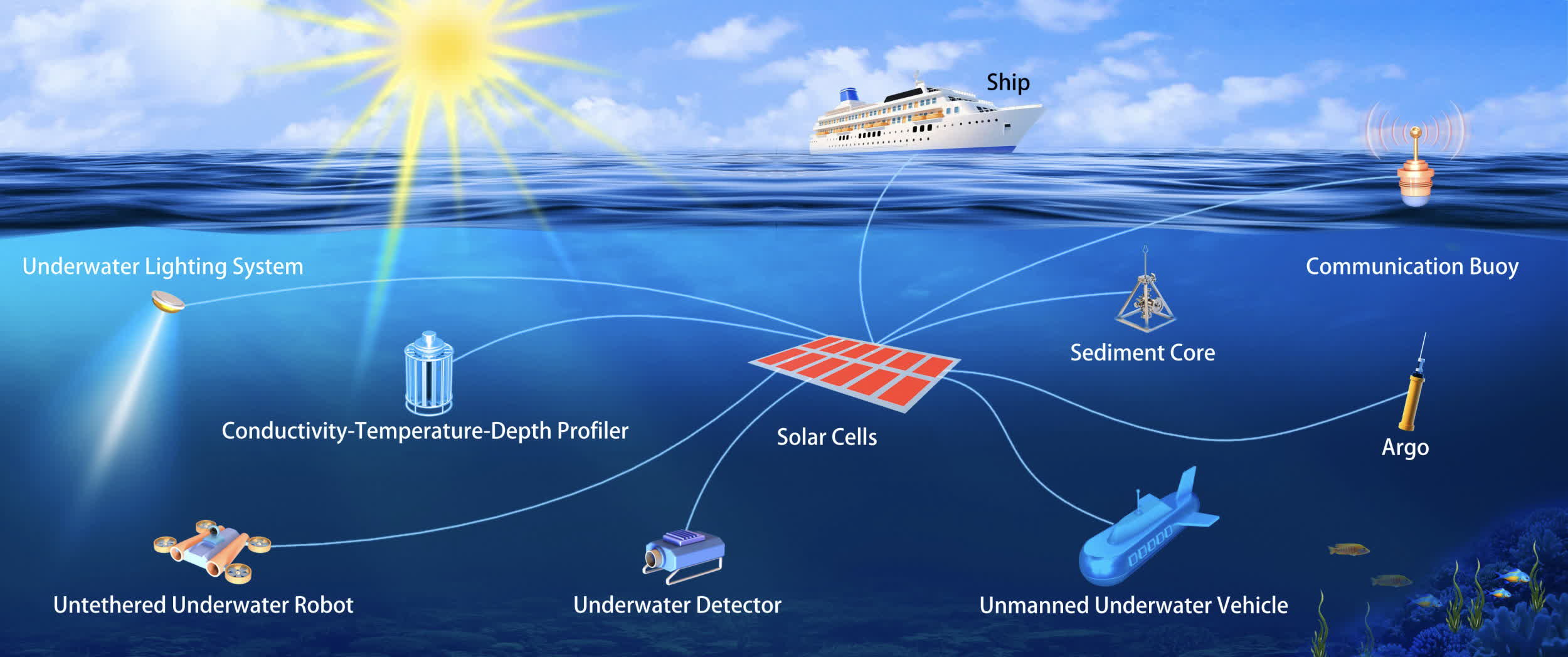
After the lab tests, the team brought the new perovskite panel to the South China Sea. The cells were mounted on a small submarine device designed to reach and maintain a specific depth. The device also included some coin-cell batteries to test the panel’s ability to actually generate electricity.
The researchers tested the perovskite compound at two meters, six meters, and 10 meters below sea level. They discovered that power generation fluctuated significantly at around two meters but became more consistent at greater depths. At 10 meters, the panel was able to generate less than a quarter of the electricity it generated eight meters above.
Advertisement
Despite the harsh environment and dim light conditions, the researchers think their new perovskite cells could one day solve the “challenge” of harvesting solar energy underwater. The study describes some hypothetical scenarios where this kind of power generation could be useful, including autonomous marine power systems and submerged Internet of Things infrastructure.
CenterPoint Energy disclosed a breach compromising some customers’ personal information after an attacker leaked data allegedly stolen from the utility company.
An investigation started after the company discovered an online post from a threat actor claiming to have stolen 7.49 million records.
CenterPoint Energy is a Houston-based public utility company that provides electric and natural gas services and operates power generation facilities.
It serves approximately 7 million metered customers across Indiana, Minnesota, Ohio, and Texas, and employs roughly 8,300 people, generating over $9.3 billion in annual revenue.
Advertisement
Earlier this month, a threat actor using the alias “4d722e4d656f77” told BleepingComputer they stole from CenterPoint Energy 7.49 million customer records that include names, phone numbers, service and billing addresses, account numbers, billing amounts, and partial Social Security numbers (SSNs).
The threat actor leaked the data, claiming that the company ignored their messages and treated them as a joke.
According to the intruder, they exfiltrated the data by iterating through millions of IDs on CenterPoint’s public API, which lacked rate limiting, web application firewall (WAF) protection, and other security measures against automated access.
In a filing with the U.S. Securities and Exchange Commission (SEC), CenterPoint Energy confirms that data was stolen, but does not name the threat actor, the number of affected customers, or the types of compromised data.
Advertisement
“While the investigation remains ongoing, the Company has determined that an unauthorized third party obtained personal information relating to a portion of the Company’s customers through one of the Company’s external-facing systems,” reads the SEC filing.
“The Company is continuing to work with third-party experts to determine the scope of customers and personal information affected by the incident and intends to notify affected customers and regulatory authorities as required by applicable law.”
CenterPoint Energy said its electric and gas services were not impacted by the cyberattack, and does not believe the incident will materially affect its business or financial condition.
CenterPoint has activated its incident-response procedures, hired third-party cybersecurity experts, strengthened protections on its systems, and reported the incident to law enforcement and regulators.
Advertisement
Multiple lawsuits proposing class actions against the firm have already been filed in federal courts by law firms representing potentially impacted customers, alleging the data breach occurred between August 17 and September 1.
Join Mikko Hyppönen and security leaders from the NFL, CHANEL, and Atlassian for a two-hour digital summit on what AI-speed attacks change, what defenders should stop doing, and how to validate, decide, fix, and re-validate at machine speed.
Two years after a single developer launched a fake card shop on Steam, TCG Card Shop Simulator has exited Early Access, with a 1.0 build now available for PC, Xbox, PlayStation 5, Switch, and Switch 2. Ding Shen Sia of OPNeon Games began the project after burning out on mobile work in 2023, expecting that Steam Trading Cards would be enough of an incentive to ship. The store sold 100,000 copies in three days and eventually surpassed four million players.
You’re starting with a basic cash register and shelf. Boxes of Tetramon booster packs continue to arrive, and you grab them, setting a daily price on your phone, and clients begin to come in. Scanning the packs and throwing out change provides a pleasant click that keeps the game going. Some people simply grab two packs and leave, while others try to undercut you for a discount, and then there are those who stroll in with a stinky cloud over their heads, so you must clean up after them or they will frighten away all the other customers.
One system, three play modes: TV, Tabletop, and Handheld
Larger, vivid, 7.9” LCD touch screen with support for HDR and up to 120 fps
Profits continue to flow in, allowing you to expand with additional floor space, extra shelves, a few play tables, some fun plush toys to sell, sleeves and dice, and, eventually, a staff to help you manage all the chaos as you crack open those boxes yourself. As your shop expands, you’ll notice more customer comments, card exchanges, new slabs and scanners, and, of course, tournaments. Your sellable products have more than doubled, increasing from 77 to 111, and you now have 43 different types of furniture and decorations, not to mention all of the community posters on the walls (273 decorations and 55 contest posters).
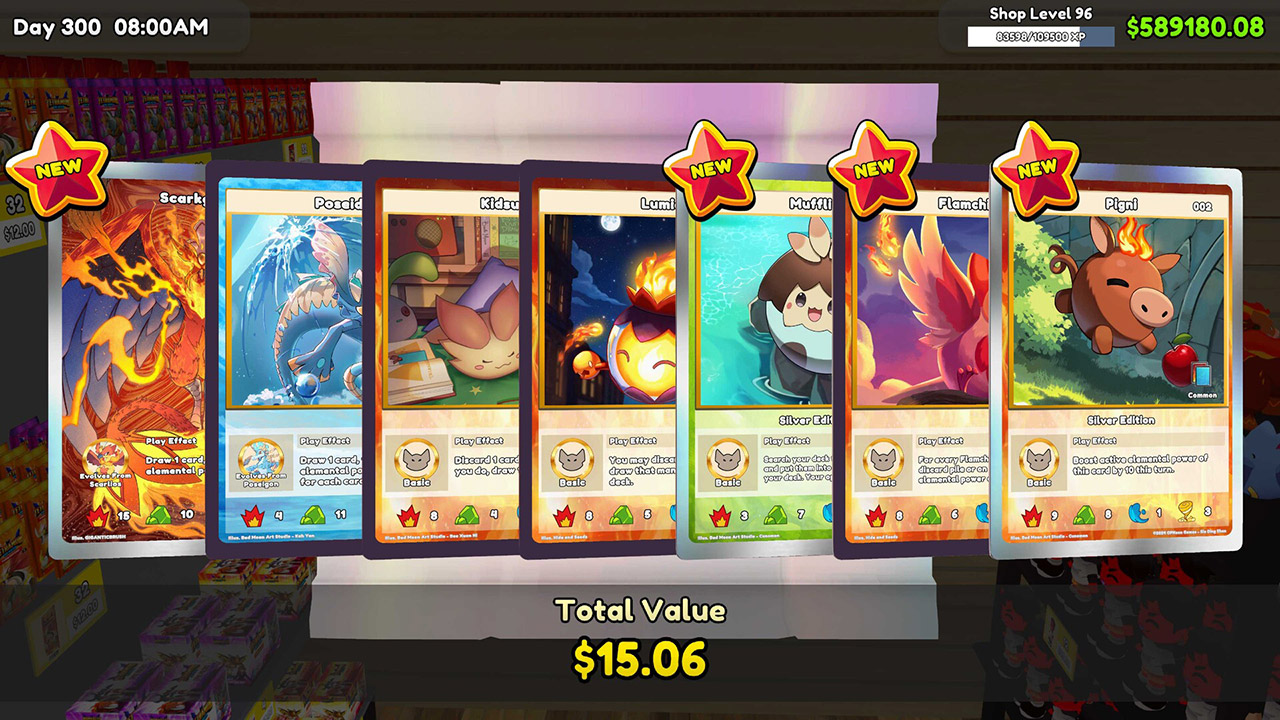
Opening those boxes is, of course, the second half of the job. You can save those rare and holographic Tetramon cards in a binder, grade them and sell them for a profit, or simply restock the shelves. Values fluctuate, but that’s what keeps it all exciting, right? People stay for hours after the shop has been able to function because they adore searching for those perfect sets and locating that elusive foil. When you release the Ascension expansion, you gain 1,452 new cards with cool full-illustrated backgrounds, increasing the total to 4,436 cards.
When your shop reaches level 7, you can finally set up a tiny workstation, grab a rulebook, and do what everyone has been waiting for: play Tetramon. Your match lasts approximately 3-5 minutes against a customer at a table, while your shop continues to operate in the background. You build a 50-card deck with a four-copy limit, draw five cards, take one mulligan, and begin with 500 Tamer Points.
The four elemental zones sit on the table: Fire, Earth, Water, and Wind. The top four cards of your deck are face down as a Guardian Area until you take damage, and play effects begin to fire when your Tetramons strike the board, ranging from extra draws to stat increases that last a turn. If you like, you can simply duplicate your deck list and share it with a friend, select a cool playmat and deck box, and if you’re feeling up to it, you can host a tournament and even keep the prize money if your team does well. Unfortunately, multiplayer is still not available for the time being, but at least your old saves from version 0.70 will be carried over.
PBP drops to 75Hz with two connected devices in testing
Two-year burn-in warranty feels short for the price
Quick Verdict
I’ve been lucky enough to play with some really interesting monitors, but there is usually a compromise somewhere. You get the resolution you want but have to give up some refresh rate, or you get the OLED visuals but not quite the brightness you would expect from an LED panel. Those trade-offs have become pretty familiar.
LG’s 39GX950B is a 5K2K ultrawide OLED that promises to avoid most of them. It is a 21:9 panel running at 5120 x 2160, which works out to 143 pixels per inch at 39 inches. The other trick is a dual mode that lets you drop the resolution and push the refresh rate all the way up to 330Hz.
Cinematic gameplay, competitive gaming, and a high-quality desktop setup are all part of the pitch here. After spending a couple of weeks with it, I think the monitor gets surprisingly close to pulling that off.
A clean design and a great ultrawide size
LG has kept the design fairly restrained. There are no excessive gamer touches, and the stand is simple, clean, and minimalist while still feeling very sturdy. Tilt, pivot, and a substantial amount of height adjustment make it easy to get the screen into a comfortable position.
Advertisement
Sam Buckingham/ Digital Trends
The 1500R curve also works well for me. LG has used more aggressive curves on some of its previous monitors, but this one feels much easier to live with. A 21:9 ratio on a 39-inch screen feels about right too. It gives you plenty of space without becoming overwhelming or taking over the entire desk.
I normally work with two screens, but I’ve really enjoyed using this ultrawide. I placed it roughly the same distance away as I would have my two monitors, and I don’t need to turn my head very much to see the edges. After using it for a while, I think I actually prefer this setup to having two separate screens.
One thing I didn’t expect was the matte OLED coating. For most people, I suspect it is the more practical choice because it does a very good job of reducing glare and reflections. Studio lights pointed toward the display were diffused surprisingly well during my testing, so anyone working in a bright room should appreciate it.
My own room doesn’t have much glare to begin with, though, so I would personally still prefer a glossy panel. A gloss coating could also make the already impressive colors look even more striking.
The 5K2K OLED panel looks excellent
LG uses a fourth-generation tandem OLED panel here, and the picture quality is about as good as you could reasonably expect from an OLED monitor. HDR True Black 500 gives you the deep contrast you’d expect, while colors have plenty of impact. G-SYNC and FreeSync Premium Pro are also supported, so the display can match the refresh rate to your graphics hardware.
Advertisement
5120 x 2160 is particularly useful for desktop work. You get the same vertical resolution as a 4K display, but with roughly 33% more width. At 39 inches and 143 pixels per inch, text looks incredibly sharp, while the extra horizontal space gives you a lot of room to work with multiple windows.
Brightness is another area where this OLED is impressive. LG rates the panel for up to 1,500 nits of peak brightness with HDR content, although you aren’t going to see 1,500 nits across the entire screen. Full-panel brightness is around 350 nits, which is still very good for an OLED.
After a couple of weeks with the monitor, I had actually turned the brightness down substantially for my environment. It has consistently felt bright enough, and I haven’t found myself wishing for more.
Sam Buckingham/
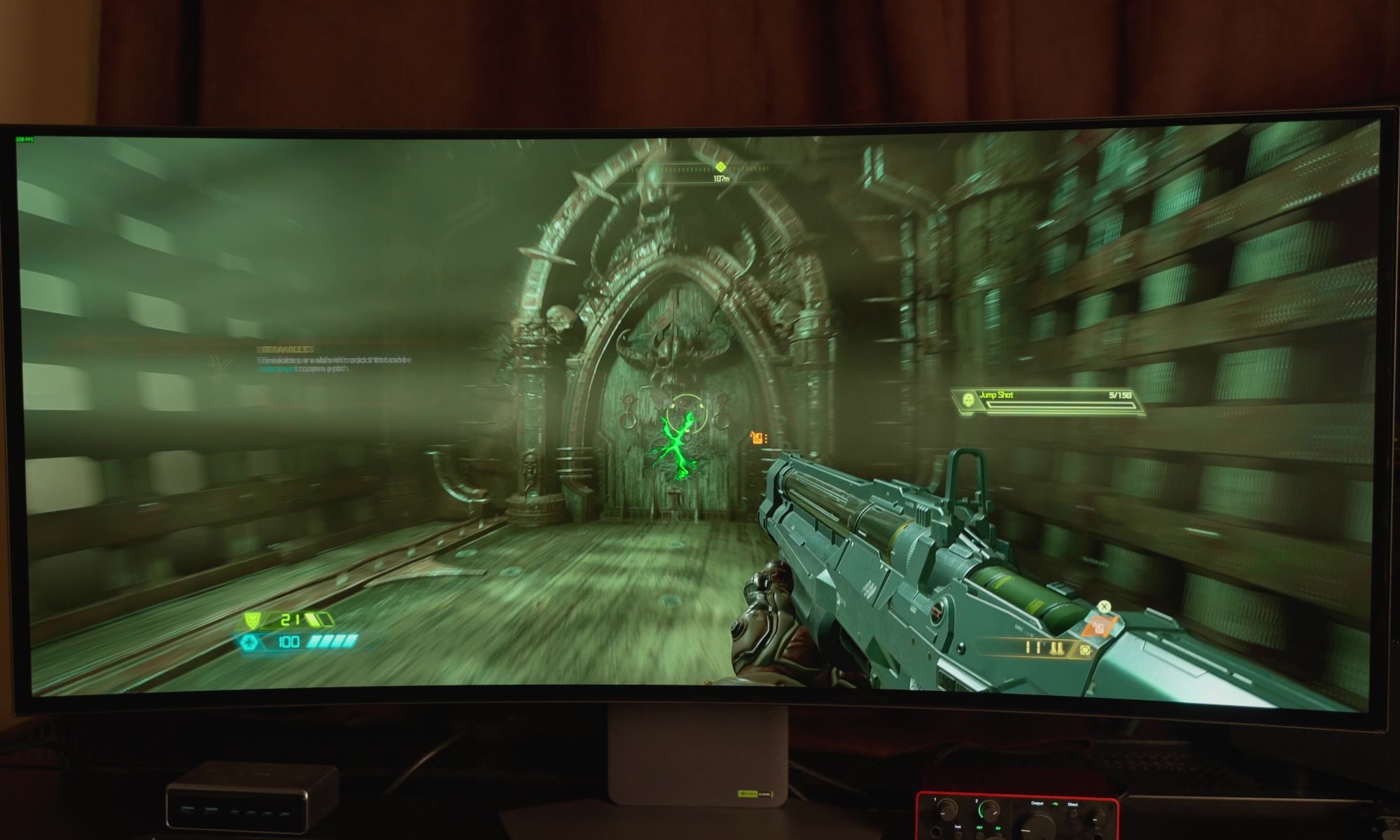
Games and video look fantastic. Cutscenes have plenty of impact, Netflix content looks great, and dark scenes in games are easier to navigate because you can pick out details that might otherwise disappear into the shadows. If you’re using it with a PC, turning HDR on makes a noticeable difference too.
The matte finish is really the one part of the picture I’d change for myself. Everything looks great as it is, but I’d be interested to see what this panel could do with a glossy coating.
Advertisement
330Hz is more useful than I expected
Motion is excellent even before getting into the monitor’s headline refresh-rate mode. LG claims a 0.03ms gray-to-gray response time, and scrolling around a webpage feels smooth and responsive. The bigger change comes when you switch to the second mode, which drops the resolution to 1080p ultrawide but pushes the refresh rate all the way to 330Hz. I wasn’t sure how much difference I’d actually see between 165Hz and 330Hz. After moving from 30fps to 60, then 120 and 144Hz, the gains can start to feel smaller as the refresh rate climbs. I expected 330Hz to be more of the same, but the difference was surprisingly noticeable. First-person shooters felt extremely fluid, movement was fast and responsive, and games I hadn’t touched for a while became more enjoyable simply because of how quickly everything reacted. Even interacting with the PC feels snappier at that refresh rate.
Sam Buckingham/ Digital Trends
I found myself going back and forth between the two modes because 330Hz is genuinely fun, but the resolution drop is too significant for general desktop use. I wouldn’t want to use 1080p ultrawide as my everyday resolution on a 39-inch display after getting used to the clarity and workspace of 5K2K. Most of the time, I stayed with the high-resolution mode and switched to 330Hz when I wanted to play a fast-paced game. It works as a compromise, although I would obviously love to have both the resolution and refresh rate without giving up so much in either direction.
Getting the most out of either mode also requires serious hardware. Driving games at very high frame rates takes a lot of graphics power, while running games at 5120 x 2160 puts plenty of pressure on the GPU too. Motion itself has been excellent in my testing, with no tearing or flicker, minimal bloom thanks to the OLED panel, and a consistently sharp image. The matte coating also does a very good job of handling glare, even with studio lights hitting the screen.
Excellent connectivity, with one compromise
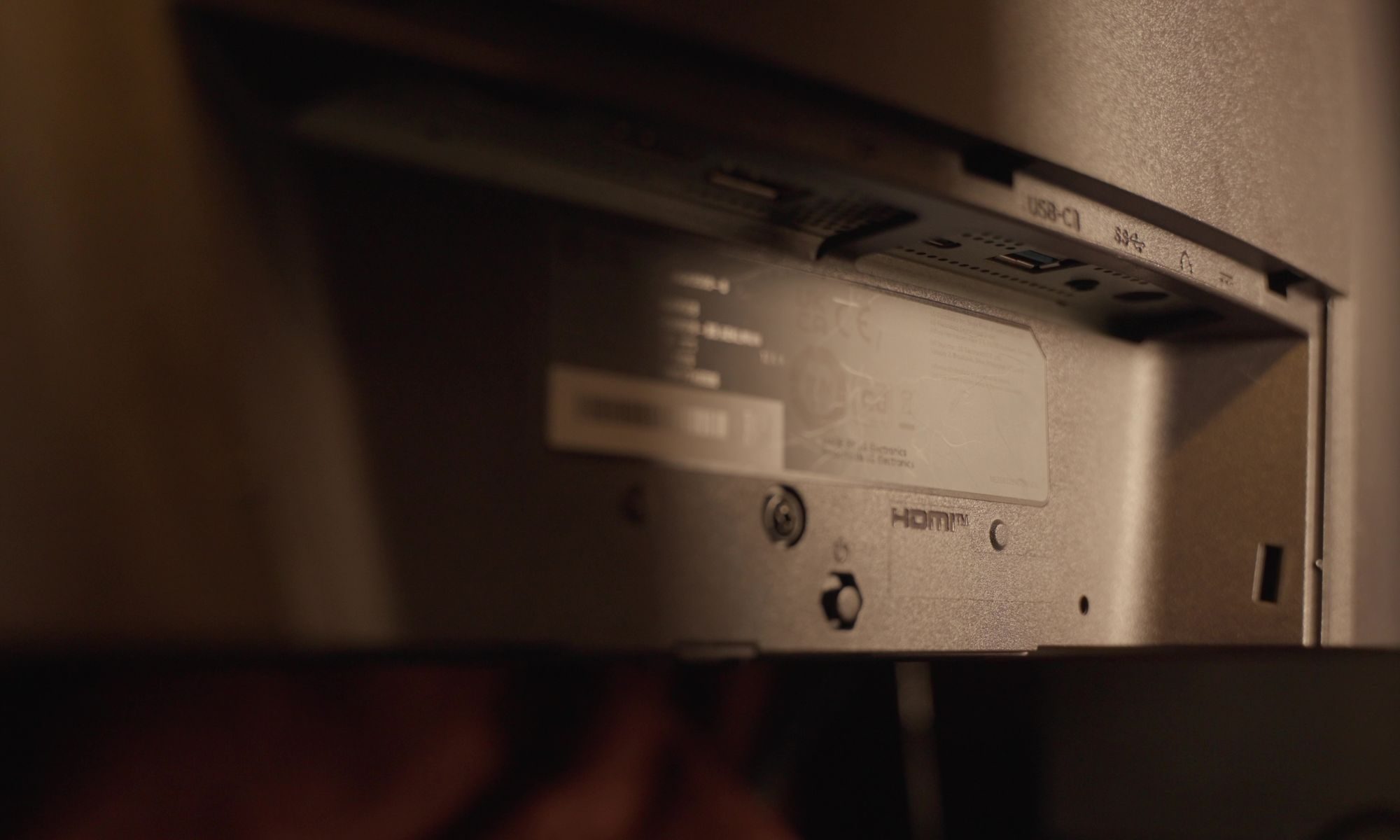
Connectivity is one of the monitor’s strongest features. DisplayPort 2.1 with UHBR20 is the headline inclusion, and it can deliver the full 165Hz refresh rate without Display Stream Compression. You’re getting the full-resolution experience without having to make that particular compromise.
HDMI 2.1 is also available for consoles and other devices. USB-C supports up to 90W of power delivery, which is particularly useful if you’re connecting a laptop because the same cable can carry the video signal while charging the machine.
Advertisement
Two downstream USB-A ports and a headphone/mic combination jack round things out.
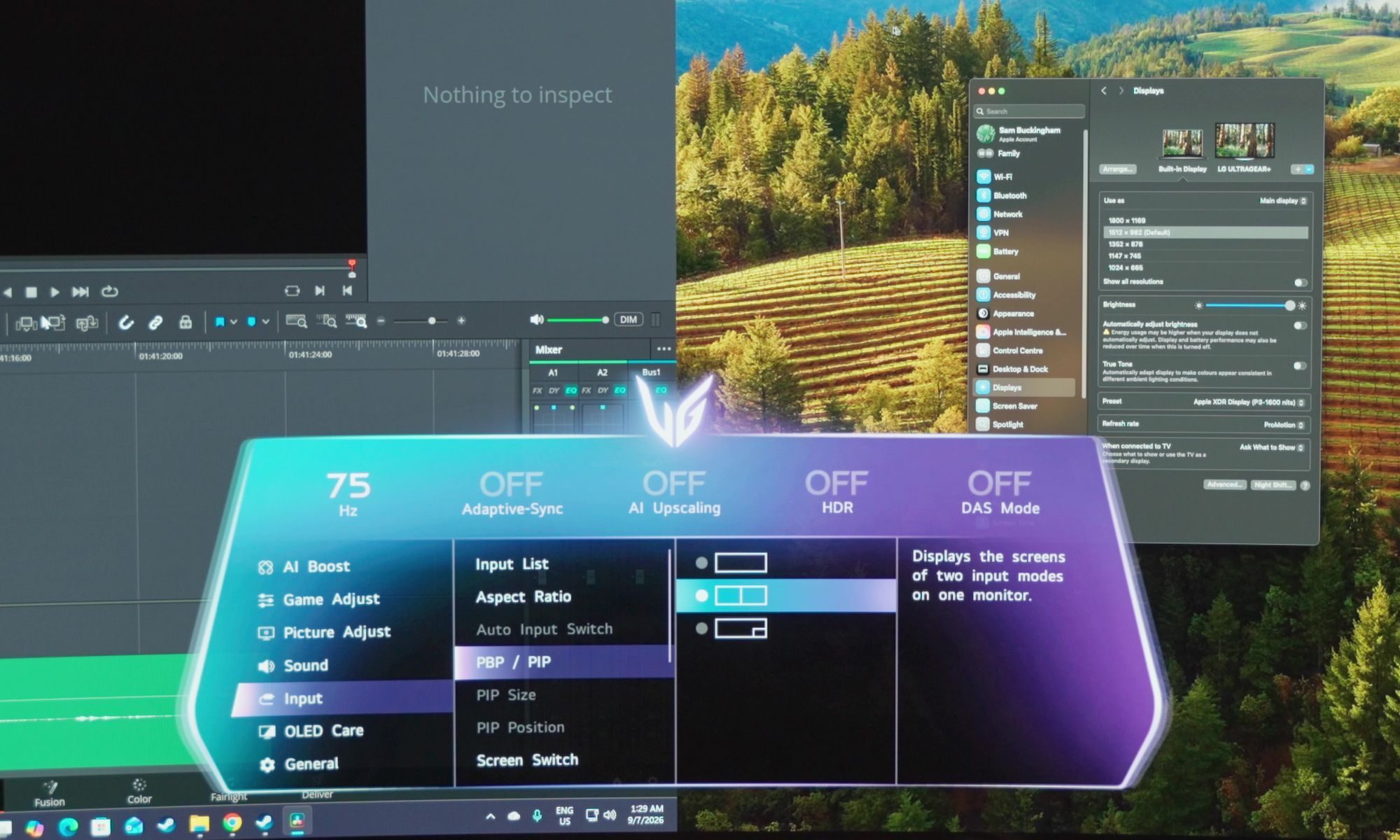
Picture-by-picture and picture-in-picture are useful additions as well. You can connect two devices and have them displayed on the screen at the same time, which could be handy if you’re regularly working between machines.
My experience with it wasn’t quite as good as I’d hoped, though. When I connected a Mac and PC together, the refresh rate dropped to 75Hz. I had hoped both devices would be able to maintain a higher refresh rate while sharing the display, but that wasn’t the case.
LG’s software is better than the monitor’s menus
The monitor’s own interface works well enough, although the neon, gamer-focused design feels a little garish to me. Navigating through it is straightforward, but LG’s accompanying software is a much better way to manage the display. I’d recommend installing it rather than relying entirely on the joystick and built-in menus. There is a small annoyance in that the software takes a few seconds to load even when it is already running in the background, but once it appears, changing settings is considerably easier.
Advertisement
LG has also packed several AI features into the monitor, with AI upscaling being the one I found most useful. I generally prefer DLSS and FSR in modern PC games, but those options aren’t available everywhere, and older games can benefit significantly from having the monitor handle the upscaling. The same applies to lower-resolution devices such as the Nintendo Switch. I wouldn’t leave it enabled for everything, but there are definitely situations where it is worth trying. AI sound takes a different approach by isolating voices and improving clarity. I noticed an effect when using it, although I wasn’t always convinced I preferred the result, and its requirement for the monitor’s speakers or wired headphones makes it less useful with my usual audio interface or wireless headphones setup.
AI scene optimization is probably the easiest feature to appreciate if you don’t want to think about display settings yourself. The monitor can adjust things such as brightness and color temperature based on what you’re doing, but I left it turned off because I do photo and video editing and don’t want those settings changing in the background without me making that decision. For someone who isn’t as particular about keeping those settings fixed, letting the monitor make those adjustments automatically could be genuinely useful.
OLED burn-in is still worth considering
Burn-in remains something to think about with any OLED monitor, although modern protections have made it much less concerning than it once was. LG is one of the companies leading the way here, and I don’t worry about burn-in nearly as much as I used to.
PC displays do present a particular challenge, though. Desktop interfaces can leave static elements such as taskbars on screen for long periods, while games can keep HUD elements in the same position. Anyone buying an OLED monitor should be aware of that and take some basic precautions.
Advertisement
My bigger concern is the warranty. LG provides two years of burn-in coverage with this monitor, which feels short when you’re spending this much money. Some of LG’s top-tier OLED TVs come with five years of burn-in coverage, and having that extra reassurance matters when you’re making a significant investment.
It is worth taking some responsibility for the display yourself, too. Avoid leaving the screen on unnecessarily for long periods, and there is little reason to run it at maximum brightness all the time.
It works well with a Mac, too
Mac compatibility was good in my testing. I was able to use the monitor with my Mac and even activate the dual mode.
I wouldn’t necessarily recommend buying the 39GX950B specifically as a Mac monitor, but it’s reassuring to know that it works well if you want to include a Mac in a mixed setup.
Advertisement
An ultrawide OLED with surprisingly few compromises
I started this review talking about the compromises that usually come with impressive monitor technology. Resolution can come at the expense of refresh rate, while OLED can mean giving up some brightness. An ultrawide OLED that tries to cover both high-end gaming and everyday desktop work therefore has plenty of opportunities to fall short.
LG’s 39GX950B mostly doesn’t.
Sam Buckingham/ Digital Trends
Deep blacks, strong colors, high resolution, serious brightness, and high refresh rates are all here. The 5K2K mode makes it an excellent desktop monitor, while 330Hz gives fast games a completely different feel. Having both available on the same display makes it unusually versatile.
My changes would be fairly small. I’d prefer a glossy coating for my own setup, and I’d make some minor tweaks to the monitor’s interface. The two-year burn-in warranty is also difficult to overlook at this price.
Money is the obvious consideration, and so is the graphics card you’ll need to drive the display properly. This isn’t something you can bolt onto a seven-year-old desktop and expect to run at its best. Both the monitor and the hardware behind it need to be capable of handling what the panel offers.
Advertisement
Should you buy
LG launched the 39GX950B at $1,800, with another listed price of $1,600, which puts it firmly into premium-monitor territory. Sales have already started appearing, though, and LG has historically made some substantial reductions on displays in this range. I’d therefore check the current selling price rather than judging it entirely by the launch figure.
For me, the LG 39GX950B comes surprisingly close to being a monitor without a major compromise. You get the resolution, OLED picture quality, brightness, and refresh rate, as long as you’re willing to pay for them and have the hardware to make use of them. For the right setup, it just might be worth it.
Why not try?
The LG 39GX950B is unusually hard to compare with other monitors because its combination of 39-inch size, 5K2K resolution, OLED panel, and dual 330Hz mode is still pretty unusual. There are a few alternatives worth considering, though, depending on which part of the LG’s appeal matters most to you.
Alienware 39 5K2K OLED Gaming Monitor (AW3926QW): If you like almost everything about the LG but don’t want to spend $1,800, start here. Alienware’s 39-inch 5K2K OLED has the same 165Hz native refresh rate and 330Hz dual mode, while its glossy RGB-stripe panel takes a different approach to text clarity and reflections. At around $1,100, it is also considerably cheaper than the LG.
Advertisement
LG UltraGear 45GX950A: If 39 inches doesn’t feel like enough, LG’s 45-inch model takes much the same approach and makes it considerably bigger. You still get 5K2K resolution, 165Hz at full resolution, and a 330Hz dual mode, but the 800R curve and lower 125 PPI make it a very different proposition on a desk. It’s the one to consider if immersion matters more than keeping the screen relatively manageable.
Samsung Odyssey OLED G9: If what attracted you to the LG was the idea of replacing a two-monitor setup with one huge OLED, Samsung’s Odyssey OLED G9 takes that concept much further. Its super-ultrawide format gives you considerably more horizontal space, although it moves away from the LG’s 5K2K resolution and 39-inch sweet spot. It’s the more extreme option for someone who wants maximum screen real estate rather than the balance Sam found so appealing here.
How I tested
I used the LG 39GX950B as my main monitor, spending a couple of weeks with it across everyday desktop work, gaming, video, and photo and video editing. I used it in place of my usual two-monitor setup and positioned it at roughly the same distance, which gave me a good sense of how the 39-inch 21:9 screen worked as a single-display replacement.
I also spent time switching between its 5K2K 165Hz mode and the 330Hz dual mode, particularly while playing fast-paced games. Alongside gaming, I used the monitor for regular desktop work, watched video and streaming content, tested HDR, connected a Mac, and tried its picture-by-picture and picture-in-picture features with multiple devices. I also spent time with LG’s monitor software and its AI features, including AI upscaling, AI sound, and AI scene optimization.
Advertisement
The display was used in a room with studio lighting, which also gave me a chance to assess how well the matte coating handled glare and reflections. I used the monitor’s settings as part of normal use rather than relying on external calibration or measurement hardware. My observations in this review are based on that real-world use, including how the monitor handled high-refresh gaming, desktop work, content consumption, and creative work.
FAQ (Frequently Asked Questions)
What size is the LG 39GX950B?
The LG 39GX950B features a 39-inch ultrawide display with a 21:9 aspect ratio.
What resolution does the LG 39GX950B have?
The monitor has a 5120 x 2160 resolution, commonly referred to as 5K2K.
Does the LG 39GX950B support HDMI 2.1?
Yes. It has HDMI 2.1, DisplayPort 2.1 with UHBR20, and USB-C with 90W power delivery.
Advertisement
Will LG 39GX950B work with Mac?
Yes. Even during our testing, I used it with a Mac and was also able to activate Dual Mode.
Can you connect a laptop to the LG 39GX950B with USB-C?
Yes. The USB-C port supports display output and delivers up to 90W of power, allowing compatible laptops to charge and connect with a single cable.
Is picture-by-picture mode supported by LG 39GX950B?
Yes. The monitor supports both Picture-by-Picture and Picture-in-Picture modes, allowing two connected devices to be displayed simultaneously on the screen.
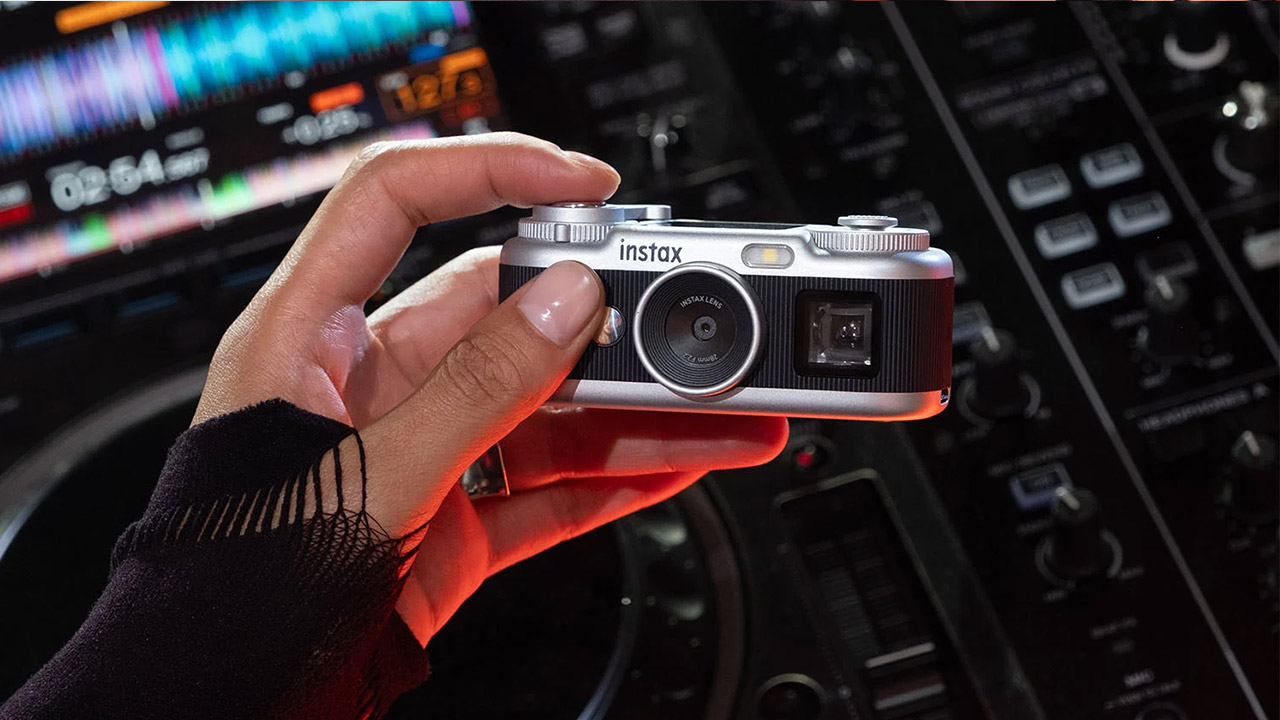
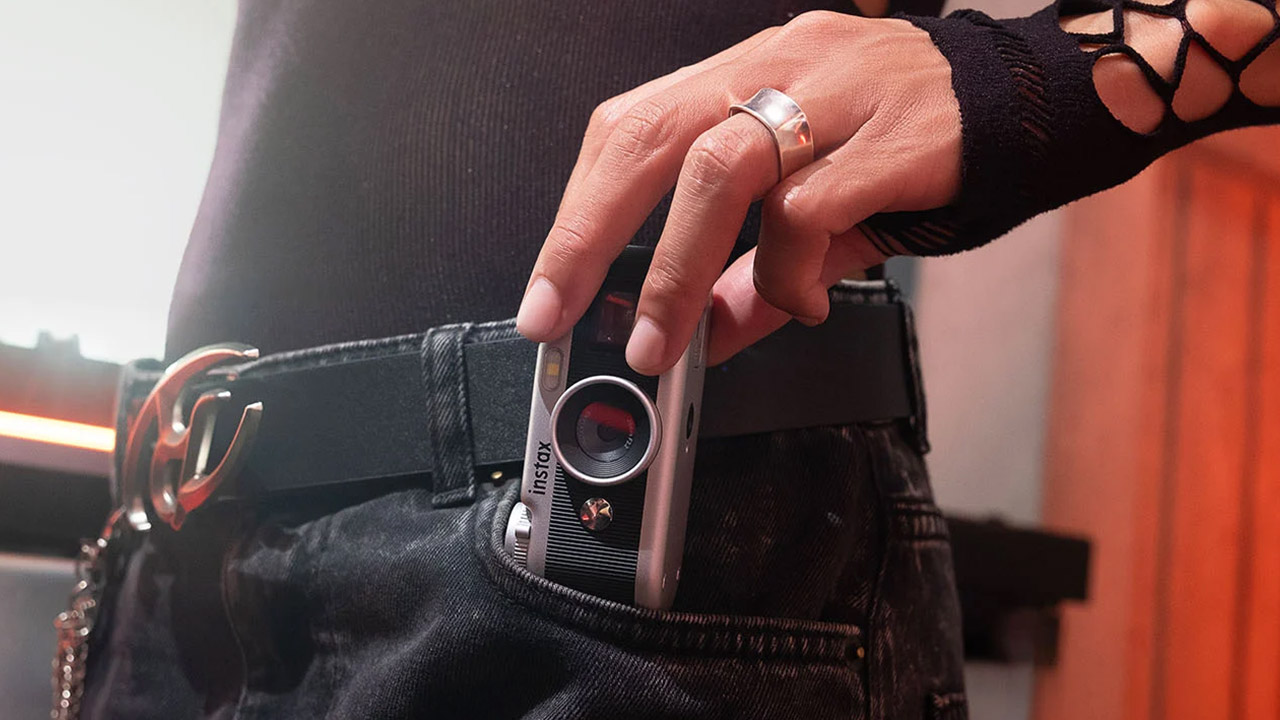
Fujifilm spent two years listening to owners of the first Instax Pal, then rebuilt almost every part of it. Instax Pal 2 keeps the palm-sized brief and discards the round pebble body that split buyers when the original arrived in 2024. In its place is a squat rectangular shell that reads like a 110 film camera scaled for a coat pocket, with an optical viewfinder, a proper shutter button, a command dial, and a wind-style lever on top.
A 1/3-inch CMOS sensor can now shoot 10.7 megapixel stills at 3776 by 2832 pixels, which is slightly more than double the original Pal, thanks to a fixed 28mm equivalent f/2.2 lens that can get as close as 8 cm. The launch coverage also includes autofocus with optional face detection, exposure correction from minus two to plus two EV, automatic ISO from 100 to 1600, and shutter speeds ranging from a quarter of a second to 1/8000.
Hybrid instant film camera. Prints high-quality, 2” x 3” INSTAX MINI instant photos (INSTAX MINI instant film sold separately)
10 Lens x 10 Film Effect Options = 100 Ways of Expression
Built-in selfie mirror so you’re perfectly framed for a selfie, Dual shutter buttons – portrait and landscape
A 1.0-inch LCD screen sits on top of the camera, allowing you to preview your photo and apply effects before anything comes out of it. Built-in memory contains approximately 100 photographs, and a microSD card can hold many more.
There are five filter themes to choose from: Modern, Y2K, Vintage, Chromatic, and Fantasy. Each theme has six looks to try out, for a total of 30 effects, with six loaded at any given moment. You can select Mini, Square, Wide, or frameless framing before taking the photo, ensuring that your eventual Instax print follows the crop exactly. A dedicated switch allows you to flip the body into instax Animation mode, which captures ten frames and converts them into a flipbook clip that you can subsequently transfer to a print via a QR code. The flash will cover an area ranging from 60 centimeters to 1.5 meters, and it includes two and ten second timers.
Advertisement
The Instax Pal 2 still does not make any paper of its own, but you have two options for moving files elsewhere: Bluetooth 5.1 or a slide out USB-C port, both of which will transfer your files to the free Instax Pal app in less than a second via cable, and from there your shot can be sent to any current Instax Link printer, a mini LiPlay, or an Evo hybrid. You may even use your phone to trigger the shutter remotely. The packaging includes a USB-C cable, a hand strap, a small angle-adjusting stand, and a one-year warranty. At launch, the Pal 2 will be available in both black and white.
Fujifilm is selling the Instax Pal 2 at $169.95 in the United States and $219.99 in Canada, with stock expected to arrive in late September 2026 and a Japan launch on October 9. That’s a bit more than the price of a Kodak Charmera, the keychain camera to which this announcement is frequently compared, but the Pal 2 does bring a larger sensor, wireless printing within the Instax family, and controls that feel like a camera rather than just a charm on a keychain. In fact, Bing Liem, who manages Fujifilm’s North American imaging group, stated that the first Pal left some consumers perplexed while suiting others wonderfully. This new Pal 2 is the solution to that split opinion, with the same go-anywhere size, more ways to frame your photo, and a smooth transition from digital file to Instax print.
Google is giving Gemini Notebook, formerly NotebookLM, a major upgrade for students, adding new features designed to help them understand difficult concepts, capture lectures, and turn study materials into interactive learning tools. The update lands alongside a free year of Google’s paid AI plan for eligible college students.
Gemini Notebook can now talk you through your notes
The biggest addition is real-time voice conversations with your notebooks. Google says the feature will let you talk through difficult topics using the Gemini Notebook mobile app in nearly 100 languages. You’ll also be able to ask follow-up questions, get step-by-step explanations, and interrupt the conversation whenever you need to. The feature will roll out to Google AI Ultra subscribers this week, with Pro and other tiers to follow.
Google
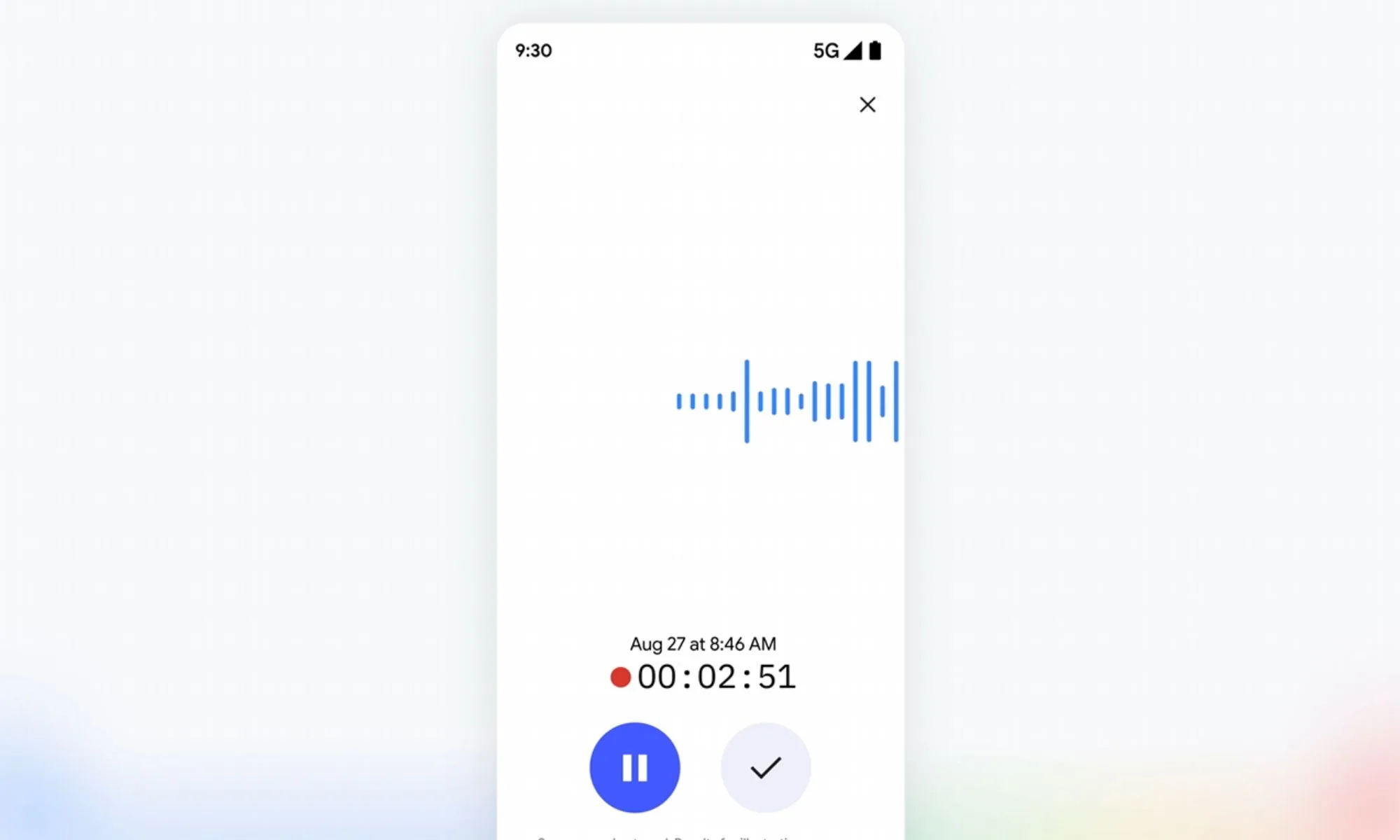
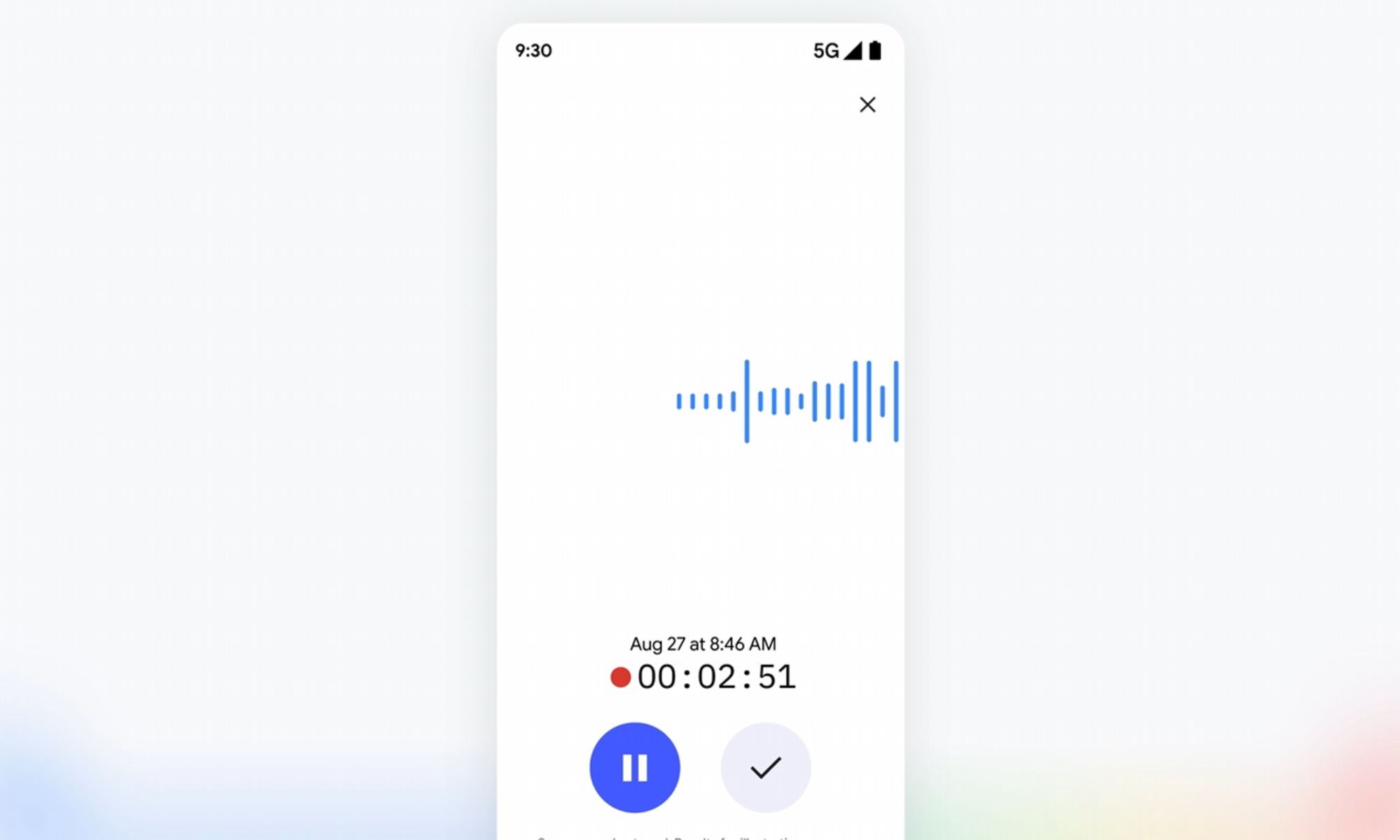
Gemini Notebook is also picking up a built-in recorder in its mobile app starting next week. It’ll let you capture lectures or quickly jot down thoughts on the go, and those recordings will land right next to existing sources.
Quizzes and flashcards make studying more interactive
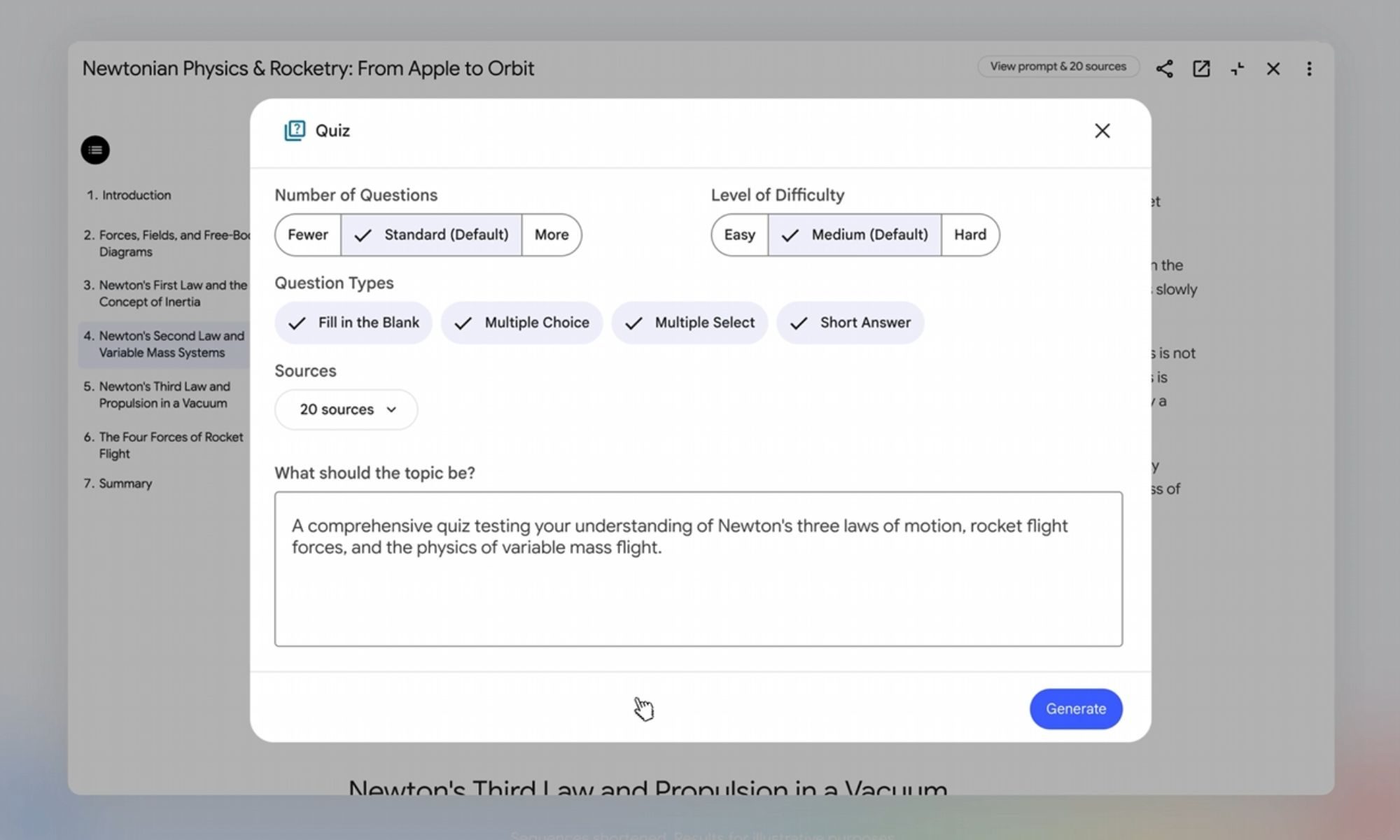
Google is expanding the interactive learning overviews housed under Reports and adding quiz formats like short answer, multiple select, and fill in the blank. These features let you quiz yourself, ask Gemini where you fell short, and tweak the questions afterward.
Google
A new short video overview format is also included, which condenses tricky topics into roughly 60-second sharable clips in more than 80 languages. The new learning overviews and quiz formats will roll out to all users over the next few weeks.
This update builds on the Student Hub that Google added to Gemini last month. It comes with a free year of Google AI Pro for eligible US college students, which unlocks four times the usage limits compared to the free tier. Students outside the US get a free year of Google AI Plus instead, which offers double the usage limits. Both offers are available until the end of this year.






























































You must be logged in to post a comment Login