
Tech
Google’s $899 Googlebook is a bet that you’ll buy a new laptop for Gemini

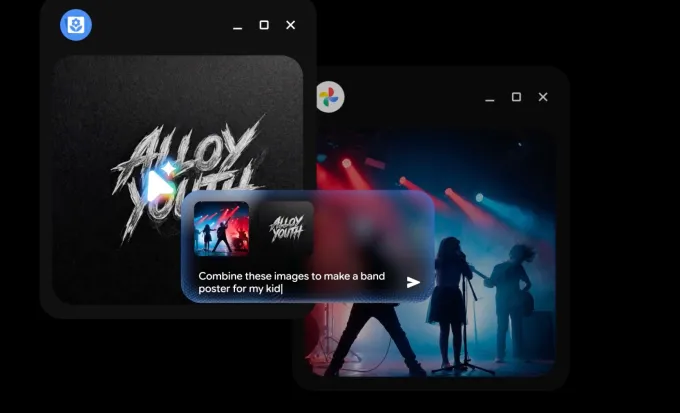
After first unveiling its new AI-powered laptop, dubbed Googlebook, in May, Google on Monday said the new device is now available for pre-order for $899.
Meant to offer a step up from traditional Chromebooks, Googlebooks run on Android OS with a desktop version of the Chrome browser and other familiar ChromeOS elements. However, the real pull for the new devices is that they’ll prominently feature Gemini’s latest capabilities in a new format: the laptop.
Google is trying to offer a laptop with unique features like an AI-powered cursor, vibe-coded widgets, and support for AI-enhanced dictation. The latter is a feature called Rambler, which cleans up messy, rambling brain dumps into readable text.
The move is a bet that AI, specifically Google’s Gemini, could be enough of a draw to get people to buy a new laptop that bakes in AI instead of running them via desktop apps you install or access through the browser. In addition, the devices could eventually replace Chromebooks, bringing millions of former Chromebook customers to Gemini AI.
On the Googlebook, Google is trying to reinvent the “point-and-click” experience of desktop computing to now include an AI element: the cursor serves as a conduit to Gemini. The company suggests various ways this could be used, like highlighting content on a webpage for Gemini to work with, asking Gemini to see if an email you’ve hovered your cursor over is suspicious, or selecting images and then asking Gemini to visualize them together.

In practice, this feature isn’t very different from Android’s “Circle to Search,” which allows smartphone owners to use gestures like circling, highlighting, or tapping to connect with Google Search, which of course, also includes AI. While it’s a clever way to take advantage of the ways people use their phones, Circle to Search on its own didn’t inspire a mass exodus to Android.
Similarly, Magic Cursor, as the AI pointer is called, won’t likely be a main selling point for the Googlebook, especially now that we have AI agents that can take over your computer and browser to do tasks for you.
Google’s Rambler, however, may be one of the best of the AI features in this upgrade, as it meets a surprisingly useful need. However, this, too, isn’t enough reason to buy a new device, as it feels more like a feature that’s nice to have than a necessity.

Vibe-coding widgets are a minor addition, as well. Other Googlebook features, like Gemini Spark and Gemini Live, also don’t require special, new hardware.
What’s more interesting about the Googlebook is how it’s seemingly part of Google’s longer-term plan to capture a large part of the K-12 market that currently relies on Chromebooks, and push them towards the company’s Gemini AI. There are somewhere around 50 million Chromebooks in schools, used by students and educators, Google has said.
In May, the company told TechCrunch that its current Chromebooks would continue to be supported, though many would become eligible to transition to the new Googlebook experience in the future.

The $899 device will include 12 months of Google AI Pro, which gives you 5TB of cloud storage, Gemini Advanced tools, and 3 months of YouTube Premium, Adobe Photoshop and more. The devices will receive regular updates for up to 10 years, Google said.
Googlebook pre-orders are open now on the Google Store, Best Buy, and other retailers. Devices will hit shelves on October 4 in the U.S., and October 5 in Canada, the U.K., Ireland, France, Germany, and Australia.
Flagship devices in the new range are being built by Acer, ASUS, Dell, HP and Lenovo, with materials like aluminum, magnesium alloy and carbon fiber. They feature up to 2.8K OLED displays, haptic glass trackpads, and backlit keyboards. Under the hood, they’ll run on processors from Intel and Qualcomm paired with dedicated NPUs. Google says the device will offer up to 14 hours of battery life.
When you purchase through links in our articles, we may earn a small commission. This doesn’t affect our editorial independence.

We may receive a commission on purchases made from links.
It’s been a while since most smartphone manufacturers stopped shipping charging bricks with their phones. Apple started the trend, and most other brands followed suit. While the move was terrible for consumers, one group hugely benefited — third-party charger manufacturers. People who buy new phones now have to spend an additional $20-30 on charging bricks, and brands like Anker and Ugreen have launching compelling chargers in different shapes and sizes to capitalize on this. The mini chargers in its Nano lineup, in particular, are a big part of why Anker is so popular, but the brand also makes a plethora of other tiny and extremely useful accessories.
There are Anker dongles, car chargers, USB hubs, MagSafe battery packs, and more. Usually, most power banks are quite big, with large capacities. Anker makes some slim and compact ones under its Nano lineup, which are easy to carry and use when traveling. While most people are only aware of basic chargers made by the brand, we went down the rabbit hole to find some of the best Anker mini gadgets that are worth buying. These gadgets aren’t necessarily unique, but they are functional and quite small. A few of these devices are multifunctional, and some of them have cool features, like a built-in display or foldable prongs.
Anker Nano smart display charger
A wall charger is about as boring as tech gets, which is what makes the Anker Nano Charger with a smart display such an odd little delight. It pushes up to 45W over a single USB-C port, enough to take an iPhone 17 Pro to 50% in about 20 minutes (according to Anker, at least). Plug in a supported iPhone or iPad and the small screen identifies the device and shows the power being delivered. As per Anker, the dedicated TUV-certified Care Mode runs up to 9 degrees Fahrenheit cooler for gentler overnight charging.
The Verge tested this charger and found the display occasionally useful, but more of a novelty than an essential. The real upgrade is apparently the prongs: they fold flat and rotate 180 degrees, so the charger fits awkward outlets behind furniture. Amazon users mostly agree, praising how fast it charges and how portable it is.
The only catch is that there’s just one port, so there’s no simultaneous charging of your MacBook and iPhone. If you often charge only one Apple device at a time and like the idea of a charger that smartly decides whether your iPhone needs full power or not, this could be the one to get.
Anker 30W 2-port car charger
Many cars still have cigarette lighter sockets doing nothing, and the Anker 30W 2-Port Car Charger puts them to work. It’s barely larger than the socket itself, so it sits nearly flush instead of jutting out too much, and it carries two ports: a 30W USB-C with PPS and a 22.5W USB-A for an older cable. Anker says the USB-C port charges about three times faster than a standard 5W charger, which is the difference between a useful top-up on a short drive and a substantial one.
Amazon customer praise is consistent: it charges fast and disappears into the dash. Having both port types for different types of cables is also a plus. However, a small minority report units dying within a few months, which is worth knowing even if it’s not the common experience. Additionally, when both ports are in use, each drops to 12W, so fast charging is a one-device affair. If you drive to work every day with one phone to charge, it’s an easy recommendation — especially for just $11.
Anker Nano 5,000mAh power bank
The best power bank is the one you actually carry, and tangling cables are usually the reason you don’t. The Anker Nano Power Bank solves that with a built-in USB-C connector that folds out of the body, so there’s nothing to remember and nothing to tangle. It plugs straight into the bottom of your phone and delivers up to 22.5W of power, and the whole thing is small enough to fit into a jeans pocket or a small purse.
This is one of Anker’s most well-rated mini gadgets, with tons of positive Amazon reviews. Users are quick to bring up its ability to effectively top up even big phone batteries like that of an iPhone 15 Pro Max, and its utility in tricky situations like power outages. Several owners mention the same small freedom: using the phone while it charges, without a wire running to a brick in your pocket or bag.
Capacity is the only trade-off here. At 5,000mAh, this is not even one full charge for most modern-day phones. However, it offers sufficient juice in a pinch when there’s no wall outlet in sight. If you want a pocketable backup for a long day out, this could be the right solution.
Anker MagGo UFO 3-in-1 charger
Traveling with an iPhone, Apple Watch, and AirPods often means packing three separate chargers and a knot of cables. The Anker MagGo UFO 3-in-1 folds all of that into a compact Qi2 pad that can charge all three at once, with up to 15W for the phone and certified fast charging for the watch. Unfolded, it props the iPhone in landscape for StandBy mode, and the 40W adapter and cable come in the box, which is a welcome addition.
TechRadar praised the clever, travel-friendly palm-sized design, judging the convenience, quality, and charging speeds worth the premium. Amazon users rate highly, and a recurring theme is that it’s ideal for frequent travelers. The ability to charge a second phone on the center pad instead a set of AirPods, has also made this a hit with families looking for a primary living room charger.
However, durability is a concern. A noticeable cluster of users report units that stopped charging after a few weeks or months. That said, it’s a minority among thousands of happy owners, and Anker’s 24-month warranty covers it. It’s still worth noting before spending $70, though. For frequent travelers deep in the Apple ecosystem, this could be a big space-saver.
Anker Nano magnetic power bank
Magnetic power banks are usually bricks that double your phone’s thickness. The Anker Nano magnetic power bank is 0.34 inches thin, closer to a couple of stacked credit cards, and it snaps on with Qi2-certified 15W wireless charging. If you want faster speeds, the USB-C port pushes up to 20W wired power, and Anker says graphene cooling with dual temperature chips keeps the surface under 104 degrees Fahrenheit. Most user reviews on Amazon praise the sleek design, noting that it will fit in whatever handbag, jacket, or cargo pocket you’re keen to store it in.
Two complaints show up somewhere often, though. Despite the cooling hardware, some users still say it runs hot. Also, the 5,000mAh capacity means that you’re not looking at a full charge all the time. Think of it as a rescue power bank that comes in handy during emergencies, when you just need enough power to make a few calls or order an Uber to get back home. Anker also says it’s built for iPhones and doesn’t recommend it for Android phones. That said, it works just fine with Android phones that support wireless charging.
Anker USB-C to USB-A adapter
New laptops gave us USB-C, but most drawers are still full of USB-A accessories and peripherals. The Anker USB-C to USB-A Adapter is the simple fix: a tiny aluminum nub that turns a USB-C port into a full-size USB-A port at USB 3.0 speeds. Flash drives, external hard drives, mice, keyboards, printers — you can use them all. The connectors are rated for 10,000 plugs and unplugs, and the housing is slim enough that two adapters sit side by side in a MacBook’s ports.
This is one of the most well-loved gadgets on the list. Amazon user reviews have all sorts of small things to praise: the click when it seats properly, the indicator light that confirms it’s plugged in, and the snug fit that doesn’t wobble. This adapter could be the cornerstone of transitioning from an older laptop to a newer one, without needing to buy new headphones or a mouse. However, if you plan on using it with a smartphone, the device apparently won’t fit through a thick OtterBox case. A small number of users report loose connections, but otherwise this seems like the adapter you can throw in a bag and stop thinking about.
Anker USB-C to HDMI adapter
Every USB-C laptop owner eventually meets a TV or projector that only connects via HDMI. The Anker USB-C to HDMI Adapter handles up to 4K at 60Hz, works with USB4 and Thunderbolt ports, and needs no drivers: you plug it in, and the screen appears. The aluminum shell sheds heat, and the braided nylon cable tolerates being stuffed into a backpack, which is where this thing will live.
Amazon users love this adapter. Whether you’re a professor or student keeping one on hand for presentations or a Steam Deck owner who wants to enjoy gaming on a large screen. By all accounts, it works reliably with a stable signal.
The one real requirement is that your device’s USB-C port must support DisplayPort Alt Mode. Most modern laptops do, but some budget laptops and phones don’t, which explains the minority of reviews saying it didn’t work with their device. There’s also no Power Delivery passthrough, since it’s a straight video adapter. So, it’s advisable to check your device’s user manual for compatibility before ordering.
Anker Nano travel adapter
The Anker Nano Travel Adapter is one of the rare travel options that doesn’t look like a brick. It’s about the footprint of a credit card and under an inch thick, but it covers Type A, C, G, and I outlets, good for the U.S., Europe, the U.K., Australia, and most of Asia. The prongs retract into the body, and one slider pops out the set you need. On the other side, you get one AC outlet, two USB-C ports, and two USB-A ports, good for five devices at once, with up to 20W from a single USB-C port.
User reviews read like a travel diary: two weeks in Switzerland and Italy on motorcycles, hotels in the U.K. and Ireland with older USB outlets — plenty of confirmation it worked across countries. Clearly, replacing multiple charging blocks with a single small adapter has made it a popular travel companion.
Notably, this is not a voltage converter, so single-voltage appliances like some hair dryers and electric toothbrushes cannot be used with it. The AC outlet is also two-pin only, so grounded three-prong plugs won’t fit. A small number of users hit compatibility snags in specific countries as well, including one report from South Africa. However, for charging phones, tablets, and laptops across most of the map, this is probably one of the most portable high-rated travel chargers.
Anker MagGo power bank for iPhone and Apple Watch
Apple Watch owners know the ritual: the watch charges on its own puck, so every trip means one extra cable. The Anker MagGo Power Bank for Apple Watch builds that puck into a 10,000mAh battery with proper fast charging. A built-in USB-C cable handles everything else at up to 30W, so your phone, earbuds, and even a laptop can charged with the same device, too. It’s about the size of a computer mouse and flight-approved, and users rate it 4.5 stars on Amazon, calling out its portability and versatility, and how convenient its pass-through charging feature is — you can top up the watch while the power bank itself recharges. The flip-up design can also double as a little nightstand dock when it’s plugged in.
The product’s complaints seem pretty manageable, too. Some owners find the built-in cable too short to use the phone comfortably while it charges, and the 10,000mAh capacity can feel limiting if you also plan on charging your laptop. For anyone wearing an Apple Watch, though, this could replace the most annoying charger in your bag.
Anker HDMI switch
There’s a TV with exactly one HDMI port fewer than you need seemingly in every living room. The Anker HDMI Switch puts two devices on one port. Press the button onboard and a blue LED shows which input is live. You can then swap between the two input sources. It supports up to 4K at 60Hz with HDR, and it draws power from the HDMI connection itself, so there’s no adapter to plug in.
Owners rate it highly, citing all kinds of wonderfully specific use-cases. One user claims to run an Apple TV and a Nintendo Switch 2 through it; another fixed a kid’s setup with a game console and a Roku on an older TV. It’s simple to install and switches seamlessly on its own.
Anker is upfront about this device’s limits, and they’re worth reading. There’s no automatic input detection, so the button press is mandatory, and it doesn’t support HDMI CEC. It runs one display at a time, and for a reliable 4K 60Hz signal, both HDMI cables should be on the short side, under about 3 feet each. None of that matters for the classic two-consoles-one-port problem, which is exactly what it’s for.
Anker 7-in-1 USB-C hub
Thin laptops made one sacrifice nobody asked for — fewer ports. The Anker 7-in-1 USB-C Hub gives you most of them back. You get a 4K 60Hz HDMI output, two USB-A ports and a USB-C port for data at 5 Gbps, SD and microSD card readers, and a USB-C PD input that passes up to 85W to your laptop, so the hub doesn’t cost you your charging port. The metal body’s premium look and feel also won’t look like cheap next to your expensive device, which is always nice.
The hub has earned thousands of positive Amazon reviews, with users praising its ability connect extra monitors on devices running different operating systems, and connection speeds fast enough to support video editing when connected with external hard drives. The compact shape also means it should fit into and travel inside your laptop sleeve, so it won’t take up extra space in your backpack.
Two cautions come straight from user reviews, however. The hub runs warm under load, and some users report overheating failures within a couple of months, which is a minority experience but one to know about. The data USB-C port doesn’t support video out, so external displays can be connected via HDMI only. For a one-cable desk setup or a travel workstation, the Anker USB-C hub is just enough to cover the essentials.
Anker USB-A extender
The simplest gadget on this list might be the most proven one. The Anker Ultra Slim 4-Port USB 3.0 Hub turns one USB-A port into four at 5 Gbps, fast enough to copy an HD movie in seconds, with a 2-foot cable that can actually reach around a laptop or up from a desktop tower. There’s no power button, no software, and nothing to configure.
The numbers are hard to argue with: 4.7 stars across more than 134,000 ratings make it one of the most-reviewed USB hubs on Amazon. Most users are happy with the adapter’s performance and the long cable, making it easy to use with various devices, from a Chromebook to a PlayStation 5. In short, it’s a versatile gadget that does the job without any quirks.
The main limitation is printed right on the listing: this hub is not designed to charge devices. A few users also find the plastic shell almost suspiciously light. If your problem is simply not having enough USB ports, this is the boring, reliable fix — for just $15.
Methdology
Anker makes several products that are quite tiny yet functional, so it didn’t take a lot of digging around to find some of the best accessories that can easily fit into your trouser pockets. Among the ones we found, we picked the options that were most useful and practical in everyday life while still being reasonably priced. We’ve personally used several of these products and also considered user reviews and opinions from professional reviewers.

At the ninth annual Reagan Institute Summit on Education (RISE) in Washington, D.C., policymakers, business leaders and education advocates from across the political spectrum gathered to address a single question: What is the purpose of education in America?
Discussions ranged from rising college costs and “cognitive surrender” fueled by artificial intelligence (AI) to the broader goal of fostering an educated citizenry. During the panel, “Beyond Achievement: Knowledge, Skills, and Human Flourishing,” Maria Flynn, president and CEO of Jobs for the Future, zeroed in on the importance of aligning what students learn in school with what the workforce will require in the next five, 10 and 15 years.
EdSurge caught up with Flynn after her session to discuss school-to-workforce connections, career awareness over prescriptive readiness and what it really looks like to prepare students for an uncertain future.
EdSurge: A new Gallup poll shows that while 51% of parents trust K-12 schools to prepare students for new technology, far fewer parents feel confident in schools’ ability to prepare them for the current world of work (27%), critical thinking and problem solving (29%), or effective AI use (34%). Is this a warning sign that our priorities are misaligned?
Maria Flynn: Yes, I do think we are not doing enough to get students ready for an unpredictable future. That gap has existed for a while, but with the rapid acceleration of AI and changing business practices, it’s becoming even more apparent. It’s interesting that parents are picking up on this, and it raises a critical question: How do we address this systemic problem at scale?
Regarding that low confidence in AI preparation, parents are learning at the same pace — or even slower — than students, so educating parents needs to happen in parallel as all of this continues to roll out.
At the same time, that AI finding doesn’t surprise me. My sense, from what I’m hearing anecdotally, is that schools are lagging behind. Systems across K-12 and higher education are scrambling to support teachers, while states and districts are trying to chart the right path forward.
It’s a telling sign that this conversation has moved from a policy debate straight to the kitchen table.
What understanding of AI should every high school graduate possess before entering college or the workforce?
By graduation, every student should have basic AI literacy — much like learning to type used to be a class we all took. Whether that is in the form of a credential or built into the classroom experience over time, employers increasingly expect these foundational skills. Beyond checking a box, the real goal is building fluency so students can apply AI to day-to-day tasks.
Where are you seeing promising models of AI education?
We see a lot of pockets of progress across different sectors, especially in higher education. For example, Ohio State is intentionally embedding AI horizontally across its majors. Miami Dade College is doing groundbreaking work in applied AI education through NSF-funded initiatives. In K-12, groups like InnovateEDU are pioneering creative approaches. There are a lot of good things happening; the priority now is being really clear on the roles of states, districts and communities in putting these practices together.
When we talk about preparing students for the future, where are the biggest misalignments between current school practices and what employers demand?
The skills of the future will continue to evolve quickly, so we shouldn’t be teaching young people about a specific job with a specific employer. The baseline needs to be strong core academics paired with durable, human skills — adaptability, resilience and the capacity to learn and relearn.
Where a misalignment exists is in how early and how broadly we expose students to different career possibilities. Maybe high schools are too focused on college admissions. If we introduce career exploration earlier — embedding it in middle school — students can make far more informed choices by 11th grade.
How can we better equip K-12 schools to help students connect their interests and passions to career pathways?
It comes down to providing better structural tools and resources. For example, expanding summer teacher externships can give educators access to real-world work experiences that then inform classroom learning.
We also need to give school counselors the resources to showcase opportunities beyond the traditional four-year degree. Free exploration tools designed specifically for teenagers — like Brightbound’s GoZig platform, developed in partnership with JFF — help students match their interests to varied pathways, including community college programs and apprenticeships.
Beyond education, how are employers adjusting to these shifts?
There is a lot shifting on the early rungs of the labor market that we need to pay attention to. With headlines of AI altering entry-level roles and recent graduates facing underemployment, we have to start getting ahead of these changes so we’re not eliminating that first rung of the ladder.
Employers are beginning to reevaluate entry-level requirements. Initiatives like Opportunity@Work’s “Tear the Paper Ceiling” campaign have encouraged companies to remove unnecessary degree requirements for jobs that don’t really need them. At the same time, young people are increasingly seeking “earn-and-learn” models like structured apprenticeships, where they don’t have to choose between working and going to school.
Progress has been made. I think it comes down, again, to helping young people understand their options.
Editor’s note: This interview has been edited for length and clarity.

There’s at least 15 author-driven lawsuits underway against AI companies, while publishers have filed roughly 10 more coordinated suits of their own, notes Publisher’s Weekly.
Yet “While the lawsuits play out, some publishers are building bridges.”
Google recently announced a partnership with Bloomsbury, De Gruyter Brill, Johns Hopkins University Press, Macmillan, O’Reilly Media, and Penguin Random House to enhance e-books from its Google Play store with AI, allowing readers to interact with the text of the books directly, ask questions and get answers, and develop tools such as quizzes and slideshows… [The CEO of the Author’s Guild called the partnership “a positive step forward in the legitimized use of books in the AI ecosystem to the benefit of readers, publishers, and authors alike.”]
Of even more significance is the growing number of licensing deals publishers are striking with AI companies. In 2024, HarperCollins became the first of the Big Five to publicly reveal that it had signed a deal to license its content for AI training. The three-year agreement paid $5,000 per participating title, split equally between HarperCollins and the authors. Wiley announced its first AI licensing deal in 2024 and has since made several more. For fiscal year 2026, it reported earning $49 million in revenue from the deals. The company also has a number of strategic collaborations with companies including Amazon Web Services, Microsoft, Anthropic, Perplexity, IQVIA, OpenEvidence, and others.
And publishers are even building in-house AI tools for producing royalty statements, proofreading, and providing customer service:
In its 2025 Salary and Jobs Report, Publisher’s Weekly reported that 63% of industry professionals surveyed said their organizations were using AI… Keith Riegert, president of the Stable Book Group and CEO of Perfect Bound, has been a vocal advocate for the use of AI in publishing — despite calling himself a “hardcore techno-pessimist.” He tells PW, “I do this because you use AI or you die at this point….” Like many in the industry, he maintains any use of AI must “start with a human and end with a human,” and he draws a clear line, avoiding AI for core creative work, such as selecting titles, designing covers, or creating illustrations — reserving it for developmental editing, formatting, and admin instead… What is known is that each of the Big Five is developing proprietary AI systems for internal use, as proven by the numerous AI-related job openings the companies have posted… [And the parent company of Penguin Random House said in 2025 they used AI for marketing and to forecast demand.]
There’ve been a few high-profile controversies about prominent authors accused of using AI. But Princeton University Press CEO Christie Henry “is less concerned about authors secretly using AI to write than about the time spent policing the situation.”
“It pulls us away from having focused time to think,” she says. Princeton University Press is currently vetting companies that promise to be able to certify that a given book was written by a human, including Created by Humans, Human Authored, and Verify My Writing. Henry adds that the proliferation of plagiarized, copycat, and pirated books online, now supercharged by AI agents mass producing and reproducing content, is further draining resources, as it demands constant vigilance and takedown requests sent to Amazon, YouTube, and others.


Read more of this story at Slashdot.
iFixit, the company known for completely tearing apart just about every product and device it can, has fully disassembled a brand new iPhone 18 Pro. The goal is to understand how all the parts fit together and find ways to fix anything that might break.
In the company’s post and teardown video, iFixit showed off how it took apart the latest iPhone, and what people who may someday need to fix theirs should look out for.
It gave the iPhone 18 Pro a repair rating of 7/10, citing easy-to-remove camera and battery assemblies. This matches the rating it gave the iPhone 17 Pro in 2025. That doesn’t mean the iPhone repair process is simple.
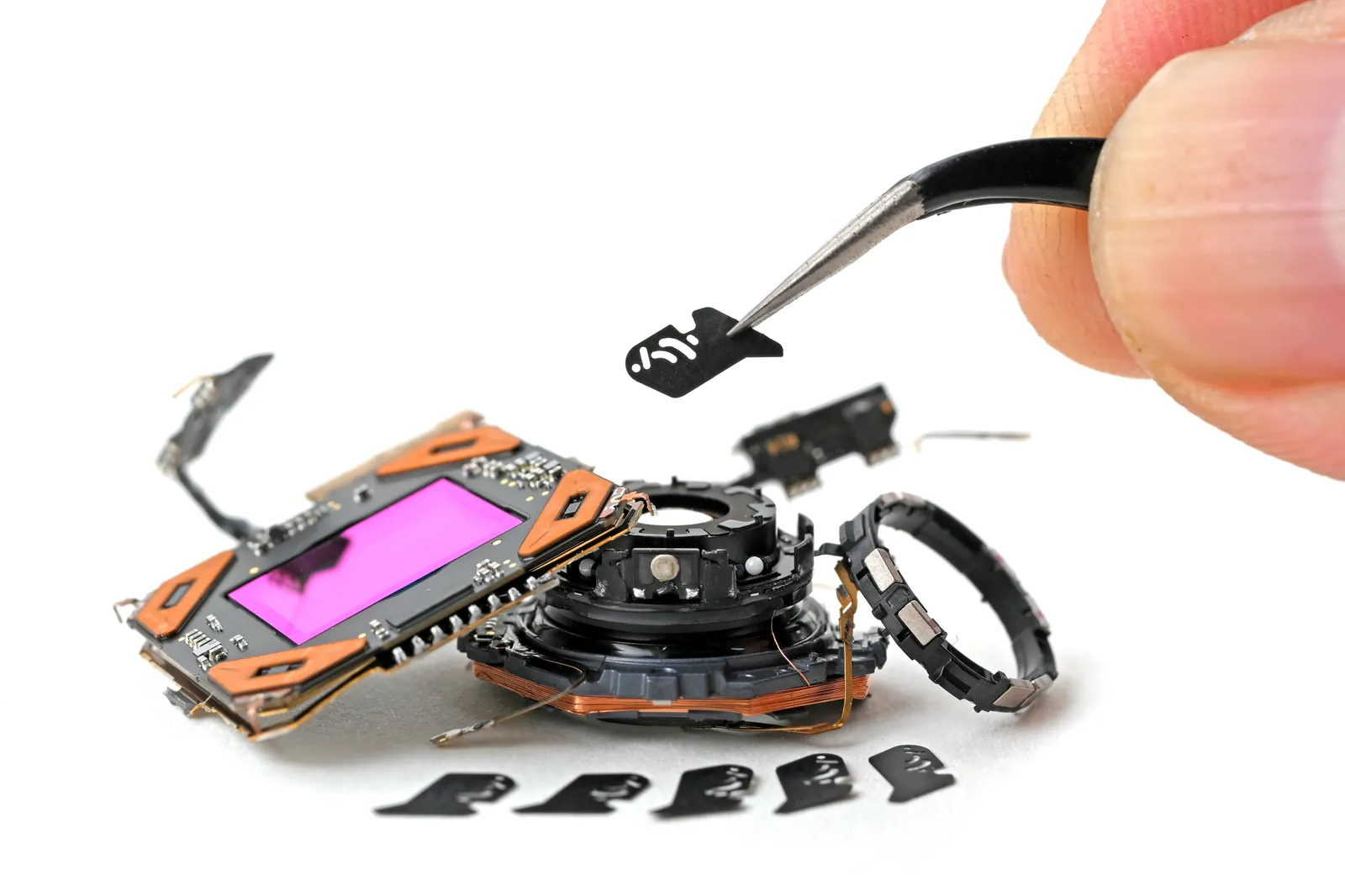
The Achilles heel of the iPhone 18 Pro may be a new feature: a variable aperture lens in the phone’s main 48-megapixel camera. It is the first variable aperture in an iPhone (though not the first in a smartphone). It uses six rotating aperture blades the width of a human hair to allow for different apertures for photo and video.

Courtesy of iFixit
The problem with the aperture is that Apple is introducing moving parts—therefore more parts that might need repair. Given the size and intricacy of how the blades are positioned, iFixit called trying to fix the individual blades an almost-impossible task. That means if the camera does break, you’d probably have to replace the full camera assembly. That will undoubtedly be pricier than paying for individual pieces. Luckily, the assembly itself proved easy enough to remove.
A stickier situation is repairing the iPhone 18 Pro’s battery, which requires prying open the glued-on screen. Once that is removed, though, the battery isn’t glued down but secured by screws, so it’s simpler to extract.
All in all, the iPhone 18 Pro is about as straightforward to repair as it has been for a few years—not a totally easy fix, but one with some tangible improvements. This comes after Apple’s long, contentious relationship with repair advocates, which made it a target of European Union legislation to make its products easier to fix.
Apple introduced a self-repair program in 2021. It got off to a bumpy start as the company withheld or made it difficult to access certain tools. After pressure from US state lawmakers, Apple made it slightly easier to repair its phones and eventually introduced a repair assistant to help guide users through the repair process. Still, just this year, the ownership advocacy group PIRG gave the iPhone 17 a D- rating for its repairability.

China is taking a firm stance on AI companions, proposing rules that would prevent platforms from offering virtual intimacy services to anyone under 18. According to a SCMP report, the proposal could set a precedent for governments drawing boundaries around AI relationships.
What would the new rules change?
China’s internet watchdog, the Cyberspace Administration of China, would ban “virtual relatives or companions” for minors. It would also prohibit services that encourage addiction or seriously affect their health. Social networking with strangers would also be banned, except for users over 16 who rely on their own wages.
Games, social platforms, and AI services that could affect cognition for users under 16 would need minors’ mode activated. Additionally, platforms would need better systems for identifying minors, and algorithms cannot encourage emotional dependence, addiction, or excessive spending. AI services found in violation could face a fine up to 10 times the platform’s income when it exceeds 1 million yuan, or about $149,000, and authorities can confiscate it.
Why this matters for AI companies worldwide?
Users aged six to 19 made up 18% of China’s internet users, totaling 112.5 million people, at the end of 2025. Lawyer He Qianggao says regulators will examine whether services simulate family or partner relationships through character settings and emotional guidance. However, ordinary AI chats and functional role-playing would generally fall outside the rules, but dependence-fostering services could face scrutiny.

The challenge is deciding what identified minors can access, which could increase product, infrastructure, and compliance costs. The proposal comes two months after China’s first dedicated humanlike AI rules took effect in July. Those rules target systems that encourage dependence and damage real-world relationships.
The debate is already spreading beyond China, from probes into the risks posed by popular AI chatbots like ChatGPT and Gemini to children to restrictions on AI use in schools. The concerns are not limited to regulators, as parents are increasingly worried about children becoming too dependent on AI.
These rules are still proposals, with public comments open until October 17. China is clearly treating emotional dependence on artificial intelligence as a youth safety issue. If these rules are adopted, it would set a precedent for how governments around the world regulate AI companions.

Facepalm: Russia might have spent more than a decade trying to drop US technology in favor of home-grown alternatives, but it appears that even President Vladimir Putin is happy to use a Dell PC and Windows for a video showing him casting his vote. It also seems that the Kremlin didn’t want to pay Microsoft the $139 activation key: Putin was using an unactivated copy of the OS, and looked about as comfortable using the computer as most 73-year-olds would.
In the clip, the Russian president was casting his vote online in the country’s State Duma elections, which were held between September 18 and 20 to elect members of the lower house.
But the video is getting a lot of attention for reasons unlikely to please the Russian president. Firstly, there’s no attempt to hide that the PC being used in this case is a US-made Dell, likely a Dell U3011, running Windows.
It looks as if Moscow isn’t in a hurry to hand over any more money to Microsoft. A magnified section of the video appears to show the Activate Windows watermark. This indicates that Windows is unactivated, though not necessarily unlicensed: a legitimately licensed installation can also display the warning if activation fails.
– Visegrád 24 (@visegrad24) September 18, 2026
Not using something like Astra Linux, which has a 74% share of the Russian-made OS market, for the shoot is something of a surprise.
There could be reasons why this Windows copy is unactivated. Maybe it was set up only for this clip, so registering a fresh copy of the OS was deemed unnecessary. Or perhaps Russia thought it was mocking Microsoft and the US?
Or maybe it was all a ploy to distract from Putin’s computer skills. He looks far from at ease when casting his vote, as the president squints at the screen, takes long pauses, and occasionally resembles the dog from the old “I have no idea what I’m doing” meme. His exclamation that “You can’t go wrong” sounds more like he’s trying to convince himself.

Putin has never come across as technically inclined. It was reported in July 2026 that he still doesn’t own a smartphone, though his spokesperson claims this is due to security and privacy concerns. He’s also said to be wary of the internet and modern communications, but then maybe we all should be.
from the dysfunction-junction dept
I’ve written a lot about how Elon Musk and Jeff Bezos convinced Republicans to redirect billions in taxpayer money away from future-proof fiber optic upgrades, and toward their low-Earth orbit (LEO) satellite broadband networks they’d already planned to deploy. Curious behavior for two extremely-rich gentlemen who both repeatedly claim to loathe subsidies and corporate welfare.
The short version: the billionaires convinced Republicans to retool the $42.5 billion Broadband, Equity, Access, and Deployment (BEAD) program (created by the 2021 infrastructure bill) in a way that weakened oversight standards, eliminated enforcement of stuff like broadband affordability, speed, and equitable deployment, and shoveled taxpayers toward more expensive, slower, less reliable satellite service.
After doing billionaires a giant favor, Republicans proudly claimed they’d “saved taxpayers around $21 billion” in “non-deployment funds.” The problem: Congress specifically earmarked this money for broadband deployment, so states were understandably annoyed at the missed opportunity.
For much of the last year, states and scattered lawmakers have been begging the Trump NTIA to offer guidance on what is going to happen to this $21 billion. Initially I think they hoped they could just pocket or repurpose that money. When they realized they couldn’t get away with it, they announced last week they’d vaguely be opening additional BEAD funding rounds to try and put the money to work.
Former FCC official Gigi Sohn, illustrated how stupid this all is over at a post at LinkedIn:
“After proudly cutting back on BEAD-eligible locations in its “Benefit of the Bargain” and “Best and Final” bidding rounds, the National Telecommunications and Information Administration (NTIA) has now decided that part of the money it allegedly “saved” will go back to deploy broadband in the places that it nixed previously.”
But there’s still no meaningful guidance on what any of this means (which is required by law). And the BEAD standards have been so altered and twisted, there’s nothing saying this doesn’t just result in billions more money being funneled to Elon Musk and Jeff Bezos for substandard LEO satellite service that’s expensive and increasingly congested (because it wasn’t designed to be a mainstream option).
The bipartisan infrastructure law that created BEAD says that any extra BEAD money left over after physically connecting people must be used to improve broadband maps (which telecoms hate because it highlights market failure), install low-cost connectivity in multiple dwelling units like low income apartment complexes, or support broadband adoption programs. All of which the Trump administration claim are “woke.”
Sohn notes that under the law the Trump NTIA needs to provide clear guidance for the funds. Just ambiguously stating that money can still be maybe used for broadband doesn’t cut it:
“NTIA Administrator Roth promised a Subcommittee of the House Energy and Commerce Committee that she would issue non-deployment guidance this summer. This partial guidance should not serve as a promise kept. The last day of summer is September 22. Tick Tock.”
The annoyance at the Trump NTIA is increasingly bipartisan, as politicians in states like Texas realize this whole program was mired with all sorts of billionaire favoritism, delays, and weird new bureaucratic obstacles that significantly eroded what could have been a once-in-a-lifetime opportunity to expand affordable, fast broadband.
I think this hasn’t been a bigger scandal (yet) in part because states don’t want to speak out and risk not getting billions in funds. So a lot of folks I see in telecom policy are privately furious or disgusted, but publicly pretending that any of this still makes any coherent sense.
It’s important to remember that Republicans spent all last election season complaining that this BEAD program was a bureaucratic hellscape they were going to immediately fix once in office.
Instead the Trump admin redirected billions to billionaires, eliminated any provisions requiring the broadband be equitably deployed and affordable, hijacked $21. billion for what they clearly hoped would be their own personal use, and created years of additional delays due to corruption and bureaucracy.
Folks like Ezra Klein, who helped Republicans parrot BEAD concerns in 2024, have been nowhere to be found since. In fact none of the “abundance” folks have made a single solitary peep about how badly the opportunity to build much-needed affordable broadband infrastructure has been bungled by Trump Incorporated.
Filed Under: bead, broadband, corruption, digital divide, elon musk, fiber, high speed internet, infrastructure bill, satellite


Europe’s data centers are to be graded on how much energy and water they use, under a rating scheme proposed on Monday by the European Commission.
Any individual site drawing more than 500 kW is covered. What the rating measures is not only consumption but what a data center puts back: heat recovered and reused, clean generation it adds, and how far it can flex its own demand when the grid is under strain.
The argument for taking the time to recover the heat is based on one figure: if about half of the heat that Europe’s data centers currently waste were recovered, it would meet the heating needs of four million households.
“Tripling our data center capacity cannot mean tripling the pressure on our grids, our water and our energy bills,” said Teresa Ribera, the Commission’s executive vice-president for clean, just and competitive transition.
Tripling is not merely hypothetical; it is the stated plan: the EU aims to have three times its current capacity within five to seven years, a goal it frames as a matter of technological independence rather than as part of an energy policy.
In 2024, European data centers used about 68 terawatt-hours of electricity, and the International Energy Agency forecasts this to rise to 114 TWh by 2030 due to AI, at which point the sector will account for more than 3% of all electricity consumed in the region.
It is a delegated regulation and determines what takes place afterward; Parliament and the Council now have two months in which to examine it, and although they can object to the entire regulation, they cannot alter a single line of it.
If it survives that stage, the individual data centers will have their labels applied in 2027, and a review of whether any of it is working will be completed by the end of 2028.
The fact is that having a rating does not mean that requirements are being imposed, since the Commission has separately put forward minimum performance standards for consultation, and it is precisely from that process that a real floor would arise; the deadline for this is 14 December.
The Commission is also carrying out work on a tripartite agreement with the operators, the grid operators and the energy suppliers later this year, after the declaration of intent made in June.
At the moment, the proposal makes data centers visible rather than smaller.
“Digital sovereignty must go hand in hand with energy responsibility,” said energy commissioner Dan Jørgensen.
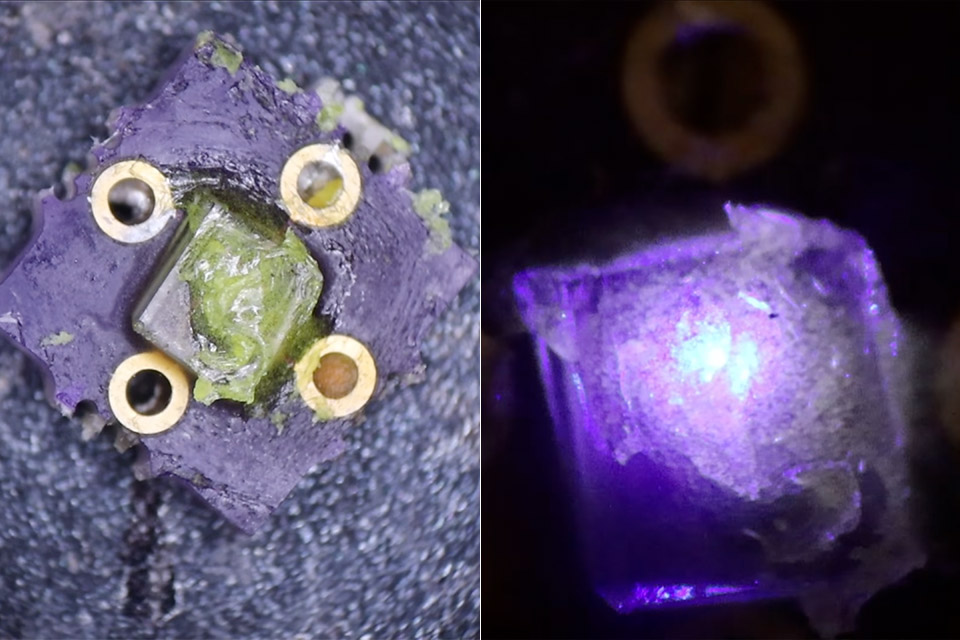
Dr Semiconductor already had working DRAM cells from a class 100 cleanroom built inside a home backyard shed. Packaging those silicon chips onto a circuit board was the next problem, because silicon is opaque and lining up pads by eye is a guessing game. Gallium nitride grown on sapphire is transparent, already contains the layers that make blue light, and happens to be the same material used in commercial LEDs. A two-inch epiwafer costs about $160 and lasts a long time once you dice it.
An LED epiwafer is essentially a thin layer of crystal on a sapphire disk. Underneath is an n-type gallium nitride layer that emits electrons, a thin indium gallium nitride ‘quantum well’ in the middle is where the magic happens, and a p-type gallium nitride layer on top delivers positive charges. When those two combine in the well, you get blue light, which is a really simple process.
Sale

Govee RGBIC Floor Lamp Basic, 1000lm LED Corner Lamp, Black
- Note: This floor lamp is 53.7 inches tall and offers a maximum brightness of 1,000 lumens, making it best suited for corners and small spaces. The…
- Dynamic RGBIC Color: Unleash your creativity with Govee RGBIC technology, you can customize each segment color base and the floor lamp will display…
- Smart Control: Manage your LED floor lamp with simple voice commands via Alexa, Google Assistant. And Govee Home APP also make it more convenient to…

To get to the buried n-layer, however, you must cut through the top two layers without damaging the rest. You can’t simply use a chlorine plasma etcher like the big boys do in actual fabs since they’re way too expensive and unsafe for a home setup. The problem is that gallium nitride absorbs 355 nanometer UV radiation whereas sapphire does not, therefore you need a controlled means to ablate the coating. A refurbished glass-engraving laser from eBay does the work. Getting the right settings can take some trial and error on scrap parts, but once you’ve figured it out, the laser can cut nice little boxes down to the n-layer. To ensure that the wafer still works before any fancy lithography begins, simply apply a smear of soft indium metal to the etched spot and another to the unaltered p-surface, then connect a 9-volt battery between the two, which will glow blue in no time.

This process can leave behind some ugly metallic gallium and rough sidewalls, which a warm potassium hydroxide bath can remove by peeling the damaged material away like an onion and leaving the top surface clean and smooth. Then it’s just a matter of following the more common flow from there: spin on the usual lift-off resist and photoresist, bake and expose through a microscope stepper (which can print a YouTube logo or simple contact pads), and after a few developments, sputter on some nickel and then silver for the p-contact in a vacuum chamber. A 400 to 450 degree air anneal converts the nickel into a good semiconductor contact and allows the silver to do its job. Following a second alignment and lift-off in DMSO, the titanium and silver create the n-contact.

When a voltage is applied to the p-side positive and the n-side negative, the dies light up a stunning blue-purple, and the turn-on voltage is an ideal 2.5 volts for this material. One major problem is sawing sapphire at home, which is a hassle to get through, but the same 355 nm laser can do the trick if you aim it so it is absorbed inside the transparent crystal, allowing you to cut the wafer into individual chips over several passes. The edges may become scatter-damaged throughout the procedure, so leave some additional space around each die.
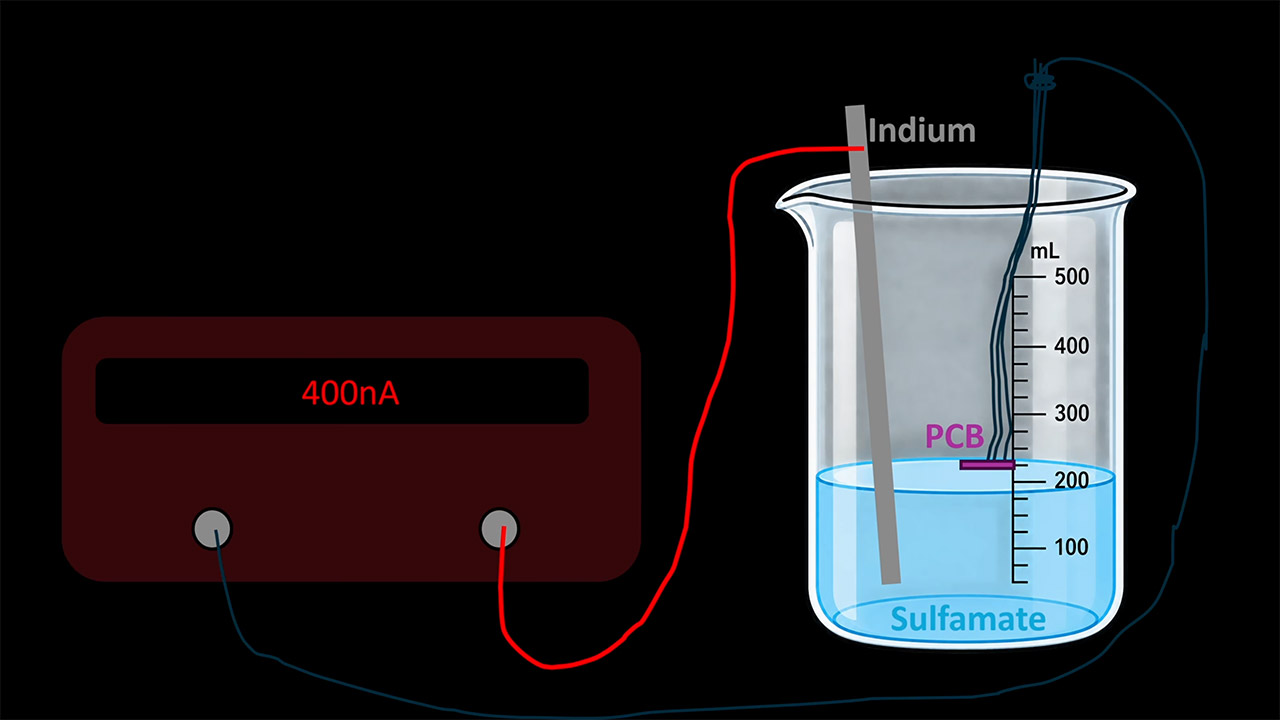
To make the LEDs more practical, you’ll need some custom boards with plated vias, which can then be electroplated with indium bumps. Mask off the regions that must remain clean using Kapton tape and rosins, then apply a little amount of flux to prevent the indium from oxidizing. A micromanipulator aligns the tiny die over the bumps, heat melts the metal, and you have a bonded chip. If you run current through the board vias, the packaged LED will light up just like a factory part. Blue LEDs on their own can appear frigid and uninviting, but when mixed with cerium-doped YAG phosphor powder and hardware-store silicone, the majority of the blue turns yellow. The eye views the combination as white since the more powder you add, the warmer the color becomes, and a small amount of silicon dries rapidly but appears rough, but it still works.
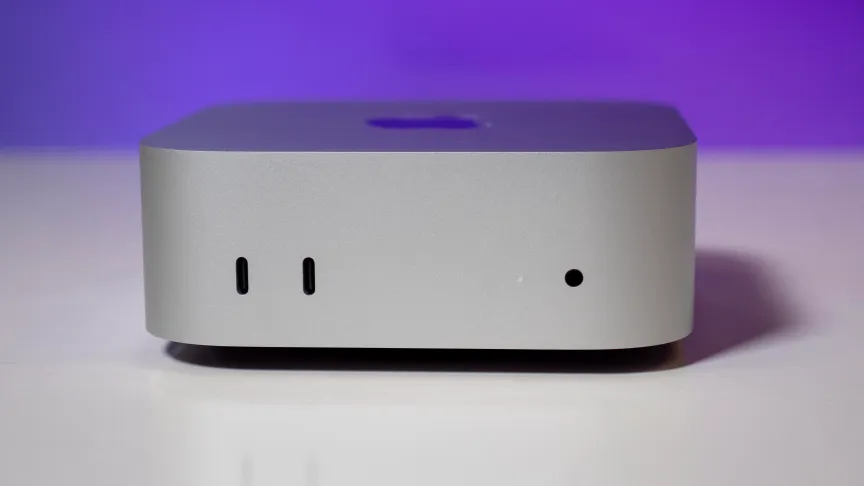
The M6 update for the Mac Mini arrived not a moment too soon. Not only has it been nearly two years since the last Mac Mini was released, but it’s also become increasingly difficult to find an older M4 Mini for purchase in recent months. In the year of the AI agent, Apple’s Mac Mini has enjoyed a surge in popularity to the point of dwindling supplies and long wait times.
The compact, quiet and affordable Mini with its energy-efficient yet powerful Apple silicon and unified memory has become a popular pick for people looking to run OpenClaw and other local AI agents around the clock. Even at its slightly elevated starting price of $899, the M6 Mini is sure to remain en vogue as a tiny, always-on AI server. The core count ticks up for the CPU, GPU and NPU in going from the M4 to the M6, skipping over the M5 in the process.
If you want to pack more power into the Mac Mini for running demanding creative workloads or larger LLMs, Apple offers two M5 Pro processor upgrades and the ability to stuff the Mini with up to 64GB of RAM. Apple sent me a pair of Mac Minis to test, an M6 model with bumps to the memory and storage and a loaded M5 Pro unit whose price places it in Mac Studio territory.
Apple Mac Mini specs (as tested)
| Mac Mini M6 | Mac Mini M5 Pro | |
| Price as reviewed | $1,299 | $2,899 |
| CPU | M6 12-core CPU | M5 Pro 18-core CPU |
| Memory | 24GB unified memory | 48GB unified memory |
| Graphics | Integrated M6 12‑core GPU | Integrated M5 Pro 20‑core GPU |
| Storage | 512GB SSD | 1TB SSD |
| Networking | Wi-Fi 7 and Bluetooth 6 | Wi-Fi 7 and Bluetooth 6 |
| Ports | Front: USB-C (x2, up to 10Gbps), 3.5mm headphone jack
Rear: USB-C Thunderbolt 4 (x3, up to 40Gb/s), HDMI out, Gigabit Ethernet, power input |
Front: USB-C (x2, up to 10Gbps), 3.5mm headphone jack
Rear: USB-C Thunderbolt 4 (x3, up to 40Gb/s), HDMI out, Gigabit Ethernet, power input |
| Operating system | MacOS 27.0 Golden Gate | MacOS 27.0 Golden Gate |
 Josh Goldman/CNET
Even before the latest price hike with the M6 model, the Mac Mini lost its standing earlier this year as Apple’s most affordable Mac computer. It debuted two decades ago at $499 and could be had for $599 for most of its tenure before jumping to $799 earlier this year.
Released this spring, the MacBook Neo became the cheapest Mac at just $699, but it’s based on an A18 Pro processor borrowed from the iPhone. So, the Mac Mini still remains the most affordable Mac computer with a proper M-series processor. At $899, it’s still $400 less than the cheapest MacBook Air. And it beat every MacBook in the race to be the first Mac to get Apple’s new M6 processor.
Meet the M6
The M6 processor is the first of Apple’s M series processors to be fabricated with a 2nm process, which allows for denser circuitry in the same size die. The smaller process usually results in greater efficiency and lets you increase the core count and clock speeds without increasing the size of the chip.
And sure enough, the M6 is richer in cores than the previous M4 part. The M6 has 12 CPU cores and 12 GPU cores — up from 10 cores of each type in the M4 chipset. Meanwhile, the core count of the neural processing unit that’s designed to handle the integer math required for AI tasks, including Apple Intelligence, has doubled.
 Josh Goldman/CNET
The M6 has a dual 16-core neural engine; its combined 32 cores are double the 16-core NPU of the M4 and M5 Pro. The M6 and M5 Pro also feature the same neural accelerators on the GPU that Apple introduced with the M5 to help boost AI and ray-tracing performance.
For $899, the M6 Mac Mini has 16GB of RAM, a 256GB SSD and a 2.5Gb Ethernet adapter. Offering 256GB of storage on a desktop computer, no matter how small that computer may be, is borderline offensive. You can’t even buy a MacBook Air with a 256GB SSD after Apple jettisoned that undersized option earlier this year. Unfortunately, the cost to double the storage to 512GB is steep at $200, which quickly pushes the price of the Mac Mini over $1,000. Want to double it again to 1TB? That’s another $300. Be prepared to part with another $500 if you want to double it yet again to 2TB.
Memory costs are similarly steep. Each 8GB upgrade adds $200 to the bill, going from 16GB to 24GB and 24GB to 32GB. Choose one of the M5 Pro upgrades, and you can take the memory to 48GB or 64GB and storage up to a whopping 8TB. (I’ll let you discover those upgrade prices on your own; just be sure you’re sitting down when you take a look.)
Pricing for the Mac Mini with an M5 Pro starts at $1,699. For that price, you get an M5 Pro with a 15-core CPU and 16-core GPU, along with 24GB of memory and a 512GB SSD. (Yes, along with you, I was relieved to see the 256GB SSD option disappear with the M5 Pro upgrade.)
 Josh Goldman/CNET
Apple sent me the higher of the two M5 Pro offerings. It has an 18-core CPU and a 20-core GPU. Apple also upped the memory to 48GB and the storage to 1TB while also upgrading the Ethernet adapter to 10Gbps. The cost of this test system is $2,899. That’s $400 more than the entry-level Mac Studio.
Notably, the M5 Pro chips have the same 16-core neural engine as the standard M5 chip and not the M6’s dual 16-core neural engine. No matter the CPU you choose, the Mac Mini comes with Apple’s N1 chip that delivers Wi-Fi 7 and Bluetooth 6 networking.
The good news and bad news with Apple’s unified memory
Let’s get the bad news (and a couple of acronyms) out of the way first. Apple’s M-series processors have a system-on-a-chip (or SoC) design with a unified memory architecture. The downside of this arrangement is that the RAM cannot be upgraded after purchase. You’re locked into whatever amount you buy. Common on today’s laptops, it’s more of a drag on a desktop computer, even one as compact as the Mac Mini, where space for upgrades is limited.
Now, the good news. The SoC design combines the CPU, GPU and neural engine to remove bottlenecks and speed up both performance and efficiency. And with Apple’s UMA, the system’s memory is shared among the CPU, GPU and neural engine instead of splitting it into separate blocks where most of the RAM is accessed by the CPU and only a smaller amount of video RAM is allocated to the GPU. Running a local LLM is extremely memory-intensive, which is why the affordable Mac Mini, with its unified memory, has become the move for many people looking to run local AI agents.
 Josh Goldman/CNET
Memory bandwidth has improved with the new Mini models. The M6 Mac Mini’s memory has a bandwidth of up to 153 GB/s with 16GB of RAM and up to 170 GB/s with 24GB or more, which is an increase from the 120 GB/s of the M4 Mini. The M5 Pro jumps you up to a memory bandwidth of 307 GB/s.
Design stays the same
Apple refreshed the internals but kept the design the same from the M4 model, which introduced a much smaller footprint than the previous M2 model. The M6 Mini has the same 5-by-5-inch box that stands 2 inches tall, with the power button still in the same somewhat strange location. It’s on the bottom panel, which means you’ll need to pick up the Mini to power it on.
The same design means the new Mini has the same port selection, which was strong with the M4 Mini, so it wasn’t begging for a change — unless you were looking for the adapter-free convenience of getting a USB-A port. With all of the USB ports of the Type-C variety, you’ll need an adapter for older USB-A peripherals or a wired mouse. Like the M4 model, the M6 Mini supports up to three external displays.
 Josh Goldman/CNET
M6 and M5 Pro Mac Mini performance so far
Based on my initial testing, the M6 Mac Mini is looking like it’s going to be an even more popular pick than the M5 Pro Mini or previous M4 Mini for agentic AI workloads. The dual 16-core neural engine, combined with the neural accelerator on each GPU core, helped the M6 rocket ahead of the M4 Mini on our Geekbench AI test, which measures the on-device AI performance of a laptop’s NPU. The M6 also topped the M5 Pro Mini and every M5-based MacBook we’ve tested on this test. The M5 has the GPU neural accelerators of the M6 but not its dual 16-core neural engine.
Still, the Asus Ascent QN10 mini PC based on a Qualcomm Snapdragon X2 Elite CPU performed better on this test than the M6 Mini, thanks to its NPU, which is capable of 80 trillion operations per second.
On our application benchmarks, the M6 Mini turned in outstanding single-core performance on the Geekbench 6 and Cinebench 2024 tests, where it again outpaced the M5 Pro and the crop of M5 MacBooks and Windows competitors. The M5 Pro Mini put its extra CPU cores to good use and beat the M6 Mini on the Geekbench 6 multicore test, but surprisingly, it fell short of the M6 Mini on the multicore CPU test of Cinebench 2024.
Where the M5 Pro Mini had its largest advantage over the M6 Mini in graphics performance. It easily outpaced the M6 Mini on our 3DMark Steel Nomad test.
I have more tests to run on these two machines to further investigate their AI and graphics performance. Check out the initial benchmark results below for the M6 and M5 Pro Mini, and check back soon for my full review of Apple’s latest Minis.
System configurations
| Apple Mac Mini (M6) | MacOS Golden Gate 27.0; Apple M6 (12-core CPU, 12-core GPU), 24GB LPDDR5, 512GB SSD |
| Apple Mac Mini (M5 Pro) | MacOS Golden Gate 27.0; Apple M5 Pro (18-core CPU, 20-core GPU), 48GB LPDDR5, 1TB SSD |
| Apple Mac Mini (M4) | MacOS Sequoia 15.1; Apple M4 (10-core CPU, 10-core GPU), 16GB LPDDR5, 512GB SSD |
| Apple MacBook Pro 16 (M5 Max) | Apple MacOS Tahoe 26.3.1; Apple M5 Max (18-core CPU, 40-core GPU); 128GB LPDDR5; 4TB SSD |
| Apple MacBook Pro 16 (M5 Pro) | Apple MacOS Tahoe 26.3.1; Apple M5 Pro (18-core CPU, 20-core GPU); 48GB LPDDR5; 2TB SSD |
| Apple MacBook Pro 14 (M5) | Apple MacOS Tahoe 26.0.1; Apple M5 (10-core CPU, 10-core GPU); 16GB LPDDR5; 1TB SSD |
| Apple MacBook Air (M5) | Apple MacOS Tahoe 26.3.1; Apple M5 (10‑core CPU, 10‑core GPU); 16GB LPDDR5; 1TB SSD |
| Asus Ascent QN10 | Microsoft Windows 11 Pro; Qualcomm Snapdragon X2 Elite X2E-88-100; 32GB LPDDR5; Qualcomm Adreno X2-90; 1TB SSD |
| Asus NUC 16 Pro | Microsoft Windows 11 Pro; Intel Core Ultra X7 358H; 64GB LPDDR5; Intel Arc B390; 1TB SSD |
| Minisforum AtomMan G1 Pro | Microsoft Windows 11 Pro; AMD Ryzen 9 8945HX; 32GB LPDDR5; Nvidia RTX 5060; 1TB SSD |


Mazu defies rivals and pre-race antics for 2026 The Shorts victory
12 Anker Mini Gadgets That Are Actually Worth Buying

Presley Gerber, 27, died from suspected overdose, report says, as new information emerges about LA rehab star spent his final days in




-

 Fashion3 days ago
Weekend Open Thread: Talbots – Corporette.com
-

 Tech17 hours ago
Researchers escape OpenAI Codex sandbox to run commands on host
-

 Crypto World3 days ago
Circle launches Arc Studio AI agent for building onchain apps
-

 Crypto World7 days ago
Revolut Attackers Warn of Ongoing Daily Customer Data Leaks
-
 NewsBeat3 days ago
Trump says US has reached an agreement to take permanent control of Greenland’s security
-

 Crypto World6 days ago
Robinhood engineers charged over $50K crypto scheme
-

 Crypto World7 days ago
Kraken Lets xStocks Holders Earn Yield Through DeFi
-

 Crypto World3 days ago
Bitcoin price breaks channel as RSI climbs to 63
-

 Crypto World5 days ago
US Charges Robinhood Engineers Over Crypto Listing Trades
-

 Crypto World6 days ago
What Is the Status of the U.S.-Iran Peace Talks? Here's What Both Sides Are Saying
-

 Crypto World6 days ago
NVIDIA Analysis: Attempted Rising Wedge Breakout Amid Pressure on the AI Sector
-

 Tech6 days ago
Webb’s IC 348 Mosaic Includes Two-Jupiter Dwarfs, Twin Jets, and a Nursery Still Making Worlds
-

 Crypto World3 days ago
World Money launches in 150+ countries with Stripe
-
Crypto World7 days ago
Can Circle’s Arc Repeat Robinhood Chain’s Meme Coin Boom?
-

 Crypto World3 days ago
Silver prices recover quickly, hitting weekly high today
-

 Entertainment6 days ago
Big Brother Update: Melody Explodes at Drew as Illness Sweeps BB28 House
-
 NewsBeat3 days ago
US was ‘on brink of war’ with China over false AI report of nukes moving in Middle East
-

 Crypto World7 days ago
Kraken Adds DeFi Yield on Tokenized Stocks and ETF Assets
-

 Crypto World3 days ago
Trading Bitcoin on Robinhood? Why 2% Spread Has Traders Worried
-

 Crypto World7 days ago
DOJ Seeks to Seize $61M in Iran Oil Funds From Binance Accounts It Vouched For
You must be logged in to post a comment Login