



.jpg)
.jpg)
Join Mikko Hyppönen and security leaders from the NFL, CHANEL, and Atlassian for a two-hour digital summit on what AI-speed attacks change, what defenders should stop doing, and how to validate, decide, fix, and re-validate at machine speed.
Tech
Save 15% Off a Japanese eSIM Data Plan With Ubigi and Our Exclusive Code

An advertiser paid for editorial consideration of this deal. Our editorial experts vetted the deal based on our independent expertise. Because we determined that the deal will save money for our readers, we wrote the content.
Save 15%: Buy a Japanese data eSIM from Ubigi and save 15% off when you enter our exclusive discount code CNETJP15 during checkout. If you’re traveling to Japan and want to be able to use your phone without worrying about roaming charges, this is the deal for you.
You’ll save 15% on your first purchase with 8-, 15- and 30-day data eSIMs available, all with unlimited data throughout Japan. Japanese data eSIMs start at $21 with our code, and you’ll save the most money when choosing the longer plans.

Save 15% with code CNETJP15
Ubigi Japanese eSIM plans
Ubigi offers three Japanese data eSIMs for you to choose from. The eight-day unlimited data plan is down to $21 from $25 once our 15% discount has been applied. For those staying in the country longer, the 15-day unlimited data plan now costs $33, down from the usual $39. Anyone lucky enough to be in Japan for a full month can choose the 30-day unlimited data plan for $55 — down from $65.
There are tons of reasons to head to Japan, whether you’re checking out the local wrestling scene or hunting for some hard-to-find classic video games. And that’s before we get into the amazing scenery and architecture that’s just waiting to be explored. Whatever your plans, having to worry about data costs shouldn’t be part of them.
These data-only eSIMs are easy to set up and use, with a single Ubigi app handling data connections for over 200 destinations, including Japan. You only need to install one app no matter your destination, so there’s no scanning of QR codes or complicated setup here.
Why this deal matters
Whether you’re visiting Japan for a vacation or for work, you’re going to need to use your phone. Sure, you can roam using your carrier, but data costs can be extortionate and unpredictable. Buying a Ubigi eSIM takes the guesswork and worry out of using your phone abroad, and saving 15% is just the icing on the cake.

Continue Reading
Tech
F-Droid 2.0: FOSS Android Appstore Continues Updating Despite Google's Pending 'Developer Verification' Plan

“F-Droid, a third-party app repository that only distributes free and open-source software packages for Google’s Android mobile platform, on Thursday announced version 2.0 of its Android app,” reports The Register.
Though they also note “a big banner across the top of the F-Droid site” pointing to a site describing pending changes from Google that threaten the future of F-Droid…
[D]evelopers who want their apps broadly distributed outside the official Google Play Store will need to register with Google and verify their identities. Google’s Full Distribution option includes paying a one-time $25 fee, handing over a copy of a government-issued ID to verify one’s identity, and conforming to Google’s terms of service. Google also offers a free Limited Distribution option that doesn’t require government ID verification but restricts distribution to 20 authorized devices, while apps from unverified developers can still be installed by users who enable Android’s advanced installation flow.
The potential death warrant hanging over its head hasn’t stopped the F-Droid team from rolling out a bunch of new features for an app it says it intends to keep working on for years to come… The team also credited the EU’s many Digital Markets Act decisions against Google for making the installation experience smoother for users. F-Droid can now use a unified installation service for its apps thanks to the availability of a pre-approval API that allows users to approve an installation when they request it, rather than waiting until the app has finished downloading. That, said the F-Droid team, “brings the F-Droid install experience on official Android devices much closer to what the built-in app store can provide.” Additionally, F-Droid 2.0 can fetch and install app updates automatically, which it now does by default.
All of those changes, however, won’t matter much if Google pushes ahead undeterred with its plans to force registration onto non-Play Store developers. F-Droid’s announcement on Thursday makes it seem that the team isn’t going to go quietly.
F-Droid has gone 10 years without a major update, notes Ars Technica — and spent over a year developing F-Droid 2.0:
The new F-Droid client was redesigned from scratch in Kotlin Compose, which is the standard for modern Android apps. This makes the store much more responsive, and there’s optional support for Android’s Material theming. The interface has also been cleaned up considerably, making the most important functions easier to access and hiding some others in overflow menus… Unlike the Play Store, F-Droid doesn’t track your taps and installs to push ads and suggestions — it helps you find things and gets out of the way.
F-Droid now includes a huge number of categories, drilling down to specialized niches like firewalls, password managers, and VPNs. You can see all these groups in the search tab. There are also higher-level categories listed on the main Discover page. When searching for apps, F-Droid will now be able to return results based on app descriptions rather than just names.
“One of the goals of the rewrite was to lower the barrier for new contributors,” F-Droid said in their announcement. “We are excited to begin rolling out F-Droid 2.0 to users over the coming weeks after 14 test releases.” (And if you want the 2.0 release right now, it’s available on the versions page.)


Read more of this story at Slashdot.
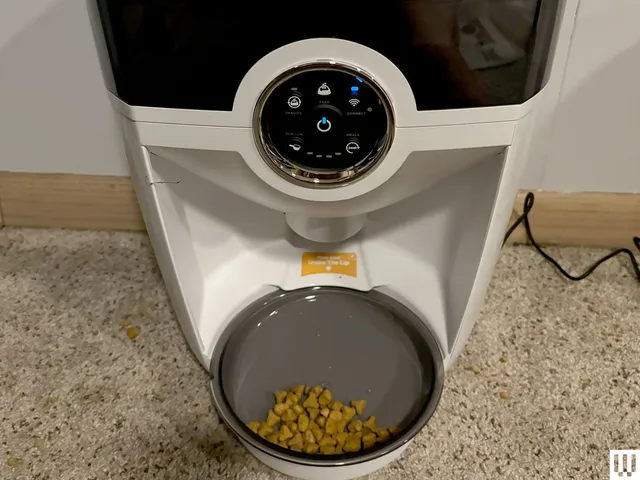
I always tell people that the best thing I’ve ever tested for my job here on the WIRED Reviews team is my automatic litter box from Litter-Robot. I recommend that every cat owner invest in an automatic litter box. If they can swing it, the Litter-Robot is the best option. You’ll be able to say goodbye to the days of scooping and unpleasant smells while this nifty machine does the grunt work for you.
-
Photograph: Molly Higgins
-
Litter-Robot is the OG automatic litter box, and the name itself has become synonymous with the concept. That’s not by accident, as the brand makes incredibly well-made, ergonomic products that make life easier for pet parents everywhere. Along with their famous automatic litter boxes, they also make a sleek automatic pet feeder that I’ve tested (and loved). These gadgets are an investment and can be pricey, but we here at WIRED love the brand so much that we’ve rounded up some of the best Litter-Robot promo codes, coupons, and deals to make these life-changing pet machines more affordable. Because your pet (and you) deserve it.

Whisker’s Litter-Robot name has become synonymous with the automatic litter box. We’ve tested the entire lineup and can help you choose the best model for your household.
Get $75 Off Litter-Robot Bundles This Month: No Promo Code Needed
One of the best ways to save big without a Litter-Robot promo code is to buy in a bundle. Litter-Robot offers several bundles that include all the essentials you’ll need to get started with your automatic litter box, such as a litter-trapping mat, replacement waste bags, odor eliminators, litter, and more. Bundles are a great way to save money on the purchases you’ll already need to make, without a Litter-Robot coupon. You can get $75 off several bundles, including Litter-Robot 4 models, as well as the newly released Litter-Robot 5 and Litter-Robot EVO models.

Get the Best Deals on the Litter-Robot 4
I’ve tested well over a dozen automatic litter boxes from different brands, including several from Litter-Robot. The one I keep coming back to is my personal favorite, the Litter-Robot 4. Even though the 5 is the newest model (I’ve tested it and I’m in the process of writing the review now), I just can’t quit you, Litter-Robot 4! I still think it’s one of the best automatic litter boxes you can buy: it has a user-friendly, intuitive connected app that isn’t overcrowded or confusing; the drawer is easy to pull out to remove waste; it has buttons on the top to manually change; and it doesn’t take up a large footprint on the floor. Plus, with a variety of discounted bundles to choose from, you won’t even need a Litter-Robot promo code.
-
Photograph: Molly Higgins
-
Litter-Robot 5 Pro Insights Bundle Discount: $150 Off
As previously mentioned, I just tested the Litter-Robot 5 Pro, part of Litter-Robot’s recently released line of new models. I was seriously impressed with this model, which looks very similar to the Litter-Robot 4 but has a built-in camera to see what’s going on inside and outside the box. The newest model isn’t cheap, but right now the Litter-Robot 5 Pro Insights Bundle is only $999 ($152 off). This bundle includes the newest Litter-Robot 5 Pro with built-in camera, plus a litter-tracking mat and waste drawer liners to get you started. And as an added bonus, Litter-Robot offers a 90-day in-home trial, a one-year warranty, and free shipping to the lower 48.

Photograph: Molly Higgins
Whisker
Litter-Robot 5 Pro
Take $50 Off the Litter-Robot EVO Starter Bundle
The Litter-Robot EVO is another newly released model from Litter-Robot, but it’s a more pared-down, basic version that’s streamlined and compact. I personally love the simpler models (hence my paragraph-long love letter to the Litter-Robot 4 above). If you don’t need to watch a camera feed of your cat peeing and pooping, the EVO is a more affordable, basic option that gets the job done efficiently. Right now, the Litter-Robot EVO Starter Bundle is $782 ($50 off) and includes everything you need to get settled with your new auto box, including waste drawer liners, a litter trap mat, a bag of litter, and odor traps to keep things smelling fresh.
-
Photograph: Louryn Strampe
-
Photograph: Louryn Strampe
Start Your 90-day In-Home Trial With Litter-Robot
Investing in an automatic litter box can feel a little scary. It’s a big investment, and you never know whether your cats will take to it or whether it fits your needs or space. Litter-Robot wants to make that decision easier for you—if you aren’t satisfied, you can return the product within 90 days for a full refund. All you need to do is pay for return shipping. Check out the full return policy here, and happy shopping!


Cryptocurrency exchange Bitget disclosed today that suspected North Korean hackers have stolen $351.6 million from its hot and warm wallets.
The company discovered the breach Thursday evening after its security systems flagged multiple unauthorized transfers from a limited number of crypto wallets.
Bitget has temporarily suspended all withdrawals while investigating the incident with help from law enforcement agencies, on-chain security institutions, and cybersecurity experts at Mandiant and SlowMist.
It also said its self-custodial Bitget Wallet was not affected, as it operates on infrastructure independent of Bitget Exchange and was not impacted by the attack, and added that the User Protection Fund (which holds 5,500 BTC currently worth about $464 million) will cover all losses.
“Based on our current assessment, approximately $351.6 million in assets were affected. Bitget’s cold wallets and the overwhelming majority of platform assets remain secure and unaffected,” it said.
“The incident falls within the coverage of Bitget’s User Protection Fund, which currently holds more than $464 million. Customer account balances remain accurate, and deposits and trading continue to operate normally.”
The company has yet to share more information on how the attackers accessed its key backend wallet-service system to forge transfer information and trigger the authorization-signing process.
Bitget CEO Gracy Chen said the incident involved the Ethereum, XRP Ledger, Arbitrum, Avalanche, Optimism, BSC, and Base chains and affected multiple assets, including ETH, XRP (single-chain loss is the largest), BNB, AVAX, USDT, USDC, and other tokens.
Chen added that some chains have also confirmed that the hacker wallet addresses have been frozen since the attack and linked the theft to North Korean hackers.
“Based on IP behavior patterns and on-chain analysis, the attack method in this incident is highly consistent with known patterns of North Korean hacker organizations. We have reported to relevant institutions and are fully cooperating in conducting a global investigation,” Chen said.
“The attacker compromised a critical backend system within our wallet infrastructure, used it to spoof transaction data, and triggered our authorization process to move funds out. No further unauthorized transfers are possible. The specific method of system intrusion remains under active investigation.”
In its latest update, Bitget said it will restore withdrawals as soon as possible, after investigators confirm it’s safe to resume normal operations.
North Korean hackers have previously been linked to many other major crypto theft incidents, including the Bybit heist, in which they stole $1.5 billion from the crypto exchange’s ETH cold wallet.


Electricity is the once and future drivetrain for automobiles, but until the advent of lithium batteries their capabilities were somewhat modest. One EV blip on the automotive timeline is the XP-512E commuter prototype by GM.
The 60s saw a wide variety of interesting experiments in the automobile space, and both GM and AMC were evaluating the possibilities of a return to electric cars for short journeys. GM wasn’t set on a particular drivetrain for their new experimental commuter cars, so the XP 512 became a trio with conventional, hybrid, and electric variants. Each car was a two seater with a fiberglass body and steel chassis. The canopy could lift and a small door in the front swung to the side for access to the cockpit. Some images from the time show the car without the canopy and just the rollbar, giving you a very small convertible (83″/2108 mm long).
Lead acid was the only viable traction battery until the 1990s, so the 1,250 lb vehicle was limited to a top speed of 30 mph and a range of 50 miles. GM was exploring a number of alternatives at the time including another blast from the automotive past, steam power, in an effort to reduce the issues of smog and air pollution that plagued cities beset by droves of V-8 powered sedans. While the XP-512E and the AMC Amitron never made it to production, they’re an interesting reminder that technologies that seem infeasible today may just need to bake a bit longer.
We have some thoughts about the opportunities afforded by electric cars, but it’s probably a good thing we didn’t get nuclear powered automobiles.

Meta’s newest smart glasses are an iterative, expensive update.

Meta announced a slew of new smart glasses at Meta Connect 2026, including its first camera-free options, but the company’s Ray-Ban Meta models remain the flagship. The Ray-Ban Meta Gen 3 carry over many of the improvements introduced in smaller updates over the last year, like the more prescription-friendly Ray-Ban Meta Optics or the affordable Meta Glasses, with new features that mostly rely on software rather than reinvented hardware.
Other than new colors and frame options, it’s hard to tell how the Ray-Ban Meta Gen 3 glasses differ from the Ray-Ban Meta Gen 2, unless you really dig into the specs. And you kind of need to, since understanding those differences is the only way to justify the new $449 starting price.
The Ray-Ban Meta Gen 3 last longer and listen better
The biggest changes Meta introduced to the Gen 3 are a longer battery life and the addition of more microphones. The Ray-Ban Meta Gen 3 lasts up to 9 hours on a charge — one hour more than the Gen 2 — and up to 50 hours with its charging case, two hours more than the Gen 2’s 48 hours. In day-to-day usability this might not make a huge difference, especially when compared to the 12 hours of battery life the company is promising on the Ray-Ban Meta Audio. We’ll need to do a full review of the glasses to see what the battery life improvements mean in real-world use.
The Gen 3’s six-mic array, one more mic than what Meta offered on the Gen 2, is a similarly modest change. Meta says adding the extra mic and redesigning the microphone layout on the Gen 3 model has allowed for better background noise reduction for calls and AI interactions, but that will have to be tested to see if it’s meaningfully different. One way the new mic on the Gen 3 could allow it to stand out from the Gen 2 is support for listening to and recording Dolby Atmos spatial audio, a feature the company says is launching later in 2026.
Meta has also ported over the action button it introduced on the Ray-Ban Meta Optics and Meta Glasses to the Gen 3. The button can summon Meta AI, act as a capture button, or be assigned as a shortcut for a variety of other Ray-Ban Meta features. The Gen 2 features a capture button that only works with Meta’s camera features.
The Ray-Ban Meta Gen 3 are smaller and available in new styles

Smart glasses are fashion as much as they are anything else, so another way the Gen 3 are differentiated from the Gen 2 is the addition of two new frame styles. The Ray-Ban Meta (Gen 3) Aviator features lenses shaped like Ray-Ban’s classic aviator glasses, with thick frames in multiple translucent and tortoiseshell colors. For something a little less in-your-face, the Ray-Ban Meta (Gen 3) Zena comes with more of a cat-eye shape in translucent, black and tortoiseshell colors. The only frame shape that’s carrying over from the Gen 2 is the Wayfarer, Ray-Ban’s most well-known frame. That doesn’t mean Meta won’t port more Gen 2 styles over in the future given its penchant for mid-cycle refreshes, but for now most Gen 3 glasses will look pretty different.
They’re also, technically, a bit smaller. The best comparison point is the Ray-Ban Meta Wayfarer. The standard-fit Gen 2 model is 131mm from hinge to hinge, while the Gen 3 model is only 129mm. The temples on the Gen 3 model are also slightly shorter at 149mm compared to 150mm on the Gen 2. The relationship is reversed when it comes to weight, though, where the Gen 3 model is a slightly heavier 51.5 grams compared to the Gen 2’s 51 grams. Those changes might not be noticeable unless you have the glasses side-by-side, but it does suggest Meta is mostly trending towards smaller glasses overall.
Meta’s new software features are coming to older models
Software and AI access define the experience of using Ray-Ban Meta smart glasses. And the vast majority of features the company announced alongside its Gen 3 model will be available on older Gen 2 models, too. That includes using the smart glasses’ FDA-cleared hearing enhancement feature, interacting with the company’s Muse AI agent, and taking photos with the glasses’ new dynamic photo capture feature, which captures multiple shots at once and lets you pick the best framing.
Combined with the Ray-Ban Meta Gen 3’s higher starting price of $449, $70 more than the Ray-Ban Meta Gen 2, that makes justifying an upgrade hard. The company’s new smart glasses will likely be a great way to jump into Meta’s growing ecosystem, but if you can buy a used Gen 2 pair (assuming you don’t need a prescription) you’ll likely get a better deal.

Watch the Laver Cup 2026 live streams as the ninth edition of the tournament gets underway on 25 September at the O2 Arena in London.
Yannick Noah and Andre Agassi will serve as team captains once again this year, returning from the previous year. Last year’s winners were Team World, as they defeated Team Europe 15–9 to earn their third title. Each team has confirmed six participants for the tournament in the United Kingdom.
Acting as tennis’ version of the Ryder Cup, the competition sees six players from Team World face off against six players from Team Europe. There are nine singles matches and three doubles matches, giving 12 matches in total, with each day seeing four matches take place.
Unlike a normal tournament, players aren’t simply knocked out after losing, on Friday, a win is worth one point, on Saturday a win is worth two points and on Sunday a win is worth three points. With 12 matches taking place, there are 24 total points available. The winner is the team that amasses the most points across the three days.
Here’s how to watch the Laver Cup 2026 from anywhere in the world. We’ve also listed the the players, recent winners and prize money below.
Can you watch the Laver Cup 2026 for FREE?
Yes. Free Laver Cup 2026 coverage is being provided by RTVE in Spain and on L’Équipe in France
Traveling abroad right now? You can use a VPN to watch the Laver Cup 2026 for free as if you were right at home.
Use a VPN to watch Laver Cup 2026 live streams
A VPN is handy piece of software that can make your device appear as if it’s back in your home country, so you can unlock your usual service. The best VPN right now? We recommend NordVPN – it does everything and comes with up to 75% off.
How to watch Laver Cup 2026 live streams in the US

Laver Cup 2026 coverage is being provided by Tennis Channel in the US.
Tennis Channel which has US broadcast rights for the US, starts their subscription plan pricing at $11.99/month for full streaming access.
You can also access the Tennis Channel via cord-cutting subscription with all of Sling, YouTube TV and Fubo having it with their sports add-on packages.
Outside of the US? Use a VPN while you’re traveling away from home to unlock your stream.
How to watch Laver Cup 2026 live streams in the UK

In the UK, live Laver Cup 2026 coverage is being provided by Sky Sports.
Sky Sports packages start at £35/month with £20/month pricing available for those who are already customers. You can also tune in via a NOW Sports membership that carries the Sky Sports channels.
If you’re out of the UK but still want to tune in, explore the VPN route set out above, which will help you access your accounts from anywhere.
How to watch Laver Cup 2026 live streams in Australia

Stan Sport will have exhaustive coverage of all three days of the tournament. Stan Sport costs AU$20/month on top of a Stan subscription, which itself starts at AU$9.99/month.
It’s also home to the Premier League, Super Rugby, the Six Nations and the Nations Championship.
Not in Australia right now? You can simply use a VPN like NordVPN to watch all the action as if you were back home.
How to watch Laver Cup 2026 live streams in New Zealand

The Laver Cup 2026 will be shown exclusively in New Zealand on Sky Sport.
You can access Sky Sport through satellite TV or get a live stream, with the Sky Sport Now subscription service starting at NZ$29.99 per day or NZ$59.99 per month.
Not in New Zealand right now? You can simply use a VPN like NordVPN to watch all the action as if you were back home.
How to watch Laver Cup 2026 live streams in Canada

In Canada, the Laver Cup 2026 is exclusive to TSN.
If you don’t have cable, the TSN Plus streaming service costs CA$24.99/month or CA$249.99/year.
Outside Canada? The VPN route set out above will help you access TSN from anywhere in the world.
Laver Cup 2026 FAQs
What is the Laver Cup 2026?
Laver Cup 2026: Explained
The Laver Cup is a unique team tennis competition that sees some of the world’s best players go head-to-head as part of either Team Europe or Team World.
First held in 2017, the event was created by Roger Federer and his management company, TEAM8, in partnership with Tennis Australia and the ATP. It is named after Australian tennis legend Rod Laver, who is widely regarded as one of the greatest players in the history of the sport. Unlike the four Grand Slam tournaments, where players compete individually, the Laver Cup is a team event. Six players represent Team Europe, while six players represent Team World. The teams are led by captains, with legendary former players often taking charge. For 2026, Yannick Noah is captaining Team Europe, while Andre Agassi is leading Team World.
The competition takes place over three days, with four matches played each day. There are singles and doubles matches throughout the weekend, with players representing their respective teams rather than competing for individual ranking points.
One of the most distinctive aspects of the Laver Cup is its scoring system. Matches become increasingly valuable as the weekend progresses.
On Friday, each match win is worth one point. On Saturday, a win is worth two points, while Sunday’s matches are worth three points each. With 12 matches scheduled across the three days, there are 24 points available in total. The first team to reach 13 points wins the Laver Cup.
Who is competing at the 2026 Laver Cup?
Confirmed: Laver Cup 2026 players
Team Europe
1. Carlos Alcaraz Team World
1. Taylor Fritz
2. Alexander Zverev
3. Flavio Cobolli
4. Rafael Jodar
5. Jakub Mensik
6. Casper Ruud
2. Alex de Minaur
3. Learner Tien
4. Alexander Bublik
5. Brandon Nakashima
6. Francisco Cerúndolo
Who are the recent Laver Cup winners?
Past winners
2017 Prague 🇨🇿 🇪🇺 Team Europe (15–9)
2018 Chicago 🇺🇸 🇪🇺 Team Europe (13–8)
2019 Geneva 🇨🇭🇪🇺 Team Europe (13–11)
2020 Not held due to Covid-19
2021 Boston 🇺🇸 🇪🇺 Team Europe (14–1)
2022 London 🇬🇧 🌎 Team World (13–8)
2023 Vancouver 🇨🇦 🌎 Team World (13–2)
2024 Berlin 🇩🇪 🇪🇺 Team Europe (13–11)
2025 San Francisco 🇺🇸 🌎 Team World (15–9)
What is the Laver Cup 2026 schedule?
Friday 25 September
- 13:00, day session: match 1 (singles)
- Followed by: match 2 (singles)
- 19:00, night session: match 3 (singles)
- Followed by: match 4 (doubles)
Saturday 26 September
- 13:00, day session: match 5 (singles)
- Followed by: match 6 (singles)
- 19:00, night session: match 7 (singles)
- Followed by: match 8 (doubles)
Sunday 27 September
- 12:00, day session: match 9 (doubles)
- If required, followed by: match 10 (singles)
- If required, followed by: match 11 (singles)
- If required, followed by: match 12 (doubles)
What is the Laver Cup 2026 prize money?
For the 2026 Laver Cup, the total prize purse is US$1.5 million.
The official Laver Cup confirms that each of the six players on the winning team receives $250,000, while there is no prize money for the losing team.
But there is another payment, as the players also receive an appearance fee, which is separate from the $250,000 prize money.
That fee is determined by each player’s ATP singles ranking immediately after the 2026 French Open. So the players aren’t simply playing for the $250,000 — everyone receives an appearance fee for taking part, regardless of whether their team wins or loses.
For example, Carlos Alcaraz, who was ranked No. 2 after Roland-Garros, receives the highest appearance fee among the 2026 players, according to Sporting News.
We test and review VPN services in the context of legal recreational uses. For example: 1. Accessing a service from another country (subject to the terms and conditions of that service). 2. Protecting your online security and strengthening your online privacy when abroad. We do not support or condone the illegal or malicious use of VPN services. Consuming pirated content that is paid-for is neither endorsed nor approved by Future Publishing.

This deal on Apple’s Magic Keyboard with Touch ID closes tonight, and $149.99 is only on the table for a few more hours.
$149.99 applies to the full-size Magic Keyboard with Touch ID and Numeric Keypad, the version built for Mac models with Apple silicon, and once the clock runs out tonight, this particular listing reverts to its usual price.
Last chance: Apple Magic Keyboard with Touch ID falls to $149.99 before the deal ends today
Apple Magic Keyboard with Touch ID drops to $149.99, saving $30 on the bargain, but hurry, this deal ends today.

Waiting until tomorrow means paying whatever this keyboard usually costs, which makes tonight the only window left to get Touch ID and a full numeric keypad locked in at $149.99 before the listing resets for good.
Touch ID built into the keyboard means unlocking a Mac or approving an online payment takes a single tap instead of typing out a password every time a screen locks itself during the working day.
That same keyboard has built a reputation among its own owners for a remarkably comfortable typing feel, with reviewers consistently pointing to the precision of every keystroke as the reason they keep coming back to it.
The extended layout adds a full numeric keypad alongside dedicated document navigation controls, turning what would otherwise be a simple typing accessory into something built for spreadsheets, finance work and long documents, with full-size arrow keys thrown in for gaming too.
It runs wirelessly on a rechargeable battery that lasts about a month between charges, and pairs with a Mac automatically the moment it switches on. That leaves a keyboard that is simply ready every time it is picked up, with nothing to plug in first.
The same keyboard pairs just as easily with an iPad or an iPhone, which means one purchase covers a Mac at the desk and a tablet or phone used everywhere else in the house too.
For anyone who spends real time typing, browsing spreadsheets, or logging into a Mac throughout the day, tonight is the moment to get the Magic Keyboard with Touch ID for $149.99 before the deal disappears.


SiliconRepublic.com stopped off in Kilkenny for Cyber Ireland National Conference 2026, where we talked to a number of attendees from across the industry.
On Tuesday (22 September), Cyber Ireland held its fifth annual national cybersecurity conference to explore the most important trends and updates within the contemporary cyber sector.
The Cyber Ireland National Conference (CINC) 2026 saw a variety of cybersecurity professionals and leaders gather at the Lyrath Estate in Kilkenny to discuss and examine topics such as the global cyberthreat landscape, cyber innovation, the development of a cyber-ready workforce and emerging security risks associated with AI.
SMEs, multinationals and individual experts alike all gathered at the event, which was sponsored by organisations such as Enterprise Ireland, TrendAI, Integrity360, IDA Ireland, Munster Technological University, Intel and Centripetal, among many more. Ireland’s National Cyber Security Centre (NCSC) and KPMG were headline sponsors of the event.
As well as featuring a number of keynotes and panel discussions, a key goal of the event was to facilitate expertise and knowledge exchange among the attendees.
This kind of engagement was particularly noted by Loman McCaffrey, Integrity360’s director of business development for Ireland, when speaking to SiliconRepublic.com at the conference.
“Everyone is engaged, everyone seems to have come with some challenges in mind,” he said.
“People use [CINC] as their one outing of the year to gather some information, to come back to the team, their boss, to the board with ‘here’s the direction of travel we need to be on’. Some events are a little bit more ‘a day out from the office’ – this isn’t that.
“This is people coming to do their research, figure out what others are doing.”
Small state, important position
The theme for this year’s conference was ‘Realising Ireland’s Cyber Industry Potential’, with a number of talks focused on Ireland’s importance in the European space, and how the country can scale its cyber resilience and capabilities to become a global player in the domain.
For Ian Fahey, managing director at KPMG, the scene was set for this year’s CINC by NCSC director Richard Browne in his opening keynote, ‘Cybersecurity State of the Nation Address’, where he “introduced Ireland as a small state on the edge of Europe, who is also leading the overall security capability for the European state”.
“We’re hosting vast amounts of data, we’re hosting and managing the fibre interconnectors between Ireland and mainland Europe and the US,” said Fahey.
“Lots of key critical infrastructure items are being hosted or driven out of Ireland and that brings a certain responsibility, and I think Ireland as a nation is stepping up to that.”
The conference took place at a vital time, with Ireland currently in the middle of hosting its EU Presidency – which also brings heightened cyber risk with it.
Eoin Byrne, cluster manager at Cyber Ireland, noted that it’s become clear through the Presidency that Ireland has a “very strong seat at the table” in Europe.
However, he emphasised that the country also has a “critical role to play in securing Europe’s digital economy” due to factors such as hosting numerous multinational tech and pharma companies, the transatlantic data cables running through our waters, and hosting an estimated 30pc of the EU’s data.
Fahey echoed the important role Ireland plays in EU digital resilience, stating that it brings “different pressures” but also “an imaginative mindset”, noting that some of the vendors at CINC were on “the leading edge” of tech solutions.
“That’s kind of positioned us to be a real strength and a real leader in terms of cybersecurity,” he said. “[The EU Presidency] has obviously brought a different focus to Ireland. The threat landscape changes, it naturally follows the Presidency of the EU.
“Ireland as a whole has held up really well, and what it has really reinforced is that the cyberthreat landscape is borderless and our response … also has to be borderless.”
‘Get the basics right’
With the topic of cyber resilience, especially in an Irish context, top of mind at CINC 2026, we asked a number of attendees about what Irish businesses need to do to stay secure in the ever-evolving threat landscape.
Eadaoin McArthur, a Cortex and cloud specialist at Palo Alto Networks, pointed to staff education as key to staying secure.
McArthur said that businesses can bolster their defences by “ensuring that their staff are moving at the speed that the threat landscape is evolving, and ensuring that organisations have the incentives and mandates in place and that they’re addressing them in a timely manner”.
She added: “Most organisations going forward will be forced to have an AI mandate to ensure that their organisations are capable to protect against the speed and velocity at which cyberattacks are occurring.”
Fahey emphasised that the most important step for Irish organisations is to “get the basics right”.
“Sort out your basic cyber hygiene before you start addressing all of these really sophisticated attacks,” he advised.
Fiona Griffin, a solutions engineer at TrendAI, agreed, and also added that Irish organisations need to keep an eye on AI.
“Getting the basics right – hygiene, patching – but also really just being aware of AI out there,” said Griffin. “Taking it seriously, making sure you’re compliant, making sure that you’re aware of the latest threats that are out there, and what’s Ireland doing in terms of compliance.”
Don’t miss out on the knowledge you need to succeed. Sign up for the Daily Brief, Silicon Republic’s digest of need-to-know sci-tech news.
Tech
This new UK domestic ‘data furnace’ from Heata can convert cloud computing waste heat into free hot water

- Householders are getting free hot water from Heata, a company that installs rented servers in homes
- Heat generated by the servers is passed to the water supply for showers and hot taps
- Heata pays for any additional electricity used, ensuring homeowners win and businesses have their data stored safely
What happens to waste heat from servers? In a server room or data center, the heat is removed through industrial cooling systems and exhausted. But what if it could be reused? What if that heat could be used to keep domestic heating bills down?
Heata is one of several companies across the UK and Europe delivering solutions to server space and heating costs. Domestic waste-heat use appears to be a growing industry, and offers homeowners the chance to cut bills significantly while giving businesses low-cost server space.
The idea is simple: install a server in the home, rent the server space to businesses, and donate the heat generated by compute processes to the home, reducing their energy bills in the process.
Latest Videos FromTechRadar
How servers heat homes
If you’ve worked in a server room, you know how hot things can get, particularly if there is a problem with the extraction system. This is the starting point for these so-called “data furnaces” where the heat from an active compute unit is used to heat water. Heata say that the waste heat from a single data center could provide hot water for around 30,000 homes, which puts it into context.
Their model is simple: a compute model is attached to a hot water cylinder, heating the water and reducing the requirement for gas heating. Homes need fast broadband to provide fast data routing to the compute module, and Heata pays for additional electricity used by the mini server. It aims to provide around 80% of heat for the heating system, reducing domestic gas bills considerably.
Like Heata, Wales-based Thermify is looking for trial customers. Their system is a little different, relying on a HeatHub, within which a cluster of Raspberry Pi Compute Modules are generating data solutions and heat.
Compatible boilers
While the having a server or compute unit in a remote part of your property to assist in heating the water – essentially using the same electricity twice – might seem an attractive option, it does not come without shortcomings. For example, there is the issue of compatibility.
With the Heata example, only vented hot water cylinders can be used. Unvented, pressurised cylinders are not compatible. Other providers of similar data-to-heat services can provide the heated water in other ways – for example, Thermify uses its HeatHub to replace a home’s boiler.
With no new homes permitted to have gas boilers installed from 2027 onward, an alternative to hot water is needed, and companies turning data into heat could be the best solution.

Follow TechRadar on Google News and add us as a preferred source to get our expert news, reviews, and opinion in your feeds.
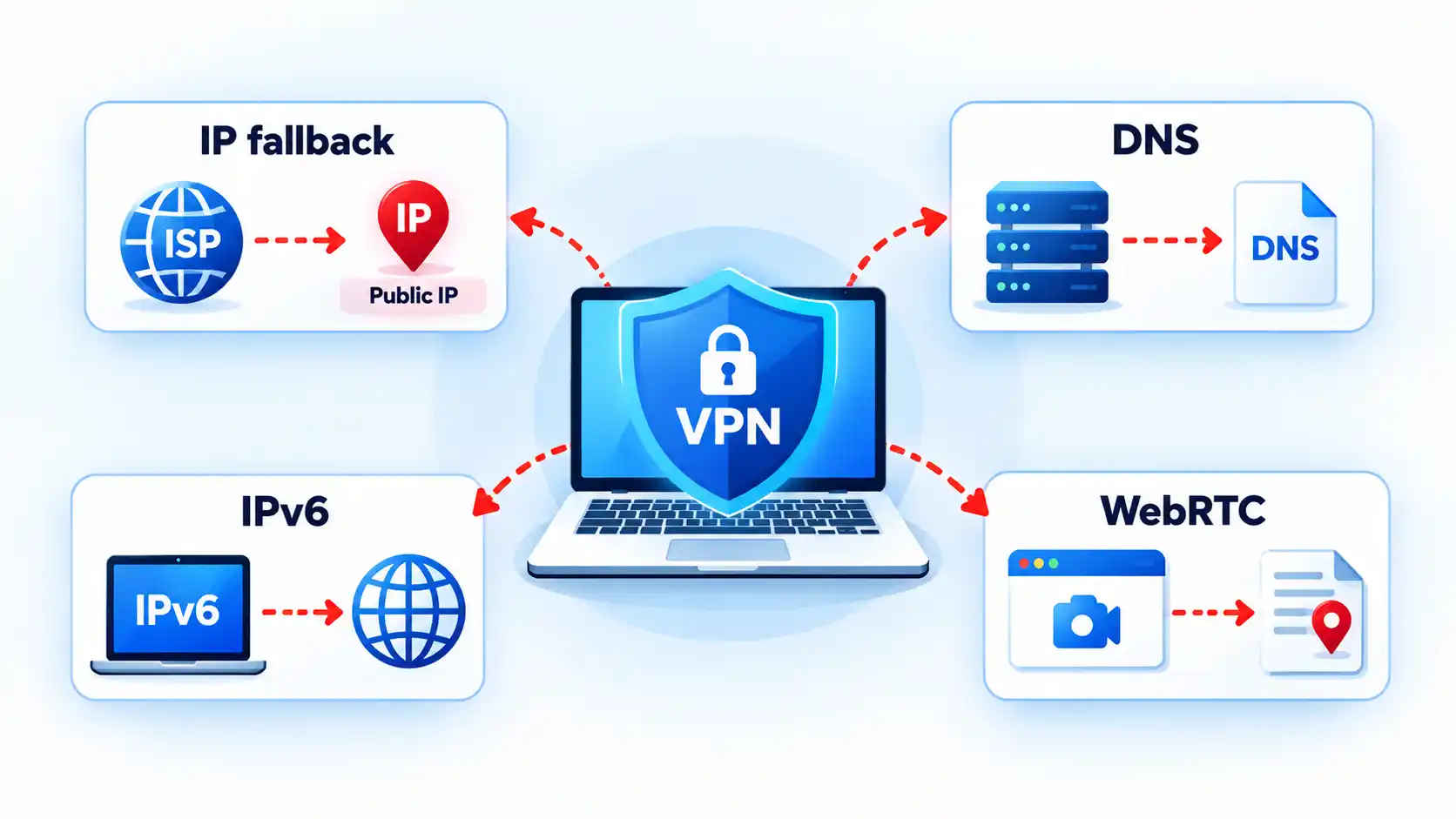
When a VPN disconnects, traffic may either stop or fall back to your normal internet connection. A working kill switch is designed to block that fallback, while a fail-open setup may let new traffic use your ordinary network route and public IP address.
Quick Take
- A VPN disconnect does not automatically mean data leaked. The result depends on what networking policy takes over after the tunnel fails.
- A fail-open configuration permits affected traffic to use ordinary networking, while fail-closed protection blocks that fallback until VPN protection returns.
- A kill switch does not stop the VPN from disconnecting. It controls whether covered traffic can leave outside the protected tunnel.
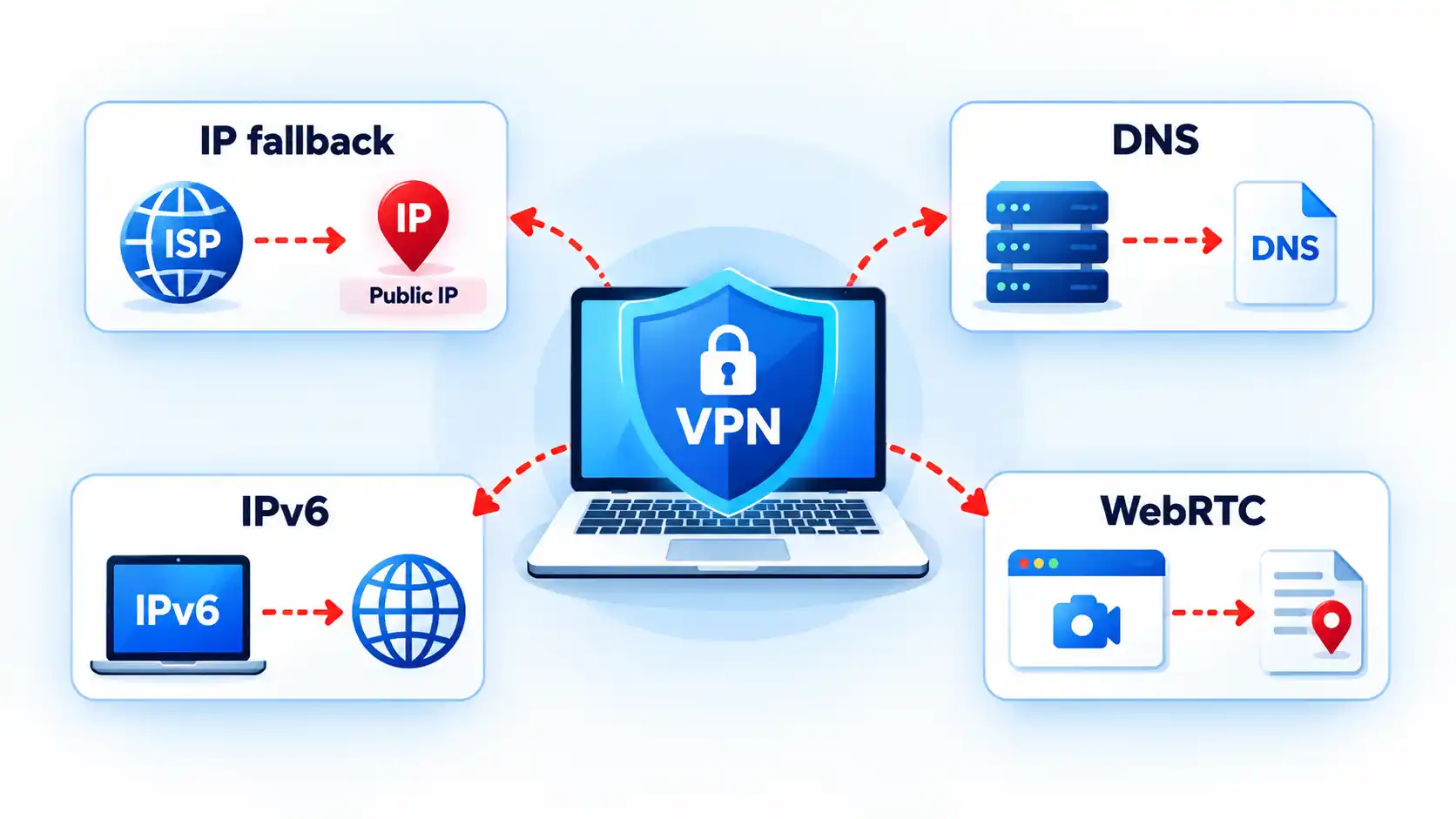
- DNS, IPv6, split-tunnel, and browser-related exposures can occur separately from a complete VPN disconnect, so they should not all be treated as the same failure.
What Happens the Moment the VPN Tunnel Drops
A VPN normally gives selected network traffic a route through an encrypted tunnel to a VPN server. When that tunnel disappears, the operating system and VPN software have to determine what should happen to traffic that would normally use it.
One possible outcome is fail open. This means ordinary networking is permitted again. New connections may use the device’s Wi-Fi, Ethernet, or mobile connection directly, just as they would if the VPN were not active. Websites reached through those new connections may then receive the public IP address associated with your normal internet connection rather than the VPN server.
The opposite behavior is fail closed. Instead of allowing protected traffic to fall back to the normal route, the device blocks it until the VPN connection returns or the blocking policy is deliberately disabled.
Suppose a laptop is connected to home Wi-Fi and its browser traffic is leaving through a VPN server. If the VPN tunnel fails, a fail-open configuration may let the browser establish its next connection directly through the internet service provider. With fail-closed protection, that new connection should fail rather than silently bypass the tunnel.
The behavior of an existing connection can be less predictable. Applications may retry requests, create a new connection, wait for the VPN to return, or time out. The practical privacy question is therefore whether traffic that was supposed to remain protected can establish a usable path outside the VPN after the tunnel is lost.
What a VPN Kill Switch Actually Does
A kill switch does not keep the VPN tunnel alive. Its job is to restrict networking when that tunnel is unavailable.
Mozilla describes its implementation as blocking the device’s network connection if Mozilla VPN becomes unstable or drops, with the aim of preventing the local IP address from being exposed. Mozilla’s kill-switch documentation is one example of fail-closed behavior implemented by a VPN application.
The enforcement can also come from the operating system. Android supports an Always-on VPN setting and a separate Block connections without VPN control. When configured together, Android can prevent connections that do not use the selected VPN.
Automatic reconnection is related but different. A reconnect feature tries to restore the VPN tunnel. A kill switch determines what traffic is permitted while that tunnel is missing. A VPN product can implement both, one, or neither depending on the platform and configuration.
Info
If your internet stops working immediately after a VPN failure, that may be the kill switch doing exactly what it was designed to do. Confirm the VPN and kill-switch state before treating the loss of connectivity as a separate network fault.
Standard Kill Switch vs Persistent Blocking
“Kill switch” does not describe one universal policy. Some implementations respond primarily to an unexpected VPN failure, while others enforce a VPN-required state even after a deliberate disconnect or restart.
Proton VPN, for example, currently distinguishes a standard mode from an advanced mode. Its standard kill switch is designed to activate when the VPN connection drops unexpectedly, while its advanced kill switch prevents internet access whenever Proton VPN is not connected and can remain active across restarts on supported platforms. These are Proton-specific implementation details, not universal VPN terminology.
The table below shows the conceptual distinction. Exact behavior still depends on the VPN application, operating system, and policy configuration.
| Behavior | Disconnect-triggered protection | Persistent VPN-required policy |
|---|---|---|
| Unexpected tunnel failure | Designed to block protected traffic when the VPN unexpectedly drops. | Blocks covered traffic because no permitted VPN tunnel is available. |
| Deliberate disconnect | May permit ordinary networking, depending on the implementation. | Normally continues blocking until the policy is disabled or the VPN reconnects. |
| Restart or reboot | Persistence depends on the product and platform. | Can remain enforced across restart when implemented as a persistent policy. |
| Intentional internet use without the VPN | May be possible after deliberately disconnecting. | Requires disabling the VPN-required policy or changing its configuration. |
This distinction is why pressing a VPN application’s Disconnect button is not always a valid test of an ordinary kill switch. Some products intentionally interpret a manual disconnect as permission to resume normal networking.
A VPN Disconnect Is Not the Only Kind of Leak
A complete tunnel failure is only one way traffic can end up somewhere you did not intend. A VPN may appear connected while a particular protocol, resolver, application, or address family follows a different path.
Public IP exposure after fallback
If the VPN tunnel disappears and ordinary routing resumes, a new connection can leave through the underlying internet connection. The remote service may then see the public IP address assigned to that normal route.
This is the failure people commonly mean when they say a kill switch prevented an “IP leak.” More precisely, traffic that was expected to remain protected obtained an ordinary route after the VPN stopped carrying it.
DNS leakage
The Domain Name System, or DNS, translates names such as example.com into network addresses. A DNS leak occurs when queries that were intended to follow the VPN’s protected DNS path instead use another resolver or network path outside that intended configuration.
Not every DNS server different from the VPN provider’s own resolver is automatically evidence of a leak. Some users deliberately configure another encrypted or third-party DNS service. The useful comparison is between the DNS path you intended and the one the device actually uses.
IPv6 bypass
Many networks support both Internet Protocol version 4, or IPv4, and Internet Protocol version 6, or IPv6. That dual-stack design can expose a routing mismatch if VPN software protects one address family but fails to apply the intended policy to the other.
The IETF’s RFC 7359 analysis of dual-stack VPN leakage describes traffic intended for a tunnel escaping through an unprotected IPv6 path when VPN software fails to handle IPv6 correctly. The document dates from 2014, so it should not be treated as evidence that current VPN applications generally have this defect.
The RFC’s IESG note also cautions that the broader leakage problem is not unique to IPv6. Similar exposure can arise whenever policy permits another unencrypted interface or route, including some split-tunnel configurations.
Browser and WebRTC address exposure
Browser networking creates a separate category of address information. Web Real-Time Communication, or WebRTC, uses Interactive Connectivity Establishment, or ICE, candidates when discovering possible paths for peer-to-peer communication.
MDN documents that an ICE candidate can contain the IP address associated with that candidate’s source. Whether the address revealed is relevant to your VPN privacy model depends on the browser, candidate type, VPN implementation, and network configuration. The presence of WebRTC address information does not by itself prove that the entire VPN tunnel failed.
These failure modes are related enough to examine together, but they should not be collapsed into one diagnosis. IP, DNS, IPv6, and WebRTC leaks have different causes and require different verification methods.
Split Tunneling Changes What “Leak” Means
Traffic outside the VPN is not necessarily leaking if you deliberately configured it to stay outside.
Split tunneling means only selected applications or destinations use the VPN while other traffic follows the device’s normal network path. Android’s per-app VPN controls, for example, can restrict VPN use to an allowed set of applications or deliberately exclude applications from it.
Imagine that a browser is configured to use the VPN but a game launcher is intentionally excluded. Seeing the normal public IP from the game launcher may be expected split-tunnel behavior. Seeing that same fallback from the protected browser after the tunnel fails would be a different result.
This is why a leak test should start by establishing what was supposed to be inside the tunnel. Without that baseline, expected exclusions can be mistaken for failures.
Kill switches and split tunneling can also interact differently across products. Proton documents that the combination is unsupported on most of its platforms, while its Windows app can use kill-switch protection with split tunneling so protected applications remain blocked if the VPN disconnects. Proton’s split-tunneling documentation illustrates why this behavior must be checked on the exact product and platform rather than assumed universally.
A useful test compares the normal route, the protected route, and behavior during a VPN interruption. Use only harmless traffic because the purpose of the test is to discover whether unprotected fallback is possible.How to Test Whether Your Kill Switch Actually Works
Prerequisites
Verify the result
Troubleshooting Kill-Switch and Reconnect Problems
The symptom usually indicates whether to investigate the kill-switch policy, the VPN connection itself, split tunneling, or the underlying network.
Internet access continues when the VPN drops
First confirm that a kill switch or equivalent blocking policy is enabled and that the affected application is supposed to use the VPN. Also check how the failure occurred. Some standard kill switches protect unexpected connection loss but intentionally allow normal networking after a manual disconnect. If split tunneling is enabled, verify that the application was not deliberately excluded from VPN protection.
Internet stays blocked after the VPN reconnects
Confirm that the VPN has actually completed reconnection rather than remaining in a connecting or authentication state. Persistent blocking policies can correctly keep traffic disabled while no valid tunnel is available. If the VPN reports connected but traffic remains blocked, restart the VPN application and check its current kill-switch state before changing unrelated router or DNS settings.
The VPN says connected, but websites still do not load
Only some apps keep working after the VPN fails
Check split-tunneling and per-app VPN rules before assuming the kill switch failed. An application deliberately excluded from the VPN may be expected to continue using the normal network, while an application assigned to the protected tunnel should follow the VPN’s applicable failure policy.
Nothing connects even after you intentionally turn the VPN off
A persistent or always-required VPN policy may still be active. Reconnect the VPN or deliberately disable that policy using the controls provided by the VPN application or operating system. Do not start deleting network adapters or resetting the entire network until you have ruled out intentional fail-closed enforcement. If the VPN itself reports connected but networking remains unavailable, VPN connected but no internet is a different diagnostic state from a simple tunnel disconnect.
Platform Differences That Matter
Android
Android provides several VPN controls at the operating-system level. Google’s current documentation says Android 7.0 and later can use Always-on VPN, and compatible configurations can enable Block connections without VPN. That combination can create fail-closed behavior without relying solely on an application’s own interface.
Android also supports per-app VPN rules. If applications are placed on an allowed list, only those applications use the VPN. Other applications can use normal system networking unless non-VPN connections are also blocked. With blocking enabled, applications outside the permitted VPN set can instead lose network access. The interaction is configuration-dependent, so observing one application’s behavior does not necessarily describe the whole device.
Apple devices
Apple supports several distinct VPN deployment models, including VPN On Demand, per-app VPN, and managed Always On VPN. They should not be treated as interchangeable names for one consumer kill-switch feature.
For managed Always On VPN configurations, Apple documents that all IP traffic can be tunneled through the organization’s VPN infrastructure and that all IP traffic is dropped when the required Always On VPN tunnels are not up. This is a strong example of operating-system-enforced fail-closed behavior, but it does not establish that every third-party consumer VPN application on an Apple device behaves the same way.
Apple separately documents VPN On Demand, per-app VPN, and managed Always On VPN as different deployment mechanisms. Those distinctions matter when comparing application behavior with organization-managed traffic enforcement.
Desktop VPN applications
Desktop VPN clients can implement blocking in different ways. Some rely on operating-system filtering or firewall facilities, while others use routing or interface mechanisms.
As a vendor-specific example, Proton documents persistent Windows Filtering Platform rules for its advanced Windows kill switch and a dummy network interface for its Linux GUI implementation. Those mechanisms illustrate implementation variety; they should not be generalized to unrelated Windows or Linux VPN clients.
The larger distinction between Always-On VPN and a kill switch is whether the system is trying to maintain a required VPN state, block traffic when that state is unavailable, or do both.
Bottom Line
What happens after a VPN disconnects depends less on the word “VPN” than on the policy that follows the failure. A fail-open configuration can permit subsequent traffic to use the normal network path, while fail-closed enforcement blocks affected traffic until VPN protection returns.
A kill switch is therefore a traffic-control feature, not a guarantee that the VPN will never fail. Split tunneling, DNS routing, IPv6 handling, browser networking, and platform-specific rules can create separate exposure paths even when the main tunnel appears healthy. The reliable approach is to understand what should be protected, verify that behavior with harmless traffic, and interpret the result against the exact VPN and operating-system configuration in use.

Business28 seconds ago
STIP: Simple TIPS ETF, For Risk-Averse Investors Concerned About Inflation (NYSEARCA:STIP)
Crypto World2 minutes ago
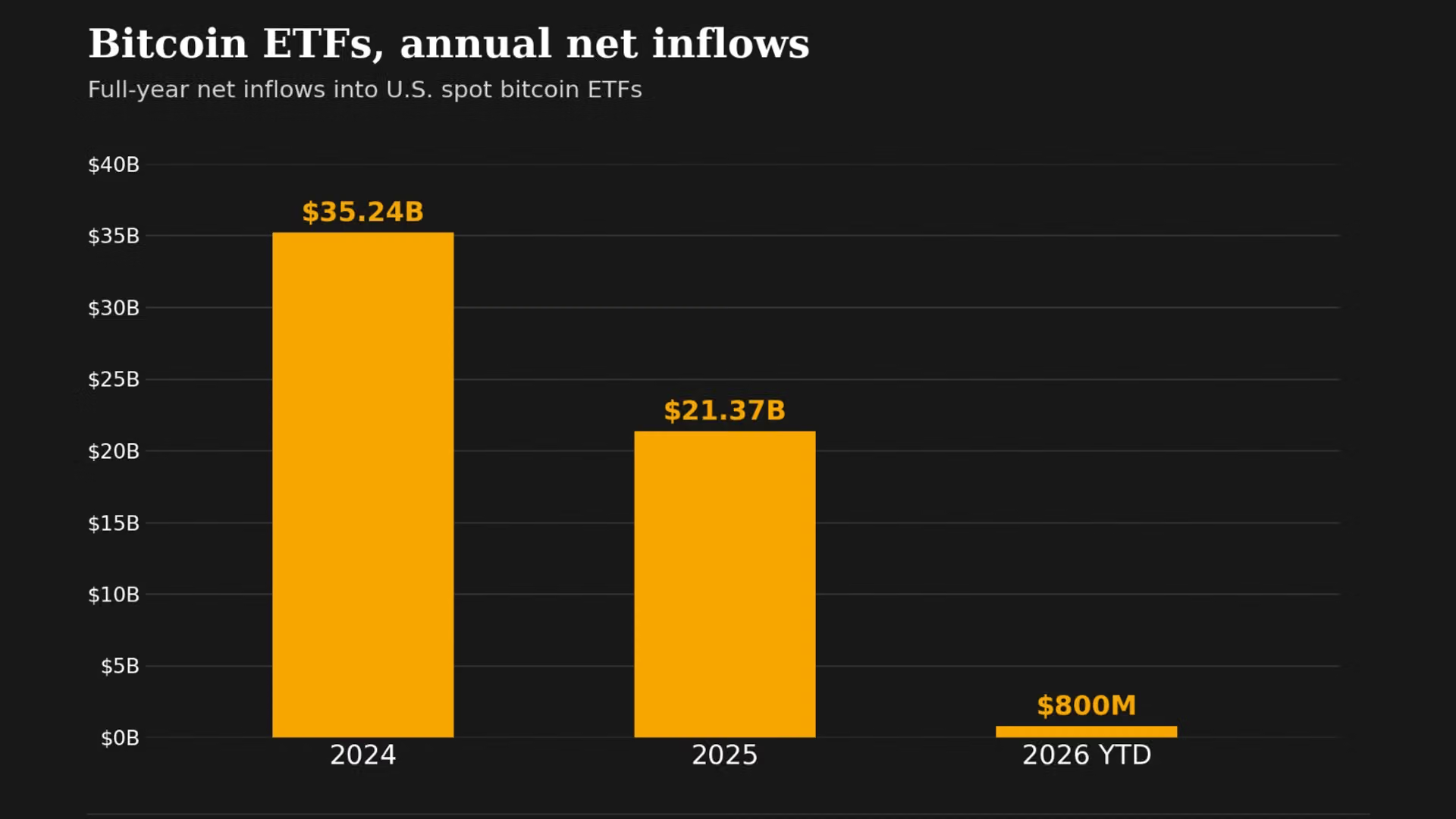
Bitcoin ETFs have erased a $5.8 billion hole

Sports5 minutes ago
‘He was abusing him nonstop’: Dhruv Jurel reveals what triggered Yashavi Jaiswal’s clash with Asitha Fernando | Cricket News




-

 Fashion7 days ago
Weekend Open Thread: Talbots – Corporette.com
-

 Crypto World2 days ago
Goldman Sachs and Deutsche Bank Agree: The S&P 500 Rally Isn't Over
-

 Tech4 days ago
Researchers escape OpenAI Codex sandbox to run commands on host
-

 Fashion22 hours ago
8 iPhone Accessories That Add Personality
-

 Crypto World4 days ago
Who Needs CLARITY Anyway? ARB Could See 70X Increase: Hodler’s Digest
-

 Crypto World6 days ago
Circle launches Arc Studio AI agent for building onchain apps
-
 NewsBeat6 days ago
Trump says US has reached an agreement to take permanent control of Greenland’s security
-

 Crypto World6 days ago
Trading Bitcoin on Robinhood? Why 2% Spread Has Traders Worried
-

 Crypto World6 days ago
Bitcoin price breaks channel as RSI climbs to 63
-

 Business4 days ago
Analog Devices (ADI) Bets $1.35 Billion on Chips that Let Machines Think for Themselves
-

 Tech6 days ago
Trump suggests rebranding AI with a new name, says he’s also creating an AI Force
-

 Tech4 days ago
Google’s $899 Googlebook is a bet that you’ll buy a new laptop for Gemini
-

 Crypto World4 days ago
Coinbase, Robinhood, Circle Seen as Tokenized-Stock Winners
-

 Crypto World2 days ago
This Bearish Netflix Stock Trade Can Cash In On Video Streaming Giant’s Woes
-
 Business2 days ago
Oil Price Today (September 23): Crude oil below $100 on hopes of US-Iran talks. What did Trump say?
-

 Crypto World3 days ago
Trump-Xi Polymarket Odds for Handshake Hit 50%
-

 Crypto World6 days ago
World Money launches in 150+ countries with Stripe
-

 Crypto World1 day ago
Crude Oil Prices Pressured by Diplomatic Hopes in the Middle East
-

 Crypto World7 days ago
Silver prices recover quickly, hitting weekly high today
-

 Entertainment2 days ago
These 17 Fall Amazon Dresses Seriously Look Like Anthropologie
You must be logged in to post a comment Login