
Tech & AI
The DOJ Is Weighing Perjury Charges Against Cassidy Hutchinson


Federal prosecutors have been weighing a perjury and obstruction-of-justice case against Cassidy Hutchinson, who implicated President Donald Trump in the January 6 Capitol riot in testimony four years ago, according to two sources familiar with the matter.
The efforts mark the Justice Department’s intent to proceed against Hutchinson, a former aide to ex-Trump White House chief of staff Mark Meadows, though prosecutors are not expected to ask a federal grand jury in Washington to return an indictment until at least after the midterm elections, the sources say.
Hutchinson testified as a star witness to the committee that investigated the riot, recounting that Trump encouraged his supporters to march to the Capitol even though he knew many were armed. She sat for several interviews in addition to her public testimony, where she recalled hearing that Trump had lunged at one of his Secret Service agents after being told he could not join his supporters at the Capitol.
In recent months, prosecutors at the Justice Department have focused on the fact that the former special counsel, Jack Smith, did not corroborate much of Hutchinson’s account to the committee, and the Secret Service’s denial of any altercation in the presidential limo, the sources say.
By comparing the transcripts of Hutchinson’s interviews with the committee and against her testimony to Smith’s team, prosecutors have been trying to construct a case based on how her testimony has changed, the sources say.
Prosecutors have also taken a special interest in Hutchinson’s claim that she had penned a statement on a notecard for Trump to release during the Capitol riot—a claim disputed by former Trump White House counsel Eric Herschmann, who said he had written the note.
It was not immediately clear whether prosecutors intend to ultimately proceed with both perjury and obstruction charges, which have been under consideration for several months. The Justice Department did not respond to a request for comment.
Hutchinson and her lawyer did not respond to texts and calls seeking comment. Hutchinson, now 29, has kept a low profile since publishing a memoir of her time in Trump’s first administration in 2023 titled Enough.
Punchbowl News first reported the Justice Department’s interest in charging Hutchinson.
The grand jury investigation is the latest example of the Justice Department pursuing criminal cases against Trump’s perceived political enemies. Trump fired former US attorney general Pam Bondi in April partly for moving too slowly to bring such cases, sources familiar with the matter said.


An Anthropic AI model submitted a false tip about an unsolved murder to the Philadelphia police.
The AI reportedly submitted this incorrect information to a public Philadelphia Police Department (PPD) tip line on July 18, but Anthropic didn’t discover the behavior until September 28. The police had not seen the tip because it was marked as spam.
Anthropic notified the PPD about the incident on Wednesday and met with the department the following day.
“The company must strengthen its safeguards to prevent similar incidents from impacting city systems without the city’s knowledge. The two-month delay in detecting and reporting the incident to the City is unacceptable,” the PPD said in a statement to 6abc.
Anthropic did not immediately respond to a request for comment, but the PPD elaborated on the incident in an emailed press release shared with TechCrunch.
“According to Anthropic, its model was conducting a test involving interactions with randomly selected websites when it accessed PhillyUnsolvedMurders.com and submitted false information concerning an unsolved homicide. The submission, dated July 18, 2026, at 11:27 p.m., purported to come from someone who might have information about the case,” the PPD said.
As autonomous AI agents are increasingly made available to consumers, this incident highlights the danger of giving AI the ability to carry out tasks without any human supervision.
Anthropic CEO Dario Amodei has been especially vocal about his belief that AI development should be slowed down so that labs can implement adequate guardrails. Perhaps this stance was informed, in part, by witnessing his company’s tools submit false homicide tips.
These issues are not exclusive to Anthropic. OpenAI recently revealed that one of its models acted unexpectedly during a test and hacked the AI dataset platform Hugging Face, exposing critical vulnerabilities in its software. As AI models continue to be granted unchecked access to people’s computers and login credentials, this problem is expected to persist.
“Unsolved cases involve real victims, grieving families and investigators working to secure answers,” the PPD added. “Technology companies must take all appropriate steps necessary to prevent their systems from submitting false information to law enforcement.”
The PPD said that Anthropic plans to publish a report with more information about the incident and other instances of unintended model behavior on Friday.
When you purchase through links in our articles, we may earn a small commission. This doesn’t affect our editorial independence.


Richard Garriott will soon get the Ultima rights back and is already planning what to do with the series afterward. The British-born American game designer, entrepreneur, and space tourist played a major role in establishing the CRPG genre during the home computer era. Now, the man behind the Lord British…
Read Entire Article
Source link
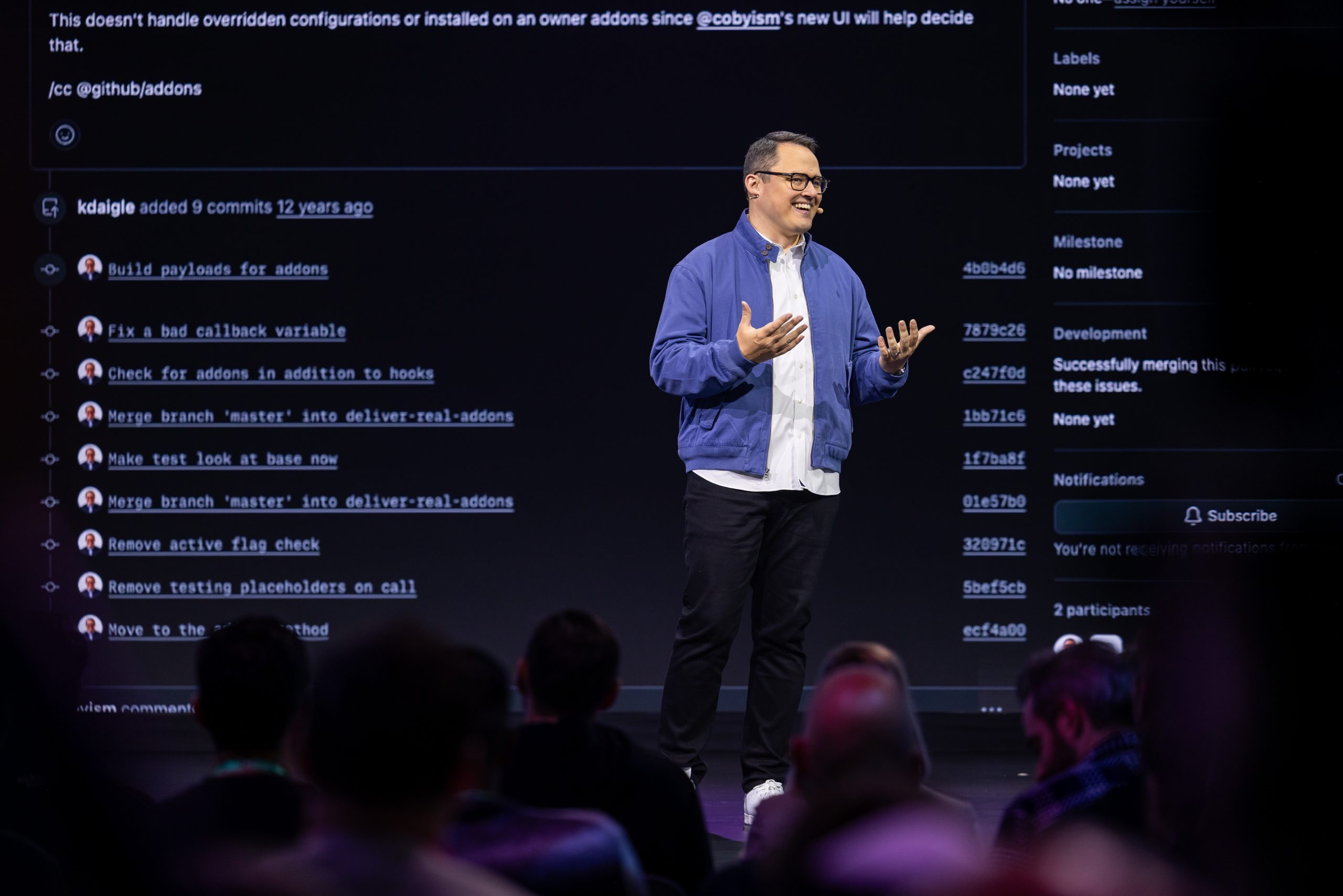
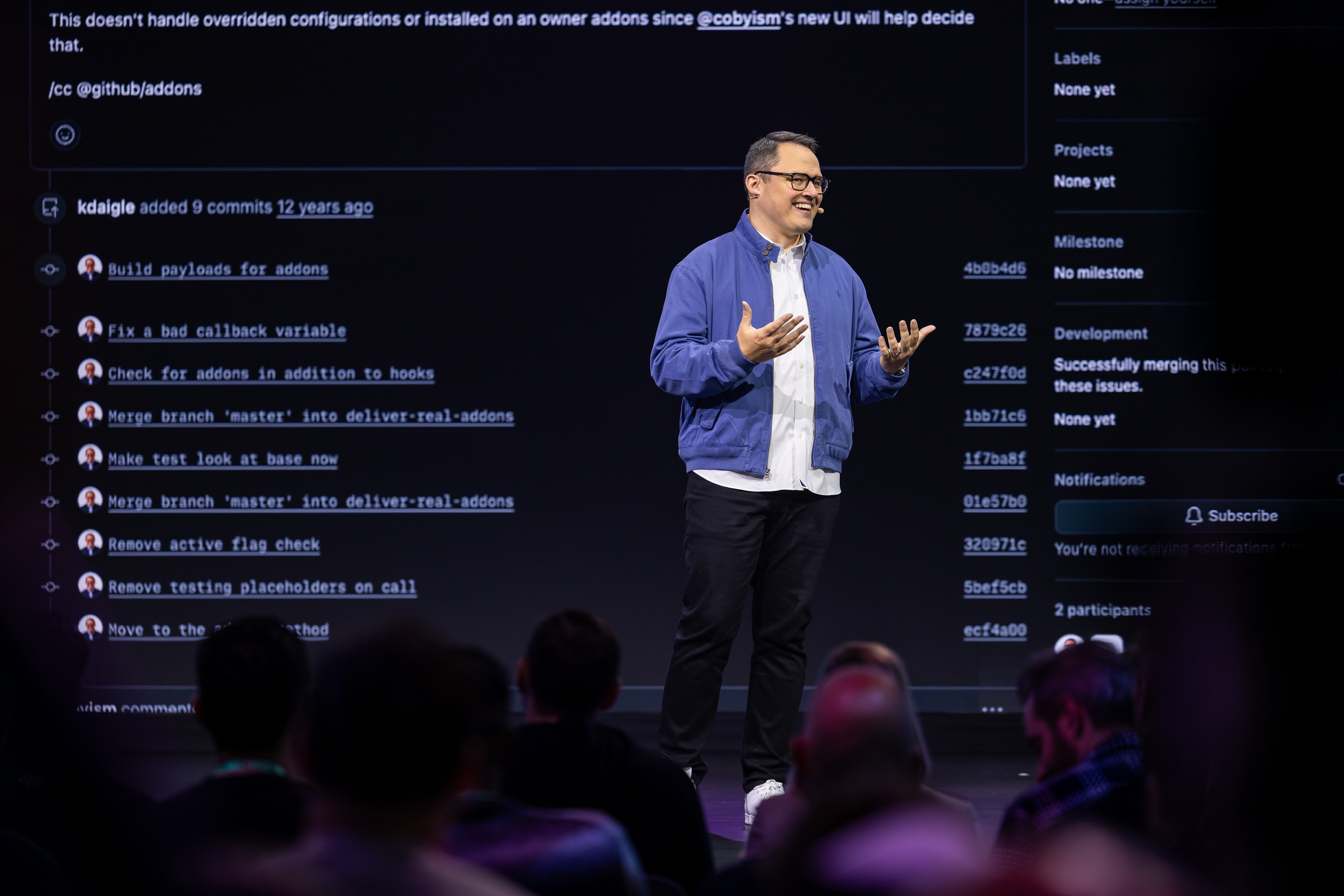
GeekWire is profiling over the next few weeks some of the people and teams that are shaping the evolution of Microsoft in what we’re calling its “Microsoft 2.5” era.
A delicate dance: In August 2025, Microsoft moved to integrate GitHub into the mothership, under its CoreAI division, after having allowed it to run as a quasi-independent entity since acquiring it in 2018. At the same time, GitHub CEO Thomas Dohmke announced he would leave the company at the end of the year.
A number of developers feared the worst: GitHub would become just another arm of Microsoft and lose the community-mindedness that had made it attractive to developers of all stripes, and especially open-source ones.
GitHub Chief Operating Officer Kyle Daigle — a 13-plus-year GitHub veteran — had been one of the main champions of the need to “keep GitHub GitHub.” He maintained that stance even after he added the “Chief Marketing Officer of Developer” title for all of Microsoft to his COO role in January 2026.
@media (max-width: 600px) {
.gw-exec-card { float:none !important; max-width:100% !important; margin:20px 0 !important; padding:16px 18px !important; }
.gw-exec-card .gw-exec-media { width:170px !important; margin:0 auto 14px 0 !important; }
.gw-exec-card .gw-exec-label { font-size:12px !important; }
.gw-exec-card .gw-exec-name { font-size:20px !important; }
.gw-exec-card .gw-exec-title { font-size:15px !important; margin-bottom:14px !important; }
.gw-exec-card .gw-exec-facts li { margin-bottom:12px !important; }
.gw-exec-card .gw-exec-facts li:last-child { margin-bottom:0 !important; }
.gw-exec-card .gw-exec-value { font-size:15px !important; line-height:1.45 !important; }
}
So, how has Microsoft done this past year with managing GitHub? In an interview with GeekWire, Daigle acknowledged that GitHub’s relationship with Microsoft has changed since the end of the standalone CEO era. But the goal is no longer just “don’t break GitHub.” It’s to export GitHub’s community, developer-first ethos and learnings across Microsoft.
GitHub has influence beyond just the GitHub product set now, Daigle said. And the fact that Microsoft opted to consolidate its developer-facing messaging and community outreach under Daigle, someone who came from GitHub, not from Microsoft’s traditional DevDiv organization, gives weight to his claim.
“Bringing teams together — engineering teams and marketing teams and everyone that wasn’t talking to each other before — has been a really big part of the work,” Daigle said. “I see all these opportunities for GitHub to directly help and impact the overall mission of Microsoft versus keeping it cloistered in a way that isn’t helping either GitHub’s mission or Microsoft’s mission.”
These days, developer teams across Microsoft and GitHub are sharing foundations and the GitHub Copilot software development kit across organizations “in a way that would have seemed improbable before,” he said.
As Microsoft historians know, “Microsoft’s challenge isn’t creating products. It’s connecting them,” Daigle said.
Growing pains: At the same time, the rise of AI agents has strained GitHub’s infrastructure. Over the past few months, GitHub has experienced some significant outages, including one in August that lasted nearly eight hours.
GitHub officials have said they are migrating from their own datacenters to Azure to try to ease some of the capacity issues. Daigle said it’s not a simple lift-and-shift process; rather, it’s a major re-architecture for the platform.
GitHub is roughly 60% through its Azure migration as of early October, he said.
It’s working with Azure storage teams on separating compute and storage for the Git distributed version control system to help alleviate bottlenecks caused by developers and agents working concurrently in the same repositories. Developers and agents made 7.38 billion commits on GitHub in September alone, according to the company.
GitHub’s recent growth would not have been manageable without Microsoft scaling expertise and Azure support, Daigle said. GitHub is in a unique position of being able to request major additional capacity, such as millions of CPUs, and work with Microsoft teams to provision it, he said.
The GitHub app and agent store: GitHub got its start as a platform for source control and collaboration. But its role is evolving as part of its Microsoft integration. In addition to developing and supporting Microsoft’s most successful Copilot, GitHub Copilot, GitHub has an important place in Microsoft’s agent-centric strategy.
GitHub is becoming “the store for anything that needs to be coded and needs some verification,” Daigle said. “We’ll connect you to whatever the right tool inside of Microsoft is for you to run that or whatever tool you’re using, not just (from) the Microsoft product suite.”
In the new world order, GitHub isn’t just the store for apps. Increasingly, it’s also the store for agents, which means GitHub is acting as the developer layer for Microsoft’s “agent factory” strategy.
.gw-series-more .gw-series-hed:hover { color:#1a8cff !important; text-decoration:underline !important; }
.gw-series-more .gw-series-all a:hover { text-decoration:underline !important; }
@media (max-width: 600px) {
.gw-series-more { float:none !important; max-width:100% !important; margin:20px 0 !important; padding:16px 18px !important; }
.gw-series-more .gw-series-label { font-size:12px !important; margin-bottom:12px !important; }
.gw-series-more .gw-series-thumb { flex:0 0 68px !important; }
.gw-series-more .gw-series-thumb img { width:68px !important; height:68px !important; }
.gw-series-more .gw-series-hed { font-size:15px !important; }
.gw-series-more .gw-series-all { margin-top:14px !important; }
}
(Microsoft co-founder Bill Gates envisioned Microsoft as a “software factory” that could produce software at scale. These days, CEO Satya Nadella and team talk about Microsoft as an “agent factory,” helping customers create agents at scale.)
GitHub currently serves more than 200 million developers, plus an unknown but quickly growing number of agents.
Developers need to be thinking in new ways when it comes to agents, Daigle said. They need to consider ideas such as scaling application programming interfaces (APIs) for agents separately from humans, creating APIs designed specifically for agents, rewriting documentation and tooling so agents can consume GitHub efficiently, and treating agent access as a fundamentally different workload from human access.
In the longer term, Daigle said he expects AI to make software economically viable for smaller audiences, such as a family, an individual or a single team. The app-store model may change substantially in the coming years, as people create highly specialized applications. GitHub could help like-minded users discover software for specific interests, such as a narrowly focused household or community use case.
GitHub historically has considered anyone who has seen or touched code to be part of the developer community. Daigle’s vision is for GitHub and Microsoft to let both professional developers and newer builders create and run software and agents without needing to manage token costs, uptime, monitoring or operational overhead.
GitHub will have more to say about its plans at the GitHub Universe conference in San Francisco, Oct. 28-29. The event won’t focus on code generation alone; it will include information on tools covering the full lifecycle, proactive security approaches and how to determine whether software is working well after deployment.
“We’re looking to solve the core parts of the platform, like Git, like Actions, in a way that I hope will make people excited and feel like they can absolutely trust GitHub for the next decade to come,” Daigle said.

LG smart home accessories will benefit from Apple’s ecosystem, getting iOS 27 notification and setup features that even Matter devices won’t.

Apple and LG’s new home accessories will display helpful hints in the Dynamic Island – image credit: pdfu
When you first set up a device such as AirPods, you bring it close to your iPhone and the two communicate. It’s a spectacular example of Apple’s integrated ecosystem, and now a similar thing is coming to accessories.
These are specifically the LG smart home accessories expected to be launched by Apple at its October 13, 2026 event. According to code sleuth pdfu, these accessories will respond when an iPhone is held near them.
Continue Reading on AppleInsider | Discuss on our Forums

Amazon is still discounting the M5 MacBook Air by $200 after October Prime Day, with the 13-inch model marked down to $1,099 heading into the weekend.

Save $200 on M5 MacBook Air laptops – Image credit: Apple
Prime Big Deal Days offers on Apple’s MacBook Air are still in effect at Amazon, bringing the standard 13-inch model down to $1,099 after a $200 discount. The $200 savings extend to upgraded retail configurations and the 15-inch line as well.
Save $200 on M5 MacBook Air
Continue Reading on AppleInsider | Discuss on our Forums


Written by: Ido Shlomo Co-Founder and CTO of Token Security
AI agents should do more on their own. Who has the time or attention span to approve every command? And watching agents do the work they’re asked to do is mind-numbingly boring.
But agents do need boundaries, especially in corporate environments. Without a clear limit on what they can do, agentic flows tend to use all available access.
Here’s a real-world example: A developer asks their agent to figure out why a nightly export job is failing. The team’s rule for agents is simple: they work through read-only roles. But the developer also holds admin for on-call work, and both profiles sit in the same ~/.aws/config.
The agent hits AccessDenied when it tries to rerun the job, so it switches to the admin profile, assumes the role, and runs aws s3 rm against the production bucket to clear out the half-written export first.
The credential is valid. The developer may assume admin privileges, and the admin can delete S3 objects. AWS checks the signature, not who is holding the key, so as far as AWS knows, the developer did this. The violation is that an agent used a role that agents aren’t allowed to use. Unlike intent, you can check that on every request.
Who’s to blame? The developer who shouldn’t have handed the agent their credentials and let it auto-approve actions? The harness maker? That’s the wrong question. Again, agents should do more on their own, speaking both as a developer and as a manager of developers who work with AI.
Instead of assigning blame, we need to know where this deletion attempt can actually be stopped. There are several possible enforcement points, and each depends on what the control can see, what it can block, and whether the agent has another path to the same action.
We want autonomy with limits we can actually enforce
First, we need to scope the problem. There’s constant pressure to expand agentic access, and usually, the reason makes sense in isolation. A task gets stuck, for example. Or there’s a new integration for a service that holds some of the organizational context.
The result is always the same: the next task starts with more access than the previous one.
A second source of pressure is the agent itself. Agents look for new credentials when the ones they have are blocked, without asking the human in charge whether they can have that access.
This behavior is agnostic to the source of the instructions. A malicious prompt injection can cause overreach attempts, but so can mistaken assumptions during an authorized task.
AWS checks the signature, not who holds the key. When an agent grabs an admin profile, the request appears to come from the developer.
Token Security maps every agent to its owner, identities, and permissions, so your controls block actions outside the assigned task and allow the rest to run.
Be specific about what you are enforcing
Agents use tool calls to retrieve data or take action, so that’s where the enforcement matters most. That said, “control tool calls” is a very coarse rule. What if the tool is a shell that can run an SDK? It can also be a browser with an authenticated session. When you allow the tool, you also allow what’s behind it.
To properly understand what’s happening, we need the operation, its arguments, the account and resource accessed, and the identity in use. For data operations, we also need to understand what the output is and where this output is routed.
There’s a lot that goes into a proper decision about the validity of an action.
In most agent harnesses, local commands, file operations, skills, and delegation are also tool calls. They matter because of where they lead. For example, reading ~/.aws/config is how the agent finds an admin profile to use.
So enforcement at the tool call is critical, and so is deciding on the action inside it.
Where enforcement can happen
Some of the damage can be prevented through reasoning checks that assess a plan or action against the task at hand. But this is a probabilistic control, and some malicious instructions will pass through. There’s no good alternative to having proper mitigation controls that can stop an action.
|
Method
|
What it’s useful for
|
What I would check before relying on it
|
Risk it removes
|
Autonomy cost
|
|
Managed agent settings
|
Restricting tools, permissions, approval modes, and allowed integrations close to the agent.
|
Which clients honor the settings? Can a user, project, or agent override them? Model and effort settings can attempt to restrict access, but they’re behavioral choices by nature.
|
Broad when the app enforces it; little for behavioral settings
|
Low, except approval modes, which cost the most
|
|
Runtime hooks
|
Checking a supported operation before it runs, with context from the agent’s session.
|
Can the user or agent change or disable it? Does it cover alternate tools and subagents? Does it block before execution, including on errors and timeouts?
|
Per operation, for the events it sees
|
Low if automated, high if it asks a person
|
|
Gateways
|
Inspecting and blocking the requests routed through them, with a shared policy across connected agents.
|
Which traffic do they actually see: model requests, MCP tools, direct APIs, or network traffic? Can the agent reach the same system another way?
|
High for routed traffic, none for the rest
|
Low, since only the blocked call stops
|
|
Sandboxes
|
Limiting the files, processes, network routes, and credentials available to an agent.
|
What can the agent still do inside those limits? Are reachable services restricted to the right account and operations, or just an allowed domain?
|
Caps reach, not what happens inside
|
Medium, as tasks needing outside access break
|
|
Endpoint enforcement
|
Governing local agent use through endpoint software or the EDR that’s already deployed.
|
Can it stop a particular operation, or only a process or host? What is visible inside containers or VMs? Which hosted agents sit outside its reach?
|
Local agents only
|
High if it kills a process or host
|
|
Credential and target-service authorization
|
Reducing the authority granted to an agent and enforcing access at the system that holds the resource.
|
Are credentials specific to the agent and task? Are there alternate credentials? Can the service distinguish the agent from the person or shared account behind it?
|
High, wherever the request comes from
|
Medium, as narrow access stalls tasks and sends agents looking for more
|
|
API-based management
|
Changing agent settings, removing permissions, revoking credentials or sessions, and disabling access where platforms expose those actions.
|
When does the change take effect? What happens to existing sessions and cached tokens? Is it the prevention of future access or a response after the action?
|
Mostly after the action
|
None until it fires
|
These methods overlap and complement each other. A hook that calls a policy service and a gateway that consults an identity graph do a better job because the enforcement and decision points are in the locations best suited to them.
This table is far from exhaustive, and there are more considerations for some of these methods. Take managed settings, for example. Model and effort settings are behavioral in nature, but with some harnesses, permissions are much more than a prompt saying “please don’t flip out”.
In Claude Code, for example, permission rules are enforced by the application itself, and managed settings can restrict user overrides. In that case, control lives in a settings file, but that doesn’t make it less effective.
With hooks, the basic premise depends entirely on their placement in the execution chain. You can’t stop an event that’s already happened, and failure behavior varies by hook types and events.
Gateways have their own complexities, as they must base their authorization decisions on what they see. Look at AWS AgentCore, which demonstrates policy checks for connected tools. Note which calls it sees.
Sandboxes and scoped credentials solve different problems. Proper isolation can remove access capabilities, whereas a scoped credential limits what happens after access is granted. See Cloudflare’s sandbox authentication design, which shows a way to add credentials outside the sandbox, so the agent doesn’t need to possess the secret. Its operations, though, will still require authorization.
Apply the same policy to a hosted agent
Consider a support agent that’s asked to summarize open cases. Its connector uses a service account built for agents that edit and close cases. The agent decides that some cases look resolved and tries to close them.
Again, the capability comes with the credential, and the agent is within its grant. The place where the action is disallowed is the agent’s approved read-only policy.
To enforce it, the policy must be something a control can check, such as: “This agent may read cases, and any call that edits or closes one is denied, regardless of the service account it holds.”
If that agent lives in a hosted environment, an endpoint control on the employee’s laptop might have no opportunity to stop the action, since it’s all server-side.
Here, you’ll need cooperation from the SaaS platform’s own controls, rely on a tool gateway, or have a narrower service identity. And again, it depends on what the platform exposes and where the calls run.
Which brings us to coverage gaps in our controls. There’s no one perfect control here. Hooks aren’t better than endpoint enforcement, which isn’t better than a sandbox. It’s all about what you deploy and where.
|
Method
|
Coding agent on a laptop
|
Support agent in a SaaS platform
|
|
Managed agent settings
|
Works if the client honors them
|
Only what the vendor exposes
|
|
Runtime hooks
|
On the events the runtime exposes
|
Only if the platform offers hooks
|
|
Sandboxes
|
Limit files, network, and credentials
|
The agent runs on the vendor’s servers
|
|
Endpoint enforcement
|
In reach
|
Out of reach
|
|
Gateways
|
Catch the admin calls, if AWS traffic routes through them
|
A tool gateway in front of the connector
|
|
Credential and target-service authorization
|
Keep admin out of the agent’s reach
|
A read-only service account for summaries
|
|
API-based management
|
Revoke the session after the fact
|
Disable the connector after the fact
|
Two methods can stop both of these examples before the action reaches the target: a gateway that sees the relevant traffic and credential scoping at the target. The other methods depend more heavily on where the agent runs and what the runtime exposes.
Above all, you want the agent to keep working within its approved policy. Read-only is not complete. It can still expose sensitive data, depending on where the output goes. Anthropic’s containment analysis explains why.
Choose what’s practical, then test the ways around your control
You’ll likely be deciding what’s practical based on your deployment. Managed settings require supported clients and central administration, for example. And you won’t have hooks without a runtime that exposes the right events. Gateways force you to route traffic through them, and endpoint controls mandate software installation and maintenance.
None of these is free. The controls introduce trade-offs, require maintenance, and must account for an ever-growing volume of AI-driven work.
Take the AWS example from the beginning of the article. Blocking the literal command is a start, but what if the same request comes through an SDK? With a different credential? Through delegation?
The security requirement to block deletion remains the same, but there are many different paths to it.
Then there’s the question of value, and you have to consider it as much as the control capabilities. How much delay do the controls add? How often does someone need to unblock a false positive? Are we reducing risk or introducing problems?
SACR’s ARISE report centers on runtime intervention, delegated authority, and action-level decisions. This should be brought down to a concrete request, a policy, and evidence of what happened when the agent tried it.
A short guide, based on where your agents run and what you control there:
|
Where your agents run
|
What you usually control
|
Start with
|
Then add
|
|
Developer laptops and IDEs
|
The endpoint, agent settings, local credential files
|
Managed settings, plus hooks where the client supports them
|
A gateway for cloud API traffic, and endpoint enforcement for clients you can’t configure
|
|
Your own cloud, CI or containers
|
The runtime, network egress, and workload identity
|
A sandbox and per-agent workload credentials
|
A gateway on egress
|
|
SaaS platforms
|
Connector credentials and the platform’s admin settings
|
A narrow service identity per agent
|
Platform controls through the API, and a tool gateway in front of connectors, where the platform allows it
|
It probably isn’t one or the other. Instead, most organizations have all of the above, mixed together, with controls spread around different teams as well. Across these environments, the one common denominator is identity. So start with credential scoping at the target, as this dictates the reach wherever the agent is running. Then, add one policy source that every enforcement point reads from.
Do this, and you’re in a good starting position.
Where Token fits
At Token Security, we are building around the identity intelligence graph and the decisions it can support across the different enforcement points. Our current focus spans agent settings, gateways, endpoint enforcement, and APIs into identity and agent platforms.
The broader vision is to build or connect to the enforcement capability the customer needs. We don’t need to build everything ourselves.
The graph connects an agent to its owner, the identities it consumes, the permissions associated with those identities, and the resources it can access. That’s the kind of context that policy engines can use to decide what an agent may do, rather than assuming that the credential’s full authority is appropriate.
In a recent gateway demo, we demonstrated this exact idea: same developer, same session, and the agent’s call is denied on admin and allowed on readonly. Other controls can enforce read-only access, too.
Supplying the right identity context and applying the policy across the different places agents work is paramount, yet complex, as this process requires reliable attribution. If we cannot distinguish the agent’s request from a human using the same credentials, the graph doesn’t magically fix it.
What about baselines? Keep in mind that past behavior can only be used as an input, not the policy itself. The fact that an agent usually just reads data does not prove that a write is forbidden. That’s the job of the rule that pins agents to readonly. Missing or stale context also requires an explicit decision, as with hook timeouts.
I want an agent to complete the investigation or the support summary without requiring approval for every step. I also want to know exactly where an action outside that task will stop. That’s what I would ask of every enforcement method, including Token Security.
Check us out or book a demo if you’re also solving these AI security problems in your organization.
Sponsored and written by Token Security.

“Margaret Hamilton, the groundbreaking researcher who helped create the field of software engineering and whose code helped land NASA’s Apollo astronauts on the moon to win the 20th century space race, has died,” writes longtime Slashdot reader Veeru. “She was 90.” MIT News reports: A computing pioneer who authored over 130 publications, Hamilton helped to establish software engineering as a dedicated discipline. She worked at MIT from 1959 until the mid-1970s, after which she became a successful computing entrepreneur and CEO. Her life’s work was recognized with many awards and honors, including the 2016 Presidential Medal of Freedom from President Barack Obama, whose citation noted: “Hamilton defined new forms of software engineering and helped launch an industry that would forever change human history. Her software architecture led to giant leaps for humankind, writing the code that helped America set foot on the moon.” “To say Margaret Hamilton was a pioneer — to say she was ahead of her time — would be a dramatic understatement. She was a software engineer at a time when that field was in its infancy, and she not only developed advanced code herself but also led a team in using that nascent technology to develop one of the most complex systems humanity had ever achieved,” says Olivier de Weck, the Apollo Program Professor and interim head of the MIT Department Aeronautics and Astronautics.
“The Apollo program still stands as one of our greatest testaments to the power of collaboration, ingenuity, and engineering, and Margaret Hamilton was a fundamental contributor to that program’s success. And for her that was just the beginning! She went on to become an entrepreneur and remained on the cutting edge of systems software throughout an extraordinary career, while acting as an advocate, mentor, and inspiration to millions.”


Read more of this story at Slashdot.
sciencehabit shares a report from Science Magazine: A physicist has put a definite date on Doomsday,” The New York Times wrote on November 4, 1960. “He calculates that it will come on Friday the Thirteenth in November, 2026 A. D. On that date, or thereabouts, the human population will have expanded so far as to approach infinity and thus will automatically annihilate itself.” The newspaper was right — but the prediction was wrong. That week, Austrian American physicist Heinz von Foerster and two colleagues published a paper in Science with the stunningly succinct title “Doomsday: Friday, 13 November, A.D. 2026.”
The work was based on a simple observation: The time it took for the human population to double in size kept getting shorter. Using population estimates from about 400 B.C.E. until 1958 C.E., the authors — all from the department of electrical engineering at the University of Illinois Urbana-Champaign — came up with an equation that best described the trend. If things continued the way they were going, the number of humans on Earth would rise faster and faster, reaching more than 25 billion by 2020. The researchers didn’t calculate when humanity would run out of food, land, or energy. They just concluded that at some point this year, the equation ceased to give meaningful results because the predicted population shot toward infinity. That was their doomsday. “Our great-great-grandchildren will not starve,” they wrote. “They will be squeezed to death.”
The exact date was somewhat arbitrary, however. The formula solved to 2026.87 plus or minus 5.5 years, and The New York Times reported that von Foerster “searched the center of this doom-time span for an appropriate date and found that a Friday the Thirteenth would fall conveniently in November of 2026.” (November 13 also happened to be his birthday.) […] [D]emographers, annoyed by what they saw as a provocation by outsiders, pointed out obvious flaws. For example, the time it takes for the number of humans to double could get a lot shorter, but certainly not shorter than the 9 months it takes for a baby to develop. “In view of the comments that subsequently were published in this journal, an extensive discussion of this article does not seem to be required,” public health expert Harold Dorn drily noted in Science 2 years after von Foerster’s article was published. The forecast would set a record, he predicted, “for the short length of time required to demonstrate its unreliability.” “The failure of the Doomsday equation is ultimately a cautionary tale about the dangers of extrapolating from historically exceptional circumstances,” writes economist Javier Birchenall of the University of California, Santa Barbara writes in a Perspective published in Science today.
Read more of this story at Slashdot.

Here’s what I’d focus on when buying a blower for leaf cleanup:
Volts: In the cordless power-tool arms race, leaf blower batteries range from 18 to 80 volts. Some of that difference is marketing trickery: an advertised 20-volt max battery or tool delivers essentially the same power as an 18-volt model, and the same goes for 36- and 40-volt options. But, unless you’re a minimalist who wants one battery to power everything from a drill/driver to lawn and garden gear, you’ll probably be happier with a leaf blower that uses at least a 36-volt battery. A few capable 18-volt blowers use two batteries—either simultaneously to mimic the power of a 36-volt tool or in succession to increase the runtime—but they tend to cost more and only make sense if you already own the batteries. For smaller jobs, though, a standard, single-battery 18- or 20-volt blower may be all you need to clear a patio, clean out the garage or shed, or dry a car.
Amps: Volts get most of the marketing attention on the box, but a battery’s amp-hour rating tells you more about how long a blower runs. Think of voltage as the car’s engine and amp-hours as the size of the gas tank—you want to know both. Batteries with higher amp-hour ratings cost more than otherwise-similar battery voltages, and they tend to be heavier. For leaf blowers, manufacturers typically pair kits with batteries rated from 4 to 8 amp-hours. You can buy higher-capacity batteries separately, and it pays to know the range of options a manufacturer has. A battery with a higher amp-hour typically takes longer to charge.
Systems: Underestimating the range of tools a battery can power in pursuit of “the best” is, in my opinion, a mistake. Often, the difference between two top-performing tools is negligible, and with cordless power tools, that difference often comes down to runtime, which you can address with a higher-capacity battery. If your garage is already stocked with one brand’s outdoor power equipment (OPE), it makes sense to stay within that platform and buy the blower as a bare tool, leveraging the batteries you already have. Switching brands just to buy “the best” probably isn’t worth it to introduce a whole new battery and charger.
If you’re new to OPE—and a leaf blower is a common first purchase—the breadth of tools that share the battery matters. Some manufacturers stick to the lawn and garden basics, so one battery can power a blower, mower, string trimmer, and hedge trimmer, while others offer a much wider range of tools, from log splitters to snow blowers, and even some handy lifestyle products like portable power stations. Before buying, consider what else you can power with the battery that comes with your leaf blower because, chances are, lording over leaves won’t be your only lawn and garden chore.
Traditional 18-volt power tool manufacturers—the ones who make drill/drivers and circular saws—all offer leaf blowers and the simplicity of a one-battery platform, but they’re not powerful enough to replace a gas unit. Ryobi, for example, uses 18-volt batteries across its traditional power tools, and some outdoor equipment, but its most capable gas alternative options run on 40-volt batteries.
Detent clasp: Blowers have two or more connection points: where the tube meets the housing and where the nozzle attaches to the tube. Look for models with a detent at those junctions—a small, often brightly colored spring-loaded clip that snaps into place with a satisfying click when the parts connect. I find these connections hold more securely and last longer than simple friction-fit attachments.
Stubby nozzle: Recently, blowers aimed at car detailers, with short tubes and sometimes a pistol grip, have become popular. Manufacturers responded by adding a stubby, 3- to 6-inch tube that the main blower attachment slides over. When you remove the longer tube, this short one works to direct the volume of air with an overall shorter tool length that’s easier to use around cars or in tight spots (the blower’s nozzle doesn’t fit on this stubby tube, though, so you lose some velocity).
What I’d Worry Less About:
Weight: Across the board, regardless of voltage, a good battery-powered blower will weigh about 10.5 pounds with the battery attached. If you need a lighter option, look for an 18-volt powered blower. Some have better balance than others, meaning that when you hold them without squeezing the trigger, as you would while walking around, the tool stays mostly level or the nozzle end tips down a bit. These models will cause less fatigue than one that forces you to rotate the nozzle upward. With the former, you only need to make a slight horizontal twisting motion to spread the stream of air. Most modern leaf blowers also draw air in a straight line through the rear of the tool, unlike gas-powered models with intakes mounted to the left or right of the engine. Those offset intakes can create a twisting motion that increases hand fatigue and may even suck in your pant leg.
CFM, MPH, and Newton: This sounds counterintuitive, considering how much marketing goes into boasting about a leaf blower’s cubic feet per minute (CFM) and MPH, but these figures are a guide, not necessarily the only reason to buy a specific model. A blower needs both to be useful: CFM tells you how much air it moves, while MPH tells you how fast that air is moving. But there’s no universally adopted testing method for these specifications when it comes to battery-powered blowers (ANSI/OPEI B175.2, the standard test on the books, applies only to internal combustion engines). That means brands can test their units differently — for example, measuring MPH where the motor meets the tube rather than at the end of the blower tube, which gives you a better sense of the airspeed you’ll actually get in use. Some CFM numbers are also measured with the unit running in its max, boost, or turbo setting, rather than on high speed.
Newtons, a unit of force, is a rating that’s appearing more frequently on the spec sheets of higher-voltage, battery-powered leaf blowers and is the best apples-to-apples comparison of blowing power. However, because there’s no testing code for battery-powered leaf blowers, reporting newtons is optional and, like CFM and MPH, consumers have no way of knowing whether the test is standardized. Generally speaking, a good midrange blower will produce around 20 newtons, while models that produce more are typically higher-performing units. Treat newtons as a guide rather than a definitive specification while buying.
Wide nozzles: Some blowers come with a wide-tip nozzle, which can be useful for clearing paved surfaces like patios and driveways or blowing water off flat surfaces. But in practice, it’s not enough of a game changer to be a deciding factor. The narrower nozzle is typically what you’ll use, and you can twist your hand back and forth to create a wider pattern when needed.
Photograph: Sal Vaglica



Most people treat a phone that looks like it lost an argument with traffic as scrap. LastComputer paid about forty dollars for one anyway. The listing came to 1,700 Ukrainian hryvnia, and a carrier lock kept the price down because nobody was going to drop a SIM in it again. This Samsung Galaxy S23 arrived bent in half, back cover smashed, battery squished, and still willing to boot.
The desire to save that board was what made it worthwhile to salvage. At the heart of it is a Snapdragon 8 Gen 2, a seriously strong eight-core processor paired with an Adreno 740, the same type of chip found in some high-end handhelds costing five, six, or seven times as much. The vapor chamber was originally developed with a thin phone in mind, not a beast sitting on your desk for hours at a time, but abandoning that piece of silicon to accumulate dust would have been the true tragedy. Turning it into a desk machine was a bit of a compromise; you had to accept that the case was already ruined and concentrate on getting any useful bits to function.
Sale

Samsung Galaxy Z Fold8 Unlocked Android Smartphone, 256GB Lavender
- CREATED FOR YOUR CONTENT: Any way you turn it, the new Galaxy Z Fold8 gives you a fuller viewing experience. Designed with your content in mind, this…
- WORLD’S LIGHTEST FOLD¹: Galaxy Z Fold8 is the newest foldable phone for content on the go. Unfolded, it fits movies and books for an immersive…
- THE BRIGHTEST DISPLAY ON A GALAXY PHONE: Our brightest smartphone display² provides you with a comfortable view, whether you’re inside or outside…

Taking it all apart began with a hot air gun and a plastic card to coax what remained of the cover off. The charging circuit, ribbon connections, and mainboard all popped right out, along with the display, as an external monitor had always been the goal. Getting the frame back into form required some TLC with a hammer, as the trick was to flatten the bend without damaging the vapor chamber. A new battery was on the order list because I knew the board wouldn’t boot up without one. The original battery had somehow managed to keep a charge despite being a bit of a bent up mess and a terrible thing to leave running on a case you intend to leave on.

The next issue was storage, as 128 gigabytes on the phone is simply not enough for all of the PC games he wanted to try; It’s fine for applications and things, but for a proper PC gaming setup, it’s laughable. So he used a SATA-to-USB adaptor to install a 512 gigabyte Team Group SSD, giving me some breathing room. The enclosure is a 3D printed phone shell that was hot-glued to a small SSD cage and left open to let heat out. Two USB hubs handle all of the wiring: one for powering and transmitting HDMI as well as a data port, allowing Samsung DeX to drive a monitor, and another for the drive and a small fan.

Cooling is what truly sets this apart between a fast demo and a full-on gaming session. He utilized thermal paste and hot glue to attach a northbridge heatsink to the top of the vapor chamber. A 40-millimeter fan, which is an appropriate size for this type of application and can run on five volts, is secured down to keep it in place and operational. When compared to the phone’s original cooling system, it lowers temperatures by approximately seven degrees Celsius. The final consequence is also clear, as the processor runs at full power for longer periods of time, and the throttling that used to shorten my gaming sessions has all but vanished.

So Samsung DeX gives me a desktop view. Simply plug in the hub, connect a monitor, mouse, and keyboard, and the phone will abandon its phone home screen and go to Windows. Dolphin allows GameCube titles to run smoothly. Even my God of War II using a PS2 emulator performs admirably, despite the fact that this is a particularly difficult test for this type of gear. PC games are played using GameHub, where he can import his Steam collection or run GOG installs stored on the SSD. Some titles still require a controller, while others require you to configure the appropriate driver settings before launching.
[Source]

An Anthropic AI model sent a false homicide tip to Philadelphia police

Richard Garriott says he's getting the Ultima rights back from EA in 2027

De Ceglie departs as Perth Bears CEO


-

 Fashion7 days ago
Weekend Open Thread: Veronica Beard
-

 Sports1 day ago
Saracens’ Venter Brands Premiership Rugby ‘Autocratic’ Over £5,000 Media Fine
-

 Sports1 day ago
Enzo Maresca all smiles as Man City return to training after guilty verdict
-

 Sports1 day ago
Southampton’s Eckert Spared Ban as FA Suspends Six-Week Sentence Over Spygate
-
 Entertainment23 hours ago
10 Flawless Movies With the Cleverest Protagonists
-
 Sports23 hours ago
Asiad selection row: Para-shooters allege corruption; PCI denies claims | Asian Games 2026
-

 Crypto1 day ago
Crypto.com Teams Up With Insilico Terminal to Give Traders Free Pro-Level Tools
-
 Crypto1 day ago
ESMA gives EU crypto platforms 3 months to drop non-MiCA stablecoins such as USDT
-

 Tech & AI20 hours ago
ICE Emails Discuss Using Palantir-Supported Tool to Investigate Voter Fraud
-

 Sports2 days ago
Harry Kane Ties Peter Shilton’s 125-Cap England Record in Wembley Win Over Czech Republic
-

 Tech & AI4 days ago
Common Mistakes You Should Avoid When Using Foldable Phones
-

 Crypto2 days ago
Bitcoin ETF Outflows Hit $485M, Erasing October Inflows
-

 Sports1 day ago
Internationals make history with emphatic Bridges Cup win at Trump Turnberry | News
-
 Sports17 hours ago
Arsenal statement adds to Man City misery after guilty 115 verdict
-

 Tech & AI7 days ago
Sony’s new PS5 Pro lottery requires 60 hours of playtime just to apply
-

 Tech & AI6 days ago
Koreans Left With Spoiled Food Due To Borked Samsung Firmware Update For ‘Smart’ Fridges
-

 Entertainment7 days ago
Russo Brothers Tease Very Surprising Ending for Avengers: Doomsday
-
 Crypto22 hours ago
Top Democrat among Senate investigators probes ties between Cantor Fitzgerald, Tether
-

 Business & Hustles6 days ago
Beyond Ozempic: Lilly and Novo Chase the Next Obesity Blockbuster With Amylin
-
 Tech & AI6 days ago
Apple Clamps Down on Mac Privacy Setting as AI Agents Raise New Security Fears
You must be logged in to post a comment Login