


If President Donald Trump had his way, the Republican Party would be top-to-bottom the party of AI — or, in his preferred branding, “super intelligence.”
Tech & AI
How to keep AI agents within their permissions



Written by: Ido Shlomo Co-Founder and CTO of Token Security
AI agents should do more on their own. Who has the time or attention span to approve every command? And watching agents do the work they’re asked to do is mind-numbingly boring.
But agents do need boundaries, especially in corporate environments. Without a clear limit on what they can do, agentic flows tend to use all available access.
Here’s a real-world example: A developer asks their agent to figure out why a nightly export job is failing. The team’s rule for agents is simple: they work through read-only roles. But the developer also holds admin for on-call work, and both profiles sit in the same ~/.aws/config.
The agent hits AccessDenied when it tries to rerun the job, so it switches to the admin profile, assumes the role, and runs aws s3 rm against the production bucket to clear out the half-written export first.
The credential is valid. The developer may assume admin privileges, and the admin can delete S3 objects. AWS checks the signature, not who is holding the key, so as far as AWS knows, the developer did this. The violation is that an agent used a role that agents aren’t allowed to use. Unlike intent, you can check that on every request.
Who’s to blame? The developer who shouldn’t have handed the agent their credentials and let it auto-approve actions? The harness maker? That’s the wrong question. Again, agents should do more on their own, speaking both as a developer and as a manager of developers who work with AI.
Instead of assigning blame, we need to know where this deletion attempt can actually be stopped. There are several possible enforcement points, and each depends on what the control can see, what it can block, and whether the agent has another path to the same action.
We want autonomy with limits we can actually enforce
First, we need to scope the problem. There’s constant pressure to expand agentic access, and usually, the reason makes sense in isolation. A task gets stuck, for example. Or there’s a new integration for a service that holds some of the organizational context.
The result is always the same: the next task starts with more access than the previous one.
A second source of pressure is the agent itself. Agents look for new credentials when the ones they have are blocked, without asking the human in charge whether they can have that access.
This behavior is agnostic to the source of the instructions. A malicious prompt injection can cause overreach attempts, but so can mistaken assumptions during an authorized task.
AWS checks the signature, not who holds the key. When an agent grabs an admin profile, the request appears to come from the developer.
Token Security maps every agent to its owner, identities, and permissions, so your controls block actions outside the assigned task and allow the rest to run.
Be specific about what you are enforcing
Agents use tool calls to retrieve data or take action, so that’s where the enforcement matters most. That said, “control tool calls” is a very coarse rule. What if the tool is a shell that can run an SDK? It can also be a browser with an authenticated session. When you allow the tool, you also allow what’s behind it.
To properly understand what’s happening, we need the operation, its arguments, the account and resource accessed, and the identity in use. For data operations, we also need to understand what the output is and where this output is routed.
There’s a lot that goes into a proper decision about the validity of an action.
In most agent harnesses, local commands, file operations, skills, and delegation are also tool calls. They matter because of where they lead. For example, reading ~/.aws/config is how the agent finds an admin profile to use.
So enforcement at the tool call is critical, and so is deciding on the action inside it.
Where enforcement can happen
Some of the damage can be prevented through reasoning checks that assess a plan or action against the task at hand. But this is a probabilistic control, and some malicious instructions will pass through. There’s no good alternative to having proper mitigation controls that can stop an action.
|
Method
|
What it’s useful for
|
What I would check before relying on it
|
Risk it removes
|
Autonomy cost
|
|
Managed agent settings
|
Restricting tools, permissions, approval modes, and allowed integrations close to the agent.
|
Which clients honor the settings? Can a user, project, or agent override them? Model and effort settings can attempt to restrict access, but they’re behavioral choices by nature.
|
Broad when the app enforces it; little for behavioral settings
|
Low, except approval modes, which cost the most
|
|
Runtime hooks
|
Checking a supported operation before it runs, with context from the agent’s session.
|
Can the user or agent change or disable it? Does it cover alternate tools and subagents? Does it block before execution, including on errors and timeouts?
|
Per operation, for the events it sees
|
Low if automated, high if it asks a person
|
|
Gateways
|
Inspecting and blocking the requests routed through them, with a shared policy across connected agents.
|
Which traffic do they actually see: model requests, MCP tools, direct APIs, or network traffic? Can the agent reach the same system another way?
|
High for routed traffic, none for the rest
|
Low, since only the blocked call stops
|
|
Sandboxes
|
Limiting the files, processes, network routes, and credentials available to an agent.
|
What can the agent still do inside those limits? Are reachable services restricted to the right account and operations, or just an allowed domain?
|
Caps reach, not what happens inside
|
Medium, as tasks needing outside access break
|
|
Endpoint enforcement
|
Governing local agent use through endpoint software or the EDR that’s already deployed.
|
Can it stop a particular operation, or only a process or host? What is visible inside containers or VMs? Which hosted agents sit outside its reach?
|
Local agents only
|
High if it kills a process or host
|
|
Credential and target-service authorization
|
Reducing the authority granted to an agent and enforcing access at the system that holds the resource.
|
Are credentials specific to the agent and task? Are there alternate credentials? Can the service distinguish the agent from the person or shared account behind it?
|
High, wherever the request comes from
|
Medium, as narrow access stalls tasks and sends agents looking for more
|
|
API-based management
|
Changing agent settings, removing permissions, revoking credentials or sessions, and disabling access where platforms expose those actions.
|
When does the change take effect? What happens to existing sessions and cached tokens? Is it the prevention of future access or a response after the action?
|
Mostly after the action
|
None until it fires
|
These methods overlap and complement each other. A hook that calls a policy service and a gateway that consults an identity graph do a better job because the enforcement and decision points are in the locations best suited to them.
This table is far from exhaustive, and there are more considerations for some of these methods. Take managed settings, for example. Model and effort settings are behavioral in nature, but with some harnesses, permissions are much more than a prompt saying “please don’t flip out”.
In Claude Code, for example, permission rules are enforced by the application itself, and managed settings can restrict user overrides. In that case, control lives in a settings file, but that doesn’t make it less effective.
With hooks, the basic premise depends entirely on their placement in the execution chain. You can’t stop an event that’s already happened, and failure behavior varies by hook types and events.
Gateways have their own complexities, as they must base their authorization decisions on what they see. Look at AWS AgentCore, which demonstrates policy checks for connected tools. Note which calls it sees.
Sandboxes and scoped credentials solve different problems. Proper isolation can remove access capabilities, whereas a scoped credential limits what happens after access is granted. See Cloudflare’s sandbox authentication design, which shows a way to add credentials outside the sandbox, so the agent doesn’t need to possess the secret. Its operations, though, will still require authorization.
Apply the same policy to a hosted agent
Consider a support agent that’s asked to summarize open cases. Its connector uses a service account built for agents that edit and close cases. The agent decides that some cases look resolved and tries to close them.
Again, the capability comes with the credential, and the agent is within its grant. The place where the action is disallowed is the agent’s approved read-only policy.
To enforce it, the policy must be something a control can check, such as: “This agent may read cases, and any call that edits or closes one is denied, regardless of the service account it holds.”
If that agent lives in a hosted environment, an endpoint control on the employee’s laptop might have no opportunity to stop the action, since it’s all server-side.
Here, you’ll need cooperation from the SaaS platform’s own controls, rely on a tool gateway, or have a narrower service identity. And again, it depends on what the platform exposes and where the calls run.
Which brings us to coverage gaps in our controls. There’s no one perfect control here. Hooks aren’t better than endpoint enforcement, which isn’t better than a sandbox. It’s all about what you deploy and where.
|
Method
|
Coding agent on a laptop
|
Support agent in a SaaS platform
|
|
Managed agent settings
|
Works if the client honors them
|
Only what the vendor exposes
|
|
Runtime hooks
|
On the events the runtime exposes
|
Only if the platform offers hooks
|
|
Sandboxes
|
Limit files, network, and credentials
|
The agent runs on the vendor’s servers
|
|
Endpoint enforcement
|
In reach
|
Out of reach
|
|
Gateways
|
Catch the admin calls, if AWS traffic routes through them
|
A tool gateway in front of the connector
|
|
Credential and target-service authorization
|
Keep admin out of the agent’s reach
|
A read-only service account for summaries
|
|
API-based management
|
Revoke the session after the fact
|
Disable the connector after the fact
|
Two methods can stop both of these examples before the action reaches the target: a gateway that sees the relevant traffic and credential scoping at the target. The other methods depend more heavily on where the agent runs and what the runtime exposes.
Above all, you want the agent to keep working within its approved policy. Read-only is not complete. It can still expose sensitive data, depending on where the output goes. Anthropic’s containment analysis explains why.
Choose what’s practical, then test the ways around your control
You’ll likely be deciding what’s practical based on your deployment. Managed settings require supported clients and central administration, for example. And you won’t have hooks without a runtime that exposes the right events. Gateways force you to route traffic through them, and endpoint controls mandate software installation and maintenance.
None of these is free. The controls introduce trade-offs, require maintenance, and must account for an ever-growing volume of AI-driven work.
Take the AWS example from the beginning of the article. Blocking the literal command is a start, but what if the same request comes through an SDK? With a different credential? Through delegation?
The security requirement to block deletion remains the same, but there are many different paths to it.
Then there’s the question of value, and you have to consider it as much as the control capabilities. How much delay do the controls add? How often does someone need to unblock a false positive? Are we reducing risk or introducing problems?
SACR’s ARISE report centers on runtime intervention, delegated authority, and action-level decisions. This should be brought down to a concrete request, a policy, and evidence of what happened when the agent tried it.
A short guide, based on where your agents run and what you control there:
|
Where your agents run
|
What you usually control
|
Start with
|
Then add
|
|
Developer laptops and IDEs
|
The endpoint, agent settings, local credential files
|
Managed settings, plus hooks where the client supports them
|
A gateway for cloud API traffic, and endpoint enforcement for clients you can’t configure
|
|
Your own cloud, CI or containers
|
The runtime, network egress, and workload identity
|
A sandbox and per-agent workload credentials
|
A gateway on egress
|
|
SaaS platforms
|
Connector credentials and the platform’s admin settings
|
A narrow service identity per agent
|
Platform controls through the API, and a tool gateway in front of connectors, where the platform allows it
|
It probably isn’t one or the other. Instead, most organizations have all of the above, mixed together, with controls spread around different teams as well. Across these environments, the one common denominator is identity. So start with credential scoping at the target, as this dictates the reach wherever the agent is running. Then, add one policy source that every enforcement point reads from.
Do this, and you’re in a good starting position.
Where Token fits
At Token Security, we are building around the identity intelligence graph and the decisions it can support across the different enforcement points. Our current focus spans agent settings, gateways, endpoint enforcement, and APIs into identity and agent platforms.
The broader vision is to build or connect to the enforcement capability the customer needs. We don’t need to build everything ourselves.
The graph connects an agent to its owner, the identities it consumes, the permissions associated with those identities, and the resources it can access. That’s the kind of context that policy engines can use to decide what an agent may do, rather than assuming that the credential’s full authority is appropriate.
In a recent gateway demo, we demonstrated this exact idea: same developer, same session, and the agent’s call is denied on admin and allowed on readonly. Other controls can enforce read-only access, too.
Supplying the right identity context and applying the policy across the different places agents work is paramount, yet complex, as this process requires reliable attribution. If we cannot distinguish the agent’s request from a human using the same credentials, the graph doesn’t magically fix it.
What about baselines? Keep in mind that past behavior can only be used as an input, not the policy itself. The fact that an agent usually just reads data does not prove that a write is forbidden. That’s the job of the rule that pins agents to readonly. Missing or stale context also requires an explicit decision, as with hook timeouts.
I want an agent to complete the investigation or the support summary without requiring approval for every step. I also want to know exactly where an action outside that task will stop. That’s what I would ask of every enforcement method, including Token Security.
Check us out or book a demo if you’re also solving these AI security problems in your organization.
Sponsored and written by Token Security.
Continue Reading

“Margaret Hamilton, the groundbreaking researcher who helped create the field of software engineering and whose code helped land NASA’s Apollo astronauts on the moon to win the 20th century space race, has died,” writes longtime Slashdot reader Veeru. “She was 90.” MIT News reports: A computing pioneer who authored over 130 publications, Hamilton helped to establish software engineering as a dedicated discipline. She worked at MIT from 1959 until the mid-1970s, after which she became a successful computing entrepreneur and CEO. Her life’s work was recognized with many awards and honors, including the 2016 Presidential Medal of Freedom from President Barack Obama, whose citation noted: “Hamilton defined new forms of software engineering and helped launch an industry that would forever change human history. Her software architecture led to giant leaps for humankind, writing the code that helped America set foot on the moon.” “To say Margaret Hamilton was a pioneer — to say she was ahead of her time — would be a dramatic understatement. She was a software engineer at a time when that field was in its infancy, and she not only developed advanced code herself but also led a team in using that nascent technology to develop one of the most complex systems humanity had ever achieved,” says Olivier de Weck, the Apollo Program Professor and interim head of the MIT Department Aeronautics and Astronautics.
“The Apollo program still stands as one of our greatest testaments to the power of collaboration, ingenuity, and engineering, and Margaret Hamilton was a fundamental contributor to that program’s success. And for her that was just the beginning! She went on to become an entrepreneur and remained on the cutting edge of systems software throughout an extraordinary career, while acting as an advocate, mentor, and inspiration to millions.”


Read more of this story at Slashdot.
sciencehabit shares a report from Science Magazine: A physicist has put a definite date on Doomsday,” The New York Times wrote on November 4, 1960. “He calculates that it will come on Friday the Thirteenth in November, 2026 A. D. On that date, or thereabouts, the human population will have expanded so far as to approach infinity and thus will automatically annihilate itself.” The newspaper was right — but the prediction was wrong. That week, Austrian American physicist Heinz von Foerster and two colleagues published a paper in Science with the stunningly succinct title “Doomsday: Friday, 13 November, A.D. 2026.”
The work was based on a simple observation: The time it took for the human population to double in size kept getting shorter. Using population estimates from about 400 B.C.E. until 1958 C.E., the authors — all from the department of electrical engineering at the University of Illinois Urbana-Champaign — came up with an equation that best described the trend. If things continued the way they were going, the number of humans on Earth would rise faster and faster, reaching more than 25 billion by 2020. The researchers didn’t calculate when humanity would run out of food, land, or energy. They just concluded that at some point this year, the equation ceased to give meaningful results because the predicted population shot toward infinity. That was their doomsday. “Our great-great-grandchildren will not starve,” they wrote. “They will be squeezed to death.”
The exact date was somewhat arbitrary, however. The formula solved to 2026.87 plus or minus 5.5 years, and The New York Times reported that von Foerster “searched the center of this doom-time span for an appropriate date and found that a Friday the Thirteenth would fall conveniently in November of 2026.” (November 13 also happened to be his birthday.) […] [D]emographers, annoyed by what they saw as a provocation by outsiders, pointed out obvious flaws. For example, the time it takes for the number of humans to double could get a lot shorter, but certainly not shorter than the 9 months it takes for a baby to develop. “In view of the comments that subsequently were published in this journal, an extensive discussion of this article does not seem to be required,” public health expert Harold Dorn drily noted in Science 2 years after von Foerster’s article was published. The forecast would set a record, he predicted, “for the short length of time required to demonstrate its unreliability.” “The failure of the Doomsday equation is ultimately a cautionary tale about the dangers of extrapolating from historically exceptional circumstances,” writes economist Javier Birchenall of the University of California, Santa Barbara writes in a Perspective published in Science today.
Read more of this story at Slashdot.

Here’s what I’d focus on when buying a blower for leaf cleanup:
Volts: In the cordless power-tool arms race, leaf blower batteries range from 18 to 80 volts. Some of that difference is marketing trickery: an advertised 20-volt max battery or tool delivers essentially the same power as an 18-volt model, and the same goes for 36- and 40-volt options. But, unless you’re a minimalist who wants one battery to power everything from a drill/driver to lawn and garden gear, you’ll probably be happier with a leaf blower that uses at least a 36-volt battery. A few capable 18-volt blowers use two batteries—either simultaneously to mimic the power of a 36-volt tool or in succession to increase the runtime—but they tend to cost more and only make sense if you already own the batteries. For smaller jobs, though, a standard, single-battery 18- or 20-volt blower may be all you need to clear a patio, clean out the garage or shed, or dry a car.
Amps: Volts get most of the marketing attention on the box, but a battery’s amp-hour rating tells you more about how long a blower runs. Think of voltage as the car’s engine and amp-hours as the size of the gas tank—you want to know both. Batteries with higher amp-hour ratings cost more than otherwise-similar battery voltages, and they tend to be heavier. For leaf blowers, manufacturers typically pair kits with batteries rated from 4 to 8 amp-hours. You can buy higher-capacity batteries separately, and it pays to know the range of options a manufacturer has. A battery with a higher amp-hour typically takes longer to charge.
Systems: Underestimating the range of tools a battery can power in pursuit of “the best” is, in my opinion, a mistake. Often, the difference between two top-performing tools is negligible, and with cordless power tools, that difference often comes down to runtime, which you can address with a higher-capacity battery. If your garage is already stocked with one brand’s outdoor power equipment (OPE), it makes sense to stay within that platform and buy the blower as a bare tool, leveraging the batteries you already have. Switching brands just to buy “the best” probably isn’t worth it to introduce a whole new battery and charger.
If you’re new to OPE—and a leaf blower is a common first purchase—the breadth of tools that share the battery matters. Some manufacturers stick to the lawn and garden basics, so one battery can power a blower, mower, string trimmer, and hedge trimmer, while others offer a much wider range of tools, from log splitters to snow blowers, and even some handy lifestyle products like portable power stations. Before buying, consider what else you can power with the battery that comes with your leaf blower because, chances are, lording over leaves won’t be your only lawn and garden chore.
Traditional 18-volt power tool manufacturers—the ones who make drill/drivers and circular saws—all offer leaf blowers and the simplicity of a one-battery platform, but they’re not powerful enough to replace a gas unit. Ryobi, for example, uses 18-volt batteries across its traditional power tools, and some outdoor equipment, but its most capable gas alternative options run on 40-volt batteries.
Detent clasp: Blowers have two or more connection points: where the tube meets the housing and where the nozzle attaches to the tube. Look for models with a detent at those junctions—a small, often brightly colored spring-loaded clip that snaps into place with a satisfying click when the parts connect. I find these connections hold more securely and last longer than simple friction-fit attachments.
Stubby nozzle: Recently, blowers aimed at car detailers, with short tubes and sometimes a pistol grip, have become popular. Manufacturers responded by adding a stubby, 3- to 6-inch tube that the main blower attachment slides over. When you remove the longer tube, this short one works to direct the volume of air with an overall shorter tool length that’s easier to use around cars or in tight spots (the blower’s nozzle doesn’t fit on this stubby tube, though, so you lose some velocity).
What I’d Worry Less About:
Weight: Across the board, regardless of voltage, a good battery-powered blower will weigh about 10.5 pounds with the battery attached. If you need a lighter option, look for an 18-volt powered blower. Some have better balance than others, meaning that when you hold them without squeezing the trigger, as you would while walking around, the tool stays mostly level or the nozzle end tips down a bit. These models will cause less fatigue than one that forces you to rotate the nozzle upward. With the former, you only need to make a slight horizontal twisting motion to spread the stream of air. Most modern leaf blowers also draw air in a straight line through the rear of the tool, unlike gas-powered models with intakes mounted to the left or right of the engine. Those offset intakes can create a twisting motion that increases hand fatigue and may even suck in your pant leg.
CFM, MPH, and Newton: This sounds counterintuitive, considering how much marketing goes into boasting about a leaf blower’s cubic feet per minute (CFM) and MPH, but these figures are a guide, not necessarily the only reason to buy a specific model. A blower needs both to be useful: CFM tells you how much air it moves, while MPH tells you how fast that air is moving. But there’s no universally adopted testing method for these specifications when it comes to battery-powered blowers (ANSI/OPEI B175.2, the standard test on the books, applies only to internal combustion engines). That means brands can test their units differently — for example, measuring MPH where the motor meets the tube rather than at the end of the blower tube, which gives you a better sense of the airspeed you’ll actually get in use. Some CFM numbers are also measured with the unit running in its max, boost, or turbo setting, rather than on high speed.
Newtons, a unit of force, is a rating that’s appearing more frequently on the spec sheets of higher-voltage, battery-powered leaf blowers and is the best apples-to-apples comparison of blowing power. However, because there’s no testing code for battery-powered leaf blowers, reporting newtons is optional and, like CFM and MPH, consumers have no way of knowing whether the test is standardized. Generally speaking, a good midrange blower will produce around 20 newtons, while models that produce more are typically higher-performing units. Treat newtons as a guide rather than a definitive specification while buying.
Wide nozzles: Some blowers come with a wide-tip nozzle, which can be useful for clearing paved surfaces like patios and driveways or blowing water off flat surfaces. But in practice, it’s not enough of a game changer to be a deciding factor. The narrower nozzle is typically what you’ll use, and you can twist your hand back and forth to create a wider pattern when needed.
Photograph: Sal Vaglica



Most people treat a phone that looks like it lost an argument with traffic as scrap. LastComputer paid about forty dollars for one anyway. The listing came to 1,700 Ukrainian hryvnia, and a carrier lock kept the price down because nobody was going to drop a SIM in it again. This Samsung Galaxy S23 arrived bent in half, back cover smashed, battery squished, and still willing to boot.
The desire to save that board was what made it worthwhile to salvage. At the heart of it is a Snapdragon 8 Gen 2, a seriously strong eight-core processor paired with an Adreno 740, the same type of chip found in some high-end handhelds costing five, six, or seven times as much. The vapor chamber was originally developed with a thin phone in mind, not a beast sitting on your desk for hours at a time, but abandoning that piece of silicon to accumulate dust would have been the true tragedy. Turning it into a desk machine was a bit of a compromise; you had to accept that the case was already ruined and concentrate on getting any useful bits to function.
Sale

Samsung Galaxy Z Fold8 Unlocked Android Smartphone, 256GB Lavender
- CREATED FOR YOUR CONTENT: Any way you turn it, the new Galaxy Z Fold8 gives you a fuller viewing experience. Designed with your content in mind, this…
- WORLD’S LIGHTEST FOLD¹: Galaxy Z Fold8 is the newest foldable phone for content on the go. Unfolded, it fits movies and books for an immersive…
- THE BRIGHTEST DISPLAY ON A GALAXY PHONE: Our brightest smartphone display² provides you with a comfortable view, whether you’re inside or outside…

Taking it all apart began with a hot air gun and a plastic card to coax what remained of the cover off. The charging circuit, ribbon connections, and mainboard all popped right out, along with the display, as an external monitor had always been the goal. Getting the frame back into form required some TLC with a hammer, as the trick was to flatten the bend without damaging the vapor chamber. A new battery was on the order list because I knew the board wouldn’t boot up without one. The original battery had somehow managed to keep a charge despite being a bit of a bent up mess and a terrible thing to leave running on a case you intend to leave on.

The next issue was storage, as 128 gigabytes on the phone is simply not enough for all of the PC games he wanted to try; It’s fine for applications and things, but for a proper PC gaming setup, it’s laughable. So he used a SATA-to-USB adaptor to install a 512 gigabyte Team Group SSD, giving me some breathing room. The enclosure is a 3D printed phone shell that was hot-glued to a small SSD cage and left open to let heat out. Two USB hubs handle all of the wiring: one for powering and transmitting HDMI as well as a data port, allowing Samsung DeX to drive a monitor, and another for the drive and a small fan.

Cooling is what truly sets this apart between a fast demo and a full-on gaming session. He utilized thermal paste and hot glue to attach a northbridge heatsink to the top of the vapor chamber. A 40-millimeter fan, which is an appropriate size for this type of application and can run on five volts, is secured down to keep it in place and operational. When compared to the phone’s original cooling system, it lowers temperatures by approximately seven degrees Celsius. The final consequence is also clear, as the processor runs at full power for longer periods of time, and the throttling that used to shorten my gaming sessions has all but vanished.

So Samsung DeX gives me a desktop view. Simply plug in the hub, connect a monitor, mouse, and keyboard, and the phone will abandon its phone home screen and go to Windows. Dolphin allows GameCube titles to run smoothly. Even my God of War II using a PS2 emulator performs admirably, despite the fact that this is a particularly difficult test for this type of gear. PC games are played using GameHub, where he can import his Steam collection or run GOG installs stored on the SSD. Some titles still require a controller, while others require you to configure the appropriate driver settings before launching.
[Source]


More Information
Humanoid robots must learn to balance, move, and interact with objects across an enormous range of situations, but the data available for this training has clear limits. Internet video shows diverse behavior but cannot capture precise physical states. Laboratory motion capture systems record accurate movement but usually cover only a narrow set of actions. This white paper examines HiPHI, a 617.5-hour whole-body human motion dataset captured with optical motion capture at sub-millimeter accuracy. It includes 245.7 hours of human-object interaction with synchronized object trajectories and meshes, and organizes coverage using FrameNet, a linguistic framework for human action. The paper also introduces a benchmark suite for measuring motion diversity and interaction grounding, and reports results from policies trained on the dataset and deployed on a physical Unitree G1 humanoid robot.
Urban VPN gives you unusually easy access to a free VPN on Windows and in supported browsers, but the trade-off is more complicated than the price suggests. Its current privacy disclosures, inconsistent feature information, and mixed independent test results make it a poor fit if strong privacy assurance is your main reason for using a VPN.
Quick Take
Urban VPN can make sense for casual, non-sensitive location changing when free access matters more than strong privacy evidence. It is harder to recommend for privacy-focused use because its policy permits substantial browsing-data processing, its own pages disagree on some Premium terms and platform features, and recent independent testing found inconsistent performance and protection.
Urban VPN at a Glance
Urban VPN’s strongest appeal is simple: you can use its Windows app and browser extensions without paying, while Android also has a limited free option. That is more generous than many VPN services that reserve most functionality for subscribers.
The problem is that a VPN should be judged by more than how quickly you can connect. Your traffic is deliberately routed through infrastructure operated by the VPN provider, so its privacy practices, connection protection, and clarity about what the software does deserve as much attention as server count or price.
Pros
- Free Windows and browser-extension access without a normal subscription requirement.
- Android has a free option, although it has tighter limits.
- Premium supports multiple devices and adds dedicated servers and additional locations.
- Urban documents features such as WireGuard, Double VPN, and a kill switch on supported products.
Cons
- The current privacy policy allows substantial browsing and activity data processing for analytics and market-intelligence purposes.
- Urban’s official pages currently disagree about its money-back guarantee.
- Its kill-switch and some platform-availability documentation is not fully consistent.
- Recent third-party testing found large speed differences, streaming failures, a DNS leak on one server, and unprotected traffic in a disconnect test.
That combination makes Urban VPN difficult to classify as simply good or bad. It offers genuine convenience, but the more sensitive your browsing is, the more important its limitations become.
How We Evaluated Urban VPN
This is a research-based review. Blog The Tech did not install Urban VPN, run original speed tests, attempt streaming access, or perform leak testing for this article.
This distinction matters because a provider page can confirm what Urban claims to offer, but it cannot independently prove that a feature works reliably in every situation. Independent testing can add useful evidence, but one test environment still cannot establish universal performance.
What Urban VPN Offers for Free
“Free Urban VPN” does not mean one identical product on every device. Urban’s free-service page says the browser extension and Windows app can be used without bandwidth limits and gives Android users a 100 MB daily free allowance. Its separate Premium comparison also distinguishes free and paid access by platform.
A browser extension and a full VPN app are not interchangeable. A browser extension operates within the browser, while a full-device VPN application can protect traffic from other applications when the operating system routes that traffic through the VPN.
| Feature | Free | Premium |
|---|---|---|
| Windows | Free app available; Urban describes Windows access as free and unlimited | Current pricing markets Premium service, but Urban’s separate Premium comparison still labels Windows as “Coming soon” in one platform table |
| Browser extensions | Free Chrome, Edge, and Firefox options | Premium is not required for basic browser-extension access |
| Android | Free option with restricted access; Urban’s free-service page states a 100 MB daily allowance | More locations and Premium server access |
| iOS | Urban’s current pages conflict: its free-service page says iOS is Premium-only, while another product page advertises a free iOS product | Premium iOS service is documented |
| Devices | Depends on the individual free product | Up to 8 devices under the current Premium offer |
| Server access | Smaller or platform-dependent selection | Dedicated Premium servers and a larger location pool |
Urban’s own pages do not always use the same server and country totals either. Current pages variously describe 87 or 89 countries and different server counts. Treat those figures as changeable product information rather than a permanent specification.
The iOS and Windows conflicts are more consequential than a server-count mismatch because they can affect whether the product you expect to buy is actually available on your device. Check the current app-store or checkout offer for your platform before paying.
Privacy and Data Collection: The Main Concern
A VPN can hide your normal public IP address from the websites you visit, but it also introduces a new party into the connection path. That makes the provider’s data practices especially important.
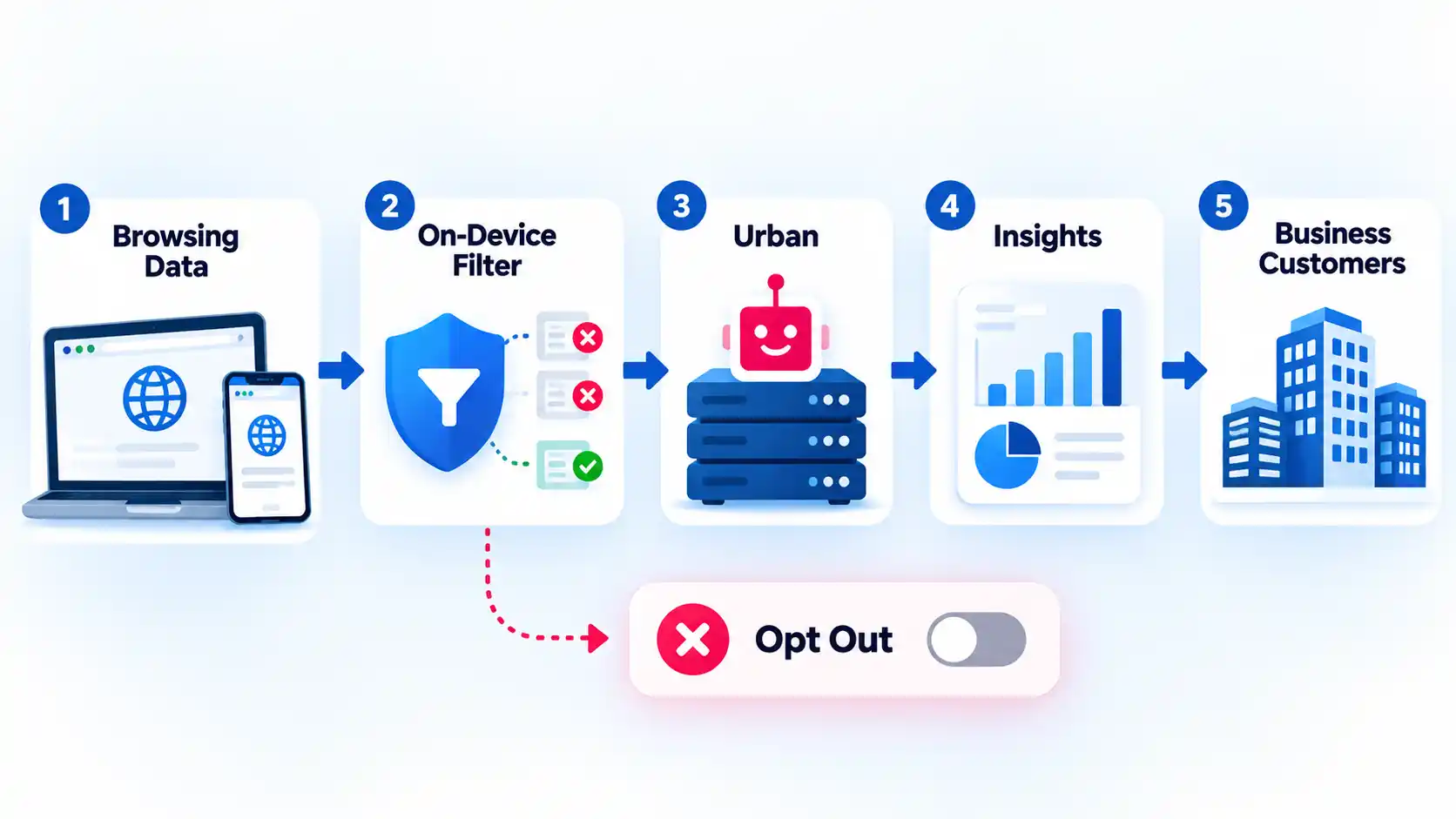
Urban VPN’s privacy policy updated September 4, 2026 says Browsing and Activity Data can include URL referrers, visited URLs, ad interactions, and search-result information. The policy says this information is cleaned on the device before being sent to Urban’s servers to remove or filter identifying information.
Urban says the data is used to provide the service and analyze traffic and engagement. It also says de-identified, filtered, anonymized, and aggregated browsing data may be used and disclosed for market-intelligence or analytics purposes, with consent where applicable law requires it.
That distinction matters. It would be inaccurate to reduce the policy to the claim that Urban simply records every named user’s full browsing history. It would also be inaccurate to describe the service as collecting no meaningful browsing information.
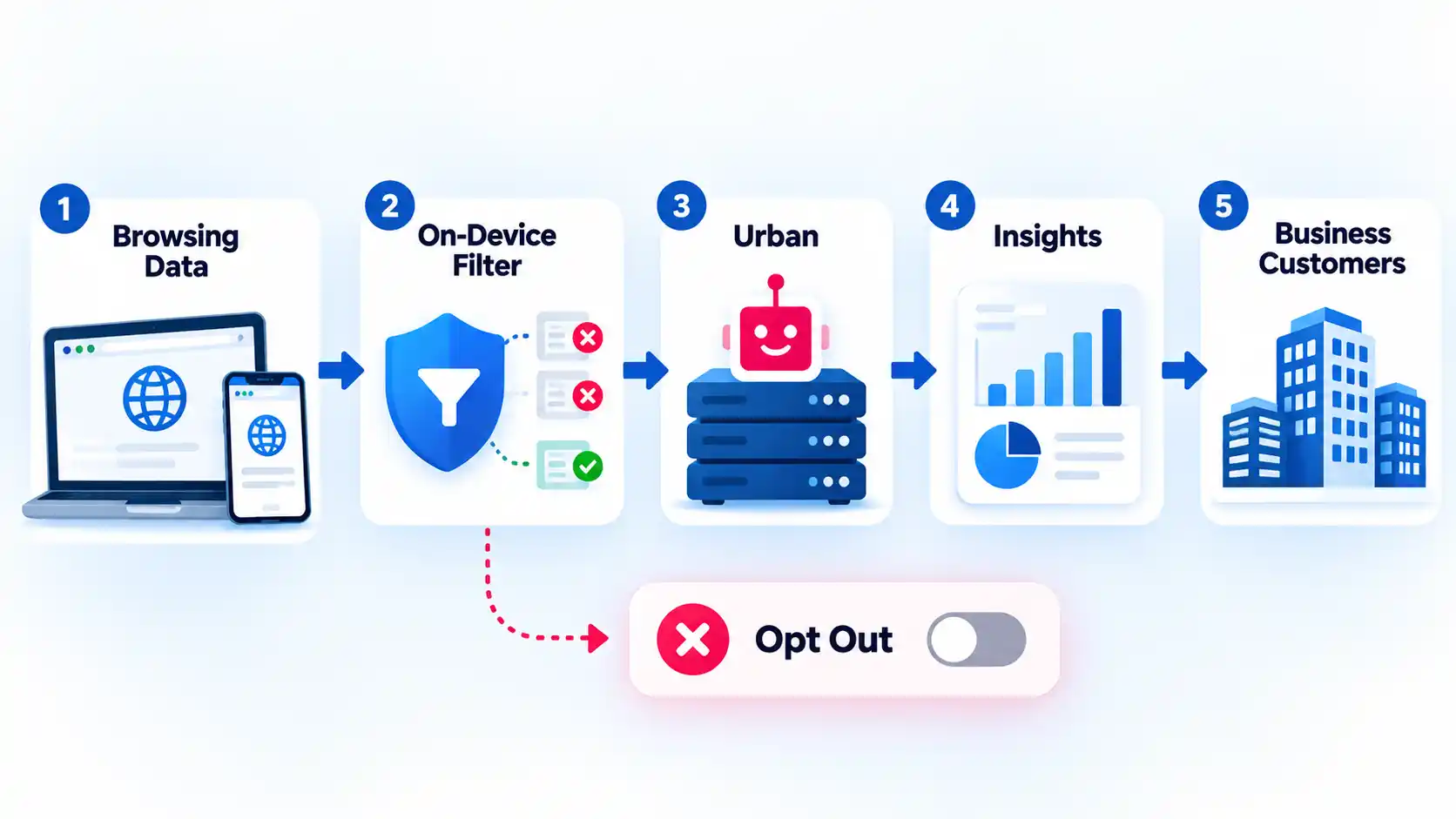
The commercial-use provisions go further. Urban says its parent company is a data broker and that marketing insights and behavior segments are sold largely from aggregated, non-identifying browsing data. The policy also says raw Personal Information may in some cases be disclosed to affiliates or the parent company for aggregation, anonymization, and de-identification.
Under its California disclosures, Urban says an insight sold with a unique identifier can qualify as a “sale” under the California Consumer Privacy Act definition. Its broader U.S. disclosures also say categories that may be sold include identifiers, commercial information, internet or network activity, profiles and inferences, and sensitive data as defined under applicable state laws.
Urban provides opt-out routes through product settings, an email request, and its “Do Not Sell or Share My Personal Information” link. The policy also says Global Privacy Control signals can be used for some browser or device opt-outs.
The browser extension deserves its own attention. The Chrome Web Store disclosure lists location, web history, and website content among the data the extension handles. Its optional Advanced VPN Protection description says visited URLs, ad interactions, clickstream data, IP addresses, and related web activity are sent to Urban’s servers for security analysis.
Urban’s terminology also makes a blanket “no logs” description hard to defend. Its own published VPN logs glossary states that UrbanVPN keeps logs for statistical analysis and periodically deletes them.
For a privacy-focused user, the practical question is not whether Urban can legally call some information aggregated or de-identified. It is whether you are comfortable routing your browsing through a service whose documented model includes this level of browsing-derived analytics and commercial data use. Choosing a VPN for privacy requires looking at the provider’s data practices, independent assurance, software transparency, and retention rules together rather than trusting one “no logs” phrase.
Security Features and Platform Gaps
Urban advertises modern security features, but their availability matters more than their names. A feature that exists on Android, for example, does not automatically protect a Windows session.
The current Premium pricing page advertises WireGuard, AES-256 encryption, Double VPN, and a kill switch. WireGuard is a VPN protocol, meaning a set of rules that controls how the encrypted VPN connection is created and maintained. A kill switch serves a different job: it blocks ordinary internet traffic if the VPN connection unexpectedly drops.
Urban’s current kill-switch feature page says the feature is available on mobile and that desktop support is “coming soon.” Its FAQ, however, describes a kill switch more generally and says it can be enabled or disabled from the settings menu. Because those statements do not fully align, verify the control in the specific app and version you intend to use instead of assuming universal availability.
Recent independent testing gives that limitation a practical consequence. In a September 2026 test, Gizmodo reported unprotected traffic after the free Windows VPN connection was interrupted in a cable-pull test. The same review reported a DNS leak on one tested U.S. server.
A DNS leak happens when the requests used to translate website names into network addresses travel outside the expected VPN path. That can reveal information about the sites being requested even when the main browser connection appears to use the VPN.
One test does not prove that every Urban VPN server or app version will leak. It does show why a feature list should not replace verification. Testing a VPN for DNS, IPv6, and WebRTC leaks can reveal whether traffic is escaping the protected route on your actual device and network.
Performance and Streaming: What Independent Tests Found
VPN speed is highly dependent on the server, protocol, distance, local connection, congestion, and device. That makes a single headline speed number a weak way to judge any VPN.
Gizmodo’s September 2026 testing illustrates that variation clearly. Its LinkX test on one U.K. server measured 185.11 Mbps, while another U.K. test using the default Auto setting measured only 1.12 Mbps. Those figures belong to Gizmodo’s test setup, not to Blog The Tech, but the large difference is useful evidence that Urban’s performance can vary sharply by connection method and server.
Streaming results were also mixed. The same test reported that five of eight tested streaming services blocked Urban VPN, while some services remained accessible. That makes Urban a risky choice if reliable streaming access is your main reason for subscribing.
It is better to interpret those results as evidence of inconsistency than as a permanent list of services that will or will not work. Streaming platforms regularly change their VPN-detection systems, while VPN providers change server addresses and routing.
The performance evidence therefore does not justify calling Urban universally slow. It does justify caution about assuming that a fast result on one protocol, server, or marketing page will carry over to your connection.
Urban VPN Premium: Pricing, Features, and Conflicting Terms
Premium changes Urban VPN mainly by adding more server access, multi-device use, dedicated Premium infrastructure, and additional features. It does not automatically resolve the privacy questions discussed earlier.
At the October 8, 2026 research point, Urban’s official pricing page advertised a one-month plan at $12.99, a six-month plan billed at $41.88, and a one-year plan billed at $59.40. Prices can change, so those figures should be treated as a dated snapshot rather than permanent rates.
The same page advertises up to eight devices, WireGuard, AES-256 encryption, Double VPN, a kill switch, and dedicated Premium servers. Urban’s separate Premium page describes a larger paid server pool and support for up to eight devices.
Urban’s Windows documentation is not fully aligned. The pricing page markets Premium alongside Windows-focused offers, while the separate Premium comparison page still marks Windows as “Coming soon” in one platform table even though surrounding text also refers to Windows. If Windows Premium is the reason you are paying, verify that the paid option and required features are available in your current Windows app before purchase.
If you are deciding whether to upgrade, compare the type of VPN client you actually need as well as the server list. Paying for more locations is not useful if your main need is protection for traffic outside the browser and you are only using an extension.
More broadly, what paying for a VPN actually changes usually includes capacity, server choice, support, simultaneous devices, or extra controls. A subscription by itself does not prove stronger privacy or better security.
Warning
Urban’s official refund information currently conflicts. Its pricing page advertises a 30-day money-back guarantee, while both its FAQ and Premium comparison say Premium does not currently offer a money-back guarantee. Verify the terms shown at checkout before paying and do not assume a refund is available.
The contradiction is not a minor wording difference. Refund eligibility can directly affect whether you are comfortable trying a long-term plan. Until Urban publishes consistent terms across its current pages, the terms attached to the exact purchase route deserve more weight than a general marketing statement elsewhere on the site.
Who Urban VPN Suits and Who Should Avoid It
Urban VPN is easiest to justify when your expectations are modest. Someone who wants occasional, non-sensitive IP-location changing on a Windows PC or supported browser may value the free access enough to accept its documented data practices and feature limitations.
It is a much weaker fit when the VPN itself is part of your privacy strategy. Consider another provider if any of the following are priorities:
- You want a provider with stronger public independent assurance around logging practices.
- You do not want browsing-derived information used for market-intelligence or analytics purposes.
- You need clearly documented kill-switch protection on your exact desktop platform.
- You need predictable streaming performance across several services.
- You want product, platform, pricing, and refund documentation that agrees across the provider’s current pages.
There is also a middle ground. You might decide that Urban is acceptable for low-risk browsing but not for work accounts, sensitive research, financial activity, confidential communication, or situations where VPN failure would create a serious privacy consequence.
That is a fit decision, not a claim that the service is malicious. Urban publishes substantial detail about its data practices and opt-out controls. The concern is whether those practices align with the reason you want a VPN in the first place.
Better Alternatives to Urban VPN
If privacy evidence matters more to you than unrestricted free access on Windows, compare providers that publish stronger assurance, clearer free-tier limits, or more narrowly defined data practices.
A comparison of safer free VPN options covers Proton VPN Free, Windscribe Free, hide.me, PrivadoVPN Free, and TunnelBear Free by factors such as data caps, registration requirements, device limits, server access, and privacy evidence.
For example, a free plan with a smaller server pool can still be the better choice if the provider publishes recurring independent audits or has a clearer policy about browsing destinations. Server count is useful only after the trust question is answered.
Bottom Line
Urban VPN’s free Windows and browser access is genuinely attractive, but free availability should not be the deciding factor when privacy is the reason you want a VPN. Its current privacy disclosures allow meaningful browsing-derived data processing, recent independent testing found protection and performance problems in specific test conditions, and Urban’s own pages still disagree about important details such as refunds, platform availability, and desktop kill-switch support.
If you only need occasional, low-risk location changing and understand those trade-offs, the free service may be sufficient. If you expect the VPN provider itself to minimize data collection, offer stronger independent assurance, and document security protections consistently across platforms, choose a provider that meets those requirements before sending your traffic through it.
Our Verdict
Urban VPN is a cautious fit for casual users who prioritize free access and convenience over strong privacy assurance. Privacy-focused users should look elsewhere, while anyone considering Premium should verify the exact platform features and refund terms before purchase because Urban’s current official pages do not fully agree.
TITLE: Amazon Ditches Fire Branding for Alexa Tablets — and May Be Building Toward a Phone
KEYWORD: alexa tablets
DESCRIPTION: Amazon’s new Alexa Tablets drop Fire branding, embrace Android and Google Play, and hint at a long-rumored Amazon smartphone powered by Alexa+.
Amazon has quietly closed the book on 15 years of Fire tablets, replacing the familiar budget lineup with a trio of premium devices called Alexa Tablets. The rebrand, announced this week, is more than cosmetic. For the first time, Amazon’s tablets run full, Google-certified versions of Android complete with the Play Store — a dramatic reversal for a company that spent over a decade insisting its forked software and walled-off Appstore were good enough.
The shift comes months after Amazon shut down its own app store, effectively admitting that Fire OS’s limited app selection had become a liability rather than a point of differentiation. Now, with the Alexa Tablets, Amazon is betting that access to Google’s full app ecosystem, paired with a much deeper integration of its Alexa+ assistant, will make its hardware competitive again against Apple’s iPad lineup and other Android slates.
What’s Inside the New Alexa Tablets
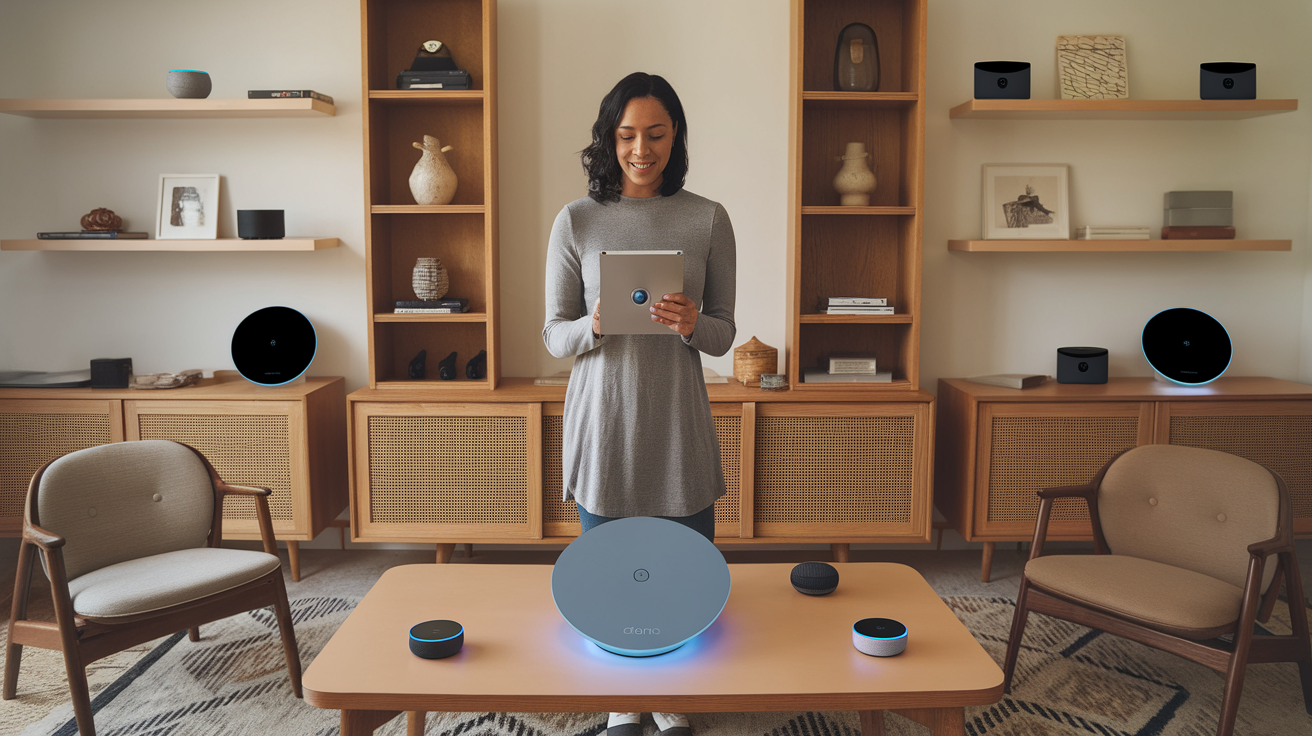
The lineup consists of three aluminum-bodied devices. The Alexa Tablet 8 starts at $230, while the Alexa Tablet 11 runs $330; both use the budget MediaTek 8189 chip and feature 16:10 displays suited for video streaming. The flagship, the Alexa Tablet 12 Pro, starts at $500 and takes a different approach with a 3:2 aspect ratio better suited to multitasking, a sharper 2800×1840 display with a 120Hz refresh rate, and a more capable MediaTek Dimensity 8400 processor paired with 8GB of RAM and 128GB of storage. Amazon also sells an optional keyboard and stylus for the Pro model, along with a matte display upgrade, pushing it firmly into productivity-tablet territory once reserved for iPads and Surface devices.

That premium push isn’t new for Amazon. Panos Panay, the former Microsoft Surface chief who joined Amazon’s devices division in 2023, has been steering the company toward higher-end hardware, from redesigned Echo speakers to slimmer aluminum Kindles. The Alexa Tablets fit squarely into that strategy, trading Fire’s cut-rate plastic for a look and feel much closer to Apple’s own tablets.
Alexa+ Takes Center Stage
While the hardware upgrades are notable, the bigger story may be how central Alexa+ has become to the experience. A persistent “Ask Alexa” widget sits on the home screen, and the assistant now supports “On-Screen Intelligence” — the ability to read whatever is on the display and answer contextual questions, similar to Google’s Gemini or Apple’s Siri. Users can ask Alexa to summarize a webpage, check whether a product seen in a YouTube video is available on Amazon, or find restaurants mentioned in an article that are closest to their office.
Alexa+ also now supports free-flowing “live sessions” for back-and-forth conversation, akin to Gemini Live or ChatGPT’s Voice Mode, and visual intelligence that lets the tablet’s camera identify objects and offer advice — point it at a leaking pipe, for instance, and ask how to fix it. Amazon says anyone who buys an Alexa Tablet gets Alexa+ included at no extra cost, a notable perk given the assistant normally requires a subscription or Amazon Prime membership.
Amazon’s vice president of devices, Kevin Keith, told Wired that the company previously “didn’t really have the right product” to showcase these AI capabilities — something the new tablets are meant to fix.
A Blueprint for an Amazon Phone?
The redesign has fueled speculation that Amazon is laying groundwork for something bigger: a smartphone. Reuters reported earlier this year that Amazon is developing a device codenamed Transformer, built around Alexa+ and reportedly featuring a generative, AI-driven interface that could reduce reliance on traditional apps. When asked directly whether the Alexa Tablets represented a dry run for a phone, Keith demurred, calling it “an interesting idea” while declining to confirm anything.
The caution is understandable. Amazon’s last foray into phones, the 2014 Fire Phone, was a well-documented disaster — plagued by a thin app ecosystem, gimmicky 3D-display features, and dismal sales that led to its quick discontinuation. By retiring the Fire name entirely and building genuine Android compatibility into its tablets first, Amazon appears to be hedging against a repeat failure, ensuring any future phone wouldn’t launch into the same app-starved environment that doomed its predecessor.
Whether or not a phone materializes, the Alexa Tablets signal a clear strategic pivot: Amazon is leaning harder into AI-driven shopping assistance delivered through premium hardware, rather than cheap devices subsidized by content sales. With smartphones already driving the majority of US online purchases, giving Alexa+ a foothold on more personal, always-with-you devices would give Amazon tighter control over how people shop — and make its AI assistant impossible to ignore along the way.
The new Alexa Tablets are available for preorder now and begin shipping October 14. Given Amazon’s marketing reach and its own retail platform, they are likely to become some of the most widely used Android tablets on the market almost overnight — Fire branding or not.
Sources:
Explore more on this topic with Vexel Search.

But down in the very state where Trump has his “winter White House,” two Republicans have put forth a very different vision for the party’s future — and have been far more eager to take on the artificial intelligence industry.
- Gov. Ron DeSantis and his attorney general, James Uthmeier, have become vocal critics of the AI industry over the past year, warning of the technology’s dangers to children and to humanity as a whole.
- This sets them apart from Trump, who has championed the industry and downplayed its dangers.
- DeSantis tried to pass an “AI bill of rights” with child safety restrictions, but his effort was foiled by other Florida Republicans with close White House ties.
- Uthmeier has filed a wide-ranging lawsuit against OpenAI and the company’s CEO, Sam Altman.
- The two are betting that public backlash against AI will grow deeper, including among Republicans — and they’re hoping they’ll be able to steer the party in a post-Trump world.
Most notable is the term-limited Gov. Ron DeSantis, who devoted much of his final year in office to a failed effort to pass an “AI bill of rights,” which would have imposed tougher restrictions regarding child safety and other topics. He’s warned that AI could “set off an age of darkness and deceit,” blasted “tech oligarchs” for putting people at risk, and called Anthropic “very creepy” for exploring whether AI could be conscious.
“He clearly understands what the risks are, and I find he’s also very good at calling bullshit on disingenuous arguments from the Silicon Valley lobby,” Max Tegmark, an MIT physicist who co-founded the Future of Life Institute, an AI safety nonprofit, told me. (DeSantis hosted Tegmark at two events in Florida this year.)
The other is DeSantis’s handpicked attorney general, James Uthmeier, a longtime close ally who is now trying to win the AG’s office in his own right — and who filed a high-profile lawsuit against OpenAI in June. Last week, Uthmeier asked the judge in the case to block OpenAI from developing new models unless they had “independent third-party guardrails and approval.”
“The danger of these AI systems is real and growing,” Forrest Saunders, a spokesperson for Uthmeier, told me. “Florida and the nation have seen case after case of violence, child exploitation, and models that operate beyond their developer’s control.” He added that Uthmeier “welcomes innovation, but Floridians will not be the test subjects.”
With AI cresting as a national anxiety — or a national opportunity, depending who you talk to — both major parties are still finding their footing on the issue. And though Trump is clearly trying to get Republicans in lockstep behind the industry, a very strong current is pulling the other way, responding to populist concerns and parents’ complaints to stake out a much more skeptical position. Florida has emerged as a bellwether for what Republican policies might look like if conservative America turns decisively against AI, especially as Trump’s political clock runs out.
DeSantis and Uthmeier aren’t unique in the GOP for having concerns about AI — a handful of House members and senators want further action, and populist opposition to data centers has bubbled up in races around the country.
But the two have gone furthest in taking on the industry directly — and they’ve done so even though it puts them on the wrong side of Trump.
In recent days, I spoke to several Florida political observers and advocates on the AI issue. Most believe that DeSantis and Uthmeier are affirmatively trying to stake out what the GOP’s position on AI should be in a post-Trump future, and to better align with an electorate that’s turning sharply against the industry, despite what the president may say.
“He’s trying to skate where the puck is going,” Jeff Brandes, a former Republican state senator, told me. (DeSantis’s office did not respond to a request for comment.)
Beyond the quest for political advantage, the stakes are very real. Will there actually be a significant and influential force on the right that takes the concerns about advanced AI’s harms seriously — and is willing to act to try and rein them in, before they do great damage?
DeSantis and Uthmeier are hoping the answer is yes — and that they will be the ones leading that charge.
Ron DeSantis’s quest for an AI bill of rights
In this case, the politics and the personal are intertwined. DeSantis occupies a unique place within the party at this particular moment that’s given him an incentive to buck the national consensus on the right, especially when it comes to Trump, and explore an independent approach.
In his first decade in politics, DeSantis had a charmed rise. In 2012, he embraced the Tea Party to win a seat in Congress; in 2017, he bear-hugged Trump to get his endorsement for governor. He then became a national conservative star for opposing pandemic-era public health restrictions and waging war on “wokeness,” winning his 2022 reelection in a nearly 20-point landslide.
“He is always out front, even ahead of other Republicans, on issues that he makes more important,” Peter Schorsch, editor of Florida Politics, told me. “I would joke with people that I didn’t know how to spell ESG or DEI before he brought these to the forefront.”
But what followed was a failed presidential primary campaign that put DeSantis on the wrong side of Trump and then sent him back to Florida with an uncertain political future.

Early last year, just weeks after a report that DeSantis’s wife Casey was considering running to succeed him as governor, Trump publicly urged Rep. Byron Donalds to enter the race, promising his “Complete and Total Endorsement.”
Also early last year, DeSantis, who had long run roughshod over Republican legislators, was faced with a new thorn in his side: an ambitious new state house speaker, Daniel Perez, who was more interested in cultivating the Trump White House than the governor. Perez took a far more assertive stance in shaping legislation and rejecting some of the governor’s demands than his predecessors; he also publicly blessed an investigation into a charity tied to Casey DeSantis. A bitterly personal feud between Perez and DeSantis ensued.
In the midst of all this, last summer, DeSantis got AI-pilled.
In July 2025, DeSantis announced that he was going to develop a state plan to deal with the rise of artificial intelligence. “We can’t just turn the reins over to a bunch of tech overlords,” he said. (DeSantis had long been a critic of major tech and social media companies on the grounds that they are too “woke” or politically hostile to conservatives and their ideas.)
At another event that month, DeSantis said: “I think this is, like, the biggest issue that’s facing our society.” He mentioned AI’s potential impacts on the economy, on jobs, on students, and on the spread of “false narratives” as troubling to him.
“I welcome technologies that will enhance the human experience. I do not welcome things that are going to supplant the human experience,” DeSantis said in September.
His interest in state action put him on the opposite side of the Trump administration, which was advocating for a 10-year moratorium on state regulation of AI — arguing that forcing the industry to abide by a patchwork of state regulations would slow its growth. (David Sacks, a key Trump adviser on AI, championed this argument.)
Last December, at the Florida mega-retirement community the Villages, DeSantis rolled out his proposed “AI bill of rights.” It did not focus on existential or civilizational risks, but instead more practical concerns around child safety. Megan Garcia, a Florida mother whose 14-year-old son died by suicide after conversing with a chatbot “companion,” appeared at the press conference.
As introduced in the Florida state senate, the bill would have required that parents consent to minors speaking to companion chatbots and forced companies to disclose when users weren’t speaking to a human, among other provisions. The state senate passed it in March.
But it was dead on arrival in the Florida House of Representatives — where Perez had aligned himself closely with the White House. “We do believe that the federal government should take care of AI, and whatever legislation or policy has to pass on a national level,” Perez said.
Brendan Steinhauser, who heads the AI safety advocacy group Alliance for Secure AI, told me that he saw Perez at a Mar-a-Lago fundraiser around this time, and asked him about safety risks. “He leaned to me and whispered, ‘We’re with you, but the president has made it clear not to move forward on this stuff,’” Steinhauser said. “So, the White House basically put the kibosh on that effort.”
DeSantis complained publicly that Perez was pursuing a “personal agenda” and thwarting badly needed legislation. It was to no avail — the bill didn’t move. But Perez did — Trump nominated him as ambassador to Brazil in June, and he was confirmed in August. (A request for comment from Perez, submitted to the State Department, received no response.)
James Uthmeier’s lawsuit against OpenAI
Though DeSantis hit a wall in the legislature, his attorney general was soon waging his own battle against OpenAI in court.
The attorney general is an elected position in Florida, but when Marco Rubio vacated his Senate seat to become secretary of state, DeSantis filled the seat with the state AG, Ashley Moody.
Then, to fill the newly vacant AG job, DeSantis chose one of his closest aides, who had served as his general counsel, chief of staff, presidential campaign manager, and chief of staff again — Uthmeier.

Uthmeier is a Florida native who had worked in Rubio’s Senate office; he graduated from Georgetown Law School in 2014. After that he joined the firm Jones Day and worked with Don McGahn; when McGahn was named White House counsel in Trump’s first term, Uthmeier went with him to the new administration, ending up at the Commerce Department. Then, in 2019, he headed back to his home state to work for the new governor, DeSantis, and has been close by his side ever since.
Now, though, DeSantis is term-limited, and Uthmeier is trying to get Florida voters to elect him for a full term as AG on his own. (Trump’s allies had reportedly urged then-Speaker Perez to challenge Uthmeier in the GOP primary, hoping to supplant a DeSantis ally; Perez demurred, and Uthmeier won the nomination unopposed.)
To make his mark, Uthmeier has filed several high-profile and politically charged lawsuits — for instance, he sued Starbucks over its corporate diversity politics (the company recently settled), and Pfizer about the safety of its Covid-19 vaccine. He’s also subpoenaed the NFL over its “Rooney Rule,” which requires teams to interview minority candidates for top coaching and operations jobs.
He’s also become the face of the administration’s challenge to the AI industry. In April, Uthmeier stood in front of a podium with an “Investigating OpenAI” sign, announcing he’d opened a criminal investigation into the company.
The impetus was a shooting at Florida State University last year that killed two people and injured six others; the accused shooter had consulted ChatGPT about various topics related to his plans hours before the attack.
“If ChatGPT were a person, it would be facing charges for murder,” Uthmeier said then. “This criminal investigation will determine whether OpenAI bears criminal responsibility for ChatGPT’s actions.”
There have been no criminal charges yet. But in June, Uthmeier filed a wide-ranging civil lawsuit against OpenAI, alleging deceptive business practices, negligence, fraudulent misrepresentation, and other legal violations, because the company marketed ChatGPT as safe when they knew it could be quite dangerous. The suit also named OpenAI CEO Sam Altman personally as a defendant. (Disclosure: Vox Media is one of several publishers that have signed partnership agreements with OpenAI. Our reporting remains editorially independent.)
Like DeSantis’s AI bill of rights, Uthmeier’s lawsuit originally focused on practical concerns and real-world harms that have already occurred, like the shooting. “Since its release in 2022, ChatGPT has advised teenagers on how to kill themselves, mix unsafe combinations of drugs, become anorexic, helped plan one mass shooting and one multiple homicide in Florida alone,” one filing in the lawsuit reads.
But after the summer’s ominous parade of AI headlines — such as OpenAI agents autonomously hacking the company Hugging Face, and new statements from current and former AI lab employees warning the technology could cause human extinction — Uthmeier turned up the heat, asking the judge in the suit for an injunction blocking OpenAI from developing new models without independent third-party safety evaluation.
“Defendants claim they cannot stop barreling forward with their potentially civilization-ending endeavors unless they are forced to do so by the government. They have asked the government to tie them to the mast” he wrote in a filing last week. “Plaintiff brings good news to the Defendants: The Florida Attorney General is answering your cry for help with a motion to enjoin you from harming Floridians with your reckless, unacceptably risky product.”
“Though a reasonable person would say there is no amount of money worth a 10% chance of the extinction of the human race, Defendants see it differently. They are intent on growing their $1 trillion valuation,” the filing continues. “It is only by the grace of the Almighty that one of Defendants’ AI agents hasn’t compromised a water supply or shut down a power grid — yet.”
OpenAI has not yet filed a response on the merits in this suit, but a company spokesperson has previously said that, in the case of the Florida State University shooter, ChatGPT “provided factual responses to questions with information that could be found broadly across public sources on the internet, and it did not encourage or promote illegal or harmful activity.”
Uthmeier, age 38, is viewed in the state as a potential rising star with a talent for getting headlines, who could well have a long career in state GOP politics — if he wins in November, that is.
While DeSantis has been credited for changing Florida from a swing state to a solidly Republican one, some recent polls have raised the possibility it might swing back. A September survey by St. Pete Polls found Uthmeier ahead of his Democratic challenger, Miami attorney and former state Rep. José Javier Rodríguez, by just a single-point margin.
And though DeSantis and Uthmeier have become major AI critics, the Floridian topping this year’s GOP ticket, Rep. Byron Donalds, is currently being hammered with attacks about his statement last year that the state needs to “embrace” data centers. He’s been nicknamed “Data Center Donalds” by his Democratic opponent, former Rep. David Jolly, who has also been close in some recent polls.
As for DeSantis, few expect the 48-year old to go quietly into retirement. When asked over the spring whether he’d run for president in 2028, he told reporters, “You never know.”
Brandes, the former Florida state senator, told me that he thinks DeSantis’s AI push is about “looking for wedge issues where he can have a different opinion from Trump’s successors as he prepares for whatever future ’28 or ’32 provides for him.”
That is: The Republican Party of 2026 might still be too influenced by Trump to go fully anti-AI. But if Trump’s influence ebbs, if the populist backlash against AI spreads further, and especially if there are more worrying AI-related reports or incidents with real-world harms, perhaps there could be an opening on the right for a leader who’s taken the problem seriously, even when it meant going against powerful figures in his party.
Tech & AI
Your digital photos and posts are scattered everywhere: This startup ties them all together


Eluum is taking aim at a problem created by the explosion of digital life: We chronicle our lives everywhere, but a single home for our most meaningful memories is hard to come by.
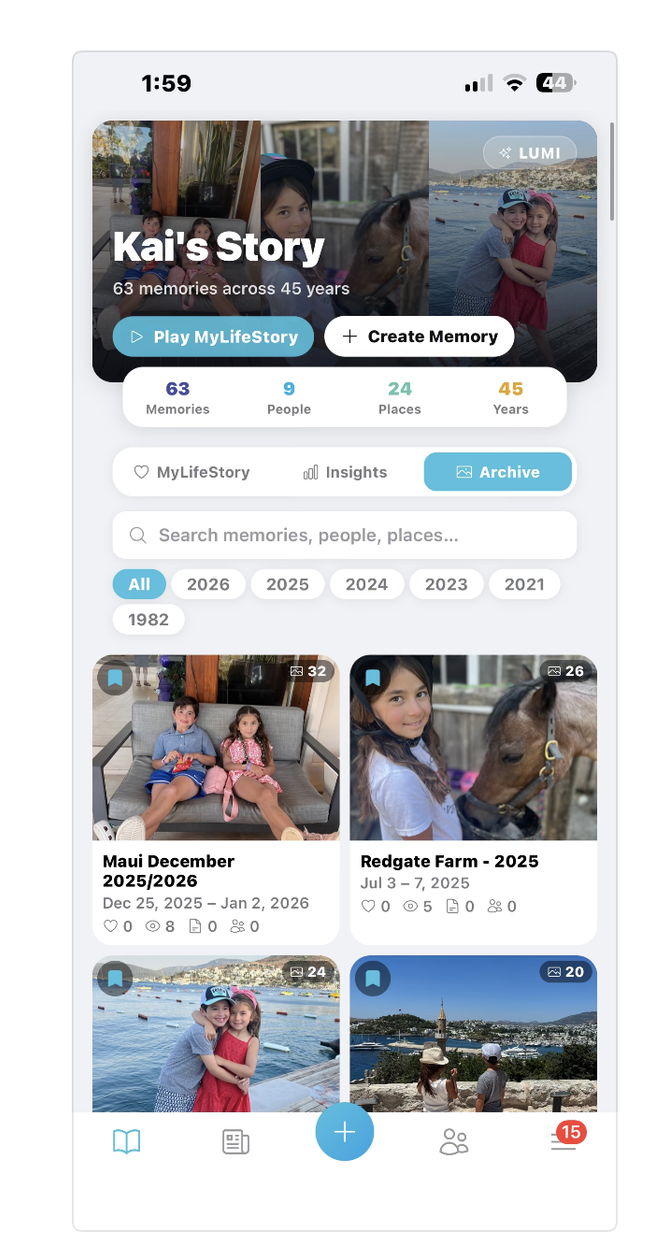
The Seattle startup’s new app brings together photos, videos, social posts, locations and other personal moments from across the digital landscape, using AI to help organize them into an evolving record of a person’s life, a feature it calls MyLifeStory.
The bootstrapped company, founded by former Microsoft and Avalara manager Bilkay Rose, former Microsoft software engineer Dale Rector and former investor relations exec Jennifer Gianola, sees an opportunity to create what it calls a user-controlled “memory layer” for social media.
The idea grew out of Rose’s own struggle to piece together years of family memories across a variety of platforms and devices. The app is available for iOS, Android and the web.
We caught up with Rose, who is part of the CoMotion entrepreneurial community at the University of Washington, for the latest installment of GeekWire’s Startup Spotlight.
In 50 words or less, give us your elevator pitch:
Eluum is building the future of social around people’s stories. MyLifeStory brings scattered photos, videos, social posts, places, and personal context into one evolving life story, helped by Lumi, our artificial intelligence memory companion, and controlled by the person whose life it represents.
What problem are you obsessed with solving?
Each of us creates thousands of digital artifacts, but they are scattered across camera rolls, social platforms, devices, and feeds. Nothing brings them together as the evolving story of a person’s life. Every person I know deals with this issue, but it seems too big to solve for most. We believe technology has finally reached the point where MyLifeStory can become real: a living story built across time, not another temporary feed built around advertising and engagement.
What surprised you after talking to customers?
People do not need another place to post. They want help making sense of what they have already created, and continue to create on a daily basis. What surprised us was how consistently people described feeling overwhelmed by their digital lives. They have the photos and posts, but the meaning — the people they actually create memories with, places they visit, experiences, and stories connecting everything — is being lost every single day.
How has artificial intelligence changed the way you build your company?
Artificial intelligence gives a small, determined team extraordinary leverage. It allows Dale, our CTO, and our broader team to build, design, test, and learn faster without requiring a massive organization or budget. More importantly, it makes our product possible.
Lumi helps users organize disconnected moments, add context, and gradually shape them into meaningful life stories. Artificial intelligence is the helper; the person remains the author. We have a bold vision for what technology can do for the average person, and we believe the first problem to solve is our memories. The most important thing in everyone’s lives is their journey through life.
@media (max-width: 600px) {
.gw-founder-box { float:none !important; max-width:100% !important; margin:20px 0 !important; padding:16px 18px !important; }
.gw-founder-box .gw-label { font-size:12px !important; margin-bottom:8px !important; }
.gw-founder-box .gw-hero { font-size:19px !important; }
.gw-founder-box .gw-byline { font-size:15px !important; }
.gw-founder-box .gw-meta { font-size:12px !important; margin-bottom:14px !important; }
.gw-founder-box .gw-facts { padding-top:14px !important; }
.gw-founder-box .gw-facts li { margin-bottom:12px !important; }
.gw-founder-box .gw-facts li:last-child { margin-bottom:0 !important; }
.gw-founder-box .gw-value { font-size:15px !important; line-height:1.45 !important; }
}
What’s one thing people misunderstand about your startup?
People sometimes assume Eluum is another social network or photo-storage application. It is neither. Eluum is building a human memory layer for social.
Our integrated social tools help people manage and share content, but MyLifeStory is the destination: a private, user-controlled story of their life that becomes more valuable over time. As a female founder, my mission is to build a company that can solve real problems. Our mission is to solve problems and make our users’ lives better.
What’s the toughest decision you’ve made in the past year?
Our founding team had to decide whether Eluum was primarily a life-memory platform or an integrated social platform. We see two enormous problems: social media needs a new, human-centered model decoupling our social lives from ad and algorithmic platforms, and people need a way to preserve their fragmented digital lives.
We ultimately realized these ideas are connected. Integrated social is how moments flow into Eluum; MyLifeStory is what gives those moments lasting meaning. Balancing that product vision with limited resources — while continually asking what users truly want, need, and would think is genuinely exciting — remains our hardest discipline.
What’s the one piece of advice you give to other entrepreneurs?
Do not confuse limited resources with an inability to make progress. A determined small team, the right technology, and a meaningful problem can accomplish far more than most people expect.
Listen closely to users, but maintain enough conviction to build what they cannot yet describe. Think big and don’t get easily discouraged early on. Prove your idea.
We’ll know our company has made it when…
I cannot imagine declaring that we have “made it.” That would be naive because trust must continually be earned. Success would mean Eluum becomes a trusted brand people rely on to build and preserve their life stories, knowing our products were designed to work for them, protect what matters, and become more meaningful with time.
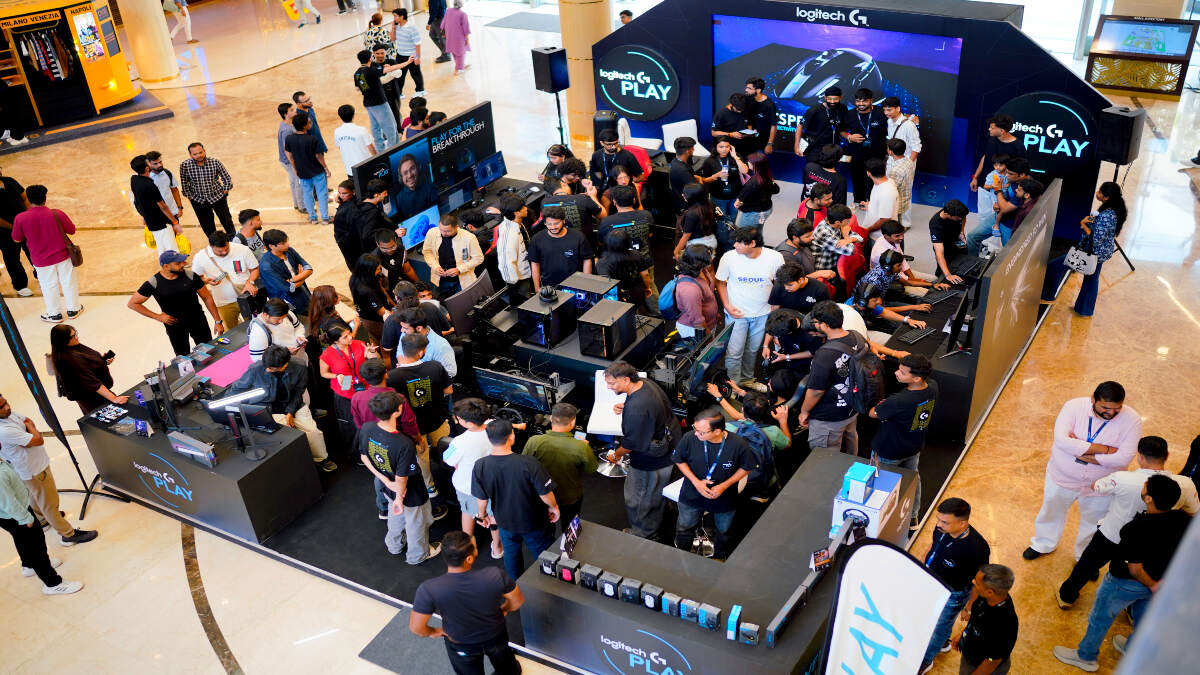
India’s gaming community got to experience Logitech G PLAY for the first time in Mumbai. The global gaming event brought more than 27 creators, esports players, and racing personalities to R City Mall, Ghatkopar. The event focused on gaming, competition, and the community around it under the “Play for the Breakthrough” theme.
The first India edition of Logitech G PLAY brought together several names from the gaming community. Popular creators including Hydraflick, Sikhwarrior, Ankit Panth and The Indian Budget Gamer attended. Professional esports players Casper, Meow 16K and Rite2Ace also joined the event. Racing creators and other gaming community members took part as well. The event celebrated the passion and communities shaping gaming culture across India.
Fans Take Part in Gaming, Racing and Creator Challenges
Logitech G PLAY offered fans an interactive gaming experience beyond a regular showcase. The event featured a 2v2 Valorant Creator Showdown in Skirmish Mode. It brought gaming creators and competitive players together for a live match. Fans also took part in Audience vs Creator challenges. Other activities included the Fastest Lap Challenge and Aim Labs challenges. The event also featured sim racing and Cosplay Showdowns. Fans could meet creators, take part in giveaways, and collect exclusive merchandise.
This event brought Logitech G’s global gaming celebration to India’s gaming community. Fans got the chance to meet creators they follow and compete with them in person. The event also followed Logitech G PLAY 2026’s global theme, “Play for the Breakthrough.” The theme highlights the perseverance behind every breakthrough in gaming and esports. It celebrates the dedication, resilience, and passion behind gaming, streaming, and competitive play.

Crypto54 minutes ago
Dogecoin dips by 11% this week as whale balances shrink

Tech & AI59 minutes ago
How to keep AI agents within their permissions

Entertainment1 hour ago
Gigi Shuts Down New Pregnancy Rumors About Her Ex


-

 Fashion6 days ago
Weekend Open Thread: Veronica Beard
-

 Sports1 day ago
Saracens’ Venter Brands Premiership Rugby ‘Autocratic’ Over £5,000 Media Fine
-

 Sports24 hours ago
Enzo Maresca all smiles as Man City return to training after guilty verdict
-

 Sports23 hours ago
Southampton’s Eckert Spared Ban as FA Suspends Six-Week Sentence Over Spygate
-
 Sports18 hours ago
Asiad selection row: Para-shooters allege corruption; PCI denies claims | Asian Games 2026
-
 Entertainment18 hours ago
10 Flawless Movies With the Cleverest Protagonists
-

 Crypto1 day ago
Crypto.com Teams Up With Insilico Terminal to Give Traders Free Pro-Level Tools
-
 Crypto24 hours ago
ESMA gives EU crypto platforms 3 months to drop non-MiCA stablecoins such as USDT
-

 Sports2 days ago
Harry Kane Ties Peter Shilton’s 125-Cap England Record in Wembley Win Over Czech Republic
-

 Tech & AI14 hours ago
ICE Emails Discuss Using Palantir-Supported Tool to Investigate Voter Fraud
-

 Tech & AI4 days ago
Common Mistakes You Should Avoid When Using Foldable Phones
-
 Tech & AI7 days ago
Fireflies.ai Launches Fireflies Talk for Free, Unlimited Voice Dictation
-

 Sports1 day ago
Internationals make history with emphatic Bridges Cup win at Trump Turnberry | News
-

 Crypto1 day ago
Bitcoin ETF Outflows Hit $485M, Erasing October Inflows
-
 Sports12 hours ago
Arsenal statement adds to Man City misery after guilty 115 verdict
-

 Gaming7 days ago
Reigns Studio Nerial Shuts Down as Founders Step Back “To Our Roots”
-

 Tech & AI7 days ago
Sony’s new PS5 Pro lottery requires 60 hours of playtime just to apply
-

 Tech & AI6 days ago
Koreans Left With Spoiled Food Due To Borked Samsung Firmware Update For ‘Smart’ Fridges
-

 Entertainment7 days ago
Russo Brothers Tease Very Surprising Ending for Avengers: Doomsday
-

 Business & Hustles6 days ago
Beyond Ozempic: Lilly and Novo Chase the Next Obesity Blockbuster With Amylin
You must be logged in to post a comment Login