The Apple Watch Ultra 4 is a great smartwatch that has a bit more battery life to play with and features that make it a more insightful training and health companion. It just might not be enough to warrant an instant upgrade for Ultra 3 owners.
Battery lasts over 2 days
Same slick mix of smartwatch features
Readiness scores and vitals modes are nice additions
No change in design
Some software features not available yet
Heart rate tracking not spotless
SQUIRREL_PLAYLIST_10208757
Advertisement
Key Features
Review Price:
£749
Advertisement
Longer battery life
The Apple Watch Ultra 4 can last for up to 50 hours with regular use.
Advertisement
S11-powered Audio Intelligence
Adds automatic sound recognition and Shazam, with Live Rewind and Siri Recap arriving later.
Advertisement
New Health Sensing System
Higher-frequency heart-rate sampling powers new Readiness scores, HRV recovery insights and daytime/nighttime Vitals views.
Introduction
Apple’s Ultra has been the smartwatch for endurance sports and outdoor lovers for years now. However, it has also become the Watch that gets the best that Apple has to offer, whether that’s in fitness tracking, communication features or just lasting the longest.
Advertisement
For the Apple Watch Ultra 4, Apple has focused on taking existing features and making them more reliable and useful, now wanting to track health and fitness stats at a more detailed level. It’s also making Siri more useful, and it’s going to keep you away from the charger for longer too.
There’s also more to come, as Apple’s Audio Intelligence will be able to hone in on voices and sounds around you once it properly arrives in a few months’ time.
That all still comes at a cost that makes it roughly the price of picking up two of the latest Apple Watch Series 12 smartwatches, so the question is, should you spend more? Is the Ultra 4 a strong upgrade on the Ultra 3? Here’s what I’ve found.
Advertisement
Advertisement
Design and screen
Same design as Apple Watch Ultra 3
Slightly heavier than Ultra 3
Introduces new sensor system
The Apple Watch Ultra 4 is basically identical to the Apple Watch Ultra 3. It has the same 49mm-sized grade 5 titanium case, the same overall case thickness, the same physical buttons, and the same strap style options. There’s technically a touch more weight to handle, but it’s a negligible amount you just don’t notice day-to-day.
Many will be happy that Apple hasn’t made drastic changes. I was sort of hoping it might follow the trend of adding in a proper flashlight, but that hasn’t happened.
Image Credit (Trusted Reviews)
It remains a smartwatch that, while blockier than most other smartwatches, does have the typical Apple build quality and comes with a strap that’s easy to remove and replace. I always find it startling how quickly I adjust to having that large case sitting on my skinny wrists.
Advertisement
Something you can’t fault is Apple’s ability to pick and match up case colours with strap options. I had the black Ultra 4 and opted to combine it with the burgundy trail loop, and it’s a stylish combination. You can still use Ultra 3 straps with it if you’re not willing to give up on some favourite bands you’ve already picked up.
Image Credit (Trusted Reviews)
Flip the watch over, and you’ll find the biggest design difference with the Ultra 3. Apple has introduced its new health sensing system, which takes care of tracking various biometric data, including heart rate and temperature.
Apple says it’s increased the surface area for the electrodes that conduct readings, added larger LEDs and can now monitor metrics like heart rate more frequently than previous watches. The new sensor didn’t seem to alter how the watch sat on my wrist and works with the same-style charging puck as previous Ultras.
Advertisement
Image Credit (Trusted Reviews)
Performance and software
Runs on watchOS 27
New S11 chip unlocks new audio features
Siri Recap and Live Rewind features not yet live
Advertisement
The Ultra 4 comes packed with Apple’s new S11 chip, which it’s dubbed its most powerful wearable chip. That’s powering watchOS 27, where key software highlights include a version of Siri that goes beyond answering simple queries and functions a bit more like ChatGPT. There’s now a new grid layout to get to the apps you use most in a quicker fashion, with more features on the health and fitness front.
Image Credit (Trusted Reviews)
The Siri improvements are intriguing ones. If you open up the Siri app on your iPhone, you can now see previous conversations you’ve had with the assistant. I was also able to have a conversation about my calendar and delve deeper into a hotel I booked and whether it offered late check-outs. The responses, while not instant, were dealt with pretty swiftly and, crucially, offered useful responses.
The new dynamic grid wasn’t a feature I found hugely life-changing, though I did appreciate using the new tap gesture to navigate Apple’s smart stack screen when I didn’t have a hand free to do it from the watch crown.
Image Credit (Trusted Reviews)
Apple is making a big play on voice, with a range of new features it’s tagged as Audio Intelligence. Some features are live, some aren’t. They use the now more powerful S11 chip and the Ultra’s microphone to deliver more sophisticated audio-based features. I was able to use the new sound recognition mode, which was swiftly able to recognise my daughter’s crying. The now quicker reacting Shazam integration identified a song playing on the radio in the gym without me prompting the Watch to do anything.
Advertisement
What isn’t available is the new Live Rewind and Siri Recap modes, which are coming later in the year. Live Rewind lets you record the last 15 seconds of a conversation while Siri Recap can summarise conversations like meetings you’ve had in the day.
Advertisement
Image Credit (Trusted Reviews)
Apple does emphasise the private nature of using these audio-based features, including that it doesn’t store recordings or give access to recordings. That said, these are features that have understandably raised eyebrows, and no doubt will continue to do so when users can start putting them to use.
Beyond those new features, the Ultra 4 still performs great at being a smartwatch that handles smartphone notifications, music features, making payments and giving you access to great apps and watch faces in a very polished way. And, yes, it continues to be an iOS-only wearable.
Tracking and features
New health sensing system brings more accurate heart rate tracking
New daytime and nighttime vitals views
Redesigned Health app not yet live
The headline feature on the Watch Ultra 4 is Apple’s new Health Sensing System, which also appears on the Watch Series 12. When combined with Apple’s new chip, it can mainly sample heart rate data at a higher frequency than previous Watches. This should lead to more accurate heart rate tracking and also unlock new health and fitness-related features.
Advertisement
Image Credit (Trusted Reviews)
That includes new Readiness scores to assess whether you’re in good shape to take on your day. There’s now more insight into your recovery from a tough day or workout, and a closer look at how vitals data can change from day to night. Some of these features, like readiness scores and HRV recovery, have been available on rival smartwatches for some time.
Let’s deal with accuracy first. I’ve had a mixed experience with the heart rate tracking on previous versions of the Ultra. More so during exercise.
Image Credit (Trusted Reviews)
For resting heart rate readings and tracking heart rate during sleep, it’s generally been fine. I’ve used the Ultra 4 for a range of exercises and also raced with it up against a chest strap monitor. While I found the average readings similar, I found it slightly underreported maximum heart rate against a chest strap. The heart rate graphs in general looked similar, and I was pretty satisfied with the performance. It’s not spotless, but it’s been solid on the whole.
Dealing with the Readiness scores next and these require seven nights’ worth of sleep alongside capturing other metrics like sleep scores, heart rate variability and vitals data including respiratory rate and wrist temperature. I’ve been comparing scores to Garmin’s similar training readiness scores and scores generated by third-party app Bevel. Looking at data after a race, I could see those scores were telling me similar things. Basically, it takes some time to recover.
Advertisement
Advertisement
Image Credit (Trusted Reviews)
Apple says scores dynamically adjust during the day based on your data. So I could see that on one day my score was a 7 and adjusted to a 6 based on the exertions or running around completing errands and squeezing in a workout during my day.
They’re nicely presented on the watch, but when it comes to reviewing it off the small screen, things get a little more archaic. This is why it’s good news Apple is deciding to overhaul its Health app, even if that overhauled app isn’t quite ready just yet.
Image Credit (Trusted Reviews)
Apple is going big on HRV (heart rate variability), which again, isn’t a new metric to smartwatches. It’s a heart rate-based metric closely tied to recovery. I’ve been comparing similar readings to a Garmin watch, and the average measurements have been similar on most days. Like Garmin, the information in isolation doesn’t feel hugely insightful. That’s likely why it has been pulled into the new Readiness and Vitals data to put it to better use.
Image Credit (Trusted Reviews)
Advertisement
Moving onto Vitals next, Apple is essentially letting you see a daytime and nighttime view of how data like heart rate, HRV and temperature might change. It’s easy to toggle between the two views, though I wouldn’t say it’s as glanceable as the new Readiness scores.
Another aspect of tracking that Apple promises improvements is with tracking your step counts. I’ve been wearing the Ultra 4 with a range of different smartwatches and smart rings. I found daily step totals typically to be a few hundred steps within daily totals of other trackers. The GPS performance in that half marathon test was strong too, even on a twisty and turning course, where I expected to have issues.
Advertisement
Over 2 days battery life
Up to 84 hours in low power tracking mode
Fully charges in just over an hour
The wait for an Apple Watch that can last a week does unfortunately go on. Instead, Apple has managed to increase the Ultra’s stamina so that it can last over 2 days. That’s up from 42 hours to 50 hours on the Ultra 2.
That improvement is my experience of living with the Ultra 4. I averaged getting two days before I was prompted to turn on the low power mode, and never quite made it to three days. That time included using the GPS, receiving notifications, using music features and interactions with Siri throughout the day and tracking sleep.
Image Credit (Trusted Reviews)
Advertisement
Apple has also boosted the battery life when tracking exercise. So now the Ultra 4 can last up to 18 hours in its most accurate GPS tracking mode, which is up from 14 hours. Stick it into Apple’s extended workout mode, and you can expect anywhere from 25 to 45 hours. When I wore the Ultra 4 for a half marathon race, which lasted just over an hour and a half, the battery dropped by 7%.
To compensate for the fact that the battery is shorter than most of the competition, Apple includes a pretty speedy fast charging mode. You can get up to 80% battery from a 45-minute charge or enough battery to cover a night’s worth of sleep tracking from a 5-minute charge.
So, yes the Apple Watch Ultra 4 has better battery life than the Ultra 3. Is it still enough? No. Will an Apple Watch Ultra 4 that can last over 2 days keep some fans happy? I imagine it will, especially with how quickly it can charge up.
Advertisement
SQUIRREL_PLAYLIST_10208757
Should you buy it?
You own an Apple Watch Ultra or Ultra 2 and looking for an upgrade
If you’ve got an older Apple Watch Ultra, it’s worth skipping the other Ultras and going for this as it gives you more for the same price.
Advertisement
You want the best smartwatch for battery life
Advertisement
The Ultra 4 offers the biggest battery yet on an Apple Watch, but it still falls quite short of smartwatches that cost a lot less.
Final Thoughts
The Apple Watch Ultra 4 is Apple’s most capable smartwatch yet, combining longer battery life with more detailed health and training insights and a selection of promising Audio Intelligence features. The new Health Sensing System and Readiness scores make its data more useful, while accurate GPS tracking and slick everyday performance ensure it remains an excellent all-round smartwatch.
Advertisement
However, the familiar design and limited availability of some headline features make it a modest upgrade over the Ultra 3, especially given its premium price. It’s a compelling choice for newcomers and owners of older models, but Ultra 3 users have little reason to upgrade just yet.
To see how it compares to the competition, take a look at our selection of the best smartwatches.
Advertisement
How We Test
We thoroughly test every smartwatch we review. We use industry-standard testing to compare features properly, and we use the watch as our main device over the review period. We’ll always tell you what we find and we never, ever, accept money to review a product.
Advertisement
Worn as our main smartwatch during the testing period
Health data compared against other wearables
FAQs
Does the Apple Watch Ultra 4 have a blood pressure sensor?
No, the Apple Watch Ultra 4 does not have a blood pressure sensor. You can still pair with compatible external blood pressure monitors to share data to Apple Health.
Pedram Rezaei, a 20-year Microsoft veteran, is joining Amazon Web Services as a distinguished engineer. (Amazon Photo)
A longtime Microsoft engineering leader who was previously a Copilot chief technology officer is joining Amazon Web Services to work on its competing AI tools for coding and workplace productivity.
Pedram Rezaei, a nearly 20-year Microsoft veteran who was most recently a corporate vice president on the Microsoft Superintelligence team, starts Monday as a distinguished engineer in the AWS Agentic AI and Emerging Technologies organization, led by Swami Sivasubramanian.
Rezaei will work initially on Kiro, the AWS coding tool, and Quick, Amazon’s AI assistant for workplace tasks, Sivasubramanian wrote in a memo to his team Monday. “He is a hands-on engineer who is still in the code every day, and he plans to keep it that way here,” he added.
Kiro’s user count doubled from the first quarter to the second, and monthly AI users for Quick grew fourfold, according to the memo. Rezaei’s plan for his first few months is to “meet people, learn how things work here, and ship something real,” Sivasubramanian wrote.
Sivasubramanian’s organization was expanded in July to include emerging technologies, part of a broader reshuffling of Amazon’s AI teams.
Advertisement
The hire comes as Amazon and Microsoft compete more directly in AI tools for work. Microsoft last month unveiled an all-in-one Copilot app that combines chat, coding and agents, its answer to OpenAI and Anthropic. Amazon made its Quick desktop app generally available in September and brought its main features to mobile.
Rezaei joined Microsoft in 2006 and held senior technical roles on Power BI, Dynamics 365, Cortana, Bing and Azure Maps before moving to Copilot, according to his LinkedIn profile. He became Copilot’s CTO in February and moved to the Microsoft Superintelligence team in June, according to the profile. Sivasubramanian’s memo said Rezaei was most recently working on training foundation models.
We’ve contacted Microsoft for comment on his departure.
Rezaei is the latest Microsoft executive to move to AWS this year. Shawn Bice returned to AWS in May from a security role at Microsoft to lead its Automated Reasoning Group.
Advertisement
In his memo Monday, Sivasubramanian also told his team that two longtime AWS engineers, Marvin Theimer and Reto Kramer, have returned to work on neurosymbolic AI and automated reasoning, which he called “one of our biggest bets for the future.” Both came back from Microsoft, according to their LinkedIn profiles.
Neurosymbolic AI pairs large language models with rule-based systems that can check whether an AI agent is following a company’s policies and procedures.
Speaking at Madrona’s IA40 Summit in Seattle last week, Sivasubramanian said nearly every CIO and CEO raises the same question about AI agents. “How do I know it is always going to obey all my rules and regulations?” he said. “This is a real concern.”
Advertisement
Solving that problem “actually unlocks so many use cases for all these enterprises,” he added.
Theimer, an AWS distinguished engineer for nine years before leaving in 2022, joined Microsoft in July 2024 as a corporate vice president and technical architect and stayed until March. It was his second stint at the company, where he worked from 1998 to 2006. He rejoined AWS in July as a vice president and distinguished engineer.
Kramer, who led an automated reasoning team at AWS before leaving in 2023, joined Microsoft in September 2025 as vice president of Security Platform & AI and stayed until May. He rejoined AWS in September as vice president of applied science.
Sivasubramanian hinted at more hires to come, writing that Rezaei joins “as we continue to build out our technical leadership team to help take on the ambitious work we have planned.”
Techdirt has been around for almost 30 years now, and the one internet law issue that never seems to change is the bullshit use of copyright to take down speech. It’s run through basically our entire history. Back in 2020 we wrote about a copyright dispute involving an author of, well, “wolf-kink erotica” using the DMCA to remove works by a competitor writing books in the same genre. The YouTuber Lindsay Ellis did a (very good) explainer video about it all and then… faced a ridiculous copyright legal threat herself.
About a week or so ago, Ellis published a video on a very different topic: cruise lines. It was something like two and a half hours long. Ellis — who I would say is a skeptic of the entire concept of cruises — decided to go all in, taking a bunch of different cruises in a row to see what all the fuss was about and how the various lines compare. After seeing the video mentioned on Bluesky, I clicked on it and… ended up watching the whole thing (albeit at 2.5x speed). I’m not that interested in cruises, but Ellis is a great sardonic storyteller and the video is really well done, mixing details about the individual cruise lines and how they treat their workers (mostly not well) and the environment (potentially even worse) with her own experiences on those trips.
But, apparently that video is currently gone from YouTube (she has kept it up on the subscription service Nebula)… because of copyright, as Ellis explained in a YouTube short.
Advertisement
Yeah. In the middle of a two-plus hour video about cruise lines, there’s a clip — just a few seconds long — of a friend who joined Ellis on one of the trips singing karaoke. And that caused the entire video to come down while the “dispute” was adjudicated.
And, as Ellis notes, YouTube by default sides with the copyright holder, because the nature of copyright law is that it very, very, very strongly encourages intermediaries to side with the copyright claimant, even if that claim is obvious bullshit and clearly fair use (as is the case here). YouTube’s ContentID system is basically built with that in mind. Even as YouTube spent years fighting back against copyright maximalism and winning the massive DMCA case Viacom filed against it, in the end, to keep the big copyright holders happy, ContentID is really designed to strongly favor copyright claimants, even when their claims are bullshit.
The culprit in this case? Apparently our old friends at Warner/Chappell, which, let’s just say, have a history of this sort of absolute bullshit. Warner/Chappell is a music publisher, and publishers tend to be even more copyright maximalist than the labels themselves. It’s likely that Warner/Chappell holds the copyright on the underlying composition that is playing in the background, and which can barely be heard for the few seconds while Ellis’ friend is singing karaoke. That’s clearly fair use and similar to the dancing baby case from over a decade ago, where some music playing incidentally in the background shouldn’t lead to a video being taken down (the difference here being that it looks like this is a ContentID claim, rather than a full DMCA takedown which would require Warner/Chappell to take fair use into consideration).
On Bluesky, Ellis points out that this wasn’t an automated takedown. Her lawyers asked people at Warner/Chappell to pull the claim and they refused, claiming (incredibly) that because the song “was not the topic of the video” they wouldn’t pull the claim.
Advertisement
That is… not how any of this is supposed to work.
Ellis also notes that she uploaded the video weeks before publishing it (as YouTube encourages creators to do) precisely so ContentID could flag any potential issues — and nothing came up until the video passed a million views. Then suddenly Warner/Chappell put in a claim, as Ellis says, just “to be an asshole.”
This sort of nonsense happens all the time, but it’s pretty incredible that we’re now nearly three decades into the DMCA itself and we’re still dealing with this kind of blatant abuse of copyright, which is mostly just a shakedown from companies like Warner/Chappell which will then run to Congress and claim they need more copyright expansion to protect them from “piracy.”
Maybe what we actually need are laws that protect the people doing the creative work from parasites like Warner/Chappell.
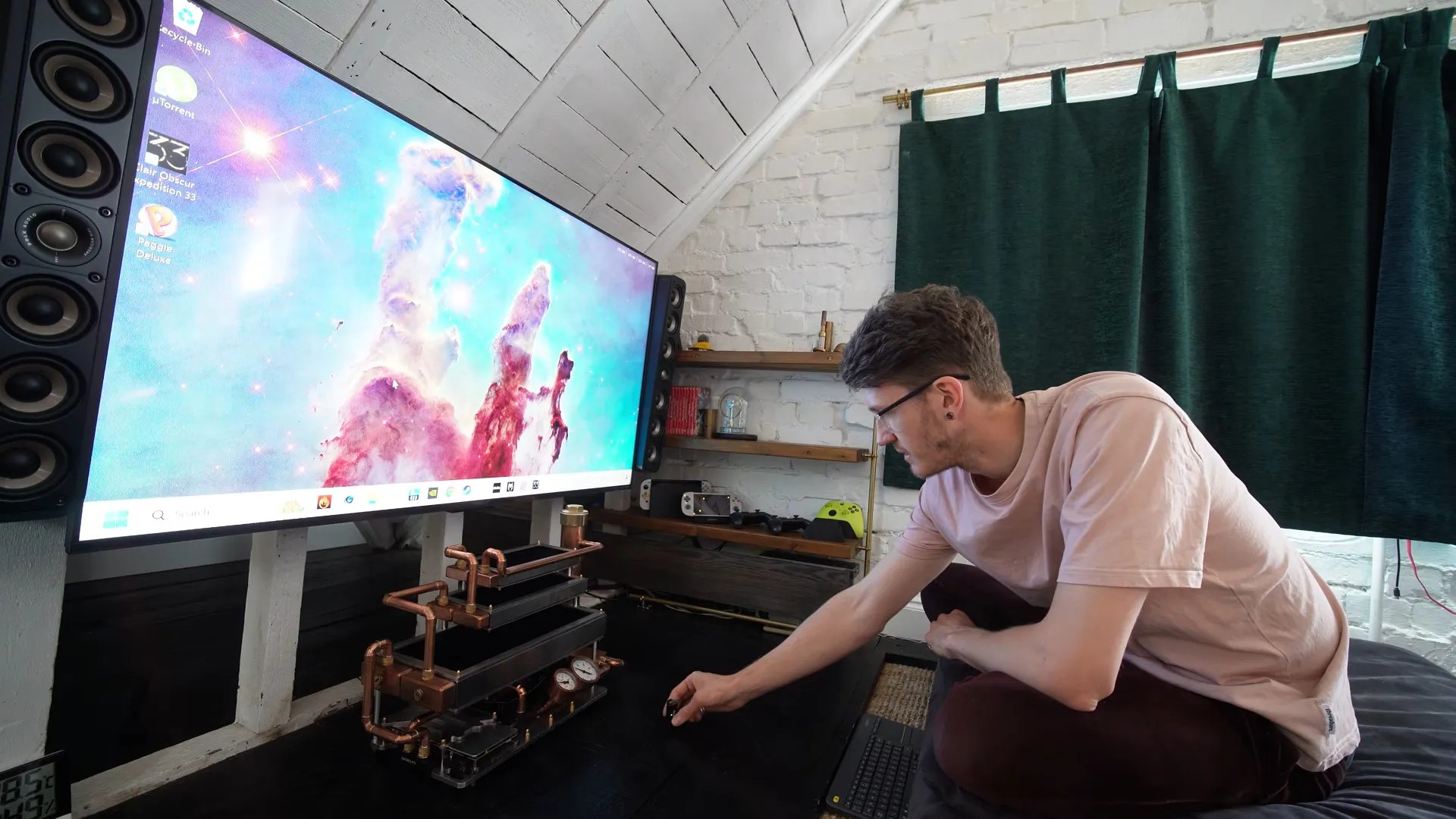
The discerning modern gamer’s quest is to find a quieter computer without sacrificing performance. That proves challenging when modern components are highly efficient at producing monumental quantities of thermal energy. So the typical solution ends up moving enough air through the computer to create a rather tumultuous racket. So why have fans at all? Well, as [Billet Labs] demonstrates, that’s not necessarily a good idea.
The build begins with a block of aluminum which, with a bit of hand-metal work, may become the base of the PC “case.” A dry-fit of the aesthetically modified parts taken from a previous attempt at a fanless PC reveals the steampunk aesthetic that defines the build. On final assembly, a large amount of thermal paste under the flex ATX power supply and 6mm of thermal pads under the motherboard provide passive cooling to the block of aluminum they are attached to
The cooling loop begins with three radiators: a big one, a small one, and a slightly smaller one. But raw metal PC radiators are difficult and expensive to come by these days. Some paint stripping and polishing will fix that problem. A few hand-made mounting brackets complete the aesthetic. All three radiators are stacked above the motherboard, and on top of each other, positioned horizontally to encourage passive airflow through them.
At this point, a normal PC would be plumbed up using standard flexible or, if you’re particularly ambitious, hard piping. But this is no normal PC. Instead, the plumbing uses household copper piping, soldered together. Two gauges sit near the front to show the water pressure and temperature. The reservoir is a larger diameter pipe with one end soldered onto a smaller pipe leading to the pump. The other end is a screw cap, with the corners machined off to match the pipe, to allow for filling of the loop. Soldering this took quite some effort because of the thermal mass in such a large pipe.
Advertisement
Once testing commenced, two issues became quickly apparent. The pressure gauge creates quite the racket as water flows past, and the stacked radiators are inadequate at cooling the PC. Rather show-stopping issues when the goal is gaming in silence. Was all this work for naught? No, the design proved the block of aluminum quite adept at cooling the motherboard and GPU. Moreover, adding a simple 120mm fan between the two smaller radiators and removing the pressure gauge effectively quelled the overheating and ticking issue. The result is a quiet (and quite pretty) living room PC with performance to match.
You can free up storage on a Mac without installing a cleaner app. Start with System Settings > General > Storage, identify the categories actually using space, and remove or move files you recognize before touching system-managed data.
On macOS Ventura 13 or later, choose Apple menu > System Settings > General > Storage. Earlier macOS versions show storage through Apple menu > About This Mac > Storage. The Storage view shows usage by category and updates as space is reclaimed.
Free Up Storage on Your Mac Step by Step
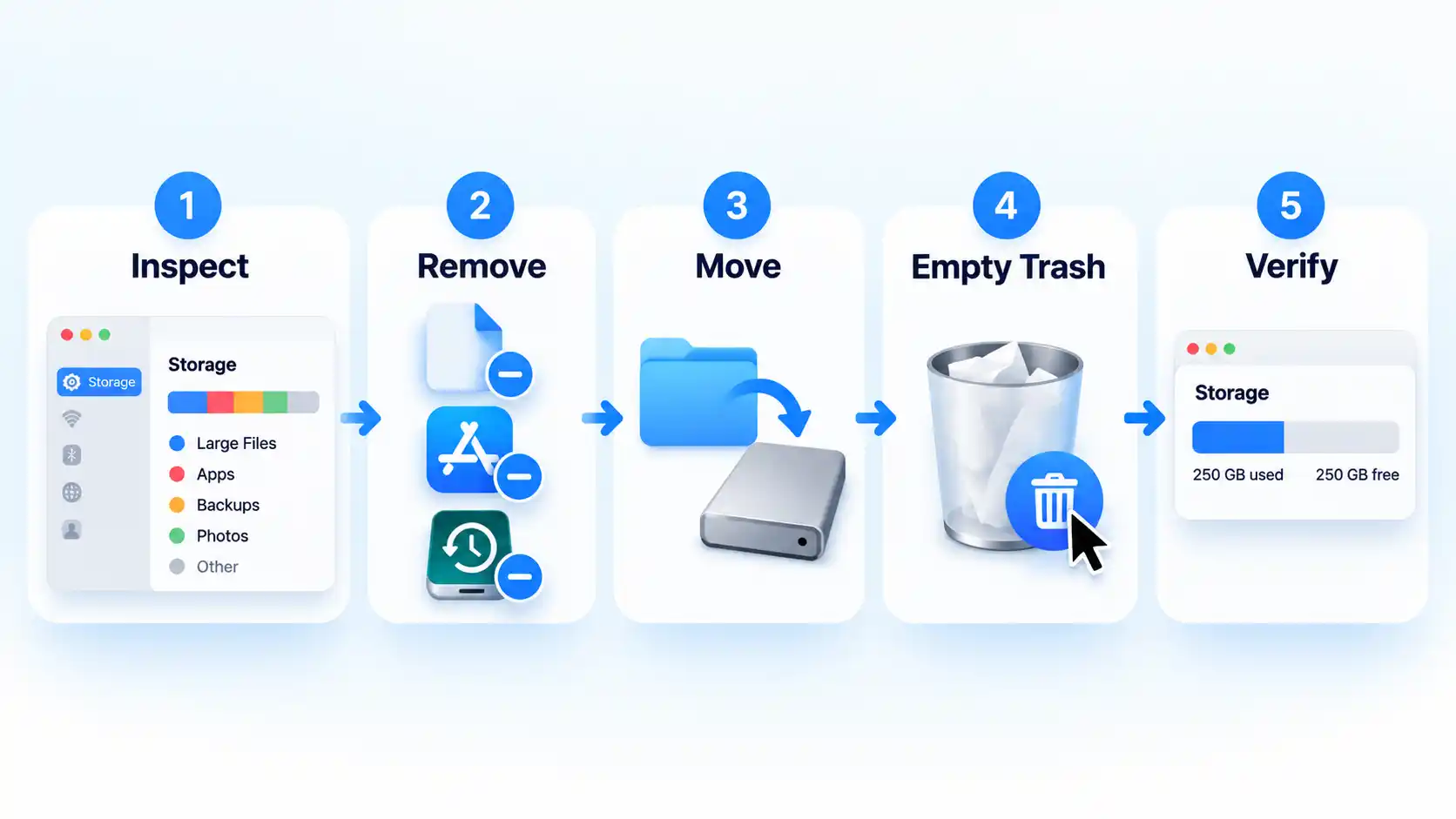
The safest order is to inspect first, remove recognized data second, and verify the result before deleting anything else. You do not need to perform every step if one category already explains most of your storage use.
Open Storage settings. Choose Apple menu > System Settings > General > Storage. Give macOS time to calculate the categories, then note both the available space and the categories using the most storage. If a category has a More Info button, use it to inspect the files or options associated with that category.
Start with large files you recognize. If Documents, Downloads, media, or another user-controlled category is large, review files that are safe to judge individually: downloaded installers, old archives, exported videos, duplicate project copies, disk images, and other files you know you no longer need. Avoid deleting an unfamiliar file merely because it is large.
Remove apps you no longer use. Open the Applications folder in Finder. If an app has its own uninstaller, use that first. If it does not, many apps installed from the internet or a disc can be dragged from Applications to the Trash. Apps with supplied uninstallers should be removed through those uninstallers. Apps required by macOS cannot normally be removed this way.
Review old local iPhone or iPad backups. Connect the device to the Mac with a cable, select it in Finder, and trust the device if prompted. Open the General tab and click Manage Backups. Review the dates before deleting anything. The Manage Backups menu lets you delete, archive, or reveal individual backups, so remove only backups you have identified as obsolete.
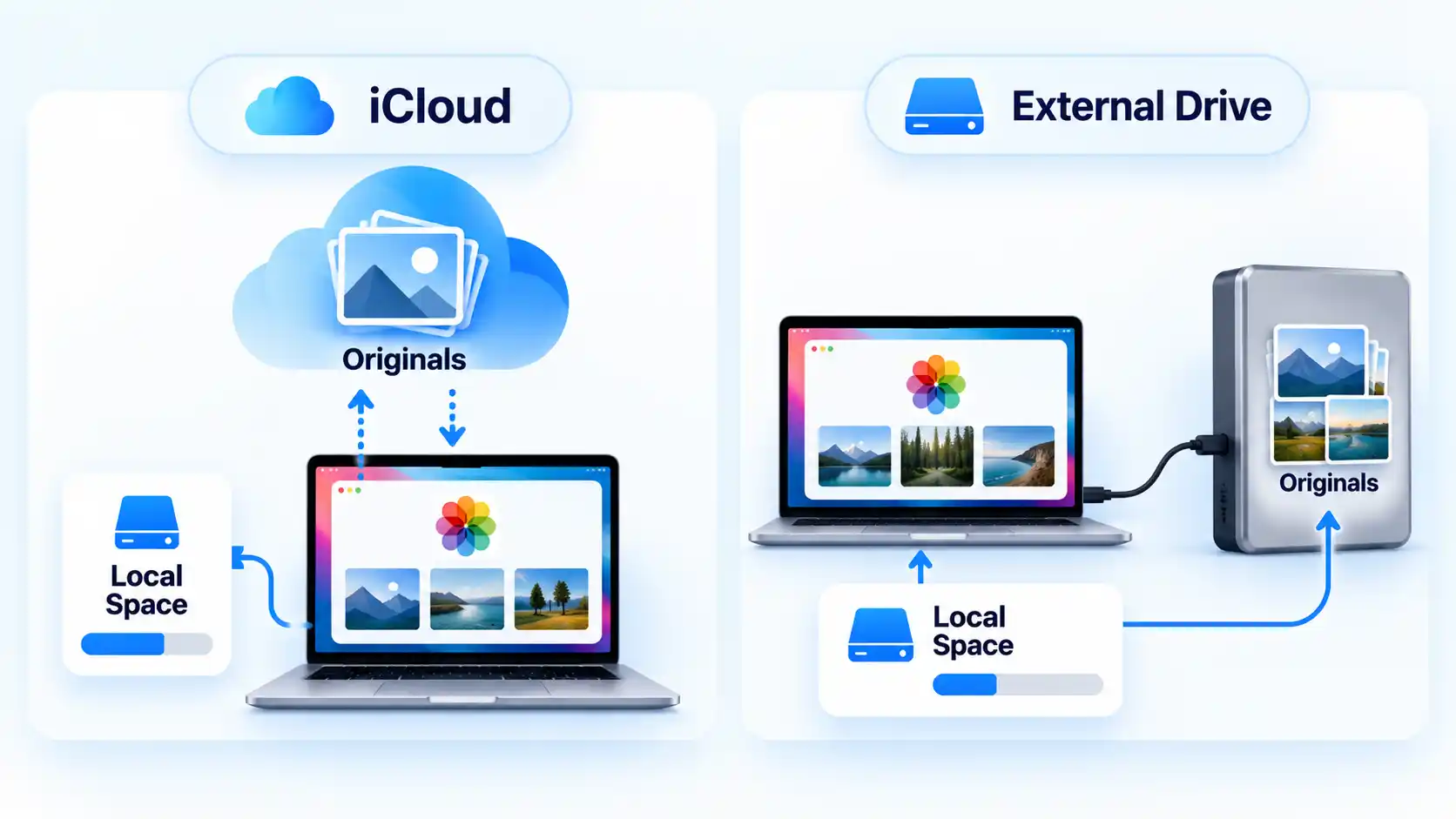
Deal with Photos and other large media carefully. If Photos, videos, music, or project media dominate your storage, decide whether the files are expendable or simply too large to keep on the Mac. Valuable media is often better moved to supported external storage or optimized through iCloud rather than deleted.
Clean app-specific content where the controls are clear. Media you can download again is an obvious candidate. If Mail is using substantial space, choose Mailbox > Erase Junk Mail and, when appropriate, Mailbox > Erase Deleted Items. Prefer controls inside the relevant app instead of manually removing unfamiliar files from hidden Library folders.
Empty the Trash after reviewing it. Moving a file to the Trash does not return that storage to the available pool. Check the Trash first, then empty it only when you are comfortable permanently removing those items.
Recheck available storage and stop when you have enough. Return to System Settings > General > Storage. Let the figures update and confirm that available capacity increased. If you now have enough room for the update, download, project, or other task that triggered the cleanup, there is no need to keep deleting files simply to make the storage graph smaller.
Verify the result
The available-storage figure in System Settings has increased after macOS finishes recalculating it.
The category you targeted is smaller, or the files and apps you intended to remove are no longer present.
You have enough free space for the task that prompted the cleanup, so further deletion is unnecessary.
Why You Usually Don’t Need a Cleaner App
macOS already covers the main jobs required for ordinary storage cleanup: it shows where space is going, exposes management options for several categories, lets you uninstall apps, supports moving files to external storage, and provides iCloud-based optimization. When storage is tight, macOS can also clear caches and logs that are safe to recreate.
A cleaner app can still make file discovery or maintenance more convenient by putting several functions into one interface. For example, a cleaner app can add convenience for reviewing large and old files. That convenience is different from necessity: you can perform the core storage-recovery workflow with macOS itself.
Advertisement
Manual cleanup also keeps the final decision with you. Software may identify a deletion candidate, but only you can determine whether a large video export is expendable, an older device backup is still valuable, or a photo library contains the only copy of important images. A category-first process keeps those judgments separate from file discovery.
What to Leave Alone: System Data, Caches, and Snapshots
macOS groups storage that does not belong to a more specific category under System Data. That label can therefore include material associated with both Apple and third-party software; it is not the name of one folder waiting to be emptied.
A cache is stored data that software can reuse instead of fetching or rebuilding it each time. When the Mac needs room, macOS already removes some caches, logs, interrupted downloads, staged updates, and other data that it considers safe to recreate. Clearing such files manually can produce only temporary savings because applications or macOS may build them again.
Time Machine local snapshots are recovery copies stored on the Mac’s startup disk. On disks using Apple File System (APFS), Time Machine can keep these snapshots locally so previous versions of files remain recoverable when the backup disk is unavailable. Their space is counted as available and snapshots are deleted automatically as space is needed, so manual removal is not a sensible first step in routine cleanup.
Advertisement
Warning !Do not indiscriminately delete files from /System, /Library, ~/Library, cache folders, or snapshot structures just because the Storage graph is large. Remove recognizable personal files and application data first, then investigate System Data only if the ordinary categories still do not explain the shortage.
If Storage Still Looks Full
If you have removed obvious files but available storage is still lower than expected, narrow the problem before deleting anything more.
Deleted files have not increased available storage
Check the Trash first. Files moved there still occupy storage until the Trash is emptied. After emptying it, reopen System Settings > General > Storage and allow the categories to recalculate.
Backups still appear to be using a lot of space
Review local iPhone or iPad backups through Finder rather than deleting backup folders blindly. Connect the device, select it in Finder, trust it if prompted, open General, then choose Manage Backups. Delete only backups you have positively identified as obsolete.
Advertisement
System Data is still the largest category
Do not treat that number as proof that system folders should be purged. First check whether large applications, device backups, other user accounts, Photos libraries, local media, or application-specific data still account for the shortage. System Data can combine multiple kinds of files, including data macOS manages automatically.
You only need enough room to complete an update or installation
If the same user-controlled category remains large after these checks, return to that category rather than switching randomly between cleanup tricks. The goal is to identify the data responsible for the shortage, not to make every storage category as small as possible.
When Moving Files Is Better Than Deleting Them
Deletion is the wrong answer when a file is valuable but does not need to remain on the Mac’s internal storage. Photos, raw video, completed project archives, virtual machines, sample libraries, and other large data can often be moved to an appropriate external drive instead.
A Photos library needs extra care because its new location has specific requirements. The external device should be formatted as APFS or Mac OS Extended (Journaled). It should not be the disk used for Time Machine backups, an SD card, a USB flash drive, a network share, or internet-based storage. These storage requirements apply when moving a Photos library.
Advertisement
Quit Photos, move the library to the supported external device, then double-click the library in its new location to open it. If you use iCloud Photos or need the library through the Photo Picker in other apps, designate the moved library as the System Photo Library, meaning the library macOS treats as the primary Photos library for those integrations. Only after the moved library opens correctly should you remove the original from the Mac. Keep the external device connected and available when you open Photos; if Photos cannot find the library there, it can create a new empty library in the default Pictures folder.
The same principle applies beyond Photos: delete data that is genuinely expendable, but move or optimize data that still has value. Once the Mac has enough free storage for normal work, an update, or the task that prompted the cleanup, stop there rather than chasing a smaller storage graph.
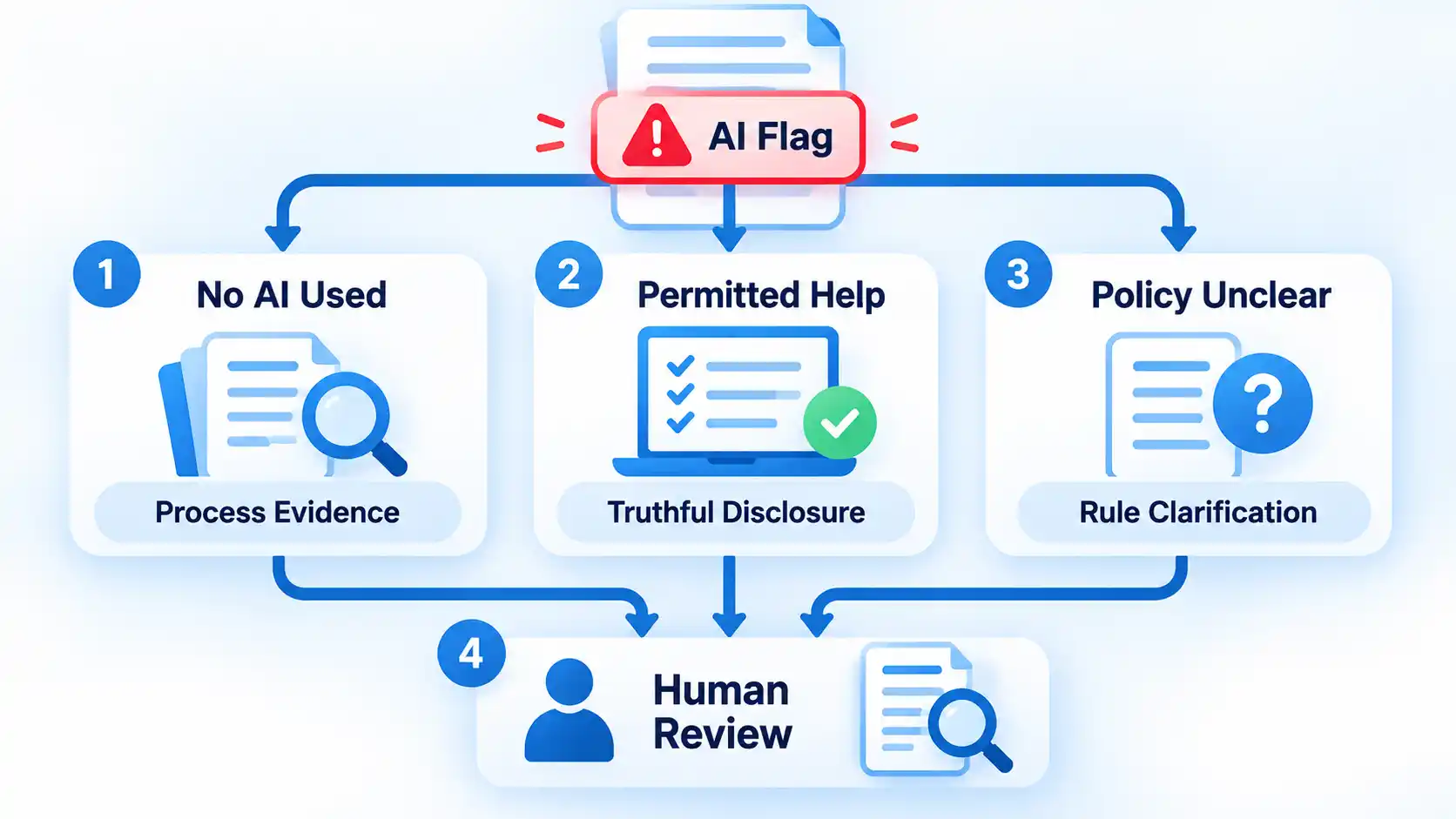
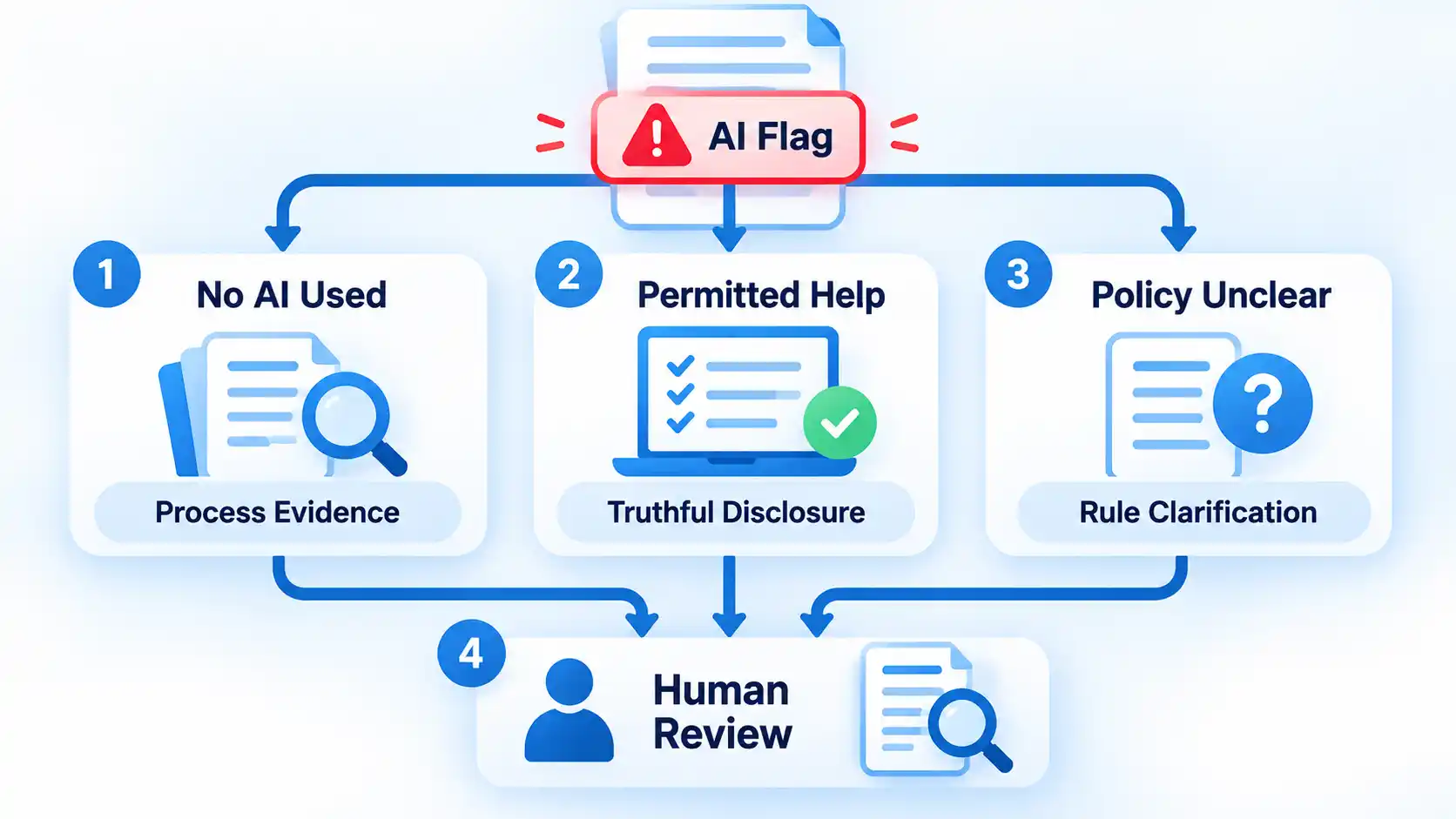
If human-written content is flagged as AI, do not immediately rewrite it to chase a lower score. Preserve the exact document and detector result, collect genuine records of how the work was created, check the rule that applies, and ask for a human review based on the full evidence.
An AI detector can be useful as a signal, but a result by itself does not record who actually wrote a document. The safest response is therefore evidence-first rather than score-first.
What an AI Flag Actually Means
An AI detector looks at patterns in text and estimates whether those patterns resemble generated writing. A false positive happens when human-written text is classified as AI-generated.
Do not assume that a percentage means the same thing across different detectors. For example, Turnitin says its current AI Writing Report does not show a numerical percentage for results from 1% to 19% because that range has a higher incidence of false positives. Instead, those results are shown as *%. For displayed results of 20% or more, its percentage refers to qualifying text that the system identifies as likely AI-generated or likely AI-generated and then modified with an AI paraphrasing tool.
Advertisement
That matters because a detector percentage should not automatically be read as “the percentage of this document that a machine wrote.” The meaning depends on the particular detector and how it defines its result, so even a high score still needs context.
When deciding whether content was written by AI, a detector result is only one signal. Draft history, source records, factual accuracy, the writing process, and other evidence can provide information the detector cannot see.
AI detector accuracy depends on the specific tool, text, language, and testing conditions rather than one universal accuracy figure.
Before You Respond: Preserve the Original Record
Before changing the disputed document, preserve what actually existed when it was flagged. If you rewrite the only copy first, you may make it harder for a reviewer to compare the detector result with your drafts and editing history.
Advertisement
Prerequisites
Keep the exact version of the document that was submitted or scanned.
Save or screenshot the detector report, including the visible score, highlighted passages, detector name, and date when available.
If you need to edit the document later, work from a copy rather than overwriting the only preserved version.
If you cannot see the detector report yourself, ask the reviewer which text was flagged and what result they received. Knowing what was actually assessed is more useful than arguing against a percentage you have not seen.
How to Build an Authorship Evidence Pack
Version history is useful, but it is only one part of the record. A stronger response combines several genuine pieces of evidence that show how the document developed.
Check Google Docs version history
On a computer, open the Google document and click Last edit, the Version history control near the top right. Choose an earlier version in the panel to inspect changes and, where available, who updated the file.
Google notes that you need edit permission to browse earlier versions. It also warns that revisions may occasionally be merged, so an incomplete revision trail does not necessarily mean earlier editing never occurred.
If an earlier state is important, you can make a copy of that version instead of replacing the current document. This lets you keep both states available for comparison.
Advertisement
Check Word or Microsoft 365 version history
For a Word file stored in OneDrive or SharePoint in Microsoft 365, open the file, select the file title, and choose Version history. You can then select an earlier version and open it separately for comparison.
The distinction between Google Docs and Word version history matters when you are trying to reconstruct how a file changed over time.
Add drafts, notes, sources and prior work
Do not stop at revision history. Earlier drafts, outlines, research notes, saved source material, comments from collaborators, emails about the work, and earlier writing on similar subjects may all help a reviewer understand the process behind the final document.
Advertisement
In academic disputes, for example, Cornell recommends looking beyond initial suspicions and considering tangible evidence. Relevant evidence can include outlines, drafts, prior discussions, previous submitted work, and whether the student can explain the submission. The exact standard will differ outside education, but the broader point is useful: several consistent pieces of evidence are more informative than a detector score alone.
No single item below should automatically be treated as conclusive proof.
Useful evidence when human-written content is flagged as AI
Evidence
What it can show
Important limitation
Detector report
What one detector classified and which passages it highlighted.
It does not directly establish who authored the text.
Version history
How a document changed across saved versions and, where available, who edited it.
History may be incomplete, merged, unavailable, or dependent on where the file was stored.
Earlier drafts
How wording, structure, examples, and arguments developed.
A draft alone does not prove who created every part of it.
Notes and outlines
The planning and reasoning that preceded the finished document.
Many writers do not keep complete planning records.
Sources and citation notes
How research material connects to the finished work.
They support the research trail, not authorship by themselves.
Prior comparable writing
Whether the document is consistent with the writer’s established knowledge or style.
People naturally change style across topics, audiences, editors, and assignments.
Process explanation
Whether the writer can explain source choices, revisions, examples, and conclusions.
It should be assessed with the rest of the evidence rather than treated as a standalone test.
How to Respond to the Flag
Your response should separate two questions: what did the detector report, and what does the available evidence say about how the document was produced? Work through the issue in order instead of rewriting the document simply to change a score.
Identify exactly what was flagged. Ask for the detector name, the result, the text that was assessed, and any highlighted passages. If two scans are being compared, check whether they assessed the same text and used the same detector model or settings where that information is available.
Check the rule that actually applies. Read the assignment instructions, school policy, employer rule, client brief, publisher policy, or other relevant requirement. Separate a detector result from the question of whether any writing or editing assistance was allowed.
State what assistance you actually used. If you wrote the disputed content without generative AI, say so plainly. If you used permitted grammar, translation, rewriting, or AI assistance, describe it accurately rather than making a broader denial that is not true.
Provide the strongest relevant process evidence. Share the preserved document, useful version history, earlier drafts, notes, sources, comments, or other records that help show how the work developed. Use evidence that genuinely exists rather than trying to manufacture a perfect-looking trail after the dispute.
Ask for human review. Request that the reviewer consider the document, the detector result, the applicable rule, and your process evidence together. A review should address the specific concern rather than assume the software output settles the question automatically.
Use the formal escalation route if needed. If the first decision remains disputed, follow the appeal, academic-integrity, editorial, human-resources, client, or other review process that governs the situation. Requirements differ, so use the procedure that actually applies to your case.
If you did not use generative AI
Keep the response simple and evidence-based. State that the disputed writing was produced by you, explain the basic process you followed, and provide the records that best support that account.
You do not need to prove that every sentence looks unlike machine-generated prose. The goal is to give the reviewer better evidence than a style-based classification alone.
Advertisement
If you used permitted editing, translation or AI assistance
“Human-written” does not always mean “produced without any software assistance.” A person may write the original material and later use spelling, grammar, translation, rewriting, or generative features.
The important question is whether the actual assistance complied with the rule governing the work. If the policy permitted a tool or required disclosure, state what you used and provide the required disclosure. Do not turn a legitimate detector dispute into an inaccurate claim that no automated assistance was involved.
If the policy is unclear
Ask which rule is being applied and which kind of assistance the reviewer believes violated it. A detector result and a policy violation are separate questions.
This is particularly important in education because rules can vary by instructor and assignment. Cornell’s current guidance says generative-AI rules may be set on an assignment-by-assignment basis and advises students to ask when the policy or tool classification is unclear. Other organizations may define acceptable assistance differently.
Advertisement
The procedure has reached a useful stop point when the responsible reviewer has the exact disputed material, the applicable rule, your truthful description of any assistance, and the relevant process evidence. A particular detector percentage is not the stop condition.
What to Do If You Have No Version History
No version history does not automatically mean you have no evidence. A document may have been written offline, imported from another application, saved as separate local files, copied between systems, or created somewhere that does not preserve a detailed revision trail.
When revision history is missing, other ways to show how a document was written can include:
earlier local copies of the file;
handwritten or digital outlines;
research notes and saved source material;
citation-manager records;
emails or messages discussing the work;
comments from editors, teachers, colleagues, or collaborators;
earlier writing on the same subject; and
your ability to explain why particular sources, examples, arguments, or revisions were used.
Even detector vendors acknowledge this limitation. Originality.ai’s current review guidance says that absence of document history is not proof of AI use and recommends using other evidence when history is unavailable.
File dates and metadata can add context, but they should not be presented as unquestionable proof. Files can be copied, exported, restored, or moved between devices and services. Use metadata as one supporting clue alongside stronger process records.
Advertisement
What Not to Do After a Flag
A disputed detector result can make it tempting to keep changing the text until a different tool gives the answer you want. That approach solves the wrong problem.
Do not fabricate drafts, notes, timestamps, or screenshots. False evidence creates a separate credibility problem and can be more damaging than the original detector dispute.
Do not delete the disputed version. Keep the material that was actually assessed before creating revised copies.
Do not treat a second detector as automatic proof. Different systems can produce different results, so disagreement adds uncertainty rather than establishing authorship.
Do not repeatedly rewrite legitimate prose solely to lower a score. Rewriting changes the evidence and may also make the prose less natural.
Do not hide assistance that was actually used. If editing, translation, paraphrasing, or generative tools were involved, describe them accurately and compare that use with the applicable rule.
Do not assume a detector percentage is a plagiarism percentage. AI detection and source-matching or plagiarism systems answer different questions.
Do not upload confidential work everywhere just to collect more scores. Before sending sensitive academic, client, employer, or unpublished material to another service, check whether you are authorized to share it and how that service handles submitted content.
A controlled rescan can help investigate an inconsistent result, but it should compare like with like. When possible, use the same text, detection model, language settings, and citation treatment. A different result under different conditions does not automatically invalidate the first scan.
How to Protect Future Work
The simplest protection is to keep ordinary records while you work instead of trying to reconstruct them only after a dispute. You do not need an elaborate surveillance system. A normal revision trail, retained drafts, research notes, and accurate disclosure records are usually more useful.
For important work, consider drafting in a system that preserves revision history, keeping meaningful intermediate copies, and retaining the notes and sources that shaped the document. Google Docs also lets you name important versions, which can make major milestones easier to find and helps prevent those named versions from being merged.
If a school, employer, client, or publisher permits some use of AI, translation, grammar, or rewriting tools but requires disclosure, keep a simple record of what was used and for what purpose. That is easier than trying to remember the exact workflow months later.
Advertisement
Verify the result
Important documents are being created or stored somewhere that retains useful revision history when feasible.
Meaningful drafts, outlines, and research notes are not all discarded when the final copy is completed.
Source and citation records are kept with high-stakes research or publishing work.
Any AI, translation, rewriting, or editing assistance that must be disclosed is recorded accurately.
You could explain how the document developed without depending on an AI detector to validate your authorship.
The aim is not to make human writing “pass” every detector. It is to keep enough genuine context that an important authorship question can be reviewed using more than one automated score.
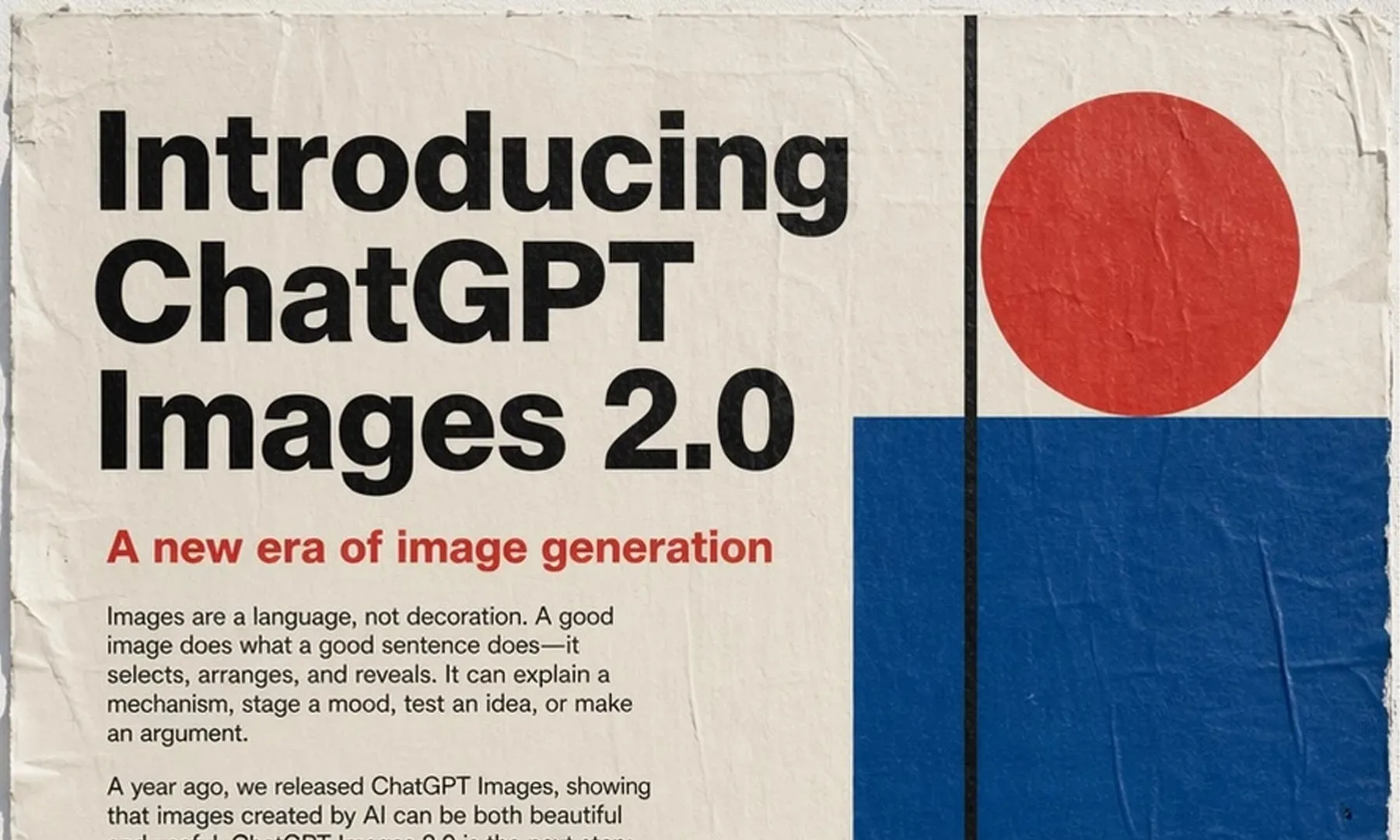
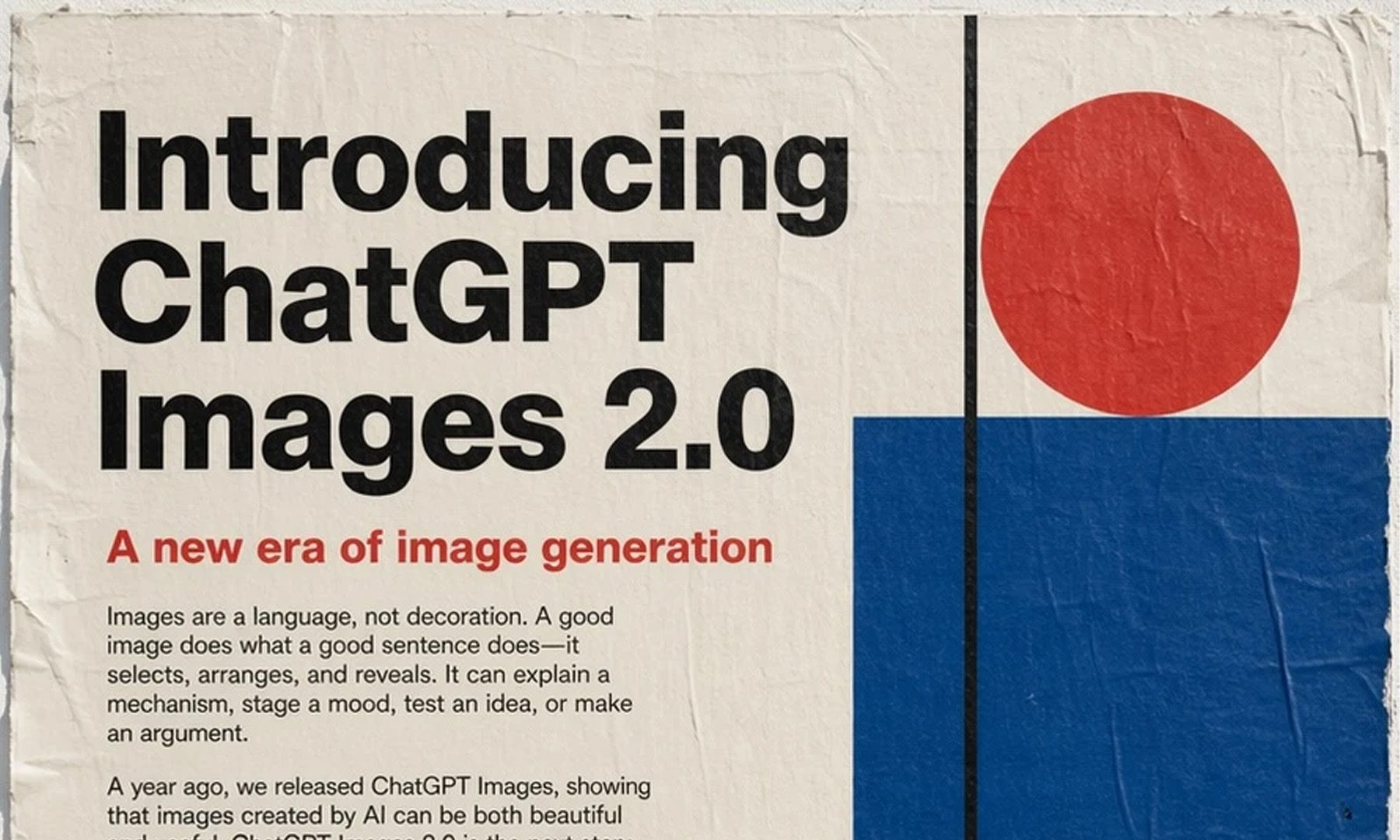
OpenAI says the ads show products in use or the experiences they unlock, carry clear labels, and sit apart from the imageyou’ree creating.
The more interesting part is thatOpenAI’s guardrails determine whether a chat is emotionally vulnerable or sensitive before placing ads. In technical terms, automated guardrails analyze the chat context before triggering a personalized ad. In simpler terms, OpenAI wants to be safe.
DoubleVerify and Integral Ad Science (third-party firms) will check how brand safety rules get applied, in a controlled setup without real conversations. I’d say an outside check matters, since I’d want any system that seems fragile to be audited first before it starts showing me targeted advertisements.
Ads have run across 31 European countries since late August, but only for free and Go users, while Plus, Pro, and Enterprise subscribers see none. That same week, the European Commission labeled ChatGPT a very large online search engine (focus on the term) because its 159.1 million monthly EU users dwarf the 45 million threshold.
The consequence: by January, OpenAI must publish a year of ads, with advertisers, run dates, targeting, and reach. That matters because Europe’s rulebook forces OpenAI to leave a paper trail for its growing ad business. At least in the EU, ChatGPT must disclose who paid, when the ads ran, whom they targeted, and how many people they reached.
This will give users and regulators a clearer view of howChatGPT’ss advertising business operates. ChatGPT already shows text-based ads, and visual ads take that further.
South Korea’s Financial Services Commission (FSC) held an emergency meeting following a series of cyberattacks targeting financial institutions in the country.
During the meeting, officials confirmed a data breach at Shinhan Bank and said other cybersecurity incidents affected other South Korean banks, including Kookmin Bank.
Shinhan Bank and KB Kookmin Bank are large private South Korean commercial banks, each holding more than $400 billion in assets.
Authorities said they launched on-site investigations after receiving incident reports and shared all actionable information with relevant agencies, including KISA (Korea’s data protection agency).
Advertisement
Financial companies in the country are now instructed to:
Inspect all externally accessible IT systems and services, including those that are not customer-facing.
Reduce unnecessary information exposure and check for missing or inadequate authentication and access controls.
Quickly share threat information and coordinate their responses.
Submit their internal security inspection results as soon as possible.
Authorities also pledged to oversee consumer protection and compensation, and analyze the incidents to identify necessary regulatory improvements.
Yesterday, local media outlets reported that South Korea’s President Lee ordered a thorough investigation into personal data leaks at financial and public institutions.
At the same time, Hana Bank was also found to have suffered a limited-scope breach after its sales-support system was compromised.
According to the same reports, Shinhan Bank leaked the details of 25,000 customers, while Kookmin Bank leaked credit card information of 119,000 clients.
Advertisement
AI-powered attacks suspected
While official channels provided no details about the perpetrators, Korean news agency Yonhap reported that a server used in the attacks had an HTML page title containing a Chinese-language string associated with ARTEX AI.
ARTEX AI is an open-source penetration-testing system that uses agents to automate information gathering, vulnerability discovery, attack-path planning, security-tool execution, and vulnerability verification.
The bank and financial authorities have not confirmed its use in the Shinhan breach, and the Chinese-language string doesn’t link the attacks to any particular threat actor.
However, Moon Jong-hyun, the head of the Genian Security Center, posted on LinkedIn that several threat analysts believe that the breaches involved AI-based attack automation tools.
Advertisement
Join Mikko Hyppönen and security leaders from the NFL, CHANEL, and Atlassian for a two-hour digital summit on what AI-speed attacks change, what defenders should stop doing, and how to validate, decide, fix, and re-validate at machine speed.
Zachary Tong had never designed a chip. He had never programmed an FPGA either, and he will tell you his electrical skills were rough. With about a month left before the first wafer.space deadline, he still decided to write a microprocessor, send the file to a real foundry, and wait to see if silicon came back alive.
After researching old processor ideas, he eventually settled on Transport Triggered Architecture, an unusual choice. A normal chip is told to add one register to another and store the result. BreakingTTAPs mostly moves data. You enter a value into a port on a functional unit, and the operation occurs when the data arrives. He has two 32-bit busses side by side, so he can complete two of those moves in a single clock cycle, which is effectively enough to qualify as superscalar in today’s terms.
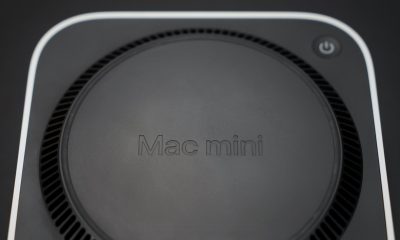
LITTLE DO-IT-ALL — Mac mini packs pure power into a small, five-by-five-inch desktop as the M6 chip delivers next-level AI capabilities. Mac mini…
M6 CHIP — Everything you do on Mac mini feels more responsive with the M6 chip and its next-generation CPU. Fly through AI workflows with up to 4.8x…
CONNECT IT ALL — Features three Thunderbolt 4 ports, an HDMI port, and a 2.5Gb Ethernet port in the back, and two USB-C ports and a headphone jack…
The clock speed is in the 18-20 megahertz range. Program memory featured 1,024 slots, each with two instructions, plus 256 words of stack and 4 kilobytes of general purpose RAM. There are approximately 80 operations spread among 20-30 functional units, including branches, comparisons, math, bitwise operations, and a random number generator for good measure. The pin headers provide sixteen general-purpose inputs and sixteen outputs, as well as an 8-bit parallel boot channel for loading programs. Unfortunately, his SPI is dead on the die, and the UART is a write-off; nevertheless, it may still be recovered.
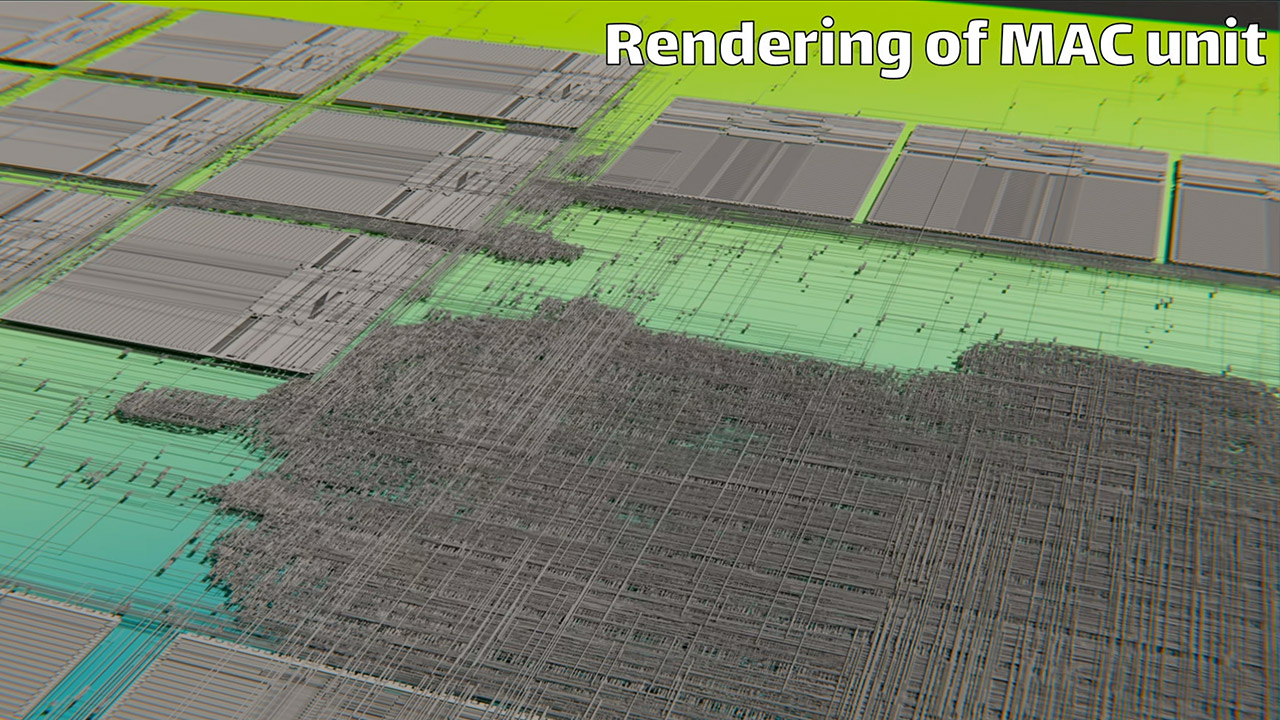
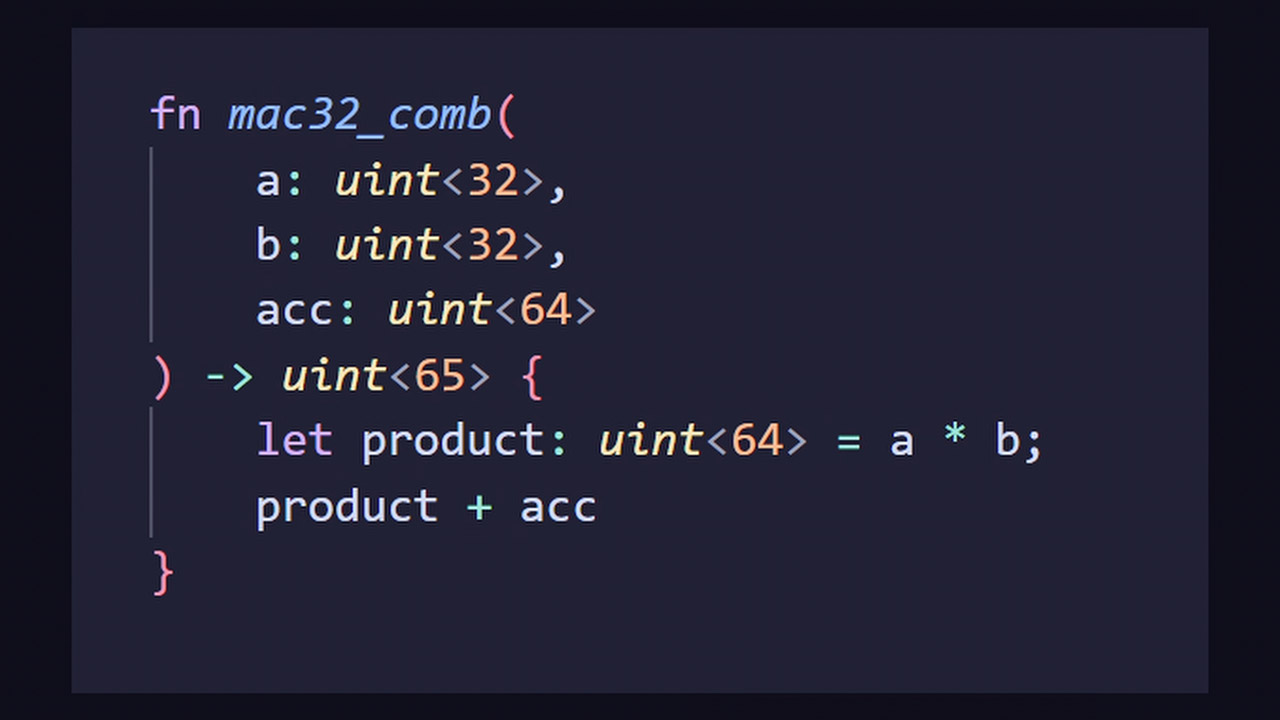
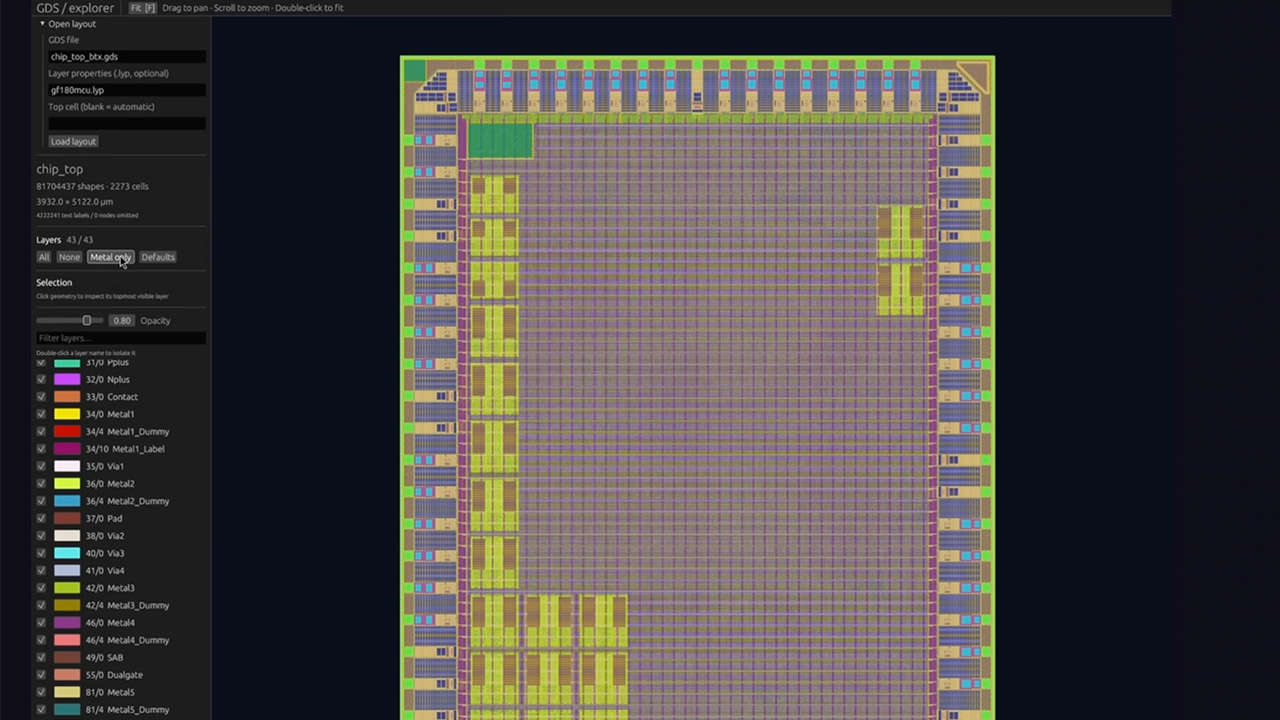
One specific section of code is a huge pain in the neck since a multiply-and-accumulate unit took up a significant amount of space on the die and fouled up the timing. Tong was still new to this type of stuff, so he didn’t feel comfortable digging into the failure all the way to the bottom of it, thus the clock speed target remained a fight until the file had to be pushed out the door. He developed the logic in Spade, a hardware language he is also learning on the side, and then used open-source tools to arrange the transistors and draw the cables. The handoff process is also rather stringent, as the foundry expects a clean GDS file, and any minor errors in it become permanent as soon as the wafer begins rolling.
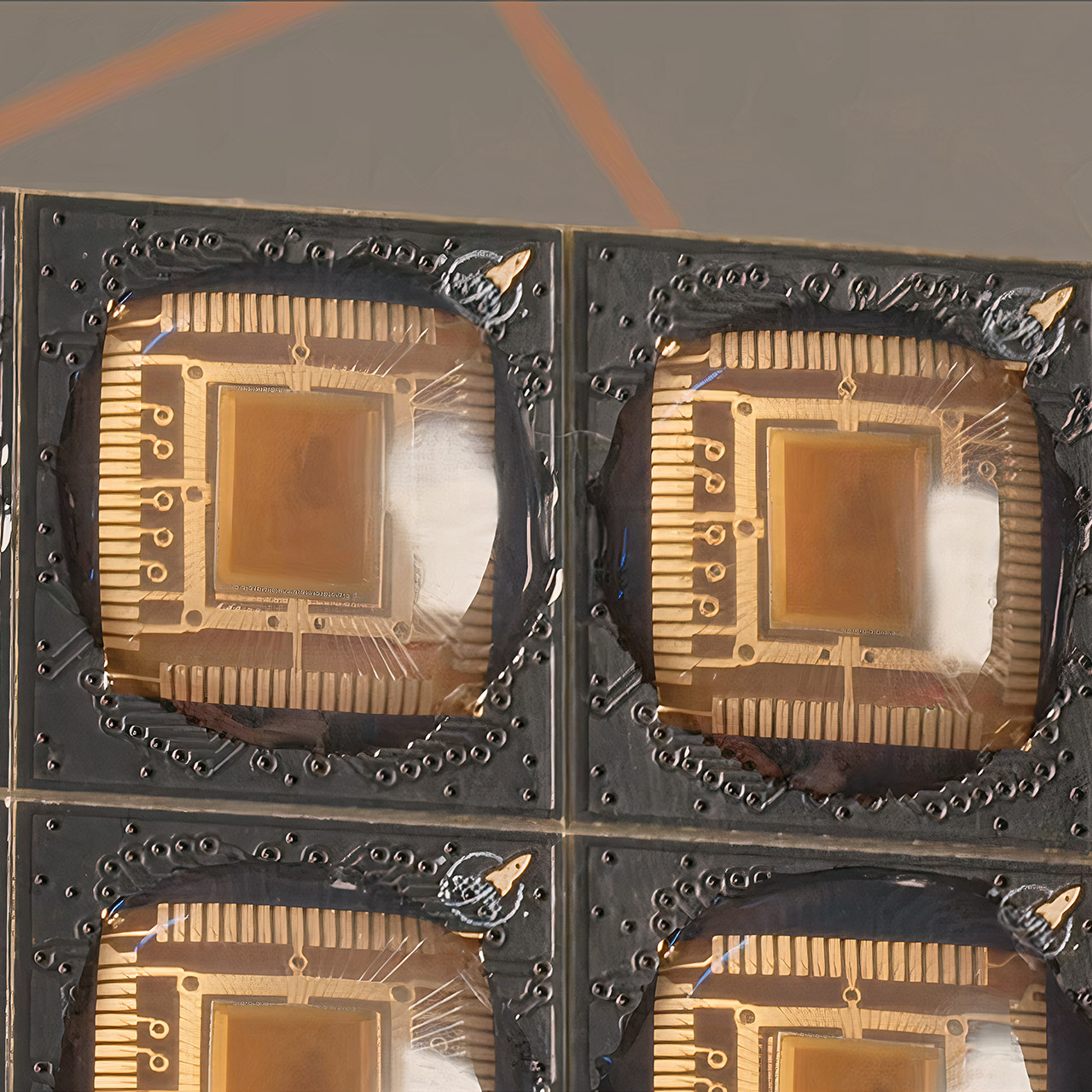
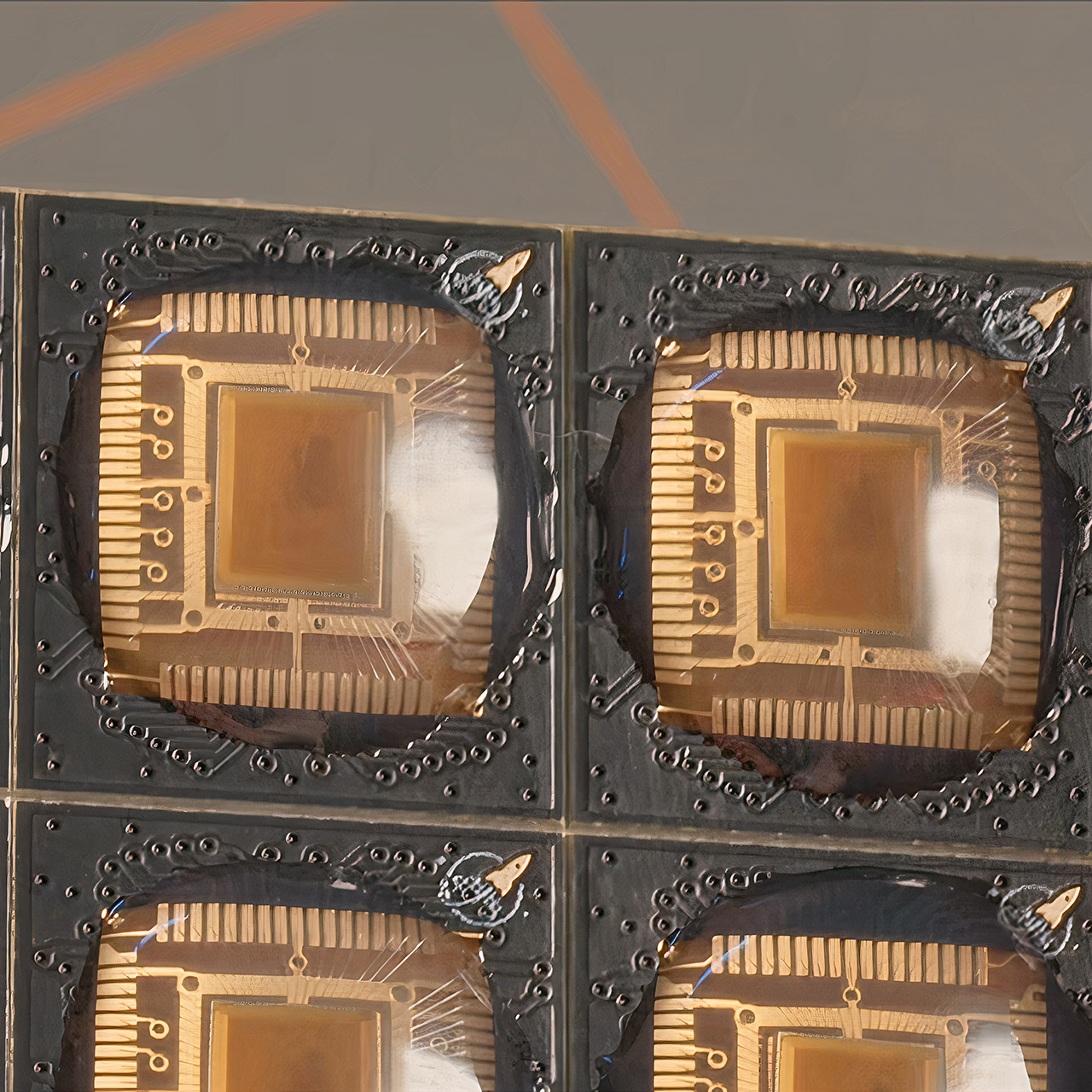
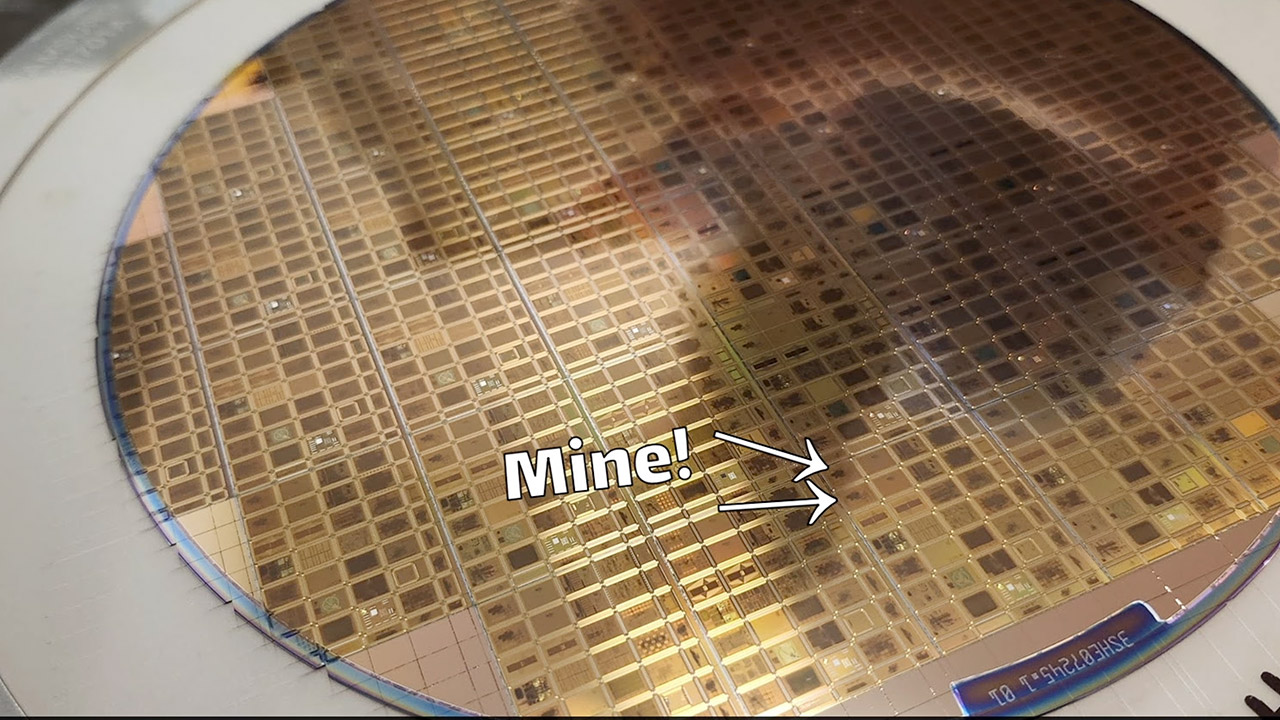
Wafer.space, run by Tim out of Singapore, is the shuttle that made the order possible. The designs are printed onto a single reticle on a GlobalFoundries 180 nm wafer using the GF180MCU mixed-signal process. Every time it prints, we receive a wafer with approximately a thousand dies on it after 3-4 months in the oven. Older geometry implies that the silicon is quite large by today’s standards. Unlike a Tiny Tapeout tile, this die contains only one circuit. The bundled parts we received revealed the real chip underneath, which was viewable via clear epoxy and ready to be inserted into the socket.
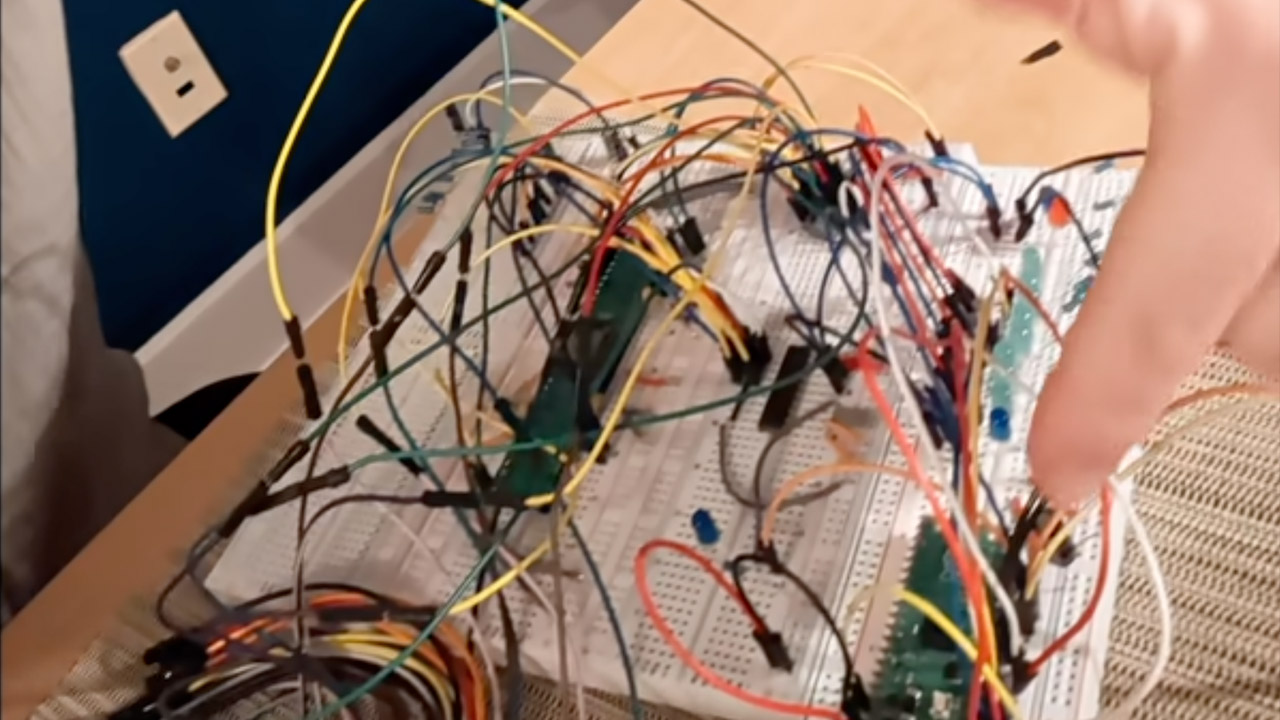
Bring-up was the short path, not the careful one. A carrier is slapped into a breadboard, a Raspberry Pi Pico starts up and loads a program, and the chip just counts up to 100 before shutting down. That was the proof in a single loop, with no bother. SPI failed just as expected, according to the debugging. The code for the Spade version, as well as the produced Verilog, are all publicly available, and Tong has even been distributing finished BreakingTTAPs boards to anyone who wants to experiment with one on their bench.
The second design is named BTX. That one is already in the foundry line. It’s a special processor designed specifically for ray tracing, with a completely new graphics system planned for it. Spaces on the shuttle are still available for anyone wishing to create their own chip, as you can purchase a slice of the wafer for a few thousand dollars for a thousand dies, with files expected in December 2026.
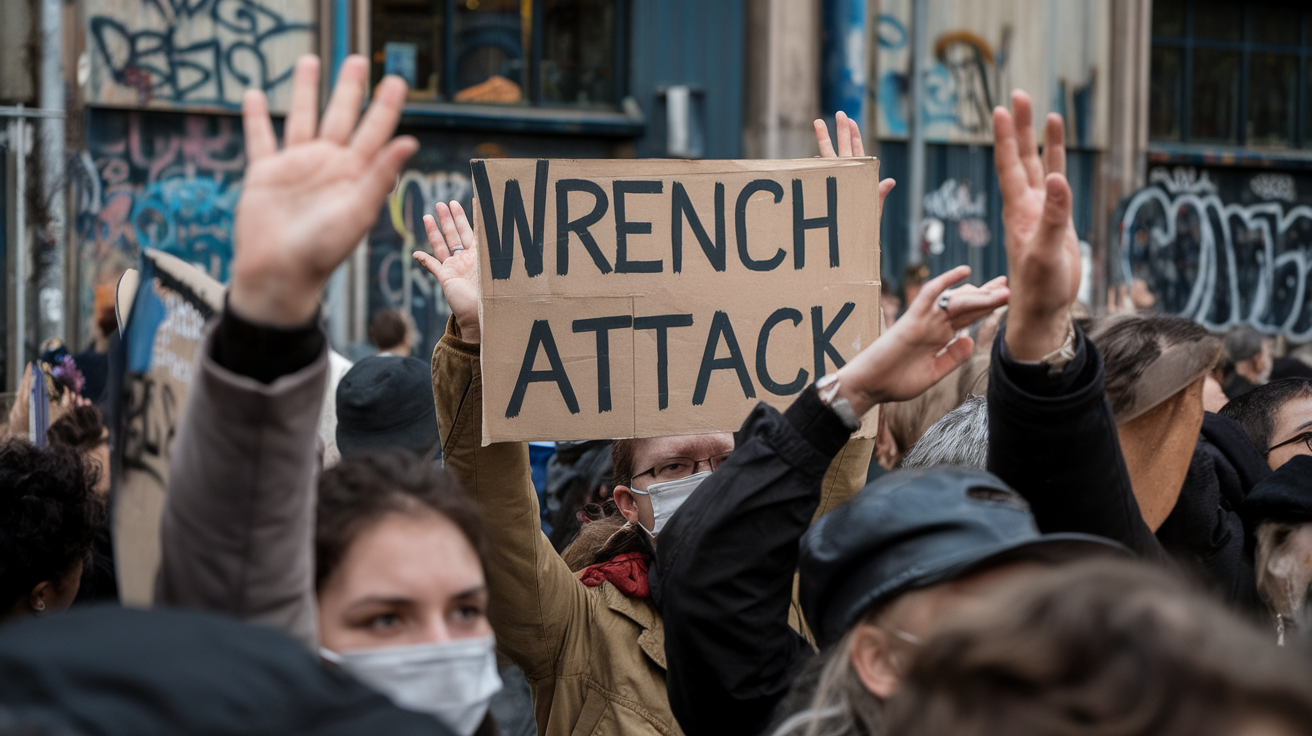
A businessman was beaten with hammers in his own home while his heavily pregnant wife was pinned down and threatened with a knife to her stomach, in an attack police believe was orchestrated to force him into handing over his cryptocurrency savings. The case, reported by the BBC, is one of a rapidly growing category of crime investigators call a “wrench attack” — and 2026 is on track to be the worst year on record for it.
The couple, who asked to remain anonymous and are referred to as James and his wife, say three masked men forced their way into their home in Solihull in December last year and spent 45 minutes assaulting and terrorising them. James was struck repeatedly in the face, head and ribs. His wife, then seven months pregnant, had a pillow held over her face as she struggled to breathe. “He’s literally suffocating her on the sofa. I can hear her screaming, ‘I can’t breathe’,” James told the BBC.
The attackers initially gave no indication of what they wanted, demanding only that James unlock his phone. It soon became clear they knew he held cryptocurrency but had little idea how to access it themselves. Instead, they took orders from someone connected via a live video call, who instructed them to search through James’s apps until they located a wallet holding a significant sum.
How a wrench attack escalates into a hostage situation
Once the caller identified the funds, the threats turned deadly serious. James said the man on the call told the intruders to threaten to “stab your wife in the stomach and kill your baby” unless the money was transferred immediately. James complied, sending hundreds of thousands of pounds in crypto to a wallet controlled by the man directing the robbery. The gang also stole several luxury watches before fleeing in a getaway car.
Advertisement
James’s wife, in her early thirties and expecting her third child, said she feared she might lose the baby because of the stress of the ordeal and believed, at one point, that her husband had been killed. The baby was ultimately born healthy and at full term, but the couple describe the experience as “horrific” and say they continue to live with its aftermath. James, who had quit his job in 2023 to trade cryptocurrency full-time after turning an initial investment into a sizeable fortune, says he has now lost everything and is looking to return to conventional work.
Police have not yet identified the attackers. Crimestoppers is offering a £10,000 reward for information, and the charity’s Alan Edwards says investigators are keen to hear from anyone who might recognise the three intruders, the getaway driver — who was caught on camera without a face covering — or the man coordinating the robbery by phone. “These criminals are obviously serious and part of some kind of organised crime,” Edwards said.
Why crypto holders are becoming prime targets
Unlike money sitting in a bank account, cryptocurrency is frequently controlled directly by its owner through self-custody digital wallets, with no institution standing between the asset and whoever can access the private keys. That makes a wrench attack — named for the blunt, low-tech coercion criminals use instead of sophisticated hacking — a disturbingly effective way to steal large sums almost instantly and with little chance of recovery once funds move.
According to blockchain analytics firm Chainalysis, roughly $30m (£22.6m) had already been stolen through violent crypto robberies in the first half of this year, putting 2026 on course to become the worst year on record for such attacks. The firm says home invasions specifically are also rising sharply. Hotspots include the United States, Brazil and Thailand, but France has recorded by far the highest number of incidents, a surge researchers link to a data breach at a tax office that may have exposed the identities and addresses of wealthy crypto holders.
Advertisement
“The physical security assumptions that protect traditional wealth, such as bank vaults and armoured cars, do not automatically apply in crypto,” Chainalysis researchers noted in their report. “Holders keep their assets in comparatively low security setups, like self-custody wallets, that can be compromised without any institutional gatekeeper standing in the way.”
As digital coin values have climbed, so has the visibility of those who hold them — and with it, the appeal of a brutally simple criminal method that requires no technical skill, only intimidation. Cybersecurity experts warn that as long as crypto wealth remains both lucrative and loosely secured, cases like the one in Solihull are likely to keep multiplying across the UK, Europe and beyond.
I was in the audience at Meta’s Connect conference last week when Mark Zuckerberg held up a pendant in his hands and surprise announced the Muse Charm, a little novelty-like device with Meta’s disarmingly adorable Muse AI agent onboard. Muse Charm is coming as soon as December this year.
But the funny thing is, while most people called it an AI Tamagotchi, all I saw was a strapless Apple Watch. Is that what the Muse Charm could be, eventually? A watch as well as a pendant? Is this Meta’s entry to wrist wearables in disguise? I’m still thinking about it…because smartwatches are also on their way to being AI assistants soon, too.
Reports of Meta working on its own watch wearable have been cooking for several years now. At Connect, there were smart glasses galore and even a new glasses-like VR headset coming next year. But things were suspiciously quiet on the wrist wearables front.
Advertisement
Meta already has one wrist wearable, the neural band that comes with the Ray-Ban Display glasses. But it received no hardware updates this year, which surprised me. The sensor-studded band uses electromyography, or EMG, to measure skin-contact electrical signals for a set of gesture controls to navigate the heads-up glasses display. Meta’s already ambitiously promised that EMG could open up all sorts of neural input possibilities, even testing the tech in a smart car dashboard prototype.
The Muse Charm, however, brings a different piece of the puzzle to the table. Muse AI is Meta’s biggest priority now, clearly, based on its widespread availability on desktops and smartphones and on the company’s intentions to put the new agentic AI on all its smart glasses and, eventually, Meta’s VR Glasses. And where else could Muse work well? Enter the Charm.
The Charm has another watch-like tell. It’s powered by Qualcomm’s Snapdragon Wear Elite chipset, which already runs on Samsung’s latest smartwatches. The Wear Elite, as I learned from Qualcomm earlier this year, is optimized for a range of AI-ready wearables, ranging from watches to pendants to even glasses. There’s no reason why Meta’s Charm couldn’t easily get a wrist strap…and a watch OS to go with it.
Advertisement
Meta’s neural band doesn’t have a screen yet. Would it ever fuse with Muse Charm?Celso Bulgatti/CNET
Many reasons for a Meta smartwatch
A smartwatch would benefit Meta on several fronts. Clearly, the company wants to keep breaking into lifestyle wearables, and watches could offer another way onto people besides faces. Fitness and health tracking would give Meta data that Muse and its smart glasses could use. And watches are a key part of the glasses interface’s future. Google’s glasses will work with Wear OS watches soon. Apple’s rumored glasses will likely work with Apple Watches.
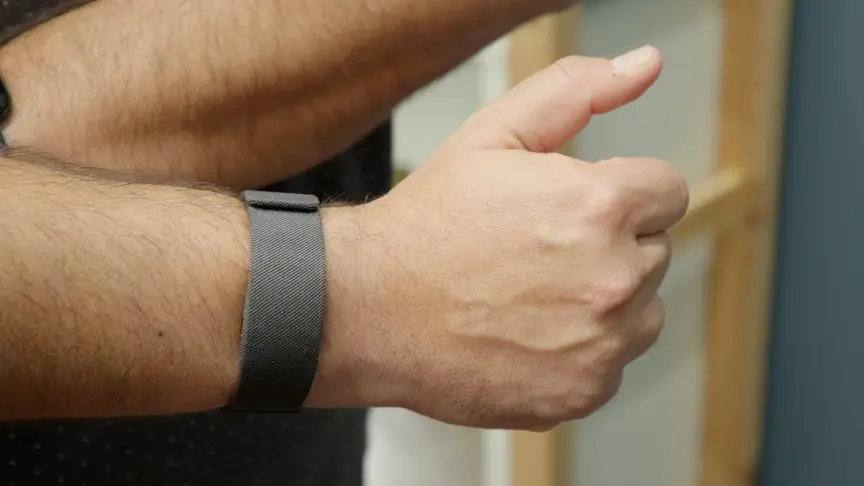
And Meta has to find a better way to make its neural band more wearable. I find the first-gen neural band fascinating in theory, but an annoying extra thing to charge in practice. If it doesn’t become a watch, or at least a fitness tracker, why wear it at all? The neural band doesn’t even control anything other than Meta’s one line of display glasses right now, but chances are Meta’s going to try to figure out ways it could work with the rest of its smart glasses lineup, and VR too.
Last year I felt like Meta’s neural band felt naked without a watch display (Apple Watch on left, Meta Neural Band on right).Scott Stein/CNET
Meta has Muse now. And a charm by the end of the year. Is the watch after that? Meta didn’t have any comment on the topic when I reached out to ask, but I think we’re seeing the beta test in action right in front of our eyes. Or is this the pivot to a modular idea that could be a pendant and a wristworn device, without committing to either?
One thing’s clear, no matter what: Meta’s looking for ways for that disarmingly adorable Muse mascot to be with us all the time, even without glasses. And the Charm looks like the experiment.
Scott Stein
Editor at Large
Advertisement
I started with CNET reviewing laptops in 2009. Now I explore wearable tech, VR/AR, tablets, gaming and future/emerging trends in our changing world. Other obsessions include magic, immersive theater, puzzles, board games, cooking, improv and the New York Jets. My background includes an MFA in theater which I apply to thinking about immersive experiences of the future.
See full bio









































You must be logged in to post a comment Login