

Lately, AI data centers are public enemy No. 1. The concerns are legion: how much water and electricity they consume, the noise they generate, the sprawling buildings they bring to communities, and the technology they’re powering that may or may not take all of our jobs and usher in the robot apocalypse.
Tech & AI
Insta360’s Antigravity A1 Follow Me Bundle Puts Reliable Tracking and Gesture Controls on Your Wrist



Antigravity released the Follow Me Bundle for its A1 drone, pairing the existing 8K 360 aircraft with a Watch Remote, Ring Remote, and full-coverage propeller guards. Complete kits that include the drone list for $799 through the company website and selected Best Buy locations, cutting the previous entry price in half, while the accessory kit alone costs $340 or $272 for people who already own an A1.
The Watch Remote’s 1.7-inch touchscreen displays a live view from the drone, allows you to select who or what you want to track, record and stop it, and activate pre-set paths such as arcs, spirals, or a climb up that culminates with the drone zooming in on the subject, which is quite cool. Simply press the Ring Remote’s one button and point it at the airplane, and the A1 will respond to hand gestures: move it left or right, up or down, or twist your wrist to bring it closer or send it away. The remote and watch are both very water and perspiration resistant, allowing you to use them during a sweaty bike ride or light rain.

Antigravity A1 Standard Bundle, 360 FPV Drone with 8K Camera for Beginners | Immersive Goggles…
- True 360° Immersive Flight: Experience the Vision Goggles’ massive 90° FOV, 66% wider than standard goggles*, with dual 1-inch Micro-OLEDs and…
- 8K 360 Video – One shot, infinite possibilities. The world’s first 360 drone captures everything around it, letting you relive your footage in crisp…
- 249g Ultra-Light or 39-Min Flight: Tailor your mission. Use the Standard Battery to stay under 249g for a regulation-friendly flight with fewer…
Tracking utilizes the drone’s AI and data from the watch’s GPS system to determine where you want to go – even when minor obstacles like trees or other riders appear in the way, the A1 stays on track up to 35 km/h while the camera captures a full 360-degree view of the surroundings. So, once you’ve landed, you can select the finest photograph, choose between folks in a group photo, or include some sweet pan and zoom moves from the film without ever having to get back in the air.
You can add propeller shields for extra protection when flying low and close to people or in confined spaces, but this will increase the takeoff weight above the 249g threshold that previously allowed for completely unrestricted play in some regions. To palm launch it, you’ll need at least a few meters of clear airspace above you, and the drone will follow you or a family member while your hands are free to do anything you want. Early hands-on reports say the watch is a little chunky, and adjusting the distance and position at the same time requires releasing the button and then trying again, but the package is still a game changer because it allows you to do things on your own that used to require goggles, a separate spotter, and were outside the “in sight” rules.
Continue Reading
The idea of switching to Ethernet does sound appealing. You generally get faster internet speeds and lower latency on a wired connection compared to Wi-Fi, which can be particularly helpful to gamers or people who work with and share large files over the internet. But how exactly does it work? Is it as simple as plugging the Ethernet cable in? And does your computer automatically disable Wi-Fi when you do so? Those are some of the common questions users have, and honestly, the entire process is pretty straightforward, requiring little manual adjustment on your part.
As soon as you plug in the correct Ethernet cable, the computer, whether it’s running Windows, macOS, or Linux, automatically switches to the wired connection. That’s how operating systems typically prioritize network connectivity by default: a wired connection over a wireless one. So, you don’t really need to disable Wi-Fi, although you absolutely can. But depending on the operating system, turning off the Wi-Fi can mean losing out on certain features. For instance, if you disable Wi-Fi after switching to Ethernet on macOS, you won’t be able to use AirDrop. So, generally speaking, it’s best to leave Wi-Fi turned on when using Ethernet. The computer will automatically switch to Ethernet for internet connectivity, and that’s all most users really need.
You can also confirm the same. On Windows, you will see the Ethernet icon (computer with a cable next to it) in the system tray on a wired connection. On macOS, you can open Network Settings and verify which connection the system is currently using.
Prioritizing Ethernet over Wi-Fi on Windows and macOS
There might be times when your computer connects to the Wi-Fi despite having an Ethernet cable plugged in. It’s rare but can still happen, especially if your system is having trouble prioritizing Ethernet. In such cases, you can force Windows to disable Wi-Fi automatically as soon as a wired connection is set up.
To do that, open the Control Panel, select “Network and Internet,” click on “Network and Sharing Center,” and select “Change adapter settings” from the left pane. Here, right-click your Wi-Fi network adapter, select “Properties,” and then click on “Configure.” Navigate to the “Advanced” tab, select the “Disable Upon Wired Connect” entry from the list, choose “Enabled” from the dropdown menu on the right, and save the changes. From now on, whenever you set up an Ethernet connection, Windows will automatically disable Wi-Fi, preventing any conflict between the two. It’s worth noting that the option isn’t available on every Wi-Fi adapter, so some of you may not see it. But if it’s there, the setting is worth reconfiguring.
On macOS, the steps are a little different, but you can reconfigure available network adapters and set Ethernet to be prioritized over Wi-Fi. To do that, open “Settings,” go to “Network,” click the three-dot menu, and select “Set Service Order.” You will now see all the available network services. Drag the Ethernet entry to the top, above Wi-Fi, then click “OK” to save the changes. With these quick methods, you can prioritize Ethernet over Wi-Fi on your computer without manually disabling the latter.

Google is beginning to replace traditional support articles with “Ask Google Help,” a Gemini-powered interface that summarizes documentation and lets users troubleshoot through a chatbot. 9to5Google reports: “Ask Google Help” will display a condensed version of the support article with direct troubleshooting steps, with the user then able to type in queries to have Gemini help figure out the next step forward. A “View Sources” button at the bottom of the AI response allows users to still access the original article, but direct links to any of these articles now defaults to the AI experience.
An example can be seen below on the “Secure a hacked or compromised Google account” page that Google’s own support account directed users to within the past few days. It can also be seen on the “Fix common issues with 2-Step Verification” page and, as far as we can tell, any support pages on the Google Account Help forum.
Google, as of right now, appears to only be testing this on select support topics. The Google Pixel Help section, for instance, still defaults to articles, whereas the Google Chrome topic has also moved to the new experience. Beyond support pages alone, this new design also impacts the central hub, with links to topics no longer showing by default in exchange for an AI chatbot that helps you find the relevant page.


Read more of this story at Slashdot.
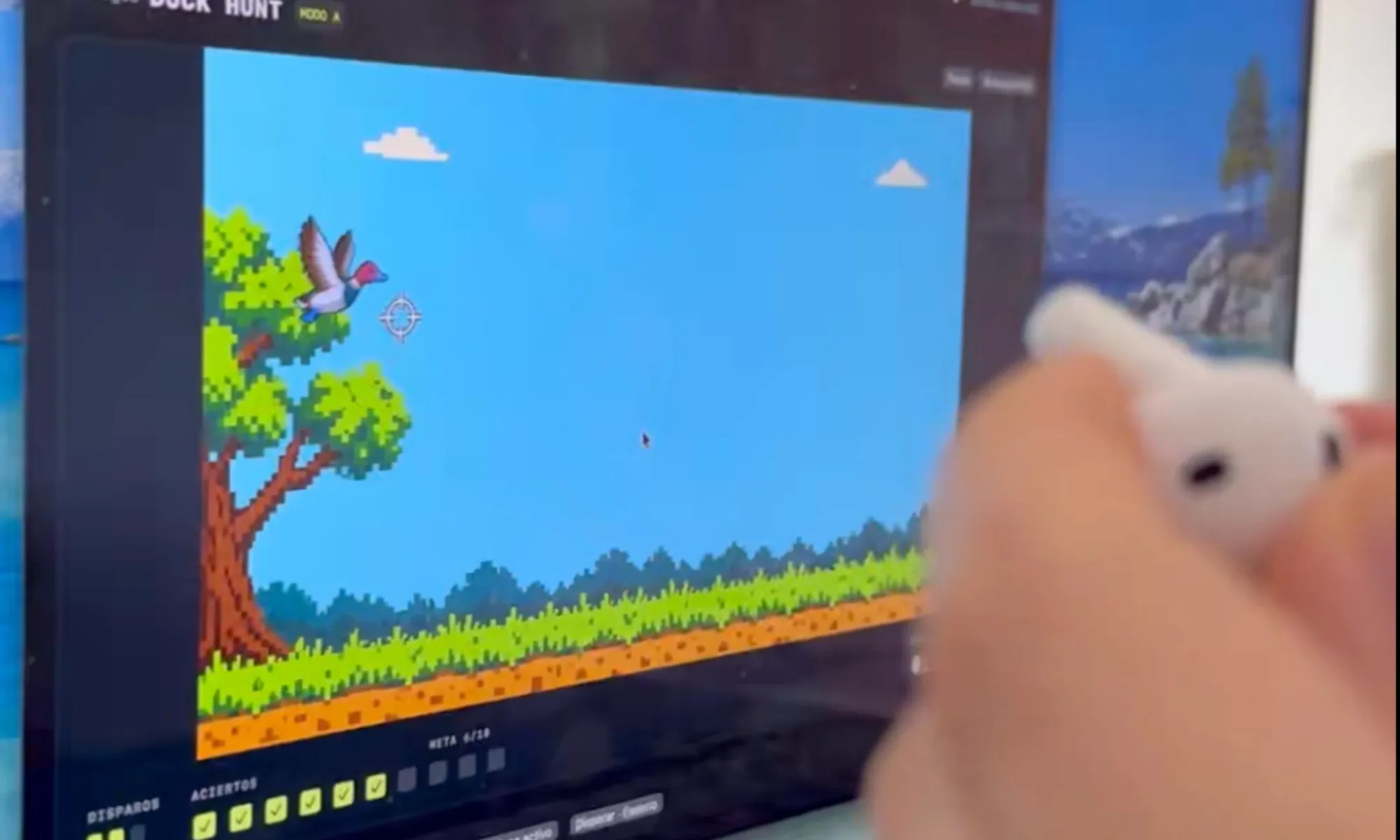
Few things feel as satisfying as blasting pixelated ducks. However, I never imagined doing it with an earbud. Then again, gaming accessories have taken stranger forms.
A developer who posts as Dividivan on X turned one AirPod into a miniature, gun-like controller you can point and tap, but it only works with a Mac. The side project became BipBop, a free website that lets you use your AirPods as a controller for 30 throwback minigames.
How does an AirPod become a controller?
It all started with Duck Hunt. Dividivan posted a 28-second demo on X on October 18, 2026. It garnered over 126,000 views in two days. The developer says it was voice-coded: built by speaking prompts to an AI.
To play, pair one AirPod with a Mac running Apple Silicon, hold it in your hand, turn it to aim, and then shoot, like a regular gun-like controller. For those wondering how AirPods can aim, they have a built-in gyroscope; the same sensor that helps your AirPods track head movements can now help you aim at digital ducks.
To shoot, tap the area near the microphone on the AirPods. The app listens for the sound and translates it into a trigger. You can also shoot by pressing on the earbud itself, though that might not be as convenient.
On Reddit, the developer told one commenter the shot delay is “0 by default,” which I’d read as no added lag, since Bluetooth always takes a moment (via Reddit). Two AirPods at once won’t work because, the developer says, Apple merges both signals.
So much for dual-wielding your way through Duck Hunt. For all of this to work, you’ll need to disable Automatic Ear Detection first.
What should you know before trying it?
The good news is that BipBop is free (so you don’t have to share your credit card details), runs offline, and needs no account. Its 30 games include Bowling, Mini Golf, Hoops, and Wave Racer.

That’s 30 ways to put your earbuds through their paces without spending a cent. The minimum system requirements are an M1 or later Mac, macOS 14 or newer, and AirPods that support head tracking.
My advice: treat it as a beta. It’s still a 0.8.7 build and isn’t notarized, meaning Apple hasn’t scanned it, so macOS may refuse to open it. The developer says to use Open Anyway rather than weaken your security.
It’s a fun little experiment, but maybe don’t hand your Mac’s security settings to the first virtual duck-shooting range you find.
RELATED COVERAGE:
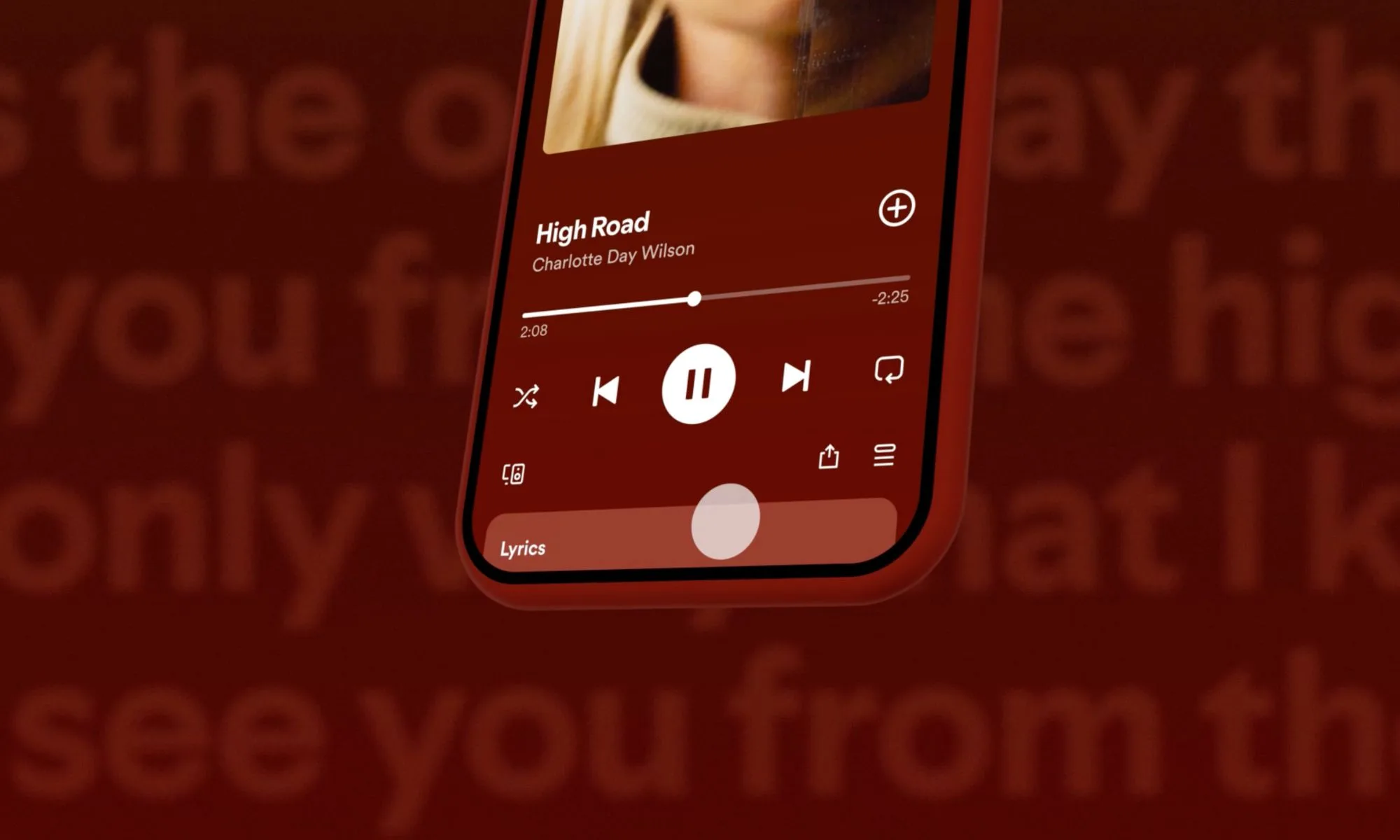
Finding new music on Spotify is one of those little joys that can turn an ordinary day around. You play a song you love, let the recommendations take over, and occasionally stumble upon an artist you wish you’d discovered sooner. But with AI making it ridiculously easy to produce music in bulk, not everything landing in your recommendations deserves a listen.
Spotify knows this is becoming a problem, and it’s acting on it. The streaming giant has revealed it filtered more than 50 million spammy, low-quality tracks from its recommendations this year. That’s on top of another 75 million tracks it has completely removed from the platform for repeatedly or seriously breaking its rules. And Spotify isn’t stopping there — it wants to make sure actual artists aren’t buried under an endless stream of AI-generated content.
Spotify is getting better at spotting music nobody wants to hear
Rather than looking for AI-created tracks, Spotify has been paying attention to how people actually listen to music. Earlier this year, it noticed that songs listeners frequently skipped, ignored, or actively rejected often overlapped with content flagged as spam or low-quality material. That discovery led to several changes to its recommendation system over the past six months. The goal is explicit: make it easier to discover genuine artists while keeping unwanted content from taking over your playlists.
Of course, identifying AI-generated spam isn’t as simple as running a song through a detector. Spotify now combines listening behavior, user feedback, suspicious upload activity, track information, and multiple AI detection services to identify potentially problematic music. It also watches for tricks such as repeatedly uploading the same music, manipulating search results, and flooding the platform with unusually short tracks. The company says these changes have already reduced complaints about unwanted content appearing in recommendations.
It wants you to know who’s actually behind the music
Cleaning up recommendations is only one part of Spotify’s strategy. The company is also making it easier to understand whether the music you’re hearing comes from a real artist or an AI-generated identity. Its AI Credits feature, introduced in April, lets artists disclose how they used AI during production. Spotify says artists are now submitting tens of thousands of these credits daily.

Meanwhile, Spotify has verified more than 300,000 artists, including many independent musicians. The platform has also begun labeling thousands of AI-generated artist identities, which it generally excludes from recommendations unless listeners choose to engage with them. Artists are getting additional protection, too. A new feature lets them review releases linked to their profiles before those tracks go public. Spotify plans to expand it to all artists by the end of 2026. Importantly, Spotify isn’t banning AI-assisted music altogether. It’s trying to distinguish legitimate creative work from content designed to exploit its platform. For listeners, that could mean fewer questionable tracks interrupting their playlists and a better chance of discovering music that’s actually worth saving.
Meta’s AI companion, Muse, is now one of only a dozen mobile apps to have reached 10 million U.S. downloads in its first 40 days on the market. According to new data from market intelligence provider Sensor Tower, Muse has seen 10.9 million downloads since its September debut, 10.2 million of which were in the United States.
Only 11 other apps to date have reached this type of post-launch milestone, said Sensor Tower’s Senior Insights Analyst Kara Lee. The most recent of these was Meta’s Threads, back in July 2023. Other apps that saw this kind of scale were largely mobile games, Lee noted.
Meta’s success is tied to the company’s ability to scale its new apps by marketing them across its other services, which it has done with both Threads and Muse. Threads was built on top of Instagram’s social graph, and its content has been integrated into both Facebook and Instagram. However, Muse isn’t only benefiting from Meta’s ability to market the AI agent across its family of apps, which today includes 3.6 billion daily active users; the company is also heavily investing in advertising to drive new users to Muse.
Per Sensor Tower’s data, Meta has allocated 39% of its total advertising spend to market Muse in October, up from 23% last month. In addition, Muse now ranks as the 21st largest brand in the U.S. by advertising impressions this month, up from 73rd in September.
Still, marketing an app and retaining users after the initial shine wears off are two different things. In this case, Muse is seeing better retention rates than its AI competitors like ChatGPT, Claude, and Grok.
In the U.S., the app had a 30% retention rate after 7 days and a 23% retention rate after 14 days. By comparison, its rivals saw an average of a 19% 7-day retention rate and a 16% 14-day retention rate, according to the firm’s data.
Muse also hit another milestone that demonstrates active engagement with the AI app. Its daily active users reached 2.5 million for the first time on October 16, a 15% week-over-week increase.
Meta’s latest AI app, which can handle various tasks on users’ behalf, has seen breakout success since its debut. It shot up to No. 1 on the App Store, and, at one point, even outpaced some of the metrics ChatGPT saw following its launch. Its latest milestone sees it topping its rivals again, as ChatGPT saw 3.7 million U.S. downloads in its first 40 days on the market. Grok and Claude saw only 500,000 and 200,000 U.S. downloads, respectively, in their first 40 days.
Globally, ChatGPT beat out Muse, having scaled to around 15 million global downloads in its first 40 days. But this isn’t a fair comparison, as ChatGPT benefited from a wider reach. Muse is only available in the U.S. and Canada for now, while ChatGPT’s app attracted attention from markets like Japan, Brazil, and Germany, too. (Japan, for instance, accounted for 25% of its global installs during its first 40 days.)
Since launching, Muse has retained its No. 1 rank on the U.S. App Store for all days except October 19, when streaming app Kick briefly beat it out. It has since reclaimed the top spot as of Tuesday. Muse has also been No. 1 on Google Play over the past 30 days.
When you purchase through links in our articles, we may earn a small commission. This doesn’t affect our editorial independence.
Tech & AI
Kenko Pieni III Ultra Compact Digital Camera Hangs Like Jewelry and Records Soft Retro Shots


Kenko Tokina introduced the Pieni III earlier this week, as a toy digital camera small enough to wear on a neck strap during ordinary days. Measuring about 53 by 35 by 18 millimeters and weighing roughly 18 grams without a card, the body sits lightly against clothing or sits on a shelf as decoration when not in use. Four standard finishes cover Soda light blue, Strawberry pink, Milk white, and Black, while separate Sanrio editions featuring Hello Kitty and related characters cost more and arrive with matching straps.
A 1/10 inch CMOS sensor is sufficient, however it only captures 0.32 megapixels before the camera ‘enhances’ the image to 1.38 megapixels. Frames are saved in 1440×960 JPEG format, while video is captured at 720 by 480 resolution with sound at 30 frames per second in the MJPEG AVI format. The 1.8mm f2.8 lens provides a nice 42mm equivalent view, but it only starts focusing at approximately 30cm out, and you shouldn’t try to shoot closer than that without using manual focus. To keep things interesting, the ISO is set to 100, so the camera has to figure out the rest on its own, which sometimes results in a rather nice ‘soft focus’ effect, similar to a watercolor painting or an old oil painting, but not as sharp as a modern smartphone camera.
People still use this thing as if it were an old film camera, snapping away without ever viewing their photographs on the back, because the results aren’t visible until the images are uploaded to a different device. It’s rather a throwback experience, as you have to wait for the pictures to appear before you can see what you’ve received. Just like in the film days, the camera features a magnet on the rear that allows you to stick it to a metal surface, providing a sturdy frame for video shooting, which is useful for filming on the go.
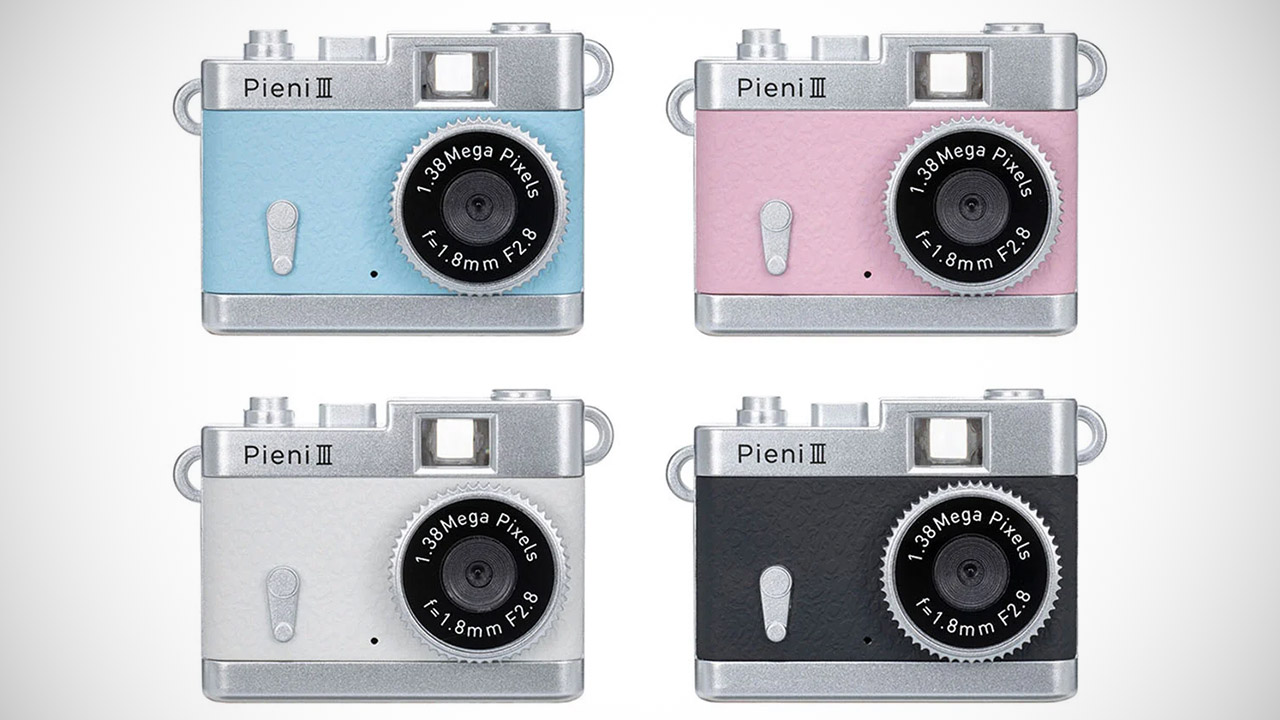
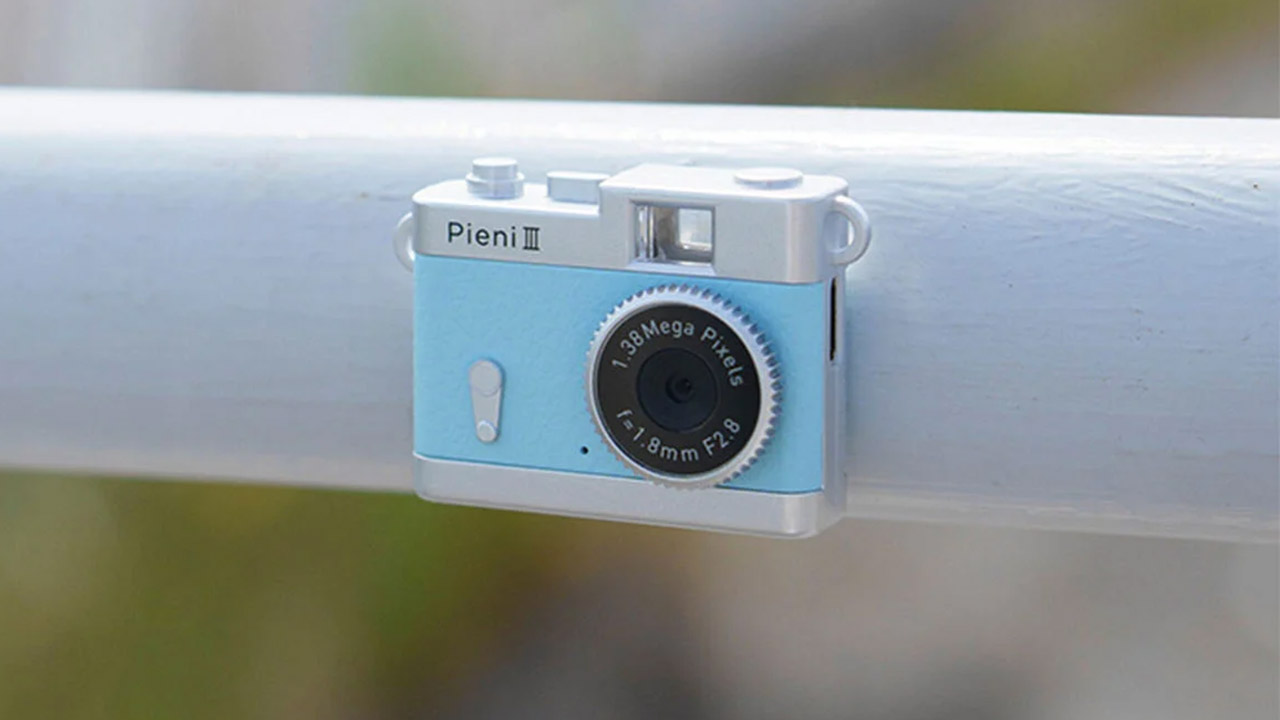
One change is that the new model now has a USB Type-C port instead of the previous version’s mini USB port, which is convenient because it can also be used to charge the battery or transfer photos and videos to a compatible smartphone via the included cable. Prices in Japan for this device start around 6600 yen, or roughly 38 to 42 USD, depending on currency rates, and overseas buyers can use proxy services to get this little camera sent to their door.
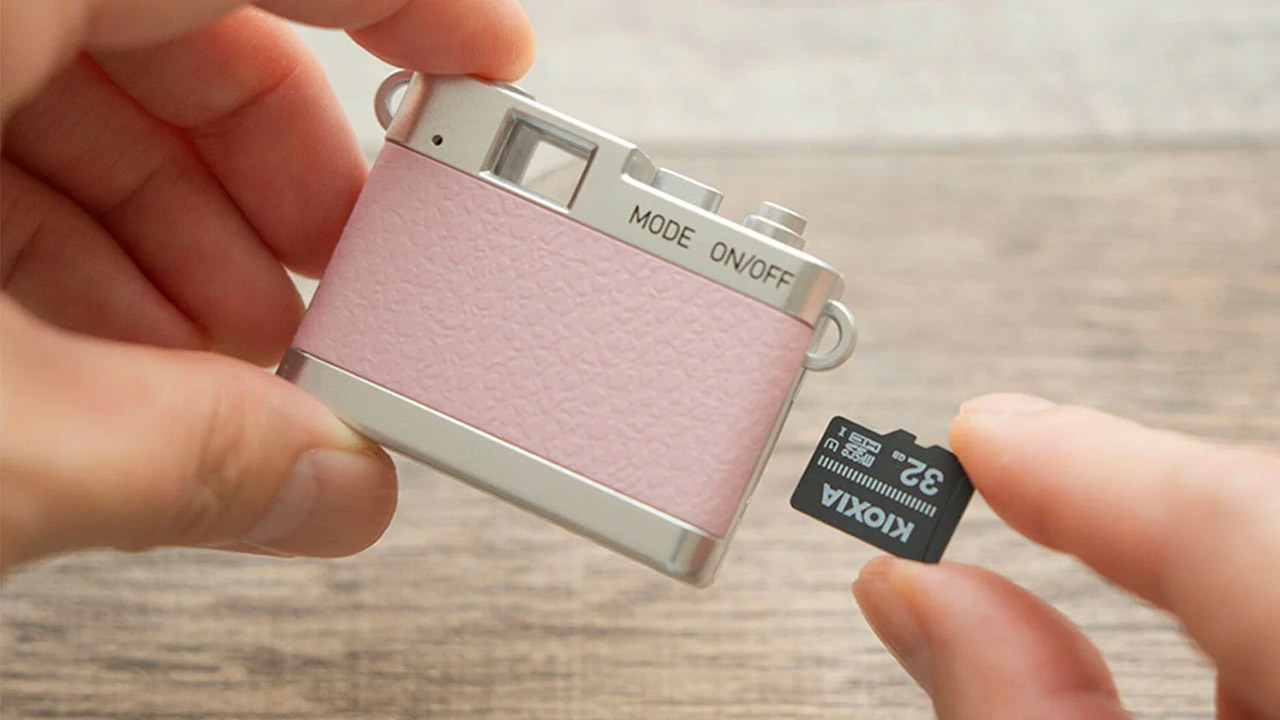

The camera is operated by only two buttons: one for power and one for shutter, as well as a basic mode selector to flip between stills and video. This small camera stores all of your files on an external microSDHC card that runs from 4 to 32 gigabytes, as it has no internal storage whatsoever. That makes it ideal for capturing those life’s events that arise unexpectedly and necessitate the use of a camera for the remainder of the day.
[Source]
Tech & AI
CMF Speaker S Review: Nothing Put Auracast in a $59 Milk Carton But Please Don’t Squeeze It
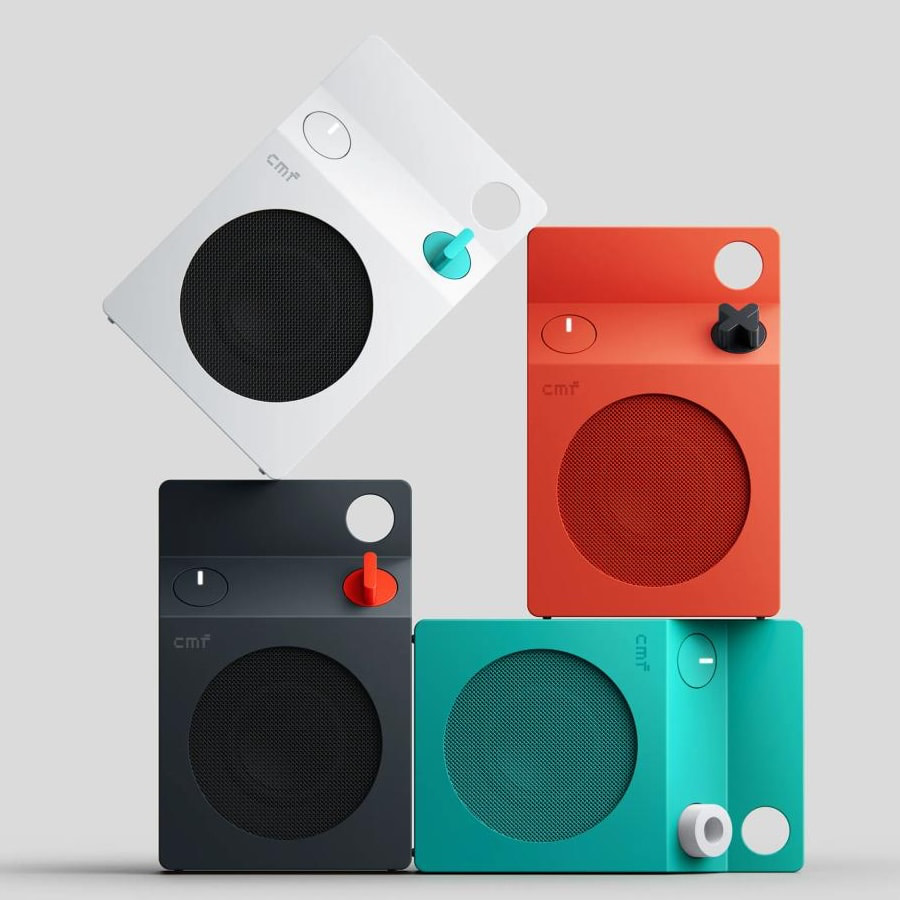
If you grew up in the 1980s, milk cartons meant three things: questionable cafeteria milk, photographs of missing children, and a lingering suspicion that Ogden Edsl’s “Kinko the Kid-Loving Clown,” made famous on the Dr. Demento Show, belonged on a police watch list rather than anywhere near a school playground. Forty years later, Nothing’s budget-friendly CMF brand has decided to give the humble milk carton a considerably less disturbing second career.
The result is the $59 CMF Speaker S, one of the more unusual portable Bluetooth speakers to arrive on my desk this year. Fortunately, it comes with Bluetooth 6.0 and Auracast rather than a missing-person photograph, and there’s considerably more technology inside than its playful appearance suggests.
We covered the launch of the CMF Speaker S and Speaker M earlier this month, and I was intrigued enough by their industrial design and extensive feature lists to request a review sample. CMF sent the smaller Speaker S in white, which I’ve been listening to for the past few days.
My initial reaction? It’s surprisingly well made, considerably more substantial than its dimensions suggest, and rather clever in ways that aren’t immediately obvious.
Related Reading:
Design and Build Quality: Got Milk? Don’t Squeeze the Carton
The white Speaker S looks like something Dieter Rams might have designed for a futuristic school cafeteria. Its geometric cabinet is clean, understated, and refreshingly different from the endless parade of cylindrical Bluetooth speakers wrapped in fabric.
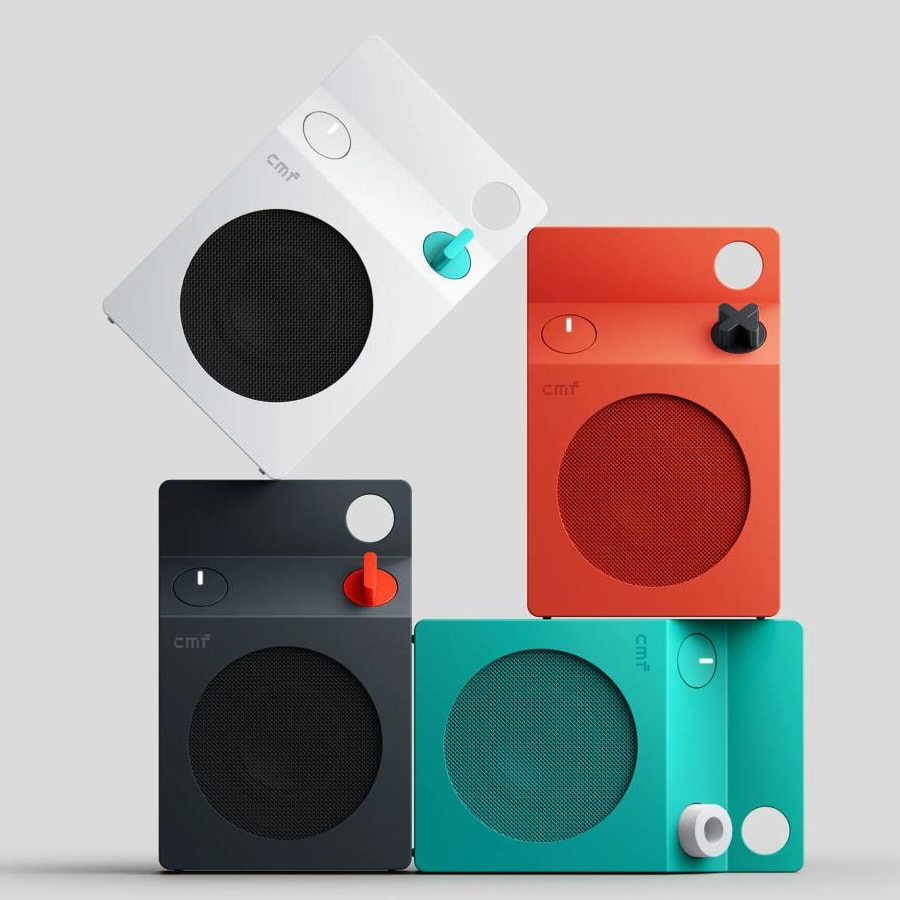
CMF offers the speaker in White, Dark Grey, Orange, and Turquoise, although I’m rather partial to the white version. It’s modern without being aggressively futuristic and looks perfectly at home on a desk, kitchen counter, or bookshelf.
More importantly, the construction feels considerably better than I expected for $59. The cabinet feels solid, the controls have a purposeful layout, and nothing about the overall presentation suggests CMF was simply trying to produce the cheapest possible speaker with an interesting shape.
There is, however, one important design detail worth mentioning.
The Speaker S incorporates two passive bass radiators that contribute to its low-frequency reproduction. At first glance, these elements look like part of the industrial design, and the temptation to pick up the speaker and squeeze them with your fingers is understandable.
Don’t do that.
Passive radiators are moving acoustic components, not decorative buttons or stress-relief toys. Pressing them unnecessarily risks damaging their diaphragms or suspensions, and the last thing your inexpensive Bluetooth speaker needs is an avoidable trip to the repair department.
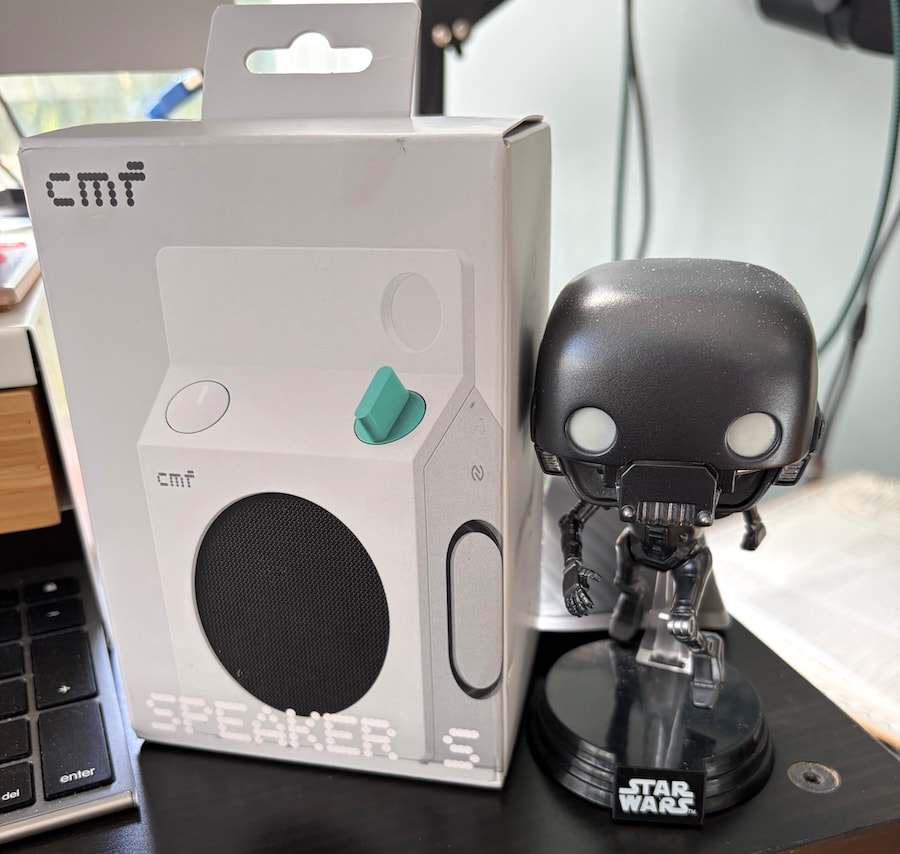
CMF also allows owners to customize the appearance through removable panels and a replaceable control knob. The company is supporting further personalization through 3D-printable design resources, an interesting approach for a product at this price.
Portable, Yes. Pocket-Sized? Not Exactly.
One surprise was the weight. The Speaker S measures 130.5 x 85 x 44mm (5.14 x 3.35 x 1.73 inches) and weighs 334 grams (11.8 ounces).
That doesn’t sound particularly heavy on paper, but there’s noticeable density to the speaker when you pick it up. It feels reassuringly substantial, although anyone expecting something practically weightless may be surprised.
I tried slipping it into the pocket of my Taylor Stitch Ojai chore coat, which normally accommodates a rather impressive collection of things I probably don’t need to carry around. No luck. The Speaker S simply didn’t fit comfortably.
It does, however, disappear into my knapsack without any difficulty, and the integrated utility hook makes attaching it to a bag considerably more convenient.
CMF rates the enclosure IP68 for dust and water resistance, making it a practical option for the beach, poolside, or a camping trip. That doesn’t mean I’d recommend tossing it into the ocean or leaving it underwater, particularly after exposure to salt, sand, or other contaminants.
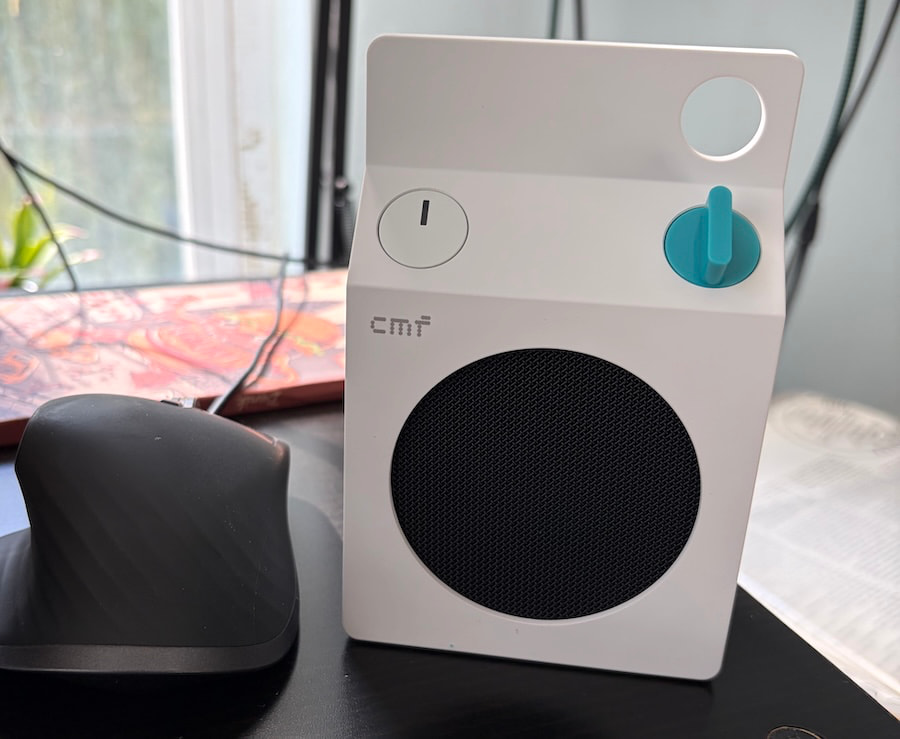
Actual Buttons. What a Concept.
CMF deserves credit for resisting the temptation to control everything through a smartphone application.
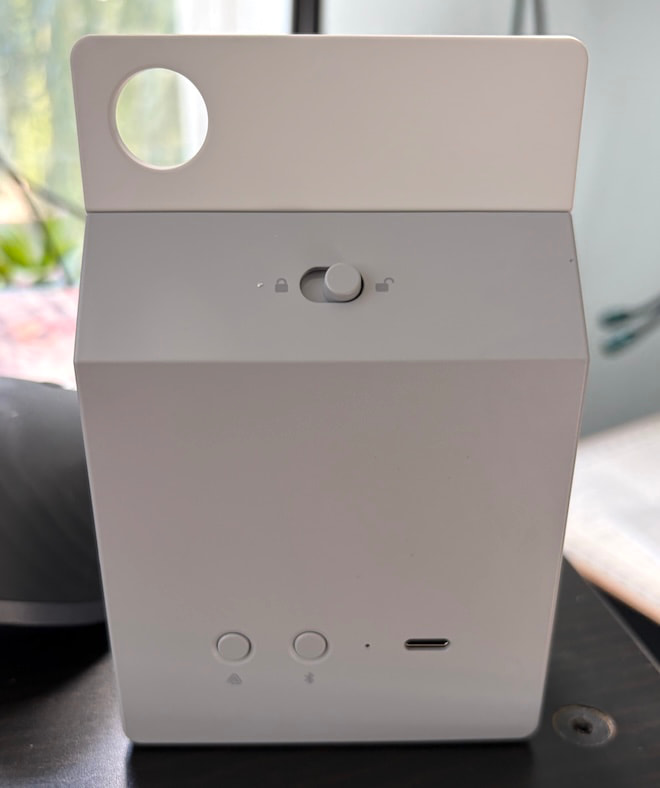
The Speaker S has a physical rotary knob that adjusts volume and handles playback. Pressing it pauses or resumes music, while additional presses handle track navigation. Holding it activates or deactivates the Ultra Bass feature.
Dedicated controls for power, Bluetooth pairing, and Auracast are also included, along with a mechanism for removing the customizable components.
There’s something refreshing about being able to reach over and adjust the music without unlocking a phone, opening an app, and navigating through menus. We’ve somehow reached a point where physical controls qualify as a premium feature, which tells you quite a lot about contemporary consumer electronics.
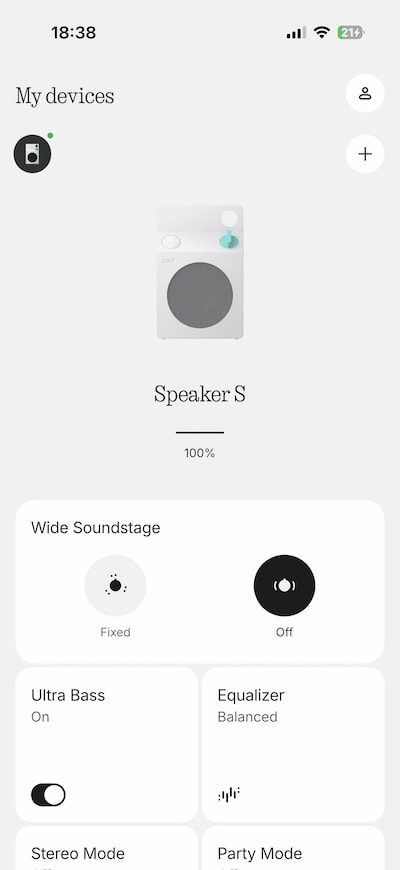
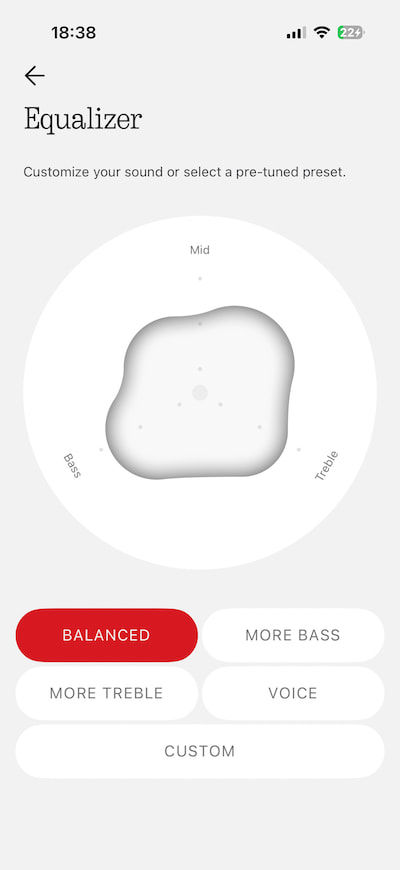
The Nothing X app adds more detailed adjustments, including four EQ presets: Balanced, More Bass, More Treble, and Voice. There’s also a custom equalizer for listeners who prefer to make their own adjustments.
The combination makes sense because essential controls remain on the speaker while the app handles more specific preferences. Whether the EQ options make a meaningful difference will be addressed in the listening section.
Auracast Might Be the Most Useful Feature
The Speaker S supports Bluetooth 6.0, but the more interesting addition is Auracast, which allows compatible Bluetooth devices to share audio with multiple nearby receivers.
With CMF’s Party Mode, users can link compatible Auracast speakers to reproduce the same music across a wider area. That opens up some appealing possibilities for dorm rooms, backyard gatherings, and impromptu parties where several friends bring their own speakers.
Two Speaker S units can also be paired in Stereo Mode, assigning separate left and right channels. That’s a different arrangement from Party Mode, which distributes audio across participating speakers rather than creating a dedicated stereo pair.
Think about a college dorm room where several people want to listen to the same playlist without dragging out a larger party speaker. Provided their devices support compatible Auracast functionality, the group can create a distributed playback setup without a complicated wired installation.
Auracast also has potentially valuable applications beyond entertainment.
The Bluetooth standard can support public audio broadcasts, including announcements within suitably equipped venues. In theory, a beach with compatible broadcast infrastructure could distribute local information or weather advisories to supported receiving devices.
There’s an important limitation. CMF documents Auracast Party Mode for shared music playback, not automatic reception of public emergency warnings. The Speaker S should not be treated as a weather-alert receiver without confirmed support for that function and a compatible local service.
Still, the broader technology is worth watching as public venues gradually adopt Auracast.
A Better Alternative to Blocking Out the World?
One place where I can see the Speaker S being genuinely useful is the playground or park.
Parents who want some background music, a podcast, or the news while supervising their children don’t necessarily need to wear noise-cancelling earbuds that isolate them from what’s happening nearby.
A compact speaker playing quietly from a bag or nearby table allows everyone to remain aware of their surroundings without sealing off their ears. That’s particularly relevant when young children, cyclists, and other people are sharing the same public space.
Of course, common courtesy matters. Nobody at the playground wants to hear your entire Spotify playlist, and a speaker doesn’t automatically make you more attentive.
The same principle applies to a picnic, a backyard gathering, or a quiet evening outdoors. Portable audio should add something to the experience rather than turn every public space into someone’s private nightclub.
Bluetooth, USB-C Audio and Battery Life
CMF has included several features that aren’t guaranteed at this price.
NFC pairing, Google Fast Pair, and Microsoft Swift Pair simplify connecting compatible devices, while dual-device connectivity allows the Speaker S to maintain connections with two sources.
USB-C also handles wired digital audio playback rather than serving exclusively as a charging port. CMF claims latency below 60 milliseconds when connected by USB-C, making the speaker potentially useful alongside a laptop for videos, casual gaming, or desktop listening.
A full charge is specified at approximately 2.5 hours with suitable USB-C power, while a 10-minute charge can provide up to one hour of playback under the company’s stated conditions.
Battery life is rated at up to 18 hours, based on CMF’s stated testing conditions of AAC playback at 50% volume with Ultra Bass enabled. My experience has been encouraging so far. On a full charge, I’ve managed over 17 hours of playback with the volume set around the halfway point on my iPhone 17, putting CMF’s advertised endurance well within reach under everyday listening conditions.
One omission worth mentioning is the charging cable.
CMF includes the speaker and a quick-start guide, but no USB-C cable. At $59, I’m not particularly offended. If you’ve been purchasing electronic devices for the past decade, there’s a reasonable chance you have enough USB-C cables in a drawer to open a small electronics shop.
CMF Speaker S Specifications
- Price: $59 USD
- Available colors: White, Dark Grey, Orange, Turquoise
- Driver: 45mm (1.77-inch) full-range
- Passive radiators: Two
- Amplifier output: 10 watts RMS
- Frequency response: 70Hz to 20kHz (manufacturer specified)
- Sound features: Ultra Bass, Wide Soundstage, Night Mode, custom EQ
- Bluetooth: Version 6.0
- Bluetooth codecs: SBC, AAC; LC3 for Auracast audio
- Wireless range: Greater than 100 meters (328 feet) under free-space conditions (claimed)
- Wireless features: Auracast Party Mode, stereo pairing, multipoint connectivity
- Fast pairing: NFC, Google Fast Pair, Microsoft Swift Pair
- Wired audio: USB-C, claimed latency below 60ms
- Battery capacity: 2,600mAh, 3.8V
- Battery life: Up to 18 hours
- Charging: USB-C; approximately 2.5 hours for a full charge with suitable power
- Protection: IP68 dust and water resistance
- Dimensions (H × W × D): 130.5 x 85 x 44mm (5.14 x 3.35 x 1.73 inches)
- Weight: 334 grams (11.8 ounces)
- App: Nothing X
- Included accessories: Quick-start guide; no charging cable
What Makes the CMF Speaker S Different?
There are plenty of portable Bluetooth speakers available for less than $75, and many promise impressive bass, waterproof construction, and all-day battery life.
What makes the Speaker S interesting is the combination of industrial design, physical controls, user customization, digital connectivity, and Auracast support at a price that doesn’t require much financial deliberation.
But there’s one rather important question left unanswered.
Can this $59 milk carton actually reproduce music well enough to compete with established portable speaker brands, or has Nothing simply created the most interesting packaging in the dairy aisle?
Time to find out.
Listening
Right out of the box, I threw some Nick Cave at the CMF Speaker S and quickly discovered that selecting the Balanced EQ preset in the Nothing X app and enabling Ultra Bass made a rather significant difference. Suddenly, this little $59 speaker didn’t sound nearly as small, anemic, or constrained as its diminutive dimensions might suggest.
Nick Cave and the Bad Seeds’ “Into My Arms” had surprising tonal weight, particularly through the piano, which sounded fuller and more substantial than I expected. Cave’s distinctive baritone wasn’t reproduced with anything approaching reference-level accuracy, but it also didn’t suffer from the haziness or graininess that often makes inexpensive portable speakers difficult to listen to. For $59, that’s a pretty encouraging start.
“Bright Horses” from Ghosteen reinforced another observation: the Speaker S isn’t particularly bright or aggressive sounding, which isn’t always something you can say about a portable speaker built around such a small driver. CMF seems to have resisted the temptation to exaggerate the treble to create an artificial sense of clarity, and the result was more balanced than I anticipated.
Switching to Jimi Hendrix’s “Little Wing” from Axis: Bold as Love revealed a surprisingly detailed top end, along with bass reproduction that favored definition over slam or physical impact. At lower listening levels, Hendrix’s vocals sounded somewhat thin, while his guitar lost some of its familiar growl and presence. Turning up the volume helped fill in some of that missing midrange body, giving the performance greater substance without making the presentation excessively aggressive.
“Voodoo Child (Slight Return)” from Electric Ladyland actually made me sit up and pay attention, which isn’t something I necessarily expected from a $59 Bluetooth speaker shaped like a milk carton. There was something reminiscent of listening to my father’s old transistor radio, only with considerably greater midrange clarity, more convincing treble detail, and a much better sense of what Hendrix was doing with his guitar.
The CMF Speaker S isn’t going to recreate the scale, dynamic impact, or tonal richness of a proper stereo system, but that’s hardly a reasonable expectation at this price. What’s interesting so far is how much musical information it manages to communicate without resorting to the exaggerated brightness or bloated bass that can make inexpensive portable speakers sound impressive for five minutes and exhausting after twenty.
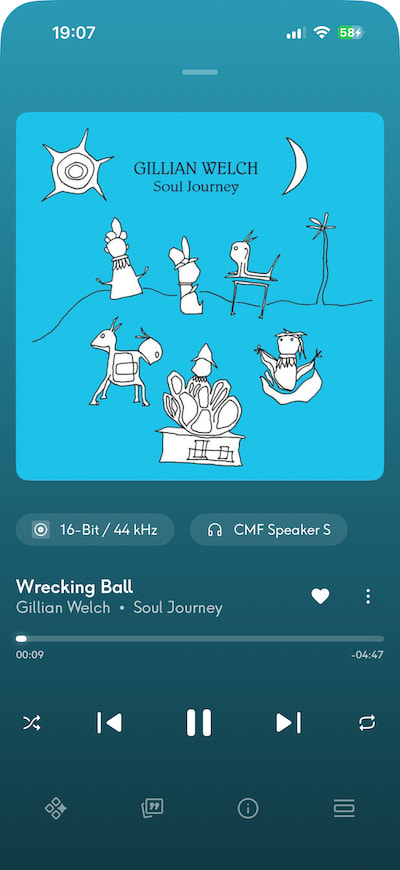
Gillian Welch’s “Wrecking Ball” and “Revelator” made me want to keep listening, which is probably the highest compliment I can pay a $59 portable speaker. The acoustic guitar had surprising clarity and tonal weight, while Welch’s distinctive twang and sultry vocals (at least to my ears) were reproduced with enough texture and presence that I found myself staring at the little CMF, wondering just how good a pair of these might sound in a proper 2.0 stereo configuration.
There’s not enough low-frequency impact or dynamic scale to fill a larger room convincingly, but for desktop listening, a guest bedroom, or an outdoor setting where you’re sitting reasonably close to the speaker, the CMF Speaker S makes a compelling case for itself. Two of these little milk cartons working together in stereo? Hell yes. That’s an experiment I’d genuinely like to try.
Switching over to deadmau5’s “Silent Picture” and The Police’s “Every Breath You Take” revealed something else rather unexpected: the CMF Speaker S actually sounded larger and more expansive with the Wide Soundstage setting turned off. Counterintuitive? Absolutely, but that’s how she blows. Enabling the feature seemed to push everything farther away, creating a more distant presentation that didn’t necessarily benefit the music.
With Wide Soundstage disabled, deadmau5’s atmospheric effects and synthesizers had noticeably greater weight and presence, projecting slightly in front of the speaker rather than sounding like they were playing somewhere down the block. The Police benefited from the same adjustment, with greater focus and substance to the instrumentation. Sting was almost bearable, which is saying something, and I could practically picture Stewart Copeland glaring at his former frontman from behind the drum kit, wondering how he’d managed to make a song about obsessive surveillance sound so romantic. Even a $59 milk carton can’t resolve that particular band dynamic.
The Bottom Line
The CMF Speaker S is a genuine surprise and one of the best values I’ve encountered in portable audio this year. With the Balanced EQ selected, Ultra Bass enabled, and Wide Soundstage switched off, this little speaker delivers considerably more musical substance than its dimensions or price might suggest. Give it some volume, and bass can be surprisingly solid across a wide range of music, with decent speed, definition, and percussion that’s occasionally tighter than it has any right to be. Vocals aren’t hiding behind a veil, and the top end is detailed, smooth, and eminently listenable without becoming aggressive or fatiguing.
There are limitations, of course. The Speaker S isn’t going to pressurize a large room, deliver convincing sub-bass, or reproduce the scale of a proper stereo system. At lower volumes, some recordings lose body and presence, but turn things up a little and the presentation becomes noticeably more engaging. I’ve found myself listening far longer than intended, which is not something I expected from a $59 Bluetooth speaker that resembles something from my elementary school cafeteria.
The JBL Clip 5 ($79 at Amazon) is a worthwhile alternative for outdoor use, with its integrated carabiner, IP67 protection, and Auracast support, while the Tribit StormBox Micro 3 ($64.99 at Amazon) offers a more rugged approach with magnetic mounting, a versatile carrying strap, and a claimed 24-hour battery life. Both deserve consideration, particularly if portability and outdoor practicality are priorities. The CMF counters with its distinctive industrial design, customizable controls, USB-C audio, and battery endurance that came remarkably close to its advertised 18 hours during my testing.
Would I buy the CMF Speaker S? Without question. It’s surprisingly well built, attracts more questions from curious bystanders than speakers costing four times as much, and sounds ridiculously good for $59. I’d happily buy a second just to hear what these little troublemakers can accomplish in stereo. Back in the 1980s, milk cartons came with sour milk, missing kids, and enough childhood trauma to keep a therapist in business for decades.
Nothing has finally delivered one worth taking home. No expiration date, no creepy clown, and no need to ask your mother for lunch money. Got milk? Screw that. Got stereo?
Pros:
- Surprisingly full, balanced, and engaging sound for $59
- Solid bass, clear vocals, and smooth, detailed treble
- Excellent build quality and distinctive industrial design
- Auracast support with stereo pairing and multi-speaker connectivity
- Physical controls, customizable EQ, and USB-C audio
- Excellent battery life; over 17 hours in testing
- IP68 dust and water resistance
Cons
- Limited bass impact and dynamic scale in larger spaces
- Vocals and instruments can sound thin at lower volumes
- Wide Soundstage mode sounds less convincing
- Heavier and less pocket-friendly than expected
- Exposed passive radiators require careful handling
- No USB-C charging cable included
Our Ratings:
★★★★★★★★★★ Sound Quality
★★★★★★★★★★ Build Quality
★★★★★★★★★★ Connectivity
★★★★★★★★★★ Design
★★★★★★★★★★ Value
Where to Buy:
Related Reading:
Low-cost carrier TextNow is launching its first child-friendly phone on Tuesday, pairing a heavily discounted Motorola handset with a software portal that lets parents control who their kid can call or text.
Yello is a customized Moto G Play that costs $150 — $100 less than the standard model’s current retail price — and comes with a $20 monthly plan, with no other required contracts or service commitments.
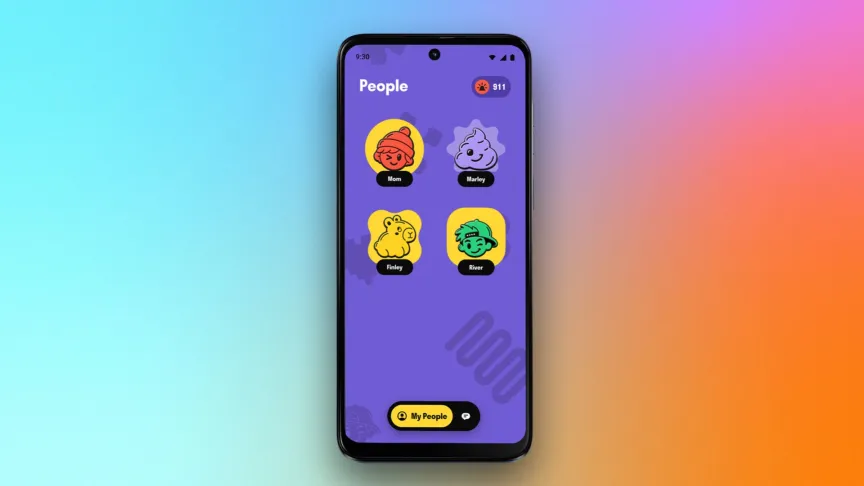
The Android phone restricts access to Google’s Play Store and doesn’t allow users to install additional apps or services. It’s designed primarily for calls and texts with parent-approved contacts, which parents can manage through a web-based portal that also lets them check the phone’s GPS location. Kids can call or text those contacts from a menu of large icons reminiscent of Netflix’s profile selection screen.

Other software available on the phone includes access to the cameras — a 32-megapixel main camera and an 8-megapixel front-facing camera — along with the calculator, clock and a weather app. Seven preloaded games can be enabled, which include phone classics such as Snake, Mines and Tic-Tac-Toe. Photos taken on the phone can only be shared with parents.
This more restrictive approach should let kids stay in touch with approved friends and coordinate pickups with parents while limiting distractions and access to content inappropriate for young children.

The 2026 Moto G Play is a good choice for Yello’s software approach. When I reviewed the phone last year, I liked its larger 5,200-mAh battery because it could easily get through two days of use. But its less-powerful processor, 64GB of storage and 4GB of memory made it challenging to use as a media machine. Since Yello’s software deliberately avoids that use, the Moto G Play should be more than sufficient for calls and texts.
Despite the name, the Yello phone is available in just one color: the same soft blue on every 2026 Moto G Play that Motorola calls “pantone tapestry.”
Most US carriers offer their own versions of child-friendly devices such as Yello. AT&T, for instance, has repurposed the Samsung Galaxy A16 into the AmiGo Jr with similar parental controls. There are also a number of child-friendly smartwatches, which may be a better option depending on your family’s needs for connectivity. But Yello does offer a lot of flexibility, since it doesn’t require a more expensive unlimited data plan or a minimum service commitment.
The Yello phone is now available on TextNow’s website.


From Ashburn, Virginia, to South Dublin, Ireland, the data centers that journalist Paris Marx visited all looked remarkably similar: large industrial facilities with loud air-conditioning units running to keep racks upon racks of servers cool. But it was the security measures around the data centers that struck Marx more than anything.
Tall fences. Security cameras everywhere. Locks on every door that required one of the few full-time employees to unlock with a badge. And in one memorable instance, standing on an Irish public curb outside a cluster of Microsoft-owned centers, there was an eerie feeling of being watched by men on lawn mowers, trimming grass that clearly didn’t need to be cut.
“It was just really staggering to me that it was at that level that it was so hard to move through these spaces,” Marx told me.
The intense security should give you an idea of just how serious Big Tech is about its data centers. These facilities are the key to the artificial intelligence programs at OpenAI, Meta, Google, Amazon and elsewhere, creating vast amounts of compute and sucking up equally staggering amounts of electricity and water.
There is no stronger metaphor for the manifestation of Big Tech’s power than the increasing sprawl of data centers. Amazon, Microsoft and Google alone control 59% of hyperscale data center capacity. In his new book available now, Hyperscale: The Ambition and Excess of Big Tech’s Data Empires, Marx, host of the Tech Won’t Save Us podcast, highlights how global data center protests are one of many ways that communities are pushing back against Big Tech’s power over us.
Hyperscale demands
Data centers existed long before generative AI; we called them server farms, and they’re what keep us online. But in this AI era, we have hyperscale data centers.
Before, a large data center might require around 50 megawatts of power to keep everything running. Now, hyperscale data centers can require triple that amount of power. Newer ones, like Meta’s Louisiana data center, may require 4,500 megawatts (4.5 gigawatts) — staggering demand that officials say is four times more than all of the electricity used in New Orleans on its hottest day in 2025. It’s more than the two gigawatts the Hoover Dam produces.

Hyperscale data centers are also housing more advanced tech. Chips like GPUs are key to creating compute, and newer chips built for AI data centers can run hotter. That makes it even harder to cool facilities, so in addition to air conditioning, facilities are using water systems to avoid servers overheating. It’s an additional environmental toll. A hyperscale center can suck up 1 million to 5 million gallons of water every day, equivalent to a town of more than 10,000 residents, according to a 2025 estimate.
So how do you keep these facilities running? The process to get approved and connected to a town’s electrical grid can take years. So tech companies have started building their own power plants right next to data centers for the sole purpose of keeping them on — perfect for burning massive amounts of fossil fuels, the main contributor to the climate crisis.
Hyperscale impacts
In the 2010s, Amazon, Microsoft, Google and many others pledged some version of becoming carbon neutral (or negative) in the next few decades — meaning they would offset the emissions they created with at least as much emission-reducing actions.
Sustainability reports from that time show that, overall, tech companies were measurably decreasing their environmental footprint. “And then ChatGPT comes along, and all of a sudden, that’s out the window,” Marx told me.
Tech leaders have been candid about allowing generative AI to override their climate goals. Google reported a 50% increase in its greenhouse gas emissions in 2024 to support its generative AI. Microsoft’s pledge to be carbon negative by 2030 “was before the explosion in artificial intelligence,” Brad Smith, the company’s president, told Bloomberg in 2023, saying the carbon goal was “five times as far away as it was in 2020” because of AI.
Modern data centers and their power plants burn fossil fuels for power, requiring gas turbines, huge tanks of diesel fuel kept on-site in case of a power outage or good old-fashioned coal. This has devastating environmental and health consequences, both immediately for local communities and in the long term for the entire world.
Communities that neighbor data centers have reported brown or unsafe drinking water, unending noise, and in one lawsuit against Elon Musk’s xAI centers in Memphis, extreme health risks; Memphis residents “are feeling it in their lungs because of the fossil fuels that are being burned,” Marx said.
Tennessee state representative Justin Pearson speaks at a rally in opposition to Elon Musk’s data center in Memphis on April 25, 2025.
Brandon Dill for The Washington Post via Getty Images
And as decades of climate research prove, burning additional fossil fuels is only going to exacerbate the effects of climate change. That’ll lead to even more extreme weather, health risks and natural disasters. As Marx put it in his book, “The world will suffer through the worsening natural disasters fueled by the quest for computation by some of the most powerful people on the planet.”
With data centers and their fossil fuels, we’re fundamentally reshaping the planet for AI. So anti-data center movements are asking: Is it worth it?
“How much computation do we really need here?” Marx asked in our conversation. “How many resources are we willing to dedicate to this vision of the future? And is this technology really delivering in such a way that expending all those resources is justified?”
The answer — for many data center neighbors in Memphis, Oregon, Chile, Ireland and thousands of other communities across the globe — is an unflinching no.

Tech & AI
AI data center backlash: The case for data centers, explained by a person who wants you to like them

Earlier this year, Gallup found that 71 percent of Americans oppose building data centers that support AI in their communities. And the backlash is bipartisan: Majorities of Democrats, Republicans, and independents opposed local construction.
Even in Texas, where data center development has been booming, Republican Gov. Greg Abbott has hit the brakes. In September, he directed state regulators to halt permits for data centers pending audits examining their effects on the power grid and water resources.
But while many data center projects have run aground, others are still getting built — and the companies behind them are employing experts like Nicole Thomas to smooth the way.
Thomas is the senior vice president of media and community engagement at JSA, a marketing and public relations firm that represents data center companies. She spoke with Today, Explained co-host Sean Rameswaram about how the industry is responding to public opposition — and why she argues that these facilities can still be good neighbors.
Below is an excerpt of their conversation, edited for length and clarity. There’s much more in the full podcast, so listen to Today, Explained wherever you get podcasts, including Apple Podcasts, Pandora, and Spotify.
You’ve been at this for 21 years. Obviously, 21 years ago, data centers were not the hot-button issue they are today. When did you notice the shift?
I’d say about two years ago. I came into this industry myself about four and a half years ago. I come from a state transportation background where community engagement is just paramount. When you’re putting a new traffic intersection up, they expect you to interact with the public.
When I got to this industry, I said, “Oh, what’s your community engagement like?” And they said, “We don’t even have any community engagements in this industry.” And they weren’t wrong. Because 21 years ago, [data centers] were just like infrastructure. It was like building a warehouse for your computers. And so it was very similar to the way that you would build a Costco.
You would just go in, request a zoning permit, the zoning board would say, “Yeah, that works. Stamp, boom.” And you build your data center. And as a matter of fact, it was very secretive before, because data, and having that data in the wrong hands, has a lot of [cybersecurity] implications. About two years ago is when we started noticing the mainstream journalists coming around asking questions about data centers. And that’s, to me, when it started.
It still feels secretive, I think, to a lot of people, and that’s why people are mad. If you read about this data center that was proposed in Utah by Mr. Wonderful, Kevin O’Leary, it caught a lot of people off guard. Seventy percent of Americans, at the moment, do not want them in their backyards. How do you go about trying to change that 70 percent’s minds?
First and foremost, I think education is really important. And so one of the things that we did notice very early on because of the previously secretive nature of data centers, there wasn’t a lot of education out there about what they even are. And so that’s something we need to change. We need to make the connection between [phones] and data centers so that people understand what a data center means to their life on a daily basis.
Every app on your cellphone requires a data center to save your information in there. When you put your password into anything, you are interacting with a data center, which will verify your password and then let you into that app. Not to mention all of the information about you that you store in that app is then stored in a data center so that it can be recalled at any time.
We could not be having this call without digital infrastructure. It doesn’t work that way. We can’t have email without digital infrastructure. And that stat about 70 percent of people not wanting the data center in their backyard — I’d be interested in seeing the stat of how many people actually live near a data center and don’t realize it.
Because there are nondescript data centers doing work quietly in your neighborhood that have been there for decades and you don’t even know it. And so in some ways I feel, and I think the industry does as a whole, but I won’t speak for them, that the pushback on data centers is somewhat related to the pushback on AI, because people can’t control AI.
You even have Sam Altman telling us that AI will destroy society. So you have this concern about AI and you don’t know how to control it, but you can push back on data centers. And so it becomes the physical manifestation of AI are these data centers that people are trying to get overturned or get to not be in their neighborhoods.
It’s understandable. I’m a citizen too. You’re a citizen, and if things come into my neighborhood, I want to know about them. I have questions. There’s a big data center that just came to my community not long ago and their community engagement was horrible, absolutely horrible.
I’m in Indiana and I won’t say which hyperscaler it is, but a hyperscaler came into — I would say, not my neighborhood, into my city. They’re definitely not in my backyard, but they’re in my city. And so we took them to task because their community engagement was basically non-existent.
Wait, you work in data center PR, but you took a data center in your community to task for not being transparent enough?
I’m on the side of responsible development.
We’ve all kind of accepted that we need a cloud for X, Y, and Z. And that it’s worth it so I can take lots of photos. I think everyone’s cool with that.
But the issue here is that people aren’t necessarily cool with AI, but we’re barreling forward anyway. How do you separate this essential need we have from AI, which people don’t necessarily feel is essential to their lives?
I think it goes back to education. Educating consumers on the difference between data centers: a small data center, a medium data center, a large data center. Educating them on why data centers exist and how they interact with data centers on a daily basis multiple times.
I hear you. But again, I feel like the issue here is not the data centers my cellphone needs, but instead is the data centers these AI companies need and these AI companies who the public doesn’t necessarily trust because they keep telling us that they’re going to kill us, and who the public is wary of because they don’t want their jobs being replaced by AI.
There’s all sorts of reasons that people are skeptical of new technology. So how do you specifically respond to that fear and to those people?
I think it’s, again, understanding the actual data center that’s being built in your community. Is it a 5-megawatt data center? That’s never going to house AI. That’s not enough power to house AI. Is it a one-gigawatt data center like Mr. Wonderful in Utah? That’s different.
But I think that AI is probably going to be something that is a lightning rod in the American public for a very long time. There are going to be people who are going to be anti-AI and pro-AI, and there’s going to be some people in the middle. I think it’s just, again, for us, it’s education, educating the community.
Have you ever been part of a project that a community rejected and you guys just packed up and said, “Okay, we’ll go find another community?”
Yeah. We have some clients who have had pushback from residents and they have said, “Let’s do a one-on-one community meeting where people can come in and ask us questions.”
And after the questions were answered, the community leaves and says, “Okay, this isn’t as bad as I thought it was.” Or we have a community that says, “No, we now have a moratorium and we’re pushing all data centers away.“
Sometimes they’ll wait for their client — my client is a developer and they’ve got clients that they’re developing for. If that client will wait, then maybe it is something that we’ll try to work out with the community. But oftentimes, they’ll just say, there’s communities who are literally raising their hand saying, “We’ll take a data center. We’ll take one. We’ll take two. Bring it here.”
So there are communities who recognize the benefits of data centers. And there are going to be other communities who say, “No, we don’t want this.” And then in five, six, eight years, they’re going to be like, “Wow, that county has a lot of tax dollars. They have a lot of really cool stuff. Why don’t we have that?” And the answer will be data centers.
I don’t think this ends anytime soon though, right? I counsel my clients that we could still be here in three to five years, really trying to help the American public understand the benefit of data centers. But it’s going to take a lot of education across the industry, and once we get those seeds planted, I’m a firm believer that they grow into educated community members who make educated decisions to bring community-minded data centers to their community.
Tech & AI24 minutes ago
Do You Need To Disable Wi-Fi On Your Computer When Using Ethernet?

Fashion29 minutes ago
Coffee Break: Wally Boot – Corporette.com

Tech & AI2 hours ago
Insta360’s Antigravity A1 Follow Me Bundle Puts Reliable Tracking and Gesture Controls on Your Wrist


-

 Fashion3 days ago
Weekend Open Thread: Kut from the Kloth
-
 Entertainment4 days ago
Anna Faris Says Chuck Lorre’s ‘Mom’ Remarks Still Hurt
-

 Tech & AI3 days ago
Double Fine’s First Post-Xbox Title, First-Person Soulslikes And Other New Indie Games Worth Checking Out
-

 Crypto7 days ago
TD Cowen: CFTC Crypto Rules Face 2028 Election Risk
-
Sports7 days ago
The Vikings’ Bruiser at WR Looped into Trade Rumors with League Interest to “Heat Up”
-

 Tech & AI7 days ago
16 cores, 5.2 GHz, and 55 TOPS: Minisforum’s newest AI workstation is mostly a massive upgrade to 192GB of memory – and that is not necessarily a bad thing
-

 Tech & AI7 days ago
Topgolf saved over $11.3 million after leaving VMware
-

 Tech & AI6 days ago
Who Is Building the AI Foundation for K-12 Classrooms?
-
 Tech & AI7 days ago
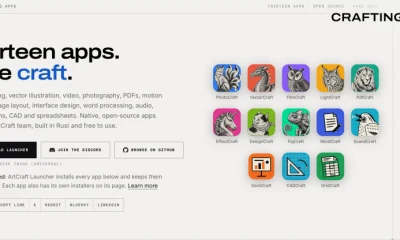
Can Vibe Coded Apps Replace Adobe and Microsoft? These AI Apps Hope So
-

 Sports7 days ago
Savannah Bananas 2027 schedule to be revealed Thursday. What to expect
-

 Tech & AI6 days ago
MCP for agent-to-agent comms may be the riskiest protocol you’ve never heard of
-

 Sports6 days ago
New report highlights growing pains
-

 Crypto6 days ago
Bitcoin Drops Under $82K as US CPI Rises Amid Higher Oil Prices
-

 Crypto7 days ago
Kalshi and Polymarket won’t be part of FTC sports gambling probe, report
-
 Crypto6 days ago
Kalshi CEO says state-led oversight of U.S. prediction markets would push them out
-
Tech & AI5 days ago
Porsche Just Revealed The Mission S, And It’s So Much More Than Just A New Concept Car
-

 Entertainment4 days ago
Jake Bauers’ Wife Reacts to NLCS MVP Win After Viral Comments
-
 Entertainment5 days ago
‘RHONY’ Carole Radziwill Exposes Truth About Ghislaine Maxwell
-

 Business & Hustles5 days ago
LARRY KUDLOW: Don’t count the GOP out yet
-
 Sports6 days ago
Shai Hope scripts history, surpasses Chris Gayle in major T20I milestone for West Indies | Cricket News
You must be logged in to post a comment Login