


Connect with us

Tech

120,000 Feet on a Friction Clamp, MAKE. ART. NOW. Flies the Insta360 X6 Near Space

Published

on

Insta360 X6 Camera Edge of Space
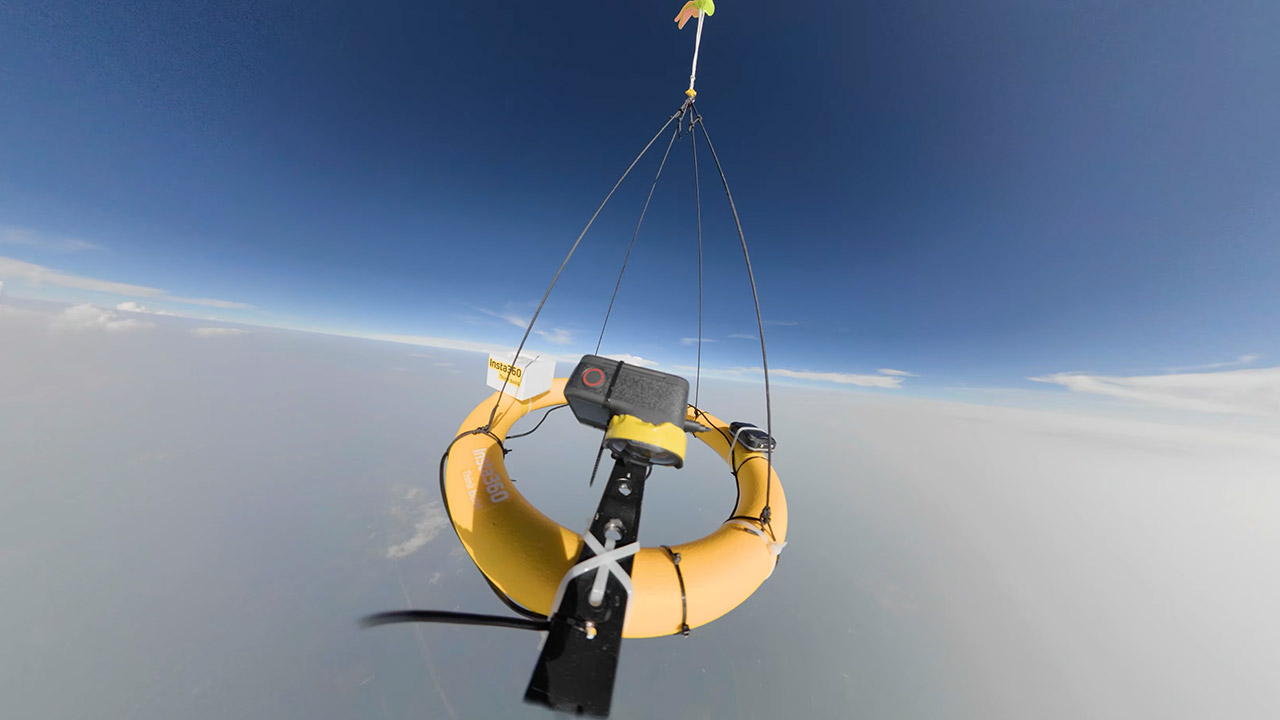
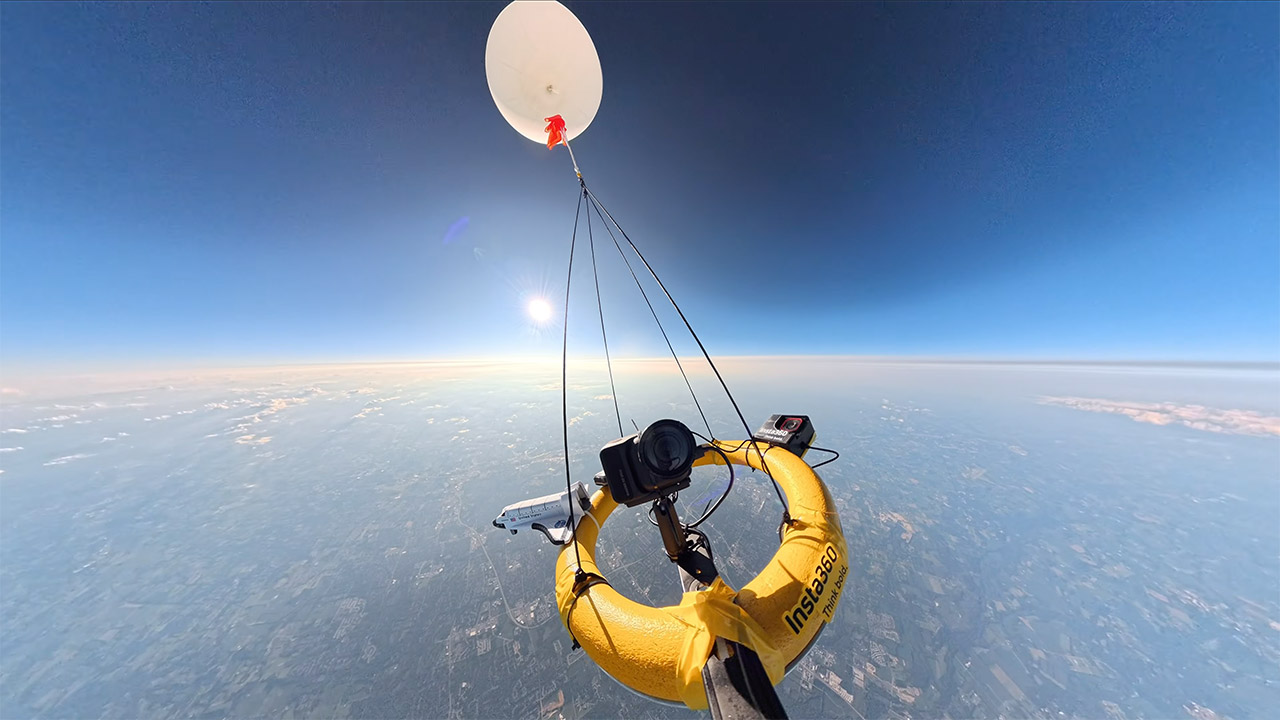
A year of weather balloons, cheap helium, and one brand-new 360 camera produced footage from roughly 110,000 to 120,000 feet. MAKE. ART. NOW. spent twelve months lofting Insta360 gear on 1,500-gram latex balloons aimed at a 115,000-foot burst, and the freshly launched X6 became the main camera for the last of those flights. Dual 1/1.1-inch sensors, 8K recording, 10-bit color, and horizon lock went along for a ride that included minus-70-degree air, a metal clamp that let go at 17,000 feet, and a neighborhood car crash captured in 360.


Payloads were kept fairly light, between 3 and 3.8 pounds, so he did not need to alert the FAA. Foam bases painted yellow provided as a base for the main camera, an X5 from previous flights, an Ace Pro 2 for behind-the-scenes photos, and some 4k 120fps burst grabs of the balloon popping, as well as a Go Ultra. External power comes from a USB box filled with Energizer lithium AA batteries; regular batteries simply weren’t up to the work in the cold. He placed hand warmers inside a 3D printed cage for one of the slow-motion cameras. The ripstop parachutes were 18 and 26 inches long, with the smaller one dropping quickly before cracking the foam, which was happily all it did. He needed to leave around 20 to 25 feet between the balloon and the payload to avoid the chute being tangled in leftover latex.


Insta360 X6, 8K 360 Camera with 1/1.1” Sensors
  • DUAL 1/1.1″ SENSORS & TRIPLE AI CHIP SYSTEM: Custom-built dual 1/1.1″ square sensors deliver unprecedented 360 image quality. Combined with a triple…
  • FLAGSHIP 8K50FPS 360 VIDEO: Hit record on our 360 action camera and capture your world in stunning native 8K50fps video. Every view, every highlight…
  • IN-HOUSE AI MODEL FOR EFFORTLESS 360 EDITING: Insta360’s own AI model, built specifically for 360 editing. New AI Director edits your footage…

Insta360 X6 Camera Edge of Space
Getting balloons to hoist the cameras proved to be much more difficult than it should have been. He felt he had enough helium with 300 cubic feet, but leaks and excess weight kept appearing. Party City eventually hooked him up with tanks that were 80 percent pure after he replaced the welding grade regulators that kept bursting. The ascent pace was quite consistent, ranging between 2 and 3 meters per second. Spot trace GPS trackers, which cost roughly $140 total, reported back every 5 minutes until they reached the 40,000-foot limit. According to weather models, we’d land between 5 and 10 miles from the launch site. We had one or two relatively simple pickups, often simply a door knock to return our payload. One cargo ended up on a farm; it required a drone to find it, and a grappling hook failed, so we had to ask a neighbor to let us through the brush to retrieve it.

Insta360 X6 Camera Edge of Space
On his second trip, the X6’s metal clip began to loosen around 17,000 feet, causing the camera to slant downward. He then discovered on the tape that the same file recorded an automobile bending a neighbor’s railing 18 seconds after he let go, and the cops arrived about 4 or 5 minutes afterward. The kids enjoyed it so much that they were counting down the days until they could leave, but he advised his daughter to wait her time because he believes the boys had the most fun they’d had all year. All three cameras that really flew back worked well. The X6’s lenses are easy to replace, thus scratches were never a serious issue. He employed timed capture to keep the high framerate Ace Pro 2 from overheating, and the lithium cells and the X6’s own 2,600mAh battery lasted the entire multi-hour trip without issue.

Insta360 X6 Camera Edge of Space
Even with the payload swinging wildly, altitude views remained rather stable since the horizon lock maintained the image level, allowing the residences on the way up to be zoomed in without the frame rolling. He was also able to capture the balloon popping and final expansion in slow motion using a second camera pointing straight above. Temperatures near the tropopause were brutal on every battery and camera mount, but to his astonishment, the X6 continued to record without issue. After three launches, it was evident that the list of things to avoid for the next launch included: not using metal clamps, ensuring that the parachute has enough room to work, purchasing helium from a local provider, and double-checking your concentration on a large screen before filling the balloon.

Source link

Advertisement
Continue Reading
Click to comment

You must be logged in to post a comment Login

Leave a Reply

Tech

The Helicopter With Radioactive Blades

Published

on

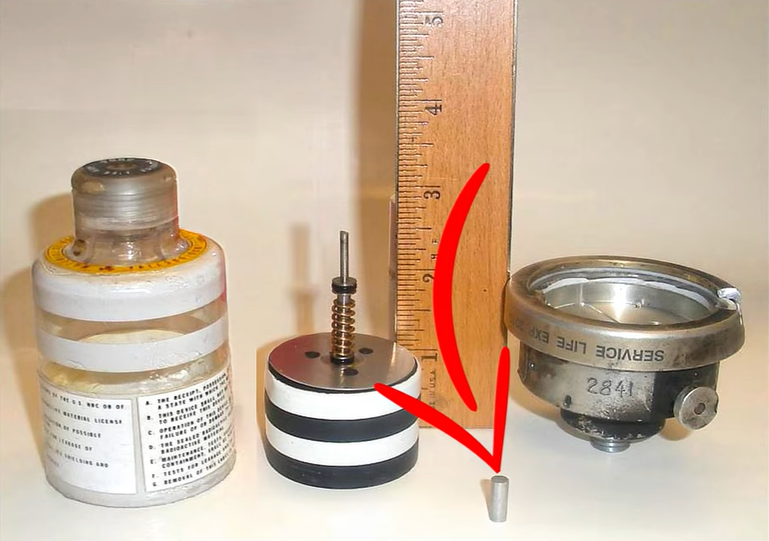
Sometimes you find gold in unexpected places. In this case, it’s from a video about the CH-53 helicopter. The CH-53 Sea Stallion first entered service in 1966. It’s a huge helicopter, capable of lifting immense amounts of weight. All that weight hangs from 6 (or 7 on some models) rotor blades.  The problem was detecting problems with the blades before they grew into a catastrophic failure.

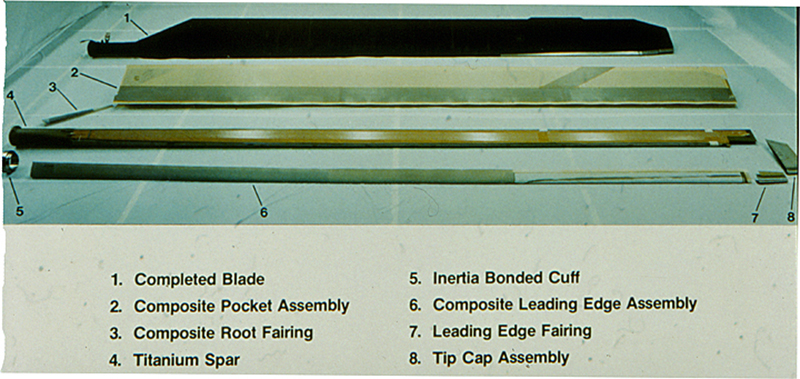
Much like a fixed-wing aircraft wing, the CH-53 rotor blades are designed with a spar as the main structural member.  On early designs, the spar was extruded aluminum. The CH-53D and other variants moved to cold-formed titanium.
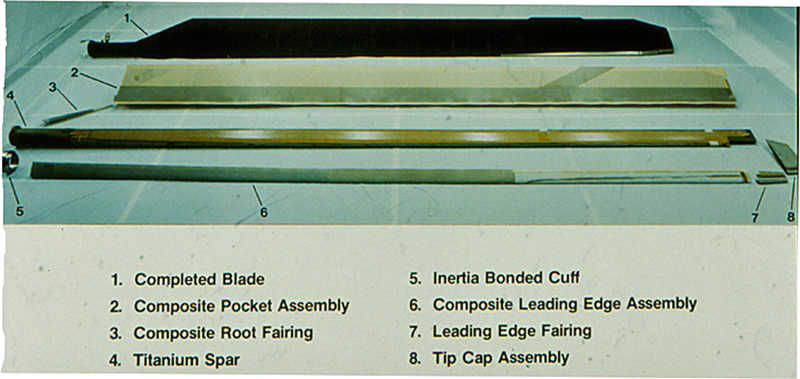
All of these blades shared the same problem – detecting tiny cracks in the metal before they grow into blade failure. Detecting cracks turned out to be rather easy. The blades are sealed and pressurized with nitrogen gas. Cracks allow the gas to leak out. A barber pole pressure indicator on the blades allows mechanics to tell at a glance if everything is ok.

That’s all fine and good on the ground, but if a blade begins cracking in the air, the pilots want to know about it immediately. What was needed was something akin to the tire pressure monitoring system on modern cars. A pressure sensor that would turn on a light in the cockpit.  Modern automotive TPMS systems use wireless sensors inside the tire. In the early 60’s though, electronic components were not reliable enough to survive rotating on a helicopter blade. Wiring the sensors through the spinning rotor head using slip rings would be incredibly complex. Expecting wireless electronic components to survive life in a rotorhead would be even more problematic.
Advertisement

The solution turned out to be simple: Throw a little ionizing radiation into the mix. Called IBIS, short for Inflight Blade Monitoring System keeps the CH-53 safe. The magic happens in the same pressure indicator we mentioned earlier. Rather than just a shift from a green to a barber pole indication, the IBIS module also exposes a tiny amount of radioactive Strontium-90.  The Strontium is a beta emitter, meaning its radiation can be detected by a Geiger counter inside the helicopter.  It’s also relatively safe for humans as long as they don’t eat or breathe it in. No batteries, no electronics on the rotor blade. It’s a simple mechanical solution to a difficult problem.

The solution is so elegant it’s still being used today. The newest versions of the CH-53 of fiber optics to detect faults in the newest all-composite blades. The older variants? They’re still going with the nuclear option.

Advertisement

Source link

Continue Reading

Tech

Tech industry’s robotics talent crunch has UW’s new grad program nearly full before day one

Published

on

University of Washington College of Engineering Vice Dean Jihui Yang, right, and professor Xu Chen walk a robot dog on the UW campus. (Photo courtesy of Xu Chen)

Robotics jobs in the Pacific Northwest are multiplying faster than universities can train people to fill them. The University of Washington thinks it has an answer — or at least a start.

This fall, UW’s College of Engineering will launch its first robotics graduate programs: a Master of Science in Robotics and a Graduate Certificate in Applied Robotics

The university capped enrollment at 35 students for the inaugural cohort. More than 30 people had already signed up for an information session before applications even opened. It’s an  early signal, engineering leaders say, of pent-up demand from regional powerhouses racing to hire engineers who can operate at the intersection of AI, software and hardware.

Program leaders say that skill set is rooted in a traditional, narrowly focused engineering degree that hasn’t kept pace with the rapid evolution of technology. UW is betting that the fix lies at the intersection of AI and hardware, echoing an industry buzzword called “physical AI.”

“Robotics is no longer confined to a single discipline,” said Xu Chen, a UW engineering professor and director of the Boeing Advanced Research Collaboration, who played a large role in the committee that designed the new programs. “The future will need a wide variety of robotics knowledge, and that’s what we built these programs to deliver.”

Advertisement

Applications opened Sept. 1 and will close Sept. 10, with UW aiming for a roughly one-week turnaround before notifying applicants. For its inaugural year, the university is intentionally keeping things small: 25 seats in the master’s program and 10 in the certificate track, which is designed for working professionals who want robotics training without leaving their jobs.

Chen said the small first cohort is by design, not a limitation. The goal, he emphasized, is to get the fundamentals right before scaling up. He expects the programs to roughly triple in size within three to five years.

“Companies are seeing newer potential in robotics as advanced computing and the wave of AI technology mature,” Chen said. “They see that their workforce will benefit from a modern robotics program, and that need is really what drove this.”

Getting there will take machines, and lots of them. UW is purchasing robots and computing hardware for its initial course offerings while also leaning on industry donations: robots, GPUs, and computing infrastructure among them, according to Chen.

Advertisement

Amazon and Microsoft anchored the effort early; the list of partners has since grown to include NVIDIA, Boeing, Dassault Systèmes — the French software company behind design tools like SolidWorks — and at least one smaller robotics manufacturer.

“The industry board was incredibly supportive from the start,” Chen said. “We’ve had almost a year of continuous meetings and collaboration with them and with representatives across our own engineering departments.”

The broader structure of the program is meant to make it easier for students from different corners of engineering, such as electrical, mechanical and computer science, to land in the same classroom and eventually choose their own path deeper into robotics through electives.

The program is also drawing on UW’s existing research muscle in the region. It taps directly into the Boeing Advanced Research Collaboration, which Chen directs, along with robotics labs inside the Paul G. Allen School of Computer Science & Engineering. That gives students a line into the same research infrastructure that already feeds Seattle’s aerospace and e-commerce giants. 

Advertisement

The university’s ambitions extend well past this fall’s launch. Chen said UW has already mapped out longer-term plans for an undergraduate robotics degree and, eventually, a Ph.D. program, with the two new offerings serving as the foundation.

For now, the clearest sign of the program’s ambitions arrived this summer in an unlikely form: a pack of robot dogs let loose on UW’s campus.

“Seattle’s hills make it a uniquely difficult place for robots to move around, which is exactly why it’s a great place to study it,” Chen said.

Both students and faculty got a chance to operate the robots directly, Chen said. It was a hands-on moment that underscored how much more accessible robotics technology has become in just the last few years.

Advertisement

“It was exciting to see the students so happy to see the robots,” Chen said. “That’s the kind of energy we want to build this program around.”

Source link

Continue Reading

Tech

I Went Eyes-On With the Aurzen Zip Pro Foldable, Portable Projector. It’s Ready to Shine Your Entertainment Anywhere

Published

on

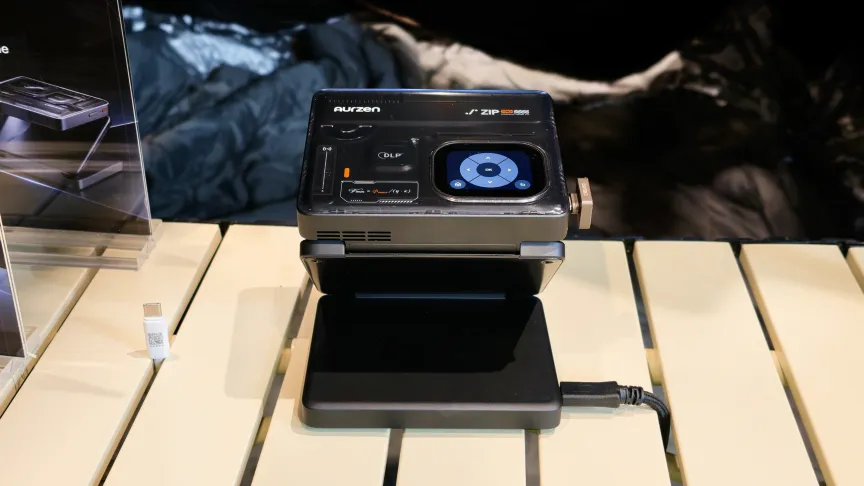
The Aurzen Zip Pro on a wood table.Geoffrey Morrison/CNET

A few months ago, I reviewed the Zip Cyber, a cyberpunk-themed pocket projector from Aurzen. It wasn’t very bright, but the trifold design made it extremely pocketable, and the overall appearance was great. 

At IFA, Aurzen debuted the Zip Pro, an updated and upgraded projector with 1080p resolution and twice the brightness. The exterior design is similar, keeping some aspects of the cyberpunk aesthetic (wise, in my opinion) and adding a small touchscreen on the top to aid setup. 

The Aurzen Zip Pro with controllers and headphones projecting Mario Kart World.Geoffrey Morrison/CNET

While still sporting what Aurzen calls “trifold” (there are two hinges), the Zip Pro is actually slightly larger than the Zip and Zip Cyber at 4.5 by 3.8 by 1.7 inches versus 3.3 by 3.1 by 1 inches. So, it’s nearly three times the total volume and about twice the weight. This is still a remarkably small projector, just less pocketable than the original. It would get swallowed by any backpack. 

Inside, there’s the aforementioned bump up to 1080p, as well as a slightly larger battery. Aurzen says it has 2.5 hours of playtime compared to the Zip’s 1.5 hours. Since it recharges via USB-C, though, you can extend playtime with any decent portable battery pack. So, with the improved performance, the larger size seems a reasonable trade-off. 

The Aurzen Zip Pro next to the Zip Cyber.
The Zip Cyber (top) and the Zip Pro were on display at IFA.Geoffrey Morrison/CNET

I got a quick look at the Zip Pro at IFA, and it did seem brighter, as evidenced by far larger image sizes to demo the projector compared to how I’ve seen it demo the Zip. The 200-lumen range makes the Pro far more usable in a wider variety of situations. It competes specs-wise,with the Anker Capsule 3, which was pricey but good. The Zip Pro is more expensive, but most tech is now compared to when the Capsule 3 was launched.

Connectivity

The biggest issue with the Zip Cyber was that it was a challenge to get anything onto it to watch. There’s still no HDMI, but it does have AirLink, Miracast, AirPlay P2P, DLNA and, especially notable since it was missing in the original Zip, Google Cast. You can also connect via USB-C to watch content from your phone.

You can preorder the Zip Pro now, and the MSRP is $630. I’ll be testing out the Zip Pro in my lab soon.

Advertisement

Source link

Advertisement
Continue Reading

Tech

Best Tech Labor Day Sales I’d Shop Myself (2026): Vacuums, Headphones, and More

Published

on

This clip-on speaker packs surprisingly chunky sound for its size. The built-in carabiner means you can easily tote it around while you’re on the go, and the onboard controls are easy to find and operate. This deal is solidly in the middle of what we tend to see; sometimes it falls a bit more in price, but this discount isn’t a bad one.

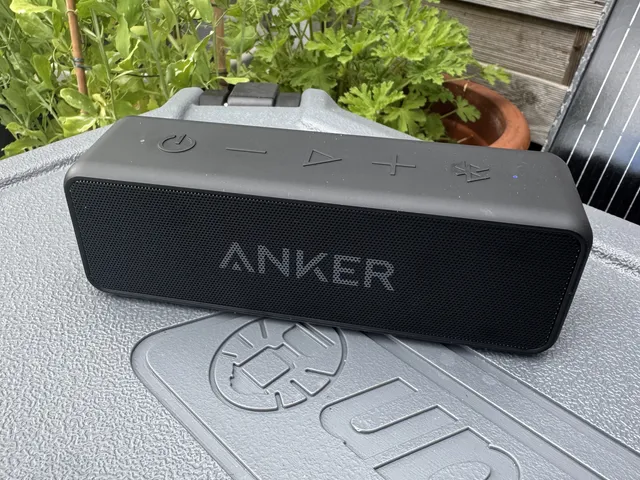
anker soundcore 2 speaker outside on top of a cooler

This speaker fluctuates in price very often, and it has remained a steadfast budget recommendation in our Bluetooth speaker buying guide. We don’t see it fall below $30 frequently. The sound will not blow you away. But for the price, it’s decent, with great battery life and a very portable water-resistant design.

They’re not the newest Sony headphones we love (the XM6), but at this price, it’s hard not to want to spring for it. This is the lowest price it tends to fall to, but it was selling for almost $50 more just a few days ago. Don’t get me wrong—the XM6 that came out earlier this year are a significant upgrade, but if you want a beautiful-sounding, comfortable, and stylish pair of noise-canceling headphones, the Sony XM5 will still make you very happy. Especially at this price.

Nothing earbuds consistently earn mentions in our buying guides, and the latest iteration is an honorable mention being sold at a very compelling price. The Nothing Ear (3a) are stylish and have solid sound, intuitive controls, and an optional app that’s actually useful. Noise cancellation could be better, but for less than $100 these are still a stellar budget pick.


Power up with unlimited access to WIRED. Get best-in-class reporting and exclusive subscriber content that’s too important to ignore. Subscribe Today.

Source link

Advertisement
Continue Reading

Tech

Two major security flaws are affecting more than six million WordPress websites

Published

on


  • Wordfence discloses two critical flaws in Elementor Pro and Super Forms
  • Bugs allow unauthenticated arbitrary file uploads, enabling remote code execution; both patched recently
  • Exploitation attempts already exceed 440,000

More than six million WordPress users are at risk of website takeover, researchers have claimed after discovering two major vulnerabilities being exploited in the wild.

Security researchers Wordfence disclosed finding two flaws, one in Elementor Pro, and one in Super Forms – two popular WordPress plugins.

Source link

Continue Reading

Tech

JMGO’s New Projectors Go Big on Brightness and Refresh Rate. I Had a Look at IFA 2026

Published

on

At the IFA show in Berlin, projector manufacturer JMGO launched its new Iris line. While externally similar to the N3 Ultimate and other models of its gimbal projectors, inside is a new light engine with even greater brightness and the new headline-grabbing feature at the show: a 120Hz refresh rate while running at full 4K resolution.

A 120Hz refresh rate isn’t exactly new in projectors, and definitely not with TVs, but with projectors, that refresh has been historically limited to 1080p. Is this a big deal? Sort of. It’s an interesting technical feat for sure, and shows where projectors can grow. For most people, it’s not likely a huge deal. Yet, a new DLP chip and design like what’s in JMGO’s new projectors is definitely worth having a look at. So I did.

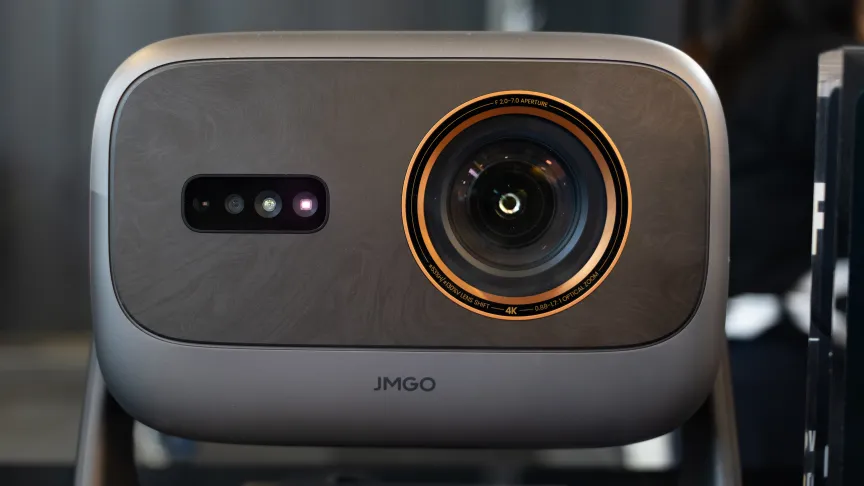
A closeup of the JMGO Iris Ultra Max at IFA 2026.Geoffrey Morrison/CNET

All the refreshes fit to refresh 

I got a brief look at the new Iris projectors at IFA, and there are two models. The Iris Ultra Max has a stated 6,500 lumens, a fully motorized gimbal and a higher native contrast ratio compared to its sibling. The less expensive Iris Ultra has “just” 4,500 lumens and only manual adjustments for the gimbal. Both models have a 0.9-1.7:1 optical zoom as well as horizontal and vertical image shift (separate from the gimbal). They also have a dual iris system to help dial in brightness and improve the dynamic contrast ratio.

I didn’t have any of my test gear with me, and no trade show is an ideal place to judge a product anyway, but the projectors certainly looked bright. JMGO had a side-by-side demo set up running fast-moving and fast-panning 60-frames-per-second content. One projector was running at a refresh rate of 60Hz, the other at 120Hz. The latter did have less blur on some aspects of the image. However, if you’re not watching 60fps content like sports or video games, I’d expect some severe motion-smoothing issues, aka the soap opera effect (this will be the case with any of these higher-refresh projectors). Then again, 120Hz is an even multiple of 24, so theoretically they could dejudder without interpolating frames. We’ll see.

The JMGO Iris Ultra Max running at 120Hz next to the previous generation running at 60Hz at IFA 2026.Geoffrey Morrison/CNET

DLP has never had a significant issue with motion blur, so a faster refresh isn’t as big an improvement as it would be with, say, LCD. Reducing LCD motion blur is actually why we have faster refresh rates in TVs to begin with. JMGO says the faster refresh rate can also further minimize DLP’s infamous rainbow effect, where some people notice rainbow trails to certain objects on screen (or when they move their eyes). That could be very helpful for those susceptible to that issue.

A closeup of the JMGO Iris Ultra Max at IFA 2026.Geoffrey Morrison/CNET

I really liked the N3 Ultimate when I reviewed it. It was, at that point anyway, the best gimbal projector. I’m not fully convinced of the need for a fully gimbaled projector for most people. But, with image shift and optical zoom, the N3 can fit in a lot of rooms regardless of how much or little you interact with the gimbal mechanism. And regardless of all that, its performance was excellent. If JMGO can keep the image quality just as high with these new projectors while increasing the already impressive brightness, that will be a very interesting projector. I’ll be getting one to test soon, especially to see if this whole 120Hz thing is worth the hype.

JMGO is expecting the MSRP of the Ultimate Max to be $3,699 and $2,299 for the Ultimate. Both start shipping in mid-October.

Advertisement

Source link

Advertisement
Continue Reading

Tech

Another Rowhammer attack has been detected, and Nvidia workstation GPUs are firmly in the firing line

Published

on


  • GPUThor is the first Rowhammer attack to defeat ECC on Nvidia GPUs and reach a root shell on the host
  • It affects four Ampere workstation cards with GDDR6 memory, the RTX A4000, A4500, A5000 and A6000
  • Non-uniform hammering, enabled by defeating GPU memory coalescing and finding that Target Row Refresh (TRR) mitigations fire once every 72 refresh intervals, delivers effectively 6.6 times the hammering intensity of prior attacks

Four researchers at the University of Toronto have disclosed GPUThor, a Rowhammer technique that breaks the error correction Nvidia has spent the past year recommending as the defense against exactly this class of attack.

Chris S. Lin, Joyce Qu, Aditya Rajeev and Gururaj Saileshwar are expected to present the paper outlining their approach and subsequent findings at ACM CCS 2026.

Source link

Advertisement
Continue Reading

Tech

What Does Candela Mean On A Flashlight (And Why Brightness Isn’t Everything)?

Published

on


While flashlights seem like simple tech, there are a number of fairly technical terms associated with them, like COB and candela. While many flashlights are primarily evaluated in terms of lumen output, candela is also an important metric. Candela is the measurement that tells you how intense a flashlight’s beam is in a specific direction, not how much total light the flashlight produces. It measures the brightness of a light at 100 feet from the source, and unlike lumens, incorporates factors like reflector size and whether the lens in front of a bulb dims the light. In simple terms, lumens tell you the overall amount of light, while candela tells you how tightly that light is focused and how far it can reach.

That distinction matters because buying a flashlight with a high lumen rating doesn’t automatically give you a better long-distance light. A wide flood beam can look very bright up close, but still have relatively low candela, while a tightly focused beam can reach much farther even with fewer lumens. Candela is especially useful when you’re comparing flashlights that look similar on paper, but behave very differently in the real world. Two lights can advertise the same lumen output and still produce very different beams based on the aforementioned reflectors and lenses, as well as LED placement and optic design.

Advertisement

Why it matters

Brightness is only the total amount of visible light a flashlight produces. It doesn’t give you a sense of where that light goes or how long it stays bright. It also doesn’t indicate how well you can see colors, detail, or whether the light is practical for the job.

Candela, meanwhile, helps you understand whether a flashlight, including the most powerful flashlights available on Amazon, is better for close-up tasks or for lighting up objects at a distance. A high-candela light is usually better for spotting trail markers, looking across a field, or cutting through fog and smoke, while a lower-candela light is better when you want a broad, even wash of light.

You’ll also see candela discussed alongside “throw,” which is basically beam distance. Flashlight testers often use candela to estimate how far the brightest part of the beam will reach, and the beam’s shape matters as much as raw output. 

Advertisement

In other words, candela is the number to watch when you care about reach, not just brightness. That’s why some flashlight buyers prefer a high-candela model for outdoor or tactical use, while others choose a lower-candela light for camping, household tasks, or general carry. Once you understand what candela is, flashlight specs stop being just a list of numbers and become key info that tells you what the light will actually do in practice.


Advertisement

Source link

Continue Reading

Tech

All a circuit board! Tech engineer tracks trains, ferries and more in real time with a post-layoff project

Published

on

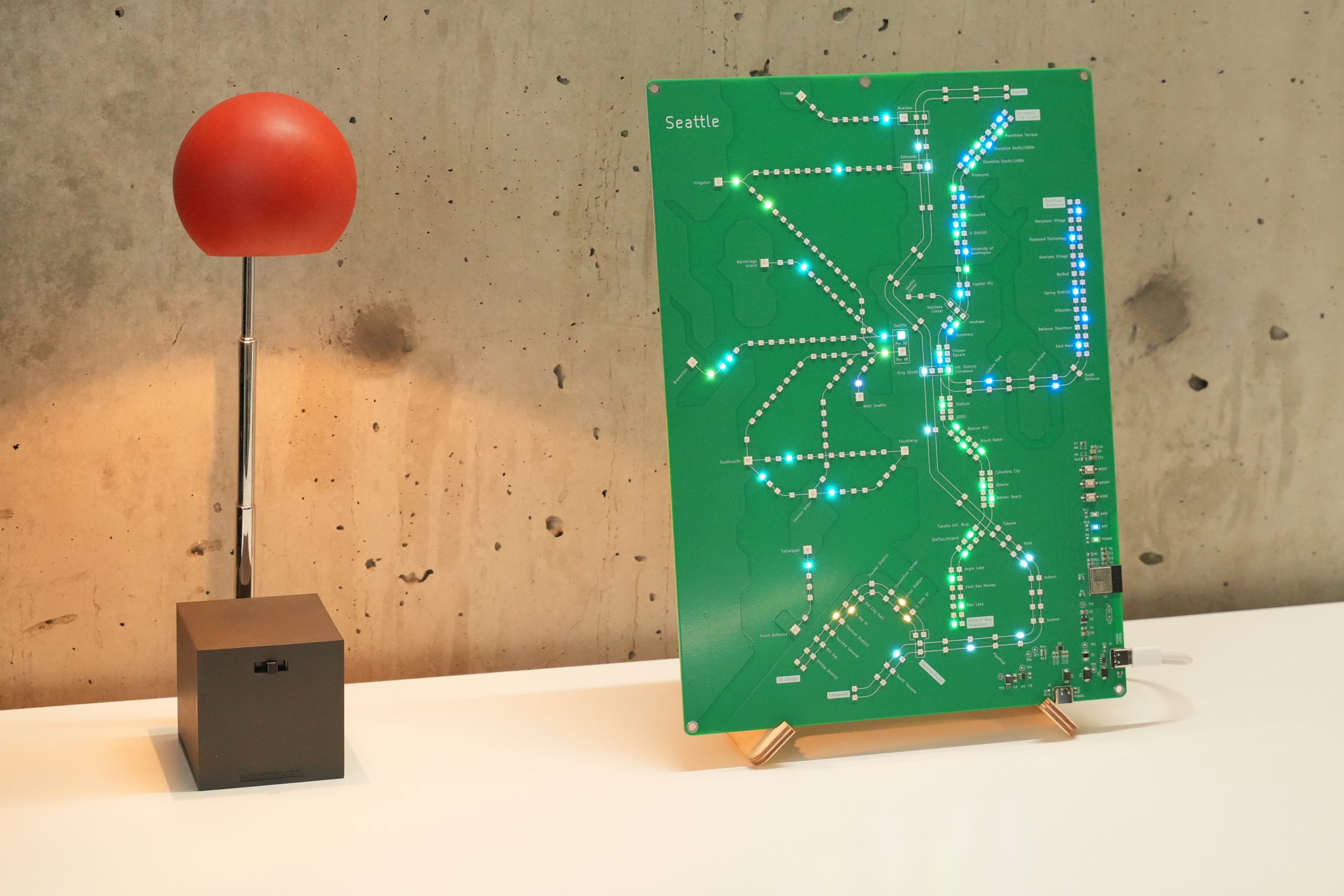
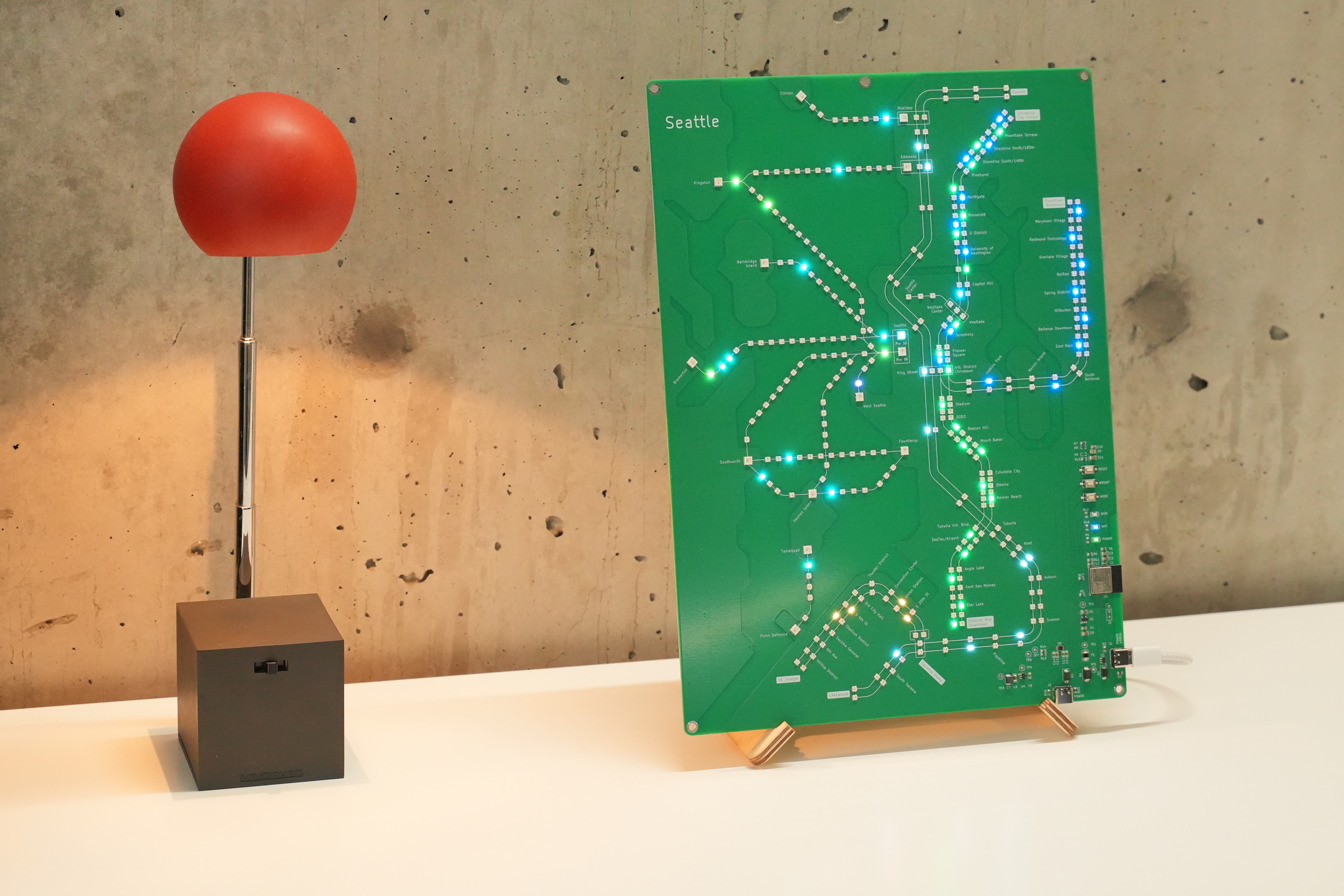
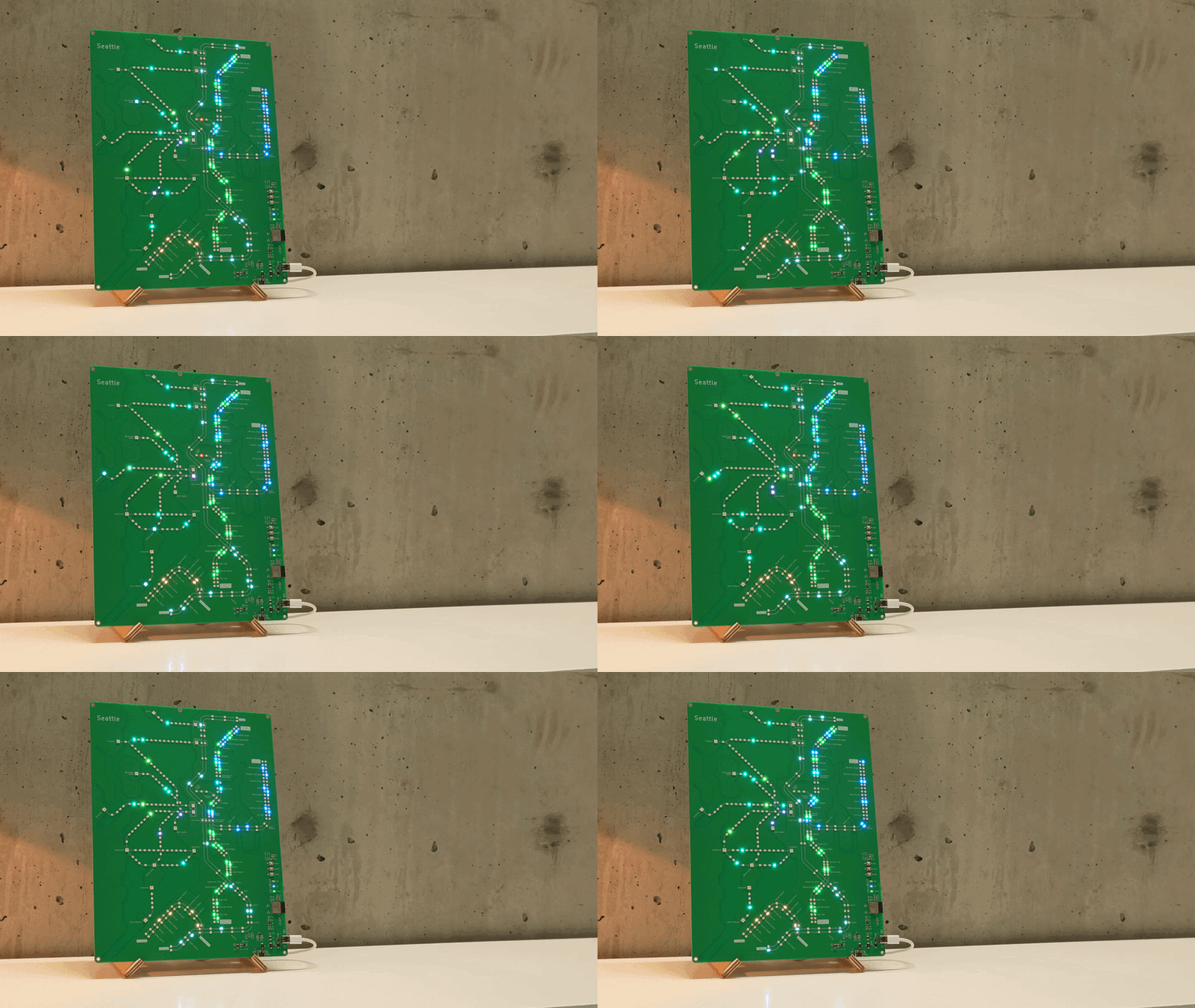
Seattle Transit Live, a circuit board map of Seattle-area trains, ferries and more. (Michael Benedict Photo)

When Sound Transit opened the light rail 2 Line across Lake Washington in March, software engineer Michael Benedict built a custom gift to mark the milestone for his transit-fanatic wife: a circuit board map of Seattle with tiny lights depicting moving trains.

Today, that personal birthday project has evolved into Seattle Transit Live, an interactive LED map that tracks Puget Sound-area light rail, trains, ferries, and the water taxi in real time using public transit data.

The extra time to indulge in such a detailed build came after Benedict was laid off from Amazon — where he worked as an engineer for a little over three years. Rather than rushing into another full-time corporate role, he picked up some freelancing and gave himself room to dive into CAD design, custom hardware and the prototyping process.

“I put way more time than is ever going to be economic into this,” Benedict told GeekWire. “I really kind of luxuriated in it because I didn’t have a job and I could just go deep.”

Designed on a custom fiberglass circuit board with etched copper detailing Seattle-area waterways, the $219 device plugs into Wi-Fi to display live positions of vehicles like Sound Transit trains, Washington State Ferries, the Sounder, and Monorail.

Advertisement
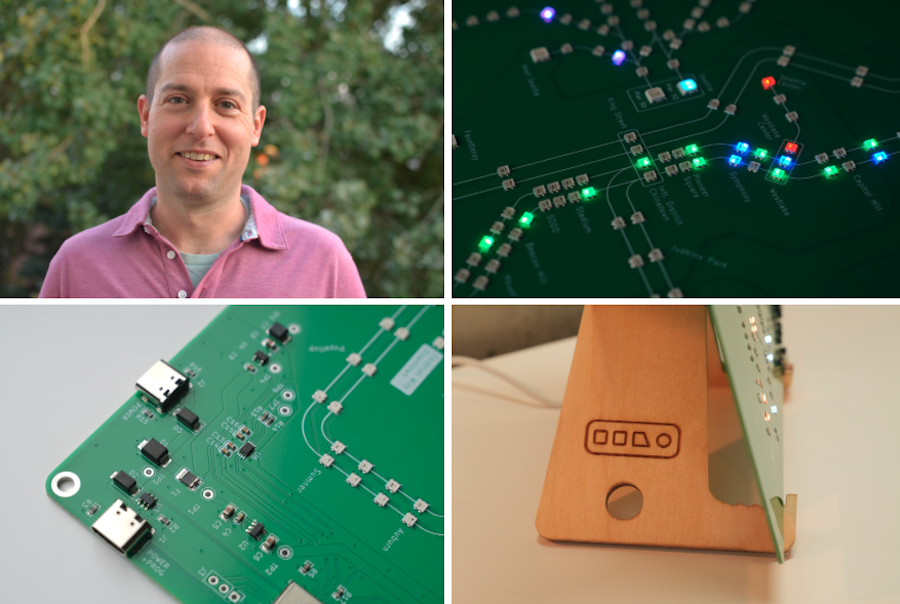
Michael Benedict is a software engineer and creator of Seattle Transit Live. The $219 interactive LED map tracks transit across the Puget Sound region and comes with a custom-built stand. (Michael Benedict Photos)

After Benedict posted an early prototype on Reddit and saw an enthusiastic response from local transit geeks asking to buy one, he refined the design and turned the side project into a full production run.

To power the display, the board uses an ambient light sensor to adjust to room brightness and features three distinct software modes. Alongside the real-time data mode, users can switch to a schedule replay mode or a fast-forward option that cycles through a full 24-hour transit schedule at 400x speed — letting users watch a day’s worth of regional traffic zip across the board in minutes.

The 8.6-by-11.8-inch boards are pretty jammed with assorted routes, but we had to ask if there would ever be room for Sound Transit’s eternally delayed Ballard neighborhood line.

“If I’m still making transit maps by the time they put Ballard in,” Benedict laughed, “I’m going to consider that a huge win all around.”

While circuit board maps and LED transit art have been built for transit networks in major cities like New York and Tokyo, Benedict sees Seattle’s unique geography and growing light rail as a compelling canvas for the concept. The board isn’t intended to replace trip-planning apps like OneBusAway, but rather to serve as a piece of functional art that captures the living movement of the region in a physical medium. And it’s all open-source.

Advertisement

The printed circuit boards are manufactured in Shenzhen, China — a standard approach for small-batch electronics — but Benedict wanted to keep a key part of the production local. He partnered with Oxbow Fabrication in Seattle’s Georgetown neighborhood to CNC-machine custom wooden stands, ensuring each board ships with a locally made mount.

The initial run of 50 pre-orders sold out quickly, prompting Benedict to order another 150 units to carry him through the end of the year. And going all-in on an independent hardware project has come with its own brand of founder anxiety.

“Putting 75,000 LEDs on your personal credit card is enough to make you think, ‘Maybe I should send some emails,’” he laughed.

Benedict recently showcased the project at the Seattle Design Festival, and he’s considering potential retail establishments in the city where offering such a niche piece might make sense — such as the gift shop at the Seattle Art Museum.

Beyond Amazon, Benedict’s tech career has included data science roles at 98point6 and Modernist Cuisine. Originally from Queens, N.Y., his embrace of the Pacific Northwest has been accentuated by his hardware project. Living next to the new Judkins Park station for the 2 Line, with a front-row seat to the region’s evolving transit landscape, has helped, too.

Advertisement

“Transit is just a really cool subject matter for it,” Benedict said. “It’s on a schedule, the data’s there, and it feels very Seattle — how the boats and trains move around.”

Source link

Continue Reading

Tech

Air circulator vs fan: Which one should you actually buy?

Published

on

Although we’re hopefully past the worst of this summer’s record-breaking heatwaves, experts warn that hotter temperatures may become the new normal here in the UK. With that in mind, now’s a great time to make sure your home is prepared for warmer weather. 

That begs the question as to whether the humble fan is enough to see you through more heatwaves? Or is an air circulator a more versatile choice?

To help you decide, we’ve detailed everything from what an air circulator actually is and how it works, to the ways it differs from a fan, so you can determine which appliance you should invest in.

Once you’re finished here, make sure you visit our round-up of the best fans. If you think you might need a bit more oomph, then our air cooler vs portable air conditioner guide has you covered. 

Advertisement

What is an air circulator?

Although an air circulator is a type of fan, it works in a slightly different way. While a traditional fan works by blowing air where it’s pointed, an air circulator moves air around an entire room. 

Advertisement

That means while a fan offers an instant, more direct cooling effect, an air circulator works to cool the temperature of an entire room by redistributing warmer air.

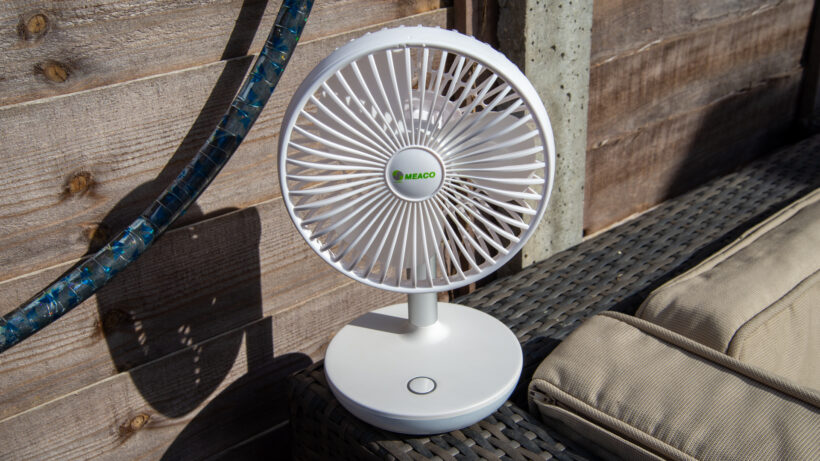
MeacoFan 260C Cordless Air Circulator heroMeacoFan 260C Cordless Air Circulator hero
MeacoFan Sefte 10 Pedestal Air Circulator. Image Credit (Trusted Reviews)

Do air circulators actually cool a room?

Unlike an air conditioning unit which actively removes hot air from a room, cools it down internally and then pushes it back out, an air circulator doesn’t actually cool a room down. Instead, it redistributes hot air with cooler air to create a more even room temperature. In addition, an air circulator helps make rooms feel less stuffy as it breaks up stale air.

So, although they aren’t actually cooling devices, they help a room feel less hot and stuffy than it would otherwise.

Advertisement

Airflow and room coverage

We should disclaim that different fans and air circulators will offer varying levels of airflow and room coverage. In our experience, we’ve found that air circulators generally offer more powerful airflow, with the Switchbot Battery Circular Fan seeing up to 2.5m/s at 1m away while the MeacoFan Sefte saw up to 2.6m/s at the same distance. 

Comparatively, we found that the Dr Prepare 13-inch Tower saw an airflow of 1.7m/s while the (much pricier) Dyson Find+Follow Purifier Cool PC3 resulted in 1.8m/s when positioned 1m away. 

Advertisement

Dyson Find+Follow Purifier Cool PC3 fan exteriorDyson Find+Follow Purifier Cool PC3 fan exterior
Image Credit (Trusted Reviews)

Noise levels

Some fans, especially older models, have a reputation for being pretty noisy appliances. However, newer models do tend to promise a quiet cooling experience. While we’ve tested a handful of fans that are a touch noisier than we’d like, such as the Dreo TurboCool which maxes out at 60.5dB and the portable Shark ChillPill that reaches up to 67.9dB, generally newer fans shouldn’t be loud enough to actively cause a disturbance.

Shark ChillPill on table standing upShark ChillPill on table standing up
Shark ChillPill. Image Credit (Trusted Reviews)

Similarly, modern air circulators shouldn’t be particularly loud either. Take the MeacoFan Sefte 8” air circulator which we concluded was “effortlessly quiet” averaging at around 43.5dB when on level six and never going beyond 54dB – even at its maximum level. 

Plus, and as its name implies, the Duux Whisper 3 is also an impressively quiet device. Even at its maximum speed of 4.3m/s at 15cm and 2.6m/s at 1m, which is pretty powerful, sound never exceeded the 52.1dB mark. 

Advertisement

Advertisement

Duux Whisper 3 heroDuux Whisper 3 hero
Duux Whisper 3. Image Credit (Trusted Reviews)

Generally, while neither a fan nor an air circulator will be completely silent, unless you have an old or broken appliance, they shouldn’t be so loud as to disturb. 

Which is better paired with air conditioning or a heater?

An air circulator is a solid option for year-round use, as it generally works as well with an air conditioner as it does with a heater. In warmer weather, if you pair your air circulator with an air conditioner, it’ll help distribute the AC’s cooler air more efficiently around the room. 

Similarly, pair the circulator with a heater and it’ll help circulate the heat to create a more uniform temperature. That’s especially useful as hot air tends to rise while colder air stays low, meaning heaters typically need to work a bit harder to warm rooms.

In comparison, while you can pair a fan with both an air conditioner or heater, remember fans are typically designed for personal use. However many fans, such as the Dyson Find+Follow Purifier Cool PC3 and Dr. Prepare 13-inch Dual Oscillating Tower, do provide oscillation which can help with air circulation too. It’s just they’re not quite as powerful as a dedicated air circulator.

Advertisement

Advertisement

Which should you buy?

There are a few factors to keep in mind when choosing between an air circulator and a fan. A traditional fan that offers a direct breeze is better for those who want personal cooling and if you don’t have an air conditioning unit that is more powerful.

However, if you want a device that helps keep your room at an even temperature, less stuffy and can work all-year round, as it helps boost both an air conditioner and a heater.

Advertisement

Source link

Continue Reading

Trending

Copyright © 2025