


Connect with us

Tech

5 Changes We Wish Harbor Freight Would Make

Published

on


Harbor Freight has a lot to offer its customers compared to larger competitors. The company also leaves a lot to be desired. Let’s start with the good stuff. Harbor Freight offers tens of thousands of tools and equipment, usually at a fraction of what places like Lowe’s and Home Depot charge. If you’re on a budget, you’ll be happy to know there are lots of good tools under $150 at Harbor Freight. The company also offers conveniences like online shopping, coupons, members-only deals, store credit accounts, and a large stock of replacement parts for the tools you already own.

But no store is perfect, and Harbor Freight has its share of flaws. A few changes could easily improve the customer experience, and some requests show up more consistently in online feedback than others. Everyone’s entitled to their opinion, and Harbor Freight employees and executives probably hear thousands of suggestions every day. That said, these are five changes that we wish Harbor Freight would make.

Advertisement

Have a cooler of cold drinks in stores

Harbor Freight’s customer base tends to consist of professional craftsmen and everyday DIYers. While some customers plan trips to the store ahead of time, it’s safe to assume that others visit the store to get that one tool they’re missing when they’re already elbows deep in a project. In either case, a cold refreshment could be a welcome relief for hardworking customers.

People pay for convenience. Grabbing a cold drink from a cooler at the checkout counter feels like a small purchase, but it makes a big impact to someone who’s spent the last few hours slogging away on a job or project. A good selection of bottled water, electrolyte drinks like Gatorade or Powerade, sodas, and energy drinks offers a little something to everyone. Plus, every drink purchase is more revenue for the store, so it’s a win-win.

Advertisement

Offer product demos in stores

Nothing sells a product like seeing what it can do up close. Customers can read the specs on the box or check reviews online, but there’s something about seeing the product in person that photos and videos can’t compare to. Some Reddit users point out that stores like Home Depot have demo products that allow customers to test and compare items in the store, and we agree that this benefit would be welcome at Harbor Freight.

Advertisement

Having demo products available for customers to test gives them a better idea of what they’re buying. That doesn’t mean customers should be able to take things like chainsaws and jackhammers for an in-store test drive, but some items, like hand tools, would work well for demos. Out of the package, customers can hold the tools to get better a feel for grip, weight, size, and comfort. Some Harbor Freight stores do have demo tools, such as the G2 ratchets, but having more items on display for touching and testing would be a helpful change for shoppers.

Advertisement

Consolidate product lines

Harbor Freight isn’t lacking on product lines. For example, the brand currently have four brands of pliers: Pittsburgh Pro, Quinn, Icon, and Doyle. The same four names pop up in the screwdriver section, along with the Warrior brand. Having four or more brands per tool type is a bit excessive, and we wish Harbor Freight would stick to just two or three per product line.

Variety is usually a good thing. Shoppers like options, especially when it comes to price. But too many options can make it harder to compare products, and even harder to make a decision. Three tool brands — budget, mid-grade, and premium — could to be the sweet spot. Anything beyond that just adds to the confusion. However, two tools of a similar price can be significantly different if they’re made for different purposes. For example, a Doyle side cutter is different from an Icon side cutter since one is for electrical work and the other is made with car mechanics in mind. Regardless of the tool’s purpose, having fewer options per tool might make some buying decisions easier.

Advertisement

Make Bauer and Hercules tools use the same batteries

Bauer and Hercules are two of the most recognizable Harbor Freight brands. They’re only found at Harbor Freight, and they’re made to rival other popular tool systems like Milwaukee Tool, Ryobi, and DeWalt, all of which use a proprietary battery line. Since both brands are made specifically for Harbor Freight, some shoppers think the two product lines should use only one type of battery compatible with all their tools.

This is something no other tool brand does, which could give Harbor Freight a competitive advantage. It would also prevent shoppers from getting locked in one battery system or having to buy new, expensive batteries when switching from one to the other. Compatible batteries mean customers can build up their tool collection with the best mix of Bauer and Hercules for much cheaper. Naturally, there are drawbacks to this idea. For example, this move might not be profitable for Harbor Freight, which could mean an increase in the price of each brand’s tools. Still, we can still dream.

Advertisement

Get free ship-to-store options

One thing you might have noticed about Harbor Freight is that it always charges for shipping for online orders. What you might not know is why it does this. Many big box stores bake shipping into the price you see online, so shipping is only technically free. Harbor Freight does not do this. If you don’t want to pay for shipping, your only alternative is to buy your items in the store.

We wish Harbor Freight would give us another option: shipping items to the store for free. Currently, there is no such option, but it would be a helpful addition in case an item isn’t available locally. Shipping between stores is probably cheaper for Harbor Freight, while the customer can get the item they need while avoiding shipping costs. This isn’t an uncommon practice; Stores like Walmart, Target, and Home Depot offer this service at no charge to the customer. It could also lead that user to make more purchases, since they’d have to get through the store’s doors to retrieve their item.

Advertisement


Source link

Advertisement
Continue Reading
Click to comment

You must be logged in to post a comment Login

Leave a Reply

Tech

Why Are Gay Bars Building Databases Of Their Patrons?

Published

on

from the surveillance-society dept

Recent reports have raised alarm about the use of PatronScan, an ID-checking and face-scanning system, at multiple LGBTQ+ bars in San Francisco’s Castro neighborhood. Much of the attention has focused on reports that the system photographs patrons as they enter venues and questions about whether those images are used for facial recognition.

A broader privacy concern also deserves scrutiny. For years, PatronScan has marketed itself not just as an ID-verification tool, but as a system that allows bars and clubs to identify patrons, keep records about them, and share information across venues. As one news article published in 2019 documented, PatronScan built a network that allowed participating bars to flag patrons and share information about them with other establishments. 

And in California, it’s not at all clear how PatronScan’s business model of scanning IDs and sharing the information from those scans with other bars comports with the law. California’s ID privacy law, which was amended in 2018 to add ID “scans,” states that no businesses shall “retain or use” any information from a scanned ID card except for limited purposes such as to verify age, comply with a legal requirement, or prevent fraud. 

Californians should be deeply concerned about businesses that collect information from government-issued IDs and use it to build databases about where people go, whom they associate with, and whether they should be allowed into other public gathering places. That concern is especially strong in LGBTQ+ spaces, which have long served as refuges for people to go without being tracked, monitored, or put on lists. 

Advertisement

We reached out to Patronscan with questions regarding their practices and their views on California ID law. They referred us to their published FAQ question “Is Patronscan privacy compliant in California?” which claims that the use of Patronscan kiosks is legal in California. They also said “Patronscan does not do facial recognition in North America, or any kind of automated analysis of the ID or the live photo image.” 

The California Legislature Has Investigated PatronScan’s Business Model 

In 2018, the California Legislature published bill analyses (on that year’s AB 2769) that went into detail about PatronScan’s business. Reviewing PatronScan’s own materials, the California Senate Judiciary Committee found that the company had collected and retained information on 561,087 customers in Sacramento alone during the first five months of 2018—a remarkable figure for a city whose population had only recently topped 500,000.

Lawmakers also found that at that time, PatronScan retained information for at least 90 days or longer in some cases, shared information among participating bars, and maintained bans that lasted an average of more than 19 years. A PatronScan “Public Safety Report” used 10,000 scans collected on a single day to report on “where customers live, how far they have traveled, and how many different venues the customers patronized.” 

This was not simply checking IDs at the door. PatronScan was building a database. 

Advertisement

An immigrants’ rights group, the Coalition for Human Immigrant Rights (CHIRLA), wrote about its concern at the time with these growing ID databases, saying that “placing individuals on a database that labels them a “threat to public safety” has “significant immigration consequences that could lead to deportation, revoking of current status, or denial of future immigration relief.” 

Today, PatronScan states that it retains personal information about all customers for 21 days, and about flagged customers for up to five years. This includes the customer’s name, date of birth, photograph, gender, and zip code. It also includes the dates and times that the customer entered particular bars. Such databases are a grave privacy threat. Personal data is routinely stolen by thieves, misused by a company’s employees, seized by government agencies, and diverted to new purposes by a company’s executives. 

California Law Still Bans ID-Scan Databases, And Bars Should Follow That Law

In 2018, California lawmakers closed what they viewed as a loophole. Existing law already prohibited businesses from retaining or using information obtained when they “swiped” a driver’s license, except for the narrow purposes of legal requirements (like a judicial warrant) or “preventing fraud, abuse, or material misrepresentation.” 

After reviewing companies like PatronScan, the Legislature amended the law to make clear that the same restrictions that apply to businesses that “swipe” ID cards also apply when those IDs are “scanned.” PatronScan opposed that change, arguing it wanted to preserve the ability to share information among bars so participating venues could decide whether to admit patrons.

Advertisement

The bill became law anyway. Yet PatronScan continues to market and sell a system that apparently retains information from scanned IDs, and allows participating venues to flag patrons and share information across its network. 

At a minimum, that raises serious questions about how those practices fit with California’s existing ID privacy law. Bar and nightlife venue owners who utilize PatronScan should think twice about its effects on their customers, and consider going back to standard, visual ID checks. These physical checks have been effective at keeping underage patrons out of 21-and-over venues for decades, and don’t present the serious privacy dangers of creating a private database of bar patrons. 

For venues serving vulnerable communities like immigrants or the LGBTQ+ community, the stakes of using this technology are even higher. It’s disappointing and alarming to see some of California’s more well-known LGBTQ+ nightlife spots instead lining up as PatronScan’s early adopters. A venue cannot claim to be a safe space while feeding its patrons’ data to a third party database. These businesses should reject PatronScan, return to the standard ID checks that every other bar has been able to utilize, and prove to their customers that their privacy and security still matters. 

Originally published to the EFF’s Deeplinks blog.

Advertisement

Filed Under: age verification, california, id privacy, id scans, id verification, privacy

Companies: patronscan

Source link

Advertisement
Continue Reading

Tech

These Limited Edition Klein Tools Pliers Celebrate America’s 250th Birthday

Published

on


Major milestones typically call for quite a bit of fanfare and fuss. A 40th birthday, for instance, or a 50th wedding anniversary. However, there will likely be few milestones as worthy of fanfare as the U.S.’ 250th anniversary on July 4th, 2026. Unsurprisingly, there have been all kinds of patriotic products produced to mark this famous date, including a rather special set of 8-inch diagonal cutting pliers from Klein Tools.

The Klein Tools 250th Edition Diagonal Cutting Pliers have a red, white, and blue colorway on the handles, with red and white on one and blue and white on the other. Functionally, however, these are the same Journeyman handles that Klein Tools customers will be familiar with. Klein complements the special colors with a laser-etched legend that states “250 USA Est. 1776” on the jaws, alongside a stylized version of Stars and Stripes above it.

Advertisement

These $34.98 Klein pliers have proved popular with customers, to the point that availability varies significantly between outlets at the time of writing. Let’s take a look at what these pliers offer and how customers like them to see if they’re one of the many Klein Tools worth adding to your tool box – as well as run through the 250th anniversary Klein Tools collection it’s a part of.

Advertisement

Klein Tools’ anniversary pliers and the rest of its 250th anniversary collection

Klein Tools’ 250th Edition pliers are essentially its standard pliers, just with new colors and iconography. Thus, they have the same 2000 Series cutting knives, stubby jaws, and a design that allegedly allows for 36% more cutting power than other pliers. The Journeyman handles still use a blend of two materials, which makes them durable yet comfortable to hold. Unsurprisingly, then, Lowe’s customers seem to like these pliers a lot, with the product receiving 4.9 out of 5 stars from 117 ratings and a 100% recommended ratio.

It’s not every day that your nation turns 250, of course, and Klein Tools, which makes a lot of its tools in the U.S., didn’t stop at celebrating the milestone with just a pair of pliers. Alongside the 8-inch pliers, Klein also sells 250th Edition 9-inch Journeyman Lineman’s Pliers, a 250th Edition screwdriver set, and a 250th Edition Wire Stripper/Cutter. Each item boasts the same patriotic colors for the handles and semiquicentennial iconography, tweaked to suit the tool’s design. In the case of the screwdrivers, that means separate red, white, and blue sections. If you’re interested in the 250th Edition pliers, or any of the other anniversary tools, you can check the Lowe’s website or any of the retailers listed on the Where to Buy section of Klein’s website.

Advertisement


Source link

Continue Reading

Tech

Microsoft 2.5: How EVP Charles Lamanna is helping turn Microsoft into the ‘Copilot company’

Published

on

Charles Lamanna, EVP of Copilot, Agents and Platform at Microsoft, at a GeekWire event in March 2026. (GeekWire Photo / Kevin Lisota)

GeekWire is profiling over the next few weeks some of the people and teams that are shaping the evolution of Microsoft in what we’re calling its “Microsoft 2.5” era.

The Copilot Super App cat is only partially out of the bag. Sometime in the coming weeks, Microsoft will launch its entry into the AI “super app” space, company officials have said. But Microsoft hasn’t talked much about what the coming Copilot Super App will include beyond a few of the top-level experiences that are meant to unify and organize consumer and business users’ access to key Microsoft AI properties.

@media (max-width: 600px) {
.gw-exec-card { float:none !important; max-width:100% !important; margin:20px 0 !important; padding:16px 18px !important; }
.gw-exec-card .gw-exec-media { width:170px !important; margin:0 auto 14px 0 !important; }
.gw-exec-card .gw-exec-label { font-size:12px !important; }
.gw-exec-card .gw-exec-name { font-size:20px !important; }
.gw-exec-card .gw-exec-title { font-size:15px !important; margin-bottom:14px !important; }
.gw-exec-card .gw-exec-facts li { margin-bottom:12px !important; }
.gw-exec-card .gw-exec-facts li:last-child { margin-bottom:0 !important; }
.gw-exec-card .gw-exec-value { font-size:15px !important; line-height:1.45 !important; }
}

Executive Vice President Charles Lamanna is part of the inner circle known as the Copilot Leadership Team that is spearheading the Super App effort. He also oversees building out and securing the back-end services that will power the Copilot Super App.

Advertisement

As head of Copilot, Agents, and Platform, Lamanna has a lot of responsibility for someone who has been with Microsoft for “only” 13.5 years. He has actually been with the company a bit longer than that, as he has done three tours at Microsoft: He first interned for Windows Live OneCare, then returned in 2009 to work on message-filtering services. He rejoined Microsoft when it bought his cloud performance-management startup MetricsHub Inc. in 2013. He worked as an engineering manager on Azure, then ran the Power Platform and Dynamics 365 teams, before assuming his current role in March 2026.

Lamanna says he emphasizes three things with his team: Be customer-obsessed; get things done by having a “total ownership mindset”; and be kind, not jerks.

Every six months, he writes a “State of the Business” paper for the team, in which he outlines their priorities. In addition to focusing on changing how people work — from tooling, technology, budgeting and organization perspectives — he emphasizes the importance of keeping “the crown jewels” of Office and Microsoft 365 up, reliable and secure.

“There’s going to be a massive surge of demand on the back end (Microsoft 365) because of agents. They’re nonstop,” said Lamanna during GeekWire‘s interview with him this week.

Advertisement

While the Super App itself will likely be free (like the Copilot App today), the services it exposes will likely not. The company has been moving toward usage-based pricing with its AI products, the way it already has with GitHub Copilot and Microsoft 365 Cowork. That kind of model makes sense for the company in a world where always-on agents, not the number of users, drive a lot of the demand.

He also said his team needs to be at the frontier for AI products. “We need to have AI startup and lab characteristics but with Microsoft sensibilities,” he said.

Lamanna made a similar case publicly this week, asserting in a LinkedIn post that “the most important thing my team will do this year won’t be any single product or feature we ship” but rather changing how the team works.

Reining in the Copilot-Palooza. Despite the rise of agents and all things “agentic,” Copilot is still Microsoft’s top priority, Lamanna said. Microsoft’s goal is for Copilot to be a truly personal AI assistant that will know how you work, the apps you use, the processes and workflows that matter to you, and more.

Advertisement

“We had some missteps because we fragmented,” he acknowledged. “It’s like we had a consumer Copilot and we have like a commercial Copilot and we have GitHub Copilot and yeah — ‘Copilot Palooza’ is what I call it internally.”

This is where the coming Copilot Super App fits in. Microsoft wants it to be a single destination that brings the key Copilots together on the work and home fronts.

He said to think of the Super App “almost like a browser or an operating system.” In the same way a browser might have a bunch of different tabs, or Windows a bunch of different apps, the Super App will be the home for Code, Chat, Cowork and Autopilots, or always-on agents. Microsoft is expecting that users still will go directly to apps when needed, but it’s working to make Copilot the first app people boot into and live in, similar to the way many do today with Outlook or Teams, he said.

Microsoft’s goal is to wire into the Super App even more of its core franchises over time. Dynamics 365, its CRM and ERP offerings, are morphing into a set of agents that connect to Dynamics Model Context Protocol (MCP) servers, which connect AI models to back-end data. The plan is to integrate those Dynamics agents into the Super App.

Advertisement

The company also is in the midst of integrating the Dataverse storage and management platform that underlies its Power Platform and Dynamics directly with Copilot. That capability, in testing now, would give users a more streamlined way to query data stored in their ERP and CRM systems from inside Copilot.

Rethinking the ‘headless’ approach. With Microsoft looking to make the Super App its new front-end user experience, what happens to Office? Its competitors like Salesforce and SAP are moving toward the idea of a “headless” approach, meaning customers would access the backend CRM or Commerce data via agents, rather than traditional desktop apps.

Lamanna said he’s not a fan of the “headless” term, as it implies “it’s dumb.” He also said you can’t simply connect an AI model to a programming interface built 10 years ago without working through how to optimize for cost, performance, and retrieval.

He said the Microsoft IQ suite of intelligence layers is the key here. Work IQ analyzes emails, chats, meetings and usage patterns and preferences so Copilot and agents can make context-aware suggestions. Fabric IQ is a similar layer for Microsoft’s data platform.

Advertisement

@media (max-width: 600px) {
aside.callout { float:none !important; max-width:100% !important; margin-left:0 !important; margin-right:0 !important; }
aside.callout .callout-img { display:none !important; }
}

Work IQ is becoming like the headless version of Microsoft 365, Lamanna said. That means users can get to their email, docs, and files without having to use applications like SharePoint or Outlook in between. Work IQ becomes a kind of in-the-background version of Microsoft 365, and the Super App automatically invokes whichever IQ/service/backend is needed.

“Copilot can navigate to these IQs as needed. For email, go to Work IQ. Info inside Dynamics 365, go to the MCP servers that it publishes. Data from Salesforce or ServiceNow, we have connectors. But you stay in the Super App,” Lamanna explained.

If Microsoft is no longer the Windows company or the Office company, what is it going to be when it grows up?

Advertisement

“We want to be the Copilot company,” said Lamanna without hesitation. “Copilot with the Super App is the front door to basically everything, from Dynamics, to GitHub, to Exchange, to SharePoint, to OneDrive, to other services I don’t even remember.”

Alongside that, Microsoft will continue to be an infrastructure company, he added, focusing on tokens, compute and storage.

“Those are probably the two most interesting businesses in technology for the next 10 years.”

Source link

Advertisement
Continue Reading

Tech

It’s like, ‘Wait a minute, are you, wait, is that Jimothy?’ The inside story of how the viral raccoon climbed inside Roku City

Published

on

I couldn’t believe it. Had Roku really just casually inserted global viral raccoon sensation Jimothy into Roku City? I’d seen a post claiming so, but knowing how easy it is to fake things with AI, I had to see it for myself.

I powered up one of my home’s half-dozen Roku streaming boxes and spent 10 minutes trying to force the platform into screen-saver mode, which then opens up Roku City. Ever since the most recent Roku platform update, I see this interface far less often than I used to.

Source link

Advertisement
Continue Reading

Tech

Phantomdrive Keeps Your Secrets Out Of Sight

Published

on

It’s a complex world out there, and more than ever folks may find themselves in a situation where they want to keep particular bits of information away from prying eyes. At the same time, overly complex methods of file security can make it difficult to share said information with the intended recipients impractical. So what’s the solution?

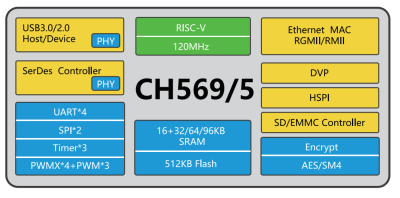
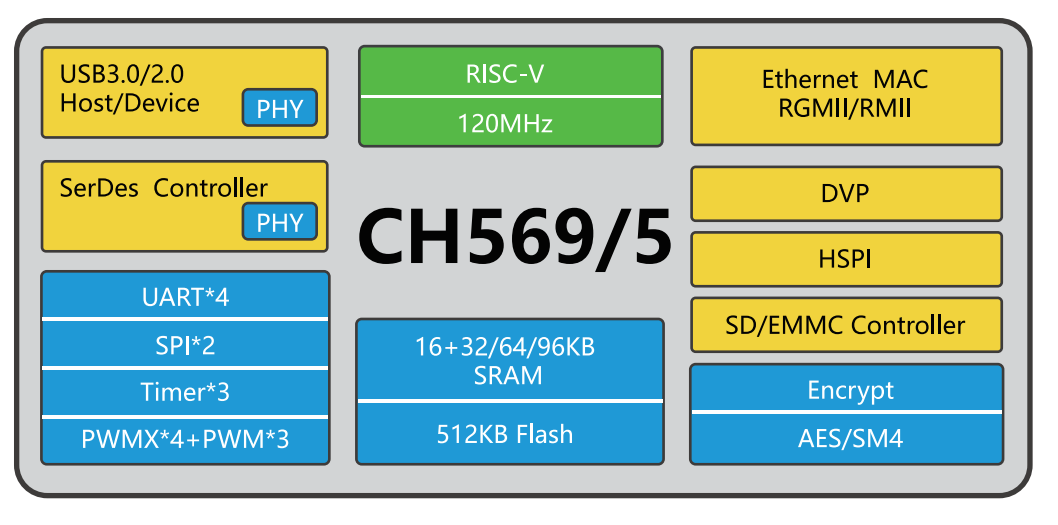
One proposal from [Ryan Walker] AKA [machinehum] is the Phantomdrive — a fully open source USB flash drive that features a secret secondary filesystem. Not only is the existence of this data hidden from the operating system under normal circumstances, but it’s encrypted with AES-256. Rather than relying on software running on the computer to handle the decryption, the CH569 chip that powers the drive does it internally.

To complete this platform-agnostic approach, [machinehum] had to come up with a way for the user to unlock the secure storage that didn’t require running any code on the client machine. A hardware solution such as a keypad is the obvious answer, but in this case, was out of the question as it would immediately tip off an observer about the drive’s true nature. A covert storage device needs a similarly inconspicuous method of authentication.

That’s why the firmware on the Phantomdrive keeps an eye on all the write operations to the unsecured section of the drive looking for the string password:. Once it sees that, it treats whatever follows as the decryption key. If it’s correct, the previously inaccessible data will appear to the operating system as a new drive.

[machinehum] cautions that none of this has been professionally audited from a security standpoint, and that you should treat this whole concept as an experiment. In other words, it’s probably more than sufficient for the average person, but no guarantees on how long it would last should a three letter agency gets too interested in what you’re up to.

Advertisement

If this seems a bit familiar, it’s because the Phantomdrive follows up [machinehum]’s self-destructing USB flash drive from a few years back. The concept is essentially the same, except this time there’s no Magic Smoke getting released.

Source link

Advertisement
Continue Reading

Tech

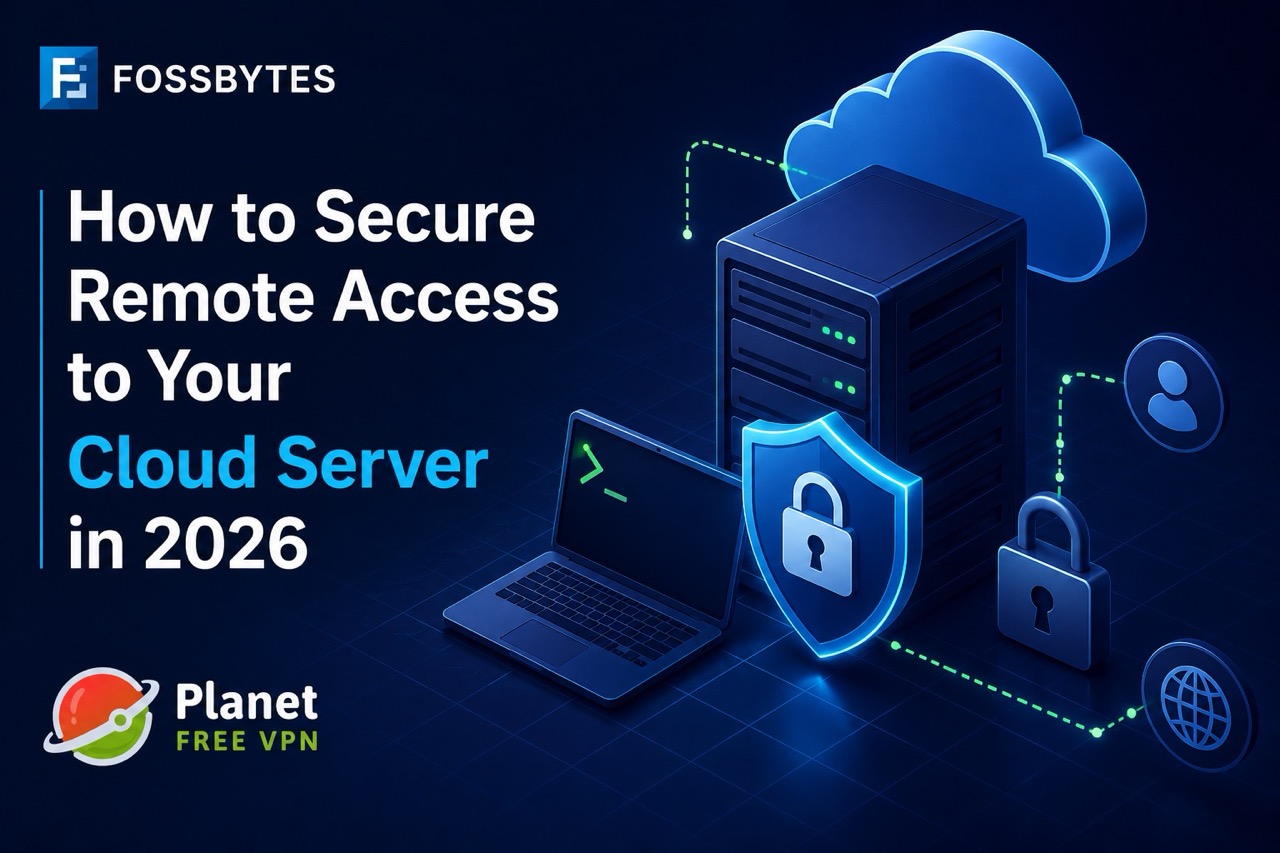
How to Secure Remote Access to Your Cloud Server in 2026

Published

on

Protection against unauthorized remote logins to your cloud server is a matter of SSH key-based authentication, a strict security policy on the firewall, two-factor authentication, and a secure communication channel – no individual component will give adequate protection by itself. The major risk point in breaches is not the server but the open door to remote login. To patch that vulnerability, you need a series of countermeasures, not a magical setting.

Why Remote Server Access Is a Common Attack Vector

Every cloud server exposes at least one remote access point – usually SSH on port 22 – and that port is scanned constantly by bots looking for weak credentials. Password-based login is the most common way a system can be attacked by brute force, and it is quite common with a standard setup that the system is left in a state where an admin/user of that system – “root user” – can log in directly by guessing the user ID and the password combination. Add in shared team credentials, forgotten firewall rules from old projects, and staging servers left publicly reachable, and it’s clear why misconfigured remote access – not zero-day exploits – is behind most cloud server compromises. The fix is simple, though you’ll need to do some setup yourself instead of trusting the default setting.

How to lock down SSH access in the right way

The best way to secure remote access is through a series of small improvements rather than one major overhaul. The following is a real working method:

  1. Switch to SSH key authentication, then turn off password login completely in the same location: sshd_config. Keys are far harder to brute-force than passwords.
  2. Disable root login over SSH and require a non-root user with sudo privileges instead; this is a security advantage that even without any change, one key compromising would limit the impact.
  3. Change the default SSH port away from 22 to cut down on automated scanning noise (not a security measure on its own, but it reduces log clutter).
  4. Restrict access by IP using your firewall or security group, allowing SSH only from known office or VPN IP ranges rather than the entire internet.
  5. Add a VPN as a connection layer for anyone accessing servers from outside a trusted network – a VPN like Planet VPN’s free VPN service can encrypt the connection between a remote worker’s laptop and the server before SSH traffic ever leaves their device, which matters especially on public wi-fi or shared networks.

Every step you take closes the doors that the attacker may open slightly, and when you combine everything, you would have a door to a series of locked gates.

Why Do I Need a Bastion Host?

When it comes to teams working with many servers, deploying a bastion host (jump box) may be a clean and effective way to solve the long-term problem. With this method, you only expose SSH to the bastion, and the other servers accept it only when it’s from the bastion’s internal IP. This centralizes logging and makes auditing access far simpler.

Advertisement

Using a virtual private network (VPN) and a bastion host together is perfectly fine – and many solutions use both: a safe way to access the private network via a VPN, followed by use of a bastion host to restrict which servers can be accessed. Some teams may decide to forgo the bastion because they don’t have the manpower to manage one, and so use a combination of a VPN and a set of firewall rules that still quite a bit lowers the exposure, but without the extra effort.

Mistakes Leading to Leaving Cloud Servers Open

The Mistakes That Cause Leaving Cloud Servers Open: Even the safest development teams may have slip-ups from time to time. One of the most frequent is leaving staged, or test servers with relaxed firewall rules equivalent to those of the production environment – hackers don’t concern themselves with which environment they first land on. Another frequent error is reusing the same SSH key on several servers and clients, causing one hacked laptop to compromise all servers that key has access to.

Another common human error is not removing or changing access when someone leaves the team, so stale credentials remain valid and accessible. At last, putting trust in the strategy of “security through obscurity” – meaning one thinks that setting up the unusual port or hiding the hostname from the public is actually sufficient security – creates a wrong impression of security. This is mostly true; in reality, modern-day attackers scan all ports anyway, and there is no way to hide from them.

System Administrators Guide to Secure Remote Access 

Prohibit SSH password logins totally and depend exclusively on key-based authentication

Advertisement
  • Surely no one wants to type in the password every time; because of this, use only key-based authentication 
  • Deter the user from logging in as root by default and instead use the sudo command to do root tasks
  • A firewall or security group rule can provide great help with IP address-based restrictions on SSH logins 
  • For access that comes from untrusted sources or external networks, use a secure tunnel like a vpn or bastion host
  • Periodically change SSH keys and inspect access lists
  • Maintain records of login attempts and detect brute-force attacks as quickly as possible

Frequently Asked Questions

What is the principal means by which cloud servers suffer break-ins through remote access?

By far the biggest reason why this can happen is unauthorized password-based SSH logins that have been cracked by brute force. The scenario is most likely to develop where the administrator allows root login via password and leaves the default port open.

Sufficient security measures for the server via SSH keys: Do you think it is safe to rely only on key authentication? 

It is true that SSH keys drastically decrease the danger of a successful brute-force attack. However, if there is only key authentication on the server, there are still risks – the server administrator can always enable root login or disable the IP-based login restrictions. So it is recommended to always have these three in the server configuration: disabled root login, restricted access to known IPs, and rotating the keys regularly as the main components of meaningful protection. 

Advertisement
Is it really necessary to set up a separate VPN network while I am able to connect via SSH keys? 

A VPN gives extra security by first encrypting your computer traffic before it reaches your network, where the SSH connection will be used. This is mostly important when working on untrusted networks – like public wi-fi – where there is a threat of a potential hacker in your local network looking at your data.

Advertisement
Bastion host vs VPN as methods of accessing the server? 

The bastion host works by funneling SSH sessions from many users through a single, carefully monitored server point while the rest of the network (and mostly the servers) remains protected from the internet. At the same time, a vpn will fully encrypt the communication between the user and the corporate network or servers. The combination is very common among larger security teams as a part of the defense-in-depth principle. 

How often should SSH keys be rotated? 
Advertisement

The ideal period to change your SSH keys depends on the security practices of your organization, but generally a good practice is to change SSH keys between 90 and 180 days, or in the case that the user who had access with the key leaves or is no longer able to be contacted, such as when a team member leaves.

Why is only changing the port number for SSH enough to secure that port?

Changing the port reduces automated scanning noise in your logs but isn’t a real security control on its own — port scanners check all ports, so it should never replace key-based auth and firewall rules.

Advertisement

Source link

Advertisement
Continue Reading

Tech

‘I think there’s room for both to coexist’: Disney’s new creator festival is the clearest sign yet that Hollywood and fan-made movies are colliding

Published

on

The El Capitan Theatre and the Walt Disney Studios lot have long been reserved for some of Disney’s biggest moments. Citizen Kane held its Hollywood premiere on that same stage in 1941, and decades later, The Lion King, the Avengers films, and a steady run of Pixar premieres have rolled out the red carpet at the same historic Hollywood venue.

This September, though, Disney is handing the spotlight to a different kind of storyteller… creators. Created in LA is a new two-day creator summit and film festival conceived by creator Jon Youshaei and presented by Disney. The event will bring 350 creators and storytellers together on September 17–18 for a premiere event at the El Capitan Theatre before moving to the Walt Disney Studios lot for a day of conversations.

Source link

Advertisement
Continue Reading

Tech

Triangle AIO Twin Gets a Macassar Makeover Because French Speakers Refuse to Dress Down

Published

on

The Triangle AIO Twin was already one of the better dressed wireless speaker systems under $1,000, but apparently French audio companies consider standing still a form of surrender.

Triangle has introduced a new Macassar finish for the AIO Twin, wrapping its compact cabinets in a genuine wood veneer inspired by Macassar ebony. The dark brown base is crossed by vertical grain and fine golden highlights that shift in appearance depending on the lighting and viewing angle.

In other words, it should look considerably more expensive than another pair of rectangular black boxes parked beside your turntable.

The new veneer is paired with the AIO Twin’s familiar oblong magnetic grille, now covered in a deep brown fabric supplied by Scandinavian textile specialist Gabriel. The combination gives the system a warmer, more traditional appearance that should work particularly well in Art Deco, mid-century and contemporary interiors.

Advertisement

Related Reading: Triangle AIO Twin Wireless Speakers and Thetis 340 Subwoofer Review

Same Speaker, Better Suit

triangle-aio-twin-wireless-speakers-macassar

Triangle has not made any acoustic or connectivity changes for the Macassar edition.

The AIO Twin remains a two-speaker stereo system built around one active loudspeaker containing the amplification and connections. The second passive speaker is powered through the supplied three-meter speaker cable.

Each cabinet uses a 1-inch silk-dome tweeter and 5-inch midrange/bass driver, with 50 watts of Class D amplification available for each channel. Triangle specifies a frequency response of 56Hz to 22kHz and recommends the system for rooms measuring up to approximately 269 square feet.

Wi-Fi streaming supports files up to 24-bit/192kHz, while Bluetooth 5.0 includes aptX, aptX HD, aptX LL, AAC and SBC. AirPlay, Spotify Connect, UPnP/DLNA playback and Triangle AIO multiroom support are also included.

Advertisement

Available streaming services through the Triangle AIO app include Spotify, Qobuz, TIDAL, Deezer, Amazon Music and TuneIn internet radio.

triangle-aio-twin-wireless-speaker-macassar-back

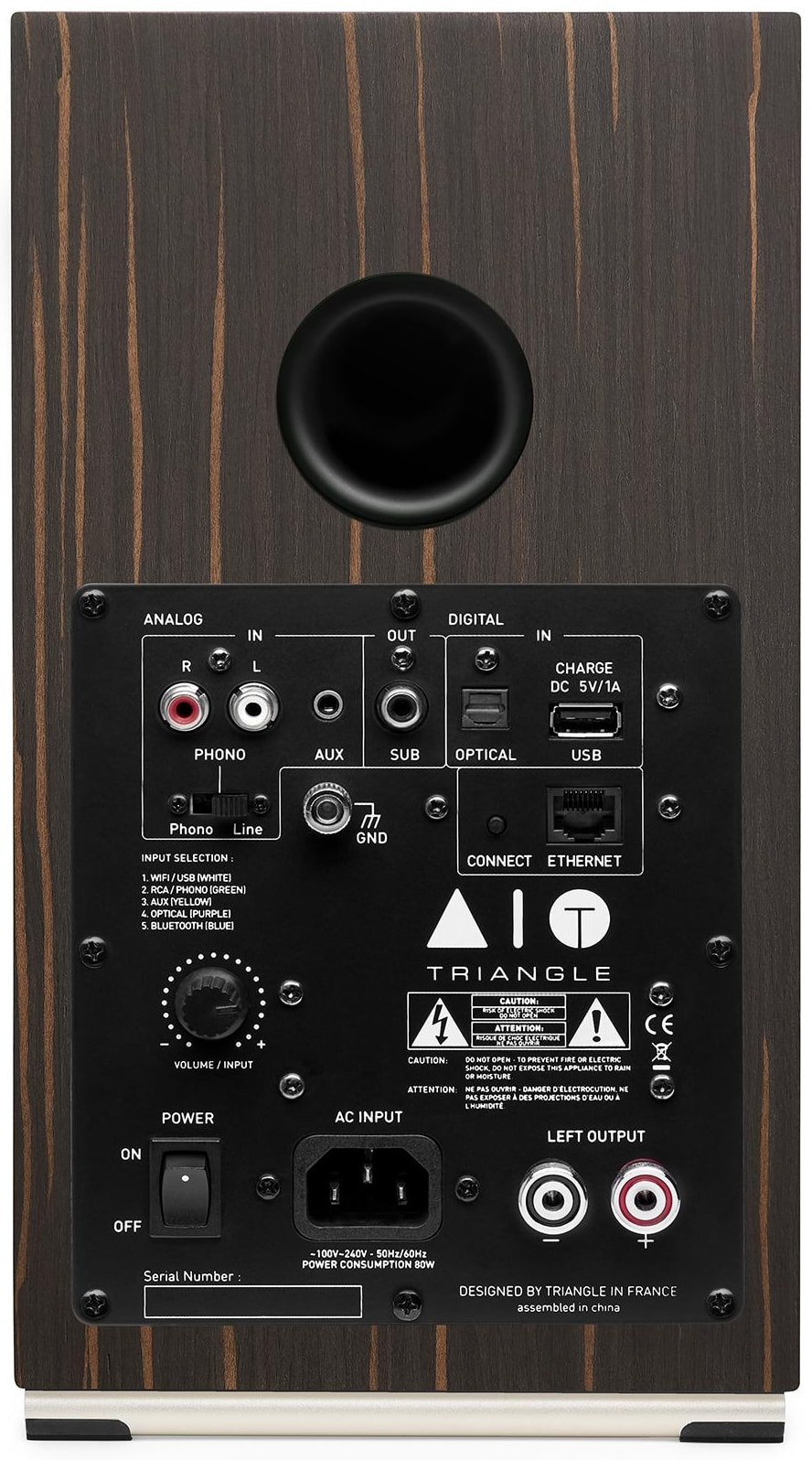
Physical connections include a switchable RCA line-level/MM phono input, 3.5mm auxiliary input, optical digital input, Ethernet, USB-A for storage devices or charging and a mono subwoofer output. The USB connection does not operate as a USB DAC input for a computer.

Advertisement. Scroll to continue reading.

Why the AIO Twin Still Works

When we reviewed the AIO Twin, its warmer tonal balance, texture, dynamic punch and fatigue-free presentation made it a more appealing long-term listen than Triangle’s less expensive Borea BR03 BT.

The AIO Twin also produced surprisingly convincing bass for its size, although adding a subwoofer remains worthwhile for larger rooms, movies or listeners determined to remind the neighbors that they still own a copy of Madvillainy.

Advertisement

The system’s versatility continues to be its strongest selling point. Buyers can connect a turntable, stream high-resolution music, add a CD player, improve the sound from a television and build a multiroom system without purchasing a separate amplifier or network streamer.

The omissions have not changed either. There is still no HDMI ARC/eARC input, which makes TV integration less seamless than it could be, and the USB-A port cannot be used as a digital connection from a laptop or desktop computer. Optical works perfectly well with a television, but HDMI would make volume and power control easier.

Macassar veneer cannot fix that, although it does make the disappointment look rather elegant.

triangle-aio-twin-wireless-speaker-macassar-grille-on-lifestyle

The Bottom Line

The Macassar edition does not improve the sound, add HDMI or turn the AIO Twin into an entirely new product. It simply gives one of the most versatile wireless stereo systems under $1,000 a more luxurious finish.

Advertisement

For listeners who want real stereo sound, vinyl playback, high-resolution streaming and TV connectivity without filling the room with components and cables, the AIO Twin remains a compelling option. It now also looks considerably less likely to have arrived with the office furniture.

Price & Availability

The Triangle AIO Twin wireless speakers are available for $899/pair at Amazon and Best Buy in English Green, Abyss Blue, Linen Grey, White, Black, Brown Maple, Eggplant, and now Macassar. However, the Macassar finish appears to be out of stock on Triangle’s U.S. website at the time of publication.

Source link

Advertisement
Continue Reading

Tech

Apple TV offers free ‘Widow’s Bay’ AMC screenings

Published

on

Fans of “Widow’s Bay” in Atlanta, Boston, Chicago, Los Angeles, New York, and San Francisco can catch a free screening of the series’ final three episodes of the first season at select AMC theaters.

“Widow’s Bay” made its debut in April, quickly becoming an Apple TV hit. The series has been praised for blending genuine horror with character-driven comedy.

Even with its late premiere date, it earned 19 Emmy nominations. That includes the coveted Best Comedy Series.

Now, Apple TV wants to do something for “Widow’s Bay” fans.

Advertisement

According to Deadline, Apple TV has teamed up with Rutgers University, alma mater of “Widow’s Bay” creator Katie Dippold, for free, one-night-only fan screenings of the first season’s final three episodes. The screenings will take place in select AMC theaters on Wednesday, August 12, in Atlanta, Boston, Chicago, Los Angeles, New York, and San Francisco.

If you’re interested in going, there’s a helpful Apple TV Screenings site that shows which theaters are participating.

Apple TV continues to churn out hits under the direction of Eddy Cue. Cue was recently honored with Cannes Lions’ Entertainment Person of the Year.

Advertisement

Source link

Continue Reading

Tech

Flock Highlighted Police Departments Using Its Tech. Now 4 Face Allegations of Misuse

Published

on

The Albany Police Department did not respond to WIRED’s request for comment.

Flock’s Savannah video centers on an interview with then major of police Robert Gavin, who praised how Flock facilitates data-sharing between different law enforcement agencies.

“We spent a lot of time doing community talks about what we’re gonna use them for, what we’re not gonna use them for,” Gavin says, adding that the overall objective is to “keep everybody safe.”

On July 31, Savannah police mayor Van Johnson wrote in a Facebook post that the allegations involving the six employees had been referred to the GBI to determine whether criminal charges should be filed.

Advertisement

The Savannah Police Department did not respond for comment. The GBI confirmed that it investigated the incidents in Savannah and Albany, but didn’t provide information, noting that the Savannah investigation is “still active.”

According to Johnson, the Savannah Police Department conducted an internal investigation through the Flock Safety Audit Assistance Program, which Flock introduced in April. In a press release announcing the tool, Flock said it “continuously monitors system activity and surfaces search patterns that fall outside an agency’s typical usage.” Savannah police chief Lenny Gunther told a local news outlet that the investigation surfaced 127 inappropriate searches out of the 39,000 it conducted this year.

“Public trust is non-negotiable,” Johnson said in his Facebook statement. “These tools exist to keep our community safe, not for personal or unauthorized use.”

In 2020, Flock posted a video by the Atlanta Journal-Constitution about the Sandy Springs Police Department’s arrest of a porch pirate. The video did not feature any interviews with Sandy Springs Police Department personnel, but noted that the man was arrested after a Flock camera captured the license plate of the suspect.

Advertisement

About five years later, the Sandy Springs Police Department launched an internal investigation into whether one of its officers had misused Flock’s technology. According to investigators, the officer allegedly ran ALPR searches to support beta testing for Signal 8, a law enforcement software company that employed the officer in a second job.

This officer, the police department claimed, did not cooperate with its investigation and was subsequently terminated.

Meanwhile, Flock showcased the Baytown Police Department in 2025 as part of a brief series highlighting cases where police said Flock was instrumental in apprehending a suspect.

“We use it multiple times every day, and once I log in to my computer, Flock is the first thing I click on,” a Baytown police officer says.

Advertisement

On July 30, Baytown police chief John Stringer announced the resignation of a police officer who had been under investigation for allegedly misusing Flock’s technology. The Baytown Police Department did not respond to WIRED’s request for comment.

In his video statement, Stringer said that two investigations into the officer’s alleged misuse—one internal, one criminal—remained ongoing.

“Accountability to the fullest extent of the law will be pursued,” Stringer added.

Source link

Advertisement
Continue Reading

Trending

Copyright © 2025