If you’re in the market for a new window air conditioner for summer 2026, there are a few qualities you’re likely mindful of in your search. While it’s worth taking the time to find one that physically fits your space, provides ample cooling, and is an overall budget-friendly air conditioner, one would be remiss to overlook the matter of sound. After all, air conditioners are notorious for getting rather noisy while running. Not only can this prove a nuisance for you in your living space, but those living nearby will also have to endure the rumbles and hums of the machine.
On the whole, it’s expected that a window air conditioner will make some kind of noise. Generally speaking, they pull in electricity to run one fan, which, in turn, pulls in warm air. Simultaneously, this electricity powers a compressor to push the coolant through the coils, thus cooling the air. Another fan then pushes the cooled air out into the room, quickly bringing down the indoor temperature. That’s a lot of moving parts, and even right out of the box, air conditioners are going to make noise as a result. The average window air conditioner tends to run between 50 and 60 decibels, with models below that level considered more noise-conscious examples.
Advertisement
With that said, modern window air conditioner technology has greatly dampened the noise created by these essential summer appliances. For those in want of quieter summer cooling, these are some of the best options currently available.
Advertisement
1. Midea U-shaped smart air conditioner
Throughout its existence, Midea has become recognized among the most reliable air conditioner brands out there. At the same time, the brand has worked to improve its units in other ways, such as their volume levels. The Midea U-shaped smart window air conditioner, which comes in 8,000, 10,000, and 12,000 BTU forms — models MAW08V1QWT, MAW10V1QWT, and MAW12V1QWT, respectively – is significantly quieter than most air conditioners like it for sale today. Supposedly, it’s 10 times quieter than its competitors. The company claims it can get as quiet as 32 decibels while in use, though higher cooling settings will bump that number up to some extent.
The Midea U-shaped smart window air conditioner comes with a bevy of other noteworthy specs and features alongside its remarkably low volume level. As the name suggests, it’s a smart device that can be controlled with the SmartHome app, and the U-shaped design keeps the unit held in place via brackets. Should you want or need to open your windows, you can do so without it falling out. It also claims 35% faster cooling with FlashCool mode and 35% increased energy efficiency thanks to its variable-speed inverter technology. The Midea website lists these window units at $399.99, $449.99, and $509.99 depending on the BTUs, each coming with the Midea one-year limited warranty.
Advertisement
2. GE model AHTT08BC Profile ClearView ultra quiet window air conditioner
General Electric has an incredibly deep product catalog with well over a century of development behind it. In fact, there are probably things that you didn’t know GE makes. Meanwhile, some of its most well-known offerings are its window air conditioners, including those that prioritize producing as little noise as possible. The $484.00 GE model AHTT08BC Profile ClearView window air conditioner is one such model, advertising noise levels as low as 41 decibels on low cool with Quiet Mode turned on. It reaches such low volumes while cooling rooms up to 350 square feet at 8,300 BTU.
Like any other modern air conditioner, there’s more to this GE model than producing less noise than previous models. The big draw for this unit is its unique design, which features a front portion that hangs below the windowsill. This means improved visibility out the window even while the unit is installed. Within is a pump to release condensation outside as it accumulates, and it dehumidifies rooms at a rate of approximately 1.7 pints per hour. This is another example of a smart air conditioner, as users can control it with the SmartHQ app over Wi-Fi, though it also comes with a separate remote control. GE includes limited warranty coverage on this unit, too.
Advertisement
3. Friedrich Chill Premier inverter air conditioner
Friedrich is one of the major window air conditioner brands currently on the market, and as such, it has released units that deliver comfortable cooling without compromising on noise level. For example, the Friedrich Chill Premier inverter air conditioner is somewhat expensive at over $700 through sources like Grainger, but it delivers if you need an air conditioner that keeps the noise down. When in cooling mode, this unit is advertised as delivering 42 decibels, while the fan alone drops that number to just 32 decibels. On top of that, it comes with some other key specifications.
Aside from being a comparatively quiet window unit, the Friedrich Chill Premier inverter air conditioner has some other intriguing qualities. Window-only models range from 8,000 to 12,000 BTU per hour; they can be operated via the FriedrichGo app over Wi-fi, and they’re said to operate 35% more efficiently than other traditional air conditioner models. Installation is simplified, too, featuring a frame, side curtain, and mounting hardware to keep it in place. This is because the unit is designed for window-opening even once installed, just in case you want to let some outside air in without powering the air conditioner up. No matter the specific model, the Friedrich limited warranty comes standard as well.
Advertisement
4. Frigidaire FHWW145WE1 inverter air conditioner
While the name tends to conjure mental images of its refrigerators, since it is one of the major refrigerator brands, and other kitchen appliances, Frigidaire has a lot more to offer. It has entered the air conditioner game in its own right, and it has some noise-conscious models in its catalog to boot. A low-noise option is the Frigidaire model FHWW145WE1 inverter air conditioner, typically retailing for $609 through the Frigidaire website. The company claims that this model goes as low as 42 decibels specifically on its Ultra Quiet setting, with higher speed and cool settings gradually increasing the volume.
Advertisement
Digging deeper into what this air conditioner can do, it’s said to provide 14,000 BTU of cooling, making it ideal for rooms between 550 and 700 square feet in size. Thus, Frigidaire recommends this unit specifically for larger, multi-use areas like dens and living rooms rather than smaller ones like bedrooms. The Frigidaire app allows for control from a distance, and a physical remote control comes included. Unlike other air conditioners on this list, however, it takes on a more traditional window air conditioner shape and setup, preventing window-opening while it’s installed. Should something go wrong shortly into its use life, Frigidaire’s one-year warranty comes included.
Advertisement
5. Hisense AWUS1225TW UltraSlim window air conditioner
Hisense has taken its place in the pantheon of well-known air conditioner brands, and in doing so, it has joined the industry-wide race to lower window unit decibel levels. One of its strongest efforts in this regard is the Hisense AWUS1225TW UltraSlim window air conditioner, boasting cooling at 35 decibels at the absolute lowest. At the time of publication, Lowe’s has this unit for sale for $449.14, so for a relatively average cost for a window unit, you receive an air conditioner notable for low-volume cooling in addition to several other key specs and design features.
This Hisense unit is listed at 12,000 BTU, so the brand recommends using it in rooms up to 550 square feet in size. This is another low-profile unit designed to leave the window above free of obstructions, though side privacy screens are included for those who want them. According to Hisense, installation is relatively simple, too. All it requires is setting the bracket on the windowsill, putting the unit on top of it, and adjusting and securing the bracket in place. Remote and Wi-Fi control through the ConnectLife app are built in, and a two-year Hisense warranty automatically comes included with purchase.
Advertisement
How these air conditioners were selected
Ay Moments/Getty Images
These window air conditioners weren’t chosen at random; a multi-step research process went into their selection. The first step was to find units known for quiet operation, ideally with decibel levels listed somewhere in their descriptions. For reference, we also looked at a variety of air conditioners to determine the average volume level for standard units in 2026. It also helped to know under what circumstances users could expect such low decibel levels. Ideal units highlighted their volume when actively cooling as opposed to when running their fan alone.
In addition to sound level, we wanted to include air conditioners that were more than capable of cooling down a room. If it couldn’t effectively cool, no matter how quiet it was, we couldn’t in good conscience recommend it on this list. Additionally, we prioritized seeking out air conditioner units from major, trusted brands, as well as those that weren’t too absurdly expensive. It was a given that these units would cost a fair amount of money, but we chose not to go too pricey with most of our recommendations for the sake of the consumer.
[Mansour] presents an interesting idea in his essay A Common Thread — just as USB-C has become the “One Connector To Rule Them All” in the world of electronics, so too should his projects have a unified physical connection layer. A common thread, if you will.
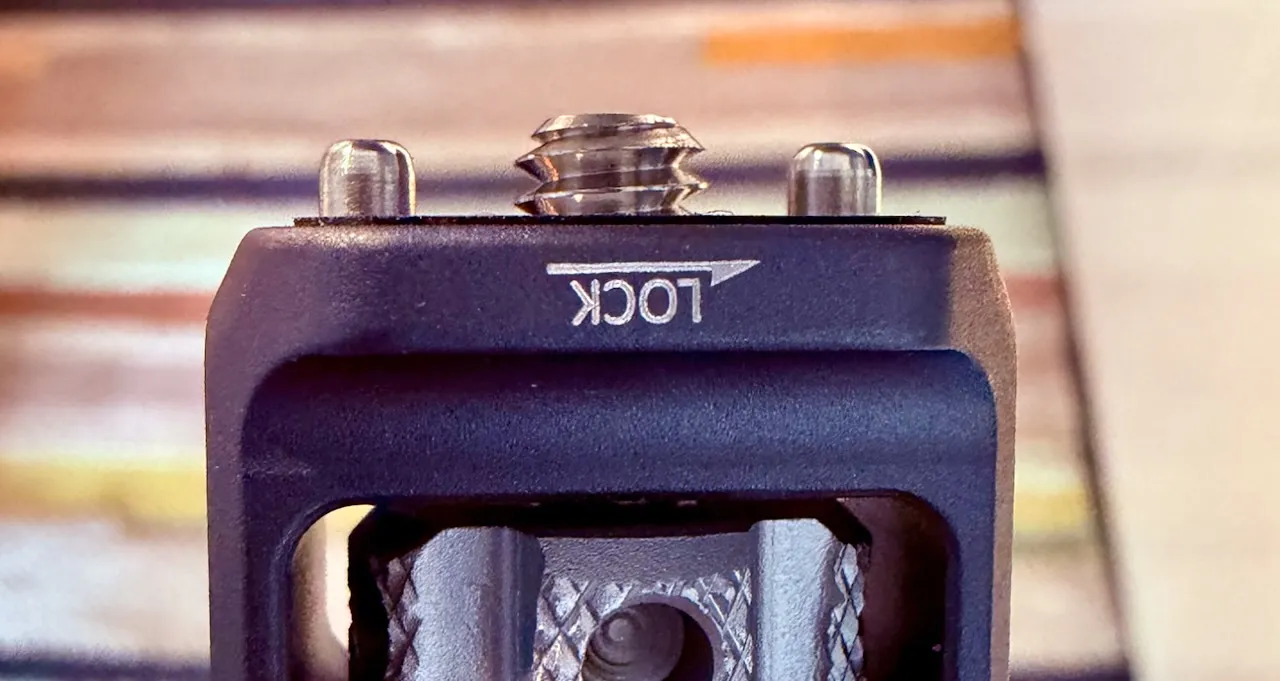
Specifically, the 1/4″-20 UNC connector that was already on all his camera equipment. Unifying his stuff around that connector wasn’t a bolt from the blue brainwave. By the sounds of it, the idea evolved over time and only became intentional after he’d already started using it.
There’s something to be said for it, though. One thing is the convenience of knowing your various bits and bobs are going to fit together like they were made with LEGO. Another is taking away a whole set of decisions in the design process: it’s going to have a 1/4″-20 UNC fitting, so [Mansour] needs only decide if its going to be tapped into the material or if he’s using an inset or captive bolt.
Advertisement
It isn’t like a 1/4″ bolt is going to introduce a weak point in most things we build — with good hardware it can take a ton or more. On the other hand it’s not exactly resilient to torque, but [Mansour]’s camera bag had the answer to that, too: spring loaded locator pins that drop into holes on the female side to take up the torque. In the photography world, these are ARRI pins. To us they just seem like a good idea.
Maybe you don’t see the point of avoiding redesigning the wheel every time for custom mounts and brackets. After all, that lets you come up the the ideal solution every time. On the other hand, [Mansour] has both simplified his design process and made decades worth of camera-holding objects — everything from tripods to stabilizing gimbals — accessible to all his stuff. It’s an interesting idea, and his full blog post is worth a read, even if it’s not likely the EU is going to force its adoption like it did USB-C.
The accessories below aren’t as great as the top picks in this guide, but they’re still good options if you’re looking for more MagSafe gadgets.
Belkin iPhone Mount With MagSafe.
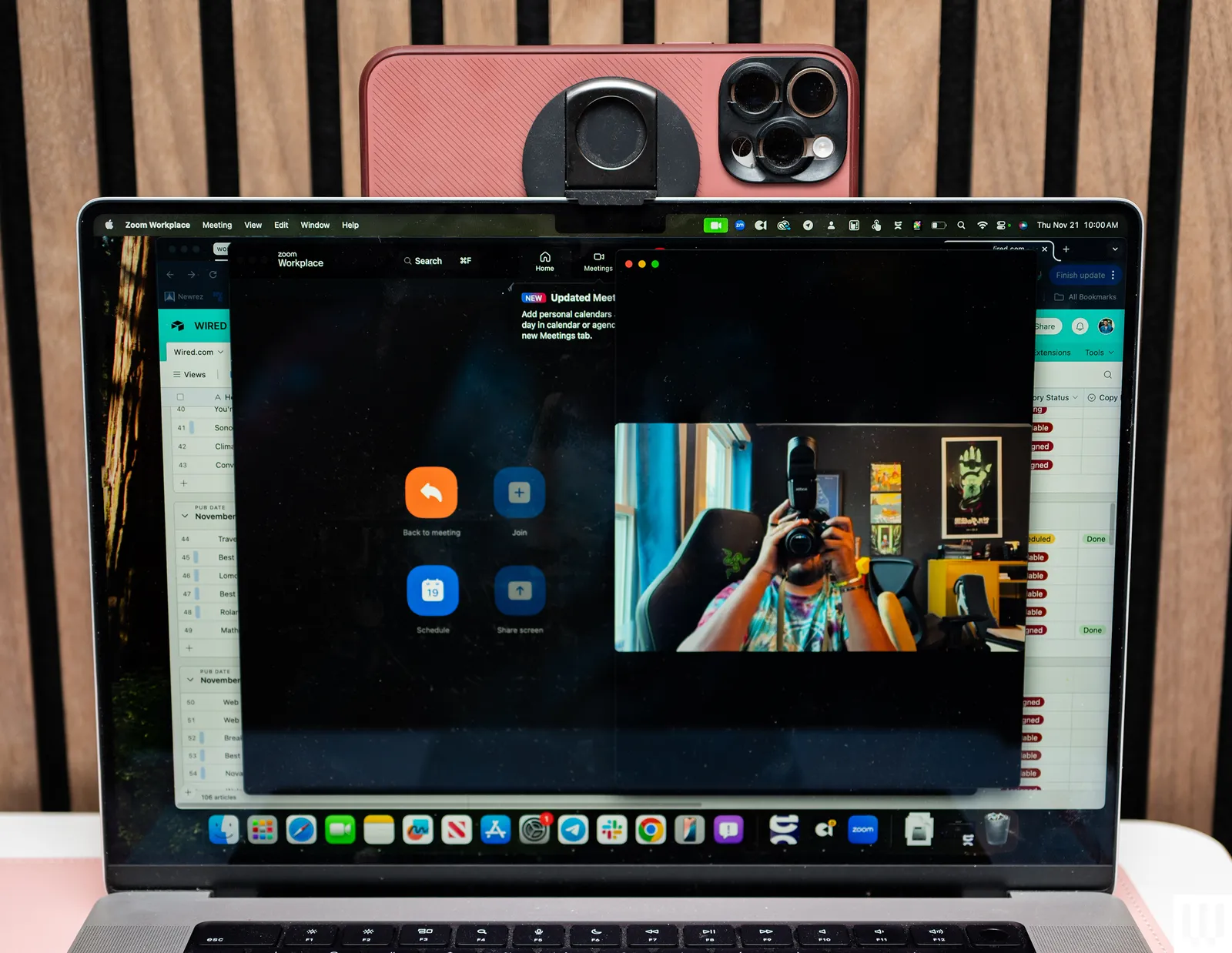
Photograph: Julian Chokkattu
Belkin iPhone Mount With MagSafe: Using Apple’s Continuity Camera feature, you can wirelessly use your iPhone as a webcam for a MacBook. It supports various video calling apps too, from FaceTime to Zoom. This circular silicone puck magnetically sticks to the back of your iPhone and can be used as a phone grip or kickstand, but you need to keep your screen close to a 90-degree angle, or else the weight of the iPhone will drag the screen back or forward. There’s also a mount for external displays, in case you want one for your home desk setup.
Advertisement
STM Goods MagPod Smarter Phone Stand: I’ve been carrying this mini tripod from STM Goods all over my apartment. When I’m not using it to see notifications at a glance at my desk, I’ll place it on my kitchen counter to stream TV shows while cooking dinner, on my coffee table to FaceTime with friends while on the couch, or on the bathroom sink to listen to podcasts while doing my makeup. I’ve also used it to shoot video. It has a magnetic disc with a socket that moves around smoothly, allowing you to position it at multiple angles. The retractable legs are sturdy too, even while tapping through notifications or typing out texts. They fold in neatly into a compact size, making it easy to travel with.
Casetify Wireless Car Charger: I’ve been using this for over a year. It’s easy to install, has MagSafe support (with a USB-C cable) and an adjustable ball joint for various viewing angles, and it’s Qi 2-certified with a 15-watt rate. It’s a bit more affordable than Belkin’s and comes in several fun patterns. (I have the Penguin design, and it’s tough not to smile while looking at it.)
Advertisement
MagGo Magnetic Charging Station (8-in-1): This little orb has three AC outlets, two USB-C ports, and two USB-A ports on the back, and over on the front is a Qi2 wireless charging pad that can recharge your phone. It’s great for workstations where you need to plug in a lot of gadgets. Each of the USB-A ports dishes out 12 watts, and the USB-C ports can output 67 watts, though this lowers if other ports or the pad are in use.
Casely Grippy: I’ve successfully used this grippy phone mount to record a few different videos. The suction on it is hit or miss. Sometimes, it sticks to my painted wall for hours on end; Other times, it slides off my mirror or shower wall in just a few minutes (taking my phone with it). I’ve found it works best if you freshly clean it as well as the surface it’s going to stick to. Apply some extra pressure when pressing it against your chosen mounting location, and maybe be prepared to catch it if it falls.
Google has locked hundreds of Blogger websites after a false positive claimed they violated its “Malware and Similar Malicious Content” policy, with some sites actually deleted from the platform.
The issue began on August 4, and it appears to affect many legitimate blogs that do not host malware or have malicious scripts.
As seen by BleepingComputer, hundreds of web admins have reached out to Google on the company’s official forum for help in restoring access to their blogs.
The forum post now has more than 300 “I have the same question” votes and over 100 replies from publishers.
“Today’s huge number of reports regarding blogs flagged/locked for the same reason suggests misclassification by automated systems,” a Blogger Product Expert wrote. “False positives do occur from time to time, but not on this scale.”
Advertisement
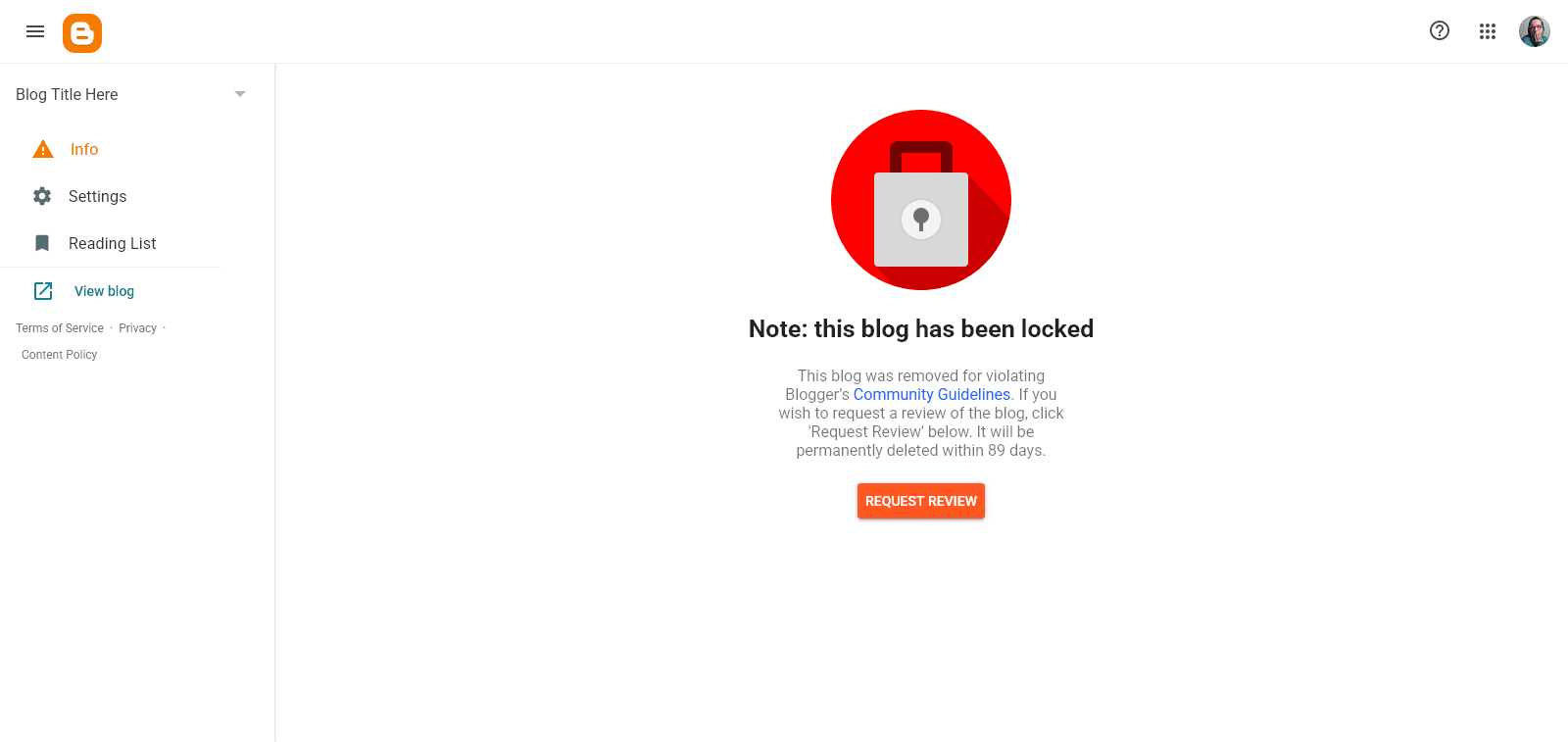
If you’re affected, you will see a large red padlock in your Blogger dashboard with a clear warning: “Note: this blog has been locked.”
“This blog was removed for violating Blogger’s Community Guidelines. If you wish to request a review of the blog, click ‘Request Review’ below,” reads the Blogger warning.
Blogger-hosted sites are locked Source: Google forum
Google’s automated message also warned publishers that their blogs can be permanently deleted within the next three months if no appeal is submitted.
While a blog is locked, its owner cannot access the dashboard tabs used to manage posts, settings, themes, or other parts of the site.
“The removal happens automatically after updating the homepage or making changes to the blog template,” one publisher reported.
Advertisement
The situation has become even more frustrating for some users, who say that their blogs were restored and then later deleted again.
Not all Blogger users are affected, and some of those who submitted an appeal are already seeing their blogs come back online.
It’s also unclear how many sites are hosted on Blogger, as Google has never disclosed the numbers. However, some third-party trackers suggest that close to 200,000 sites are hosted on the platform.
We’ve reached out to Google for a statement, and we’ll update this story when we hear back.
Advertisement
This is a developing story.
Security teams log 54% of successful attacks and alert on just 14%. The rest move through your environment unseen.
The Picus whitepaper shows how breach and attack simulation tests your SIEM and EDR rules so threats stop slipping by detection.
Once upon a time, telephones were primarily point-to-point communications systems. There were options for three-way and conference calls out there, but by and large the plain old telephone system was about connecting one handset to another for a direct conversation. For this reason, the telephone was seldom used for mass emergency communications, because it was simply not fit for broadcasting a message to a wide number of people.
However, technology has since changed. Our modern phones are all connected to a big digital over-the-air network, and large swathes of them can be addressed all at once if so needed. This has led to the development of emergency warning systems that use the cellular network, with Cell Broadcast being the most notable iteration.
Notification
Cell Broadcast technology has been a part of mobile network infrastructure for some decades now, having been included in various forms in 2G, 3G, 4G, and 5G mobile standards. The system was first demonstrated in 1997 in Paris, with the concept being straightforward enough—a way for cell networks and authorities to send rapid notifications in a one-to-many broadcast. The technology is sometimes referred to as Short Message Service-Cell Broadcast (SMS-CB), differentiating it from the more familiar Short Message Service-Point to Point (SMS-PP) that individual subscribers use. A Cell Broadcast message can be fired off to select cells of a cellular network, with the notification in turn popping up on the handsets of all subscribers connected to that cell. This allows for easy geofencing of emergency alerts and information, such that only individuals in the relevant area receive the Cell Broadcast message.
The infamous false alarm missile warning message sent out in Hawaii in 2018 was, in part, distributed via the Wireless Emergency Alerts system using Cell Broadcast. Credit: public domain
By firing a Cell Broadcast to entire mobile networks across a country, it’s possible for authorities to get a message out to millions of phones in mere seconds—a remarkably effective way of communicating critical information quickly.
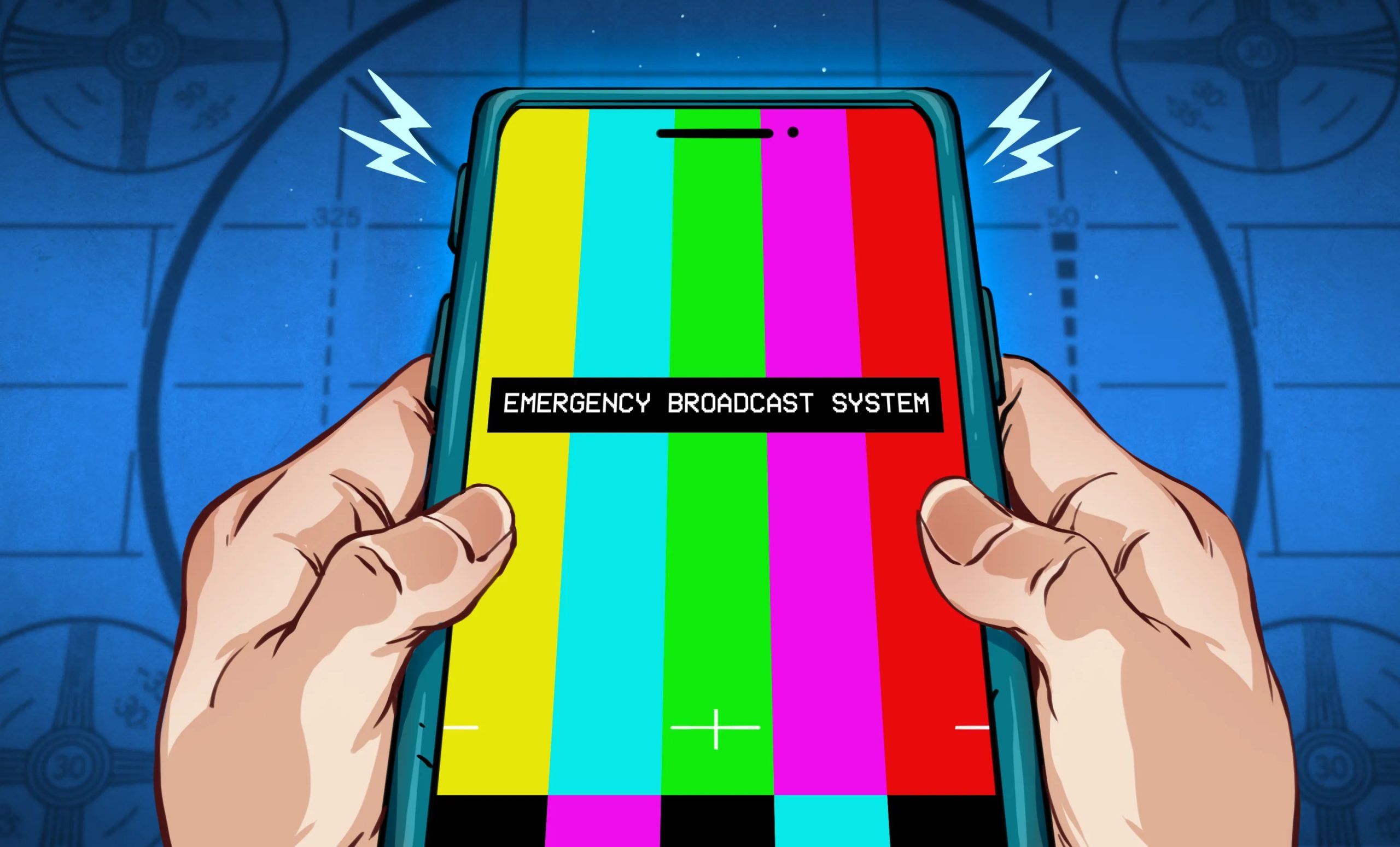
A typical Cell Broadcast emergency message will be announced by a special alert tone with the textual message content appearing on the phone in turn. Messages can be sent in a primary and an additional language and displayed according to a devices individual language settings to aid in accessibility. There is also generally no need for a given device to have a SIM card installed, since the Cell Broadcast messages are not addressed to any given individual subscriber number.
Advertisement
Modern Cell Broadcast messages can be up to 1,395 characters long using Latin characters, or up to 615 characters in languages using UCS-2 character encoding. Messages can be set to refire from every 2 seconds to over 30 minutes, with handsets typically ignoring rebroadcasted messages that have already been displayed. In turn, new messages can also be sent quickly to reflect changing conditions or updated information.
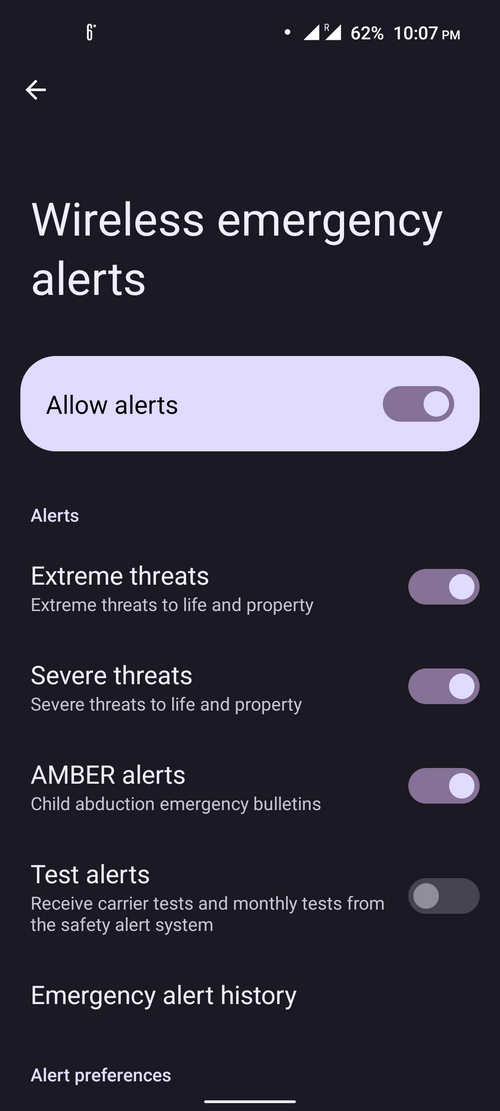
Cell Broadcast messages can come in several different levels depending on the intended severity of the alert. These are identified by hex codes laid out in 3GPP standards, though the exact alert levels vary across different national implementations of the system. In the EU, they are ranked from Alert Level 1 (most severe) to Alert Level 4 (least severe) with additional levels for “Amber,” “Test,” and “Information” alerts beneath. Levels below 1 can be “opted out” on certain handsets with the functionality to do so. Similarly, in the US, the highest level is “National Alert” which can not be opted out of and will always fire on handsets receiving the message. Below that, the levels step down to “Extreme Alert,” “Severe Alert,” and “Public Safety Alert,” with Amber Alerts and test levels beneath that.
Some handsets allow opting out of lower-level alerts. The highest-level CB alerts will typically sound a tone and display on all capable handsets, regardless of volume settings or silent or “Do Not Disturb” modes. Credit: Aveaoz, CC BY-SA 4.0
Many nations have built emergency communications systems around the Cell Broadcast infrastructure. Since a high percentage of populations in developed countries own cellular phones and keep them close at hand at all times, it serves as a highly effective way to distribute emergency warnings. Many countries simply name their systems after their own nation—such as FR-Alert and DE-Alert in France and Germany, to T-Alert in Thailand. Others get more creative, such as S!RENEN in Denmark, or more descriptive, such as the Disaster and Emergency Warning Network (DEWN) in Sri Lanka.
Despite Cell Broadcast having existed in various forms across previous generations of mobile networks, some nations are still yet to fully implement emergency warnings over this infrastructure. Notably, Australia is in the process of rolling out AusAlert in 2026, with the first national test of the system firing off on the 27th of July, 2026. Authorities noted that 94% of targeted cell towers broadcast the message succesfully, though there was some controversy around some phones not displaying the broadcast message, and concerns around secret phones being revealed by the test which would sound regardless of silent or “do not disturb” modes. Other countries still developing Cell Broadcast emergency systems include India, Poland, Ukraine, Sweden, and Brazil.
Not all CB messages are high-level emergencies. Above, a cold weather warning sent out via Cell Broadcast in South Korea. The device in question had a German language setting, hence the message title in a different language. Notably, SMS-CB messages sent in non-Latin alphabets feature a lower character limit. Credit: Verganglichkeit, CC BY-SA 4.0
There are limitations to Cell Broadcast. Namely, as a one-to-many broadcast message, it’s not directly possible for authorities or telecommunications operators to determine how many or which subscribers may have received the message. The technology is effectively a “push” message system with no backchannel for confirmation of receipt. This is somewhat by design, however, as thousands or millions of devices sending a read receipt via the network would create huge network congestion. This would be particularly undesirable during an emergency situation.
Regardless, the Cell Broadcast methodology has key benefits for emergency and mass notifications compared to other methods of reaching out via the mobile network. Most of all, it’s a message that is broadcast rather than sent to individual subscribers. Sending the same notifications via SMS or MMS would require huge amounts of network capacity as each individual message for each individual phone number was sent out.
Advertisement
There are also logistical difficulties in such a method, wherein a list of valid phone numbers must be maintained and updated at all times. It can also be more difficult to do things like geofenced messaging, since individual subscribers and their phones tend to move around a fair bit.
Hopefully, you’ll never find yourself wrapped up in a major weather event or other serious emergency. If you do, though, you might just find that critical information you need to survive thanks to a timely Cell Broadcast message. Expect such systems to become a baseline part of emergency management efforts in future as long as cellphones remain a ubiquitous communication tool across the population.
Three weeks after Apple filed a landmark case accusing OpenAI of stealing trade secrets, OpenAI is hitting back. In a new blog post, the ChatGPT-maker said Apple’s lawsuit is “careless, aggressive and oddly personal.”
Apple alleged in its initial complaint that two former Apple employees, software engineer Chang Liu and 24-year Apple veteran Tang Tan, improperly accessed Apple’s proprietary tech after they left for OpenAI. But OpenAI claims that Apple’s own security lapses allowed Tan and Liu to access Apple’s systems, and that this was a previously known issue.
This all comes as Apple asked the US District Court for the Northern District of California this week to speed up the case and order OpenAI to “collect and return” all Apple info it has. The case could have big ramifications for OpenAI, which is gearing up to launch its first AI hardware device. OpenAI is arguing that because the initial filing was based on false claims, the case shouldn’t continue. (Disclosure: Ziff Davis, CNET’s parent company, in 2025 filed a lawsuit against OpenAI, alleging it infringed Ziff Davis copyrights in training and operating its AI systems.)
To aid its point, OpenAI released some selected text and email exchanges between the two companies and their lawyers. These, combined with the documents filed with a California federal court on Tuesday, paint a picture of two heavily lawyered companies: one that can’t figure out how to use its email, and another that is aggressively defensive.
Advertisement
The text and email exchanges OpenAI released are heavily redacted. But the messages seem to support OpenAI’s claim that Apple made mistakes in the lead-up to filing its lawsuit. Apple’s outside counsel leading the case, Gabriel Gross, seemed to have emailed the wrong person at OpenAI in February about Apple’s concerns. Che Chang, OpenAI’s general counsel, emailed Apple’s in-house lawyers, saying Gross claims to represent Apple and says Gross had spoken with Chang, despite the fact that Chang has never heard of him.
“I don’t know what the point of [Gross’s] lie is, but could you please confirm if he is actually representing you, and if so, whether you have other counsel you can use. I don’t think interacting through him is appropriate given this behavior,” Che emailed Apple’s in-house lawyers on Feb. 23, according to an email OpenAI released.
Apple’s lawyers confirmed Gross is representing the iPhone-maker and that Gross initially contacted the wrong person at OpenAI. (Chang’s email is not included in court filings, but Gross’s emails straightening out the miscommunication are.)
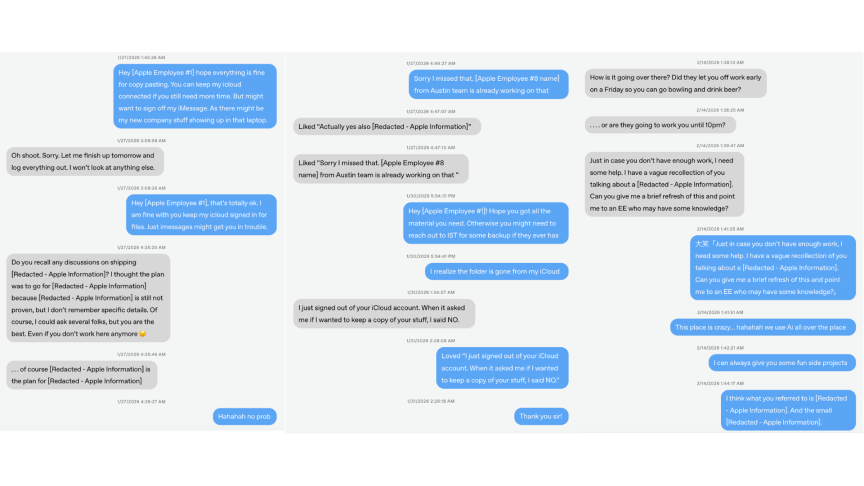
These text messages, released by OpenAI, are between Chang Liu and unknown Apple employees after his employment with Apple ended. These are select messages, not the entire thread; Note the dates of the exchanges.OpenAI/Screenshot by CNET
OpenAI also released what it says are text messages between Liu and Apple employees after he left Apple. The messages show Liu’s correspondence with an unknown Apple employee on his last day at Apple, arranging file transfers. The texts continue after that day, addressing file transfer issues and seeking Liu’s advice on redacted Apple projects despite Liu no longer working there. OpenAI says that Apple’s “residual access” issues let Tan, Liu and other former Apple employees improperly access company files.
“Of course, I could ask several folks, but you are the best. Even if you don’t work here anymore,” an unknown Apple employee texted Liu on Jan. 27, five days after Liu left Apple for OpenAI.
Advertisement
Apple said in its request for a preliminary injunction, filed Monday night, that “these interactions and exchanges cannot explain the repeated, unauthorized downloading of voluminous technical files from Apple’s cloud-based storage discussed below, which Mr. Liu performed on multiple occasions from February to April 2026 while employed by OpenAI.”
Apple also referred to Liu’s text messages, which it included in its preliminary injunction filing, where Liu said he found a way to access the company’s third-party cloud storage system without authorization, to which he said: “LOL.” Apple claims he coached other Apple-to-OpenAI job hoppers on how to access Apple files in that way “to avoid trouble with the security team,” the filing says.
It’ll be up to the court to sort out which multibillion-dollar tech company is telling the truth. OpenAI certainly has a strong motive to prove Apple wrong – the lawsuit could do a lot of damage, financially and reputationally. OpenAI has now made its position clear: “We do not have, nor want, any of their trade secrets.”
Katelyn Chedraoui
Reporter 2
Advertisement
Katelyn is a reporter with CNET covering artificial intelligence, including chatbots, image and video generators. Her work explores how new AI technology is infiltrating our lives, shaping the content we consume on social media and affecting the people behind the screens. She graduated from the University of North Carolina at Chapel Hill with a degree in media and journalism. You can reach her at kchedraoui@cnet.com.
See full bio
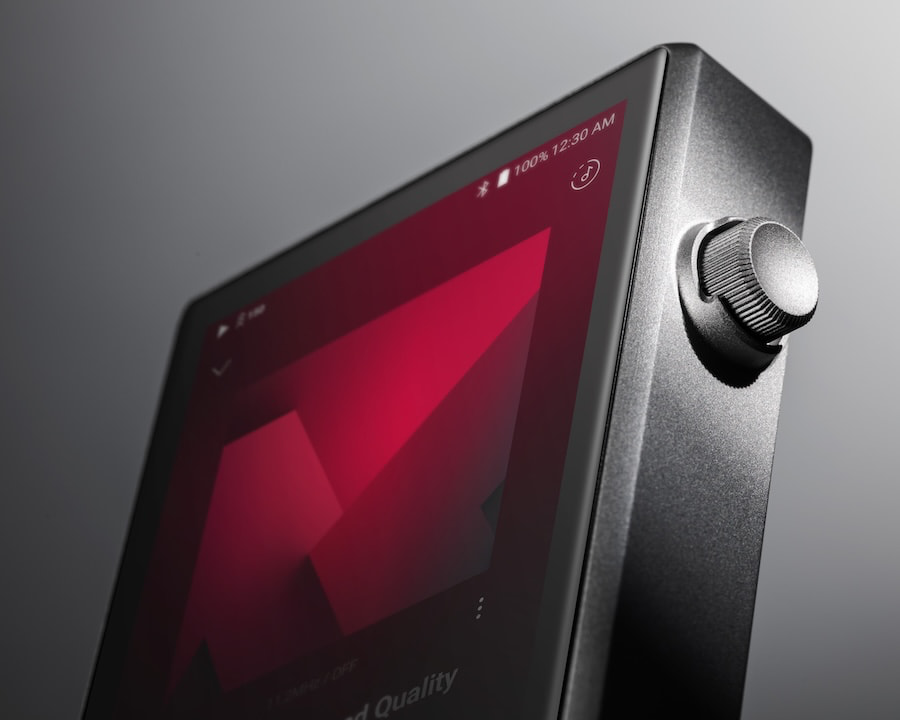
The smartphone was supposed to kill the digital audio player. Based on the continuing flood of new DAPs in 2026, somebody forgot to tell the portable audio industry.
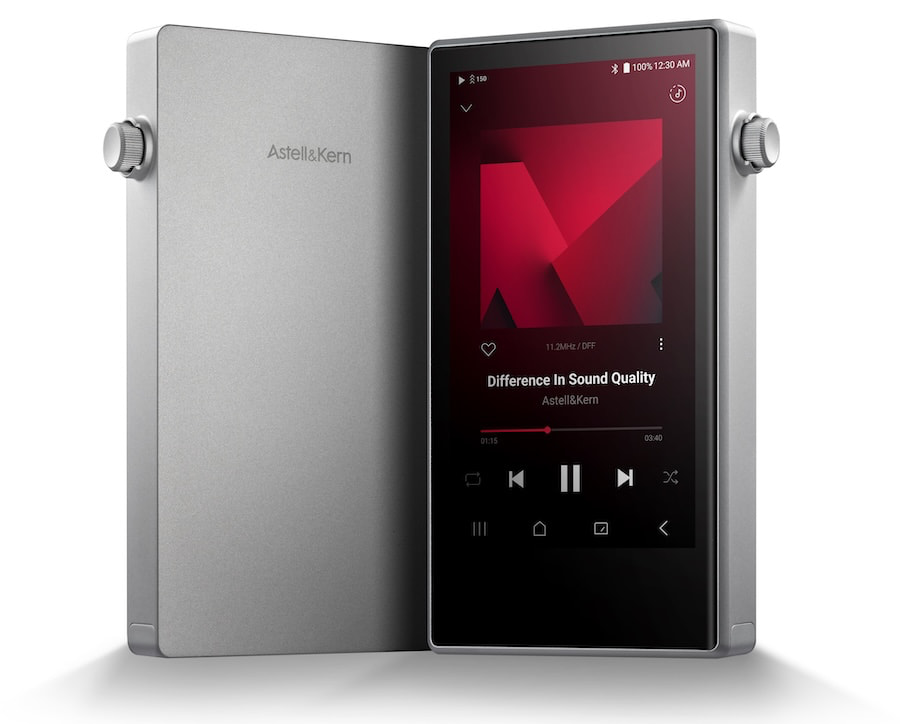
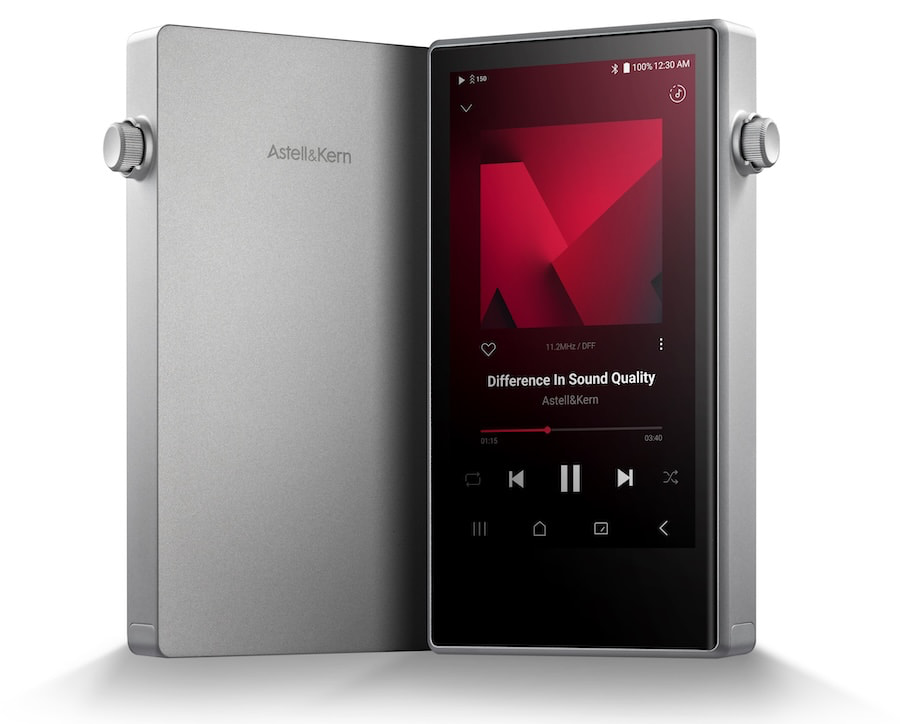
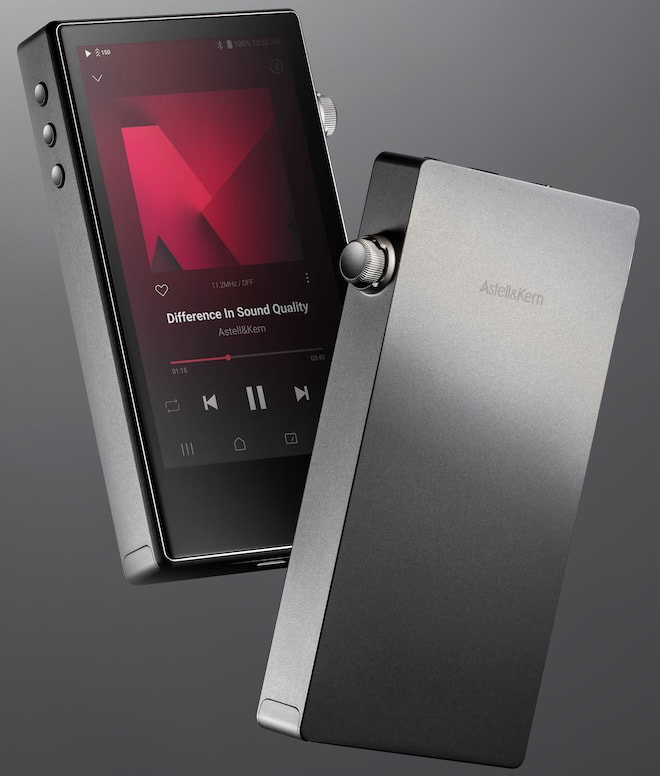
Astell&Kern is now teasing the PD5 “All Day Player,” a more compact model designed to succeed the well-received A&norma SR35. The company plans to reveal the new DAP during the 2026 Hong Kong High-End Audio Visual Show, which runs from August 7–9 at the Hong Kong Convention and Exhibition Centre.
Detailed specifications remain under wraps, but Astell&Kern has already confirmed an aluminum chassis designed for comfortable one-handed use, a switchable Quad/Octa-DAC architecture, and up to 28 hours of continuous playback. The PD5 will also introduce EnviroTune, an intelligent feature designed to analyze ambient noise and tailor the listening experience to the user’s surroundings.
With another wave of new DAPs arriving from across the portable audio category, the PD5 appears to be Astell&Kern’s attempt to deliver premium performance without the flagship pricing, weight, or battery anxiety that often comes with it. The remaining questions are how much it will cost, which DACs are inside, and whether “All Day Player” proves to be more than a clever marketing line.
Advertisement
Related Reviews:
Astell&Kern PD5
Astell&Kern PD5: What We Know Ahead of Its Hong Kong Debut
The PD5 uses eight Cirrus Logic CS43198 DACs, allowing listeners to switch between Quad-DAC and Octa-DAC operation.
Quad-DAC mode prioritizes longer battery life for extended listening sessions, while Octa-DAC mode is designed to deliver the PD5’s full sonic potential and maximize performance from a DAP of this size.
In Quad-DAC mode, the PD5 provides up to 28 hours of continuous playback. Support for PD 3.0 charging reduces charging time to approximately 2.5 hours.
EnviroTune analyzes ambient noise and automatically optimizes the sound for the listener’s current environment. This is designed to provide a more consistent listening experience while commuting, working, or listening in a quieter space.
The PD5 supports playback up to 32-bit/384kHz PCM and native DSD256. Its octa-core processor and full Android operating system are optimized for music streaming services, while dual-band Wi-Fi, Bluetooth 5.3, and broad codec support, including Qualcomm aptX HD, LDAC, and LHDC, provide several options for listening to high-resolution audio wirelessly.
Advertisement
The Bottom Line
The PD5 has a promising foundation, including eight Cirrus Logic DACs, switchable Quad and Octa-DAC operation, up to 28 hours of battery life, and EnviroTune. But Astell&Kern has not yet revealed several details that will determine whether it is actually competitive, including output power, storage capacity, screen specifications, dimensions, weight, Android version, battery life in Octa-DAC mode, pricing, and availability.
If the PD5 lands near the A&norma SR35’s $800 price point, it could be a compelling option for listeners who want a compact DAP with long battery life and enough flexibility for both casual and critical listening. It will also face strong competition from the $699 HiBy R6 Pro II 2025, the $650 FiiO M33 R2R, and the $949 iBasso DX260 MK2. The PD5 may have eight DACs under the hood, but its final price, amplifier power, and software experience will matter far more than the chip count.
Creators will be granted access to a deep library of Disney assets to use in their videos.
Emre Akkoyun/Shutterstock
Disney and TikTok have penned a deal that will allow TikTok creators to bring Disney-centric vertical videos to Disney+. Disney launched its TikTok-like Verts section in the Disney+ app back in March, when it did hint at eventually broadening it out to include fan-generated content.
Creators who opt in to the initially US-only pilot will gain access to Disney assets for hundreds of films and series, with Pixar, Marvel and Star Wars among the confirmed IP. Approved creators will have their videos hosted on both TikTok and in Verts on Disney+. These will be refreshed regularly to help grow the audience and “engage subscribers more deeply in timely fan conversations,” Disney wrote in a press release.
Disney and TikTok are also launching an initiative called the Disney Creator Ambassador Program, which will see them nurture “best-in-class creators” by increasing their visibility, allowing them to attend exclusive events, and incentivize them with rewards. It’s easy to see why Disney would want to invest in TikTok talent. Internal company data revealed that an average of 6.5 million film and TV-related posts were shared on TikTok each day last year, while half of respondents in a survey said they were inspired to watch a movie or TV show by videos they encountered on TikTok.
Advertisement
The new partnership comes after recent reports that Disney may be planning to launch a free tier of Disney+, although it isn’t clear whether that would incorporate vertical video content if it did materialize. Disney did not comment at the time. The TikTok and Disney+ collaboration will launch as a pilot in the coming months, with no firm date announced today.
Gears of War: E-Day is the first mainline entry in the popular sci-fi shooter series since the release of Gears 5 almost seven years ago. While the game won’t be released until Oct. 6, Xbox Game Pass Ultimate and PC Game Pass subscribers can get early access to the game’s open beta two months early, on Thursday, Aug. 6.
Xbox Game Pass, a CNET Editors’ Choice award pick, offers a wide selection of games you can play on your Xbox Series X, Xbox Series S, Xbox One and PC or mobile device for as little as $10 a month. And with a subscription to the higher-tiered Game Pass Ultimate ($23 a month), you can access hundreds of games, including new ones the day they’re released, each month.
Here are all the games Xbox is bringing to Game Pass in August.
Gears of War: E-Day open beta early access
Coming to Game Pass Ultimate and PC Game Pass on Aug. 6.
Advertisement
Grab your lancer and get ready to crush some grubs in the latest entry in the Gears of War franchise before the game’s October release. In the early access open beta, you’ll be able to play the new Horde Siege player-versus-environment game mode. This is a new take on Gears’ Horde mode that’s built for larger maps, more players and bigger battles.
Date Everything!
Coming to Game Pass Ultimate, Game Pass Premium and PC Game Pass on Aug. 11.
Advertisement
Dating simulator games can be fun, but they might feel limiting in some aspects. Yeah, you might love your bed, but does your bed share those same feelings for you? This game lets you explore that idea to its logical conclusion by letting you date almost everything in your home. Bed? Absolutely. Door? You bet. The overwhelming sense of existential dread? If that’s your bag, go for it! There are over a hundred items, each with a unique voice actor, that you can date in this game, so have fun!
This game combines classic brick-breaking gameplay with the base-building, survival and roguelite genres to create something wholly unique. You’ll explore a bottomless pit of monsters on the hunt for treasure, armed with nothing but ricocheting balls. You’ll recruit fellow treasure hunters, tackle huge monsters and upgrade your arsenal as you plunge deeper underground.
Advertisement
Other games coming to Xbox Game Pass
Those are some of the games Microsoft is bringing to Xbox Game Pass soon, but the company is adding more to the service this month. Here are the other games you can try soon.
Monsters are Coming! Coming to Game Pass Premium on Aug. 6. Previously on Game Pass Ultimate and PC Game Pass.
Powerwash Simulator 2: Coming to Game Pass Premium on Aug. 6. Previously on Game Pass Ultimate and PC Game Pass.
Bounty Star: Coming to Game Pass Premium on Aug. 11. Previously on Game Pass Ultimate and PC Game Pass.
Grounded 2 (game preview): Coming to Game Pass Premium on Aug. 11. Previously on Game Pass Ultimate and PC Game Pass.
Cricket 26: Coming to Game Pass Ultimate, Game Pass Premium and PC Game Pass on Aug. 13.
Mio: Memories in Orbit: Coming to Game Pass Premium on Aug. 13. Previously on Game Pass Ultimate and PC Game Pass.
Sandustry: Coming to Game Pass Ultimate and PC Game Pass on Aug. 13.
Egging On: Coming to Game Pass Premium on Aug. 13. Previously on Game Pass Ultimate and PC Game Pass.
Games leaving Game Pass on Aug. 15
While Microsoft is adding titles to Game Pass soon, it’s also removing a handful of games from the service on Aug. 15. So you still have some time to play these games for the first time, or finish your campaign, before you have to buy them separately.
Zach began writing for CNET in November, 2021 after writing for a broadcast news station in his hometown, Cincinnati, for five years. You can usually find him hanging out with his wife, son and dog in their home.
See full bio
Owala Cloud Insulated Bag: This packable tote is surprisingly easy to inflate with just a few breaths. I love that it zips shut, a feature other cooler totes are often lacking. It’s pretty roomy inside but folds flat for easy storage and transportation. While it’s handy for tasks like keeping picnic snacks cold, especially if you add your own ice packs, this isn’t really a traditional cooler. I wouldn’t recommend adding ice cubes to it. But if you want a bag that keeps things cold for longer, it’s reliable.
Arctic Zone Titan Deep Freeze Backpack Cooler: I don’t love backpack coolers because the zippers aren’t leakproof, which means at some point I inevitably get icy cold, questionably clean water somewhere it shouldn’t be. This bag includes two “ice wall” gel packs that are placed in dedicated pockets, which can either help your ice last longer or help you forgo it entirely depending on your trip length. It can also mean less water to leak out of the zippers, depending on how you pack it. The cooler has a large 30-can capacity, but felt a bit unwieldy to me when packed full. I like the numerous organizational pockets, but when they’re full, they add to the bulk. The detachable bottle opener is a nice bonus. I think this cooler is a good pick if you know you want a backpack, but there are some other portable options that I like more.
Pelican Elite 20QT: This tall, narrow, injection-molded cooler is a solid option for road trips. The larger options are rotomolded. It’s waterproof, durable, and easy to fit in the backseat or a pull-wagon. There are four cupholders with drains on the lid, and it keeps ice frozen for two days in 80-degree heat. —Scott Gilbertson
Bote Kula Magnepod: This cooler is designed to fit on Bote’s Aero Breeze or other paddleboards, but it doesn’t need to be paired with them. The bucket shape is versatile, the cooler itself is durable and rugged, and there are tie-down points that let you attach it wherever you may need to.
Advertisement
Yeti Hopper Flip 12: This wide-mouth, free-standing Yeti has a heavy zipper and is a great size for bungeeing to your paddleboard or bike rack. There’s a grab handle and a shoulder strap, so you can attach your flip-flops, dry bag, or little Bluetooth speaker.
Anker Solix EverFrost 2: Anker’s Solix EverFrost 2 electric cooler comes in three sizes (24, 42, or 61 quarts) and has wheels, a handle, and a wee fold-out shelf to sit drinks on. The largest model has two separate cooler sections (you can have a fridge and freezer). Since there’s no need for ice, you can make full use of the space. It’s quick to cool, giving you drinkable beer in 20 minutes. The removable 288 Wh battery is good for around 52 hours for the 42-quart model, but you can add a second battery to extend that to 4.3 days. Anker makes some of our favorite power banks and power stations, so I’m not surprised its Solix EverFrost 2 cooler doubles up as a charger for your gadgets, though that will eat into your battery life. You can recharge the cooler battery via a wall outlet, car socket, solar panels, or USB-C. Paired with a 100-watt solar panel, this could be a great way to go off-grid (you’ll need around four hours of sunshine a day minimum to keep it running). On the downside, the Solix EverFrost 2 can also run out of power fairly quickly, depending on how warm it is and how often you open it. Because of the battery, these coolers are heavy. The 42-quart model is 51 pounds empty, so you’ll want help lifting it in and out of your car when fully loaded, though the handy wheels make it easy to maneuver on the ground. It can also be a little noisy, which might be annoying if you’re sleeping in a tent with it. —Simon Hill
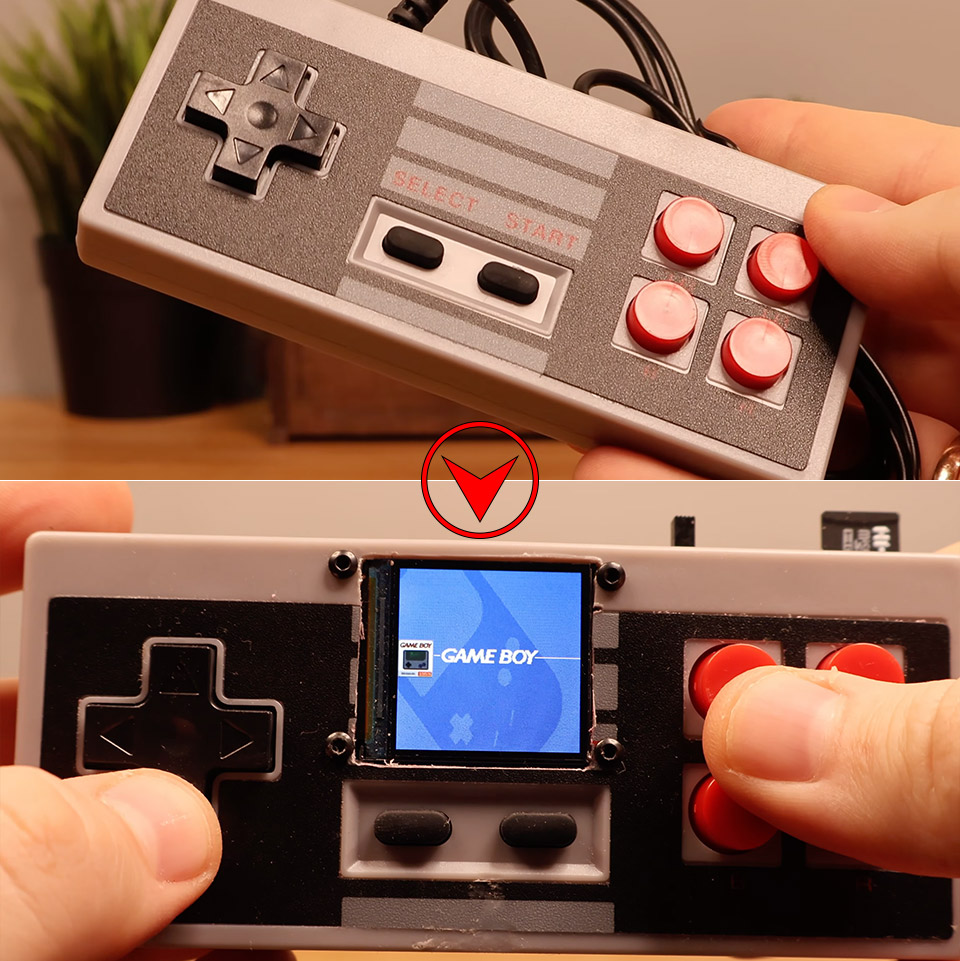
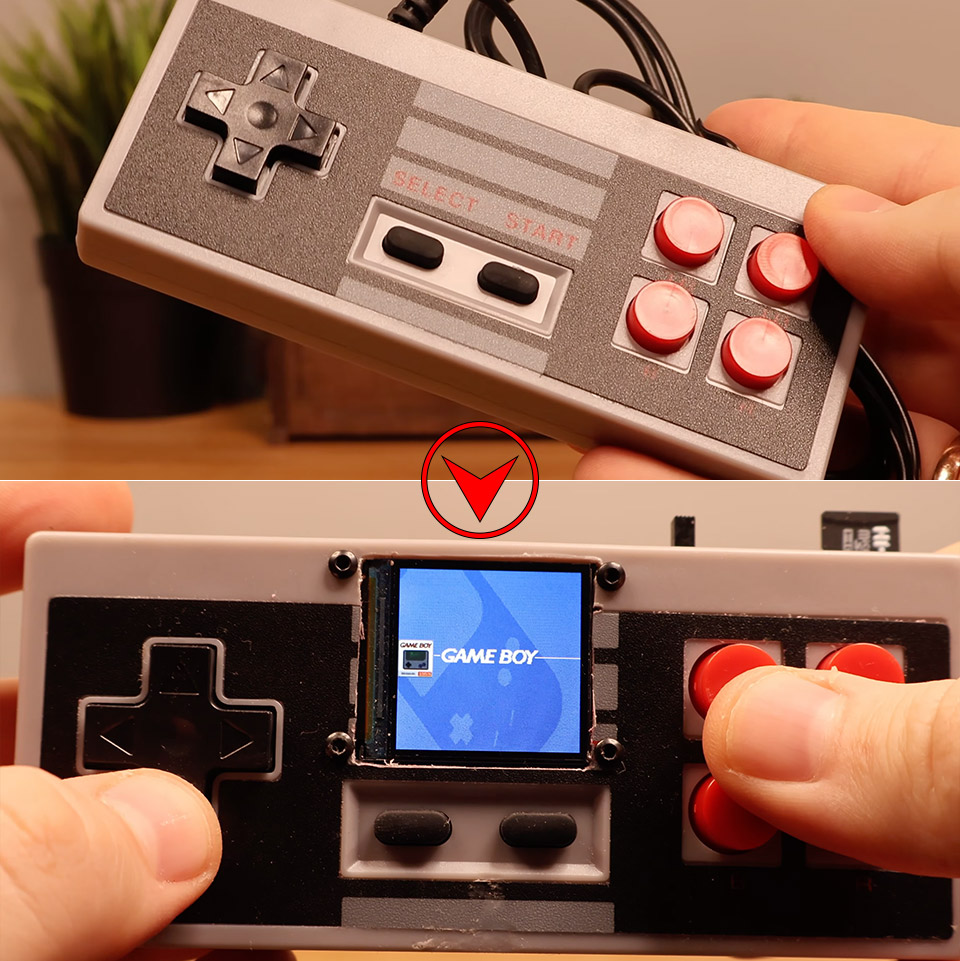
Original NES controllers still feel right. The click of the D-pad, the springy A and B buttons, the solid rectangular shape that fits perfectly in two hands. Most of them now live in drawers or boxes. Logic Gate Labs decided one of those controllers could do more than sit around. They gutted a standard NES-style gamepad and packed a complete retro gaming system inside it, complete with a screen, speaker, storage, and enough power to run dozens of 8-bit games plus a slow but playable version of DOOM.
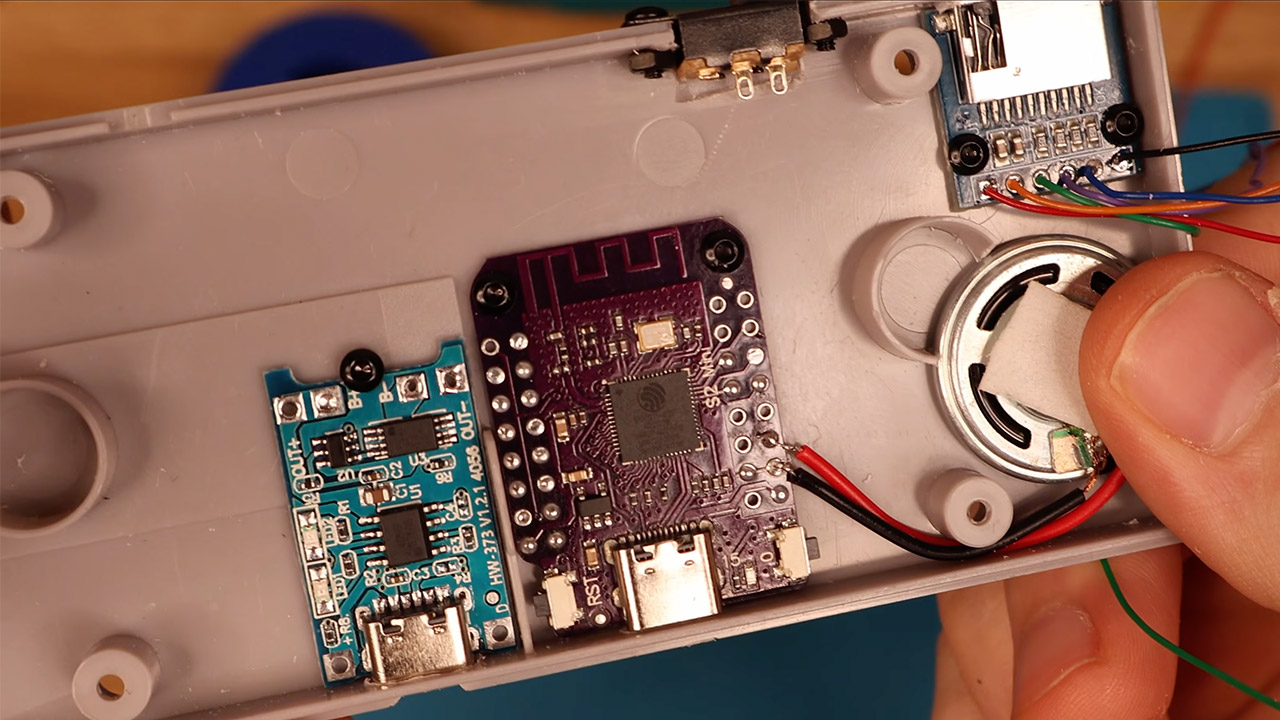
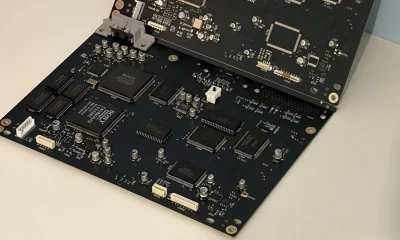
Space inside the traditional NES shell is really limited, so forget about placing those larger ESP32 boards inside. They simply will not go, as the smaller ones you may have believed would work do not have the memory to do the task properly. The ESP32-S2 was the solution. It has adequate processing power and a couple hundred kilobytes of RAM while yet being compact enough to fit in the remaining space after removing the original PCB.
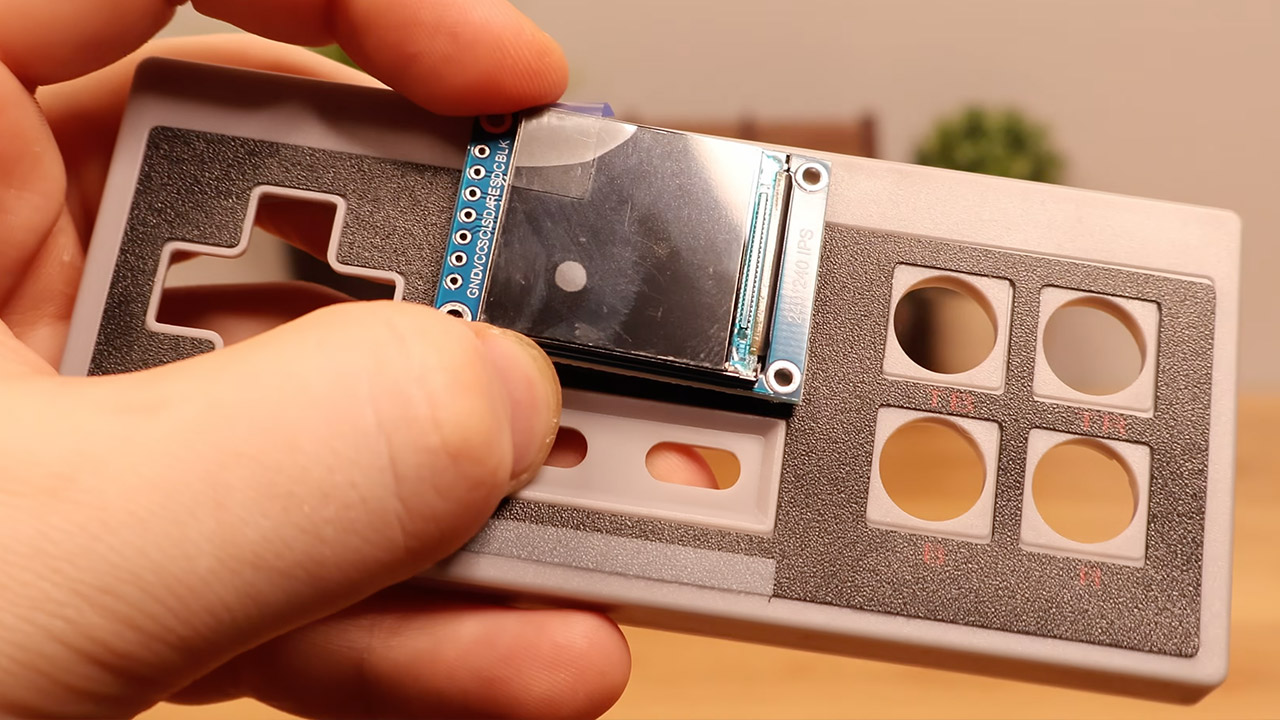
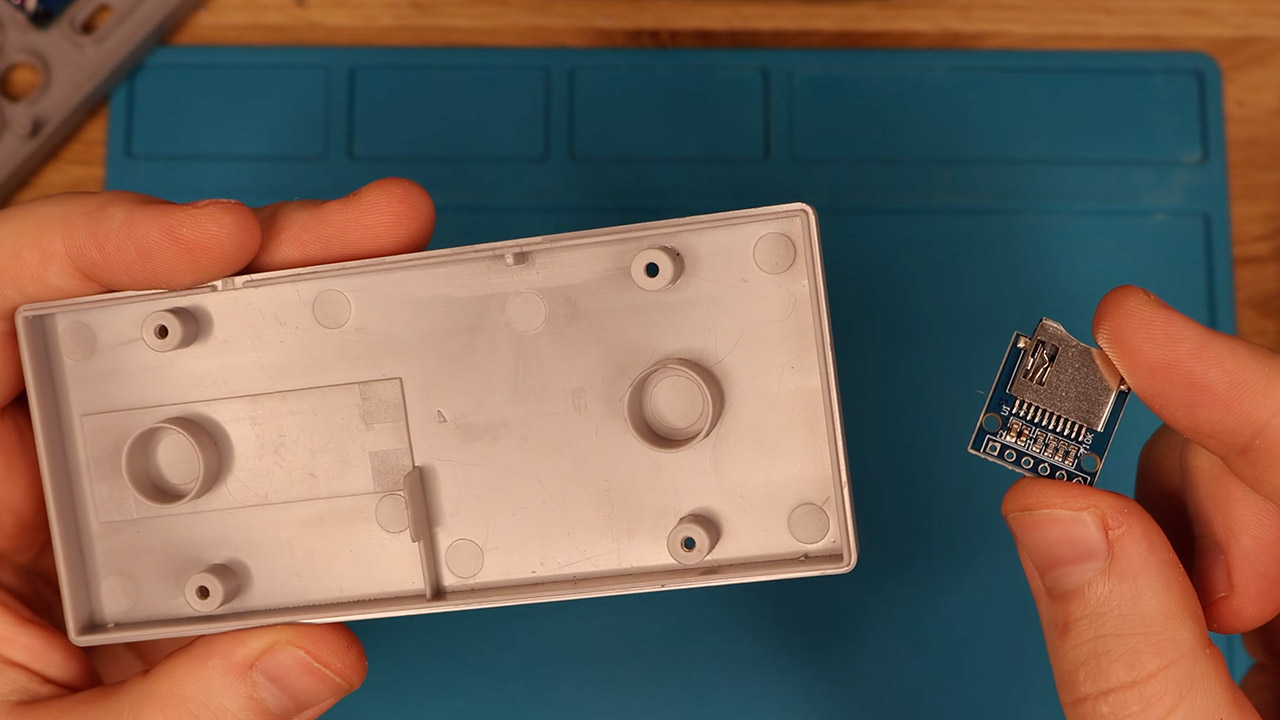
Fitting the display was a hassle because the internal plastic supports had to be removed so that the screen could sit flush with the other components. Fresh drillings were required for the screen, a USB charging connector, a microSD card slot, a small speaker, and a power switch. Keeping the wiring neat was a difficulty. A large piece of bare copper wire serves as the main ground rail, eliminating the need for additional ground wires to connect to the microcontroller. The remaining signals are handled by the narrower signal cables.
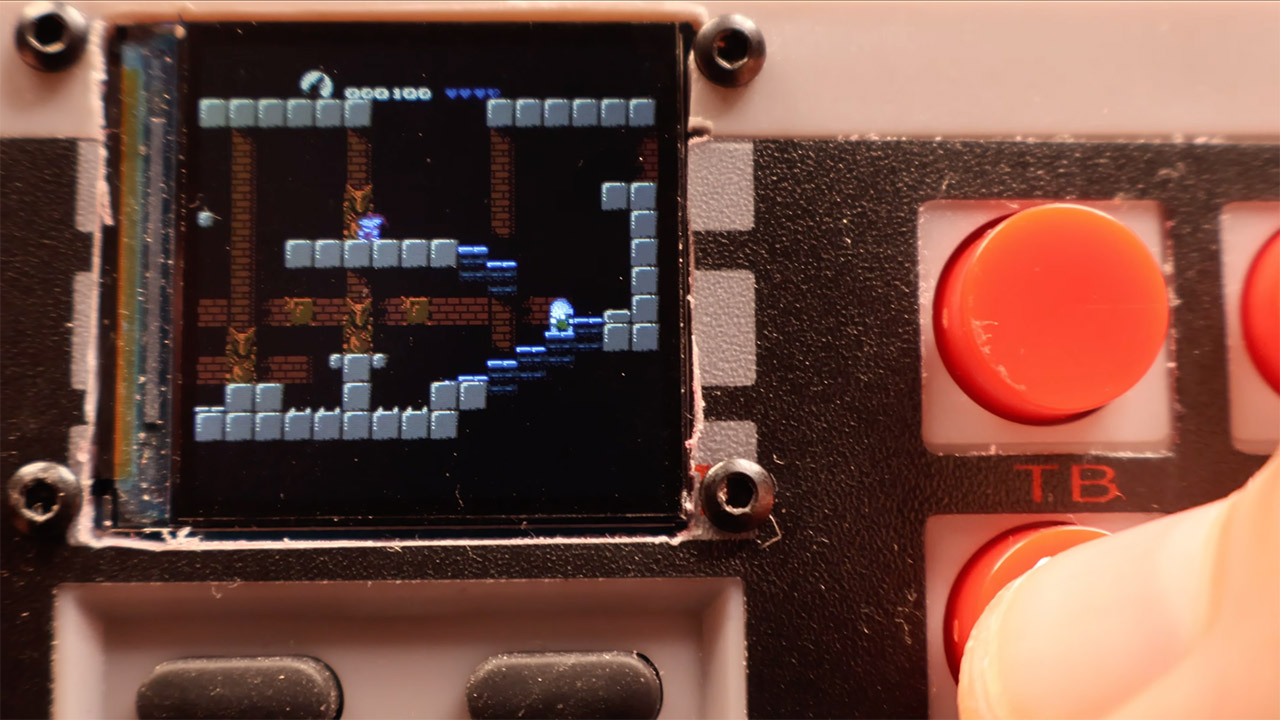
Games load from a microSD card that is inserted in there, and the firmware’s Retro-Go emulator framework is running, which was created specifically for the ESP32-S2 using the ESP-IDF and CMake because it is not a standard target. 8-bit classics operate smoothly. If you want to try something a little more difficult, PrBoom-Go supports DOOM via a Freedoom WAD file loaded on the card. The frame rate ranges from 5 to 15fps, which is adequate for a fast blast, though it will never be as smooth as a recent port.
You can obtain all of the parts you need for less than seventeen dollars from common suppliers on Aliexpress. Overseas markets are more cheaper if you can find what you need. A microcontroller, a small color screen, a rudimentary amplifier and speaker, a charging circuit, a battery, and a few switches and connectors are all readily available.
It still appears like a NES controller on the outside since the buttons are all in the appropriate places and feel the same way you remember them. Flip the power button, load a ROM, and the small screen comes alive with games that used to require a whole console and television to run. It’s a self-contained portable that costs less than one modern game while fitting a lot of history into a form factor that most people are already familiar with. [Source]



-SOURCE-Julian-Chokkattu.jpg)





















































You must be logged in to post a comment Login