If there’s one thing the American automotive industry is probably best known for, it’s engines. Big ones, too, with plenty of classic, high-speed muscle cars from the 1960s sporting 400 cubic-inch V8s making healthy amounts of power. But while those engines that gearheads may look back on with fondness were very capable in their heyday, they’re not really all that powerful compared to what American automakers have to offer now.
Engines like the 426 HEMI might be iconic (and deservedly so, might we add), but its advertised 425 hp and 490 lb-ft of torque pales in comparison to big-power modern V8s from the likes of GM, Ford, and Dodge. These automakers have continued pushing the horsepower envelope forward with each passing decade, breaking past barriers that engineers working in the ’60s and ’70s probably thought were outright impossible.
Advertisement
American carmakers don’t have a monopoly on big, high-performance power plants, of course. Some of the world’s most powerful V8s, for example, are the products of European automakers and their engineers. But that’s another topic for another time; for now, let’s dive into the world of high-power American engines and see just how crazy they can get.
Advertisement
Dodge Viper V10 — 645 hp
The legendarily hard-to-drive Dodge Viper was, arguably, one of the most iconic American vehicles of its day. From its outrageous design to the massive V10 under the hood, the Viper was, and will likely always remain, a unique and likely impossible-to-replicate performance car. That said, the 1991 Viper’s 8.0-liter V10 only made 400 hp, which is honestly pretty tame by modern standards — and wasn’t necessarily earth-shattering even back then.
Dodge increased the Viper V10’s power and displacement over the years, though. The first bump came in 2003 with the third-gen Viper’s 8.3-liter, 500-hp power plant, followed soon by another bump to 8.4 liters and 600 hp in 2008. While these numbers are solid, some might feel that the V10 never quite made the amount of power one might hope from such a massive engine. That said, its final iteration was at least good enough to earn a place on this list.
In 2013, Dodge unveiled the fifth-generation VX I Viper, which boasted several improvements over its predecessors. It was a comfier and more luxurious car, with higher-quality materials and a more accommodating interior. Things improved under the hood, too: The 8.4-liter V10 now made 640 hp and 600 lb-ft of torque, good enough for Chrysler to claim that it was the most powerful naturally aspirated sports car engine on the market. The Viper’s engineers weren’t quite done, though, and they managed to squeeze out an extra 5 hp for 2015, bumping the V10’s output to 645 hp — a number it retained until the end of production in 2017.
Advertisement
Chevrolet LT6 — 670 hp
JoshBryan/Shutterstock
Chevrolet’s LS series of small-block V8s may be the more recognizable of the automaker’s modern compact performance powerplants — and an incredibly popular choice for engine swaps the world over — but if it’s power you want, the newer LT engines are the ones to pay attention to. Case in point: The 5.5-liter LT6, which debuted in the 2023 Chevrolet Corvette Z06 with an impressive 670 hp and 460 lb-ft of torque.
One of the secrets to the LT6’s impressive power output is the flat-plane crankshaft that Chevy engineers adopted for the engine. While we don’t have the space to dig into the differences between cross-plane and flat-plane cranks here, the gist is that flat-plane crankshafts require less balancing and are thus lighter. This, in turn, allows designers to make an engine that revs incredibly high and makes a lot of power while doing so; the LT6 specifically generates its 670 hp at 8,400 rpm, with redline arriving at 8,600 rpm.
It’s not solely down to the crankshaft design, of course: Chevy engineers pulled out all the stops to make nearly 700 hp from a 5.5-liter engine without the aid of boost. Other clever tricks include a high-flow exhaust, an oversquare bore and stroke that reduces piston speed at high revs, and an active intake manifold that rams extra air into the combustion chamber via a behavior known as resonance supercharging to squeeze as much power as possible out of the LT6. The result is a naturally aspirated small-block V8 that’s easily one of the most powerful Corvette engines ever.
Advertisement
Chevrolet Performance ZZ632/1000 — 1,004 hp
Not all mega-powerful American engines come installed in cars from the factory; instead, some ship as crate engines. One of the most pertinent examples is the Chevrolet Performance ZZ632/1000. As the name indicates, the ZZ632 is a massive 632 cubic-inch tall-deck, big-block V8 that, as shipped, is good for 1,004 hp and 876 lb-ft of torque.
Advertisement
The ZZ632 is a modern entry in Chevy’s storied lineage of big block engines, with the powerplant flying the same flag once flown by iconic big blocks like the 454 that powered the C3 ‘Vette, Monte Carlo and Caprice. Just with a lot more power, of course. However, unlike many other modern 1,000-hp American V8s, the ZZ632/1000 manages it without forced induction; instead, it’s a naturally aspirated motor that makes a strong argument for the old adage of there being no replacement for displacement.
Chevy predictably equips the ZZ632 with heavy-duty components to handle all that power (and 12.0:1 compression). It boasts forged internals all around barring the camshaft, which is billet steel. The rest, including the pistons, crankshaft, and rocker arms, are all forged aluminum or steel of some sort. It also has fuel injectors that deliver 86 pounds-per-hour and makes its headline figures on 93 octane gas — no E85 necessary here. There have been plenty of engine swaps featuring the ZZ632 over the years, but one of the most memorable is likely Hot Rod magazine’s yellow 1957 Chevy known as Project X, which got a ZZ632/1000 in a 2023 episode of “Hot Rod Garage.”
Advertisement
Dodge Hellephant — 1,000/1,025 hp
What carries more weight than a Hellcat? If you ask Dodge, it’s the Hellephant. The automaker has used the name for two distinct engines, both of which one-upped the already powerful Hellcat engines by generating four-figure power numbers.
Dodge first revealed the 426 Hellephant at the 2018 SEMA show, where it sat in the engine bay of a restomodded ’68 Charger. The engine was based on the 6.2-liter Hellcat but achieved 1,000 hp and 950 lb-ft of torque on pump gas via several mods. These included an aluminum engine block, a 3.0-liter supercharger, special forged pistons, and an aggressive, high-lift camshaft, amongst other upgrades. Availability was very limited to start with, however, with units selling out within 48 hours and later delayed due to camshaft issues.
In 2023, Dodge released the Dodge Challenger SRT Demon 170, with a 6.2-liter, 1,025-hp (on E85) Hellephant engine under the hood. Changes for this HEMI included a new 3.0-liter supercharger (with more boost courtesy of a 3.02-inch pulley) and a larger throttle body. Like the 426 Hellephant, Dodge sold the engine as a crate motor, calling it the Hellephant C170. As of mid-2026, Direct Connection has two variants of the Hellephant listed: The E85-capable, 6.2-liter 1,025-hp C170 and the 1,000-hp Hellephant A30 426 that it reintroduced in 2025. The C170 is technically the more powerful of the two, but we felt both were deserving of equal billing here — what’s 25 horsepower between friends, after all?
Advertisement
Chevrolet LT7 — 1,064 hp
The 670-hp LT6 that debuted in the 2023 C8 Corvette Z06 was already very powerful, especially for a naturally aspirated powerplant. Despite that, even the most casual petrolhead would have guessed that there was predictably no way that the automaker was going to stick with a sub-700-hp engine for the C8 ZR1. And this hypothetical individual was proven very, very right in 2024, when Chevy revealed that the ZR1 would make 1,064 hp from its 5.5-liter, twin-turbocharged LT7 engine.
Advertisement
Chevy’s chosen name is, of course, indicative of the engine’s family resemblance to the LT6, but there’s more to separate the two engines than the turbos. These include chunkier internals — with forged titanium connecting rods and all-new forged aluminum pistons — and altered cylinder heads to accept the 20 PSI that the turbos put out. This head casting also allows for both port and direct fuel injection, unlike the direct injection-only LT6. Another difference is that the engine designers developed an anti-lag system for the LT7, ensuring it stays in boost. Paired with a similarly upgraded transmission, the LT7’s 1,064 hp pushed the ZR1 to a record-breaking 233 mph top speed in 2024.
While the LT7’s raw power is the focus of this list, it would be remiss of us not to mention the electrified 1,250-hp Corvette ZR1x. This latest iteration of the C8 ‘Vette pairs the LT7 with a modified version of the front motor from the Corvette E-Ray, making for what is likely to be the quickest (and fastest) Corvette ever.
Advertisement
SSC Tuatara V8 — 1,350/1,750 hp
While naturally aspirated, high-power V8s are undoubtedly impressive, getting huge power numbers out of eight cylinders invariably requires a bit of help, be it from a supercharger or twin turbos. Dodge went down the former route with the 1,000-hp Hellephant, while Chevy went for the latter to squeeze 1,064 hp out of the 5.5-liter LT7. But both of those pale in comparison to what Nelson Racing Engines (NRE) and SSC cooked up for the SSC Tuatara.
The Tuatara’s V8 is a 5.9-liter V8 that rocks dual 76mm NRE turbos and a flat-plane crankshaft that allows it to rev up to a dizzying 8,800 rpm. To allow the engine to get up that high, NRE engineers designed a large-bore, short-stroke engine to keep piston speeds down. Similarly, short-skirt pistons and lightweight titanium connecting rods ensure that the V8’s rotating assembly is lightweight enough to allow the engine to rev safely to nearly 9,000 rpm. It’s admittedly not quite one of the highest-revving production car engines ever, but it’s still plenty impressive for a such a large V8.
Cooling the hot air from NRE’s in-house twin turbos are two air-to-water intercoolers located in the intake manifold. These allegedly halve the intake air temperature and help squeeze out even more power from the engine. The final icing on the cake of ultra-high-horsepower is, of course, biofuel: The V8 makes its 1,750 hp when gassed up with ethanol or methanol. Without it, you’re looking at a paltry 1,350 hp instead. Still great, but not nearly as great as 1,750 hp.
Advertisement
Hennessey Fury V8 — 1,817/2,031 hp
Hennessey Performance is known for building many incredibly powerful vehicles, from a 1,200-hp version of the Cadillac CTS-V to the 1,400-hp Venom GT based on the Lotus Exige. But while all of those were indeed impressive achievements, the engine powering company’s most recent hypercar (as of 2026) easily bests them all: Say hello to the Fury V8.
Advertisement
This ludicrously overpowered engine was revealed alongside the Venom F5 in 2020, with frankly mind-boggling numbers straight from the off. Hennessey claimed that the twin-turbocharged, 6.6-liter V8, which was based on GM’s classic LS small-block V8, would make 1,817 hp and a ludicrous 1,193 lb-ft of torque. While we’re not sure if any third-party outlet ever dared to take a Venom F5 to the dyno, we don’t see any reason to doubt those numbers, not least due to the F5’s impressive 221-mph half-mile and our own Dave McQuiling’s experience behind the wheel of one back in 2024.
Managing just over 1,800 hp from a 6.6-liter V8 would already have guaranteed the Hennessey and its Fury V8 a place in the history books, but the Texas-based tuner was far from done. In 2025, Hennessey announced the Evolution package for the Venom F5, which bumped output up to an even crazier 2,031 hp and 1,445 lb-ft of torque. This extra 200 hp or so comes courtesy of new turbos, updated billet aluminum pistons, higher-flow injectors, and lighter valve covers — and E85 fuel, of course.
Website traffic from AI will surpass traffic from traditional search by 2028. Do you know that almost 70% of businesses report higher return on investment (ROI) with the use of AI in SEO? And this data shows the surging demand and usage of SEO intelligence.
But how is it different from just seo or why is there so much buzz around a separate term? Keep reading to know all about modern-day search engine optimization.
What is SEO Intelligence?
SEO intelligence is all about the process of refining your website to achieve higher rankings on the search engines by collecting, analyzing, and leveraging data related to search engine performance. It gives you a picture of how your website is doing in organic search, how it stands against the competitors, and what the strategy is to do better in search rankings.
How is it different from Normal SEO?
This is the most common confusion. Let me clarify for you.
SEO is about the basics of optimizing your website for it to rank better, and it is more about using the right keywords, improving technical seo and tailoring web content accordingly.
Advertisement
Whereas SEO intelligence goes a layer deeper, it is the advancement of the basics that goes with a strategic approach. Here, it is not just about practicing seo but practicing it with the right tools, using data and analysis before deciding what seo actions will be the best for expected outcomes. It is about being precise and making data-backed decisions, and it is a proactive approach.
SEO is about execution, whereas SEO intelligence is about what & why to execute.
Why do you need Search Engine Optimization Intelligence?
These are the 8 top-most benefits of SEO intelligence:
1. Competitive Edge
When you are using the right seo tools and each of your decisions is backed by clear figures, facts, and industry insights, it helps you stay ahead of the competition. Moreover, intelligence starts with gathering data, which includes what your competitors are doing, taking note of beneficial strategies from them, and what you should avoid while learning from others’ mistakes.
Advertisement
2. Data Driven Decision-making
Use of intelligence in seo processes helps you make informed decisions as you look at analysis and reports rather than playing on assumptions. You can make and maintain highly effective and high-performing plans for traffic generation.
3. Optimized Content
Gives you an understanding of what type of content will work best for your target audience and platform. Better-aligned content leads to higher engagement rates.
4. Enhance User Experience
It is not only about your website performance on search engines, but also how the website treats users or visitors. Intelligent data gives a view of how your site is utilized by visitors and what can be improved in usability and navigation.
5. Higher Conversion
It is a seo process at core, and the purpose of seo is to rank your website higher, which indeed will increase footfalls and consequently conversion rates. Now adding intelligence to basic seo makes these increments much higher.
Advertisement
6. Long-term Results
Applying intelligence while working on seo magnifies the power and scope of expansions. The combination of seo intelligence, search intelligence, product, and market intelligence fosters a holistic and all-rounded strategy.
When you are constantly monitoring your website and using analytics, you can make real-time decisions and improvements, avoiding the piled-up work. This helps to stay effective for a longer period of time as seo keeps working in the background, offering you organic results.
7. Cost Effectiveness
This seo practice allows businesses to focus on high-intent keywords, avoiding budget wastage on irrelevant traffic. Also, it avoids guesswork and works on data, resulting in a higher ROI, allowing savings on paid advertising. It reduces Customer Acquisition Cost (CAC).
8. Increased Online Visibility
Focusing beyond keywords and page loading speeds seo intelligence supports in spotting new opportunities by working on user intent, identifying low difficulty keywords, and optimizing SERP features and artificial intelligence. As you deal with data and more in-depth information throughout the process, it automatically improves the technical health of the website and assists in building topical authority.
Advertisement
What are the Key Elements of SEO Intelligence?
Source: Roaring Studios
While working with this format of seo you need to adhere to the following metrics for it to really work as desired:
Keyword intelligence to focus beyond just search volume and understanding why and what is being searched for behind those searched words or phrases.
Competitor analysis is one of the most important elements for staying ahead in keyword rankings, backlinking plans, and grabbing new opportunities.
Content intelligence to understand what your audience is looking for and what works and what does not. Paying attention to this ensures user needs and web authority.
SERP tracking is essential for staying updated on new features and AI overviews.
Backlink Intelligence makes you aware of the relevance of referring domains supporting strong site authority.
Predictive analysis is another key aspect that really defines a strong implementation of intelligence, as it helps forecast trends and what is going to happen next with a proactive approach in strategies.
Best SEO Intelligence Tools 2026
Before you choose a seo intelligence tool, look at the factors such as automation, data accuracy, prediction capabilities, and scalability to understand whether the tool really meets the needs of intelligence or not.
1. Clearscope
It is one of the best choices for editorial teams wanting to improve content quality. It offers advanced content grading and checks, ensuring the content is SEO-optimized and human-friendly.
Clearscope bags a strong client base of YouTube, IBM, Adobe, Deloitte, and more.
Helps you measure visibility across Google and AI chatbots.
It not only helps in finding keywords but also gives a holistic view of the next high-impact topic for you to spark and own the online conversation before your rivals do.
Offers content analysis for the entire site and individual pages for prebuilt content views or custom ones.
Some limitations are that it has limited automation, no AI writing at scale, a steeper learning curve, and is expensive for small teams.
2. Frase
Best used for SERP based content briefs and FAQs, and it is a much more economical option to Surfer and Clearscope. It talks about being an all-in-one solution for an intelligent seo process.
Companies like Thomson Reuters, Under Armour, Coursera, Hennessey, and more are the clients held by Frase.
That said, Frase claims to avoid patchwork, the old tradition if seo that requires separate tools for research, writing, optimization, and more. It does it all together by utilizing its 80+ skills.
Offers AI search tracking, content optimization, and integration across tools and platforms.
Some fallbacks are shallow optimization compared to Sufer or Clearscope, and constrained scalability for large teams.
3. Market Muse
It is best suited for big publishers, enterprise sites, and content-heavy SaaS brands. Topical authority and content strategy are strong points of Market Muse by Siteimprove.
Their clients include Orbit Media Studios, ON24, Sumo Logic, and more.
Helps by providing personalized difficulty solutions. Offering a tailored roadmap for creation and updates in minutes.
You can best use it to expand the authority of your website that you already have.
Competitor analysis helps identify gaps and overlooked opportunities. You can also leverage link recommendations, quality analysis, and brief optimization.
It lacks somewhere because it is a killer for small blogs, has a steep learning curve with required training, and is also expensive.
In a Nutshell
If you really want to succeed in your search engine optimization, you need to adapt SEO intelligence. Because it will not only tell you to ‘do it’ but will make you understand why, what, and how to do it in a much more effective and efficient way. The process has some important elements, including prediction, content optimization, backlinking, and more, as I have mentioned.
Advertisement
We also discussed some of the best tools for a robust seo intelligence strategy. So you have got it all, what is seo intelligence, its importance, how to practice, what are the best ways and tools you can use. Get going and boost your website ranking and business.
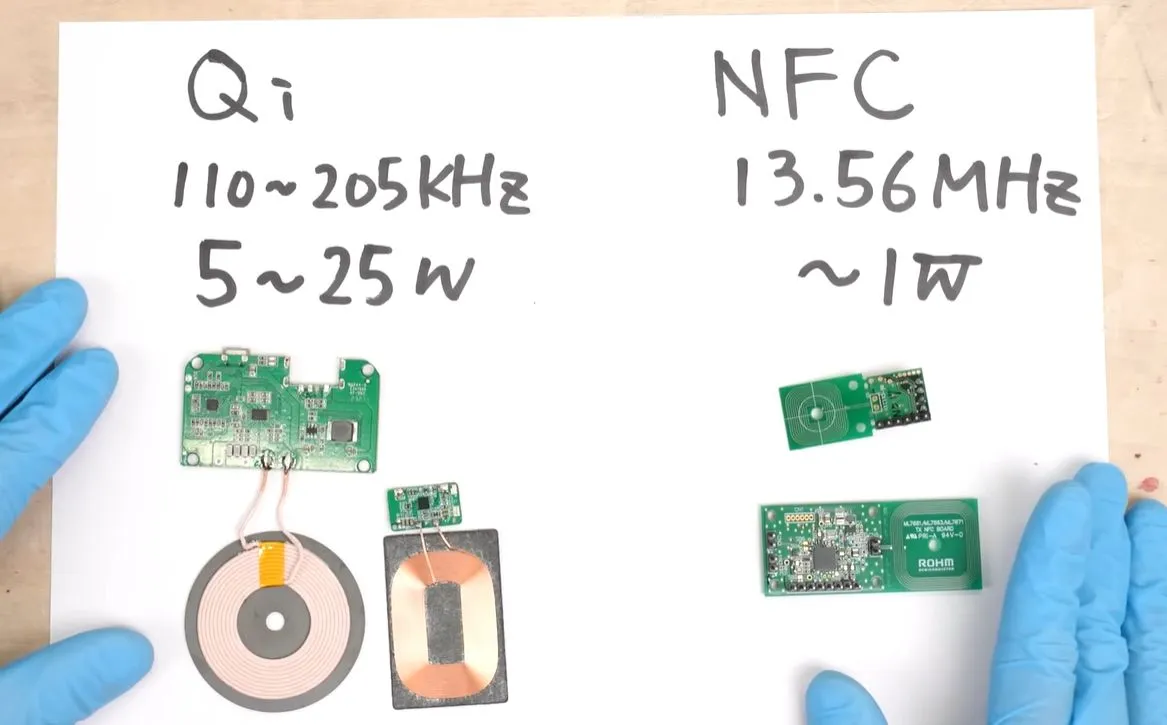
It shouldn’t be any surprise that NFC and similar RFID implementations are capable of providing power to a receiver, since this is after all how RFID tags can work without a battery. The question is more whether you can do more with NFC than just briefly power some low-power circuitry to spit out some data. This is the topic of a recent [Denki Otaku] video.
Although both Qi and NFC use electromagnetic induction, they differ in the frequency and correspondingly the maximum power that they can deliver to a receiver. For NFC this is around a Watt, with the used NFC module supporting up to 250 mW, which already sets the rough scope of what one can expect from an NFC-powered device. That said, an NFC transmitter and receiver can be significantly smaller than those for Qi due to the much higher frequency.
An additional benefit of NFC is that it offers more freedom to the user in its protocol in terms of user data, which is useful for applications where you don’t just want to power a device. In the video an MCU and IMU are powered along with an OLED display, which demonstrates wireless charging as well as data transfer of the IMU data to a second MCU.
Advertisement
The benefits of NFC over Qi would thus be the smaller antenna size, and depending on the used NFC implementation also charging and data transfer at the same time.
The first India’s Favorite Smartphone awards, powered by Flipkart, just wrapped up. And what a stellar night it was. Instead of the usual jury picks, this one was decided by people. Users voted for their favorite smartphones, and the results are actually pretty interesting. If you missed it, here’s everything you need to know.
Cameras Segment Winners
There was a time when smartphone cameras were just okay. Good enough to take photos in the day, but once the light subsided, so did the quality. Well, that’s not the case anymore. Different smartphone makers excel at various things. Portrait photography, for instance, is clearly a battleground. Phones like the vivo V60 (Best Smartphone for Portraits Under ₹40,000) and the Google Pixel 10 (Best Smartphone for Portraits Above ₹40,000), which won in their respective segments, show how much brands are focusing on skin tones, edge detection, and that DSLR-like look.
Selfies have also made a comeback as a serious category. With devices like the Motorola Edge 60 Pro (Best Smartphone for Selfies between ₹20K – ₹30K) and OPPO Reno14 5G (Best Smartphone for Selfies between ₹30K – ₹40K), it’s clear that front cameras are no longer an afterthought, especially in a creator-first world. Still, the most important thing when it comes to smartphone photography is nighttime shots, and here the vivo X200T took the night photography crown in the above 40K budget. Unsurprisingly, it was Apple that bagged the best video award with the iPhone 17 Pro Max. On the other hand, the best videos award in the 30K-40K segment was won by the vivo T4 Ultra.
Rounding up the camera section, the best smartphone for photography between the 20K-30K was the Motorola Edge 70 Fusion. The same award, but between 30K-40K, was awarded to the vivo V60e. Last but not least, the overall best flagship phone for camera was OPPO Find X9 Pro.
Battery & Performance Winners
For all the talk about AI and cameras, most people still care about two things: battery life and performance. That’s exactly why budget battery champs like the realme P4 Lite 5G (Best Battery Life Smartphone under ₹10K) and realme P4x 5G (Best Battery Life Smartphone between ₹10K-₹20k) matter. These aren’t flashy devices, but they solve a real problem: getting through the day without constantly looking for a charger.
Gaming, on the other hand, has become its own category entirely. Phones like the OPPO K13 Turbo 5G (Gaming Smartphone of the Year Between ₹20K-₹30K) and POCO X8 Pro Max (Gaming Smartphone of the Year Between ₹30K-₹40K) highlight how performance today isn’t just about benchmarks, it’s about sustained performance, thermals, and real gameplay stability.
Advertisement
Beyond gaming, the other thing that makes or breaks the phone is the software experience. While most phones today have good software, the winner in this category was absolutely clear: Nothing. The Nothing Phone (4a) and CMF by Nothing Phone 2 Pro swept the stage, winning the best software experience both under the ₹20K and ₹30K categories.
But if you just want the best overall performance and a mix of software and gaming, then the iQOO Neo 10R 5G is the way to go in the ₹20K-₹30K category. Build quality is also getting more attention. Devices like the vivo T5x and Motorola Edge 60 Fusion stand out for their in-hand feel and durability. That’s something buyers are starting to notice more than before.
Value & Design Awards
Despite all the innovation happening at the top end, the core of the Indian smartphone market hasn’t really changed. Categories like Best Value 5G and Best All-Rounder exist for a reason. Phones like the Moto G57 Power 5G (Best Value 5G Smartphone Between ₹10K-₹20K) and realme P4 Power 5G (Best All-Rounder Smartphone ₹20K-₹30K) aren’t trying to be the best at one thing.
Smartphone design has remained the same for the better part of a decade. But Nothing has been changing that trend slowly but surely, with unique designs and lighting. As expected, the Nothing Phone (4a) Pro won the Chromatic Disruption Award. On the other hand, the Motorola Edge 70 Fusion took home the Color Material Finish (CMF) award. At the same time, the iPhone 17 Pro winning for trendsetting design is a reminder that consistency and familiarity still carry a lot of weight.
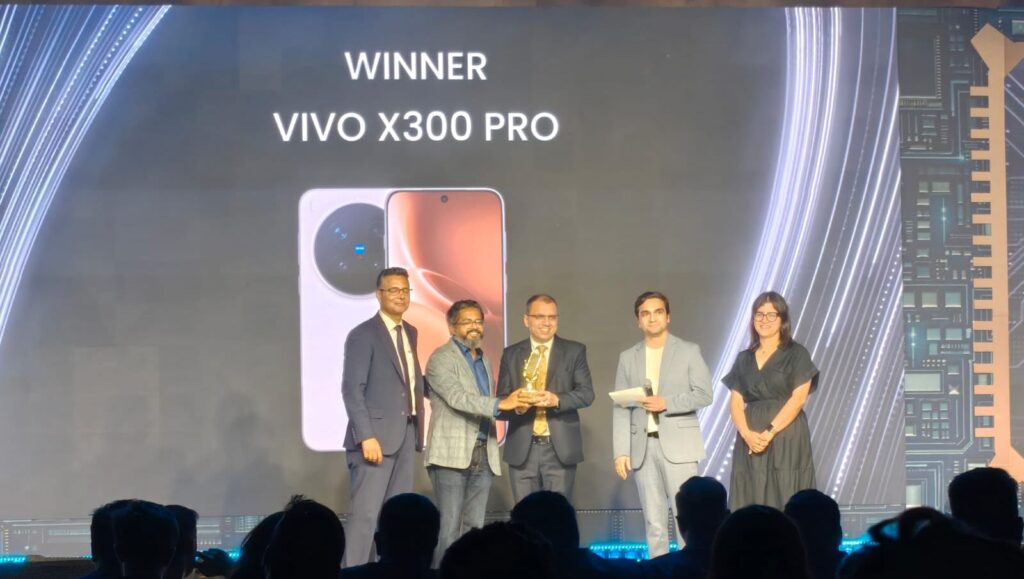
The Samsung Galaxy S26 series (Capture the night right award) being recognized as the “Smartest Smartphone” says a lot about where things are going. It’s less about raw power now and more about how intelligently a device can adapt and assist. Similarly, phones like the vivo X300 Pro (Future of Smartphone Photography) show how AI is playing a bigger role in photography, not just enhancing images, but defining how they’re captured in the first place.
Advertisement
Full List of Winners
Category
Winner
Best Smartphone for Portraits (₹30,000 – ₹40,000)
vivo V60
Best Smartphone for Portraits (₹40,000 & above)
Google Pixel 10
Best Smartphone for Selfies (₹20,000 – ₹30,000)
Motorola Edge 60 Pro
Best Smartphone for Selfies (₹30,000 – ₹40,000)
OPPO Reno14 5G
Best Smartphone for Night Photography (₹40,000 & above)
vivo X200T
Best Smartphone for Videos (₹30,000 – ₹40,000)
vivo T4 Ultra
Best Smartphone for Videos (₹40,000 & above)
Apple iPhone 17 Pro Max (Silver)
Best Smartphone for Photography (₹20,000 – ₹30,000)
Motorola Edge 70 Fusion
Best Smartphone for Photography (₹30,000 – ₹40,000)
vivo V60e
Best Smartphone for Photography (₹40,000 & above)
OPPO Find X9 Pro
Best Battery Life Smartphone (Under ₹10,000)
realme P4 Lite 5G
Best Battery Life Smartphone (₹10,000 – ₹20,000)
realme P4x 5G
Gaming Smartphone of the Year (₹20,000 – ₹30,000)
OPPO K13 Turbo 5G
Gaming Smartphone of the Year (₹30,000 – ₹40,000)
POCO X8 Pro Max
Best Software Experience (₹10,000 – ₹20,000)
CMF by Nothing Phone 2 Pro
Best Software Experience (₹20,000 – ₹30,000)
Nothing Phone (4a)
Best Build Quality Smartphone (₹10,000 – ₹20,000)
vivo T5x
Best Build Quality Smartphone (₹20,000 – ₹30,000)
Motorola Edge 60 Fusion
Best Performance Phone (₹20,000 – ₹30,000)
iQOO Neo 10R 5G
Lifestyle Creator of the Year
Sejal Kumar
Pop Culture Creator of the Year
Baccha mat bolna
Visual Storyteller of the Year
Ankur Agarwal
Entertainment creator of the year
Danny Pandit
Best Value 5G Smartphone (Under 10,000)
vivo T4 Lite 5G
Best Value 5G Smartphone (₹10,000 – ₹20,000)
Moto g57 Power 5G
Best Emerging 5G (₹10,000 – ₹20,000)
Samsung F70e
Best All-Rounder Smartphone (₹10,000 – ₹20,000)
vivo T5x 5G
Best All-Rounder Smartphone (₹20,000 – ₹30,000)
realme P4 Power 5G
Tech Creator of the Year
Rajeev Makhni
India’s Most Trusted Tech Creator
Tech Burner
Review Master of the Year
Beebom
Fastest Growing Tech Creator
RJ Abhinav and Techs Venom
Smartest Smartphone (₹40,000 & above)
Samsung Galaxy S26 Series
Best Designed Smartphone (₹30,000 – ₹40,000)
Nothing Phone (4a) Pro
Best Color Material Finish (CMF) I I Chit chat will happen here
Ai+ Smartphone
Capture the night right award
Samsung Galaxy S25 Series
The Chromatic Disruption Award
Nothing Phone (4a) Series (Pink)
Best Colour Material Finish (CMF) I I Chit chat will happen here
It’s the age-old question: repair or replace? It’s something you see drivers wrestle with all the time, but what about homeowners? When your home’s heating and cooling system runs into trouble, it’s worth asking yourself whether paying for another repair or investing in a full replacement is the more affordable option. That’s where the $5,000 rule comes into play. If your HVAC’s not passing the seasonal routine maintenance check, you can use this basic calculation to weigh the short-term cost of repair against long-term value of replacement.
It’s this simple: multiply the age of your HVAC system by the estimated repair cost. If the total exceeds $5,000, the consensus among technicians is that replacement would actually be the more cost-effective option. For example, a 12-year-old unit in need of a $500 repair would give you a total of $6,000. In that case, replacement may be the smarter financial move. (Alternatively, if the unit was installed nine years ago or less, the math suggests it’d make more sense to just repair.) It’s not an exact science, of course, but it’s just meant to help you make your mind up.
Advertisement
Why the rule might not be as reliable anymore
Kunakorn Rassadornyindee/Getty Images
The $5,000 rule is based on the idea that most HVAC systems only operate effectively for about 10 to 15 years — 20 if you’re lucky. That’s true of all major air conditioner brands. After that, you can reasonably expect performance to decline and efficiency to drop, not to mention needing more frequent repairs. With the $5,000 rule, homeowners have a reasonable threshold to help them know when repairs might not make sense financially anymore.
That said, the $5,000 rule might not be as reliable as it once was. HVAC replacement costs have gone up by a lot, and newer systems could end up with bills in the range of $10,000 or more. And while HVAC units are getting more efficient, they’re also getting more advanced. That means the cost of repair goes up, too. If you’re not sure which direction to go, you can always ask a trusted HVAC technician to make it make sense for you. Have them break down the cost of replacement vs. repair and weigh your options from there.
The programme will deliver enhanced national datasets, policy briefings, peer-reviewed academic outputs and a flagship WDC report designed to inform decision makers and the wider public.
The Western Development Commission (WDC) and Atlantic Technological University (ATU) will partner to examine how remote and hybrid work is reshaping Ireland’s economy, communities and quality of life.
The two-year project, which is called Connected Futures: The Economics of Remote and Hybrid Work in Ireland and its Impacts on Wellbeing, Mobility, and the Local Economy, is funded under the TU Rise programme.
Dr Aisling Moroney from WDC’s policy analysis team will spearhead WDC involvement in the research. The ATU side of the operation will be led by Dr Amaya Vega, Dr Sinead Keogh and Dr Michelle Queally, from the Department of Enterprise and Technology in the Faculty of Business, and post-doctoral researcher Dr Salim Khan.
Advertisement
With institutions based across the west and northwest, ATU is well positioned to explore how evolving working patterns are impacting people and enterprises across the country. The new partnership aims to “build on that foundation and move the conversation forward again”, according to the pair.
The research will provide the Government and stakeholders with information on local spending, sustainable mobility, wellbeing, digital infrastructure, commuting behaviour and the long-term future of regional communities.
The programme also plans to deliver enhanced national datasets, policy briefings, peer-reviewed academic outputs and a flagship WDC report designed to inform decision makers and the wider public.
Commenting on the partnership, Dr Orla Flynn, the president of ATU, said, “Remote and hybrid work have fundamentally reshaped how we live, work and connect, particularly in regional and rural Ireland.
Advertisement
“By combining ATU’s research expertise and regional reach with the WDC’s leadership in this area, the Connected Futures initiative will generate evidence-based insights to support national decision-making, strengthen communities and ensure that the benefits of new ways of working are shared across all regions of the country.”
Allan Mulrooney, the CEO of the WDC, added, “Ireland changed how it works almost overnight. The challenge now is understanding what that means for communities, for businesses and for regional growth.
“This partnership with ATU is about building that evidence, grounded in real data and lived experience, and ensuring remote and hybrid work deliver meaningful benefits across the country, not just in a small number of locations. That evidence will help Government, agencies and employers take the right next steps and ensure Ireland remains ahead of the curve.”
Don’t miss out on the knowledge you need to succeed. Sign up for the Daily Brief, Silicon Republic’s digest of need-to-know sci-tech news.
Experts from TCS and Rent the Runway discuss how AI is impacting the ever-evolving cyber space.
Artificial intelligence (AI) has the power to impact careers in the cybersecurity sector in a number of ways. From the potential to reduce workload and ease burnout, to increasing jobs displacement and affecting the uptake of new skills, it is fair to say that the use of organisational AI has its pros and cons.
For Rehan Jaddi, the vice-president of engineering and chief information and security officer at Rent the Runway, the rapid adoption and integration of AI represents a key cybersecurity challenge.
He said: “While AI presents tremendous opportunities for innovation and efficiency, it also introduces new and complex risks. To address this, we are proactively developing a comprehensive AI governance and risk management framework. This isn’t just about blocking threats, it’s about enabling the business to innovate securely.”
Advertisement
To mitigate risk and ensure best practice, he explained Rent the Runway works to define risk tolerance to guide AI adoption strategy, establish clear principles and policies for the ethical and secure use of AI, evaluate and implement new security technologies designed to protect AI systems, adapt IT and security teams’ skillsets to meet the demands of this new landscape and take a strategic and proactive stance to safeguard data.
It is a risky landscape at points, agreed Jennifer Scott, the head of cybersecurity delivery and operations at TCS’ global delivery centre, Letterkenny.
“While the advent of AI has the potential to significantly mature and improve security operations centres and security information and event management capabilities, it can also have an adversarial impact, enabling attackers to more easily find gaps, expose and precipitate human error,” she said.
“Human error and susceptibility to AI-driven vishing and phishing attacks is therefore a growing challenge. User education about AI-enabled vishing and phishing remains extremely important in preventing potential high-cost compromising of client systems.”
Advertisement
Sturdy security skills
Of the skills and qualifications most suited to a cybersecurity role in modern-day organisations, Scott said that particularly at TCS, experts skilled in incident management, threat hunting and forensics are in high demand.
“OT security is also in growing demand,” she said. “Industry recognised certs in demand include OSCP (offensive security certified professional), CISSP (certified information systems security professional) and CISM (certified information security manager).
Jaddi noted that while the demand for traditional cybersecurity skills remains high in 2026, Rent the Runway is increasingly looking for professionals with a blend of technical expertise and business acumen.
He said the most sought-after qualifications in the organisation today fall into three main categories, which are AI and machine learning security, cloud and application security, and risk management and communication.
Advertisement
In AI and machine learning security, Jaddi explained as AI is further integrated into workplace operations, Rent the Runway needs qualified experts who understand the unique vulnerabilities of machine learning models and are equipped with the skills needed to build security into the entire AI life cycle.
“With the proliferation of SaaS applications and our cloud infrastructure, we need professionals who can secure our data and applications in a distributed and dynamic environment,” he added. “This includes expertise in container security and identity and access management.”
Jaddi is of the opinion that it is no longer enough for an employee to be a technical expert in their field. Rather, security professionals are operating in a space where they need to be able to translate complex technical risks into business terms, communicating effectively with stakeholders across the organisation.
“Ultimately, we’re looking for security leaders who can think strategically and act as partners to the business, enabling innovation while protecting the organisation.”
Advertisement
Don’t miss out on the knowledge you need to succeed. Sign up for the Daily Brief, Silicon Republic’s digest of need-to-know sci-tech news.
If you’ve been paying any attention to the renewable energy space, you’ll know that generation isn’t really the problem anymore. Solar panels are cheap, and wind turbines are everywhere. The problem is matching generation with demand—sometimes there’s too much wind and sun, and sometimes there’s not enough. Ideally, you could store that energy somewhere, and deploy it when you need it.
The answer everyone keeps reaching for is lithium-ion batteries, and they work just fine. However, there’s a competing technology that’s been quietly scaling up in the background—the vanadium flow battery. It has some unique advantages that could see it rise to prominence in the world of large-scale grid storage.
The Juice That Stores Juice
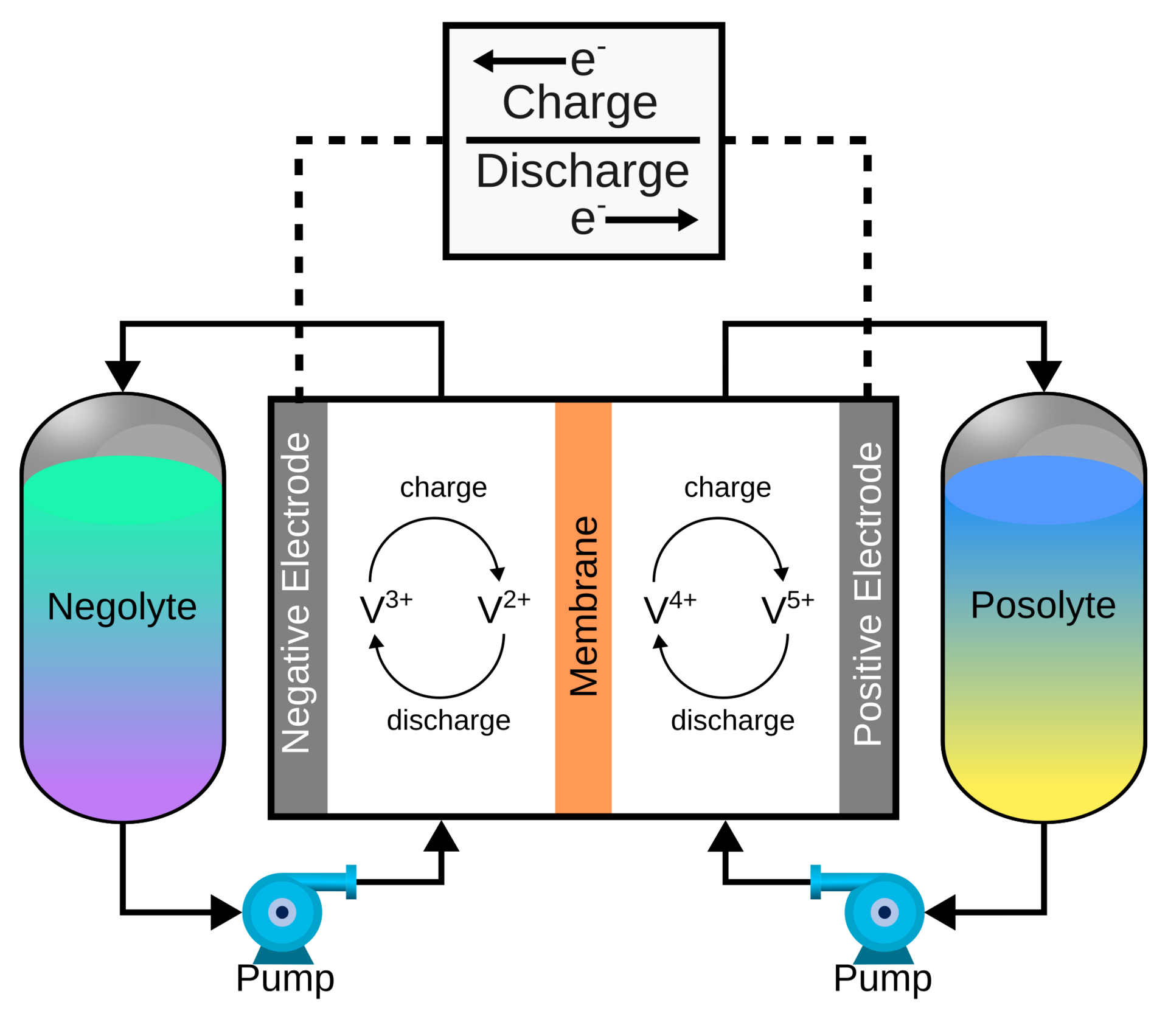
Flow batteries are chemically simple, but mechanically complicated. They use pumps to flow electrolyte from massive tanks through cell stacks to generate electricity. This means they are very easy to scale in capacity – just add bigger tanks, and you’ve got a bigger battery. Credit: Kavin Teenakul, CC BY-SA 4.0
Flow batteries are beautiful in their simplicity, storing charge in huge tanks full of liquid electrolyte rather than in gel-like materials sandwiched between solid electrodes as per a regular battery. Specifically, two big tanks of vanadium ions, typically dissolved in sulfuric acid. By pumping the electrolyte through a cell stack where the electrochemical reaction happens, you generate electricity. Getting more power is as simple as adding more cell stacks, while increasing the battery’s capacity is as simple as getting bigger tanks full of more electrolyte. The two variables are almost entirely decoupled, which is an extremely elegant property for a grid-scale storage system. It makes right-sizing the system a cinch, it’s simply a matter of scale. These batteries also have the property of surviving tens of thousands of charge cycles without damage, and lifespans measured in decades.
The chemistry itself works out quite tidily. Both the positive and negative electrolyte use vanadium, just in different oxidation states. The positive side hosts VO2+ and VO2+ ions, while the negative side works with V²⁺ and V³⁺ ions. These solutions are pumped through a cell, either side of a permeable membrane that allows proton exchange. When the battery is being discharged, electrons leave the anode electrolyte and are transferred through the external load to the cathode electrolyte; this is balanced by the transfer of protons across the membrane. During charging, the opposite occurs.
A neat side-benefit of this is that because the battery uses the same element on both sides of the membrane, cross-contamination between the two tanks — an inevitable consequence of some ions sneaking through the membrane over thousands of cycles — doesn’t actually kill the battery. The electrolyte merely needs to be rebalanced and normal operation can resume. This single-element trick also means the electrolyte has a very long service life. It doesn’t degrade in the way an electrolyte in a regular battery might. A well-maintained vanadium flow battery can run for ten to twenty years with minimal capacity loss, and at end of life, that vanadium electrolyte still has value. It can be sold, recycled, or reprocessed as needed. Meanwhile, the electrodes in the cell stack and the pumps and machinery that moves the electrolyte around can be serviced or replaced as needed. It’s a very different scenario compared to lithium-ion cells, where recycling the raw materials involves great mechanical and chemical complexity.
Advertisement
There is a complexity gain versus traditional batteries, in that moving all the electrolyte around requires mechanical pumps that in turn draw power to operate. These batteries are also not particularly compact, nor efficient in terms of energy-to-volume ratio. However, these problems are offset with the ease of scaling and maintaining them.
Deployment
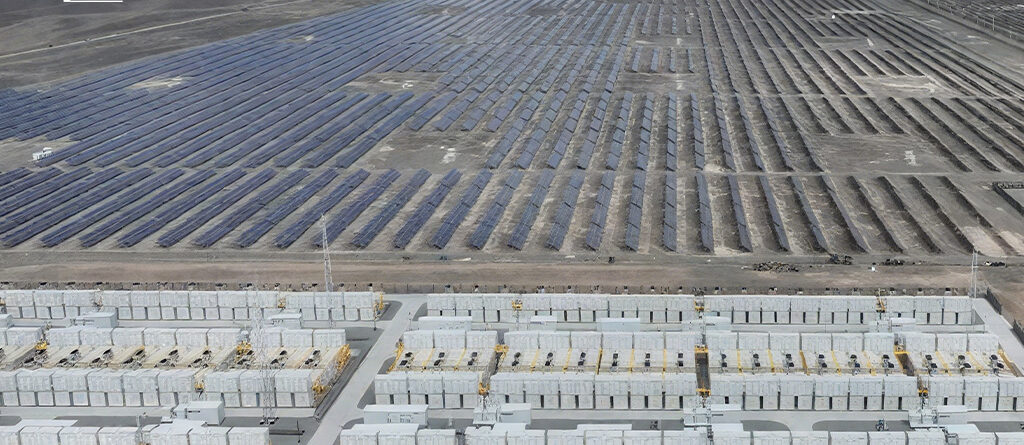
An aerial view of a flow battery installed by Rongke Power in Hami, in northwest China. Credit: Rongke Power
In the real world, vanadium flow batteries are starting to hit the big time. The largest example in the world is a Chinese project, consisting of a 200 MW battery in Jimusaer, with a total capacity of 1000 MWh, built by Rongke Power. The second largest installation, installed in the city of Ushi in 2024, has a capacity of 700 MWh and can discharge 175 MW to the grid, and was constructed by the same firm. These batteries are comparable in power output to the Victorian Big Battery, a lithium ion installation that outputs 300 MW at peak, but far larger in capacity, as the Australian installation tops out at just 450 MWh by comparison. These installs build upon a previous effort to install a 100 MW battery in Dalian with 400 MWh capacity, along with smaller projects in Shenyang and Zongkyang that operate at sub-10MW levels. The batteries are intended to be used to support grid stability in their local grids. They also have grid-forming capabilities, which means that the flow battery can be used to do a black start, helping to bring traditional thermal generation units online in the event of a total grid collapse.
Australia has also been leaping to adopt vanadium flow battery technology, too. The country is well known for having a huge install base of rooftop solar, which has created a difficult-to-control grid at times. The abundance of sunlight and solar generation during the day has lead to huge peaks where power prices at times turn negative, and the goal is to add storage so that this power can be stored for more effective use over longer time periods.
The vanadium flow battery installation in Port Pirie, South Australia, operated by Yadlamalka Energy. Credit: Yadlamalka Energy
In South Australia, a small project has proven the viability of vanadium flow batteries in local conditions. The Co-Located Vanadium Flow Battery Storage and Solar project in Neuroodla was installed by Yadlamalka Energy, and combined photovoltaic generation and storage into a single site. The project’s goal was to demonstrate the value of vanadium flow batteries for providing both simple energy storage and frequency control services to the grid. It’s a relatively small installation, of just 2MW output and 8MWh capacity, paired with 6MWp of solar panels on site. The build was located adjacent to the Neuroodla substation for easy connection to the grid. The project faced some challenges in terms of power derating during the hottest local conditions, and with some limitations on power deployment and energy trading based on the inverter capabilities at the site. Ultimately, though, the project was able to generate serious revenue even with its limited capacity, thanks in part to energy price volatility in the local market as solar peaks and troughs occurred on a regular basis.
Over in Western Australia, sights are being set much higher. The state government has put out an expression of interest for a 50 MW, 500MWh vanadium flow battery to be installed in Kalgoorlie. The project is backed by $150 million in government funding, and hopes to offer a mighty 10-hour discharge capability to the grid. The project hopes to be up and running by 2029, relying on locally-produced vanadium to fill the tanks.
The mindless pull of the infinite scrolling social media feed has a way of turning every spare moment into a lost hour. It starts as a quick check for a notification or a brief distraction during a work break, but these apps are engineered to keep you trapped in a loop of “just one more.”
Before long, that reflex to reach for your phone becomes an automatic response to any second of boredom, leaving you stuck in a cycle of digital noise that is hard to break with willpower alone.
I miss the feeling of calm that comes with being without a smartphone. And I’m not the only one. A Pew Research survey from 2024 found that 72% of US teens say they feel “peaceful” when they don’t have their smartphone, while 44% say it makes them anxious.
Advertisement
But switching off is hard. Crucial personal and banking information is tied to my phone, and I’d still need it occasionally even if I tried switching to a second, simpler device.
So instead of breaking free, I found ways to reduce my screen time and phone addiction. I wish I could say it was through willpower, but nope. I relied on some of the same technology to get away from it.
I used my iPhone’s built-in features to curb my phone usage. It’s not a perfect solution, but these methods have helped me lower my screen time without swapping to a dumb phone.
Set up your iPhone for fewer distractions
Advertisement
Personally, these social media apps cause a lot of distraction.
Prakhar Khanna/CNET
If your phone addiction isn’t extreme, you can set up your iPhone to be less distracting.
It starts with easy things like disabling notifications and simplifying your home screen. I removed all social media apps from mine, and it helped me reduce the daily open rate. I was no longer mindlessly tapping those icons because I’m lazy enough not to swipe down and type the app’s name just to scroll through them.
Here are other iPhone settings that you can use to curb your phone addiction.
I use the iPhone’s Focus mode to limit distracting notifications when I’m working and traveling — essentially for times when I want to be 100% present in things I’m doing.
This feature goes beyond the simple Do Not Disturb function. I need notifications from my family and favorite contacts to pass through, so I have set up different Focus modes instead of using a blanket Do Not Disturb mode every time. Here’s how to set up Focus mode.
Advertisement
Go to Settings > Focus and tap on the + icon.
Mike De Socio
Create and customize your own Focus mode.
Mike De Socio
1. Go to Settings > Focus. 2. Tap on the + icon (on the top-right corner) to create a Custom Focus. 3. Manage notifications by choosing which apps and contacts you want to hear from during your focus time. You can change individual settings here through People and Apps.
Advertisement
You can also create a custom home screen that activates when you switch on your new focus mode. For instance, I have Instagram on my home screen in Travel focus mode, and none of the social media apps are on my Work home screen.
Apple’s Screen Time feature can help you create schedules and set limits for apps that are sucking the joy out of your life. If you’re adamant about having time away from your phone, you can block apps and notifications for those time periods.
For instance, I have Instagram set to 45 minutes per day and 30 minutes on weekends. Here’s how to set up Screen Time.
Advertisement
Go to Settings > Screen Time > App Limits and tap on Add Limit.
Screenshots by Prakhar Khanna/CNET
Select the apps you want to set time limit for.
Advertisement
Screenshots by Prakhar Khanna/CNET
1. Go to Settings > ScreenTime > AppLimits. 2. Tap on Add Limit. 3. Select the individual or categories of apps you want to set timers for. 4. Tap Next and set the amount of time you want to allow yourself on each app. 5. Tap Customize Days if you want to customize your limit’s schedule. 6. Tap Add in the upper right corner.
Once set, your iPhone sends a notification 5 minutes before approaching your set time limit. After the app reaches the Screen Time limit, it stops whatever it’s doing and displays a new screen. It prompts you to tap OK to exit the app. You can choose to tap Ignore Limit if you’re doing something urgent that requires more time to finish.
Schedule downtime
Go to Settings > Screen Time > Downtime and set a schedule.
Advertisement
Screenshots by Prakhar Khanna/CNET
Schedule downtime on iOS is part of the Screen Time feature, and you can use it to force yourself to put down your iPhone. I have set it up for weekends. Here’s how you can set up downtime on your iPhone.
1. Go to Settings > ScreenTime > Downtime. 2. Toggle on the widget next to Scheduled. 3. Set your downtime schedule.
When downtime is enabled, only phone calls and apps that you choose to allow are permitted. Like Screen Time limits, when you schedule downtime, a 5-minute reminder is sent before it begins. You can then ignore the reminder or turn on downtime. It can be turned off at any time by turning off Scheduled.
Use Assistive Access
Advertisement
Assistive Access makes it easy to stay focused with only the essential apps.
Prakhar Khanna/CNET
Assistive Access is an accessibility feature in iOS. It provides a simplified user interface that aims to help people with cognitive disabilities use an iPhone with greater ease and independence. However, it can double as a feature that’s enabled when you want a more focused way to use your iPhone.
In a way, this feature dumbs down your iPhone. Apple says, “Assistive Access offers ways for people to navigate iPhone and communicate using visuals rather than text.”
It displays on-screen items in a large grid that emphasizes images and icons. You also get large text labels and high contrast buttons on the iPhone’s home screen and across essential apps like Calls, Messages, Camera, Photos and Music.
Advertisement
Here’s how you can set up Assistive Access on your iPhone.
Prakhar Khanna/CNET
Tap on Continue on these screens and customize what you want to see when your Assistive Access is turned on.
Prakhar Khanna/CNET
1. Go to Settings > Accessibility > AssistiveAccess. 2. Tap on Set Up Assistive Access and select Continue. 3. Choose the layout for home screen apps from either Rows (if you want items arranged in a list) or Grid (for bigger icons arranged in a grid). 4. You can now tap on the + icon to select apps available in Assistive Access. 5. The iPhone will prompt you to enter your passcode and set up an Assistive Access passcode. Follow the on-screen instructions, and you’re done.
Advertisement
To exit Assistive Access, you need to:
1. Triple-press the side button (for modern iPhones) or the Home button (for iPhones with Touch ID). 2. Tap Exit Assistive Access. 3. Enter the Assistive Access passcode you entered during the setup process.
I haven’t been able to use Assistive Access for more than a day because it limits the iPhone’s functionality down to a basic phone. It is great if you can live with just simple functionalities.
Otherwise, I recommend using the settings mentioned in the previous section to keep 100% of your iPhone’s functionality while reducing your screen time.
Advertisement
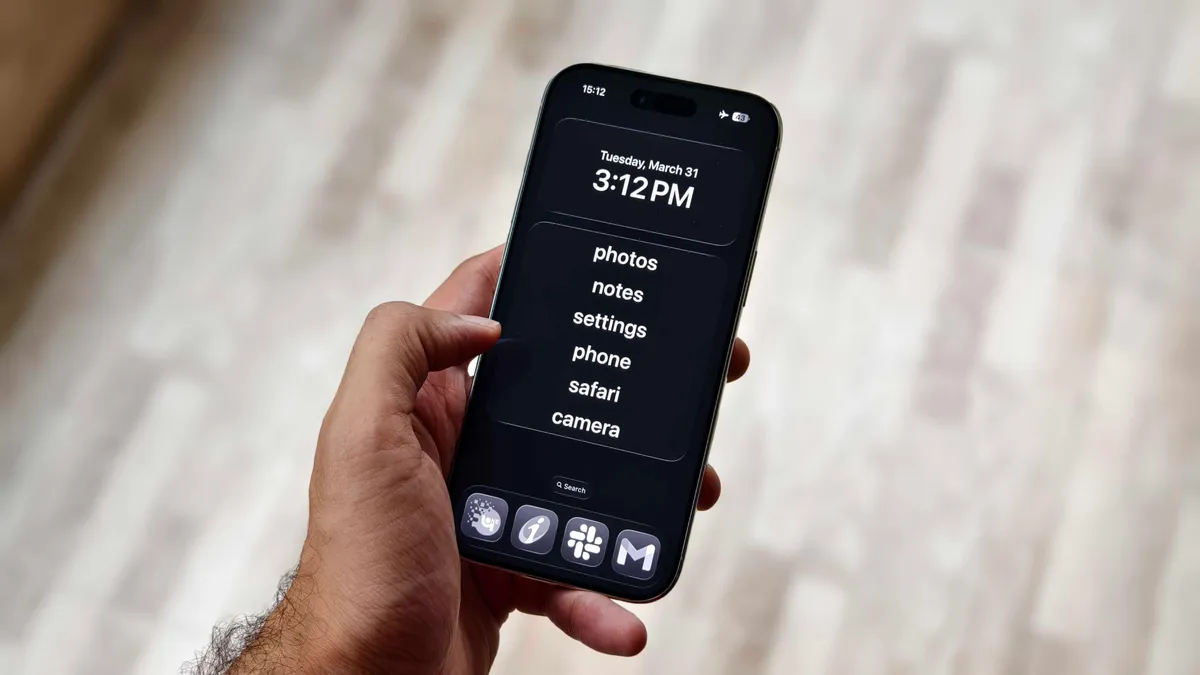
Make your iPhone minimalist with this Dumb Phone app
I made my iPhone Air semi-dumb by installing this app.
Prakhar Khanna/CNET
The Dumb Phone is a $3 per-month app (or $25 for a lifetime purchase) that lets you create a minimalist-style phone. Unlike the iPhone’s built-in Assistive Access feature, it creates a text-based launch menu for your most essential apps and hides everything else.
The setup process is simple with on-screen instructions, but you need to enable a few settings.
Advertisement
Add Widget: Go to your home screen > tap and hold on empty space > Tap Edit > Add Widget > search for “dp” > Select Page 1 widget.
Set the minimalist DP wallpaper: In the DP app, the second instruction takes you to an option to save a wallpaper. Save it and go to Settings > Wallpaper > Add New Wallpaper > Photos > select the recently saved black wallpaper > follow the rest of dp instructions.
Enable Dark mode: Go to Settings > Display & Brightness > select Dark.
Set Reduce Animations & Transparency to On: Go to Settings > Accessibility > Per-App Settings > Add App > Home Screen & App Library. Then, after it’s added, tap Home Screen & App Library > Reduce Motion, then tap On.
Create a minimalist Home Screen: The app prompts you to uncheck all other home screen pages, suggests widget positioning and removes dock icons.
I added my essential banking and work apps to the dock and enabled all the other settings. The Dumb Phone app offers plenty of customization options to personalize your iPhone experience.
By default, all other settings and UI elements remain the same as before. You can still access all the other apps and add whatever you want to your home screen.
However, if you want the true dumb phone experience, you can turn on Detox Mode to block non-essential apps. It connects the app to the iPhone’s Screen Time setting, which can be used to permit or block app notifications and access.
It took me at least an hour to set up the Dumb Phone app to my liking, but once it was, it helped me reduce my screen time.
I like it because it didn’t force me to relearn the basic features of my iPhone. It simply adjusted my home screen and settings for a more focused, distraction-free interface. It made me realize that most of it comes down to muscle memory — because readjusting my home screen was a bigger win than expected.
Advertisement
By removing apps from my home screen or deleting them altogether, I am no longer mindlessly tapping on apps I don’t need.
Assistive Access is likely the most effective way to curb your phone usage. It gives you these big UI buttons within apps.
Prakhar Khanna/CNET
That said, there are two relatively obvious issues with this route. First, you’re paying additional money for the privilege of simplifying things. And secondarily, you’ll still need to rely on some willpower, because it’s not hard to swipe away from these customizations.
Advertisement
If you do eventually decide that you want a secondary device for staying connected while minimizing distractions, there are a lot of options. Newer keyboard-equipped phones, “minimalist” themed phones and the Barbie-themed flip phone offer different ways to still have access to communication while cutting back.
But you might not need the extra expense if some of these iPhone customizations provide a similar way to quiet things down. While I’m still on this journey, these iPhone settings have helped me limit my screen time. I hope they’ll help you too.
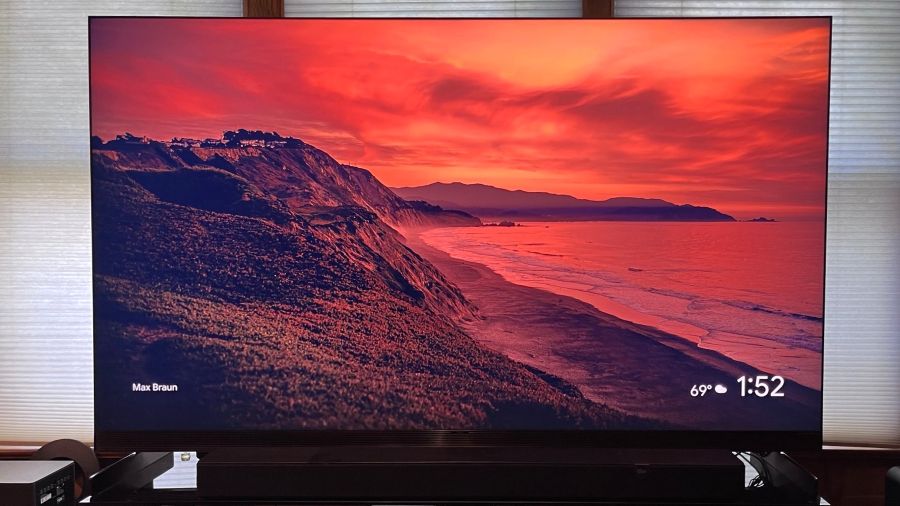
The TCL X11L is the company’s flagship TV for 2026, and it takes a different path than previous TCL mini-LED TVs. A key difference is TCL’s use of Super Quantum Dots (SQD), a new, enhanced quantum dot formulation that allows for full coverage of the BT.2020 color gamut – a claim several other TV brands are also making, but for their new RGB LED sets. If high brightness was the previous goal for flagship TVs, then extended color has become the new frontier.
Assisting the TCL X11L on its extended color quest is an Advanced Color Purity algorithm and new Ultra Color filter. The latter features 5 nanometer particles compared to the 60 nanometer particles in standard mini-LED TVs, and this allows for “more accurate pixel-level color” and more “consistent color saturation,” according to TCL. Moving beyond 100% BT.2020 coverage, the X11L’s specifications cite peak brightness at up to 10,000 nits, with up to 20,000 local dimming zones.
Note that both those numbers are for the 98-inch X11L, not the 75-inch version that TCL sent me for review. The 75-inch model instead features around 11,500 zones, which is still a considerably greater number than you’ll find on other flagship mini-LED TVs. In general, more local dimming zones means higher brightness and deeper, more uniform blacks, and the X11L is helped on that front by TCL’s Halo Control System. This uses a new 26-bit backlight controller and a Dynamic Light Algorithm, along with a reduced optical distance between the TV’s mini-LED backlight modules and light diffuser layer, to virtually eliminate backlight blooming. As you’ll see in the Viewing Impressions section below, the results here are seriously good for a mini-LED TV.
As attention-grabbing as the X11L’s specs are, all that technology comes at a price. The 75-inch version lists for $6,999.99, while the 98-inch X11L clocks in at $9.999.99. Even with recent price drops (the 75-inch X11L can now be found for $3,999.99) that is a big premium over the company’s stepdown SQD Mini-LED TV, the TCL QM8L series. The QM8L has a lower specified peak brightness at 6,000 nits and a lower local dimming zone count at 4,000 (for the top 98-inch screen size), but it provided an excellent overall level of performance when we tested it. The QM8L also has a mostly similar feature set, leaving its much pricier X11L SQD Mini-LED big brother with a lot to prove.
What Is It?
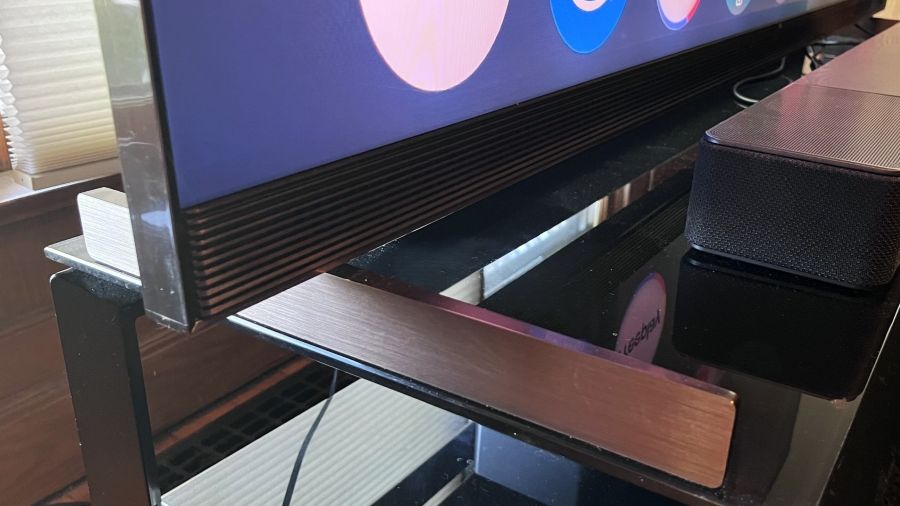
The TCL X11L’s sturdy support feet are positioned at the far edges of the screen
The TCL X11L is the top series in the company’s 2026, SQD Mini-LED TV lineup, followed by the QM8L and QM7L series. It features Super Quantum Dots for extended color, up to 20,000 backlight local dimming zones, and TCL’s high-contrast WHVA 2.0 Ultra Panel with an anti-reflective screen filter. Similar to the QM8L series, X11L TVs are outfitted with TCL’s TSR AI Pro processor, which provides AI-enhanced contrast, color, motion, and upscaling.
Dolby Vision, HDR10+, HDR10, and HLG high dynamic range formats are all supported by the X11L, and a planned software update for summer 2026 will add Dolby Vision 2 Max compatibility, providing enhanced features such as bi-directional tone mapping and Authentic Motion de-judder processing. The X11L also has Filmmaker Mode and IMAX Enhanced picture presets plus Intelligent picture and sound modes that make automatic adjustments based on content.
Advertisement
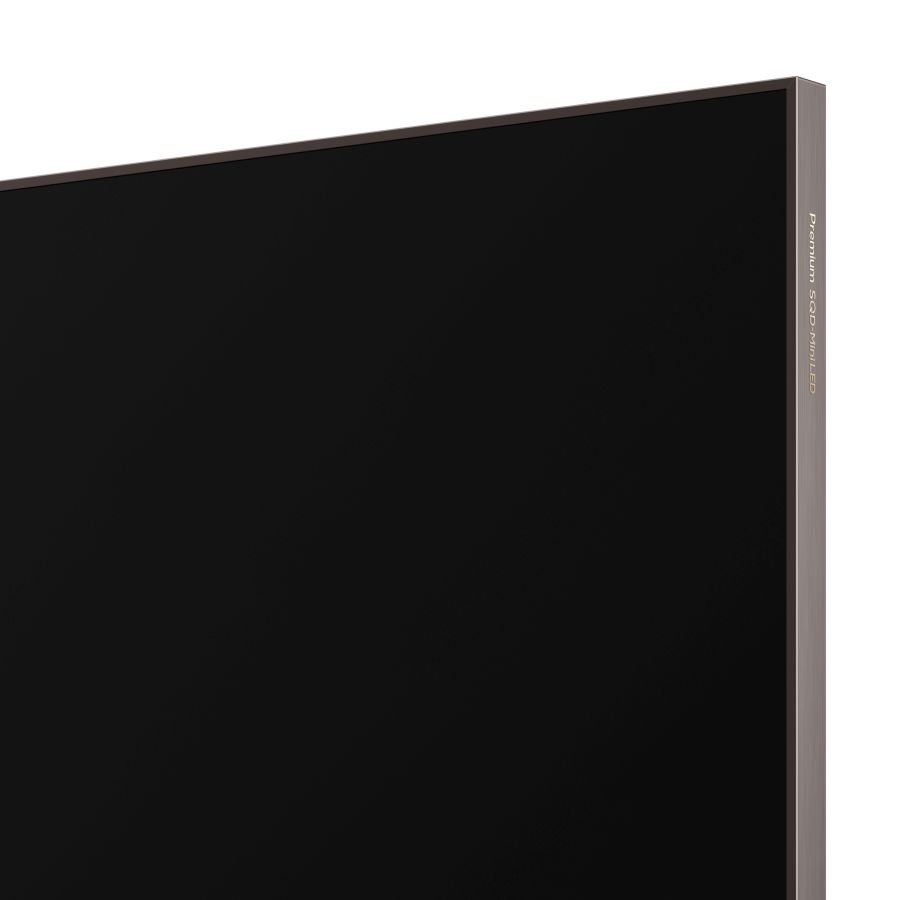
The X11L features a premium metal frame design and is slim for a mini-LED TV
The X11L is the first TCL TV to feature four HDMI 2.1 ports for gaming. These support a 4K/144Hz refresh rate and there’s also 1080p/288Hz and FreeSync Premium Pro support for PC gaming. The TV’s Game Master mode provides a Game Bar pop-up menu for making easy gaming-related picture adjustments, and it also reduces input latency.
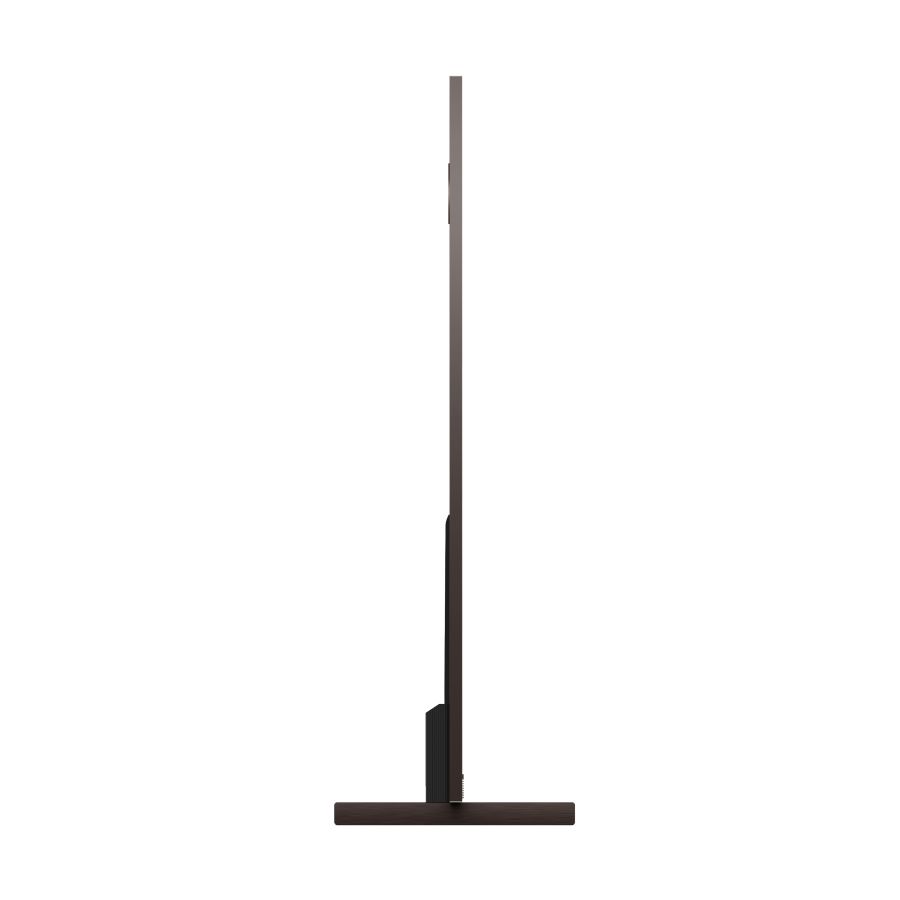
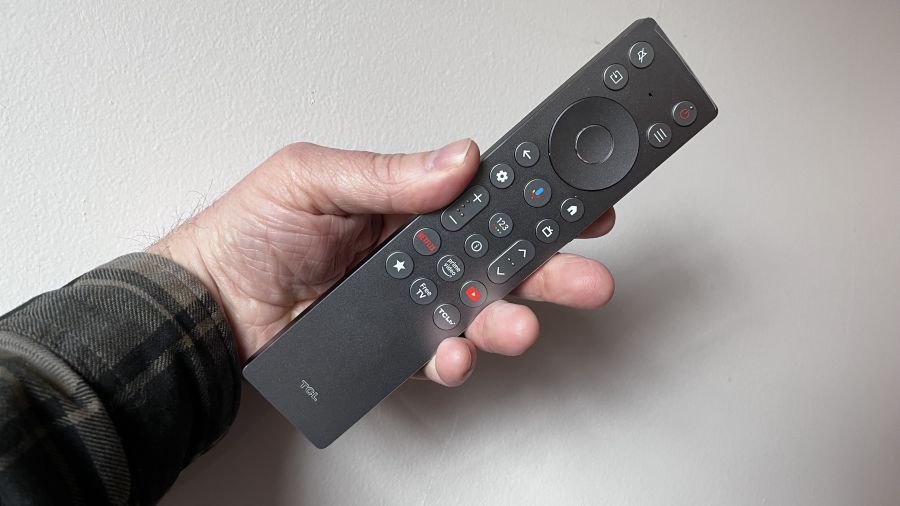
TCL clearly put a lot of work into the X11L’s physical design. Its 0.9-depth is alluringly slim for a mini-LED TV, and its polished aluminum side, top and bottom panels give it a luxury look. The support feet carry over the aluminum theme and also provide a solid foundation for the TV. TCL’s ZeroEdge design minimizes the screen’s bezel for a near “all-picture” appearance and there’s a fully backlit remote control with a built-in mic for voice commands.
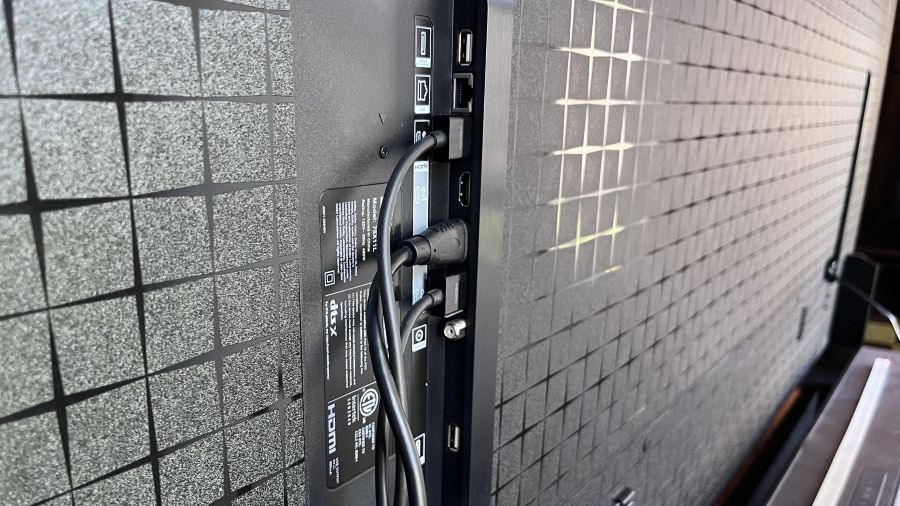
The TV’s four HDMI 2.1 ports are located on a side-facing panel for easy access.
In addition to its four HDMI 2.1 ports (one with eARC), the X11L has an optical digital audio output, USB 2.0 and 3.0 ports, an Ethernet jack and an RF input for an antenna. The connections are all located on a side-facing panel on the TV’s back, allowing easy access for wall-mount installations.
Google TV with Gemini
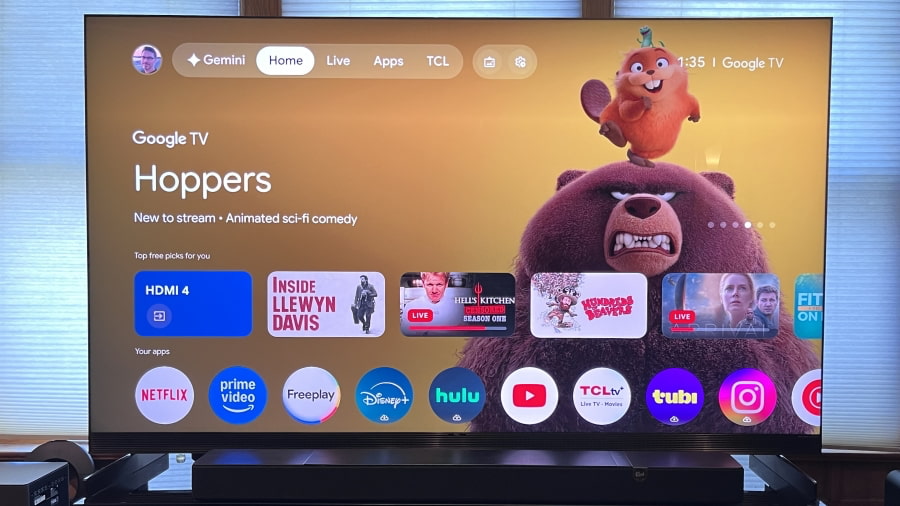
The X11L’s main Google TV interface
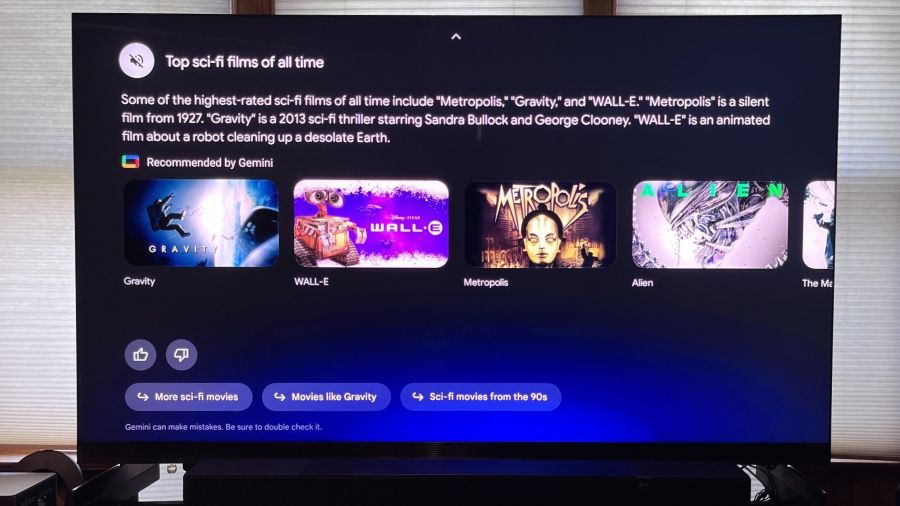
The X11L is the second TCL TV series to feature Google TV with the Gemini AI assistant. That feature is also available on the TCL QM8L, and it makes content searching easier and more enjoyable via its conversational format. Using either the mic button located on the remote, or the far-field one located on the TV itself, you can ask, “What are the best Sci-Fi movies?” and then drill deeper with additional queries such as, “Which are the best ones from the past decade?” to get a more refined list.
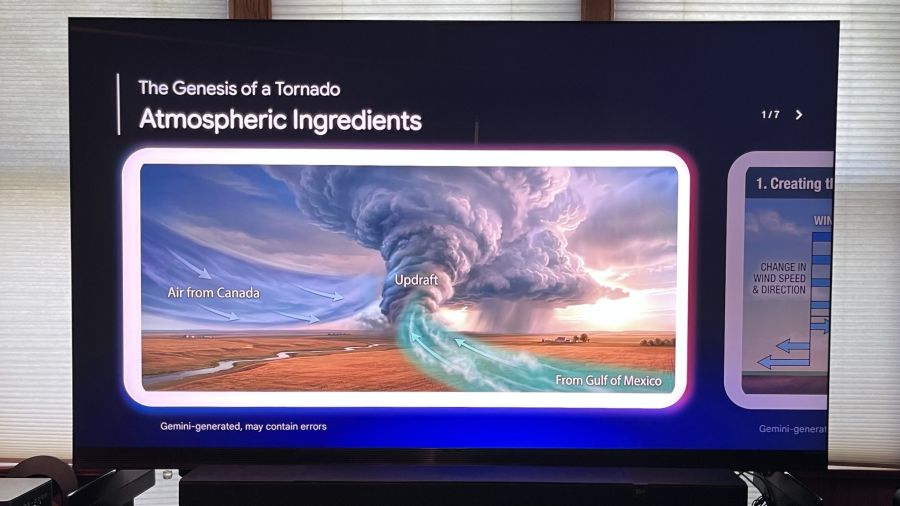
Google TV with Gemini isn’t just for content searches; like the Gemini app on your phone or laptop, it can be used to research anything. I asked the TV how tornadoes get formed, and it created a multi-slide, multimedia presentation on the topic (adding the caveat that Gemini can make mistakes, of course).
Advertisement. Scroll to continue reading.
Advertisement
Gemini for Google TV lets you conduct conversational searches across a range of topics
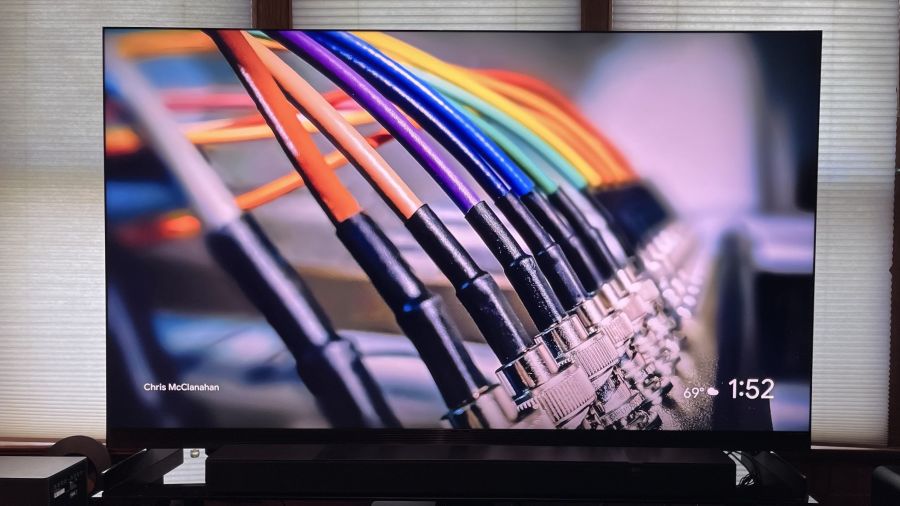
Aside from Gemini, the Google TV platform itself is easy to customize so it presents relevant apps and personalized content recommendations based on your viewing and browsing history. You can play screensavers pulled from the Google TV library, as well as images from your Google Photos account and also Gemini AI-created ones. Additionally, there’s a Live tab on the home screen that lets you view a grid guide of both Freeplay free-to-stream programs and local broadcast channels pulled in by an antenna connected to the TV’s built-in ATSC 3.0 tuner.
Audio by Bang & Olufsen
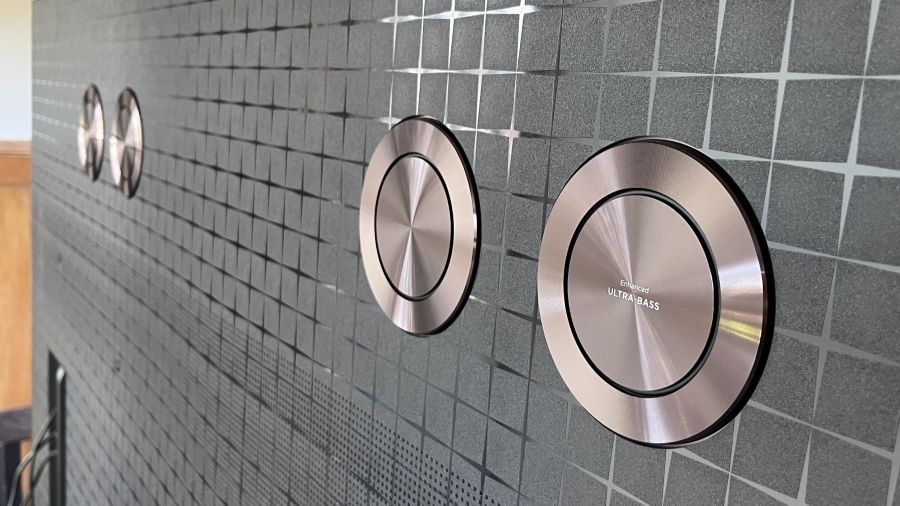
Four bass drivers are located on the TV’s back panel
TCL doesn’t provide much in the way of specs for the X11L’s built-in speakers other than it has Audio by Bang & Olufsen. There is processing and pass-through support for both Dolby Atmos and DTS:X, and a quartet of “Ultra Bass” drivers on the TV’s back panel are used to reinforce bass effects in movie soundtracks. Equalizer adjustments in the TV’s Sound menu provide Center and Surround level sliders, and these indicate that there is a dedicated center channel driver in the TV’s front-firing speaker array, alongside dedicated drivers for surround channel information in soundtracks.
Another Sound menu highlight is the Beosonic interface. This lets you customize the TV’s sound to your liking by moving a slider up and down between Bright, Energetic, Warm and Relaxed quadrants. Overall, I found that the X11L’s built-in speakers delivered clear dialogue, clean bass and a decent sense of surround ambience, but the sound also had a somewhat thin quality.
Emphasizing Warm and Relaxed on the Beosonic interface helped a bit here, but the X11L should ideally be paired with a soundbar or external speakers. To that end, support is provided for connecting an optional TCL wireless subwoofer for extended bass, and the X11L is also Dolby Atmos FlexConnect capable, supporting a 4.1.4-channel Atmos speaker configuration using TCL’s Z100 wireless FlexConnect speakers and Z100-SW wireless subwoofer.
Setup & Viewing Impressions
After doing some casual viewing with the X11L, I started my testing by making measurements using Portrait Display’s Calman Color Calibration software. Other than disabling the Adaptive Brightness feature, which adjusts brightness automatically based on room lighting, I left the Filmmaker Mode and Standard presets at their default settings for the measurements.
Peak HDR brightness measured on a white 10% window pattern in Filmmaker Mode was 2,174 nits and 465 nits on a 100% (fullscreen) white pattern. In Standard mode, peak HDR brightness on 10% and fullscreen patterns was 4,011 and 407 nits, respectively. The X11L’s peak SDR brightness was notably high, measuring 1,958 nits on a 10% window pattern in Standard mode and 669 nits on a 100% pattern. Those results indicate that the X11L will be a great bright room option for viewing sports, much of which is broadcast or streamed in high definition/standard dynamic range.
So, what about TCL’s 10,000 nits peak brightness specification for the X11L? The highest brightness measurement I recorded was 4,860 nits in Vivid mode, which is roughly half of what TCL claims for the series. Still, the 75-inch X11L’s overall brightness is exceptional, even if there were some odd brightness-related artifacts that I noticed during my subjective viewing tests.
Advertisement
Specifically, the X11 sometimes displayed brightness “pumping” effects where the picture would be super-bright, particularly on a cut from a dark to a bright scene, and then gradually get dimmer. I mainly noticed this when viewing the demonstration footage on the Spears & Munsil Ultra HD Benchmark 4K Blu-ray disc with the HDR10 option selected. The same pumping effect did not show up when I watched the 10,000 nits Dolby Vision version on the disc, however, and I also didn’t see it on any other Dolby Vision HDR content I watched.
A listed benefit of TCL’s SQD Mini-LED tech is 100% BT.2020 color gamut coverage, and while the 89.7% I measured in Filmmaker Mode came up short of that number, it’s still an excellent result and one that’s comparable to the TCL QM8L SQD Mini-LED TV. P3 color gamut coverage was 97.8, another excellent result that matches what I measured on the QM8L.
Delta-E (the margin of error between the test pattern source and what’s displayed on-screen) averaged 3.9 for grayscale and 5.0 for color, both of which are higher than the 3.0 result considered to be the threshold for what’s indistinguishable from perfect to the human eye. Unfortunately, the TV’s White Balance (2- and 20-point) and Color adjustment menus didn’t provide sufficient range to let me fully calibrate the picture, though I was able to make minor improvements to gamma and color point accuracy.
Gamers will want to select the X11L’s Game picture preset and also turn on the Game Master mode in the System menu settings for lowest input lag while gaming. Using a Leo Bodnar input lag meter, I measured 14.5ms for a 4K 60Hz input. With the exception of the QM8L, which measured 9.8ms on the same test, that result is comparable to past TCL TVs I’ve tested.
Running through my regular slate of 4K Blu-ray demo clips post-adjustment, the X11L’s picture looked fantastic on the James Bond movie No Time to Die. Skin tones were accurate, and there was impressive black depth and shadow detail in dark scenes. A scene where Bond traverses a rocky hillside cemetery did show a degree of judder, though this could be fixed without adding any soap opera effect by setting both the Judder and Blur sliders in the Clarity menu’s Custom Motion mode to 3.
Advertisement
Advertisement. Scroll to continue reading.
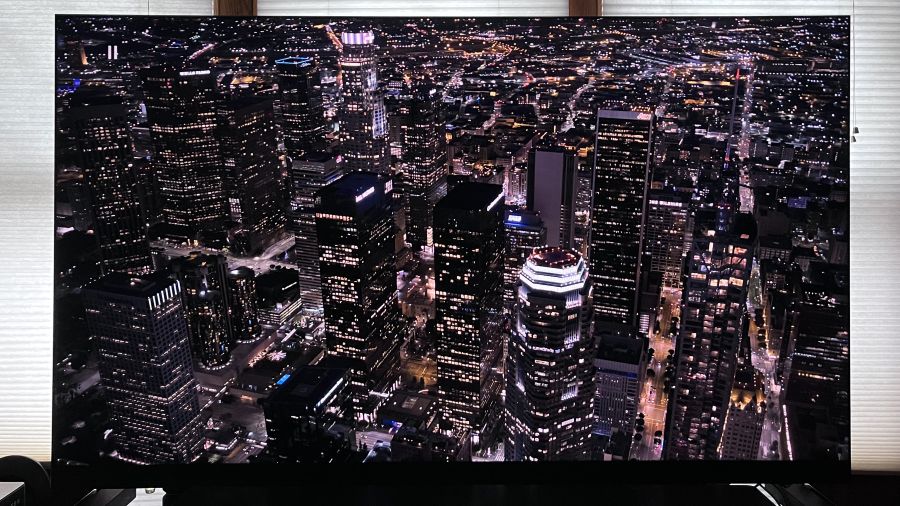
The X11L’s powerful local dimming resulted in images with excellent micro-contrast.
Switching back to the Spears & Munsil disc, demo clips showing flowers, birds, and lizards against a stark black background revealed virtually no backlight blooming. Equally impressive was the TV’s micro-contrast in an overhead shot of a city at night. A mini-LED TV with average local dimming control will typically show some degree of light bleeding in this sequence, which limits the overall contrast level and softens detail. On the X11L, however, the black level remained rock solid, and highlight detail was clearly defined.
Spider-Man: Into the Spider-verse has been one of my recent go-to 4K discs for testing color on TVs, and the X11L looked every bit as good as the QM8L when it came to color saturation and detail. Overall, I thought the computer-animated picture here looked punchier and overall better owing to the X11L’s superior contrast and shadow detail. I had similar thoughts when I watched scenes from Alien: Romulus, another movie with plenty of scenes with bold colors and bright objects pitted against dark backgrounds.
The X11L’s 4K upconversion of standard HD programs was excellent. When I watched a PBS documentary on the American naturalist and writer Henry David Thoreau, fine details in shots of the Massachusetts and Maine woods were clearly defined, and so was the inky scrawl in close-up shots of Thoreau’s journals. The set’s anti-reflection screen also did a good job of minimizing glare from lights and open windows when I watched this doc during the day, and its color saturation was mostly maintained when viewing from far off-center seats.
The Bottom Line
The X11L’s fully backlit remote control
TCL’s flagship X11L SQD Mini-LED TV is as bright as TVs get, and with its extended color gamut coverage and refined local dimming, it delivers truly attention-grabbing picture quality. TCL has claimed the X11L to be the “best overall TV in the industry,” and there’s plenty here to back up that statement.
With a discounted price of $3,999.99 for the 75-inch model I tested, the X11L is still about as expensive as TVs get. At that cost, you’ll be wondering what else it has to offer other than a great picture, and in this case the extras include a slim, premium design, better-than-average built-in sound, and Google TV enhanced with the Gemini interactive AI assistant. The X11L will also be made Dolby Vision 2 Max compatible with a software update scheduled for later in the year, and that same update will also add an Intelligent Device Control feature that will let you adjust picture and sound settings using voice commands.
Advertisement
About the only thing stopping me from giving the TCL X11L a full two thumbs up recommendation is the TCL QM8L, which provided nearly as impressive performance when I tested it, and was much easier to calibrate for an accurate picture. It also packs many of the same features as the X11L. The price for the 75-inch QM8L dropped from $2,999.99 to $1,999.99 since I reviewed it, making it a dramatically less expensive option than the X11L. The TCL X11L is undeniably a great TV, but there are clearly better values to be had.
Pros:
Exceptional brightness
Extended P3 and BT.2020 color gamut coverage
Refined local dimming (up to 20,000 zones)
Effective anti-relection screen
Good off-axis color uniformity
Dolby Vision 2 support (pending)
Google TV with Gemini AI assistant
Audio by Bang & Olufsen front-facing speaker array
Dolby Atmos FlexConnect support
Wireless subwoofer support
Four HDMI 2.1 ports with 144Hz support
Premium design
ATSC 3.0 tuner
Cons:
Higher than average grayscale and color point errors in Filmmaker Mode
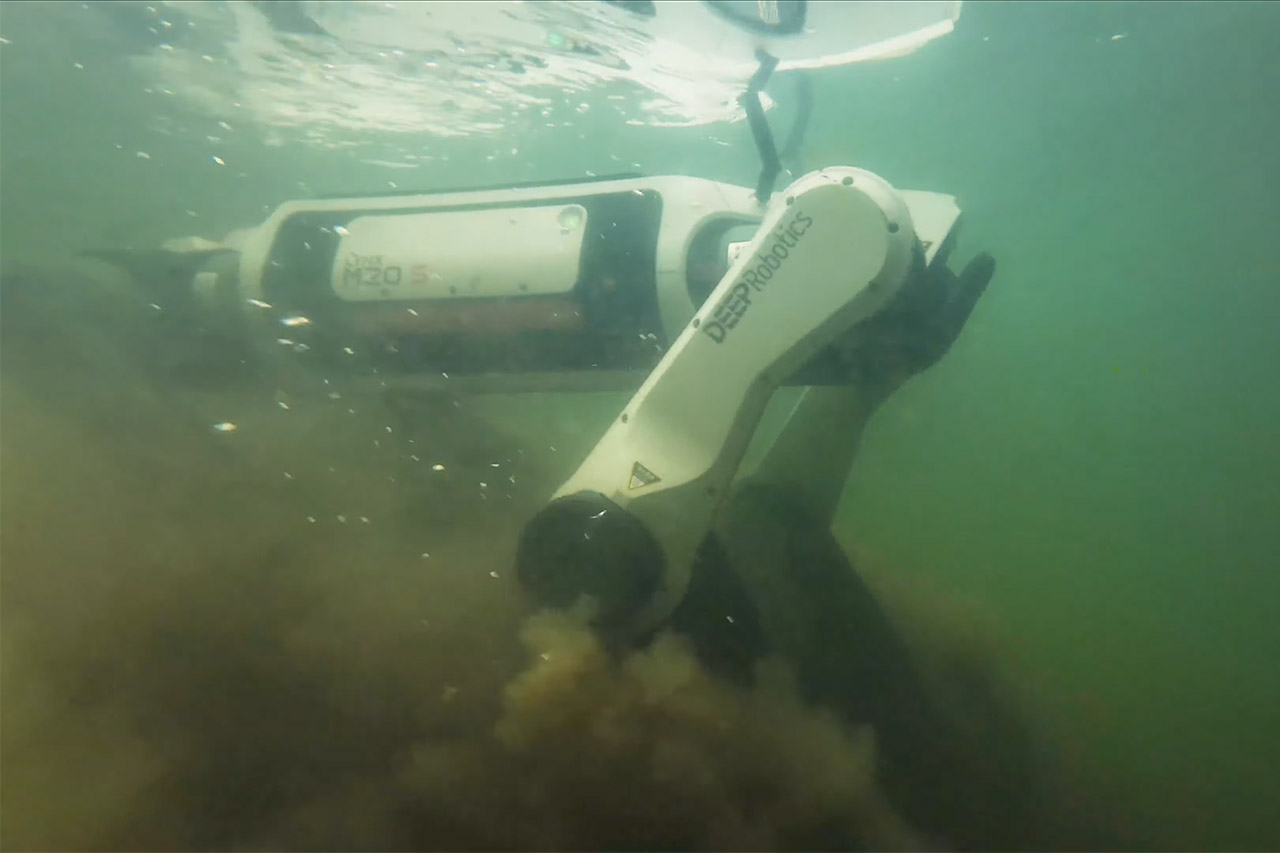
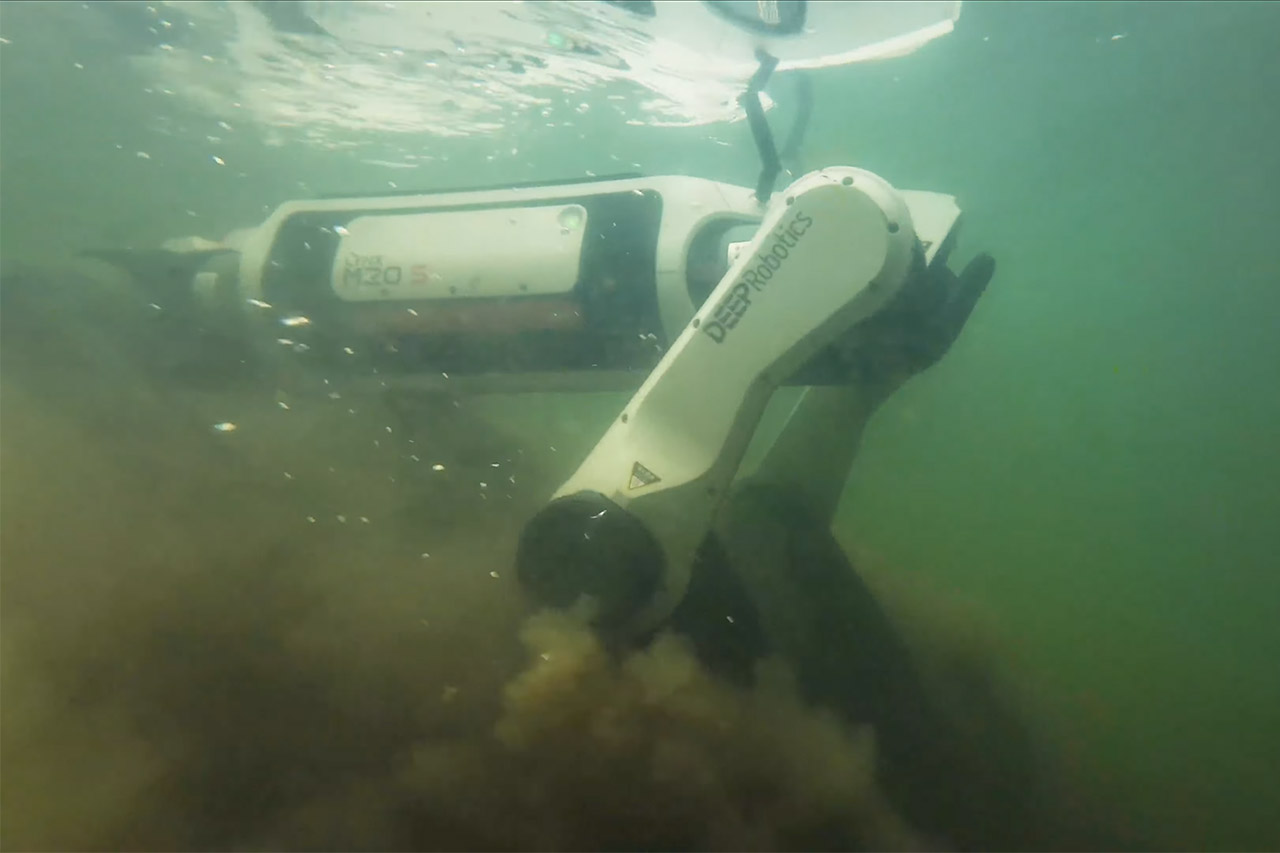
Deep Robotics has just released its latest four-legged robot, the Lynx M20S, and it’s evident that this machine was built to handle situations that would bring others to a halt. The days of the Lynx M20 being content with the safety of a controlled factory floor or a bone dry path are over, as the Lynx M20S simply continues truckin’ without blinking, trekking through water and dirt like it’s nothing. The engineers expanded on the previous Lynx M20’s robust foundation by improving three critical areas: hauling capacity, water resistance, and sheer speed.
The Lynx M20S may appear familiar, but it has been refined, measuring approximately 82cm long, 43cm broad, and 57cm tall, a sleek structure that maintains the overall weight under 33kg with the battery included. That means one person can easily move it around when necessary, so getting it from a truck to a job site is no trouble. M20S has wheels on the ends of each leg, so when in rolling mode, it glides along pavements and packed paths with ease. Flip a switch, and the wheels lock and the legs bend and lengthen, allowing you to step over logs, scamper up embankments, or step over obstacles up to 80cm tall. If you have to climb stairs, it is content to go to the next level at a fairly consistent rate: 25cm each step with a maximum slope angle of 45 degrees. It has a clever hybrid system that allows it to determine the optimal path forward based on what’s in front of it, all with a smooth transition from one mode to another.
【Next-Generation Robotic Companion: Meet the Unitree Go2 Robotic Dog】 The Unitree Go2 X is a powerful and intelligent quadruped robot designed for…
【Intelligent Navigation with 3D LiDAR & Obstacle Avoidance】 Featuring ultra-wide 3D LiDAR with 360°x96° perception, the Go2 X detects obstacles…
【High-Definition Vision & Seamless App Integration】 A front HD camera streams 1280×720 video to the app. Control the robot, view real-time data…
Speeds have undoubtedly increased with this new iteration, as lab testing suggest it can achieve a top speed of 9m/s, which is fast enough to keep up with a jogging on open ground. However, for everyday use, it has a more manageable top speed, striking a good mix between control and performance. Payload capacity has also been increased, allowing you to carry 35kg of weight in real work, up from 15kg previously. Hot-swappable batteries provide 3 hours of juice when unloaded and a good 2.5 hours when loaded, and the 1.5 hour charge time allows you to get back on the road quickly. Distance is expected to be roughly 15 kilometers without cargo and 12 kilometers with weight on board – quantities that matter when the operation is spread out over a vast location or a remote trail.
Protection levels received the same level of attention to detail. The Lynx M20S has recently received an IP67 rating. It’s well-sealed against dust and may be submerged in water for a short period of time without issue. I mean, earlier versions had an IP66 rating, which was fine for dealing with heavy rain or the occasional splash, but don’t expect it to get through a deeper puddle or an unforeseen flood. Temperatures range from negative 20 degrees Celsius to a blistering 55 degrees Celsius, so the robot can actually run whether it’s snowing or the sun is pouring down on some unfortunate guy in the desert. The Lynx’s joints and electronics are all shielded, so it can withstand a good old-fashioned rainstorm, muddy wetlands, or a dusty construction site, and all of that durability means it can do jobs when the weather is a complete nightmare.
Sensors and brains are the final piece of the puzzle. It has dual 96-line LiDAR units that scan the entire 360 degrees around it (and 90 degrees up), sending thousands of data points to the navigation system per second. Wide-angle cameras provide it with some visual input, and the onboard processors map out the way ahead and dodge obstacles in real time, plus the machine works out when to roll, how to stride, and exactly how to modify its stance for balance on its own. Operators can monitor the live feed and intervene if things go wrong, but the majority of the movement occurs automatically. With those modular ports, you can add all sorts of different gear for whatever project you’re performing, such as gas detectors and inspection cameras.





























































You must be logged in to post a comment Login