The mindless pull of the infinite scrolling social media feed has a way of turning every spare moment into a lost hour. It starts as a quick check for a notification or a brief distraction during a work break, but these apps are engineered to keep you trapped in a loop of “just one more.”
Before long, that reflex to reach for your phone becomes an automatic response to any second of boredom, leaving you stuck in a cycle of digital noise that is hard to break with willpower alone.
I miss the feeling of calm that comes with being without a smartphone. And I’m not the only one. A Pew Research survey from 2024 found that 72% of US teens say they feel “peaceful” when they don’t have their smartphone, while 44% say it makes them anxious.
Advertisement
But switching off is hard. Crucial personal and banking information is tied to my phone, and I’d still need it occasionally even if I tried switching to a second, simpler device.
So instead of breaking free, I found ways to reduce my screen time and phone addiction. I wish I could say it was through willpower, but nope. I relied on some of the same technology to get away from it.
I used my iPhone’s built-in features to curb my phone usage. It’s not a perfect solution, but these methods have helped me lower my screen time without swapping to a dumb phone.
Set up your iPhone for fewer distractions
Advertisement
Personally, these social media apps cause a lot of distraction.
Prakhar Khanna/CNET
If your phone addiction isn’t extreme, you can set up your iPhone to be less distracting.
It starts with easy things like disabling notifications and simplifying your home screen. I removed all social media apps from mine, and it helped me reduce the daily open rate. I was no longer mindlessly tapping those icons because I’m lazy enough not to swipe down and type the app’s name just to scroll through them.
Here are other iPhone settings that you can use to curb your phone addiction.
I use the iPhone’s Focus mode to limit distracting notifications when I’m working and traveling — essentially for times when I want to be 100% present in things I’m doing.
This feature goes beyond the simple Do Not Disturb function. I need notifications from my family and favorite contacts to pass through, so I have set up different Focus modes instead of using a blanket Do Not Disturb mode every time. Here’s how to set up Focus mode.
Advertisement
Go to Settings > Focus and tap on the + icon.
Mike De Socio
Create and customize your own Focus mode.
Mike De Socio
1. Go to Settings > Focus. 2. Tap on the + icon (on the top-right corner) to create a Custom Focus. 3. Manage notifications by choosing which apps and contacts you want to hear from during your focus time. You can change individual settings here through People and Apps.
Advertisement
You can also create a custom home screen that activates when you switch on your new focus mode. For instance, I have Instagram on my home screen in Travel focus mode, and none of the social media apps are on my Work home screen.
Apple’s Screen Time feature can help you create schedules and set limits for apps that are sucking the joy out of your life. If you’re adamant about having time away from your phone, you can block apps and notifications for those time periods.
For instance, I have Instagram set to 45 minutes per day and 30 minutes on weekends. Here’s how to set up Screen Time.
Advertisement
Go to Settings > Screen Time > App Limits and tap on Add Limit.
Screenshots by Prakhar Khanna/CNET
Select the apps you want to set time limit for.
Advertisement
Screenshots by Prakhar Khanna/CNET
1. Go to Settings > ScreenTime > AppLimits. 2. Tap on Add Limit. 3. Select the individual or categories of apps you want to set timers for. 4. Tap Next and set the amount of time you want to allow yourself on each app. 5. Tap Customize Days if you want to customize your limit’s schedule. 6. Tap Add in the upper right corner.
Once set, your iPhone sends a notification 5 minutes before approaching your set time limit. After the app reaches the Screen Time limit, it stops whatever it’s doing and displays a new screen. It prompts you to tap OK to exit the app. You can choose to tap Ignore Limit if you’re doing something urgent that requires more time to finish.
Schedule downtime
Go to Settings > Screen Time > Downtime and set a schedule.
Advertisement
Screenshots by Prakhar Khanna/CNET
Schedule downtime on iOS is part of the Screen Time feature, and you can use it to force yourself to put down your iPhone. I have set it up for weekends. Here’s how you can set up downtime on your iPhone.
1. Go to Settings > ScreenTime > Downtime. 2. Toggle on the widget next to Scheduled. 3. Set your downtime schedule.
When downtime is enabled, only phone calls and apps that you choose to allow are permitted. Like Screen Time limits, when you schedule downtime, a 5-minute reminder is sent before it begins. You can then ignore the reminder or turn on downtime. It can be turned off at any time by turning off Scheduled.
Use Assistive Access
Advertisement
Assistive Access makes it easy to stay focused with only the essential apps.
Prakhar Khanna/CNET
Assistive Access is an accessibility feature in iOS. It provides a simplified user interface that aims to help people with cognitive disabilities use an iPhone with greater ease and independence. However, it can double as a feature that’s enabled when you want a more focused way to use your iPhone.
In a way, this feature dumbs down your iPhone. Apple says, “Assistive Access offers ways for people to navigate iPhone and communicate using visuals rather than text.”
It displays on-screen items in a large grid that emphasizes images and icons. You also get large text labels and high contrast buttons on the iPhone’s home screen and across essential apps like Calls, Messages, Camera, Photos and Music.
Advertisement
Here’s how you can set up Assistive Access on your iPhone.
Prakhar Khanna/CNET
Tap on Continue on these screens and customize what you want to see when your Assistive Access is turned on.
Prakhar Khanna/CNET
1. Go to Settings > Accessibility > AssistiveAccess. 2. Tap on Set Up Assistive Access and select Continue. 3. Choose the layout for home screen apps from either Rows (if you want items arranged in a list) or Grid (for bigger icons arranged in a grid). 4. You can now tap on the + icon to select apps available in Assistive Access. 5. The iPhone will prompt you to enter your passcode and set up an Assistive Access passcode. Follow the on-screen instructions, and you’re done.
Advertisement
To exit Assistive Access, you need to:
1. Triple-press the side button (for modern iPhones) or the Home button (for iPhones with Touch ID). 2. Tap Exit Assistive Access. 3. Enter the Assistive Access passcode you entered during the setup process.
I haven’t been able to use Assistive Access for more than a day because it limits the iPhone’s functionality down to a basic phone. It is great if you can live with just simple functionalities.
Otherwise, I recommend using the settings mentioned in the previous section to keep 100% of your iPhone’s functionality while reducing your screen time.
Advertisement
Make your iPhone minimalist with this Dumb Phone app
I made my iPhone Air semi-dumb by installing this app.
Prakhar Khanna/CNET
The Dumb Phone is a $3 per-month app (or $25 for a lifetime purchase) that lets you create a minimalist-style phone. Unlike the iPhone’s built-in Assistive Access feature, it creates a text-based launch menu for your most essential apps and hides everything else.
The setup process is simple with on-screen instructions, but you need to enable a few settings.
Advertisement
Add Widget: Go to your home screen > tap and hold on empty space > Tap Edit > Add Widget > search for “dp” > Select Page 1 widget.
Set the minimalist DP wallpaper: In the DP app, the second instruction takes you to an option to save a wallpaper. Save it and go to Settings > Wallpaper > Add New Wallpaper > Photos > select the recently saved black wallpaper > follow the rest of dp instructions.
Enable Dark mode: Go to Settings > Display & Brightness > select Dark.
Set Reduce Animations & Transparency to On: Go to Settings > Accessibility > Per-App Settings > Add App > Home Screen & App Library. Then, after it’s added, tap Home Screen & App Library > Reduce Motion, then tap On.
Create a minimalist Home Screen: The app prompts you to uncheck all other home screen pages, suggests widget positioning and removes dock icons.
I added my essential banking and work apps to the dock and enabled all the other settings. The Dumb Phone app offers plenty of customization options to personalize your iPhone experience.
By default, all other settings and UI elements remain the same as before. You can still access all the other apps and add whatever you want to your home screen.
However, if you want the true dumb phone experience, you can turn on Detox Mode to block non-essential apps. It connects the app to the iPhone’s Screen Time setting, which can be used to permit or block app notifications and access.
It took me at least an hour to set up the Dumb Phone app to my liking, but once it was, it helped me reduce my screen time.
I like it because it didn’t force me to relearn the basic features of my iPhone. It simply adjusted my home screen and settings for a more focused, distraction-free interface. It made me realize that most of it comes down to muscle memory — because readjusting my home screen was a bigger win than expected.
Advertisement
By removing apps from my home screen or deleting them altogether, I am no longer mindlessly tapping on apps I don’t need.
Assistive Access is likely the most effective way to curb your phone usage. It gives you these big UI buttons within apps.
Prakhar Khanna/CNET
That said, there are two relatively obvious issues with this route. First, you’re paying additional money for the privilege of simplifying things. And secondarily, you’ll still need to rely on some willpower, because it’s not hard to swipe away from these customizations.
Advertisement
If you do eventually decide that you want a secondary device for staying connected while minimizing distractions, there are a lot of options. Newer keyboard-equipped phones, “minimalist” themed phones and the Barbie-themed flip phone offer different ways to still have access to communication while cutting back.
But you might not need the extra expense if some of these iPhone customizations provide a similar way to quiet things down. While I’m still on this journey, these iPhone settings have helped me limit my screen time. I hope they’ll help you too.
The U.S. Cybersecurity and Infrastructure Security Agency (CISA) is warning that hackers are exploiting vulnerabilities in the Linux kernel and Android operating system.
The most recent flaw the agency added to its Known Exploited Vulnerabilities (KEV) catalog, CVE-2025-48595, is a high-severity integer overflow vulnerability in the Android Framework, which can be leveraged for increased privileges.
According to Google’s recent security bulletin, the security issue impacts Android 14 through 16, and requires no user interaction to exploit.
Google indicated that CVE-2025-48595 may be under limited targeted exploitation in the wild, but provided no specific details about the activity or technical information about the flaw or the incidents.
The issue has been addressed with the release of June 2026 security patches (2026-06-01 and 2026-06-05 security patch levels).
Advertisement
The second vulnerability CISA added to KEV is tracked as CVE-2022-0492, a high-severity privilege escalation flaw that impacts multiple Linux kernel branches, from 2.6 through 4.20, and from 5.5 through 5.17.
The flaw lies in the ‘cgroup_release_agent_write()’ function of the cgroups v1 subsystem, which, due to insufficient authentication checks, can be abused by a local attacker to bypass namespace isolation, escalate privileges, and potentially escape from a container to gain root-level access on the host system.
According to past reports from Aqua Security and Palo Alto Networks, the issue primarily impacts containerized environments using cgroups v1, and is especially dangerous when containers are granted elevated capabilities.
The Linux kernel versions that address the issue are:
Advertisement
4.9.301+
4.14.266+
4.19.229+
5.4.177+
5.10.97+
5.15.20+
5.16.6+
5.17-rc3+
By including the two flaws in KEV, all federal agencies bound by the BOD 22-01 directive are required to apply the vendor-provided security updates and mitigations, or to stop using the impacted software. CISA set the deadline for June 5.
However, the KEV also serves as a notice board for critical infrastructure entities and large organizations in general, who should take security measures against these flaws with the same urgency.
Neither of the flaws is marked as exploited by ransomware groups, which is a specific flag CISA uses on its KEV entries to highlight additional severity and patching urgency.
Automated pentesting tools deliver real value, but they were built to answer one question: can an attacker move through the network? They were not built to test whether your controls block threats, your detection rules fire, or your cloud configs hold.
This guide covers the 6 surfaces you actually need to validate.
Before the current wave of laws banning mobile phones in schools, we had published a piece from some researchers who had looked at how similar bans had worked in Australia, with the conclusion that… they didn’t. At best, the research showed the evidence on school phone bans to be “weak and inconclusive.” Those authors suggested that rather than doing outright bans, politicians should leave the issue to the schools themselves to determine what’s best.
So it should come as little surprise that two years later, after many similar bans have gone into effect in the US that… the studies are showing up as (you guessed it) weak and inconclusive. The new study from the National Bureau of Economic Research (NBER) has some people shaking their heads because it can find no evidence of better student performance in schools.
Schools that adopted strict bans — requiring students to keep their devices in locked pouches throughout the school day — saw a meaningful decline in student cellphone use. But test scores have not increased in those places on average. And at first, banning phones led to higher suspension rates.
That’s not to say there should be a free for all in schools. But, once again, it would be nice if politicians, the media, and other commentators could finally (for once) recognize that blanket bans of technology are almost never the answer. The relationship between students and technology is complex and nuanced and doesn’t have a single effect in a single direction. Instead, it’s highly context and individual dependent.
A reasonable, nuanced approach is (1) better equipping teachers with tools to be flexible, (2) better educating students on the tradeoffs of technology use, and (3) improving the overall education environment with an actual recognition that context matters.
Advertisement
Obviously, if kids are just sitting in class all day staring at their phones instead of paying attention to the teacher, that’s a problem. But there are ways to deal with that specific scenario that don’t require a full ban. For some schools a full ban could absolutely make sense, and for others it doesn’t.
We’re going through this in our own local school district where, starting a few years ago, the high school (after studying and then testing different solutions) put boards in every classroom with pockets, where students were asked to deposit their phone at the beginning of every class. This created some challenges, such as when some teachers used the phones in pockets as an attendance-taking short-cut and some students (including my own kid) did not have a phone with them at all in school (by their own choice at the time). But it also meant kids could have phones on them between classes and at lunch.
It’s not a perfect solution, but that’s an important point: nothing is a perfect solution, and pretending otherwise is a problem.
But then California passed a new law, which required schools to come up with plans to ban phones. While the law was not nearly as strict as many other school phone ban laws and does actually give schools more freedom in creating a policy for their own community, it already has resulted in a bunch of wasted time where our school district feels they need to go back to the drawing board and come up with a new phone ban plan, even though the old one appeared to be working decently well.
Advertisement
At the last minute, California has even scaled back its original law, giving schools even more freedom — but also more confusion.
But this whole episode reeks of the usual political and media reflex of “we must do something, this is something, therefore we will do it.”
Letting communities and schools decide how best to handle in school distractions seems like a much more appropriate approach. And part of that is teaching everyone that there is no magic bullet solution to problems. Kids are in school to learn, and part of that learning should be “hey, you shouldn’t be staring at your phone all day, but also it shouldn’t take a law to get you to put down the phone.”
The new study just confirms what the earlier research already showed. Blanket bans make for good press releases. They don’t make for better students.
Advertisement
The hard, unglamorous work of actually improving education — better-equipped teachers, more engaged classrooms, students who’ve been taught to think critically about their own technology use — doesn’t fit on a campaign mailer. So we keep getting laws instead of solutions.
As AI continues to encroach on every aspect of our lives, there is a persistent fear or hope, depending on your angle: AI will someday take over art. The internet is full of quizzes showing that most lay people cannot tell the difference between AI-generated art (digital pictures of paintings, prose) and the real thing. Multiplestudieshave shown that when people are shown AI-generated art and human-made art, but are not told which is which, they tend to prefer the AI-generated art, whether it be images, poetry, or prose.
Yet what’s striking is that despite this disparity, people still consistently say that human-made art is what they want.
In one study published in 2023, participants were shown a series of images, each randomly labeled “AI-made” or “human-made.” Participants rated the images they thought were machine made as worse than the images they thought had been created by a human artist — even when those were actually human-made.
A natural experiment in how difficult it can be for people to tell the difference between AI-generated art and human-made art occurred last month, when the prestigious Commonwealth Foundation awarded its short story prize to “The Serpent in the Grove,” which a bears some of the hallmarks of AI-generated prose. In a statement to New York magazine, the Commonwealth Foundation said that the prize committee does not use AI checkers, but that “all shortlisted writers have personally stated that no AI was used.”
Advertisement
The big “tell” for “Serpent in the Grove” was that it is riddled with metaphors that are rhythmic and evocative at first glance but fall apart when you try to figure out what they mean: “The girl smiled like sunrise over a sink”; “She had the kind of walking that made benches become men.” If art is about connecting with another human mind, we might say that “Serpent” fails if, when you read it, you find it almost impossible to tell what the mind behind that story is trying to say.
One conclusion you might draw here is that the widespread disdain for AI-generated art is empty snobbery. If human-made art were so much better, the argument goes, then people would be able to see a real difference.
This line of thinking relies on the belief that “good” art is something that many people find appealing, at least in a vacuum. At this point, AI has automated that generation fairly successfully. At some point, it may get even better at it.
But I don’t think those study participants were lying when they said they wanted human-made art, even if they couldn’t tell the difference. Even if we get to a future in which AI’s persistent glitches are ironed out, so that there are no more missing fingers and garbled sentences, and AI-generated images and music and poetry and prose and film are completely indistinguishable from the best a human can produce, even to highly trained experts — even then, I think people would still keep saying they would rather experience art made by humans. And even in such a world, I don’t think they would be lying.
Advertisement
The pleasure of art is specifically related to the human mind on the other side of the product. When we’re told that the mind on the other side is a machine, many of us don’t want to engage anymore.
That loss of interest matters. It is consistent. It has happened before in the history of art.
Two hundred years ago, another new technology emerged that was capable of automating the technical skills many people at the time would have considered one of art’s fundamental functions: the camera. It could capture a likeness perfectly and very quickly, in a moment when almost all of visual arts were organized around capturing a likeness.
The camera changed the way paintings were produced and ultimately valued, but it did not replace the medium entirely — and the reasons why can help explain why AI-generated art won’t replace human-made art, either.
Advertisement
“Art’s most mortal enemy”
Looking at the 1785 painting “The Oath of the Horatii” by Jacques-Louis David can feel like watching a movie.Wikimedia Commons
In 19th-century Europe, one of the major ways people decided whether a painting was good was by asking the question, “How closely does this match what I can see with my eyes?” It was important for painters to be able to create something that we would now describe as photorealistic.
What people wanted from art at the time, says Richard Meyer, a professor of art history and director of American studies at Stanford University, was what people expect from a good Hollywood movie now: “You suspend your disbelief that you’re looking at a flat surface with pigment built up on it, and you fall into the fiction of, here are these beautiful bodies before you, or here is this landscape, or here’s this bowl of fruit.”
An artist’s skill was in large part defined by how faithfully they were able to recreate reality. Many artists were able to make a living painting relatively affordable portraits, which allowed people who weren’t aristocrats or nobility to commission a permanent record of their appearance, says Anju Lukose-Scott, a curator and master’s student at the University of Chicago.
Advertisement
As inventors began to develop earlyversions of photography in the middle of the 19th century, it started to seem like artists might become redundant. A camera can create an exact record of the way the world looks far faster and more easily than any painter can, no matter how skilled they are with their brush. The new technology, French poet Charles Baudelaire wrote darkly in 1859, was “art’s most mortal enemy.” By the 20th century, as it became possible to reproduce an old masterpiece on a postcard, philosopher Walter Benjamin feared that original works of art had lost their unique aura.
The immediate implications for a large class of skilled craftspeople were catastrophic. “Portraiture was a huge commercial business,” Lukose-Scott says. The camera made such work nearly obsolete. Some artists went out of business; others pivoted to making daguerreotypes for their clients instead of paintings.
But the effect on painting as a fine art form was different, Meyer says. Painters began to focus on what they could accomplish with their brushes that a camera could not. Instead of trying to capture reality, they began to use colors and textures to convey emotions.
Artists in the new impressionist movement would deliberately show their brushstrokes in their paintings, making the texture of the paint and canvas part of the artistic effect they were developing. Since photography was still a black-and-white medium, the impressionists made vivid colors more and more central to their work. They moved away from trying to duplicate the shapes and lines that cameras could record so well, and instead began to explore the way unnatural shapes and lines could provoke a visceral response from a viewer.
Advertisement
To the modern eye, it’s these discrepancies between paintings and reality that make these impressionist paintings so exciting and pleasurable to look at. They show us a way of perceiving the world that photography cannot.
Claude Monet’s 1872 painting “Impressionism, Sunrise,” with its expressive brushstrokes and impossible physics, gave the impressionists their name.Wikimedia Commons
As painting evolved, photography took over where trade portraiture left off: It was considered a craft, not an art. When people began to take photography seriously as its own medium in the 20th century, it wasn’t because of photography’s exceptional ability to capture a likeness, Meyer says. The ability to do that could now be taken for granted. Instead, the art of photography was about the choices made by the human using the camera: what to shoot, how to frame the subject, how to light it, how to edit it.
Today, almost all of us carry cameras around in our pockets. But most of us would not describe the quick, functional photographs we take with our smartphones as art, no matter how accurately they capture the world around us. People can and do make art with their phones, but doing so requires a human mind working with intention and craft behind the machine of the camera.
We no longer consider the ability to create a perfect replica of reality to be the main prerequisite to making a piece of visual art. Technology has made it easy enough to do that the skill has lost value. People still care about visual art, but we use different criteria to evaluate it than we did in 1800.
Advertisement
AI’s arrival may very well devalue the ability to create smoothly readable text and pleasant visual compositions, and that could mean bad things for a lot of industries, including journalism. But that doesn’t mean we’ll stop caring about whether or not a human being made a piece of art.
“Art offers us a way of looking”
I keep thinking about something Meyer told me about what happened to the 19th-century portrait painters who lost their jobs to daguerreotypists. Meyer argues that there was something about the nature of middle-class portraiture that made people willing to cede it to cameras, in a way that they didn’t feel happy to do with the types of paintings that live on in museums.
In portraiture, Meyer says, “you’re going not so much for the individual expressive perspective of the artist but for a likeness. It’s really about oneself, the person portrayed, rather than the person portraying.” In contrast, Meyer says, fine art is about the artist, and the way that the artist sees the world.
Advertisement
It’s worth spending a bit of time on the distinction Meyer is drawing. One thing that people who love playing with AI sometimes say is that the pleasure of prompting comes from watching a stray thought become concrete in the blink of an eye: It is a piece of your mind made external, so that you can look at it. An AI prompt is about the person prompting, in much the same way that the average hired portrait was about the person being painted.
If I consider an image or a piece of text to be a reflection of myself, I might not mind using soulless technology to create it — it’s already interesting to me, because it’s about me and for me. But when an image or a piece of text is about something else, I feel differently. I want to connect with another person, not something mechanical.
That seems to be the thing that most humans crave from art: an encounter with another human mind. Someone expresses how it feels to be alive in a human body, with a human soul, and another one sees it, reads it, hears it, and grasps at it. That is the experience that moves us.
“It’s about wanting to understand how an individual sees the world differently from how we can see it on our own,” Meyer says. “Art offers us a way of looking.”
Advertisement
So when we think about whether AI-generated content has the potential to be art, to replace art, the question that matters is not whether it can create entertaining or realistic images and text out of nothing. The question is whether the machine allows us to experience the way a different person lives in the world.
For Lukose-Scott, the possibility is unlikely, because today’s LLMs are trained on a corpus of existing art. ”What’s retained in the invention of photography is a kind of artistic identity. People are using the technology through their own artistic voice, which from my perspective is lacking in AI,” Lukose-Scott says. “My perception of AI art is that it’s just a self-gratifying loop, because it’s taking from what we already know, and it’s putting it back in the world.”
When a person uses ChatGPT to spit out a Studio Gibliflied replication of their family snapshots, they are not showing us a new form of subjectivity. They are mimicking the subjectivity of Hayao Miyazaki, without bringing Miyazaki’s intention or skill to bear on the finished product — and they’re able to do so because OpenAI trained its model on Miyazaki’s work without his permission. Unlike the camera, AI is built on a foundation of what is arguably intellectual theft.
This is not to say that it would be impossible for an artist to use AI as a tool to produce new artistic ideas, just as it is not impossible for an artist to use an iPhone camera as a tool to make art. But it would look different from slapping a prompt into Midjourney, for the same reason that most people’s iPhone selfies are not very artistically interesting: Because they are about and for you, not about sharing your embodied experience with the world.
Advertisement
The context matters enormously. The context is what tells me that when I reach out to art with my human mind — my human soul — another mind is on the other side, reaching back.
According to a report from 404 Media, Google has emailed some Android app developers with a “confidential content offer pilot,” inviting them to share their codebases with the company to help train its AI coding tools. Google said the program would provide participating developers with an additional way to monetize… Read Entire Article Source link
Eighteen months ago Suno was the AI company the music industry wanted to destroy. Every major record label had sued it, accusing it of training its models on copyrighted songs without permission. Now the labels are its partners, and investors have repriced the company accordingly. Suno has raised new capital at a $5.4bn valuation, more than double the $2.45bn it was worth just six months ago.
Bond Capital led the round, a Series D that had been reported to be closing for several weeks. The step-up is steep: a little over 2x in roughly half a year, the kind of re-rating that usually reflects either explosive growth or a fundamental change in a company’s risk profile. In Suno’s case it reflects both, and the second may matter more than the first.
The growth is real enough. Suno says more than 100 million people have now used the service, with around 2 million paid subscribers, and it reported roughly $150M in revenue in 2025.
By the measure investors care about, it is one of the breakout consumer-AI products, turning text prompts into finished songs for a mass audience rather than a niche of producers.
Advertisement
The 💜 of EU tech
The latest rumblings from the EU tech scene, a story from our wise ol’ founder Boris, and some questionable AI art. It’s free, every week, in your inbox. Sign up now!
But the more important shift is legal. When Suno last raised, it did so under an existential cloud: lawsuits from Universal, Warner and Sony, any of which could in principle have ended the business if the courts found its training data infringing. That cloud has substantially lifted.
Warner settled in November 2025 and struck a partnership to build licensed models, and Universal settled in October, its deal pairing a payment with a licensing arrangement for a joint AI platform. Two of the three majors that wanted Suno gone are now commercial partners.
Advertisement
That is the change investors are paying for. A company facing three industry-ending lawsuits is priced for the possibility of zero. A company that has converted two of those plaintiffs into licensors, and is rebuilding its models on authorised catalogue with artist opt-in, is priced as a going concern with a path to legitimacy. The valuation jump is less a bet on more users than a re-rating of the chance that Suno survives to keep them.
The terms of the settlements point at what Suno becomes on the other side. It has said it will launch new, licensed models in 2026 and deprecate the current ones, give artists and songwriters control over whether their names, voices and compositions are used, and require a paid account to download audio.
That is a more constrained, more expensive product than the free-for-all that built its user base, and the strategic question is whether 100 million users trained on the old model accept the new one.
The truce is also incomplete. Sony, the last of the three majors still litigating, has settled with neither Suno nor its rival Udio, and its fair-use cases are expected to produce a pivotal ruling in summer 2026. That decision could shape the copyright ground rules for the entire generative-music field, and a result unfavourable to Suno would complicate the legitimacy narrative this valuation rests on. The risk has shrunk, not vanished.
Advertisement
What the round captures is a company mid-transformation, from insurgent to licensee, from sued to partnered, from free tool to paid platform. The $5.4bn says the market believes the transformation is working. Sony’s lawyers, and a courtroom this summer, still get a say in whether it finishes.
ASUS has unveiled the Ascent QN10, a new mini PC that brings premium desktop capabilities into a compact form factor. This device comes equipped with all the benefits of a desktop computer, packed in a compact design. ASUS has managed to pack the device with all the essential functionalities through its integration with the powerful Snapdragon X2 Elite processor. The compact size of the product also allows users to use it in any residential or office setting.
Asus Ascent QN10 Specifications
As for the hardware specifications, the ASUS Ascent QN10 comes with the powerful Snapdragon X2 Elite processor from Qualcomm to deliver contemporary computing capabilities. The on-board NPU offers up to 80 TOPS computing capabilities. The processing unit also performs various tasks and runs everyday applications easily. ASUS calls this device the first mini PC to feature this chipset and run both versions of Windows 11.
It supports a range of AI models, agents, and orchestration tools. Compatible applications include OpenClaw, Hermes, Cursor, Claude Desktop, OpenAI Codex, and OpenCode. Running AI tasks locally helps reduce delays and keeps more data on the device. This can benefit users who work with coding, content creation, and AI development.
The mini PC features a silver finish and a space-saving 0.75L chassis. ASUS says the design is 86% smaller than a conventional 5L mini PC. The front section includes the ASUS branding and power button, while side vents support cooling. The mini PC measures around 130×130×39.96mm and weighs only 0.75kg, along with ventilation vents along the side to improve cooling.
ASUS places multiple USB Type-A and Type-C ports on the device, including USB 4 Gen 2 connections. The front panel provides easy access to frequently used ports. The mini PC also features an HDMI port, Ethernet connection, and a 3.5 mm audio connector. ASUS provides the Ascent QN10 with an 180W power supply along with a sleek design. The mini PC is ideal for use in offices, content creation, coding, and AI-based tasks. The small form factor not only decreases desktop clutter but also ensures desktop-like performance.
Advertisement
Price And Availability
The ASUS Ascent QN10 has yet to be officially announced regarding pricing and availability. ASUS is expected to provide more details about the mini PC’s launch in the coming days. As of today, ASUS has simply introduced it as part of their mini PC range.
Santa Monica Studio chose the latest State of Play to deliver an extended look at God of War Laufey, the next mainline entry in the series. The footage immediately made clear that this chapter belongs to Faye. Known as Laufey the Just in her lifetime, she served as wife to Kratos and mother to Atreus. Her funeral opened the 2018 God of War. Now she returns as the protagonist in a story that picks up right after that moment.
Faye awakens in a place called Everywhen. It’s a bizarre location to wake up, like the afterlife of gods or the genesis of all magic. It is also the final resting place for gods and creatures from all over the world, who come for a variety of reasons. The location is a magnet for power-hungry gods and beasts from throughout the fabled world, and Faye must deal with them all, including the Egyptian lioness goddess Sekhmet and Mongolian war deity Begtse. Meanwhile, her plans to keep Kratos and Atreus safe are unraveling, so she fights to get everything back on track.
PlayStation 5 Console – 1TB, includes wireless controller, 1TBSSD, Disc Drive, 2 Horizontal Stand Feet, HDMI cable, AC power cord, USB cable, printed…
1TB of Storage, keep your favorite games ready and waiting for you to jump in and play
Ultra-High Speed SSD, maximize you play sessions with near instant load times for installed PS5 games
Combat in God of War Laufey expands on what you’ve seen in previous installments in the series, but it also integrates some ancient DNA from the game’s Greek origins. Faye moves rapidly and fluidly; she can effortlessly switch between the ground and the air, providing her a plethora of new offensive and defensive options. She keeps momentum even after a succession of attacks, and you suddenly have possibilities for knock-out hits that kill an enemy for good. You’re wielding a sword that Faye earned by gaining the trust of a new ally, as well as a trick up her sleeve from her days as the Golden Hand of the Jötnar, which allows her to control people’s souls and use it to her advantage in battle, as you can pull out a soul, hit it with all your might, or chuck it at other enemies to cause them to stumble.
Faye is joined by two other characters, including Phranque, a cosmic cube voiced by Jack Quaid who has a soft spot for Faye’s pals and the creatures that inhabit the Everywhen. Rue is a supernatural ribbon with a sword hidden inside; Perlina Lau voices her, and she provides consistent counsel throughout the plot and action. Despite the cofusion, this is not a prequel, but rather a continuation of the story that will take it to new and exciting places. You can already wishlist it on the PlayStation Store, but there is no indication of when it will be released on the PS5. [Source]
Three US cloud providers control 70pc of Europe’s market. The Commission wants to change that.
The European Commission today (3 June) published its long-awaited Technological Sovereignty Package, a bundle of legislation and strategy designed to cut the EU’s dependence on non-European suppliers across chips, cloud, AI and open source.
The headline items are two new legislative proposals: a Chips Act 2.0 and a Cloud and AI Development Act (CADA), alongside an Open Source Strategy and a roadmap for digitalising the energy sector.
AWS, Microsoft Azure and Google Cloud currently account for around 70pc of Europe’s cloud market, and the US Clouyd Act means American authorities can compel those providers to hand over data regardless of where it is stored.
Advertisement
CADA introduces a single EU-wide sovereignty framework for cloud and AI, with the strictest restrictions on non-EU providers applying to sensitive public-sector workloads in areas like healthcare, finance and justice. Private companies are not covered.
On chips, the revised act targets next-generation semiconductor capacity for AI workloads. AI-related components are expected to account for more than 70pc of the global semiconductor market by 2030, and Europe still leans heavily on third countries for advanced design and production.
The Chips Act 2.0 speeds up permitting, deepens partnerships with allied nations and introduces a new excellence label for European semiconductor regions.
Open Source key
The Open Source Strategy looks to scale European-built alternatives in cloud, AI, cybersecurity and semiconductors, drawing on a developer base of more than 3m across the continent. The Strategy will:
Advertisement
Encourage wider adoption of existing open source solutions in public and private sectors;
Support EU organisations in contributing to open source development as high-quality alternatives to non-EU proprietary solutions, which are owned and controlled by a single supplier;
Strengthen Europe’s open source ecosystem.
This includes measures to “support open source businesses, address the security and long-term maintenance of open source, increase the EU’s footprint in the governance of open source and promote digital skills in this area”.
“We live in a world where geopolitics and technology are inseparable,” said Henna Virkkunen, executive vice-president for Tech Sovereignty, Security and Democracy. “Those who champion technological innovation will shape the future – and we must ensure that Europe plays a leading role in this. Today’s package marks a major shift in how Europe approaches technological sovereignty. It is time for Europe to be in control of its data, of its supply chains, and of its future in a clean and sustainable way. We are strengthening Europe’s digital autonomy and resilience while keeping our economy open to partners around the world.”
“We cannot afford to depend on others for the technologies that keep our hospitals running, our energy grids stable and our services secure,” said Commission President Ursula von der Leyen. “This is about protecting our citizens, defending our interests and making our own choices. Europe has the talent, the research excellence, the industrial base and the Single Market. Together, we must turn these strengths into technological sovereignty.”
Both legislative proposals now need to clear the European Parliament and Council before taking effect. The Commission plans to launch a call for AI Gigafactories in July and will begin consultations on a European equity fund to back the package’s broader ambitions.
Don’t miss out on the knowledge you need to succeed. Sign up for the Daily Brief, Silicon Republic’s digest of need-to-know sci-tech news.
from the bricks-and-minifigs-and-influencers-and-lawsuits dept
On Techdirt, we often complain about lawyers and bad lawyering and bad cases. But there are times when lawyers are helpful, and my one-sentence summary after spending many days trying to understand a viral dispute about [checks notes] some old Star Wars LEGO sets is that a lot of people should have spoken to competent lawyers before doing… whatever the fuck they decided to do here.
If you haven’t been following the Bricks & Minifigs saga, congratulations on your peaceful existence. It’s a genuinely difficult story to track, partly because you have to watch a bunch of long YouTube videos to piece it together, and partly because almost everyone covering it is pushing a specific angle. Just as a point of reference, Bricks & Minifigs is a company that franchises its concept of stores for buying and selling lego blocks and sets — and, yes, minifigs. They have about 300 stores, most of which are franchised.
The basic summary (and some of this is disputed) is that a local Bricks & Minifigs franchise in Keizer, Oregon made an agreement with a guy named Bryan Mansell to sell a very large collection that his father had put together over many years of collectable unopened Star Wars LEGO sets. The intention of the collection had (we are told) always been to pay for college for Bryan’s children. His father, an 83-year-old man, had agreed to have Bryan sell the sets via the Keizer store on consignment. The collection was advertised, including on the store’s Instagram page where they made it clear that it was “one of the largest, most valuable privately held collections of Star Wars LEGO in the world” and that it was about to go on sale.
Later photos in that post detailed that they believed the collection was “worth well over $200,000” and that the entire collection would be sold through the store. The actual value of the legos in question is disputed, but the lowest number I’ve seen is closer to $60k. The entirety of the Instagram post text reads:
Saturday and Sunday, the 11th and 12th of November, the Bricks and Minifigs store in Salem-Kaiser will display one of the largest, most valuable privately held collections of Star WarsTM LEGO in the world. The event will be open to journalists and the public for photos before the collection goes on sale.
In the early 90s, Ed Mansell predicted Star WarsTM LEGO would be a good investment. Over the next 15 years, he purchased approximately $20,000 of Star WarsTM LEGO and preserved them, sealed, in their original boxes. The investment really paid off. The collection is now estimated to be worth well over $200,000. Multiple sets, including the highly prized, incredibly rare Cloud City set, are now worth more than $10,000 each. Some of the individual minifigs are worth more than $1,300 each. The ten-fold increase in the value of Mansell’s collection is a greater return than if Mansell had put the same amount of money into the stock market in a Dow Jones Index Fund.
When Ed Mansell decided it was time to divest, he turned to his son, Bryan Mansell. Bryan knows more about his father’s comic book and baseball card collection but didn’t feel confident in his knowledge of the LEGO secondary market. He saw the sign for the Bricks and Minifigs store while passing by on North River Road, came in, and asked the store owner, Chrystal Law, if she could help. “I told him, even if we couldn’t sell the collection, I would help him figure out how much it was worth because I didn’t want him to get ripped off. And I think that’s why he trusted me,” Law said. The entire collection will be sold through Law’s store, but first they wanted to put it all on display so the public can see it in its entirety.
The collection will be on display in the store’s party room from 10am till 6pm on Saturday, November 11th, and 11am till 6pm on Sunday. The collection will be available for sale immediately, so the best time for pictures will be Saturday morning. The collection will not be stored on-site after hours for security reasons, and after Sunday the sets will be available for purchase but stored elsewhere. Bricks and Minifigs is located at 3670 River Road in Kaiser.
Apparently, over the course of 2024, various parts of the collection were sold off and Mansell would stop by each month to collect his cut of the sales. There is a dispute over how much of the collection was actually sold before everything went off the rails in late 2024.
Advertisement
In November 2024, as you may have heard, Donald Trump was elected. Chrystal’s partner, Ben Gorman, runs a small publishing company called Not A Pipe Publishing, which (among other things) publishes something called the “Antifa Lit Journal.” Gorman felt like publishing such things in the US under a Trump regime might be problematic and looked into moving out of the country. As part of that, Law contacted corporate Bricks & Minifigs about selling or closing their franchise (exactly what she told them is disputed).
This next part is also disputed. Law & Gorman say corporate told them they had a franchisee who was interested in taking over the franchise. Bricks & Minifigs corporate claims that Law had told them she was shuttering the store and that she wasn’t allowed to do that, so they had to rush to reclaim the store. Almost immediately someone associated with Bricks & Minifigs, Brandon Best, showed up at the store, saying he was taking over the store and demanding the keys and that Law leave immediately. There’s also a dispute over whether or not Law & Gorman were in violation of their franchise agreement (Law & Gorman claim that the breach was due to failures by BAM corporate, which had been worked out months prior, and any claim of ongoing breach is misleading).
There’s a bit that is caught on video where Law tells Brandon and someone from the company on the phone that they have a large collection on consignment and that they owe Mansell money, and Bricks and Minifigs corporate tells Law they’ll “take on the consignment liability.”
Law and Gorman push back on Bricks & Minifigs just taking over the store, but are told by a B&M “official” name Ki McAllister (recorded by Gorman) that if they try to fight this, B&M will make their lives difficult: “If we go the legal route, it’s gonna be a very expensive battle for you and it’s not going to be a good position for you guys to get into. There’s not a whole lot of options for you. If you want to go the legal route, it’s just going to be a mess and it’s gonna be expensive for you.” When Gorman pushes back and asks if McAllister spoke “with” or “at” Crystal, McAllister admits he spoke “at” her and then says: “If you fight this, then you’re putting yourself into a whole lot of shit. It sounds like a threat and I can acknowledge that, because in a way it is.“
Advertisement
From there, it appears corporate Bricks & Minifigs transferred the franchise to two of its partners, Joshua Johnson and Brandon Best (the guy who showed up at the store) and they just… basically denied owing Mansell anything at all or even having his legos. Or sometimes they’d admit it and sometimes they wouldn’t. It became messy. Mansell claims that the people he spoke to store gave an almost identical message to him that Ki McAllister gave to Gorman & Law that it would be too expensive for him to go to court to get back what he owes.
Mansell then reached out to YouTubers, some of whom detailed how Bricks & Minifigs appeared to have effectively stolen all these lego sets. But then (according to one of the YouTubers) Bricks & Minifigs threatened to sue them (sense a pattern?) and they took down the videos.
Mansell then contacted another YouTuber named Ben Schneider, who goes by the handle Reckless Ben — best described as a Temu Nathan Fielder. He puts himself in ridiculous situations, goes to equally ridiculous lengths to justify them, and stares blankly into the camera with that specific combination of cluelessness and overconfidence that comes from someone who has talked himself into believing every move he makes is correct.
In this case, that included (not a complete list) trying to get back Mansell’s money and/or remaining legos by going to the store, confronting the employees, confronting the owners (who were difficult to track down), showing up at Bricks & Minifigs corporate, speaking to the CEO, setting up a registered religion in order to run a raffle for the lego sets to try to make this a criminal case to get law enforcement involved (not how any of this works), filing a bunch of small claims cases against the store and the company and the owners of the store, creating a company called We Steal from Old People, setting up a “franchise” structure for We Steal from Old People to use a mirror argument of Bricks & Minifigs that he can’t be held liable for franchisee actions, putting up signs for that store, and much more.
Advertisement
Some of these moves are interesting. Some are genuinely clever. Many are very stupid — particularly agreeing to talk to cops without a lawyer present after being arrested (more on that shortly), and believing that tricking a store employee into signing what she thought was a delivery receipt, but which was actually an unenforceable “contract” against trespassing him, accomplished anything at all. Mostly what all of this does is generate attention, rather than anything legally compelling.
The one potentially legally interesting move in all of this was filing the ten separate small claims cases against the store (I won’t even get into how they were able to structure things to file the ten separate claims even though that’s interesting, because this is freaking long enough, and the details are in some of the videos below). The store refused to show up in the cases, meaning that default judgments were entered in each case. When Schneider went to the store to try to collect, he found that the store had been permanently shuttered the day after the default judgments came down (which looks very, very bad for Bricks & Minifigs and the franchise owners).
The cops get called on Schneider repeatedly through all of this. When he’s in Utah trying to confront both Bricks and Minifigs CEO Ammon McNeff and the supposed franchise owners, Joshua Johnson and Brandon Best. He tries to take Johnson to small claims court and the court tells him he needs to first try to resolve the issue with Johnson, but Johnson (who at one point offers to give Mansell the lego back if Mansell apologizes, but then doesn’t) has blocked Schneider’s phone number and calls the police when he sees Schneider and associates near his house.
At multiple points the police stop cars that Schneider is in (one time after falsely claiming they didn’t stop at a stop sign, even though the dash cam shows they clearly did) and generally appear to be harassing Schneider and his colleagues. In what appears to be a tremendously egregious move, they pull them over and hold them for hours claiming that they believe there are drugs in the car which they search for and are unable to find. Later the cops get a warrant and raid the Airbnb where Schneider and others are staying, arresting them all.
Advertisement
Schneider and some of the others working with him are arrested at various points for stalking and harassment, while Schneider insists he’s just trying to serve Johnson with the papers from the small claims case. There’s also an attempt to claim that the Go Fund Me campaign that Schneider set up at some point violates some law. The whole thing goes off the rails in so many ways.
Schneider also gets access to various bodycam footage, some of which is redacted in places that look sketchy but happens all the time with police body cams. Some of the bodycam footage looks damning against the police (including a couple of admissions that they don’t really think Schneider and his friends have violated the law, even if the police chief later disputes that).
Very stupidly, Schneider and his friends/colleagues repeatedly talk to cops without a lawyer present. This is a very bad thing to do. Multiple people who were arrested later put up their own videos about it, including one (the guy who was arrested for trying to lock his phone when a cop tried to take it), who claims that he’s got a high IQ so was never going to get bested by a cop (this is also a stupid thing to say).
Bricks & Minifigs’ position on all of this appears to be that (1) anything bad that happened was because of the franchise owners and not corporate, both the previous ones and the ones they arranged to take over who appear to be closely associated with corporate Bricks & Minifigs anyway, (2) Law & Gorman violated their franchise agreement in many ways and the takeover of the store was necessary because of that, (3) that Gorman & Law “stole” Mansell’s legos and the new store really didn’t have any, (4) that Gorman & Law weren’t allowed to do consignment deals in the first place (despite evidence to the contrary, including the franchise agreement that lays out that consignment is acceptable), (5) that Ki McAllister is a low level employee and his statements don’t matter (not how it works), (6) that they didn’t know about any consignment deal (clearly untrue given video evidence as well as notifications from both Law and Mansell), (7) that Schneider is only giving a one-sided account (true, but doesn’t deal with many of the factual claims), and (8) that this is all an illegal harassment campaign against them designed to get them to pay out way more money than they owe (if they owe anything at all).
Advertisement
On top of all that we have competing additional civil lawsuits filed in Utah state courts and the various misdemeanor (not felony) charges against Schneider (though he claims he’s also being threatened with felony charges, though as far as I can tell none have been filed yet). Oh and the potential of criminal charges against… someone… in Oregon for the possible theft of Mansell’s collection.
Phew.
Let’s now insert some of the many videos on this. I will say that Bricks & Minifigs corporate (and the replacement franchise owners) come out of this all looking very, very, very sketchy. Ben Schneider comes out of it looking like both a hero for getting a tremendous amount of viral attention to all of this, but also kind of a dumbass for doing a bunch of very stupid things that he thinks helps his cause but don’t, which he could have avoided by… actually talking to a lawyer. Yes, Schneider got a ton of attention on the issue, but also did a ton of things that likely made everything worse for Mansell and himself.
If literally anyone involved had spoken to a lawyer at any point, an awful lot of this mess could have been avoided.
Advertisement
That’s why I’ll start with the most even-handed summary I’ve seen of the whole thing, from the always excellent Lawful Masses with Leonard French, who walks through the legal reality in exhaustive detail. It’s more complicated than any of the other coverage suggests, though yes, Bricks & Minifigs still comes out of it looking like people who took control of collectible legos they had no rights to.
Some of the key points highlighted by French that haven’t made it into most of the other videos I’ve seen:
Mansell should have filed a UCC-1 financing statement with the consignment to protect his property (this is genuinely useful information for anyone ever looking to sell things on consignment) but even if he didn’t do that, he’s probably protected by the “merchant exception” related to the Statute of Frauds. This is far beyond my own legal understanding, but is fascinating.
Mansell sent a termination letter to the new owners of the franchise, putting them on actual notice that the sets were his.
Mansell had a friend go in and purchase one of his sets after he had clearly informed the store not to sell one. As French points out, this is now a pretty clear theft case.
Bricks & Minifigs has some ways that they could (potentially successfully) challenge the small claims default judgments against them in Oregon, but the clock is ticking on that, and if they fail to, those judgments could follow them around.
Then as I was finishing up this already incredibly long article, I saw French has released part II, looking at some of the filed lawsuits that I discuss below and coming to similar conclusions that I do (i.e., no one comes out of any of this looking good).
Advertisement
Then there are some of Schneider’s amusing/cringey videos, starting with him talking about the effort to get back the legos. This is the main video that made this go viral and currently has around 3 million views.
He then published a follow up detailing how the police in American Fork treated him and his friends including stopping them multiple times and eventually raiding their AirBNB and arresting them.
Advertisement
And also a short video reading through and reacting to a leaked letter that Bricks & Minifigs corporate sent to their franchisees about how to deal with the controversy.
Then there are the American Fork police who released this bizarre video showing their side of the story, which appears to be set in… I dunno… heaven? John Oliver’s void? The entirely white background is a freaking choice is all I’m saying. So too is the “I’m reading you a bedtime story” tone of voice from police chief in the video.
The police chief also fails to address the weird redactions in the bodycam footage, and the multiple times his cops are caught effectively admitting that Schneider and his crew weren’t actually breaking the law.
Schneider has released a response video using a similar backdrop and highlighting problems and inconsistencies with the claims in the police video.
Advertisement
Then there’s Bricks & Minifigs CEO Ammon McNeff going on a livestream and doing a poor job of defending the company, including saying a few things that won’t do him any favors in court.
Believe it or not, there’s even more in all these videos that I don’t have time to go into, but we’re at almost 3,000 words already and we haven’t gotten to some of the competing lawsuits.
Advertisement
We have discussed the small claims cases (which have mostly ended in default because BAM folks ignored them) but the bigger deal are the competing lawsuits that have been filed in Utah’s state court and have received less direct attention. While it’s one thing to say things on a one-sided YouTube video, what you say in court can be a bit more serious. And we have two competing cases to look at. The first was filed by Law and Gorman and the LLC they had set up to run the Oregon store, and filed in Utah’s Chancery Court back in March.
It adds some useful details to the whole mess, including saying that the only breach they had regarding their franchise agreement with BAM corporate was… because BAM themselves refused to live up to the requirements of the agreement. Apparently Law had simply managed the store before this, but had approached corporate about taking on the franchise, which they agreed to do. But after working out a deal, the company failed to transfer the lease and the bank account over to Law & Gorman, which caused a bunch of problems regarding payments:
Shortly after the sale closed, BAM failed to fulfill its obligations to properly transfer the store’s bank account and assign the store lease to Plaintiffs’ LLC. These were not minor administrative oversights—they were fundamental obligations without which the franchisee could not operate the business. Without control of the bank account, Plaintiffs could not make the automated payments required under the Franchise Agreement. Without the lease in their name, Plaintiffs had no direct relationship with the landlord and no ability to ensure rent was paid. BAM’s failure to complete these transfers was the first material breach of the Franchise Agreement and the proximate cause of every subsequent “default” BAM later cited as grounds for termination.
BAM did not return the bank’s documentation needed to change account ownership, causing the account to be frozen without Plaintiffs’ knowledge. As a result, automated payments for franchise royalties and for the remaining purchase price were not withdrawn as scheduled.
Similarly, because BAM never assigned the store’s lease to BAMF Salem 1, LLC, the landlord’s notices of bounced ACH rent payments went to BAM as the tenant of record—not to Plaintiffs. BAM did not promptly inform Plaintiffs of these issues, effectively concealing the problem until it had compounded. Plaintiffs thus could not pay rent through no fault of their own: the lease was not in their name, the bank account was frozen, and the party responsible for both failures—BAM—kept Plaintiffs in the dark. BAM’s own Director of Operations later confirmed this failure on a recorded call, admitting that “the lease is technically in our name still.”
Advertisement
That is a pretty bad look. Especially given that, in BAM’s own lawsuit, they claim the reason they repossessed the store and handed its franchise to someone else was… the very things that Law & Gorman say they caused. BAM corporate’s massive lawsuit filed against Ben Schneider, Bryan Mansell, and a bunch of folks working with them (and, of course, claiming civil RICO because why not?) claims that they took back Law & Gorman’s franchise because of breaches to the agreement, such as those that Law & Gorman say were BAM’s fault n the first place (oddly, the BAM lawsuit refers to everyone by their first names, rather than last, which would be more typical).
Despite the foregoing plain requirements, Chrystal and Benjamin materially breached their obligations, as required APA payments were not completed, FA royalty payments became delinquent, the lease and various accounts were never properly transferred and lease amounts were unpaid. Chrystal’s outstanding contractual obligations mounted, eventually exceeding an estimated $175,000….
… Based on the foregoing uncured breaches and anticipatory repudiation, BAM, inter alia, issued a written 11/14/24 Notice of Immediate Termination to Salem LLC pursuant to the FA, exercised its priority rights to the collateral in the Security Agreement, pre-scheduled a repossession with Chrystal and repossessed the Salem LLC store on or after 11/14/24 and assumed the lease, as expressly permitted under the FA and APA, including any and all fixtures, inventory and other assets, and credited an estimated $38,000 paltry value thereof as an offset to the unpaid $175,000 debt.
That’s a pretty big factual dispute that the two courts are going to need to dig into.
The BAM lawsuit also claims that they had no notice of Mansell’s consignment, which is plainly bullshit given the video clip that shows up in basically all of the videos above:
Advertisement
Excepting only respecting the foregoing unpaid lease, BAM did so as a bona fide purchaser, without notice of any third party claims or liens of any kind, including Chrystal and Benjamin’s undisclosed and alleged 11/22/23 Consignment Agreement with Brian, referenced infra.
Prior to and at the time of repossession, BAM’s representative, Brandon, conducted an informal and video inventory of the Salem LLC fixtures and inventory. While he did not locate or identify any product that was identified as consigned or not owned by Salem LLC, he concluded that the maximum value of any residual inventory was less than $38,000. Less than $5,000 worth of Star Wars LEGO product could be located and identified in the entire residual Salem LLC onsite inventory.
This is quite a claim to make given the video evidence to the contrary, which had already gone viral by the time this lawsuit was filed last week.
There are other claims in the BAM lawsuit that seem problematic including this:
Bryan showed up later that day and began yelling at personnel and holding up purported consignment paperwork demanding the immediate return thereof or payment of $80,000. Josh interceded and asked to review it and briefly did so and pointed out that neither BAM (nor Josh and Brandon) were a party to this purported arrangement.
Again, taking over the store also meant taking over the consignment liability, which they had already been made aware of and which they admitted they were taking over (as recorded in the security camera video). That they hadn’t personally been a party to the arrangement doesn’t matter, because when they took over the franchise they also took over that agreement.
Advertisement
The complaint then says that Johnson and Best tried to find the alleged sets owned by Mansell but were unable to do so, concluding that they were all gone. This is, obviously, contested by Mansell and others who have pointed to evidence that the sets were still in the store, including Mansell having someone go in and purchase one of the sets after he had demanded them back in a written notification.
The complaint also claims that it was only in late 2025 and early 2026 that Best was able to dig into the old franchise’s accounting system to find details of sales of what were likely many of Mansell’s legos. The complaint argues that it appears most, if not all, were sold by Law prior to the takeover and if Mansell is owed money, it’s from Law and Gorman.
Many months later in the fall of 2025, and only after Baker Salem had entered its 3/27/25 Business and Asset Purchase Agreement, Brandon gained access to Salem LLC’s archived and incomplete POS accounting system, which he discovered identified Star Wars “lot sets” from Star Wars regular “lots” inventory sales. This inventory sale distinction was unclear to Brandon and Josh, and Chrystal had never explained the significance, if any, to anyone, but Brandon much later in 2026 discovered that approximately 367 purchases of lot sets (for an estimated retail value of $46,000) and 336 purchase of lots (for an estimated retail value of $12,600) had occurred after 2023. He still could not, however, confirm the specific products sold (and whether they had been consigned or not).
Then we get the RICO claims. The supposed “conspiracy”:
Upon information and belief, though they had no legitimate legal recourse or evidence upon which to file a claim, Chrystal, Benjamin and Bryan conspired to, inter alia, threaten, intimidate, extort and defraud Plaintiffs anyway possible, as detailed herein, including the formation of an Enterprise to engage in wrongful activities.
As an initial step, Salem LLC caused a 12/24/24 legal demand letter to be sent to BAM, variously alleging it had been damaged based on the termination of its FA, which was a private business matter between Chrystal and Salem LLC. On 1/10/25, BAM responded, denying the allegations and providing support for its termination. Neither Salem LLC, nor Chrystal or Benjamin, thereafter pursued any claim in the letter further with BAM until 1/2/26, when a separate legal demand letter was sent, as discussed infra.
Advertisement
Instead, upon information and belief and in furtherance of such threats, Chrystal, Benjamin and/or Bryan learned of Schneider and communicated with him, whereby they provided information regarding their unsupported claims against Baker Salem and/or BAM, ignoring and excluding Salem LLC and/or Chrystal’s sole obligation regarding any private consignment agreement with Bryan. In connection therewith, they, together with others (i.e., DOES 1-15) conspired to intentionally, maliciously, fraudulently and illegally threaten, extort, harass, profiteer, interfere with and damage Plaintiffs in furtherance of the Enterprise, including based on the unlawful activities described herein.
Upon information and belief, Schneider and the Schneider Group acquired a direct or indirect financial interest in Bryan, Chrystal, Benjamin and/or Salem LLC’s unsupported claims against Plaintiffs, whereby co-Defendants (with Bryan, Chrystal, Benjamin and/or Salem LLC’s assistance and support) organized and established the Enterprise that would launch a campaign of deception, disinformation and destruction intended to cause Plaintiffs injury and damage, to extort a demand of over $200,000, to deceive and manipulate Plaintiffs, to interfere with Plaintiffs economic and family relations, to harass Plaintiffs, to cause private and public nuisances, to trespass and to otherwise engage in a pattern of unlawful activities, as described herein.
They then claim that this “enterprise” engaged in numerous “unlawful activities” in support of the supposed conspiracy:
Commencing after Baker Salem began operations as a new franchisee and continuing to date, Schneider and the Schneider Group (with the support of Bryan and Chrystal) waged a malicious and intentional campaign of extortion and destruction through independent episodes of unlawful activities against Plaintiffs. Such included periodic harassment through phone calls, numerous disruptive store or office visits, repeated instances of trespass, deceptively staged events (i.e., disingenuous coronation, rally, raffle, store front table promotion, a fictitious Lego Club rally, manufactured and frivolous complaints to police, private and public nuisances, threatening phone calls, numerous deceptive live and telephonic impersonations, in person and remote threats (and via proxies), frivolous sham lawsuits (splitting claims in multiple ineffective small claims actions), etc.), issuing the Publications of defamatory and disparaging images and content, all in furtherance of the Enterprise.
The complaint quotes Schneider’s viral video in ways that… Schneider himself made easy for them to quote. The “we have to do something illegal” is not a great line for Schneider and the other defendants in this case. They also highlight this bit, which is also not a great fact for Schneider:
Advertisement
5/21/26 YouTube Video, Minute 12:46 through 14:46 (Schneider attempted extortion and directly threatened Ammon by stating that, “if you just want to give it back now, it’s going to be a lot easier for you guys. You know, I think you guys would prefer the easy way” or “the hard way. I don’t think you guys are really going to like it”. An implied depiction of the threatened violence associated with the “hard way” is an explosion at BAM’s corporate headquarters).
Of course it’s a bit rich for them to complain about the “easy or hard way” complaint when they apparently made similar statements to Law & Gorman as well as Mansell.
Once again, so so so much of all of this could have been avoided if either side had competent lawyers and listened to them.
Johnson and Best also claim that they tried to settle with Mansell and he rejected their offer, which they claim is evidence that “the enterprise” was seeking more than they were legitimately entitled to:
In late 2025 and based on co-Defendants’ ongoing harassment, Brandon and Josh further investigated the Baker Salem store inventory, and though they still could not reliably identify any product that appeared to belong to Bryan, they located a few (approximately 20) Star Wars LEGO sets in a back office lockable cupboard, on which they noticed stickers not previously recognized. As a precaution only, but still without knowledge that Bryan in fact had any right thereto, they directed that such not be sold from Baker Salem’s inventory and remain locked up pending completion of their ongoing investigation and receipt of reliable evidence of ownership and other conditions.
On or about 12/3/25, in a text exchange between Josh and Bryan (deceptively orchestrated by Schneider) and after sustaining incredible business disruption and harm, Josh discussed a possible settlement scenario under economic duress. Purely as an accommodation (and without any legal obligation to do so), Josh discussed a possible settlement scenario to allow Bryan to retrieve the few sets that had been provisionally identified as merely Star Wars related product in the back office (i.e., described above, though not necessarily belonging to Bryan), which as a precautionary matter, Josh had set aside pending receipt of ownership documentation from Bryan. Josh indicated a written apology and other concessions would need to be made and the harassment must stop. Bryan rejected this proposal outright and responded, “Unless you are going to make us whole on the whole Lego collection, I don’t see where we have anything to discuss.” This confirmed the Enterprise’s interest. Referring to the sets he had identified, Josh replied, “We can give you what was left when [presumably Chrystal] left. We can’t and aren’t responsible for what she sold the two years yall were working together. If you want what she left let me know.” Bryan refused this offer. This exchange further evidenced Bryan’s objectives were not about recovering a LEGO collection, but rather about extorting payment for the Enterprise beyond any legitimate claim.
Advertisement
That argument may sound good to the BAM folks, but I’m pretty sure they’re wrong when they claim they’re not responsible for what Law sold prior to them taking over, because (again) when they took over the store they took on any liabilities with the store. And that would be one of them. Also, there appears to be some evidence in the videos that some of the times they offered to return Mansell’s legos and then… didn’t.
Believe it or not, the 5,000+ words I’ve already written here barely scratches the surface.
Strip it all back and the core of this is pretty simple: an 83-year-old man’s carefully assembled lego collection — built over 15 years, meant to fund his grandkids’ college — appears to have been taken (at least in part) by people who calculated that it would cost more to fight them than to walk away. That bet almost paid off. The only reason this became a national story is that Bryan Mansell found someone willing to be very, very extremely online about it.
But “going viral” is not a legal strategy. And Schneider’s willingness to do basically anything for content — including things that are genuinely legally stupid, like talking to cops without a lawyer present, or making statements on camera that now appear in a civil RICO complaint — may have made things considerably worse for Mansell in the long run, even as it made things considerably more uncomfortable for Bricks & Minifigs in the short run. If Schneider had talked to a lawyer before doing half of what he did, he might have accomplished more with less collateral damage.
Advertisement
Though it might not have made such “good content.”
Meanwhile, if Bricks & Minifigs had talked to a lawyer — a good one, not just whoever is filing these complaints — they might have been advised that explicitly threatening people on recorded calls, taking over a store while explicitly acknowledging a consignment liability on video, and then denying that consignment existed in court filings, was not a sequence of events that tends to end well. And that shuttering the store the day after default judgments came down looks, to put it diplomatically, quite bad.
The deeper structural problem here — one that Leonard French articulates better than I can — is that the US legal system has a genuine dead zone around mid-five-figure disputes. Too big for small claims (even with Schneider’s claim splitting exploit), too small to justify the cost of a full civil suit, it’s exactly the range where a well-resourced defendant can make a calculated bet that the other side will run out of money or patience before getting justice. That’s a feature of the system Bricks & Minifigs happened to exploit, but is not unique to them.
The answer to that structural problem shouldn’t be “find a YouTuber willing to go to ridiculous lengths to get attention on this issue.” Though in 2026, that does appear to be working better than most alternatives — at least in the court of public opinion, where the verdict has already come in decisively on the side of Mansell and Schneider. That’s a real problem for Bricks & Minifigs and every one of their ~300 franchisees, regardless of how the legal cases resolve. You don’t get to un-become the lego store that allegedly stole an old man’s retirement collection. That story is going to follow this brand around for a long time.
Advertisement
None of this had to go this way. A competent lawyer on either side, at almost any point in this saga, probably changes the outcome significantly. Instead, both sides made calculated bets — Bricks & Minifigs that the costs of fighting would deter anyone from trying, and Schneider that going maximally viral would substitute for having an actual legal strategy. The first bet nearly worked. The second is still being litigated, in multiple senses of that word.
Two years ago the EMF hacker camp in the UK released a new kind of event badge. The Tildagon was designed to be a recurring event badge, useful for the next EMF rather than destined to be e-waste. With the 2026 event coming up there’s a new Tildagon called the Spaceagon, and as you might expect it’s very familiar indeed.
Tildagon owners can update their badge with the Spaceagon front panel, while those without one can buy the new badge. It has a few minor updates from its predecessor, including better buttons, LEDs, and display mounting, and there’s a compass, a joystick, and touch sensitive areas.
The Tildagon introduced its own add-on format, the Hexpansion. This year there’s the first official Hexpansion, a keyboard, using the same rubber moulding we see on quite a few maker projects. We like the Hexpansion idea because it uses an edge connector rather than a set of pins on the device, but at the cost of more expensive badge parts.



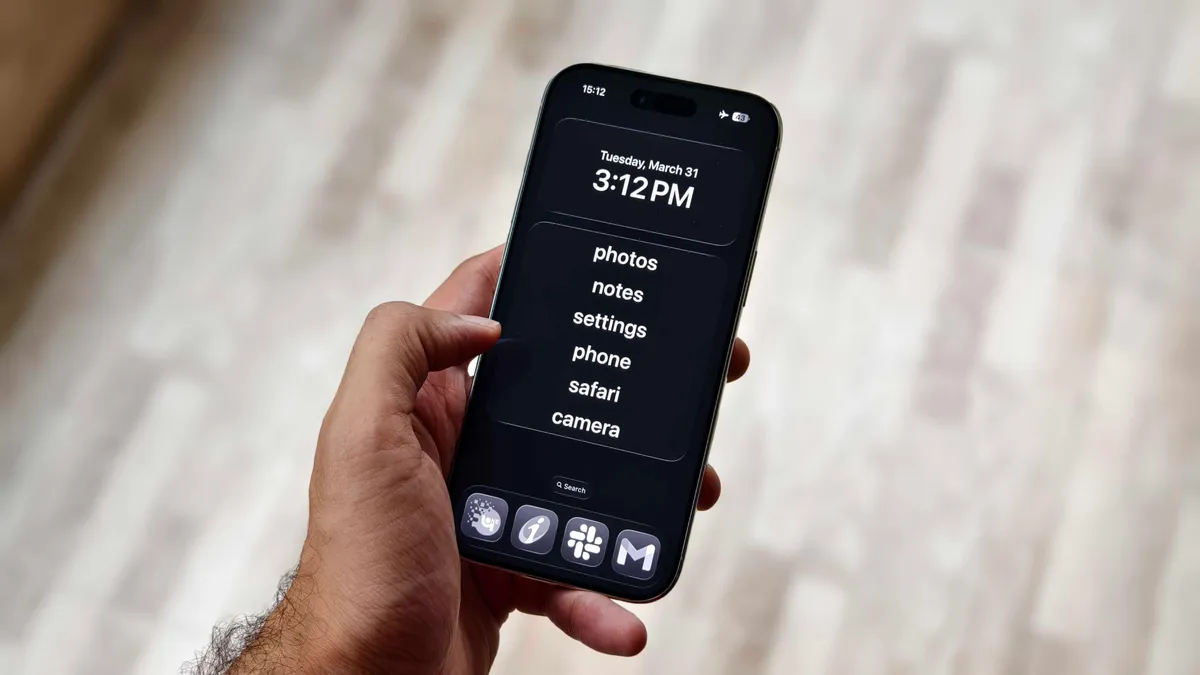






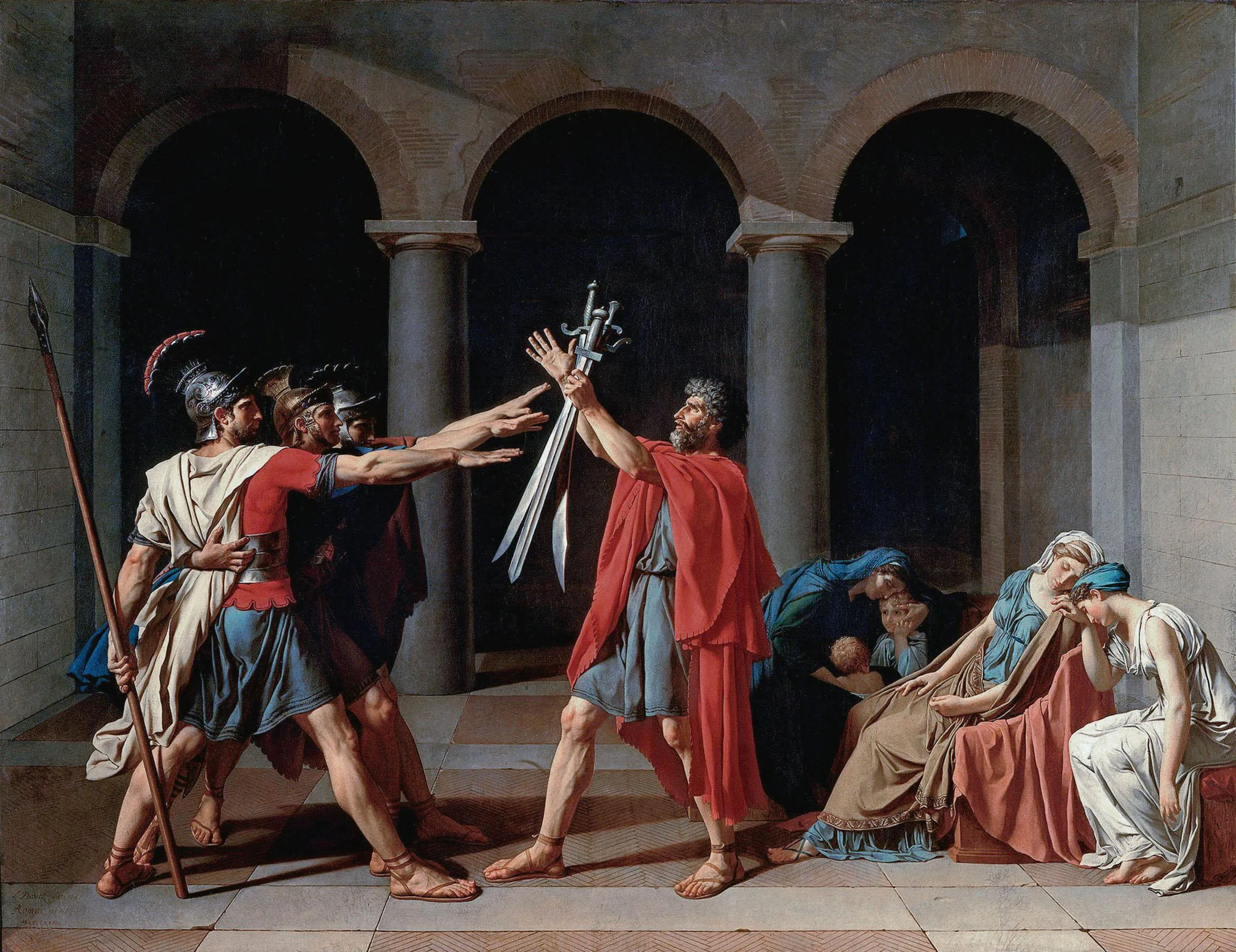























































You must be logged in to post a comment Login