The Acer Chromebook 315 (2026) is a solid Chromebook with good battery life, reasonable endurance and a solid screen. You can get more power for the price on rival models, and perhaps a stronger display if you spend a smidgen more.
Reasonable performance from new MediaTek chip
Solid port selection
Excellent battery life
Quite heavy
Not as powerful as key rivals
Key Features
Advertisement
Review Price:
£399.99
MediaTek Kompanio 540 processor inside
Advertisement
This Acer Chromebook has an eight core MediaTek processor inside for reasonable performance for basic tasks.
15.6-inch Full HD screen
Advertisement
It also has a larger screen for more real estate than smaller options.
All day battery life
Advertisement
The endurance of this Chromebook is also solid, and it can comfortably get through a working day.
Introduction
The Acer Chromebook 315 (2026) updates the brand’s big-screen and surprisingly affordable Chromebook for this year with some intriguing changes.
For instance, it’s the first Chromebook in this size that the brand is offering with a new MediaTek Kompanio 540 processor, 8GB of RAM, and 128GB of eMMC storage, while the keyboard layout and port selection have also been changed compared to this laptop’s predecessors.
Advertisement
Nonetheless, we’ve got a 15.6-inch Full HD IPS screen, excellent battery life and more to like for a reasonable £399.99 price tag that puts this against the Asus Chromebook Plus CX34 as perhaps its closest rival at this price, or you can also opt for a slightly older model like the Lenovo IdeaPad 5i Chromebook.
Advertisement
To see if this Chromebook 315 (2026) can make it onto our list of the best Chromebooks we’ve tested, I’ve been putting it through its paces for the last couple of weeks.
Design and Keyboard
Solid plastic frame
Reasonable port selection
Snappy keyboard and slick trackpad
The Chromebook 315 (2026) isn’t a laptop that necessarily has to look as stylish as the best ultrabooks out there; it’s more about function than form. Nonetheless, for a cheaper laptop in 2026, it still feels reasonably solid, though you can tell it’s mostly plastic. That being said, there isn’t much flex in the chassis, as you might expect with laptops lower down the price ladder.
It tips the scales at about 1.6kg, putting it on the heavier side for a larger laptop, though it’s still somewhat portable for classes, lectures, or just out and about.
Advertisement
Image Credit (Trusted Reviews)
Advertisement
Port-wise, we’ve got a decent selection: the left side has USB-C and USB-A, with a further USB-C and USB-A on the right side, alongside a 3.5mm headphone jack. This is fine for most use cases, although older variants of this laptop supplemented this with a microSD card reader for a little added versatility.
Open the lid, and you’ll see this is where things have changed the most compared to older versions of this laptop. Acer has taken a leaf out of Apple’s book with the keyboard layout on the Chromebook 315 (2026), ditching the full-size layout it used to come with and replacing it with a smaller form factor that eschews the number pad and some navigation keys in favour of speaker grilles on either side.
Image Credit (Trusted Reviews)
The keyboard isn’t backlit by the looks of things, but feels surprisingly snappy under the finger. It’s a softer keypress, but nonetheless has decent travel, and it was very easy to get up to speed with it.
As for the trackpad, it is a little on the small side given the size of the keyboard deck, but it feels glossy and smooth under the finger and has a pleasant mechanical click.
Display and Sound
Full HD resolution is just about okay on this larger screen
Reasonable brightness and colours
Okay speakers
Advertisement
As for its display, the Chromebook 315 (2026) doesn’t move the needle from its predecessors, opting for a larger 15.6-inch Full HD IPS screen with a more modest 60Hz refresh rate.
Advertisement
It’s fine for the productivity workloads this is designed for, with okay detail across a larger screen, although I think a 15.6-inch screen size is pushing things a tad for the 1080p resolution on offer. It’s not to the point you can see individual details, but a slightly higher-res screen would have been nice.
Image Credit (Trusted Reviews)
There isn’t a quoted brightness figure for the Chromebook 315 (2026)’s display, but to my eye it feels a little dimmer than our usual 300-nit target when set to full blast. You’ll want to stay indoors with this laptop, though, as it isn’t the punchiest of panels. Colours look reasonable to my eye, but owing to the lower brightness, there is an element of the panel that feels a smidgen washed out.
The dual speakers are mostly mids, as you’d expect from a cheaper laptop. They’re okay for casual viewing, but little beyond that. For more extended listening, utilise the headphone jack on the right-hand side.
Performance
Okay performance for casual tasks
Zippy enough for some multi-tasking
eMMC storage is a shame
Advertisement
The Chromebook 315 (2026) continues the trend of Acer’s more affordable Chromebooks shipping with the MediaTek Kompanio 540 processor. This is one of MediaTek’s latest low-power mobile chips that features eight cores, including two Arm Cortex-A78 ‘big cores’ and six Arm Cortex-A55 cores, plus a dual-core GPU.
It’s not a chip necessarily designed for outright grunt; it is more for zippy performance on basic tasks where it’s needed. Think of it as a competitor to Intel’s N-series of chips – quiet, but efficient, and enough power for the basic tasks these devices are designed for.
Advertisement
Image Credit (Trusted Reviews)
The scores that the Chromebook 315 (2026) achieved in the customary Geekbench 6 test were similar to those of an Intel N100 in the same test on the larger, convertible Chromebook Spin 312 I’ve tested in the past. The multi-core result is a bit lower than I expected, owing to the number of cores on this MediaTek chip compared to the N100.
With this in mind, outright speed and performance aren’t the name of the game for the Chromebook 311 (2026). Its purpose is to be a portable and efficient laptop for light productivity loads, which it performs decently well. I didn’t experience too much of a slowdown while using multiple Chrome tabs for Google Docs, Spotify and more while using it for work as my main laptop.
Image Credit (Trusted Reviews)
Advertisement
My particular configuration comes with 8GB of RAM and 128GB of eMMC storage, providing solid RAM headroom for multitasking and reasonable storage capacity, given that most of your work is likely to be in the cloud rather than stored locally. It would have been nice to see solid-state storage in 2026 on a more affordable device, though, and eMMC storage isn’t the quickest.
Software
Lightweight and clean ChromeOS install
No Chromebook Plus features
The first thing to note about the Chromebook 315 (2026) is that it runs ChromeOS, meaning it’s got a clean, lightweight UI with no real bloatware pre-installed, which makes it easy to get around and jump into apps such as Google’s G Suite of productivity apps.
This specific Chromebook 315 (2026) model also doesn’t meet the Chromebook Plus minimum spec requirements. This means we aren’t getting new features such as Help Me Read or Magic Eraser, for instance.
Image Credit (Trusted Reviews)
There is one benefit to this being a newer model: it comes with Google’s new Quick Insert key, where the Caps Lock key is, which opens a Spotlight Search-style menu that can be used for everything from inserting a link to looking up files.
Advertisement
Advertisement
Battery Life
Lasted for 15 hours 12 minutes in the battery test
Capable of lasting for between one and two working days
The Chromebook 315 (2026) packs in a more modest 45Whr cell into its larger chassis, and Acer doesn’t make any specific claims about this laptop’s endurance. With this in mind, the MediaTek Kompanio 540 processor’s efficiency is improved over its predecessors, leading to solid results on other laptops with the same chip that I’ve tested.
A 1080p video loop test at 50% brightness yielded a result of 15 hours and 12 minutes, meaning you should be able to get one to two working days out of this Chromebook. With some hypermiling and a lower brightness figure, two working days with juice to spare becomes more of a possibility, which is great for a more affordable laptop.
The Chromebook 315 (2026) comes with a smaller 65W USB-C brick, which is okay at putting charge back into the laptop. It took 36 minutes to get back to 50%, while a full charge took 83 minutes.
Should you buy it?
You want a solid Chromebook for getting work done
Advertisement
This Chromebook ticks the boxes for a snappy keyboard, decent ports and solid battery life to help you get work done.
This Chromebook is quite limited in power with its MediaTek chip, though, if you wanted a little more oomph for a similar price.
Advertisement
Advertisement
Final Thoughts
The Acer Chromebook 315 (2026) is a solid Chromebook with good battery life, reasonable endurance and a solid screen. You can get more power for the price on rival models, and perhaps a stronger display if you spend a smidgen more.
Advertisement
For instance, both the Asus Chromebook Plus CX34 and Lenovo IdeaPad 5i Chromebook are slightly older models compared to this new Acer choice, but their 12th-gen Intel Core i5 chips are beefier than the MediaTek option, plus they have similar battery life and somewhat higher quality screens for a similar price tag. The Asus choice is also a Chromebook Plus, so it benefits from additional software trickery if that’s important to you.
With this in mind, the Chromebook 516 (2026) is a decent choice if you want a large-screen laptop that’s got enough power and endurance to help you get work done with ease without costing the earth. For more options, check out our list of the best Chromebooks we’ve tested.
How We Test
This Acer laptop has been put through a series of uniform checks designed to gauge key factors, including build quality, performance, screen quality and battery life. These include formal synthetic benchmarks and scripted tests, plus a series of real-world checks, such as how well it runs popular apps.
FAQs
How much does the Acer Chromebook 315 (2026) weigh?
Advertisement
The Acer Chromebook 315 (2026) weighs 1.6kg, putting it on the heavier side for a 15.6-inch laptop.
Test Data
Acer Chromebook 315 (2026)
Geekbench 6 single core
992
Geekbench 6 multi core
2249
Battery discharge after 60 minutes of online Netflix playback
Fraunhofer introduces quantum random generator targeting future cryptographic security challenges
Q-Dice uses vacuum fluctuations instead of software algorithms for randomness
New system delivers over 4 Gbit/s quantum-generated random number output
As concerns grow about the security implications of future quantum computers, researchers continue searching for stronger sources of cryptographic protection.
One critical requirement involves generating truly unpredictable random numbers that can withstand increasingly sophisticated attacks against modern digital systems.
Fraunhofer IPMS has now introduced a new quantum random number generator designed specifically for security-sensitive environments and high-throughput infrastructure deployments.
Latest Videos From
Quantum randomness replaces reliance on conventional algorithms
The system, known as Q-Dice, generates random numbers using quantum vacuum fluctuations rather than conventional software algorithms that may contain weaknesses.
Advertisement
According to Fraunhofer IPMS, the technology delivers randomness at speeds exceeding 4 Gbit/s, with the hardware appliance rated at 4.1 Gbit/s.
Random number generation forms a fundamental component of encryption, authentication, secure communications, and access control systems throughout modern digital infrastructure.
Weak or predictable randomness can undermine otherwise robust security mechanisms, creating opportunities for attackers to exploit cryptographic vulnerabilities.
Advertisement
Sign up to the TechRadar Pro newsletter to get all the top news, opinion, features and guidance your business needs to succeed!
Because Q-Dice randomness originates from quantum vacuum fluctuations rather than a mathematical formula, there is no underlying pattern for hackers to study.
This means no seed value exists for attackers to calculate, predict, or reverse engineer, regardless of available computing power.
Fraunhofer IPMS says Q-Dice derives entropy from inherently unpredictable quantum effects, producing outputs suitable for applications including data encryption, authentication systems, secure communications, quantum key distribution, and post-quantum cryptography.
Advertisement
The organization claims that generated randomness was evaluated using recognized frameworks, including BSI AIS 20/31 and the NIST SP 800-22 test suite.
The system also carries EAL 3 and PTG 3 classifications, reflecting compliance with security requirements established by Germany’s Federal Office for Information Security.
Unlike many software-based approaches, the platform relies on physical quantum phenomena rather than mathematical procedures intended to simulate randomness.
Advertisement
Rack-mounted hardware and cloud access offer deployment flexibility
Fraunhofer IPMS is offering the technology through both dedicated hardware and cloud-based delivery models to accommodate different operational requirements.
The primary hardware version arrives as a 19-inch rack-mounted appliance intended for deployment inside data centers and other controlled computing environments.
The appliance combines quantum entropy generation, signal acquisition, randomness extraction, and system integration within a single platform featuring 10 Gbit/s Ethernet connectivity.
Advertisement
Fraunhofer IPMS said the development process remained entirely in-house, covering optical subsystem design, low-noise analog electronics, high-speed data acquisition, and FPGA-based post-processing.
For organizations unwilling to install dedicated equipment, the institute also provides an online Entropy-as-a-Service offering delivering quantum-generated randomness through a secure interface.
“With Q-Dice, we make high-quality quantum randomness practically usable and accessible,” said Alexander Noack, Division Director Data Communication and Computing at Fraunhofer IPMS.
“Whether as a robust 19-inch rack system integrated into your own infrastructure or via our online Entropy-as-a-Service platform, we are removing the barriers to adopting quantum-level security.”
Advertisement
Fraunhofer IPMS is now actively seeking partners to pilot the technology and help build practical, real-world applications around it.
Noack added that the goal involves working collaboratively to raise the overall bar for security and trust as quantum computing capabilities continue advancing.
Whether Q-Dice becomes a standard component in next-gen security infrastructure, or remains a niche tool, depends on how quickly organizations recognize the urgency of post-quantum preparation.
It’s no secret that Snap has been working on a pair of AR-powered smart glasses for quite some time now – the dev kits for the hardware have been available for the past few years, and CEO Evan Spiegel always claimed that they’d be available by the end of 2026.
Well, we’ve just had our first official look at the super high-tech Specs – specs that Snap spent literally billions of dollars on over years of R&D – ahead of release later this year and, let’s just say, reactions are… mixed.
There’s no getting around it; the glasses don’t look as sleek or as stylish as many were expecting, especially with companies like Meta and Ray-Ban coming out with some pretty slick-looking (albeit comparatively basic) smart specs. It’s actually the opposite; the glasses are massive, chunky and look overly large on the head – even when modelled by Spiegel on stage at the announcement.
As you’d expect, the reaction memes are strong, and opinions are divided online. Even Snap’s stock dropped by 5% after the announcement, suggesting that Snap might’ve been drinking its own kool-aid for a little too long, focusing too much on the smarts and not the fact that, y’know, these actually need to be worn, in public, where people can actually see them on your face.
Advertisement
The problem is that I know the software experience on the Specs is fantastic, unlike anything else I’ve ever seen or used – but will people actually give it a go when they look like that? I think we all know the answer to that question.
Advertisement
Snap’s software is leagues ahead of the competition
Back in September 2025, I got to try the Spects dev kit at Snap’s London HQ, and Snap OS 2.0 feels closer to the sci-fi AR we were promised a decade ago than anything I’ve used since. While most rivals are serving up green, single‑colour overlays and static notification panels, Snap is running a full operating system that understands the world around you.
Image Credit (Trusted Reviews)
Full‑colour graphics aren’t just floating in your periphery; they’re anchored to real objects and surfaces. Pin a window next to your desk or drop a widget onto a coffee table and it stays there, even as you look or walk away. It sounds like a small thing, but that persistence makes the specs feel like genuine mixed‑reality interfaces rather than glorified heads‑up displays.
Image Credit (Snap)
Then there’s the built-in AI, which, believe it or not, is actually quite good. Much like Google Gemini’s Live Mode on mobile, Snap’s Spatial Tips feature doesn’t just answer questions in a floating chat box; it understands what you’re looking at and overlays help directly onto it.
Image Credit (Trusted Reviews)
Advertisement
When I asked how to do an ollie on a skateboard, it didn’t spit out a wall of text – it drew the steps onto the board itself, showing where my feet should go at each stage. The same approach applies to things like flat‑pack furniture, car engines or household repairs: you look at the thing you’re stuck on, and the instructions appear right where you need them.
Advertisement
Image Credit (Snap)
On top of that, real‑time translation features can caption conversations and translate signs or menus with real-world overlays, with text that sticks to people and objects as they move. Compared to the mostly static, widget‑driven software on Even Realities’ G2 or Rokid’s AR specs, Snap OS 2.0 feels way more polished, mature and genuinely useful.
So when I say Snap’s software is leagues ahead of the competition, I really do mean it.
Comparing the Snap Specs to existing smart glasses like the Meta Display specs and Even Realities G2 is like comparing an iPhone 17 Pro to a Nokia 3410; they’re in totally different leagues.
Samsung Galaxy XR. Image Credit (Trusted Reviews)
Advertisement
In fact, in terms of the tech and mixed-reality experience on offer, they’re closer to the likes of the Apple Vision Pro and Samsung Galaxy XR – relatively large VR-style headsets that you certainly couldn’t wear on a night out or a trip – than existing smart glasses.
Like the proper headsets, Snap’s specs have high-end full-colour screens rather than the single-colour panels used by most existing manufacturers, and like those headsets, it can run a plethora of first- and third-party apps – there’s a reason why Snap got those dev kits out so early, after all.
Advertisement
Image Credit (Snap)
It actually goes a step further with its semi-transparent lenses, rather than using passthrough camera feeds and regular screens like the existing ultra-premium headsets. With electrochromic dimming on the lenses, it’s not hard to imagine they could offer a more immersive mode for watching movies and the like.
Image Credit (Snap)
When you look at the Specs through that lens (pun intended), they look more like a phenomenal feat of engineering than a bulky pair of smart glasses.
Advertisement
… but there’s no argument, they’re ugly and expensive
Snap has tried its best to frame these as fashionable, collaborating with the likes of Kaia Gerber, Jimmy Butler, Imogen Heap, Jack Harlow, and Hoyeon to model the Specs in marketing images – but, let’s be honest, they’re still some pretty ugly.
Image Credit (CNBC)
Compared to regular glasses that most people currently wear, these are much thicker – not just in the frame housing the screens but also in the arms of the glasses. The arms also look way longer than they should – on Spiegel’s head at the reveal, anyway – with very little in terms of a hook at the end to wrap around your ear for extra stability.
The slightly rounded, curved shape of the specs is quite nice in my eyes, but they’re just too big, chunky and obviously-smart to be worn by the average Joe. And with an eye-watering price tag of £1,995/$2,195, they’re not attainable for the average consumer either.
Image Credit (Snap)
Advertisement
Of course, these are first-gen specs, and if Snap does power through and keep iterating on the design and hardware, this is the worst the Specs will ever be.
Advertisement
Just think about how much better the Apple Watch Series 11 is compared to the Apple Watch – it’s the same here. The core concept is there, and Snap’s software is a shining beacon in a sea of lazy AR concepts; it just needs the time to properly cook.
Image Credit (Snap)
That said, I reckon the Snap Specs will be a big hit with die-hard techies with money to burn, and I imagine I’ll be seeing execs from companies sporting the Specs at events like MWC in 2027 – but will I see anyone actually wearing them in day-to-day life? I doubt it, and that’s a shame.
I’ve spent years messing with in-game brightness sliders, GPU filters, HDR modes, and monitor presets to tinker with my experience on my favorite games. Of course, I’d always go with the original artists’ intent first, but replaying these titles with new filters does freshen up the atmosphere.
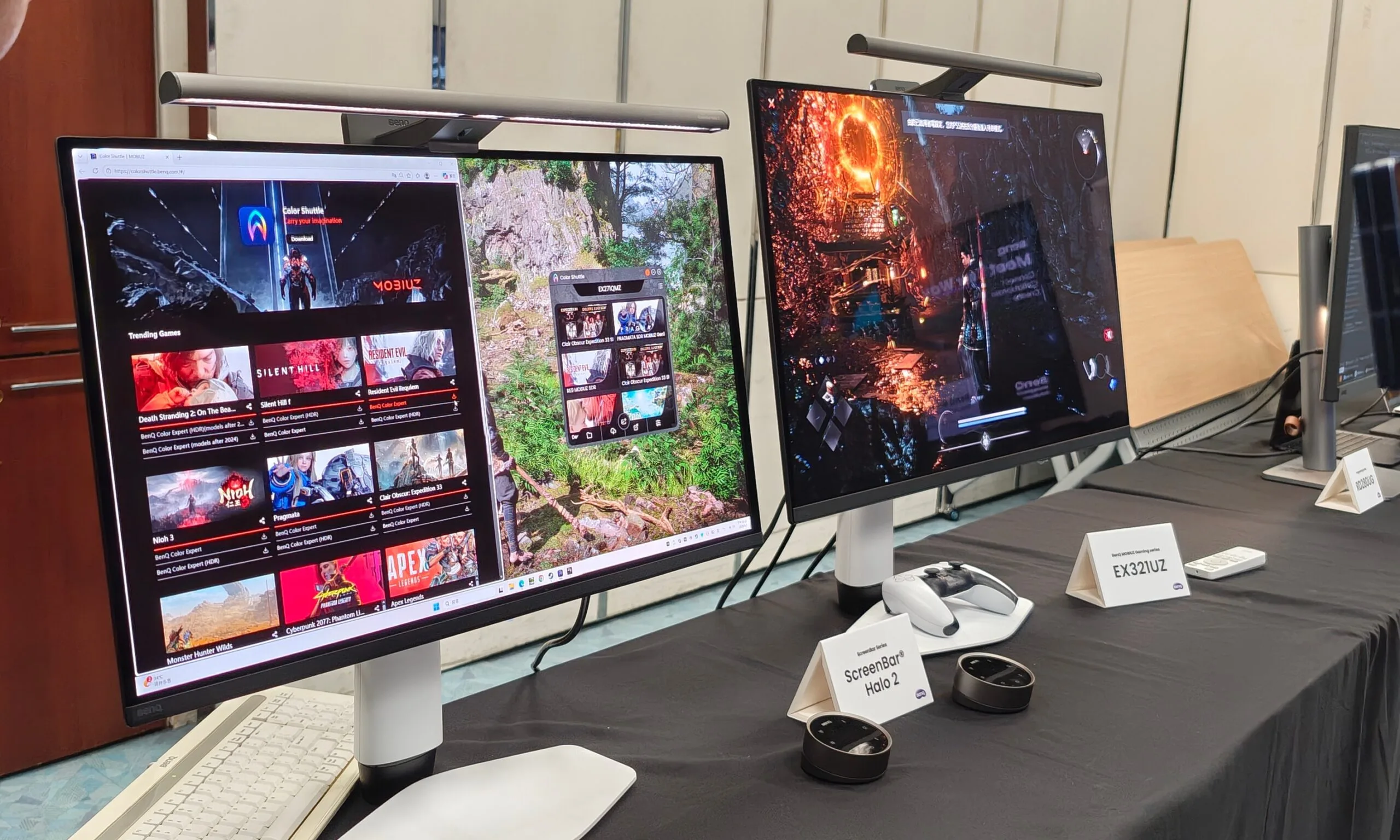
This is why I was particularly impressed by BenQ’s new MOBIUZ gaming monitors. During a recent visit to BenQ’s Taiwan HQ, I got a hands-on look at the company’s latest AI-powered game filter tech, and it immediately made more sense than I expected. The company isn’t just slapping on the “AI” sticker onto a gaming display. What you are getting here is custom touches to change up your experience by pulling from BenQ’s game art database that automatically tunes brightness, contrast, and color balance to match the game’s visual style. The fun part is that your performance doesn’t take a hit.
The filter lives in the monitor
Vikhyaat Vivek / Digital Trends
When you use GPU-side filters, such as Nvidia’s Game Filters, your graphics card is still involved in the post-processing pipeline. Those tools can make a game look sharper, moodier, or more vivid, but they can also come with a performance cost depending on the setup. BenQ takes a different route by moving this job to the display itself. Its Smart Color system works through the Color Shuttle software and uses an AI chipset with BenQ’s MOBIUZ Game Color Database.
So rather than applying a GPU-level filter to the rendered frame, it adjusts the monitor’s own output using game-specific visual profiles. In practice, you can make a game look richer or more balanced without worrying that the filter itself is quietly eating into your frame rate. Considering how precious those extra fps can be for a lot of PC gamers, the visual filter makes sure you don’t lose any of it.
More than just a bunch of presets
Vikhyaat Vivek / Digital Trends
The part I liked during the demo was that BenQ is not treating this like an old-school FPS/RPG/Racing preset menu. Those have existed forever, and most of them are either too aggressive or too generic. Color Shuttle is built around a game art database with more than 120 profiles. BenQ says it uses deep learning to understand color grading, lighting, and artistic direction across different game styles. Once Smart Color is enabled, it can detect what you are playing and switch to a suitable profile automatically.
You can also tweak those settings yourself, including familiar BenQ tools like Color Vibrance and Light Tuner that let you shift the image toward your preference. Again, “better colors” has always been a subjective thing. One player may want a horror game to look darker and moodier, while another may prefer better shadow visibility. Someone else may want open-world games to look more cinematic. BenQ’s system gives you a starting point, then lets you tune from there.
Advertisement
Backed by a community
Vikhyaat Vivek / Digital Trends
One of the best parts of Color Shuttle is cloud sharing. You can save custom presets, upload them, and share them with other players. Other users can then download those setups for their own compatible monitors. This gives the feature a social side. Imagine downloading a profile for a specific game because another player has already found a better balance for night scenes or other scenes.
But that also explains why the internet connection is part of the story. Color Shuttle connects to BenQ’s Game Color Database, and the cloud side is used for saving and sharing profiles. The AI tuning is not the same thing as cloud gaming or streaming, but the ecosystem still depends on BenQ’s online database and community layer.
Still, there are some limitations. Color Shuttle is currently a Windows 10/11 app, and console users need to save presets to the monitor’s Gamer modes through a PC before using them elsewhere. Regardless, I like where BenQ is going here. A lot of AI gaming features feel too heavy or too tied to expensive GPU upgrades. Smart Color is smaller, but also more practical.
404 Media remembers how a Florida police office looked up his ex-girlfriend’s license plate in the Flock automated license plate reader system at least 69 times in 2024 — even searching for her mom’s license plate at least 24 times. The police office was charged with stalking and hacking-related offenses, serving one day in prison with five years of probation — but his case “was not a one-off.” [Alternate link via Bruce Schneier]
Local news reports from around the country repeatedly detail police abusing the Flock surveillance system in order to stalk their partners or ex-partners. The contours of each story are much the same, with the police officer in question using their access to the system to repeatedly track a specific person over the course of weeks or months. The cases highlight the fact that Flock can be used to track the whereabouts of individual people, that police do not get a warrant in order to use the system, and that, if they have access to the system, they have the technical ability to look up any license plate they want for any reason they want. An April study by the civil rights group Institute for Justice found that at least 18 police officers have been caught around the country using Flock to stalk a romantic interest in the last few years; another database, called the ALPR Abuse Library, has documented 20 specific cases of “stalking/targeting” around the country.
The known cases of police stalking are almost certainly a vast underreporting of the overall abuse, because they largely include only cases in which the behavior was so egregious that it led to police officers being fired, arrested, or both. Flock told 404 Media that it is “aware of 15 incidents of abuse, each surfaced because of the transparency and accountability features deliberately built into our platform…. There are also 140,000 monthly active users of Flock, so the relatively rare instances of abuse, while obviously wrong and awful, are exactly that — rare,” a Flock spokesperson told 404 Media. [One in 10,000.] “Humans are fallible; unlike most tools society provide law enforcement, Flock ensures that in the instances when our technology is misused, the evidence used to hold responsible parties accountable, is right there in our system. We also encourage all our customers to have a usage policy, regular training, and to implement our Audit Assistance tool, which proactively flags unintended use….”
But it is also the case that Flock has strenuously fought against lawsuits and potential regulations that are seeking to require police to get a warrant to use the system. And many cases of abuse have not been detected by police departments themselves but by those private citizens, journalists, and stalking victims who have found patterns of abuse in public records files they have obtained from their local police departments. In most cases of Flock-related stalking reviewed by 404 Media, the abuse occurred over the course of months or years, and the victims were subjected to dozens or hundreds of lookups. Other abuse cases have been discovered using the website HaveIBeenFlocked.com, a website that compiles Flock searches released via public records requests and turns them into a searchable database. Flock has repeatedly tried to get that website taken down, as we have previously reported.
Regardless of how that might work, the ban is not a substitute for parental controls on devices and your home network. With two kids of my own, here’s what I’ve learned.
Talk to your kids
Parental controls are there as a safeguard to protect kids from the harms that the internet has to offer. As kids get older, the number of restrictions you have will reduce, but you’ll still most likely want something in place.
All restrictions should be clearly stated and you should talk to your kids about why restrictions are in place and what you expect from them when they’re using devices. Then, you can put restrictions in place.
Advertisement
Use the provided parental controls
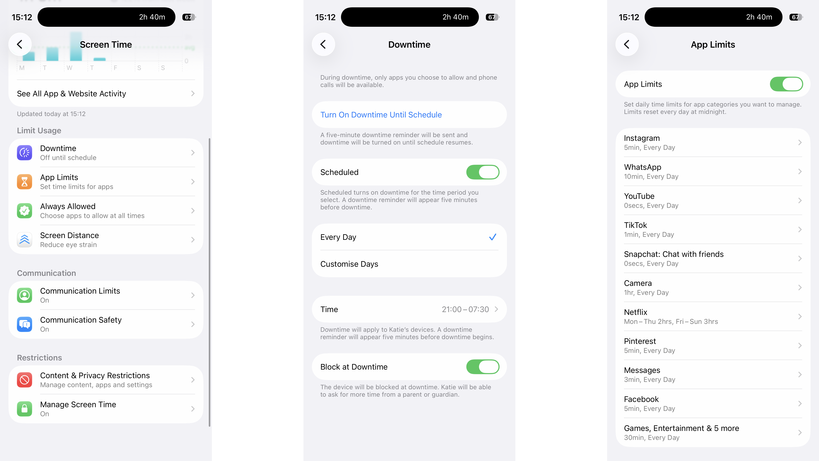
Whether or not your kids have Apple or Android phones, there are free parental controls available for both platforms: Screen Time for iOS and Family Link for Android.
Advertisement
These both need to be tied to a child’s account, but once installed, they both give a similar set of controls: you can make kids request apps before installing them, you can set app time limits, control the contacts they can add, and you can put phones into downtime to prevent use (either manually or scheduled).
Image Credit (Trusted Reviews)
Family Link for Android phones is available on iOS and Android, but for Screen Time you need another Apple device.
If your kids have Amazon tablets or Kindles, then parental controls are available there, too, controllable through the parents’ dashboard online. Again, you get a similar level of control, including time limits.
Advertisement
The one thing that’s annoying about Amazon’s parental controls are that they stop a child joining a different Wi-Fi network, and you have to do this with a parent’s profile on the device itself. On the one hand, this is a safety feature, but if a child goes off to stay with grandparents, for example, they can’t connect to Wi-Fi without you being present.
Windows has its own controls, with Microsoft Family Safety. MacOS devices can use Screen Time, just like the phones.
Advertisement
Game consoles have their own set of controls that you need to set up individually.
Advertisement
Most social networks have parental controls of varying quality, but require that any account your child sets up be monitored by you as a parent using the provided controls.
My advice is to always set every device up with the controls available, but to try and restrict the number of manufacturers you have.
For example, if your child has an iPhone and an iPad, the same settings and time limits apply to both; if they have an Android tablet, a Windows PC, and an iPhone, you have to set limits and controls on each.
Invest in a router with proper parental controls
It’s essential, in my view, to have parental controls running on your home network. I use Eero at home and have Eero Plus. With this, I can create profiles for each child and associate their devices.
Advertisement
Each profile can have its own scheduled downtime, turning off at bedtime, for example, and you can filter the internet in an appropriate way for different-aged children. Eero also allows me to block specific services across all devices, say turning off Discord, YouTube or Snapchat.
Advertisement
But be careful. To identify a device, Eero (and other routers) use a device’s MAC address. Phones and tablets can create a private MAC address, which can change frequently. It’s for privacy to stop public hotspots spying, but when a MAC address changes, your router thinks it’s a new device.
Disable this setting on your child’s devices (turning it off or setting it to Fixed, rather than Rotating) and, if your router supports it, turn on notifications for new devices. That way, you’ll get a pop-up on your phone if the router spots a new device, which covers MAC address changes and any children bringing other unlocked devices home.
Also be aware of devices with more than one network connection. A PC with Wi-Fi and Ethernet will appear as two different devices, and you need to add both to a profile for full protection.
Home network controls should not be used in place of on-device controls, but alongside them. When your child leaves home with a device, such as an iPhone, they’re no longer protected or restricted by the home network. Make sure mobile devices are set up with restrictions similar to those on your home network, so your kids remain protected when they’re using a mobile connection or on another network.
Advertisement
Advertisement
Protect your passwords and PINs
Most parental controls will require a PIN or password when you want to make changes, so don’t use the same ones that you’d use on your own phone, as your kids probably know what this is. I use random PINs and passwords, and save them in a secure note on my phone.
Be aware of different access routes
Just because a phone’s locked down or restricted in a certain way, it doesn’t mean that your kids can’t get around the controls you have. Take Snapchat, for example: kids can simply log in on someone else’s phone or via a web browser, bypassing time limits that you might have set.
If a service that your child has access to has the option of two-factor authentication (where you need a code to login), set this up, but add the code to your phone, such as through the Google Authenticator app. Sign out of all sessions on the service on your child’s phone, and then sign them back in. They’ll need the authentication code to do so, so it’s fine to give out that one-time code.
Advertisement
However, now if they try and log in via another phone or the web, they’ll need a code that they can’t get, so you can ensure that they’re safe. This doesn’t stop them from creating new accounts on many services.
Advertisement
It’s also worth blocking web access to services on their phone and your home network, just for safety. For example, if you have time limits on WhatsApp, you’ll want to block WhatsApp.com, as the web version allows a child to pair their account and switch to a web browser when they run out of time.
Image Credit (Trusted Reviews)
Blocking social media sites’ web addresses prevents kids from bypassing time controls in apps or creating new accounts to circumvent restrictions.
Plastic waste can now be converted directly into usable jet fuel
A tandem reactor system breaks plastic down at 460 degrees Celsius
Ruthenium catalyst sites delivered far better selectivity than commercial alternatives
Researchers at Nanjing Forestry University and Tsinghua University have demonstrated a new method for converting plastic waste directly into usable jet fuel, with estimated production costs ranging from $1.0 to $1.8 per kilogram.
The work comes as airlines, governments, and fuel producers continue searching for alternatives that could reduce dependence on conventional fossil-derived jet fuel.
While the technology remains under further development, the researchers say their approach combines favourable fuel characteristics with economics that appear competitive on paper.
Latest Videos From
New reactor design turns waste plastic into aviation fuel
The study, published inNature Energy, shows a tandem reactor system using hydro-pyrolysis and hydrogenolysis can convert plastic waste into jet-fuel-range hydrocarbons.
Advertisement
The researchers note plastic material first enters a reactor operating at 460 °C, where it is broken into smaller molecular compounds.
Those intermediate products then pass into a second stage operating at 160 °C, where a specially designed catalyst converts them into cycloalkane-rich aviation fuel suitable for further evaluation.
Professors Yadong Li and Dingsheng Wang explained that controlling the final product mix had long remained a challenge in plastic conversion research.
Advertisement
Sign up to the TechRadar Pro newsletter to get all the top news, opinion, features and guidance your business needs to succeed!
“The problem that kept pulling us back was selectivity,” they said, noting that conventional approaches often produce broad and difficult-to-control distributions of chemical products.
The team concentrated on atomically dispersed ruthenium, or Ru, sites supported on cobalt-aluminum oxide materials.
After evaluating multiple catalyst configurations, they found that isolated Ru sites delivered significantly different reaction behaviour compared with conventional alternatives.
Advertisement
They reported that the catalyst achieved hydrogenation performance more than 100 times greater than a commercial Ru/C catalyst during a key processing stage.
Economics and sustainability claims draw attention
The study arrives amid continuing efforts to expand sustainable aviation fuel production as airlines face pressure to lower emissions.
Advertisement
Aviation remains one of the more difficult sectors to decarbonize because aircraft require energy-dense liquid fuels that can operate under demanding flight conditions.
The group also reported successful catalyst preparation and testing at gram scale, while stating that both catalyst manufacturing and hydrogenation processes appear capable of scaling further.
The researchers said the resulting fuel demonstrated attractive performance characteristics while also offering potentially favourable economics.
“A techno-economic analysis put the competitive minimum selling price at $1.0–1.8 per kilogram,” Li and Wang said, describing the estimate as competitive.
Advertisement
For comparison, conventional fossil-based jet fuel currently costs roughly $1.00–$1.30 per kilogram, although prices change with global oil markets and refinery conditions.
Given the volatility tied to global oil markets, the conflict in Iran, and tensions across other oil-producing regions, a price-competitive alternative becomes increasingly difficult to ignore.
Future work will focus on kilogram-scale catalyst production and continuous feeding systems intended to improve operational efficiency.
Claude Guillemot, co-founder of French video game company Ubisoft, died Friday at the age of 69.
According to French media (via Bloomberg), Guillemot died in a plane crash in the French resort town of La Baule. He was one of two people aboard the plane, both of whom died.
Guillemot founded Ubisoft with his four brothers in 1986. Since then, the company has published the Assassin’s Creed, Far Cry, Prince of Persia, and Tom Clancy video game franchises, as well as many other titles. The family retains control of Ubisoft, and Guillemot’s brother Yves is still CEO.
Guillemot was also chairman of Guillemot Corp., which makes gaming and audio accessories.
Advertisement
“Ubisoft was deeply saddened to learn of the death of Claude Guillemot, co-founder of the group and chairman of Guillemot Corp., in an accident,” Ubisoft said in a statement. “Our thoughts are with his family and loved ones during this difficult time. No further statements will be made at this time.””
Prince also worked on Wolfenstein and Duke Nukem games.
id Software
Video game composer and sound designer Bobby Prince has died. An obituary states that Prince died on June 16 at the age of 81 following an illness. Developer id software shared the news of Prince’s passing.
Rest in peace to the video game music pioneer Bobby Prince. Your music lives on forever. pic.twitter.com/8LAT6CGZ5Y
Prince was perhaps best known for his pioneering work on the Doom series. The Library of Congress inducted his soundtrack for the original game into the National Recording Registry just last month.
Advertisement
“Despite the limitations of the 1993-era sound card drivers, Prince composed the perfect riff-shredding accompaniment for the game’s demon-slaying journey to hell and back,” the Library of Congress stated. “Taking advantage of his knowledge of MIDI, Prince even worked to ensure that the sound effects he created could cut through the music by assigning them to different MIDI frequencies.”
Prince also worked on games such as Wolfenstein 3D, Rise of the Triad and Duke Nukem 3D. In 2006, the Game Audio Network Guild honored Prince with a lifetime achievement award.
“Everyone at Romero Games is deeply saddened to learn of the passing of Bobby Prince,” Doom co-designer and id Software co-founder John Romero wrote on X. “He left an incredible mark on games and on my life.”
If you’ll excuse the pun, skillets seem to always be a hot topic.
More than in other sections of cookery, there is a continual quest to find the best one, or at least the best one you can afford. I’ve seen cycles of fetishization come and go for copper, cast-iron, and carbon steel.
At the Mall of New Hampshire in the 1980s, I remember watching a miraculous cooking-store demonstration of omelettes effortlessly sliding out of a Teflon pan. Then, only a few years ago, the industry pretty much dropped the whole Teflon category like a hot potato due to the pans’ propensity to give off harmful fumes if they get too hot. Less durable ceramic immediately filled the void, and we’re already realizing how quickly it can lose its nonstick magic.
All this time, stainless-steel pans have been waiting in the wings. They are durable, and lighter and less fussy than cast iron and carbon steel. They’re not nonstick, but that’s often fixed with a pat of butter. They sear well, and with a bit of TLC, they’re built for a lifetime of hard work.
Advertisement
All-Clad has been one of the great brands in stainless for years, but I wondered if other slightly more expensive skillets were worth a look, particularly as some are new to the market and others have been flying under the radar. Along with a 10-inch All-Clad, I called in similar-sized pans from Hestan, Viking, and Heritage Steel. Testing all these sounded like fun at first, but things got weird and stayed weird for a while, and only with a bunch of hands-on data gathering and time at the stove did I understand which pans I could recommend.
Pans Labyrinth
A smart and easy cheat for someone like me is to use All-Clad’s 10-inch D3 Fry Pan as a baseline. (“Fry pan” and “skillet” are used interchangeably in this category.) The D3 has been an America’s Test Kitchen and Wirecutter darling for years, with advocates seeking out traits like uniform heating across its surface, a comfortable handle, and cladding (layers of different metals). It’s $170 with a lid and $150 without, which is a good chunk of change, but it feels like a fair price for buy-it-for-life durability.
I own and love one of All-Clad’s 4-quart D5 Essential Pans, which is like a high-sided skillet, and it has a perfectly flat cooking surface. But the cooking surface on the D3 skillet All-Clad sent to me for this story was a bit domed–high in the center and low around the outside—not horribly so, but surprising to me, and among the dozen or so pans I called in, it was among the furthest out of whack. I also noticed that the rivets that hold the handle to the pan weren’t fully squished on there. It felt fine and didn’t wobble, but an All-Clad representative confirmed this wasn’t right. They sent another pan, and the rivets were as they should be on that one, but the bottom was pretty much the same. I learned that this amount of doming is within All-Clad’s tolerance range, but not within mine. What can I say? I like flat pans, I thought, looking wistfully at my perfect D5.
I had a similar level of trouble with another pan I had high hopes for. The new 10-inch Viking Pure Glide Pro, which I had seen at my favorite trade show, has a textured titanium layer for the cooking surface above an aluminum core and stainless-steel bottom layer. Impressively, this combination of materials created a capable nonstick competitor that I’d be a lot more excited about if it was part of a better, sturdier pan. The Viking had some temperature management issues that I’ll get to in a moment, and it either warped or arrived warped to the point that heating oil would form a moat around the center of the pan. If Viking fixes this, the Pure Glide Pro has the potential to be a hell of a pan, but it’s not there yet.



























































You must be logged in to post a comment Login