


Connect with us
DAPA Banner

Tech

Apple says Mac mini shortages will last for months

Published

on

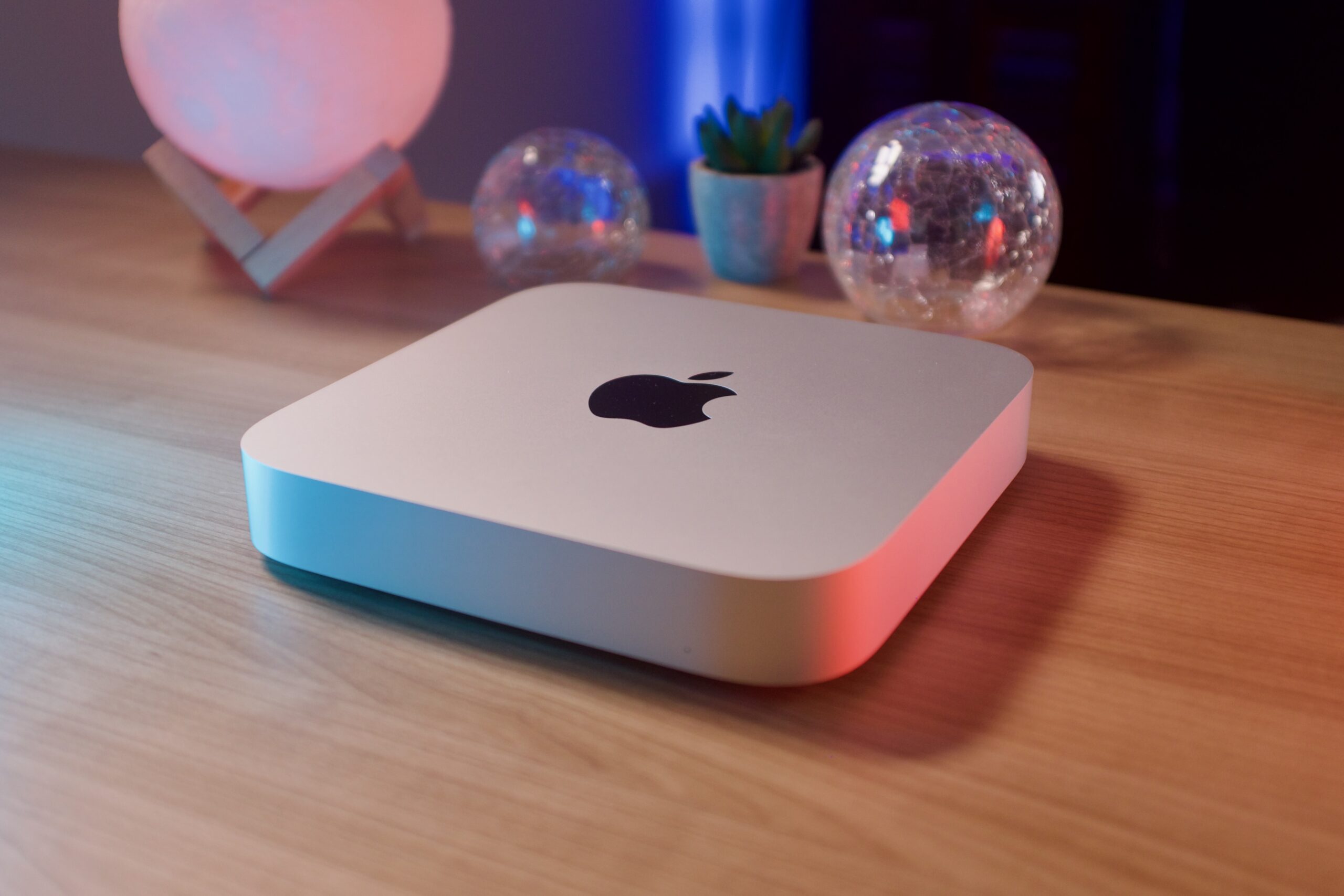
If you were planning to pick up a Mac mini anytime soon, you might be in for a wait.

Apple has confirmed that its smallest desktop is facing supply issues that could take “several months” to resolve. This is happening as demand continues to run ahead of what the company expected.

The update came during Apple’s Q2 2026 earnings call. There, the company acknowledged that both the Mac mini and Mac Studio are currently struggling to stay available in normal supply-demand balance. In short, Apple is selling them faster than it can keep up.

The Mac mini has always sat in a slightly unusual place in Apple’s lineup. It’s never been the flagship Mac. However, it has quietly built a loyal following among developers, creators, and anyone trying to build compact desktop setups. The latest generation, though, seems to have pushed it into a different category altogether.

Advertisement

With Apple Silicon bringing major gains in performance and efficiency, the Mac mini is no longer just an entry-level Mac. In fact, it’s now being used for heavier workloads like coding, creative production, and even home server setups. All this is possible in a tiny footprint that doesn’t take over your desk.

Advertisement

Apple CEO Tim Cook said the company “undercalled the demand” for both the Mac mini and Mac Studio. He added that it expects supply to take “several months” to fully catch up.

It’s happening at a strong moment for Apple’s Mac business overall. The company reported $111.2 billion in revenue for Q2 2026, up 17% year-on-year, with Mac revenue hitting $8.4 billion. So while the shortage is technically a supply problem, it also reflects strong demand for Apple’s desktop lineup more broadly.

Advertisement

For buyers, though, it’s less of a silver lining. Depending on the region, the Mac mini is now either delayed or harder to find in stores.

Source link

Advertisement
Continue Reading
Click to comment

You must be logged in to post a comment Login

Leave a Reply

Tech

Week in Review: Most popular stories on GeekWire for the week of April 26, 2026

Published

on

Get caught up on the latest technology and startup news from the past week. Here are the most popular stories on GeekWire for the week of April 26, 2026.

Sign up to receive these updates every Sunday in your inbox by subscribing to our GeekWire Weekly email newsletter.

Most popular stories on GeekWire

Source link

Continue Reading

Tech

Get Record Low Prices on M5 Pro, M5 Max MacBook Pro 14, 16

Published

on

Grab steeper discounts on Apple’s new MacBook Pro for May.

Apple retailers have issued steeper discounts on the MacBook Pro for May, resulting in record-low prices on several M5 Pro and M5 Max 14-inch and 16-inch configurations.

Prices have dipped to as low as $1,949 for the 2026 MacBook Pro, with a variety of 14-inch and 16-inch configurations now up to $250 off. You can check out top deals below, with a full rundown of markdowns in our 14-inch MacBook Pro 2026 Price Guide and 16-inch MacBook Pro Price Guide.

14-inch MacBook Pro M5 Pro and M5 Max deals

Advertisement

16-inch MacBook Pro M5 Pro and M5 Max sale

In our M5 Max 16-inch MacBook Pro review, we found the M5 Max chip is blazing fast with great graphics and AI performance. We’re also pleased to see support for Wi-Fi 7 in the 2026 line.

Source link

Continue Reading

Tech

Motorola Razr+ 2026 vs. Razr Ultra: Is the $400 price gap actually worth it, and which one to pick?

Published

on

Four hundred dollars is a significant amount: it could be a weekend trip, a decent mirrorless lens, or a perfectly capable budget Motorola smartphone. Yet here we are, staring at two Razr phones that look remarkably alike, run the same version of Android, share the same rear camera array, and flip the same way into your pocket — the $1,099 Razr+ and the $1,499 Razr Ultra

While the base Razr (2026) sits in a totally different category, the real confusion lies between the Razr+ (2026) and the Razr Ultra (2026). To help you with that, I’ve spent hours juggling between the product’s spec sheets and zooming in on every single detail. For me, it’s not about declaring the winner, but about finding out which is the right Motorola flip phone for you.

Razr+ (2026) vs. Razr Ultra (2026): Specifications at a glance

Razr+ 2026 Razr Ultra 2026 Difference
Price $1,099 $1,499 $400
Dimensions Unfolded: 171.4 × 74 × 7.1mm
Folded: 88.1 × 74 × 15.3mm189g
Unfolded: 171.5 × 74 × 7.2mm
Folded: 88.1 × 74 × 15.7mm199g
10 grams havier and a hair thicker
Inner display 6.9″ Extreme AMOLED, LTPO 165Hz, 3,000 nits, 414 ppi 7.0″ Extreme AMOLED, LTPO 165Hz, 5,000 nits, 462 ppi 10 grams heavier and a hair thicker
Cover display 4.0″ LTPS AMOLED, 165Hz, 2,400 nits 4.0″ LTPO AMOLED, 165Hz, 3,000 nits LTPO with higher brightness 
Processor Snapdragon 8s Gen 3 (4nm) Snapdragon 8 Elite (3nm) Faster and more efficient chip
RAM / Storage 12GB / 256GB 16GB / 512GB More RAM and storage
Rear cameras 50MP (f/1.8, 1/1.95”) + 50MP (f/2.0) ultrawide 50MP (f/1.8, 1/1.56”) + 50MP (f/2.0) ultrawide Larger primary sensor
Front camera 32MP (f/2.4) 50MP (f/2.0) LOFIC sensor Higher resolution, wider aperture
Battery 4,500mAh 5,000mAh More battery capacity
Wired charging 45W wired, 15W wireless 68W wired, 30W wireless Less charging time
Cover glass Gorilla Glass Victus Gorilla Glass Ceramic 3 Stronger glass
Materials Woven jacquard (Mountain View) Alcantara / Natural wood veneer
Operating System Android 16 (same) Android 16 (same) Identical
Water resistance IP48 (same) IP48 (same) Identical

Price and availability

Both phones will be available for pre-orders starting May 14, 2026, and hit shelves on May 21, 2026. The Razr+ comes in at $1,099, a $100 hike over last year, while the Razr Ultra jumps $200 to $1,499.

The more overlooked difference is how you actually buy them. The Razr+ is available through AT&T at launch and T-Mobile later in 2026, meaning carrier financing, trade-in deals, and installment plans are all on the table. The Razr Ultra skips carrier retail entirely.

Razr+ 2026 Razr Ultra 2026
Price $1,099 (+$100 vs. 2025) $1,499 (+$200 vs. 2025)
Pre-order May 14, 2026 May 14, 2026
On sale May 21, 2026 May 21, 2026
Where to buy Motorola.com, Best Buy, Amazon, AT&T, T-Mobile (later) Motorola.com, Best Buy, Amazon only
Carrier retail AT&T (launch), T-Mobile (later), no Verizon retail No carrier retail
Network support AT&T, T-Mobile, Verizon, most MVNOs AT&T, T-Mobile, Verizon, most MVNOs

Similar form factors yet different in-hand feel

Unfold the phones, and you’d struggle to tell them apart due to nearly identical dimensions, the same titanium hinge inner structure and four-inch cover display, and the identical IP48 ingress protection rating. Yes, the Ultra is 0.4 mm thicker and 10 grams heavier, but these aren’t the real-world differentiators.

It’s the Razr Ultra’s Alcantara back that sets it apart from anything else in the segment: warm, grippy, fingerprint-resistant, and reminiscent of a luxury car interior. That’s where part of the additional $400 goes.

Advertisement

The Ultra also comes in a Cocoa wood veneer variant, which carries a grain texture beneath a protective coating that saves it from daily wear and tear. The Gorilla Glass Ceramic 3 on the cover screen rounds out the design that’s built to take daily life.

The Razr+, meanwhile, comes in one Pantone Mountain View variant, with a woven jacquard finish. I think it’s unique as well, just not as exquisite as the Ultra. If you prefer going caseless, the Ultra has no equal.

Ask yourself: where do you use your phone the most?

In a dim room, the 7-inch (Ultra) and the 6.9-inch (Razr+) LTPO AMOLED foldable screens look identical, both while scrolling through the UI or watching content on YouTube or Netflix. However, the real gap shows outside, under direct sunlight. 

If you live and work in a region where the peak summer sun often makes you squint at smartphone screens, both phones solve that problem, but the Ultra does it with even less squinting involved. The Ultra’s inner screen peaks at 5,000 nits, which is considerably more than the 3,000 nits ceiling of the Razr+. 

There’s a rather modest brightness difference between the cover screens: 3,000 nits on the Ultra versus 2,400 nits on the Razr+. Further, the Ultra swaps the LTPS panel for LTPO, which enables smarter, more efficient refresh rate adjustments.

So, checking turns on a navigation map, reviewing a photo you just shot, or simply checking a message without cupping your hand over the phone screen, is relatively easier on the Ultra, particularly outdoors. However, if you predominantly live indoors or in office environments with artificial yet soothing lighting conditions, the Razr+ is no slouch.

Advertisement

Both phones get the same chip as last year, but the gap still matters

I’ll be upfront with you. Neither of Motorola’s flagship flip phones received a chipset upgrade this year due to rising component costs and thinning profit margins. And despite that, both the phones debuted with a price hike, indicating just how ugly the situation is. 

The Razr+ ships with the Snapdragon 8s Gen 3 (4nm), while the Razr Ultra retains the Snapdragon 8 Elite (3nm), and even in 2026, the performance gap between them is quite real. The Elite carries a 30-40% performance delta (in CPU and GPU tasks), and it’s also more efficient, thanks to 3nm fabrication technology. 

Even so, I’d say that the Razr+ packs sufficient punch for day-to-day tasks like scrolling, messaging, multitasking, streaming, and casual gaming. What’s different on the Ultra is that everything feels more snappy, thanks to Elite’s Oryon afterburners.

The 8 Elite also brings 16GB of RAM and 512GB of storage, versus the Plus’s 12GB and 256GB, which might not matter today, but if I were to hold onto a device for, let’s say three to four years (given that you’re getting three years of OS support), I’d definitely want some memory and storage headroom to begin with. 

On the software front, I don’t have much to talk about, except the new Daily Drops feature, which obviously is Motorola’s take on Samsung’s Now Brief. Essentially, it’s a personalized daily feed with curated headlines, weather updates, and Google Photos Memories.

There’s the Google Photos Wardrobe feature that lets you try on outfits virtually from your own photo gallery. Pick your own poison from the multiple AI assistants and make use of the Moto AI suite with notable features like Catch Me Up and Next Move. The only difference is that the 8 Elite’s NPU handles on-device AI tasks faster.

Advertisement

If you’re a photography enthusiast, Ultra is the one for you

I’ll admit Motorola had me with the deceptively similar specs: a 50MP (f/1.8) primary and a 50MP (f/2.0) ultrawide with Macro Vision on both phones. Upon digging deeper, though, the Ultra pulls ahead.

Its primary sensor is physically larger at 1/1.56 inches versus the Razr+’s 1/1.95 inches, and that extra real estate makes the sensor faster in daylight and cleaner in poorly-lit conditions. On top of that, the Ultra uses a Sony LOFIC (Lateral Overflow Integration Capacitor) sensor, which, in theory, captures up to six times more dynamic range. 

The Ultra handles harsh afternoon sun, backlit subjects, and high-contrast scenes better. Further, it supports Dolby Vision capture for video and shoots up to 8K in 30 fps (most users won’t need it, but I had to mention it). 

On the selfie front, the Ultra ships with a 50MP (f/2.0) sensor with a wider aperture and bigger pixels than the 32MP (f/2.4) shooter on the Razr+, translating to better low-light selfies. Both phones share Camcorder Rotate to Zoom, Frame Match, and Group Shot.

Like the screen, the chipset, and the differences in cameras all add up to the $400 difference, but they’ll matter most to content creators and vloggers. For most users, the Razr+ does hold its ground quite well.

The Ultra pulls ahead in usage and charging times as well

Unlike the Flip 7, which still sticks with a lithium-ion battery, both the Razr+ and the Razr Ultra come with the newer silicon-carbon battery tech, which allows manufacturers to pack in more battery capacity into slimmer bodies. 

Advertisement

The Razr+, with its 4,500 mAh battery, claims to offer over 31 hours of battery life, while the 5,000 mAh cell on the Ultra takes the number to 36+ hours. Now, these are lab numbers, and your mileage will vary. I’d say that under mixed usage, the Razr Ultra should provide an hour or two of screen-on time over the Razr+. 

The Ultra charges faster as well, both when wired (68W vs. 45W) or wirelessly (30W vs.15W), which means that midday top-ups or unplanned charging sessions in the morning will be quicker. The Razr+ will last the day just fine, but heavy users might want to stick with the Ultra.

Bottom line: Should you spend the extra $400?

The $400 gap between the Razr+ (2026) and the Razr Ultra (2026) is real, as is quite evident from the section-wise discussions we’ve just gone through. However, whether those differences matter depends entirely on how you use your smartphone. 

If you spend a lot of time outdoors, shooting video content, showing off your phone to other people, and tend to hold onto a device for three to four years, the Ultra earns its premium over the Razr+. Together, the brighter display, faster chip, superior primary and selfie camera, faster charging, and premium build add up to a meaningfully better phone in ways that show. 

However, if you’re a casual user who isn’t particular about all those things, but just doesn’t want to go with the Razr 2026, the Razr+ (2026) strikes the sweet spot between functionality and affordability. It’s a capable, well-rounded phone that covers all the bases without breaking your bank and letting you save enough for the weekend trip. 

Frequently Asked Questions (FAQs)

  • Does the Motorola Razr+ 2026 have wireless charging? Yes: 15W wireless and 5W reverse wireless charging, same as last year.
  • Are the Razr+ 2026 and Razr Ultra 2026 waterproof? Both are IP48-rated: splash and submersion resistant, but not fully dustproof.
  • Does the Razr+ 2026 use the same chip as last year? Yes: Snapdragon 8s Gen 3, unchanged for the third consecutive year.
  • Which phone is better for photography: the Razr+ or the Razr Ultra? The Ultra: bigger sensor, LOFIC technology, and a significantly better front camera.

Source link

Continue Reading

Tech

Who Makes Harbor Freight’s Most Affordable Engine Hoist & Is It Any Good?

Published

on


If you’re a DIYer on a budget, you’ve no doubt done a little shopping at your local Harbor Freight. The family-owned retail hardware store chain has, after all, been delivering quality tools at wallet-friendly prices since it was founded in 1977. That includes even heavy-duty garage gear like shop cranes, engine stands, and engine hoists. 

Engine hoists come in various shapes, sizes, and prices — with some selling for hundreds of dollars or more. If you are shopping for an engine hoist on a budget, however, there are a few options available from Harbor Freight worth checking out. The Haul-Master’s 1-Ton Manual Chain Hoist, in particular, is one of the most affordable options you’ll find currently in-stock in the retail chain’s online store. 

Haul-Master, which also makes utility trailers, is one of several notable brands that are currently owned by Harbor Freight and sold exclusively through its outlets. As of this writing, the heavy-duty hoist was selling for just $69.99, which should raise an eyebrow for any mechanic or home garage dweller in need of a device with 1-ton capacity. The only question is whether or not it actually works.

Advertisement

What users are saying about Haul-Master’s 1-ton engine hoist

Overall, customers who have bought this item from Harbor Freight are largely happy with their purchase. To date, almost all of the 1,500-plus reviews on its product page rate it either 4 or 5 stars. From the sounds of it, not all of those customers are using their Haul-Master to hoist engines, however. In fact, many claim they are using their 1-ton engine hoist to move everything from concrete artwork to animals slain on a hunt. 

Advertisement

Nevertheless, durability is a pretty common point of praise, with many users claiming that they’ve been using their engine hoist for several years without fault. Most of those users also state that the hoist is surprisingly lightweight and easy to use. And yes, many of those happy customers also thought this was a solid price for the product.

However, some 58 Harbor Freight customers rated the hoist at 3 stars or lower, and those users have noted a couple of potentially worrisome issues. For instance, one user claims their chain broke lifting a mere 30 pounds. Others note that their hoist locked up shortly after purchase, while one claimed that the lack of a zinc-coating made it impossible to clean off collected oil and grease. These factors are all worth considering prior to purchase.

Advertisement


Source link

Continue Reading

Tech

Up-Close with Kawaii, a Modder’s Dream Device That Fits an Entire Nintendo GameCube Console on a Keychain

Published

on

Kawaii Smallest Nintendo GameCube
Modders shrank a normal Wii motherboard to a fraction of its original size while retaining all functionality, allowing you to play games exactly like the original. Tito from Macho Nacho Productions just posted a detailed look at the Nintendo Kawaii project.


At first glance, you can see how small this thing actually is, measuring only sixty millimeters wide, sixty millimeters tall, and sixteen millimeters thick, but it is still a fully functional gaming console. You can attach it to your keys with a small keychain loop and carry it around with you all day. The outside casing is composed of CNC-machined aluminum, giving it a very smooth finish, and they’ve added some subtle etched artwork and some goofy compliance labels to give it some individuality without clutter. When you turn it on, six soft-glowing RGB LEDs illuminate it from the inside, adding to its charming appearance.

Kawaii Smallest Nintendo GameCube
The trick to making it this compact was using an Omega trim, as they began with a Hollywood-2 Wii Mini board and simply chipped away at all of the non-essential pieces until they were down to the bare requirements, yet they still managed to fit all of the functionality in there. The chip relocation job was arguably the most difficult, as they had to shift crucial components to new spots on the tiny board, which took some time. They ended up with two flex boards, one for the video output chip and another for the NAND memory chip. They’ve also created a bespoke power module called Thundervolt that not only gives electricity but also reduces the voltage to the CPU, allowing it to run cool and efficiently; brilliant stuff. They based all of their ideas on open-source designs supplied by the project’s crew.

Kawaii Smallest Nintendo GameCube
A small microSD card is used for internal storage, and games are loaded from it using homebrew software. Of course, the trimmed-down board leaves no area for a disc drive. The output options are very standard; composite television, 480p component, and stereo audio all plug into this single connection port. When you pull out the corresponding magnetic dock, you can plug in four GameCube controllers at once. The dock itself connects via pogo pins, so there are no cables dangling everywhere, making for a really nice solution.

Kawaii Smallest Nintendo GameCube
Getting games to run on this machine is shockingly simple, as all titles run at full speed, with no software techniques to aid them; the original Nintendo hardware is doing all the heavy lifting. The controllers continue to respond exactly as they did when you had a large, cumbersome console on your television. Of course, because there is no active cooling, it gets a little warm after a while of play; nevertheless, an external fan protruding out the side helps a lot, though it is a bit of a trade-off for the significant size reduction.

Source link

Advertisement
Continue Reading

Tech

How to Track Your Luggage (2026): AirTag, Pebblebee, CaseSafe

Published

on

This is really useful if you, like me, tend to swap out your Bluetooth trackers between items as you’re using them. If you’ve attached a Pebblebee Clip to your luggage, you can pop it out and put it in your pocket for when you grab dinner by yourself while you’re traveling. Pebblebee works with both Apple Find My and Google Find Hub. If you’re nervous about triggering the siren, you can also grab the Pebblebee Card 5 ($35), which is the same price and doesn’t have the siren.

Tips and Tricks for Finding Your Luggage

Peak Design Roller Pro black rectangular luggage with wheels and the handle extended upwards

Photograph: Adrienne So

I have been losing my luggage since I was four years old, getting sent on planes halfway around the world. Here are a few ways I’ve learned to keep track of my luggage (and how to deal with the disappointment when I inevitably don’t).

Zip your tracker into an interior pocket. You don’t want to just place it loose in your belongings. Maybe it will slide into the middle of your clothes, where the Bluetooth signal will get blocked, or you or a careless TSA employee might accidentally shake it out onto the floor. Some of my favorite carry-on suitcases, like the Peak Design Roller Pro ($600), have AirTag pockets built into the bag, so you don’t have to worry about them falling out.

Advertisement

Label your individual trackers. It’s pretty easy to change the name and emoji of your trackers in Find My or Find Hub, and you should! It’s hard to keep track of which item you’ve lost when you have six AirTags, all labeled “Adrienne’s Luggage.”

Check the battery before you leave. If you’re not traveling often, it’s easy to let your luggage Bluetooth trackers sit unused for months.

What about GPS trackers? GPS trackers use satellites, whereas AirTags and other similar trackers use Bluetooth and a crowdsourced network of compatible devices they can communicate with, such as phones. While you may experience small gaps in coverage with Bluetooth trackers when you’re locating your luggage—for example, your suitcase got loaded onto the cart and isn’t within 30 feet of an iPhone while it’s making its way to baggage claim—you’re pretty much guaranteed to have a lot of devices on the Find My or Find Hub network at an airport to help establish the tracker’s position. GPS trackers usually require a subscription, so I don’t recommend them for luggage tracking if you’ll only use them a few times a year.


Power up with unlimited access to WIRED. Get best-in-class reporting and exclusive subscriber content that’s too important to ignore. Subscribe Today.

Advertisement

Source link

Continue Reading

Tech

This tiny, magnetic e-reader could stop you from doomscrolling

Published

on

It was love at first sight. It felt like scouring the mall, dipping in and out of sprawling department stores in search of a specific, elusive item, only to finally find what you’re looking for. Only, I didn’t even know I was searching for something like the Xteink X3, because I never dared dream of something so delightful: a tiny, MagSafe-compatible e-ink reader that could attach to my iPhone like a Pop Socket.

This was it. My life would change forever. I would get my hands on the Xteink X3, and I would stop doomscrolling forever. I would read more books than ever before… which is saying something, since – brag – I read at least 50 books a year. But – not a brag – I probably spend even more time on social media than I do reading. I know that I feel generally less anxious when I limit my social media time, but alas, the siren song of TikTok beckons me. What if instead of opening social media, I could just flip my phone over and read on a tiny, Kindle-like e-ink screen? Could this $80 gadget fix me?

I’ve tried reading books (… or downloads from AO3) on my phone, immersing myself in a fictional world, rather than posts from the president in which he threatens to obliterate an entire country. But something about looking at my phone, where I’m constantly tempted to open Instagram to see whatever Reel someone sent me, doesn’t quite soothe me the way that a book or an e-ink device like a Kindle does.

I was so excited for my X3 to arrive that I constantly refreshed the tracking link until finally, it was delivered. Even though I had meticulously compared the dimensions of the X3 to my iPhone 16, or my Pop Socket wallet, I still worried it might not fit – the previous model, the Xteink X4 (basically the same device but a little bigger) only fit on larger phones like the iPhone Pro Max line. But sure enough, the X3 magnetically attached to the back of my phone like it was custom-made to fit.

Advertisement

My X3 came in the mail about two hours before I had to leave to go to a Phillies game, so I rushed to load books onto it, because I thought it would be really funny to take photos in which I read “The Power Broker” in a crowded baseball stadium. Behold, my handiwork:

The XTeink X3 watches as the Phillies kick off a ten-game losing streakImage Credits:TechCrunch

For the first several days that I had the X3, I carried it with me on the back of my phone. This made me a bit nervous, though, since I’m used to having a Pop Socket wallet, which means I’ve gotten in the habit of leaving home without my actual wallet. But I found that I used the X3 just as much when I carried it in my purse or pocket, rather than attaching it to my phone. I’m still not sure if I’ll keep this setup, or if I’ll start actually using a real wallet so that I can attach the ereader, but for now, that’s what has felt most natural. Plus, my X3 shipped with a very compact, cute, magnetic case, which perfectly protects the device and its screen and makes it a little easier to hold. At just $9 for the case, I’d recommend getting one. The case can also magnetize to your phone, though it feels a bit less secure than attaching your X3 alone.

Over my two weeks of testing, I did find that the X3 helped me read more. If you’re in line at a coffee shop, or waiting for the bus, you can just pull out the ereader instead of opening Instagram. I didn’t find the small screen difficult to read on, either. But just buying the device won’t change your habits – you have to remember that you have a 3.7 inch screen in your pocket that can fit hundreds of books.

Techcrunch event

San Francisco, CA
|
October 13-15, 2026

Advertisement
A Pop Socket wallet and the Xteink X3, side by sideImage Credits:TechCrunch

The Xteink X3 is pretty close to being the device of my dreams, but it’s not quite there yet. The firmware that the device comes with is pretty clunky – not unusable, but not exactly intuitive. I expected this, since the Xteink Reddit community was buzzing about CrossPoint, a community-made, free, open source firmware. The process of downloading CrossPoint was a bit intimidating as someone who writes words, rather than code – but with the instructions on CrossPoint’s website (and a few videos), it was easy enough. I encountered some difficulties at first, but then I realized it was because I was trying to download the X4 firmware onto my X3, so… my bad. You probably won’t even need the YouTube videos!

When you start loading books and open source firmware onto your X3, you’ll notice another divisive aspect of the device: it doesn’t have a USB-C port, unlike the X4. Instead, it uses a magnetic charger. Yes, it’s annoying to have yet another charging cable specifically for this one device, but I don’t care that much. After two weeks of consistent use, my X3 has dropped from a 100% charge to a 96% charge, so I can’t imagine I’ll be using that magnetic charger too often. You don’t even need the cord to add new books to your ereader – you can transfer files over Wi-Fi from your phone or computer (I wouldn’t call the process user-friendly, but I was able to figure it out without Googling anything).

Speaking of loading books, that’s another drawback. The majority of what I read on my Kindle comes from Libby, which is my favorite app (#notsponsored). The Libby app allows you to easily borrow ebooks or audiobooks from your library and send them to your Kindle. But you can’t get those ebooks (legally) onto an Xteink ereader, since libraries use protected versions of .epub files that deter users from copying them (you also can’t read books you buy from Amazon’s ebook store on non-Amazon devices, because capitalism). This lack of compatibility is a drawback, but it also makes the device feel unique – it’s a “dumb” device that has no apps and no touch screen, which feels startlingly refreshing in an era of AI-enabled refrigerators.

Advertisement
You can add your own screen savers, which I have clearly had too much fun withImage Credits:TechCrunch

It’s not hard to find interesting .epub files to load onto the X3, even if you can’t access your Kindle library or Libby. A lot of great books are in the public domain, which means that they’re no longer subject to copyright and can be downloaded for free (I’ve weirdly never read “Pride and Prejudice,” so the time is now). A few months ago, I bought the entire .epub catalogs of sci-fi writers Charlie Jane Anders and Annalee Newitz as part of a charity fundraiser, which should keep me busy for quite a bit. If you wanted to, you could even turn online articles or blogs into .epubs using a free program like Calibre.

So, did the Xteink X3 fix me? Am I now a newly reformed woman who has a healthy relationship with social media and has read a bunch of classic novels that I never read as an English major, since I mostly took classes with ridiculous titles like “Aestheticus Extremus: The Politics of Precarious Invention in North American Poetry and Poetics”? It’s not that simple. But if you meet the X3 halfway and make a concerted effort to use it, then maybe you’ll spare yourself from a bit more brainrot.

When you purchase through links in our articles, we may earn a small commission. This doesn’t affect our editorial independence.

Source link

Advertisement
Continue Reading

Tech

Japan is building military drones out of cardboard, and they're faster and cheaper than you'd expect

Published

on


Japan’s defense ministry recently sat down with Air Kamuy, a drone manufacturer whose signature design relies on corrugated cardboard construction. The meeting signals Tokyo’s broader ambition to carve out a leadership role in low-cost drone production as mass-market models reshape the calculus of modern warfare.
Read Entire Article
Source link

Continue Reading

Tech

Apple Watch Ultra’s Modular face simplified for watchOS 27

Published

on

The Apple Watch updates in watchOS 27 includes new watch faces, with Apple testing a new simpler version of the Modular Ultra for the standard model.

In the run-up to WWDC in June, the rumor mill will surface leaks and speculation about Apple’s software changes. One of the more frequent updates to expect is for the Apple Watch, in the form of new faces.

According to Mark Gurman in Sunday’s “Power On” newsletter for Bloomberg, Apple’s update to watchOS 27 will include some watch face changes as usual. Apple is said to be testing multiple new faces for inclusion, but Gurman only discusses one stand-out version.

He writes that Apple is doing a simplified version of the Modular Ultra, the watch face designed for the Apple Watch Ultra. It’s a version that Apple is seemingly trying to rework so it can be used on the smaller face of other Apple Watch models.

Advertisement

The refinements maintain the large clock from the face design, but eliminates the large complication section in the center. It also removes the row of three small complications that appear above the time, and the information that surrounds the bezel.

The change turns into a large clock for the top two thirds of the display. The lower row of three small complications remains under the time, filling out the rest of the design.

The result is a face that is less information-dense but suitable for the standard Series models.

The modular face is not the only one on the way. As part of watchOS 26.5, Apple is bringing out a new Pride Luminance face as part of its annual Pride collection.

Advertisement

Source link

Continue Reading

Tech

The Fitbit-for-your-brain era could be closer than we think

Published

on

Consumer tech has spent the last decade turning the body into a stream of metrics. Heart rate, sleep stages, blood oxygen, recovery, stress, and readiness have all been packaged into dashboards that deliver a clearer picture of your “health”. Now the next frontier may be a little more intimate by moving up to the brain—not literally, thankfully.

Neurable, a Boston company building noninvasive brain-computer interface tech, is moving to a licensing model, which means its EEG-based system could soon show up in a much wider range of consumer gadgets beyond the company’s own headphones. Other brands may be able to build the tech into familiar products such as gaming headsets, smart glasses, hats, helmets, and other hearables. One of the first products expected to feature it is a gaming headset developed in collaboration with HyperX.

The technology isn’t as sci-fi as it sounds

When most people hear “brain tech,” they probably think of Neuralink-style implants or some dramatic form of mind reading. Neurable’s approach is a lot less dramatic. Its system uses electroencephalography, or EEG, which measures electrical activity in the brain through sensors placed on the head. Those signals are then processed through software models designed to estimate things like focus, cognitive strain, mental recovery, readiness, and anxiety.

So rather than decoding thoughts, Neurable is trying to translate broad brain-state signals into consumer-facing scores and prompts that resemble the health insights people already get from smartwatches and fitness bands. That is exactly what the company is betting on—making it feel similar to smartwatches or smart bands like Fitbit.

A headset that claims to monitor concentration or detect mental fatigue can sit much more comfortably next to a wellness device than a lab instrument. Neurable talks about use cases like gaming performance, student focus, workplace fatigue, and recovery from cognitive overload. The language around the product is carefully framed as well. It avoids talk of invasive surveillance and leans instead on self-optimization, routine management, and better day-to-day performance.


Advertisement

Why this could become normal surprisingly fast

The big reason this might stick is the form factor. Consumer neurotech is not arriving as some awkward and medical-looking gadget. The hardware is being tucked into products people already understand and already buy. That is how new categories become socially acceptable. Fitness tracking followed that path on the wrist. Brain-state tracking now seems to be attempting the same move through headphones and other head-worn devices.

This philosophy extends to the experience itself. “Brain readiness” starts sounding a lot like the familiar language of health metrics, not unlike sleep scores or heart-rate variability. Once enough products start promising insights into mental workload, fatigue, or focus, a whole new wearable category starts to open up.

There is promise here, but there are also real questions

There is a genuine consumer appeal here. Plenty of people would want better signals around burnout, stress, or cognitive fatigue if those signals are reliable and useful. From students to gamers, anyone whose day depends more on mental sharpness than physical output could see the appeal. A wearable that helps identify when focus is slipping or when recovery is needed fits neatly into a culture already obsessed with “doing better”.

But trust is where things get slippery. Brain metrics sound authoritative by default, and that can become a problem quickly. Privacy concerns feel much sharper once companies begin collecting data that feels more personal than step counts or sleep trends. Neurable says its practices are privacy-conscious and consent-driven, but those assurances are going to face much tougher scrutiny if the technology spreads across more brands and more product categories.

The darker outcome goes beyond privacy. A system built to track focus and cognitive strain could easily attract companies that want more than wellness insights. It could become a way to monitor whether workers look alert enough, engaged enough, or productive enough, which is exactly how consumer neurotech could slide from self-tracking into workplace surveillance.

The real tension is easy to miss because the packaging is so friendly. A headset that promises better focus sounds useful enough. A market full of products trying to score your mental state every day sounds like something people should probably think a lot harder about before it becomes normal.

Advertisement

Source link

Continue Reading

Trending

Copyright © 2025