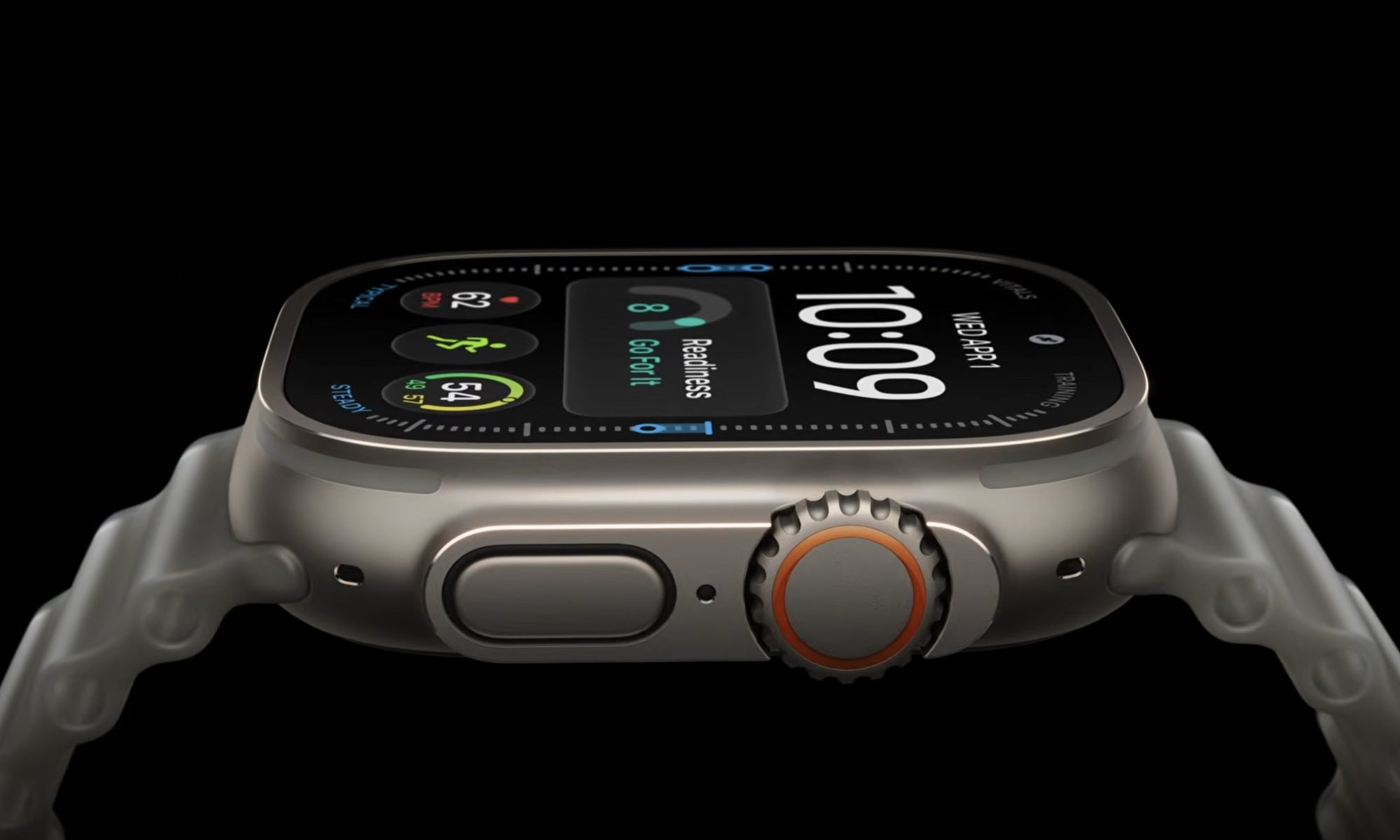
A quick glance at the spec sheet and it looks like the Apple Watch Ultra 4 is quite similar to last year’s Ultra 3. The same 49mm titanium case houses the same big 3,000-nit display, with the Action button on the side, satellite connectivity, 100-meter water resistance, and recreational diving support down to 40 meters. Apple hasn’t even changed the two case colors.
But that’s just the hardware side of the story. Look underneath the familiar casing, and things start looking a lot newer. The Ultra 4 introduces an entirely new Health Sensing System, higher-frequency heart-rate and HRV measurements, and so much more. It also starts at the same $799 price at which the Ultra 3 launched. So for someone buying their first Apple Watch Ultra, the decision might be obvious. Though the same doesn’t hold true for existing Watch Ultra 3 owners.
Apple
Apple Watch Ultra 4 vs Watch Ultra 3 Specs
Features
Apple Watch Ultra 4
Apple Watch Ultra 3
Starting price
$799
$799 at launch
Case
49mm Grade 5 titanium
49mm Grade 5 titanium
Dimensions
49 x 44 x 12mm
49 x 44 x 12mm
Weight
63.0g natural / 63.1g black
61.6g natural / 61.8g black
Colors
Natural, Black
Natural, Black
Display
LTPO3 wide-angle OLED, Always-On
LTPO3 wide-angle OLED, Always-On
Resolution/display area
422 x 514, 1,245mm²
422 x 514, 1,245mm²
Brightness
1–3,000 nits
1–3,000 nits
Processor
S11
S10
Storage
64GB
64GB
Heart sensing
New Health Sensing System
Electrical + third-gen optical sensors
Readiness score
Yes
No
Recovery HRV
Yes; much more frequent HRV sampling
No
Siri AI
Yes with watchOS 27
Yes with watchOS 27
Audio Intelligence
Yes
No
Gestures
Single tap, double tap, wrist flick
Double tap, wrist flick
GPS
Precision dual-frequency GPS
Precision dual-frequency GPS
5G
Yes
Yes
Satellite communication
Yes
Yes
Normal battery life
Up to 50 hours
Up to 42 hours
Low Power Mode
Up to 84 hours
Up to 72 hours
Full GPS/HR outdoor workout
Up to 18 hours
Up to 14 hours
Extended full GPS/HR workout
Up to 25 hours
Up to 20 hours in Low Power Mode
Maximum extended workout
Up to 45 hours
Up to 35 hours with fewer GPS/HR readings
15-minute charge
Up to 18 hours use
Up to 12 hours use
Water resistance
100m
100m
Scuba diving
Up to 40m
Up to 40m
Apple’s technical specifications confirm that the physical aspects like dimensions, display resolution, peak brightness, water resistance, storage, and core connectivity remain almost unchanged.
Design and display: It’s basically a tie
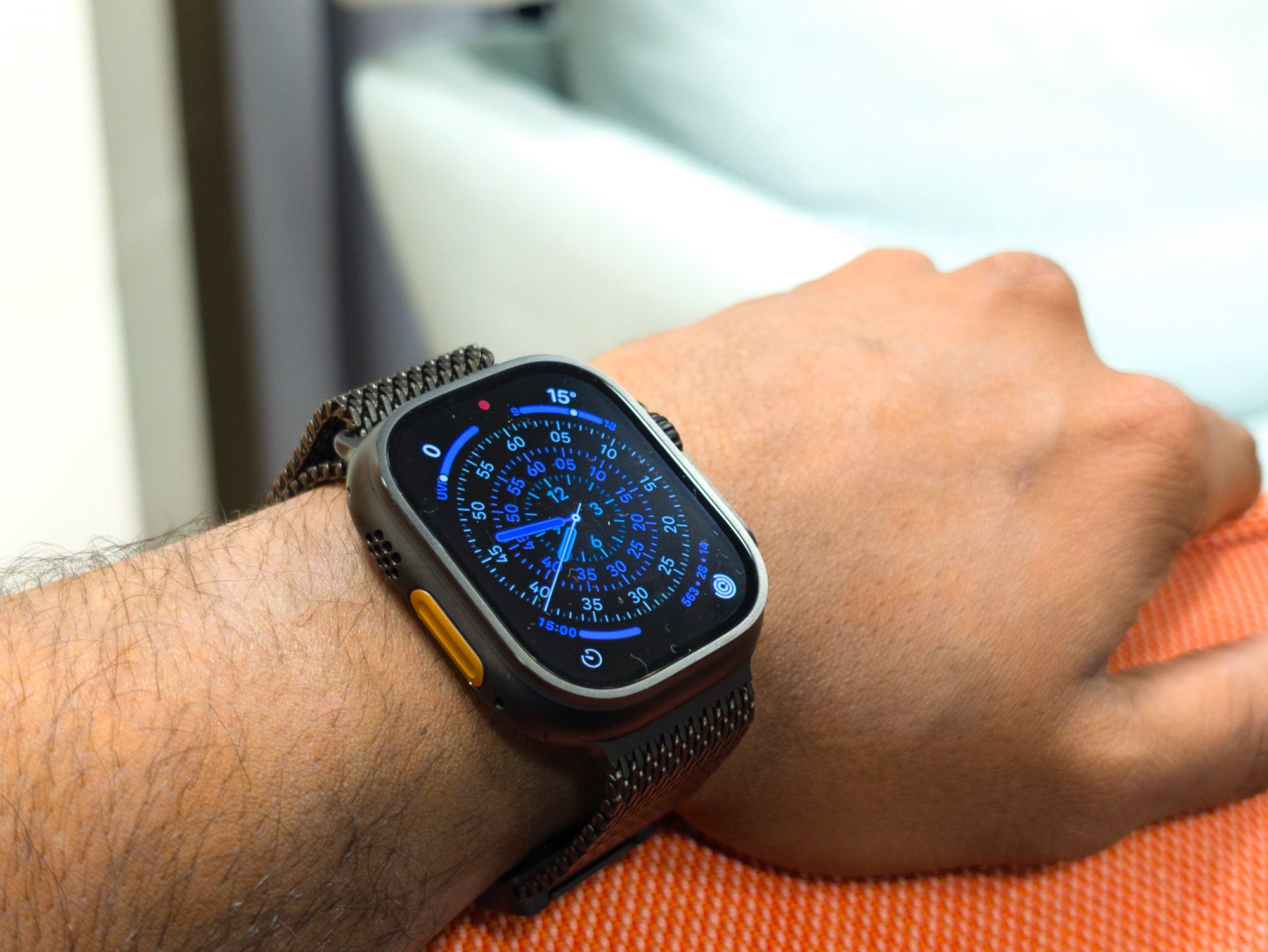
If you were hoping Apple had shrunk the Ultra again, you’re going to be disappointed. Both generations measure 49mm tall, 44mm wide, and 12mm thick. The Ultra 4 has actually gained a tiny amount of weight, reaching 63 grams in natural titanium compared with 61.6 grams for the Ultra 3. While Apple can say the Ultra has gotten thinner, a 1.4-gram difference is not going to make a difference in real-world use.
The display hasn’t materially changed either, with both models using a 422 x 514 LTPO3 wide-angle OLED panel with a 1,245mm² display area, 1Hz Always-On capability, and brightness ranging from 1 nit to 3,000 nits. In our review of the Apple Watch Ultra 3, we praised its thinner body and wide viewing angles as one of the biggest improvements Apple had made to the Ultra line. It finally made Apple’s enormous adventure watch considerably easier to live with every day.
Advertisement
Apple
Health tracking: Ultra 4 wins by a mile
This is where the generational gap finally opens up. The Ultra 4 has Apple’s new Health Sensing System, built around redesigned optical and electrical sensors and the S11 chip. Larger, more efficient green LEDs allow the watch to measure heart rate every five seconds throughout the day, while Apple says HRV can now be measured up to 24 times more frequently.
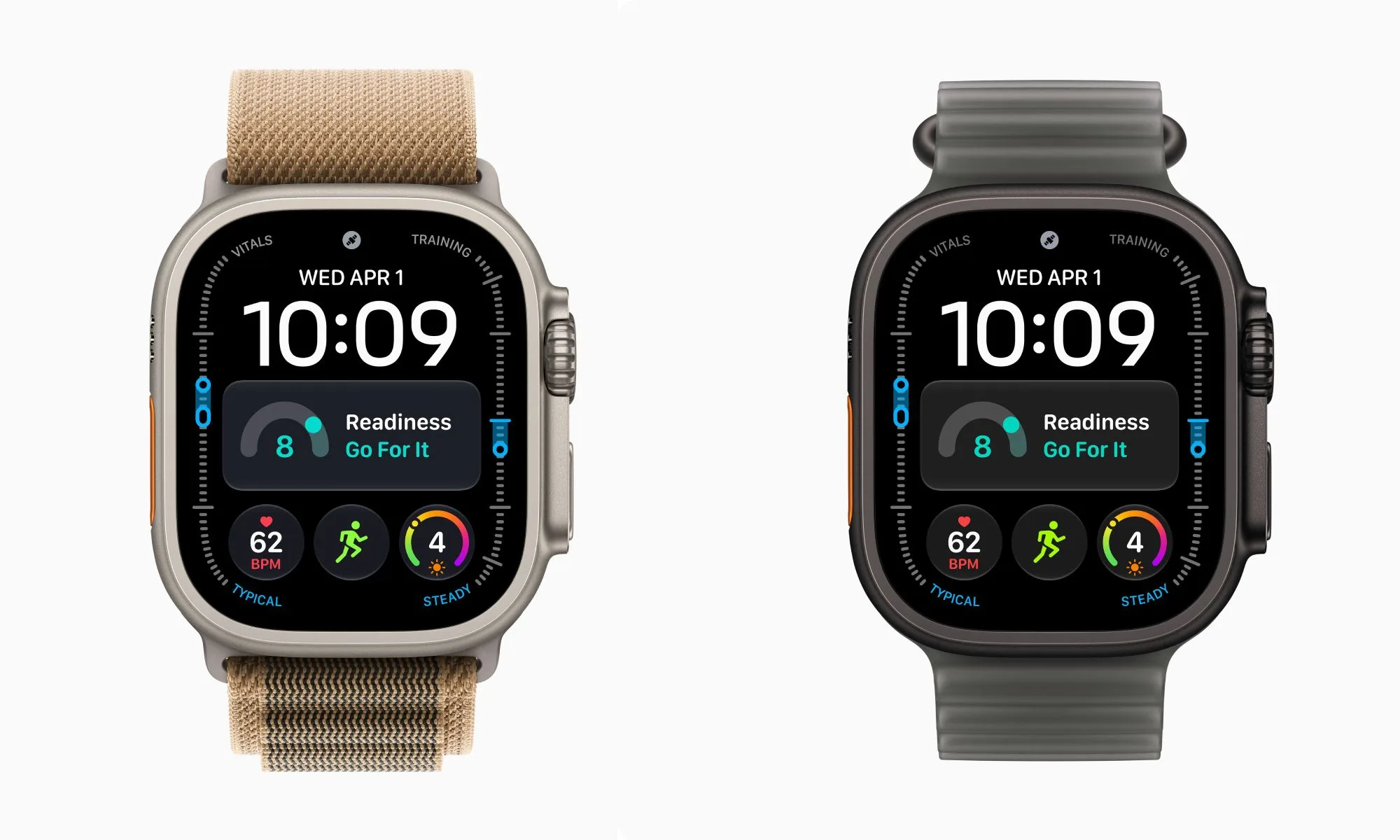
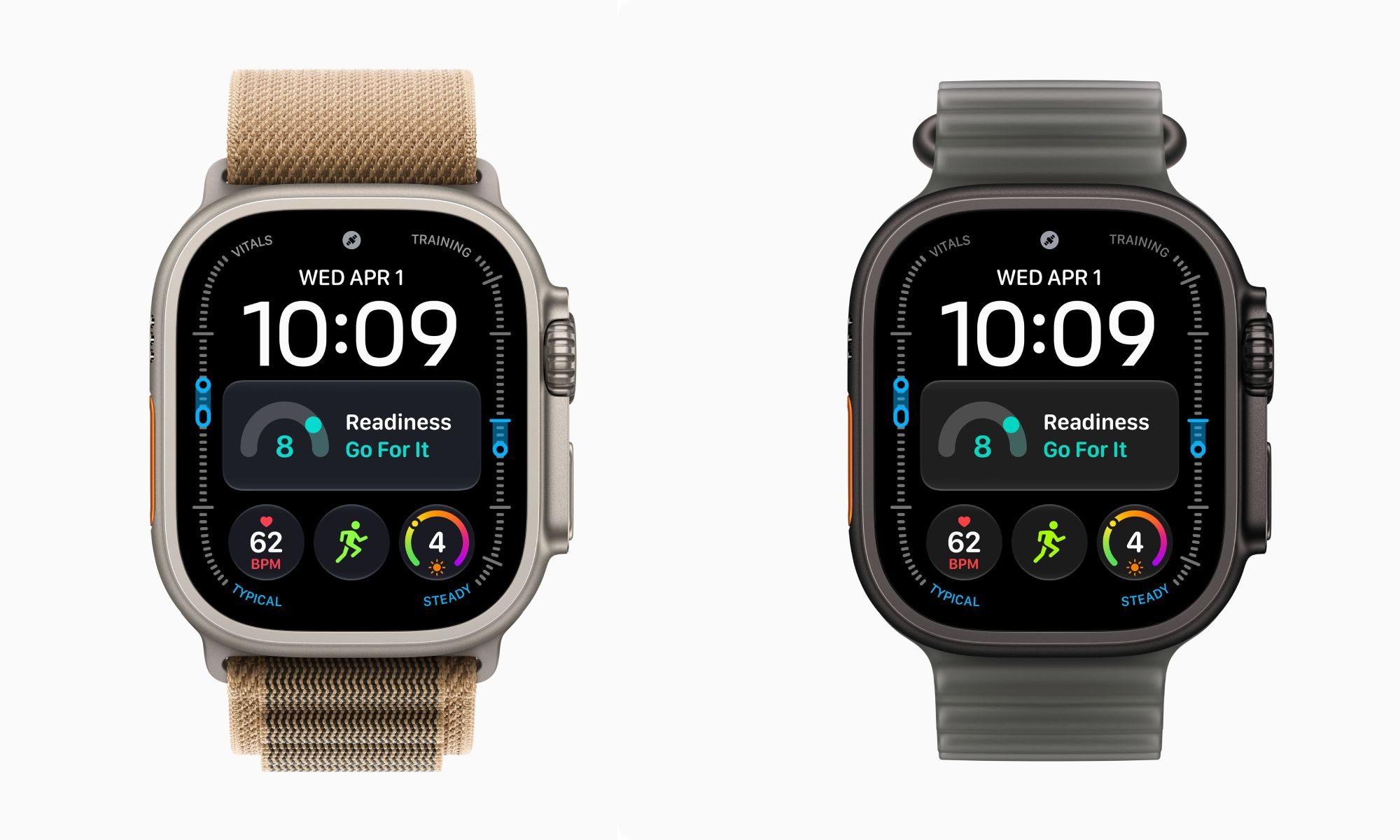
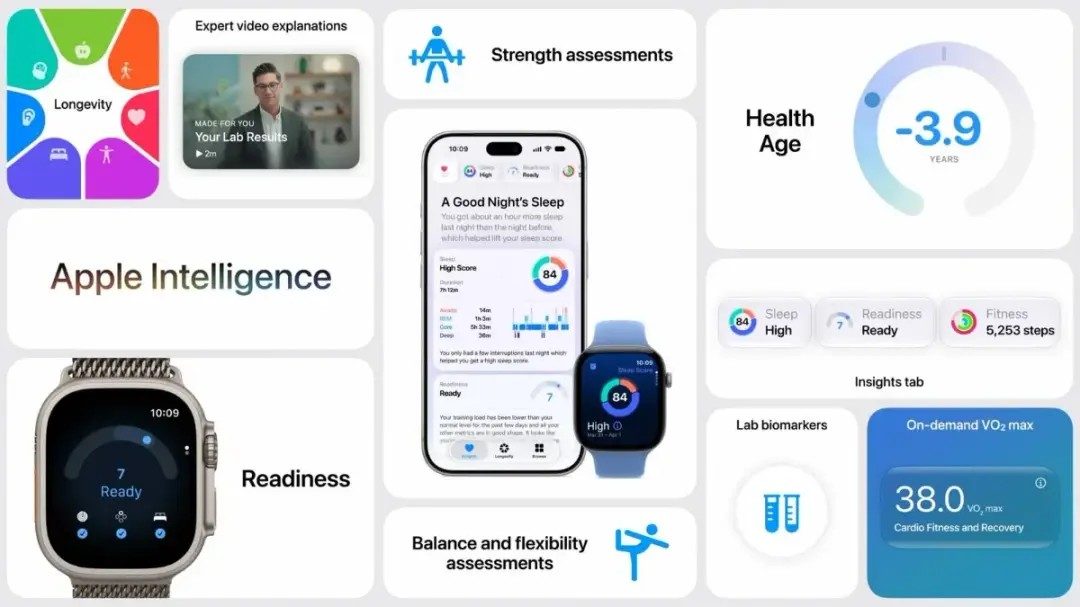
The additional data feeds several new features. The biggest of which is the new Readiness feature. It basically combines recent activity, training load, sleep score, vitals, and recovery information into a score from 0 to 10. Rather than simply handing over the number, Apple categorizes your condition as Recover, Pace Yourself, Ready, or Go For It. The score can also change throughout the day as new workout and health data arrives.
Apple
Apple is additionally separating Recovery HRV from broader HRV trends and adding HRV to Vitals. Daytime Vitals can flag changes before you go to sleep, which makes the Ultra 4 considerably more useful for athletes trying to judge recovery and training readiness. This addresses one of the more noticeable holes in Apple’s previous fitness offering by finally offering a unified daily recovery metric that competitors such as Garmin, Oura, and Whoop have emphasized.
Fitness and GPS: mostly familiar, with better endurance
Both watches remain extremely capable sports devices. You get precision dual-frequency GPS, customizable workouts, Heart Rate Zones, Race Route, Pacer, training load, automatic track detection, cycling power-meter support, offline hiking maps, swimming metrics, and recreational scuba diving.
Apple is once again claiming the Ultra 4 provides the most accurate on-device GPS in a sports watch, based on testing against leading dual-frequency sports watches in August 2026. Interestingly, Apple made a similar accuracy claim about the Ultra 3 last year, and both spec sheets still list precision dual-frequency GPS. I consequently wouldn’t describe this as a major new GPS hardware system without more testing.
Apple Watch Ultra 3Nirave Gondhia / Digital Trends
Though Apple claims that there is a clearer enhancement in step and indoor-distance tracking thanks to its redesigned pedometer algorithms around the S11 chip that improved all-day step counts and treadmill distance estimates. These changes won’t impact the average user, but athletes who specifically care about recovery data get a much larger upgrade thanks to Readiness and higher-frequency heart sensing.
S11 and software: Don’t upgrade just for Siri AI
The S11 chip sounds like an easy reason to favor the Ultra 4. Except there’s one minor detail to remember. Siri AI isn’t exclusive to the Watch Ultra 4. Apple says watchOS 27 supports Apple Watch Ultra 2 and newer, and Siri AI can run on those supported watches when paired with a compatible Apple Intelligence-enabled iPhone.
Advertisement
Meaning, your Ultra 3 still gets Apple’s much more conversational assistant, personal context awareness, the dedicated Siri app, dynamic app grid, smarter Smart Stack, and many of watchOS 27’s other improvements. What’s really new is the hardware-exclusive feature, Audio Intelligence. The S11 chip contains a Secure Enclave designed to process audio independently, allowing the Ultra 4 to support four new functions: Sound Recognition, faster automatic Shazam, Live Rewind, and Siri Recap.
Live Rewind can recover the previous 15 seconds of a conversation as text when you double-press the Digital Crown. Siri Recap goes further by generating a high-level summary of conversations for you to revisit later. Apple says neither feature stores the raw audio, and both arrive in beta later in 2026.
Nirave Gondhia / Digital Trends
Battery life: this might be the upgrade people notice immediately
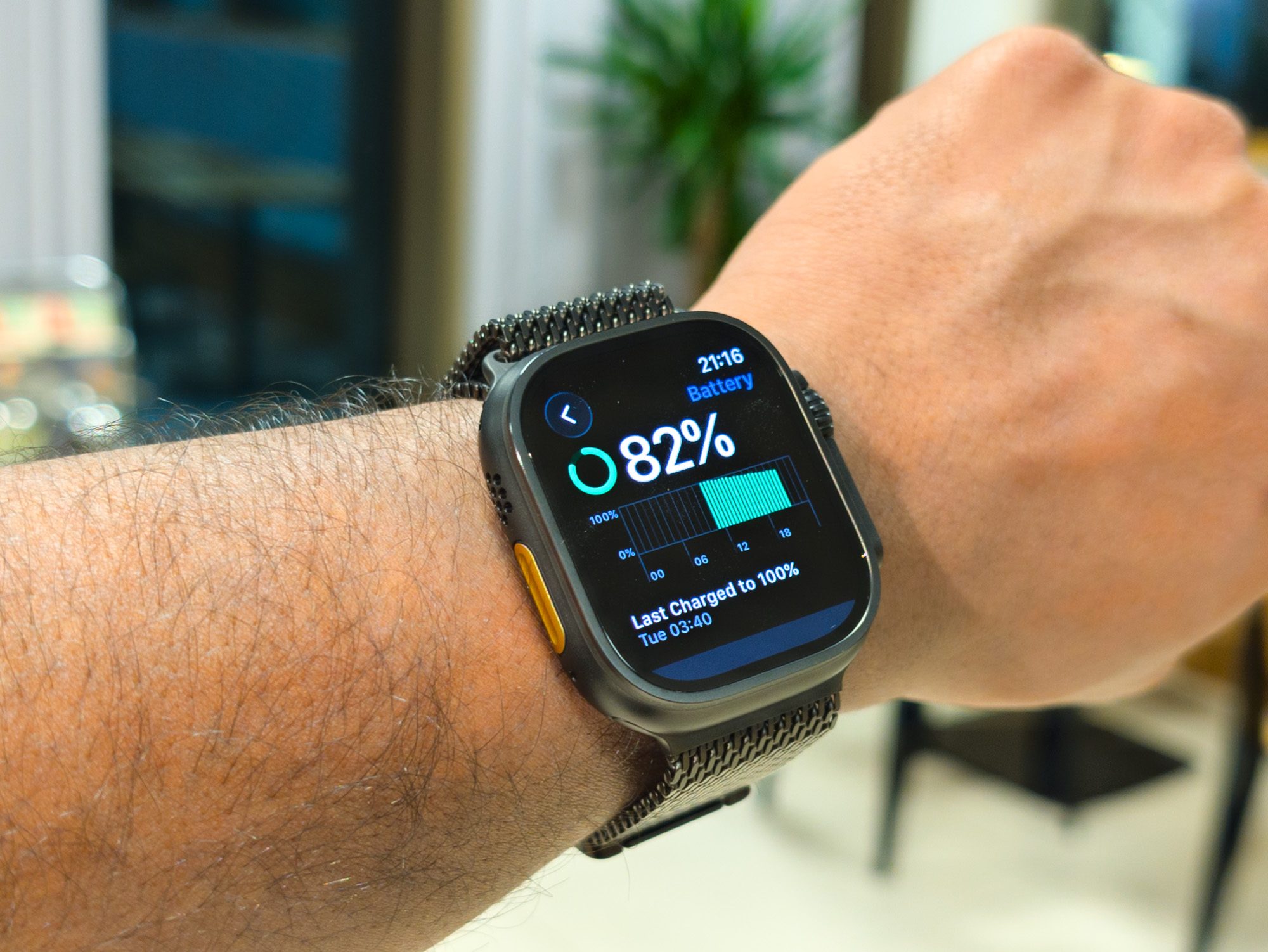
Battery life was already one of the Ultra 3’s greatest strengths. Apple rated it for up to 42 hours of ordinary use and 72 hours in Low Power Mode. During one of our tests, it had 31% charge remaining even after running for nearly 60 hours, demonstrating just how strong its endurance could be under mixed usage.
In the latest generation, normal use rises to 50 hours, while Low Power Mode reaches 84 hours. An ordinary outdoor workout with full GPS and heart-rate measurements increases from 14 to 18 hours. Apple’s new Extended Workout mode reaches 25 hours while retaining full GPS and heart-rate measurements.
There’s also Max Extended Workout mode, rated for up to 45 hours of outdoor running, walking, or hiking while still taking GPS readings every second. Apple specifically pitches that as enough for many 100-mile races. Both watches reach 80% in about 45 minutes, but 15 minutes on the charger now gives the Ultra 4 up to 18 hours of normal use, versus 12 hours on the Ultra 3. Five minutes provides up to 10 hours of sleep tracking instead of eight.
Advertisement
Apple Watch Ultra 4 vs. Ultra 3: Which should you buy?
For a new Apple Watch Ultra buyer, get the Ultra 4 if you’ve been waiting to buy one. Apple has kept the $799 starting price while improving the areas that actually make sense for this product. Readiness and higher-frequency HRV are quite big updates in the health tracking department. The Health Sensing System captures considerably more physiological data, and battery life is moving farther into dedicated sports-watch territory.
It’s an easy recommendation when the alternative costs the same (when not on discount). So if you’re already on the Watch 3 Ultra, it’s better to stick with it. The display and physical design are essentially identical. You already have 5G, satellite communication, precision dual-frequency GPS, excellent battery life, and almost the entire Ultra fitness toolkit. Most importantly, watchOS 27 means you aren’t being locked out of Siri AI or Apple’s larger software redesign after only one year.
San Francisco’s city attorney has hit Meta with a cease-and-desist letter telling the company to stop “allowing” paid advertisements that include AI-generated child sexual abuse content and asked it to explain how the ads repeatedly ran on its platforms.
On Tuesday, WIRED reported that Meta has run more than 350 ads in recent months that transformed still images of minors—some of them confirmed as real individuals, including a member of a European royal family—into short videoclips that can depict them performing sexual acts. When clicked, these ads would direct people to download AI image- and video-generation apps, some of which could be used to digitally undress people or create other nonconsensual intimate imagery.
The ads, which were discovered by researchers at the Tech Transparency Project (TTP), included some identical ads that had been uploaded multiple times, and in total they reached more than 29,000 accounts in countries in the European Union. The ads that were shown across Facebook, Instagram, and Threads also targeted accounts in the US, Australia, and India. WIRED initially reported on a batch of 53 of the ads at the start of August, but more than 250 of the total number of ads ran on Meta’s platforms after this initial report.
“Meta has failed to address a known issue of AI-generated child sexually explicit ads, while profiting from them,” San Francisco city attorney David Chiu says in a statement to WIRED. “These ads are deeply disturbing and cause harm to real children. Meta claims to have zero tolerance for child exploitation, yet the scale and persistence of these issues suggest current efforts are woefully inadequate. This is unacceptable, and Meta must do better.”
Advertisement
“No company—particularly one that claims all advertisements are reviewed and approved prior to distribution and then accepts payment for that distribution—should permit its advertising systems to be used in this manner,” Chiu writes in the four-page letter his office sent to Meta’s lawyers.
The letter raises a host of questions about how Meta’s ad policies and safety systems operate and asks that the company’s legal, child-safety, and advertising staff engage in “prompt discussions” with the city office. “These findings are especially troubling because they do not appear to reflect an isolated failure that Meta corrected when first alerted to the problem,” Chiu writes.
Meta says there is “no indication” that the ads were displayed in San Francisco and this means they are “outside the city attorney’s jurisdiction.” While Meta’s ad library, which is a repository of ads, includes some data about ads published in the US, it does not break down where in the US ads may have run.
In response to Meta’s jurisdictional claims, City Attorney’s Office spokesperson Alex Barrett-Shorter tells WIRED that, because “San Francisco consumers can access the unlawful ads through Meta online spaces,” the matter is the the city of San Francisco’s business.
Advertisement
“We find Meta’s response astonishing. Meta appears less concerned about whether they’re guilty of exploiting children than whether San Francisco should say anything about it,” Barrett-Shorter says. “Meta has bigger problems to solve here than determining our jurisdiction.”
Meta previously told WIRED that many of the ads identified by the TTP researchers had already been removed before they were reported—all of them have now been removed for violating its policies—and most had “fewer than 200 impressions” from accounts. “We don’t tolerate nudify apps or any kind of child exploitation, whether real or AI-generated,” a Meta spokesperson previously said. The company said the “total ad spend” for the 300-plus ads found by the researchers was “under $5,000.”
The expanding market for data centers and associated renewable energy supplies has attracted the insurance industry
Data centers alone could represent a $91 billion market
A destroyed AI data center could cost $50 billion to replace
The cost of data centers continues to rise, with insurance now added to real estate, communications, energy, and environmental impact. Several reports indicate that not only is insurance a growing cost for big guns like OpenAI and Meta, it’s a market that looks set to expand alongside the increase in data centers.
A new report by the Swiss Re Institute indicates the insurance industry could collect $91 billion in premiums from AI data centers between now and 2030, with a further $111 billion from renewable energy installations linked to the data centers.
With a combined market of around $200 billion across a three year period, the AI boom could represent an accumulation of risk. The report highlights four interconnected factors that could affect multiple businesses if only one is disrupted.
Latest Videos FromTechRadar
Advertisement
The assurance of data centers
Reliance on new data centers isn’t all about the end product. Construction companies, physical supply chains, and technology and communications organizations all play their part in assembling an AI data center facility. Power stations – traditional or renewable – have similar requirements, and once both types of installation are brought online, their importance increases.
Gianfranco Lot, Swiss Re’s chief underwriting officer for P&C Re, told Insurance Business Mag: “AI needs data centers, power grids, and increasingly complex infrastructure – and all of it needs insurance. That creates growth opportunities across multiple lines of business, but also significant risk concentrations. The deployment of capacity will depend on our ability to understand and manage those, and getting paid for the associated tail risk.”
Estimates suggest a single AI data center can cost $50 billion to replace.
New market, new opportunities
Insurers are preparing to offer comprehensive support for the data center industry. Risk management firm Aon has released an analytics tool designed to help insurers measure and map exposures for data centers, and it appears the wider industry is exploring options to underwrite these installations.
Sign up to the TechRadar Pro newsletter to get all the top news, opinion, features and guidance your business needs to succeed!
Advertisement
Indeed, Aon has its own estimations, working on a figure of a $29 billion market by 2030. Meanwhile, other insurers and analysts are assembling databases and exploring opportunities to provide financial fallback to data centers.
Four factors (large assets, geographic clustering, supply-chain dependencies, and shared networks) can each interrupt several businesses within the sphere of the data centers, and the Swiss Re Institute report highlights the importance of insuring against disruption. This represents a previously unseen level of integration and interconnectivity between industries, something that seems to be informing the market estimates.
Ultimately, the insurance price will be factored into the usage costs, with AI token prices and other tariffs added to the bill for end users.
Much of what we’re treated to during these launch events is a recap of the new capabilities of their operating systems, which have usually been available in beta since the developers conferences where they get announced.
For Apple, that means demonstrations of its updated iOS 27 and WatchOS 27, announced at WWDC in June running on the new hardware. But we’ve been using the OSes for a while and don’t have to rely on passing demos during the hardware announcement: Here’s our experience with the beta and what to know about iOS 27 before you start using it as well as our take on the new Siri in WatchOS.
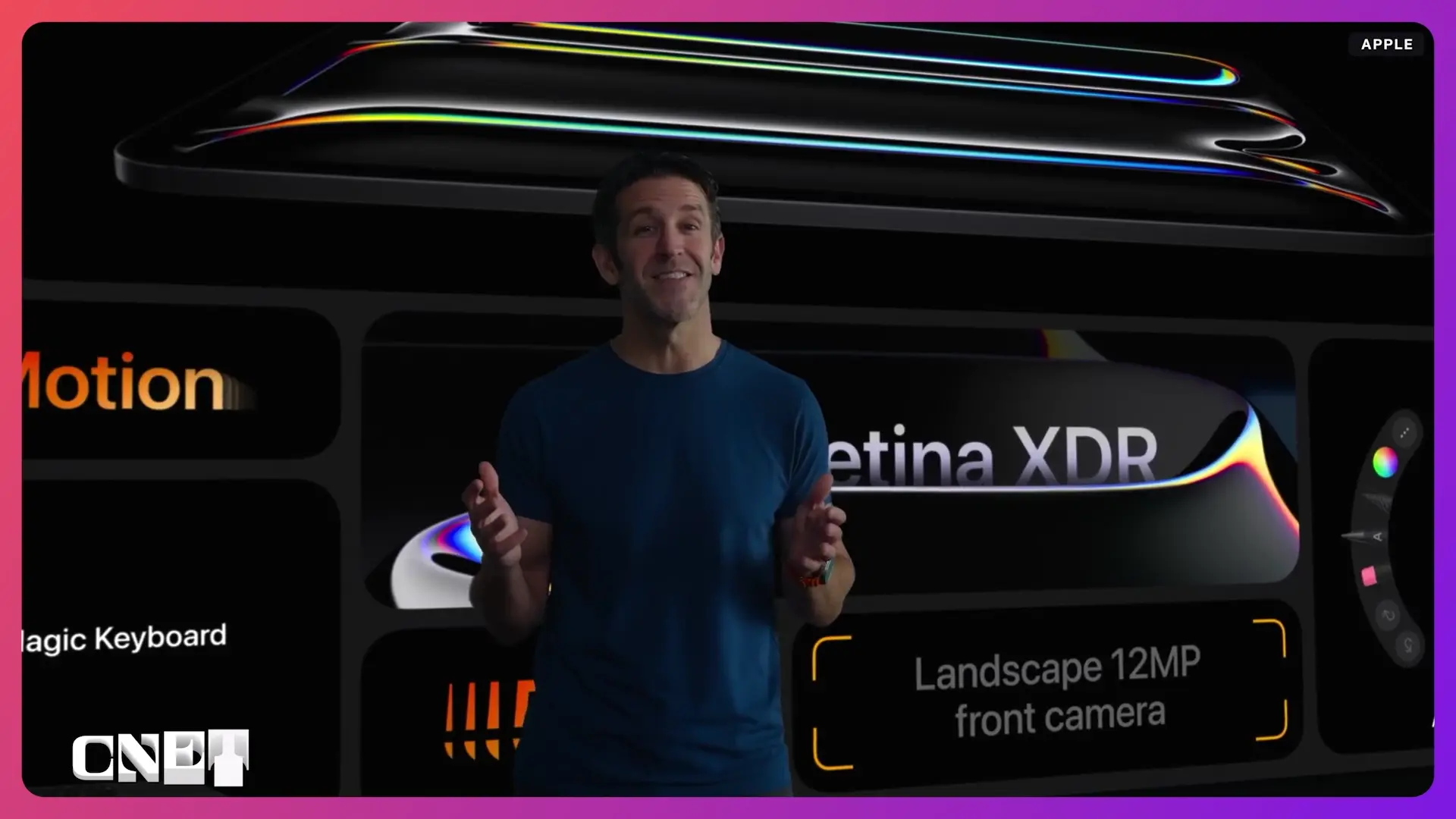
After the initial cinematic opening to promote the new variable aperture camera on the iPhone 18 Pro and Max, Tim Cook provided a clever, well-done segue to Ternus’ first Apple launch as CEO.
Ternus came up through product design, and it showed during the event. If memory serves, we were provided with more specific hardware information about chips, device builds, cooling systems and so on than in a lot of earlier launches. That might not appeal to everyone, but it’s the type of thing that keeps me awake as we head into the second hour of these things.
There also seemed to be a lot more video shot in lots of locations around LA. This was likely to drive home the association between Apple and “pro” cameras, but it made a very nice change from a lot of static Apple Park and heartwarming family video.
Abrar Al-Heeti/CNET
Perks of the iPhone Duo
In addition to being its first foldable, the iPhone Duo brought a much longed-for feature back into the…fold.
Touch ID disappeared along with the iPhone’s Home button; the last holdout was the iPhone SE which was discontinued in 2022. Even if you’re fine with Face ID, having a fallback method for logging in and approving purchases makes sense, and its certainly more convenient than having to enter a PIN code.
But it unfortunately replaced Face ID rather than supplement it.
Advertisement
We had some in-chat mockery about ability to register multiple fingerprints for the Touch ID, but as someone who occasionally has dirty, greasy or otherwise electronics-objectional hands, being able to use a clean finger sounds nice to me.
I like the simultaneous front and rear camera feeds, which lets use the outer screen flipped towards the subject. It reminds me of methods introduced to get pets’ attention from the early days of phones and before phones had cameras; I remember using an app that mimicked different cat vocalizations, though I really spent a lot of time wiggling my fingers above my head.
Abrar Al-Heeti/CNET
I’m also a huge fan of the nano-texture screen layer, which comes from Apple’s desktop displays and MacBook Pros. With its excellent anti-reflective properties, it makes the most sense on a phone. I’d like to see it on more than just the Duo.
My biggest concern about the Duo was the size. The iPhone 16 Pro Max I currently have occasionally feels a hair too big to use comfortably single handed. But the folded Duo is a bit narrower.
Variable aperture camera on the iPhone 18 Pro and Pro Max
Apple made a big deal about its mechanical aperture for the new 48MP main cameras on the iPhone 18 Pro and Pro Max, and it is a breakthrough for a phone.
Advertisement
Electronic apertures used by most small cameras and phones simply limit or increase the amount of light the sensor absorbs. A mechanical, bladed aperture physically changes the shape of the hole which controls the exposure, and that determines what bokeh and bright highlights look like as well as how naturally the depth of field is rendered.
So introducing a mechanical aperture should allow for more control over the quality of the look (as opposed to the quality of the image) looking photos and videos. That’s notable.
But don’t expect a truly pro-lens look, though. It’s a six-bladed diaphragm, which isn’t even as good as some entry-level kit lenses, and 8 blades is more or less the minimum for really nice-looking, soft bokeh. In its video showing off the camera, there was very little of it.
There are four aperture settings, f1.48-f4, which highlights the constraint of the small phone sensor and module. By f4 on a sensor that small you’re essential at infinite focus, where on a larger sensor you might get up to f16 or f32. The bottom line is you don’t have a lot of depth-of-field variability to play with for that variable aperture.
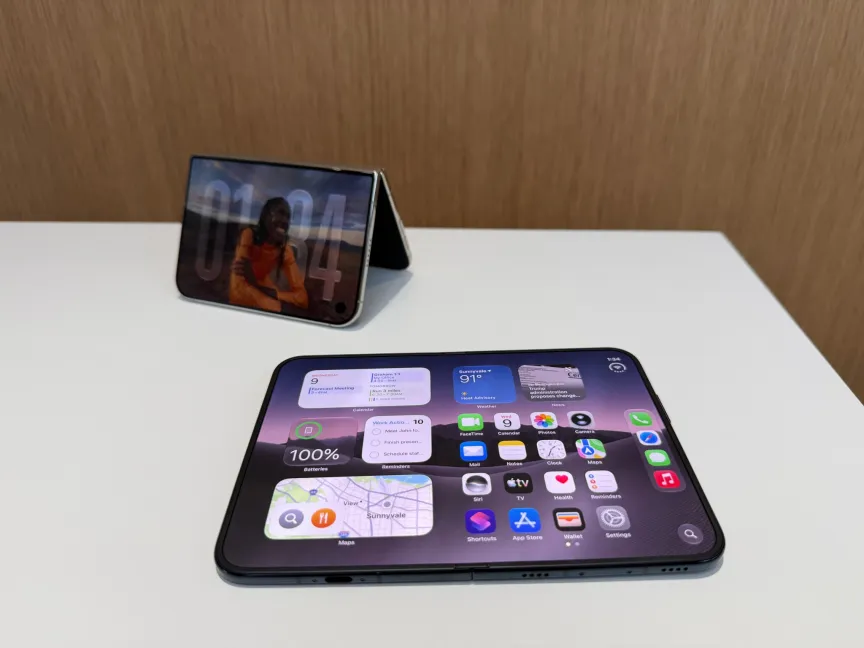
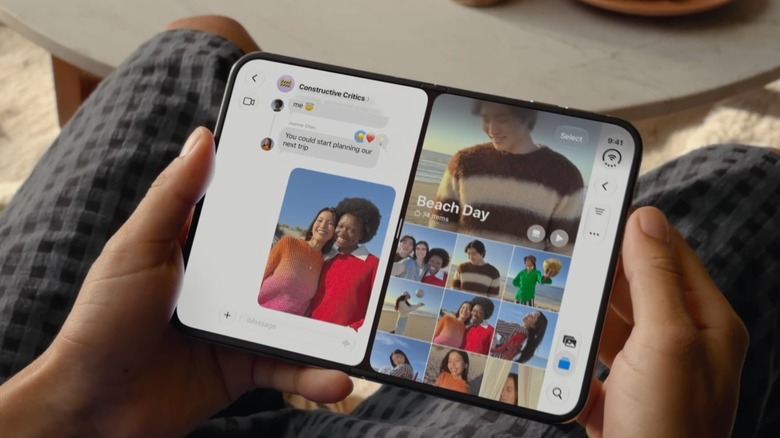
The new iPhone Duo folding phone folds like a book or passport.CNET
Burgundy Pro, Night Sky Duo
I’m a fan of deep, rich colors for phones, though I usually just cram it in a case and never see it again. At least based on the livestream, the burgundy looks like a nice change from the aggressive orange of the previous generation (though I do like it), and the navy-black Night Sky seems a lovely choice after my MacBook Pro-favorite Space Gray.
A20 Pro
In a switch-up from previous years, Apple launched its new laptop and desktop chip, the M6, ahead of the A20 Pro, which is incorporated by all three iPhones. Usually the mobile processor comes first and the computer chip inherits its major architectural changes from that. In this case, the A20 has the same 2nm process size as the M6, down from 3nm in previous generations.
A smaller process size allows for a denser die, which ultimately lets you fit more circuitry in the same size package.
In this case, it has the doubled Neural Engine of the M6, used for the on-device AI processing, from 16 to 32 cores. That’s likely an essential upgrade for decent performance with on-device Siri AI.
There are also more cores, both GPU and CPU, plus the change from performance cores to super cores, which can run at faster clock speeds.
It also has the packaging with the memory placement optimized for better heat dissipation because smaller process sizes and denser dies can generate a lot more heat than bigger ones. That plus the switch to super cores required it.
Apple also dealt with heat by adding a vapor chamber and adding a dissipation layer beneath the screen.
Advertisement
Efficiencies introduced by the chip theoretically improve battery life, according to the company.
iPhone Handoff
If you’ve got two iPhones, iPhone handoff will let you share a single phone number, designating one eSIM as primary and the other as a companion. It sounds interesting, and would let you leave one phone at home or, with careful scheduling let someone else pick up (for say an elderly relative or young child) but it’s one of those features that could suffer if it’s badly implemented. I’m not sure if it lets you save the cost of a second line, because you’ve still got to have an activated SIM in the companion phone. I also wish it could work with a non-Apple phone.
It’s also kind of confusing, since Apple already has Handoff for sharing tasks across devices.
Watch Ultra 4 improved sensors
More sensitive, frequently polling sensors are an unambiguous win if you use them in a watch, as long as they don’t overwhelm the rest of the system (which I have no reason to think they do here). Better sensors in the Watch Ultra 4 mean more accurate readings and more easily recognized outliers.
Audio Intelligence sound recognition
The Watches’ Audio Intelligence can, among other things, decode sounds into visual notifications for the hearing impaired. That’s a nice accessibility perk.
Advertisement
An AI-driven feature that I could really use, though, is real-time accent compensation in AirPods; the AirPods 5 received some tweaks inherited from the higher-end model, including improved active noise cancelling. Translation is nice, but I have a lot of trouble understanding people with heavy accents of all kinds — a big drawback when you live in New York City.
It’s not all sunshine, though. There are a lot of things I just say “nope” about.
Always on AI
On one hand, I like the idea of a Watch that can catch parts of conversations I routinely miss (Live Rewind), either because I’ve gone space cadet or because my hearing glitched, as it tends to do. But I’m also one of those Luddites who doesn’t like or use devices with always-on listening or recording.
I’m not a big fan of Apple’s “it only stays on our servers” Private Cloud Compute privacy narrative, which surfaced once again today, especially since Apple Intelligence/Siri AI can also use hybrid (local plus cloud) and third-party-integration models. Even if it stays on your device, you still never know until after the fact what has obtained access to your data — and it may now include a lot of health data.
Advertisement
It may also be because I don’t find a lot of the commonly trotted out use cases very compelling. Apple Intelligence, and the upcoming dedicated Siri app, can do the things everybody’s on-device AI can, which seems to be writing email, summarizing calendars, travel scheduling, creating shopping lists, generating wallpaper and so on.
To me, a lot of the AI used by the Watch Series 12/Ultra Health and related apps and on similar devices, such as Stuff, goes too far into the micromanaging-your-life zone. If it’s going to give a Readiness score of my ability to handle activities, I’m going back to bed and pulling the covers up over my head, because my body tells me it’s not ready for anything.
The iPhone Duo’s drawbacks
While the Duo has the same 48MP main camera as the iPhone 18 Pro and Max, it doesn’t have the same mechanical aperture or high-end features. This is actually a notable negative which I’d weight heavily when considering the phone.
The other thing I suspect will make things awkward are the screen aspect ratios. Folded, each side is just shy of 3:2 — it’s 1.45 instead of 1.5 — which has become nonstandard. 1.5 is the aspect ratio of full-frame camera sensors, which conceivably makes it nice for displaying them, but neither video or games use it. Opened, the large screen has a 1.4 aspect ratio, which is even more novel.
As a result, Apple has had to alter iOS 27’s screen layout settings, both to take advantage of the extra screen real estate (good), as well as to change where control appear so you can use them comfortably (bad). Apple spins these as “optimizations.” But it means inconsistent user experiences and interface conventions between the Duo and the rest of the iPhone line.
Advertisement
Additionally, it means that the operating system will have to adapt a lot of existing non-Apple apps and content on the fly to run right on the device. That’s always a bumpy road.
While the Duo supports the Apple Pencil, it’s just plain odd. It works with the original, USB-C Pencil rather than the more recent Bluetooth version, which seems inconvenient for carrying around and using — it requires physical pairing with the device and plugged-in charging. Plus it’s not really designed to use with the phone, since there’s no way to dock it. It seems like the least-effort solution possible to a stylus.
Lori Grunin
Senior Editor / Computers and Gaming Hardware
I’ve been reviewing hardware and software, devising testing methodology and handing out buying advice for more than 25 years.
See full bio
We’re back with a recap of Apple’s iPhone Duo launch event! In this episode, Devindra and Engadget Senior Reporter Karissa Bell break down their thoughts on Apple’s first foldable, and how the company is building on a form factor that Samsung pioneered. Also, we dive into the curious case of the iPhone 18 Pro, which has a new variable aperture camera, but will likely be overshadowed this year by the Duo.
Advertisement
Credits
Hosts: Devindra Hardawar and Karissa Bell Producer: Ryan Fernandez
I think it’s basically a question of timing. A lot of people are sensing that the pace of capabilities is picking up. We’re already pushing from human to superhuman in many areas, like coding, hacking, math, and I think people are aware of this. Even if there’s a lot of talk in the press about things being hyped, I think people see that things are just not slowing down.
That’s one reason, and two is the recent safety incidents, which have updated a lot of people around the sci-fi–sounding doomer concerns not really being so sci-fi after all. Both of these have been gradual trends over the last few years. Things like the models being aware of when they’re being tested has been a thing for a while now. Maybe three years ago, that was a sci-fi concern. Then, about a year ago, that became a real thing.
Those two things mean that people are quite receptive to someone working on AI saying, “Yeah, in the next year, things could get pretty bad, pretty fast.”
You mentioned the recent incidents. Can you be more specific about what you’re referring to and why it led to you speaking out now?
Advertisement
I think the big classic example here is the attack on Hugging Face on the part of OpenAI’s agent swarm. What’s so shocking about this one is the agents did this hack as part of a general strategy for understanding more about the grader. They were trying to understand the world they found themselves in, trying to understand the thing that was doing the grading. They decided that it would make sense to go on this very concerted effort to hack into some infrastructure, and they succeeded.
This previously sounded like science fiction. Two years ago, an evaluation of an AI would have been running a model on some math questions. Now we’ve got cases where, while the AI is being evaluated, it runs for days, comes up with all sorts of ideas of its own, and decides to hack into some third party and actually compromises their infrastructure. It looks like it does this all of its own volition, with no priming on the part of the human. This just happened while it was being tested.
Some people think the Hugging Face incident is a sign that the AI companies are moving recklessly fast, while others think it’s a sign that the AI models are just very good at hacking now, and then some think it’s both. I’m curious what your exact takeaway from it is.
I don’t want to focus too much on the Hugging Face attack, because I do also think there is plenty of evidence that we don’t know how to align models properly. When we train models, we push them through this set of training environments and then hope that what comes out at the end will, like, largely behave sensibly, but we still can’t precisely control how the AI behaves.
Advertisement
We can’t make sure that it won’t do things like try and randomly decide to impersonate a human online in order to achieve something—we don’t know how to guarantee that. I think that’s the main takeaway.
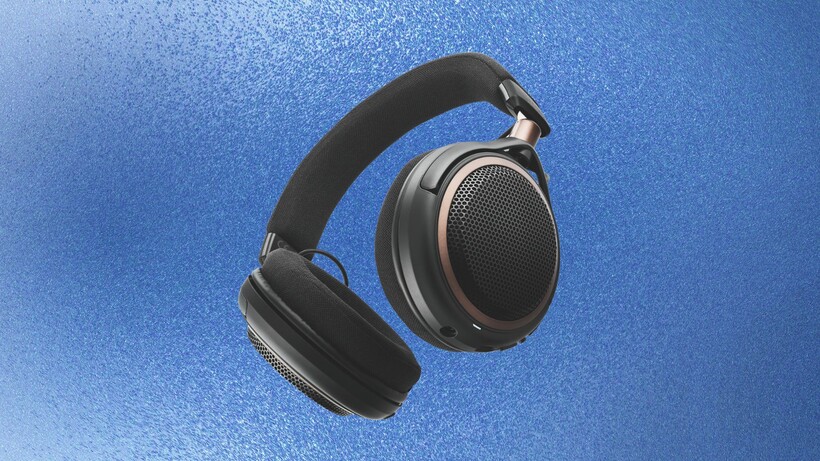
Audio-Technica has released its first ever pair of wireless open-backed headphones in the ATH-AL5NC.
This new launch builds on a line-up already established through the R-Series for music production and the recently expanded ADX Series for audiophile listening, with the ATH-AL5NC extending Audio-Technica’s open-back design into wireless territory for the first time.
Specially designed 53mm dynamic drivers produce the detailed soundstage associated with open-back listening, while the open housing improves airflow around the earcups compared with sealed, closed-back alternatives that trap more heat during long sessions.
That focus on comfort extends to the build itself, with the ATH-AL5NC weighing 240 grams, so listeners can wear these headphones for hours without a break.
Advertisement
Wireless use is backed by a battery life of up to a massive 75 hours, and a 15-minute charge restores up to 8 hours of playback when the battery does run flat.
Advertisement
A multipoint pairing function keeps the headphones linked to two Bluetooth devices at the same time, while support for LDAC enables 24-bit/96kHz high-resolution audio over a wireless connection.
If you choose to use the headphones through a wired and not wireless connection, the Audio-Technica includes a 1.2 metre cable with a 3.5mm stereo mini-plug and its own in-line microphone, while the headphones’ built-in microphone covers calls made over Bluetooth.
Advertisement
Beyond the hardware, the A-T Connect mobile app extends the ATH-AL5NC with a low-latency mode for gaming and video, an EQ, and a soundscape function that layers ambient sounds over music for focus or relaxation.
Image Credit (Audio Technica)
A noise-reduction function sits on the right earcup and stays active even when listeners plug in the supplied cable. The app also unlocks a Sound Leakage Reduction mode aimed at open-back headphones used in shared spaces, though Audio-Technica notes that leakage cannot be eliminated entirely at higher volumes and that the mode does alter the sonic signature of the headphones.
Advertisement
The ATH-AL5NC is available now, priced at £219 / €249 / $279 / $499 AU dollars. We don’t see many wireless open-back headphones aside from the Grado GW100x, which still command a price of £249 / $279 despite launching several years ago, so these less headphones could give Grado more of a robust challenge.
Massachusetts became the latest state to force data centers to bring their own power, but this time there’s a twist. A new state mandate would require developers building data centers larger than 25 megawatts to provide clean power or pay into a ratepayer protection fund.
Gov. Maura Healey’s executive order is the latest example of states turning against data centers. Just a few years ago, tech companies and data center developers were showered with incentives to locate facilities in a particular state. Now, they’re fighting a groundswell of public opposition as politicians seek to show voters they’re addressing their concerns.
Under Healey’s order, data centers larger than 25 megawatts of peak demand will have to bring their own power and guarantee that it adheres to the state’s clean energy requirements. Healey would prefer that they generate the clean power onsite, too. If not, they’ll need to fund the construction of new generation nearby or pay into a ratepayer protection fund.
Massachusetts is also directing communities to “avoid signing non-disclosure agreements,” according to the executive order. To give regulators time to implement the new restrictions, the governor is pausing applications for a data center sales tax exemption that went into effect last month.
Advertisement
Healey said data centers must meet the Massachusetts clean energy standard enshrined in state law, although it comes with some added strength. The state’s clean energy standard dictates that industry only generate a portion of their power using approved sources like wind, solar, and hydro. In 2030, for example, those sources must contribute at least 40% of the total. The amount varies by year, and it ratchets up over time. But the governor’s office clarified that data centers will be required to meet 100% of its electricity demand with clean energy generation.
With the new restrictions, Massachusetts becomes the third state in as many months to rein in data center development.
In August, Texas Gov. Greg Abbott announced that all new data centers in the state would need to submit to audits by the public utility commission and the grid operator, ERCOT. In July, New York’s governor stopped construction of new data centers 50 megawatts or larger.
With public sentiment shifting against data centers, the tech industry is starting to push back. Pro-AI super PAC Leading the Future — which is funded by Marc Andreessen, Ben Horowitz, and Greg Brockman — is buying ads that seek to sway voters in battleground states ahead of midterm elections.
Advertisement
Update: This article was updated with information from the Massachusetts governor’s office that clarified the executive order will require data centers to meet 100% of its electricity demand with clean energy generation.
When you purchase through links in our articles, we may earn a small commission. This doesn’t affect our editorial independence.
from the nasty-people-protecting-nastier-people dept
Let’s start out with the obvious (and obviously heartbreaking): this is not related to the multiple times ICE officers have murdered people. Those officers still remain at large and the DOJ and DHS have shown absolutely zero interest in following up on those cases. In fact, when any local agency attempts to do so, they’re less-than-politely told to GTFO and then the FBI (or whoever) simply shoves any and all documentation into the nearest memory-hole.
This is about an officer who shot someone in Minneapolis, which makes him not all that special. That his shooting involved him firing through a closed door makes it remarkable, but only because an open door might have resulted in another murder. But even though it wasn’t a murder, the DHS put its spin on the incident, only to have its narrative disproven mere moments later:
In the immediate wake of the shooting of Mr. Sosa-Celis, federal officials defended the agents, saying they had been attacked with a broom and shovel. Kristi Noem, who was then the secretary of homeland security, described it as “an attempted murder of federal law enforcement.” Within days, Mr. Sosa-Celis and a housemate, Alfredo A. Aljorna, who was also from Venezuela and involved in the confrontation, were charged with federal felonies.
Minnesota investigators did as much investigating as they could and Minnesota prosecutors secured an assault indictment against ICE office Christian Castro. The problem was that Castro was being held in Texas and its governor (Greg Abbott) was in no hurry to grant Minnesota’s extradition request. A court ruled in favor of Texas and Castro was released… only to get picked up on the separate (but far less serious) charge of filing false reports.
Advertisement
While this does mean Castro will face some charges in court (and still has to deal with the assault charge brought by Minnesota), the real ugliness beneath all these twists and turns is more of the same old bullshit from Trump’s completely compromised Department of Justice.
Castro was actually facing far more serious charges from the US government before DOJ officials got involved. He could have been facing severe civil rights charges (including assault), but he’s ultimately working for Trump, which means almost no anti-migrant (or anti-ICE protester) crime will ever result in criminal charges.
Over the “strongest possible” objections from the federal prosecutor handling the case, leaders at the Department of Justice in Washington, D.C., quashed plans to bring civil rights charges against an Immigration and Customs Enforcement agent accused of shooting a Venezuelan immigrant and then lying about it.
Somehow, there are still a few prosecutors left in the Trump DOJ that are willing to actually pursue justice, rather than placate a president who firmly believes the DOJ exists solely to act as his personal weapon of retribution. This attorney tried to do the right thing:
Late on Tuesday, Matthew Evans, the assistant U.S. attorney in Minnesota in charge of the case, told lawyers for Sosa-Celis and other victims to prepare for Castro to be charged “only with False Statements,” according to an email that was reviewed by ProPublica.
[…]
Advertisement
“This is being directed by the Main Justice and the US Attorney,” Evans wrote in a remarkably candid account of internal deliberations. “I objected in the strongest possible terms and fought it as hard as I could. It wasn’t enough.”
Evans probably knew this would be the last email he would write as a DOJ prosecutor. What everyone expected to happen happened shortly thereafter. For being honest about the end result and advocating for charges he clearly felt the ICE officer deserved, Evans was immediately kicked to the curb by his [cough] “superiors.”
A federal prosecutor in Minnesota who was investigating an Immigration and Customs Enforcement officer for possible civil rights crimes has been fired, four sources familiar with the matter told CBS News.
Assistant U.S. Attorney Matthew Evans was investigating ICE officer Christian Castro over the shooting of a Venezuelan immigrant earlier this year. The Justice Department ultimately charged Castro this week with making false statements about the incident, but the indictment remains sealed…
Evans tried to secure more severe charges against ICE officer Christian Castro. That was strike one. That he told the victims of Castro’s crimes that his efforts had been overridden by DOJ officials was strike two. That’s an out, at least the way this administration counts balls and strikes. It probably would have preferred to punch him out on strike one, but Evans apparently moved faster than the forces of injustice.
Advertisement
Now that Evans has been fired for doing his job, the administration spin machine is whirring away again.
Three sources told CBS News that Evans is under investigation by the Justice Department. Two sources said the investigation focuses on allegations of leaking.
Hey, you don’t get to investigate him! You fired him! Leave him the fuck alone! I mean, if we’re going to play this game, then let’s re-open every investigation of any law enforcement officer (federal or otherwise) that was abandoned because the officer chose to quit, resign, or agree to be terminated rather than stick around until an investigation reached its conclusion. All this says is that the Trump and his DOJ loyalists want to keep punishing people they’ve already punished, or, if nothing else, stumble across something that might justify a vindictive firing after the fact.
This is all bullshit. The ICE officer is on the fast-track for a wrist slap. Meanwhile, the state that still wants Castro to face assault charges will have to wait around indefinitely for a clearly disinterested DOJ to go through the motions of “prosecuting” an officer it never wanted to prosecute.
Summer temperatures in the United States may just be the hottest they have ever been. After looking at the data, the National Centers for Environmental Information, part of the National Oceanic and Atmospheric Administration, determined that July 2026 was the warmest month on record in the past 132 years. Whether you’re dealing with sweltering heat in Wyoming, oppressive humidity and high temperatures in Florida, or something in between, there’s nothing better than ice-cold AC when you go indoors.
But bearable indoor temperatures come with at least one pitfall: cost. According to the U.S. Energy Information Administration, cooling could make up nearly 20% of your electricity bill. Considering everything else you need to power — from lighting to your washer and dryer to the water heater and more — that could amount to a significant expense.
On the positive side, maximizing your air conditioner’s efficiency could save you money. By reducing your AC unit’s energy draw, you may see your bill drop. At the very least, you should feel a bit more comfortable while the air conditioner is doing its very best, most efficient job. There’s no single tip or trick to cut your cooling costs, but there are plenty of strategies for maximizing efficiency. From pre-purchasing tips to after-the-fact fixes, here are some ways to increase your air conditioner’s efficiency.
Advertisement
Size your AC properly
Douglas Rissing/Getty Images
Size matters when it comes to selecting an AC unit. While you might think buying the biggest, beefiest unit will turn your home into an Arctic paradise in mid-August, that’s not the most efficient way to choose an air conditioning unit. Buying a too-big AC means you’re spending more up front and wasting energy whenever it runs. Energy Star also suggests that a bigger AC isn’t better for cooling, either.
To determine the right air conditioner size for your space, you’ll need the room measurements. A simple perimeter calculation (well, simple if your room is a square or rectangle) will help you figure out how many BTUs per hour you need. For example, Energy Star recommends a unit with a 10,000 BTU capacity for spaces between 400 and 450 square feet. Keep in mind that ceiling height can impact the calculation, however. Energy Star notes that its suggestions are based on 8-foot ceilings, so if yours are higher, you may need to scale up.
Advertisement
Choosing the right AC unit means you’re not over- or under-powering, which should help with energy usage and, therefore, your electric bill. The right-sized AC could also mean you hit closer to the expected lifespan of your AC unit. Obviously, a too-small air conditioner will have to work harder (and constantly) to cool a larger room. Thus, proper sizing can help avoid wasting energy and overworking your unit.
Advertisement
Select variable speed tech
Lazy_Bear/Shutterstock
You might suspect that turning your air conditioner off when you’re not using it is the only real way to be efficient. However, binary on-off switches may be wasting energy rather than conserving it. After all, if you shut off the AC and it gets hot again, your unit may be working harder to get the temperature back down. According to Energy Star, a variable speed air conditioner offers greater efficiency when it comes to energy usage, and it goes a little deeper than thermostat controls.
Instead of going full blast and then cutting off completely, variable speed technology allows your unit to adapt to changing conditions in your space. Even my older window AC unit has this technology, with a thermostat option to set the desired room temperature. Then, it powers off and on according to the environmental conditions. The same way there’s a difference between setting HVAC to on or auto, most AC units have a similar function. While that’s better than a unit you have to manually adjust, there’s actually an even better way, according to Energy Star.
Energy Star goes a step further and recommends variable-speed compressor AC units with more advanced technology. Instead of switching on and off, variable-speed air conditioners change their internal compressor motor speed. Not only is this kind of function more efficient, but it’s also quieter than alternatives.
Advertisement
Look for Energy Star efficiency
Olena Popova/Getty Images
It might go without saying that you should look for the most efficient air conditioner possible if you’re looking to buy a new unit. The simplest way to set yourself up for long-term savings is by choosing a unit with an Energy Star label. Most labels I see at my local Lowe’s include a chart that shows predicted energy savings over the course of a year, and usually an associated cost, too. What does Energy Star certification actually mean, though?
According to Energy Star itself, certification is a confirmation of both performance and environmental friendliness. You’ll probably find that a lot of major air conditioner brands have Energy Star certified options, specifically to remain competitive. Any manufacturer seeking Energy Star certification has to agree to EPA (Environmental Protection Agency) regulations. The manufacturer also has to source third-party testing and certification, confirming that the product or products meet industry requirements for performance.
When it comes to air conditioners, specifically, Energy Star also means higher quality materials. The instructions should also be much clearer than for air conditioners that don’t seek Energy Star certification. You may also find ACs that are labeled Energy Star Most Efficient, a title that speaks for itself. Whether you’re choosing a window AC versus a mini-split or looking for budget options, Energy Star labeling is one benchmark to check.
Advertisement
Plant shade trees
FOTOGRIN/Shutterstock
Shade could make a significant difference in your air conditioner’s efficiency, but it may not be in the exact way you would expect. It might seem intuitive to make sure your AC unit has shade over it, especially if you’re using an evaporative cooler, such as a swamp cooler. After all, direct sunlight can lead to more evaporation than you might want. Yet there are some precautions when deciding whether you should shade your AC unit, including considering whether the shade structure may block hot air from escaping.
In terms of increasing energy efficiency, it seems that the research on shade over air conditioners may be inconclusive. For example, one study by researchers at the Kuwait Institute for Scientific Research noted that the efficiency increase gained from shading an AC unit will likely be under 1%. In our research, we were unable to find a definitive source that confirms significant energy savings from shade over the outdoor AC unit.
However, shade could still be a net positive if trees and greenery block the sun from hitting your home. The U.S. Department of Energy suggests that shade helps reduce air conditioner usage, going so far as to recommend that you plant both shrubs and shade trees to reduce AC costs. Blocking sunlight and heat is one strategy for keeping your AC running in a heat wave, and even on those cooler days, too.
Advertisement
Clean or replace filters
Pocketlight/Getty Images
It’s not surprising that some of the most common problems with air conditioners center around physical blockages like dirt. After all, how can an air conditioner blow cool air into your home if its filters are clogged? It’s such a common issue that consumer pamphlets from sources like the U.S. Department of Energy include multiple reminders not only to check your AC filters regularly, but also to investigate whether the filter is the cause of operating problems.
Various types of air conditioners may have filters, from swamp coolers to central air systems to window AC units. Some units may even have washable filters, which can help stretch filter usage longer than you may expect. Whether you’re buying a new air conditioner or are cleaning up an existing one, check what type of filter the unit may require, and then stock up.
Advertisement
Curious about how much a dirty filter can impact your air conditioner’s efficiency? The U.S. Department of Energy claims that the number one way to cut your cooling energy usage is by cleaning or replacing the unit’s filter. The U.S. Department of Energy gives a range, but you could reduce your unit’s energy consumption by up to 15%. Although the lower end of that savings range is 5%, taking multiple steps to maximize your AC’s efficiency can add up to a significant amount.
Advertisement
Check seals
Baloncici/Shutterstock
When it comes to cooling (or heating) your home, one of the most significant factors is how and where air enters and exits the house. Whether you have a window unit that you carefully place and insulate, or your home has ductwork throughout, poor seals could result in a lot of energy loss. A lack of seals around doors and windows could mean the unit is working harder to keep cool air circulating, because it’s actually escaping.
In its guide on home cooling and energy savings, the U.S. Department of Energy describes different types of AC units and cautions users against allowing cool air to escape. With a central air conditioner, for example, consumers should check their ductwork not only for holes and gaps, but also for any spots where the ducts bend or sag. A room air conditioner, says the Department of Energy, is most efficient when you skip the accordion-like panel that comes in the package and instead use rigid material to block airflow.
Some exceptions do apply when it comes to sealing up your home for the summer. For example, the types of portable air conditioners that require vents actually need a way to vent warm air out of a window. While you’ll still want to make sure the connection is airtight, ventilation is important. Similarly, more passive cooling methods — like inviting a cross-breeze between windows or doors — rely on air moving through the building.
Advertisement
Keep it clean
Aaron Finn/Shutterstock
Cleaning your air conditioner is one of the less glamorous aspects of enjoying frigid indoor temperatures during summer heatwaves. Yet maintenance like cleaning drains and removing leaves and other debris is important for peak performance and energy efficiency. Different types of air conditioners involve varying cleaning requirements, but in general, central air conditioners, mini-split compressors, and evaporative coolers may need more cleaning and upkeep, according to a guide from the U.S. Department of Energy.
Of course, other AC types can also involve cleaning; one of the downsides of portable AC units is the fact that they need regular draining so as not to flood your home. You’ll need to determine how often to service your AC unit and whether you can DIY or if the equipment requires a professional. You may find that accumulated debris impacts how your unit works, especially if it’s a central unit or a swamp cooler.
Whether it’s a toddler dropping random objects into your HVAC system or frogs climbing into your swamp cooler (things that you can hopefully manage to avoid), a visual inspection and cleaning can go a long way toward reducing your suffering in summer temperatures. With some AC units, refrigerant may need a top-off, or you might find that the evaporator coil is bent, and while the Department of Energy says you can DIY the latter, it’s up to you whether you want to.
Advertisement
Add a fan
Stockseller_ukr/Getty Images
One of the simplest yet probably overlooked ways to maximize your air conditioner’s efficiency is by giving it a boost with a fan. A fan doesn’t necessarily make it cooler in your home, but it can contribute to better efficiency in the sense that you may not need your AC cranked up as high if the cool air is kept circulating.
As the U.S. Department of Energy explains, fans create a wind chill effect as they circulate air. Various types of fans can help achieve that cooling effect, but ceiling fans, in particular, are recommended for efficiency. In effect, a fan can reduce the strain on your AC unit because it can be set to a lower temperature thanks to the wind chill. You’ll still feel comfortable, but the thermostat won’t have to be set any lower.
One thing to keep in mind about fans is that they cool people, not spaces. Fans work because they help evaporate our sweat. Thus, if you’re leaving a room (or the house), turning off the fans will help conserve energy and probably not make much of a difference in terms of overall cooling. Yet there are drawbacks to using fans, particularly in the mid-90s Fahrenheit. The Environmental Protection Agency (EPA) cautions against using fans for cooling at higher temperatures, because they cannot prevent heat-related illnesses at those temperatures.
Advertisement
Invest in insulation
Ryan Mckeever/Getty Images
Sealing your home is one smart step toward keeping you cool in the most efficient way possible. However, there’s an almost invisible factor that can also impact how efficiently your air conditioner runs, and that’s insulation. While you can’t see inside your walls, crawl spaces, or attic, you’ll want to investigate whether there’s sufficient insulation to help maintain comfortable temperatures, according to the U.S. Department of Energy.
Insulation recommendations vary based on what climate zone you live in and whether your home already has insulation. Insulation is measured in R-Values, where the higher numbers mean better thermal performance, per Energy Star. For example, in a hot, dry climate, Energy Star recommends R49 for an uninsulated attic. A very cold climate is better served by R60 insulation.
Advertisement
If your attic already has insulation, but it’s around 3 to 4 inches deep, Energy Star recommends adding more, though at a lower R value than if it was uninsulated to begin with. Insulation isn’t only for your attic, either. Energy Star also recommends insulation under the floor and under siding. Though you should check local regulations and probably get an expert opinion, overhauling your home’s insulation could significantly improve both cooling and heating efficiency.
Advertisement
Check the vent settings
Demiano Silva/Shutterstock
Adjusting your air conditioner’s vent settings is another basic step toward better efficiency. Depending on what type of AC unit you have, you may need to take a tour of your home’s vents. Or, it could be as simple as tweaking the direction of the vent on your window AC unit. As far as what direction your AC vents should go, that will depend on what type of system you have and where the vents are located.
If your vents are high up, either on the wall or ceiling, you will probably want to point them downward. Doubling down on a previous tip, using your ceiling fan on the right summer setting can also help circulate that cool air as it descends. In the summer, ceiling fans should turn counterclockwise to continue pushing air down and circulating it around the room.
Especially at the change of seasons, when temperatures first begin to rise, it makes sense to check all the vents and fans in your home to make sure everything is operating properly. After all, if one vent is closed, that could mean one room is warmer than the rest, and that’s an unfortunate thing to discover in the middle of a heatwave.
Advertisement
Minimize manual adjustments
Andrii Kozak/Shutterstock
Although the ability to adjust your home’s thermostat to suit your comfort level is nice, humans are not always the best judge of efficiency. For one thing, each type of air conditioner has its own operating guidelines. As the U.S. Department of Energy covers in its guide to home cooling, some units can simply stop working due to a clogged filter or a thermostat failure. In short, most air conditioner systems are pretty smart, especially when they’re clean, in good repair, and Energy Star certified.
There’s even a specific 3-minute rule for air conditioners, which governs how often an AC unit comes on. Turning on and off too often can overwork an air conditioner, so the rule helps keep it as efficient as possible. Thus, manual overrides can reduce efficiency, as research from the National Bureau of Economic Research (NBER) confirms.
In a working paper on how humans affect smart-technology efficiency, the NBER found that households regularly override their thermostat settings. Unfortunately for humans who may think their smart thermostat is helping them save energy, the overrides were less efficient than what the system was already doing. In its abstract, the NBER specifically notes, “we find that user behavior dampens energy savings,” an unfortunate yet helpful finding for smart thermostat users, in particular.
Google Research and NASA JPL have released a deep learning model that maps methane plumes globally at 60 metres, finding about 50% more than human analysts and 23,000 additional plumes, including at 24 of the 25 largest-emitting landfills. Europe’s Methane Regulation ordered a satellite monitoring tool and a super-emitter alert system, but it covers only oil, gas and coal.
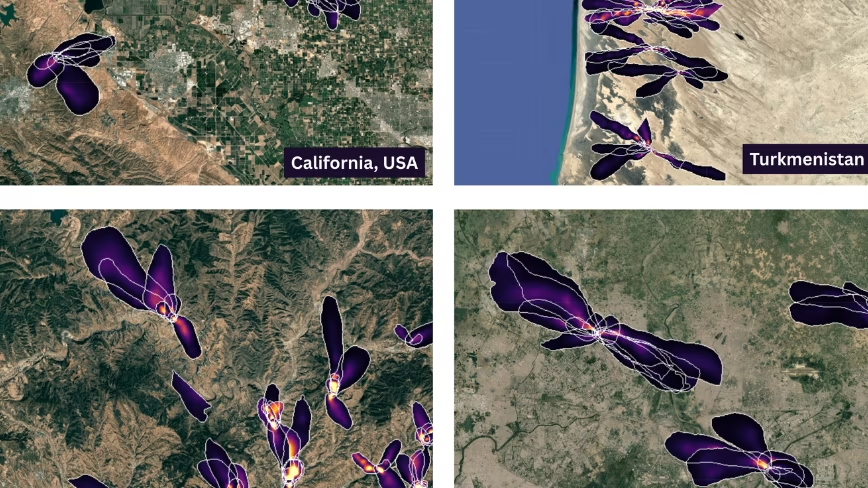
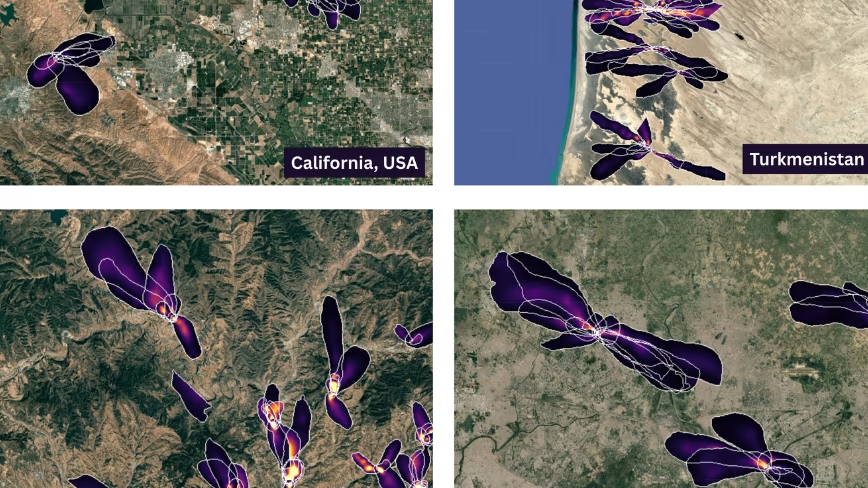
Google Research and NASA’s Jet Propulsion Laboratory have released a deep learning model that maps methane plumes worldwide from space, Google Research said. It flags around 50% more plumes than human analysts, and 23,000 more than the existing product.
The model is a vision transformer trained on 3.6 million simulated plumes. It reads raw spectra from EMIT, a NASA instrument on the International Space Station, at 60 metres per pixel.
Europe already runs a version of this. The Copernicus atmosphere service switched on a methane hotspot explorer in February last year, built by Dutch researchers on Sentinel-5P data.
Advertisement
The two are not doing the same job. Sentinel-5P covers the planet daily at roughly 5.5 by 3.5 kilometres per pixel, a region rather than a site.
Sixty metres resolves a landfill cell. The paper reports plumes at 24 of the world’s 25 largest-emitting landfills, against 17 for the NASA product it replaces. UCLA built last year’s list of the worst sites from Carbon Mapper analysis of EMIT and Planet Labs data.
Which is where Europe’s own rules stop short.
The Methane Regulation applies to oil, gas and coal. It obliges the Commission to build a global monitoring tool on satellite data, and Article 31 alerts member states to super-emitting events.
Advertisement
Waste is outside it. Prognos and the ifeu Institute estimated in January that municipal waste landfilled in Europe between 2022 and 2050 will release roughly 1.5 billion tonnes of carbon dioxide equivalent as methane.
Europe’s high-resolution answer is still being built. AIRMO raised EUR 5M in March to launch its first satellite in early 2027, and the Copernicus CO2M mission is due in November of that year.
What is available now costs nothing. The plume database sits on Earth Engine under a Creative Commons licence, the model is on Kaggle and the code on GitHub.
The limit is where the instrument looks. EMIT was built to map mineral dust in arid regions, and it flies on a space station orbit inclined at 51.6 degrees. Europe was never the target.
Advertisement
So the sharpest methane map in existence is a by-product of an American dust mission, given away.
European Earth observation has the opposite trouble, as TNW has reported: plenty of data and too few buyers. A regulator wanting facility-level methane attribution tomorrow would download Google’s file, then find the emitters it resolves best are the ones the regulation does not reach.









































You must be logged in to post a comment Login