Want big muscles? Keep working out. Want big coding skillsets? Flex your dev skills with the Atrophy CLI app before they wither away
If you’re a coder who uses AI agents to write programs for you, you may start losing those talents. Fortunately, a new command line tool can help reinforce your skills before they wither away.
Aptly titled Atrophy by Ashutosh Rath, the Bengaluru, India-based developer who created it, the CLI app treats coding abilities like Elo chess scores and pushes devs to reinforce their learning through regular drills in five different skill areas.
Advertisement
Syntax recall asks users to write a small function from a spec, debugging presents a code snippet with a hidden bug in it, code reading treats users like a human print command, API memory tests one’s ability to fill in the blank in a stdlib call, and decomposition tests a coder’s ability to outline a design.
Exercises test Python and JavaScript skills and come in three difficulty levels, Rath explained in the GitHub readme, with seeded generation for fresh variants of the different exercises.
“If AI assistance is quietly eroding your ability to code unaided, the chart shows you – before an interview, an outage, or a day without wifi does,” Rath wrote in Atrophy’s readme.
Users take a baseline exam with one exercise in each of the five skill areas to get their starting ratings, which Rath estimates takes around 25 minutes to complete. After that, he recommends users do 5-10 minute drills two or three times a week. Atrophy automatically selects an exercise from the skill that’s been neglected the longest and sets a soft time limit for the exercise. Users can still pass if they exceed the soft limit, but point gain will be reduced if they do so.
Advertisement
Rath told The Register that ratings are adjusted after exercises “using an Elo-style formula,” and explained that drills early in one’s Atrophy use will move the number more than later ones. Inactivity in using the app (it has to be triggered manually right now and won’t force users to drill on any set schedule) weakens Atrophy’s confidence in the correctness of its user’s rating, but doesn’t actually lower scores.
Rath also suggests users take an AI-assisted drill once a month, scores for which are tracked separately and used to measure one’s skill gap between assisted and unassisted coding so you can see if you’re gradually becoming more dependent on agent assistance as time goes on.
As mentioned above, the rating system was based on chess Elo ratings, but Rath told The Register that it’s not a one-to-one copy of Elo’s ranking style. For one, each of the five skill areas is ranked independently and each starts at 1200. There isn’t a hard minimum or maximum, Rath explained, so just know you can keep dropping below 1200 if your coding muscles get really weak.
As Rath notes in the readme, drills are just a proxy for real-world skills, so don’t treat the number as an absolute measurement of skill: The value of Atrophy lies in the trends the app suggests over time, which allows devs to hone in on skill areas AI may be harming.
Advertisement
“Atrophy isn’t anti-AI,” Rath told us. “I built it to measure the gap between what I can do with AI and what I can still do on my own, because that skill can quietly rust without warning.”
There’s plenty of evidence to suggest Rath is on to something. Analysts have been warning for some time that AI can erode skills due to reliance on tools to handle tasks traditionally left to human developers, but anecdotal evidence isn’t all the proof.
Researchers at MIT found last year that students writing essays with the assistance of AI chatbots had less brain activity than those writing them without LLM help. The cadre of users relying on AI also had poorer fact retention and an inability to recall what they had written. The end result of AI usage, they concluded, was “shallow encoding” of learning and less ability to operate independently of their agentic companions.
In other words, your skills could be disintegrating without you even realizing – might be time to take Atrophy for a spin so you can at least establish a baseline. ®
At the center of the device is Thunderbolt 5’s 120 Gbit/s bandwidth ceiling. That throughput is enough to support dual 8K displays or up to four 4K monitors from a single dock. While Thunderbolt 5 laptops are still relatively uncommon, more systems are beginning to ship with the standard, and… Read Entire Article Source link
At VentureBeat’s recent AI Impact event, where the discussion centered on what separates enterprises that scale agentic AI from those that stall in pilot mode, Brian Gracely, senior director of portfolio strategy at Red Hat, detailed what companies actually run into once agents reach production.
He dove into cost discipline, the security blind spots unique to autonomous systems, and the organizational friction that determines whether agent adoption spreads beyond early champions.
Enterprises are overestimating how far behind they are on AI agents
Many enterprise leaders, especially those following industry keynotes and AI announcements, worry that they’re already falling dangerously behind competitors deploying agents at scale. But according to Gracely, much of that anxiety reflects a misconception about how quickly organizations learn once they begin building. Teams often move up the learning curve far faster than they expect.
Advertisement
That rapid progress creates a different challenge, however. As agent usage expands, AI costs rise just as quickly, turning cost management from an engineering concern into a recurring boardroom discussion.
Agentic AI usage is orders of magnitude higher than during the chatbot era, making AI costs a growing concern for enterprises. At the same time, organizations are becoming increasingly aware of their dependence on a small number of model providers. According to Gracely, that combination is driving many enterprises to explore alternatives that give them greater control over costs and infrastructure.
“The two or three top providers are already telling the market that they’re losing money, and they’re trying to go public to make up those gaps,” he explained. “At some point, the dependency on that means you’re either going to buy at a very high-cost level, or you’re going to figure out alternatives to control what you’re doing.”
Right-sizing AI models is the fastest lever for cutting agent costs
The biggest cost issue is that enterprises overspend by defaulting to the most capable model available regardless of task complexity.
Advertisement
“If I’m simply trying to resolve an insurance claim, I don’t need to know about the history of Western civilization in my model, I don’t need to know World Cup soccer scores,” Gracely said.
Semantic routing is the mechanism many companies use to make that judgment automatically, classifying requests and sending each to a model sized for the task without requiring users to choose, while infrastructure techniques like caching repetitive queries cut how often a request needs to reach GPU compute at all. Together, he said, these tools remove the assumption that efficiency and innovation pull in opposite directions.
“There’s a lot you can do at a GPU infrastructure level, and quite a bit you can do in terms of flexibility of models,” he explained. “Those give excellent choices in terms of the levers you’re trying to pull, whether you need efficiency or you need innovation. That shouldn’t be a binary choice.”
The financial discipline needed for token spend is similar to the FinOps practices that took years to mature in order to take control of cloud compute spending. Those underlying frameworks will transfer even as the vocabulary changes, Gracely said, especially as organizations push for internal education on model selection so teams stop defaulting to the most prominent option for tasks that don’t need it.
Advertisement
“The same way we first had to teach the financial people what an EC2 instance is and what an S3 bucket is, you’re going to have to start explaining tokens to them,” he said. “We don’t always need a Rolls-Royce. We don’t always need caviar, because we’re trying to do basic types of things.”
Patch speed is now critical as AI tools find vulnerabilities faster
AI-powered vulnerability discovery is forcing enterprises to rethink how quickly they can identify, validate and deploy patches. Long-established patch management cycles may no longer be fast enough in an environment where AI can uncover — and attackers can exploit — new vulnerabilities much more quickly.
“Most companies are probably going to have a window of somewhere between seven and 14 days to stay ahead,” he said. “There are groups, Red Hat included, that are going to build patches for these, but the embargo window is going to be short.”
AI is also changing what defenders need to look for. Rather than simply uncovering isolated critical flaws, AI security tools can identify combinations of seemingly minor vulnerabilities that become dangerous only when chained together. As both software complexity and vulnerability discovery accelerate, Gracely argued that the ability to rapidly manage and update software is becoming a strategic capability rather than simply an operational one.
Advertisement
Subject matter experts and compliance teams decide whether agents scale
In the end, organizational adoption comes down to the need for deep, sustained involvement from the subject matter experts whose knowledge the agent is meant to encode, which makes earning their buy-in a prerequisite rather than an afterthought.
“You have to think about the incentives, what you do for people who participate in this work so they don’t feel threatened that it’s going to take away their job, and how you incentivize people in the long run to cooperate with that innovation,” he said.
Sponsored articles are content produced by a company that is either paying for the post or has a business relationship with VentureBeat, and they’re always clearly marked. For more information, contact sales@venturebeat.com.
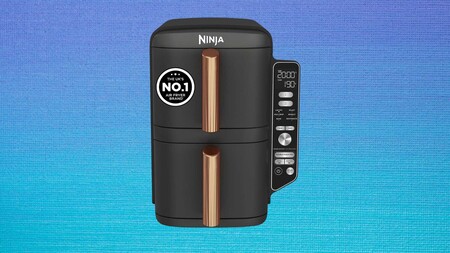
A 9.5-litre air fryer capable of cooking four layers of food simultaneously solves the one problem that has always made air frying frustrating for households feeding more than two people.
That drop in price comes on a machine built around two independent drawers, each able to run its own cooking programme, while a stacked meal rack adds a second level inside each drawer.
Advertisement
That four-level layout means a family roast and a tray of vegetables can finish cooking at exactly the same moment, feeding as many as eight people from one compact unit.
That capacity matters less if the food takes an evening to cook, which is why the Double Stack XL runs up to 55% faster than a conventional fan oven, while that same air fry function cuts fat by up to 75% compared with deep frying, letting weeknight chips and chicken thighs arrive genuinely crisp without a fryer.
Advertisement
Beyond air frying, six cooking functions cover roasting, baking, reheating and dehydrating, so the same drawers that crisp fries one night can dry fruit or bake a tray of cookies the next.
Despite that range of functions, the unit stands 30% slimmer than Ninja’s previous AF400 model and measures just 38.5cm tall, low enough to fit beneath most kitchen cabinets.
The trade-off is that a 9.5-litre double-drawer air fryer still needs a decent stretch of real counter space, and this particular version comes only in grey with no alternative colour options currently listed.
For anyone currently juggling a single-drawer air fryer at mealtimes, or cooking a full roast dinner in frustrating batches, the Ninja Double Stack XL at £199 removes that entire bottleneck.
Every drawer, crisper plate and stacked meal rack is fully dishwasher safe, which matters given how much more surface area this unit generates compared with a far more typical single-basket machine.
Advertisement
Advertisement
Ninja also backs the Double Stack XL with a free two-year guarantee once it has been registered, adding a layer of reassurance to a purchase that the discount alone already justifies.
Meta has a new AI model out, this time dedicated to generating and editing AI images. And yes, you can use it on Instagram. But if you have a public account, you need to change your settings now to avoid ending up the unwitting subject of anyone’s AI creations.
The model, called Muse Image, is the first creative model from the new family of Muse Spark models made by Meta’s superintelligence labs. The company said in a blog post that it’s built to handle more complex requests, create composite photos and edit existing images. It’s available now on the Meta AI app, Instagram and WhatsApp, with plans to eventually bring it to Facebook, Messenger and advertisers.
CEO Mark Zuckerberg showed off the new model on his Instagram on Tuesday. He showed some of the 30 new AI editing effects the model is powering for Instagram Stories, including images of numerous Zuckerberg clones, a 360 camera view with AI lead Alexandr Wang and an exposure portrait mode with Andrew Bosworth, Meta’s chief technology officer.
Advertisement
CEO Mark Zuckerberg demonstrates the new AI model’s editing abilities in Instagram stories featuring Alexandr Wang (center), Andrew Bosworth (right) and many AI clones of himself (left).
Mark Zuckerberg/Screenshot by CNET
This isn’t the first time an AI company has tried to entice people to use its creative AI by offering to place you and your friends into the AI scenery. That was OpenAI’s pitch when it launched its ill-fated Sora video app in 2024. But OpenAI still drew ire from regular people and celebrities for its role in easily creating deepfakes. Meta’s new AI model poses the same risk.
Let’s momentarily step aside from the fact that this new model will probably lead to even more AI slop on Instagram. And that the pictures you upload to the Meta AI app are used to improve Meta’s services. There’s an important detail in the settings everyone with a public Instagram account should know. If you’re over 18 and have a public account, anyone with a Meta AI account can “tag” you in their AI image prompts and create hyperrealistic AI images including your likeness — otherwise known as deepfakes.
Advertisement
How to prevent yourself from being deepfaked
I gave the new model a spin to see just how easy it could be to create deepfakes. My CNET colleague Abrar Al-Heeti has a public Instagram account, and I was able to make an AI image of her as a pirate in less than a minute by including her Instagram username in my prompt. When I tried the same for myself, tagging my private Instagram account, Meta AI couldn’t complete the request.
While Meta AI and I didn’t need to get my colleague Abrar Al-Heeti’s permission to make this AI-generated image of her as a pirate, I did get her consent before including it in this story.
Created by Katelyn Chedraoui using Meta AI
Meta confirmed to CNET that creators with a public Instagram account can block people from creating AI content with their likeness with a setting toggle. Go to Instagram Settings > Sharing and reuse > Toggle off “Allow people to reuse your content on Instagram and with AI features atMeta.” You can adjust this control for posts and reels. Private accounts automatically don’t have their content accessible for anyone to remix or create with. (After our testing, Al-Heeti turned off this permission.)
Advertisement
You can also limit your risk of being deepfaked when tagging yourself in an image request for the first time in the Meta AI app. It will walk you through some steps to help the app recognize you. That includes taking a picture of your face and, optionally, uploading three photos of yourself. In this process, you can choose who is allowed to use your likeness, including only yourself, followers you approve, mutuals or everyone. You can adjust this in the app by going to Settings > Your likeness.
These controls will be essential for professional creators and influencers, whose names and likenesses are their brand and therefore their livelihood. Meta says its models have built-in protections to prevent the model from creating illegal, abusive or defamatory content. But like we saw with Sora, motivated bad actors can get around a model’s safeguards. We will have to wait and see if Meta’s are up to the challenge.
In some parts of Canada, you’ll rarely hear someone use the phrase “whatever paddles your canoe” instead of the more usual “whatever floats your boat”– and apparently, at least for one Swede, that’s steam power. The video, linked and embedded below, is a detailed tour of a canoe equipped with a small boiler and an outboard motor that has been converted to run using steam pressure by [Kenneth Karlsson].
The canoe itself appears to be a Grumman of the “prospector” type, wide in body to hold all the gear you’d need for extended wilderness trips– or, in this case, a small boiler. Amidships is the ideal place, as it won’t affect the balance of the boat. Amidships is an odd place to put an outboard– in the North American homeland of the canoe, if you aren’t moving under your own power, it is more common to cut off the curved stern of the canoe and mount the outboard to the newly-made transom. [Karlsson]’s choice to put the outboard off one side will be less maneuverable than a stern mount, but saves the need to modify the canoe and makes for much shorter steam lines. Shorter steam lines means less hose to potentially leak and scald the occupants, as well as fewer losses, so we can’t really argue with the tradeoffs.
The engine is an old two-stroke outboard that has a single steam cylinder retrofitted to it, along with a heat exchanger to warm up lake water with exhaust steam before it heads the boiler. The water is filtered first, of course, but we do hope the new owner– who posts on YouTube with channel “Steam Canoe” is diligent about cleaning the boiler. It doesn’t look like super high pressure steam, but the vapour phase of water is always something to be respected.
Advertisement
If the potential of scalding steam leaks and boiler explosions put you off, but you still won’t pick up a paddle, canoes can be rigged with sails— or you can just hand the paddle to a robot arm. Though given this is Hackaday, maybe you’d rather skip the canoe and climb aboard the good ship Benchy instead.
Doom developer id Software is reportedly laying off about half its staff as part of Microsoft’s broader Xbox cuts. The reported layoffs potentially affects around 90 employees. Engadget reports: While neither Microsoft nor id Software have formally acknowledged the layoffs, one former member of the studio’s staff, Michael Maynard, has echoed the 50 percent figure on LinkedIn. According to at least one of Game Developer’s sources, that could translate to around 90 job cuts, though it’s so far unclear what departments at id Software have been hit hardest.
[…] Bloomberg reported yesterday that as part of the “reset” at Xbox, ZeniMax Media, the parent company of id Software, will be focusing on its biggest franchises — like The Elder Scrolls, Fallout, Wolfenstein and Doom — going forward. It’s possible that motivated the cuts to id Software, but the developer at least outwardly appears to be already heavily focused on Doom. The studio launched Doom: The Dark Ages in 2025 and an expansion to the game on July 7, 2026. Whatever the reason, the cuts at Xbox aren’t over: While Microsoft eliminated 1,600 roles alongside the announcement that Xbox is restructuring, it still plans to lay off another 1,600 employees over the coming months.
For much of the past decade, Xbox had one big idea: be the Netflix of gaming. Under Phil Spencer, Microsoft invested tens of billions of dollars into Game Pass, bought some of the industry’s biggest publishers, and pushed the idea that subscriptions, not consoles, would define gaming’s future. According to a new report from Bloomberg, that vision is now being rethought.
A new direction for Xbox
Rather than centering Xbox around subscriptions, Microsoft’s gaming business is reportedly beginning to place renewed emphasis on hardware, first-party games, and flagship franchises.
WomenWeAdmire
Bloomberg reports that Asha Sharma, who recently took over leadership of Xbox, is steering the business toward a more traditional strategy: one that focuses on selling consoles, building must-play exclusives, and treating Xbox hardware as a priority again instead of simply another way to access Game Pass.
Unsplash
The shift reportedly extends beyond consoles. Rather than pursuing ever-larger acquisitions, Microsoft’s gaming business is said to be leaning more heavily on its biggest existing brands, with Minecraft and King becoming increasingly central to Xbox’s long-term plans. Bloomberg notes that Minecraft’s steady profits had effectively been helping fund much of the wider Xbox business, a role that has only grown alongside King’s massive mobile business following the Activision Blizzard acquisition.
Gaming was never going to be Netflix
Bloomberg suggests the subscription-first strategy ultimately ran into a simple reality: people don’t consume games the way they consume movies or TV shows. Even after spending billions on Bethesda and Activision Blizzard, Game Pass never became the universal subscription service Microsoft had envisioned. Internally, executives also reportedly questioned whether putting blockbuster franchises like Call of Duty onto Game Pass on day one was the right long-term business decision, given how much revenue those games traditionally generate through full-price sales.
Microsoft / Xbox
That doesn’t mean Game Pass is disappearing. It’s still expected to remain a major part of Xbox’s ecosystem. But according to Bloomberg, it may no longer be the centerpiece of Microsoft’s gaming strategy. If anything, the report suggests Xbox is coming full circle.
After years spent trying to redefine what the platform should be, the company now appears to be rediscovering something the gaming industry has known all along: great hardware sells consoles, great exclusives sell hardware, and subscriptions work best when they support that ecosystem, not replace it.
Ready to choose your new ereader? Let’s get started…
Amazon Kindle Colorsoft vs Paperwhite: similarities & differences
Advertisement
In this section, I’ll be discussing the standard Kindle Paperwhite and Colorsoft models, as well as the Signature editions, but not the Kindle Scribe Colorsoft.
Let’s start with the similarities. Regardless of whether you buy a Colorsoft or Paperwhite, you’ll be getting a seven-inch, glare-free screen, IPX8 waterproofing, and an option of either 16 or 32GB of storage. All offer 300ppi resolution when used in black and white.
The big difference to know is that the Paperwhite models only display in black-and-white, whereas the Colorsoft Kindles can also display in color (at 150ppi, which is standard for a color ereader). This has a knock-on effect on battery life: Amazon says the Colorsoft models will last eight weeks on a single charge, whereas the Paperwhite can go up to 12 weeks. That’s based on half an hour of reading per day, on a brightness level of 13, which is just below halfway.
It also has an effect on price — regardless of if you opt for a Signature or standard model, at list price the Paperwhite Kindles are cheaper than the Colorsoft models.
Advertisement
Kindle Paperwhite models
There are two main Paperwhite models: the regular Paperwhite and the Paperwhite Signature. The only difference is that the Signature has double the storage (32GB compared to 16GB for the standard model).
Advertisement
Kindle Colorsoft models
There are three main Kindle Colorsoft options: the standard model, the Signature edition, and the Kindle Scribe Colorsoft. The first two are basically the same, except the Signature packs twice as much storage (16GB compared to 32GB). The Scribe Colorsoft offers writing capabilities alongside color reading, and it’s different enough that I’ve relegated it to the ‘Other options’ section of this article.
Amazon Kindle Colorsoft vs Paperwhite: which should I buy?
The only real reason to choose a Colorsoft over a Paperwhite is for its color display potential. Aside from that, the specs are either the same or better on the Paperwhite, and Paperwhite models are cheaper, too.
Advertisement
So how good is the color? Our tester was extremely impressed. You can get the full low-down in the Display section of our Kindle Colorsoft review, but the short version is that panning and zooming is smooth and speedy, with no ghosts or artifacts popping up, and refresh is “nearly undetectable”.
On the subject of picture quality, our tester had this to say: “The Kindle Colorsoft lights the color and black pixels evenly, and color pages look fantastic. They look like paper, as they should… Get an iPad if you want bright and saturated.” You can get a taster of what to expect in the carousel of images below.
Image 1 of 5
(Image credit: Philip Berne / Future)
(Image credit: Philip Berne / Future)
(Image credit: Philip Berne / Future)
(Image credit: Philip Berne / Future)
(Image credit: Future / Lance Ulanoff)
You can use color to highlight text in different hues, which could be useful to students, for example. However, the obvious market for a device like this is graphic novel fans. On this point, be aware that because the Kindle Colorsoft can’t run third-party apps, you’ll be limited to the titles available via Amazon’s own ComiXology platform. This offers a decent selection of comic books, but is more limited than the likes of Marvel Unlimited and DC Universe Infinite.
Note that you can read graphic novels on a Paperwhite, but they’ll just be in black and white. Just like on the Colorsoft, there’s a Panel view feature that expands each individual frame on the page — see it in action on a Paperwhite below.
Advertisement
(Image credit: Sharmishta Sarkar / TechRadar)
If that has convinced you that color is something you’ll want to make use of, buy a Colorsoft model. If not, pick up a Paperwhite and enjoy the cheaper cost and longer battery life.
Other Kindle options
If you’re in the market for a black-and-white ereader, you also have the option of a standard Kindle, which has a smaller screen than the standard Paperwhite and Colorsoft ereaders, is cheaper and lighter in weight too. There are a few concessions you’ll need to make, though: the battery life is on the shorter side, and it’s not waterproof.
There’s also the Kindle Scribe and Kindle Scribe Colorsoft, which you can use for writing as well as reading. Both have larger (11-inch) screens, and neither are waterproof. Note that if you go for a Scribe Colorsoft, you can’t use the two parts in tandem — so you can’t take notes on a color page — which weakens the proposition somewhat.
Amazon and B&H are competing for your business by offering a $150 discount on Apple’s current 15-inch MacBook Air with an M5 chip.
You can pick up the M5 MacBook Air 15-inch at the discounted price of $1,349 when you opt for the sleek Midnight finish at Amazon and B&H.
At $150 off, this is the lowest price available on the standard model with 16GB of RAM and 512GB of storage per our 15-inch MacBook Air M5 Price Guide, but you can also shop blowout specials on remaining M4 inventory at B&H, which we’ve included below.
Considering Apple raised prices across the latest M5 models, a closeout configuration can provide you with additional storage and/or memory at a lower price point than comparable models in the 2026 M5 line.
Our MacBook Air Price Guide is home to dozens more deals across the 13-inch and 15-inch product lines, with every configuration eligible for a discount.
Leaders of startups recently spun out of the UW, top row, from left: Hilco Boerlage of Precision Cognition Labs; Jan Whittington of Climate Solutions International; Elena Cant of DetellaDx; Sura Alwan of PEAR-Net Society; and Min Sun of Colleague AI. Bottom row, from left: Jingcong Zhao of KeenSight Health; Vigneshwar (Viggy) Sakthivelpathi of Nanosync Labs; Chris Norn of Skape Bio; Joelle Tudor of CathConnect; and Conor Lanahan of Prosthetic Fit 360. (CoMotion Photos)
The University of Washington’s CoMotion program announced 10 startups that secured UW-licensed intellectual property over the past year. Eight are in healthcare, spanning diagnostic tools, medical devices and new therapeutics. The other two focus on K-12 education or climate change.
CoMotion, which operates as a collaborative innovation hub, reports that it and its predecessors have fostered 310 deep-tech companies over the past three decades, more than one-third of which are still active. Those businesses have raised $1.8 billion from investors in the past five years alone.
Here’s a look at the 10 startups:
CathConnect is a Seattle-based startup making urinary catheters that are easy to insert into a patient’s bladder and will safely disconnect if pulled out accidentally. The devices could help prevent the 450,000 traumatic catheter removals that occur in the U.S. each year, which lead to longer hospital stays, higher medical costs and increased infection risk.
CathConnect was launched by Joelle Tudor, a former UW undergraduate researcher and Michael Malone, a UW doctoral candidate.
Advertisement
Climate Solutions International offers a software platform that helps government employees analyze factors like climate resilience, cost and carbon emissions for proposed infrastructure projects. The startup is the brainchild ofJan Whittington, a UW urban planning professor who previously received funding from the World Bank to apply these strategies across 300 cities in 30 countries.
Climate Solutions International was selected for CoMotion’s second Climate Tech Incubator, a six-month program is located at the Seattle Climate Innovation Hub, a public-private partnership in the city’s downtown.
Colleague AI created an AI tool and chatbots to assist K-12 teachers craft lesson plans and streamline other classroom operations. The technology was developed by Min Sun, a UW professor of education and Colleague AI co-founder, with substantial research and testing by educators.
The UW College of Education was selected two years ago as a national center for research and development on using generative AI as a teaching tool, a designation that included a $10 million grant to support Sun’s work.
Advertisement
DetellaDx is using AI and single-cell technology — a research tool that allows scientists to analyze genetic information in individual cells — to detect early-stage cancers with a high degree of accuracy. The diagnostic approach is based on research by Scott Kennedy, an associate professor in the UW Department of Laboratory Medicine & Pathology. DetellaDx’s initial focus is on women with a genetic predisposition for ovarian cancer.
KeenSight Health aims to help clinicians communicate better with patients through its Clinical Intelligence Engine, a coaching software that reviews doctor-patient conversations and gives physicians practical feedback. The platform also incorporates patient history stored in electronic records and other resources.
Nanosync Labs has created wearable sensors that monitor brain health and sleep without invasive procedures. The devices and platform allow for continuous tracking of changes in brain pressure and deep sleep, a restorative stage essential for brain health. The sensors enable earlier detection of neurological conditions, benefiting patients with traumatic brain injury and sleep disorders.
Advertisement
The technology was developed in the UW lab of Jae-Hyun Chung, an associate professor of mechanical engineering. Viggy Sakthivelpathi, who earned a PhD from the UW, is Nanosync’s co-founder and CEO.
PEAR-Net Society provides resources to help medical and public-health experts experts understand whether medications, chemicals, infections, vaccines, or other exposures may harm a fetus during pregnancy.
The organization relies on two well-established databases documenting teratogens, factors that can cause birth defects. These include the Teratogen Information System, or TERIS, developed by Dr. Jan Friedman, a UW graduate, and Shepard’s Catalog of Teratogenic Agents.
Precision Cognition Labs has developed a tool for memory assessment that can detect mild dysfunction and track changes in cognitive performance. The assessment is faster and easier to use than tools that require in-person, clinical evaluations, allowing for more frequent checkups and longitudinal studies.
Advertisement
The startup is a joint venture between the UW and the University of Groningen in the Netherlands, where it is based. Andrea Stocco, a UW associate professor and expert in computational psychiatry, is a co-founder and scientific director.
Prosthetic Fit 360 is building sensors that improve outcomes for patients with lower-limb prosthetics. The devices use trilateration, a technology that measures an object’s precise location by calculating distances from multiple known reference points. The startup was founded by Conor Lanahan, who earned his bioengineering and biomedical engineering doctorate degree from the UW.
Skape Bio is using AI to create new therapeutics that target G protein-coupled receptors, or GPCRs. The receptors, which are located on cell membranes, detect hormones, neurotransmitters and other signals that trigger biological responses.
The Copenhagen-based startup was founded by Chris Norn in partnership with UW Nobel laureate David Baker and scientists from the UW’s Institute for Protein Design and the BioInnovation Institute in Copenhagen.































































You must be logged in to post a comment Login