

Connect with us
DAPA Banner
DAPA Coin
DAPA
COIN PAYMENT ASSET
PRIVACY · BLOCKDAG · HOMOMORPHIC ENCRYPTION · RUST
ElGamal Encrypted MINE DAPA
🚫 GENESIS SOLD OUT
DAPAPAY COMING

Tech

Best Unlimited Phone Plan: T-Mobile, AT&T, Verizon Compared (2026)

Published

on

“Unlimited” is a funny term. Unlimited cell phone plans often come with a long list of footnotes, terms, conditions, and exceptions. Mercifully, all of the Big Three cell companies have, by now, ditched throttling on their most expensive plans and include 5G data access in all their unlimited plans. Yet there are still many differences in the services they offer, and there are many differences between each carrier’s various tiers.

Cheaper “unlimited” tiers do offer unlimited talk and text. But they still have rules on how much data you get before they start throttling your speed, and some “unlimited” plans may throttle your data at any given time. It’s been a fixture of cell service plans for years.

It can be overwhelming, which is why I’ve broken it down. Below, I’ve highlighted what each of the three major carriers offers for “unlimited” individual and family plans to help you figure out which unlimited plan is best for you and your budget.

If you absolutely want to avoid slower data speeds at peak times, you’ll likely be choosing among the plans here. But look to our guide to the Best Prepaid Phone Plans for lower costs at the expense of some limitations. Also check out WIRED’s guides to the Best Android Phones, Best iPhones, and Best Cheap Phones.

Advertisement

Update February 2026: We updated prices and plans for all three major carriers. We added T-Mobile’s Essentials Saver Plan and rebranded Better Value Plan as well as AT&T’s rebranded Premium PL, Extra EL, Saver SL, and Value Plus VL plans.


The Best Unlimited Plan Right Now: T-Mobile Experience More/Better Value Plans

The Essentials plan (with autopay, taxes/fees not included): 1 Line for $60/month | 2 Lines $90 | 3 Lines $90 | 4 Lines $100 | 5 Lines $125.

Essentials Saver plan (with autopay, taxes/fees not included): 1 Line for $50/month | 2 Lines $80 | 3 Lines $140

Experience More/Better Value (with autopay, taxes/fees not included): 1 Line for $85/month | 2 Lines $140 | 3 Lines $140 | 4 Lines $170 | 5 Lines $200

Advertisement

Experience Beyond (with autopay, taxes/fees not included): 1 Line for $100/month | 2 Lines $170 | 3 Lines $170 | 4 Lines $215 | 5 Lines $260

T-Mobile has the best 5G coverage among the big three, the highest 5G speeds, the fastest downloads and the best overall reliability, according to analysis from OpenSignal and Ookla. The carrier also makes claims to winning on value, when you take into account perks that include entertainment bundles, airplane WiFi, and access to satellite data in emergencies.

T-Mobile has rebranded its unlimited offerings this year but still offers three (or kinda four) main unlimited talk and text plans: Essentials, Experience More, and Experience Beyond. Only the two Experience plans offer true unlimited 5G data without any throttling or deprioritizing (i.e., making your phone stand in line for data behind other, more important, phones during peak demand.)

For merely occasional jet-setters and those who want consistent phone upgrades, Experience More is the best affordable phone plan among all services. This adds WiFi during flights, 4K video, 60 gigs of high-speed mobile hot-spotting, a modicum of international data, a AA membership, free ad-supported Netflix, and cheap ($3) Apple TV. It’ll also let you upgrade your phone every two years so random children don’t make fun of your ancient iPhone at a rest stop (yes, this has happened to me.)

Advertisement

If you want 3 lines or more and you’re a new T-Mobile customer (or a 5-year T-Mobile customer), you have access to an even better deal. The limited-time-only Better Value plan is in fact., possibly the best deal in phonedom at the moment. For the same price as the 3-to-5 line Experience More plans, you add free ad-supported Hulu, access to the T-Satellite emergency network, unlimited mobile hot-spotting, 30 gigs of international data in hundreds of countries, plus additional watch and tablet lines for just $5 a line. With the exception of phone upgrades every two years instead on every year, the perks are actually better than T-Mobile’s highest price plan, at a much lower price. This sale price is also locked in for 5 years.

Source link

Continue Reading
Click to comment

You must be logged in to post a comment Login

Leave a Reply

Tech

Self-powering shaking capsule shows the future of safe drinking water in the palm of our hands

Published

on

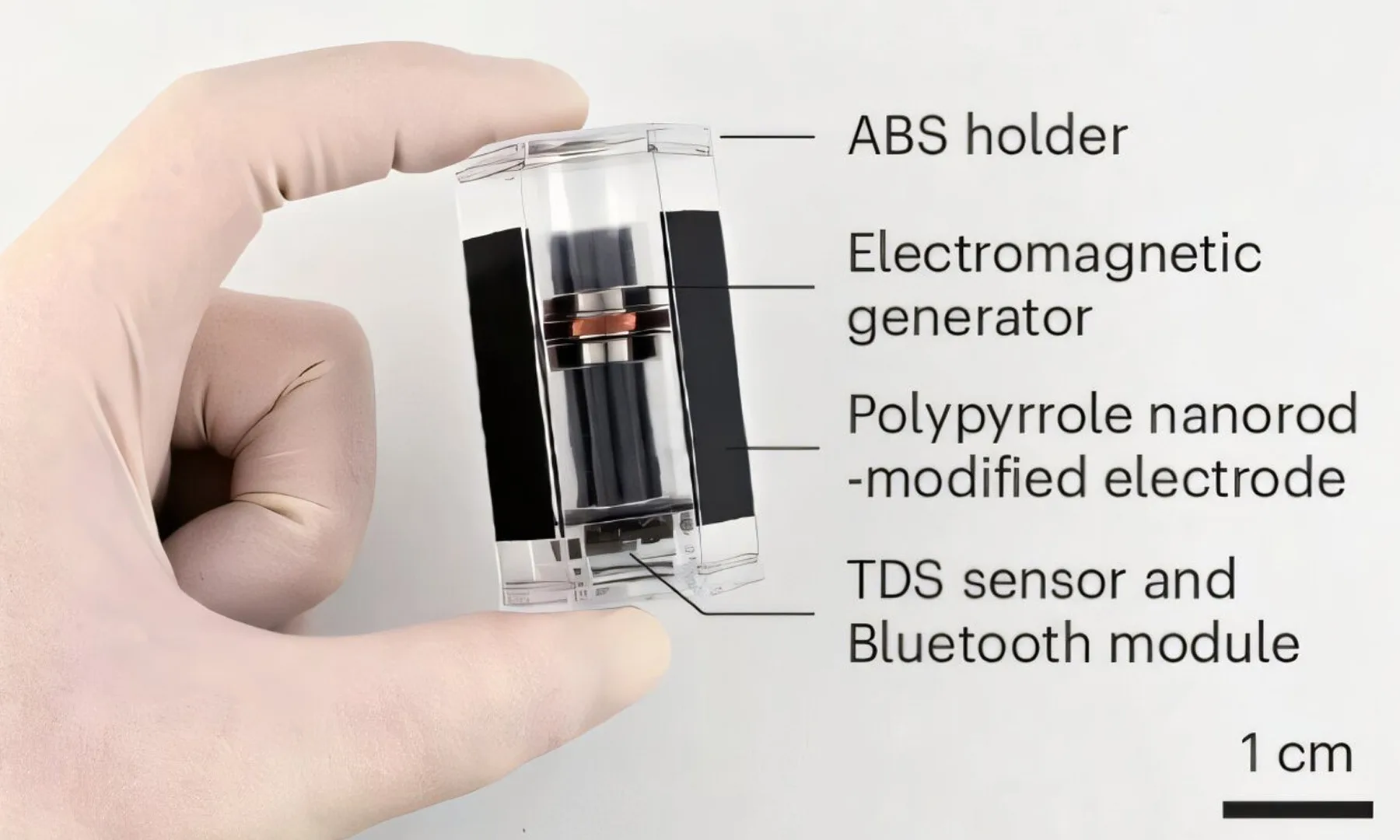
Access to safe drinking water remains a challenge for billions of people worldwide, but a new invention from researchers in South Korea could make the process much simpler. A self-powered floating capsule that fits in the palm of a hand can reportedly test water quality and disinfect unsafe water without relying on batteries, external power, or chemical treatments.

A simple shake is all this water purification capsule needs

According to a recent paper published in Nature Water, the device, called the Floating-induced Detection-Guided Disinfection (FDGD) capsule, generates electricity when shaken. An internal magnet moves through a coil to produce enough power to activate a built-in sensor that measures the water’s electrical conductivity, giving users an indication of its quality through a connected smartphone or smartwatch.

If the water passes the initial safety check, the capsule can simply be left floating inside it. Gentle movement from waves or even walking while carrying the container generates static electricity, powering microscopic nanorods on the capsule’s surface. These create strong electrostatic forces that damage the membranes of nearby bacteria and viruses through a process known as electroporation, effectively neutralizing them without adding chemicals.

In laboratory testing involving containers holding up to four liters of water, researchers reported that the device successfully inactivated 99.9999% of bacteria and viruses, including E. coli, across multiple water samples. The technology was detailed in the journal Nature Water, with researchers describing it as an affordable, decentralized solution for regions where conventional water treatment infrastructure is unavailable.

The clever part isn’t the disinfection, it’s the lack of dependencies

Interestingly, plenty of portable water purifiers already exist, but most depend on disposable filters, chemicals, UV lamps, or rechargeable batteries. This capsule sidesteps all of those requirements by harvesting energy from simple physical movement, making it particularly attractive for disaster relief, camping, remote communities, or humanitarian deployments where electricity isn’t guaranteed.

Of course, the FDGD capsule is still a research prototype and has yet to prove itself outside controlled testing. But if it can be commercialized at the low cost envisioned by its creators, it could put a reliable water testing and purification tool into millions of hands. Sometimes, the biggest breakthroughs aren’t massive treatment plants or billion-dollar infrastructure projects. Sometimes, they’re small enough to fit in your pocket.

Advertisement

Source link

Continue Reading

Tech

Quantum computers are coming, and this new device wants to protect the secrets hidden inside tomorrow’s digital world

Published

on


  • Fraunhofer introduces quantum random generator targeting future cryptographic security challenges
  • Q-Dice uses vacuum fluctuations instead of software algorithms for randomness
  • New system delivers over 4 Gbit/s quantum-generated random number output

As concerns grow about the security implications of future quantum computers, researchers continue searching for stronger sources of cryptographic protection.

One critical requirement involves generating truly unpredictable random numbers that can withstand increasingly sophisticated attacks against modern digital systems.

Source link

Continue Reading

Tech

I’m so conflicted about Snap’s new high-tech Specs

Published

on

It’s no secret that Snap has been working on a pair of AR-powered smart glasses for quite some time now – the dev kits for the hardware have been available for the past few years, and CEO Evan Spiegel always claimed that they’d be available by the end of 2026.

Well, we’ve just had our first official look at the super high-tech Specs – specs that Snap spent literally billions of dollars on over years of R&D – ahead of release later this year and, let’s just say, reactions are… mixed. 

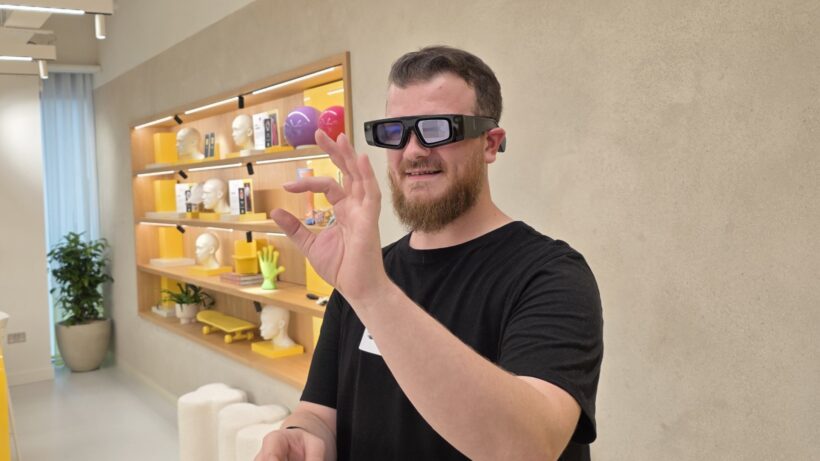
There’s no getting around it; the glasses don’t look as sleek or as stylish as many were expecting, especially with companies like Meta and Ray-Ban coming out with some pretty slick-looking (albeit comparatively basic) smart specs. It’s actually the opposite; the glasses are massive, chunky and look overly large on the head – even when modelled by Spiegel on stage at the announcement.

As you’d expect, the reaction memes are strong, and opinions are divided online. Even Snap’s stock dropped by 5% after the announcement, suggesting that Snap might’ve been drinking its own kool-aid for a little too long, focusing too much on the smarts and not the fact that, y’know, these actually need to be worn, in public, where people can actually see them on your face. 

Advertisement

The problem is that I know the software experience on the Specs is fantastic, unlike anything else I’ve ever seen or used – but will people actually give it a go when they look like that? I think we all know the answer to that question. 

Advertisement

Snap’s software is leagues ahead of the competition

Back in September 2025, I got to try the Spects dev kit at Snap’s London HQ, and Snap OS 2.0 feels closer to the sci-fi AR we were promised a decade ago than anything I’ve used since. While most rivals are serving up green, single‑colour overlays and static notification panels, Snap is running a full operating system that understands the world around you.

Snap AR Specs dev kit hands on Snap AR Specs dev kit hands on
Image Credit (Trusted Reviews)

Full‑colour graphics aren’t just floating in your periphery; they’re anchored to real objects and surfaces. Pin a window next to your desk or drop a widget onto a coffee table and it stays there, even as you look or walk away. It sounds like a small thing, but that persistence makes the specs feel like genuine mixed‑reality interfaces rather than glorified heads‑up displays.

Snap Specs overlaySnap Specs overlay
Image Credit (Snap)

Then there’s the built-in AI, which, believe it or not, is actually quite good. Much like Google Gemini’s Live Mode on mobile, Snap’s Spatial Tips feature doesn’t just answer questions in a floating chat box; it understands what you’re looking at and overlays help directly onto it. 

Snap Spectacles AI helpSnap Spectacles AI help
Image Credit (Trusted Reviews)

Advertisement

When I asked how to do an ollie on a skateboard, it didn’t spit out a wall of text – it drew the steps onto the board itself, showing where my feet should go at each stage. The same approach applies to things like flat‑pack furniture, car engines or household repairs: you look at the thing you’re stuck on, and the instructions appear right where you need them.

Advertisement
Snap Specs AI overlaySnap Specs AI overlay
Image Credit (Snap)

On top of that, real‑time translation features can caption conversations and translate signs or menus with real-world overlays, with text that sticks to people and objects as they move. Compared to the mostly static, widget‑driven software on Even Realities’ G2 or Rokid’s AR specs, Snap OS 2.0 feels way more polished, mature and genuinely useful.

So when I say Snap’s software is leagues ahead of the competition, I really do mean it.

Comparing the Snap Specs to existing smart glasses like the Meta Display specs and Even Realities G2 is like comparing an iPhone 17 Pro to a Nokia 3410; they’re in totally different leagues. 

Samsung Galaxy XR on a tableSamsung Galaxy XR on a table
Samsung Galaxy XR. Image Credit (Trusted Reviews)

Advertisement

In fact, in terms of the tech and mixed-reality experience on offer, they’re closer to the likes of the Apple Vision Pro and Samsung Galaxy XR – relatively large VR-style headsets that you certainly couldn’t wear on a night out or a trip – than existing smart glasses.

Like the proper headsets, Snap’s specs have high-end full-colour screens rather than the single-colour panels used by most existing manufacturers, and like those headsets, it can run a plethora of first- and third-party apps – there’s a reason why Snap got those dev kits out so early, after all. 

Advertisement
Snap Specs side-onSnap Specs side-on
Image Credit (Snap)

It actually goes a step further with its semi-transparent lenses, rather than using passthrough camera feeds and regular screens like the existing ultra-premium headsets. With electrochromic dimming on the lenses, it’s not hard to imagine they could offer a more immersive mode for watching movies and the like. 

Snap Specs in caseSnap Specs in case
Image Credit (Snap)

When you look at the Specs through that lens (pun intended), they look more like a phenomenal feat of engineering than a bulky pair of smart glasses. 

Advertisement

… but there’s no argument, they’re ugly and expensive

Snap has tried its best to frame these as fashionable, collaborating with the likes of Kaia Gerber, Jimmy Butler, Imogen Heap, Jack Harlow, and Hoyeon to model the Specs in marketing images – but, let’s be honest, they’re still some pretty ugly. 

Snap Specs being worn by CEOSnap Specs being worn by CEO
Image Credit (CNBC)

Compared to regular glasses that most people currently wear, these are much thicker – not just in the frame housing the screens but also in the arms of the glasses. The arms also look way longer than they should – on Spiegel’s head at the reveal, anyway – with very little in terms of a hook at the end to wrap around your ear for extra stability.

The slightly rounded, curved shape of the specs is quite nice in my eyes, but they’re just too big, chunky and obviously-smart to be worn by the average Joe. And with an eye-watering price tag of £1,995/$2,195, they’re not attainable for the average consumer either.

Jack Harlow wearing the Snap SpecsJack Harlow wearing the Snap Specs
Image Credit (Snap)

Advertisement

Of course, these are first-gen specs, and if Snap does power through and keep iterating on the design and hardware, this is the worst the Specs will ever be. 

Advertisement

Just think about how much better the Apple Watch Series 11 is compared to the Apple Watch – it’s the same here. The core concept is there, and Snap’s software is a shining beacon in a sea of lazy AR concepts; it just needs the time to properly cook. 

Snap SpecsSnap Specs
Image Credit (Snap)

That said, I reckon the Snap Specs will be a big hit with die-hard techies with money to burn, and I imagine I’ll be seeing execs from companies sporting the Specs at events like MWC in 2027 – but will I see anyone actually wearing them in day-to-day life? I doubt it, and that’s a shame. 

Source link

Advertisement
Continue Reading

Tech

Forget RTX filters. BenQ’s gaming monitor does the pretty stuff itself

Published

on

I’ve spent years messing with in-game brightness sliders, GPU filters, HDR modes, and monitor presets to tinker with my experience on my favorite games. Of course, I’d always go with the original artists’ intent first, but replaying these titles with new filters does freshen up the atmosphere.

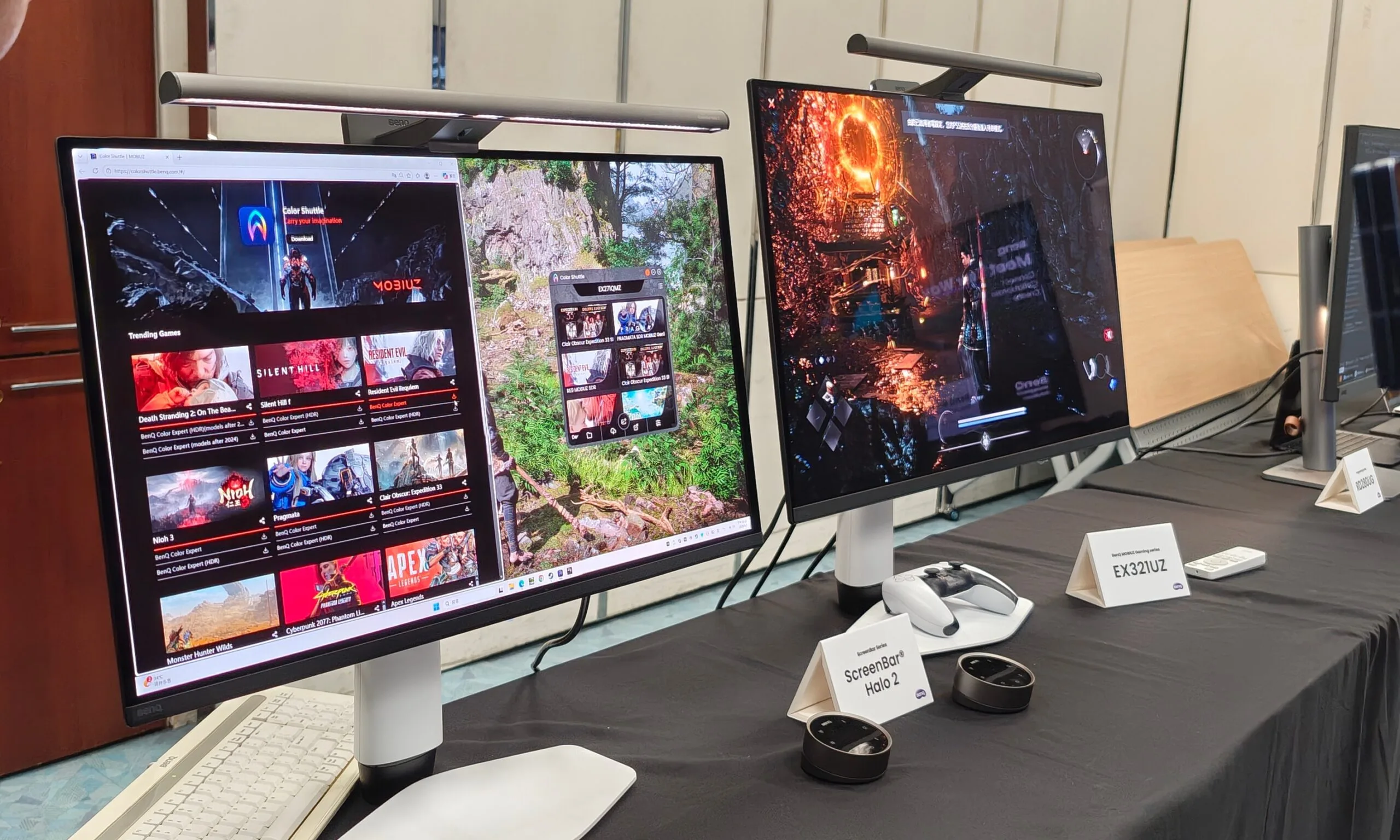
This is why I was particularly impressed by BenQ’s new MOBIUZ gaming monitors. During a recent visit to BenQ’s Taiwan HQ, I got a hands-on look at the company’s latest AI-powered game filter tech, and it immediately made more sense than I expected. The company isn’t just slapping on the “AI” sticker onto a gaming display. What you are getting here is custom touches to change up your experience by pulling from BenQ’s game art database that automatically tunes brightness, contrast, and color balance to match the game’s visual style. The fun part is that your performance doesn’t take a hit.

The filter lives in the monitor

When you use GPU-side filters, such as Nvidia’s Game Filters, your graphics card is still involved in the post-processing pipeline. Those tools can make a game look sharper, moodier, or more vivid, but they can also come with a performance cost depending on the setup. BenQ takes a different route by moving this job to the display itself. Its Smart Color system works through the Color Shuttle software and uses an AI chipset with BenQ’s MOBIUZ Game Color Database.

So rather than applying a GPU-level filter to the rendered frame, it adjusts the monitor’s own output using game-specific visual profiles. In practice, you can make a game look richer or more balanced without worrying that the filter itself is quietly eating into your frame rate. Considering how precious those extra fps can be for a lot of PC gamers, the visual filter makes sure you don’t lose any of it.

More than just a bunch of presets

The part I liked during the demo was that BenQ is not treating this like an old-school FPS/RPG/Racing preset menu. Those have existed forever, and most of them are either too aggressive or too generic. Color Shuttle is built around a game art database with more than 120 profiles. BenQ says it uses deep learning to understand color grading, lighting, and artistic direction across different game styles. Once Smart Color is enabled, it can detect what you are playing and switch to a suitable profile automatically.

You can also tweak those settings yourself, including familiar BenQ tools like Color Vibrance and Light Tuner that let you shift the image toward your preference. Again, “better colors” has always been a subjective thing. One player may want a horror game to look darker and moodier, while another may prefer better shadow visibility. Someone else may want open-world games to look more cinematic. BenQ’s system gives you a starting point, then lets you tune from there.

Advertisement

Backed by a community

One of the best parts of Color Shuttle is cloud sharing. You can save custom presets, upload them, and share them with other players. Other users can then download those setups for their own compatible monitors. This gives the feature a social side. Imagine downloading a profile for a specific game because another player has already found a better balance for night scenes or other scenes.

But that also explains why the internet connection is part of the story. Color Shuttle connects to BenQ’s Game Color Database, and the cloud side is used for saving and sharing profiles. The AI tuning is not the same thing as cloud gaming or streaming, but the ecosystem still depends on BenQ’s online database and community layer.

Still, there are some limitations. Color Shuttle is currently a Windows 10/11 app, and console users need to save presets to the monitor’s Gamer modes through a PC before using them elsewhere. Regardless, I like where BenQ is going here. A lot of AI gaming features feel too heavy or too tied to expensive GPU upgrades. Smart Color is smaller, but also more practical.

Source link

Advertisement
Continue Reading

Tech

Cops Keep Getting Arrested for Using Flock’s Cameras to Stalk People

Published

on

404 Media remembers how a Florida police office looked up his ex-girlfriend’s license plate in the Flock automated license plate reader system at least 69 times in 2024 — even searching for her mom’s license plate at least 24 times. The police office was charged with stalking and hacking-related offenses, serving one day in prison with five years of probation — but his case “was not a one-off.” [Alternate link via Bruce Schneier]

Local news reports from around the country repeatedly detail police abusing the Flock surveillance system in order to stalk their partners or ex-partners. The contours of each story are much the same, with the police officer in question using their access to the system to repeatedly track a specific person over the course of weeks or months. The cases highlight the fact that Flock can be used to track the whereabouts of individual people, that police do not get a warrant in order to use the system, and that, if they have access to the system, they have the technical ability to look up any license plate they want for any reason they want. An April study by the civil rights group Institute for Justice found that at least 18 police officers have been caught around the country using Flock to stalk a romantic interest in the last few years; another database, called the ALPR Abuse Library, has documented 20 specific cases of “stalking/targeting” around the country.

The known cases of police stalking are almost certainly a vast underreporting of the overall abuse, because they largely include only cases in which the behavior was so egregious that it led to police officers being fired, arrested, or both. Flock told 404 Media that it is “aware of 15 incidents of abuse, each surfaced because of the transparency and accountability features deliberately built into our platform…. There are also 140,000 monthly active users of Flock, so the relatively rare instances of abuse, while obviously wrong and awful, are exactly that — rare,” a Flock spokesperson told 404 Media. [One in 10,000.] “Humans are fallible; unlike most tools society provide law enforcement, Flock ensures that in the instances when our technology is misused, the evidence used to hold responsible parties accountable, is right there in our system. We also encourage all our customers to have a usage policy, regular training, and to implement our Audit Assistance tool, which proactively flags unintended use….”

But it is also the case that Flock has strenuously fought against lawsuits and potential regulations that are seeking to require police to get a warrant to use the system. And many cases of abuse have not been detected by police departments themselves but by those private citizens, journalists, and stalking victims who have found patterns of abuse in public records files they have obtained from their local police departments. In most cases of Flock-related stalking reviewed by 404 Media, the abuse occurred over the course of months or years, and the victims were subjected to dozens or hundreds of lookups. Other abuse cases have been discovered using the website HaveIBeenFlocked.com, a website that compiles Flock searches released via public records requests and turns them into a searchable database. Flock has repeatedly tried to get that website taken down, as we have previously reported.

Advertisement

Source link

Continue Reading

Tech

The social media ban might be coming, but you still need parental controls, here are my top tips

Published

on

Whether you’re for it, against it or indifferent to it, the social media ban for under-16-year-olds is due to come into force next year.

Regardless of how that might work, the ban is not a substitute for parental controls on devices and your home network. With two kids of my own, here’s what I’ve learned.

Talk to your kids

Parental controls are there as a safeguard to protect kids from the harms that the internet has to offer. As kids get older, the number of restrictions you have will reduce, but you’ll still most likely want something in place.

All restrictions should be clearly stated and you should talk to your kids about why restrictions are in place and what you expect from them when they’re using devices. Then, you can put restrictions in place.

Advertisement

Use the provided parental controls

Whether or not your kids have Apple or Android phones, there are free parental controls available for both platforms: Screen Time for iOS and Family Link for Android.

Advertisement

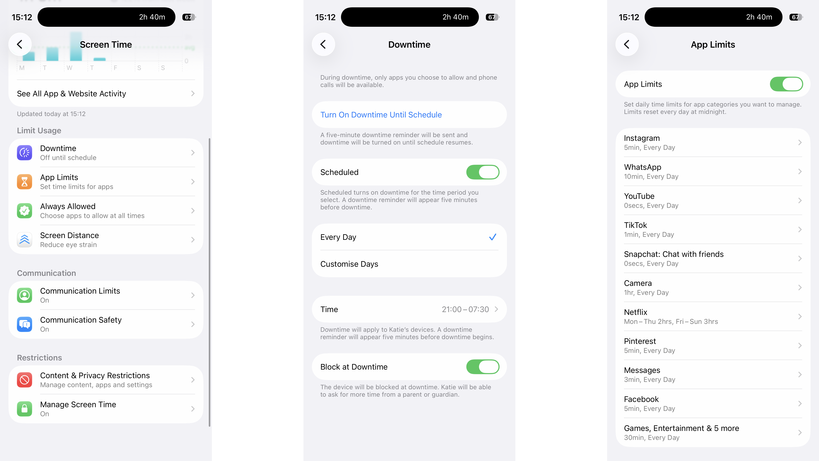
These both need to be tied to a child’s account, but once installed, they both give a similar set of controls: you can make kids request apps before installing them, you can set app time limits, control the contacts they can add, and you can put phones into downtime to prevent use (either manually or scheduled).

Screen Time in iOSScreen Time in iOS
Image Credit (Trusted Reviews)

Family Link for Android phones is available on iOS and Android, but for Screen Time you need another Apple device.

If your kids have Amazon tablets or Kindles, then parental controls are available there, too, controllable through the parents’ dashboard online. Again, you get a similar level of control, including time limits.

Advertisement

The one thing that’s annoying about Amazon’s parental controls are that they stop a child joining a different Wi-Fi network, and you have to do this with a parent’s profile on the device itself. On the one hand, this is a safety feature, but if a child goes off to stay with grandparents, for example, they can’t connect to Wi-Fi without you being present.

Windows has its own controls, with Microsoft Family Safety. MacOS devices can use Screen Time, just like the phones.

Advertisement

Game consoles have their own set of controls that you need to set up individually.

Advertisement

Most social networks have parental controls of varying quality, but require that any account your child sets up be monitored by you as a parent using the provided controls.

My advice is to always set every device up with the controls available, but to try and restrict the number of manufacturers you have.

For example, if your child has an iPhone and an iPad, the same settings and time limits apply to both; if they have an Android tablet, a Windows PC, and an iPhone, you have to set limits and controls on each.

Invest in a router with proper parental controls

It’s essential, in my view, to have parental controls running on your home network. I use Eero at home and have Eero Plus. With this, I can create profiles for each child and associate their devices.

Advertisement

Each profile can have its own scheduled downtime, turning off at bedtime, for example, and you can filter the internet in an appropriate way for different-aged children. Eero also allows me to block specific services across all devices, say turning off Discord, YouTube or Snapchat.

Advertisement

Eero Parental controlsEero Parental controls

But be careful. To identify a device, Eero (and other routers) use a device’s MAC address. Phones and tablets can create a private MAC address, which can change frequently. It’s for privacy to stop public hotspots spying, but when a MAC address changes, your router thinks it’s a new device.

Disable this setting on your child’s devices (turning it off or setting it to Fixed, rather than Rotating) and, if your router supports it, turn on notifications for new devices. That way, you’ll get a pop-up on your phone if the router spots a new device, which covers MAC address changes and any children bringing other unlocked devices home.

Mac address controls in iOSMac address controls in iOS

Also be aware of devices with more than one network connection. A PC with Wi-Fi and Ethernet will appear as two different devices, and you need to add both to a profile for full protection.

Home network controls should not be used in place of on-device controls, but alongside them. When your child leaves home with a device, such as an iPhone, they’re no longer protected or restricted by the home network. Make sure mobile devices are set up with restrictions similar to those on your home network, so your kids remain protected when they’re using a mobile connection or on another network.

Advertisement

Advertisement

Protect your passwords and PINs

Most parental controls will require a PIN or password when you want to make changes, so don’t use the same ones that you’d use on your own phone, as your kids probably know what this is. I use random PINs and passwords, and save them in a secure note on my phone.

Be aware of different access routes

Just because a phone’s locked down or restricted in a certain way, it doesn’t mean that your kids can’t get around the controls you have. Take Snapchat, for example: kids can simply log in on someone else’s phone or via a web browser, bypassing time limits that you might have set.

If a service that your child has access to has the option of two-factor authentication (where you need a code to login), set this up, but add the code to your phone, such as through the Google Authenticator app. Sign out of all sessions on the service on your child’s phone, and then sign them back in. They’ll need the authentication code to do so, so it’s fine to give out that one-time code.

Advertisement

However, now if they try and log in via another phone or the web, they’ll need a code that they can’t get, so you can ensure that they’re safe. This doesn’t stop them from creating new accounts on many services.

Advertisement

It’s also worth blocking web access to services on their phone and your home network, just for safety. For example, if you have time limits on WhatsApp, you’ll want to block WhatsApp.com, as the web version allows a child to pair their account and switch to a web browser when they run out of time.

WhatsApp web imageWhatsApp web image
Image Credit (Trusted Reviews)

Blocking social media sites’ web addresses prevents kids from bypassing time controls in apps or creating new accounts to circumvent restrictions.

Advertisement

Source link

Continue Reading

Tech

Sunday Reboot: The right marketing, the wrong changes

Published

on

In this week’s “Sunday Reboot,” Beats subverts the World Cup, and GymKit and Malcolm’s gym are updated in opposite ways.

Young man wearing large black headphones with a small white strip on the side, looking over his shoulder toward the camera, dressed in a dark hoodie against a plain background
Jamal Musiala with some taped Beats – Image Credit: Instagram/Beats/Jamal Musiala

Sunday Reboot is a weekly column covering some of the lighter stories within the Apple reality distortion field from the past seven days. All to get the next week underway with a good first step.
This week, current Apple CEO Tim Cook warned of price increases, Brazil adopted EU-style App Store rules, and supply chain assembler Tata is accused of contaminating the water supply in India. Also, leakers are worried we could have another colorgate issue this fall.
Continue Reading on AppleInsider | Discuss on our Forums

Source link

Continue Reading

Tech

Plastic waste could soon fuel aircraft as researchers develop cheaper jet fuel from discarded materials using a new reactor system

Published

on


  • Plastic waste can now be converted directly into usable jet fuel
  • A tandem reactor system breaks plastic down at 460 degrees Celsius
  • Ruthenium catalyst sites delivered far better selectivity than commercial alternatives

Researchers at Nanjing Forestry University and Tsinghua University have demonstrated a new method for converting plastic waste directly into usable jet fuel, with estimated production costs ranging from $1.0 to $1.8 per kilogram.

The work comes as airlines, governments, and fuel producers continue searching for alternatives that could reduce dependence on conventional fossil-derived jet fuel.

Source link

Continue Reading

Tech

Ubisoft co-founder Claude Guillemot dies in plane crash

Published

on

Claude Guillemot, co-founder of French video game company Ubisoft, died Friday at the age of 69.

According to French media (via Bloomberg), Guillemot died in a plane crash in the French resort town of La Baule. He was one of two people aboard the plane, both of whom died.

Guillemot founded Ubisoft with his four brothers in 1986. Since then, the company has published the Assassin’s Creed, Far Cry, Prince of Persia, and Tom Clancy video game franchises, as well as many other titles. The family retains control of Ubisoft, and Guillemot’s brother Yves is still CEO.

Guillemot was also chairman of Guillemot Corp., which makes gaming and audio accessories.

Advertisement

“Ubisoft was deeply saddened to learn of the death of Claude Guillemot, co-founder of the group and chairman of Guillemot Corp., in an accident,” Ubisoft said in a statement. “Our thoughts are with his family and loved ones during this difficult time. No further statements will be made at this time.””

Source link

Continue Reading

Tech

Doom Composer Bobby Prince Has Died

Published

on

Prince also worked on Wolfenstein and Duke Nukem games.

Video game composer and sound designer Bobby Prince has died. An obituary states that Prince died on June 16 at the age of 81 following an illness. Developer id software shared the news of Prince’s passing.

Prince was perhaps best known for his pioneering work on the Doom series. The Library of Congress inducted his soundtrack for the original game into the National Recording Registry just last month.

Advertisement

“Despite the limitations of the 1993-era sound card drivers, Prince composed the perfect riff-shredding accompaniment for the game’s demon-slaying journey to hell and back,” the Library of Congress stated. “Taking advantage of his knowledge of MIDI, Prince even worked to ensure that the sound effects he created could cut through the music by assigning them to different MIDI frequencies.”

Prince also worked on games such as Wolfenstein 3D, Rise of the Triad and Duke Nukem 3D. In 2006, the Game Audio Network Guild honored Prince with a lifetime achievement award.

“Everyone at Romero Games is deeply saddened to learn of the passing of Bobby Prince,” Doom co-designer and id Software co-founder John Romero wrote on X. “He left an incredible mark on games and on my life.”

Advertisement

Source link

Advertisement
Continue Reading

Trending

Copyright © 2025