
Tech
Capital One Says Money Laundering, Not January 6 Riot, Led To Shutdown Of Trump Accounts


from the be-careful-what-you-wish-for dept
I don’t know but when your best argument is “we got locked out of our accounts for supporting violent insurrectionists,” maybe it’s time to stop arguing.
But if there’s anything Trump likes, it’s being a plaintiff in a lawsuit. So, that’s exactly what the Trump Organization argued, in hopes of pressuring Capital One into a presumably hefty settlement.
The case centers on roughly 385 accounts tied to the Trump Organization, Eric Trump and a collection of affiliated businesses — including a winery, a bottled-water company and a golf course developer — that banked with Capital One for more than a decade before the accounts were shut down in mid-2021.
In an amended complaint filed earlier in July, the Trump-affiliated companies insisted the closures had nothing to do with financial crime or money-laundering, but everything to do with politics.
The Trump Organization alleges Capital One moved to distance itself from Donald Trump after the Capitol riot and that the bank’s cited anti-money-laundering rationale was invented after the fact to cover for that decision.
If you need a reason to “distance” your company from persons or organizations, that’s a pretty good reason. If you’ve chosen to align yourself with violent insurrectionists and rely on them for financial support, then it’s pretty much “you’ve made your bed, now please take your business elsewhere.”
But what Capital One is alleging in its response to the Trump Organization’s lawsuit somehow makes the Trump Organization look even worse than it did when it first filed its lawsuit alleging some weird form of political persecution.
According to Capital One’s motion to dismiss [PDF], this had nothing to do with acts that were unsavory (buddying up with violent insurrectionists) and everything to do with stuff that is indisputably illegal, rather than merely unseemly.
The SAC [second amended complaint] concedes that Capital One’s decision to terminate the accounts was expressly permitted by the governing agreement and instead rests on vague allegations of political discrimination that are not supported by any of the documents attached to the SAC. To the contrary, those documents and Plaintiffs’ own allegations make clear that Capital One closed Plaintiffs’ accounts for anti-money laundering (“AML”) reasons. The closures were the result of months of analysis and a careful review by Capital One’s AML team in accordance with bank policies and regulatory guidance. Capital One never publicized the termination decision nor its confidential internal process giving rise to the closure, and it permitted Plaintiffs several months (and granted several extensions) to find new banking services, which they did.
It wasn’t because you guys wanted to destroy democracy! It’s because you seemed like you were engaged in actual crimes!
In any event, as Trump and his Trumpians surely know, private companies can terminate accounts at a moment’s notice for any reason they choose to do so. That’s the bargain consumers agree to when utilizing corporate services. Just because it happens to you doesn’t make it immediately actionable. If you don’t like the terms of the agreement, don’t agree to it. Take your business elsewhere. Otherwise, deal with it and take your business elsewhere when you’re told this particular place of business is no longer an option.
But let’s not lose sight of the main thing here. The Trump Organization walked into court insisting it was the victim of “political discrimination.” Now, the organization is facing the considerable possibility of limping out of court looking like the grifters we’ve always assumed them to be.
And claiming Capital One had a legal obligation to tell the Trump Organization it was being investigated for suspected money laundering does nothing but allow Capital One to permanently link the organization to money-laundering allegations on the public record. No one suspected of criminal activity is due a head’s up, whether it’s from a private entity or a government agency.
As Capital One points out, no matter whose name is on the letterhead, the institution’s obligations during this money laundering investigation were to the government, not to the aggrieved party hoping to turn this into a paycheck.
Plaintiffs’ argument that Capital One should have proceeded with the contractually-permitted termination process differently and given Plaintiffs an opportunity to explain suspicious transactions fails for the additional reason that Capital One had no duty to do so. As a federally regulated financial institution, Capital One is subject to the Bank Secrecy Act (“BSA”) and its implementing regulations, under which a bank’s BSA-mandated compliance obligations are “owed to the United States and not private bank customers.”
The Trump Organization now has multiple self-inflicted gunshot wounds in its feet. It could stop the bleeding by conceding defeat and agreeing to the dismissal. But if history has proven anything, it’s that Trump never knows when to stop. And while this isn’t Trump himself suing, it’s safe to assume the Trump Organization won’t accept defeat. But it probably should. If it insists on keeping this case alive, there’s a good chance some more rounds of discovery will be necessary. And when that happens, all the details supporting Capital One’s money laundering investigation are going to come out. I, for one, hope this litigation survives this motion to dismiss.
Filed Under: corruption, debanking, donald trump, insurrection, january 6, money laundering, political violence, trump administration
Companies: capital one, trump organization


Apple has introduced new beta firmware for AirPods, AirPods Pro, and AirPods Max, so that developers can continue testing out inbound iOS 27 features.
Apple will be introducing a number of new features for select AirPods models this fall, as part of the iOS 27 and other 27-gen operating system releases. Ahead of that release, it is testing out the features via beta firmware builds.
The new firmware, build 9A5336b, replaces the previous build, 9A5314b, which Apple seeded on July 7. It can be downloaded to the AirPods Pro 2 and AirPods Pro 3, AirPods 4, and AirPods Max 2.
It is intended to be used only by developers, not the general public. A public version is expected within days.
To install the beta, users need to be running on iOS 26, iPadOS 26, macOS 26, or later releases. There is an option under the AirPods settings interface to enable the firmware installation.
Once enabled, the update itself happens automatically, when you place the AirPods on charge near the host device.
Among the changes users can expect from the AirPods firmware is a new EQ setting in iOS 27. Other changes to make the management of AirPods easier are also anticipated to arrive.

I didn’t expect Samsung to be the one crossing the finish line first here, given how much noise Dolby Vision 2 made when it was announced (September 2025).
The company has confirmed its next HDR format, and it’s arriving on a popular OTT platform this month, beating Dolby Vision 2 to the punch.
So what exactly is Samsung launching?
Called HDR10+ Advanced, Samsung’s new HDR format is arriving on Prime Video this month, and the company’s 2026 TV models should support it. The genuinely surprising part for me is that this format only got announced back in November, months after Dolby Vision 2, and Samsung still managed to ship it first.
Now, Samsung hasn’t said exactly which TV models qualify, or how much Prime Video content we’ll get at launch. However, a promotional image confirms the Amazon series Ride or Die will support it.
Under the hood, this update bundles six separate upgrades. It includes a brightness boost built for today’s punchier TV panels, genre-specific picture tuning, more precise local dimming for mini-LED sets, and, last but not least, improved color accuracy.
At their core, both formats are chasing the same idea. They’re after smarter, scene-by-scene motion smoothing that handles fast action without slipping into that dreaded “soap opera” look older TVs are known for.

How does this actually compare to Dolby Vision 2?
Samsung’s version goes by the name Intelligent Motion Smoothing. It’s paired with a gaming-focused mode aimed partly at cloud gaming services. Dolby Vision 2’s version is called Authentic Motion, just so you know.
The real issue here isn’t about the similarities or the differences, in my opinion. It’s about a chaotic format war breaking out between players in the TV industry.
Hisense, Philips, and TCL are all lining up behind Dolby Vision 2, perhaps to close the gap with premium brands that often go with proprietary chip-level picture processing and the tiered flexibility (Dolby Vision 2 vs. Dolby Vision 2 Max) that could help them differentiate between value and premium products.
Peacock and Canal+ have also committed to stream that format once it’s actually ready, as the format needs a software update to enable it. LG, on the other hand, is sitting this fight out entirely. Instead, it’s building its own separate system with Prime Video.
Samsung avoided Dolby’s licensing fee while shipping a competing format first. That suggests real financial motivation behind the rush.

Most conversations about generative artificial intelligence in schools eventually zoom in on using AI in the classroom. Before districts redesign teaching and learning around AI, they may need to answer a more fundamental question: Can schools afford an AI-first future?
The question sounds strange because generative AI is often presented as software with free and low cost tiers to individual users. Teachers open a browser window, type a prompt, and receive a response in seconds. The experience feels almost weightless and as simple as a Google search. The infrastructure behind that interaction is much more complicated.
A useful way to think about generative AI is to remember the large desktop computers that once sat in school computer labs. Students interacted with a monitor and keyboard, but much of the important work happened elsewhere inside a massive tower packed with hardware.
Today’s AI systems operate similarly, except the tower has been replaced by massive data centers located hundreds or thousands of miles away — and increasingly in some cases, just a few miles away.
Cost of Compute
An explanation is in order. How do chatbots and the hardware behind them work? Think of the chatbot prompt as the remote control. The hardware stored at the data center is the wiring within a television, and the chatbot’s output is what appears on screen as you watch and flick through channels.
Every student prompt, teacher-generated lesson plan or AI-assisted feedback comment depends on specialized processors, networking infrastructure, electricity, water, and increasingly scarce computing capacity.
Most discussions about AI in education begin after those systems are already in place. However, a growing body of research suggests schools should pay closer attention to the infrastructure itself.
Researchers studying AI adoption in education have largely focused on classroom implementation, AI literacy and governance. Stanford’s review of the evidence base for AI in K-12 education found that adoption continues to outpace rigorous evidence about educational outcomes. At the same time, UNESCO and other organizations have increasingly emphasized governance, transparency and human oversight as schools experiment with AI tools.
A separate body of research examines the infrastructure that makes those tools possible. Urban planners, computer engineers and environmental researchers have begun documenting the physical footprint of artificial intelligence. Their work points to a reality that is largely invisible to educators: generative AI is both software and hardware that requires robust infrastructure to support and scale.
Research by Xiaofan Liang, PhD on data centers describes how AI expansion increasingly shapes land use, energy systems, local planning decisions and community development. Research by Shaolei Ren, PhD on power and water demand demonstrates that large-scale AI deployment carries substantial resource requirements that extend well beyond the technology sector. Researchers and policymakers are now examining how data center growth affects electricity demand, water consumption, electrical grid capacity, and environmental sustainability.
According to estimates cited by the Congressional Research Service, U.S. data centers consumed about 176 terawatt-hours of electricity in 2023, roughly 4.4% of all U.S. electricity consumption. Using average residential electricity consumption estimates from the U.S. Energy Information Administration, that’s enough electricity to power nearly 17 million American homes for a year. The map below shows where the United States sits in the world’s energy picture and why AI’s growing appetite for power matters.
Attribution: Hannah Ritchie, Pablo Rosado, and Max Roser (2020) – “Energy Production and Consumption” Published online at OurWorldinData.org. (archived on May 18, 2026).
Traditionally, districts purchase educational technology such as learning management systems, assessment platforms and instructional software through licensing agreements that can often be forecast years into the future. But generative AI operates differently.
Unlike traditional software, which becomes cheaper to distribute as it scales, generative AI continues generating costs each time users engage with the system. Industry observers increasingly point to what’s called “inference costs,” which are the computing resources required to generate responses. These are some of the major costs of LLMs for consumers and one of the central economic challenges facing AI companies.
For schools, how can a district plan for these costs, and what happens when the costs far exceed expectations? Put another way, it’s unclear whether generative AI is financially feasible for schools.
Many districts are currently experimenting with AI through pilot programs, limited licenses or AI features embedded within existing products. There are few examples of what universal access would actually cost.
What would it mean for every student and their teachers to have access to generative AI every day? Before we address this question, there is another cost variable to consider: data privacy.
Many educators and parents have expressed concerns about student information flowing into commercial AI systems. One response has been to advocate for private deployments, district-controlled systems or locally hosted models that offer greater oversight and protection.
Those approaches may provide stronger governance, but they also require additional investment. That makes student data privacy a matter of policy and infrastructure. The more control schools want over data, the more likely they are to encounter costs related to storage, cybersecurity, hardware, networking and technical expertise.
Understanding the Generative AI Market
Meanwhile, the broader market continues to evolve.
OpenAI, Anthropic and other major AI companies are still competing to define the commercial landscape. Product offerings change frequently. Pricing models continue to evolve. Infrastructure investments remain enormous.
The result is a technology ecosystem with long-term economics that remains uncertain at precisely the moment schools are being encouraged to integrate it more deeply into teaching and learning. This uncertainty arrives during a challenging financial period for many districts.
Federal ESSER funding has expired. States continue debating educational technology spending priorities. District leaders face growing pressure to justify technology investments while responding to staffing shortages, student mental health concerns, and academic recovery efforts post-COVID-19 school shutdowns.
Against that backdrop, AI presents a different kind of procurement question: Do districts understand the long-term commitments they may be making when AI becomes embedded in curriculum, assessment and daily operations?
There is still one more cost factor to consider: community impact around data centers. Data centers are expanding rapidly across the United States. Local governments and residents are increasingly debating the benefits and tradeoffs associated with new facilities. Questions about energy demand, water consumption, environmental exposure and land use have become common features of public meetings and planning discussions.
For educators, these debates may seem distant from classroom practice. But every discussion about AI in schools ultimately depends on the infrastructure being built in communities across the country.
Schools are currently debating how to integrate AI into teaching and learning while the infrastructure, economics and governance systems required to support large-scale adoption are still taking shape.
Before schools decide how deeply AI belongs in classrooms, they may need a clearer understanding of how much it costs and if it’s feasible to maintain the systems that make an AI-ready classroom possible.


About the Report
Competitive pressure and AI tools are reshaping how organizations innovate. As development cycles compress and markets evolve more rapidly than ever, the ability to make confident, data-driven R&D decisions has become a competitive advantage.
The 2026 R&D Benchmark Report examines how leading organizations are responding to these challenges, and where they continue to struggle. The research reveals that while AI adoption is widespread, many organizations still lack the intelligence needed to prioritize the right opportunities, eliminate low-value projects early, and reduce costly late-stage failures. Instead, teams often contend with fragmented data sources, lengthy approval processes, and critical insights that arrive too late to influence key investment decisions.
Drawing on responses from more than 200 senior R&D leaders across nine industries, this report provides practical benchmark data and insights into the strategies organizations are using to reduce R&D waste and accelerate time to market.

Your neighbourhood TCM shop is actually a S$150M empire
Most Singaporeans have walked past a Hockhua Tonic store without thinking twice. Its iconic red signage, the scent of dried herbs, and rows of grab-and-go herbal teas blend so seamlessly into Singapore’s heartland malls that the brand has become part of the landscape.
Which makes it easy to miss what’s actually going on: a S$150 million business with over 80 outlets across Singapore and Malaysia, a loyalty programme with over 480,000 registered members, and a supply chain that stretches from ginseng farms in Ontario, Canada, to bird’s nest operations in West Malaysia.
What founder Chan Tiong Cheng started with his mother in 1986 as a small wholesale business importing American ginseng from Canada has since grown into Singapore’s largest traditional Chinese medicine retail chain. Today, Hockhua operates three manufacturing plants in Singapore and reports an annual turnover of S$150 million.
Here’s its story.
A mother, a son, and a sack of ginseng

The founding of Hockhua began in 1986, when Chan and his mother, Madam Lee Ang Cho, started importing American ginseng from Canada and selling it wholesale. Back then, Hockhua neither had a retail presence nor branding—just a wholesale company with a supply chain and a bet that Singapore’s Chinese community would keep wanting ginseng.
The mother-son duo was right.
In 1987, Chan brought in three partners and expanded the wholesale operation, setting up at Kampong Kranji. Demand for traditional Chinese health products was growing as Singapore’s middle class expanded and began spending on wellness.
By 1989, there was enough confidence to open the first physical retail outlet, Hockhua Ginseng Birdnest Trading Enterprise in Hougang.
The shop was popular enough to trigger several more openings in quick succession between 1990 and 1995. By 1992, the company had already begun describing itself as a “comprehensive traditional health food chain.” It claimed that revenue had tripled from S$2 million to S$6 million between 1990 and 1993.
Owning the supply chain

What distinguishes Hockhua’s growth from most Singapore retail stories is how much of it was vertical. Rather than simply opening more shops selling other people’s products, Chan kept bringing more of the supply chain in-house.
The process began in 1996 with the formation of SHW Trading Enterprise—later renamed Hockhua Tonic Pte Ltd—to handle direct imports. By cutting out intermediaries, the company lowered procurement costs, exercised tighter quality control, and kept retail prices competitive.
Over the next few years, Hockhua expanded that strategy further. By 2000, it had established six subsidiary companies specialising in different product categories, including ginseng, bird’s nest, Chinese herbs, agri-food, seafood, and traditional medicine.
The corporate structure that emerged looked very different from a typical retail chain. Under Hockhua Holdings, subsidiaries oversee cultivation, sourcing, processing, manufacturing and distribution, with the retail outlets serving as only the final touchpoint.
In many ways, Hockhua resembles a vertically integrated agricultural and manufacturing group that happens to sell through retail stores.
That integration stretches well beyond Singapore. The company says it cultivates its own ginseng through partner farms in Ontario, Canada, and Jilin Province, China. It has also operated its own bird’s nest farms in West Malaysia since 2009, while an Indonesian processing facility was added in 2018.
Its abalone is sourced from eight countries, including Australia, New Zealand, Japan and Chile. Meanwhile, more than 20 patented TCM products in capsule and powder form are manufactured across three Singapore plants spanning some 13,000 square metres—a sizeable manufacturing footprint by local standards.
Today, Hockhua carries over 1,000 products. Its flagship brands include Golden for ginseng, Golden Cow for bird’s nest, and Tiger King for abalone, each spanning multiple grades and price points, from everyday health supplements to premium festive gift sets.
Keeping customers coming back
Beyond sourcing and manufacturing, Hockhua also invested early in customer retention. In 1991, it became the first medical hall in Singapore to introduce a loyalty points programme—long before app-based rewards became commonplace.
Today, the programme has more than 480,000 registered members across Singapore and Malaysia.
The company also broadened its retail appeal beyond traditional Chinese medicine.

Since opening its first Oriental Herbal Tea outlet in 2000, Hockhua has sold freshly brewed herbal drinks alongside its core products. Priced from under S$2 and brewed daily using ingredients such as luohan fruit and chrysanthemum, the drinks offer a low-cost entry point for customers who might otherwise never step into a TCM shop.
By 2019, Hockhua operated 15 licensed herbal tea outlets under the Hockhua Herbal Tea and Oriental Herbal Tea brands.
While the company does not disclose revenue from the business separately, the tea counters likely play an important role in driving foot traffic and introducing new customers to its broader range of health products.
Crossing the S$100M mark

Hock Hua’s numbers tell a story of quiet, compounding growth over the years.
What started as a S$2 million wholesale operation in 1990 had tripled to S$6 million by 1993, impressive for a business barely out of its first retail experiment.
The real scale of what Hockhua had built became clearer over the following decade: by 2009, with 46 retail shops and 15 herbal tea stores across Singapore plus a handful of Malaysia outlets, revenue had reached S$83 million.
It crossed S$100 million sometime around 2012, and according to Superbrands Volume 15, published in 2024, turnover stood at S$150 million in the year prior, making it one of the most resilient retail operations in Singapore’s wellness space.
Going digital, going regional

In 2014, Hockhua launched its e-store, which eventually paved the way for further e-commerce expansion in 2018 across Qoo10, Lazada, RedMart, and Shopee.
Expansion into neighbouring Malaysia began in 2007 with the first two outlets in Kuala Lumpur. A factory and warehouse were established in Malacca in 2015 to centralise product storage, processing and distribution to Malaysia outlets.
A China outlet opened in Fuzhou in 2016 and later relocated to a new shopping mall in Xiamen in 2019, a foray into the waters of the world’s largest TCM market, though the China presence has remained modest in Hockhua’s public accounts, except for a few processing plants like one in Gansu, China.
On the awards front, Hockhua has achieved Superbrands status every year from 2008 to 2024 and received a Silver Award from the Singapore Food Agency in 2018 for ten consecutive years of Grade A food hygiene.
In 2019, it was recognised under the Singapore Quality Class for business excellence and nominated as a Singapore heritage brand.
A heritage business
With its history, Hockhua occupies a significant position in Singapore’s commercial landscape as a homegrown brand selling traditional products to customers who remember their parents buying the same things, while simultaneously trying to stay relevant to a generation that approaches wellness very differently.
Singapore’s broader wellness economy reached US$23.2 billion (S$29.7 billion) in 2024, ranking 37th globally and up from US$15 billion (S$19.2 billion) in 2021. Within this thriving sector, the specific local market for vitamins and health supplements was valued at approximately US$583 million (S$746.9 million) in 2024 and is projected to reach US$752 million (S$963.4 million) by 2029.
But whether that wave is carrying TCM along with it, or whether younger Singaporeans are reaching for collagen drinks instead of bird’s nest, is a harder question to answer.
What they do show is a business that has compounded steadily for nearly four decades, from bringing Canadian ginseng into Singapore to a S$150 million retail operation. In a retail environment that has seen far more famous names stumble, that is its own kind of achievement.
- Learn more about Hockhua Tonic here.
- Read other articles we’ve written on Singaporean businesses here.
Featured Image Credit: Capitaland
Disclaimer: Unless otherwise stated, any opinions expressed below belong solely to the author. Data sourced from Singapore’s Ministry of Manpower.
Before you ask—no, the government of Singapore hasn’t changed its policy and suddenly revealed how much money the country really has in its reserves. But as the three main organisations responsible for managing them have published their annual reports over the past month, we can make an educated (and probably fairly accurate) guess as to what the total sum is.
This, mind you, refers only to financial reserves, not the totality of all reserves, which include state land as well as state-owned buildings, the precise value of which is likely quite difficult to estimate anyway.
We’re talking about the money and other financial assets managed by GIC, Temasek and the Monetary Authority of Singapore (MAS)—money that could, for example, be used to support the Singapore dollar during periods of market stress.
Profits from these investments are used to calculate the annual Net Investment Returns Contribution (NIRC) to the budget.
Temasek
The easiest to understand is the portfolio of Temasek, which is always listed by its net value—that is, the value of all the assets that Temasek owns, minus any liabilities.
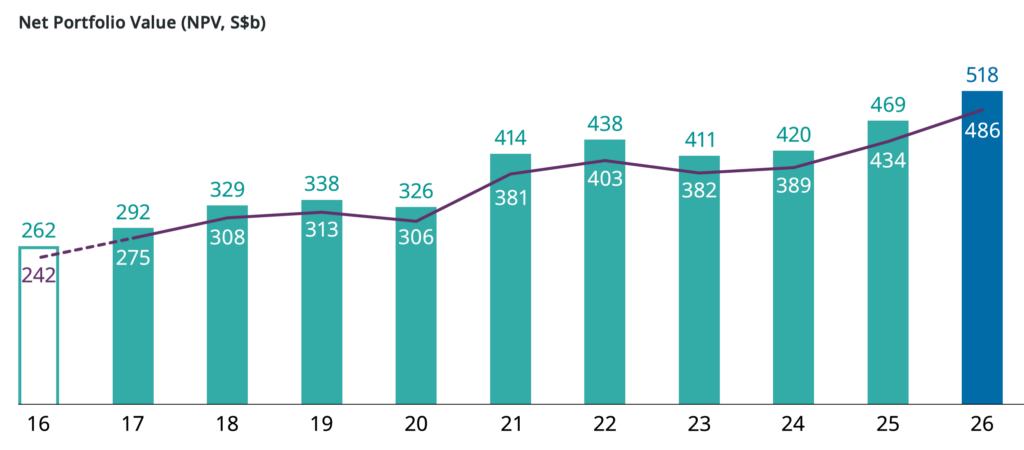
In FY2025 ending on Mar 31, 2026, its value had exceeded S$500 billion for the first time in history.

Since the pandemic of 2020, it has jumped by close to S$200 billion, or very nearly 60%. This figure has to be discounted by S$25 billion that the government reinjected into Temasek from the dividends the company paid, which do not count towards its performance.
Nevertheless, a net increase of around 50% in six years, including over 10% (S$49 billion) last year alone, is nothing to complain about.
GIC
GIC is quite a bit more opaque about its activities.
It doesn’t reveal the total amount of assets under management, and it doesn’t even report one-year return rates. Its reporting is deliberately understated, focusing on long-term returns over at least five-year periods.
Unlike Temasek, it is less invested in equities, although that is currently changing, and its share has grown to 56% last year. Traditionally, however, it preferred safer assets, which explains the visibly lower returns.
That said, an annualised 6.2% over the past decade is not bad at all.

But what about the total amount? How much money is hidden away in GIC and invested by the company all over the world? Well, the government won’t tell us, but there are some good guesses out there.
Two sources, the Sovereign Wealth Fund Institute and Global SWF, both appear to be very close in their estimates, with the former putting the total AUM of GIC at US$1.18 trillion and the latter valuing it slightly lower, at US$1.16 trillion.
This translates to roughly S$1.5 trillion.
However, not all of it can be counted as Singapore’s reserves. A huge chunk of the money represents CPF contributions.
The cash from CPF is not sent to GIC directly, but instead converted to bonds, the proceeds from which only then come under GIC stewardship. Because the bonds become the government’s liability, it is obligated to fund them in every available way. It is done this way to legally protect your CPF funds with the entirety of the country’s reserves rather than just the GIC portion.
For our calculations, it means that we have to subtract at least S$676 billion, reported by CPF as the sum of all balances in Q1 2026, from the S$1.5 trillion estimate above.
Once we do that, we’re left with a still very handsome S$824 billion, which is the upper bound of the financial reserves under management by GIC (this figure is not precise, as there may be some other deductions, but it works as a general ballpark).
Combined with Temasek’s S$518 billion, we’re already over S$1.3 trillion, and we haven’t even looked at MAS yet.
Monetary Authority of Singapore
Ministry of Finance defines financial reserves as the sum of assets managed by GIC and Temasek, and the Official Foreign Reserves, held and invested by the Monetary Authority of Singapore.
As of Jun 2026, the value of OFR stood at over S$551 billion. Together with the estimated S$1.3 trillion at the other two organisations, the total amount of Singapore’s financial reserves could be close to S$1.9 trillion and cross S$2 trillion in 2027.
How accurate are these figures?
The data for MAS is accurate to the dollar. Temasek reports its figures within a fairly narrow range, which depends on whether some of the unlisted assets are valued by their book value or marked to current market conditions. GIC is, officially, a total unknown.
However, we may try to use the NIRC formula to check if our calculations make sense.
The portion of reserves that counts towards NIRC is actually a bit smaller—around S$1.4 trillion. This is because MAS has to keep most of the reserve assets to match the various liabilities it has on its books.
We also know the following things about NIRC:
- It is calculated on the basis of the expected annual long-term real rate of return
- The government takes 50% of those returns
- This year’s NIRC was estimated at S$28.5 billion
That implies expected annual returns of about S$57 billion. If the pool of reserves qualifying for NIRC is roughly S$1.425 trillion, those expected returns amount to around 4% a year.
An expected annual 4% rate of return sounds highly plausible for Singapore government’s usually conservative approach, and appears to fit in the S$1.4+ trillion range of reserves qualifying for NIRC, which I mentioned above.
This is the cushion that remains profitably invested, financing about 20% of Singapore’s budgetary expenses each year. Another few hundred billion remain in MAS, together approaching nearly S$2 trillion in financial reserves that the country strengthen its resilience against financial shocks and currency market stress.
On the financial front, then, Singapore doesn’t seem to have too much to worry about. It can repel any speculative attacks on the SGD and keep taxes low thanks to a consistent flow of investment returns.
- Read other articles we’ve written on Singapore’s current affairs here.
Featured Image Credit: f11photo/ depositphotos


Every time a carrier says “no upfront cost,” I brace myself for the asterisk buried in the fine print. T-Mobile’s newest 36-month financing plan has one too, though it’s dressed up quite nicely.
T-Mobile, the second largest wireless carrier in the United States, just rolled out a financing option called EIP Flex 36. As the name suggests, it stretches device payments across three full years instead of the usual two. The real hook, however, is what it lets you skip at checkout.
So what exactly does T-Mobile’s EIP Flex 36 change?
Normally, even when a carrier spreads out the cost of your phone, you’re still stuck paying overheads (call them hidden costs) like sales tax, activation charges, or maybe even an upfront deposit on the spot.
And that is exactly what makes T-Mobile’s EIP Flex 36 worth your attention. The new plan folds all of that into your monthly bill instead. If you qualify for the plan, you can walk out of a T-Mobile store having paid nothing at all.
It works across a range of phones, watches, and tablets. You can still stack it with whatever device promotions T-Mobile is currently running. A limited-time 0% APR further sweetens the deal, though the company hasn’t said exactly when the promotional offer expires.
The financing term itself has also been extended from 24 months to 36 months, effectively reducing your monthly payments while keeping you tied to the same device and the same carrier for longer.
Is there a catch?
While the plan sounds quite appealing to me, the only catch, for now, is that the “$0 down” promise only applies to customers T-Mobile considers well-qualified. Furthermore, the carrier hasn’t clarified what everyone else will actually owe upfront.
Beyond the new plan, T-Mobile has also introduced Student Perks, which is a $30-per-month single line plan with autopay enabled, plus a bundled 5G home internet deal that includes a prepaid card worth up to $200.
That is everything that the carrier has announced, and I can confidently say I know the reason behind it. Stretching payments to three years right before a launch season packed with pricier phone launches doesn’t feel like a coincidence to me. Longer financing terms tend to hide rising device prices by dividing them into monthly payments even as total costs climb.
With this rollout landing right after Samsung’s pricier Galaxy Z Fold 8 and Z Fold 8 Ultra launch, and right before the Pixel 11 and the iPhone 18 Pro, which are rumored to debut at a higher price than the outgoing models, T-Mobile’s timing reads less like a customer favor and more like a strategy to keep its lines engaged and monthly revenues coming in.

I am going to start where no good teacher should start, with a $10 word: epistemology. It refers to a branch of philosophy that explores how we know what we know – something scholars like John Dewey argued is deeply tied to experience, not just information.
This word takes me back to my doctoral graduation when my father-in-law said with good-natured humor, “Well, Ev… there’s a lot of [stuff] you can’t learn from a book.” At the time, I didn’t know what to say, but any teacher worth their salt will tell you: he’s right.
Pre-service teachers – myself included – often lament that they didn’t really learn to teach until the rubber-meets-the-road experience of student teaching or that first job. This is the challenge of teaching pre-service teachers. I’ve been doing it for a handful of years now, and I see a trend – the TikTok way of knowing in education. It’s got me wondering how we adapt our practices based on my experience during my recent final exams with pre-service teachers.
The TikTok Way
For example, I ask my students to make two tangible items to try and circumvent AI. One item is a teacher creed. I hand out “fancy” paper and tell them to create something they might read every teaching day – something to remind them not if, but when teaching gets hard. These are heartfelt, colorful creations. They write things like, I will show up with a good attitude. Even on my worst day, I will be someone’s favorite teacher. I cringe a bit, knowing how more seasoned educators might scoff but that is perhaps why I assign them – to bottle that early hopefulness in a landscape that often doesn’t create it for new teachers.
The second item is to create “One One-Pager to Rule Them All!” Students make non-linear, doodle-style notes throughout the semester, and this final asks them to zoom out and represent everything essential we’ve learned through a map of connections, images, and ideas.
I love this assignment because I can see who is connecting the dots and who is simply regurgitating the text. I sit with each student for five to seven minutes as they “show and tell” the work. As they read their creeds, I am heartened and sometimes even tear up. And in conversation after conversation this semester, I heard the same phrase, almost as a confession mid-conference:
“I know it’s not research-y, but in a TikTok I saw…”
“I know it’s not the best source, but I saw a reel that said…”
“This guy I follow always says…”
Each of these notes expanded or connected my own thinking about course content. Some couldn’t be backed in my mind of research, but others could. So, instead of arguing, I asked questions: Who created that content? What might their motivation be? Why does it matter to you? This kind of questioning reflects what Marilyn Cochran-Smith and Susan Lytle describe as “inquiry as stance” – an orientation where teachers are active investigators of knowledge.
An Epistemological Shift
We are in a shift in epistemology. Future teachers are learning not only through peer-reviewed research or textbooks, but also through short-form video, personality-driven content, and lived teacher experience shared in real time – what media scholars like Henry Jenkins describe as a more participatory culture of knowledge. This is democratizing, the dismantling of the silo that has long held educational research out of reach. But this is also destabilizing.
During my first years of teaching, I cried in my car a lot. If I had had the megaphone of TikTok influencers celebrating how they left education, or even my own content microphone, I’m not sure I would have made it through to my later years of teaching that are still hard but more grounded and fulfilling.
Admittedly, some positions are ones to leave. Yes, at times educator working conditions are not what they should be but how do we help pre-service and early-career teachers move through the baptism-by-fire years while being bombarded by voices – many from people who have left the profession and now narrate it from the outside? Some of the content is helpful. Some of it is not. And all of it is loud.
I wonder if our teacher preparation programs are keeping pace with how knowledge is actually being formed. It leads me to my favorite teacher question, “So what? What do we do now?” How long do we hack away at the plant growing up the wall, and when is it time to embrace the aesthetic of a vine-covered building as something worth studying?
Instead, what if we become weavers of stories? What if we help students craft their own and build connections of knowing? What if we engage lived experience not as secondary to research, but as a complementary form of knowing? When have we had so much access to real-time teacher voices about things that happened to them in the classroom that day?
Just because something is visual, narrative, click-baity, and social doesn’t mean it is missing the mark or doesn’t engage a pedagogical question worth exploring. This TikTok wondering is happening whether we embrace it or not, so what if we see it as a new charge to help future teachers engage these voices critically, rather than pretending they don’t exist?
Here are some ideas I’m playing with. I’m curious what you might add.
Ed Content Fridays. Students bring in content that connects with the week’s readings and learning from their own scrolling. Discuss it in a Spider-Web format that employs elements of a librarian CRAAP test to help students develop habits of mind around credibility and content creator motivation.
Use a C3WP writing strategy that engages reels and posts to kick off class. Start with what students know as a free write and then bring in content to have them expand their arguments and defend thoughts with research from our shared text. If students bring it in, they find it interesting, and we can require a citation connection to the course text or researchers.
Like/Share/Subscribe. Share strong online content that sings from reputable sources with students. Syllabi and course hubs can be places to curate rich content collaboratively.
Have students create their own content. CapCut on a desktop or Edits on a phone are surprisingly easy plug-and-play tools to make short form videos, and we can up the academic requirements with or without student posting. Thoughtful content can grow out of our rich history of educational research, bringing rich, thoughtful voices in among the pervasive ranting. I’m not saying we shouldn’t be about the work of educational reform and that a good rant doesn’t have its place, but this new way of knowing and sharing knowledge is sitting in our desks waiting for us to light the fire.
Yes, my step-dad is right, there is so much we can’t learn from a book, but maybe there is still so much we can learn from our own students in their own ways of knowing, even if we don’t fully understand them ourselves. What if our ways of knowing weave together, creating something beautiful?
If you’re in the market for a new window air conditioner for summer 2026, there are a few qualities you’re likely mindful of in your search. While it’s worth taking the time to find one that physically fits your space, provides ample cooling, and is an overall budget-friendly air conditioner, one would be remiss to overlook the matter of sound. After all, air conditioners are notorious for getting rather noisy while running. Not only can this prove a nuisance for you in your living space, but those living nearby will also have to endure the rumbles and hums of the machine.
On the whole, it’s expected that a window air conditioner will make some kind of noise. Generally speaking, they pull in electricity to run one fan, which, in turn, pulls in warm air. Simultaneously, this electricity powers a compressor to push the coolant through the coils, thus cooling the air. Another fan then pushes the cooled air out into the room, quickly bringing down the indoor temperature. That’s a lot of moving parts, and even right out of the box, air conditioners are going to make noise as a result. The average window air conditioner tends to run between 50 and 60 decibels, with models below that level considered more noise-conscious examples.
With that said, modern window air conditioner technology has greatly dampened the noise created by these essential summer appliances. For those in want of quieter summer cooling, these are some of the best options currently available.
1. Midea U-shaped smart air conditioner
Throughout its existence, Midea has become recognized among the most reliable air conditioner brands out there. At the same time, the brand has worked to improve its units in other ways, such as their volume levels. The Midea U-shaped smart window air conditioner, which comes in 8,000, 10,000, and 12,000 BTU forms — models MAW08V1QWT, MAW10V1QWT, and MAW12V1QWT, respectively – is significantly quieter than most air conditioners like it for sale today. Supposedly, it’s 10 times quieter than its competitors. The company claims it can get as quiet as 32 decibels while in use, though higher cooling settings will bump that number up to some extent.
The Midea U-shaped smart window air conditioner comes with a bevy of other noteworthy specs and features alongside its remarkably low volume level. As the name suggests, it’s a smart device that can be controlled with the SmartHome app, and the U-shaped design keeps the unit held in place via brackets. Should you want or need to open your windows, you can do so without it falling out. It also claims 35% faster cooling with FlashCool mode and 35% increased energy efficiency thanks to its variable-speed inverter technology. The Midea website lists these window units at $399.99, $449.99, and $509.99 depending on the BTUs, each coming with the Midea one-year limited warranty.
2. GE model AHTT08BC Profile ClearView ultra quiet window air conditioner
General Electric has an incredibly deep product catalog with well over a century of development behind it. In fact, there are probably things that you didn’t know GE makes. Meanwhile, some of its most well-known offerings are its window air conditioners, including those that prioritize producing as little noise as possible. The $484.00 GE model AHTT08BC Profile ClearView window air conditioner is one such model, advertising noise levels as low as 41 decibels on low cool with Quiet Mode turned on. It reaches such low volumes while cooling rooms up to 350 square feet at 8,300 BTU.
Like any other modern air conditioner, there’s more to this GE model than producing less noise than previous models. The big draw for this unit is its unique design, which features a front portion that hangs below the windowsill. This means improved visibility out the window even while the unit is installed. Within is a pump to release condensation outside as it accumulates, and it dehumidifies rooms at a rate of approximately 1.7 pints per hour. This is another example of a smart air conditioner, as users can control it with the SmartHQ app over Wi-Fi, though it also comes with a separate remote control. GE includes limited warranty coverage on this unit, too.
3. Friedrich Chill Premier inverter air conditioner
Friedrich is one of the major window air conditioner brands currently on the market, and as such, it has released units that deliver comfortable cooling without compromising on noise level. For example, the Friedrich Chill Premier inverter air conditioner is somewhat expensive at over $700 through sources like Grainger, but it delivers if you need an air conditioner that keeps the noise down. When in cooling mode, this unit is advertised as delivering 42 decibels, while the fan alone drops that number to just 32 decibels. On top of that, it comes with some other key specifications.
Aside from being a comparatively quiet window unit, the Friedrich Chill Premier inverter air conditioner has some other intriguing qualities. Window-only models range from 8,000 to 12,000 BTU per hour; they can be operated via the FriedrichGo app over Wi-fi, and they’re said to operate 35% more efficiently than other traditional air conditioner models. Installation is simplified, too, featuring a frame, side curtain, and mounting hardware to keep it in place. This is because the unit is designed for window-opening even once installed, just in case you want to let some outside air in without powering the air conditioner up. No matter the specific model, the Friedrich limited warranty comes standard as well.
4. Frigidaire FHWW145WE1 inverter air conditioner
While the name tends to conjure mental images of its refrigerators, since it is one of the major refrigerator brands, and other kitchen appliances, Frigidaire has a lot more to offer. It has entered the air conditioner game in its own right, and it has some noise-conscious models in its catalog to boot. A low-noise option is the Frigidaire model FHWW145WE1 inverter air conditioner, typically retailing for $609 through the Frigidaire website. The company claims that this model goes as low as 42 decibels specifically on its Ultra Quiet setting, with higher speed and cool settings gradually increasing the volume.
Digging deeper into what this air conditioner can do, it’s said to provide 14,000 BTU of cooling, making it ideal for rooms between 550 and 700 square feet in size. Thus, Frigidaire recommends this unit specifically for larger, multi-use areas like dens and living rooms rather than smaller ones like bedrooms. The Frigidaire app allows for control from a distance, and a physical remote control comes included. Unlike other air conditioners on this list, however, it takes on a more traditional window air conditioner shape and setup, preventing window-opening while it’s installed. Should something go wrong shortly into its use life, Frigidaire’s one-year warranty comes included.
5. Hisense AWUS1225TW UltraSlim window air conditioner
Hisense has taken its place in the pantheon of well-known air conditioner brands, and in doing so, it has joined the industry-wide race to lower window unit decibel levels. One of its strongest efforts in this regard is the Hisense AWUS1225TW UltraSlim window air conditioner, boasting cooling at 35 decibels at the absolute lowest. At the time of publication, Lowe’s has this unit for sale for $449.14, so for a relatively average cost for a window unit, you receive an air conditioner notable for low-volume cooling in addition to several other key specs and design features.
This Hisense unit is listed at 12,000 BTU, so the brand recommends using it in rooms up to 550 square feet in size. This is another low-profile unit designed to leave the window above free of obstructions, though side privacy screens are included for those who want them. According to Hisense, installation is relatively simple, too. All it requires is setting the bracket on the windowsill, putting the unit on top of it, and adjusting and securing the bracket in place. Remote and Wi-Fi control through the ConnectLife app are built in, and a two-year Hisense warranty automatically comes included with purchase.
How these air conditioners were selected
These window air conditioners weren’t chosen at random; a multi-step research process went into their selection. The first step was to find units known for quiet operation, ideally with decibel levels listed somewhere in their descriptions. For reference, we also looked at a variety of air conditioners to determine the average volume level for standard units in 2026. It also helped to know under what circumstances users could expect such low decibel levels. Ideal units highlighted their volume when actively cooling as opposed to when running their fan alone.
In addition to sound level, we wanted to include air conditioners that were more than capable of cooling down a room. If it couldn’t effectively cool, no matter how quiet it was, we couldn’t in good conscience recommend it on this list. Additionally, we prioritized seeking out air conditioner units from major, trusted brands, as well as those that weren’t too absurdly expensive. It was a given that these units would cost a fair amount of money, but we chose not to go too pricey with most of our recommendations for the sake of the consumer.
To speed up Google Chrome, enable Memory Saver in Performance settings, close high-RAM background tasks using Chrome’s built-in Task Manager, remove unused browser extensions, and ensure the browser is updated to the latest version. Clearing accumulated browsing data and configuring standard page preloading will also restore rapid page load speeds without requiring third-party utility software.
Quick Take: Essential Chrome Optimization Steps
When Google Chrome becomes sluggish, high memory consumption from unoptimized background tabs and bloat from legacy extensions are usually the primary culprits. According to global desktop browser market share data from Statcounter, Chrome continues to dominate desktop web browsing globally, making system resource efficiency a primary concern for millions of users.
To get Chrome running smoothly again without losing your saved preferences or browsing history, focus on six core interventions:
- Turn on Memory Saver: Automatically frees RAM from inactive background tabs.
- Kill heavy processes: Use Chrome’s Task Manager (
Shift + Esc) to identify and close memory-hogging tabs. - Prune extensions: Audit
chrome://extensionsand disable tools you do not actively use. - Adjust preloading and graphics: Enable standard preloading and toggle hardware acceleration based on your GPU capability.
- Clear cache and reset settings: Remove corrupted temporary site data that slows down page rendering.
- Restart and update: Apply pending security patches and clear browser heap memory through a clean restart.
Prerequisites for Optimizing Chrome
Before modifying browser configurations, verify that your system meets the basic operational conditions listed below:
| Requirement | Recommended Specification | Why It Matters |
|---|---|---|
| Operating System | Windows 10/11, macOS 11+, or ChromeOS | Ensures compatibility with modern Chrome memory management APIs. |
| Browser Version | Chrome Version 110 or higher | Includes native Memory Saver, Energy Saver, and modern security protocols. |
| System Memory (RAM) | 8 GB minimum (16 GB recommended) | Prevents severe OS-level disk swapping when running multiple web applications. |
| Account Backup | Chrome Sync enabled or bookmarks exported | Protects browsing data if a full browser settings reset is required. |
Step-by-Step Chrome Speed Optimization Guide
Follow these steps sequentially to isolate performance bottlenecks and reconfigure Chrome for optimal speed.
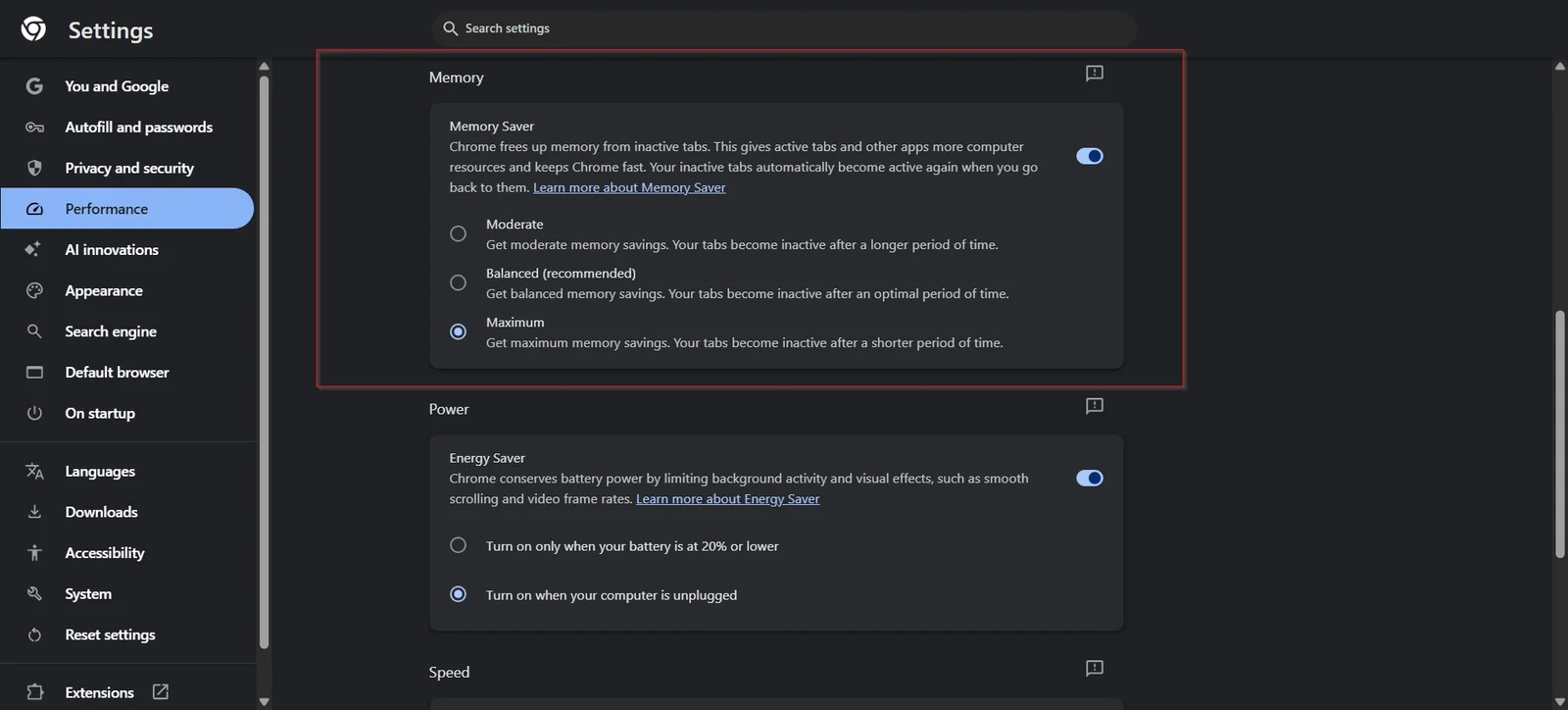
Step 1: Enable Built-in Performance Modes (Memory Saver & Energy Saver)
Chrome includes automated resource controls designed specifically to prevent inactive tabs from hoarding system RAM. You can manage these settings by enabling Chrome’s built-in Memory Saver and Energy Saver features to reduce RAM consumption on inactive tabs.
- Open Chrome and click the three vertical dots (Menu) in the top-right corner.
- Select Settings and click Performance from the left-hand navigation sidebar.
- Toggle Memory Saver to the On position.
- (Optional) If you frequently work with specific web applications that must remain active in the background (such as webmail or audio players), click Add next to “Always keep these sites active” and enter their domain names.
- On laptop devices, toggle Energy Saver on to limit background visual effects and high frame rates when running on battery power.
Expected Outcome: Inactive tabs discard their held memory while preserving their title and tab state. When you click back onto a sleeping tab, Chrome reloads the page seamlessly.
Step 2: Identify and Terminate Resource-Hungry Tabs with Chrome Task Manager
A single misbehaving web page or background script can cause system-wide slowdowns. For additional background task management, follow Google’s official Chrome performance documentation to identify processes hogging system memory.
Branching Shortcut by Operating System:
- Windows & ChromeOS: Press
Shift + Escwhile inside Chrome. - macOS: Click Window in the top system menu bar and select Task Manager (or click Menu > More Tools > Task Manager).
- Inside the Task Manager window, click the Memory footprint column header to sort all active processes from highest to lowest consumption.
- Locate individual tabs or background processes consuming excessive RAM or CPU cycles (e.g., over 500 MB for a single static tab).
- Click on the offending process and select End Process at the bottom right.
Expected Outcome: The high-resource process terminates immediately, releasing RAM back to the operating system and stopping CPU thermal throttling.
Step 3: Audit, Disable, and Uninstall Unnecessary Extensions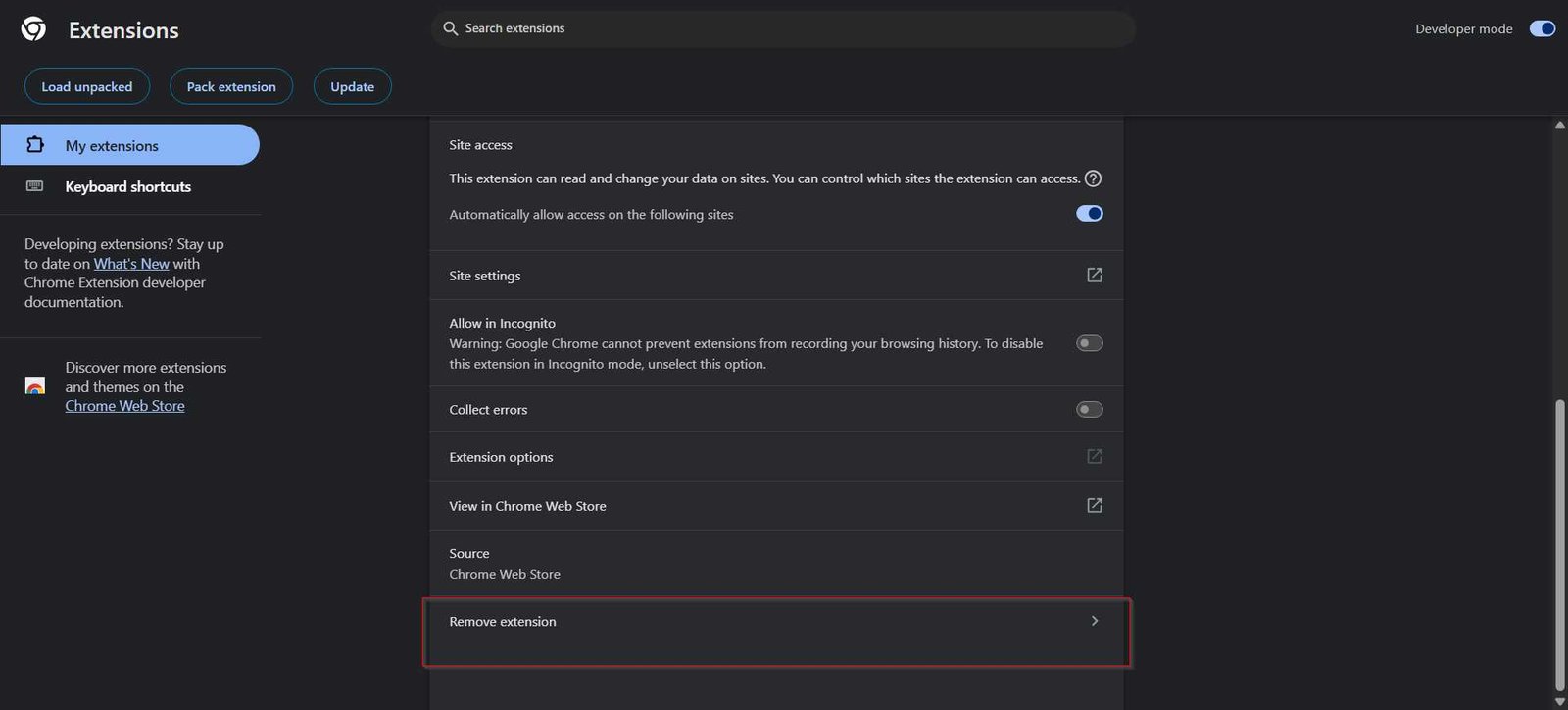
Browser extensions run persistent background scripts that inspect network traffic, modify page DOM trees, and consume memory. Only install extensions from the official Chrome Web Store extensions catalog and audit permissions regularly.
- Type
chrome://extensionsinto the address bar and press Enter. - Review every installed extension. Toggle off the switch for any extension you do not use daily.
- For extensions you no longer need, click the Remove button.
- If you suffer from frequent form submission crashes, avoid relying on outdated third-party form helpers; rely on Chrome’s built-in Autofill or maintained password managers instead to avoid script conflicts.
Expected Outcome: Lower baseline memory consumption upon browser launch and reduced latency when loading complex web pages. Learn more about essential Chrome extensions for productivity that maintain low system overhead.
Step 4: Configure Page Preloading and Hardware Acceleration
Chrome can predict which links you are likely to click and preload web assets in advance, speeding up navigation across frequently visited sites.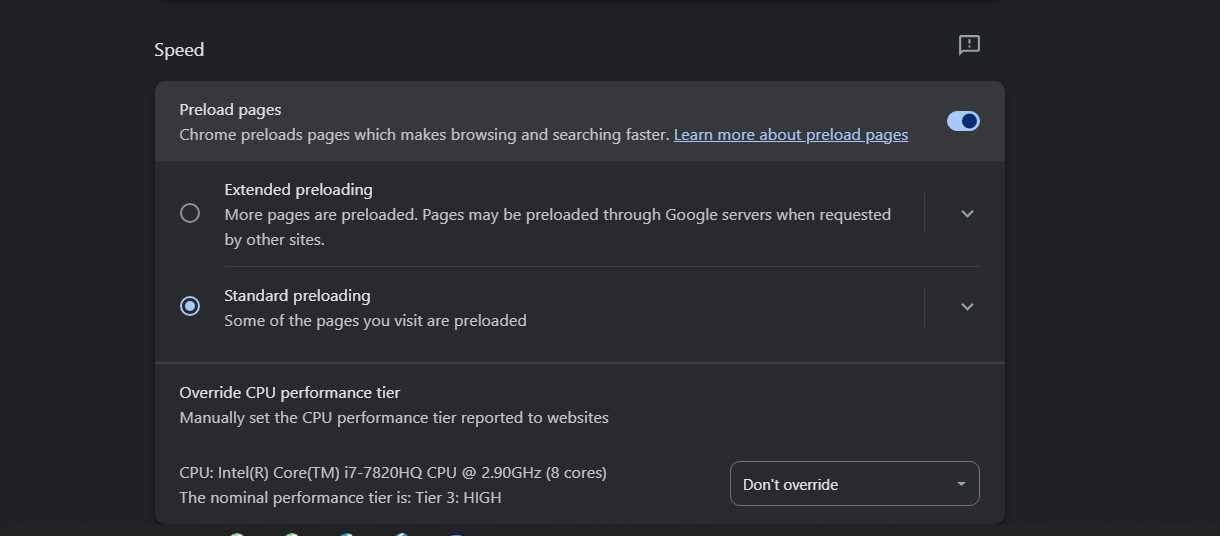
- Navigate to
chrome://settings/performance. - Scroll to Preload pages and select Standard preloading. (Avoid Extended preloading if you are on a metered connection or limited RAM).
- Next, navigate to
chrome://settings/systemin the left menu. - Verify that Use graphics acceleration when available is toggled On if you have a dedicated or modern integrated GPU. If you experience screen flickering or video playback lag, toggle this setting Off and restart Chrome.
Expected Outcome: Instantaneous page transitions for internal links and smoother rendering of video content. You can also configure advanced Chrome flags like chrome://flags/#smooth-scrolling if default page scrolling feels jumpy.
Step 5: Clear Cached Data and Reset Corrupted Browser Settings
Over months of use, corrupted web cache, stale cookies, and misconfigured permissions can degrade browser responsiveness.
- Press
Ctrl + Shift + Delete(Windows) orCmd + Shift + Delete(Mac) to open the Clear browsing data menu. - Select the Advanced tab and set the time range to All time.
- Check Cached images and files and Cookies and other site data. Click Clear data.
- If browser behavior remains erratic, navigate to
chrome://settings/resetand click Restore settings to their original defaults.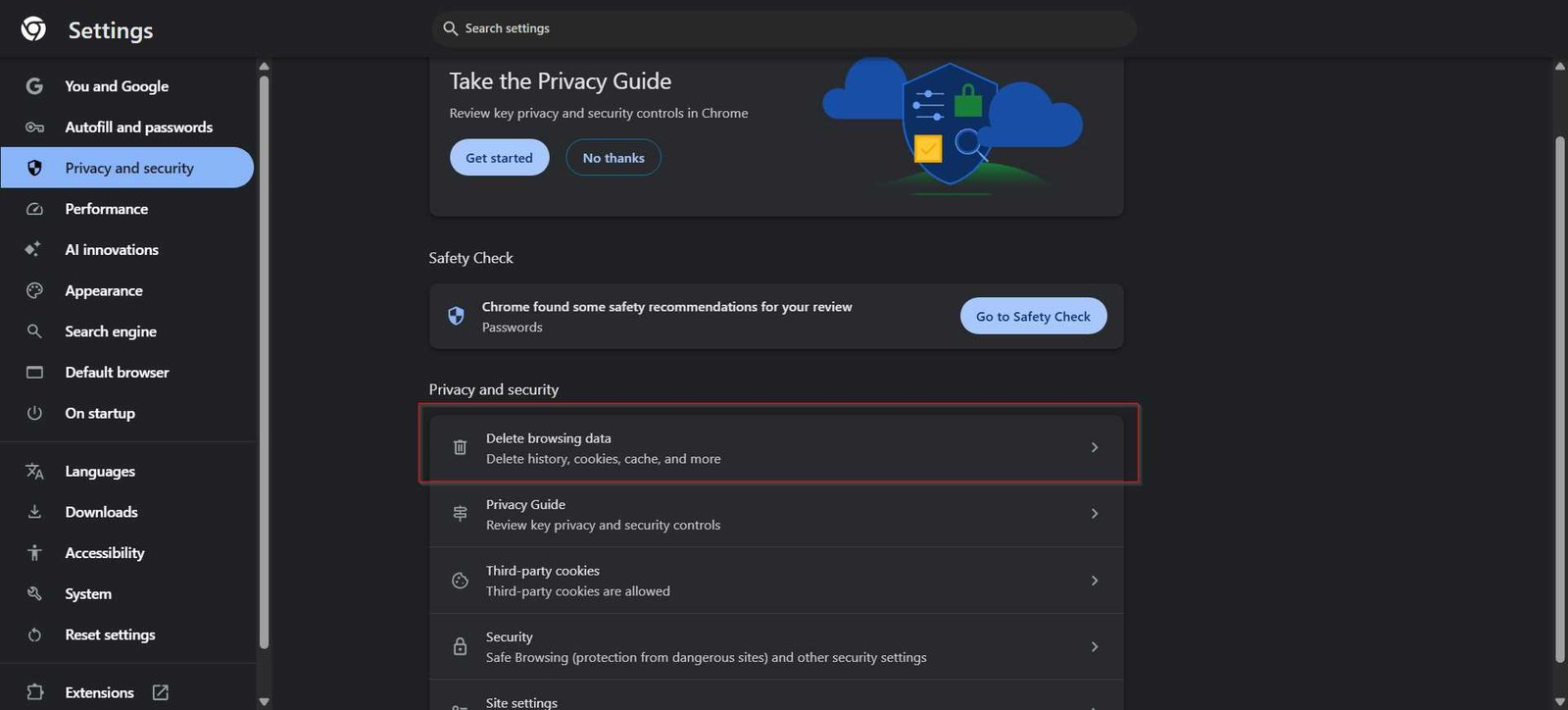
Expected Outcome: Elimination of stale browser cache states and misconfigured flag overrides. Review our full guide to clear your browser cache and cookies safely without losing critical saved passwords.
Step 6: Update Chrome and Perform Routine Restarts
Chrome continuously updates its V8 JavaScript engine and memory allocation routines. However, background updates only take effect when the browser restarts completely.
- Type
chrome://settings/helpinto your address bar and press Enter. - Chrome will automatically check for pending updates and download them.
- When prompted, click Relaunch to apply the update.
- Get into the habit of closing and re-opening Chrome at least once a week rather than leaving it running indefinitely during system sleep cycles.
Expected Outcome: Patched memory leaks, updated security definitions, and a fresh browser heap memory state.
How to Verify Chrome Performance Improvements
To confirm that your optimization efforts yielded tangible performance gains, perform the following verification checks:
- Check Baseline Memory Usage: Open Windows Task Manager (
Ctrl + Shift + Esc) or macOS Activity Monitor. Compare overall system RAM usage before and after enabling Memory Saver with 10–15 tabs open. You should observe a 30% to 40% reduction in total memory allocated to Chrome processes. - Inspect Individual Tab States: Hover your mouse cursor over an inactive tab. The hover preview card should indicate that the tab is “Inactive” or sleeping, confirming that Memory Saver is functioning.
- Test Script Execution Speed: Load heavy web applications (like Google Sheets or web design tools). Notice whether page interaction and input latency are crisp and responsive.
Troubleshooting Common Chrome Performance Issues
Chrome Still Uses High Memory After Enabling Memory Saver
If Chrome continues to consume excessive RAM despite enabling native performance features, background extensions or pinned tabs are usually bypassing tab sleep rules. Pinned tabs, pages playing background audio, or sites with active web socket connections (like live messaging apps) are automatically excluded from memory deactivation.
Fix: Open chrome://extensions, temporary disable all non-essential extensions, and check if memory drops. Unpin non-critical tabs and review your “Always keep these sites active” list under chrome://settings/performance to ensure unnecessary domains were not added accidentally. For deeper diagnostics, read our guide on how to troubleshoot high Chrome RAM usage.
Web Pages Render Slowly or Video Playback Stutters
Slow page rendering or choppy video playback (especially on high-resolution streams) often points to GPU hardware acceleration conflicts or outdated graphics drivers.
Fix: Go to chrome://settings/system, toggle Use graphics acceleration when available to the opposite setting, and click Relaunch. Additionally, type chrome://gpu into the address bar to verify whether hardware acceleration features are marked as “Hardware accelerated” or “Software only.” Update your system’s graphics drivers if hardware acceleration is failing.
Unwanted Pop-ups, Search Hijacking, or Malware Symptoms Persist
Starting in Chrome version 111, Google retired the standalone Chrome Cleanup Tool previously found under browser settings. Users can no longer run a native “Clean Up Computer” scan directly inside Chrome.
Fix: Ensure Google Safe Browsing is configured to Enhanced protection by visiting chrome://settings/security. If malicious search redirects or persistent pop-ups remain, review your modern browser security settings and run a thorough malware scan using dedicated OS-level malware scanners like Malwarebytes or Microsoft Defender. If needed, consult our guide on standalone malware removal tools.
Where This Approach Has Limits
Optimizing software settings can only reclaim available hardware capacity; it cannot overcome physical hardware bottlenecks. If your machine has 4 GB of RAM and is running modern web applications alongside an operating system that requires 3 GB on its own, Chrome will inevitably slow down regardless of setting tweaks.
Additionally, while preloading pages speeds up navigation, it increases background data usage, which can be undesirable on metered mobile hotspots. Finally, disabling hardware acceleration resolves rendering glitches on older GPUs but offloads graphics tasks to the CPU, which may elevate CPU temperatures and reduce battery life on laptops.
Key Takeaways
- Built-in features like Memory Saver automatically suspend inactive tabs, reducing RAM footprint by up to 40%.
- Use
Shift + Esc(Chrome Task Manager) to pinpoint and close specific high-resource tabs instead of restarting the whole browser. - Google’s legacy “Clean Up Computer” feature was permanently removed in Chrome 111; use Enhanced Safe Browsing and standalone antivirus tools for malware detection.
- Regularly prune unnecessary browser extensions, as they run continuous background scripts that degrade performance.
- Restarting Chrome weekly is mandatory to apply pending security updates and purge browser heap memory leaks.
Frequently Asked Questions
Why did Google remove the “Clean Up Computer” option from Chrome settings?
Google retired the built-in Chrome Cleanup Tool in March 2023 (Chrome version 111). Google cited a steady decline in local software hijacking complaints, significant improvements in Google Safe Browsing real-time URL detection, and enhanced anti-malware capabilities built directly into Windows Defender and modern operating systems. Chrome now relies on real-time cloud protection rather than local disk scanning.
Will turning on Memory Saver log me out of active web sessions?
No. When Memory Saver deactivates an inactive tab, it releases the system RAM allocated to rendering the page, but it preserves the tab’s session cookies, authentication tokens, and state. When you click back onto the tab, Chrome reloads the page with your active login intact. However, unsaved text entered into unsubmitted web forms on non-autosaving pages may be lost if a tab is discarded.
Does disabling hardware acceleration make Chrome faster or slower?
On modern systems with functioning graphics drivers, keeping hardware acceleration enabled makes Chrome significantly faster by offloading page rendering, CSS animations, and video decoding to the GPU. Disabling hardware acceleration should only be done as a troubleshooting measure if you experience visual artifacts, screen tearing, or video playback glitches caused by buggy graphics drivers.
Is it safe to change experimental flags in chrome://flags?
Flags located in chrome://flags are experimental features that Google developers use for testing. While popular flags like Smooth Scrolling (chrome://flags/#smooth-scrolling) are generally safe, changing unstable flags can cause browser crashes, tab freezing, or data loss. If Chrome becomes unstable after modifying flags, return to chrome://flags and click the Reset all button at the top right.

SpaceX Joins a Club It Was Missing From In New Nvidia Deal: How Will Stocks React?

10 Forgotten Sci-Fi Books That Have Aged Like Fine Wine

Crypto In Serious Trouble?


-

 Business6 days ago
Why Trees Belong on the Risk Register
-

 Fashion4 days ago
Weekend Open Thread: Wit & Wisdom
-

 Politics4 days ago
Meta enters AI-training agreement with far-right ‘propaganda rag’ Newsmax
-

 Crypto World3 days ago
MicroStrategy Post-Earnings CLARITY Act Push Could Add New Catalyst for Its Stock
-

 Politics6 days ago
Reform UK betrays West Mids residents by running from party pledges
-

 Business7 days ago
Major shareholder moves on Canyon
-

 Crypto World4 days ago
XRP Ledger v3.3.0 brings five institutional features
-

 News Videos5 days ago
Bitcoin Enters the 3rd Stage of the Bear Market
-

 Politics2 days ago
Zack Polanski: an incitement to murder Nigel Farage?
-

 Crypto World7 days ago
Kraken Enables Retail Access to Jersey Mike’s IPO via Tokenized Shares
-

 Politics5 days ago
Luke Littler’s dominance sparks GOAT debate
-

 Sports5 days ago
Seema Kaliramna Wins Discus Throw Bronze, Takes India’s CWG Medals Tally To 17
-

 Crypto World4 days ago
New York sues Kalshi over prediction market gambling
-

 Crypto World2 days ago
Crypto PAC spending tops $2M in Michigan House race
-

 Business7 days ago
Johnson & Johnson agrees to $5.5B settlement over talc cancer claims
-

 Business4 days ago
Trump Announces Hamas Disarmament Agreement as Iran Strikes Kuwait Air Base and US Attacks Pause Overnight
-
 Tech6 days ago
Gemini can now summarize the messiest comment threads in Google Docs
-

 Tech3 days ago
ESET tracks rise in malicious AI skills and adaptable malware
-

 NewsBeat5 days ago
Four people die trying to cross Channel in small boats
-
 Tech4 days ago
Gemini Spark can now use Chrome logins and saved passwords to run errands on your behalf
You must be logged in to post a comment Login