Denon is taking a big swing at multi-room audio in 2026 with a major revamp of its HEOS lineup, with three all-new wireless home speakers, and why not? The multi-room category continues to appeal to serious listeners who want convenience without giving up performance. And with Sonos still dealing with the fallout from its 2024 app debacle, there is real opportunity for other audio brands to chip away at its market grip.
Denon’s approach comprises three rather pricey options, including the entry-level Denon 200 ($399), the midrange Denon 400 ($599), and the flagship Denon 600 (a whopping $799). The Home 200 and Home 400 are particularly poised to take on Sonos and its similarly designed Era 100 and Era 300 speakers, so it was only natural that we took a look at those two first, and I’ll be comparing them to those Sonos models early and often.
Each of Denon’s new speakers offers some form of Dolby Atmos Music support (virtualized in the Home 200), along with convenient setup and control via Denon’s HEOS app, and multiple connection options, from Wi-Fi and Bluetooth to 3.5mm and USB input. The obvious question is whether the new lineup delivers performance that justifies the premium pricing.
The short answer is yes, you’re getting what you pay for here, at least when it comes to audio quality. But that doesn’t necessarily mean you should throw in your Sonos card and make the swap just yet. Here’s how it all shakes out.
Advertisement
Swift Setup
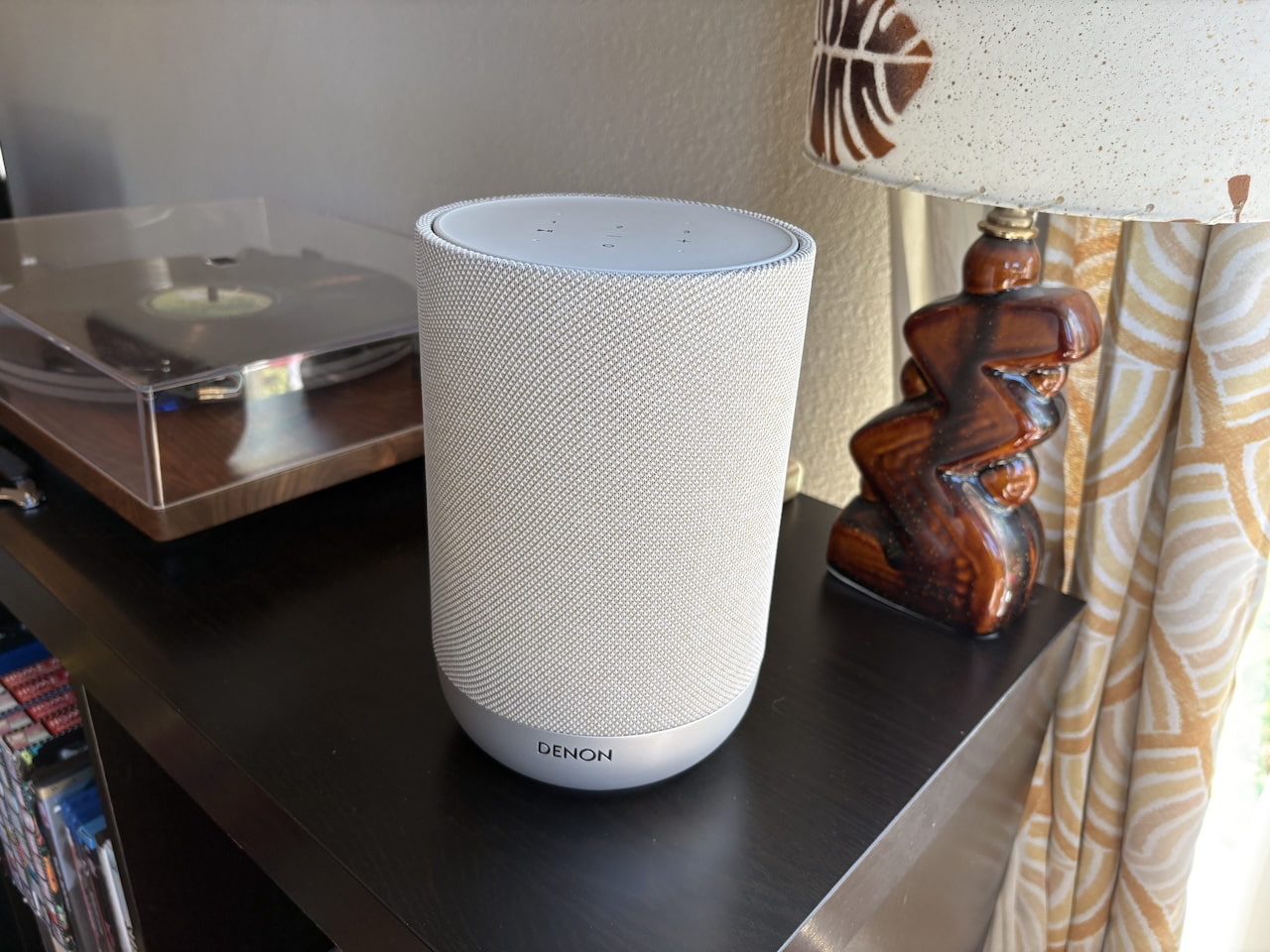
Denon Home 200
Getting the Home 200 and Home 400 ready to play is as simple as pulling them from their cardboard packaging, plugging in, and jumping on the HEOS app. The app immediately feels Sonos-like, though the design and layout are a bit clunkier. Most importantly, it makes setup and Wi-Fi connection virtually effortless, something I couldn’t say about HEOS speakers I’ve tested in the past. Adding the Denon 200 took just a few minutes, and the Home 400 was even quicker after creating my profile, accomplished with just a few taps. After a five-minute firmware update, the speakers were online and ready to roll.
As with Sonos, speakers are designated in the HEOS app as “Rooms,” allowing them to operate independently in different spaces or be grouped with other HEOS speakers and devices. You can name them after the actual room, give them something more personal, or, as I did during testing, use the model number to keep each speaker straight.
Design & Features: Elegance Meets Substance
While each Home speaker has its own aesthetic vibe, Denon did well in creating a common design language—call it elegant utilitarianism. The Home 200 is, like so many rivals, basically just a slick column of sound, though at 8.5 inches high and 5.5 inches deep, it’s notably bigger than the Era 100. Its acoustic wrapping is a familiar theme found in everything from Bluesound’s latest Pulse Flex to Google’s Nest smart speakers, Its glittering matte base, available in silver/stone or charcoal, and rather gaudy centralized LED remind me of some of the first Wi-Fi speakers I tested back in the 2010s. Mercifully, the light can be dimmed or turned off in the app settings.
Under the Home 200’s grille are three drivers, including dual 1-inch tweeters and a four-inch woofer, powered by three class D amplifiers. The lack of any upfiring or side-firing drivers means any spatial audio you hear is achieved through virtualization, and each of Denon’s Home speakers is set to provide a deeper and wider soundstage than its drivers suggest by default via digital processing.
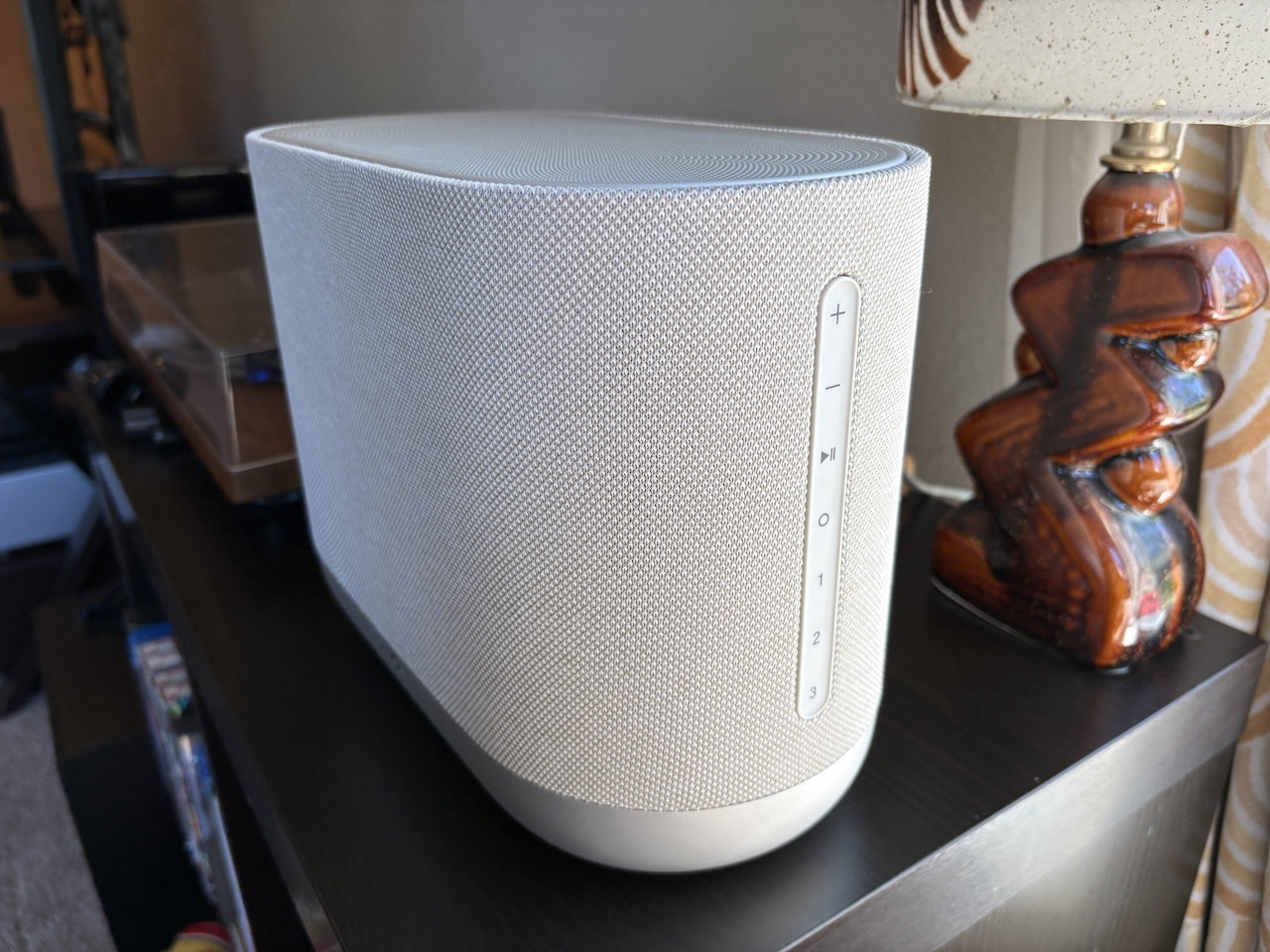
Denon Home 400
The larger Home 400 offers a few more style points, somewhat reminiscent of a curvy Vegas hotel wrapped in fabric. It sits 8.6 inches high, 5.9 inches deep, and 11.8 inches wide. On top is a stout grille to protect the dual .75-inch upfiring drivers set at angles to help expand spatial audio. Those are joined by two forward-facing 1-inch tweeters, and dual 4.5-inch woofers, each powered by its own class D amplifier.
Advertisement
Both speakers offer a full swath of touch controls to supplement the HEOS app, including volume, play/pause, an action key for a voice assistant, and three “Quick Select” keys that can be programmed to a desired station or service. The Home 400 sets them on a side control strip, while the Home 200 hosts them on its rounded top. It’s a busier look than the more minimalist Sonos controls, but they’re pretty convenient in daily use.
Connectivity and Smarts
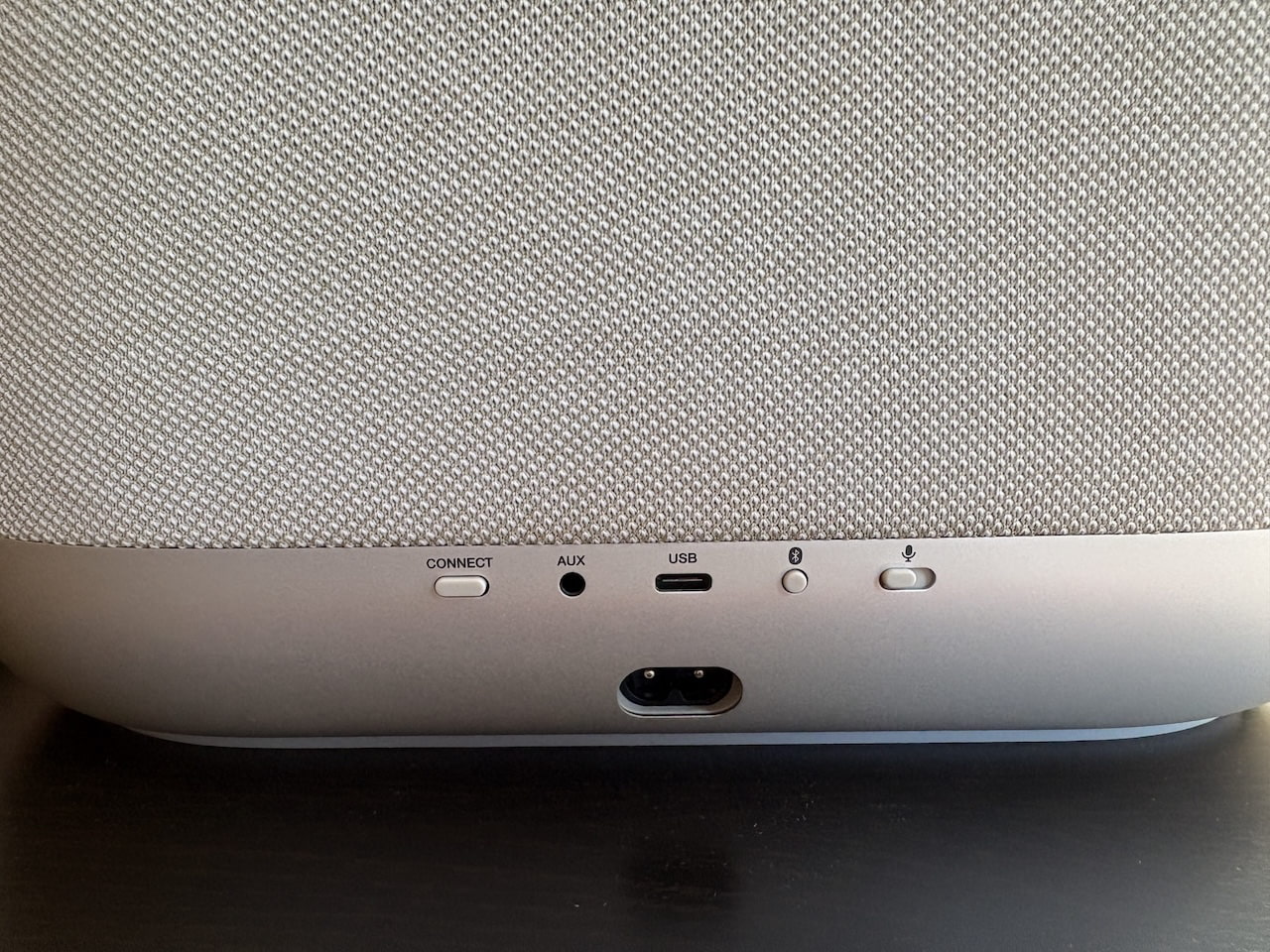
Each of the speakers offers a host of connectivity options, including Bluetooth, Wi-Fi (with both 2.4GHz and 5GHz support), a 3.5mm aux input, and a USB connection, which can connect a NAS storage drive or double as an Ethernet input via an adapter (not included). Streaming support includes AirPlay 2, as well as Spotify and TIDAL Connect, and Qobuz Connect. Unlike Sonos speakers, Google Cast isn’t offered, and while there’s an onboard microphone, there’s no support for Google Assistant or Alexa. Siri is (oddly) only available if you have a HomePod connected, so if smarts or voice control are of concern, you’ll want to look elsewhere.
Advertisement. Scroll to continue reading.
Denon Home 400 (rear)
As for built-in streaming services, you won’t find the 100+ options Sonos supports, but you’ll get top options like Pandora, Spotify, TIDAL, Deezer, SiriusXM, and Qobuz, as well as loads of available internet radio stations. Apple Music is the biggest miss, available only via AirPlay. Dolby Atmos Music is available from TIDAL and Amazon Music Unlimited, but not Apple Music. Still, two out of three is not bad, and Sonos speakers do not currently support Dolby Atmos Music via TIDAL.
As with other multi-room systems, the Denon Home speakers can be grouped throughout the home, used as surrounds with the Denon Home 550 soundbar, currently the only supported bar, or paired directly with the Denon Home Subwoofer ($649). As expected, two Home 200s or two Home 400s can also be configured as a stereo pair.
Advertisement
Listening
When I first fired up the Home 200 to stream over Spotify Connect, I was immediately impressed by its width, breadth, and just how much bass the little speaker was able to muster. Vocals sounded slightly echoed, but since I was playing the speaker in the background, I didn’t pay it much attention at first.
After digging in deeper with some of my go-to test tracks, I noticed the speaker was making some odd choices in balancing frequencies, especially for more complex tracks. In Radiohead’s “Burn the Witch,” the entrance of the frantic strings seemed to push back the vocals the way I push my dog into the back seat on a road trip. I soon realized that each of Denon’s Home speakers defaults to an “Auto” mode, which attempts to virtualize every track for spatial audio, including stereo music, with varying results.
After switching to the alternate “Pure” mode, I found much more to like about the Home 200, which offers clarity, instrumental definition, and sheer potency that goes beyond the vast majority of speakers in its class—a good thing considering its price point. The bass in even basic pop tunes like Hall and Oates’ “Sarah Smiles” is reproduced with character and texture. The acoustic guitar in Joni Mitchel’s “California” is cut with a spritely vibrance that gives an almost live quality, while percussion and cymbals in tracks like White Denim’s “A Place to Start” show off serious sparkle in the upper midrange and treble.
Moving to the Home 400 stepped up the performance considerably. Again, I much preferred the “Pure” sound for everything besides Dolby Atmos Music (more on that below). Oddly, choosing the Pure mode means you can no longer adjust EQ on either speaker, but luckily, I rarely felt the need to. This model offers hefty punch for its size, and not just in the bass. Midrange instruments are rendered with impressive punch and muscle, and the speaker easily filled my room at midrange volume without any noticeable distortion. Occasionally, the splashy upper midrange pushed toward the edge of sharpness, but never crossed over.
Advertisement
Caroline Polachek’s revelatory dance track, “Welcome to My Island,” absolutely bumps on the Home 400, summoning a clean, expansive soundstage as her ethereal vocals sit out front of the groove with unabashed rawness. The timbre of each synth and percussive element is given a spotlight, with plenty to explore in the space between, and the crescendo into each chorus reveals impressive dynamic expression.
Sound Check
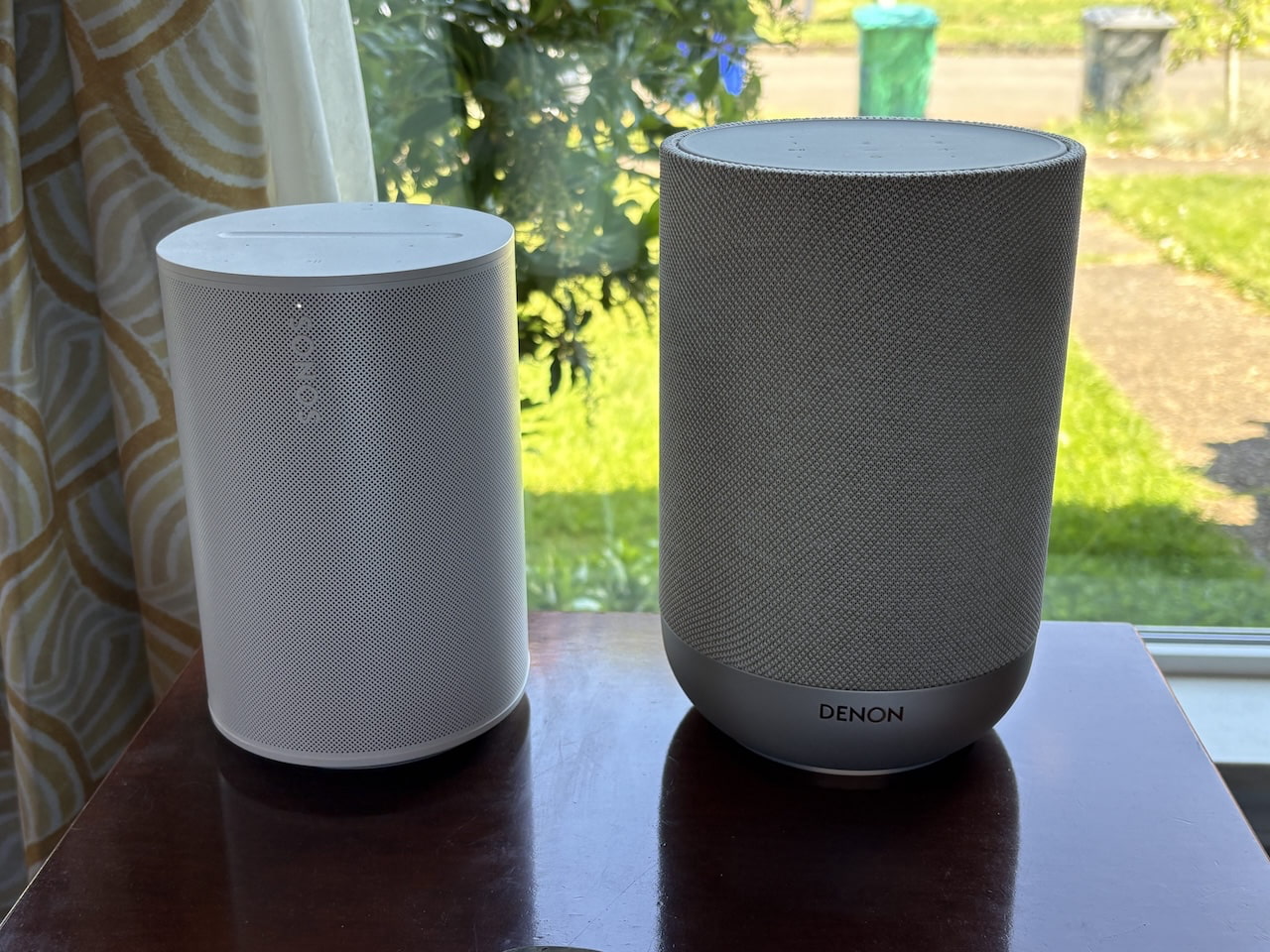
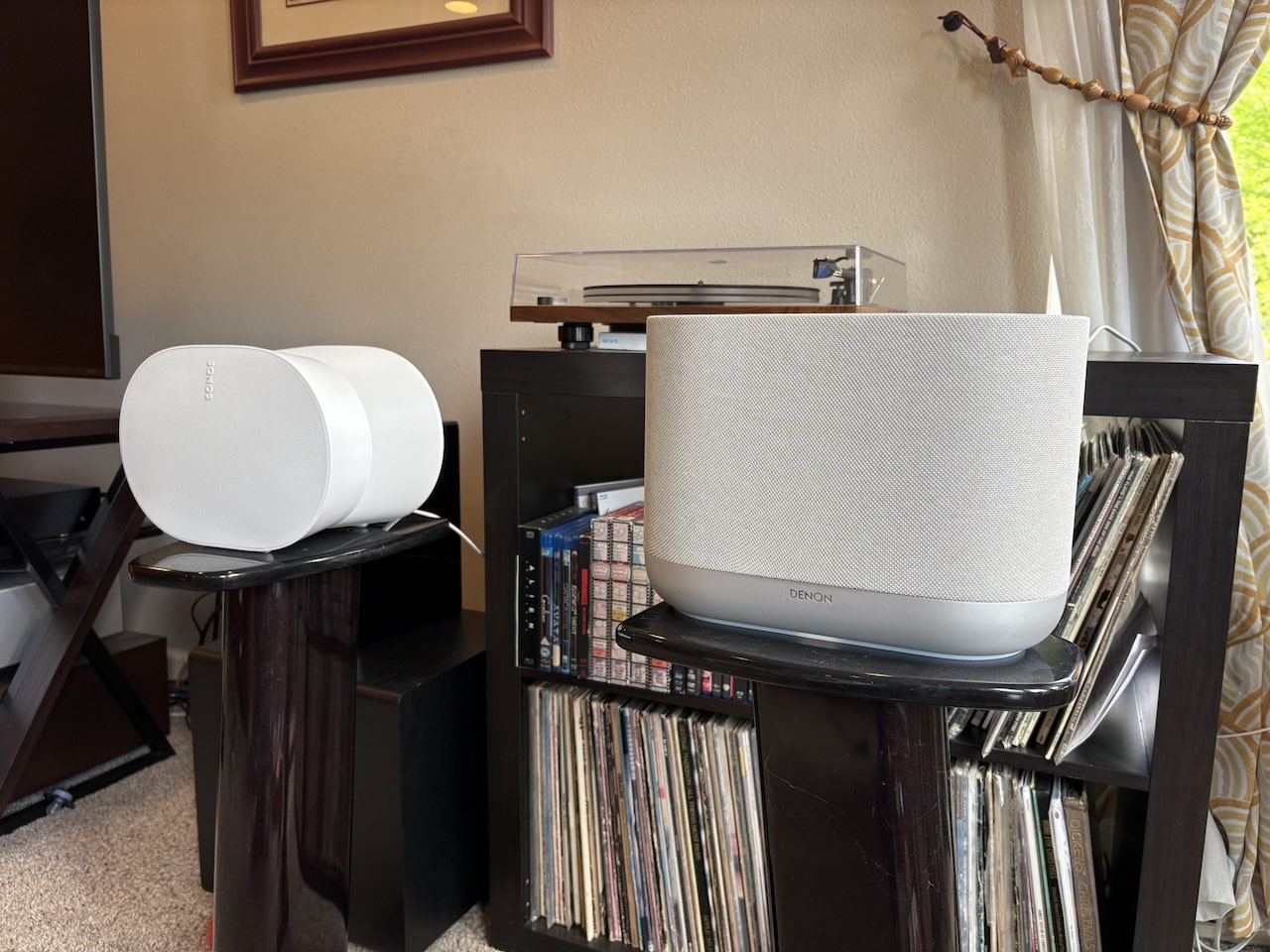
Sonos Era 100 (left) vs. Denon Home 200 (right)
Comparing the Home 200 to the Era 100 directly, Denon’s pricier speaker provided a bigger, cleaner sound, with better bass and finer attention to the small details. For its part, the Era 100 sounds a little smoother and more streamlined across the frequency range, with better consistency across genres.
Even so, the Home 200 outduels its smaller rival with its flashier, more engaging sonic signature, digging deeper into the texture of each instrument. If you care to try it, you’ll get a much wider soundstage in the Auto mode, even for stereo tracks, with instruments seeming to pop out multiple feet from its relatively meager footprint.
It’s a similar story with the Home 400, which is not only louder and more nuanced than the Era 300 in everyday listening, but also provides a more full-bodied sound across registers. That’s most noticeable in the meat of the sound, with midrange instruments like vocals, guitar, and percussion all offering a bigger, weightier punch. The Era 300 competes well in the bass and treble, with its futuristic, rounded sides providing some impressive acoustic efficiency. In most cases, though, the Home 400’s bigger, more precise sound signature is more satisfying.
Sonos Era 300 (left) and Denon Home 400 (right)
The one caveat is when I switched to Dolby Atmos Music, which I mostly tested on the service both brands support, Amazon Music Unlimited. Setting aside the sheer difficulty in both sourcing and actually tracking down good Dolby Atmos mixes, something with which the format in general continues to struggle across sources, the two speakers were on a more even playing field for 3D audio tracks.
That’s not too surprising, given that the Era 300 offers both upfiring and side-firing drivers for a more expansive and immersive soundstage than the Home 400 offers in its Pure mode. The slip-sliding space guitars and pop-up background vocals in Elton John’s “Rocket Man” (still one of the best Atmos mixes out there) were sent cascading around the room with the Era 300, whereas the Home 400 sounded more compact and resigned.
Advertisement
Advertisement. Scroll to continue reading.
That changed when I switched back to the previously maligned Auto mode, which used some surprisingly effective digital processing to push the sound well beyond the speaker’s physical footprint, by what sounded like six or seven feet. Unlike with stereo tracks, Auto mode did not introduce obvious frequency emphasis, overly echoed vocals, or strange compression with Dolby Atmos content.
Taken purely on sonic ability, the Home 200 and Home 400 outperform their Sonos rivals.
Usability
Sonos makes up some ground in daily use. Some of that may come down to my familiarity with the Sonos app, but it still offers a cleaner, more intuitive layout, especially for speaker grouping. Sonos’ method of selecting speakers and tapping “Apply” feels smoother and simpler than HEOS’ approach, which requires creating or dissolving different speaker groups in the Rooms tab.
Advertisement
Sonos also offers a simpler method for controlling features like EQ, which, unlike Denon’s speakers, is available at any time from the device settings. As mentioned, I was also confused by Denon’s decision to virtualize all audio to 3D sound by default, even in the stereo-only Home 200.
I was also surprised to find that the Home speakers convert lossless audio to compressed AAC by default. To get lossless playback, you have to go into each speaker’s settings and change Multi-room Audio Quality from Normal to High. The app even warns you to use Ethernet or “excellent Wi-Fi” first, though I had no major issues on my network.
The Bottom Line
Denon’s Home 200 and Home 400 deliver sound quality that rises above most speakers in their class, including Sonos, though the higher pricing is impossible to ignore. The HEOS app is relatively easy to use, setup is as slick as anything I’ve tested, and I had no issues using the speakers solo or grouped throughout my home over multiple weeks of testing.
They can also be connected to a Denon subwoofer or soundbar, and the potential for broader integration with Denon AV receivers could make the system even more versatile down the line. That makes the latest Denon Home speakers legitimate Sonos competitors, especially with newer formats like Dolby Atmos Music, where the Home 400 proved to be one of the stronger performers in the category.
Advertisement
Even so, they fall short of being the proverbial “Sonos killers.” You get fewer streaming services, fewer streaming options, no Chromecast support, and Denon’s HomePod-dependent Siri integration pales next to Sonos’ built-in Alexa and Sonos Voice Control.
That’s fine. This is not a zero-sum market, and Denon still makes a serious splash with some of the best multi-room speakers I’ve heard in this class. For listeners who want excellent performance in a multi-room system that gets close to Sonos simplicity, the Denon Home 200 and Home 400 deliver.
Pool robots have become remarkably capable over the last few years. What started as simple cleaners designed to remove debris from the bottom of a pool has evolved into a new category of intelligent systems capable of navigating entire pools, adapting to changing conditions, and taking on multiple maintenance tasks at once. As expectations around smart home technology continue to rise, pool owners are increasingly looking for the same combination of automation, convenience, and reliability from their pool-care equipment.
Few brands have embraced that shift more aggressively than Beatbot. Available through the Beatbot website and Amazon storefront, the company has established itself as a leader in premium robotic pool care by combining advanced robotics, AI-powered vision systems, and intelligent navigation technologies into products designed to reduce the time and effort required to maintain a clean pool. This Prime Day, Beatbot’s lineup offers a closer look at how far automated pool care has progressed, from flagship systems capable of real-time decision-making to versatile robots designed to handle multiple aspects of maintenance in a single cleaning cycle.
Rather than focusing on a single product category, Beatbot has spent the last several years building a broader pool-care ecosystem powered by advanced robotics, intelligent navigation, and AI-driven automation. From flagship robotic cleaners capable of real-time decision-making to surface skimmers and more accessible cleaning solutions, the goal remains the same: reducing the time, effort, and guesswork traditionally associated with pool maintenance.
Inside Beatbot’s most advanced pool-care system
Beatbot
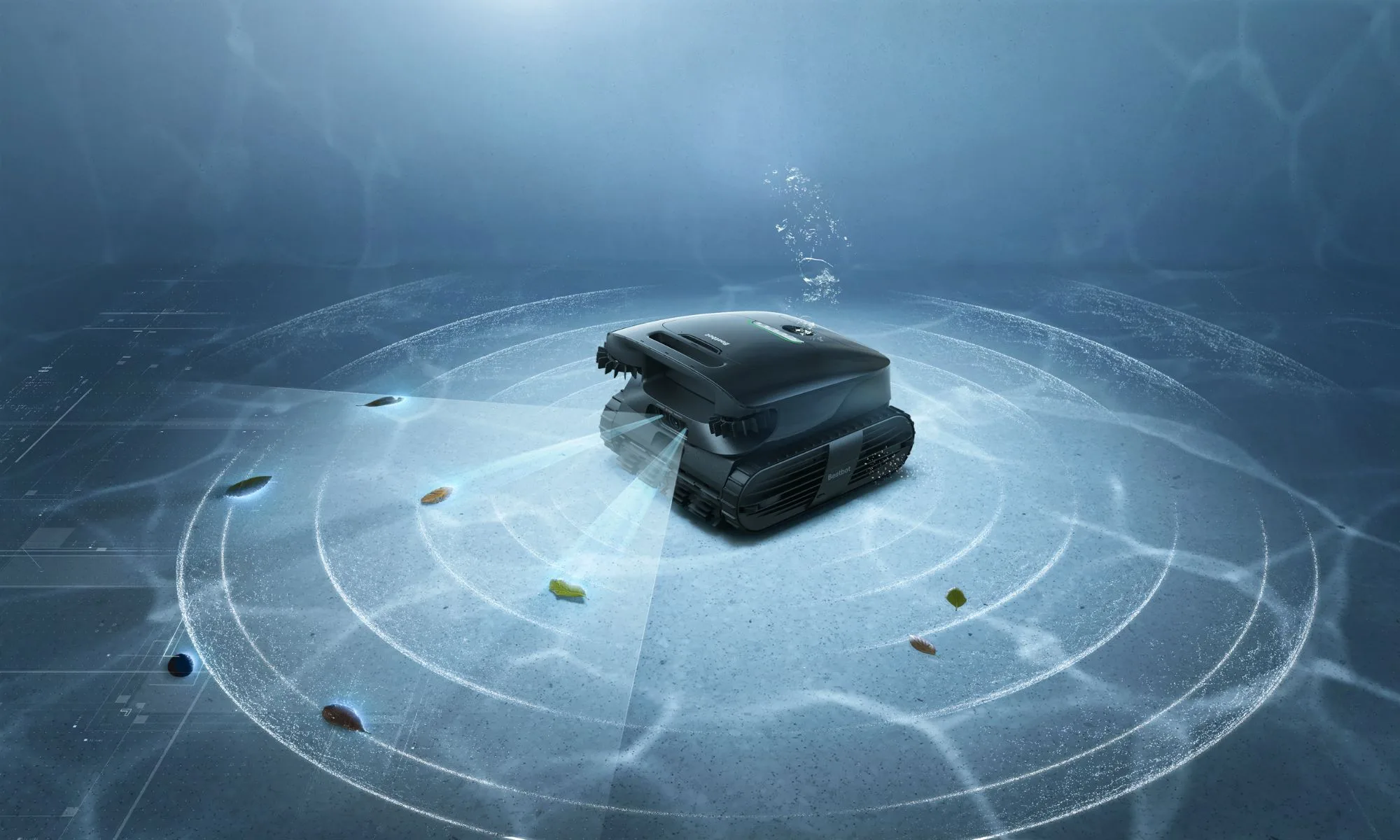
Beatbot’s vision for AI-powered pool care comes together most clearly in the AquaSense X. Combining an autonomous self-cleaning station with HybridSense™ AI Vision, CleverNav™ AI Path Planning, AI debris detection, intelligent obstacle avoidance, auto-recovery functionality, and night cleaning capabilities, it brings a deeper level of awareness and adaptability to the cleaning process.
The system continuously analyzes its surroundings, identifies obstacles and debris, and adjusts cleaning routes in real time to improve coverage across the entire pool. Instead of relying on fixed cleaning patterns, it adapts as conditions change, helping deliver a more thorough and efficient clean while reducing the need for user intervention.
Advertisement
The autonomous self-cleaning station further reinforces that hands-off approach. By minimizing routine maintenance after each cleaning cycle, it allows pool owners to spend less time managing their cleaner and more time enjoying their pool. For those looking for the most advanced option in Beatbot’s ecosystem, the AquaSense X combines intelligent navigation, adaptive cleaning, and automated maintenance in a single platform.
Prime Day price: $3,999 (regularly $4,250).
AquaSense 2 Ultra expands the idea of intelligent pool maintenance
Beatbot
While many robotic pool cleaners focus primarily on debris removal, the AquaSense 2 Ultra takes a broader view of pool maintenance. As the world’s first AI-powered 5-in-1 robotic pool cleaner, it combines floor cleaning, wall cleaning, waterline cleaning, surface skimming, and water clarification within a single system.
HybridSense™ AI Vision and CleverNav™ AI Path Planning help the AquaSense 2 Ultra navigate multiple cleaning zones while adapting to changing pool conditions. Combined with AI debris detection and intelligent obstacle avoidance, the system is built around what Beatbot calls full-pool intelligence, allowing it to tackle different maintenance tasks through a single platform.
Water clarification is what further separates the AquaSense 2 Ultra from traditional robotic cleaners. Beyond collecting debris, it actively contributes to cleaner, clearer water while reducing the need for additional maintenance tools. For pool owners looking for a more comprehensive approach to pool care, it brings cleaning, water care, and intelligent automation together in a single solution.
Advertisement
Prime Day price: $1,999 (regularly $3,150).
AquaSense 2 Pro brings comprehensive care into a single system
Beatbot
The AquaSense 2 Pro focuses on simplifying pool maintenance without sacrificing capability. Combining floor cleaning, wall scrubbing, waterline cleaning, surface skimming, and water clarification within a single platform, it is built for pool owners who want a more complete maintenance solution without juggling multiple tools.
Features such as the ClearWater™ Clarification System, Smart Water Surface Parking, and one-touch app retrieval help streamline day-to-day ownership, while Full Coverage Path Optimization supported by 22 sensors helps ensure efficient navigation and consistent cleaning performance across the pool. By continuously assessing its surroundings and adjusting cleaning routes as needed, the AquaSense 2 Pro is designed to deliver thorough coverage with minimal intervention.
The result is a system that brings together intelligent navigation, water care, and multi-zone cleaning in a way that feels practical rather than complicated. For pool owners looking for a balance between advanced automation and everyday usability, the AquaSense 2 Pro sits comfortably in the middle of Beatbot’s growing pool-care ecosystem.
Prime Day price: $1,699 (regularly $2,299)
Advertisement
The Sora Series brings smarter cleaning to more pools
Not every pool owner needs a flagship-level solution, which is where the Sora Series fits into Beatbot’s broader lineup.
Beatbot
The Sora 70 is the most capable model in the range, delivering 4-in-1 cleaning across the floor, walls, waterline, and surface. By incorporating dedicated surface cleaning alongside traditional robotic cleaning functions, it provides broader coverage than many mid-range alternatives. Features such as Smart Surface Parking, shallow-area accessibility, SonicSense™ AI Ultrasonic Obstacle Avoidance, and intelligent path planning help improve cleaning consistency while making retrieval easier once a cleaning cycle is complete.
SonicSense™ AI Ultrasonic Obstacle Avoidance and intelligent path planning help the Sora 70 navigate more efficiently while improving cleaning consistency across the pool. Together with its 4-in-1 cleaning capabilities, those technologies make it one of the most capable options in Beatbot’s mid-range lineup.
Prime Day price: $999 (regularly $1,499)
The Sora 30 focuses on delivering stronger day-to-day cleaning performance without the premium investment associated with flagship models. Its enhanced 3-in-1 cleaning capability covers floors, walls, and waterlines, providing broader coverage and greater versatility than many entry-level cordless cleaners. For buyers looking to step into Beatbot’s ecosystem, it offers an appealing balance of performance, convenience, and value.
Advertisement
While positioned as a more accessible option, the Sora 30 still benefits from the design philosophy that runs throughout Beatbot’s lineup: broader coverage, smarter operation, and less manual effort. For pool owners seeking dependable day-to-day maintenance, it offers a practical entry point into Beatbot’s intelligent pool-care ecosystem.
Prime Day price: $649 (regularly $999)
Prime Day is the perfect time to upgrade
Beatbot
Beatbot’s Prime Day offers extend well beyond the flagship models. Alongside deals on the AquaSense X, AquaSense 2 Ultra, AquaSense 2 Pro, Sora 70, and Sora 30, shoppers can also save across the company’s broader pool-care ecosystem. The Sora 10 drops from $699 to $449, while the AquaSense 2 is available for $799, down from its regular $1,298 price. Surface-cleaning solutions are also seeing significant discounts, with the iSkim available for $299 (normally $499) and the iSkim Ultra reduced from $999 to $549.
Available from July 8 through July 11, these promotions make it one of the best opportunities of the year to upgrade to Beatbot’s AI-powered pool-care ecosystem. Whether you’re looking for a flagship robotic cleaner, a comprehensive maintenance solution, or a dedicated surface-cleaning system, the lineup offers options across a range of pool sizes, maintenance needs, and budgets.
For pool owners ready to spend less time cleaning and more time enjoying their pool, Prime Day may be the ideal time to make the switch.
Norway will largely prohibit generative AI use for elementary kids ages 6 to 13 beginning with the new school year, while allowing limited, teacher-supervised use for older students. The government says the restrictions are intended to prevent children from skipping foundational reading, writing, and mathematics skills amid declining test scores. Reuters reports: Facing a broad decline in education test scores, the government in 2024 banned smartphones from schools and has given teachers back more powers to enforce discipline in the classroom. Using AI increases the risk that young children skip important steps in their education, Prime Minister Jonas Gahr Stoere told a press conference on Friday. “The most important thing in school is that our children learn to read, write and do mathematics,” Stoere said, adding that the new standards will be imposed from the new school year beginning in late August.
Pupils from first through seventh grade, aged 6 to 13, should as a general rule not be using AI, while those in lower secondary school, aged 14 to 16, can cautiously adopt tools under teachers’ supervision, the government said. In upper secondary education, from ages 17 to 19, students should learn to use AI appropriately so that they are prepared for further education and work, it added. In a related statement, the Norwegian government also said it would propose legislation to fund the use of more books in classrooms, reversing the trend towards computer tablets.
Pause not a permanent withdrawal from drone delivery operations in Ireland, Manna said.
Drone delivery firm Manna is taking a “strategic pause” in operations in Ireland over what it describes as a lack of a clear national framework surrounding the technology.
The Irish company is instead shifting focus to the US, UK and other international markets where “regulatory, and planning frameworks are advancing and commercial drone delivery is accelerating”, it said in a statement. The company already has operational authorisation in both the US and UK and anticipates full authorisation to operate in the United Arab Emirates.
“The absence of a clear national policy framework for commercial drone delivery means there is currently no defined pathway for the sector to scale in Ireland,” Manna said.
Advertisement
“In the absence of such a framework, decisions are assessed locally, creating uncertainty around the planning and infrastructure requirements needed to support commercial drone delivery at scale.” The pause is not a permanent withdrawal from drone delivery operations in Ireland, the company said.
Manna was refused planning permission for drone aerial delivery hub in Dublin’s Dundrum region this week.
Last year, it was refused permission to retain a drone delivery hub in Blanchardstown, meanwhile, Cork City Council has also sent the company letters raising concerns about its operation there.
Despite the supposed regulatory setbacks, Manna has completed more than 300,000 deliveries and partnered with more than 120 Irish businesses.
Advertisement
It has also teamed up with companies such as food delivery platforms JustEat and Deliveroo – and Uber, more recently, primarily servicing parts of Dublin. And last year, it expanded its focus and announced an entry into Cork’s airspace.
“This is a difficult decision because Ireland is where Manna was founded, built and first proven,” said Bobby Healy, the founder and CEO of Manna.
“However, in the absence of a clear national pathway to scale commercial drone delivery, we have to focus our investment in markets where that pathway is now clear.”
Manna has launched and operated drone delivery services in Ireland in Moneygall, Oranmore, Balbriggan, Blanchardstown and Cork, and has expanded services internationally to Finland and Texas.
Advertisement
It has made nearly 90,000 deliveries in its most mature market in Blanchardstown, where Manna has operated since early 2024.
Manna has been at the receiving end of criticism from residents – especially in Dublin 15 – where it runs four sites. Complaints include the frequency of drones, with one telling the Irish Independent that they saw “at least” 50 drones every day, as well as noise and environmental concerns.
According to Manna’s own account, its three planning permissions drew objections from 255 individuals.
Manna currently employs nearly 200 people across engineering, technology, operations and corporate functions in Dublin. It said that future employment and planned expansion at local delivery hubs will not proceed “at this time”. Earlier this year, the company announced around 300 new jobs in the country, alongside a $50m Series B raise.
Advertisement
“This decision does not affect Manna’s continued investment in Ireland, which will remain the company’s primary base for research and development, engineering, robotics, regulatory affairs, customer operations and corporate functions,” Manna clarified.
Responding to Manna’s decision, Minister for Enterprise, Tourism and Employment Peter Burke, TD, said: “I regret the announcement and the uncertainty that this creates for workers and their families.
“Government are ensuring that all available supports are put in place for workers that may be impacted, including supports for retraining and job search assistance.”
Last August, the Department of Transport published a national policy framework for Unmanned Aircraft Systems that aims to foster “growth and innovation, while ensuring that operations remain safe and secure and environmental and social concerns are managed”.
Advertisement
An action plan, published in March, laid out sixteen goals across planning, compliance, enforcement and innovation.
Don’t miss out on the knowledge you need to succeed. Sign up for the Daily Brief, Silicon Republic’s digest of need-to-know sci-tech news.
Updated, 07:40pm, 19 June, 2026: The article has been updated with the Government’s response and background information.
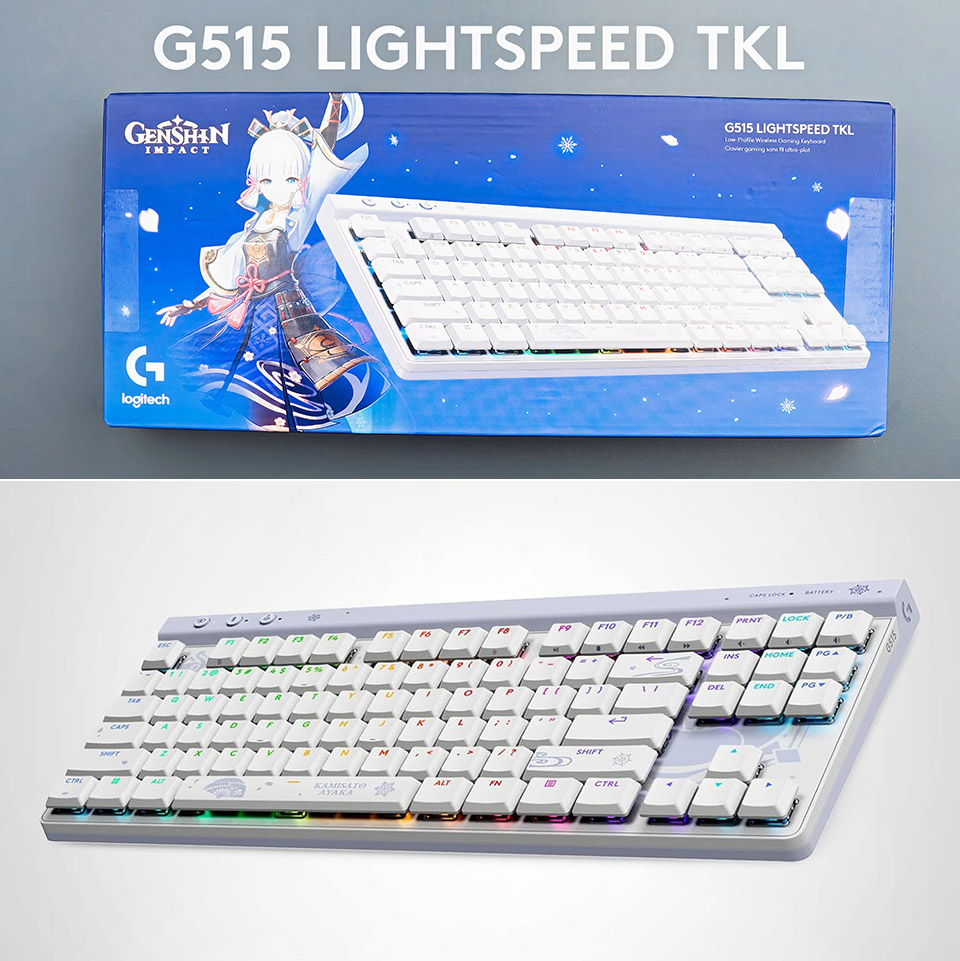
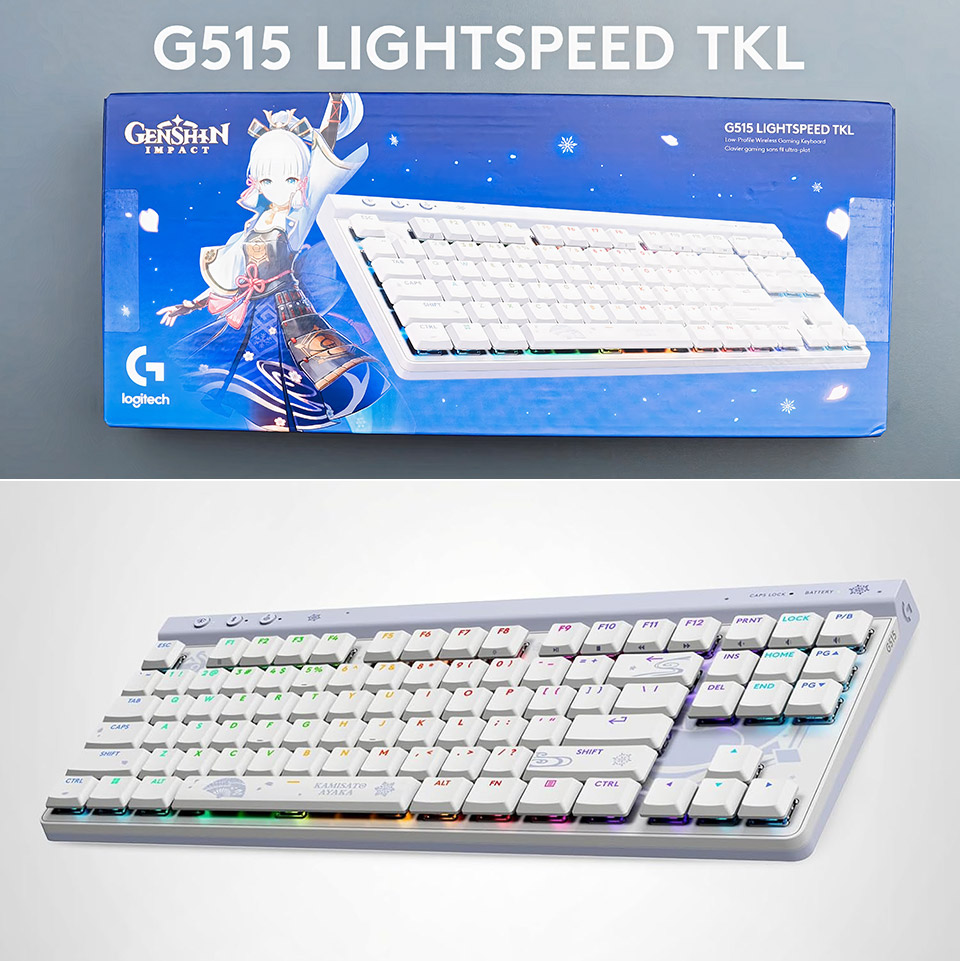
Logitech teamed up with the Genshin Impact team for a special edition of its slim wireless keyboard, and the result feels more thoughtful than most licensed gear. The G515 Kamisato Ayaka special edition model, priced at $69.99 (was $170), takes the standard low-profile TKL hardware and wraps it in a clean white design that nods to the character without turning the whole thing into a billboard. It stays subtle enough for daily use while still giving fans something distinctive to look at every time they sit down.
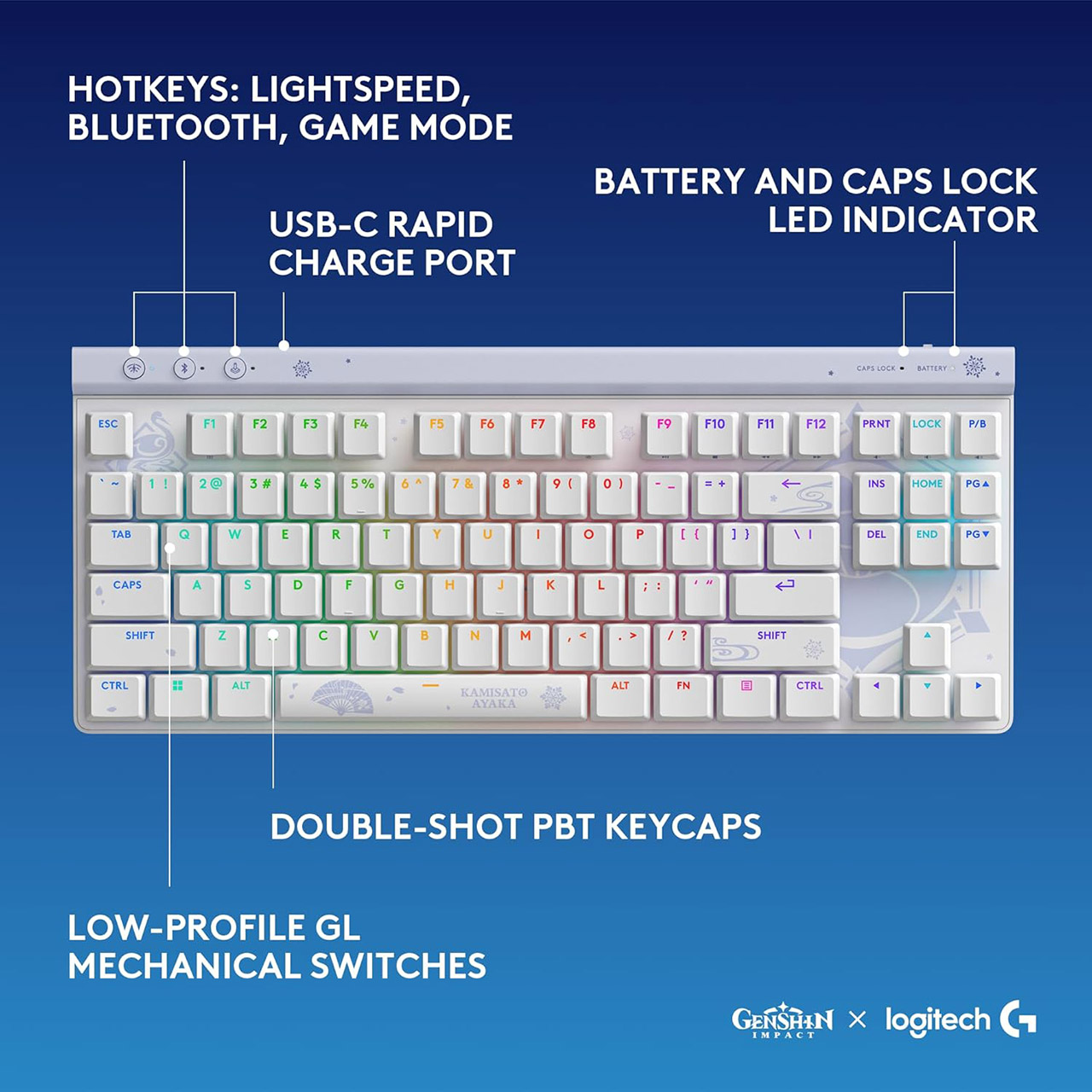
The keyboard itself measures only 22 millimeters at its tallest point, giving it a very thin profile, thanks mostly to the low-profile GL mechanical switches and a chassis that has been shortened significantly by the lack of a number pad. The end product is a really slimline device, with the white body featuring some really sleek light blue and lavender artwork down the edges, as well as swirling swirls and snowflake accents that pay homage to Ayaka’s cryo theme and her extremely graceful fan design. To accentuate the idea, the spacebar features a fan emblem and her name. The legends on the keycaps are designed in a way that uses a variety of colors that are readable even when the RGB lighting is turned on, since they do not clash with it.
The keycaps are made of double-shot PBT and have lasting legends, as well as a nice matte finish that does not shine with time. The casing provides significant sound dampening, as it is much quieter than many low-profile boards. The stabilisers are adequate for a prebuilt keyboard, though you may notice a slight vibration in the spacebar if you search for it. The feet on the bottom offer two tilt angles, allowing you to modify the slope without using any other equipment.
The 1.3-millimeter actuation point and 3.2-millimeter overall travel are beneficial for both typing and gaming, since the tactile brown switches in this edition are light and provide sharp feedback that registers rapidly without being mushy. The factory lubrication ensures that the keys remain smooth from day one. Going low profile also means less finger travel, which some individuals find less exhausting during extended sessions. The bad news is that there is no wrist rest in the box, so users who like one will have to either get used to the floating feel or create their own.
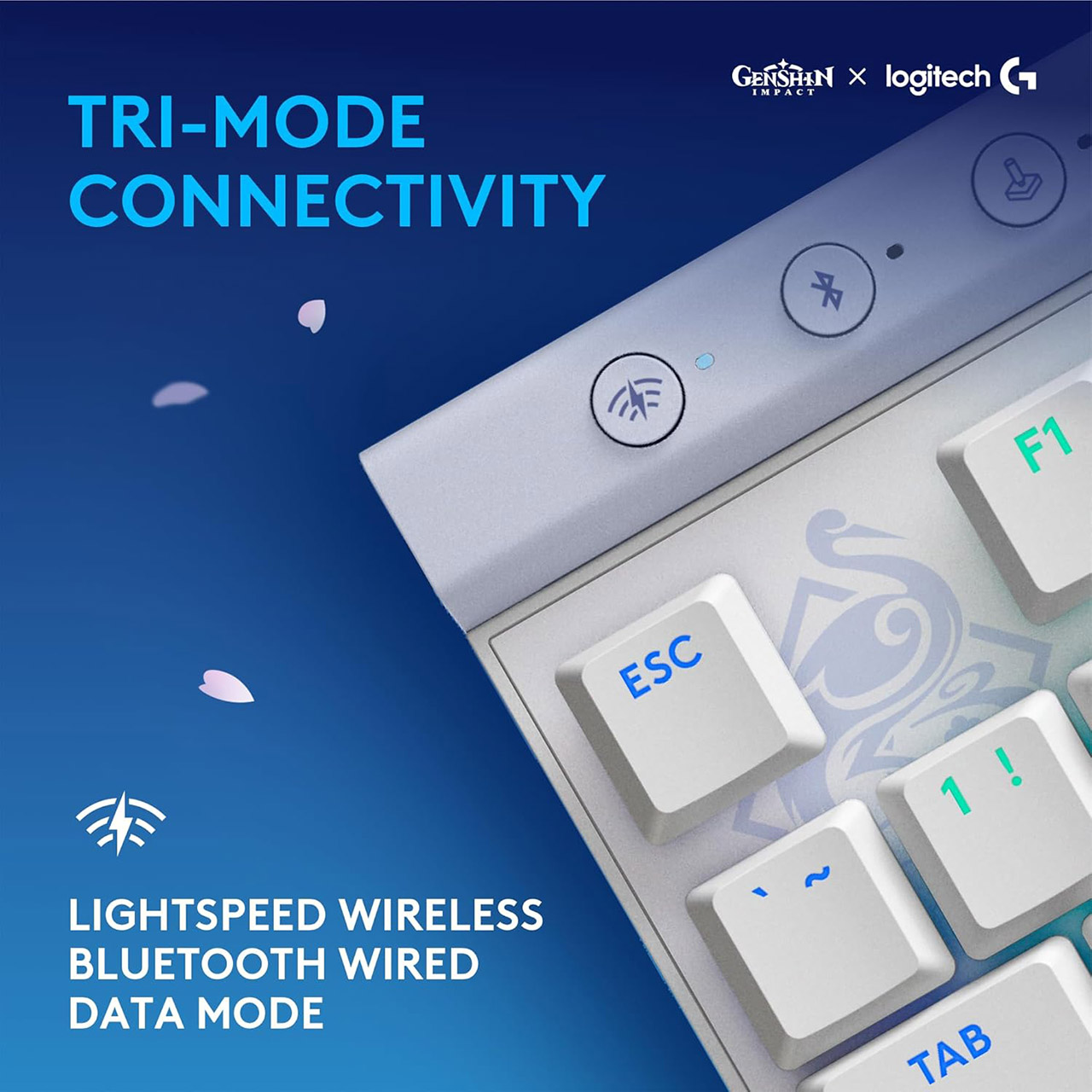
Wireless performance is based on Logitech’s LIGHTSPEED 2.4 GHz connection, which maintains a 1-millisecond report rate throughout gaming. There’s a Bluetooth option if you merely want to use it for light tasks or multi-device settings, as well as a USB-C wired mode that can be used as a backup or to charge. The provided dongle allows 2:1 pairing, which means that one USB port can handle both this keyboard and a compatible Logitech mouse. The battery should last for at least 36 hours with the RGB turned on, and much longer if you dim or turn off the lights. A USB-C to USB-A cable for charging is included in the box, along with the dongle and basic documentation.
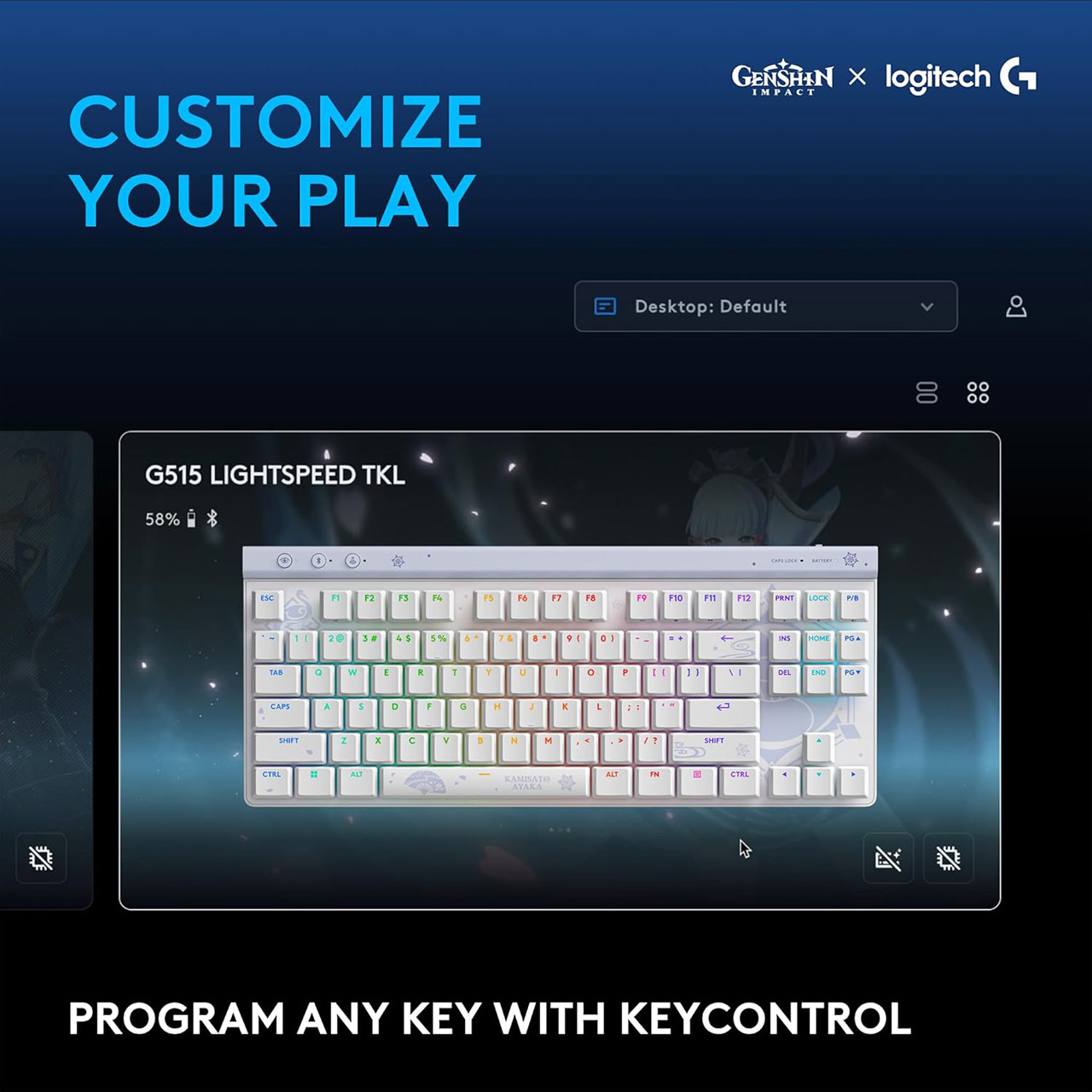
The RGB illumination is fully incorporated into Logitech’s LIGHTSYNC system and looks stunning on the shine-through keycaps. Because this is a special edition, you’ll find some custom Ayaka-themed effects in G HUB, which focus on soothing blues and whites and subtle transitions rather than dramatic rainbow sweeps. The software allows you to build profiles, remap keys, and customize illumination by key or across zones. Onboard memory stores a few profiles, allowing the keyboard to work properly on different computers without the need to reload anything.
‘Entirely automating everything is not the future we want’: OpenAI CEO Sam Altman lays out his company’s vision as it opens a ‘third phase’ and looks to build technology “to benefit everyone”
OpenAI’s Sam Altman and chief scientist Jakub Pachocki list future goals for the AI giant
The world economy is now beginning to shape around AI and are committed to delivering tools that people would use
The note also reaffirmed OpenAI’s commitment to AGI with a caveat: ensuring it benefits all of humanity
With modern AI solutions moving well beyond simple chatbots to agents and projected to evolve into operators, one could assume that the automation of everything is an eventual goal.
This, however, has been denied by OpenAI CEO Sam Altman and chief scientist Jakub Pachocki, who said the goal of the artificial intelligence research and deployment company is not to automate everything but to allow people to make better decisions as AI improves their lives.
In a note titled ‘Built to benefit everyone’ that marked a break from OpenAI’s AI model capability pushes of late, two of the most important people in the AI ecosystem penned an unusually values-forward document that outlined their future plans for AI.
Latest Videos From
AI for everyone equally?
The note highlighted three major focuses for OpenAI:
Advertisement
– Building an automated AI researcher
– Accelerating the economy
– Giving everyone on Earth a personal AGI
Advertisement
Sign up to the TechRadar Pro newsletter to get all the top news, opinion, features and guidance your business needs to succeed!
OpenAI estimates that by March 2028, a significant portion of its research will be conducted by AI systems, in addition to its own researchers. This will help them to traverse a ‘post-AGI world’.
This, combined with the focus on giving everyone an AGI, is an interesting outlook because it assumes that everyone agrees on what AGI would look like. The definition is not set in stone and can vary from person to person and also at an organizational level.
OpenAI’s statement also provides clues about what an AGI would be like, with an “automated AI researcher” who both provides a path to AGI and is an important cog in the wheel.
Advertisement
OpenAI’s narrative about AI benefiting everyone worldwide is not a new one, but its focus on equality is an interesting one, especially given the timing: OpenAI’s note popped up exactly the same day it filed confidential paperwork for its IPO, making it perhaps read more as PR than it would otherwise be perceived.
OpenAI’s latest models are state-of-the-art, but many feel Anthropic’s now-banned Fable pushes frontier models even further than what GPT currently offers in multiple segments. Training new models is increasingly capital-intensive even as new capabilities are introduced, tested, and refined over time.
OpenAI also has something of an image problem after it stepped in to replace Anthropic’s Claude and Mythos-class solutions for the US military earlier this year, a move the latter company maintains was necessary because the restrictions it insisted on for the use of its AI were important.
Advertisement
When OpenAI stepped in to replace Anthropic on classified networks, it was widely perceived as willing to look past those restrictions to some degree, even though Sam Altman insists that the same two principles (no domestic mass surveillance and use of force permitted only by humans) would apply, with many critics pointing to a ‘softer’ approach on the matter by OpenAI to fill the void that comes with lucrative military contracts in the future.
The note, therefore, does read like a checklist for the future, but also paints OpenAI as a more magnanimous organization before its IPO, and that might be the primary intention here, but it does fail to weigh in on growing power consumption concerns, even as one could also consider it a reply or acknowledgment to a similar note by Anthropic about recursive self-improvement where its AI solutions effectively already act as an AI researcher for the company.
A Yoodli.ai cardboard sign is visible at right during Fox’s FIFA World Cup broadcast on Thursday from Seattle, featuring, from left, Rob Stone, Stu Holden, Clint Dempsey, and Alexi Lalas. (Screen grab via Fox Sports)
When a startup town turns into a soccer town attracting worldwide attention, it’s a great opportunity to test your guerrilla marketing skills.
Seattle’s Yoodli leaned into that theory on Thursday by getting its name and web address on Fox Sports’ live broadcast of FIFA World Cup festivities from Pier 62 on the waterfront.
The company, which launched out of the former AI2 Incubator in 2021, develops AI-powered software that allows users to simulate and practice real-world conversations. Yoodli has been at AI House all week on nearby Pier 70, and the team said grabbing free TV ad time was a “Hail Mary move” — especially in an era when AI company billboards are such a thing.
In a description of events relayed to GeekWire via email, the effort started with Yoodli’s new growth marketing manager Connor Wright scrolling Instagram earlier that morning to catch up on World Cup updates. He saw that Fox was live-streaming from Pier 62.
A scrappy startup lightbulb went off.
Advertisement
Communications and content leader Sage Ke’alohilani Quiamno said she quickly ripped up a monitor box — because the startup is getting a new office soon — and wrote “Yoodli.ai” on the front and “USA” on the back.
Yoodli’s Sage Ke’alohilani Quiamno, left, makes a company sign from a computer monitor box and Connor Wright shows off the finished product that made it onto a Fox Sports broadcast in Seattle. (Yoodli Photos)
Marketing intern Luis Quiroz ran down Alaskan Way with Wright to get inside Fox’s Pier 62 makeshift studio space and hold up the sign just over the shoulder of soccer commentator Alexi Lalas.
“When you’re standing outside with a piece of cardboard and a Fox broadcast camera sweeps by, you seize the moment,” Quiamno said. “Connor held the sign without hesitation while I directed him via phone from the office.”
Yoodli has been watching World Cup action daily from the lunchroom at AI House, and Quiamno said the energy downtown has been something else, especially in anticipation of Friday’s noon match between the U.S. and Australia at Seattle Stadium (Lumen Field).
“It’s the kind of vibe Seattle rarely gets: the waterfront is packed, everyone’s in a good mood, and there’s this collective feeling that the city is on the global stage,” she said.
Advertisement
Yoodli was co-founded by Esha Joshi and Varun Puri and is ranked No. 22 on the GeekWire 200 index of the Pacific Northwest’s top startups. The company currently has about 80 employees.
“We’re growing but still small enough to pull off a guerrilla PR stunt,” Quiamno said.
And apparently it worked. Yoodli says it saw an increase in website traffic and demo inquiries following the broadcast.
“Proof that a handmade sign and a little World Cup energy go a long way,” Quiamno added.
A visit to a hardware store can be quite intimidating for newcomers. Familiarity with specific types and sizes of tools comes with experience, so it’s hard to know exactly what you’re looking for when starting your own tool set.
While the staff members in your local store would be glad to help, you could end up purchasing more than you’d actually intended to or may ultimately need. A tool kit is a collection that you can easily add to or customize at any time, so it doesn’t necessarily have to take up a lot of space or be particularly expensive. You’ll want to make practical choices that can grow with your confidence and won’t be left gathering dust, though.
Developing your own tool set and keeping it stocked and cared for is exciting for any budding garage-tinkerer, and we’ll take a look at how to do just that. From deciding on the particular type of tools you’d like to buy to to organizing their storage, and alongside some of the toolbox essentials, here are some simple tips that’ll help you get started.
Advertisement
Know what makes seemingly basic tools like screwdrivers tick
CupangXOfficial/Shutterstock
As with anything you start from scratch, the key is to consider the basics first. These are the items like slide rules, spirit levels, screwdrivers, and hammers, and there can be more to them than you think. Screwdrivers are divided into categories based on the type of screw they’re designed to work with, and attempting to use the wrong type could damage the screw and make it difficult to extract.
Different varieties, such as the Phillips head, have their own advantages. This particular type is easy to grip and work with because of the cross-shaped head of the screws designed for it, which makes it difficult to accidentally overtighten. There are also less familiar models like ratcheting screwdrivers, which boast a motion that takes some of the force required out of their use.
Advertisement
With more specialised models on the market too, there will be tools with unique applications that you may never have to use at all. Researching different types of tools and the jobs they’re used for is invaluable, but you don’t have to own every different type. General purpose, individual, quality items will be an excellent start. Consider this over simply buying an all-in-one tool kit, which might have a lot of smaller attachments and tools that you don’t really need.
Advertisement
Consider only adding to your toolset as projects require it
Oleg suhenco/Shutterstock
A large set of quality tools can be expensive. To help get your money’s worth from everything, remember that you don’t need to buy everything you ultimately want to have in your collection all at once.
Plan each home improvement project as it comes. Do you have every tool in your set that you’ll need for it? If not, it’s time to make that purchase. As simple as this piece of advice is, it’s vital to bear in mind, in case your enthusiasm about creating your first tool set sends you way over budget. This way, you know that you’ve only ever bought tools that you’ve actually used.
As your skill and confidence with DIY tasks develops, you may find yourself tackling more of them. It’s likely, then, that your toolkit will grow accordingly, and you’ll also begin to find that you already have everything you need for later jobs. Just as importantly, you’ll be experienced with how to use the items in your collection, thanks to taking it steadily and being selective.
Advertisement
Consider where you’re buying your tools from
Andreonegin/Getty Images
The previous advice will help to curb excessive spending as you get more comfortable in the world of DIY. It doesn’t mean you need to buy every tool you use, though, and certainly not brand-new. If you don’t know someone who can lend you any tools you lack, you have other options.
Your town’s community library may have the facility to rent out power tools, at a tiny fraction of the cost of buying them outright. For more of a long term bargain, though, try scouting social media to see if anybody in your local area is selling the tool you need second-hand. Somebody else, after all, might have fallen into the very trap you’ve just avoided — buying a brand-new tool and using it just once or twice.
The usual warning applies with this, however: Be sure that the tool is exactly as advertised before completing a transaction. If you’re not familiar with the specific item, researching new prices will show you exactly how much of a bargain you might be getting. On the other hand, buying new from local hardware stores isn’t necessarily to be avoided, especially when the next big sale is advertised; you might be surprised at what you’re able to pick up.
Advertisement
Don’t forget to think about storage
M-gucci/Getty Images
You’re well on your way to planning out your tool kit and stocking it with a variety of essentials. Before long, then, you’re going to come up against the question of where to store all of your tools.
You’ve also got to consider where on your property you’ll keep all your new items. Fortunately, new tools are provided with manuals that detail not only the essentials of operation, but safe storage too. Avoiding certain temperatures, keeping them away from water, keeping those items that require it separate from each other, and so on are all vital considerations.
Advertisement
Then there’s the way you use your tools. Are you expecting to travel a lot with them? If that’s the case, a sturdy yet portable toolbox or other system will be vital. If you aren’t, and will largely be working in your garage, it’s not as much of a concern to have everything travel-ready. An organized storage system may take up a lot of space, but it’ll pay dividends when it comes to knowing that everything is locked away safe and, crucially, where to find it when you need it.
Advertisement
Get a good understanding of how to use your tools before wielding them
Howtogoto/Getty Images
There are a lot of resources available for DIY newcomers. Be sure to double-check SlashGear’s list of home tool kit essentials, for instance, for anything you might be missing. Another great place to start would be the websites of some of the biggest names in home improvement. Lowe’s has created a very convenient guide to the best sorts of items to include in a toolkit, from saw horses to safety equipment.
The outlet recommends a square, which will prove important for accurate measurements and making the types of cuts that can make or break a whole project. In tandem with this, Lowe’s DIY Basics is a series of super brief YouTube tutorials that will show you how to use these new items. For instance, if you’re unsure about your new combination square, the below Lowe’s guide will be invaluable.
Technique develops with experience, but you need to understand not only which items to include, but why they’re there. Fortunately, if there’s one thing that the home improvement community can relied on for, it’s producing tutorials and advice for newcomers into the fold. Make use of it all. Remember, though, that you don’t have to tackle a job that feels like more than you can handle. You can get quotes for a given task, and then determine whether it’s something you can feasibly tackle yourself.
The last thing you want to happen after dropping hundreds of dollars on a wearable is to discover that it doesn’t work with your body. But, that’s a fairly common problem people with wrist tattoos have been running into since the advent of smartwatches and fitness trackers. As countless posts on devicesupportpages and Reddit have chronicled over the years, tattooed skin and the sensors used by wearables often don’t mix well.
One of the main issues people experience is with heart rate sensing. Wearables use a light-based technique called photoplethysmography (PPG) to measure heart rate. That’s the green light you see when you flip your device over. But, tattoos can get in the way of that light, messing with the readings. The other problem is wrist detection, which also uses lights to determine if the tracker is on a person’s wrist (along with an accelerometer and electrical sensors). Slap a fitness tracker on a wrist that’s covered by a tattoo, and the device may not register that it’s being worn at all, consequently requiring the wearer to repeatedly unlock the device whenever they want to interact with it.
It might seem a bit silly that technology advanced enough to respond to gesture controls and provide personalized sleep coaching would be stumped by a bit of pigment, but the tattoo issue isn’t just a baseless gripe that consumers have latched onto. Device makers have acknowledged it and advised buyers to avoid putting their trackers on top of tattoos.
“Tattoos (ink, pattern, saturation) can block the heart rate sensor’s light, causing inaccurate or missing readings,” Garmin notes on a support page. “For best performance, wear the watch on skin that is free of tattoos if possible.” Apple has issued similar notices going back to the release of the first Apple Watch.
Advertisement
Is there a solution?
People with tattoos have devised sorts of workarounds to get the most out of their smart watches and fitness trackers, though none are exactly ideal. The simplest? If the inside of your wrist isn’t tattooed (or at least has larger areas of clear skin), you can position the device there instead of on top of the wrist. Similarly, if your other wrist is tattoo-free, wear the device on that one. But if you’ve grown used to wearing a watch on a certain wrist for years, it’s going to feel pretty weird to change it up.
As a quick fix, some people swear byepoxy bottle cap stickers or layering pieces of clear tape, either of which are placed over the sensors and inexplicably correct the problem for a lot of wearers. Reusable accessories designed to work the same way have seen some success too. There’s also the option of using a chest strap if accurate heart rate tracking is all you’re after — and if you don’t have chest tattoos. Again, though, this isn’t the most comfortable or convenient way to use a wearable in most situations day-to-day.
Ultimately, it’ll continue to be an issue until the sensors these watches and fitness trackers rely on are improved to account for skin variations like tattoo ink. Likewise, light-based sensors have been found to be less reliable for people with dark skin, highlighting a need for more diversity in the research and development of this type of technology.
Anecdotally, it seems like Google’s Pixel Watch 4 might be much better at handling tattooed skin than its predecessors. There were rumors of Samsung introducing an update a few years back to improve things in this area too, but the complaints of tattooed Galaxy Watch users would suggest otherwise.
Advertisement
More research is needed
Identifying the problem is theoretically the first step to solving it, but unhelpfully, the reality is that how much tattoos interfere with sensor readings isn’t consistent from case to case. A study published in 2025 attempted to quantify the difference in readings taken from devices worn over tattooed skin versus non-tattooed skin, and while it did find the former suffered inaccuracies, the results were mixed.
The researchers used the Polar Verity Sense and armband, outfitting participants with one device over a tattoo plus one on the same arm in an area without a tattoo. Participants also wore a Polar H10 chest strap heart rate monitor to establish a baseline, as this style of wearable is considered to be more accurate. Over the course of a day, they were monitored when at rest, walking at their own pace and jogging.
This revealed that the presence of the tattoos did have an impact on heart rate readings, but it was dependent on the wearer’s activity level, “with the greatest effect observed at rest and variation decreasing as exercise intensity increases.” And in some cases, the researchers note, “the presence of an arm tattoo did not affect the heart rate validity measurement at all.” There are a number of variables that must be taken into account — like ink color, saturation and depth — and as it stands today, there just hasn’t yet been enough research down to the nitty-gritty of the problem to bring about a solution.
Looking for the most recent Connections answers? Click here for today’s Connections hints, as well as our daily answers and hints for The New York Times Mini Crossword, Wordle, Connections: Sports Edition and Strands puzzles.
Today’s NYT Connections puzzle changed at the last minute. The Times had another puzzle scheduled for today, but moved it to June 30 at the last minute. And if you’re a fan of a certain New York team that just won a basketball championship, you can see why. They substituted today’s puzzle, which features some words relating to that winning team. Read on for clues and today’s Connections answers.
The Times has a Connections Bot, like the one for Wordle. Go there after you play to receive a numeric score and to have the program analyze your answers. Players who are registered with the Times Games section can now nerd out by following their progress, including the number of puzzles completed, win rate, number of times they nabbed a perfect score and their win streak.
Here are four hints for the groupings in today’s Connections puzzle, ranked from the easiest yellow group to the tough (and sometimes bizarre) purple group.
Yellow group hint: The 11th letter.
Advertisement
Green group hint: I’m behind you!
Blue group hint: Sit down.
Purple group hint: Rock on.
Answers for today’s Connections groups
Yellow group: Featuring silent and pronounced “K”s.
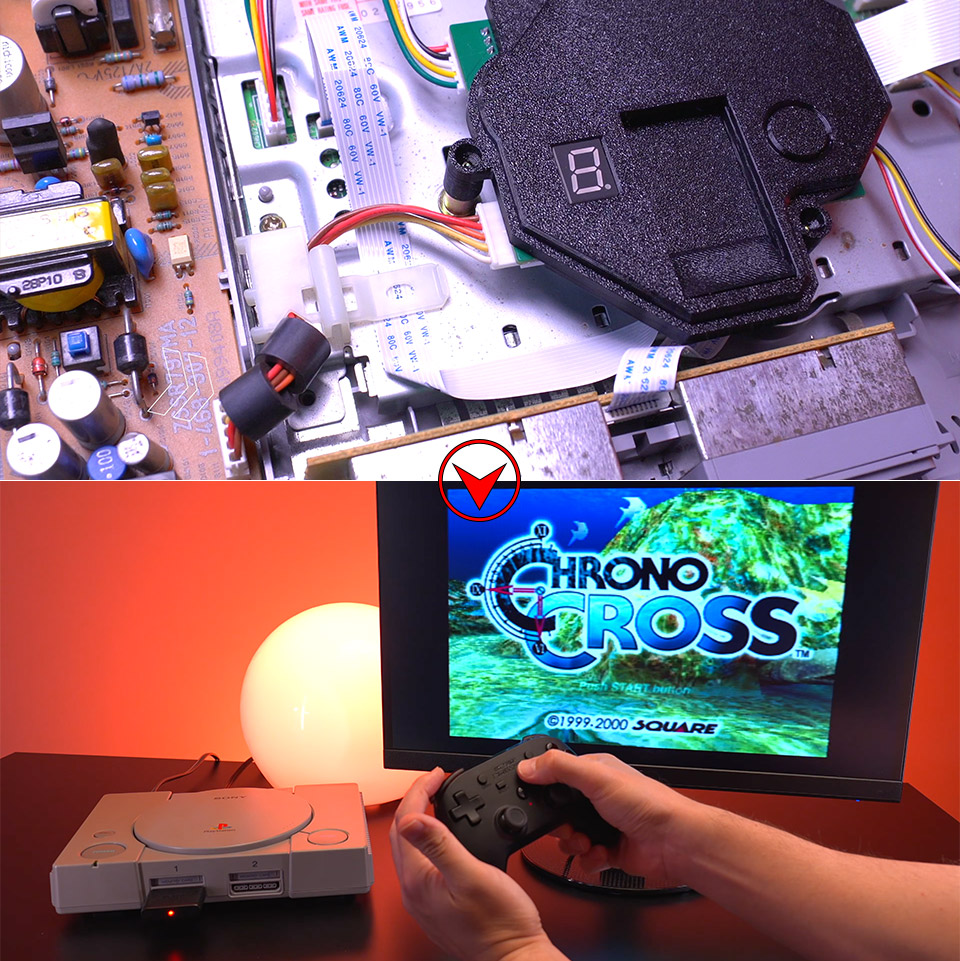
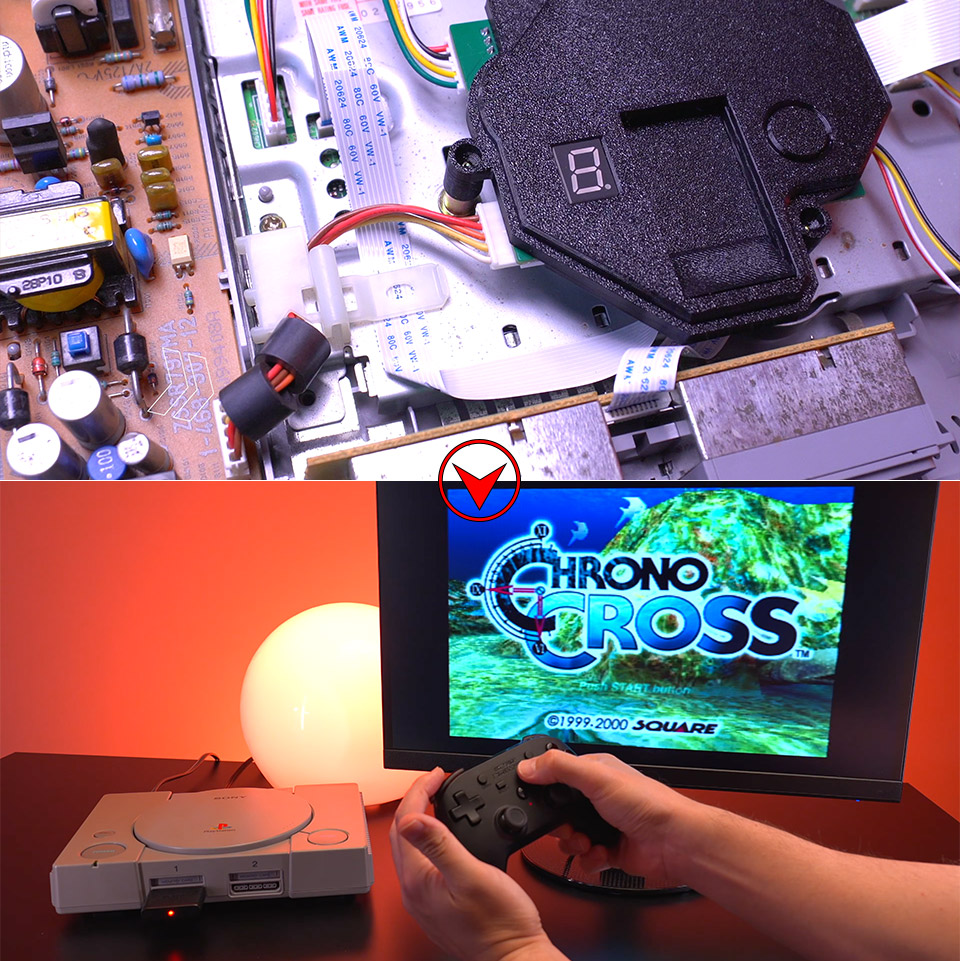
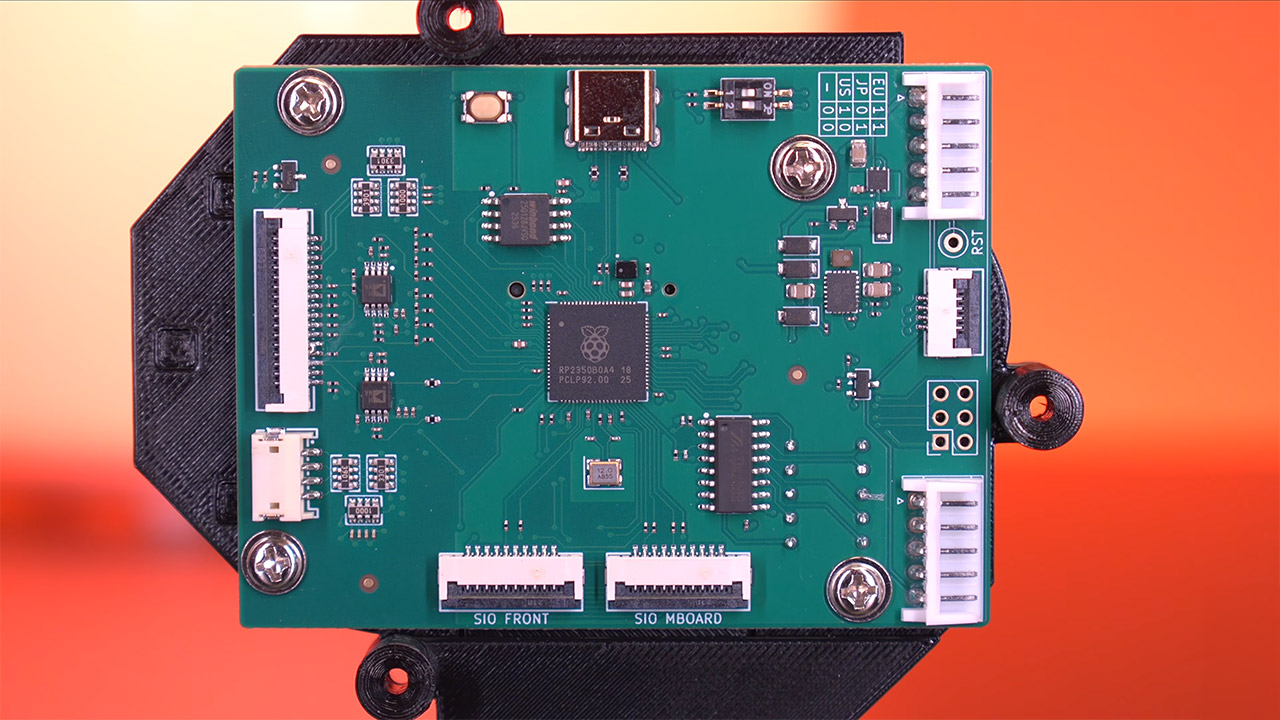
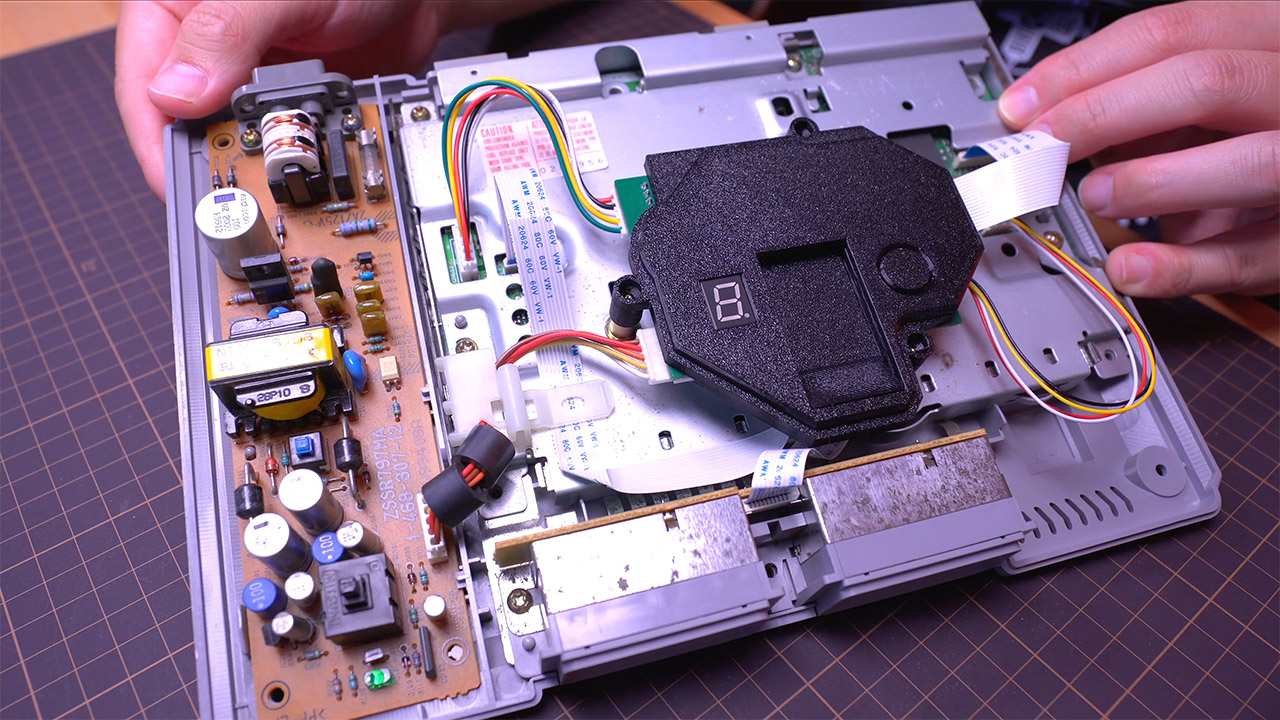
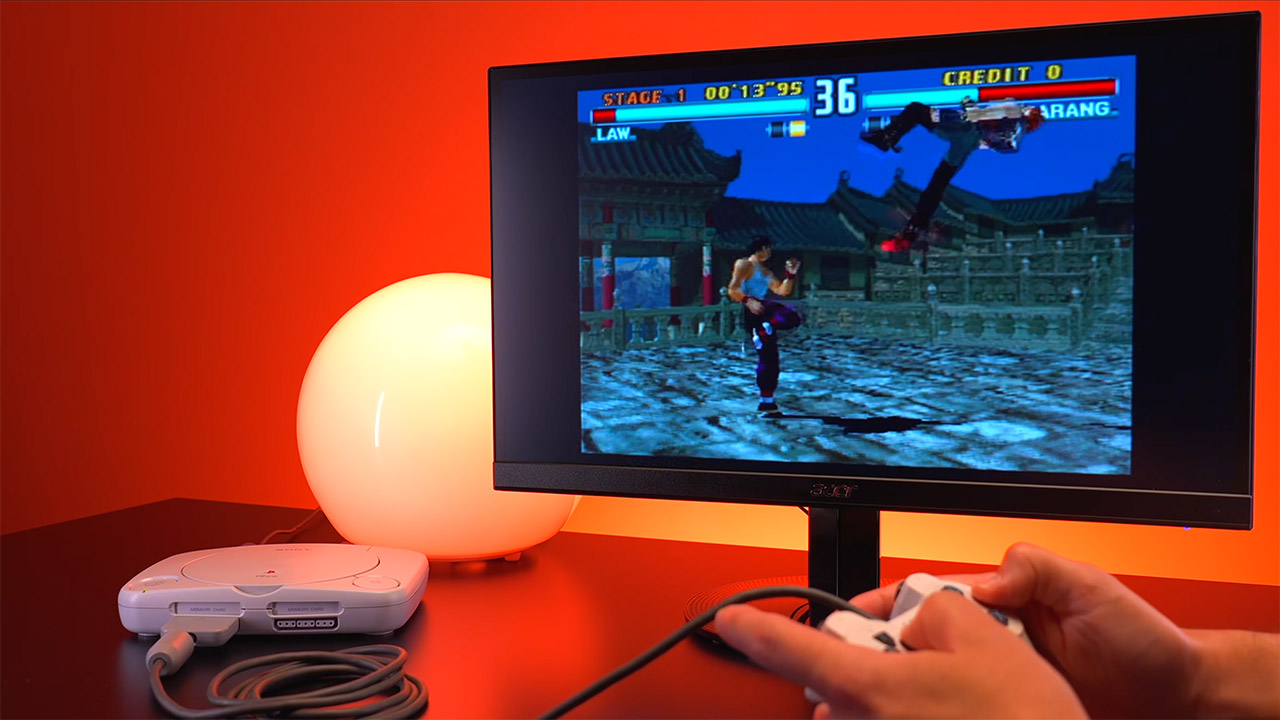
Owners of original PlayStation consoles have watched their disc drives age for decades. Lasers fade. Games start to skip or fail to load altogether. Replacement drives grow scarce and expensive. A new device called ArcStation steps in with a direct solution. It replaces the entire optical drive assembly inside the console with a compact circuit board that loads games from an SD card instead. No discs stay necessary after setup. The change keeps the original hardware intact and authentic while removing the most common point of failure.
Installation is mercifully simple: simply unplug and open the case with a single Phillips screwdriver, and you’re done. Owners then carefully remove the old drive, flip over to the shiny new board, and adjust two little DIP switches to match the region settings on their console. Once that’s done, simply plug in the short cables provided, which go into the exact same locations as the originals. You will not need to apply any solder or make any lasting modifications to the motherboard. Instead, the new board sits well on the existing posts inside the casing thanks to a 3D manufactured mount that also accommodates both the larger “fat” PlayStation models and the handy tiny PSOne. A simple test boot with the lid remaining open will ensure that the old Sony logo and boot animation are back in action. Put the case back on, and you’re finished.
PlayStation 5 Console – 1TB, includes wireless controller, 1TBSSD, Disc Drive, 2 Horizontal Stand Feet, HDMI cable, AC power cord, USB cable, printed…
1TB of Storage, keep your favorite games ready and waiting for you to jump in and play
Ultra-High Speed SSD, maximize you play sessions with near instant load times for installed PS5 games
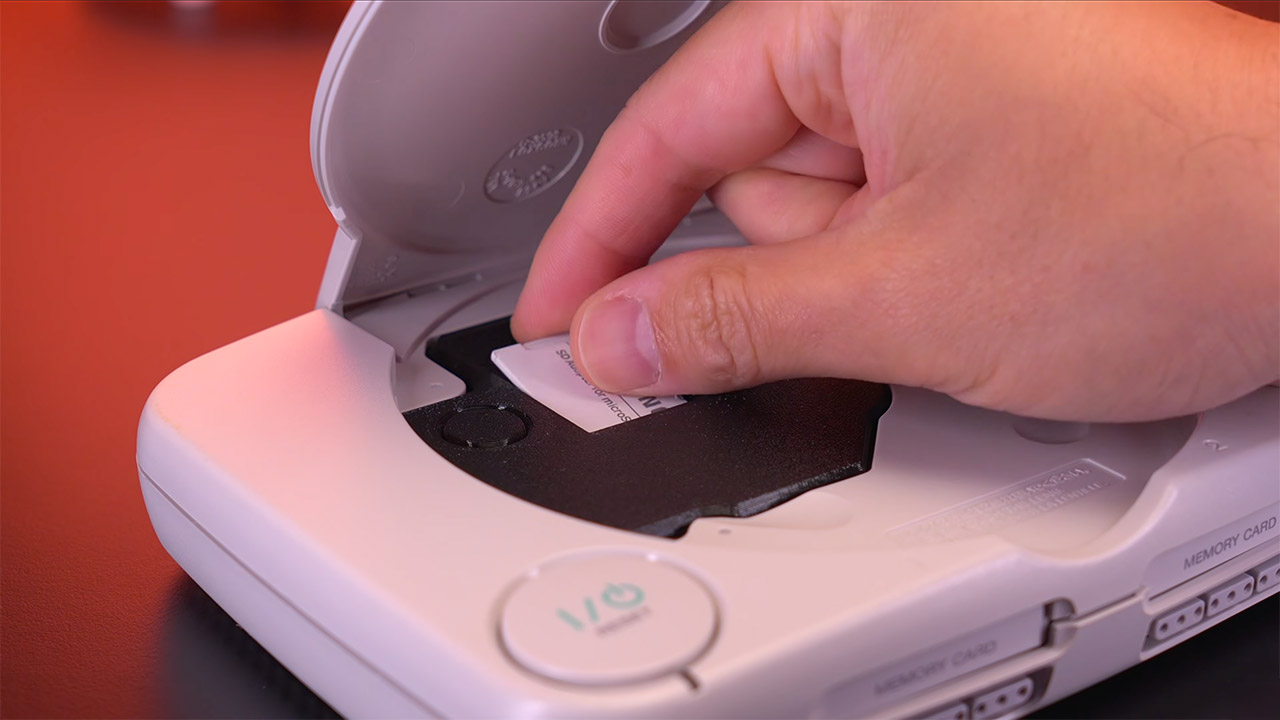
Once inserted, the board appears as soon as you turn on the console and displays a very clean small menu on a tiny built-in LED screen. Users just copy their game files to a normal SD card formatted in either FAT32 or exFAT. It is not an issue to have CUE/BIN pairs, BIN files on their own, or ISO pictures on there; the board can handle them all. You can keep the games in folders or subfolders if you like, as this is all about organization. Simply hit the refresh button in the menu, and the board will scan your card and generate a list for you. Then simply press the title button with your controller, and the game will launch immediately on the original hardware. In terms of load timings, they’re not far off from what you’d get from an actual CD, and there’s even a special option for early motherboard revisions that can shave even more off.
The reason this works so well is that it accurately mimics the behavior of the original CD-ROM drive, down to the radio frequencies that the console expects. Games that generally look for modchips or copy protection will not even blink an eye. You get region-free access on all PS console generations, including the legendary PSOne. If you’re playing a game with multiple discs, the board will usually handle the queue for you. You can even build a manual queue of up to six discs and move between them as needed; simply press the button next to the SD slot while keeping an eye on the LED display.
Save games are moved to virtual memory cards that are kept directly on the SD card; each game has its own dedicated file, so storage never runs out like it did on the old physical cards. You can attach the virtual card to either slot 1 or 2 on the fat models, but be careful because some older systems cannot handle it. Owners can access the menu without having to turn off the console by specifying a button combination on the controller, which is far more convenient than fiddling around in the settings. The tiny PSOne differs from the others in that it cannot use virtual memory cards or the game reset combo due to its completely different internal layout, but it can still use all other functionalities. Some additional options on the main menu allow you to adjust video settings, switch to a light or dark theme, receive sound cues, have the console auto-start the previous game you played with a slight delay, and even display the game title from either a database or what is actually on the folder name.
Pre-orders began at the end of May at a reduced price of roughly 140 euros. Shipping is expected in September, but fingers crossed it will arrive sooner. The kit contains all of the wires required for both the fat and slender models, as well as the board, which is pre-mounted for ease of installation. There has been thorough testing on over a hundred titles, and the results on the fat models have been remarkably consistent, even after extended gaming sessions.

















































You must be logged in to post a comment Login