Pouring the resulting distillate for testing. (Credit: Lowered Expectations, YouTube)
The propensity of gasoline to ‘go stale’ through the process of oxidation is the reason why gasoline that has been stored for a long period of time is considered to be unusable, as it will no longer combust property. Since this process creates the sludge that you find in the bottom of an old gasoline canister, it follows that you may be able to distill out the still good gasoline. With this reasoning, [Joel] over at the [Lowered Expectations] channel set to work to try out this theory.
As part of his job of maintaining things like pressure washers, he got access to many grades of stale gasoline to experiment with. After a short demonstration of how poorly these grades of stale gasoline burn it’s on to the main distillation event. To the stale gasoline aluminium oxide is added as both a catalyst and to create nucleation sites that will prevent ‘bumping’ where you suddenly get a surge out of the heated flask.
Of course, that this is incredibly dangerous should be obvious, and the lack of PPE on the side of [Joel] is somewhat worrying. On the positive side, he does take it easy with ramping up the temperature on the gasoline to try and find the sweet spot where production seems sufficient. This turned out to start at 70°C in the flask when the condenser began to receive its first load of presumably clean-ish gasoline.
The goal here is of course to approximate the function of the fractionating column (‘distillation tower’) at refineries at smaller scale, which [Joel] appears to be doing correctly with what looks to be a Vigreaux column. Since the base product is gasoline with oxidized contaminants this process is of course quite different, so he goes through the different temperature ranges to see what kind of distillate he gets, up to nearly 200°C before calling it.
Ultimately 880 mL of the initial 1 L was collected, with the various distillates combined for testing. Unfortunately none of the testing is actually covered in the video, but it is mentioned at the end that a second batch of the distillate was used to power his car, so presumably it works.
Advertisement
Suffice it to say that ‘works’ doesn’t mean that it is safe, of course. Heating such stale gasoline produces many highly flammable and combustible substances, along with many that are just downright bad for your health to be exposed to. The plethora of very short-term to all the way to very long-term health effects this may cause should be obvious.
A scent diffuser can make a big difference in your day-to-day quality of life. I didn’t think they were all that special until I started testing them, and now I can’t imagine my home not smelling great all the time. Pura makes many of our favorite diffusers, and with a Pura discount code, you can make the initial investment more affordable. You can also use a Pura coupon code on scent refills. With dozens of scents to choose from, plus more seasonal offerings, you’ll want to try them all. Here’s where to find a Pura discount code or Pura promo code.
Pura Promo Code: $20 Off for Instant Savings
We’ve liked basically everything we’ve tried from Pura, including multiple different diffuser models and scents. The smart nebulizers evenly disperse great-smelling fragrance throughout your home, and the app lets you adjust the strength and schedule. After trying them, you’ll probably want to spread the word too. Refer your friends and you’ll both get $20—yours toward any purchase, and theirs for a Pura discount code on orders over $50. Stack these bonuses with Pura deals for even more savings.
Get 25% Off at Pura
One of the best times to use a Pura coupon is during seasonal shopping holidays. Treat yourself or a loved one to a new home fragrance with 25% off your order using Pura coupon code PURA25OFF during checkout. This is a great way to save on scent refills or new diffusers.
Pura Diffuser Promo Code: 20% Off Smart Fragrance
Pura makes some of the best diffusers you can buy. Shop this Pura sale to get 20% off your new smart diffuser, which can be controlled with an app or manual buttons (depending on the model you choose). We especially like the new Pura 4 and the large-room Pura Plus, both of which can hold two scents and even have built-in color-changing nightlights.
Advertisement
Subscribe and Save to Get a Free Diffuser
Pura diffusers are some of the best on the market, and this Pura sale is a great way to try them, with no Pura promo code needed. There are dozens of scent options to choose from, including from bespoke and popular brands and fragrance houses like Otherland, Capri Blue, Anthropologie, Disney, and more. Subscribe to your favorite(s) for six months and your diffuser will be free. There’s even a 30-day trial so you can make sure you like your chosen scent(s).
Sign Up for 10% Off Your First Pura Order
This Pura promo couldn’t be easier. Simply sign up for the Pura newsletter and you’ll get a Pura discount code for 10% off your first order. Use it on diffusers, scent refills, or even a car air freshener. Just make sure you sign up before placing your order.
On paper, the Anthbot M9 ticks a lot of boxes; it can handle lawns up to an acre and inclines of up to 45%, it doesn’t require pesky physical boundary lines, and features a wide cutting blade with five razors. But while it cuts well and shows real promise on a perfectly flat lawn, its disappointing real-world performance on anything less than smooth ground means it’s not all it’s cracked up to be.
Can handle inclines of up to 45%
Wide 20cm cutting blade with five razors
No need for physical boundary wires
Struggles with minor bumps and divots
Goes outside of boundary lines
Misses patches of grass
Key Features
Advertisement
Review Price:
£735
Wire-free navigation
Advertisement
The Anthbot M9 uses GPS, 4G and an RTK station to map and navigate your garden without the hassle of physical boundary wires.
AI-powered obstacle detection
Advertisement
With dual 150-degree HDR cameras and on-board AI, the Anthbot M9 is designed to identify obstacles and move around objects in its path.
App-controlled cutting
Advertisement
The Anthbot M9 lets you adjust cutting height, set mowing schedules and customise mowing patterns directly from the companion app.
Introduction
With robot lawn mowers becoming increasingly popular as a hands-off way to keep your garden in check, the Anthbot M9 arrives with a spec sheet that sounds genuinely impressive.
It promises to tackle lawns up to an acre in size, handle slopes of up to 45%, and ditch the need for physical boundary wires altogether thanks to its GPS- and 4G-based navigation system. Throw in AI-powered obstacle detection and automatic mapping, and it certainly sounds like a smart solution for anyone after a stress-free mowing experience.
Advertisement
But, as is so often the case with robot mowers, the real test isn’t what it can do on paper – it’s how well it copes with the quirks of an actual garden.
Advertisement
After spending time setting up and using the Anthbot M9 in my own admittedly less-than-perfect garden, it became clear that while there’s plenty to like here for the right kind of garden, there are more than a few frustrations that stop it from being an easy recommendation.
Design and features
Docking station for charging
Dedicated GPS RTK station
Automatic or manual control
The Anthbot M9 might have an impressive feature set, including mowing lawns up to an acre in size and handling slopes of up to 45%, but it does need a bit of setup before it can crack on with the job at hand.
Image Credit (Trusted Reviews)
You might feel a bit overwhelmed with the number of parts in the box, but it’s actually pretty straightforward to set up. The first step is to mount the charging base along the edge of your grass and use the included screws to secure it to the ground, with the caveat that it needs a clear view of the sky, so it can’t be near buildings or trees.
Advertisement
Advertisement
That can be a bit of a struggle depending on your garden and placement of any outdoor plugs, as the cable, even with the extension attached, isn’t that long at 10m. And, if you order it in the UK, be aware that it comes with an EU plug, so you’ll need to get an adapter or rewire it yourself.
Image Credit (Trusted Reviews)
I actually had to place mine on a brickwork patio due to the placement of my outdoor plug, though it had no real impact on the performance – the M9 simply made its way to the grass before activating the blades.
There’s also the GPS-based RTK station that helps the mower stay on route, though, thankfully, it comes with an extension cable (which has to be plugged into the charging dock rather than an outlet) to keep it out of the way. It has a pretty stable base that can be pushed into grass or soil, but it can be a bit of an eyesore with a rather industrial look and bright green LED; it’ll depend on your garden’s style, I suppose. A lot of new robots dispense with this reference station, using network RTK for navigation, as with the Segway Navimow i205 AWD.
Image Credit (Trusted Reviews)
Just don’t do what I did and move the RTK station post-setup, as you’ll need to go through the initial setup in the app once again.
Advertisement
When it came to the robot itself, there was very little involved; I just had to move it into place on the charging station to start charging. I will say, though, without any dedicated carrying handle like the LawnMaster OcuMow 18 Autocharging Vision – and stickers explicitly telling you not to hold the mower by the wheel covers, which is where you’d naturally grab – it can be a bit big and bulky to move around. Still, it’s not impossible, and I got cracking with the Anthbot app setup soon after.
Advertisement
During the setup process, you’ll be able to get the M9 to automatically map your garden, something possible thanks to its combination of two 150-degree HDR cameras – though you’ll need pretty distinctive borders for this to be a success.
Image Credit (Trusted Reviews)
I thought my garden would be perfect, with two grassy areas distinctly separated by a brick path and 1-ft fences protecting the flowers, but it really struggled. After letting it do its thing, it came back with a completely inaccurate map, missing chunks of my grass.
Thankfully, you can set the boundary yourself by taking manual control of the mower and driving it around the edges of each area – but even this is a little finickier than it has to be with, in my experience, overly sensitive joystick controls that make it go very fast with only slight adjustments.
Once done, I renamed each area (on the off-chance I wanted to mow one area one day, and the other the next) and added a no-go zone around a pergola pillar that sits in the corner of my grass. There’s no need for any physical boundary lines here though, a refreshing change from plenty of robo mowers.
Advertisement
Advertisement
Image Credit (Trusted Reviews)
Once setup was complete and the GPS was active, I was free to activate the M9 and unleash it on my garden – but I’d recommend changing a few features in the app first. The biggest is to set the cutting height, with the M9 offering a range from 30- to 70mm, in pretty precise 5mm increments.
The electronic system used here is much more convenient than having to adjust a manual selection wheel on the mower itself, as it can be done from anywhere. It just makes it that little bit easier to adjust the height of your grass – you’ll typically want it longer in the spring months before cutting it down shorter in the summer.
You can also set a schedule to mow the grass automatically, and with the M9 able to detect rain and stop mowing to avoid damaging the grass, it shouldn’t make a mess of things on rainy days either.
Image Credit (Trusted Reviews)
The default mowing mode seems quite random, with the M9 going in different directions depending on the shape of your grass – but you can set the direction if you want those professional-looking lines. You can also get it to mow the lawn twice on every run, just to ensure you’ve caught every single blade of grass.
Advertisement
Image Credit (Trusted Reviews)
You can also trigger the M9 using the buttons on the mower’s control panel, with different button combinations allowing you to mow or return home, along with a big stop button to stop the mower in an emergency. This is also where you’ll find the battery key, which is essentially a kill switch – take it out when you’re not mowing, and it simply won’t work. That’s great if you’ve got curious kids around, though it also means you won’t be able to remotely trigger it.
Image Credit (Trusted Reviews)
Flip the robot over, and you’ll see a 20cm wide cutting deck with five replaceable razor blades that spin around to cut the grass. That’s a pretty wide base, and the use of five blades instead of three is another welcome upgrade compared to some of the cheaper options floating around. It is still on the small side if you’ve got a 1-acre lawn, but it’s fine for my relatively compact suburban garden.
Performance
Clean, uniform cuts
Can miss areas of grass
Goes outside its boundary lines
Can’t handle lumpy ground at all
With advanced features like the ability to navigate 45% slopes, a wide cutting blade and a 150-degree camera to understand the world at hand, I had high hopes for the Anthbot M9 – but still, letting it go on my precious lawn for the first time was daunting.
Advertisement
Advertisement
It’s not a perfect lawn by any means – the shrink-swell clay soils of my ground mean it’s quite lumpy and bumpy in places, and there are a few patches of dying grass – but it’s pretty healthy and neat-looking overall.
Image Credit (Trusted Reviews)
Letting the M9 go the first time, it started in a random patch in the middle of the grass before dotting here, there and everywhere, with the blades turning on and off frequently. It did this, I realised, when it detected any particularly high lumps in the grass – I imagine in an effort to stop scalping the grass – but it also meant that chunks of grass were left essentially untouched.
Then there was the opposite problem; when the M9 detected a divot a little too steep, it’d stop, bleep angrily for a few seconds, and then turn away. It did occasionally try these at different angles, but usually it’d be the same story: stop, bleep, give up.
Image Credit (Trusted Reviews)
The problem is that there’s no indication as to what this bleep actually means, and there’s no notification or information about it in the app – I only figured it out by sheer trial and error. I tried filling some of the divots with dirt to reduce them, but it seems very sensitive in this regard. It can handle 45% slopes, sure, but they’d better be smooth slopes.
Advertisement
It’s also not that great at detecting objects, despite the fact that it’s designed to be able to detect over 1000 objects, including people and animals. There were multiple occasions when it simply rammed into the 1ft fences that protect my flowerbeds; it didn’t go any further, thankfully, but considering I stayed away from them in mapping, it was surprising to see.
Advertisement
That wasn’t the only time it went over the boundary line either; it also got stuck on a mini kerb in one corner of my grass that I purposely avoided mapping as it attempted to essentially cut the corner.
Image Credit (Trusted Reviews)
When it gets stuck, it bleeps constantly, but again, there’s no notification sent to your phone to alert you to this if you’re not nearby. I also found that the blades and wheels didn’t stop spinning despite grinding against the stone kerb, something that’s particularly worrying from a safety standpoint.
Essentially, it’s something you won’t want to leave unattended – and that kind of defeats the purpose of having a robot lawn mower.
It does a much better job at detecting humans at least; whenever I’d walk in front of the M9 in use, it’d turn away and head in a completely different direction.
Advertisement
Advertisement
Anyway, back to the cuts; I found that it’s very hit-and-miss in terms of coverage. The first few runs, it got the majority of the grass, but on the latest run, it simply seemed to forget around a third of one of my zones. Looking in the app, it said it had covered it – I’m not sure what happened there.
Image Credit (Trusted Reviews)
You can take manual control of the robot to get it to cover any areas it might’ve missed, but as mentioned earlier, the controls are very sensitive, making it difficult to maintain a straight line and navigate bends cleanly.
I think it also struggled in my garden due to the wheel design; the big rear wheels deliver plenty of power to get it up those inclines, but the shopping trolley-style front wheels offer no direct control, and it means that those bumps in my grass can often send it to the left or right of where it wants to go.
Image Credit (Trusted Reviews)
It also doesn’t handle edges very well – the 20cm blade doesn’t extend to the edges of the mower, after all – but that’s a criticism of most robot mowers. It does have an edging mode that you can activate in the app, where the robot will run along a border; however, if the M9 is up against a fence, it still won’t reach. You’ll likely need to go out with a strimmer to tidy those up every now and again.
Advertisement
Image Credit (Trusted Reviews)
It isn’t all bad, of course. The combination of a wide cutting blade and five blades means that when it cuts, it does so neatly and efficiently. You can see clear paths being made as the M9 makes its way through taller areas of lawn, and the cut height is pretty uniform (aside from the aforementioned bumps). The areas it did manage to cut properly looked great – it’s just a shame it wasn’t a uniform experience for me.
Image Credit (Trusted Reviews)
That said, it feels like you need a golf course-level of flatness and clearly defined edges to get the most out of the M9 – and most of us don’t have that in our gardens. If you’ve got a lumpy, bumpy garden like me, you’d likely be better served by something like the Sunseeker Elite X5.
The one saving grace is that the M9 doesn’t struggle to find its way back to the docking station once it considers the job done; even with the placement of the base station away from the grass, it makes its way over and docks itself first-time most of the time.
Advertisement
Image Credit (Trusted Reviews)
Advertisement
Should you buy it?
You have a large, perfectly manicured lawn
If you’ve got a perfectly flat lawn under an acre, the Anthbot M9 shouldn’t struggle to keep it maintained.
Advertisement
You’ve got a less-than-perfect lawn
If your lawn has bumps and divots, the M9 will struggle to navigate and cleanly cut it.
Advertisement
Final Thoughts
On paper, the Anthbot M9 ticks a lot of boxes; it can handle inclines of up to 45%, it doesn’t require those pesky physical boundary lines, it relies on 4G and GPS for location data, it has a wide cutting blade and five razors and the ability to identify objects via on-board AI.
However, the real-world performance on anything less than a perfectly flat lawn is a little disappointing. It would get caught on small divots in the grass, diverge from its path with only trolley-style front wheels, and the app doesn’t alert you when the mower runs into issues. Pair that with the fact that it often misses patches of my lawn, and it’s not all it’s cracked up to be.
Advertisement
It cuts very well, so there is potential there if you do have a perfectly manicured lawn free of divots and lumps, but for most of us, that really isn’t the case. For other options, take a look at our selection of the best robot lawn mowers.
How We Test
We test every robot lawn mower we review thoroughly over an extended period of time. We use standard tests to compare features properly. We’ll always tell you what we find. We never, ever, accept money to review a product.
Find out more about how we test in our ethics policy.
Used as our main robot lawn mower for the review period
Used on a variety of grass lengths to see how well the mower cuts
Used on a variety of grass lengths to see how well the mower cuts
FAQs
Does the Anthbot M9 need boundary wires?
No, it uses GPS, 4G and an RTK station to map your garden, so there’s no need to lay physical boundary wires.
Advertisement
Is the Anthbot M9 good for uneven gardens?
Not really. It performs much better on flat, clearly defined lawns, and struggled in testing with bumps, divots and messy edges.
Advertisement
Can the Anthbot M9 be left to mow unattended?
It’s not ideal. The mower can get stuck, miss sections and stray near boundaries, and the app doesn’t alert you when something goes wrong.
There’s a lot that doesn’t add up in a security advisory password manager Dashlane published Monday, warning that attackers managed to obtain 20 encrypted user vaults.
“Starting on Sunday, May 31, 2026, an external party launched a brute force attack against certain Dashlane user accounts,” the company said. “The goal of the attack was to brute-force two-factor authentication (2FA) protections to allow the attacker to register new devices on existing user accounts.”
Hello, Dashlane, anybody home?
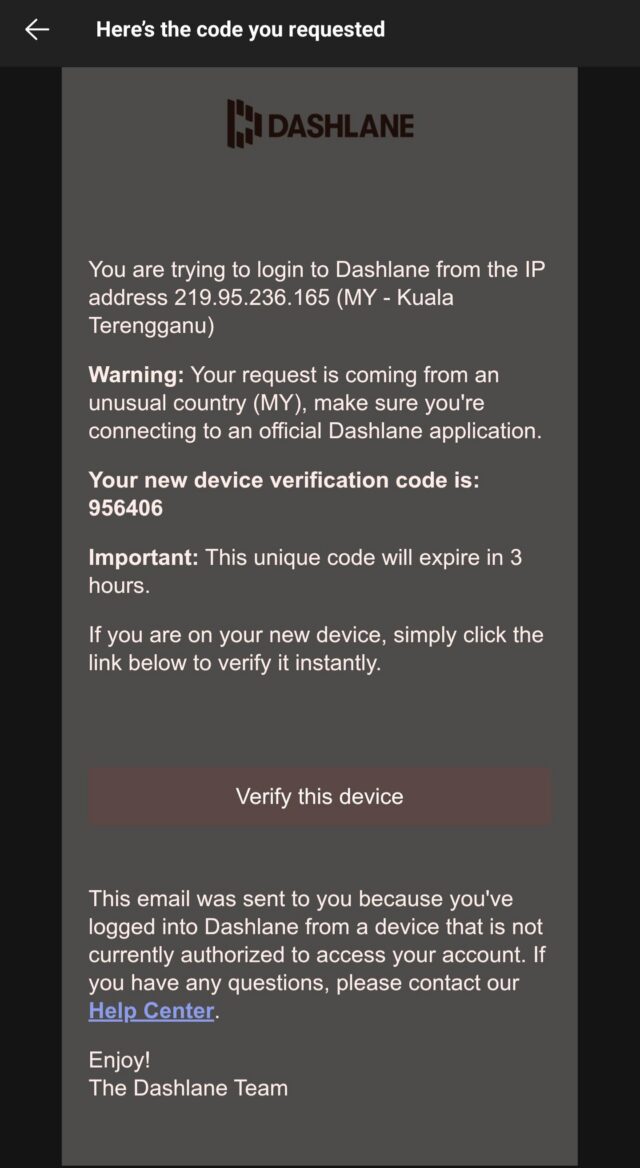
A Dashlane user who received such a 2FA request provided this screenshot of the notification, which arrived on Sunday.
Advertisement
The UK-based user was concerned and contacted Dashlane through a support bot. Ultimately the user got no information about why the notification was sent.
“Then [I] discovered this news from Mastodon infosec and not Dashlane themselves,” the user told me. “Currently trying to find out what has happened! Because how can you trigger a 2fa request if you haven’t got the password 1st? As a paying customer I think I should have known about this from Dashlane and not Mastodon infosec folks.”
Scores of social media discussions are filled with similar comments from users who also don’t understand the basic mechanics of this attack. Typically, 2FA protections take the form of a one-time password generated by an authentication app or sent by text or email. They’re typically six digits long and change every 45 or so seconds, although as the notification above indicates, the code remained valid for three hours.
Advertisement
Brute-forcing is a trial-and-error method that rapidly submits every possible combination until landing on the right one. Under these assumptions, there would be 1 million possible passcodes. A successful breach would require a statistically significant percentage of them to be entered within the three-hour window.
While the resources needed to bombard Dashlane servers with that volume of guesses in such a short period of time are possible, they’re not commonly found in usual brute-force attacks. Dashlane doesn’t explicitly say it placed a rate limit on the number of submissions a user can make, although it appears likely based on language in the advisory saying “Because of the high volume of attempts on user accounts, Dashlane’s security controls automatically locked accounts that were targeted by the attack.” Even assuming there was no rate limiting, it’s hard to imagine Dashlane servers not at least temporarily choking when receiving 150,000 or more submissions in an hour or so.
Netflix has announced that it’s picked up a new show called Dealies from Joe Bennett, the co-creator of Scavengers Reign and Common Side Effects, and Ted Travelstead, a voice actor on Scavengers Reign and a former supervising producer on The Great North.
Dealies follows the staff of a big box retail store of the same name. Scavengers Reign followed a crew that crash-landed on a treacherous alien planet. Common Side Effects is about a conspiracy to cover up a potentially life-extending miracle drug. Compared to those premises, Dealies’ workplace sitcom doesn’t seem particularly interesting. But have faith, there’s a good chance the show has more going on than it appears to on first blush.
Advertisement
Both Bennett and Travelstead are executive producing and showrunning Dealies, with Green Street Pictures handling animation, as it did on Bennett’s previous shows. Based on the key art Netflix shared alongside its announcement, and opening credits Green Street Pictures posted on YouTube, Dealies shares some notable similarities with Common Side Effects. Character designs with big expressive heads feel like a Green Street speciality at this point, and the credits’ surreal, almost Paprika-esque imagery recalls some of their previous show’s headier moments. Hopefully, the similarities will also extend to the plot: Common Side Effects is a comedy, but with a disarming amount of real emotional drama running through it.
According to Green Street Pictures, Dealies will premiere on Netflix at some point in 2027. Common Side Effects, which Bennett co-created with Steve Hely, is available to watch on HBO Max and was renewed for a second season in March 2025. Scavengers Reign is technically cancelled, but if you haven’t seen it, you can catch up now on Netflix or HBO Max.
This sponsored article is brought to you by Black & Veatch.
The biggest challenge facing utilities today isn’t what it seems. It’s not demand, even as load growth accelerates. It’s not extreme weather, even as “major events” become routine. It’s not cybersecurity, even as connections expand across the grid.
Nick Lehnert, Associate Vice President, Distribution Grid Leader, Black & Veatch.
Black & Veatch
The real challenge is this: Distribution systems were designed for a different reality.
Advertisement
Long gone are the days of predictable demand, one-way power flow and isolated disruptions. At Black & Veatch, we see that leading utilities are no longer debating whether to modernize. They’re deciding how quickly they can do it, and how to do it at scale.
Across grid modernization programs globally, three truths consistently emerge. They define what it takes to prepare the distribution system for what’s next:
1. Outage response is not a resilience strategy
Resilience is being redefined in real time. A strategy centered on mobilizing crews and restoring service as quickly as possible is reactive, and increasingly insufficient.
Resilience has to shift upstream into integrated system design. That starts with hardening. Stronger poles, undergrounding and structural upgrades all have a role, particularly in high-risk corridors. We’re also seeing meaningful gains from how the network is configured and how quickly it can respond without waiting on manual intervention.
Advertisement
This is where distribution automation programs can change outcomes. Strategically placed reclosers, automated switches and fault indicators help contain disruptions before they spread. When combined with feeder reconfiguration and updated protection strategies, distribution automation investments allow utilities to set more aggressive recovery targets and achieve measurable reductions in outage duration and customer impact.
2. Future-readiness depends on DERs at scale
Forecasting is less and less reliable. Only 19 percent of utilities report strong confidence in their ability to predict future load growth, according to the Black & Veatch 2025 Electric Report.Distributed Energy Resources (DERs) like solar, storage, EVs and behind-the-meter generation are exciting solutions; but they fundamentally change how the system operates. Power is no longer just delivered. It’s injected, stored and redirected in ways the system was never designed to manage.
At scale, these challenges show up quickly — particularly on feeders where distributed generation is approaching or exceeding hosting capacity. Protection coordination becomes more difficult when fault current comes from multiple directions. Voltage becomes less predictable as generation fluctuates throughout the day. And planning models must now account for highly variable, location-specific behavior.
Distribution modernization is fundamentally changing how the system is designed and operated so it can absorb disruption, manage bi-directional flows and respond in real time.
Advertisement
Adapting to bi-directional power flow requires more than incremental updates. Leading utilities are responding by building flexibility into the system, moving beyond static assumptions toward dynamic hosting capacity and interconnection studies, planning that incorporates DER, EV adoption and localized load growth, and infrastructure aligned with the communications and control needed to manage it.
3. The edge must be intelligent, visible and secure
As system stress and complexity increase, utilities need far greater visibility and control over the network. Historically, utilities relied on customer calls, Supervisory Control and Data Acquisition (SCADA) at the substation level and field crews to understand what was happening on the system. That model doesn’t hold up. You can’t effectively manage a system you can’t see. Plus, the most critical events are increasingly happening beyond the substation — on feeders, laterals, and at the edge where DER and customer behavior are interacting with the grid.
Grid-edge technologies have become essential. Sensors, Advanced Metering Infrastructure (AMI) and automated switching provide the raw data and control needed to move from reactive to proactive operations. In more advanced deployments, utilities are creating centralized control environments that allow operators to see and manage the distribution system in near real time. That capability is enabled by:
Advanced communications networks to form the backbone of real-time grid visibility
Distribution Management System (DMS) and Outage Management System (OMS) to enable faster, more coordinated system response
Analytics, AI and machine learning to improve situational awareness, anticipate system conditions, and support operational decision-making
The same connectivity enabling this real-time visibility and control also introduces new vulnerabilities, blurring the line between physical and cyber risk, yet many utilities manage them separately. Only 22 percent have unified teams in place, even as threats continue to rise, including a 50 percent increase in substation attacks and growing exposure to malware and ransomware, according to the Black & Veatch 2025 Electric Report. Cybersecurity and resilient network design must be embedded into the architecture from the outset—not layered on after the fact.
See what bolder vision looks like
Distribution modernization is fundamentally changing how the system is designed and operated so it can absorb disruption, manage bi-directional flows and respond in real time.
Advertisement
To learn about a successful program, check out Georgia Power’s recent grid modernization program. Black & Veatch partnered with the utility on large-scale infrastructure upgrades. The results? Outages are down 76 percent, restoration times have improved by more than 80 percent and communities across Georgia are powered by a grid built to meet the future head-on.
When the state faced the most destructive storm in the company’s history, Hurricane Helene, Georgia Power deployed a rapid response team that utilized its “smart grid” and restored power to more than 1 million customers within days.
A grid built to meet the future head-on—that’s the result of bolder vision.
Hackathons often spark brilliant ideas that can contribute to a better nation. Yet, more often than not, they fizzle out before making a real difference.
But in Singapore, Build for Good is attempting to change that trajectory.
Build for Good is a citizen engagement initiative by Open Government Products (OGP) that aims to empower Singaporeans to make the city-state better in their own ways through their month-long hackathons and accelerator programmes.
Advertisement
It provides a safe space for startups and innovators to test, refine, and scale their social impact projects, and with mentorship, resources, and a network of partners, ideas that start small can grow into initiatives that genuinely help communities across Singapore.
To date, Build for Good has organised four hackathons, with over 300 participants who have built solutions for public good, from improving accessibility to strengthening community support networks.
Simplifying caregiving through citizen innovation
Several of these projects have since moved beyond the prototype stage, supported by Build for Good’s accelerator programme, which works with selected teams to refine their ideas, conduct user testing and explore sustainable operating models.
This includes CareCompass, a free-to-use app designed to assist first-time caregivers, particularly those supporting dementia patients, in navigating the often overwhelming world of caregiving.
Advertisement
Image Credit: CareCompass
Founded during the 2024 Build for Good hackathon, CareCompass simplifies access to critical resources: users provide a few details about their care recipient, and CareCompass generates curated guides tailored to their needs.
The AI-powered app consolidates essential information, from available subsidies to relevant local services, helping caregivers quickly find the support and resources that can make day-to-day caregiving more manageable.
It’s a solution that deeply resonates with the team, as every member has either been a primary or secondary caregiver, or has been closely involved with family caregiving.
For Joshua Gei, one of the founders of CareCompass, the experience was particularly vivid. When his grandfather suffered a stroke in 2020, he encountered the complexities of the caregiving system firsthand.
At discharge, our family faced challenges coordinating care. Nurses, social workers, and doctors all had different pieces of information, from arranging home renovations to understanding which subsidies applied. Managing all this while adjusting emotionally was overwhelming.
Joshua Gei
Advertisement
After coming together as a team during the Build for Good hackathon, Joshua and his co-founders quickly realised they had all faced similar caregiving challenges—and that’s when the lightbulb moment came.
“We realised we all had similar stories—fragmented information, overwhelming logistics, emotional exhaustion,” he recalled. “That’s when we knew we weren’t just building an app, we were solving problems our own families had struggled.”
Image Credit: Build For Good
The resources and guidance offered during the hackathon were crucial in turning the team’s idea into a working solution.
The Build for Good programme that produced CareCompass partnered with the Singapore Government Partnerships Office (SGPO) to foster deeper co-creation between citizens and government. Through this partnership, SGPO connected participants with subject-matter experts across government agencies, helping teams gain a clearer understanding of the problems they were tackling.
For CareCompass, this meant gaining access to the Agency for Integrated Care (AIC) and getting referred to DementiaSG, allowing the team to validate assumptions, test features, and design the app around real caregiver needs.
Advertisement
“AIC and DementiaSG provided access to backend data and connected us to caregivers on the ground,” Joshua shared.
With their progress and validated concept, CareCompass was eventually selected for the Build for Good Accelerator programme, receiving S$20,000 in funding to develop, pilot, and launch their solution.
Community partners such as Mindfull Community engaged 20 caregivers to provide feedback on the platform, and there are ongoing plans to pilot with grassroots teams in Braddell Heights and Punggol.
These partnerships ensured that CareCompass is grounded in real caregiver needs, complements existing resources, and evolves based on both on-the-ground and digital feedback.
Joshua Gei
Advertisement
Since launching in Nov 2024, CareCompass has garnered around 500 registered users and over 2,000 total users, and continues to expand its reach.
The platform has also merged with Heartbeat, another solution developed during the same hackathon aimed at tackling senior isolation, to create a more holistic caregiving ecosystem.
By integrating Heartbeat’s wellbeing features, including daily check-ins, reminders, and engagement tools, CareCompass allows users to monitor their care recipients’ overall wellbeing more effectively.
Bridging gaps in mental health support
While CareCompass tackles the practical challenges of caregiving, another team at the same hackathon was focused on empowering individuals in their mental health support through EBI.
Advertisement
Image Credit: Build For Good
The platform’s founders are all too familiar with the frustrations of mental health discontinuity—none more so than Richard Xiong.
After just four months of therapy, his therapist relocated overseas. “I had to begin the process again,” he recalled. “Waiting months for a new appointment and having to retell painful experiences felt like reopening old wounds. It often feels like taking two steps forward, then one step back.”
But Richard is not alone. Many patients in public healthcare face therapist changes due to leave or reassignment, forcing them to start over repeatedly.
He came to realise just how widespread this issue was during Build for Good’s “Human Library” session, where participants got to engage with mental health experts and discuss the challenges Singaporeans face today.
Through these conversations, he and the rest of the EBI team realised that mental health—despite being a growing concern in Singapore’s fast-paced society, particularly among youths—remains burdened by stigma and systemic gaps in support.
Advertisement
Thus, they created an app that helps users articulate and process their feelings through AI-powered prompts, offering journaling, chat, or voice-based interactions, including an assistant that’s even able to converse in Singlish.
EBI summarises key concerns and coping strategies from entries, allowing users to track their progress and share insights with mental health professionals.
Image Credit: EBI
By combining guided self-reflection with personalised insights, the platform addresses the fragility of the therapist–patient relationship and the gaps in support between sessions or across providers.
To bring the app to life, the team similarly benefitted from OGP and SGPO’s combined support, which provided not only mentorship but also connections to experts in the mental health space.
These partnerships helped the team understand real-world challenges, validate assumptions, and shape the app to address the needs of users on the ground.
Advertisement
At first, EBI was rolled out in an open public beta during the 2024 hackathon, where members of the public were invited to sign up and use the platform for free. The team went on to be selected for the 2024 Build for Good Accelerator programme, alongside CareCompass.
Following the beta, which engaged nearly 300 participants, the team’s focus has shifted from direct public promotion to clinical validation, with the aim of demonstrating EBI’s effectiveness in a healthcare setting.
The team is currently conducting a clinical trial in collaboration with local healthcare providers, focused on patients with disorders of gut-brain interaction such as IBS.
The platform’s potential extends beyond mental health. It is positioning itself as a broader tool for mental wellness across the healthcare spectrum, particularly in areas where psychological support plays a crucial role but remains underserved. The team believes EBI can help bridge this, supporting patients at scale while giving clinicians better data to track progress over time.
Advertisement
Reflecting on their journey, Richard sees the collaboration as essential: “In many ways, I see innovators like us as the seeds of change, and the government as the water and sunlight that help those seeds grow.”
“Without the creativity and drive of the community, there would be no seeds to plant; but without the structure, trust, and nurturing environment provided by the government, those seeds could never take root.”
You, too can make a difference
Both CareCompass and EBI demonstrate how citizen-led innovation creates meaningful social impact when supported by structured programmes like Build for Good.
As the EBI team puts it: “We believe that when it comes to solving complex societal problems, success depends on shared ownership between the community and the government.”
Advertisement
Like the teams behind these initiatives, you, too, can make a difference.
Have an idea that could create positive change? The Singapore Government Partnerships Fund by SGPO supports community-driven initiatives. Learn more about SGPF here, and explore other solutions through Build for Good here.
The Pixel 11 series isn’t due until August, but a steady stream of leaks has already revealed details ranging from design to specs across all four upcoming devices. The latest addition gives us a look at the wallpapers Google may ship with the lineup, and they offer a strong hint at the color options likely at launch.
A toned-down palette across the board
Mystic Leaks on Telegram (via 9to5Google) has shared the full wallpaper library for every model in the Pixel 11 lineup ahead of the phones’ expected August launch. According to the leak, the base Pixel 11 will get four abstract wallpapers in black, green, pink, and purple.
Mystic LeaksMystic LeaksMystic LeaksMystic Leaks
The Pixel 11 Pro and Pro XL will share a separate set in beige, black, gray-green, and silver, while the Pixel 11 Pro Fold might get just two options, one in a black-and-white theme and another in green.
Mystic LeaksMystic LeaksMystic LeaksMystic Leaks
All wallpapers will come in dark and light variants to match their respective system themes. The lighter versions are slightly more vibrant, but still noticeably more muted than what Google offered with the Pixel 10 lineup.
Mystic LeaksMystic Leaks
What the wallpapers tell us about the Pixel 11 colorways
The wallpaper colors appear to line up with a previous leak that pointed to black, green, pink, and purple as the color options for the base Pixel 11. If the same logic holds for the Pro models, the beige wallpaper signals a new colorway, alongside black, green, and a silver option like the Pixel 10 Pro’s Moonstone variant. Similarly, the Pixel 11 Pro Fold may be offered in black and green colorways.
Google has not confirmed any of this officially. But the shift toward more muted tones could mark a departure from the more vibrant wallpaper choices Google has offered in recent years. Whether that reflects a deliberate design direction for the hardware colors or just a different creative approach remains to be seen when the phones launch later this summer.
Benchmark Capital, the storied Silicon Valley VC firm known for early investments in eBay, Snap, Uber, and Twitter, is breaking with one of its signature traditions: keeping its funds to about $425 million and backing only young startups. After more than two decades of restricting its vehicles to that amount or lower, the outfit has closed on commitments of $2 billion across two new funds, including a $1.25 billion vehicle dedicated to later-stage investments, according to the Wall Street Journal.
While the fund sizes of many venture capital firms have ballooned into billions of dollars over the last decade, Benchmark stuck to the strategy that helped make it legendary. By being staunchly selective and taking a large—typically 20%—stake in every startup the firm backed, it maintained a model designed to maximize outsized returns for its limited partners.
However, Benchmark’s relatively small fund sizes have likely prevented the firm from investing in capital-intensive AI startups, particularly foundation model makers, whose round sizes often reach into hundreds of millions. As a result, the firm hasn’t invested in Anthropic, OpenAI, or any of the other capital-intensive AI labs, such as Periodic Labs, Reflection AI, or Recursive Superintelligence.
Benchmark’s new $750 million early-stage fund will give the firm more flexibility to write checks in an environment where early-stage valuations have skyrocketed. While the firm has traditionally backed companies at the Series A stage, Benchmark has recently given itself more flexibility to invest in companies at other early stages of development.
Advertisement
In recent months, Benchmark backed two Series B startups: Gumloop, a platform that allows enterprises to create AI agents without writing code, and Monaco, an AI-native sales and CRM platform.
Benchmark general partner Everett Randle previously told TechCrunch that the firm looks to build a “meaningful and deep relationship with the entrepreneurs, and that can happen relatively early in the company’s lifecycle, at seed, [Series] A, at [Series] B.”
The firm dipped its toe into late-stage investing when it raised a $225 million special purpose vehicle (SPV) to participate in a $1 billion pre-IPO round for Cerebras, as TechCrunch reported earlier. Benchmark first led the chipmaker’s Series A in 2016. Cerebras held its IPO last month, returning Benchmark $3.25 billion at the IPO price.
That windfall prompted the firm to raise a dedicated growth fund. That new vehicle will make five to six large investments in both existing portfolio companies and new startups, according to a person familiar with Benchmark’s strategy.
Advertisement
The two new funds aren’t the only changes at Benchmark. Over the last two years, the firm has undergone a significant shift in its general partners.
In 2024, Miles Grimshaw left the firm to rejoin Thrive Capital. Then, last year, Sarah Tavel—Benchmark’s first and only female general partner to date—took on the less-involved role of venture partner, while Victor Lazarte departed to start his own VC firm.
To replenish its ranks, Benchmark — which traditionally runs with four to six general partners — added two new high-profile investors to its team: Randle, poached from Kleiner Perkins, and Jack Altman, the brother of OpenAI CEO Sam Altman. The moves suggest that even Benchmark, long defined by its resistance to growth, now sees the AI era as requiring a different playbook — more capital, more stages, and fresh blood at the partner table.
When you purchase through links in our articles, we may earn a small commission. This doesn’t affect our editorial independence.
The ban, if implemented, would mean that any printer without this firearm-blocking technology could not legally be sold or transferred in California
The move is still pending Senate review before being enacted into law
It could mean that 3D printers could become more expensive or more restrictive for users in the state in the near future as manufacturers pass on added compliance costs to users
The state of California is moving toward enacting a ban on the sale of 3D printers that lack a built-in algorithm preventing users from producing ‘ghost guns’ on a whim.
The controversial bill was passed last week and is pending Senate confirmation before ultimately reaching California Governor Gavin Newsom’s desk, where it must still be signed.
The move remains controversial, with critics arguing that it directly impedes innovation and consumers’ rights and could lead to other forms of government-mandated censorship and control over what users do with their purchases.
Latest Videos From
A piece of legislation that may be hard to implement
California’s AB-2047 bill has been the subject of controversy since it was first introduced to the assembly by member Rebecca Bauer‑Kahan on the 17th of Feb 2026.
Advertisement
It aims to set legal requirements, including mandating that state-approved algorithms be included with 3D printers (at the firmware or application level), which would make it impossible for users to print untraceable 3D-printed firearms.
It places the onus on manufacturers, who must file documentation indicating that their printers contain the “firearm blueprint detection algorithm”.
The bill acknowledges the limitations of the task at hand, stating that a California DOJ-mandated “acceptably low level of evasion” will serve as a benchmark for such measures.
Advertisement
Sign up to the TechRadar Pro newsletter to get all the top news, opinion, features and guidance your business needs to succeed!
The performance standards for the bill have yet to be drafted, with the bill stating that the DOJ or a ‘relevant agency’ will publish said guidelines by the 1st of January 2028.
Critics point out that this might, however, be an exercise in futility, given that users should, in effect, be able to use open-source slicers to circumvent such restrictions by simply using a VPN, even if such a restriction were implemented via geolocation, for example.
Proponents of the regulation point out that the rules will bolster safety by closing a long-standing loophole that has enabled commercial 3D printers to produce untraceable weaponry.
Advertisement
They also cite United Healthcare CEO Brian Thompson’s murder, allegedly with a 3D-printed weapon by Luigi Mangione in 2024, a case that drew national attention as a key example of how the tech can be abused with ease.
Many remain skeptical about the practical enforcement of the legislation, however, which might be easier to pass than to implement, owing to a mix of legal challenges, industry resistance, and courts that have historically treated 3D gun files as a First Amendment right.
The state law governing app use by minors takes effect tomorrow.
Tada Images/Shutterstock
We’re continuing to see the impact of the wave of age verification laws being passed by US state governments over the last year. Apple announced today that apps distributed in Texas will need to conform to the requirements set out under state law SB 2420. MacRumors first noticed the change, which is taking effect tomorrow for any apps distributed in the state.
New Apple Accounts in Texas will be subject to SB 2420 and will need to verify their ages. A parent or guardian will need to provide consent when minors download apps or significant updates to apps and when they make in-app purchases. Developers will also need to support parents or guardians revoking that consent to access at any time.
The Texas measure was signed into law last May, although legal challenges delayed its planned effective date of January 1. Apple had already laid some groundwork for how it will handle geographically-tied requirements, and the company began adopting age verification for iCloud accounts in the UK in March.



























































You must be logged in to post a comment Login