On a balmy, 86-degree day in Mountain View, just outside Google’s sprawling campus, I sought refuge from the glaring California sun in a Volvo EX60 — or so I thought. The air conditioning wasn’t working.
To mitigate the heat even slightly, we opted to darken the transparent sunroof. And all we had to do was ask Gemini.
Advertisement
“Can you make the sunroof opaque?” Vivek Radhakrishnan, a technical program manager at Google, asked the car via voice command. Like magic, the electrochromic window stretching over us blocked the light beaming in from above. We didn’t have to rummage through the car’s settings to find the right button.
At Google’s I/O developer conference on Tuesday, I got an early look at a handful of new features coming to cars supporting Google Built-in and Android Auto. The upcoming capabilities, rolling out later this year, are designed to help you keep your eyes on the road while offering useful information. You can lean on Gemini AI to handle tasks like sharing your ETA, describing that landmark that caught your eye and even helping you order dinner.
Watch this: Google’s Car Update Helps You Keep Your Eyes on the Road
The Volvo EX60 comes equipped with Google Built-in, a native operating system for car infotainment systems that lets you tap directly into Google’s services. We could ask Gemini to identify a dashboard warning light, for example, or have it gauge whether a 65-inch TV we just bought would fit in the back.
Advertisement
Although we were technically parked outside of Shoreline Amphitheater, a giant TV in front of us simulated driving along a San Francisco road toward one of the city’s signature skyscrapers. We asked Gemini, “What’s that tall building in front of me, and can you tell me something interesting about it?”
Using the car’s front-facing camera, Gemini identified the Transamerica Pyramid, “which stood as the tallest building in San Francisco for 45 years.” We got some bonus information, too, as Gemini said, “Nearby, on your right, you’ll find the historic copper-clad Sentinel Building, a landmark that miraculously survived the 1906 earthquake and later became home to Francis Ford Coppola’s film studio.” It was neat to get that much detail and learn something new.
Afterward, we hopped over to the Kia EV9 (which thankfully had functioning A/C) to get a look at upcoming Android Auto features, which are available by connecting your phone to the vehicle. They include a more personalized dashboard design built on Google’s Material 3 Expressive, so you can display a picture of your cat alongside custom widgets, for instance.
While still parked, we then opened up YouTube and watched videos in 4K resolution at 60 frames per second, which can make the time you spend charging your vehicle a little more entertaining. Once you start driving, those videos automatically shift to audio-only so they’re not distracting.
Advertisement
Magic Cue can pull information from your email, calendar or other apps to quickly respond to texts asking for your ETA or other event details. In our demo, an incoming text asked, “What time is the pottery class?” and Gemini found the date and time automatically: June 1 at 2 p.m. Google Product Manager Alanna Veiga just had to tap to send it as a reply.
If you want to make sure your dinner arrives home when you do, you can also ask Gemini to place an order through a food delivery app. Using voice commands, we asked it to order two fish tacos from Pacific Catch on DoorDash. Gemini then pulled up the DoorDash app on the connected phone and added those items to the cart, tapping through the steps as if it were a human. Once it was time to check out, all Veiga had to do was tap to confirm the order.
On vehicles with both Google Built-in and Android Auto compatibility, you’ll be able to use the new Immersive Navigation for Google Maps, which shows a 3D view of buildings, overpasses and surrounding terrain, as well as details like lanes, traffic lights and crosswalks. That can help you get a better understanding of your surroundings and make navigation clearer and easier.
The updates are part of a wider expansion of Gemini into cars, phones, wearables and smart glasses. And while the supercharged AI features might not be able to fix your broken A/C, they can simplify menial tasks and help you stay focused on the road.
Last month Terry Godier published a great essay on his website about “the boring internet,” discussing how the internet that many of us grew up with, the wonderful, empowering, exciting internet that moved power to the edges of the network rather than the center, is still there. It’s just hidden beneath enshittified commercial layers put there by companies seeking to extract more and more from you. It’s a great read and here’s just a snippet:
The internet you grew up on is not gone.
Some of its commercial superstructure is, and more of it will go. The next decade is going to be strange for any company whose value proposition was: we host the place where you talk to your friends.
The platforms will keep mutating. The feeds will keep filling. The slop will keep rising. The grief is real and you are not wrong to feel it.
But the actual internet — the protocols, the federated services, the plain-text commands, the open feeds, the small servers, the personal sites, the things people built when user and developer were sometimes the same word — is still right there.
But, as Godier’s piece notes, protocols are… boring. They change slowly (for a good reason, because you need stability to build on). They tend to change by consensus, which is messy. And rather than having billion dollar companies throwing a whole massive engineering team at making everything work, in the protocol world, we rely on constant experimentation by anyone who wants to experiment.
Advertisement
Sometimes that produces silly things. Sometimes it produces things that only kinda work. And sometimes, it produces wonderful new things that would never have existed in a world of fully centralized services.
But, it takes time. And that can be frustrating for those of us who want to live in that better future. The important thing for people to understand, though, is that while the amazing new breakthroughs in the protocol world may not get giant headlines in the NY Times or flashy stories about trillion dollar IPOs, they are building real things for real people, in which the people are the most important part, rather than the bankers or the billionaire execs looking to get richer.
So I was excited recently to take part as a juror for the Open Social Awards, put on by New_Public and Public Spaces, reviewing a wide range of projects looking to build on open social protocols (mostly ATproto and ActivityPub). The energy among developers right now for what they can do on open social systems is real, and it’s building fast. Tim Trautmann recently wrote about this, saying “the nerds are building a new internet.” As he wrote:
The open web of the nineties didn’t win because the tools were better. It won because a critical mass of people decided that the alternative, a handful of AOL-style walled gardens choosing what everyone saw, was not the future they wanted. Then they built their way out of it. Slowly, unglamorously, in rooms that looked a lot like this one.
Whether atproto ends up being the thing, or a stepping stone to the thing, I don’t know. Nobody in the room claimed to know. But the work is real, the apps are shipping, and the people building them are taking it seriously without taking themselves seriously. That combination is rare, and historically, it’s the one that wins.
Advertisement
You can see that kind of excitement as well in this recent video of a bunch of developers doing an ATproto hackathon, where you see people realizing in real time how powerful ATproto is in allowing you to build a better internet:
It’s so easy these days to get down on the state of the larger internet, increasingly controlled by bigger and bigger companies trying to extract more and more from you. But if you look beneath all of that, genuinely interesting, important things are being built, some of which was celebrated at the Open Social Awards last week.
The grand prize winner was the Newsmast Foundation, which has been helping mission-driven organizations build their own social spaces online, using ActivityPub. They’ve been building some amazing community apps for news organizations, non-profits, and more. Enabling those organizations to have their own social spaces, but built on top of an open protocol.
Advertisement
The two “Excellence Award” winners were equally strong — there was a real argument that either of them could have taken the grand prize. First there’s Blacksky Algorithms, which has built out an entirely separate and differentiated ATproto experience, where thousands of users can have a social media experience interoperable with Bluesky and others on the network, but without ever touching Bluesky hardware or software. The company keeps doing really fascinating things as well, including its use of pol.is for community decision-making, and offering up its ability to build entirely independent ATproto powered communities to others via Acorn.
And there’s one of my personal favorites, Sill, which is a wonderful cross-protocol newsreader app. You login with your Atmosphere (ATproto) handle and/or your ActivityPub handle, and it will find the news that is being discussed among your followers and format it in a nice digest format. I use it as a daily review of what’s happening in the world that’s interesting to me.
And then all of the “honorable mentions” were doing interesting things as well, figuring out ways to make open social more useful: Bounce (a tool for migrating between AcitivtyPub and ATproto while bringing your community with you, from the team who also does BridgyFed, a tool for communicating across protocols). Dandelion, an events platform built on ATproto. Streamplace, which does video streaming on ATproto. Leaflet, which has become one of the go to places for long form blogging within the ATproto world, and Bonfire Networks, which is also working on helping communities build their own communities online.
There were many other entries as well, and the energy developers are bringing to open social projects right now is genuinely contagious. People are learning that they can just build stuff, and specifically the kind of stuff that you had to rely on the goodwill (or perhaps commercial agreements) of a large company to build.
Advertisement
Every day there are more creative new ideas showing up. The one thing I’m looking forward to most is when we start to break out of the “rebuilding this centralized service on open protocols” and finally get to the point where we get entirely new things that are only possible because of open protocols. This is how these things have always worked. A new medium first gets used to rebuild familiar things — almost as a way of learning how the underlying system operates. Then come the breakthroughs that are only possible because of that new medium. If I had one complaint about the entries this year, it’s that too many of them felt like rebuilding the old things, just on a protocol.
We’re already starting to see small examples, though, of what it looks like when we go to the next stage, and it’s not just “this service, but without centralized control” to “we can function entirely differently without centralized control.” That’s just starting to happen, but I expect we’ll see many more examples in the near future.
In the meantime, congrats to the winners (and all the entrants) of the first ever Open Social Awards.
Salaries for AI roles in Singapore have climbed 15-25% in the last 12 months
Artificial intelligence builders are winning even as AI is used to justify cutting jobs in big tech and global banks. In Singapore, salaries for workers developing these systems are climbing up to five times faster than average wages.
“AI and data-based roles remain among the most in-demand positions in Singapore this year,” said Kirsty Poltock, country manager at Robert Walters Singapore. “Companies are racing not just to experiment with AI, but to put it to work at scale in their businesses.”
While hard numbers are scarce, Poltock said AI-related hiring “has continued to grow strongly over the past 12 months, particularly in AI engineering, machine learning, data science, AI product management, and AI governance roles.”
Advertisement
For instance, Chinese technology companies are intensifying efforts to recruit AI graduates from Singapore’s two flagship universities, offering sharply higher pay packages from S$200,000 a year to entice PhD holders to work in China, reported The Straits Times.
On May 20, OpenAI committed over US$300 million (S$386 million) to build Singapore’s applied AI sector, including an Applied AI Lab and a training programme to create over 200 Singapore-based technical roles in the coming years.
Its rival, Anthropic, the creator of AI assistant Claude, is also hiring its first Singapore-based product support specialists and offering a lucrative salary, according to an advertisement on LinkedIn.
AI is “clearly an outlier” for high demand, talent shortages, and premium salaries—even if not the only high-growth area, Poltock said.
She added that the demand for AI talents “has consistently outpaced the supply of qualified candidates”, resulting in salary hikes.
AI openings are everywhere. A quick search on the job portal MyCareersFuture.sg on Jun 10 revealed 150 listings for AI engineers, 45 for machine learning and 15 for data science. On the other hand, LinkedIn is advertising over 800 posts for AI engineers, more than 4,000 for machine learning and over 5,000 for data science.
However, fresh talent is scarce. AI roles often take longer to fill than other professional positions, Poltock said, because employers are competing for a limited pool of candidates.
Employers are particularly hungry for “deep tech” talents who can go beyond building AI prototypes to embedding systems into real‑world operations.
Advertisement
“Chinese tech firms tend to have a much stronger emphasis on deep technical AI capabilities and infrastructure, including research,” she added. “In Singapore, employers are generally placing greater emphasis on commercialisation and enterprise integration—using AI to improve productivity, automate workflows and enhance customer experience.”
No need for PhDs for AI roles
Image Credit: Shadow of light via Shutterstock
Typical entry routes into AI roles include bachelor’s and master’s degrees in computer science, data science, mathematics, or engineering—especially from local universities—plus programming skills and hands-on AI project work or internships.
“For the vast majority of AI roles we see in Singapore, a good bachelor’s degree plus practical experience and the right skills are sufficient, but to earn the absolute top end of the spectrum, a PhD would be required,” Poltock said.
An “absolute expert in AI research or leading major AI initiatives in Singapore” could command close to S$350,000 in total compensation, she added. Such an expert is expected to lead a team and has responsibilities that are increasingly global in scope, which recruiters said companies tend to look beyond Singapore for suitable candidates.
However, the silver lining lies in the fact that such AI leadership rarely fly alone but builds local teams, which creates downstream opportunities, said Yuan Yijia, founder of Singapore‑based AI recruitment agency Dada Consultants.
Advertisement
“They anchor an AI organisation here—then around them you start to see hiring for applied AI engineers, data analysts, platform and product roles. Those are exactly the kinds of positions that Singaporean graduates and mid‑career professionals can qualify for if they build the right skills,” she told The Straits Times.
Poltock urged Singaporeans to regroup and consider how AI can complement their careers, whether through AI-related degrees, mid-career technical upskilling, or applying AI within familiar sectors.
But riding the AI wave takes more than checking a box by taking a single course.
The candidates who stand out are “proactive, inquisitive and willing to get their hands dirty—through internships, internal pilot projects, or even self-initiated work at home.”
Advertisement
Read other articles we’ve written on Singapore’s current affairs here.
Featured Image Credit: Shadow of light via Shutterstock
Stockton has approved a $3.15 investment in Flock drones
The drones will act as airborne first responders
Residents have raised privacy and surveillance concerns
Surveillance and privacy are huge concerns for individuals across the world right now, and municipal leaders in the California city of Stockton are the latest to attract criticism for a controversial drone expansion program that’s ostensibly being undertaken in the interests of public safety.
As reported by Stocktonia, the city council recently gave the thumbs up to a $3.15 million investment in drones manufactured by Flock, on top of the automatic license readers the company already supplies. These drones can act as airborne first responders, giving police eyes on a 911 call situation in as little as 30 seconds.
The sales pitch is that officers will be better informed when they arrive, and that some incidents could be handled remotely. “It’ll really enhance what we already have, in that we get quick deployments, real time updates for officers on scene,” said Police Lt. David Padula when the deal was approved.
Latest Videos From
However, while city leaders all liked the drone program, there has been massive public opposition against it. Issues around privacy, immigration enforcement, and mass surveillance have been raised by residents — not just in regards to how the drones are used, but how the data they collect is stored and shared.
These drones aren’t widely used in the US, but there are active programs in some cities in states, including Texas, Indiana, and Connecticut. The license plate readers are far more widespread, with more than 100,000 now in use.
Advertisement
Data collection and privacy
Flock drones are designed to respond to incidents in minutes (Image credit: Flock)
“It sends the wrong message,” said local activist group The Stockton Community Check-In Booth in a statement after the council decision. “While our residents continue to struggle under the financial impacts of this administration and economy, Stockton continues to invest in militarization and surveillance.”
“Private organizations can control your data from those Flock cameras, and because they’re privately owned, you can’t even use freedom of information to find out what they have about you,” said Stockton Republican congressional candidate John McBride, calling the use of the drones “a total invasion of privacy”.
Advertisement
Sign up for breaking news, reviews, opinion, top tech deals, and more.
According to Flock, local agencies remain in control of the data. It states that it doesn’t work with ICE, and that federal agencies are blocked from discovering or requesting data held by Stockton. Drone flights are logged on a public-facing dashboard, and Stockton police will own 100% of the data they collect.
However, Flock has run into trouble elsewhere: It has previously been found to be sharing access with US Customs and Border Protection in Colorado and Illinois, though it says these practices have now been stopped. In Texas, police used a Flock camera network to track the movements of a woman who had an abortion.
In other areas, authorities haven’t been so welcoming to Flock and its systems. In Mountain View, California, a Flock network of cameras was recently scrapped over concerns about unauthorized access.
A former Meta employee who lost their job during a round of layoffs on May 20 is said to have been detained by US Immigration and Customs Enforcement in recent days, according to communications inside the company seen by WIRED.
A current employee posted about the incident on an internal Meta messaging board for immigration topics this week. The initial post was marked as “urgent” and tagged two Meta executives who focus on immigration issues and employee risk, in an attempt to escalate the issue to them.
The current status of the detained worker is unknown.
A spokesperson for Meta, Dave Arnold, declined to comment on the record. Representatives from ICE and the US Department of Homeland Security did not provide comment in time for publication. It is unclear whether the employee was detained by ICE, Customs and Border Protection, or another agency.
Advertisement
Internal messages reviewed by WIRED indicate employees believe their former colleague was being detained in El Paso, Texas, where there is a major US-Mexico border crossing. On the other side is Ciudad Juárez, home to one of the largest US consular offices in the region and a common destination for visa processing.
Many international employees at US tech companies work on H-1B visas, which allow firms to hire highly skilled foreign workers. These visas are tied to a specific employer. Workers who secure a new job need to adjust their immigration paperwork, sometimes by intentionally leaving and reentering the country.
WIRED was unable to confirm the worker’s nationality or what type of US visa they may have traveled on.
The incident marks a rare known instance of a corporate tech worker being taken into immigration custody since President Donald Trump launched dramatically escalated enforcement efforts across the country early last year, sparking widespread criticism.
Advertisement
In May, Meta cut nearly 10 percent of its workforce, or roughly 8,000 people, as part of its ongoing efforts to make the company more efficient and offset the massive investments it is making into AI infrastructure. Numerous workers on visas were among those let go, according to employees familiar with the departures.
A small community of Meta employees has demanded that the company do more to protect immigrant employees and contractors at risk of being detained or deported by ICE, including helping to pay for legal fees and allowing workers to avoid offices on days they fear immigration officials might be in the area. Amid what some employees describe as a lack of support from Meta, workers have begun organizing financial and logistical aid for colleagues in the US dealing with immigration issues.
Under the Trump administration, immigration authorities have been arresting tens of thousands of people a month, with about 60,000 people in detention centers as of early April, according to researchers. Tech offices have not been much of a target for raids. But in January, immigration authorities arrested two workers traveling to a Meta data center construction site.
They are angry at Redmond and will have their revenge. Nightmare Eclipse, the prolific bug hunter and possibly disgruntled ex-Microsoft employee, disclosed another zero-day vulnerability just hours after Redmond issued a record-breaking number of CVEs and fixes for June Patch Tuesday.
The latest zero-day, RoguePlanet, targets Microsoft Defender and works against fully patched Windows 10 and Windows 11 systems, according to the researcher, who also released proof-of-concept exploit code for the security flaw. Assuming the attacker can win a race condition, this bug allows local privilege escalation and leads to SYSTEM-level control over an affected machine.
Advertisement
Nightmare Eclipse (aka Chaotic Eclipse) is a disgruntled bug hunter with a deep understanding of Windows and an even deeper grudge against Microsoft. They claim to be an ex-employee, and accuse Redmond of ignoring vulnerability reports and refusing to communicate with them.
“When I actively asked you to communicate with me, you refused, humiliated me and made sure to insult me in front of people,” they wrote in an earlier blog post that also promised a “bone shattering” drop on July 14.
“You defame me in public with your CVE-2026-45585 advisory even though you literally deleted the Microsoft account I used to report bugs to you with and I got zero pennies from doing so and I still happily did like an idiot,” the post continued.
Possibly as an outlet for this anger, and reportedly in response to Redmond’s lack of action, Nightmare began releasing their findings to the public. RoguePlanet marks the seventh Microsoft zero-day that they found and disclosed – accompanied by either a PoC exploit or technical details – before Redmond issued a fix.
Advertisement
Microsoft’s initial response to those disclosures was widely interpreted as a threat of legal action, prompting massive outrage from the broader infosec community before Redmond sought to calm the backlash by stating it had “no intention to pursue action against individuals conducting or publishing security research.”
As of Tuesday, the previous six zero-days all have patches.
Three of them, RedSun, UnDefend, and BlueHammer, came under attack soon after Nightmare published working exploit code for each and before Microsoft released security updates to address the flaws. The other three, YellowKey, GreenPlasma, and MiniPlasma, all have been fixed as of June’s Patch Tuesday.
YellowKey (aka CVE-2026-45585) is a security feature bypass bug in Windows BitLocker. An attacker with physical access to the vulnerable system could bypass the BitLocker Device Encryption feature and gain access to the device’s encrypted data.
Advertisement
GreenPlasma (aka CVE-2026-45586) and MiniPlasma (aka CVE-2020-17103) are both privilege escalation flaws in the Collaborative Translation Framework (CTFMON) and the Cloud Files Mini Filter Driver that can be abused by an authorized attacker to elevate privileges locally and gain SYSTEM access.
When asked about RoguePlanet, a Microsoft spokesperson told The Register that the Windows giant is “aware of the reported vulnerability and is actively investigating the validity and potential applicability of these claims.”
The spokesperson continued: “Microsoft is committed to investigating security issues and updating impacted products to protect customers as soon as possible. Importantly, we support coordinated vulnerability disclosure, an industry standard that protects customers and supports the research community by ensuring their findings are thoroughly investigated and addressed before being made public.”
Soon after Nightmare published a PoC for RoguePlanet, the ThreatLocker threat intelligence team validated the exploit code and said that they were “actively assessing impact, affected systems, and additional mitigations,” promising to share more findings “as they become available.”
Advertisement
Tharros Labs senior vulnerability analyst and long-time respected security sleuth Will Dormann said he tested the exploit code, too. “It’s reportedly not 100% reliable, but it worked on the first attempt for me,” Dormann wrote.
Nightmare, for their part, rolled back the promise of a “bone shattering” drop on July 14.
“(Un)fortunately I will be unable to mass disclose zerodays in July 14th, RoguePlanet took way more time than expected and truly drained me,” the researcher said on Tuesday. “I might take a break but I can’t say for sure what I will be doing for next month, maybe it’s nothing, maybe it’s smtg. But the big thing is not happening. I did not intend to spread a mass panic with that post and I apologize for doing so.”®
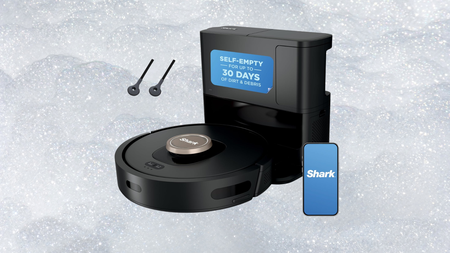
Most robot vacuums promise to clean your home while you get on with your life, but the ones that actually deliver on that without constant babysitting are far rarer than the marketing would have you believe.
The self-emptying base is where that hands-free promise becomes real, holding up to 60 days of debris before you need to empty it, which means weeks of daily cleaning cycles without you ever having to crouch down and deal with the dustbin yourself.
Advertisement
Navigation is handled by 360-degree LiDAR mapping, which builds an accurate picture of your home and uses that to plan efficient cleaning routes rather than bouncing around randomly the way cheaper robots tend to do.
Matrix Clean Navigation takes that a step further by moving in a precise grid pattern and making multiple passes from different directions, which is the difference between a robot that technically covered the floor and one that actually cleaned it.
Pet owners will appreciate the self-cleaning brushroll, which actively resists hair tangles and keeps the robot running efficiently through longer and thicker fur without the usual mid-session maintenance that dogs and cats tend to demand.
Advertisement
HEPA filtration traps 99.97% of dust and allergens down to 0.3 microns, which matters more than most robot vacuum listings let on, particularly in homes where allergy sufferers or young children are spending time close to the floor.
Up to 120 minutes of runtime means the Shark AI Ultra Robot Vacuum can cover larger homes in a single session, and the Recharge and Resume function sends it back to dock when power runs low before picking up exactly where it left off.
But seriously, why spend your weekend pushing a vacuum around when the Shark AI Ultra Robot Vacuum handles the whole job without you, turning what used to feel like a chore into something you simply never have to think about again?
Chaotic Eclipse drops seventh Windows zero‑day, “RoguePlanet,” hours after Patch Tuesday
Race‑condition exploit grants SYSTEM privileges; PoC confirmed viable by ThreatLocker
Researcher continues public disclosures amid feud with Microsoft, following BlueHammer, RedSun, UnDefend, YellowKey, GreenPlasma, and MiniPlasma
Chaotic Eclipse, the mysterious security researcher with a Microsoft grudge, disclosed another zero-day vulnerability in a fully patched Windows 11 device, just hours after Microsoft released its recent record June Patch Tuesday cumulative update.
This is the seventh zero-day exploit Chaotic Eclipse has disclosed in a matter of months. Called “RoguePlanet”, this bug is described as a “race condition vulnerability” that grants attackers SYSTEM privileges on fully patched Windows 10 and Windows 11 devices.
The researcher published a Proof-of-Concept (PoC) exploit earlier this week in a self-hosted Git, after saying that both GitHub and GitLab repositories hosting earlier work got removed by Microsoft.
Latest Videos From
Performing as described
“The exploit is a race condition, so it’s a hit or miss. I have managed to get a 100% success rate on some machines while it struggled to work on others,” they explained.
Advertisement
Security researchers ThreatLocker confirmed to the publication that the flaw works, and even recorded a video to demonstrate how it works.
“Our initial analysis confirms that the RoguePlanet exploit is viable and performs as described. Organizations using application allowlisting can prevent the exploit from executing, providing an effective layer of protection against this attack,” Danny Jenkins, CEO of ThreatLocker, told BleepingComputer.
In early April 2026, Chaotic Eclipse disclosed finding BlueHammer, a Windows Defender privilege escalation vulnerability. At the time, they said they were leaking it because they were unsatisfied with how Microsoft handled vulnerability disclosures.
Advertisement
Sign up to the TechRadar Pro newsletter to get all the top news, opinion, features and guidance your business needs to succeed!
“They mopped the floor with me and pulled every childish game they could. It was soo bad at some point I was wondering if I was dealing with a massive corporation or someone who is just having fun seeing me suffer but it seems to be a collective decision,” they later elaborated.
In the meantime, six more flaws were disclosed: RedSun, UnDefend, YellowKey, GreenPlasma, and MiniPlasma – with Microsoft releasing this month’s Patch Tuesday cumulative update, fixing two of the flaws: GreenPlasma and YellowKey.
Instagram has been quietly shaping your feed for years without ever really asking what you wanted. That changes now.
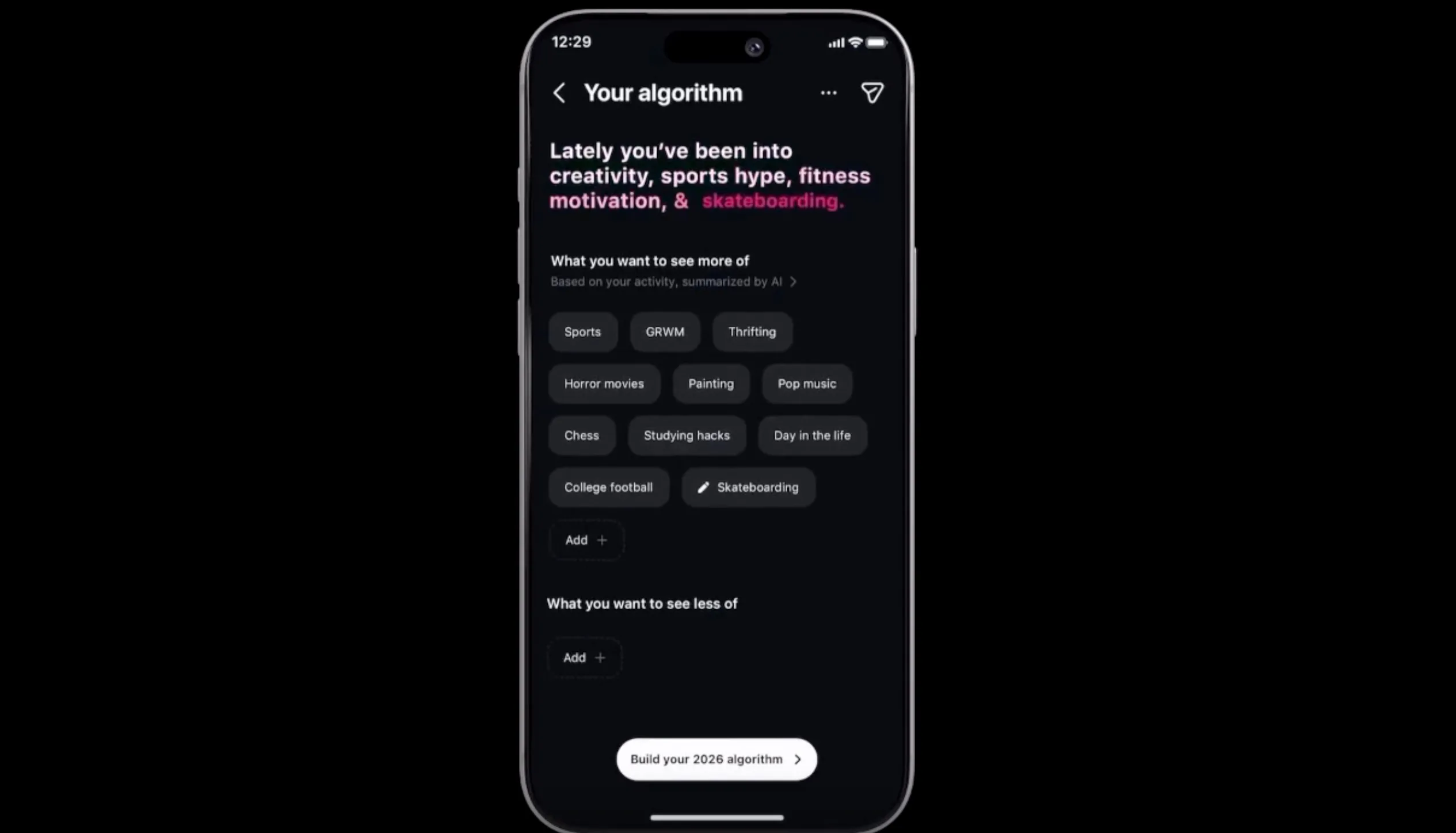
Instagram head Adam Mosseri announced that Your Algorithm, a feature that lets you see and edit the topics Instagram thinks you are into, will soon be available across your main feed. It was already live on Reels and the Explore section, and this week’s update brings it to the one place most people spend the most time.
What is Your Algorithm and how does it work?
Instagram
Your Algorithm shows you the topics the system thinks you care about most and lets you act on them. You can see the full list, add topics you want more of, and ditch the ones you do not.
Right now, the feature is limited to topics, but Instagram says it is already working on expanding things to cover specific people, different moods or vibes, and content types.
Mosseri says the feature is powered by a real shift in how AI models work now. For years, ranking systems ran on data that no human could actually read or make sense of. Now, large language models can look at clusters of content and put them into plain language, which is what makes something like this possible at all.
Advertisement
Why this matters
Mosseri was unusually candid in his announcement post. He acknowledged that while algorithmic recommendations are genuinely useful, they quietly took something away from users over time.
Instagram
Your feed learned from what you tapped on and watched, but you never really got to tell it what you wanted. Eventually, the whole thing became a one-sided conversation.
Mosseri says Instagram plans to build a lot of what comes next around giving people real control over their experience. He also teased a more ambitious future where AI generates entirely personalized app experiences on the fly, though he was upfront that version of things gets a lot more complicated.
There are so many cables out there, and plenty of solid options did not make the cut as a top choice. Here are a few honorable mentions I’ve tested and liked.
Statik MagStack Pro for $25: I quite like the automatic magnetic coiling this cable features, as it stays neat, and the colors could be handy if you want something that stands out (I tested the bright orange version). But performance is distinctly average at 100W for charging and 480 Mbps for data transfer. It is 6.6 feet and comes with a two-year warranty.
Advertisement
Baseus 2-in-1 Charging Cable for $25: I love the idea of a single cable that splits into two, allowing you to charge both devices from one USB-C port, but I found this cable’s performance to be unpredictable. You can get up to 140 watts for a single device, but when you split it between two devices, the charging rate drops well below that as a combined total. It’ll work fine if you use it for overnight charging a laptop and a phone, or a pair of phones.
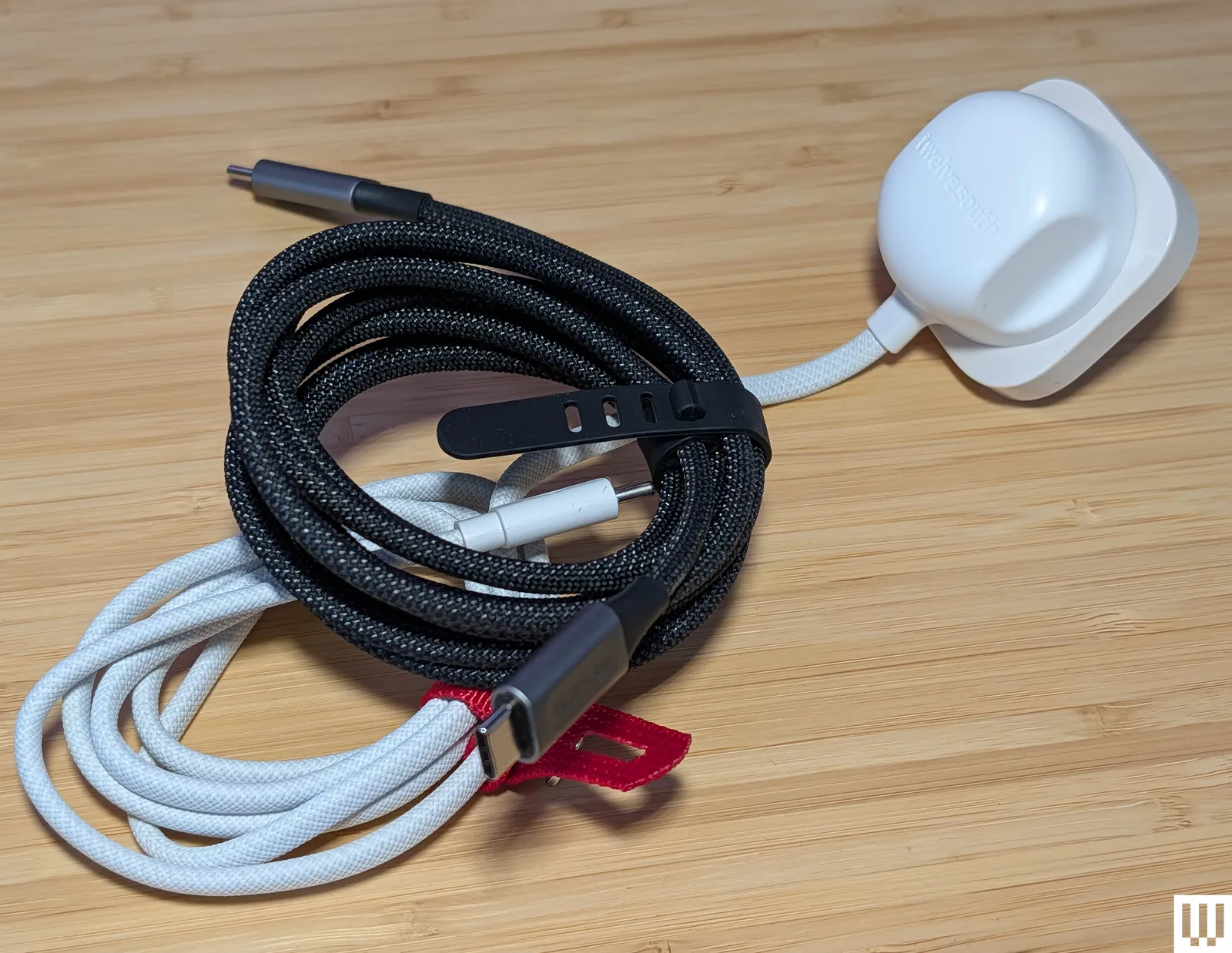
Twelve South PowerCord for $30: While I don’t think we want to go back to a landscape of devices with permanently attached cables and power adapters, they do offer a simplicity that could be useful for some folks or situations. The PowerCord from Twelve South is thick and durable-feeling, with a tangle-resistant woven (4- or 10-foot) USB-C cable attached to a compact 30-watt (power delivery) wall plug.
Photograph: Simon Hill
Smartish Crown Joule 3-in-1 Cable for $20: This clever offering from Smartish packs three connection types into one. It is technically USB-A to MicroUSB, but there’s an adapter at the tip that converts it to USB-C or Lightning. It has a durable fabric finish in a choice of four colors and can charge most of your gadgets at top speed (up to 100 watts). WIRED reviews editor Julian Chokkattu has used it to juice up a range of devices, including wireless keyboards and a Fire tablet. It’s also MFi-certified for Apple devices.
EcoFlow Rapid Pro for $25: This durable charging cable from EcoFlow is a solid choice for fast charging, thanks to its 240-W capability. It also has tough metal ends, a lovely woven finish, and comes with a cable tie.
Advertisement
Nomad Chargekey for $29 and USB-C Cable for $25: The Chargekey is a handy wee addition to your key ring with 12 cm of braided cable capable of delivering 240 watts and up to 10 Gbps data transfer, though it can be a little awkward to use. I also tried Nomad’s new Kevlar-reinforced USB-C cable, which is also 240 W but only has 480 Mbps data transfer. It feels durable with metal ends and braided cable, but you can get more capable cables for less money.
QDOS PowerMotion Ultra for £40: This USB 4.0 cable is a solid alternative to our top picks for folks in the UK, combining up to 240-watt charging with data transfer speeds up to 40 Gbps. It is relatively thick, feels durable, and comes with a lifetime warranty. I like the braided nylon finish and color-matched cable tie. I also tried the QDOS Powerloop (£20), a handy wearable charging cable that doubles as a lanyard strap. It’s thick, woven, and durable, with screw-off ends that reveal a USB-C cable capable of supplying 60 watts of power and 480 Mbps of data.
Advertisement
Chargeasap Connect Pro for $40: Magnetic-tip cables can be handy for kids and folks with dexterity issues. The idea is you stick the relevant tip in your device and then attach the cable magnetically when you need to charge. This one also has an LED display to show real-time power usage. It works best if you leave the tips in your devices, but that means they can’t be charged by regular cables, and the tips are very easy to lose if you remove them. Performance-wise, it’s a standard 100-watt charging cable.
Krafted Connex for £30: I like the idea of a Swiss Army Knife–style charging cable key ring, but the execution here is flawed. It does offer USB-A, USB-C, Lightning, and MicroUSB, but the flip-out plugs don’t have any cable attached, so they are not very adjustable, making it tough to plug into some ports. The Rolling Square InCharge X 6-in-1 Cable above is about the same price and works far better.
Scosche Strikeline Premium USB-C Cable for $25: This braided cable comes in various lengths, all the way up to the 10-foot cable I tested. It’s a good alternative to my pick for the best long cable above if data transfer is more important to you than charging speed because it offers 5 Gbps data speeds, but only 60 watts for charging.
Advertisement
Ugreen Uno USB-C Cable for $10: I love the smiley-faced Uno line from UGreen, but I assumed the display on this cable would show the charging rate. It does not. It just displays smiley eyes when charging and changes when fully charged. I tested the 6.6-foot cable, but it also comes in 1.6-, 3.3-, and 10-foot lengths. It feels durable and is reasonably priced, but it is rated at a very ordinary 100 watts and 480 Mbps.
Native Union Pocket Cable for $30: This wee braided USB-C to USB-C cable is perfect for slipping on a key ring to ensure you are never caught without a cable. It’s a nice design with braided cables, but you only get around 7 inches, and it maxes out at 60 watts. It’s built to last, constructed from recycled materials, is USB-IF certified, and comes with a lifetime warranty.
Caudabe ChargeFlex for $25: This is a good option for a Lightning cable, but it’s a little more expensive than I’d like. It is a thick braided cable reinforced with Kevlar for durability. There is a leather clip you can use for cable management, and the ridged finish on the connectors makes them easy to grip when unplugging.
Cable Matters Gen 2 USB-A to USB-C cable for $10: This is a good alternative to my top pick for best USB-A to USB-C if you want faster data transfer speeds (it maxes out at 10 Gbps). The trade-off is that it’s limited to 15 watts for charging.
Advertisement
Bluebonnet Eco-Friendly Charging Cable for $25: Bluebonnet (an Austin-based studio named after the Texas state flower) made this cable from naturally biodegradable wheat straw. It promises the ability to survive 50,000-plus bends and uses plastic-free packaging. I love the dappled blue finish and the cream ends, which both look good and are easy to pick out of a tangle of cords. It’s nothing special performance-wise, offering up to 60-watt charging and 480 Mbps data transfer.
RUGD Rhino Power USB-C to USB-C for £11: This is a solid option for folks in the UK seeking a tough cable. It has a braided nylon finish and has been tested to withstand at least 100 kilograms of tension and 100,000 bends. It can also deliver up to 60 watts.
Iniu Braided USB-C Cable for $10: This is a cheap, 6.6-foot USB-C to USB-C charging cable that tops out at 100 watts. Data transfer is only 480 Mbps. One end lights up green when it’s charging.
Advertisement
Lindy USB 3.2 Type C to C Cable for $22: These active cables are suitable for hooking up monitors to your computer, and they support up to 8K at 60 Hz and 4K at 120 Hz. They also support DisplayPort 1.4. I tested the longer 3- and 5-meter variants that max out at 60 watts for power delivery and 10 Gbps for data (but they’re out of stock). The shorter cable linked here can go up to 20 Gbps. They work well and feel durable, but they’re a bit pricey.
Satechi USB-C to USB-C Charging Cable for $20: Gear from Satechi always has a classy look, and its braided nylon cables are no exception. This one is 6.5 feet and has a Velcro strap. It’s also capable of 100-watt charging with support for PD and QC. Sadly, data transfer is limited to 480 Mbps.
Plugable Thunderbolt 4 Transfer Cable for $70: This active Thunderbolt 4 USB-C to USB-C cable matches my top pick with support for 100-watt charging and data transfers up to 40 Gbps. It is 6.6 feet long and comes with a two-year warranty.
Advertisement
Belkin Boost Charge USB-C for $10: This cable maxes out at 12 watts and 480 Mbps. The basic PVC finish is the cheapest, but you can opt for braided nylon ($16). Both come in black or white at 3.3 or 6.6 feet. These cables are USB-IF certified and work as advertised (I’ve been using one in the car for the last few months).
More Cable Management
Photograph: Simon Hill
TwelveSouth CableStay for $30: A round textured weight finished in silicone, the CableStay will keep your cable handy. It comes with a 5-foot braided cable (in a matching color) that’s capable of delivering up to 60 watts. You can just about fit two cables under it if you need to do so.
Advertisement
Smartish Cable Wrangler for $30: I used this on my desktop for a long time to stop cable ends from disappearing off the back of my desk. It works great with metal connectors, but for some cables, you must attach a special cable collar that sticks magnetically (you get three in the box).
What to Know Before You Buy
Cables are usually included in the box for whatever device you purchase. These are generally capable of charging the device at the maximum rate. Keep it safe, keep it simple, and if it is unmarked, consider labeling it.
Check your device’s standards. Look for a cable that matches your needs. For example, if your device supports Power Delivery, then get a PD cable. Remember: The charging adapter also must support the same standards. We have more details about standards below.
Advertisement
You can use USB-C for displays. Manufacturers will state the data transfer speed or list support for 4K or 8K video on select cables. That means you can use a USB-C to USB-C cable to transmit video from your laptop to your monitor. You should consider DisplayPort Alt Mode (DP Alt Mode) support, as this enables you to hook up displays and video sources that support DisplayPort.
It is safe to use your phone while it is charging, but it will charge at a slower rate. Heat is also bad for battery health, so it is best to take a break when your phone feels warm.
Poorly made cables can overheat and start fires. To boost your chances of buying a dependable cable, look for an option with a USB-IF certification (learn more about this below), or stick to trustworthy brands like those in this guide, including Anker, Cable Matters, or Baseus.
Charging Standards and Certification
Advertisement
With various standards and charging technologies at work, it is much harder than it should be to work out what a cable can do. There are a few key points worth knowing when shopping:
USB Standards: The Universal Serial Bus (USB) standard dates back to 1996 but has seen many new standards, revisions, and connector types in the years since. Instead of running through all of them here, I’ll highlight what matters most right now:
Connectors: While USB-C is mercifully becoming a standard connection type, you want cables with connectors that fit your existing devices. Today, that still might mean USB-A, Lightning, or even MicroUSB. Remember that the capabilities of any cable are limited to its oldest connection type.
Data: The data transfer speed is always in megabits per second (Mbps) or gigabits per second (Gbps). The top speed capability of a given cable depends on the standard:
Advertisement
USB 2.0 supports 480 Mvps
USB 3.0 supports 5 Gbps
USB 3.1 supports 10 Gbps
USB 3.2 Gen 1 supports 5 Gbps
USB 3.2 Gen 2 supports 10 Gbps
USB 3.2 Gen 3 supports 20 Gbps
USB 4.0 supports 40 Gbps
Power: While cable manufacturers always list the maximum charging rate, your device determines how much power to draw, so it’s important to know what standards it supports and then combine your cable with the correct power adapter. The charging rate of a cable is measured in watts (W). Sometimes manufacturers will list specifications on the cable in tiny print. If there’s no listed watt rate, you can calculate it by multiplying the voltage (V) and the current (A), assuming those are listed.
Basic USB-C cables are passive and can only carry up to 60 watts. Cables that can carry 100 watts or more—sometimes described as “active” cables—must contain an e-marker chip that identifies the cable and its capabilities.
The Power Delivery (PD) standard is as close as we have to a common standard. A few manufacturers, like OnePlus, Oppo, and Xiaomi, still have proprietary charging standards. Then there’s Qualcomm’s Quick Charge (QC), which was the most popular for phones for many years, although Quick Charge 4+ supports PD. Even PD has a variant called programmable power supply (PPS), which is part of the USB PD 3.0 standard. PPS allows for real-time adjustments to maximize efficiency and charge phones, like Samsung’s Galaxy S22 range, at up to 45 watts instead of the usual 18. The latest addition to PD is an extended power range (EPR), which allows USB-C cables to carry up to 240 watts (they used to be limited to 100 watts).
Thunderbolt was a proprietary interface developed by Intel and Apple, but it’s now open for royalty-free use (still certified by Intel). With Thunderbolt 3, the standard adopted the USB-C connector and is capable of data transfer speeds up to 40 Gbps and can deliver 100 watts of power using the PD standard. Thunderbolt 4 brings various improvements, mostly related to the video signal (support for two 4K displays or an 8K display). It also supports the USB 4 standard and is backward compatible with previous standards. Thunderbolt 5 can double the transfer speed of Thunderbolt 4 and can support three 4K displays or two 8K displays.
Cable Certification: There are a few types of cable certification. When a cable is certified, that usually means it was independently tested and conforms to specific standards. It gives you, as a buyer, peace of mind that your cable performs as the manufacturer claims. Certification can be expensive, so many cable manufacturers shun it, but that doesn’t necessarily mean their cables are poor quality. The USB Implementers Forum (USB-IF) is a non-profit organization dedicated to advancing USB technology. Run by members like Apple, Google, HP, Microsoft, and Intel, it sets specifications and offers certification. If a cable is certified by the USB-IF, it has been tested to ensure it complies with its standards. Apple has its own Made for iPhone (MFi) certification for Lightning cables. Intel certifies Thunderbolt cables. Certified cables usually have the relevant logo on the connector. (For example, Thunderbolt cables have a lightning bolt.)
SpaceX’s IPO is expected to create over 4,000 new millionaires, from engineers to cafeteria workers. Pricing is set for Wednesday at $135/share, with a $1.8 trillion Nasdaq listing on Thursday.
More than 4,000 current and former SpaceX employees are expected to become millionaires when the company begins trading on Nasdaq this week, according to an analysis by Hill.com. Of those, approximately 400 are projected to hold stakes worth $100 million or more.
Advertisement
The wealth creation will not be limited to engineers and executives. SpaceX has historically compensated workers at every level, including cooks, welders, and cafeteria staff, with stock options rather than higher cash salaries, a bet on the company’s long-term value that is now about to pay out at a $1.8 trillion valuation.
The IPO numbers
SpaceX is offering 555.6 million shares at a fixed price of $135 each, raising approximately $75 billion in the largest IPO in history. Goldman Sachs is the lead underwriter, followed by Morgan Stanley, Bank of America, Citigroup, and JPMorgan Chase.
The 💜 of EU tech
The latest rumblings from the EU tech scene, a story from our wise ol’ founder Boris, and some questionable AI art. It’s free, every week, in your inbox. Sign up now!
Advertisement
Pricing is expected after market close on Wednesday, with shares set to begin trading on Nasdaq under the ticker SPCX on Thursday. The offering is massively oversubscribed, with investors bidding for multiples of the available shares.
How the equity was distributed
SpaceX’s compensation philosophy has long favoured ownership over cash. Options granted in 2025 carried exercise prices of $37 and $42.40 per share, meaning employees who hold those grants will see their paper gains multiply several times at the $135 listing price.
The approach extended across the organisation. Non-technical staff received equity packages alongside engineers and mission-critical personnel, a practice unusual for a company of SpaceX’s scale and one that explains the breadth of the projected wealth creation.
Concentration risk
For some employees, the windfall comes with a problem. One former employee holds a $21.4 million stake that represents 93% of his household’s investable net worth, highlighting the concentration risk that comes from years of equity-heavy compensation.
Advertisement
A group of more than 100 current and former employees created a low-fee wealth management arrangement with advisory firm Choreo, representing combined potential wealth of between $1 billion and $5 billion. The group was formed specifically to prepare for the post-IPO liquidity event.
The South Texas effect
The IPO is also expected to accelerate a housing boom in South Texas, where SpaceX’s Starbase launch facility is located near Brownsville. The average home price in Cameron County has more than doubled since SpaceX arrived, rising from approximately $131,000 in 2014 to over $281,000 in April 2026.
Longtime residents are already facing affordability pressure as incoming SpaceX professionals bid up prices. If thousands of newly liquid millionaires reinvest in local real estate, the displacement risk will grow further.
The flags
The 4,000 millionaire figure is an estimate by Hill.com, not a confirmed SpaceX disclosure. Actual outcomes depend on the final listing price, employee vesting schedules, lockup periods, and individual tax situations.
Advertisement
Lockup restrictions typically prevent employees from selling shares for 90 to 180 days after listing. The wealth is real on paper but will remain illiquid for months, and a post-IPO share price decline during the lockup period would reduce the actual value employees can realise.
Musk will retain over 82% voting control after the offering through super-voting shares, meaning the 4,000 new millionaires will have negligible influence over corporate decisions. The governance structure concentrates economic upside broadly but decision-making power narrowly.



























































You must be logged in to post a comment Login