Connect with us

Tech

How Delhi Cut Electricity Loss from 50 to 5 Percent

Published

on

It’s 6 a.m. on a cold January morning in 2002 in New Delhi. It’s still dark outside, and I’m in the kitchen preparing breakfast, packing lunches, and getting my two children ready to catch the school bus when, for the third time in a week, the power goes out. No lights, no mixer to finish my daughter’s puttu—her favorite rice dish—no kettle, no toaster. The bathroom is dark, and the kids are upset.

It will probably be hours before the power comes back on, so I grab a flashlight and light the candles that are set up around the house for these occasions. We’re behind schedule now. We pack the food we have, bundle up as the house turns chilly, and head outside, leaving a mess in the kitchen. We make our way to the bus stop in the dark—the streetlights are out, too—only to discover my daughter has missed her ride. Again. I’ll be late for work at Jamia Millia Islamia, a university where I am a professor of electrical engineering and teach power systems and smart grids. I just hope the power is on there.

This was a common scene for my family and all of Delhi in the early 2000s. Power outages happened almost daily and lasted hours. When the power was on, the quality was so poor that it would dim lights, flicker screens, and wreak havoc on appliances. Customer service at the power utilities essentially didn’t exist.

Advertisement

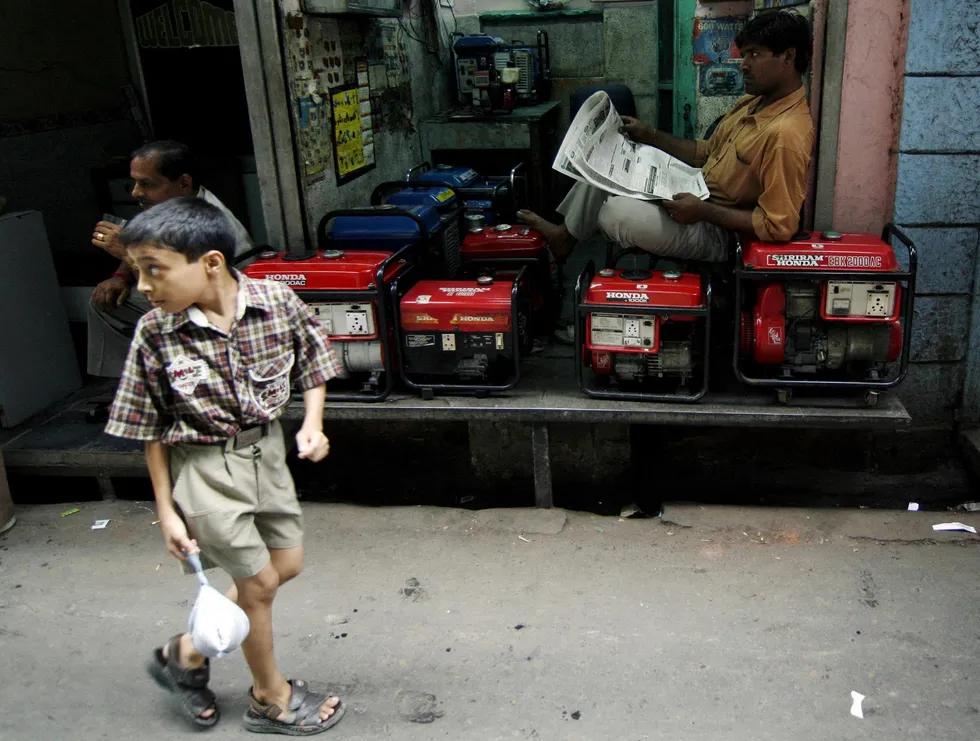
A child in a collared shirt walks past a store front where a man is sitting on top of rows of generators A child walks in July 2007 past a store in New Delhi specializing in reconditioned generators. The fear of power cuts during summer heat spurs demand for these generators so that residents can produce their own power.Nicholas Bradley/AFP/Getty Images

These problems had been getting worse through the 1980s and 1990s. The cause: an aging distribution grid bereft of crucial technologies, and electricity providers with little accountability. The situation became so bad that the city was losing more than half of its power through obsolete equipment and theft. These staggering losses meant that utilities got paid for only a fraction of the electricity they were trying to deliver. And the lack of funds prevented them from investing in better grid infrastructure.

But over the last quarter century, a remarkable effort by the government and the city’s distribution utilities has turned Delhi’s grid into a reliable, modern system. Power losses have shrunk from over 50 percent in 2002 to 5 to 6 percent in 2026—on par with France and Belgium, and better than Greece and Serbia. Delhi’s grid reliability index, a measure of how often electricity can be counted on, stood at around 70 percent in 2002 and has now topped 99.9 percent.

A nighttime city scene in Delhi, India where the street is packed with vehicles and people, and buildings and signs are brightly lit. The bustling Main Bazar in the Paharganj neighborhood of Delhi increasingly uses more nighttime electricity, but reductions in electricity loss help counter demand. iStock

With reliable power, businesses across the city have blossomed. The streetlights are bright. The number of electric vehicles, including city buses, is growing daily. Quality of life has improved. Today, my family is comfortable year-round in our home despite Delhi’s scorching summers and cold winters. The chaos of losing power no longer hinders me from getting to work. The city still has problems—pollution, overcrowding, noise—but thankfully, reliable power is no longer among them.

The transformation of Delhi’s grid can serve as a model for other cities that suffer from decrepit power infrastructure. Regions of Albania, Argentina, Bangladesh, Brazil, Estonia, India, Kenya, Pakistan, Sri Lanka, Uganda, and Venezuela are reeling from heavy losses in their distribution grids. Their problems look like Delhi’s 25 years ago. I believe it’s possible to improve electricity in these places by adapting the changes Delhi made. Here’s an inside look at how the city accomplished it.

Advertisement

Delhi’s Power Grid and Energy Mix

The city of Delhi hosts the capital of the Republic of India, and sits along the Yamuna River in the northern part of the country. It’s home to about 23 million people and is one of the most densely populated areas in the world. Delhi’s grid includes thousands of kilometers of power lines, and peak electricity demand reached an all-time high this year of 8,748 megawatts. The city currently buys 76 percent of its power from central generating companies and private players from neighboring states. Energy generation within the city is restricted to natural gas and renewable sources. Nearly 48.5 percent of the city’s power comes from coal, about 26.5 percent from natural gas, and the rest from carbon-free sources, led by hydropower at 15.6 percent.

Narrow urban street before and after cleanup of tangled overhead utility wires Tata Power replaced about 5 kilometers of overhead lines with underground cables, which reduced electricity loss and improved the aesthetics of Delhi’s streets, such as the Janta Flats in the Shalimar Bagh neighborhood.Tata Power-DDL

By the early 2000s, Delhi’s nearly 100-year-old power distribution system was in serious disrepair. Everything was old—lines, transformers, circuit breakers, switches. New grid technologies were needed to keep up with new kinds of electricity loads, but there was little money to upgrade components.

The shabby state of the grid caused many problems, most notably high electricity losses, where electricity vanishes primarily as heat. The cause of the losses was a classic electrical problem: too much current flowing through a network that wasn’t designed to carry it efficiently.

To understand the problem, it helps to understand how modern power grids work. Typically, they include generation, transmission, and distribution. After power is generated, transformers convert the electricity to high voltage levels—typically 132, 220, 400, or 765 kilovolts in India. Transmission lines then carry the power over long distances to receiving substations that are closer to where customers need electricity. Transformers then step down the voltage (to 66, 33, or 11 kV in India) and distribution lines branch out, carrying the power to customers. The whole grid works primarily on alternating current.

Advertisement

Distribution networks carry both active and reactive power. Active power is the energy used to perform useful work (and is measured in watts). Reactive power is the power that flows back and forth in an electric circuit, building electric and magnetic fields (measured in volt-ampere-reactive, or VAR). Although it doesn’t perform useful work, reactive power is necessary for many devices, such as induction motors, transformers, and computers (typically any circuit or device with inductance or capacitance elements).

When there are a lot of devices consuming reactive power on the same line, the overall current carried by the line—the sum of the active and reactive current—must increase. The more current in the line, the more the line heats up and the more energy that’s wasted as heat.

In addition to current, resistance in the line will increase losses as well. Resistance is when electrons encounter opposition as they move through the conductive material (typically aluminum in a power grid). Longer lines with many branches and connection points will increase resistance. The rule of thumb is that line loss equals the square of the current multiplied by the resistance.

Reactive power creates a second problem: It causes the voltage along the line to drop. And when the voltage falls, many modern electrical devices try to maintain roughly the same level of performance by drawing more current. That higher current produces even greater losses in the line and causes the voltage to fall further.

Advertisement

In a healthy grid, the utility will take compensatory measures to lower the current and maintain the voltage all the way to the ends of the lines. But in Delhi, this wasn’t happening. The result was a vicious cycle. Reactive loads increased the current, the higher current increased energy losses and lowered the voltages, lower voltages forced devices to draw more current and further increased the losses.

In some parts of Delhi, the effect was so severe that residents took matters into their own hands. A colleague of mine who lived in a different part of the city constantly experienced voltage that was too low for her appliances to operate reliably, so she had to install her own voltage stabilizer. At my home, we bought an inverter and battery system to keep a fan and a few lights running during the many outages.

Electricity Loss and Theft in Delhi

The losses in Delhi weren’t caused solely by technical problems. Theft of electricity was rampant, by both the powerful and the powerless (in both senses of the word). Businesses, residential customers, and utility employees with vested interests would siphon electricity from the grid. It was easy to illegally hook into a streetlight or a distribution line running close to one’s house or factory. Utilities didn’t have the resources to identify theft or penalize offenders. Even if they could, the courts were already overburdened, and an electricity regulatory commission that could push for reforms had not yet fully formed.

Side\u2011by\u2011side view of messy exposed wiring vs neatly organized electrical meters. Updated meters have made billing easier and more accurate. Tata Power-DDL

Making matters worse, the utilities and their employees were rarely held accountable for their actions, and so corruption plagued the system. Junior engineers and line workers, many of them lacking appropriate technical skills, were tasked with handling nearly every issue, including outages, flickering, and bill payment. This was too much authority in the hands of people with too little training.

Advertisement

On top of that, customers didn’t pay their bills. Meters were old, frequently faulty, and easily tampered with. Utility employees would take a meter reading by visiting the customer’s property, noting the reading in a book, entering it in a ledger or on a computer back at the office, and converting it into an electricity bill that would get dropped off at the customer’s property. This process left a lot of room for incorrect billing.

To pay a bill, customers had to stand in long queues at the utility offices, which had limited business hours. Not wanting to take off a half day of work for this, many customers simply didn’t pay. And there was no penalty for not paying—there were no regulations allowing the utilities to cut off a customer’s power. (I paid my bill by having a family member stand in line for me.)

The combined commercial and technical losses left Delhi’s utilities collecting payment for less than half of the electricity they were supplying in the early 2000s.

India’s Electricity Act and Power Reforms

Such problems weren’t unique to Delhi. On average in 2002, state utilities across India experienced electricity losses of nearly 37 percent. My country desperately needed systemic reforms, but authority over electricity was split between the central and state governments so any decision-making was fractured. States managed most of the generation, as well as transmission and distribution, while the central government oversaw generation that supplied multiple states, such as hydropower, fossil fuel plants, and nuclear plants. The central government could push reforms, but the states determined whether those reforms would succeed. Making matters worse, most states put a single organization in charge of generation, transmission, and distribution, giving that entity too much control and reducing transparency and competition.

Advertisement

Two men in hard hats wielding tools work on electrical equipment on a sunny dayA team of technicians with BSES Rajdhani Power maintains an insulator string on a large power transformer in 2011. BSES Rajdhani Power

In 2001, India’s central government began writing some historic legislation that became the landmark Electricity Act, 2003. Among the grand reforms aimed at transforming the country’s power industry, it unbundled state oversight of grid networks, creating separate entities for generation, transmission, and distribution. It also opened up the power sector to privatization. It allowed large electricity customers to bypass local distribution companies and purchase electricity from competitors or build their own power plants. It created a central regulatory agency responsible for determining interstate tariffs and promoting market competition in the power sector. And it created mechanisms for prosecuting electricity theft.

Electric equipment inside a security cage Hundreds of capacitor banks have been installed in Delhi to supply reactive power at strategic locations and help stabilize voltage.Tata Power-DDL

In 2002, Delhi was already taking drastic action to fix its grid. The organization overseeing Delhi’s distribution, the Delhi Vidyut Board, was broken up and two private companies—BSES (now Reliance Infrastructure), and Tata Power—took over distribution. They faced a Herculean task. Tata Power, serving the northern half of Delhi, would have to tackle a combined commercial and technical electricity loss of 53.5 percent. BSES, whose territory was split between two subsidiaries, was facing 51.5 percent losses in South Delhi and 63.1 percent losses in East Delhi.

“The company inherited a deteriorated and overloaded network, massive power theft, weak billing and collection systems, inaccurate consumer records, and an aging, largely untrained workforce,” Dwijadas Basak, CEO of Tata Power, told me. There were over 100,000 unresolved billing complaints, 20,000 pending connection applications, and frequent supply failures, which had severely eroded consumer trust, he added. Both Tata and BSES devised sweeping reforms and human resource development initiatives. The companies followed their own paths over the years, but ultimately implemented similar changes, with similar results.

Delhi’s Electricity System Overhaul

Fixing Delhi’s grid was a journey that involved all stakeholders, including customers, city authorities, and utility employees at all levels. The utilities revamped their organizational structures, diminishing the power of junior staff and creating separate teams to focus on specific tasks. Long-term employees of the erstwhile Delhi Vidyut Board received training from the up-and-comers at the new companies.

Advertisement

On the technical side, both companies installed digital control systems that let them monitor and operate the grid from a central location. Known as SCADA, or supervisory control and data acquisition, the systems offered a bird’s-eye view of the infrastructure, including the status of equipment, voltage, current, power flow, and switch positions, with updates in seconds. This helped the companies identify areas of high loss and theft and make faster decisions based on accurate information.

Three women sit at a long desk facing computer screens; additional screens showing grid operations are behind them. The SCADA (supervisory control and data acquisition) system at Balaji Estate in Delhi’s Kalkaji neighborhood serves as the nerve center of BSES Rajdhani Power’s distribution network in South and West Delhi. It enables real-time visibility, remote control of grid operations, fault identification and isolation, and load management. BSES Rajdhani Power

The utilities also replaced aging transformers and circuit breakers and created extensive maintenance plans for equipment. In 2002, 11 percent of the transformers in the region were failing at any given time. That rate is less than 1 percent today, according to Tata. Crucially, the companies installed hundreds of capacitor banks, including some mobile ones, to supply reactive power at strategic locations. This improvement reduced the total current flowing in the distribution lines and helped stabilize the voltage. They also installed voltage regulators at points in the system where voltage tends to drop.

To reduce theft, the companies replaced bare distribution wires with insulated lines—a single cable for three phases—which made it harder to tap into the lines. The cables also reduced outages because they’re better at preventing ground faults, which can occur when, say, a tree branch falls on the line.

Workers received better sensors and tools to do their jobs safely and accurately. For instance, they were given helmet-mounted voltage sensors, which are safer than handheld ones, and thermal scanning tools to detect hidden defects in the insulation of high-voltage equipment that could otherwise have led to catastrophic failures.

Advertisement

To reduce inaccurate billing and meter tampering, the companies replaced the old electromechanical meters with digital ones that are read with handheld devices. In some locations, radio-frequency-based group metering systems were installed by Tata to consolidate multiple customers’ meters into one. The data is then wirelessly transmitted to a central database, eliminating the need for individual meter readings. The companies are now trying smart meters, which give consumers more control over their electricity bills and give utilities remote control of some equipment (with the customer’s consent).

To encourage people to pay their bills, the utilities installed kiosks that are available 24 hours a day, and they created a web-based payment system and mobile app. Incentives for early bill payment and community-engagement programs also helped. Assistance from Delhi’s law enforcement considerably reduced electricity theft.

Three women stand at a door threshold, smiling and holding papers.\u00a0Tata Power hired women living in the 223 slums it serves in the northern parts of the city to knock on neighbors’ doors and remind them to pay their power bills. These payment collectors [left and center], known as abhas, were photographed while speaking with a customer [right] in the Sanjay Basti area of New Delhi in 2017. Prashanth Vishwanathan/Bloomberg/Getty Images

In areas where theft was particularly rampant and losses were as high as 83 percent, according to Tata, the companies took a different strategy. These pockets of Delhi were predominantly occupied by low-income families. Tata Power, and later BSES, worked to improve the water supply for these residents and provide educational opportunities, such as instruction in reading and writing in Hindi as well as financial literacy. These efforts focused on the women, who were at home more, and paid them to collect electricity payments from their neighbors. Bill payment rates from these areas are now on par with those of other parts of Delhi.

In recent years, some customers have been installing rooftop solar panels to take advantage of subsidies and incentives. This trend can reduce electricity losses further because the energy generated at the customer end reduces current in the distribution lines. Customers are also installing more LED lights and energy-efficient appliances, reducing the load in the system.

Advertisement

BSES is using AI to help detect theft. The algorithms analyze consumption patterns in pockets where losses are higher than they should be. The company is also using AI to forecast demand, fine-tune operational efficiency, and provide chatbots for customers.

Quality of Life Improves in Delhi

Life in Delhi is better than it was 25 years ago. I’m not worried that the power may go out and force me to reschedule my activities. My uninterrupted Wi-Fi gives me peace of mind, and my heating and cooling systems keep me and my family comfortable. I rarely need to use our old inverter and battery.

A rickshaw driver charges his vehicle next to an Ola electric scooter at a charging stationThe sharp rise of e-rickshaws in Delhi has increased demand on the power grid. Sajjad Hussain/AFP/Getty Images

The number of businesses in Delhi has increased substantially, in part because of the access to quality power. People can confidently buy products that depend on electricity. In fact, the city’s peak electricity demand has tripled since 2002 due to the increase in population, commercial activity, and use of electrical gadgets.

And then there’s the benefits to the planet. One unit of electricity that isn’t frittered away is one less unit that must be generated, not to mention the reductions in carbon emissions.

Advertisement

Still, there’s work to do. Some areas of Delhi continue to have high losses, driven partly by the illegal charging of e-rickshaws. Elsewhere in India, the states of Himachal Pradesh, Madhya Pradesh, Maharashtra, and Telangana still experience losses of about 17 to 23 percent despite the sweeping Electricity Act, 2003. There are many reasons for the ongoing losses: long distribution lines to remote villages, less digitization, and inefficiencies in billing and collection of payments.

These regions, and others around the world, can learn from Delhi’s grid comeback. Recently, power losses have increased substantially in countries such as Argentina, Greece, Jamaica, and Morocco, according to the World Bank, and some of the causes are similar to those that Delhi faced back in 2002.

Meanwhile, Australia, most countries in North America and Europe, and a few countries in Asia and Africa experience low electricity losses as they invest regularly in their distribution infrastructure and the ethical enforcement of rules. In China, for example, losses have gradually been cut in half, from 7.1 to 3.4 percent. In Latvia, losses plummeted from 25 to 5.8 percent.

What’s important is a comprehensive approach. Technologies like smart metering, AI, and analytics certainly help, but equally important is that people in the field are trained and take responsibility for their jobs, and that laws are enforced and payments collected.

Advertisement

“Sustainable loss reduction cannot happen through technology alone,” Abhishek Ranjan, CEO of BSES Rajdhani Power told me. “Technology is an important enabler, but long-term success comes from combining it with disciplined execution, operational accountability, and strong consumer engagement.”

From Your Site Articles

Related Articles Around the Web

Source link

Advertisement
Continue Reading
Click to comment

You must be logged in to post a comment Login

Leave a Reply

Tech

Bose jumps back into wired earbuds with ANC and 24-bit audio

Published

on

Just in case you missed it, wired earphones are back in vogue. Call it the return of yet another retro trend, or just people tired of having yet another device they have to charge daily, they are here to stay. Bose, one of the most recognizable names in the audio segment, knows it all too well. The result? The Bose Noise Cancelling Wired Earbuds.

Bose gives wired earbuds a modern upgrade

Bose has just launched wired earbuds after a long time and these adopt a handful of modern-age audio tech perks. The interface is USB Type-C. There is noise cancellation on board and the in-house Bose QuietControl technology is also on the table. Just like the flagship wireless audio gear made by Bose, these wired earbuds let you pick between regular listening mode, one with isolated noise, and, finally, you get an aware mode that is akin to transparency mode.

Bose notes that plug and play is one of the big draws of its new wired earbuds. You get physical inline controls for volume adjustment, handling calls, and switching between noise cancellation and transparency modes. For audiophiles, thanks to the wired interface, you get support for USB Audio Class 2 protocol, which opens the doors for low-latency audio at 24-bit/48 kHz output.

The Bose Noise Cancelling Wired Earbuds are priced at $99 in the US and they are already up for pre-order starting today. You can pick between black, white, smoke, and a lovely dewdrop mint shade, while open sales are expected to commence on October 15.

Why Bose is going wired again

But why a return to wired earbuds? “Wired earbuds are experiencing a cultural renaissance, and when we decided to bring them back, we knew we had to make them even better than before,” explains Raza Haider, president of Bose Premium Consumer Audio. In a recent conversation with Audio-Technica product veterans, the company also told Digital Trends that one of the biggest reasons behind the revival of wired headphones and earbuds is the convenience factor. Users just want something they can plug in and start enjoying their music without having to deal with pairing hassles, charging concerns, or latency and audio streaming quality woes.

Advertisement

Source link

Continue Reading

Tech

YouTube and Meta will now run ads for Gibney’s ‘Musk’ documentary

Published

on

YouTube and Meta will now run paid ads for Musk, Alex Gibney’s documentary about Elon Musk, The Hollywood Reporter reported on Saturday. Both had refused the trailer ad. TikTok and X are still not running it.

The outlet first reported the refusals on Friday. Bleecker Street, the film’s US distributor, opens it in cinemas on 9 October. The documentary premiered in Venice this month.

What the platforms said

YouTube said its system had temporarily restricted the trailer when Bleecker Street submitted it as an ad.

“Following review the ad has been cleared to run,” YouTube said in a post on X.

YouTube also said the ad should appear soon. As of late Saturday morning, no one had told Bleecker Street of any change, according to The Hollywood Reporter.

Advertisement

“This was an error and the ads are being restored,” a Meta spokesperson told TechCrunch.

Meta had already turned down an appeal from Bleecker Street before it changed course.

Political content rules

YouTube, TikTok and Meta had all told Bleecker Street the ad fell under their rules on political content. TikTok and Meta do not allow campaign or other political ads. Meta’s policy stems largely from the Cambridge Analytica scandal, the outlet reported. YouTube allows campaign ads from vetted candidates, with paid-for disclosures.

The trailer includes a shot of Musk at a 2024 Donald Trump campaign rally. It also refers to the 2024 election.

X refused to discuss the film with Bleecker Street. It will not take ads for any of the distributor’s upcoming films either. Musk owns X, which is challenging a €120M fine in the EU.

Advertisement

Source link

Continue Reading

Tech

The FPGA Chronicles: Exploring The Tang Nano 20K

Published

on

FPGAs used to be mysterious, expensive devices, but these days you can buy surprisingly capable boards for very little money. Some years ago, I did an FPGA Bootcamp over on Hackaday.io. Much of that material still applies, but the hardware is dated. So I decided it was time to update it, using the inexpensive Tang Nano 20K and its GOWIN GW2AR-18 FPGA as the main platform, with perhaps a few excursions into other FPGAs.

History and Motivation

Once upon a time, if you wanted to have a custom IC, you went with a wheelbarrow full of money to a semiconductor company. However, some smart person at a semiconductor fab eventually realized they could make a chip with a lot of uncommitted blocks on it and then, for a custom chip, only design the wiring that connected them together. This still required a wheelbarrow full of money, but it was a smaller wheelbarrow.

Then one day, someone realized they could do the same thing but make the electrical connections between the blocks configurable. Maybe have fuses you can blow, or use EEPROM or RAM cells to remember which blocks are connected to which. It is complicated, sure, but then you can make many of these chips and sell them to people who could, in theory, make their own custom chips without your help.

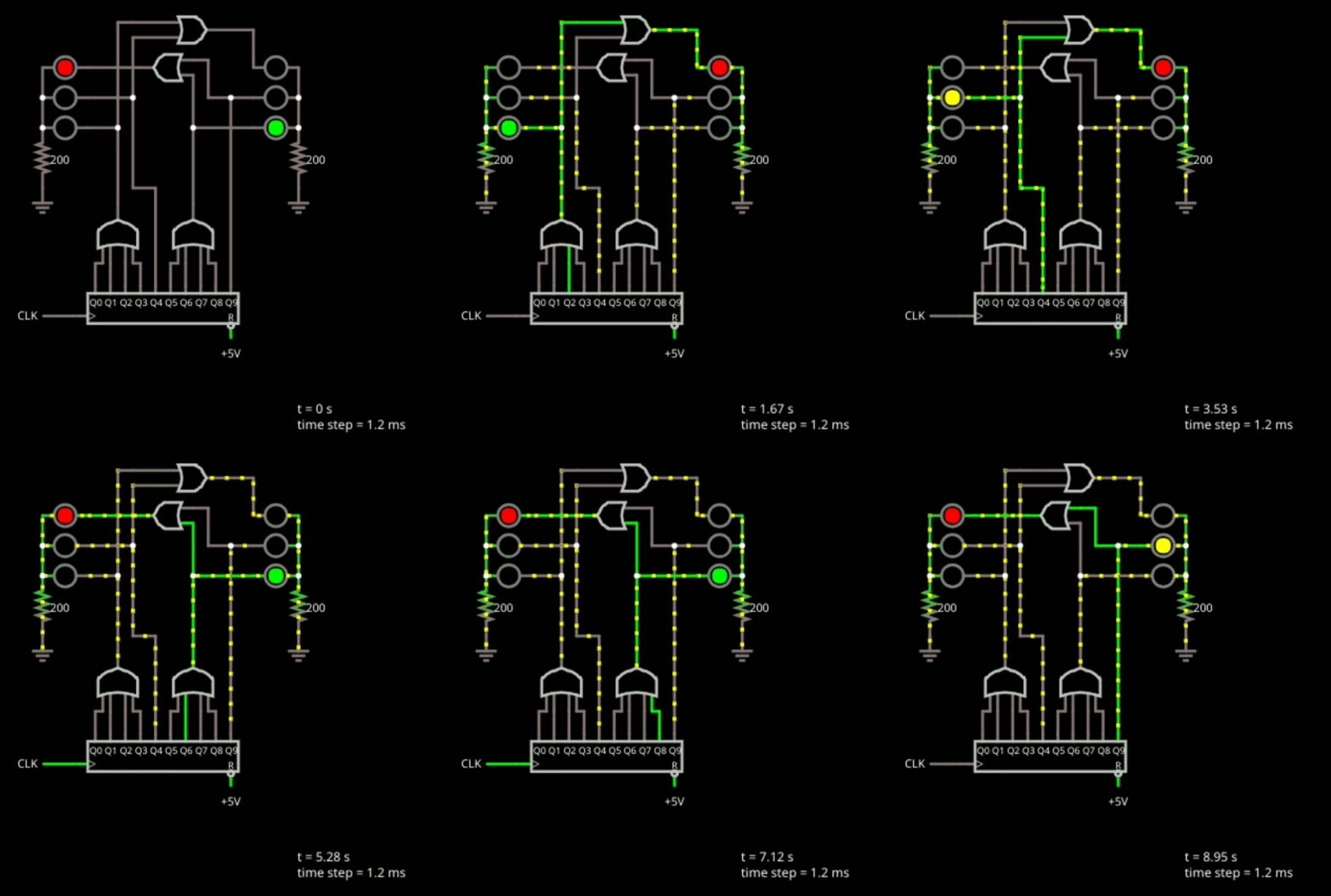
When do you need an FPGA? A classic classroom exercise for an FPGA, for example, is a traffic light because it shows off how to do state machines, which are important for some kinds of FPGA designs. But other than as a learning example, why would you do this? Even a simple 8-bit CPU can handle a traffic light.

Suppose instead that you have hundreds of digital sensors on a rocket, and any one of them must raise an alarm within a few microseconds. A processor has to sample inputs in groups, service interrupts, or rely on extra hardware. An FPGA can simply implement the equivalent of one enormous OR gate. It watches every input continuously, and unrelated logic elsewhere in the FPGA does not steal execution time from it. Can you do it with a microcontroller? Probably, but not easily. For some classes of problems, an FPGA is the better answer.

Advertisement

Of course, you can also build a CPU on your FPGA and some FPGAs have CPUs in the same package. This is often a sweet spot because then things that are easy to do in software, you do in software. Things that are easier to do in hardware, you do in the FPGA.

The 20K Solution

How big of an FPGA do you need? It is hard to compare FPGAs because the blocks are different. Think of PC memory. You can talk about 1 GB vs 4 GB, but the full picture depends on the memory speed, bandwidth, and timing. FPGAs are the same way. Two FPGAs may have a similar number of building blocks, but one may have much more powerful building blocks than the other. However, the 20K board’s FPGA is quite capable, even if it is hard to compare it directly to other FPGAs from other vendors.

It uses GOWIN’s GW2AR-LV18QN88C8/I7, which contains 20,736 four-input look-up tables (LUT4s) and 15,552 flip-flops. The exact maximum clock rate depends heavily on the logic and routing, so there is no single useful “FPGA clock speed,” but the device is quite comfortable in the low hundreds of MHz for appropriately pipelined designs.

Where the chip shines is memory. Most FPGAs have distributed RAM, which eats up resources on the chip, and block RAM, which are dedicated RAM cells. The GOWIN has both of these options. It also has a separate 8 Mbyte, 32-bit SDR SDRAM right in the package. Of course, you have to eat up some FPGA resources to talk to it, but not as much as you might think, and certainly not as much as it would take to place an 8 Mbyte RAM in the FPGA fabric.

Advertisement

There are other special-purpose blocks, like 48 18×18 multipliers, you can configure in a few ways. The Nano 20K board also has a programmable clock generator, QSPI flash (64 Mbits), and connections for audio, LCD, microSD, and HDMI. A microcontroller lets you program the clock generator, flash the chip via JTAG, or provide a virtual serial port back to the host.

Simply FPGA

The basic workflow for an FPGA is:

  1. Define the logic you want using an HDL (we will use Verilog, but VHDL is also common).
  2. Define a “top block” that connects to the outside world.

  3. Set up constraints that mainly tell the device which pins connect to which ports on the top block.

  4. Run a synthesis process that converts your HDL to primitives.

  5. Run a place and route process that assigns primitives to specific chip resources and produces a “bitstream.”

  6. Download the resulting bitstream to the FPGA’s RAM or to the configuration flash (which makes it survive a power cycle).

You can do all of these things with GOWIN’s IDE or open-source tools that we’ll talk about later.

Inside

You might think you just want to draw schematics. Some FPGA tools allow that, but the GOWIN IDE does not. It can, however, draw schematics to show you what you asked for. Turns out, if you are doing something large, schematics are a pain. Why draw out a 7-segment decoder when you can just describe it using a software-like language?

Advertisement

Inside the chip, there aren’t really uncommitted gates per se. There are lookup tables. So if you specify that Z=A|(BC)|(A^D) it doesn’t really go find an AND gate, an OR gate and an XOR gate. It just develops a table and programs that table to produce that function. That’s why LUTs — Look Up Tables — are important.

Simplicity

So let’s look at the simplest possible thing you might do.


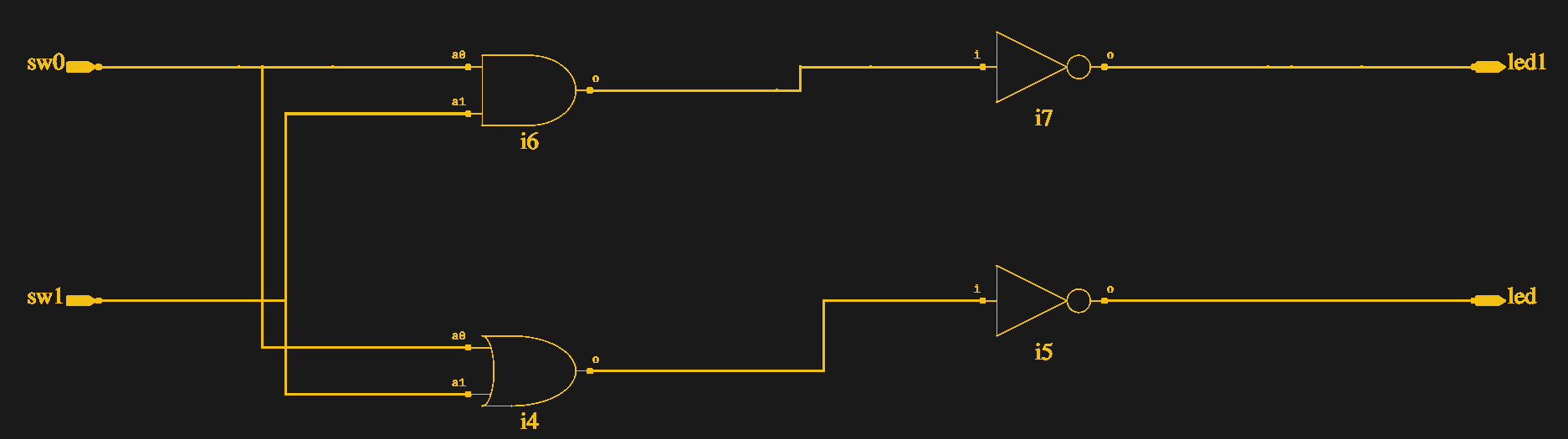
module top(output led1, output led, input sw0, input sw1);
assign led=~(sw0|sw1);
assign led1=~(sw0&sw1);
endmodule

We’ll talk more about Verilog later, but for now note that nothing “executes” these lines one at a time. This literally tells the FPGA design software to connect the two switches to a logic gate and then invert the result and connect it to the LED. At run time, this isn’t code, it is wiring.

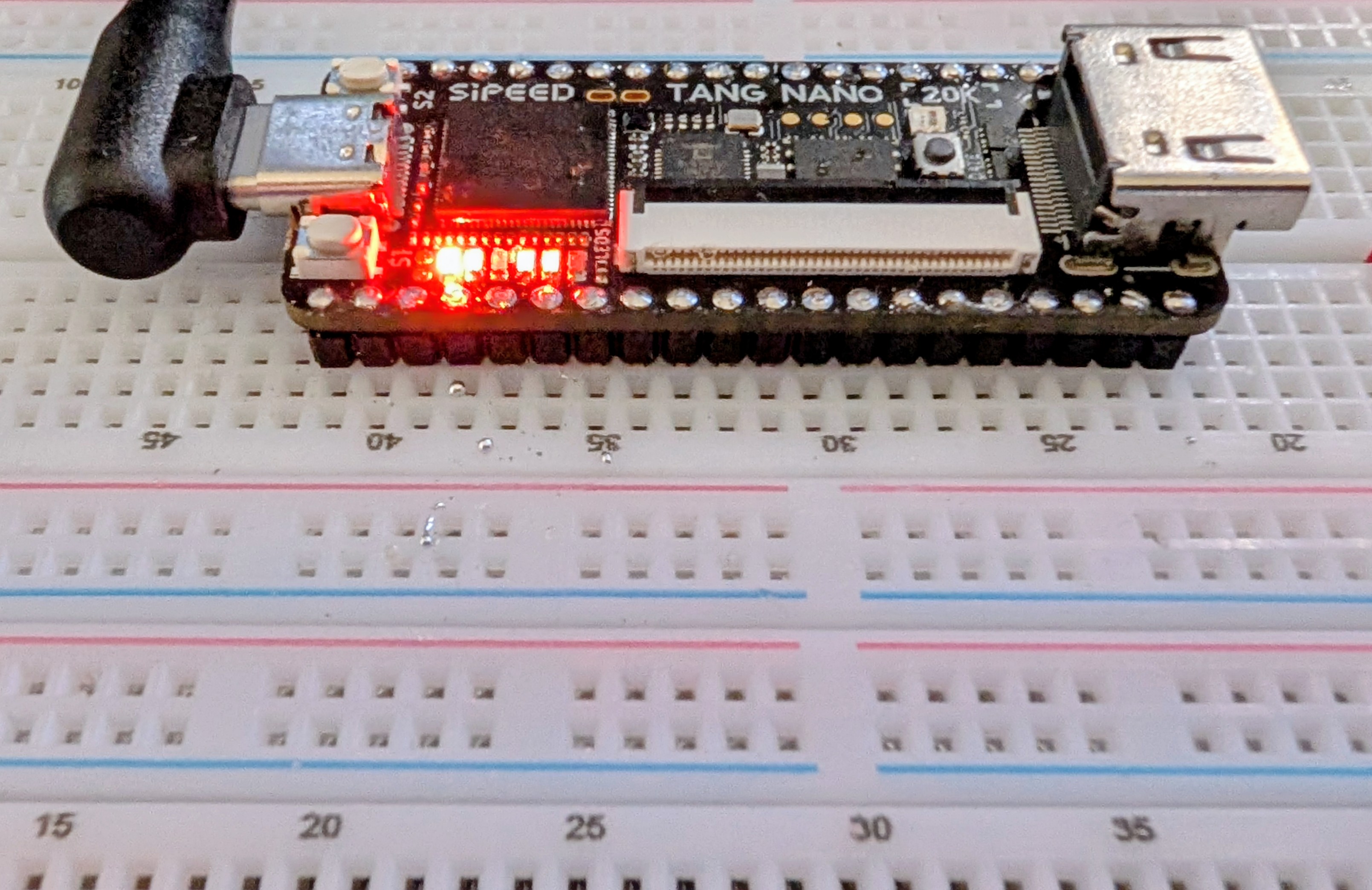
The LEDs on the board are active low, so this just takes two inputs (presumably switches), computes the OR and AND, and outputs them to the LEDs. The switches on the 20K are pulled down so there’s no need for a pull up or pull down in the FPGA. The output is a logic one when you press the swtich.

Advertisement

How do you connect the devices to your “code?” You need a constraint file, and that’s easiest done through the “Floorplan” editor (see the figure). It builds a file which you can change if you prefer to work with a file:


IO_LOC "led" 15;
IO_PORT "led" IO_TYPE=LVCMOS33 PULL_MODE=UP DRIVE=8 BANK_VCCIO=3.3;
IO_LOC "led1" 16;
IO_PORT "led1" IO_TYPE=LVCMOS33 PULL_MODE=UP DRIVE=8 BANK_VCCIO=3.3;
IO_LOC "sw1" 88;
IO_PORT "sw1" IO_TYPE=LVCMOS33 PULL_MODE=NONE BANK_VCCIO=3.3;
IO_LOC "sw0" 87;
IO_PORT "sw0" IO_TYPE=LVCMOS33 PULL_MODE=NONE BANK_VCCIO=3.3;

That’s it. The schematics come in two flavors. One shows what you’d expect (see the figure). The other shows opaque LUT boxes.

The video below walks through the design from starting the project to watching it work on a breadboard.

Installing

The final project in Bootcamp 0.

I’m glossing over a lot of details. While the GOWIN software runs on Linux, I had to do a lot to get it to work. Since I wasn’t on a supported distro, I had to work out the dependencies myself, but that wasn’t too hard.

The problem was when I tried to execute the program. The first problem was with libfreetype.so.6. I removed the private copy and linked it to my system copy. That got me a little further. However, to get it all running, I needed to set (or add) GOWIN’s lib directory to LD_LIBRARY_PATH to prevent it from picking up system libraries.

Advertisement

The programmer also needed a little work to not run afoul of other drivers on the system. The specific cure there for me was to build the file: /etc/udev/rules.d/99-tang-nano-20k.rules with these lines:

SUBSYSTEM=="usb", DRIVER=="ftdi_sio", ATTRS{idVendor}=="0403", ATTRS{idProduct}=="6010", ATTR{bInterfaceNumber}=="00", RUN+="/bin/sh -c 'echo $kernel > /sys/bus/usb/drivers/ftdi_sio/unbind'"

Of course, my fixes may or may not help your problems. If you are lucky, you won’t need any fixes at all. The open-source tools are perhaps a little easier to deal with, and we’ll look at those too. However, some of the GOWIN tools are nice, and you can check an option to have it always use your choice of external editors, which is a nice feature.

Next Time

If you need a refresher on digital logic, the original FPGA Bootcamp 0 lets you learn about logic design using a free tool in your browser. No FPGA required at all. Meanwhile, we’ll be looking later at open-source tools, IP, synchronous logic, and using the built-in logic analyzer, among other things. If you want to talk about this series, drop by our Discord server.

When you finish up your next FPGA project, don’t forget to send us a tip. You might see your project on Hackaday.

Advertisement

Source link

Continue Reading

Tech

Fake “locked computer” alerts in Google Ads are tricking users into calling tech-support scammers

Published

on

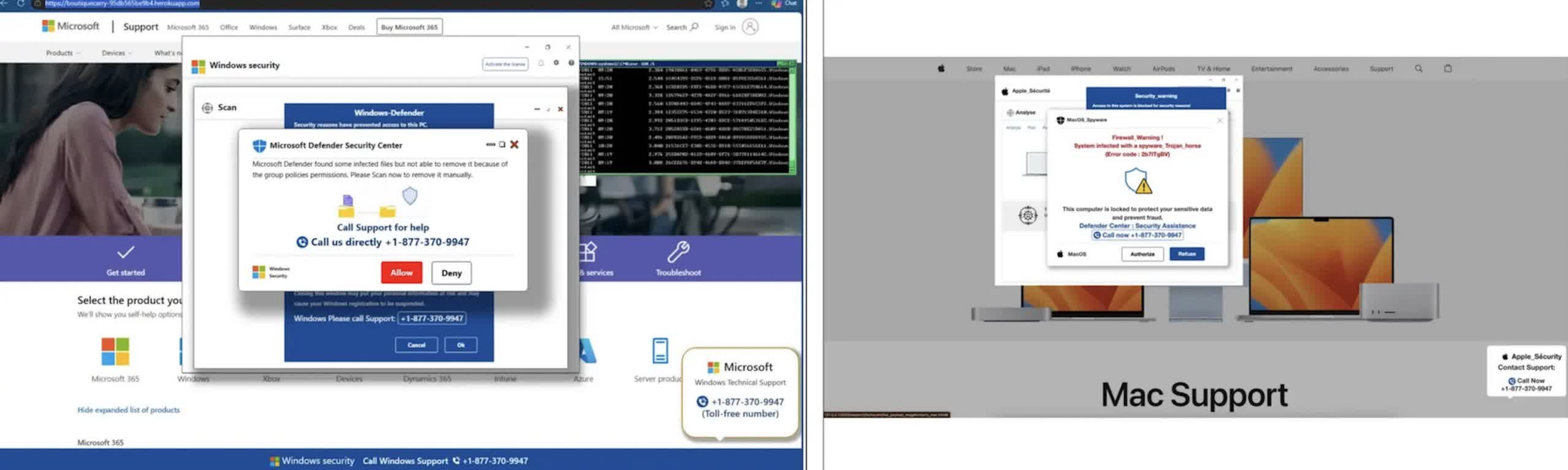
TL;DR: A malicious Google Ads campaign used fake security warnings to convince Windows and Mac users that their computers had been locked, then pushed them to call fraudulent technical-support numbers. The ads appeared on legitimate, high-traffic sites, including maps, weather, real estate, sports and document-hosting pages. After a user clicked, the ad opened a page that took over the browser and displayed warnings that made it look as though the device had been infected or disabled.

The goal was not to install malware or lock the computer. It was to create enough confusion to get people to call the number on the screen. Callers were then pressured to pay for bogus support, hand over personal information or allow someone to remotely access their device.

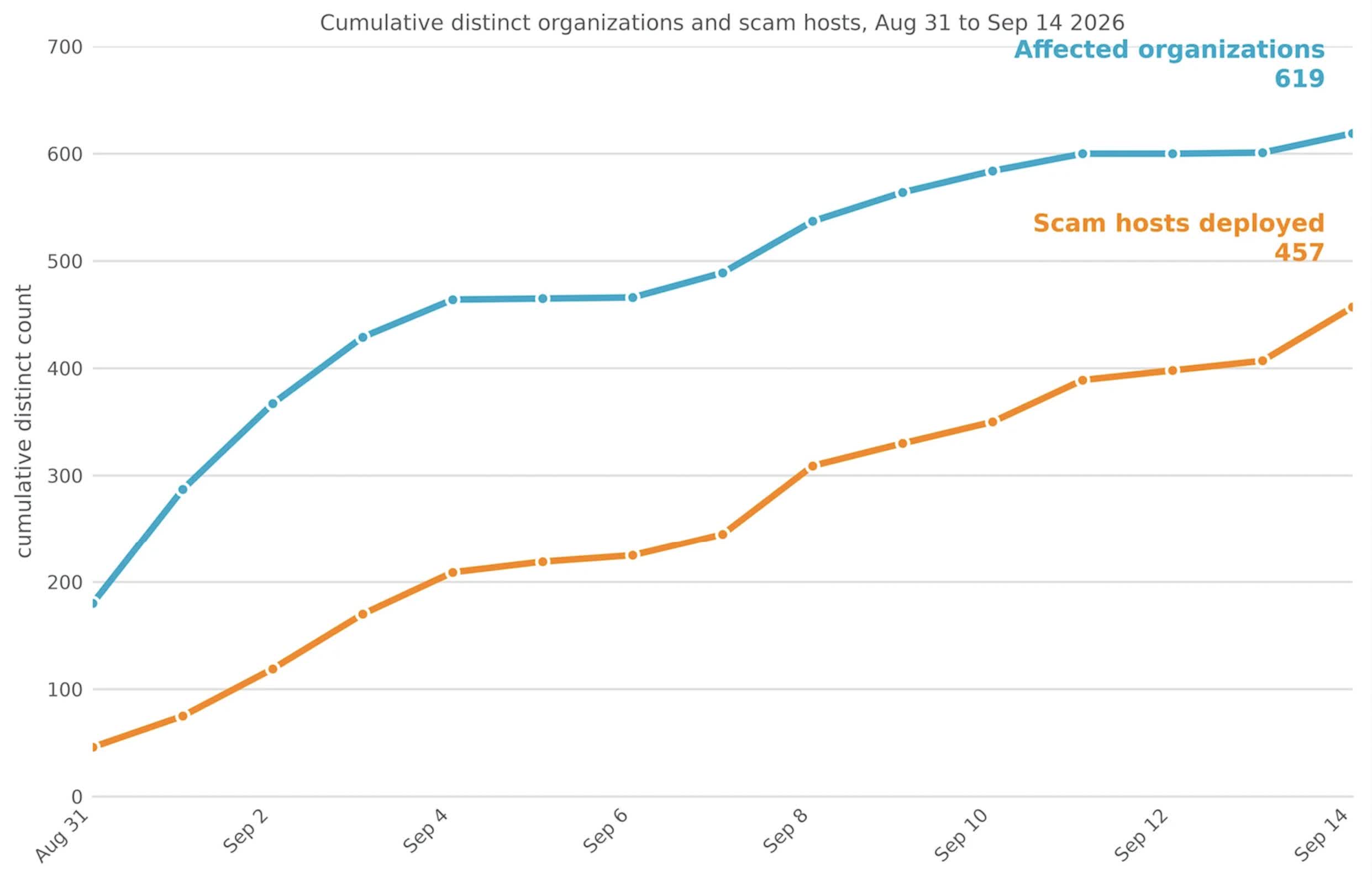
Netskope, the security firm that tracked the campaign, said it saw users at 619 customer organizations click on the ads between August 31 and September 14. Its security tools blocked the pages before those users could be scammed. The company said its data represents only a limited view of internet traffic, suggesting the campaign likely reached many more people.

About 62% of the affected organizations were in the United States. Japan and Australia were the next most affected countries. Netskope identified more than 250 Google Ads campaign IDs tied to the operation and found the ads on at least 284 legitimate publisher sites.

Advertisement

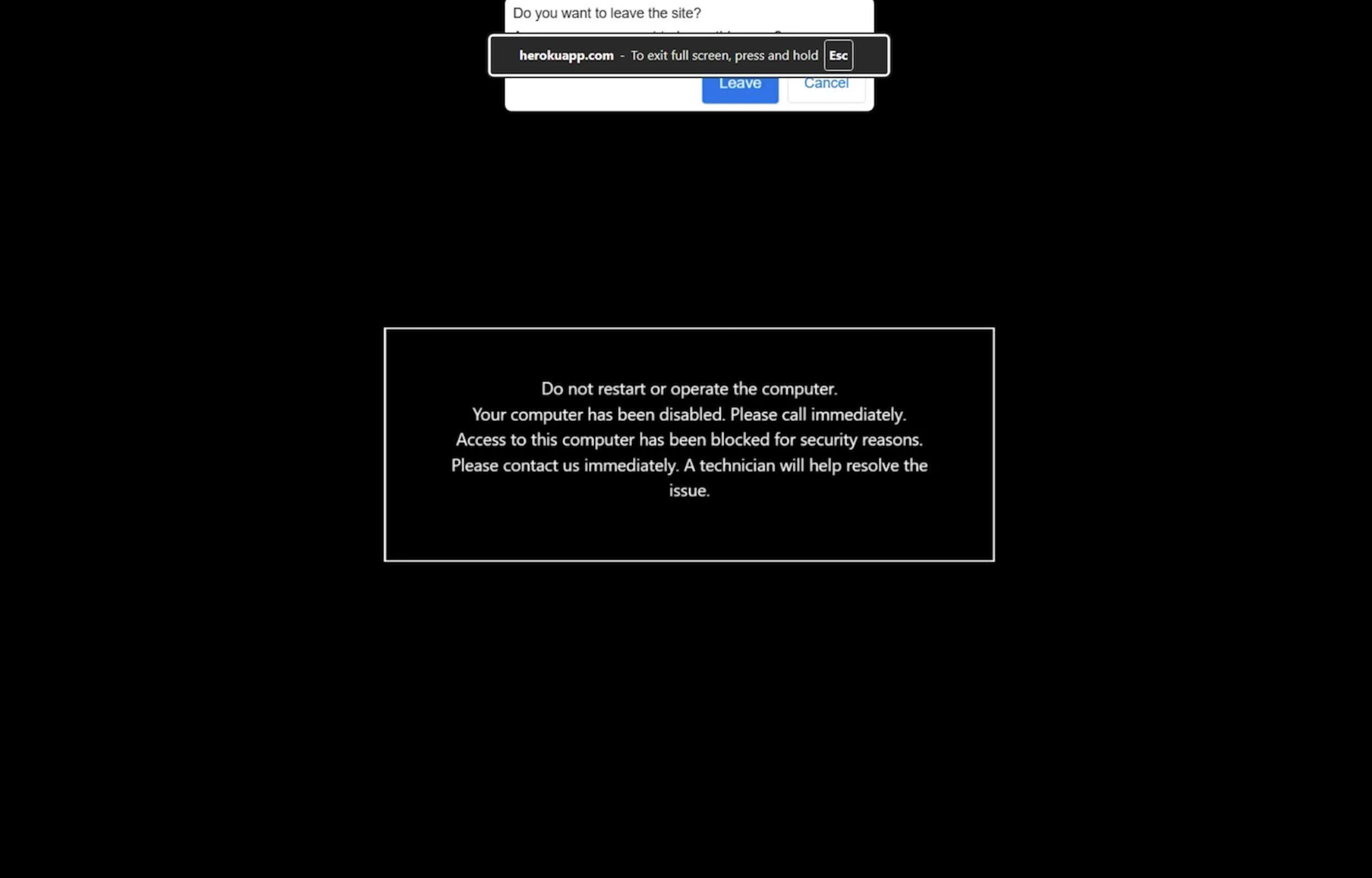
What made the scheme effective was the way it behaved in the browser. The page opened in full-screen mode, hid the browser’s address bar and cursor, and interfered with common keyboard shortcuts. The browser also slowed down and played sounds, making it seem as though the entire system had become unstable.

Netskope said the campaign turned a routine ad click into what appears to be a browser or system failure. The fraudulent page occupies the full screen, hides the cursor, blocks common exit commands and slows browser performance to make the device seem unusable. Although the computer is not actually locked, the behavior is designed to alarm users and push them to call the number displayed in the warning.

The fake warnings were adapted for Windows and macOS. The page also waited until it detected mouse movement before displaying the warning. Its code was encrypted and only decrypted in browser memory shortly before the warning was shown. Those choices may have made the campaign harder for endpoint security tools and ad-scanning systems to spot.

The warning pages also made it harder to simply close the browser. Pressing Escape or other keys often had no immediate effect, and attempts to close the page could cause the warning to reload. That behavior is central to the scam: the victim is meant to believe that normal controls no longer work.

Advertisement

Google said it was investigating the campaign. The company did not say why its systems failed to block the ads or whether the entire operation had been removed from its advertising platform.

“We have zero tolerance for scams,” Google said in a statement. “We’re actively investigating the campaigns in this report and will take action against accounts that violate our policies.”

Google has said it blocked more than 99% of policy-violating ads before they were served last year. The Netskope report shows that some campaigns can still get through by using browser tricks rather than a traditional malicious download.

It goes without saying that users who encounter one of the fake lock screens should not call the displayed number. The computer has not been locked, and in many cases, holding the Escape key for several seconds will exit full-screen mode and restore normal controls. Windows users can also simply open Task Manager, while those using Macs can use the Force Quit menu.

Advertisement

Once the browser is closed, it can be reopened without restoring the previous session.

Source link

Advertisement
Continue Reading

Tech

Modulate raises $25M for its voice models and analysis suite

Published

on

Boston-based voice intelligence startup Modulate has raised $25 in new funding for its platform that uses an array of small models to offer enterprises transcription, emotional analysis, deepfake and AI music detection, and policy enforcement for voice agents in regulated industries.

The funding follows a popular trend among investors in the growing voice AI industry: backing companies that are trying to make AI voices sound more human.

It also rivals other companies trying to detect the intent behind human conversation by analyzing it, and those trying to protect people and companies from deepfake calls, as it is now easy to clone voices.

Modulate’s new funding was led by Future Ventures with participation from Hyperplane and Lakestar. Data from PitchBook indicated that the startup had raised $41 million in funding at a $170 million valuation prior to this round.

Advertisement

The startup was founded in 2017 by Mike Pappas and Carter Huffman, who met as MIT physics undergrads. In its early days, the company focused on providing voice modulation for gaming. But later, it started to concentrate on a voice-based moderation tool.

With the onset of voice AI models, the company is now concentrating on detecting different sorts of AI audio generation and analyzing intent behind a person’s words.

“Our insight into the voice AI space is that a lot of folks are doing transcription, but there’s not really any capability out there that gets the full nuance and full understanding of a conversation, which is so important when you’re talking to another human being,” Huffman said on a call with TechCrunch.

Image Credits: ModulateImage Credits:Modulate

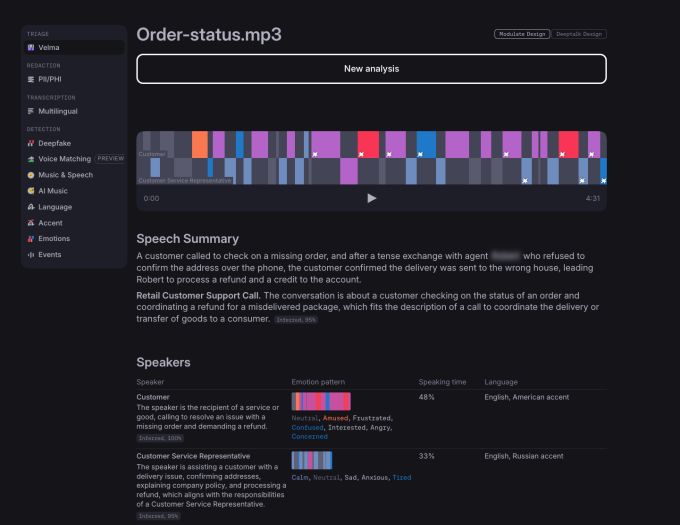
The company today runs more than 100 models that are largely categorized into two sections: Signal extraction models to understand vocal emotion, tone, language, and synthetic voice determination; and Analysis/detection models that look at intent, like what the customer is trying to say, whether the caller is violating rules, or whether they are trying to scam the receiver.

Huffman said that because it runs smaller models, the company doesn’t need specialized hardware and a ton of compute, which could be crucial when token bills go up. Plus, it’s easier for the company to train models with newer capacities, add them to the lot, and have an orchestrator call them when needed.

Advertisement

Modulate has a varied customer base, but it specializes in deepfake detection and alerting organizations like call centers to a possible scam. It also monitors how AI agents respond to customers to assess the quality of calls, along with making sure that AI follows compliance rules in regulatory areas. Because of these products, Module often sits beside the voice stack being used by a company just to analyze calls.

As more enterprises adopt AI-powered customer service, it is becoming important for them to know why a customer call was a success or a failure. In that case, gauging customers’ intent and response becomes critical beyond basic analysis. Huffman said Modulate can give granular data to enterprises around that.

“I think when companies think of emotion analysis, they think if the customer was neutral or positive, the call was a success, and if the customer was negative, the call was a failure. But actually, many times people will be polite even to, like, AI agents or bots. Right. And they won’t come across as angry, but they’ll be very dissatisfied,” he said.

The company said that its tech is also being used to monitor cyberattacks through voice calls.

Advertisement

The startup currently has 40-45 employees and aims to add 10 more people in the coming months to bolster model building. Modulate is currently working on increasing its on-premises and on-device deployment capabilities for increased privacy.

When you purchase through links in our articles, we may earn a small commission. This doesn’t affect our editorial independence.

Source link

Advertisement
Continue Reading

Tech

Apple & Amazon UK face revived price fixing lawsuit

Published

on

A lawsuit accusing Apple and Amazon of colluding to limit sales of products to consumers in the UK is being revived, with both companies potentially facing hundreds of millions of dollars in damages.

In 2018, Apple and Amazon reached an agreement that allowed regional Amazon stores to sell Apple and Beats hardware. The agreement has been legally problematic for both tech giants ever since, with one lawsuit coming back from the dead in the UK.

Reuters reports the UK’s Competition Appeal Tribunal permitted for part of a dismissed consumer lawsuit against Apple and Amazon to resume on Monday. The decision revives the accusations of price fixing and artificially limiting sales, along with the threat of financial penalties for the firms.

Specifically, the tribunal allowed claims relating to Apple products bought through Amazon’s marketplace to proceed. One claim about sales from Apple and other retailers was rejected by the tribunal.

Advertisement

A limiting agreement

The original lawsuit in the UK was a counterpart to another in the United States filed in 2022. It accused Apple and Amazon of making a secret deal in the 2018 agreement.

It was alleged that there would be limitations on independent retailers selling Apple hardware through Amazon. The limitations were apparently anti-consumer due to limiting competition.

The U.S. lawsuit was killed in September 2025, while the UK version was shut down earlier in January 2025. That UK mass lawsuit, the equivalent of a class-action lawsuit, was brought by consumer law academic and professor Christine Riefa.

Riefa’s lawsuit was stopped by the tribunal due to concerns about the proposed class representative and litigation funding. The updated lawsuit, spun up in December 2025, changes the plaintiff to Justin Le Patourel.

Advertisement

The tribunal ruled that there was a reasonable and realistic basis for the lawsuit to argue restrictions on resellers could’ve harmed consumers by raising prices of Apple products on Amazon.

However, there wasn’t enough evidence to support arguments that the actions impacted prices for Apple products sold elsewhere. Judge Kelyn Bacon’s rejection was due to the claims being based on a “complex and speculative theory of harm.”

Disappointment, disagreement, financial threat

A spokesperson for Le Patourel said he welcomed the ruling, but added that it was disappointing that some elements of the claim were not certified.

Apple said that strongly disagreed with the claims. Its agreement with Amazon was intended to fight counterfeit products on the marketplace.

Advertisement

Amazon welcomed the decision, saying that the remaining claim was “without merit.”

To Le Patourel’s legal team, the remaining part of the case could be worth at least 289 million pounds ($383 million) if found in its favor. The earlier version was valued at $602 million.

Source link

Advertisement
Continue Reading

Tech

Tesla’s Optimus production hits snags with hands, The Information reports

Published

on

Tesla has increased Optimus production about tenfold in recent months. It is still struggling to build the humanoid robots reliably at scale. Qianer Liu and Grace Kay reported for The Information on Friday, citing people familiar with the project, that the hands, factory equipment and suppliers are holding it back.

Tesla made several hundred robots a week last month, up from a few dozen a week in the second quarter, according to the report. It aims to make more than 1,000 a week by the end of 2026. TNW has not independently verified the figures.

Small parts, new lines

Tesla stopped making the Model S and Model X at its Fremont factory in May and moved workers and engineers to Optimus. The robot it now builds, Optimus V3, is lighter and has more cameras than earlier versions.

Equipment at several stations, including those that assemble the hands and joints, does not always line up parts precisely. More robots then need fixing after they come off the line.

Advertisement

“Not only are the Optimus production lines new, but the Optimus parts are much smaller and have to fit together far more precisely than car parts,” The Information wrote.

Each hand and forearm has more than 100 screws and other small parts that workers assemble by hand. Some touch sensors have also been unreliable, so Tesla has developed a replaceable “sensing glove” that holds them. It plans to add the glove to next year’s model.

Training the robots, and the workers

The software is not ready for general use either. Optimus still needs programming and training for each job, and basic tasks take several days to learn, according to the report. For now, Tesla uses most units internally for testing, training and data collection, in tightly supervised areas.

To gather training data, Tesla had factory workers in Texas and California wear suits that record their movements. Some complained because they “knew the robots were designed to eventually replace them”, The Information reported. Tesla then moved the work to dedicated teams and set up training hubs.

Tesla still relies on Chinese suppliers for robot parts, according to the report. It plans to lease the first robots to commercial customers rather than sell them.

Advertisement

A bigger bet on robots

Elon Musk said on Tesla’s investor call in July that Optimus could be “the biggest product ever”. Optimus is part of Tesla’s $25 billion capex plan for 2026. This week the company also began volume production of the Tesla Semi.

In China, Beijing is reportedly slowing humanoid robot IPOs. China also installs 59% of new factory robots worldwide, according to the International Federation of Robotics.

Source link

Advertisement
Continue Reading

Tech

How to Avoid Malware Online: 11 Practical Safety Tips

Published

on

To reduce malware risk while browsing, keep your software updated, leave browser and device security features enabled, download only from sources you can verify, and treat unexpected links, attachments, and security warnings carefully. No single protection blocks every threat, so the safest practical approach is to use several layers together.

Malware means malicious software. A computer virus is one type of malware, but the wider category also includes spyware, Trojans, ransomware, and other software designed to harm a device, spy on activity, steal information, or perform unwanted actions. If you want the wider context, different types of cybersecurity threats include malware as well as phishing, credential attacks, ransomware, and other attack methods.

Quick Take

  • Keep your operating system, browser, apps, and security software updated.
  • Leave antivirus, firewall, and browser security protections enabled.
  • Get software from publishers or other sources you can independently verify.
  • Do not trust unexpected links, attachments, update prompts, or webpage virus alerts.
  • If suspicious software has already run, stop sensitive activity and check the device before continuing.

How Malware Reaches You While You Are Online

Imagine visiting a normal-looking website and seeing a message that says your browser is outdated. The page offers an urgent update. You download the file, run it, and later discover that the supposed update did not come from the browser developer.

That example shows why malware prevention is not simply about avoiding obviously suspicious websites. Microsoft explains that malware can arrive through unexpected attachments, unofficial or bundled software, malicious downloads, compromised webpages, and weaknesses in outdated software. A legitimate website can also be hacked and used to expose visitors to malware. Microsoft’s malware infection guidance recommends keeping software, especially the browser, current and removing software and browser extensions you no longer use.

A vulnerability is a weakness in software that malicious code may be able to exploit. Updates fix many known weaknesses, while browser warnings, security software, careful download choices, and other protections address different parts of the same problem.

Advertisement

If your concern is whether unusual behavior means a device is already infected, malware warning signs are a separate question from preventing the initial infection.

1. Keep Your Operating System, Browser, and Apps Updated

Updates matter because they can fix security weaknesses before those weaknesses are used against you. The FBI recommends regularly updating computers, phones, and apps to protect against security weaknesses that attackers can exploit.

Turn on automatic updates where practical, especially for your operating system, web browser, and security software. Applications that open documents, messages, or downloaded files should also stay current.

There is an important difference between an update delivered through a program’s normal update system and a webpage that claims you need one. If an unfamiliar page says, “Your browser is outdated,” do not install the offered file simply because the message looks official. Close the prompt and check for updates through the browser’s own settings or the software publisher’s verified website.

Advertisement

2. Keep Real-Time Malware Protection Enabled

Real-time protection means security software checks files and programs as they are downloaded, opened, or run instead of relying only on a scan you start later.

Keep a reputable antimalware tool active and current. On Windows, Microsoft Defender Antivirus is built into Windows Security and can continuously scan for threats. Microsoft’s current guidance says that real-time protection scans files you open or download.

Antivirus is still only one layer. It does not make every website, attachment, browser extension, or installer trustworthy. Antivirus and browser security protect different parts of the browsing process, which is why both matter.

3. Leave Your Firewall Enabled

A firewall controls which network connections are allowed to enter or leave a device. A simple way to think about it is as a gatekeeper for network traffic rather than a tool that examines every webpage or downloaded file.

Advertisement

Microsoft says Windows Firewall filters network traffic and blocks unauthorized access. Turning it off can make a device more exposed to unwanted network connections.

Keep your device’s normal firewall enabled unless you have a specific reason to change it. If an application is being blocked, allowing only the application you trust is generally safer than switching the entire firewall off.

A firewall does not make a dangerous installer safe. It complements malware scanning, browser protections, and software updates rather than replacing them.

4. Keep Browser Safe-Browsing Protection Turned On

Modern browsers can warn you before you visit a site or download a file that has been associated with phishing, malware, deceptive software, or other dangerous activity.

Advertisement

Google says Chrome Safe Browsing warns about dangerous sites, downloads, and extensions, including threats involving malware, phishing, malicious advertising, and social engineering. Other modern browsers provide their own security and reputation checks.

Leave these protections enabled. If a browser stops a download or displays a full-page warning, do not automatically bypass it simply because you want to reach the site or file.

A warning is not absolute proof that a file is malicious. For example, an unfamiliar or uncommon file may receive additional scrutiny. The practical response is to verify the publisher and source independently rather than treating every warning as either infallible or safe to ignore.

5. Download Software Only From Sources You Can Verify

A professional-looking download page does not prove that the file behind it is safe. Attackers can imitate company branding, create convincing download buttons, or distribute modified installers through unrelated websites.

Advertisement

When possible, get software from the developer or publisher’s official website, an established operating-system app store, or another distribution channel you can independently verify. The FBI advises downloading files and apps only from trusted sources, while Microsoft recommends downloading software from the official vendor’s website.

Pay attention during installation as well. Some installers include potentially unwanted software, meaning programs you did not primarily intend to install that may add advertising, toolbars, or other unwanted behavior. Microsoft advises reading installation screens instead of clicking through them automatically.

The useful question is not merely, “Does this website look professional?” Ask, “Can I confirm that this is the real publisher or an authorized source?”

6. Do Not Override Download Warnings Just to Get the File

A common mistake is treating a security warning as an obstacle that must be removed. A site may tell you to disable antivirus, ignore a browser warning, or allow a blocked download before its file will work.

Advertisement

That should make you more cautious, not less. Google tells Chrome users to take download warnings seriously and notes that attackers may tell people to turn off or ignore warnings to avoid security detection.

If a browser or security tool blocks a file, first confirm what the file is, who published it, and why you expected to download it.

There is a difference between independently confirming that a legitimate file was incorrectly flagged and trusting the same website that is asking you to weaken your protection. If the only reason you believe the file is safe is that its download page says so, you have not independently verified it.

Suppose you receive an unexpected message that appears to be from a delivery company and says an invoice is attached. A convincing logo and familiar company name do not prove the sender is genuine.

Advertisement

The FBI advises caution with messages that pressure you to click links or open attachments. The FTC similarly recommends that when an unexpected message could be genuine, you should contact the organization through a phone number, email address, or website you already know is real rather than trusting the contact details inside the suspicious message.

This advice is not limited to email. Text messages, social media, workplace chat systems, and messaging apps can all be used to deliver suspicious links or files.

If you already clicked something questionable, the correct response depends on what happened next. What to do after clicking a suspicious link differs depending on whether you only opened a webpage, entered credentials, downloaded a file, or ran the downloaded program.

8. Ignore Webpage “Virus Detected” and Fake Update Pop-Ups

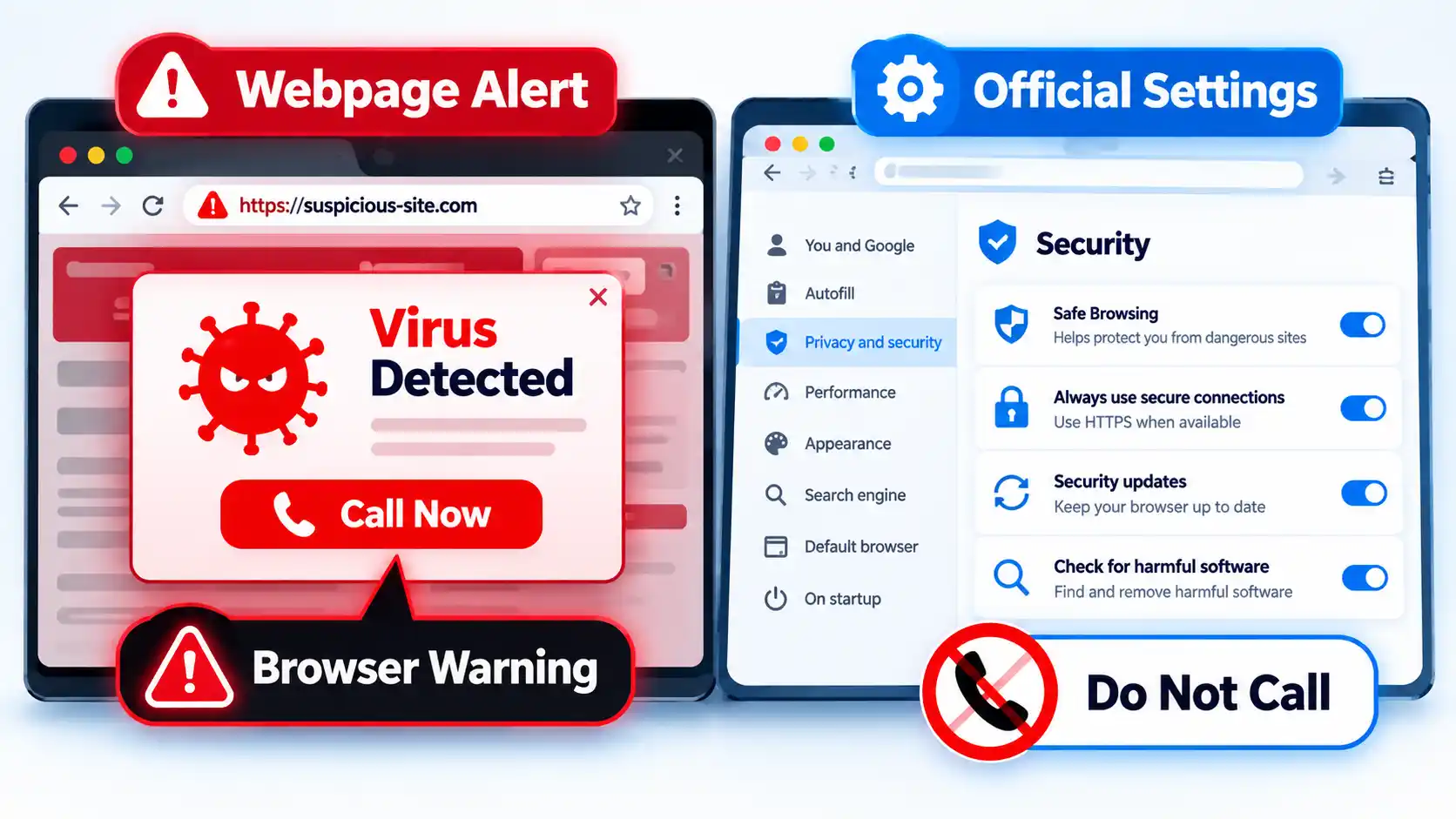
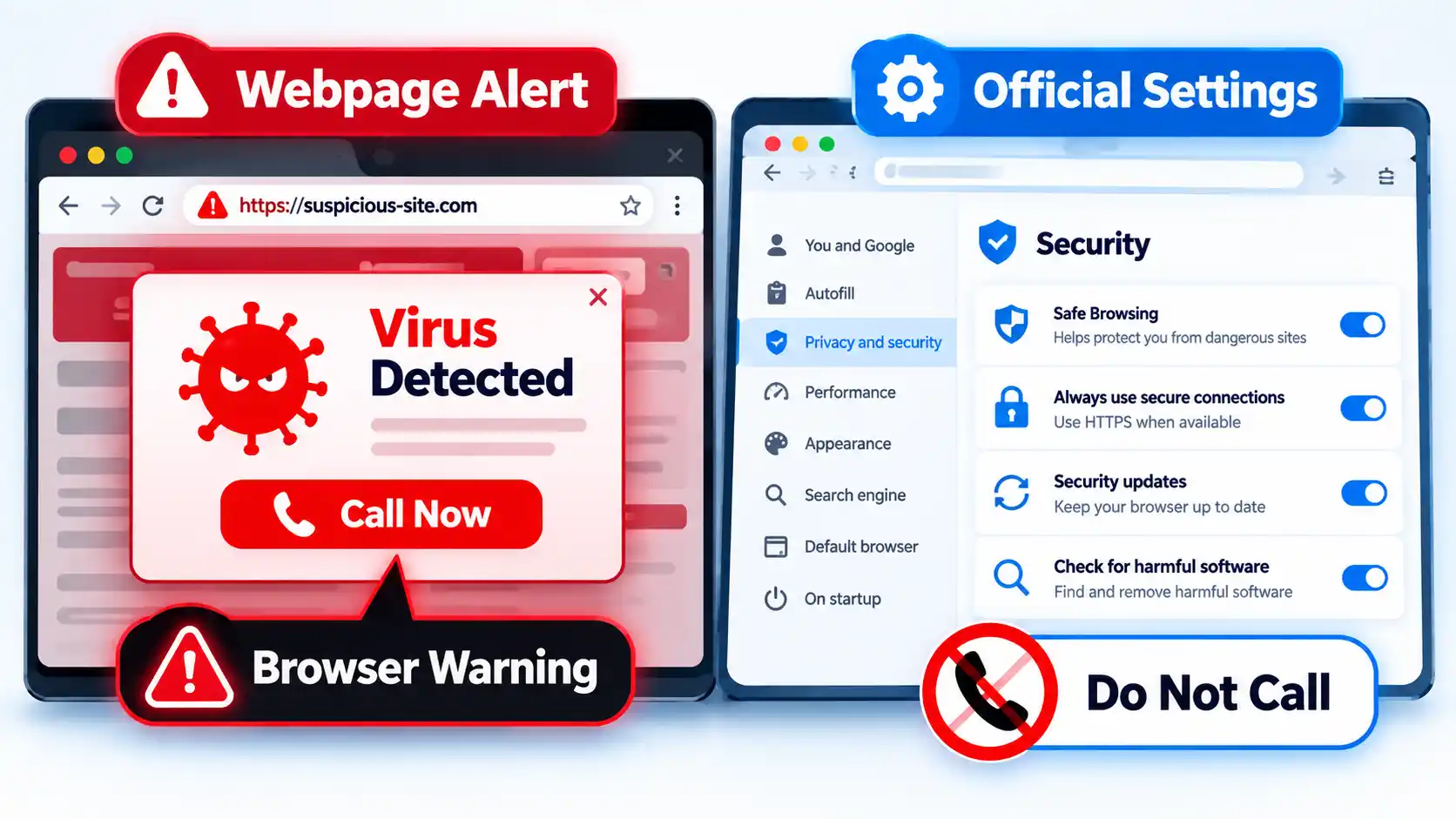
A webpage can display a box that looks like a Windows, browser, or antivirus message even when it is simply content created by the website. Messages such as “Your device has 5 viruses,” “Critical infection detected,” or “Call support now” should not be trusted merely because they look urgent.

Advertisement

Warning
If a webpage claims your device is infected and tells you to call a phone number, install a cleanup tool, or disable security protections, close the page and check your device through its legitimate security settings instead.

The FTC warns that tech-support scammers use fake computer warnings to frighten people into calling a number, paying for unnecessary services, sharing financial information, or giving someone remote access to the computer. The FTC also states that legitimate security pop-up warnings do not ask you to call a phone number.

Split browser showing Virus Detected scam alert beside Official Settings and Do Not Call warning

The same pressure tactics can appear on unfamiliar streaming and download sites. Pop-ups, fake play buttons, redirects, and fake app prompts can push a visitor toward a download or permission they did not originally intend to grant.

When you genuinely need to update software, open the program’s own settings, use its normal updater, or visit the publisher’s verified website yourself.

Advertisement

9. Keep Browser Extensions to the Ones You Actually Need

A browser extension is an add-on that changes or adds browser functions. Depending on what it does, an extension may ask for permission to access website data or other browser features.

Mozilla explains that Firefox extensions can request permission to access data or features, and users can review and manage those permissions. The exact permission system differs between browsers, but the practical question is the same: does the extension need the access it is requesting?

Before installing an extension, check who publishes it, what permissions it asks for, and whether you actually need it. Remove extensions you no longer use. Microsoft also recommends removing unused browser extensions and keeping the browser updated as part of reducing malware exposure.

10. Avoid Pirated Software, Cracks, and Key Generators

A crack, activator, modified installer, or software-key generator may ask you to run a program from a source you cannot reliably verify. Running unknown software gives that program an opportunity to make changes on your device.

Advertisement

Microsoft specifically warns that software key generators can install malware and recommends obtaining software from the official vendor instead. Microsoft also advises reading exactly what an installer is adding rather than clicking through installation screens automatically.

The security lesson is straightforward: if you cannot confidently identify who created a program and what you are allowing it to run, installing it creates avoidable risk.

11. Block Unwanted Pop-Ups and Be Careful With Site Permissions

Pop-ups are not automatically malware. Legitimate sites may use them for sign-ins, support windows, payment flows, or other normal tasks. The risk appears when a pop-up pressures you to install software, allow notifications, download a file, or grant another permission you did not intend to give.

Keep your browser’s normal pop-up protections enabled and be selective when websites ask for access to notifications, downloads, the camera, the microphone, location data, or other device features. Grant a permission only when it makes sense for the task you are deliberately performing.

Advertisement

Google’s Safe Browsing documentation explains that Chrome can warn about abusive websites and extensions, malicious ads, malware, phishing, and social-engineering threats. That makes browser protection useful, but it does not remove the need to judge unexpected permission requests yourself.

What to Do If You Think You Already Downloaded Malware

Prevention advice changes once you think suspicious software may already have reached your device. The next action depends on whether you only visited a page, downloaded a file, ran a program, or entered sensitive information.

I downloaded or ran a suspicious file

Stop using the device for sensitive tasks such as banking, shopping, or entering important passwords until you have checked it. Update your installed security software through its legitimate interface, then run an appropriate malware scan and follow the tool’s instructions for anything it detects. If the device belongs to an employer or school, contact its IT or security team rather than changing managed security settings yourself.

I entered a password or financial information after clicking a suspicious link

Treat this as both an account-security and device-security problem. If possible, use a device you trust to change an exposed password and contact the affected service through contact details you independently verify. If payment or banking information was exposed, contact the relevant bank or payment provider promptly rather than using a phone number supplied by the suspicious message.

Advertisement
Pop-ups, redirects, or unwanted extensions keep returning

Review recently installed apps and browser extensions, remove items you do not recognize or need, update the browser and operating system, and run a malware scan with your installed security software. Persistent unwanted behavior can have several causes, so use support from the device or software publisher, your organization’s IT team, or another provider you can independently verify if the problem continues.

Clicking a suspicious link does not automatically prove that malware was installed. You may have reached a phishing page without downloading anything, or downloaded a file without running it. Match your response to what actually happened instead of assuming that every suspicious click means the device is infected.

The Core Rule: Do Not Defeat Your Own Security Layers

Staying safer online does not require treating every unfamiliar website as malicious. The more useful rule is to keep your protections current and avoid overriding them without a verified reason.

Use software updates to close known weaknesses, browser protections to warn about suspicious sites and files, malware protection to inspect software, a firewall to control network connections, and careful judgment before installing anything. None of these protections is complete by itself.

Advertisement

A virtual private network (VPN) is also not a replacement for device security. A proxy or VPN changes how selected network traffic is routed or protected, but it does not make a malicious attachment, unsafe installer, or fake update trustworthy.

Source link

Advertisement
Continue Reading

Tech

Bose Launches New Wired Earbuds After More Than a Decade

Published

on

Bose used to make lots of wired headphones. But it’s been a minute. Specifically, it’s been 11 years. Since then, wired headphones entered 2026 having a serious moment, with sales up for the first time in five years—10 percent in the back half of 2025 and 20 percent at the start of 2026. Young people are driving the trend, including celebrities sporting wired earbuds and literally writing songs about them.

Bose president of consumer audio Raza Haider (among others at the company) noticed. He dropped off his teen at college last year and saw wired earbuds left and right. A return to wired earbuds seems to be a national trend—it’s certainly popular among the Gen Z and Gen A of New York City, and the teenage kids of WIRED staffers too.

The new Bose Noise Cancelling Wired Earbuds come to the market just in time to capitalize on this trend. Launching them, from idea to final product, took the company around eight or nine months, said Haider. This is much faster than most audio releases I’m familiar with. Haider explained that Bose has been working toward enabling faster, more efficient production to accelerate new product launches, revisions, and collaborations.

Testing the Bose Wired Earbuds: Are They Any Good?

I was one of a few reviewers to get these earbuds ahead of launch. I’ve had them for only four days, and they’re technically a late-stage prototype, not the final product, so this is more of an impression than a full review. But so far, so good.

Advertisement

As with any wired headphones, the simplicity is a big part of the appeal. There’s no battery to charge, no app to download, no Bluetooth to fiddle with, and no latency to ruin your TV show or video game.

Already, the Bose earbuds leapfrog cheaper wired pairs (like Apple EarPods) in sound quality and active noise canceling (ANC). They have clear detail across lows, mids, and highs, especially for something at this price point. More importantly, the noise canceling is a godsend. I can listen to music at more comfortable levels, even during a commute or café stop.

What I don’t love: The central control panel is a little heavy. It has a volume up and volume down, as well as a play/pause/noise-canceling mode switch button, but it weighs down the cable. It’s pretty flush against my torso, which is nice, but it also weighs down the earbuds in my ears. The cable tension it adds is annoying, especially compared to the tension-free experience of using wireless earbuds. The cable is thick and premium-feeling, but it inevitably ends up tangled inside of the included soft pouch.

Source link

Advertisement
Continue Reading

Tech

Why is my new iPhone slow? What is indexing?

Published

on

All iPhones are slower than you’d expect when they are new or when you’ve updated iOS, and Indexing is generally the culprit. Here’s exactly what’s happening and what you can do about it.

Not to drag this out, the short answer is that all you absolutely have to do to speed up your iPhone is wait. You can help it along a bit, but the iPhone is indexing all of the data you’ve got on it and when that’s done, it won’t be so slow anymore.

In fact it will feel especially fast, because then whenever you search your emails or look for a file, the iPhone has it indexed and will take you straight to it. This has always been the case with Spotlight searches, and it’s now also because of Sir AI.

It’s possible that you’ve never even noticed the slowdown. Then at the other end of the scale it’s possible that bugs with the iPhone 18 Pro reportedly not responding quickly to touch are because of this.

Advertisement

Everyone’s iPhone is different because everyone’s iPhone contains different data and, most importantly, different amounts of it. Apple warns that depending “on the amount of data on your device, Spotlight indexing can take hours or even days.”

This indexing is performed on your device and the resulting index stays on your device. It’s also something that iOS performs continually, it’s just most noticeable when the indexing first starts.

What gets indexed includes:

  • Files
  • Folders
  • Apps
  • Documents
  • Emails
  • Messages
  • Contacts
  • Photos
  • Music
  • Podcasts
  • Notes
  • System Settings

So later when you need to find that Apple Note about your Christmas list, Spotlight gets it right away. Now when you ask what time your flight to LA is, Siri AI gets it from your emails or your calendar because of this indexing.

Consequently, this index can be huge and it can therefore take a long time to produce at first. After that, the index is continually updated and Apple says this incremental further indexing is much faster.

Advertisement

What you can do

Seriously, don’t give it a thought, just wait and it’ll work out. Apple might be being optimistic when it even says that the process could take days, as AppleInsider staffers have noticed it being around a week.

However, there are steps you can take that will speed up the indexing. It’s not clear that they will make it a great deal faster, but the process will be quicker if you:

  • Stop using your iPhone
  • Leave it charging
  • Make sure it’s on Wi-Fi

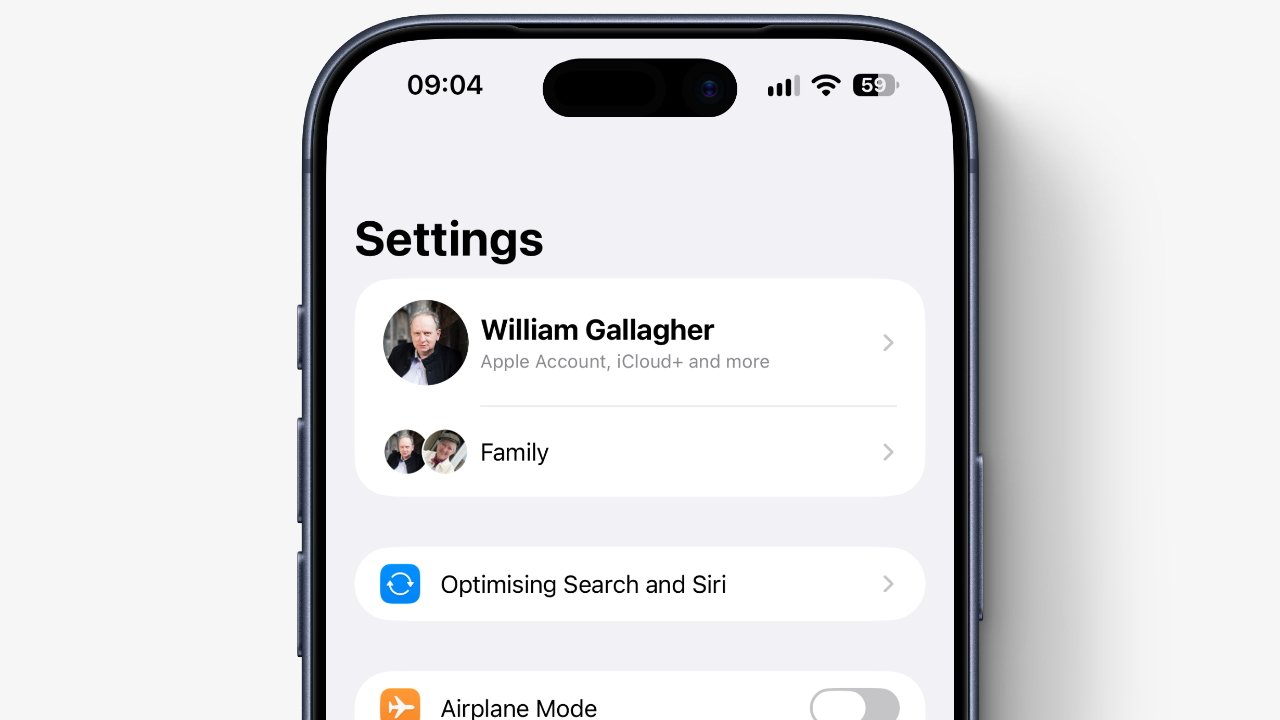
You can see whether indexing has completed or not by checking Settings. At the top, just under your name and any Family settings, you’ll either see the words “Optimising Search and Siri,” or you won’t.

This only appears during the initial indexing and it’s surely there because people have complained about the slow down. You can tap on those words to get a fuller explanation, but really you just get Apple saying the same thing in more words.

Why this is more noticeable now

Siri AI. Apple’s documentation about this reads as if they’ve just added the phrase “and Siri AI” to the odd sentence, but it is the reason the indexing is taking longer.

Advertisement

If you noticed it taking longer during the previous iOS 26, and specifically iOS 26.6, that appears to have been Apple preparing the way. As noted by AppleInsider about the iPad back in July 2026, iPadOS 26.6 looked to be handling background tasks in advance of the OS 27 releases.

So Apple has done what it can to cut down the indexing time. That just won’t help if you’re moving all of your data to a new iPhone where it will have to start again.

Source link

Advertisement
Continue Reading

Trending