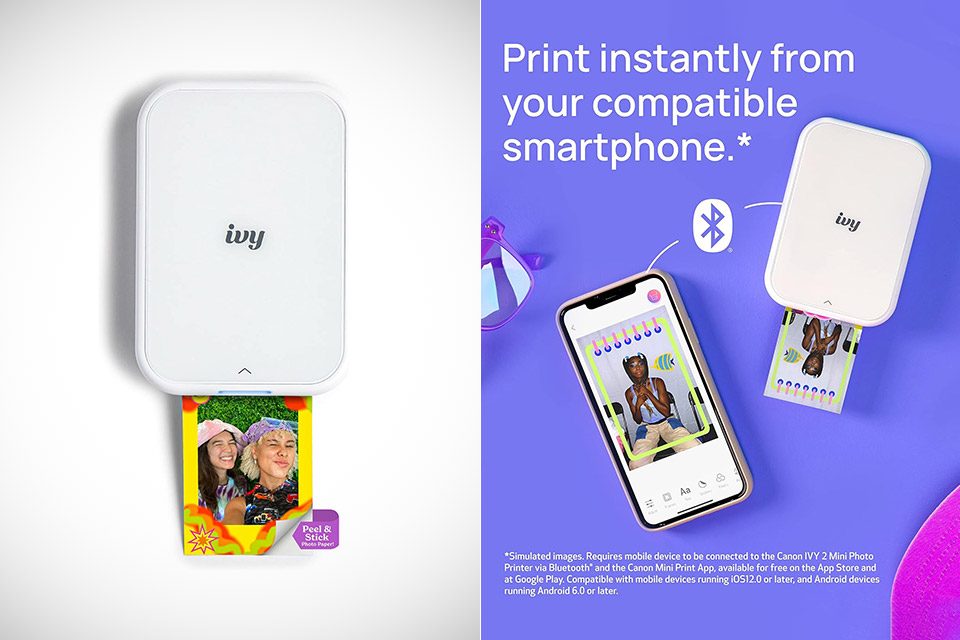
Smartphones already handle the hard part of travel photography by capturing sharp images in any light. What often gets left behind is the ability to share those images as something tangible right away, something you can hand to a new friend at a market or slip into a journal before the day ends. The Canon Ivy 2, priced at $99 (was $120), fills that gap without forcing anyone to carry a separate instant camera or deal with film.
The device is so small that it could easily fit into a jacket pocket or the side pocket of a day bag. Its dimensions, barely more than 4.7 x 3.3 x 0.8 inches, and weight of 5 ounces ensure that it never feels like a burden when packing for a long trip or trudging through a crowded train. The device’s controls are straightforward: just a power button and a pair of LED status indicators, and you won’t be bogged down by complicated menus because everything is handled through your phone.
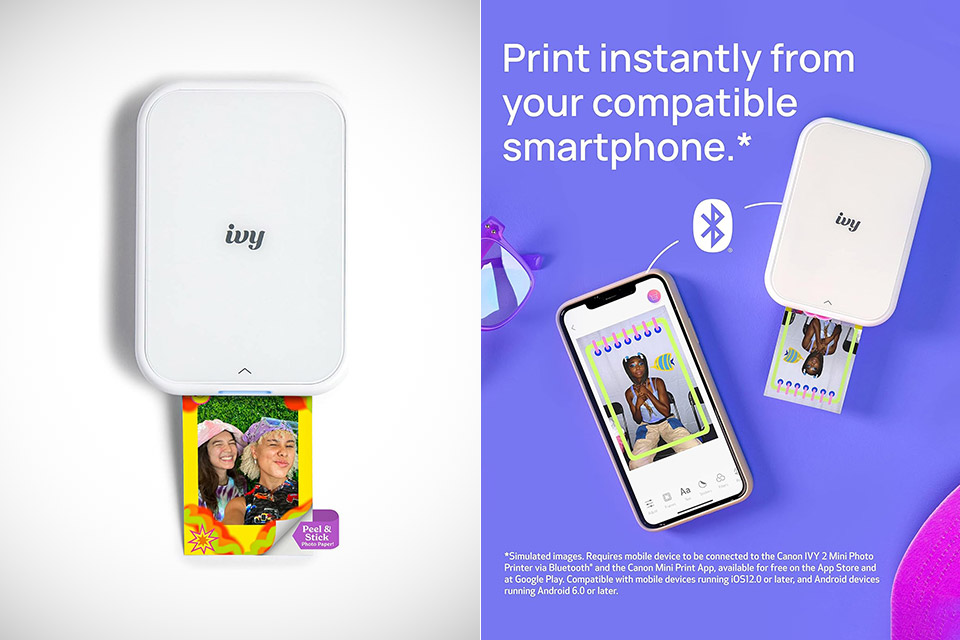
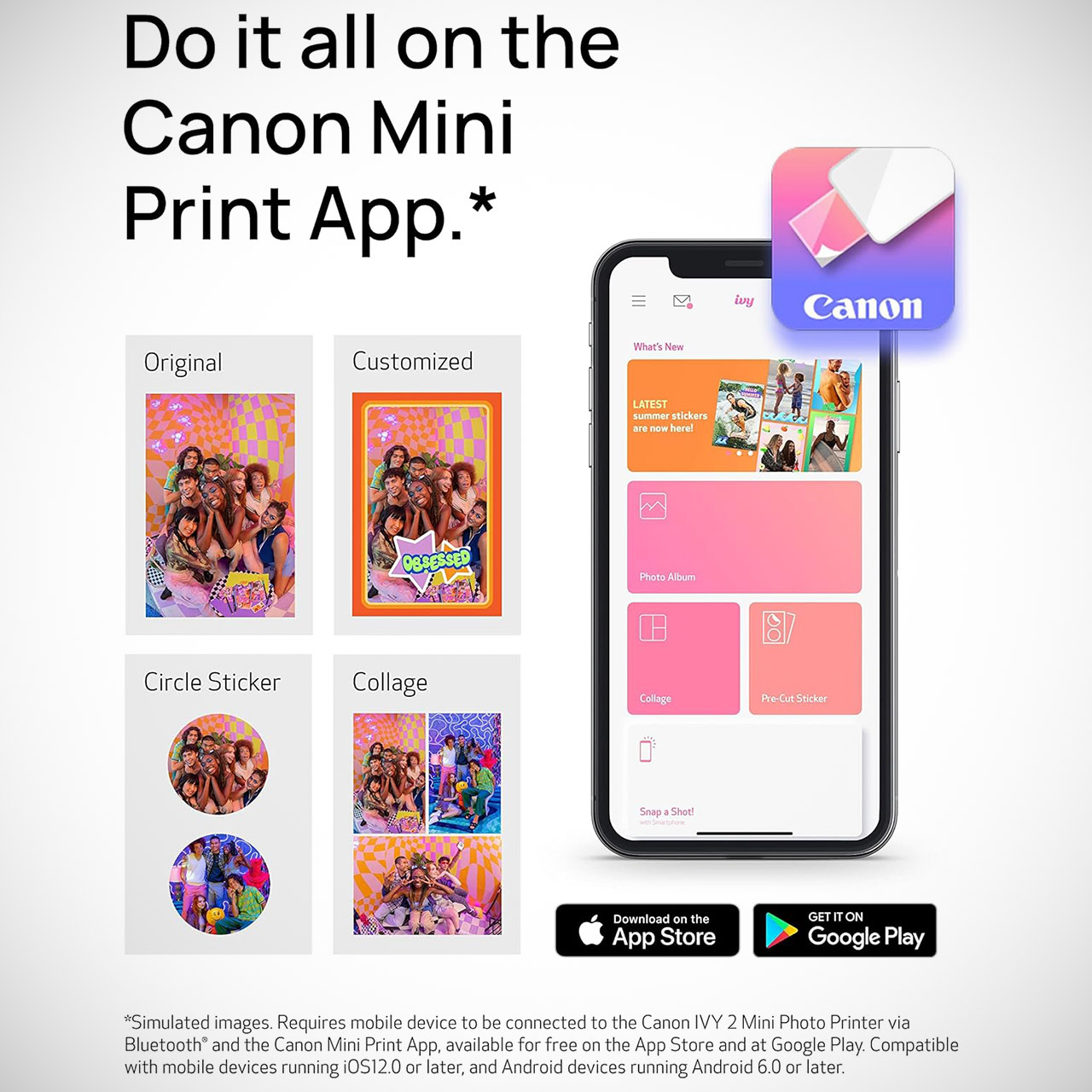
Connecting the printer is as easy as possible. Simply download the free Canon Mini Print app, activate Bluetooth, and you’ll be ready to go in seconds due to long-range Bluetooth 5.0 technology. Once it’s up and running, simply select a photo from your camera roll, add some creative touches (frames, filters, text, or collage patterns are all available in the app), and then press print to let the Ivy 2 do its magic.
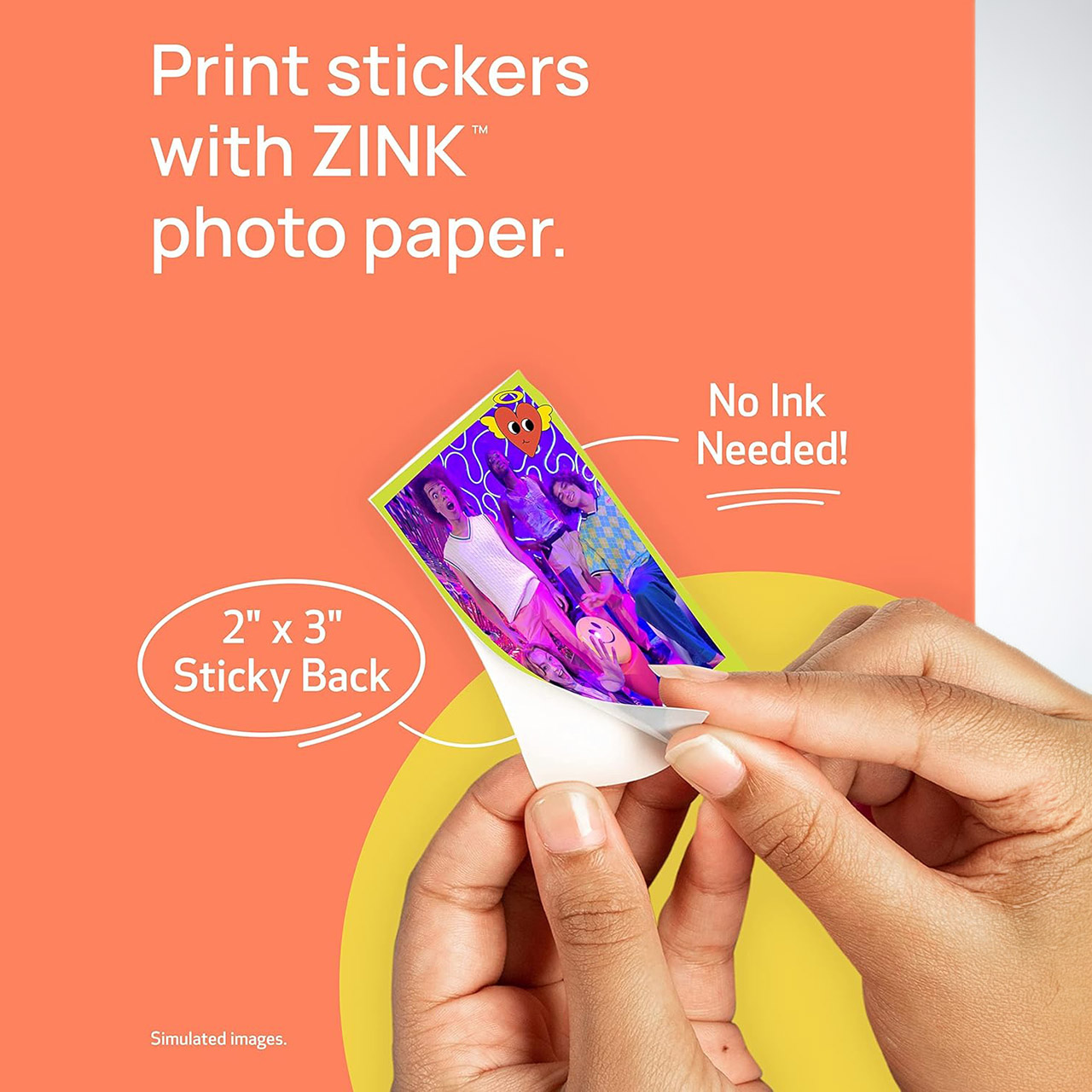
The printer’s ZINK technology removes all of the common ink-related issues. Instead of color ink, the paper contains color crystals that come to life when heated by the printer to create the image, eliminating the need for filthy cartridges, the risk of liquid leaking in your backpack, and the turmoil that occurs when the print appears. In less than a minute (around 30-50 seconds), your finished photo will measure 2 by 3 inches and have a tidy borderless edge.
Each print has a simple peel-and-stick layer on the back. Simply remove the liner, and your photograph will attach to almost any smooth surface. Travelers use them to write a few pages in their diary, label their bags, paint their water bottles, or turn their phone case into an impromptu gallery of their trip’s highlights. If you need to attach it to anything more curved, like a helmet or a bottle, pre-cut circular sticker sheets are also available.
The good news is that these prints are fairly resistant to smudges, moisture, and tears, so even if you end up stuffing them in your pocket or passing them around at dinner, they’ll still look great. A full charge will last about 20 prints, which should be plenty for most people to go through a day of active photography. If you need to recharge, a simple charge from a power bank or hotel outlet will get you back up and running in about 45 minutes. Meanwhile, the paper capacity is up to 10 sheets at a time, and a calibration sheet is included to ensure that the printer is operating correctly.
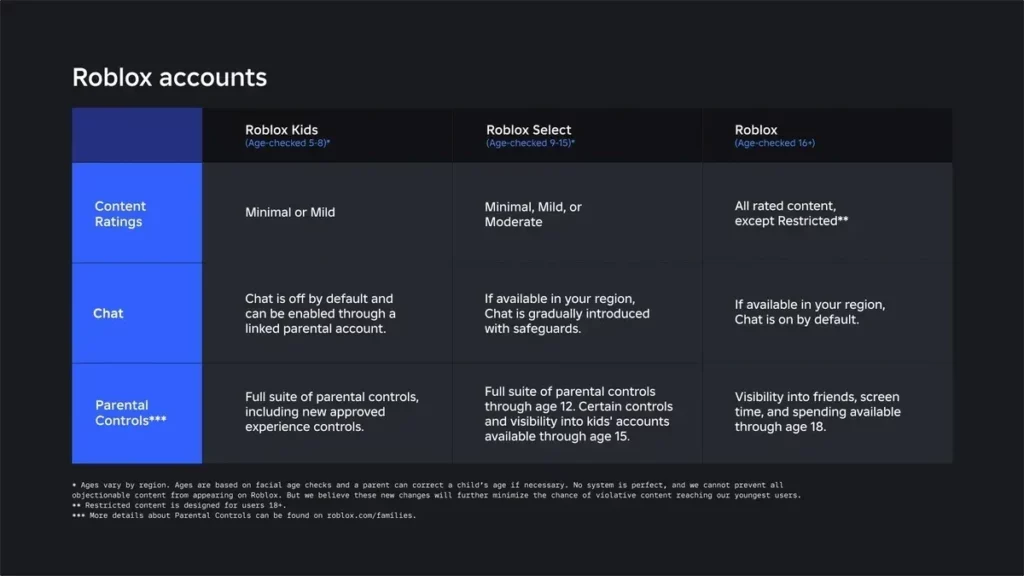
Roblox is expanding its safety features for younger players. The platform has launched Roblox Kids and Roblox Select Accounts in India. The new system is designed for users under 16. The platform uses age checks to place users into either Roblox Kids or Roblox Select Accounts. Each account is provided with security features and restrictions regarding access to certain types of content. Over time, the user’s level of protection changes as they move into a new age group.
Roblox Kids Accounts for Ages 5 to 8
Roblox Kids Accounts are designed for children ages 5 to 8. These accounts include the platform’s highest level of default safety protections. Users can access only selected games that carry Minimal or Mild content ratings. Chat features remain disabled by default to provide a safer experience. The company also reviews and approves eligible games before making them available to these users.
Roblox Select Accounts for Ages 9 to 15
The creators of Roblox have launched a feature called Select Account aimed at older children and teenagers. These accounts allow players ages 9 to 15 to gain wider access to more games at Moderate maturity levels. Chat availability depends on the user’s age and region. Roblox also continues to enforce protections for all users under 16.
As children grow, Roblox automatically adjusts their account experience. Players move from Roblox Kids Accounts to Roblox Select Accounts when they turn 9. Once users turn 16, Roblox automatically places them in a standard account and updates their account settings accordingly. The platform gradually expands access to features while updating safety protections as users get older.
Advertisement
New Parental Controls Coming to Roblox
The new rollout expands Roblox’s parental control system. The parents can monitor gameplay activity and check the friends’ list from their linked account. They will have control over parameters such as screen time, spending limits, and communication restrictions. The new game-blocking options give them increased control over content. Parents can also grant permission for selected games outside the default account settings.
As part of the latest update, Roblox is adding more protections for users under 16. Facial age verification will play a larger role in accessing some chat features. Users who do not complete the process may lose access to certain communication tools. The platform also blocks links, images, and videos from being shared in chat. New restrictions will also prevent users under 16 from viewing or sharing social media links across the platform.
This year, Roblox will start using the International Age Rating Coalition (IARC) rating system. By using IARC, Roblox hopes to provide better age guidelines for its experiences. The IARC age recommendations will be integrated into Roblox’s age-specific accounts.
Now bring back the Microsoft Zune, I double dare you.
Andrei Antipov/Shutterstock
We may receive a commission on purchases made from links.
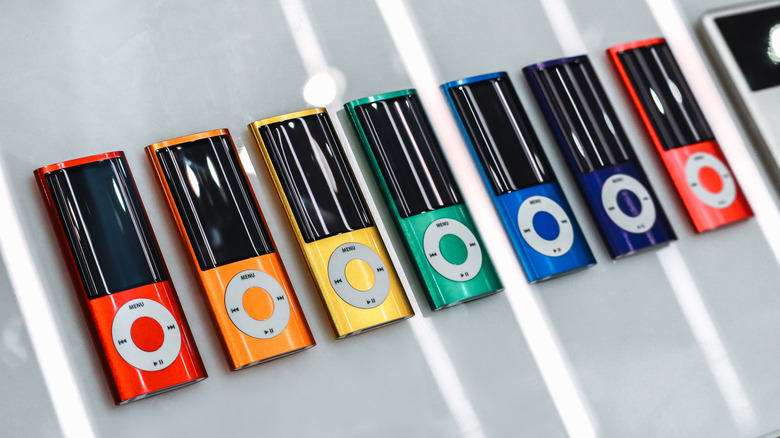
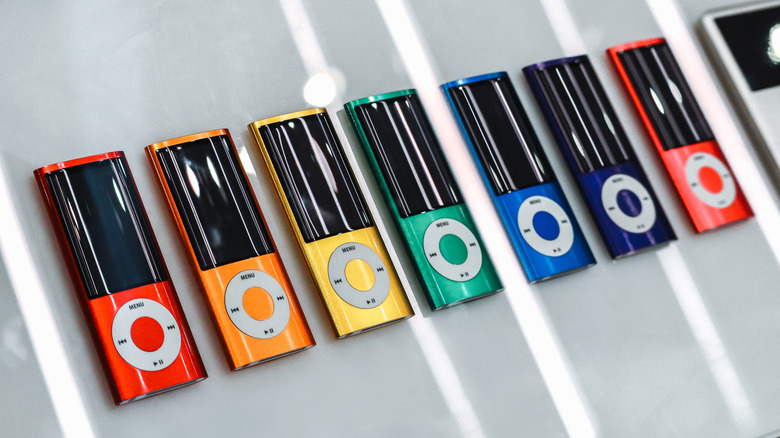
As technology continues to protrude uncomfortably into more of our lives, some younger folks are pretty much over it. It’s not just generative artificial intelligence, which Gen Z is slowly souring on, but current technology as a whole. The younger generation isn’t ditching tech entirely, but they’re rolling things back to the late 2000s. Yes, while those who lived through that period will primarily remember the horrors of the financial crisis, it seems today’s youths have decided we were also living through the era of peak gadgets. Case in point? The iPod is making a comeback.
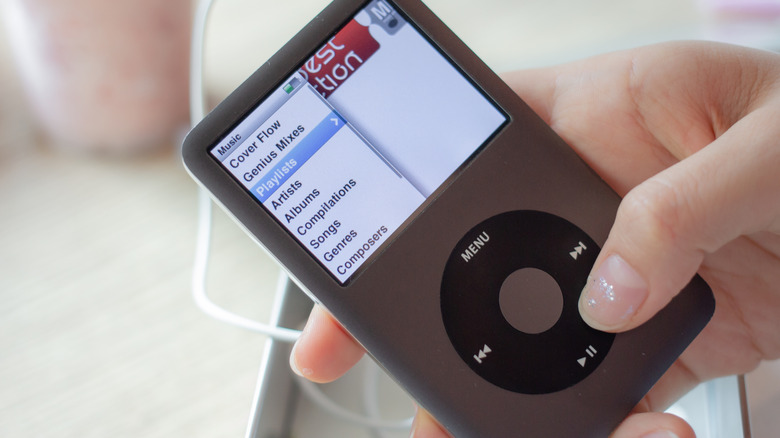
Apple hasn’t released a new iPod since 2019, when it launched the final version of the iPod Touch. The iPhone had by that point swallowed the iPod along with many other standalone gadgets, obviating the need for what had previously been the company’s largest moneymaker. But now, old iPods are in high demand with the youth. In February, Axios reported that eBay searches were up for the iPod Classic and iPod Nano by 25% and 20%, respectively. While a large portion of iPod buyers are older, 32% of respondents to an informal survey by Emily White, a plurality, were Gen Z.
Advertisement
The iPod was once an object of cultural homogeneity. It was the epitome of cool, so embedded in the public consciousness that its advertisements often showed nothing more than a dancing silhouette with telltale white earbud wires flailing in the air. How ironic, then, that the same gadget which once identified its owners as a part of the dominant zeitgeist now signals the exact opposite, a type of retrograde iconoclasm defined by its rejection of the latest iPhone. Why not buy an old Zune, wayward youths? Now that would be truly countercultural.
Connection fatigue and a desire for more control appear to drive iPod sales
Amp.pan/Shutterstock
The trend toward tech gadgets from two decades ago appears driven primarily by exhaustion with the current state of technology. That exhaustion cuts across generations, but Gen Z was not able to experience the early days of the PC and Internet. That generation of young people, the oldest of whom are on the cusp of their thirtieth birthday and the youngest of whom are just starting high school, have seen only a precipitous and ongoing decline in digital privacy and the relentless enshittification of once useful products and platforms.
Emily White’s survey found that Gen Z was driving the resurgence in iPod ownership, motivated primarily by a desire to minimize distractions, listen to music more intentionally, and to assert ownership over their music and listening experience. There’s a lot to be said for those desires. Are you truly taking in an album if your phone’s notifications are interrupting it interstitially, distracting you with emails and social media drama? And, as for ownership, we’ve seen music streaming services shuttered before (RIP Google Play Music). If Spotify were to delete your account tomorrow without giving you your playlist data, how would you even begin to rebuild your music collection?
Advertisement
Those who lived through the iPod’s heyday may remember the holdouts who continued to collect vinyl and CDs while the rest of us loaded our digital media players with more music than they could fit in their entire homes. In many ways, though, those stalwarts had a point. How many among us have managed to lose our old music files, whether due to forgetfulness or to a corrupted hard drive? Today’s iPod nostalgics may well be to the streaming era what those vinyl collectors were to early digital adopters.
iPods aren’t the right choice for every music fan in 2026
What’s clear about iPod adopters, young or old, is that they’re generally not audiophiles. There are plenty of modern devices which cater to Hi-Fi heads with niche features while also supporting Hi-Fi streaming services like Apple Music, Tidal, and Qobuz. An old iPod, however well preserved since the mid-2000s, is less capable than you might think. In addition to lacking support for high-resolution audio formats, it may have experienced internal component degradation over the years which could affect sound quality. Moreover, syncing an iPod is no longer a convenient, plug-and-play affair. With iTunes dead and buried, iPod owners must now turn to independently developed software. There’s a time-consuming DIY element to contemporary iPod ownership.
Advertisement
Unless what you’re after is a dose of blog-era nostalgia you can’t get from any other media player, it’s worth looking outside Apple’s ecosystem. iPod Classic models are selling for up to $300 on eBay at press time, which is a lot of money considering you’ll miss out on modern conveniences like Bluetooth connectivity and support for high-resolution audio. Modern digital audio players (DAPs) from companies like Sony, Fiio and HiBy are built from the ground up for an audiophile-grade listening experience. They bridge the gap between the iPod and iPhone eras by running custom Android versions packed with under-the-hood system tweaks and user-facing software to prioritize and customize sound quality.
Granted, these newer devices can bleed your wallet at the high end, commanding multi-thousand-dollar price tags, but there are plenty of options at every price point. For $320, you can pick up the HiBy Digital M500 X Hatsune Miku, a device themed around the titular virtual pop star and stuffed with enthusiast audio features. It also has an array of physical buttons along the side, reminiscent of an old, Walkman-style cassette player. Speaking of which, those looking to go even cheaper can take a gander at the wonderfully chintzy Fiio SnowKky Echo Mini, which is even more Walkman-inspired and packs a lot of value for $60 despite missing out on some enthusiast features. Splitting the difference are products like the Fiio JadeAudio JM21, which, at $180, impresses even the notoriously hard to please Hi-Fi community by including features like a balanced 4.4mm TRS output alongside the classic 3.5mm headphone jack.
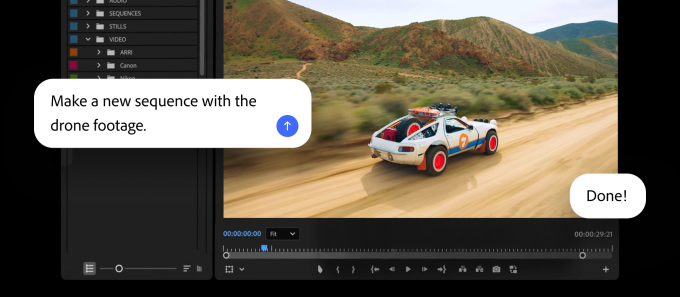
Adobe is updating its Firefly AI assistant with new chops, and adding it to Premiere, Illustrator, InDesign and Frame.io.
The company has given the assistant new abilities to make brand kits, product videos, and storyboards . Plus, the Firefly app now lets users save whatever they’ve created as an element that can be used across projects.
Image Credits:Adobe
In Premiere, users can use the AI assistant to sort assets into bins, batch-rename clips, identify interview questions and add markers. And in Illustrator, the assistant can do things like reorganize layers across a document or check for missing fonts.
Firefly is already usable with Express, Photoshop, and Acrobat, and is supported by ChatGPT, Claude and Copilot. Adobe said that it plans to add support for Google Gemini and Slack soon.
Firefly updates
Adobe is slowly transforming Firefly to increasingly resemble Canva, at least when it comes to AI features, loading up the app with AI tools that can generate images, videos and storyboards. The company is now adding a new feature called Elements that can save AI-generated characters, objects and locations for later use.
Advertisement
Firefly is also getting a Projects feature that can store existing assets in one place, and share context. This could be useful for teams creating a video series or brand campaigns. Both of these features are currently available in a private beta.
Image Credits: AdobeImage Credits:Adobe
The company said users can now describe a brand and its style, or upload existing collateral, in Firefly to have it generate a brand kit, complete with logos, brand identity and color palettes, or even generate product videos from photos. Users can also create storyboards to create videos.
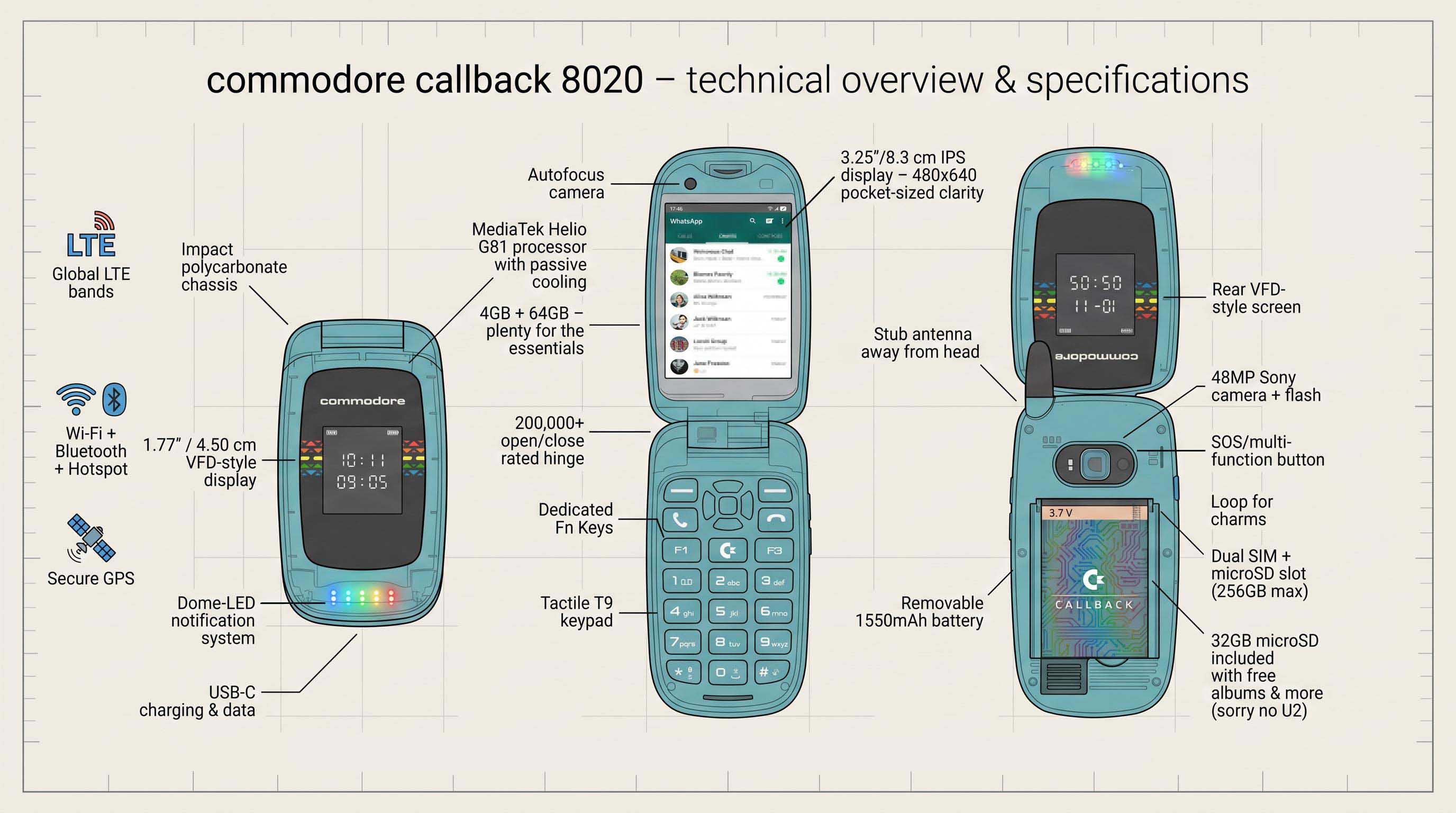
Whatever happens with the new incarnation of the Commodore corporation, we’ll always remember the old one fondly. Well, we’ll remember certain of its products fondly, at any rate, if not the corporate leadership that drove them under. About that, perhaps the less said the better. That’s why we’re looking at the revived Commodore’s latest offering with equal parts interest and trepidation — is there really a market for a Linux-based, Commodore branded flip phone in 2026 and beyond?
The official reveal trailer, which you can watch below, can only be described as weaponized nostalgia for the late 90s, which tracks because the revived C-64 is more-or-less the same thing for the 8-bit era. That said, between replaceable batteries, actually having a decent camera — a 48MP Sony module — quality Cirrus Logic DAC for audio, and running the Linux-based, Android-app-compatible Sailfish OS, the “Callback 8020” ticks all the boxes. Except for price, that is. Many will find the $499 USD launch price a little tough to swallow in this economy, so we hope they aren’t betting the farm on this one being a mass hit.
Still, compared to other premium “digital minimalist” products like the LightPhone III, the price looks reasonable — and with web browsing and social media explicitly excluded from the app store, this phone is firmly in that category. At least this one comes with some sweet Commodore branded headphones, which double as an FM antenna just like they did on your Nokia back when.
While it doesn’t come with DOOM from the factory, it does come with Snake and a selection of emulated C64 games . Ringtones are SID samples, but of course there’s no actual SID chip in the phone, any more than there’s a 6502. That said, if someone builds a phone around a 6502, please let us know.
Advertisement
No, it’s not a new Amiga, as so many of us were hoping for, but by putting quality modern components into the flip phone form-factor, at least they’re trying to innovate (or perhaps retrovate) and we have to respect that. Only time will tell if the market does.
Intel’s stock has risen after Trump announced that the company will make chips for Apple, but it’s not clear when chips will get delivered, how many will ship, or how much the deal is worth.
Following initial rumors that Apple was in discussion with Intel over manufacturing processors, it was revealed in May 2026 that test production had begun.
Now in a late-night posting on Truth Social, Trump announced that “Apple has agreed to work with Intel to design and build its chips in America.” Consequently, according to CNBC, Intel stock rose 8.8% in premarket trading, while Apple was up 0.6%.
The posting comes after Trump reportedly discussed the semiconductor supply chain at the G7 summit. Plans to reduce dependence on Taiwan chip production were key topics at this summit.
Advertisement
In a note to investors by Dan Ives at Wedbush seen by AppleInsider, the deal with Intel is a substantial multi-year one.
There were no further details, and the announcement appears to only confirm the news from May 2026.
What the deal entails
It’s believed that Apple’s deal with Intel concerns production of older or lower-end processors. Intel will not be making the chips for the forthcoming iPhone 18 Pro Max, for instance, nor the M5 or later ones for the Mac.
What’s most likely is that Intel will produce older M-series chips for devices such as the iPad Pro and MacBook Air. It may also make processors for the non-Pro versions of the iPhone.
Advertisement
Someone other than TSMC making processors for Apple has historical precedent. For example, Samsung used to make the A-series chips for Apple.
The most likely scenario here is tapping a capacity-limited TSMC only for the newest Apple processors, such as the latest 2 nanometer design expected in the iPhone 18 range.
Intel has only just recently entered very limited scale testing of the 18A-P process. That means that Intel will not reach full chip production for Apple until mid-2027 at the earliest.
Trump’s US manufacturing push
It is true that Apple and Intel’s deal was prompted by Trump. this follows Apple’s continued increased investment, or re-announcing of previous investments, into US manufacturing.
Advertisement
The deal and such announcements have already seen Intel’s stock price rise dramatically. The rise follows Trump’s administration investing in Intel in return for shares.
“They were worth around 100 Billion Dollars when we made our offer,” posted Trump. “Now they are worth over 600 BILLION DOLLARS!”
As well as responding to political pressure, Apple has reportedly been forced by the global chip shortage to consider alternatives to its main supplier, TSMC. That’s because the worldwide demand for AI processors has led to Apple losing its position as TSMC’s largest customer to Nvidia.
Apple has generally managed to avoid the shortage problems better than most of its rivals, due to its size and buying power, plus its long-term deals. However, as the shortage continues, even Apple has said it is going to have to raise prices.
A recent trend in gaming accessories is the move to Hall effect and tunneling magnetoresistance technology. It started in controllers a few years ago, and it was only a matter of time before it made its way into gaming keyboards. There are now dozens of great HE and TMR keyboards to choose from. So now, as with controllers, the question becomes: Is it really worth upgrading?
There are certainly advantages to magnetic keys, but there are also some compromises. The granular levels of customization and significantly shorter response times can make a big difference in competitive games. On the other hand, the typing experience takes some getting used to, the battery life can be shorter and they’re often more expensive than their traditional mechanical cousins.
If you’re on the fence about upgrading, it can be hard to know if and when it’s worth it. For me, though, the answer is now a resounding “Yes, but.” Let me explain.
The concept of magnetic switches is simple: Instead of compressing a physical spring or rubber membrane as part of a mechanism to send an electrical signal that signifies a keypress, magnetic sensors are used to detect when a key is pressed more precisely and with less friction. This leads to some noticeable benefits.
Durability
The most obvious benefit for most casual gamers is the greater durability. Without the mechanical friction caused by the rubbing of physical components, HE and TMR switches can last much longer. Most mechanical switches are rated to last anywhere between 50 and 100 million keystrokes, which averages to about 10 to 15 years (of course, this could vary wildly depending on your usage). HE and TMR switches, on the other hand, are rated for more than 100 million keystrokes, so 15 to 20 years or more. It’s likely the keyboard’s other components will give out before the switches.
The second benefit is technologically much more profound, but also not nearly as useful for the vast majority of gamers. Some HE and TMR switches can, according to their manufacturers, register inputs (called the actuation point) as small as 0.05 millimeters of travel. By comparison, most traditional mechanical switches have an actuation point of between 1 and 2mm. This means that a key needs to travel far less before the keyboard and computer register the movement, greatly increasing response times. That may not seem like a big difference, but in the world of competitive gaming, that shorter actuation point is significant.
What’s even more interesting is that these switches can be customized far more granularly than their mechanical counterparts. So, not only can the actuation point be set to almost nothing, but most HE and TMR keys can store up to four actuation points per keystroke. That means you can perform four separate actions with a single press of the key; two actions on the downstroke and two on the release. For example, you could use the same single keypress to go from crouch to prone, prime and then throw a grenade. Or enter a vehicle, turn on the lights and then start the engine, all in one keypress.
Advertisement
This advanced customization can be useful in all kinds of games, including shooters, roleplaying games, multiplayer online battle arenas and massively multiplayer online roleplaying games like Elden Ring, League of Legends and World of Warcraft. Imagine being able to use a potion, cast a shield, cast an attack buff, then attack all by pressing a single key. There’s a whole world of possibilities. Again, most gamers probably won’t need that much control, and the amount of benefit depends largely on what genre you prefer. But that level of customization can really change the way you play your favorite games.
The shorter actuation levels also means response times are much shorter than with traditional mechanical switches. Again, to preface this, if you’re not a hardcore gamer or someone who plays FPS games a lot, you might not notice a difference. However, the more you do notice and practice with it, the harder it becomes to go back. Once you build the muscle memory of not having to fully press the keys to perform an action, going back to a traditional mechanical keyboard might actually start to feel like a chore.
Advertisement
The best pianists learn how to essentially bounce their fingers across the keys, especially when playing faster, more challenging works, and it’s similar here. Once you learn how to bounce your fingers on the keys, you’ll get faster and be able to react to what’s happening in the game. While 0.05mm versus 2mm might not seem like a big difference, in most games, simply starting your attack or trigger pull before the other guy almost always determines who wins the encounter (or how much health you lose during the fight).
That’s not all. Most magnetic keyboards have a feature that ensures all keypresses register, even if two keypresses overlap. With traditional switches, the first key has to return all the way to the top before the next keypress can register. With magnetic switches, the second keypress can register the moment the first keypress reaches the actuation point. This lets you do things like strafing and peeking around corners more quickly.
Are there downsides to magnetic switches?
With all their potential benefits, Hall effect and tunneling magnetoresistance switches have some drawbacks.
Cost
Advertisement
The Redragon FIDD K683.
Redragon
Like most technologies that aren’t widespread yet, magnetic keyboards are generally more expensive than traditional mechanical keyboards. That’s certainly not true across the board. There are some magnetic keyboards like the Redragon FIDD K683 for as low as $30, but on average, you’ll have to pay a bit more for magnetic switches, particularly TMR ones.
Keep in mind that keyboards vary widely in their materials as well as the types of switches. Arguably, the biggest determining factor in the price of a keyboard is the materials for the rest of the keyboard (you can even get one made of concrete if you want). So, if you want to just test out magnetic switches before investing in a more premium keyboard, pick up a couple of cheaper ones to make sure you like the feel of them before upgrading to a nicer model.
Daily typing
Advertisement
The Keychron K6 HE keyboard.
Keychron
Ever since I started testing magnetic keyboards (about two years ago, when they became more widely available), it’s been hard to find one I can also use as my daily typing keyboard. The typing experience on almost all of them has never quite matched the feel and sound of my mechanical keyboards. They are getting better, and I know enthusiasts are shouting loud enough for me to hear that you can change the springs on the switches. Even so, there’s still a way to go.
I say “almost all” because there is one glorious exception, the Keychron Q3 HE 8K. I say this unequivocally: the Q3 HE 8K is by far the best keyboard I have ever typed on. I’ve typed on many keyboards in my lifetime, and I am well aware that there are hundreds, if not thousands, I have never tried, but the Q3 HE 8K is my absolute favorite of the ones I’ve tested.
The Q3 uses Keychron’s custom Lime Magnetic Switches, which are hot-swappable. It has a full metal body, a gasket mount design and polybutylene terephthalate, or PBT, keycaps. I don’t know why or how, but the unique combination of everything on this keyboard adds up to an absolutely superb typing experience. Plus, the gaming benefits of the magnetic switches make it one of the best gaming keyboards you can buy.
Advertisement
A closeup of the Keychron Q3 HE 8K switches.
Keychron
Battery life
Most magnetic keyboards have significantly shorter battery life than their mechanical brethren. That’s mostly due to how the technology works: Magnetic-switch keyboards have to continuously scan their sensors. They have to continually process the exact location of every switch, and the ones with rapid-trigger and low-latency features (most of them) use a high polling rate, typically around 8,000 Hz.
All this puts a lot of strain on the battery, which is why many magnetic keyboards, such as the Q3, are wired only. It’s also why the wireless ones suffer from short battery life. While many mechanical keyboards can last well over 1,000 hours with backlighting off, magnetic keyboards typically last between 100 and 200 hours. This will vary depending on which features you keep on or off, but it’s still a fraction of a mechanical keyboard’s battery life.
Advertisement
Should you buy a magnetic keyboard?
As I said at the beginning, “Yes, but…” The extreme levels of customization, rapid response time and greater durability are wonderful benefits for any gamer. However, by and large, they’re benefits that only the most competitive gamers will truly be able to appreciate. There are tons of fantastic gaming keyboards out there that don’t have magnetic switches, and any gamer can enjoy them.
If you have the money or really want to invest in improving your gaming, then a magnetic keyboard is absolutely worth it. It’s taken a few years for them to get this good, but it’s safe to say that if you’ve thought about upgrading, they’re ready for you.
Over the last couple of decades, the Highlander has quietly become one of Toyota’s most established models — and a stalwart choice in the mid-size crossover segment. The original Highlander first debuted more than 25 years ago, when it broke ground as one of the first three-row crossover SUVs — and though the Highlander has grown in size, Toyota has stuck with that formula ever since.
For 2027, the Highlander will be undergoing its biggest evolution yet as it moves to a fully electric powertrain – leaving the Grand Highlander to take over for consumers who still want internal combustion — but for the time being, the current combustion and hybrid versions of this crossover remain a popular choice in the segment. As one would expect, Toyota’s reputation for reliability is a big draw for Highlander buyers, and indeed, this model has generally received high scores for its reliability and many other aspects . In recent years, though, there have been some strong new mid-size SUV alternatives that have emerged.
Below, we’ve rounded up five SUVs that, according to trusted sources like Consumer Reports and J.D. Power, outperform the familiar, but aging Toyota Highlander in a number of categories. The selection includes some of the Highlander’s direct mid-size competitors, along with a couple of Toyota SUVs that can be found in the same showroom.
Advertisement
Toyota Crown Signia
Jonathan Weiss/Shutterstock
Toyota’s SUV lineup has grown significantly in recent years, and one of the more recent additions that could serve as an alternative to the Highlander is the Crown Signia. Not to be confused with the slightly odd, high-riding Toyota Crown sedan, the Crown Signia is more of a traditional SUV — and to some eyes, about as close as you can get to a modern Toyota station wagon.
Our experience with the 2025 Crown Signia showed this crossover to be an intriguing choice, with its mix of Lexus-grade refinement and the impressive fuel economy from its standard hybrid powertrain. The Crown Signia gets high marks from Consumer Reports, where it comes in as the top-ranked Toyota SUV and the second-highest finisher among all mid-sized SUVs. It also earns a high overall rating from J.D. Power, with an especially high score in the all-important quality and reliability category.
Advertisement
How does the Crown Signia compare to the Highlander? With the Signia, you’ll be trading some of the Highlander’s size and practicality (along with its third-row of seating) for a sleeker, more luxury-like SUV experience that happens to deliver excellent fuel economy. Beyond interior space, the biggest difference between these two Toyota SUVs might be under the hood. While the Highlander can be had with either a 2.5-liter hybrid or a 2.4-liter gasoline turbocharged engine, the Crown Signia is hybrid-only.
Advertisement
Hyundai Santa Fe
Jonathan Weiss/Shutterstock
Like the Highlander, Hyundai’s Santa Fe is another SUV model that’s been around for a long time. In fact, both the Santa Fe and the Highlander debuted during the same 2001 model year. Both SUVs have grown in size since then, and the Santa Fe received an extensive redesign for the 2024 model year. The new Santa Fe got larger, boxier, and now includes a standard third row, which could help it win over Highlander buyers.
Like the Highlander, the Santa Fe is available with both gasoline and hybrid powertrains — and the hybrid model earns especially high marks. Consumer Reports rates the Santa Fe Hybrid as the third best mid-sized SUV with three rows of seats overall, one spot ahead of the Highlander Hybrid in that category.
As for comparing the Hyundai directly against the Toyota, the Highlander is the larger SUV on the outside, but the Santa Fe actually beats it in several interior space categories. Another thing that might draw buyers to the Hyundai is its price — according to Truecar, the base price of the Santa Fe is about $11,000 less than the Highlander. While some might be wary of picking a Hyundai over a Toyota if they’re looking for long-term reliability above all, the Santa Fe is an SUV that punches above its weight in many ways.
Advertisement
Subaru Outback
Jonathan Weiss/Shutterstock
If you were comparing strictly on paper, the three-row Subaru Ascent would be that brand’s most direct competitor to the Highlander, but if three rows of seating aren’t a strict requirement, the new Subaru Outback could potentially be the strongest alternative to the Highlander. Although it started back in the 1990s as a simple Subaru Legacy station wagon with a lift kit, the Outback has since evolved more into a dedicated mid-sized SUV, and that became explicit with the Outback’s radical 2026 redesign.
Larger and more squared off than it was before, the 2026 Outback has narrowed the gap between itself and more traditional mid-sized SUVs — even if some Subaru purists aren’t sold on the new look. Sentimentality aside, the new Outback is extremely competitive in its class, with U.S. News giving it a tie for second place in the midsize SUV category, well above the Highlander.
One area where the Outback falls behind the Highlander is its lack of a hybrid option. Currently, the Outback’s only two engine options are a 2.5-liter naturally aspirated boxer engine or a 2.4-liter turbocharged boxer engine. However, given the recent additions of the Forester and Crosstrek Hybrids to the Subaru lineup, it’s likely that electrification will eventually make its way to the Outback as well. For now, even when optioned with its more upgraded 2.4 turbo engine, the Outback is still priced cheaper than a Highlander — and you get Subaru’s legendary AWD system too.
Advertisement
Honda Passport
Jonathan Weiss/Shutterstock
Given Toyota’s excellent reputation for quality, you may expect that one of its SUVs would rank at the top of the Consumer Reports list of today’s best SUVs, but that honor actually goes to a mid-size SUV made by one of Toyota’s Japanese competitors — the Honda Passport. The three-row Honda Pilot would be the more direct competitor to the Highlander, but the Passport plays in the same mid-size segment, and has earned high marks across the board.
The Passport excels in its off-road capability, but even if you don’t plan on taking your SUV off of the pavement, there’s still a lot to like, with impressive space in both the second row and the cargo area. U.S News rates the Passport as the fourth-best midsize SUV on sale right now, and the Honda is also among its best picks for families.
One area where the Passport diverges from the Highlander is under the hood. Distinctly old school in its approach, the Passport offers neither a turbocharged engine nor a hybrid option — all Passports are powered by Honda’s naturally aspirated 3.5-liter V6 engine. Depending on your needs, that can be either a good thing or a bad thing. Compared to turbos and hybrids, the V6 is outgunned in both low-end torque and fuel efficiency, but it also delivers mechanical simplicity and an engine character that’s increasingly rare in modern SUVs of any type.
Advertisement
Toyota Grand Highlander
Jonathan Weiss/Shutterstock
If you take a look at sales figures, you’ll see that annual Toyota Highlander sales have fallen off quite dramatically over the last few years, and the biggest reason for that is likely the arrival of the larger Toyota Grand Highlander, which debuted for the 2024 model year. As its name implies, the Grand Highlander is larger than the Highlander both inside and out, with especially large bumps in cargo space and third-row legroom. Like the Highlander, the Grand Highlander is available in both hybrid and non-hybrid versions.
Our experience with the 2025 Grand Highlander Hybrid showed a highly refined, comfortable crossover that has as much interior space as you can get before moving up to a full-size, truck-based SUV like the Toyota Sequoia. Consumer Reports rates the Grand Highlander Hybrid second among three-row mid-size SUVs, and also among the 10 best SUVs on sale today. It’s also tied for fifth in the U.S. News mid-size SUV rankings, more than ten spots ahead of the regular Highlander.
Advertisement
In 2025, the Grand Highlander outsold the regular Highlander by more than double, suggesting that it’s now taken over the Highlander’s old position in the Toyota lineup. This also helps to explain why Toyota is now repositioning the smaller Highlander as a new, all-electric, three-row crossover that carries a familiar and trusted name.
Advertisement
Methodology
Jonathan Weiss/Shutterstock
When compiling this list, we limited our selections to mid-size crossover SUV models most likely to be cross-shopped against the Highlander. We considered reliability, quality, and performance rankings from third-party sources and media outlets like J.D. Power, Consumer Reports, and U.S. News and World Report, along with our own first-hand reviews and driving experiences at SlashGear.
Google has released its June Pixel Drop update for compatible Pixel smartphones, bringing a mix of new Gemini-powered features, multitasking improvements, and communication upgrades. The update focuses heavily on creativity, introducing new tools for video creation, music generation, and screen recording, while also enhancing calling and emergency features.
Screen Reactions Makes Content Creation Easier
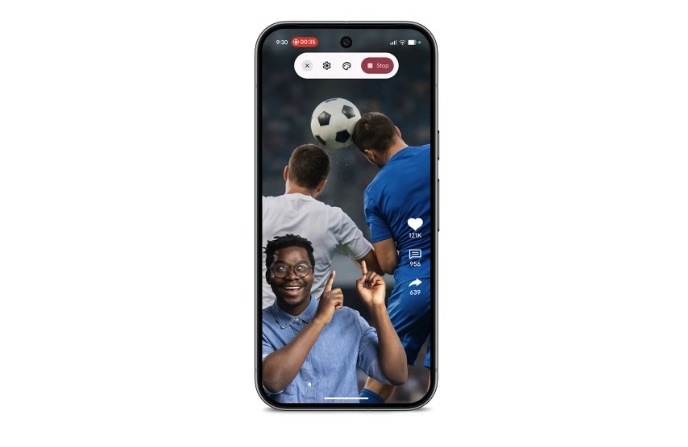
One of the more interesting additions in the June Pixel Drop is Screen Reactions. The feature lets users record their screen while simultaneously capturing themselves through the front-facing camera. It’s designed for creators who record tutorials, gameplay clips, or social media content.
Users can reposition and resize the camera feed while recording, eliminating the need for separate screen recording and webcam software. Everything can be captured directly from a Pixel device.
New Gemini Capabilities
Google is also expanding Gemini’s creative toolkit with new video-generation features. Users can describe a concept in natural language, and Gemini can generate a video from a combination of text, images, and existing video clips. The feature can also work with content already stored in a user’s camera roll, making it easier to create edited videos without relying on traditional editing software. Google has additionally introduced AI-generated avatars, allowing users to create digital versions of themselves for personalized content.
The June Pixel Drop also adds music-generation tools powered by Gemini. Users can create songs from simple text prompts and customize different elements of the final track. The feature is aimed at creators looking for background music for videos, presentations, or personal projects without needing dedicated music-production software.
Beyond that, Google continues to integrate Gemini into communication tools across the Pixel lineup. One of the newest additions is Voice Translate on the Pixel 10a, which provides live translation during phone calls. The feature currently supports English and Hindi, allowing users to communicate across languages without relying on third-party translation apps. Google has also expanded Quick Share support to additional devices.
Advertisement
Improved Voicemail and Floating Message Bubbles
Pixel users are also getting several improvements to the calling experience. The update allows users to create personalized voicemail greetings using recorded audio instead of standard templates. Google has also expanded access to call transcription features, making it easier to review messages without having to listen to them. Call screening capabilities have been improved in several regions, including India.
Multitasking is receiving attention as well. Google is expanding support for floating bubbles, allowing supported apps to remain accessible in small floating windows above other applications. The feature should make it easier to switch between tasks without constantly jumping between apps. Activities like messaging, browsing, and following tutorials become more convenient, particularly on larger-screen devices. Foldable Pixel phones also receive additional multitasking optimizations as part of the update.
Emergency Features Become More Connected
Safety remains a major focus of the Pixel experience. With this update, emergency sharing now works alongside features such as car crash detection, fall detection, and pulse loss detection. In emergency situations, users can quickly notify both emergency services and selected contacts. The goal is to streamline the process of getting help while ensuring friends and family remain informed when something goes wrong. The June Pixel Drop is rolling out now to eligible Pixel devices and represents one of Google’s larger software updates of the year, particularly for users interested in Gemini’s growing suite of AI-powered tools.
This article is crossposted from IEEE Spectrum’s careers newsletter. Sign up now to get insider tips, expert advice, and practical strategies, written in partnership with tech career development company Parsity and delivered to your inbox for free!
I’ve sat on both sides of the interview table several times over the past decade. You might be surprised to hear that I’ve often been just as nervous interviewing candidates as I was when being interviewed!
Nearly all the interview advice out there is about the candidate’s side, but understanding the other side can also help you prepare. Let me show you what I’ve seen firsthand, and what I’d bet is happening at the company you just interviewed with.
If you recently got rejected after an interview, this might explain what actually happened.
Advertisement
One caveat, because I’ve been on the receiving end of this: A couple of my recent interviews were run entirely by AI. These were screening rounds, but a growing share of job seekers now report being interviewed by a bot somewhere in the process. Everything below assumes you reached a person.
Most teams have no standard prep
You might assume companies train people to run interviews. Many don’t.
In practice, your interviewers may be much less prepared than it seems. Their prep might look like this: “Here’s a rubric from three years ago, figure it out.” Or: “Let’s grab a conference room between meetings and decide what to ask.”
The questions are often whatever the interviewer personally studied when they were job hunting. These days, they may be generated with an LLM the morning of.
Advertisement
Then the panel negotiates. One person wants to quiz candidates on data structures and algorithms for a role in which they design websites. Another insists system design is essential for a junior level position. People default to what was done to them and assume it’s normal because it was normal to them.
What’s normal to the spider is chaos to the fly.
“Scoring” that isn’t really scoring
After an interview, some processes I was part of had one simple scale to score candidates: yes, no, strong yes, strong no.
The result is predictable. Like the candidate? Strong yes. They rubbed you the wrong way but answered everything correctly? Somehow a soft yes at best.
Advertisement
Structured scoring with defined criteria measurably reduces this. The research backs it, and the rare times I saw it used well, it changed my own assessments. Yet many teams I worked on never used this approach.
Prestige bias and politics
Even with a strong scoring system, bias and office politics can change the outcome.
For instance, I once interviewed someone I was strongly against hiring. It was clear they didn’t know what they were doing, and they’d be running critical infrastructure. I gave a strong no with objective reasons, scoring notes, specific examples from the technical round.
Leadership pulled me into a meeting right after and asked why. I walked them through my notes.
Advertisement
What I didn’t know: Several of them already knew the candidate personally. They liked them. They wanted them hired. I said the decision was theirs, my assessment hadn’t changed, and wished them luck.
I’ve also watched a strong resume short-circuit an entire loop. The team saw a top-tier company name, skipped the standard technical rounds, lobbed a few softballs, and basically welcomed the candidate in.
But once this engineer got started, it turned out to be a poor fit. And it wasn’t the candidate’s fault. They were set up for failure, because nobody checked whether this person could do this job at this company.
In both cases, it didn’t work out.
Advertisement
What you can actually control
You could read all this and decide the system is broken or rigged.
The broken part is fair. The rigged part isn’t. People who are genuinely good at interviewing pass more often. It’s messy, but it’s not a lottery.
You can’t fight bias, politics, or a sloppy process. That’s like being mad at the weather. You can only play the two cards you’re dealt: your technical ability and your behavioral presence.
Most candidates obsess over the technical side and forget the behavioral rounds exist. But product managers, designers, and cross-functional leads—people with zero technical background—will judge you entirely on whether you can tell a clear story and seem like someone worth working with. If you’re unlikeable in the room, you’ve roughly halved your odds at every stage.
Advertisement
So here’s the unglamorous advice that actually works: put yourself on camera.
Talk through a project you led, a mistake you made, a hard problem you solved. Record it. Watch it back. Cringe. Do it again.
Think out loud, under pressure, with another human watching.
If you keep failing interviews, the fix isn’t always more technical prep. It’s getting better at being in a room with other people who are potentially more nervous, less prepared, and more biased than you ever imagined.
Advertisement
The process is broken. You can still win.
—Brian
A new initiative from the U.S. National Science Foundation plans to distribute $1.5 billion of funding over 10 years to independent research organizations, which it calls “X-Labs.” The program is meant to support work being done outside of academic institutions, starting with two areas: scientific instruments for sensing and imaging, and interconnects and integrated photonics for quantum systems.
We’ve said it before, and we’ll say it again: AI is changing the engineering profession. So how can you stay in demand as the field’s tools evolve? A senior engineering manager at Walmart Global Tech offers seven quick tips.
For even more expert tips, check out the new career advice collection from The Institute. These articles feature guidance written by working engineers, meant to help those in all stages of their careers stay at the forefront of their profession. Discover tips for technical presentations, dive into a specific career path like cybersecurity consulting, and more.
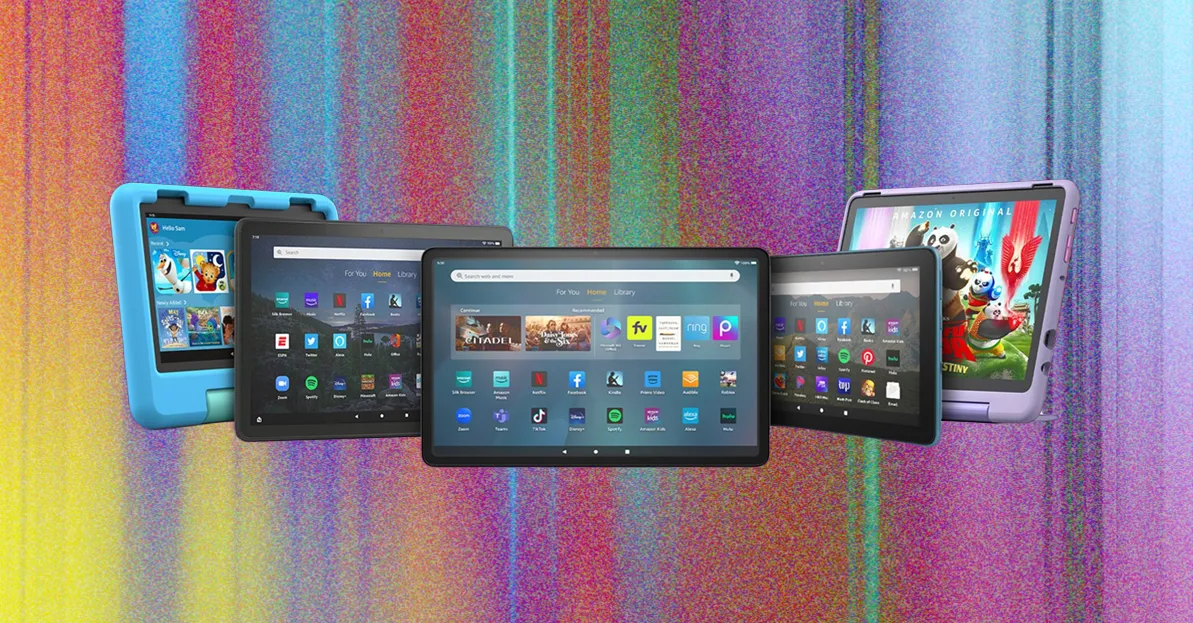
A faucet for Amazon content: If you subscribe to Amazon’s Prime service, you can consume all the included movies, music, TV, and books; shop for all the items you can get with its free two-day shipping; and browse your free Amazon photo storage. You can do most of the same things from an Android tablet or iPad, but the Fire OS interface is crafted specifically to deliver Amazon goods, with swipeable pages for each type of media Amazon sells.
Built “good enough”: Physically, Amazon’s Fire tablets are made of cheap-ish plastic, but they’re designed with enough care that the build quality won’t bother you too much. Wi-Fi reception is excellent, and the front-facing cameras have improved considerably in the past couple releases. The Kids Editions are also some of the best-quality tablets for kids, encased in a rugged bumper, and all have microSD slots so you can add extra storage. (We recommend this 128-GB microSD card for $33.) It used to be that you could improve things by hacking Amazon’s tablets to install the Google Play Store on your Fire device. Unfortunately, installing the Play Store has become increasingly difficult and is something I no longer recommend for most people. It’s not worth the hassle when there are other reasonable cheap Android tablets available.
Cheap: Did we mention the price? They all cost $200 or less, save the new Max 11. If you stick to the cheaper models though, they’re a great value. You can also get them with Amazon lock-screen ads, which will lower your price by $15.
Advertisement
TIRED
Non-Amazon content is lacking: The greatest strength of these tablets is also their greatest weakness. If you aren’t an Amazon Prime subscriber and don’t plan to get your video, audio, or books from Amazon, the Fire tablet line is far less compelling. They do have Alexa, so that could be a plus, but again, that’s tied deeply into Amazon’s content library. You can download third-party apps like Netflix on Amazon’s Appstore, but the selection is far more limited than what’s available on Apple’s iPad or the Google Play Store on standard Android tablets. Rumor has it this will be changing this year as Amazon improves Fire OS, but so far, that’s just a rumor.
Old tech: The tech inside these tablets is old. The processors aren’t the fastest, and you’ll likely notice small fits of lag and a general lack of power compared to more expensive Android tablets. The touchscreens aren’t as responsive or sensitive as more expensive tablets. Since many of the apps for Fire OS are built with weak processing power in mind, you don’t notice it too much. The operating system is also dated (depending on which Fire tablet you’re buying), which could hide some of the weaknesses. Amazon’s latest Fire OS is a modified version of Android 11, which came out in 2020. Amazon keeps updating its tablets to some degree, but not nearly as often as it should.
Short warranties: Aside from the Amazon Kids two-year, no-questions warranty, Fire tablets don’t have great backing from Amazon. Only the Fire HD 10 comes with a full one-year warranty. The smaller devices have 90-day warranties.
Advertisement
Special offers: Over time, Amazon’s Special Offers ads have gotten more overt and annoying. We recommend you pay the extra cash to buy a Fire tablet without them.












































You must be logged in to post a comment Login