Watch March Madness 2026 live streams as 68 schools battle it out over the course of 67 games in 21 days to determine this year’s NCAA national champion. Below we have all the info on how to watch college basketball from anywhere in the world with details on worldwide TV channels, broadcasters and free streaming online.
Having started all the way back in November, the long college basketball season is set to come to its fast and furious climax. The beginning of the end kicks off with Selection Sunday (March 15) where the all-important brackets are decided, followed by the First Four round (March 17 & 18) in which a quartet of colleges play for the right to join the Big Dance.
After battling out a thrilling championship game this time last year, the Houston Cougars and champs Florida Gators are likely to fancy their chances of a strong run again. While the Duke Blue Devils, Arizona Wildcats and Michigan Wolverines all come into March Madness with imposing 29-2 records. And the tournament also provides a showcase for some of college ball’s hottest talent and NBA prospects, like Cameron Boozer, Darryn Peterson, AJ Dybantsa and Caleb Wilson.
Advertisement
Here’s where to stream March Madness 2026 live online and watch college basketball from anywhere, including ways you can watch every game for free.
Watch March Madness 2026 Quick Guide
Key dates
First Four: March 17-18
Championship game: Mon, Apr. 6
Can I watch March Madness in 2026 for free?
DAZN has struck a deal with the NCAA to broadcast every single game of March Madness 2026 for FREE in a wide range of countries.
The territories covered include the UK, Ireland, Scandinavia, Belgium, Italy, Portugal, UAE, and more. You can see the full list here.
Away from your home country but still want to watch those free DAZN streams? You’ll need to use a VPN, with details on how below.
Advertisement
Use a VPN to watch any March Madness 2026 stream
How to watch March Madness 2026 live streams in the US
National coverage of March Madness 2026 is shared between CBS (also streaming on Paramount+) and TBS, TNT, and truTV (also streaming on HBO Max). You can see the split in our ‘Schedule’ section at the bottom of this page.
If you’re a cord cutter, Sling TV’s Orange plan carries TNT and TBS and prices start from as low as $4.99 for one-day access, $9.99 for three days, $14.99 a week or $45.99 a month.
Alternatively, YouTube TV and Hulu + Live TV both carry all four channels and feature free trials for new users.
Advertisement
Paramount Plus subscribers will need the Premium plan to watch CBS live. Prices start at $13.99/month, but you can also get an active 30-day subscription for just $1 if you sign up to Walmart+.
HBO Max prices start at $16.99 for the standard plan which is required for live sport.
Cable subscribers can also watch online via the March Madness Live app, available on a multitude of platforms.
Advertisement
How to watch March Madness 2026 live streams in Canada
In Canada, coverage of March Madness 2026 from the US is shown by TSN.
That means you can also watch online thanks to its TSN+ ($8 a month / $80 a year) streaming platform.
If you already subscribe to this services but find yourself outside Canada, download a VPN and watch NCAA championship games as if you were back at home.
Advertisement
How to watch March Madness 2026 live streams in the UK for FREE
As explained above, specialist sports streamer DAZN has the rights to show March Madness 2026 in the UK.
What’s more, it will do so for FREE. You just need to create a free account in order to stream every single game for free.
Alternatively, Disney+ will broadcast every game from the tournament with prices starting at just £5.99/month.
Outside the UK? You’ll need to download a VPN, as detailed above, to watch your free college basketball streams from abroad.
Advertisement
How to watch March Madness 2026 live streams in Australia
Aussies can watch NCAA March Madness 2026 on Disney+, which now streams the tournament live in Australia as part of its ESPN coverage.
Games are also available on ESPN via Foxtel, which can be live streamed through Foxtel Now.
That means you can also stream games through Kayo Sports – from about $30 AUD a month after a 7-day free trial or introductory offer.
Advertisement
Not in Australia? Use Norton VPN if you’re away from home, in order to tap into your usual college basketball coverage from anywhere.
National Championship Game April 6 – TBS/truTV/TNT/HBO Max (Free on DAZN in UK)
When does March Madness 2026 start?
Following Selection Sunday on March 15, the March Madness 2026 action gets underway on Tuesday, March 17 with the First Four round. The championship game set to take place on Monday, April 6.
Can I watch March Madness 2026 on my mobile?
The vast majority of broadcasters mentioned in this article have streaming services that you can access through mobile apps or via your phone’s browser – for example, March Madness Live, Paramount+ and HBO Max in the US and DAZN in the UK.
Advertisement
We test and review VPN services in the context of legal recreational uses. For example: 1. Accessing a service from another country (subject to the terms and conditions of that service). 2. Protecting your online security and strengthening your online privacy when abroad. We do not support or condone the illegal or malicious use of VPN services. Consuming pirated content that is paid-for is neither endorsed nor approved by Future Publishing.
The security industry has spent the last year talking about models, copilots, and agents, but a quieter shift is happening one layer below all of that: Vendors are lining up around a shared way to describe security data. The Open Cybersecurity Schema Framework (OCSF), is emerging as one of the strongest candidates for that job.
It gives vendors, enterprises, and practitioners a common way to represent security events, findings, objects, and context. That means less time rewriting field names and custom parsers and more time correlating detections, running analytics, and building workflows that can work across products. In a market where every security team is stitching together endpoint, identity, cloud, SaaS, and AI telemetry, a common infrastructure long felt like a pipe dream, and OCSF now puts it within reach.
OCSF in plain language
OCSF is an open-source framework for cybersecurity schemas. It’s vendor neutral by design and deliberately agnostic to storage format, data collection, and ETL choices. In practical terms, it gives application teams and data engineers a shared structure for events so analysts can work with a more consistent language for threat detection and investigation.
That sounds dry until you look at the daily work inside a security operations center (SOC). Security teams have to spend a lot of effort normalizing data from different tools so that they can correlate events. For example, detecting an employee logging in from San Francisco at 10 a.m. on their laptop, then accessing a cloud resource from New York at 10:02 a.m. could reveal a leaked credential.
Advertisement
Setting up a system that can correlate those events, however, is no easy task: Different tools describe the same idea with different fields, nesting structures, and assumptions. OCSF was built to lower this tax. It helps vendors map their own schemas into a common model and helps customers move data through lakes, pipelines, security incident and event management (SIEM) tools without requiring time consuming translation at every hop.
The last two years have been unusually fast
Most of OCSF’s visible acceleration has happened in the last two years. The project was announced in August 2022 by Amazon AWS and Splunk, building on worked contributed by Symantec, Broadcom, and other well known infrastructure giants Cloudflare, CrowdStrike, IBM, Okta, Palo Alto Networks, Rapid7, Salesforce, Securonix, Sumo Logic, Tanium, Trend Micro, and Zscaler.
The OCSF community has kept up a steady cadence of releases over the last two years
The community has grown quickly. AWS said in August 2024 that OCSF had expanded from a 17-company initiative into a community with more than 200 participating organizations and 800 contributors, which expanded to 900 wen OCSF joined the Linux Foundation in November 2024.
OCSF is showing up across the industry
In the observability and security space, OCSF is everywhere. AWS Security Lake converts natively supported AWS logs and events into OCSF and stores them in Parquet. AWS AppFabric can output OCSF — normalized audit data. AWS Security Hub findings use OCSF, and AWS publishes an extension for cloud-specific resource details.
Advertisement
Splunk can translate incoming data into OCSF with edge processor and ingest processor. Cribl supports seamless converting streaming data into OCSF and compatible formats.
Palo Alto Networks can forward Strata sogging Service data into Amazon Security Lake in OCSF. CrowdStrike positions itself on both sides of the OCSF pipe, with Falcon data translated into OCSF for Security Lake and Falcon Next-Gen SIEM positioned to ingest and parse OCSF-formatted data. OCSF is one of those rare standards that has crossed the chasm from an abstract standard into standard operational plumbing across the industry.
AI is giving the OCSF story fresh urgency
When enterprises deploy AI infrastructure, large language models (LLMs) sit at the core, surrounded by complex distributed systems such as model gateways, agent runtimes, vector stores, tool calls, retrieval systems, and policy engines. These components generate new forms of telemetry, much of which spans product boundaries. Security teams across the SOC are increasingly focused on capturing and analyzing this data. The central question often becomes what an agentic AI system actually did, rather than only the text it produced, and whether its actions led to any security breaches.
That puts more pressure on the underlying data model. An AI assistant that calls the wrong tool, retrieves the wrong data, or chains together a risky sequence of actions creates a security event that needs to be understood across systems. A shared security schema becomes more valuable in that world, especially when AI is also being used on the analytics side to correlate more data, faster.
Advertisement
For OCSF, 2025 was all about AI
Imagine a company uses an AI assistant to help employees look up internal documents and trigger tools like ticketing systems or code repositories. One day, the assistant starts pulling the wrong files, calling tools it should not use, and exposing sensitive information in its responses.
Updates in OCSF versions 1.5.0, 1.6.0, and 1.7.0 help security teams piece together what happened by flagging unusual behavior, showing who had access to the connected systems, and tracing the assistant’s tool calls step by step. Instead of only seeing the final answer the AI gave, the team can investigate the full chain of actions that led to the problem.
What’s on the horizon
Imagine a company uses an AI customer support bot, and one day the bot begins giving long, detailed answers that include internal troubleshooting guidance meant only for staff. With the kinds of changes being developed for OCSF 1.8.0, the security team could see which model handled the exchange, which provider supplied it, what role each message played, and how the token counts changed across the conversation.
A sudden spike in prompt or completion tokens could signal that the bot was fed an unusually large hidden prompt, pulled in too much background data from a vector database, or generated an overly long response that increased the chance of sensitive information leaking. That gives investigators a practical clue about where the interaction went off course, instead of leaving them with only the final answer.
Advertisement
Why this matters to the broader market
The bigger story is that OCSF has moved quickly from being a community effort to becoming a real standard that security products use every day. Over the past two years, it has gained stronger governance, frequent releases, and practical support across data lakes, ingest pipelines, SIEM workflows, and partner ecosystems.
In a world where AI expands the security landscape through scams, abuse, and new attack paths, security teams rely on OCSF to connect data from many systems without losing context along the way to keep your data safe.
Nikhil Mungel has been building distributed systems and AI teams at SaaS companies for more than 15 years.
Welcome to the VentureBeat community!
Advertisement
Our guest posting program is where technical experts share insights and provide neutral, non-vested deep dives on AI, data infrastructure, cybersecurity and other cutting-edge technologies shaping the future of enterprise.
Read more from our guest post program — and check out our guidelines if you’re interested in contributing an article of your own!
It’s easier now to stay connected wherever you are, but getting to that point is still complicated. Wireless plans for phones and home internet plans are typically two separate things, with some crossover or discounts if you get them from the same provider.
AT&T OneConnect puts wireless and home service together in one bundle, with unlimited mobile data for up to 10 voice lines and gigabit broadband at home. However, it’s limited to new AT&T customers only. Here’s how the details break down.
OneConnect offers three pricing tiers, billed monthly:
Advertisement
Individual — $90: One member, one voice line, up to three data devices and one household with 1Gbps internet.
Duo — $120: Two members, two voice lines, up to six data devices and one household with 1Gbps internet.
Family — $225: Unlimited members, up to 10 voice lines, up to 10 data devices and one household with 1Gbps internet.
One notable detail is that the OneConnect subscription prices listed above include taxes and fees, a practice that’s quickly becoming increasingly rare among major carriers. On many plans, including AT&T’s newest wireless plans, those costs are added on top.
For comparison, an AT&T bundle for two people with unlimited wireless and gigabit-speed home internet would cost about $225, including two lines on the AT&T Premium 2.0 plan and AT&T Internet 1000 fiber at $65. For one person, a single Premium 2.0 wireless plan costs $90, plus $65 for home fiber. (It’s also important to note that speeds and availability vary depending on your location.)
As with any new connection plan, you’ll want to scrutinize the details so you know what you’re getting into.
For instance, OneConnect is currently limited to new customers; existing AT&T customers have no migration path to combine their broadband and wireless services under this digital umbrella. According to an AT&T spokesperson, “Once we gather customer feedback and validate the experience with our initial cohort, we will make OneConnect available to as many customers as possible.”
Advertisement
It’s also entirely BYOD — or ‘bring your own device’: “Limited to bring your own eSIM compatible, unlocked smartphones, tablets, and wearables,” reads the fine print on AT&T’s press statement. There are no phone deals tied to OneConnect, although the spokesperson didn’t rule out that possibility in the future.
Unlike AT&T’s standalone wireless plans, OneConnect follows a one-size-fits-all model. One benefit of AT&T mobile service is that each person on an account can select their own plan. For instance, a parent might choose AT&T Premium 2.0, while a teen could opt for the cheaper but more limited AT&T Value 2.0.
Other major carriers offer home internet and mobile service bundles, but they’re not packaged in the same way. Verizon and T-Mobile, for example, provide discounts if you’ve signed up for both types of plans.
AT&T is betting that account owners will want a simpler, bundled service instead of two separate plans. With unlimited talk, texting, data and AT&T’s Active Armor service for filtering out unwanted calls and texts, that’s a size that does seem to fit all.
Lucid Group finished 2025 on an upswing — building twice as many EVs as the previous year and reporting a 55% uptick in sales. Then the first quarter of 2026 arrived.
The company, which makes the Air sedan and Gravity SUV, reported Friday that it sold 3,093 vehicles in the first quarter, a 42% drop from the previous quarter and about 0.5% lower than the same period last year. It had built many more, about 5,500 in total.
Lucid said the sales dip, and the gap between production and deliveries, is not a demand problem. Instead, the company blames a supplier quality issue with its second-row seats, which disrupted deliveries of the Lucid Gravity for 29 days.
The supplier issue also prompted Lucid to recall more than 4,000 Gravity SUVs. Lucid told the National Highway Traffic Safety Administration that it discovered some of the anchors for the SUV’s second-row seat belts were not properly welded.
Advertisement
Lucid spokesperson Nick Twork confirmed to TechCrunch that the decrease in sales was tied to problems with the supplier. He said that due to an unapproved change made by a supplier, the company issued a stop on Gravity sales that lasted most of February to ensure proper vehicle quality before restarting them. Twork made a point of noting Lucid’s more recent success, saying that “following eight record quarters, we showed strong results in both January and March which very nearly achieved year-over-year growth on their own.”
Lucid said in its securities filing Friday that the issue has been addressed, and the company seems confident that disruption won’t affect its production goals.
Lucid reaffirmed its previously announce production guidance of between 25,000 and 27,000 vehicles this year. Lucid built 18,378 EVs in 2025. That would represent an increase of as much as 47% from last year.
Techcrunch event
Advertisement
San Francisco, CA | October 13-15, 2026
Lucid’s seat supplier troubles come as the company prepares to start building its first vehicle on a new lower-cost platform aimed at the mass market. Lucid has said that first vehicle will cost around $50,000, a price point that will put it in direct competition with the upcoming Rivian R2 SUV, as well as existing products like the Tesla Model Y, Tesla Model 3, and Chevrolet Equinox EV.
Polyarc, the Seattle-based VR gaming developer behind the award-winning Moss series, announced that it’s had to “significantly reduce the size of the company.”
The announcement, via LinkedIn on Monday, notes that the layoffs come after “an unsuccessful team-wide effort to secure funding following the cancellation of a major project.”
The company, which had around 52 employees according to LinkedIn, did not specify how many were affected, but said it plans to share a spreadsheet with information about those who were impacted to help them make connections in new job searches.
Polyarc was founded in 2016 by Tam Armstrong, Danny Bulla, and Chris Alderson, all three of whom had formerly worked on Destiny at Bungie. The studio’s debut project, the fantasy adventure Moss, came out in 2018 to critical and commercial success, which led to both a 2021 sequel and a multiplayer spinoff in 2023.
The Moss series, which began as exclusives for the PlayStation VR platform before going multiplatform, is on the short list of candidates for VR gaming’s “killer app.” In Moss, players take the role of a Reader, an unseen individual who discovers a magical book in a forgotten library. That book allows you to watch and affect events in the fantasy world of Moss, where a young mouse named Quill is on a quest to save her kingdom.
Advertisement
The problem for the VR market, however, is that much of it is driven by Meta, and Meta has been steadily stepping back from its VR endeavors for the better part of the last couple of years. In January, another wave of VR layoffs at Meta closed several studios and dramatically lowered the headcount at Bellevue, Wash.-based Camouflaj.
There are still major players in VR gaming, such as Valve and its upcoming Steam Frame. It’d be a mistake to say the sector is dead or dying, but Meta drove so much of the conversation around VR that its slow abandonment has destabilized the format.
In addition, the last three years have been a tough time to work in the video game industry, as numerous companies have been forced to slim or shut down. Other recently affected studios in the Pacific Northwest include Phoenix Labs, Monolith Productions, and Rec Room.
A microchip pet door awaits its fate at the FedEx Office on NW 46th Street in Seattle. (GeekWire Photo / Todd Bishop)
For a while now, since the closure of the Amazon Fresh Pickup in Seattle, I’ve been complaining about having to drive across the Ballard Bridge to Whole Foods to do my Amazon returns.
I walked in with a microchip pet door (long story), showed the QR code on my phone, got it scanned, handed over the unpackaged item, and walked out with a receipt. No box, tape, or label required, just as with other drop-off locations. There was no line.
The refund hit my account the same day.
The one thing that made me scratch my head is that, unlike returning something at a Kohl’s or Whole Foods, there’s no real ancillary benefit for FedEx Office. I dropped off the package and there was nothing else to do in the store. I had no copies to make, nothing to ship, and no need for any of the miscellaneous supplies in their limited displays.
Advertisement
However, I was in need of traditional U.S. Postal Service stamps, so I asked if they sold them, and the guy looked at me like I was a complete idiot. Fair enough.
But for pure convenience, it seems like a win for Amazon customers.
Amazon and FedEx severed their logistics relationship back in 2019 as Amazon built out its own delivery network. Now they’re patching things up, and more than 1,500 FedEx Office locations are accepting returns as part of a network of over 10,000 drop-off points nationwide.
We discussed this (and much more) on this week’s GeekWire Podcast. Listen above, and subscribe to GeekWire in Apple Podcasts, Spotify, or wherever you listen.
Database credentials remain one of the most common attack vectors in enterprise breaches, yet most organisations still manage them through shared spreadsheets, hardcoded connection strings, or standalone credential vaults with no session oversight. Keeper Security, the Chicago-based cybersecurity company best known for its password management platform, is attempting to close that gap with KeeperDB, a new capability that embeds database access controls directly into its privileged access management (PAM) platform.
The product was announced at RSA Conference 2026 in San Francisco, where Keeper also collected 18 industry awards across categories including password management, privileged access management, and zero-trust security.
What KeeperDB actually does
KeeperDB adds a vault-native database access interface to KeeperPAM, Keeper’s unified privileged access management platform. In practical terms, this means developers, database administrators, and security teams can connect to MySQL, PostgreSQL, Oracle, and Microsoft SQL Server databases directly from the Keeper Vault, without exposing credentials in plaintext or relying on separate database management tools.
Every database session is governed by centralised policies, with full session recording for audit and compliance purposes. The idea is straightforward: if organisations already store their passwords, secrets, and privileged credentials in Keeper, database access should live there too, rather than requiring a separate tool with its own credential store.
“KeeperDB represents a natural evolution of our zero-trust architecture,” said Darren Guccione, CEO and co-founder of Keeper Security. “By embedding database access directly into the vault, we eliminate the credential sprawl that creates risk in most enterprise environments.”
Advertisement
The credential sprawl problem
The challenge KeeperDB addresses is well documented. Database credentials in most organisations are scattered across configuration files, environment variables, CI/CD pipelines, and individual developer machines. When an employee leaves or a credential is compromised, tracking down every instance of that credential becomes an exercise in archaeology.
Traditional database access tools compound the problem. Each tool maintains its own connection profiles and saved credentials, creating multiple copies of sensitive information outside any centralised governance framework. For organisations subject to SOC 2, HIPAA, PCI DSS, or similar compliance requirements, this fragmentation makes audit preparation significantly more time-consuming.
KeeperDB’s approach consolidates database access under the same zero-knowledge encryption and policy engine that already governs passwords, SSH keys, API tokens, and remote desktop sessions in KeeperPAM. Credentials are never exposed to users in plaintext, access is granted based on role-based policies, and every query session is recorded.
Proxy mode for existing workflows
Recognising that many teams have established workflows with existing database clients, Keeper is also introducing KeeperDB Proxy. This companion feature allows developers to continue using their preferred tools (pgAdmin, MySQL Workbench, DBeaver, and similar clients) while routing connections through Keeper’s infrastructure. The proxy maintains centralised policy enforcement, credential protection, and session visibility without requiring teams to abandon their existing tooling.
Advertisement
This is a pragmatic concession. Asking database administrators to switch from tools they have used for years is a reliable way to generate friction and reduce adoption. By offering both a native vault interface and a proxy mode, Keeper is betting that organisations will adopt whichever path creates the least disruption.
A broader PAM strategy
KeeperDB is the latest addition to a platform that has expanded considerably beyond its password management origins. KeeperPAM now includes password and passkey management, secrets management for DevOps and CI/CD pipelines, privileged session management with recording, remote browser isolation, secure remote desktop and SSH access via Keeper Connection Manager, and now database access.
The company’s strategy is to consolidate multiple point solutions into a single platform with a single credential store and a single policy engine. For managed service providers (MSPs), Keeper announced a revamped 2026 partner programme in February with tiered discounts and expanded enablement resources, suggesting that the mid-market and channel are key growth targets alongside direct enterprise sales.
The F1 connection
Keeper’s RSAC presence coincided with the company’s broader visibility push. Now in its third season as the official cybersecurity partner of the Atlassian Williams F1 Team, Keeper launched a global advertising campaign in March 2026 featuring driver Alex Albon. The campaign, filmed during pre-season testing in Bahrain, draws parallels between the real-time data protection required in Formula 1 operations and the identity-first security model that Keeper promotes for enterprise environments.
Advertisement
Williams uses KeeperPAM to protect passwords, infrastructure secrets, and privileged accounts both at its Grove headquarters and trackside, where race strategy, telemetry, and engineering systems depend on tightly controlled access to sensitive data.
What this signals
The broader trend KeeperDB reflects is the continued consolidation of identity and access management tools. Organisations that once maintained separate solutions for password management, secrets management, privileged access, remote connectivity, and database access are increasingly looking for unified platforms that reduce complexity and the number of credential stores to protect.
Keeper is not the only vendor pursuing this strategy. CyberArk, BeyondTrust, and Delinea have all expanded their PAM platforms in recent years. What distinguishes Keeper’s approach is its zero-knowledge architecture (meaning Keeper’s own servers cannot access customer data) and its consumer-grade user experience, which the company argues drives higher adoption rates than traditional enterprise PAM tools.
KeeperDB is available now for KeeperPAM customers, with support for MySQL, PostgreSQL, Oracle, and Microsoft SQL Server. KeeperDB Proxy is expected to follow in a subsequent release.
We spend hours testing every product or service we review, so you can be sure you’re buying the best. Find out more about how we test.
Dreame Miracle Pro: two-minute review
The Dreame Miracle Pro is a premium dryer that does a lot more than just dry your hair. Alongside six modes — Cool, Scalp, Essence, Comfort, Quick Dry, AI Smart — it comes with a built-in essence mister, a ring of red and near-infrared light therapy around the barrel, and a distance sensor that automatically adjusts heat and airflow depending on how close the dryer is to your head.
All of these features are designed to protect your scalp, improve the health of your hair, and add a level of customization that’s rare on rival models. As a result, it’s one of the most feature-packed hair dryers on the market, at any price.
Advertisement
During my tests, the main drying performance was strong. Using Comfort mode on high speed, my mid-length, fine hair went from wet to dry in around under five minutes with a smooth, frizz-free finish. Quick Dry mode got there faster, but the result wasn’t quite as polished. Not bad, just not as smooth as on Comfort mode. The essence mister – activated in Essence mode for the final minute or two of a drying session – left my hair noticeably softer and smelling great. It’s one of those features that sounds gimmicky until you’ve used it and seen how great it is.
The distance-sensing heat adjustment works well for rough drying but responds slower than I’d like and the constant change in sound as it switches between each speed just ends up being irritating. For more precise and less annoying styling one of the fixed modes tends to give more predictable results. The red and near-infrared light therapy ring is harder to evaluate in the short term, because any real benefit to scalp health takes months to show up, but it’s a nice addition. It’s also worth noting that fitting an attachment blocks most of the light, so getting the full benefit requires using the dryer without a nozzle.
At $399.99 / £399, the Miracle Pro sits at the same price point as the best hair dryers on the market. If you want a dryer that treats hair health as seriously as drying speed, it makes a compelling case. Keep reading to learn more in my Dreame Miracle Pro review.
At $399.99 / £399 (about AU$560), the Miracle Pro sits towards the top end of the price scale. That’s approaching the same price bracket as the $549.99 / £399.99 / AU$749 Dyson Supersonic Nural which, for a brand that has historically positioned itself as a more accessible alternative to its luxury rival, is a notable shift.
Sign up for breaking news, reviews, opinion, top tech deals, and more.
The Miracle Pro’s drying performance is strong, but strong drying alone doesn’t justify $400. What you’re really paying for is the smart heat regulation, a built-in essence mister and the red light ring. There isn’t another dryer on the market that offers this combination of features, making it stand out.
Advertisement
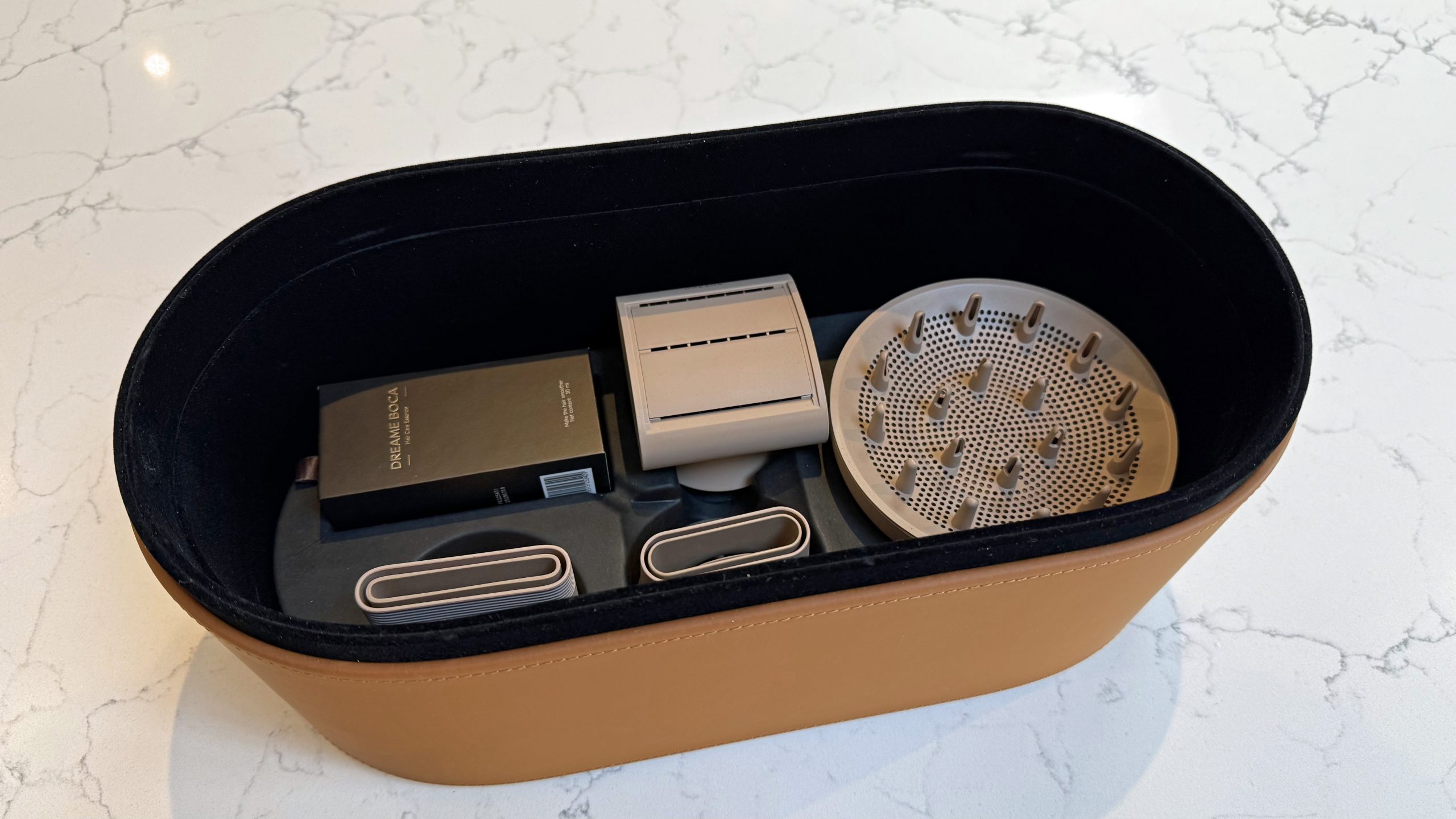
The Miracle Pro comes in a faux-leather storage case complete with a diffuser (pictured right), two styling nozzles (bottom left and bottom centre), an anti-frizz attachment (top center) and Dreame Boca Essence (top left) (Image credit: Future)
The essence capsule ships with one 30ml bottle of Dreame’s own Boca formula, and replacing the essence will be an ongoing cost. It’s not currently possible to buy the Boca essence on its own but the cartridge is refillable so you can spend as much or as little as you want on an alternative essence.
Four attachments are included in the box — a styling nozzle, smoothing nozzle, anti-frizz nozzle and diffuser. This is generous (albeit an expectation at this price) and compares well to the Nural, which ships with five attachments. The Miracle Pro also comes in a velvet-lined gift box, which adds to the premium feel.
At this price, the most obvious comparison is the Dyson Supersonic Nural, which is the benchmark for premium hair dryers and the closest rival in terms of smart heat technology. The L’Oreal AirLight Pro, at $475, is also worth considering if light-based technology appeals — it uses infrared rather than red light therapy, with the focus on faster drying rather than scalp health, and comes with an app for precise heat and airflow controls. In the UK, the GHD Speed at £299 is a strong alternative if pure drying performance is the priority — its halo airflow tech keeps the barrel cool to the touch and delivers super fast results, though it doesn’t attempt any of the Miracle Pro’s more advanced, smart features.
Whether it’s good value for money or not is that it’s complicated. If the scalp light and essence mist appeal to you, and you’d use them consistently, you will be able to justify the price. If you’re only really after the fastest, most powerful dryer, you can spend less on the likes of the GHD Speed to get there.
Six modes, illuminated display, four magnetic attachments
Red light and essence mister built into the barrel
For the price, you get the Miracle Pro dryer, four attachments — a styling nozzle, smoothing nozzle, anti-frizz nozzle and diffuser — and a bottle of Boca essence (pictured) (Image credit: Future)
There was a time when a tall, rather than wide, hair dryer was rare, but the ubiquity of Dyson‘s Supersonic shape has not only made the design more common, it also makes all rivals look high-end by association.
The Miracle Pro has the same barrel-over-handle shape as most has added a couple of features to make it look noticeably different. The handle is covered in textured faux leather, the barrel and attachments come in a matte gold, and the whole thing arrives in a velvet-lined box.
It’s a bold look that won’t suit everyone but it does feel genuinely premium. In testing, the leather grip felt solid and comfortable — even if it left my hand feeling clammy after long periods — but it’s unclear yet how well it will hold up to daily use over many months.
The front barrel (pictured) has a built-in slot for the essence cartridge. When Essence mode is enable, the airflow diffuses the essence gently onto the hair (Image credit: Future)
At 0.9lb / 420g, it’s light for a dryer with this much going on inside, and it’s well balanced. Most of the weight sits in the handle, which makes it easy to move around your head without your wrist getting tired. The filter sits at the bottom of the handle and is a feature I generally dislike in hair dryers because it’s easy to block with your hand mid-drying. However, Dreame has made the handle long enough on the Miracle Pro to prevent this happening, and without throwing the balance out of sync in the process.
Advertisement
The barrel is on the smaller side, which is useful for getting close to the roots and working around the hairline. Yet this is a slightly moot point because the built-in AI Smart mode uses a distance sensor to automatically adjust the heat and airflow depending on how close the dryer is to your head anyway.
The controls include a sliding switch on the handle to turn the Miracle Pro on and off and flip between the two speed settings – High (72 m/s) and Low (50 m/s) (Image credit: Future)
The controls are simple enough. A sliding switch on the handle turns the Miracle Pro on and off and flips between the two speed settings — High (72 m/s) and Low (50 m/s.)
While two speeds are fewer than most rivals — the Dyson Supersonic Nural offers three, for example — it’s the default on Dreame dryers and has never proved a problem for my mid-length, thin hair. Thicker or natural hair styles may need more options but, on the Pro particularly, the range of modes and the way AI Smart mode adjusts airflow in real time means you’re unlikely to feel the gap.
A single button on the handle cycles through the Pro’s six modes — Smart, Essence, Cool, Comfort, Quick Dry, or Scalp.
Advertisement
A single button on the handle cycles through the Pro’s six modes – Smart, Essence, Cool, Comfort, Quick Dry, or Scalp (pictured) – and the selected mode appears on the display on the rear of the dryer (Image credit: Future)
The six modes cover a good range.
Cool: 86 F / 30 C
Scalp: 100 F / 38 C
Essence: 122 F / 50 C
Comfort: 140 F / 60 C
Quick Dry: 176 F / 80 C
AI Smart: Adjusts in real time based on distance from scalp
Cool runs at 86 F / 30 C and is mainly for finishing. Scalp mode sits at 100 F / 38 C and is intended for anyone with a sensitive scalp. Essence mode runs at 122 F / 50 C, which is warm enough to activate the mist, but not so hot it defeats the point.
As 140 F / 60 C, Comfort is the most practical everyday setting, and Quick Dry goes up to 176 F / 80 C for when you need speed. AI Smart mode works across all of these, using a distance sensor to adjust the heat and airflow depending on how close the dryer is to your head, and every time you switch the dryer on, it starts in AI Smart mode by default.
A small screen on the rear of the barrel shows which mode you’re in and this is much easier to read than the tiny color-coded LED ring on the Dreame Gleam, for instance.
The same sensor used by the AI Smart mode also feeds into the auto-pause feature, which recognizes when you’ve put the dryer down and dials back the heat and airflow automatically. It’s a sensible safety feature, to avoid items on your desk being blown around every time you place it down, but I found it really irritating. The constant changes in noise as you pick it up and put it down was not an enjoyable sensory experience.
Advertisement
Around the front of the barrel is a ring of red lights (pictured) that Dreame calls “dual red light therapy” and is designed to stimulate scalp circulation and boost hair health over time (Image credit: Future)
Around the front of the barrel is a ring of red lights that cover two wavelengths at 633nm and 1064nm. Dreame calls it “dual red light therapy,” although the 1064nm wavelength is technically near-infrared.
The idea is that red light/infrared light stimulates scalp circulation during drying to support hair strength over time. It’s visible in use but not distracting, and worth knowing that fitting an attachment blocks most of it so if scalp health is the main draw, you’ll want to spend some time using the dryer without a nozzle attached.
Speaking of nozzles, Pro ships with four magnetic attachments by default:
Styling nozzle: Directed airflow for sectioning and precise blow-drying
Smoothing nozzle: Concentrated airflow for a smooth finish
Anti-frizz nozzle: Neutralizes static and smooths frizzy hair
Diffuser: Distributes airflow evenly for curls and volume
Each one clicks on and off easily, and the dryer recognizes which one is attached, automatically recalling your last-used settings for that specific nozzle.
It’s a small touch but it means you’re not manually resetting your preferences every time you switch between drying and diffusing, for example. The filter at the base of the handle is magnetic too, so it pulls off easily for cleaning.
Advertisement
Dreame Miracle Pro review: performance
Fast drying, smooth results
Essence mister is a genuine highlight
Red light benefits hard to assess short-term
The Miracle Pro is a strong everyday dryer. Using it most mornings on my long, fine hair, I found the Comfort mode on High speed to be the best setting for a regular wash-day routine. My hair went from wet to dry in just under five minutes, with a smooth, frizz-free finish that I’d normally need a separate serum to achieve.
Quick Dry mode gets there faster, in under three minutes, but the result is noticeably less polished. Scalp mode is the gentlest option and while it adds time to the overall dry, the finish is noticeably softer.
Essence mode – which activates the built-in mister – is the feature I didn’t expect to care about and ended up using every time. It runs at a moderate heat and is designed to be used for the last couple of minutes of your routine, rather than the full session.
Switching into it at the end left my hair noticeably softer, smooth and smelling great. It’s a small thing that adds up over time and was a genuine highlight for me.
Advertisement
The essence cartridge (pictured) is small and simple, designed to slot conspicuously into the barrel (Image credit: Future)
AI Smart mode is the headline feature, and it largely delivers. The dryer adjusts heat and airflow as you move it closer to and further from your head, which takes some getting used to. There’s a slight lag between changing your distance and feeling the adjustment, which the Dyson Supersonic Nural handles more quickly, and you’ll notice the airflow change before you notice the temperature shift.
In practice, this works well for rough drying where you’re moving quickly and not thinking too hard about distance. For precision styling, I tended to switch to a fixed mode where the output was more predictable. Plus, like with the constant changes in noise with the auto-pause feature, the fluctuations soon became irritating.
You remove the cartridge by pressing the front until it clicks and pops out (pictured) (Image credit: Future)
The red light therapy ring is harder to evaluate over a relatively short period. Dreame’s claims – improved scalp circulation and stronger hair over time – are plausible, but any real difference would take months to show up. What I can say is that using the dryer without an attachment, which is required for the red light to reach the scalp unobstructed, feels slightly counterintuitive mid-routine.
Noise-wise, the Miracle Pro is genuinely quiet for its power output. Dreame claims 56.6 dB but it’s not clear if that’s just the lowest reading – on Cool – or an average. In my tests, the average readings for each of the modes were:
Advertisement
Cool: 58 dB
Scalp: 60 dB
Essence: 62 dB
Comfort (low speed): 63 dB
Comfort (high speed): 68 dB
Quick Dry (low speed): 65 dB
Quick Dry (high speed): 72 dB
Performance score: 4 out of 5
How I tested the Dreame Miracle Pro
I used the Dreame Miracle Pro as my main hair dryer for four weeks, replacing my usual dryer for daily morning use on my mid-length hair.
I worked through each of the six modes, both speed settings and the attachments systematically in the first week, then settled into more natural everyday use to get a realistic sense of how it performs over time.
I timed dry sessions across the different modes and speeds, and tracked decibels using the DecibelX app. I also compared the results to other dryers I’ve tested at similar and higher price points.
For once, we can avoid debating in the comments what constitutes a “cyberdeck”, because [LCLDIY] does not refer to his cyberpunk masterpiece as such — he calls it a laptop. Considering the form factor is more like an all-in-one with a built-in laser projection keyboard, that’s arguably an even more controversial label to use, but as stylish this build is, it’s what’s inside it that interests us most.
This would be much easier than the original for our old eyes, especially in the dark.
No, not the cash-register motherboard that serves as the brain, though that has got to be worth some hacker cred. No, it’s the graphics card [LCLDIY] designed to drive 10″ electroluminescent (EL) displays that really has us interested. EL screens have a unique and beautiful glow that many find captivating, but we don’t see them all that often for two reasons. One is price: if you can’t find them surplus, they’re not cheap. The other is driving them, which [LCLDIY]’s project helps with, because the graphics card is open source.
The card is PCI, so you’ll need an adapter to plug it into a modern PCIe slot, or you’d have to redesign the thing. Since this isn’t elegant-engineering-a-day, we know which we’d do. The card is based on the CHIPS65548/5 chip, which means you should be able to find driver support under Linux and Windows. [LCLDIY] seems to be using Windows 2000, but that might just be because it’s all been downhill since then.
If the cyberpunk laptop wasn’t enough inspiration, [LCLDIY] also created a giant-scale Game Boy using the same 10″ screen and DIY graphics card. The soft glow of the EL display is particularly suited to the low-res nature of the retro games, as it’s not entirely unlike a CRT. You can see it in action–both builds!– in videos embedded below.
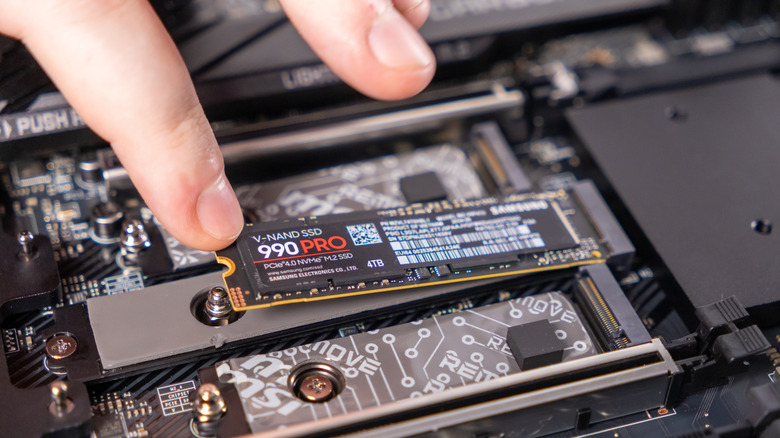
Solid-state drives have completely changed the game for storage on computers and laptops. No moving parts, no RPM (revolutions-per-minute) to worry about, and lightning-fast read and write speeds. Even early SSDs were impressive, but once the M.2 format hit the market, things got even better. While SSDs are currently monstrously expensive, pretty much every modern desktop and laptop uses them, mostly due to the demands of modern software, video games, and operating systems.
Here’s the thing, though. Even though modern SSDs are super fast, and they will last a lot longer than most hard drives due to their lack of moving parts, they can still slow down. As you fill them up with data, which can happen very quickly if it’s a smaller SSD, that advertised speed of several thousand megabytes per second goes down fast.
Fortunately, modern operating systems like Windows support a standard hardware command to help you solve this issue, with a very fitting name: TRIM. TRIM cleans up so-called blocks of data so that the SSD knows which ones to use, making it more efficient and increasing its lifespan.
Advertisement
Why should you use TRIM?
Nwz/Shutterstock
Although it has a much cooler name, TRIM is essentially the modern equivalent of disk defragmentation, which Windows can still do. Defragmenting old hard drives brought all the data closer together in a more accessible spot, allowing the hard drive to cycle through the data more efficiently and make it faster. TRIM doesn’t work on the same principle as defragmentation, as SSDs and HDDs store data in different ways, but TRIM does serve a similar purpose. It increases your SSD’s efficiency and lifespan by clearing up empty blocks of data that are no longer in use.
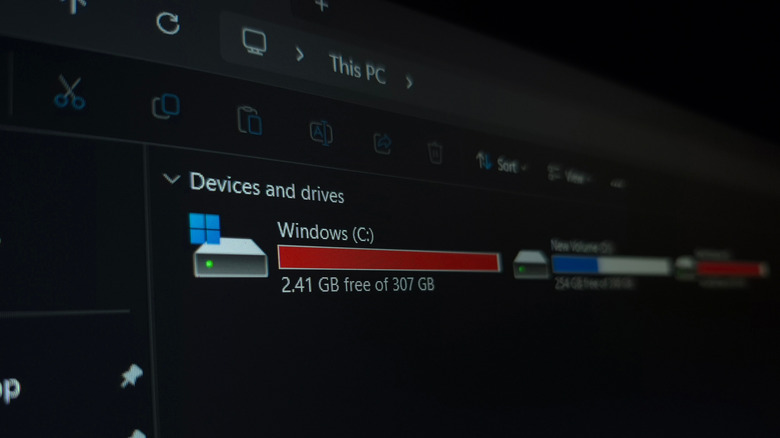
Recent releases of Windows run this process automatically in the background, and you can check this through the drive’s properties from inside This PC on your computer. If the scheduled optimization (which you can find inside of Properties > Tools > Optimize) is set to On, then Windows runs TRIM for you on a weekly basis.
Advertisement
Another way to check if TRIM is on is through PowerShell. Simply run PowerShell with administrator privileges. Next, type “fsutil behavior query DisableDeleteNotify” without the quotes, then hit Enter.
Marko Sokolovski / SlashGear
If both values are zero, then TRIM is on, and you don’t need to worry about it. We would not recommend disabling it, as in this era of highly unpredictable SSD prices and the importance of keeping our data safe and secure, it’s always a good idea to keep your SSD on its best behavior, and TRIM definitely helps out with that.
We’ve all been there at one point or another; you unlock your iPhone with the intention of checking the weather or sending a quick text, only to be greeted by a sea of little red circles.
They’re everywhere, screaming for your attention like a digital toddler until you open the app and clear it. It’s a core part of the iOS experience, sure, but after years of staring at these tiny stress-inducers, I’ve had enough. The problem? I can’t really do much about it.
App badges are my worst enemy
The problem with app badges is that they are designed to be addictive. They’re pitched as helpful reminders, but in reality, they’re designed to draw you into an app to see what’s “new,” even when there’s nothing of substance actually waiting for you.
Every time I unlock my iPhone and see a bunch of badges on my home screen, I’m immediately distracted. Instead of doing what I actually set out to do, I find myself mindlessly scrolling through a feed just to make the number go away.
Advertisement
Image Credit (Trusted Reviews)
Advertisement
It’s even more infuriating when the badges refuse to leave. We’ve all dealt with that one stubborn app – it’s the Oura app for me at the moment, oddly enough – where you’ve cleared every notification, read every message, and checked every update, yet the badge remains.
For a company that prides itself on “clean” design, the home screen often looks like a messy desk covered in red Post-it notes.
No, I’m not going to disable them one by one
Now, I know what the power users among you are going to say, “Just go into Settings and turn them off!” And yes, technically, you can.
But, there’s the catch: Apple forces you to do it on an app-by-app basis. I have hundreds of apps installed on my iPhone, and the idea of diving into the notification settings for every single one of them to toggle off “Badges” leaves me in a cold sweat – and besides, it’d take the better part of an afternoon.
Advertisement
It begs the question: why isn’t there a system-wide toggle? Apple gives us “Silence Unknown Callers” and “Focus” modes to reclaim our digital sanity, yet it won’t give us a single master switch to kill the red dots. It’s a bizarre omission when you really think about it, especially for an operating system that is supposed to be the very pinnacle of user-friendliness.
Advertisement
Android fixed the issue years ago
What makes this even harder to swallow is that our friends over in the Android camp solved this ages ago.
Image Credit (Trusted Reviews)
On most Android skins, app badges (or “dots”) are intrinsically linked to the notification shade. If you swipe away a notification because you’ve seen it and decided it’s not important, the badge on the app icon vanishes too. A system that, in my mind, makes a lot of sense.
On iOS, the badge and the notification centre live in two completely different worlds. You can clear your entire lock screen, but those red circles will stay pinned to your icons until you manually open the app.
Advertisement
At the very least, Apple should give us the option to mirror that Android-style functionality in the Settings menu for those of us who find the current system a little bit archaic.
It probably won’t change any time soon
As much as I’d love to be optimistic, I’m not holding my breath. With the reveal of iOS 27 scheduled for WWDC in early June, the rumour mill is buzzing about the long-awaited reveal of the Gemini-powered Siri and even more powerful AI features, but a badge overhaul is nowhere to be found.
Advertisement
Badges have been a staple of the iPhone since the very beginning, and despite Apple redesigning the notification system multiple times over the last decade, they’ve remained largely untouched. It seems Apple is perfectly happy with the status quo, even if it means our home screens remain a cluttered, distracting mess for the foreseeable future.



























































You must be logged in to post a comment Login