Connect with us
DAPA Banner
DAPA Coin
DAPA
COIN PAYMENT ASSET
PRIVACY · BLOCKDAG · HOMOMORPHIC ENCRYPTION · RUST
ElGamal Encrypted MINE DAPA
🚫 GENESIS SOLD OUT
DAPAPAY COMING

Tech

Ilya Sutskever Stands by His Role in Sam Altman’s OpenAI Ouster: ‘I Didn’t Want It to Be Destroyed’

Published

on

Elon Musk’s trial against OpenAI and Microsoft entered its final stretch on Monday, with testimony from Microsoft CEO Satya Nadella, former OpenAI chief scientist Ilya Sutskever, and current OpenAI chairman Bret Taylor.

Sutskever drew the spotlight, revealing an ownership stake in OpenAI’s $850-billion for-profit arm that is currently worth about $7 billion. That makes him one of the largest known individual shareholders of OpenAI. Earlier in the trial, OpenAI president Greg Brockman acknowledged for the first time that he has around $30 billion worth of OpenAI shares.

Brockman was one of the research lab’s original cofounders, and Sutskever joined shortly afterward, turning down a $6 million annual compensation offer from Google. Brockman said he and Sutskever were “joined at the hip,” until Sutskever helped lead Sam Altman’s brief removal as OpenAI CEO in 2023. Sutskever had helped collect evidence to show Altman’s alleged history of deception, and even assisted in drafting a memo to the board. Though they tried to repair the relationship, Sutskever has been estranged from Brockman and Altman ever since, a lawyer for OpenAI said on Monday.

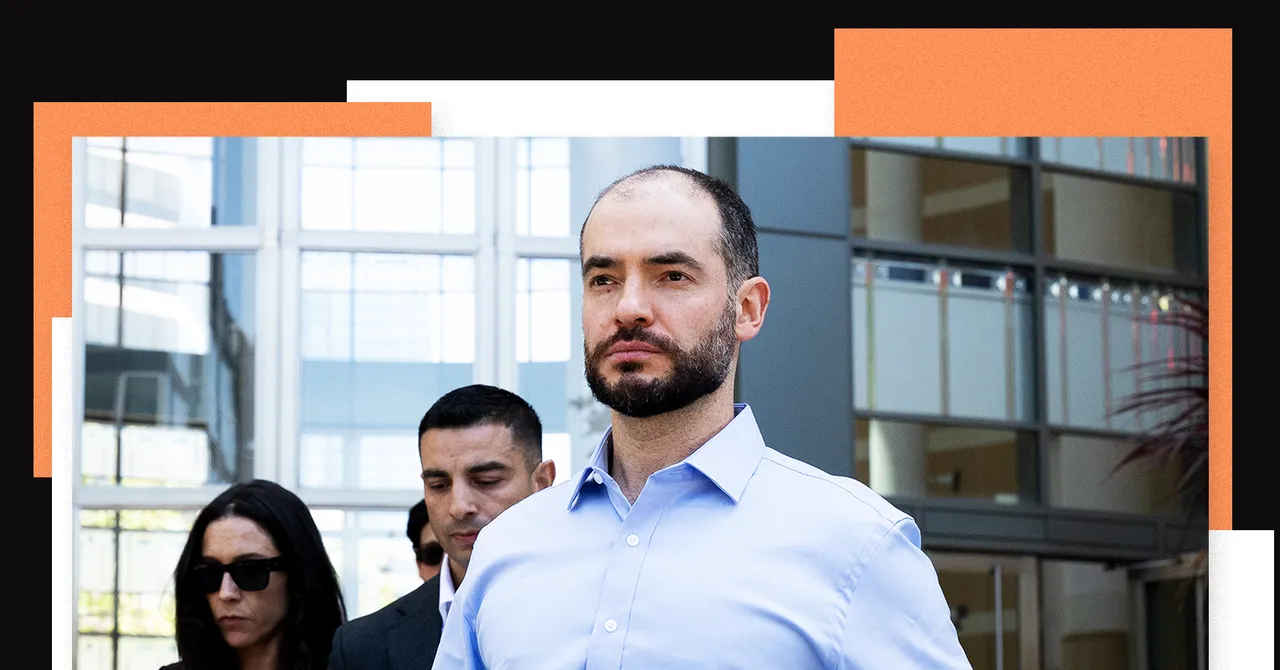
Sutskever, who arrived in the courtroom wearing a dress shirt and slacks, the first male witness to testify without a suit jacket, appeared to be dejected about no longer being involved with OpenAI. (He left and formed a competing AI lab in 2024.) “I felt a great deal of ownership of OpenAI,” he said at one point Monday. “I felt like I put my life into it, and I simply cared for it, and I didn’t want it to be destroyed.”

Advertisement

Sutskever’s testimony bolstered Musk’s contention that Altman is not the right person to lead an AI lab that could create artificial general intelligence. In addition, Sutskever mentioned how the superalignment team he helped lead, which focused on the safety of future models, was doing the most important work at OpenAI “for the long term.” The team was disbanded in May 2024, shortly after Sutskever left the company.

But Sutskever also added to OpenAI’s defense that Musk never negotiated any special promises when funding the OpenAI nonprofit. Musk’s allegation that such commitments existed and that Altman and Brockman violated them by pursuing a lucrative for-profit arm are the core of his claims in the lawsuit. Sutskever said OpenAI needed “a lot of dollars” to build a computer as big as the human brain, and while seeking donations had some “reasonable success,” becoming a for-profit was the consensus way forward.

“I would describe it as the difference between an ant and a cat,” Sutskever said in response to a question from US district judge Yvonne Gonzalez Rogers about how more computing helped OpenAI level up. “If there’s no funding, there is no big computer.”

In the end, Sutskever, a prominent AI scientist who paints in his spare time, testified for about an hour, barely making eye contact with anyone during his time on the witness stand.

Advertisement

Musk’s legal team had unsuccessfully sought to treat Sutskever as a hostile witness because of his financial stake in OpenAI. But Gonzalez Rogers agreed to give attorneys for both Musk and OpenAI extra leeway in their questioning of Sutskever due to what she described as his “unique position” in the case.

The Blip

Much of Monday’s testimony centered around the well-covered events of Altman’s ouster and reinstatement as CEO in November 2023. Nadella described Sutskever and other board members firing Altman as “amateur city” and reiterated that he “never got clarity” about the lack of candor that led to their decision. Nadella also acknowledged during his testimony that he and colleagues discussed 14 potential board members who would join OpenAI if Altman returned, including at least two whom the Microsoft group vetoed and one who later joined. Nadella described Microsoft’s input as suggestions.

Sutskever said he supported firing Altman because an “environment where executives don’t have the correct information” is not “conducive to reach any grand goal.” But he criticized his board colleagues for rushing the process, lacking experience, and accepting “legal advice that wasn’t very good.”

Microsoft’s Bet

In his lawsuit, Musk accused Microsoft of helping to transform OpenAI into a moneymaking machine beyond what Musk intended. Nadella testified that Microsoft had first supported OpenAI with discounted cloud computing but it could no longer afford to do so “once the bill started going up.” A for-profit arm that Microsoft could invest in, in exchange for a potential financial return, was more palatable.

Advertisement

But as the years progressed and the bills kept rising, Microsoft wanted more out of the partnership. Microsoft “will lose 4 bil next year!!!” Nadella exclaimed in an email in 2022 to his lieutenants about the OpenAI partnership. He called for a new agreement ensuring Microsoft would also get AI “know-how” from the startup, which he kept spelling as “Open AI.”

Source link

Continue Reading
Click to comment

You must be logged in to post a comment Login

Leave a Reply

Tech

Quit VMware and you’ll emerge with more complex and less capable infrastructure

Published

on

Virtualization

Analyst says modernizing applications is probably a better use of your time than hypervisor migration

Organizations that decide to reduce their VMware footprints, or quit Virtzilla entirely, will emerge with more complex and less capable infrastructure.

That’s the view of Paul Delory, a research vice president with analyst firm Gartner, who yesterday told the company’s IT Infrastructure, Operations & Cloud Strategies Conference in Sydney that there is no technical reason for VMware users to adopt a rival hypervisor, and that no vendor offers a one-for-one replacement for the virtualization pioneer’s flagship Cloud Foundation (VCF) suite.

Advertisement

But Delory said Broadcom’s licensing policies, which see it only sell VCF, mean VMware users’ licensing bills typically rise by 300 to 400 percent. Broadcom argues that the full-stack private clouds VCF makes it possible to build are so efficient that VCF quickly pays for itself.

The analyst told the conference he thinks those contemplating a move off VMware will do better if they instead focus on application modernization. But he said Broadcom’s price changes, and the prospect the company might hike prices again in future, mean many VMware users will look elsewhere.

Those who do, he warned, will end up with more complex infrastructure for two reasons.

One is that few organizations will be able to quit VMware entirely, as they run applications with dependencies that aren’t easy or economical to unwind. Reducing or eliminating a VMware rig therefore means adopting multiple replacements, which creates more infrastructure to manage and therefore extra complexity.

Advertisement

The other is that no rival hypervisor can match the efficiency or VM density possible when using VMware’s products, so moving means acquiring more hardware.

Delory said the best alternatives to VMware are the public cloud, or HCI vendors – these days that acronym denotes both hyperconverged infrastructure and hybrid cloud infrastructure.

The analyst warned that HCI vendors, with the exception of Nutanix, have weak migration tools that will leave users needing to create bespoke migration automations using “Ansible and a Rube Goldberg machine.”

Public clouds, he said, will welcome customers who move 1,000 or more VMs with free migration services.

Advertisement

He recommended against considering OpenStack, which he said remains “too big, too complex, and has too many moving parts for the typical IT shop to handle effectively.”

Delory also warned VMware users that migration projects are significant engineering undertakings that require extensive assessment of every application in a fleet to determine its best destination, and the work required to get it there.

He reminded VMware users that not every workload is certified to run under non-VMware hypervisors, and that some vendors now offer cloud-native versions of their wares and therefore offer an easier on-ramp to containerised applications.

Delory advised exploring those options, and not making architectural decisions that mean you can’t consider moving off VMware.

Advertisement

“VMware is betting that you can’t move off and they can jack the price way up,” he said. “That may be a good bet. But don’t make it easy.”

The analyst finished his talk by predicting most users will minimize their VMware footprints, rather than eliminating them, and restated Gartner’s prediction that 35 percent of workloads currently running under VMware will operate on a different platform by 2028. ®

Source link

Advertisement
Continue Reading

Tech

Red Hat gives RHEL 10.1 the boot into orbit

Published

on

Off-Prem

Orbital compute platform, which launched on a mission to the ISS last year, gets an immutable upgrade alongside refreshed container images

Red Hat Enterprise Linux 10.1 has powered up on board a datacenter orbiting 250 miles or about 400 km above the earth.

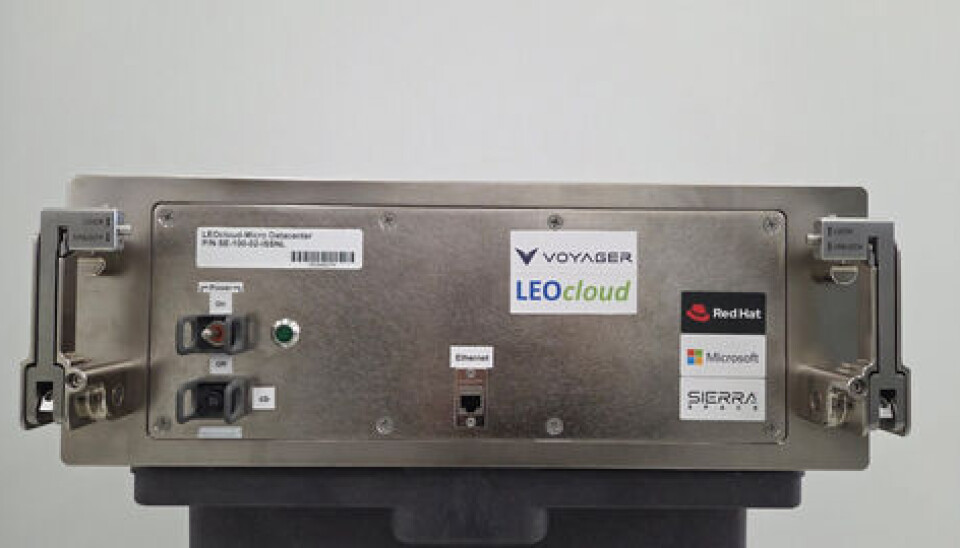
That RHEL-powered satellite is Voyager’s LEOcloud Space Edge “micro” datacenter, which launched aboard a SpaceX Falcon 9 rocket and hitched a ride on the International Space Station (ISS) back in September.

Advertisement

The system is designed to demonstrate the advantages of processing data gathered directly in orbit, rather than sending info back to a terrestrial conventional datacenter.

Voyager boasts the reduction in latency makes the system as much as 30x faster than sending all the data back to Earth.

Originally developed by LEOcloud prior to its acquisition by Voyager last year, Space Edge is, as its name suggests, a low-power edge compute platform for orbital data processing.

Voyager and Red Hat contend that “as commercial and government organizations increase their reliance on space-based data, the ability to process data in orbit is increasingly critical.”

Advertisement

And they certainly wouldn’t be the first to suggest that. Faced with power constraints, SpaceX, Amazon, Google, Nvidia and others have all announced plans to put large clusters of AI datacenters in orbit, with some designs aiming to cram 100kW worth of compute onboard a single satellite.

The company hasn’t disclosed the hardware used in Voyager’s Space Edge, stating only that it’s a “space-hardened managed cloud infrastructure.”

Hardening is certainly a concern for complex electronics operating outside Earth’s atmosphere, where charged particles and radiation can corrupt data or do permanent damage over time.

HPE’s Spacebourne compute platform demonstrated many of these challenges during its first mission aboard the ISS in 2017.

Advertisement

Over the course of its mission the system, which was composed of mostly off-the-shelf components, suffered several upsets including a power failure and SSDs that failed at an “alarming rate,” HPE’s Mark Fernandez said at the time.

We’ve reached out to Voyager for comment on the system and what kind of data its “micro” datacenter will process during its mission. We’ll let you know if we hear anything back.

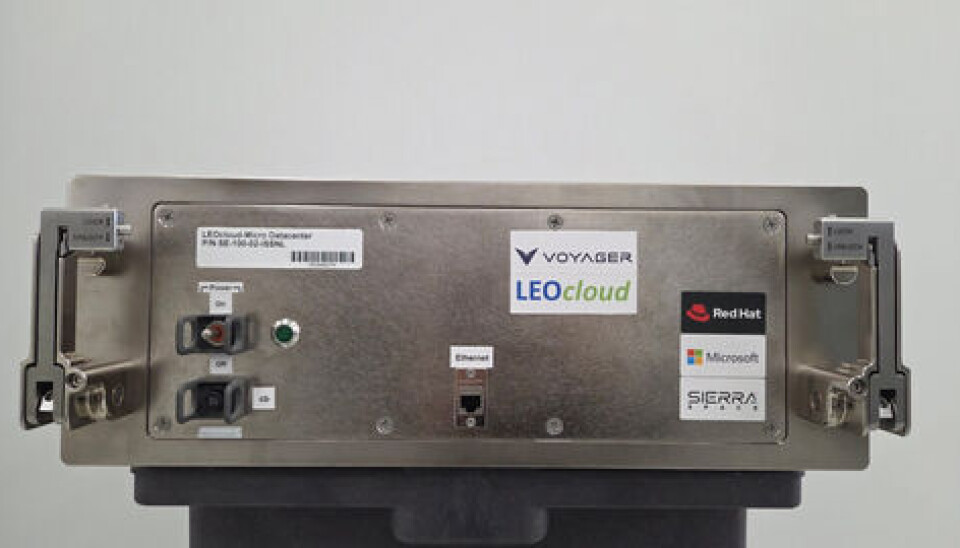
It’s safe to assume Space Edge’s compute capacity is limited compared as promotional images show its systems are little larger than a shoebox – and therefore offer less room for components than servers used on earth.

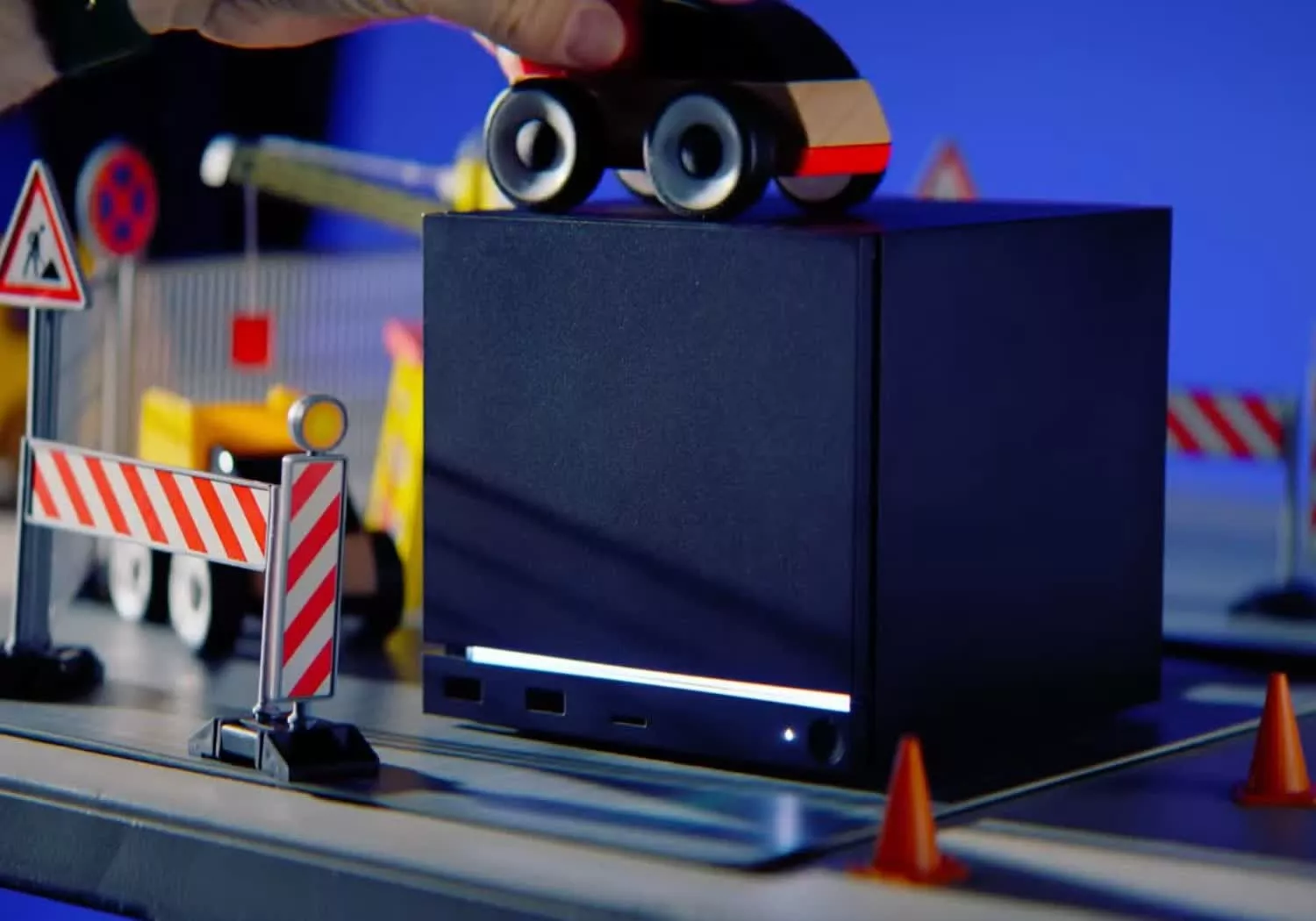
So what does Voyager's Space Edge look like? Well here you have it. A shiny shoebox-sized server.

So what does Voyager’s Space Edge look like? Well here you have it. A shiny shoebox-sized server.

What we do know is that RHEL 10.1, along with Red Hat’s Universal Base Image (UBI), are up and running on the ISS.

Advertisement

Specifically, Space Edge is running RHEL in image mode, an immutable build of the OS where changes to the most directories will reset to a known good state upon reboot.

This means that any issues related to what they call “configuration drift” can be addressed by turning the machine off and back on again, a feature we’ll sure will be popular among many in the IT crowd.

Alongside the base OS, Space Edge is also running Red Hat’s UBI container image under Podman, a container runtime interface (CRI) similar to Docker that is rootless and daemonless by default.

RHEL 10.1’s arrival in orbit comes amid renewed interest in space driven by the yearning of every great hyperscaler to boldly go and generate tokens where no one has before. Actually, they have, but not at scale.

Advertisement

But that’s exactly what SpaceX, Amazon and others have proposed. In pursuit of unlimited power, the two companies have independently filed to put large constellations of AI satellite compute platforms in sun-synchronous orbit.

In February, SpaceX filed an application with the Federal Communications Commission to lob a million space-based datacenters into orbit.

Meanwhile, Amazon has proposed a slightly smaller constellation with 51,600 data processing satellites. 

Of course, these plans do have one small problem left to solve. How will they get those sats into orbit for less than the cost of simply building more terrestrial infrastructure? According to one space datacenter startup, the economics of orbital datacenters won’t be viable until the cost to orbit falls to around $10 per kilogram. As of writing, a rideshare aboard a Falcon 9 runs about $7,000 a kilogram. ®

Advertisement

Source link

Continue Reading

Tech

Apple AI research examines spatial reasoning, ASL annotation

Published

on

Apple hasn’t abandoned spatial computing, judging by its research studies.

Apple’s interest in AI models and their applications in spatial computing shows no signs of slowing down, even as some claim the Apple Vision Pro is dead.

In April 2026, it was argued that the Apple Vision Pro was an outright failure and that, as a result, we’d never see a successor product. That rumor, though it always seemed unreasonable, has since come into question.

Even though the company’s Vision Products Group may have seen some changes, there’s ultimately still hope for a new generation of the Apple Vision Pro. Apple’s AI research suggests the company hasn’t abandoned its spatial-related projects.

Advertisement

On the contrary, new studies posted on the Apple Machine Learning blog explore the use of LLMs in sign language annotation, 3D head modeling, and more. Apple’s researchers also developed a new benchmarking system to evaluate the spatial-functional intelligence of LLMs.

Benchmarking spatial-functional intelligence for multimodal LLMs

The paper titled “From Where Things Are to What They’re For: Benchmarking Spatial-Functional Intelligence for Multimodal LLMs” outlines a new testing and grading system for MLLMs.

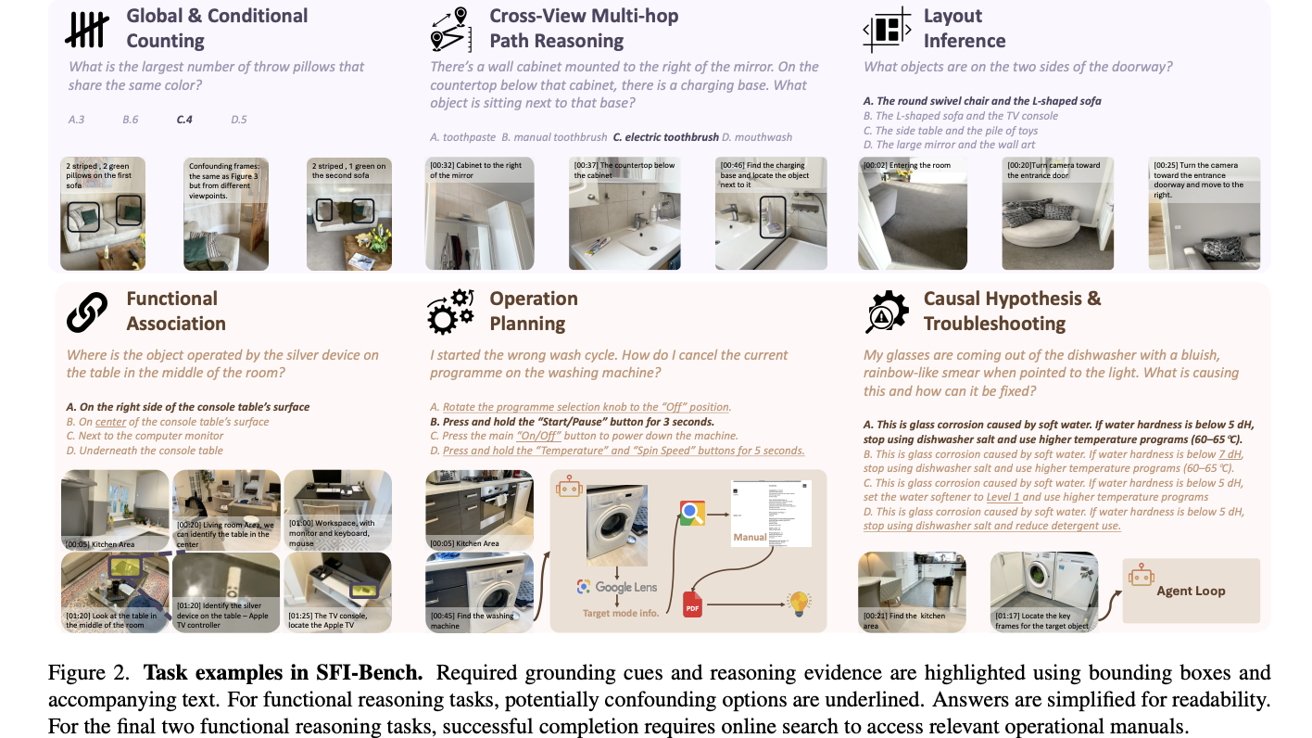
Collage of household task examples with photos of rooms and appliances, multiple-choice questions, and labeled sections on counting, reasoning, layout inference, functional association, operation planning, and troubleshooting.

Apple’s researchers developed a benchmarking framework that tests the spatial reasoning capabilities of MLLMs. Image Credit: Apple

As the study explains, to mimic human understanding of a space and its objects, AI models rely on two distinct structures. This includes “a spatial

Advertisement

representation that captures object layouts and relational structure, and a functional representation that encodes affordances, purposes, and context-dependent usage.”

In other words, a multi-modal LLM needs to understand the geometry of a particular space, along with the purpose and location of the objects inside it. Apple’s researchers say that existing benchmarking methods, such as VSI-Bench, only test the first aspect, largely ignoring the latter.

To combat this, they developed the Spatial-Functional Intelligence Benchmark, abbreviated as SFI-Bench. It’s described as a video-based benchmark with 1,555 expert-annotated questions derived from 134 indoor video scans.

As for what SFI-Bench tests specifically, the study explains this in a fairly straightforward manner:

Advertisement

“Beyond spatial cognition, SFI-Bench incorporates functional and knowledge-grounded reasoning, probing whether models understand what objects in the scene are for, how they are operated, and how failures can be diagnosed.”

In other words, the benchmark tests if AI models comprehend what an object is, where it’s located, how it’s used, what it’s used for, and how it can be fixed.

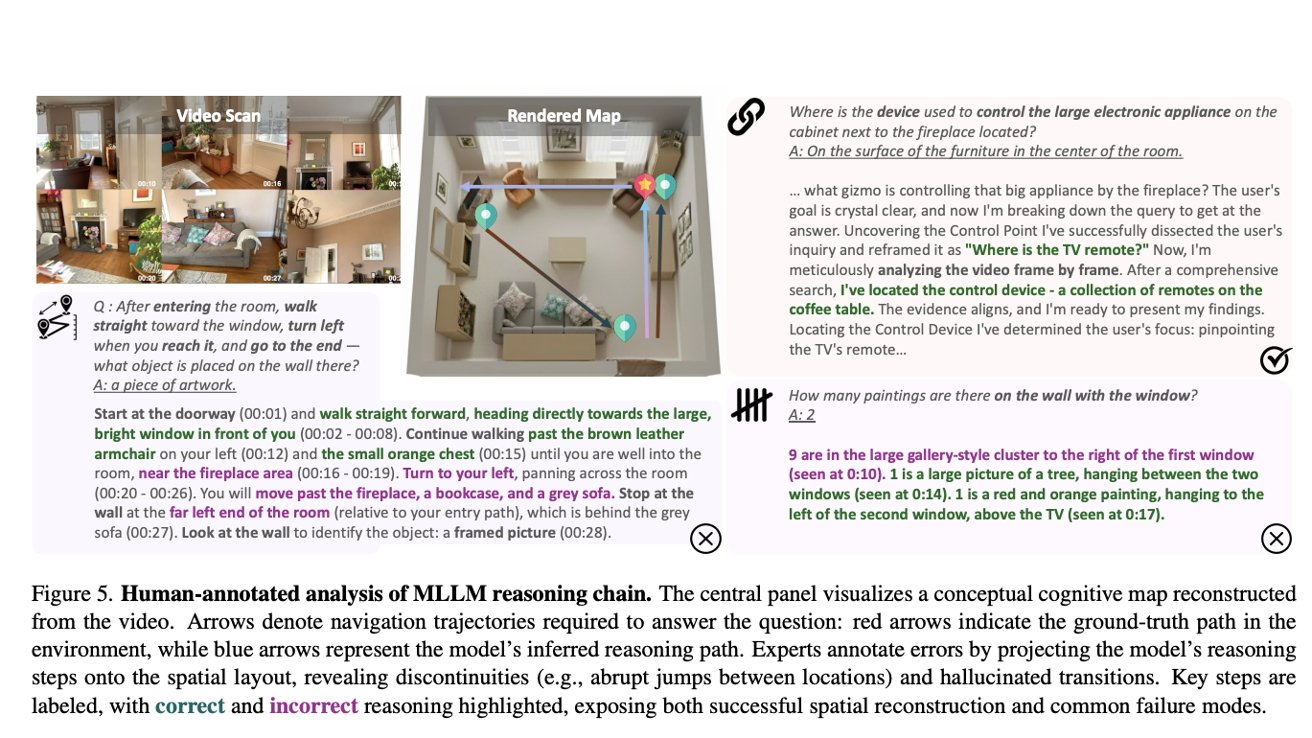
Diagram of a living room navigation task: video scan frames, a 3D rendered room map with colored paths and markers, and annotated text explaining questions, reasoning steps, and correct versus incorrect answers

Apple’s AI researchers tested how well LLMs understand the world around them. Image Credit: Apple.

If this sounds familiar, it’s because Google has had tools with this type of spatial awareness since at least 2024. At its i/o conference that same year, Google’s AI model correctly identified an object in front of it as a record player and even suggested how to repair the device.

Advertisement

In practice, SFI-Bench would serve to test similar and more advanced AI models. Some of the tests mentioned include asking an LLM to identify the largest subset of the same brand bottles on a cabinet, asking it to cancel the current program on a washing machine, what a TV remote is used for, and more.

Apple’s researchers tested several open-source and proprietary AI models with their SFI-Bench framework. Unsurprisingly, Google Gemini 3.1 Pro achieved the best overall result, while Gemini-3.1-Flash-Lite placed third. OpenAI’s GPT-5.4-High scored second.

However, the study notes that “Across all models, global conditional counting emerges as a key bottleneck, revealing persistent limitations in compositional and logical reasoning.”

In other words, most current MLLMs “struggle with spatial memory, functional knowledge integration, and linking perception to external knowledge.” Still, the study noted that models with internet access performed better, relative to offline-only models.

Advertisement

As for potential applications within iOS, we could see Apple unveil a version of Siri with both spatial and contextual awareness. This would make sense, given that the company has partnered with Google for Apple Intelligence features.

It remains to be seen if and when that would debut, though, or how well the AI might perform.

Using AI models for sign language annotation

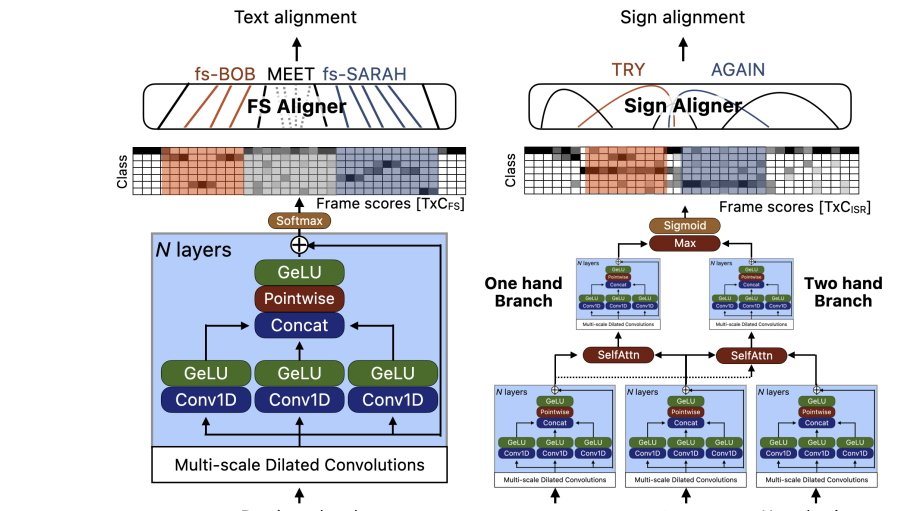
In a separate study, dubbed “Bootstrapping Sign Language Annotations with Sign Language Models,” Apple’s researchers explored how AI could be used to annotate sign language videos.

Diagram comparing text and sign alignment for sign language recognition, with labeled timelines, colored frame-score grids, and stacked neural-network blocks showing multi-scale dilated convolutions, self-attention, and separate one-hand and two-hand branches

Apple’s researchers explored using AI for ASL annotation. Image Credit: Apple

Advertisement

The company’s research team says it developed a “pseudo-annotation pipeline that takes signed video and English as input and outputs a ranked set of likely annotations, including time intervals, for glosses, fingerspelled words, and sign classifiers.”

In doing so, they seek to reduce the time and cost of annotating hundreds of hours of sign language manually. This approach involved creating “simple yet effective baseline fingerspelling and ISR models, achieving state-of-the-art on FSBoard (6.7% CER) and on ASL Citizen datasets (74% top-1 accuracy).”

Apple’s researchers developed nearly 500 manual English-to-glossary annotations. They validated them through back translation, manual annotations, and pseudo-annotations for over 300 hours of ASL STEM Wiki and 7.5 hours of FLEURS-ASL.

For testing, Claude Sonnet 4.5 was given a gloss-to-English variation of a prompt and had to translate it from manual ASL STEM Wiki annotations to the reference English text that signers interpreted.

Advertisement

The study notes that “Errors were predominantly in cases where a sentence does not have any fingerspelling.” While additional work remains to be done, the researchers say their “approach for fingerspelling recognition and isolated sign recognition can be trained with modest GPU resources and could also be used for further iteration on pseudo annotation pipelines.”

As for why Apple is researching this, it could have something to do with the long-rumored camera-equipped AirPods. Perhaps the company plans to expand its Live Translation feature to include sign language.

3D gaussian head Reconstruction from multi-View captures

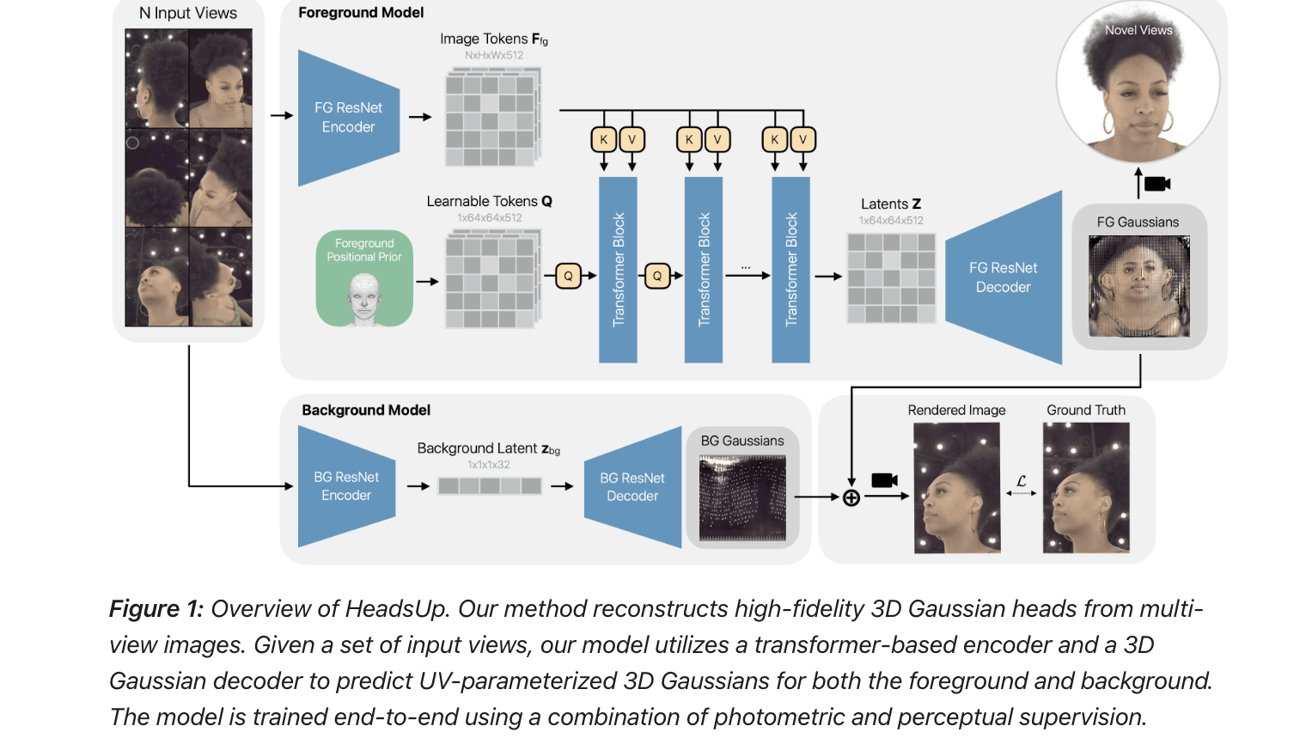
Another study called “Large-Scale High-Quality 3D Gaussian Head Reconstruction from Multi-View Captures” explores how head models can be made from images with the help of AI.

Flowchart of a neural network reconstructing a woman's 3D head from multiple photos, showing foreground and background ResNet encoders, transformer blocks, Gaussian decoders, and rendered versus groundtruth outputs

Apple’s AI researchers explored how LLMs can be used to create 3D head models from multi-view captures. Image Credit: Apple.

Advertisement

Apple’s researchers developed “HeadsUp, a scalable feed-forward method for reconstructing high-quality 3D Gaussian heads from large-scale multi-camera setups.”

In essence, the study explores how different head views can be converted into Gaussian blobs and then into 3D models through a series of encoders and decoders.

To test their image-to-3D-model method, those behind the study used “an internal dataset with more than 10,000 subjects, which is an order of magnitude larger than existing multi-view human head datasets.” The 3D head models were also animated using expression blendshapes.

Overall, the study explains that “HeadsUp achieves state-of-the-art reconstruction quality and generalizes to novel identities without test-time optimization.”

Advertisement

In terms of practical applications, the study could be related to the Apple Vision Pro and its Persona feature. Apple may be looking for ways to improve how expressions are rendered, or how faces themselves are captured and rendered within visionOS.

There may also be hardware or comfort-related applications. During the development of the headset, AppleInsider was told that the company included various 3D head types alongside Apple Vision Pro models.

Time will tell what Apple does with the information its researchers create. While we have to wait and see what its next product will be, one thing is for sure: the company isn’t backing down when it comes to AI and spatial computing.

Apple is set to announce iOS 27 and its corresponding OS updates at WWDC 2026, which will begin on June 8.

Advertisement

Source link

Continue Reading

Tech

Wacom MovinkPad 11 review: Specs, features,price

Published

on

Wacom is back with a new pen display pad, with the MovinkPad 11 aimed at artists who like to sketch and create on the go. That’s assuming that you can fit it into your workflow.

Wacom stands as one of the elder leaders in the world of graphic pen displays, producing a variety of pen displays to meet every need. As artists become more mobile in their day-to-day workflow, so grows the need for portable and versatile equipment for creatives on the go.

Wacom provided the MovinkPad 11 to use for an extended test drive, to see if its quality and execution live up to the reputation Wacom has held onto for so many years.

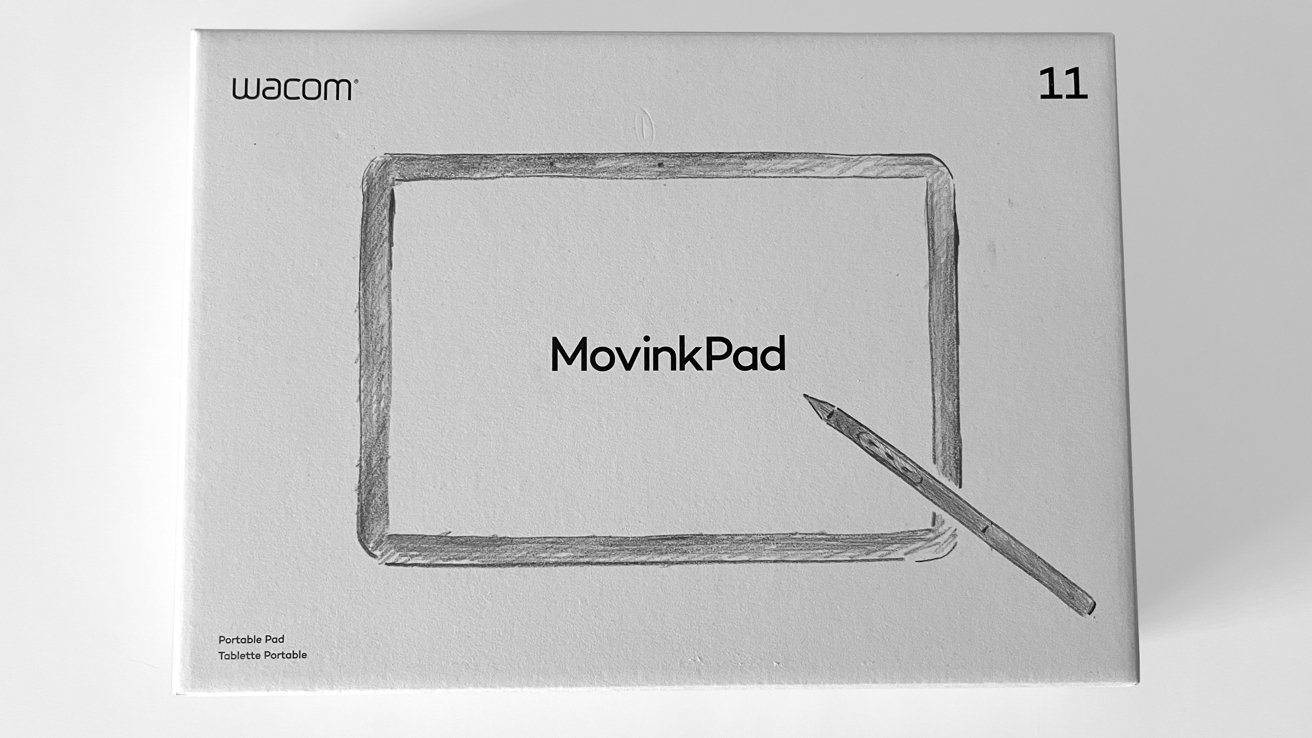
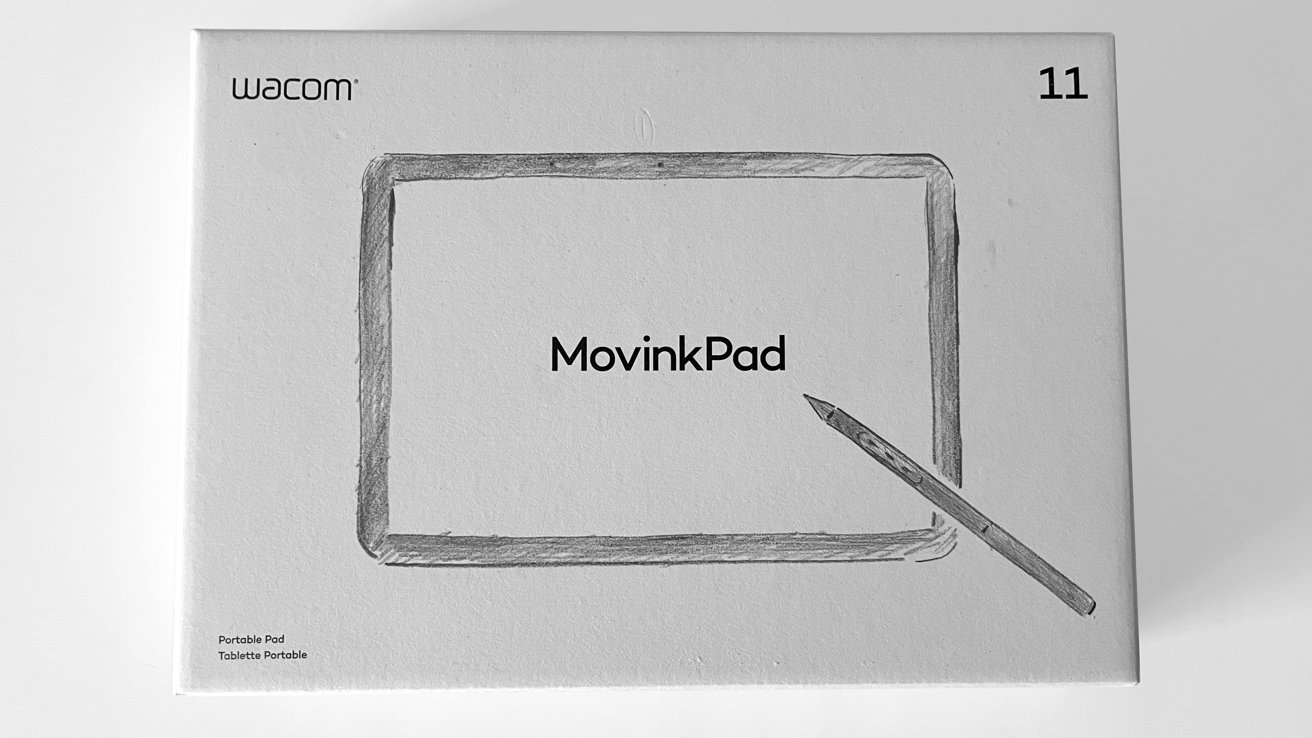
The MovinkPad 11 arrived in a padded shipping box from Wacom, with simple and vibrant sketchbook-style branding.
Advertisement
Wacom MovinkPad 11 product box, showing a simple sketch of a rectangular tablet with a stylus on a plain background, labeled as a portable pad in small text

Wacom MovinkPad 11 review: Its box

Inside the box

  • Wacom MovinkPad 11 (and Android driven pad with full functionality)
  • Wacom Pro Pen 3 with nib holder (Felt nib x3)
  • USB-C to USB-C Cable (1m/Power)
  • IPI Booklet
  • Regulation sheet

The Wacom MovinkPad 11 also includes complimentary software:

  • Clip Studio Paint Debut (2-year license)
  • ibisPaint X (180-day trial)
  • Artwod (3-month trial)
  • Magma (3-month trial)
  • Product Dimensions (L x W x H): 266 x 182 x 7 mm / 10.5 x 7.2 x 0.3 in
  • Product Weight: 588 g / 1.3 lb
  • Product Color: Light Gray
  • Storage Temperature and Humidity – Temperature: -10 to 60 degree C – Humidity: 30 to 90% RH (non-condensing)
  • Operating Temperature and Humidity – Temperature: 5 to 40 degree C – Humidity: 30 to 80% RH (non-condensing)
  • Screen Size: 11.45 in / 29 cm
  • Active Area: 243 x 159 mm / 9.6 x 6.3 inch
  • Display Technology: IPS
  • Surface: AF + AG glass
  • Direct Bonding: Yes
  • Touch Technology: Projected capacitive technology
  • Multi-touch: Yes – 10 fingers
  • Display Resolution: 2200 x 1440 pixels
  • Display Colors: 16.7 million
  • Color Depth: 8bit x RGB = 24bit
  • Color Gamut Coverage Ratio: sRGB 99% (CIE1931) (typ)
  • Aspect Ratio: 3:2
  • Viewing Angle: 170 deg. (85/85) H / 170 deg. (85/85) V (typ)
  • Contrast Ratio: 1200:1 (typ)
  • Brightness: 400cd/m2(typ)
  • Refresh rate: 60/90 Hz
  • Processor: Mediatek Helio G99
  • Memory: 8GB
  • Storage: 128GB
  • Operating system: Android 14
  • Wireless Connectivity: IEEE 802.11a/b/g/n/ac – Bluetooth 5.2
  • I/O Connectors: 1x USB Type-C port (USB2.0)
  • Battery Type: Lithium-ion battery
  • Battery Capacity: 7700mAh (typ)
  • Camera: 5M pixels (Front) / 4.7M pixels (Rear)
  • Mic/ Speaker: Dual Microphones / Stereo Speaker
  • Sensor: G-sensor / e-compass / Ambient light sensor
  • System Requirement for Wacom MovinkPad Instant Pen Display
  • Windows: Windows 11 *Windows ARM-based computers are not supported
  • Mac: macOS 14 (Sonoma), 15 (Sequoia), 26 (Tahoe) *Intel Mac computers are not supported.

Pen Specs

  • Wacom Pro Pen 3 with Nib holder
  • Pen Technology: Electromagnetic resonance technology
  • Pen Pressure Levels: 8192 levels
  • Supported Pen Tilt Angle: 60 degrees
  • Pen Resolution: 5080 LPI
  • Pen Type: Pressure-sensitive, cordless, battery-free
  • Switches: 3 side switches

The MovinkPad 11 is an incredibly well-made, lightweight all-in-one pad from top to bottom. Nothing about the MovinkPad 11 feels cheap.

In appearance, the MovinkPad 11 feels a lot like an Apple product with the gray metal case and simple design.

This is a full functionality, independent all-in-one pad, not simply a pen display that requires a desktop or laptop to drive its use. This means the MovinkPad 11 also includes all the bells and whistles of a tablet, including speakers, front and rear cameras, a native Android operating system, 8 GB of memory, 128 GB of internal storage, and wireless connectivity via Wi-Fi and Bluetooth.

Advertisement
Black tablet with blank screen lying on a white surface, accompanied by a slim dark stylus positioned vertically to the left of the tablet

Wacom MovinkPad 11 review: Unpowered

In a sign of the times for technology, the MovinkPad 11 does not include HDMI ports or USB-A ports. Wacom is fully embracing USB-C connectivity and charging.

Wacom includes the Wacom Pro Pen 3 with the MovinkPad 11, and this is a solid stylus pen. It is one of the thinner models that is closer to an actual pencil is size and feel.

Setting up the MovinkPad 11 was incredibly easy, outside of one small issue Wacom needs to address immediately.

Advertisement

After unboxing and charging the MovinkPad 11, I powered up the pad and was greeted with a simple and straightforward series of steps. It guided me on how to connect to my Wi-Fi, adjust settings, link my AppleInsider work Google account, and get straight into sketching via the preloaded Wacom Canvas app.
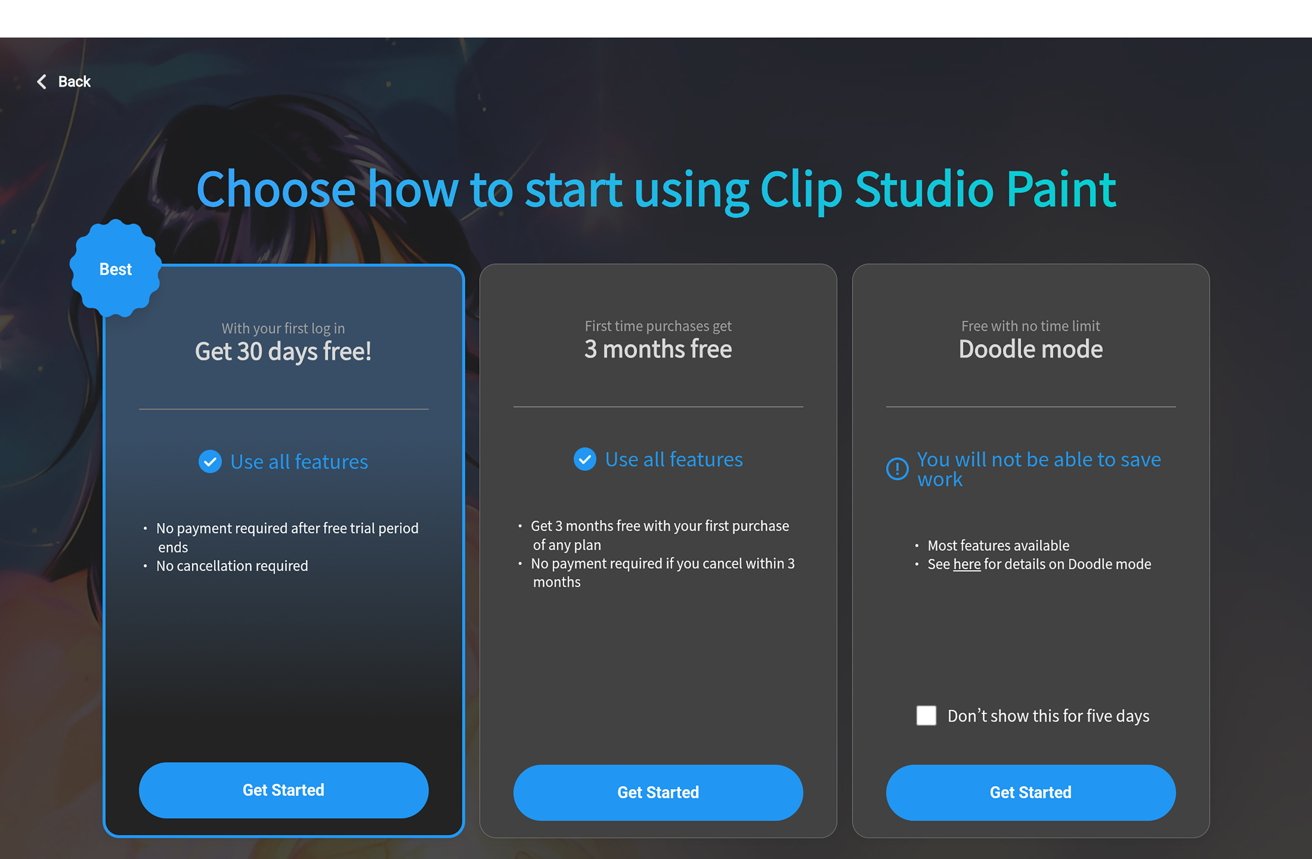
Clip Studio Paint start screen showing three options: 30 days free trial, 3 months free for first purchase, and free Doodle mode with limitations, each with Get Started buttons.

Wacom MovinkPad 11 review: Guiding through the set-up process

You can enter the OS settings easily to install new apps and make personal preference adjustments, and I did over time.

But my initial test with every pen display and all-in-one is to answer how quickly and easily I can get to work from unboxing to initial startup. In the case of the MovinkPad 11, very easily.

Advertisement

After setting up the MovinkPad 11, I opened a fresh Wacom Canvas document and settled in to sketch and eventually worked up a sketch for an upcoming cartography project.

Wacom includes Wacom Canvas, Wacom Shelf, and Wacom Tips apps at startup. Each of these applications work in conjunction with the MovinkPad 11 to create and save sketches, and also to adjust the preferences for their use with the MovinkPad 11.

Wacom Canvas is a lightweight sketching app with simple functionality that I enjoyed. With simple pencil-style brushes in blue and gray, an inking brush, two eraser sizes, and export functionality as PNG files or transferring straight into Clip Studio, it is a solid app with limits.

I wish Canvas provided at least 2 to 4 layer options.

Advertisement

The app is designed purely for sketching, but when I want to draw in blue and refine with an ink brush, the eraser tool takes everything. I would like a little separation here, as this is my standard workflow in Photoshop.
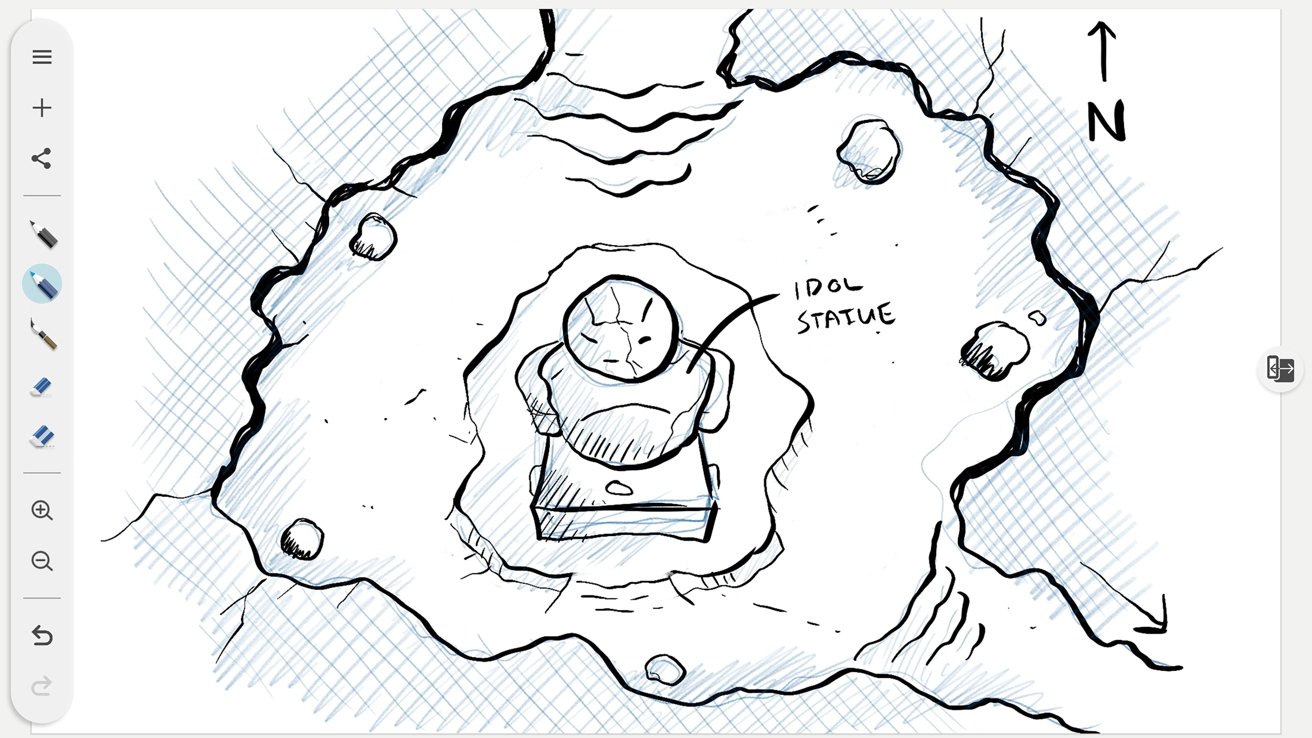
Hand-drawn top-down dungeon sketch showing a cracked stone idol statue in a central pit, surrounded by rough cave walls, scattered rocks, and a north arrow marker.

Wacom MovinkPad 11 review: Screenshot of the drawing process.

The purchase of the MovinkPad 11 from Wacom includes a 2-year Clip Studio Paint Debut license, as well as trials for the sketching app ibisPaint X (180-day trial), ArtWod (3-month trial), and Magma (3-month trial).

Outside of Photoshop, Clip Studio Paint is the go-to app for digital illustrators. The inclusion of a 2-year license is a great feature for the MovinkPad 11.

Advertisement

Wacom Shelf auto-saves and stores your Canvas sketches, but it takes a moment to realize that and make use of the app. It works, and it does a good job, but the initial setup did not explain this.

For someone working for an hour and accidentally clicking the new sketch button in Canvas, there will be panic.

Wacom Tips handles the preferences for the MovinkPad 11 and the stylus. However, I was shocked to see there are no options to adjust the pressure sensitivity for the stylus on the MovinkPad 11.

Pen pressure can be adjusted in some individual apps like Clip Studio, and Wacom is typically very good with their pressure sensitivity and the artist’s needs. To see it excluded with the MovinkPad 11 is surprising when hand fatigue, carpal tunnel, and arthritis affect how artists work.

Advertisement

I hope this will be considered in future offerings.

Hand-drawn top-down dungeon sketch showing a cracked stone idol statue in a central pit, surrounded by rough cave walls, scattered rocks, and a north arrow marker.

Wacom MovinkPad 11 review: Screenshot of the drawing process.

The Pro Pen 3 is lightweight and sturdy. It doesn’t feel flimsy, and I love the pencil-like dimensions.

The pen nibs included are the wonderful felt nibs offered by Wacom. They are always my preferred nibs for drawing with any stylus for the paper-like texture and micro resistance they provide.

Advertisement

During my time with the MovinkPad 11, I was relieved to see that the sharpness of the line quality and responsiveness on the display remain consistent with the drivers Wacom is famous for. Battery life for a single full charge is incredibly impressive.

Overall, drawing on the MovinkPad 11 is a lovely experience.

The MovinkPad 11 is a great all-in-one, but it does have a few drawbacks.

It is an all-in-one pad and has no angle adjustment outside of how you hold it. Or if you integrate the optional Wacom foldable stand sold in its online shop for $99.

Advertisement

Working on a flat surface means the tablet is flat. This did not do my posture any favors, so I moved the intended sketchbook seating posture, holding the MovinkPad 11 in my hand or lap and sketching.

It helped, but it drove home the idea that long sketching sessions with the MovinkPad 11 as-is will be tiring and cumbersome.

The MovinkPad 11 is great for short sessions and sketching on the go. But alternative approaches are required for long/more involved work.

I also do not like that the carrying case for the MovinkPad 11 is an optional extra. The pad on its own also does not include any sort of flap or covering for the screen.
Advertisement
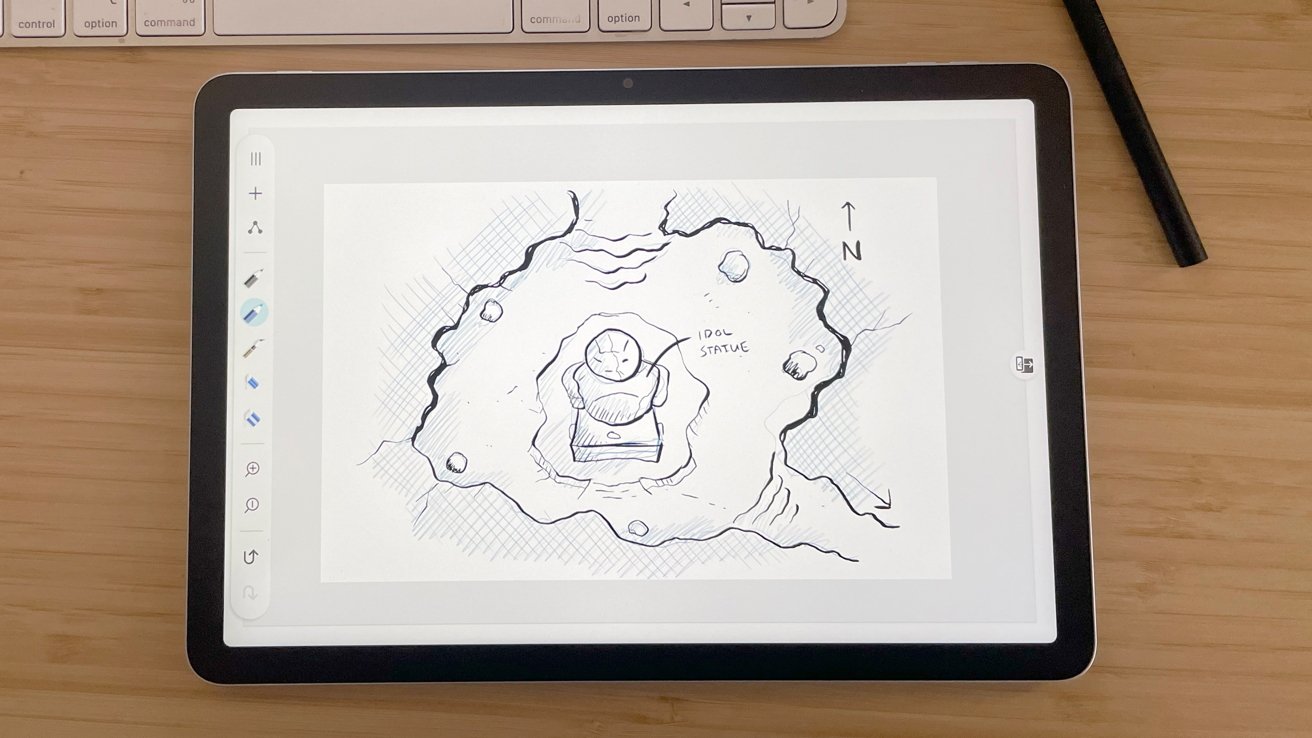
Tablet on wooden desk displaying a hand-drawn cave map with a central idol statue sketch, surrounding rocks, directional arrow labeled N, and drawing tools visible on screen and nearby.

Wacom MovinkPad 11 review: A case would’ve been nice to protect the display while on the move.

The screen is durable, certainly. But, as an all-in-one advertised as something aimed at on-the-go artists, I feel my eye twitch when I think about throwing it into a laptop bag unprotected.

This is not an inexpensive piece of equipment, and I would have liked to see Wacom include some basic protection as standard.

Another downside for users in a macOS-dominant workspace is that the MovinkPad 11 is an Android native all-in-one.

Advertisement

This is not the end of the world by any means. But it does mean that Mac users like me will have to jump through a few extra logistical hoops to drop the MovinkPad 11 into their workspace.

The MovinkPad 11 retails in the Wacom Online shop for $449, but I have seen it on sale there for as low as $399.

The MovinkPad 11 is a solid all-in-one, but the retail cost is not a small investment, and it must be weighed against the alternatives available.

Comparatively, an iPad averages $349, and the Apple Pencil Pro retails for $129. Add Procreate for $12, and you’re set up with an all-in-one that natively runs with macOS and merges seamlessly into that workspace for $490.

Advertisement

At $449 vs. $490, it is all about what you need in your life and tradeoffs.

With the MovinkPad 11 you secure the incredible drivers and functionality Wacom is known for. But you sacrifice the loss of macOS and Procreate.

On the other side at $490, you spend slightly more and lose the Wacom functionality, but you gain utility with macOS.

The MovinkPad 11 is a solid offering from Wacom for artists looking for a simple and powerful digital sketching tool.

Advertisement

However, the native Android operating system hinders seamless integration into iOS and macOS spaces. For the same ballpark retail cost, comparable options already exist for Apple users.

Ultimately, it will come down to personal preference and what is most important for you and your workflow. That said, I do not believe there is a wrong answer.

The MovinkPad 11 is excellent. If I worked in a Windows environment, I would happily purchase one.

I don’t.

Advertisement
  • Easy installation
  • Beautiful display
  • Sturdy construction
  • Portable
  • USB-C port
  • Amazing line quality and pressure sensitivity
  • A 2-year Clip Studio Debut license
  • Protective travel case is a paid optional feature
  • Possible additional cost for stand
  • Not a “cheap” option for a casual artist
  • Android all-in-one that requires extra steps for macOS users

Rating: 3.5 out of 5

The hardware is good, the use of the tablet is good. It’s better on Windows than it is on Mac, and that’s a problem.

I want to like it, it’s just hard to whole-heartedly recommend with those “extra steps” I mentioned.

The MovinkPad 11 is currently available through the Wacom online store for $399.95. It’s also available from Amazon for $399.95.

Source link

Advertisement
Continue Reading

Tech

Steam Machine may launch soon as reservation system and four retail packages surface

Published

on


Hints about the new reservation system were found in the latest Steam update files released last week. Redditor Pepeizq, who spotted the reservation system code, also found references to at least four Steam Machine packages and two Steam Frame packages. The code also mentioned the existing Steam Controller and Steam…
Read Entire Article
Source link

Continue Reading

Tech

Riding an AI rally, Robinhood preps second retail venture IPO

Published

on

Just two months after listing its first venture fund on the stock market, Robinhood is preparing to launch a second. The company has filed a confidential registration for RVII, a standard regulatory step that allows it to work through the approval process before making details public.

Unlike its first fund, which currently holds stakes in 10 late-stage companies — Airwallex, Boom, Databricks, ElevenLabs, Mercor, OpenAI, Oura, Ramp, Revolut, and Stripe — RVII will cast a wider net, investing in growth-stage and early-stage startups. It’s a meaningful distinction, given that early-stage startups are younger and carry more risk but also offer the potential for greater returns.

The fundraising target for RVII has not yet been set, the company said in a blog post. For its inaugural fund, Robinhood sought to raise $1 billion but ultimately fell several hundred million short of that goal.

Despite the shortfall, the first fund has performed strongly. RVI — the ticker for Robinhood’s first fund, which trades on the NYSE (New York Stock Exchange) — debuting on the NYSE at $21 a share in early March and has since more than doubled, closing on Monday at $43.69. Market enthusiasm for the AI prospects of the fund’s underlying startups has likely fueled the stock’s rise.

Advertisement

The premise behind both funds addresses a longstanding gap in who gets to invest in startups. Under federal rules, only “accredited” investors — those with a net worth exceeding $1 million or annual income above $200,000 — can put money into private companies. That has historically locked ordinary investors out of the earliest and most lucrative stages of a company’s growth. RVI and now RVII, are designed to change that, letting anyone invest in a portfolio of private startups through a regular brokerage account.

“You can think of [Robinhood Ventures] as a publicly traded venture capital firm with daily liquidity. No accreditation requirements and no carry,” Robinhood CEO Vlad Tenev said in an interview at The Wall Street Journal’s Future of Everything conference last week. Daily liquidity means shares can be bought or sold any day the market is open, unlike traditional VC funds, where capital is locked up for years. No carry means Robinhood doesn’t take a percentage of investment profits, as conventional venture firms typically do.

Over the past few years, the most valuable AI startups have gone from early bets to companies worth tens or hundreds of billions of dollars, and almost all of that appreciation has happened in the private markets, out of reach for most investors.

Tenev’s longer-term vision goes further still. “The aspiration is, if you’re a company raising a seed round and a Series A round — so, just first capital — retail should be a big chunk of that round, much like it now is in the public markets,” Tenev said at the conference. “And we should let those people in at the ground floor, so that they can actually benefit from this potential appreciation that’s increasingly happening in the private markets.”

Advertisement

If that vision takes hold, it could fundamentally change how startups raise their earliest capital, with retail investors eventually sitting alongside venture firms, including in the earliest rounds, where the biggest returns are often made, a whole lot of money is lost, as well.

When you purchase through links in our articles, we may earn a small commission. This doesn’t affect our editorial independence.

Source link

Advertisement
Continue Reading

Tech

WhatsApp Plus is here, and you can safely ignore this subscription

Published

on

WhatsApp has fiercely defended its status as a free, no-nonsense online messaging app for over a decade, but a new subscription tier is muddying the waters. 

Meta is rolling out WhatsApp Plus, a paid subscription model, to a limited number of iPhone users using the latest version of the App Store. 

So, what does WhatsApp Plus actually offer?

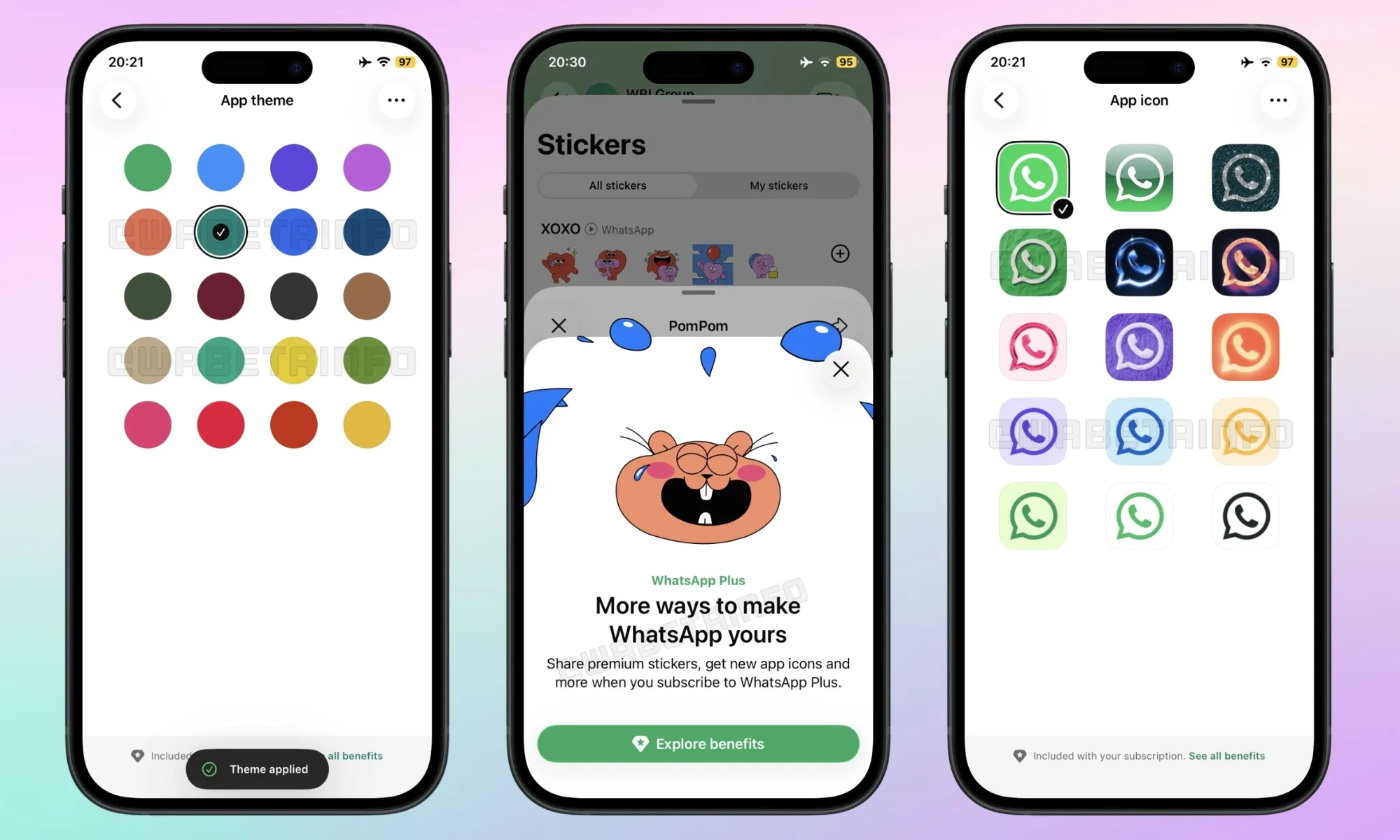
The list of benefits included as part of the WhatsApp Plus subscription sounds more like a cosmetic buffet than something useful. First, subscribers get 18 accent colors to replace the app’s signature green theme. 

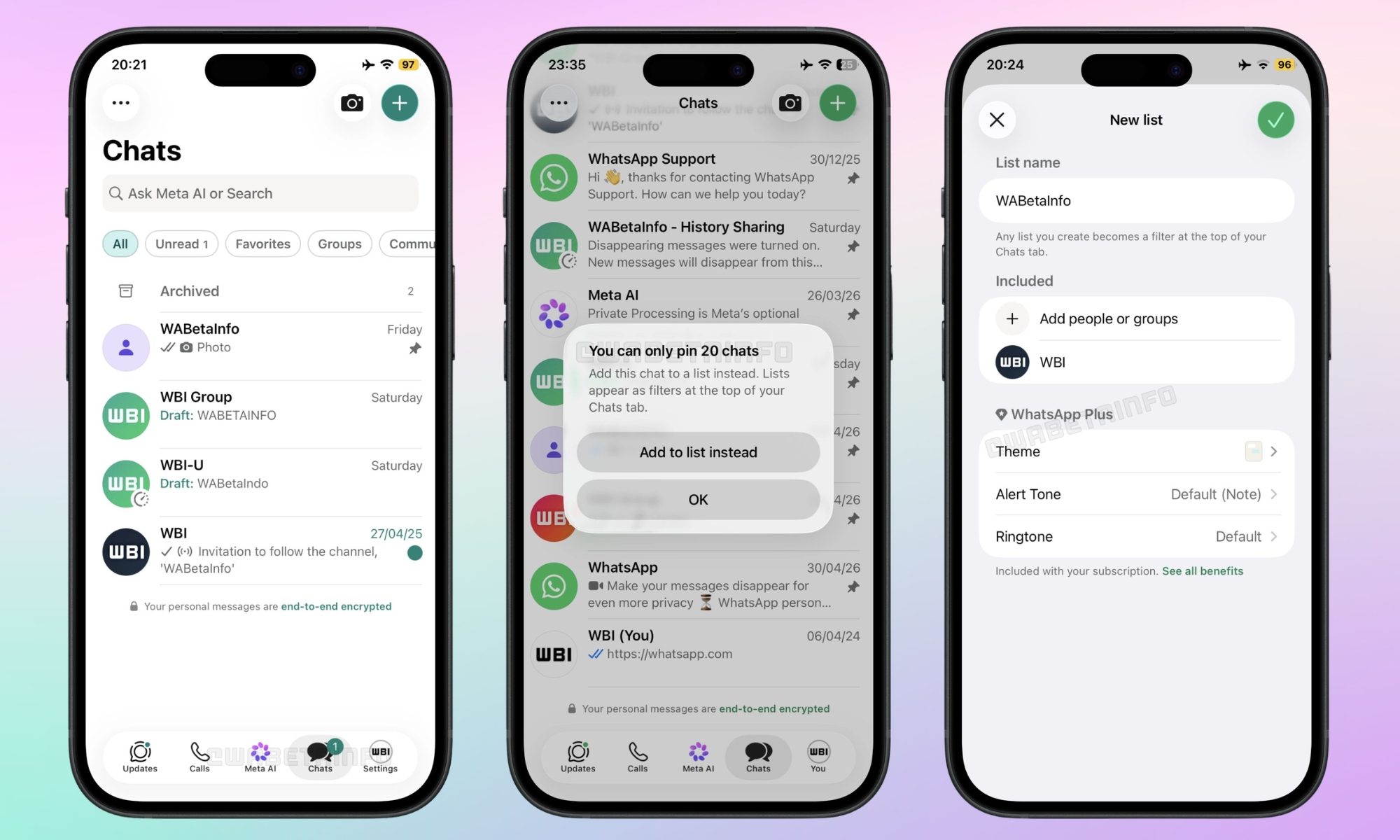
Then, there are 14 alternative home-screen icons to choose from. Additional perks include premium animated sticker packs, 10 exclusive call ringtones, and the ability to pin up to 20 chats (up from three), which is the only benefit I can imagine using. 

What’s more is that subscribers can also apply unified themes and alert tones across entire chat lists, but the core WhatsApp experience, including E2EE messaging, calls, video, and status updates, remains the same. 

Advertisement

How much does the WhatsApp Plus subscription cost?

In European markets, the subscription is priced at around €2.49 per month. While the US pricing hasn’t been revealed yet, it could land around $2.49 to $2.99. A free trial, for a week or a month, depending on the region, may also be available for eligible users. 

For now, the WhatsApp Plus subscription is billed monthly via the App Store. For now, WhatsApp Business accounts can’t access the subscription, which is all the more questionable, since such users are more likely to pay for paid tiers. 

What doesn’t sit well with me is that several WhatsApp Plus headline features are already available on rival messaging platforms for free; no monthly fee required. 

Competitor apps offer chat background customization for free

Take the custom themes feature as an example. Telegram has already had the chat background customization feature, along with dark/light mode switching, for years, without a paid subscription. 

Signal recently added a paid tier for cloud backups (removing the 45-day restriction on media storage), but even so, it lets users set custom chat wallpapers at zero cost. Apple’s native messaging service, iMessage, also offers free chat customization inside the Messages app, including per-contact photo backgrounds. 

You see? What WhatsApp is charging for is already available in the base package of its competitors. 

Advertisement

The paid tier should have included more useful features

The Telegram Premium subscription, which costs $4.99 per month in the US, raises the file upload limit from 2GB to 4GB, provides voice message transcription, real-time chat translation, boosts download speeds, and allows users to join up to 1,000 Telegram channels. 

These, in my opinion, are functional updates that change the way you use the app. WhatsApp Plus, however, only changes how the app looks, for the most part. 

WhatsApp Plus, I’d say, isn’t a bad product. It’s a perfect add-on for enthusiasts who might want a purple app icon and animated stickers. However, for value-seeking buyers like me, the competition is offering more, either for less or nothing at all. 

Source link

Advertisement
Continue Reading

Tech

Thinking Machines shows off preview of near-realtime AI voice and video conversation with new ‘interaction models’

Published

on

Is AI leaving the era of “turn-based” chat?

Right now, all of us who use AI models regularly for work or in our personal lives know that the basic interaction mode across text, imagery, audio, and video remains the same: the human user provides an input, waits anywhere between milliseconds to minutes (or in some cases, for particularly tough queries, hours and days), and the AI model provides an output.

But if AI is to really take on the load of jobs requiring natural interaction, it will need to do more than provide this kind of “turn-based” interactivity — it will ultimately need to respond more fluidly and naturally to human inputs, even responding while also processing the next human input, be it text or another format.

That at least seems to be the contention of Thinking Machines, the well-funded AI startup founded last year by former OpenAI chief technology officer Mira Murati and former OpenAI researcher and co-founder John Schulman, among others.

Advertisement

Today, the firm announced a research preview of what it deems to be “interaction models, a new class of native multimodal systems that treats interactivity as a first-class citizen of model architecture rather than an external software “harness,” scoring some impressive gains on third-party benchmarks and reduced latency as a result.

However, the models are not yet available to the general public or even enterprises — the company says in its announcement blog post: “In the coming months, we will open a limited research preview to collect feedback, with a wider release later this year.”

‘Full duplex’ simultaneous input/output processing

At the heart of this announcement is a fundamental shift in how AI perceives time and presence. Current frontier models typically experience reality in a single thread; they wait for a user to finish an input before they begin processing, and their perception freezes while they generate a response.

Advertisement

In their blog post, the Thinking Machines researchers described the status quo as a limitation that forces humans to “contort themselves” to AI interfaces, phrasing questions like emails and batching their thoughts.

To solve this “collaboration bottleneck,” Thinking Machines has moved away from the standard alternating token sequence.

Instead, they use a multi-stream, micro-turn design that processes 200ms chunks of input and output simultaneously.

This “full-duplex” architecture allows the model to listen, talk, and see in real time, enabling it to backchannel while a user speaks or interject when it notices a visual cue—such as a user writing a bug in a code snippet or a friend entering a video frame. Technically, the model utilizes encoder-free early fusion.

Advertisement

Rather than relying on massive standalone encoders like Whisper for audio, the system takes in raw audio signals as dMel and image patches (40×40) through a lightweight embedding layer, co-training all components from scratch within the transformer.

Dual model system

The research preview introduces TML-Interaction-Small, a 276-billion parameter Mixture-of-Experts (MoE) model with 12 billion active parameters. Because real-time interaction requires near-instantaneous response times that often conflict with deep reasoning, the company has architected a two-part system:

  1. The Interaction Model: Stays in a constant exchange with the user, handling dialog management, presence, and immediate follow-ups.

  2. The Background Model: An asynchronous agent that handles sustained reasoning, web browsing, or complex tool calls, streaming results back to the interaction model to be woven naturally into the conversation.

This setup allows the AI to perform tasks like live translation or generating a UI chart while continuing to listen to user feedback—a capability demonstrated in the announcement video where the model provided typical human reaction times for various cues while simultaneously generating a bar chart.

Impressive performance on major benchmarks against other leading AI labs’ fast interaction models

To prove the efficacy of this approach, the lab utilized FD-bench, a benchmark specifically designed to measure interaction quality rather than just raw intelligence.The results show that TML-Interaction-Small significantly outperforms existing real-time systems:

Advertisement
  • Responsiveness: It achieved a turn-taking latency of 0.40 seconds, compared to 0.57s for Gemini-3.1-flash-live and 1.18s for GPT-realtime-2.0 (minimal).

  • Interaction Quality: On FD-bench V1.5, it scored 77.8, nearly doubling the scores of its primary competitors (GPT-realtime-2.0 minimal scored 46.8).

  • Visual Proactivity: In specialized tests like RepCount-A (counting physical repetitions in video) and ProactiveVideoQA, Thinking Machines’ model successfully engaged with the visual world while other frontier models remained silent or provided incorrect answers.

Metric

TML-Interaction-Small

GPT-realtime-2.0 (min)

Gemini-3.1-flash-live (min)

Advertisement

Turn-taking latency (s)

0.40

1.18

0.57

Advertisement

Interaction Quality (Avg)

77.8

46.8

54.3

Advertisement

IFEval (VoiceBench)

82.1

81.7

67.6

Advertisement

Harmbench (Refusal %)

99.0

99.5

99.0

Advertisement

A potentially huge boon to enterprises — once the models are made available

If made available to the enterprise sector, Thinking Machines’ interaction models would represent a fundamental shift in how businesses integrate AI into their operational workflows.

A native interaction model like TML-Interaction-Small allows for several enterprise capabilities that are currently impossible or highly brittle with standard multimodal models:

Current enterprise AI requires a “turn” to be completed before it can analyze data. In a manufacturing or lab setting, a native interaction model can monitor a video feed and proactively interject the moment it detects a safety violation or a deviation from a protocol — without waiting for the worker to ask for feedback.

The model’s success in visual benchmarks like RepCount-A (accurate repetition counting) and ProactiveVideoQA (answering questions as visual evidence appears) suggests it could serve as a real-time auditor for high-stakes physical tasks.

Advertisement

The primary friction in voice-based customer service is the 1–2 second “processing” delay common in 2026’s standard APIs. Thinking Machines’ model achieves a turn-taking latency of 0.40 seconds, roughly the speed of a natural human conversation.

Because it handles simultaneous speech natively, an enterprise support bot could listen to a customer’s frustration, provide “backchannel” cues (like “I see” or “mm-hmm”) without interrupting the user, and offer live translation that feels like a natural conversation rather than a series of disjointed recordings.

Standard LLMs lack an internal clock; they “know” time only if it is provided in a text prompt. Interaction models are natively time-aware, allowing them to manage time-sensitive processes like “Remind me to check the temperature every 4 minutes” or “Alert me if this process takes longer than the last one”. This is critical for industrial maintenance and pharmaceutical research where timing is an essential variable.

Background on Thinking Machines

This release marks the second major milestone for Thinking Machines following the October 2025 launch of Tinker, a managed API for fine-tuning language models that lets researchers and developers control their data and training methods while Thinking Machines handles the infrastructure burden of distributed training.

Advertisement

The company said Tinker supports both small and large open-weight models, including mixture-of-experts models, and early users included groups at Princeton, Stanford, Berkeley and Redwood Research.

At launch in early 2025, Thinking Machines framed itself as an AI research and product company trying to make advanced AI systems “more widely understood, customizable and generally capable.”

In July 2025, Thinking Machines said it had raised about $2 billion at a $12 billion valuation in a round led by Andreessen Horowitz, with participation from Nvidia, Accel, ServiceNow, Cisco, AMD and Jane Street, described by WIRED as the largest seed funding round in history.

The Wall Street Journal reported in August 2025 that rival tech CEO Mark Zuckerberg approached Murati about acquiring Thinking Machines Lab and, after she declined, Meta pursued more than a dozen of the startup’s roughly 50 employees.

Advertisement

In March and April 2026, the company also became known for its compute ambitions: it announced a Nvidia partnership to deploy at least one gigawatt of next-generation Vera Rubin systems, then expanded its Google Cloud relationship to use Google’s AI Hypercomputer infrastructure with Nvidia GB300 systems for model research, reinforcement learning workloads, frontier model training and Tinker.

By April 2026, Business Insider reported that Meta had hired seven founding members from Thinking Machines, including Mark Jen and Yinghai Lu, while another Thinking Machines researcher, Tianyi Zhang, also moved to Meta. The same reporting said Joshua Gross, who helped build Thinking Machines’ flagship fine-tuning product Tinker, had joined Meta Superintelligence Labs, and that the company had grown to about 130 employees despite the departures.

Thinking Machines was not simply losing people, however: it also hired Meta veteran Soumith Chintala, creator of PyTorch, as CTO, and added other high-profile technical talent such as Neal Wu. TechCrunch separately reported in April 2026 that Weiyao Wang, an eight-year Meta veteran who worked on multimodal perception systems, had joined Thinking Machines, underscoring that the talent flow was not one-way.

Thinking Machines previously stated it was committed to “significant open source components” in its releases to empower the research community. It’s unclear if these new interaction models models will fall under the same ethos and release terms.

Advertisement

But one thing is certain: by making interactivity native to the model, Thinking Machines believes that scaling a model will now make it both smarter and a more effective collaborator.

Source link

Continue Reading

Tech

Making Big Dry Ice Blocks With Low Pressure CO2

Published

on

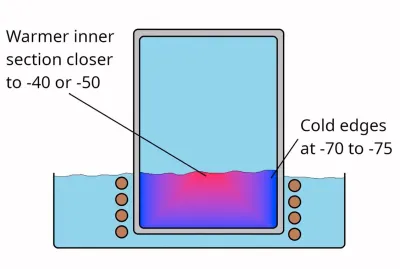
Although the term ‘dry ice’ is generally used for solid CO2, it’s much more accurate to call this ‘dry snow’, as, rather than being actual solid blocks, they are effectively snow that’s been compressed really tightly. While not really necessary for most applications of dry ice, it is possible to make blocks of actual CO2 ice, and thus [Hyperspace Pirate], as someone with a healthy obsession with cold things had to make some of his own.
As a first step, you, of course, have to chill down CO2 in a container, for which Mr. [Pirate] used a Joule-Thomson cryocooler, with a 15% butane, 35% propane, and 50% ethylene gas mixture. Of course, as ethylene is only easy to get if you have a lot of money to spend, you will want to make it yourself from ethanol. This involves boiling and 400°C aluminum oxide to capture the produced ethylene.

With the CO2 pressure chamber cooled in its refrigerated bath, the process didn’t take long. After opening the pressure chamber, the results were interesting to say the least. Although there was definite ice formation along the sides that contacted the metal chamber the closest, the closer to the center, the more the CO2 resembled the usual fluffy, compressed dry ice.

This is encouraging as it shows that it’s definitely possible to make nice ice pucks or cubes, but the method needs further refinement to get more ice and less snow.

Advertisement

Source link

Advertisement
Continue Reading

Tech

BYD’s latest EV costs just over $10,000, goes 250 miles, and packs a LiDAR, too

Published

on

BYD has officially unveiled the 2026 Seagull, sold internationally as the Dolphin Mini or Dolphin Surf, and the numbers deserve your attention. 

The updated compact EV’s price starts from 69,900 yuan, which is around $10,300, in China, and tops out at 85,900 yuan, which is around $12,600. It debuted at the 2026 Beijing Auto Show before going on sale this week (via CarsNewsChina). 
2026 BYD Seagull got launched w/ px from 69.9 to 97.9k RMB. The top 2 px versions come w/ Lidar + DiPilot-300 & DiLink-150 to have the sensor & compute for latest smart car tech.

This package adds 12k RMB on top of the standard DiPilot-100 config. Still comes in 305/405 km… pic.twitter.com/fEQQ9jOcdU

— tphuang (@tphuang) May 11, 2026

Advertisement

What do buyers actually get for their money?

The standout upgrade this year is the optional “God’s Eye B” intelligence driving package, called the DiPilot 300 system, which adds a LiDAR sensor to the subcompact city car, increasing its price to between $13,400 and $14,400. 

The system provides city-level navigation on autopilot, along with traffic light recognition and roundabout handling. That’s semi-autonomous driving capability at a price bracket where most car buyers in the US are still choosing between a used Toyota and a three-year-old Chevy. 

The longer range BYD variant packs a 38.88 kWh battery pack that delivers up to 252 miles of CLTC-certified range. Base variants, on the other hand, use a 30.08 kWh battery pack that provides up to 190 miles of claimed range. 

BYD’s subcompact city car packs in enough punch

Given that it’s designed to be driven around in the city, the new BYD EV features a 55 kW motor that can generate 135 Nm of torque, numbers that might not sound great at first, but complement the car’s purpose. 

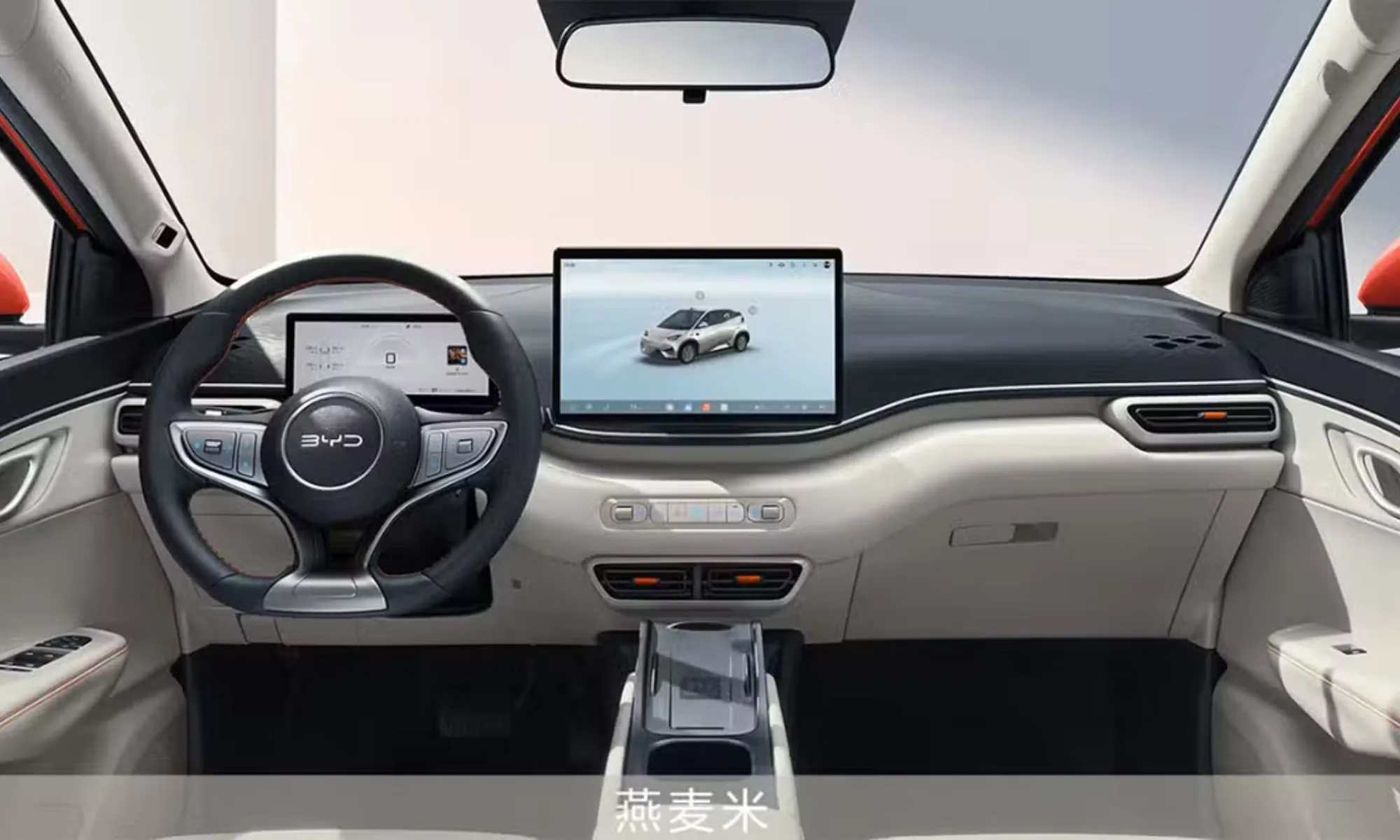
The cabin offers a 12.8-inch central touchscreen display for handling navigation and 3D vehicle controls. Optional add-ons can get buyers 50W wireless charging, heated front seats, and a six-way power-adjusted driver’s seat. 

Advertisement

To me, the Seagull’s 2026 update isn’t just a product refresh. By pushing LiDAR into the sub-$15,000 bracket, BYD is essentially normalizing advanced driver assistance at a price point where it’s hard to even imagine the feature. 

Source link

Advertisement
Continue Reading

Trending

Copyright © 2025