
Tech
Improve Your Apple CarPlay Experience By Doing These Simple Things

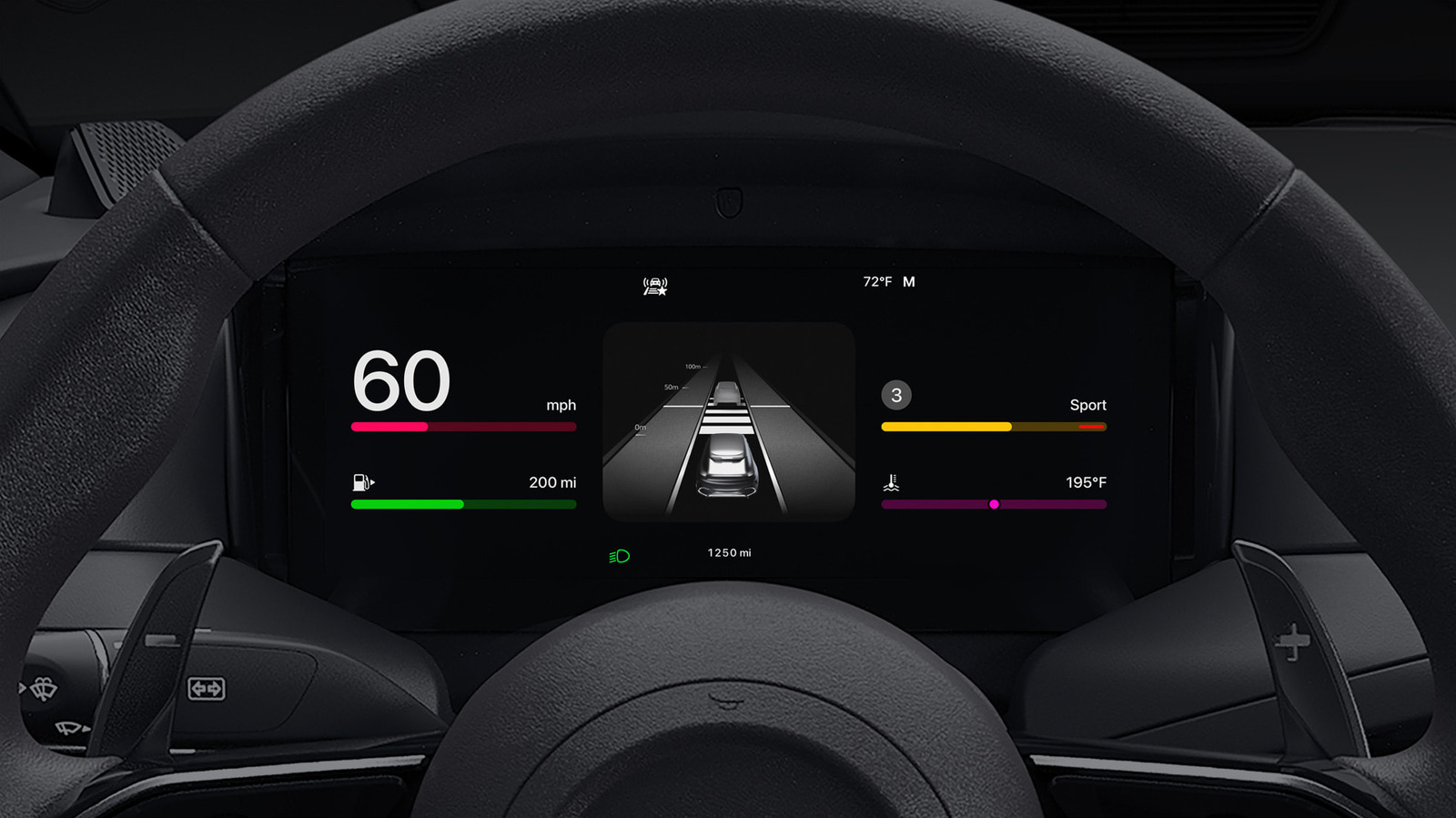
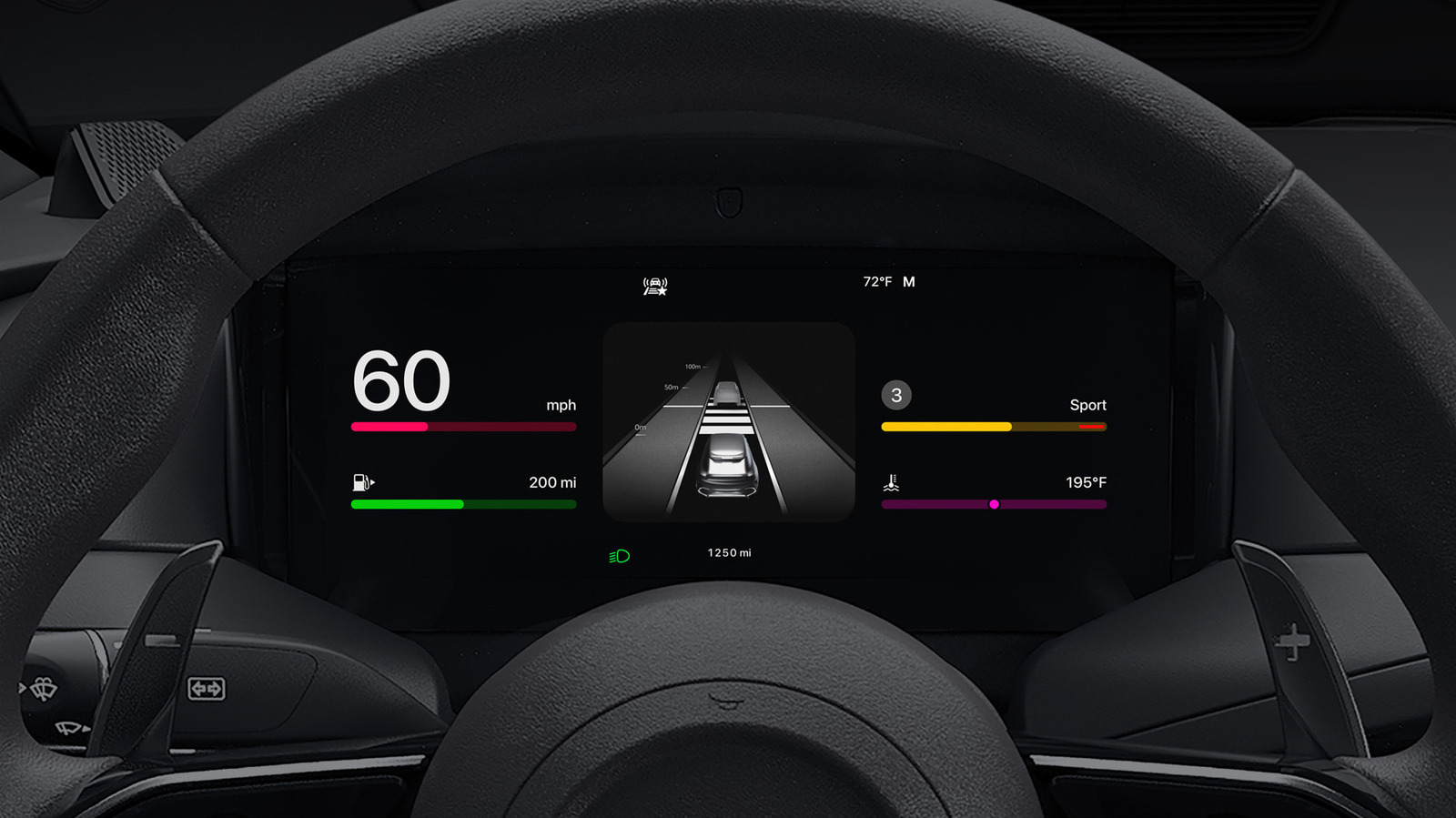
CarPlay can become even better when you take a few minutes to customize it.
Your iPhone turns your car’s infotainment system into a navigation and communication hub, thanks to CarPlay. While it works great by default, there are several ways to make it even better, plus new features that arrive every so often.
From configuring CarPlay basics to designing the perfect app layout, adjusting the feature can make your commute safer and more entertaining. And with iOS 27 bringing several new updates to CarPlay, now is a great time to dive into this core iPhone function.
Make the most of the layout and display
The easiest way to up your CarPlay game is customizing its layout to your liking. You may be surprised to learn that you must rearrange icons on your iPhone, not your car’s display. To do this, open Settings on your iPhone, tap General and select CarPlay. From there, select your vehicle and enter the Apps menu.
Here, you’ll find a list of apps on your phone compatible with CarPlay; drag them up or down to make the most important ones readily available on your CarPlay screen. The size of your car’s display defines how many apps make it onto the first page, so you may have to get creative when prioritizing your most-used ones. To remove or add apps, tap the red minus or green plus, respectively.
Starting with iOS 26, you can further organize your infotainment system through CarPlay widgets. These bring the same quick views you use on your phone’s Home screen, such as weather, calendar and clock, to your Car’s display. Edit them by tapping Widgets on the same menu where you selected your Apps earlier. CarPlay will intelligently swap your widgets throughout the day if enable Smart Rotate, and the similar Widget Suggestions will show available ones even if you haven’t added them.
CarPlay’s overall brightness should shift with your dash controls, but you can go further to toggle light and dark mode to suit the conditions to the time of day. Go to Settings > Appearance on your CarPlay screen, then select Automatic to allow your CarPlay brightness to adjust automatically. Apple’s CarPlay visual accessibility guide can also help here.
To spruce up its look, customize your wallpaper by opening Settings inside CarPlay and tapping Wallpaper. Choose your favorite option and hit Set. You can also change the colors of your icons, toggling between Default, Dark and Clear, under Settings > Customize icons in CarPlay.
Maximizing what you get from CarPlay
Siri is built into CarPlay; by saying “Hey Siri” or pressing the voice button on your car’s steering wheel, you can send messages, start navigation, change the playlist and take other actions. On a compatible iPhone, the revamped Siri AI in iOS 27 is also more useful in the car. And if the assistant is becoming a backseat driver, you can stop Siri from interrupting you while using CarPlay by tinkering with various settings.
If you like, you can go further by enabling Voice Commands, an accessibility feature that provides more CarPlay controls with your voice. To turn this on, go to Settings > Accessibility > Voice Control in CarPlay. Once enabled, it will continually listen for commands like opening apps, swiping left/right or touching a certain element on the screen. For a full list of commands, see Apple’s Voice Control CarPlay support page.
The Focus feature is a productivity must-have on your iPhone, and the Driving Focus helps reduce distractions from notifications while not affecting essential driving apps. To enable Driving Focus, go to the Settings on your vehicle’s CarPlay display, select Driving Focus and choose Activate with CarPlay. For best results, customize your Driving Focus notification settings on your phone by going to Settings > Focus > Driving. Under People, select contacts whose messages you’d like to allow through or silence. You can also allow repeated calls from people who are otherwise suppressed, as well as create auto-replies. Visit the While Driving tab to turn on this Focus automatically whenever you connect to CarPlay, if you didn’t already do so on your iPhone.
Beyond these settings and app changes, elite CarPlay users use both wireless and wired connections depending on the situation. Although a wireless connection is convenient, it doesn’t charge your phone while using it unless your car has a wireless charging pad. As such, on extended road trips, plugging in your phone is the right choice to keep the battery topped up.
Other little tricks make CarPlay even smoother. In the Messages app on your iPhone, tap and hold a frequent conversation and choose Pin to keep it at the top — doing this will also pin it in the Messages app for CarPlay. And don’t forget about the Shortcuts app, where you can build CarPlay automations.

Even if it’s not a top-of-the-line, perfect model, having a washing machine is better than not. With that said, if you want to be picky, there are some things to be mindful of before buying one. For one, there are several washing machine models many recommend steering clear of, and there are the pros and cons to different machine types across the board. While it’s a common sight, and it’ll do the job in getting your clothes clean, there are some drawbacks to a top-load washing machine that potential buyers should be aware of.
Let it be known that there’s nothing inherently wrong with using a top-load washing machine. At the end of the day, they’re great at getting clothes cleaned up in a timely fashion, and there are top-load options at different price points and from different brands to consider. You have a lot of choice without necessarily losing out on quality or cleaning ability. This is just to say that there are some negatives to them that could be cause for concern to some, pushing them in the direction of a front-load unit instead.
If you’re in the market for a new washing machine, you might want to think twice about the top-load style. These are some of their notable problems, regardless of the brand attached to them.
Higher water consumption
Naturally, a washing machine of any variety is going to use a lot of water. On average, users can expect modern washing machines to use somewhere between 14 and 20 gallons of water per load. The amount of water consumption is dependent on several factors, including load size and machine age, as well as the type of washer in question. As it turns out, the typical top-load washer uses more water per load than a front-load unit, so if keeping down your water use and water bill are top priorities, a top-load washer doesn’t seem the best choice.
According to Maytag, users will see different levels of water use between model types. If you have a top-load unit with an agitator — the large pole in the center of the machine – you’re likely to use around 19 gallons per load. Meanwhile, those without agitators drop a bit but still remain high at around 13 gallons. LG adds that top-loaders with more low-profile impellers at the bottom of their wash bin can use even more water, between 21 and 26 gallons per wash. By comparison, a front-loader will more than likely use approximately 7 gallons, or reach somewhere into the low teens on the high end.
Higher fabric wear
As mentioned previously, many top-load washing machine models feature an agitator in the center. Overall, this element serves a few key purposes during the wash cycle. It keeps clothes relatively separated, attempting a more even wash across the board, and they add a bit of friction against the clothing being washed to scrub out stubborn stains. With all of that said, agitators aren’t in every single washing machine model for a reason. Even in models from the best top-loader washer brand on the market, they’re imperfect, and their shortcomings can make them major deal-breakers for those debating a top-load washing machine.
First and foremost, top-load washers equipped with agitators can put some serious strain on clothing. As a giant immobile obstacle at the center of the machine, shirts and pants get caught around it while being yanked by the rest of the laundry pile. This can cause premature fabric wear. Their method of cleaning is flawed, too. The agitator’s intent of forcing clothes to rub against it to clean them can harm fabric while providing subpar cleaning. On top of all of this, they can be noisier than non-agitator models, especially if laundry becomes concentrated on one side and thumps throughout the wash cycle. Thus, a front-loader is the clear quieter and clothing-safer option.
Loss of stackability
In most home washer and dryer setups, there’s more than enough room to stick a washer and dryer next to one another. However, in other living spaces, horizontal wiggle room is limited, leaving you little choice than to seek out vertical options. Naturally, this kind of setup doesn’t lend itself well to a top-load washer. As the name spells out, it’s loaded from the top, so if you have a dryer placed on top of it, you’re not going to be able to fill and empty it. It’s not the biggest revelation, but it’s worth mentioning all the same.
At the same time this begs the question: Is there a way to stack a top-load washer onto a front-load dryer? In short, this is a bad idea, too. Washers are significantly heavier and they move around a lot more while active, opening the door for damage to both machines. Not to mention, stacking a top-load washer so high would make the top door basically inaccessible, making laundry more of a hassle than it can already seem. If you truly want to do washer and dryer stacking, it’s best to buy designated vertical models that won’t sustain damage or present danger when piled up and used. Still, stackable washers and dryers have their own downsides to be aware of beforehand.
Lower spin speeds
If you’re getting a load of laundry started, odds are you want it done quickly. In this case, a top-load washing machine might not quite be what you’re looking for. Historically speaking, top-load units are known to have much slower spin rates than their front-load counterparts. Granted, newer high-efficiency-branded top-loaders have increased their spin rate to compete with front-loaders, but if you’re looking into older, potentially used models to save a little money on up-front costs, know the spin speed might not be up to more modern standards.
On the whole, this doesn’t seem like too big of a deal. So what if a washer spins a little slower? Well, the fact is a slower-spinning washer can push more of its workload onto the dryer. If clothes spin slower at the end of their wash cycle, they disperse less moisture. This leaves more behind for the dryer to take care of. As a consequence, you then face longer drying times and higher energy consumption as the washer’s clothes-cleaning companion tries to get its part of laundry day done. This also means more wear and tear on the machine, so your less likely to see your unit reach the average dryer’s lifespan, let alone stick around longer.

So close and yet so far…

League of Legends players might have been rejoicing after Riot Games said that team voice chat was finally coming to the popular MOBA. Turns out the party was short-lived. A mere two weeks after the announcement that the feature was coming to select regions in October’s 26.20 patch, Riot’s dev team posted on social media that the addition of voice chat has been delayed. And, sadly for the LoL players who have already waited 17 years for the option, there’s no revised timeline for when it will be arriving in-game. The studio didn’t give a reason for the delay, only stating that it is “to meet the quality bar” its community deserves.
Hey everyone, wanted to get this out separate from today’s Patch Notes. We announced Team Voice as coming to NA/OCE in Patch 26.20, but made the call to push it to meet the quality bar you deserve. No new target patch to share yet, but we’re making this a priority to get right.
— League of Legends Dev Team (@LoLDev) September 22, 2026
It’s possible the reversal was the due to issues around moderation. LoL is a game famed for toxic in-game behavior, although Riot has been working to address that reputation in recent years. It’s possible that the company’s initial approach to making voice chat not a complete trash fire, like requiring a minimum Honor level to prove a history of good in-game behavior, weren’t working as intended. It could also be that the “voice skin” concept, allowing players to change how they sound to their teammates, was causing issues. It may be disappointing to have the long-requested feature promised and then snatched away, but at least Riot is still working on an implementation.

Verdict
The Huawei Watch 6 is a great-looking smartwatch with a superb screen, in-depth health tracking and solid multi-day battery life. Limited app support keeps it from competing with the smartest wearables, however, and inconsistent sleep tracking undermines some of its fitness credentials.
-
Stylish look and premium materials
-
Comprehensive health and fitness tracking
-
Big, bright 1.5-inch screen
-
Works with iOS and Android
-
Very limited third-party app integration
-
Inconsistent sleep tracking
-
GPS can struggle a bit in built-up areas
View Huawei Watch 6 offers
Review Price:
Advanced health tracking
Huawei’s X-Tap system combines ECG, PPG and pressure-sensitive sensors.
Bright 1.5-inch display
The large AMOLED screen is sharp, vibrant and bright enough for outdoor use.
Multi-day battery life
The Watch 6 can last around three and a half days with the always-on display and health tracking enabled.Key Features

£399
Introduction
The Huawei Watch 6 is a premium smartwatch that puts health and fitness tracking front and centre, combining a wide range of sensors with a stylish design, a bright display and multi-day battery life.
It’s not quite as smart as the best smartwatches running Wear OS or watchOS, largely due to its limited third-party app support, but Huawei is hoping that features such as X-Tap, Health Glance and improved activity tracking will make up for it.
After spending a couple of weeks with the Watch 6 on my wrist, I’ve found plenty to like, though a few frustrating inconsistencies keep it from being the complete package.
Design
- Familiar, yet still premium, design
- Bright, detailed 1.5-inch screen
- Case can be scratch-prone
The Huawei Watch 6 might not look all that different from the Watch 5, but that’s fine; the Watch 5 was already one of the more refined-looking smartwatches on the market, and the 6 continues that trend. The classic circular watchface is flanked by a rotating digital crown on the top-right, a button on the bottom right, and the return of Huawei’s X-Tap sensor system in the middle – but more on that a little later.

The overall look is, frankly, really nice; it doesn’t look or feel particularly techy on the wrist, with enough weight that it feels solid without being overly heavy, weighing in at around 60g. And, at 10.9mm thick, it’s far from the thickest wearable I’ve had on my wrist this year.
It has nicely contoured edges, and small complaints from other smartwatches – like the odd gap they sometimes have between the strap and your wrist – are non-existent here. Huawei knows how to make a good-looking wearable, that’s for sure.
And that’s paired with a handy strap system that takes a little bit of inspiration from Apple and Google, with a simplified design that lets you put on and take off the watch with one hand – again, something that sounds small but makes all the difference on the wrist.

The band itself is soft and comfortable, made from fluoroelastomer, and can more than pass for both work and gym, though you can opt for various other straps, both from Huawei and third parties, considering it supports 22mm bands.
Materials-wise, we’re looking at a nice high-end titanium finish for the 46mm model with reflective sides and a matte front that surrounds the sapphire glass-protected screen – though the smaller 43mm model opts for a cheaper aluminium alloy instead, and I’m not quite sure why.

But despite the tough material on the 46mm variant I’ve got on my wrist, I’ve found it still scratches quite easily; over the past 10 days of wear, I’ve somehow got a noticeable scratch on the matte-finish frame just above the screen and I don’t remember any particularly violent knocks or scrapes.
The screen is another standout of the Watch 6; at 1.5 inches, it measures in the same as its predecessor, but this smooth LTPO-enabled screen now runs at up to 3500nits.

With such high levels of brightness, it should come as no surprise that it was easily legible on bright, sunny days, and it meant that the built-in torch functionality (which uses the screen) works even better here than before – though it’s still not quite as handy as the actual built-in torch you’ll find on wearables like the Garmin Fenix 8.
Still, it’s bright, vivid and detailed, and the selection of pre-installed watchfaces looks absolutely fantastic. Even the bezel doesn’t look as egregious as it does on other wearables, with Huawei instead making it a core part of the design with classic watch etchings.

Durability-wise, there isn’t much of an improvement here – but with full IP69 and 5ATM that allows for use down to 50m, there isn’t really much else it could do to improve.
Features and software
- Runs HarmonyOS with basic smartwatch functionality
- Lack of third-party watch apps
- Works on iOS and Android, with dual connectivity
The Huawei Watch 6 sports Huawei’s home-grown HarmonyOS software that, in many ways, is pretty familiar.
It works just like most smartwatches, with a swipe up to access phone notifications, swipe left or right to access widgets, and a swipe down from the top to access quick settings. A press of the digital crown will take you to the app menu – though this is arguably the area where Huawei falls down compared to smarter options like the Pixel Watch 5 and Apple Watch Series 12.

Using its own custom OS means that third-party app support is pretty much non-existent. Apps like Spotify, Google Maps and MyFitnessPal aren’t available; instead, it’s mainly Huawei-designed health and fitness apps along with a few niche options like Trainpal, Emirates and MyBotPal. You can at least use the Watch 6 for payments in the UK now, with Curve Pay integration.
There is support for some smartwatch functions – you’ll get notifications, though you can’t quickly respond to them, and you can take and make calls on the wearable, even if your phone isn’t connected, if you opt for the eSIM variant.

It’ll also display elements like the weather, calendar events and more, so it’s far from a basic experience, just not quite as capable as some others out there. And, even though Google Maps isn’t present, Huawei’s Petal Maps alternative is there for casual walking and cycling navigation.
The upside to not using a platform like Wear OS – not that the US-blocked Huawei would be able to anyway – is that the Watch 6 is fully compatible with iOS and Android; not only that, but the watch can connect to two devices simultaneously. When you’d use that, I’m not sure, but you can at least.

Huawei also does some fun stuff with gesture controls, with a pinch of two fingers to select, a swipe on your finger to scroll and a flick of the watch to go back. It does take some getting used to, and I’d like the watch to be more responsive (I had to repeat the gesture every now and again), but it’s a genuine way to use the smartwatch when your hands are full.
Health and fitness tracking
- Upgraded X-Tap system and Health Glance
- Over 100 exercises, with exercise-specific metrics
- Hit-and-miss sleep tracking
Really, the smartwatch features are secondary to the health and fitness features that the Watch 6 offers, so let’s delve into that a little more.
The Watch 6 is packed with health sensors, but the headline feature is Huawei’s updated X-Tap system, which combines ECG, PPG and a pressure-sensitive touch sensor in a compact module on the side.

It works alongside the optical heart-rate sensor and the watch’s temperature, motion and atmospheric sensors to track everything from heart rate and SpO2 to arterial stiffness and pulse wave arrhythmia. Huawei’s Health Glance feature pulls a few of these checks together, even asking you to cough into the microphone for a respiratory assessment, before delivering a detailed report in just 60 seconds.
It’s quick, unobtrusive and genuinely useful, especially if you don’t want to run every test individually.

The Watch 6 also sports dual-band GPS to help track outdoor activities, so to put it to the test, I went on a 45-minute walk in my local park. It’s not quite as built-up as an urban jungle, living on the outskirts of London, but there are plenty of trees to obscure the wearable. Even then, there were only minor wobbles along the track that I couldn’t account for.
Things got a little messier when I tried a similar 20-minute walk in the ultra-built-up Canary Wharf, though that is a very demanding environment for any GPS device. That said, there are better watches for this kind of thing – the Galaxy Watch Ultra 2 stands out in my mind as a recent option. That thing just sticks to you.

I appreciate the sheer amount of exercise-specific data and metrics that Huawei tracks, with elements like balance and intensity on runs and virtual power and ascent when cycling, with so many different watch layouts to choose from and customise so you can focus on the exact metric you’d like. It’s quite impressive stuff if you’re really into your sports and wellness.
Now there’s way more to the Watch 6 than tracking runs and walks – there are over 100 forms of exercise available, with new additions for this year including indoor skiing, along with improvements to cycling metrics, and support for over 3000 global ski results to help you navigate the slopes without a phone when outdoor skiing.

Of course, it’s not all about tracking your runs and cycles; the Watch 6 will also monitor your general health and wellbeing. There’s nothing new here that we haven’t seen before – it tracks elements like movement, HR, HRV, blood oxygen, movement and more, with a familiar set of rings tracking daily calorie burn, exercise time and standing time.
What is new for this year is a readiness score, which, as we’ve already seen on a plethora of devices, combines elements like recovery, sleep quality, skin temperature and cycle tracking to provide insight into how much you should push yourself on any given day. Again, not new tech, but new to Huawei, and a welcome addition that usually aligned with how energetic I felt.

When it comes to tracking my sleep, however, I found it fell short compared to the likes of the Oura Ring 5. Now, while elements like sleep stage tracking will naturally vary among wearables, I found that the Huawei Watch 6 didn’t really notice when I was going to sleep.
One night, it took me around an hour to fall asleep – Oura marked that awake time in bed correctly, but Huawei completely ignored it, only starting the tracking once I actually fell asleep, and that doesn’t give the most accurate overall snapshot. It’s the same with waking up during the night; nights where I got up and went to the loo went completely unnoticed by the Watch 6, but not my Oura Ring 5.

Granted, I’m not the best sleeper, and most manufacturers admit that tracking is spottier with more troublesome sleepers like myself, but I’ve already experienced better, so I know it’s possible.
And it’s a bit of a shame, really, because Huawei does offer a depth of sleep-based data for you to scroll through each morning – but with my core sleep tracking being so off, I didn’t know how much I could trust what I was getting.
All this information is available both on the watch itself and the accompanying Huawei Health app. The companion app was never my favourite for navigation – it felt a little messy – though things have gotten better with a redesigned interface. It’s still not the most user-friendly, in my opinion, with plenty going on everywhere you look, and the occasional ad you can’t dismiss, but you can at least dive deep into your data on a larger screen.

There’s also a smattering of AI analysis available via the companion app. It’s handy if you don’t know much about the individual metrics you’re tracking, but conversely, I feel like it could still be a little more personal and, well, a little less robotic with its assessments. A little bit of charm would go a long way here, like with Google’s Fitbit Air.
Battery life
- Up to five days of battery life
- Three days of use with AOD on
- Charges in around 90 minutes
The Huawei Watch 6, in my opinion, has strictly middle-of-the-road battery life – not terrible by any means, but also not close to offering the longest life of any wearable right now.
The latter is actually a bit surprising, as it’s usually Wear OS watches like the Pixel Watch 5 and Galaxy Watch 9 that offer a couple of days of battery life, with other wearables like the Garmin Fenix 8 Pro and Xiaomi Smart Band 10 Pro – running custom software as Huawei’s wearable does – sometimes offering weeks of battery life.
The OnePlus Watch 3, for example, offers five days in Wear OS mode and a whopping 16 days when running its own custom software.
With the Huawei Watch 6, however, I got around five days of mixed use with the always-on screen off – when I turned it on, that dropped down to around three days. Use GPS tracking for workouts, especially marathons and other longer forms of exercise, and that number can dwindle even further, though that is par for the course with wearables.

Now I’m not saying that it’s disappointing – it’s not. I enjoyed the fact that, unlike the Pixel Watch 5 that has donned my wrist recently, I didn’t need to charge it every couple of days. I just feel like it should be more, considering it isn’t running the same feature-hungry software as the Pixel alternative.
When it does need a top-up, the magnetic charging puck snaps into place fairly easily, taking around an hour and a half to deliver a full charge – though with the multi-day battery life here, you don’t need to fully charge it if it’s running low before you’re headed out the door. 30% should more than suffice for a day, and that only takes 25 minutes.
Should you buy it?
You want a stylish watch with great health tracking
The Huawei Watch 6 looks and feels every bit premium, and features a pretty comprehensive health tracking system.
You want a true smartwatch experience
HarmonyOS doesn’t have much in the way of third-party app support, and its smartphone integration is a little basic compared to some of the competition.
Final Thoughts
The Huawei Watch 6 is a stylish, well-built smartwatch with a superbly bright display, a comfortable fit and some of the most extensive health monitoring features around.
Huawei’s X-Tap system and Health Glance make it impressively quick and easy to gather detailed insights, while the wide range of workout modes and solid multi-day battery life (even if it could be better) make it a capable everyday companion.
However, limited third-party app support means it can’t compete with Wear OS or watchOS when it comes to smart functionality, and inconsistencies with sleep tracking take the shine off its fitness credentials.
It’s not the most well-rounded smartwatch on the market, then, but it remains a compelling option for those who value classic styling, battery life and in-depth health and exercise tracking over apps and better smartphone integration.
To see how it compares, take a look at our selection of the best smartwatches.
How We Test
We thoroughly test every smartwatch we review. We use industry-standard testing to compare features properly, and we use the watch as our main device over the review period. We’ll always tell you what we find and we never, ever, accept money to review a product.
- Worn as our main tracker during the testing period
- Data compared to other wearables
FAQs
Yes, the Huawei Watch 6 works with both iOS and Android through the Huawei Health app. However, Android users will need to download the app from Huawei’s website or the third-party app storefronts, as it isn’t available through Google Play.
The Huawei Watch 6 lasted just shy of four days in my testing with the always-on display enabled, regular health monitoring and a couple of GPS-tracked workouts, though you should be able to extend that a little further depending on usage.
Full Specs
| Huawei Watch 6 Review | |
|---|---|
| Manufacturer | Huawei |
| Screen Size | 1.5 inches |
| IP rating | IP69 |
| Waterproof | 5ATM |
| Size (Dimensions) | 46.4 x 10.9 x 46.4 MM |
| Weight | 60 G |
| Operating System | HarmonyOS 7 |
| Release Date | 2026 |
| First Reviewed Date | 22/09/2026 |
| Colours | Sky Blue, Sky Black |
| GPS | Yes |
| UK RRP | £399 |
| USA RRP | TBC |
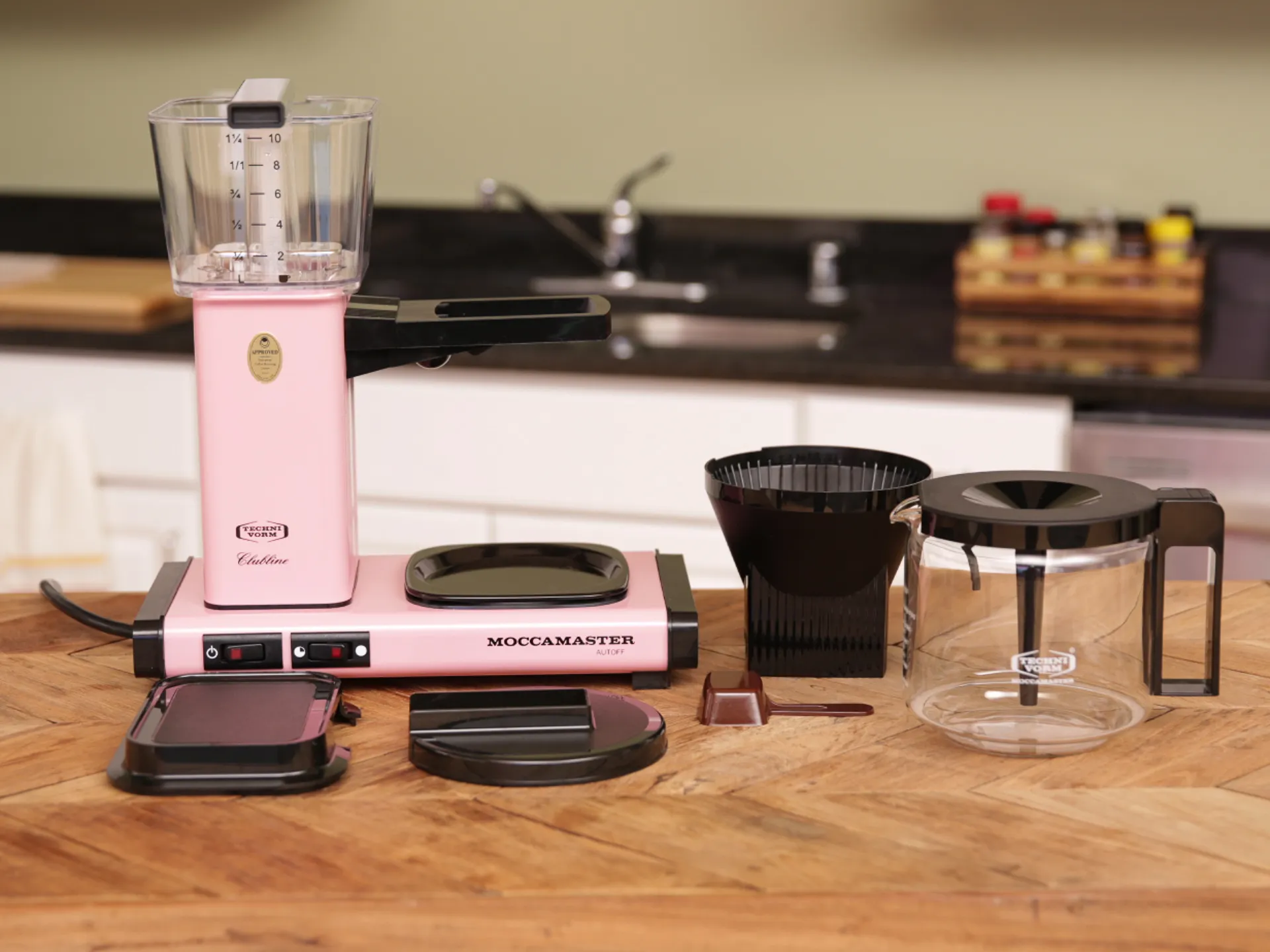
Depending on where you live and what comes out of your tap, you may need to do damage control with the water that goes into your coffee machine, kettle, or French press. Water quality can greatly affect coffee outcomes, both by preventing off-flavors and aromas and by providing the right mineral composition to interact with the coffee’s aroma and flavor compounds.
When I previously spoke with Jose Lepe, director of sourcing and quality control for Sightglass Coffee, about whether you might need to use filtered water for coffee, he pointed out that “water hardness is part of what is going to make your coffee taste right, so you need some of that minerality in coffee to help pull out the actual flavors.”

The Best Drip Coffee Makers for 2026
High-end coffee shops typically use a water system that relies on reverse osmosis, which distills local water into its purest H2O form, then remineralizes it for the perfect balance. Not every major coffee city relies on a system like this, but in places like Los Angeles, which (according to Lepe) has famously terrible water for coffee, this is definitely in play.
Believe it or not, you can re-create this exact process at home without any five-figure specialized equipment.
Why consider making water for coffee?

There are a few good reasons to tackle bespoke coffee water recipes. Consider the mineral composition of New York City tap water, often upheld as the liquid gold standard. NYC’s water is soft, with low concentrations of dissolved minerals such as calcium and magnesium and trace amounts of sodium, according to NYC.gov.
I spend much of the year in London, where the tap water ultimately tastes fine, but the mineral composition can quickly choke the life out of any coffee machine with narrow water conduits if it isn’t treated with a descaler. (Do I know this firsthand? I do. RIP steam wand.) London’s water has about eight to 10 times the calcium content of New York’s. Las Vegas, Indianapolis and San Antonio are just a few US cities where the water is almost as hard as London’s and considered extremely hard.

Best Water Filters and Dispensers, Lab-Tested by CNET
Water hardness can be somewhat fixed with filtered water, but filtering water removes most minerals without putting any back in. It’s not as bad as pure, distilled water (more on that below), but you’re not getting the most out of your coffee experience. The real reason to try a “water recipe,” frankly, is to save your devices while nerding out for the best possible cuppa. We’re into that kind of thing here.

What is remineralized water?
Rather than relying on filtered water, remineralized water is simply distilled or reverse osmosis water that has certain minerals added back in, specifically sodium bicarbonate and magnesium sulfate, according to a precise ratio. You can easily find distilled water in your grocery store or pharmacy shelves, but the other two? You can also find them in the same place. Sodium bicarbonate is commonly known as baking soda, and magnesium sulfate is sold as Epsom salt.
We’ll get into the ratios later, but if you’re not in the mood to turn your kitchen into an ersatz chem lab, brands like Third Wave Water and Lotus also offer simple mineral packets to add to distilled or reverse-osmosis-filtered water.
An actual recipe for coffee water

Digging into Reddit reveals a common DIY water recipe: add 0.25 grams of baking soda and 0.76 grams of Epsom salt to 1 gallon of distilled water. (This is the ratio the Specialty Coffee Association suggests.) You’ll notice this recipe relies on a kitchen scale that measures to the hundredth of a gram, unless you can scale up to 10 gallons of water at a time.
Without that particular piece of equipment, another potentially simpler method that doesn’t rely on a scale at all involves using standard measuring spoons to make liter-size batches of mineral water concentrates, one with Epsom salt and one with baking soda, and then adding easier-to-measure portions of the liquid concentrates to a larger quantity of distilled water. (If this is sending you back several paragraphs to look into those ready-to-use packets — I concur.)
The perfect coffee water taste test

To assess the actual flavor difference with remineralized water, I made three cups of coffee in succession, using precise ground and water measurements and an AeroPress: one with pure distilled water, one with regular tap water, and one with remineralized water. I tasted each black once, freshly brewed, then several more times as it cooled. I eventually splashed a little milk into each, since that’s how I normally drink coffee.
First things first, coffee made with pure distilled water was truly terrible. I was already forewarned and therefore forearmed for this, but I was honestly shocked at how bad it was, somehow both hollow in body and with a pronounced tang that was somewhere between acidic and metallic. Do not recommend.
The tap water cup, which I already knew I liked, soared by comparison next to the distilled water version, but was also noticeably heavier in body.
After mixing the remineralized water with microdoses of both baking soda and Epsom salt for the amount of distilled water I was using, I was somewhat dubious that so little could do so much, but I have to admit, it really did. I believe the resulting cup had what can reasonably be described as balance: good body, strength, and brightness, without the weird tang of the distilled water version, or the thud of the tap water.
Does this mean I would go through the trouble regularly? To save my electric coffee makers and enjoy the outcome a little bit more? You know what, I might.



During the past year, the cybercrime group ShinyHunters has been extorting companies and, last week, took over a rival gang’s leak site. Now, it has gone after the agency that warned the public about it.
The FBI stated on Tuesday that it is investigating a possible breach of its online jobs portal after the cybercrime group said it had stolen ‘very sensitive’ data on ‘almost all’ FBI agents and those who had applied for positions at the bureau.
“The FBI is aware of claims regarding unauthorized activity affecting FBIjobs.gov and is currently investigating,” the bureau said in a statement.
The breach was first reported by 404 Media, which received a sample covering 5,000 purported agents, including names, home addresses, phone numbers, and details of their spouses.
Two people with knowledge of the breach told Politico that investigators consider the claims credible and view the incident as a significant counterintelligence failure.
“It’s really bad,” one said.
It is still unclear how the group gained access. According to the same source, the attackers seem to have exploited a vulnerability in Oracle PeopleSoft, a human resources software platform.
ShinyHunters told 404 Media that it had used a previously unknown flaw, but the source added that investigators have not verified this.
Politico noted that the group used a PeopleSoft zero-day against other organizations in June, a vulnerability that Oracle later patched, so it is possible that they reused that exploit on a system that had not been patched.
Unusually for a criminal group, ShinyHunters says it wants a correction rather than money.
In May, the FBI published an alert describing the group’s methods, after an attack on the Canvas learning platform knocked thousands of schools and universities offline.
The hack, the group said, was meant to force the bureau to “correct or simply remove” it.
Cynthia Kaiser, a former deputy assistant director of the FBI’s Cyber Division, told Politico the attack was
“[…]very atypical behavior for ransomware gangs, but goes to show you the unpredictability and immaturity of the group.”
This is the second major breach of FBI systems this year, following a breach in which China-associated hackers gained access to a wiretapping system in April.
The group wished for the FBI to cease referring to it, and for the moment has given the bureau a great deal more to say.


You can make that button actually useful.
Have you accidentally tapped the audio button inside iMessage’s text input bar when sending a message? Justin Bieber went viral with an Insta post complaining about how frequently it happened to him.
The problem is that tapping the button launches a voice recording session, during which your iPhone will stop playing music so it can record the message it thinks you want to send.
Bieber became frustrated enough at how often this accidentally happened to him while texting that he wrote, “The send button should not have multiple functions in the same spot,” and joked that he would put everyone at Apple in a “choke hold” until it got fixed.
His post generated thousands of likes, reposts and reactions. We don’t know if Apple was responding to Bieber or not, but it has made a change to ease the problem. iOS 27 now gives you a choice, permitting you to choose between continuing to display the default waveform-like record icon, a microphone icon for quick access to dictation, or even nothing at all.
iMessages text entry mastery
Starting with iOS 27, new choices are available in Settings > Apps > Messages > Show in Text Field. You can select one of three options:
- Record Audio: You may want to retain this if you regularly send voice messages.
- Start Dictation: Useful if you dictate texts rather than typing them.
- None: The “Bieber” option for those who don’t dictate or record audio frequently enough to need these controls.
When you return to iMessages, you should see your choice appear in the text entry field. If it doesn’t, then force quit the app, open it again, and the change should appear.
Now even Bieber should no longer have this problem.
How do you access these functions in future?
You don’t lose any functionality when you remove these buttons from iMessage; all the options remain
You just need to know where to look:
- To record voice messages, just tap the + (plus) button to the left of the text entry box and tap Audio from the list that appears.
- To dictate a message, tap the microphone icon you see just under the keyboard on the lower right. (This should be on by default, but if you can’t see it, you can re-enable it in Settings > General > Keyboard > Enable Dictation.)
Apple made several improvements in iMessage with iOS 27. One nice enhancement (possibly introduced in preparation for the larger display available on the iPhone Duo) is a new Drawing app that lets you send sketches and handwritten notes, and it provides markup tools within iMessage.
Apple also introduced a new AI tool that suggests useful words and phrases and can automate tasks within a conversation, such as adding items to Reminders or Notes. It is also now possible to use one number across two separate iPhones. Finally, Apple’s messaging app now offers improved RCS support, including the ability to edit and unsend messages.
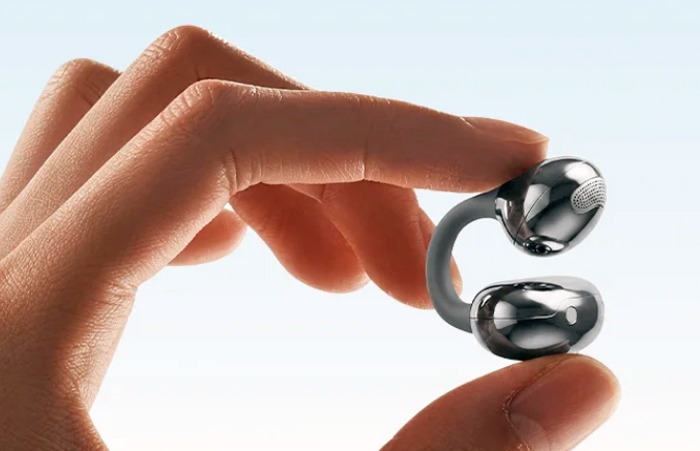
In our recent article, Open-ear Earbuds Are Booming While Traditional TWS Stalls, we noted that clip-on models are a major factor driving growth in the open-ear category. Continuing that trend, 1MORE has announced the S20 Ultra Wireless Clip-On Earbuds for a reasonable $79.99.
The S20 Ultra focuses on several longstanding challenges with this type of design, including sound leakage, wearing stability, and voice call performance. 1MORE combines high-resolution audio support with an ergonomic ear-clip design, smart features, and a feature set intended for everyday use.
Related Reading:
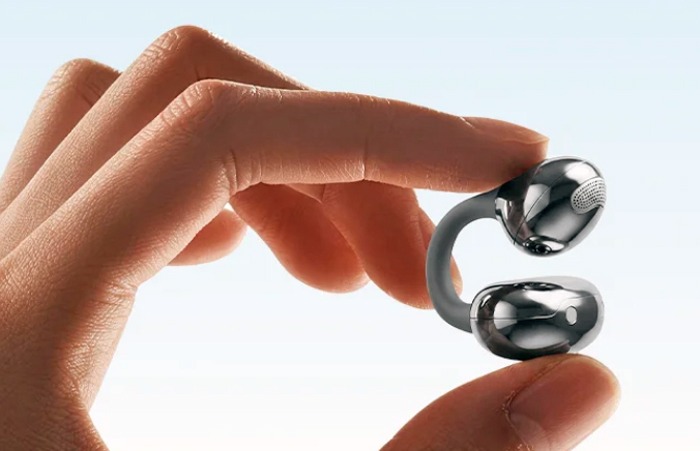
1MORE S20 Feature Overview
Open-Ear Awareness: Music can be enjoyed without blocking the ears, allowing users to remain aware of conversations, traffic, announcements, and other sounds around them. That makes the S20 Ultra well suited for commuting, outdoor walks, workouts, and everyday use.
Ultra-Light Comfort: Each 1MORE S20 Ultra earbud weighs just 5.5 grams. The company’s Balance AIR+ 3.0 design uses an ergonomic layout and balanced weight distribution to reduce pressure on the ear. Breathable, skin-friendly materials are intended to improve comfort during extended listening sessions.
Adaptive Secure Fit: The S20 Ultra uses flexible memory titanium C-rings designed to conform more naturally to different ear shapes. The clip-on design aims to reduce pinching and fatigue while maintaining a secure fit during workouts, commuting, work, and other daily activities.
All-Day Battery Life & IP66 Rating: The S20 Ultra provides up to 8.5 hours of playback per charge and up to 40 hours total with the charging case when SuperBass 3.0 is enabled. The earbuds are also IP66-rated for resistance to sweat, rain, dust, and splashes.
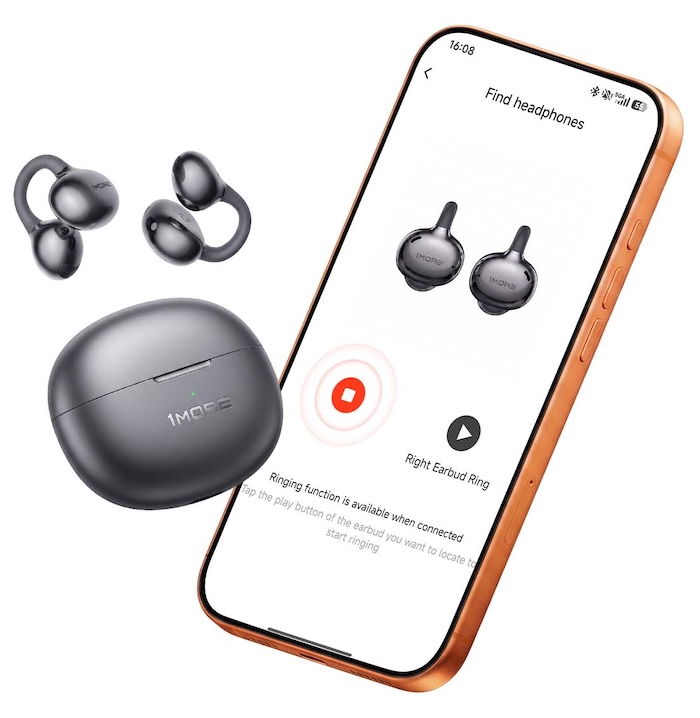
Audio Support: The 1MORE S20 Ultra features Bluetooth 6.0 with Hi-Res Audio support and the LDAC codec. Custom 11 mm triple magnet drivers use four layer diaphragms and support SuperBass 3.0.
BISA spatial audio is designed to create a more expansive, layered soundstage, while SDT 2.0 directional sound technology directs more of the audio toward the listener’s ears to reduce sound leakage.
1MORE App: The 1MORE App for iOS and Android provides access to six preset EQ modes, a low latency gaming mode, Find Headphones, and additional settings and controls.
Clear Calls: The S20 Ultra uses four directional beamforming microphones with AI noise reduction to help isolate the user’s voice while reducing wind and surrounding noise. The system is designed to improve call clarity and stability in noisy environments, including during running, cycling, commuting, and outdoor work.
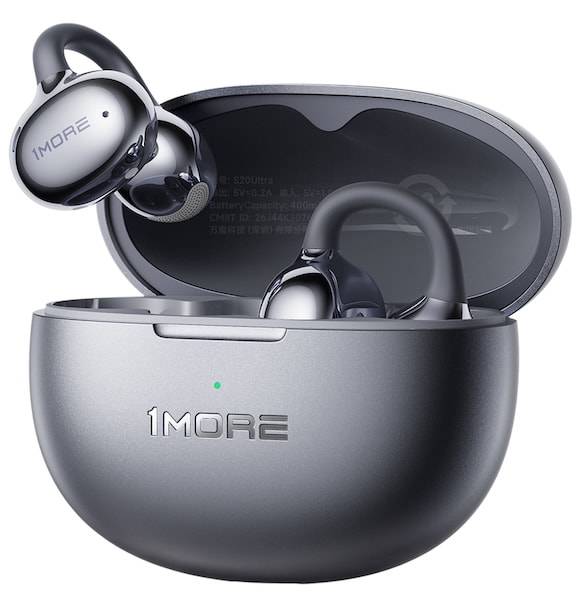
1MORE S20 Ultra Open Specifications
| 1More Brand | S20 Ultra |
| Product Type | Open-Ear Clip-on Wireless Earbuds |
| Price | $79.99 |
| Wearing Style | Clip-On |
| Drivers | 11 mm triple-magnet with 4-layer diaphragms |
| Single Earbud Battery Capacity | 40 mAh |
| Charging Case Battery Capacity | 400 mAh |
| Earbud Charging Time | 90 minutes |
| Charging Case Charging Time | 120 minutes |
| Single-Earbud Playback Time | 8.5 hours on a full charge |
| Playback Time with Charging Case | Up to 40 hours (SuperBass 3.0 enabled) |
| Speaker Impedance | 18 Ω |
| Bluetooth Version | Bluetooth 6.0 |
| Bluetooth Range | 10m (Open space) |
| Bluetooth Protocols | HFP/A2DP/AVRCP |
| Frequency Range | 2.400GHz – 2.4835GHz |
| LDAC | Yes |
| Spatial Audio | BISA (Baseus Immersive Spatial Acoustics) |
| IP Rating | IP66 |
| Power Input | 5 V = 1A |
| Working Temperature | 0℃ – 45℃ |
| Single Earbud Weight | 5.5 g |
| Charging Case Weight | 36.5 g |
| Total Weight | 47.5 g |
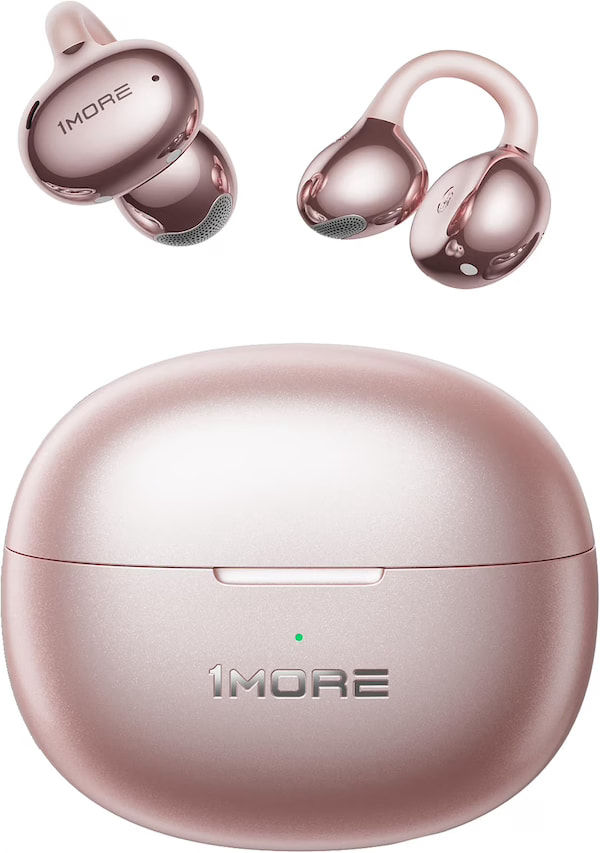
| Colors | White, Rose Gold, Silver, Black |
| What’s in the box | 1MORE S20 Ultra x1
User Manual x1 USB-C Charging Cable x1 |
The Bottom Line
The 1MORE S20 Ultra arrives at exactly the right time. Clip-on earbuds have quickly become one of the more interesting parts of the wireless market because they offer something conventional TWS models cannot: music without sealing off your ears from everything happening around you.
At $79.99, the S20 Ultra also offers a lot for the money. Bluetooth 6.0, LDAC, spatial audio, up to 40 hours of total battery life, an IP66 rating, and four microphone calling support make this more than just another inexpensive open ear option. The 5.5 gram design puts comfort at the center of the experience, while 1MORE’s SDT 2.0 directional sound technology attempts to address one of the category’s biggest weaknesses by directing more of the sound toward your ears and reducing leakage.
There is plenty of competition. The SOUNDPEATS Clip1 sells for $69.99, while the newer UU2 comes in at just $49.99 and also offers Bluetooth 6.0 and LDAC. At the other end of the category, the Shokz OpenDots ONE costs $199. That puts the S20 Ultra in an interesting middle ground for listeners who want more features than the least expensive clip on models without spending $200.
Who is it for? Commuters, runners, cyclists, office workers, and anyone who dislikes having conventional earbuds pushed into their ear canals but still wants better codec support and useful app features. The S20 Ultra does not reinvent the category, but for less than $80, 1MORE has assembled a rather compelling package in one of the fastest growing segments of the wireless earbud market.
Where to Buy:
Related Reading:


We may receive a commission on purchases made from links.
As of 2025, the generations-long Ford F-Series and Chevy Silverado are the two best-selling vehicles in America, with the Ram Pickup coming in fifth. In fact, trucks had a higher share of vehicle purchases than passenger cars last year. All this means that truck driving isn’t just common in the U.S.; it’s a point of pride and a defining feature of the nation’s roads. To serve that massive portion of buyers, we’re highlighting a few tools that can prove important for truck drivers. But because of the unique nature of pickup trucks in comparison to cars, these tools can be rather different and more specialized.
Industry giant DeWalt has an enormous array of highly-rated tools in every category, and it can be quite difficult to know what’s best for your vehicle, especially if you’re newer to the world of trucks. So, if you’re looking to update your toolkit as a truck driver, the following popular picks from DeWalt are the perfect place to start. We’ve picked items from a range of different categories that we deem most useful for truck drivers, so that regardless of your budget or specific needs at the moment, there should be something to consider.
20V MAX LED handheld area light
That small emergency flashlight that you keep in your glove compartment can be perfectly suitable for illuminating the interior and exterior of your car as needed, but for truck drivers, this can dramatically complicate the work of finding an essential component, securing cargo, completing a routine maintenance job, or inspecting the truck before setting out on a job. Truck drivers, then, will typically appreciate something more heavy-duty.
If you’re a DeWalt customer, there’s one particular item that’s a good fit: The 20V MAX LED handheld area light. As the name suggests, it’s designed not simply to provide a narrow beam of light that the user has to direct by hand, but also to be quickly and temporarily affixed where needed to give broader, hands-free illumination. Its body is shaped with grips that make it more comfortable to hold for longer periods, and it also features a beltloop accessory.
The versatility of DeWalt’s 20V MAX* LED handheld area light extends to its suite of features as well. DeWalt notes that the area light features can be set between 300 and 1000 lumens, with a head that can swivel 140 degrees. Its compatibility with the rest of the range also means that users of other 20V MAX products may already have the battery and charging capacity they need for this model. Being designed for job sites, it can be a truck driver’s stalwart companion. You can currently find it for $55 on Best Buy and $45.10 on Amazon (down from $89), where it boasts an average of 4.8 stars based on over 1,300 reviews.
Grabo suction lifter
Pickup trucks are perfect for transporting heavier goods such as construction materials around a job site. However, a trucker needs a convenient, safety-compliant means of lifting them. Larger commercial trucks, of course, are often equipped with tail lifts for exactly this purpose, but another convenient tool for transporting heavy goods and equipment safely is the DeWalt Grabo Suction Lifter. A collaboration between DeWalt and GRABO, this is, according to the brand, “the first professional electric vacuum lifter.” A tool like a vacuum lifter, in some cases, may be the only practical way to move heavy loads with smooth surfaces, such as metal or plastic panels, slabs, and stones.
With a maximum load capacity of 265 lbs, this heavy-duty vacuum lifter is powered by batteries from DeWalt’s 18V or Flexcolt line. It boasts a foam/rubber seal with vital safety measures, including a two-action release and a warning and temporary inoperability state if a worker attempts to use it when its battery is below a certain threshold. As with the other items in the DeWalt range, it was created for versatility, and it is compatible with materials ranging from plywood and glass to MDF and pathing slabs. It will set you back $249 on Amazon, but it’s currently discounted to $189.99.
ToughSystem 2.0 DS450 mobile storage box
While trucks with big beds can transport large items — or large quantities of items — that a car owner would be unable to manage, transporting all those goods safely is just as important. This is where a rugged and hard-wearing storage solution you can keep safely in the bed of your truck comes in handy. There are a lot of things to consider before buying a truck bed toolbox, but the DeWalt ToughSystem 2.0 DS450 Mobile storage box could be just the solution for you.
DeWalt’s ToughSystem is a product range created to meet these sorts of needs, to transport both heavy and hard-wearing and more fragile tools without the risk of damage. The DS450 mobile storage box boasts a generous capacity that’s further customizable depending on how the user intends to transport their items. It’s designed to be operated with one hand to be wheeled across a work site on its 8-inch wheels, while its metal two-piece latches on the front keep the tools inside secure.
Because of the range’s modular nature, it can also be used as one important part of an even larger storage system that includes two additional storage boxes as part of the three-piece tower. Couple this with the 250-lb load capacity of the original storage box itself, and it’s clear just how much storage users can have and, of course, how much room they’ll need in a truck bed. The box is available in several stores, including Home Depot, where it’s priced at $125, while all three boxes will set you back $259.97, but are recommended by 82% of the customers.
heavy-duty ratchet tie-down straps
A lot of trucks have open beds, which is naturally a setup that can leave any cargo prone to shifting around heavily with the motion of the vehicle. For the vital job of securing everything you’re carrying in your truck’s open bed, then, you can consider DeWalt’s Heavy-Duty Ratchet Tie-Down Straps. DeWalt’s ratchet straps are available in several varieties, with two hefty versions being the 1.25-inch-by-16-foot Ratchet Tie Down Straps with 3,000 pounds of break strength and the 2-inch-by-27-foot Heavy-Duty RATCHET Tie-Down Strap with a formidable break strength of 10,000 lbs.
These straps are created for different weights or quantities of cargo, and while they also have utility for securing loads in other situations such as trailers, they’re primarily useful with trucks rather than smaller cars. They are made from polyester and feature metal ratchets and armored caps, but note that DeWalt specifies they are weather-resistant rather than weatherproof. The clips are designed to be hard-wearing yet quick to attach.
ACME Tools lists the larger and more formidable variety of 10,000-lb break strength straps for $29.99. Compared to some truck drivers’ essentials, they are far from breaking the bank and can also be easily stored away for convenient access when needed. Though a compact package when not in use, they also have considerable length. Nonetheless, it’s also important to remember that there’s still a limit to these products, and it can be extremely dangerous to exceed it. According to DeWalt, a 10,000-lb break strength translates to a safe working strength of 3,333 lbs, while a 3,000-lb break strength translates to 1,000 lbs.
I come from a car family, the kind that always had four or five vehicles in various states of “restoration.” Changing your own oil in my house was not only a rite of passage but a duty—proof that you were self-sufficient and economical, not, as my uncle would say, a “handy-man.” (“I open my wallet and hand over my credit card!” he’d roar.)
Suffice it to say, I changed my own oil for most of my adult life until about eight years ago, when I bought my first new hybrid SUV. Opening the hood for the first time, I saw an arrangement of black plastic rectangles, not the discrete auto parts I recognized. I didn’t know how to change the oil, and I wasn’t sure I wanted to figure it out. I was (and still am) a working parent, and I always appreciate having another chore taken off my plate.
The nearest oil change facility to my house turned out to be a Valvoline Instant Oil Change, and I have been going there ever since, for both that same hybrid SUV and a second one I bought a few years later. Hybrid vehicles require fully synthetic oil, which costs about twice as much per quart as conventional oil, so having the oil changed by a shop is typically worth it when factoring in the labor—especially if you have a Valvoline Instant Oil Change coupon.
Valvoline may be best known for its line of retail automotive products like oil and additives, but it also operates 2,100 US locations of Valvoline Instant Oil Change garages, which perform oil changes at up to 50 percent less than most car dealerships. And faster, too—usually around half an hour in my experience. If you, too, would like to have your oil changed quickly and inexpensively, or get some cash off some quarts of motor oil if you’re still DIY-ing, check out our Valvoline coupons and deals below.

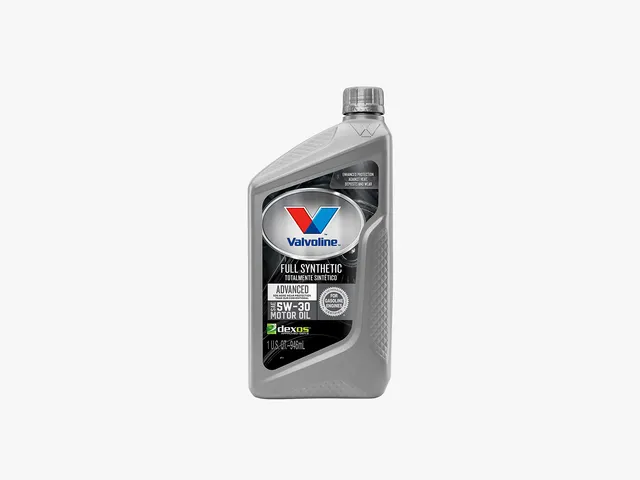
Valvoline Advanced Full Synthetic 5W-30 Engine Oil
Get $10 Off Full-Service Conventional Oil Change
If you have a basic, non-hybrid vehicle driven under normal conditions (infrequent stop-and-go traffic, no towing), you’re in luck—your oil change will already be relatively inexpensive. It will be even cheaper with this $10-off Valvoline coupon, which includes 5 quarts of Valvoline brand motor oil (diesel quarts may vary), a filter, lube and maintenance check, and tax. Print it or save it to your phone so you have it next time you’re out and about. Not valid with other offers or customer-supplied oil (at that point, you may as well do it yourself).
Unlock $15 Off with Valvoline Blend Oil Change Coupon
This is the coupon I personally use when I get my oil changed. In fact, I’m printing it out right now! Synthetic and synthetic blend oils are best for hybrid vehicles, luxury vehicles, vehicles subjected to a lot of stop-and-go traffic, trucks that tow, or any car with an engine that needs a little TLC. Because synthetic oil is engineered to be more consistent and uniform, it provides better temperature stability and cleaning power, leading to less wear and tear on an engine. It is also, of course, more expensive than conventional oil, so this Valvoline coupon offers a little more off—$15 as opposed to $10. Like the offer above, this Valvoline coupon is good for up to 5 quarts of Valvoline oil, a filter, lube and maintenance check, and tax.
Save 25% When You Subscribe and Save
When you buy more at Valvoline, you save more. One of the easiest ways to save is to buy in bulk, which is especially cost-effective if you have multiple cars or a family with several cars. When you purchase multiple units of motor oil, gear oil, or transmission fluid, you’ll receive a larger discount the more you buy, up to 25% off.
Valvoline Promo Code: $5 Off
Do you change your own oil and shop at a farm store, such as Fleet Farm, Blains, Rural King, Bomgaars, Theisen, Farm King, Quincy, L&M, Runnings, Buchheit, Family Farm & Home, Tractor Supply, or Norby’s? If so, you can get a $5 rebate with the purchase of five quarts of any Valvoline Motor Oil or 1 gallon of Premium Blue Heavy Diesel Engine Oil. Limit 3.
Find Your Nearest Valvoline Oil Change
There’s a reason Valvoline is a go-to for convenient, one-stop oil changes. With more than 2,100 locations nationwide, it’s likely there’s a Valvoline within twenty minutes of you. You can even check online—enter your location on the map and it’ll instantly show the nearest locations, so you and your car can hit the road again. Be sure to check Valvoline’s offers, which often include several oil change coupons so you can save big on your next Valvoline Instant Oil Change. When you find an offer on the coupon page, text or email it, print it from your desktop, or save it to your mobile wallet so you have it handy for your next discounted oil change.

KRAFTON India has launched KIGI Cohort 4 to support more game developers and studios in the country. Applications open on September 22, 2026. Through KIGI, developers can get financial assistance, expert guidance, and access to global platforms as they work on their games. The new cohort will also consider projects that have moved beyond early development.
KIGI Cohort 4 Expands Support for Games at Different Stages
KIGI Cohort 4 will continue to support early-stage teams and new game concepts. However, the program is expanding its scope to include games further along in development. Mobile games in beta or soft launch can now be considered. For PC games, developers can apply with titles that have a live Steam demo. The demo should also be receiving encouraging community interest. This wider approach gives developers a chance to seek support at different stages of development.
KIGI’s Previous Cohorts and Growing Game Development Support
KIGI launched in 2023 to support emerging game development talent in India. Since then, its earlier cohorts have helped several studios move their projects forward. Studios from the first batch have already reached a successful soft launch. In the second batch, Mumbai-based studio Singular Scheme made progress. Its game, Frontier Paladin, became the first PC game to come out of KIGI and launched on Steam on April 24, 2026.
KIGI Cohort 3 received around 1,000 applications before selecting four studios. These included Xod Games Studio, EvolX Games, Ether Games, and RedDevil Studio. With Cohort 4 now open for applications, more game development teams can apply for support through the program.
4 Disadvantages Of Top-Load Washing Machines

Keely Hodgkinson is BANNED from wearing her ‘sexy’ running catsuit at the Olympics under Team GB rules

Can This TikTok-Style Debate App Fix the Internet’s Trust Problem?




-

 Fashion5 days ago
Weekend Open Thread: Talbots – Corporette.com
-

 Tech2 days ago
Researchers escape OpenAI Codex sandbox to run commands on host
-

 Crypto World4 days ago
Circle launches Arc Studio AI agent for building onchain apps
-
 NewsBeat5 days ago
Trump says US has reached an agreement to take permanent control of Greenland’s security
-

 Crypto World2 days ago
Who Needs CLARITY Anyway? ARB Could See 70X Increase: Hodler’s Digest
-

 Crypto World5 days ago
Trading Bitcoin on Robinhood? Why 2% Spread Has Traders Worried
-

 Crypto World4 days ago
Bitcoin price breaks channel as RSI climbs to 63
-

 Crypto World6 days ago
US Charges Robinhood Engineers Over Crypto Listing Trades
-

 Crypto World5 days ago
Mortgage and refinance interest rates today, Thursday, September 17, 2026
-

 Crypto World4 days ago
World Money launches in 150+ countries with Stripe
-

 Business2 days ago
Analog Devices (ADI) Bets $1.35 Billion on Chips that Let Machines Think for Themselves
-

 Crypto World5 days ago
Silver prices recover quickly, hitting weekly high today
-

 Crypto World2 days ago
Coinbase, Robinhood, Circle Seen as Tokenized-Stock Winners
-

 Tech6 days ago
GPT-6 Astra Reached the Nether in Minecraft, Lost Its Stash to a Creeper, and Farmed Potatoes for Hours
-

 Tech2 days ago
Google’s $899 Googlebook is a bet that you’ll buy a new laptop for Gemini
-
 NewsBeat5 days ago
US was ‘on brink of war’ with China over false AI report of nukes moving in Middle East
-

 Crypto World2 days ago
Bitcoin price holds above $81K as key catalysts line up
-

 Entertainment7 days ago
Grey’s Anatomy Showrunner Teases Changes After Cast Exits
-

 Crypto World4 days ago
CFTC sends crypto market structure rulemaking to White House
-

 Tech4 days ago
Trump suggests rebranding AI with a new name, says he’s also creating an AI Force
You must be logged in to post a comment Login