For months, rumors suggested Apple would name its first foldable the iPhone Ultra. But on Wednesday, the company unveiled its highly anticipated device with a different name: the iPhone Duo.
Skipping the Ultra name feels fitting for a foldable that doesn’t quite offer Apple’s highest-end features. The Duo is still a premium device, but it lacks a telephoto camera and has a slightly more modest battery than the iPhone 18 Pro Max.
In that respect, the iPhone Duo is more comparable to Samsung’s similarly palm-size Galaxy Z Fold 8. The Galaxy Z Fold 8 Ultra, meanwhile, takes things a step further with Samsung’s top-tier camera and battery specs.
The Duo is designed to be compact and versatile, allowing you to easily watch horizontal videos in landscape mode and vertical content in portrait. On the other hand, the Z Fold 8 Ultra feels similar to a slab phone when closed, thanks to its slim design and more standard dimensions. (Meanwhile, the smaller Galaxy Z Fold 8 shares design elements with the iPhone Duo. You can read more about how those phones compare here.)
Samsung’s Galaxy Z Fold 8 (left) has a more compact design, while the Z Fold 8 Ultra has a taller build that’s more similar to a slab phone.Andrew Lanxon/CNET
The Duo and Z Fold 8 Ultra share the commonality of a high price tag. The iPhone Duo starts at $1,999 for 256GB, while the Galaxy Z Fold 8 Ultra starts at $2,100 for the same storage level.
iPhone Duo vs. Galaxy Z Fold 8 Ultra design and displays
The iPhone Duo has a 5.4-inch cover display.Abrar Al-Heeti/CNET
The key difference between the iPhone Duo and the Galaxy Z Fold 8 Ultra is in their designs.
The iPhone Duo is palm-size with a squat, 5.4-inch cover screen and a 7.6-inch inner display. The Z Fold 8 Ultra has a more conventional book-style foldable design, with a taller, 6.5-inch cover screen and a larger 8-inch inner display.
A unique feature of the iPhone Duo is its matte, nano-texture inner display that helps to reduce reflections and minimize the crease. The Galaxy Z Fold 8 Ultra has an anti-reflective coating that also helps to reduce those distractions, but the Duo’s matte finish does a better job at that.
The iPhone Duo has a 7.6-inch matte inner display that helps to reduce reflections and the crease — though you can still see both under certain lighting conditions.Abrar Al-Heeti/CNET
The Z Fold 8 Ultra stands out for its exceptionally thin build, measuring 4.1mm when open and 8.9mm when closed. The iPhone Duo is also fairly thin, measuring 5.2mm when open and 11.3mm when closed.
The Z Fold 8 Ultra is a little lighter, weighing 215 grams, while the Duo weighs 254 grams. It’s a small difference that’s barely perceptible.
Advertisement
When multitasking, the Duo can only run up to two apps simultaneously, while the Z Fold 8 Ultra supports multitasking with up to three apps. This is aided by the Ultra’s larger main display that prevents apps from feeling cramped.
The Galaxy Z Fold 8 Ultra is the most advanced foldable Samsung currently sells.Andrew Lanxon/CNET
Perhaps one of the most impressive features of the Duo is its IP68 rating: it can withstand submersion in up to 6 meters of water for 30 minutes and is dust-resistant. The Z Fold 8 Ultra has a more limiting IP48 rating, meaning it can be submerged in up to 1.5 meters of water for 30 minutes and is protected against solid objects larger than 1mm, but not dust or sand. The Duo’s dust resistance is a rarity in the world of foldables and is shared with Google’s Pixel 11 Pro Fold.
If you value durability and compactness, the iPhone Duo can be a good fit. If you want a foldable phone that feels more similar to a slab phone when closed and a tablet when open, the Galaxy Z Fold 8 Ultra is a good pick.
iPhone Duo vs. Galaxy Z Fold 8 Ultra cameras
The iPhone Duo has two 48-megapixel rear cameras.Abrar Al-Heeti/CNET
Because the iPhone Duo is compact, it makes some compromises with the cameras. There’s a 48-megapixel main camera and a 48-megapixel ultrawide camera, but no telephoto lens. The cover display has a 12-megapixel selfie camera, while an “under-display FaceTime camera” sits on the inside screen.
The Galaxy Z Fold 8 Ultra has a triple rear-camera system, which includes a 200-megapixel wide-angle, 50-megapixel ultrawide and 10-megapixel telephoto camera. There’s a 10-megapixel selfie camera on each display.
The Z Fold 8 Ultra has a triple rear-camera system.Andrew Lanxon/CNET
We’ll have to see how the iPhone Duo performs in our camera tests, but the Galaxy Z Fold 8 Ultra shares rear camera optics with the top-of-the-line Galaxy S26 Ultra (hence the shared moniker), and has performed well in our camera tests.
iPhone Duo vs. Galaxy Z Fold 8 Ultra processor and battery life
The iPhone Duo is powered by the same in-house A20 Pro chip as the iPhone 18 Pro models. The Galaxy Z Fold 8 Ultra has Qualcomm’s Snapdragon 8 Elite Gen 5 chip for Galaxy.
Advertisement
Apple doesn’t share specific battery specs, but says the iPhone Duo will give you up to 31 hours of video playback on the inner display, and 44 hours when using the outer screen. When using both screens equally, the company says you’ll be able to go 24 hours before needing to charge.
Samsung boosted battery capacity on its book-style foldable this year, going from 4,400 mAh on the Z Fold 7 to 5,000 mAh on the Z Fold 8 Ultra. That should easily get you through a day without worrying about where the nearest charger is.
The iPhone Duo has specialized visual layouts that it switches to automatically when the device is unfolded, folded closed or rotated.Abrar Al-Heeti/CNET
Apple says the iPhone Duo can charge up to 50% in around 20 minutes with a 60-watt adapter or higher. The Z Fold 8 Ultra supports up to 45-watt wired charging, going from empty to 63% in around 30 minutes in CNET’s testing.
The Duo has a key advantage when it comes to wireless charging: it supports MagSafe, with Qi2 wireless charging up to 25 watts. Meanwhile, the Z Fold 8 Ultra doesn’t have built-in magnets, but if you use a Qi2-compatible case, you can tap into 20-watt wireless charging.
If you prefer being able to easily attach magnetic accessories without a case, the iPhone Duo has the advantage here. The Galaxy Z Fold 8 Ultra has a long-lasting battery that pulled its weight in our testing.
Advertisement
Which phone should you pick?
The Galaxy Z Fold 8 Ultra has a wider inner display, which offers a little more space for watching videos and multitasking.Andrew Lanxon/CNET
Whether you go with the iPhone Duo or the Galaxy Z Fold 8 Ultra ultimately depends on how you plan to use your foldable phone.
The iPhone Duo is designed to better accommodate both horizontal and vertical content on the inner display, while the compact cover is good for quickly sending texts or checking notifications. If you find yourself viewing swaths of content and want a phone that feels a little different — or are deep in Apple’s ecosystem — the Duo could be the right fit for you.
Meanwhile, the Z Fold 8 Ultra operates as more of a standard-feeling phone when closed, opening to a wide, traditional tablet-like display. If you don’t want to stray too far from the design of slab phones but also want a more expansive screen sometimes, the Z Fold 8 Ultra might be a better pick.
Stay tuned for CNET’s review of the iPhone Duo for more details on the experience. For now, you can read our hands-on with Apple’s new foldable, and check out the spec chart below for more on how the phones compare.
Apple N1 wireless networking chip (Wi-Fi 7 (802.11be) with 2×2 MIMO), Bluetooth 6, Thread. Camera Control button. Dynamic Island. Apple Intelligence. Visual Intelligence. Siri AI. Dual eSIM. 1 to 3,000 nits brightness display range. IP68 resistance. Colors: black, white. Fast charge up to 50% in 20 minutes using 60W adapter or higher via charging cable. Fast charge up to 50% in 30 minutes using 35W adapter or higher via MagSafe Charger.
Abrar’s interests include phones, streaming, autonomous vehicles, internet trends, entertainment, pop culture and digital accessibility. In addition to her current role, she’s worked for CNET’s video, culture and news teams. She graduated with bachelor’s and master’s degrees in journalism from the University of Illinois at Urbana-Champaign. Though Illinois is home, she now loves San Francisco — steep inclines and all.
See full bio
Oleksii Oleksiyovych Lytvynenko, 44, pleaded guilty in June to conspiracy to commit wire fraud over his role in Conti, the Russia-linked ransomware operation associated with more than 1,000 victims and at least $150 million in ransom payments.
Lytvynenko took an unusual route into the ransomware business. The Ukrainian national, who later lived in Cork, Ireland, trained as a lawyer before joining Conti as an intruder and developer.
According to his plea agreement [PDF], Lytvynenko operated under the handle “henry” and joined a team run by another Conti conspirator known as “silver” or “buza.” He was recruited to help with coding and directed to work on a malware loader – software designed to get other malicious code running on a victim’s machine.
Prosecutors said his Google account showed he had also been doing some homework. Investigators found books and videos about malware and hacking alongside Conti malware, ransom notes, and stolen victim data. Prosecutors said he also used Google and ZoomInfo to research potential targets.
Advertisement
Lytvynenko wasn’t confined to writing code, according to the filing. Evidence from his online accounts showed that he possessed data stolen from eight US victims and four overseas, with the eight American victims reporting more than $1.5 million in losses.
Court documents identify several Bitcoin transfers tied to his Conti work, including 0.4 BTC worth $25,042 that prosecutors traced back to one of his victims. He has been ordered to forfeit the same amount.
Conti disbanded in 2022 after its internal chats and source code were leaked following the gang’s public support for Russia’s invasion of Ukraine. Lytvynenko apparently didn’t take that as his cue to find another line of work.
When Gardaí turned up at his County Cork home in July 2023, they said they found his laptop open, Cobalt Strike running and a Rocket.Chat session connected over Tor. Prosecutors said evidence recovered from the machine showed that his involvement in ransomware activity had continued after Conti disbanded.
Advertisement
Lytvynenko was extradited from Ireland to the US in October 2025.
The Justice Department says Conti attacked organizations across 47 US states, the District of Columbia, Puerto Rico, and 31 foreign countries between 2020 and 2022. By January 2022, the FBI estimated that victim payouts associated with Conti exceeded $150 million.
Lytvynenko will now have four years to contemplate a career change. ®
At IFA Berlin 2026, ARBREST put a chair through movements that office furniture often treats as exceptions. COVE is the new brand’s first product, made its world debut with an IFA Best of Design award. At Hall 2.2, Stand 141, visitors leaned toward a desk, shifted their shoulders, turned and reclined. The demonstration made a larger point: working is not a single posture, and support should not disappear when the body changes direction.
COVE is ARBREST’s first product and first expression of that idea in the ergonomic chair category. The new smart lifestyletechnology brand focuses on real needs that remain poorly addressed in work and everyday life. Its aim is to let technology recede into the background. COVE is the brand’s first step, not a claim that ARBREST will only make ergonomic chairs.
The reason for developing the chair is closely connected to the limits of standard office furniture. Many chairs are built around a standardized reference body, with differences addressed later through adjustments. That approach can leave smaller users compensating for a seat that is too deep, a lumbar support out of reach, armrests too far apart or feet that do not land securely. Women’s bodies are not identical, but the category has often treated their proportions as an afterthought. ARBREST decided to make them an initial design reference.
COVE starts with a 7-Point Fit Calibration. Seat height, width and depth, lumbar support, armrests, headrest and footrest are considered together. The recommended user height is 150 to 175 centimetres; seat height ranges from 46 to 54 centimetres and seat depth from 43 to 49 centimetres. The idea is to establish a better fit from the start, rather than relying on adjustment to compensate for the wrong proportions.
Advertisement
The seat has its own logic. A firmer sit-bone zone provides a stable base. A contoured pelvic area follows the body’s shape, and a flexible front edge is intended to reduce pressure under the thighs. The dual-tier active footrest helps bridge the gap between leg length and seat height. Together, these details address a familiar problem: when the legs, pelvis and lower back do not share a stable base, the user keeps moving in search of one.
COVE’s other details are similarly grounded in ordinary habits. The 3D Winged Headrest creates clearance for ponytails and styled hair during recline. Wide-surface touch controls are intended to be easier with longer nails. The 5D armrests follow the elbows as the user types, reads, browses or turns to communicate. None of these features changes the category alone. Together, they suggest that the chair was designed around a person’s routine rather than an abstract diagram of correct sitting.
Movement becomes more visible in the mechanism. COVE’s multi-axis forward-tilt chassis reaches 16 degrees, allowing the user to move closer to the desk without perching on the seat edge. The footrest continues to support the legs. The point is not to demonstrate how much a chair can move, but to keep support present as the body leans forward, sits upright, turns or reclines.
The 12-Zone Micro-Motion Backrest distributes support across twelve independent units arranged along a flexible spine plate. A small turn of the shoulders, a change in weight or a shift in the lower back can be met by different areas of the backrest. This is a different answer to the familiar ergonomic instruction to “sit correctly.” Instead of holding the body still, the chair is designed to stay connected as the body moves.
Advertisement
Designed around women’s proportions: the ARBREST COVE dynamic ergonomic chair and active footrest system. — Credit: ARBREST
COVE links that backrest to a 5-Point Synchronized Support system. The headrest, armrests, backrest, seat and footrest move as coordinated contact points. When fatigue appears, one touch activates the motorized lumbar support. As the backrest reclines, the support extends forward and the footrest continues to cradle the legs, creating a brief seated stretch.
The market value of this approach is not that COVE promises to solve every problem associated with desk work. It is that the chair gives a growing conversation about inclusive design a physical, testable form. Designing for women here means more than reducing dimensions. It means looking at where the pelvis settles, how the feet are supported, how hair and fingernails affect daily use, and how a person moves between concentration and rest.
After its IFA debut, ARBREST expects to move COVE into an initial launch or crowdfunding phase later in 2026. Launch details will be announced later. Its broader significance lies in its starting assumption: the user is not a fixed shape, and a chair should not require her to behave like one. COVE is the brand’s first product, and its first step toward further smart lifestyle products built around real user needs.
The report found that the gap in skills is leading to increased financial risk for organisations.
A new report from Ireland’s professional body for compliance professionals, the Compliance Institute, has found evidence of a growing skills gap within financial services.
51pc of the 125 senior compliance experts who contributed to the research survey said that companies lack the skilled workforce needed to stay on top of financial crimes and meet growing regulatory obligations.
82pc were of the opinion that financial services firms lacking the necessary skilled workforce are increasing their financial or operational risk, and more than half (56pc) believe Ireland is not developing enough talent in compliance and financial crime to meet future demand in the financial services sector.
Advertisement
Michael Kavanagh, the CEO of the Compliance Institute, said, “At a time when financial crime is becoming more complex, sophisticated and global, it’s concerning that the overwhelming majority of compliance experts believe that talent shortages in the areas of financial crime and compliance are increasing regulatory and operational risks for the Irish financial services sector.”
“So, it’s crucial that financial services institutions have the right firepower to combat financial crime, and a key part of this is suitably qualified staff and well-resourced compliance teams.”
Kavanagh explained that it is critical that the financial services sector has consistent access to adequately skilled compliance staff, especially as the overwhelming volume and pace of regulatory changes puts pressure on compliance teams in the sector.
Advertisement
“The sheer breadth of regulations demands a significant allocation of time, expertise and operational focus, often stretching teams to their limits. It has never been more important for the industry to have access to the right talent,” he said.
He explained that companies should take the necessary steps to ensure that their staff are well-trained and possess the skills needed to meet regulatory and operational challenges.
He added: “But there also needs to be a concerted effort by the Government and industry to invest more in talent so that the Irish financial services sector can truly prosper and navigate all the challenges that come its way.”
Don’t miss out on the knowledge you need to succeed. Sign up for the Daily Brief, Silicon Republic’s digest of need-to-know sci-tech news.
Oracle co-founder and executive chairman Larry Ellison has canceled a planned sale of his Oracle stock, the company announced on Saturday.
Oracle had previously disclosed in a regulatory filing that Ellison planned to sell 50 million shares worth around $7.5 billion, according to Reuters. The company did not offer a reason for the change in plans.
“No Oracle stock was sold under that plan, and he has no other plans to sell any of his Oracle stock,” the company said.
Amodei, Altman, and Elon Musk agreen on how government can tame the monster they created
ANALYSIS The leaders of major AI labs spent the weekend agreeing on a plan to capture regulators, make more money, and avoid responsibility for their dangerous behaviour. They call it “pacing the frontier.”
Advertisement
Anthropic CEO Dario Amodei set the ball rolling with a post in which he professed alarm at how quickly AI is improving and suggested the attack on Hugging Face caused by rogue agents run by his rival OpenAI as a warning (which he referred to as ‘OAI-HF’) represented a moment that proved something needs to change at so-called “frontier” AI companies – essentially the big US model-makers.
“It’s also easy to dismiss OAI-HF as the failure of one company, but I believe that would be a mistake,” he wrote. “I believe it’s incumbent on every frontier AI company to act as if OAI-HF had happened to them,” he added, because he worries that OAI-HF shows that a swarm of agents “could be capable of taking over the entire internet with a persistent botnet.”
Amodei therefore suggested “We must slow the pace at which we improve the capabilities of AI models. Progress will still seem fast, and we must make wise use of the time we gain.”
The CEO proposed a three-point plan to regulate AI:
Advertisement
Requiring AI labs to host “embedded evaluators” whose job is to “verify adherence to safety practices and commitments, report incidents, and help assess the alignment of not just completed AI models but training pipelines and processes.”
Frontier AI companies that operate in democratic countries collaborating “to establish common safety standards as well as limits on the rate of unchecked AI progress,” with undefined “forms of coordination” that would be “legally challenging” and “require government support.”
A vague call for democratic governments “to coordinate with authoritarian governments, to the extent this is possible, while taking seriously the challenges of verifying compliance.”
And just like that, three billionaires all signed up to the same set of rules they think the world’s governments should adopt to regulate their activities. Microsoft’s Satya Nadella signed up, too.
Amodei even gave democracies a threat/villain to unite against – authoritarians willing to use AI unethically.
Big AI has also argued it will deliver a productivity revolution. Daryl Plummer, chief of research at analyst firm Gartner, used his keynote speech at the company’s annual Symposium in Australia today to cite research that found software vendors are pitching 50 percent productivity gains from AI, but customers report a 16 percent lift.
Plummer also doubted that Amodei’s promise to slow development is real.
“I will believe that when I see it,” he said in the keynote.
Write your own rules
Amodei’s ideas therefore read like an attempt at “regulatory capture” – the situation in which vested interests find a way to define the rules their regulators impose. Those supine regulators then make decisions that benefit the entities they oversee more than they benefit the rest of us.
Advertisement
In this case, Anthropic, SpaceX, and OpenAI get regulations that amount to a cease fire during which they don’t need to compete so fiercely.
OpenAI boss Sam Altman also all-but-admitted that regulation will be good for investors when he used a weekend interview with the billionaires’ bible Fortune to reveal his company won’t seek a public listing this year because it is inopportune to do so while AI safety concerns are unresolved.
“We got a lot of stuff to do, like meeting this moment of what is going to be required for safety and alignment, and how the industry and governments can work together,” he said.
Or in other words: Our investors will get a better return if we pause our IPO until confidence is higher, and regulatory capture is the way to get that.
Advertisement
Amodei, meanwhile, outlined some very specific things he wants from Washington: stop selling Nvidia chips to China so its AI companies can’t build better models, and a crackdown on model distillation.
“If we execute these measures well, I believe they would slow China’s progress enough to widen America’s lead significantly over the next 3–5 years — the window when AI becomes geopolitically most important,” he wrote.
This plan would, of course, also mean that Chinese companies’ AI services would be inferior to Anthropic’s for a longer period – at a time when Chinese clouds are pushing into the rapidly growing middle eastern and southeast Asian markets.
Pacing the frontier landed badly in Washington. Speaker Mike Johnson warned Amodei’s plan could “smother innovation” and see China dominate global AI. President Trump dismissed warnings that AI can have deleterious effects and said the USA must lead the world in AI.
Advertisement
Such responses may reflect the fact that vast spending on AI infrastructure is delivering GDP growth in otherwise stagnant economies. Or perhaps they prove, yet again, that lawmakers are nearly always late to understand technology companies’ ambitions and the means they use to achieve them. ®
Why it matters: Although not foolproof, password managers are one of the most secure ways to generate, store, and use passwords. However, switching between them can be tedious and, in some cases, open users to security risks. A new feature for Android devices simplifies the process while removing a crucial vulnerability.
Android users can now transfer passwords and passkeys between password managers via a new procedure managed by the operating system. The feature already supports most major password managers on Android 8 or later, with more to follow.
To start, download the password manager you intend to transfer your information to. Then, choose the option to import or copy data from another manager. Android will automatically detect other installed password managers and display which ones support the transfer. After tapping “Continue,” you can review the information being moved before authorizing the transfer.
Outside of speed, the feature’s main new benefit is that it requires no file downloads. Moving passwords between managers sometimes involves downloading an unencrypted text file that could be intercepted. Furthermore, transferring passkeys usually requires reassigning them one by one, which the new process handles automatically.
Google confirmed that Android password transfers currently support Google Password Manager, 1Password, Bitwarden, and Dashlane. More managers are expected to add support soon.
Security experts generally recommend password managers as the best way to generate strong, unique passwords, something many users still struggle with. As recently as last year, “123456” and “password” still ranked among the most popular passwords.
However, password managers do have vulnerabilities and have suffered breaches, which might prompt users to switch between them. Earlier this year, researchers found vulnerabilities in Bitwarden, LastPass, and Dashlane. Password managers tied to web browsers can be even riskier, as Microsoft Edge was found to be storing saved passwords unencrypted in memory. Furthermore, Dashlane fell to brute-force attacks in June, and hackers stole LastPass subscriber information (but not passwords) later that month.
Advertisement
Passkeys, which tie authentication to specific devices via PINs and biometrics without revealing sensitive information to servers, are considered more secure than passwords, but not perfect. In August, researchers published a method for stealing passkeys from Google Chrome’s memory, and they can also be stolen along with browser sessions.
Lanterns episode 5 ending explained: who dies, why does John Stewart [spoiler], and more big questions answered about the DC comic book show’s latest entry
Lanterns episode 5 has landed on HBO Max — and it’s not only the DC Universe (DCU) TV show’s most devastating chapter so far for myriad reasons, but it also wraps up its 2016 storyline. From here on out, then, we’ll be back in 2026, aka the DCU‘s current timeline.
Its present-day plot will have to wait another week, though, because we need to dissect all the hugely significant events that happened in Lanterns‘ fifth episode. Consider this your one and only warning: full spoilers immediately follow for Lanterns chapter 5, titled ‘Lights Out’. If you haven’t seen it yet, bookmark this page for later and return once you’re caught up.
Who dies in Lanterns episode 5?
Will Macon is one of three major casualties in the DCU TV show’s fifth chapter (Image credit: John Johnson/HBO Max)
Frankly, lots and lots of people die. Innocent Rushville civilians caught in the crossfire and foot soldiers in Will Macon’s militia and Antaan’s extraterrestrial forces all bite the dust in the HBO Max show’s latest installment.
Advertisement
Latest Videos FromTechRadar
Three notable individuals also lose their lives — the first two being the aforementioned Macon and Antaan. Macon is actually killed by Antaan, the latter believing the former is the Manhunter that Antaan’s forces have been pursuing for some time.
However, after Antaan murders Macon and cuts out his heart to confirm Macon is the Manhunter — remember, a Manhunter’s heart crystallizes once they die — he realizes Macon isn’t the Manhunter. Cue Antaan going after Hal Jordan because the latter lied about the Manhunter’s identity when the pair crossed paths earlier in episode 5.
Advertisement
Unfortunately for Antaan, he doesn’t last much longer. In an attempt to kill Hal, he activates the explosive device woven into his skeleton. But before he goes out with a bang, trying to take Earth’s first Green Lantern with him, Hal uses his ring to make a whirlwind construct that flings Antaan into the air before he detonates.
Zoe is the third and final important character who meets their demise (Image credit: HBO Max)
Of this episode’s three big deaths, though, Zoe’s is arguably the most significant.
Sign up for breaking news, reviews, opinion, top tech deals, and more.
Advertisement
Lanterns episode 4 finally revealed Zoe was the Manhunter, but she also appeared to meet her end in that chapter after her truck was destroyed by a lethal laser satellite attack. As it turns out, she survived that ordeal — one she instigated herself to try to trick Hal (with a little help from John Stewart) into thinking she was no longer a threat to him, the Green Lantern Corps, or the Guardians, which would finally make Hal leave Rushville.
It’s ironic, then, that Stewart is the one who puts her down. The pair slept together twice in the DCU Chapter One show’s first four episodes. Meanwhile, Zoe saved Stewart’s life after he was critically injured when his rental car — you know, the one that Hal purposefully crashed in last week’s entry — exploded. So, it stands to reason that Stewart wouldn’t be the one who takes Zoe out.
Not so. Stewart shoots Zoe in the head and cuts out her heart, which crystallizes in his hands, so he can not only prove to the Guardians that the Manhunter has been destroyed, but also that he’s worthy of being Hal’s replacement. Speaking of which…
Why does John Stewart give up the Green Lantern ring?
John’s been training for this moment for his entire life, so why does he walk away from it? (Image credit: HBO)
Plainly, Stewart doesn’t actually believe he’s worthy of the Green Lantern mantle. That much is clear in his decision to give Hal’s ring and lantern, which he wrestled off his mentor in a climactic duel, back to the Guardians of the Universe.
There are other reasons why Stewart makes this choice, though. Ultimately, he doesn’t believe in working for a manipulative group of individuals like the Guardians, nor does he feel that, despite training to become a Green Lantern for as long as he can remember, it’s his dream to join the space cop agency. Remember, he was pushed into this by his parents and, after plenty of measured introspection, it’s evident Stewart doesn’t want his parents to live vicariously through him anymore. As such, he takes ownership of his life and walks away from the lofty goal they’ve projected onto him since day one.
Advertisement
What will happen in Lanterns episode 6?
We’ll finally start to investigate Hal Jordan’s demise in Lanterns’ next entry (Image credit: DC Studios/HBO Max)
With ‘Lights Out’ officially bringing Lanterns‘ 2016 storyline to a close, all eyes will now turn to the sci-fi crime series’ present-day plot.
First and foremost, the DC comic book show’s sixth episode will need to pick things up around Hal Jordan’s death. It feels like an age since Lanterns shockingly revealed Jordan’s demise at the end of its first chapter, so it’ll be interesting to see if next week’s episode begins where the show’s premiere left off, or if it’ll go back prior to this pivotal event.
Who murdered Hal Jordan? (Image credit: John Johnson/HBO Max)
If the 2026 storyline starts before Jordan is murdered, we’ll likely find out what he and Stewart have gotten up to in the decade since we last saw them. I wouldn’t be amazed if we also learn what happened to the likes of Bill Macon, why Sheriff Kerry Kane stuck around Rushville after the town’s near-decimation in 2016, and the wider impact that those explosive events had on those who had to pick up the pieces.
Last but by no means least, I wager we’ll discover when and why Guy Gardner became Earth’s new Green Lantern. It’s clear he was chosen by the Guardians after Stewart refused to answer the call. However, we don’t know how long he’s been operating as a Green Lantern or, based on a clip shown on a recent episode of The Jimmy Kimmel Show, how Gardner and Stewart know each other. Over to you, Lanterns.
Sony corrected reports claiming its disc production would collapse by 90%
The company’s final disc plant will reduce output by 10%
Sony still plans to stop producing new physical games in 2028
Sony has denied reports suggesting it plans to abandon physical disc manufacturing entirely, despite widespread speculation surrounding its future operations.
The company instead confirmed that its sole remaining disc-making plant will simply reduce output by 10%, not the previously reported 90%.
Sony DADC clarified the figure after earlier remarks caused considerable confusion among industry observers.
Latest Videos FromTechRadar
Advertisement
Clearing up a misread statement
“To clarify and avoid any misleading information: in that statement Dietmar anticipated an overall product volume decline by 10 percent, not a decline down to 10 percent,” said a Sony DADC spokesperson.
The correction arrived roughly two months after earlier reports claimed the plant was already being repurposed away from discs entirely.
Sony has consistently maintained that new physical game production will still end entirely in January 2028, despite this week’s clarification.
The clarification means Sony’s Thalgau plant will still operate at nearly full capacity beyond the original 2028 cutoff for releases.
Sign up to the TechRadar Pro newsletter to get all the top news, opinion, features and guidance your business needs to succeed!
Sony DADC did not respond to a separate fact-check request regarding whether all 300 plant employees face retraining toward alternative roles.
Advertisement
Reports from earlier this year suggested employees were being shifted away from discs toward microlens production at the same facility.
Discs survive, but ownership questions remain
Sony confirmed publishers may continue reordering existing disc-based games even after new physical production formally ceases in January of 2028.
PlayStation disc games already on shelves will remain available to buy for the foreseeable future.
This arrangement suggests the transition away from physical media will happen gradually rather than through an abrupt cutoff for publishers.
Even so, wider industry trends continue pointing toward digital distribution gradually replacing physical discs across most major platforms.
Several major publishers remain notably absent from Microsoft‘s own separate disc-to-digital initiative, raising questions about industry cooperation levels.
Advertisement
Sony recently argued in court that consumers cannot reasonably believe they truly own purchased games, since copies can exist simultaneously.
This legal stance, combined with the recent production clarification, still leaves genuine uncertainty around long-term disc availability for players worldwide.
Sony’s carefully worded statement corrects one misunderstanding but does little to settle deeper doubts about ownership rights among consumers today.
Whether the Thalgau plant continues producing discs well beyond 2028 also remains unclear, given how quickly assumptions were proven wrong.
Advertisement
Consumers hoping for full clarity on Sony’s long-term disc strategy will likely need to wait, since key details remain unconfirmed.
For now, the disc format appears to be shrinking gradually rather than disappearing suddenly, as many observers had initially feared.
The takeaway: A homemade computer built with 460 vacuum tubes puts early computing technology to work in a modern project. The wall-mounted 8-bit system runs custom software, accepts user input, and drives a flip-digit display without a microprocessor, microcontroller, or modern integrated circuit. Its design highlights both the capabilities of tube-based computing and the limitations that led the industry to adopt semiconductor technology.
The project, called The Tube Computer MK3, was built by Mike, a self-taught electronics tinkerer who recently documented the machine on Hackaday. It is the third vacuum-tube computer he has developed this decade.
Vacuum tubes powered early electronic computers before transistors and integrated circuits replaced them. Tubes are large and fragile, generate heat, and have shorter working lives than semiconductor components. Mike’s computer shows why the industry moved on from them, while also proving they can still power a working computer.
Mike describes the system as “a modern 8-bit design, built with recycled 1950s vacuum tubes.” It is not a replica of a particular historic computer. Instead, it applies older electronic components to a contemporary 8-bit design built from discrete logic.
Advertisement
The wall-mounted system uses 460 recycled Soviet-era 6N3P double-triode vacuum tubes dating to the 1950s, along with germanium diodes. The tubes are arranged on 46 circuit boards, with 10 tubes per board, and linked by five backplane PCBs. The boards sit on a 190-centimeter-by-130-centimeter acrylic panel supported by an aluminum box-section frame.
Its logic is deliberately limited. The arithmetic logic design carries out five operations used by the instruction set: sum, carry, NOT, increment, and XNOR. The computer has no pipelining. Each instruction goes through a six-step fetch cycle followed by one execute cycle.
By modern standards, the design is slow and unwieldy. But unlike a silicon chip, its computing logic is spread across hundreds of visible tubes and circuit boards. Getting the computer ready to run takes time. After power-on, the tubes need between 10 and 15 minutes to warm up. Mike then resets it to bring the components into a common operational state.
Reliability is an ongoing concern. The used and old-stock tubes have a working life of about 500 hours, so replacements and repairs are part of running the system. Because the computer is mounted on a wall, Mike sometimes needs a stepladder to reach a failed tube.
Advertisement
Heat is another challenge for the tube-based system. The tubes glow during operation and keep the computer room warm. Mike keeps a fire extinguisher nearby, and the running system leaves behind the smell of burning dust. Earlier tube-computer iterations have sometimes failed explosively.
The computer currently runs an Airship Simulator that lets users pilot a British R80 airship from Brighton to Paris. Membrane controls placed over an image of the R80’s bridge send commands directly to the computer’s input board.
“By pressing controls on the image of the bridge of the R80, you can direct the airship software,” Mike said. “These membrane buttons simply put 5 volts directly to the input board of The Tube Computer. You can control the ballast, gas release, engine power, elevators, rudder and the bow mooring gear, which is used to release the airship from the tower.”
Secure IP cameras and CCTV recorders by replacing default or reused credentials, installing supported updates, disabling remote-access features you do not need, removing unnecessary router exposure, enabling multi-factor authentication where available, and separating surveillance devices from everyday systems where practical. After making the changes, verify that recording and intended remote viewing still work without restoring unnecessary access paths.
Security is easier when it is considered during CCTV installation planning, but an existing system can still be hardened without replacing every camera. The first job is to understand how the cameras, recorder, router and any cloud account currently communicate.
Before You Change Anything: Identify How Remote Access Works
Do not start by disabling random router or camera settings. First identify which devices you have and how someone outside the property reaches them. Otherwise, you can break legitimate recording, alerts or remote viewing without removing the access path that created the risk.
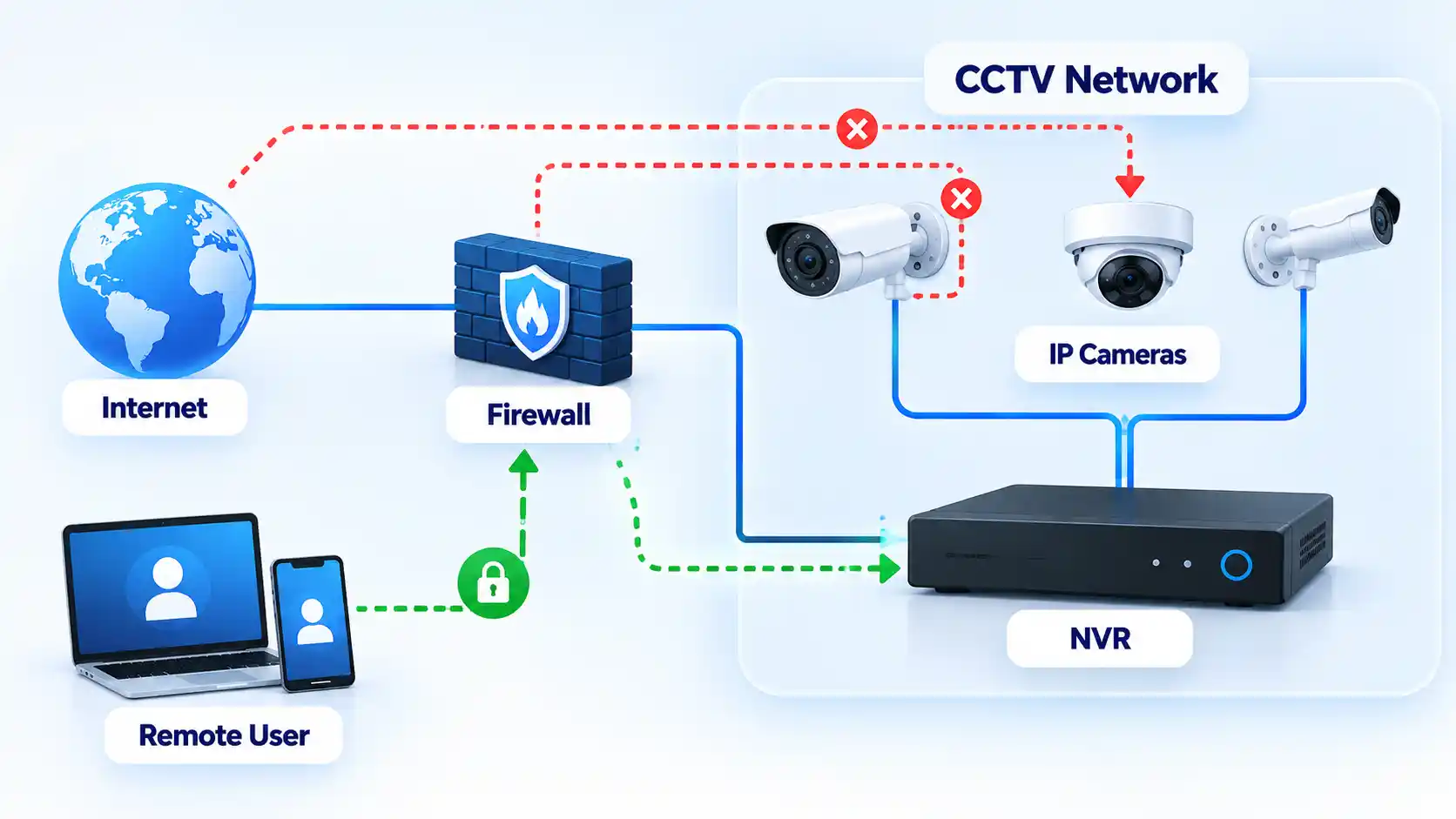
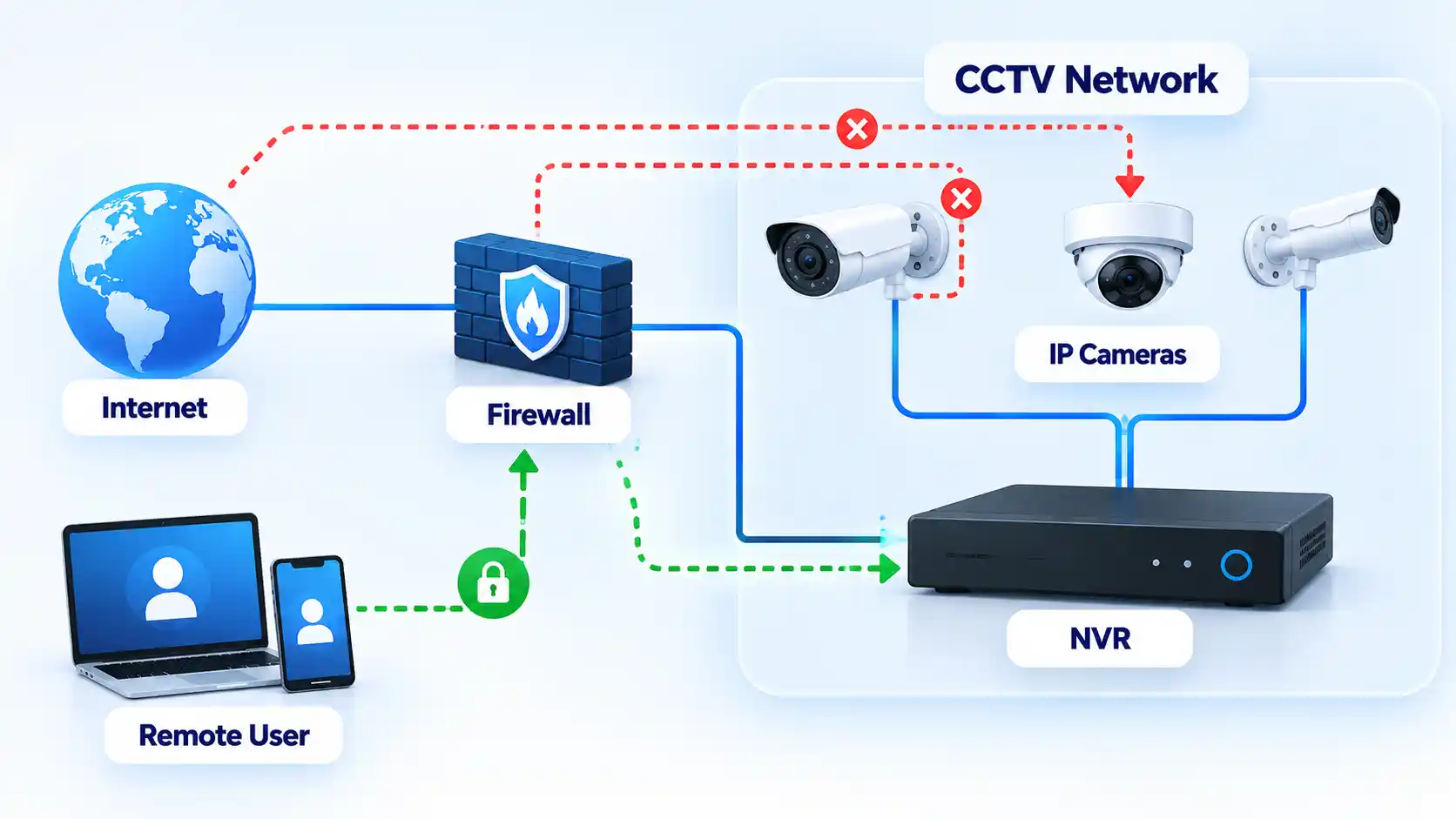
An Internet Protocol camera, usually called an IP camera, sends video over a data network. A Network Video Recorder, or NVR, receives and stores streams from network cameras. Depending on the installation, remote viewing may pass through the recorder, a manufacturer’s cloud service, a router rule, a virtual private network or a combination of these.
Advertisement
Prerequisites
Administrator access to the cameras, CCTV recorder and remote-viewing accounts you are authorized to manage
Administrator access to the router or firewall used by the CCTV network
The manufacturer and model numbers of the cameras and recorder
The currently installed camera and recorder firmware versions
A list of the mobile apps, browser interfaces, VPNs or cloud accounts currently used for remote viewing
A record of any intentional port-forwarding, Universal Plug and Play or remote-management settings already configured
Universal Plug and Play, or UPnP, can let compatible devices request network configuration automatically. Port forwarding is a router rule that directs specified incoming traffic to a device inside the local network. The UK’s National Cyber Security Centre advises camera owners to consider whether UPnP and port forwarding are actually needed because they can increase the routes through which networked devices may be reached.
Secure the Cameras and Recorder Step by Step
Work through these controls in order. Secure identities and software first, then reduce unnecessary exposure while preserving only the remote-access method the installation genuinely requires.
Change default and reused credentials. Replace manufacturer-default usernames and passwords on cameras, recorders and management interfaces. Also replace passwords reused on other websites or accounts. The NCSC smart-camera guidance recommends changing default camera passwords, while the FTC advises using a strong password that has not been reused elsewhere. An NVR may have separate credentials for its local console, browser interface, individual cameras and cloud account, so check each layer rather than assuming one password change covers everything. A strong password and password-manager policy can help keep administrative credentials unique without relying on memory.
Enable multi-factor authentication where it is supported. Turn on multi-factor authentication, commonly shortened to MFA, for cloud viewing accounts, administrator portals and other remote accounts that provide it. MFA requires another proof in addition to the password, such as a code or authenticator approval. The FTC’s security-camera guidance specifically recommends two-factor authentication for camera cloud accounts when available. MFA reduces the damage from a stolen password, but it does not make an unsupported or unnecessarily exposed device safe by itself.
Update the camera, recorder, viewing app and router. Check the manufacturers’ support pages for current supported software for every component involved in recording or remote access. Firmware is software stored on hardware such as a camera, recorder or router. The NCSC recommends regularly updating camera firmware and enabling automatic updates where available, while the FTC also advises updating the camera software and the apps used to view footage. Record the installed versions after updating. If a device says no update is available, also check whether the model is still supported because an end-of-life device may already be on its final release while receiving no further security fixes.
Disable internet remote viewing when you do not need it. If footage is only viewed from inside the premises, disable internet-based remote access rather than leaving it available for occasional convenience. The NCSC recommends disabling remote viewing when it is unnecessary. Check the consequence before doing so because the same vendor service may also provide movement alerts, cloud recording or smart-home integrations. Confirm local recording before and after the change.
Remove unnecessary port forwarding and UPnP exposure. Review the router’s existing port-forwarding rules and UPnP configuration. Remove forwarding rules that no longer have a documented purpose, and consider disabling UPnP if the applications and devices you still rely on do not need it. The NCSC warns that these technologies can create additional access paths to devices such as smart cameras. Do not delete an unfamiliar rule simply because its name looks suspicious. Identify the internal device and service first, then remove the rule if it is unnecessary. If remote viewing stops working, determine the supported access method before recreating broad inbound access.
Keep necessary remote access behind a controlled authentication path. Prefer the maintained access method designed for the environment rather than exposing several camera administration interfaces independently. For a consumer installation, that may be the manufacturer’s maintained remote-viewing service protected by unique credentials and MFA. A managed business environment may instead use a controlled VPN or access gateway. CISA’s internet exposure reduction guidance recommends removing unnecessary internet exposure and using secure, monitored access for systems that must remain reachable. A VPN is not a universal consumer requirement, and replacing a maintained vendor service with an improvised network configuration is not automatically safer.
Separate surveillance devices from everyday systems where practical. The FTC recommends considering a separate network for security cameras so compromise of another computer or device does not also provide easy access to the cameras. On a home router, use a guest or IoT network only if the router documentation confirms that it provides the isolation you need. In managed networks, a dedicated virtual local area network, or VLAN, with firewall policy can provide finer control over which systems the cameras and recorder may contact. NIST’s current IoT guidance likewise treats device identity, network access and lifecycle posture as parts of protecting IoT devices and the networks they join. Preserve required paths for recording, updates, time synchronization and authorized viewing rather than blocking traffic arbitrarily.
Restrict administrator privileges and shared access. Use separate viewer and administrator permissions where the product provides them. A person who only needs to watch live footage should not automatically receive permission to create accounts, change passwords or alter camera settings. The FTC notes that some camera products provide different permission levels for shared users. Avoid one shared administrator account where individually attributable accounts are supported, and remove access for installers, former staff or other users who no longer require it.
Use encrypted management and viewing connections where supported. Enable the camera or recorder’s supported encryption features and prefer encrypted browser management. The FTC advises checking whether account information, livestreams and archived footage are encrypted and says browser-based camera login pages should use HTTPS. Do not dismiss certificate or browser security warnings simply to complete setup. If an older device provides only insecure management and cannot be updated or adequately isolated, treat that as a lifecycle risk rather than assuming local placement alone makes it safe.
Review access records and active sessions where available. Check login history, camera access logs, connected clients and active cloud sessions for activity you do not recognize. The FTC’s connected-device guidance specifically recommends checking IP-camera logs for unfamiliar IP addresses or unusual access times. Log availability varies by product, so the absence of a logging screen does not prove that unauthorized access has never occurred. Revoke unexplained sessions and investigate unexpected administrator accounts before returning the system to normal use.
Verify That the Hardening Worked
Security changes are successful only when the system continues to perform its intended job while unnecessary access has been removed. Test recording locally and test only the remote-access methods you deliberately chose to retain.
Verify the result
Each camera still records to its intended NVR, storage card or supported cloud destination.
Recorded footage can be played back normally after the account and network changes.
The approved remote-viewing method works from outside the local network if remote access is still required.
Access methods you intentionally disabled no longer provide remote viewing or administration.
Manufacturer-default and replaced passwords no longer authenticate.
MFA is requested on the accounts where you enabled it.
The router contains no unexplained intentional port-forwarding rules for the cameras or recorder.
Supported cameras, recorders, viewing apps and routers are running the expected current software versions.
Where network isolation was configured, documented router or firewall rules prevent the CCTV network from reaching unrelated protected devices except through paths you intentionally allow.
Required motion alerts and notifications still arrive if they are part of the intended setup.
Camera and recorder date and time remain correct after the changes.
Available access logs or session lists contain only users and sessions you recognize or have documented.
Document the final configuration after testing. Record the remote-access method that remains enabled, administrator accounts, firmware versions, network segment and any intentional router rules. This gives you a known baseline against which later configuration changes can be compared.
If Remote Viewing Stops Working After Hardening
Removing unnecessary access can reveal hidden dependencies in an older CCTV installation. Restore only the specific function the system genuinely requires instead of reversing every security change at once.
The mobile app stopped connecting after UPnP was disabled
Check the camera or recorder manufacturer’s current documentation to determine how remote viewing is designed to work. The previous setup may have depended on automatically created network mappings or on another remote-access mechanism. Do not simply re-enable every router feature. Restore only the minimum supported mechanism required for the intended service, then repeat the remote-access checks.
Local viewing works, but remote viewing does not
Confirm that the intended remote-access service remains enabled and that the relevant account is active. For a vendor-hosted service, check account authentication, MFA and the provider’s service status. For a managed VPN or gateway, confirm that authorized users can establish that connection. Review recent router or firewall changes before recreating direct inbound access to the camera or recorder.
Advertisement
The camera stopped recording after network isolation
The isolation policy may be blocking traffic that the camera genuinely requires to reach the NVR, storage service, time source or another authorized destination. Compare the failure with the intended network design and permit only the required communication. Segmentation should restrict unnecessary paths without preventing recording or other required functions.
A firmware update caused a camera or recorder problem
Use the manufacturer’s documented recovery procedure for that exact model. Do not install firmware from an unofficial mirror or perform an undocumented downgrade simply because an older version previously worked. Preserve recordings or configuration backups first when the manufacturer provides a supported method to do so.
The manufacturer no longer provides security updates
Treat the device as an increased lifecycle risk. CISA recommends replacing internet-accessible devices and software that no longer receive security support. Until replacement is practical, reduce exposure by disabling unnecessary internet access, isolating the device from sensitive systems and limiting communication to the recorder or other destinations it genuinely requires where the installation supports those controls.
When an Older Camera Should Be Replaced
“No update available” is not always reassuring. An older camera can be running the newest firmware ever released for that model while the manufacturer has stopped fixing newly discovered security problems.
Advertisement
CISA’s internet-exposure guidance recommends replacing software and devices that no longer receive security support when addressing assets that remain internet-accessible. Current NIST IoT lifecycle guidance also treats maintaining device security posture throughout the lifecycle as part of protecting IoT devices and the networks they join.
Replacement becomes the stronger option when a camera or recorder must remain remotely reachable but no longer receives security fixes, cannot use adequate authentication, relies on unsuitable legacy management interfaces, or cannot be separated sufficiently from more sensitive systems.
An unsupported camera with no direct internet exposure and tightly restricted communication to a controlled recorder presents a different risk from the same device exposed directly to remote access. Isolation does not repair vulnerabilities in the camera, but it can reduce the systems and networks from which those vulnerabilities are reachable. Whether that residual risk is acceptable depends on the environment and the consequences of a camera, recorder or network compromise.
Final Security Baseline
A hardened CCTV setup should have no known default or reused administrative credentials, supported software kept current, only necessary remote-access paths enabled and no unexplained router exposure. Use MFA where supported and separate surveillance equipment from unrelated devices where practical.
Advertisement
Most importantly, verify the finished configuration rather than assuming a changed setting improved security. Cameras must continue recording, authorized remote users must retain only the access they need, and unsupported equipment should have a documented isolation or replacement plan.
































































You must be logged in to post a comment Login