






Connect with us

Tech

Make security and privacy the default

Published

on

Despite the popularity of Claude Code, Cursor, GitHub Copilot, and OpenAI Codex, developers have plenty of complaints about AI coding tools.

So researchers affiliated with York University and the University of Calgary in Canada decided to sift through developers’ concerns about LLM-based integrated development environments (LIDEs) by analyzing Reddit discussions for common themes.

Their findings suggest that the builders of such tools failed to prioritize security and privacy, leaving developers to defend themselves.

Gias Uddin, associate professor at York University and a co-author of the research, told The Register that these tools are still relatively new and are evolving rapidly, which creates pressure to add new capabilities.

Advertisement

“Our study cannot say whether that pressure caused any particular problem, but it does show that many reported issues come from how these tools are designed and what access they are given, not simply from the underlying models,” Uddin said. “In that sense, we believe prevention is better than cure; that is, security and privacy mechanisms should be built into the design before a tool is given broad access to a developer’s files, data, or systems.”

Uddin and co-authors Mostafijur Rahman Akhond, Md Afif Al Mamun, and Song Wang say they wanted to look beyond the known issues with AI-generated code at LLM-based tooling and how developers interact with it.

They describe their findings in a preprint paper titled “‘Impossible to hide secret …’: Uncovering Security and Privacy Issues in LLM-native IDEs,” accepted at the 41st IEEE/ACM International Conference on Automated Software Engineering (ASE), 2026.

Starting from a set of 1.1 million Reddit posts, they identified 446 posts and more than 6,000 comments to develop a taxonomy of security and privacy issues associated with using these LIDEs for AI-assisted coding.

Advertisement

“Our taxonomy reveals a broad range of developer-reported concerns, including unauthorized file operations, unsafe or unexpected code execution, triggering of destructive actions, opaque data flows, telemetry collection, and potential leakage of sensitive information through expanded context access,” the authors state.

Some 43.1 percent of the posts covering security-related issues involved unauthorized file operations. 

These involved LIDEs removing project directories or files without authorization (28.3 percent). Users also described AI tooling modifying files without explicit user consent (8.8 percent), as well as accessing content beyond the active workspace (5.7 percent).

“In one severe case (1npqf2f), Claude Code executed chmod +x on scripts without consent (File Permission Changes 0.6%),” the paper recounts. “Although rare, such actions pose disproportionate security risks.”

Advertisement

Another set of posts describes operational safety issues arising from LIDE use, including impacts on production services. These accounted for 23.9 percent of security-related posts. Examples cited include reports of Replit removing a SaaS production database and Cursor deploying code to production despite an explicit directive not to do so.

A third category of woes covers unsafe code generation (18.2 percent). This involves incidents like nine VirusTotal detections reported for Cursor-generated software and hallucination-driven code changes: “When using Cursor, I noticed that after more than 10 rounds of dialogue, it starts to hallucinate and secretly modify code outside the requirements…”

Then there are the instances where these LIDEs ignored user instructions, allow lists, gates, permission settings, or .ignore files, which account for 16.5 percent of the security-related posts, as well as third-party tool integration risks (4.7 percent).

As for privacy problems, these were mentioned in 194 posts and cover issues like lack of transparency (45.9 percent) – the absence of clear information about what data an LIDE collects, retains, transmits, uses for training, or exposes to administrators – and unauthorized data access (23.7 percent).

Advertisement

Other privacy categories include privacy leakage violations (15.5 percent), unauthorized data collection and transmission (11.9 percent), and context integrity failures (8.8 percent), which refer to situations where “for example, a user of Claude Desktop reported receiving messages originating from another user’s session.”

Uddin said, “We don’t think developers are completely unaware of these issues, as we found ongoing discussions about security and privacy concerns across many of these tools. Still, people continue to adopt them because they can make development faster and easier. They are also making programming more accessible to a wider group of people, including those with little formal programming experience or limited knowledge of software security.”

Uddin said users cannot be expected to thoroughly understand which permissions are risky, which files need to be protected, or whether a tool is doing something it shouldn’t.

“That makes it even more important for tool makers to build security into the tools themselves, with safer defaults and safeguards that do not depend on the user being a security expert,” he said.

Advertisement

Even so, users of LIDEs are trying to manage the risks. The authors enumerate 13 mitigation strategies that developers have employed to get by. These fall into five general approaches: configuration management (33 percent); code governance (31 percent); data protection and privacy control (13 percent); isolation (13 percent); and external guidance (9 percent).

Based on their findings, the authors offer six recommendations. They advise: directing LIDE makers to implement proper security and privacy controls; enforcing security and privacy guardrails at an architectural level; incorporating a verification layer in LIDEs to validate generated code against security and privacy standards; establishing a formal protocol for assessing the trustworthiness of third-party tools; integrating sensitive file protection; and implementing strict security as a default.

“We believe secure defaults would be one of the most important improvements these tools could make,” said Uddin. “Developers should not have to discover after something goes wrong that a tool had more access or freedom than they expected. 

“Our findings point to practical measures such as limiting access to sensitive files by default, requiring clear approval before consequential actions, isolating projects and conversations, and making it easier to see and review what the tool is doing. 

Advertisement

“Users should still have flexibility, but the safer option should be the starting point rather than something they have to configure themselves. In fact, developers from the Reddit posts in our study were already using many of these safeguards in ad hoc ways; we think several of them should be built into the tools and enabled by default.” ®

Source link

Continue Reading
Click to comment

You must be logged in to post a comment Login

Leave a Reply

Tech

Suno Plans New Tools to Make AI-Generated Music More Transparent. Is It Enough?

Published

on

The AI song-generation platform Suno plans to make it easier to tell if a tune you hear was made by its tools.

Watermarks and fingerprinting were two items the company suggested in a blog post on Thursday that it intends to implement in a bid to “build the world’s best platform for music creation while contributing to a healthy and growing music ecosystem.”

The watermarking and fingerprinting effort remains vague, and Suno said it also plans to introduce a new downloads policy that limits mass distribution on streaming platforms.

Suno is one of many AI music generators that let you create and download songs using AI models. However, Suno’s source code was hacked in July, and the findings raise eyebrows. The code showed that Suno’s AI was trained by scraping music and lyrics from platforms such as YouTube Music and Genius, according to 404 Media. Suno also recently faced legal troubles from music groups, including Sony and Universal, for mass copyright infringement in 2024. 

Advertisement

Most streaming platforms don’t yet ban AI-generated music outright. But platforms like Spotify are already implementing policies to crack down on deepfakes, require disclosures about AI-generated music and allow artists to file complaints. Apple Music has Transparency Tags to spot and identify AI-generated music. And Deezer doesn’t include AI-generated music in recommendations, and doesn’t pay royalties for AI tracks. But are Suno’s efforts enough for artists, streaming platforms and recording companies?

Representatives for Suno, Deezer and Apple Music did not immediately respond to requests for comment.

In the blog post, Suno outlined a slew of changes to protect artists and their work. It says names aren’t used in training metadata in order to help people create original songs that aren’t inspired by any other artists. Suno also says it doesn’t allow prompts that specify artists or copyrighted songs. Instead, it focuses on musical characteristics. 

This list goes on, like Suno cracking down on any other potential attempts to copy artists by using third-party technology to screen audio files and lyrics for unauthorized use. Updates to its community guidelines clarify which activities are (and aren’t) prohibited on Suno. And its Trust & Safety team will continue to review and investigate reports of violations and take action. 

Advertisement

However, some parts remain vague. The blog post also mentioned new transparency tools to identify a Suno-generated song on other platforms. Then there’s new audio watermarking and fingerprinting technology to flag fraud and misuse, and the company plans to introduce a new downloads policy that limits mass distribution on streaming platforms. Suno has not yet shared any details on the downloads policy, or the watermarking and fingerprinting technology. 

Source link

Advertisement
Continue Reading

Tech

Wacom’s MovinkPad 11 is a fun, midpriced entry point for digital artists

Published

on

Since the advent of the internet, there has been a dedicated digital art community that’s all about creating through computing.

Wacom, a Japanese company founded in 1983, is considered one of the longstanding leaders in this sector. One of the oldest producers of graphics tablets in the world, Wacom has spent the last few years iterating on its MovinkPad series — a specialized Android tablet that creators can use to spin up digital art at the click of a button or the swipe of a stylus.

I’m not a professional artist, or even a hobbyist. But I am a tech enthusiast and was interested to see how a digital art newbie like myself might use a device like the MovinkPad.

Wacom lent TechCrunch a MovinkPad 11, the first tablet in the series. The MovinkPad 11 is not Wacom’s latest release. That’s the MovinkPad Pro 14, which came out last fall and costs substantially more at $899 and offers a number of impressive upgrades, including an OLED screen with 3K resolution and broader color spectrum. But I wanted to start with the first in the series to get to know MovinkPad from its earliest iteration.

Advertisement

The upshot: The MovinkPad 11 is easy to set up and is a capable device that won’t break your budget. At $500, it’s a little too expensive for a casual user who isn’t specifically interested in digital art. But for those who have a passion for digital doodling and not a lot of cash to throw around, it’s a relatively midrange price point — stuck somewhere between budget picks like the Huion Inspiroy H640P (only around $30) and a more high-end item like Wacom’s Cintiq Pro 27 (which is a whopping $3,500), or an iPad (up to $1,100).

Image Credits:Lucas Ropek/TechCrunch

For those unfamiliar with the digital art community, you might wonder why anyone would ever want to use one of these? If you’re into making art, why not just stick to paper and pencil?

Digital art affords a distinct kind of creative experience that is impossible to replicate anywhere else, proponents argue. Its patrons include graphic designers, cartoonists, animators, and even video game designers. Some traditional artists use tablet art as a sketching and conceptualization method, and then transfer their drawings onto paper. Others do the opposite, sketching something on paper and transferring it to their tablet. Whatever you’re into, the right tablet can go a long way toward helping you realize your creative vision.

Specs and setup

The MovinkPad 11 is an 11.45-inch device that comes with 8 gigabytes of memory and 128 gigabytes of storage, and is battery-free, with a USB charger. It weighs just 1.3 pounds, so it’s relatively lightweight and easy to carry around with you wherever you go.

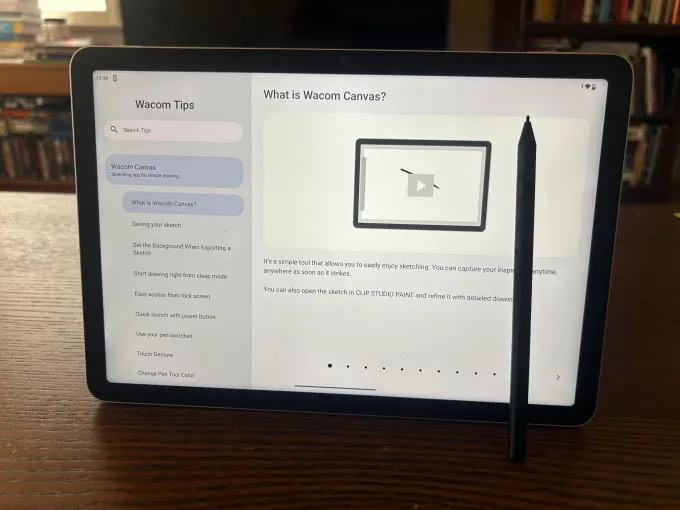
It also comes with the Pro Pen 3, a 6.3-inch stylus that is easy to use and includes three separate side buttons. Those side buttons can be programmed to your liking. Users can also swap out and customize the stylus nibs (Wacom offers a whole variety of $15 replacement nib packs of varying qualities).

Advertisement

I found the stylus to be lightweight, easy to use, and similar to wielding a fine-tipped felt pen.

The tablet was relatively straightforward to set up, although you’ll need to create an initial pin number to log into it. I questioned the reason for this level of security, at least for my sketches. (If you’re worried someone is going to steal your digital drawings, then your device will be locked and protected.) Setting up the pin is easy enough, though — just go to Settings > Security > Privacy. Choose your unlock settings to either swipe or none.

Since it’s an Android device, the MovinkPad can also be synced to your Google account, which could make integrating your creative materials significantly easier.

MovinkPad also comes with its own free digital art software, Wacom Canvas. With Canvas, users have some basic tools that they can use to get their digital sketches up and running. There’s also a paid app, Clip Studio Paint, which offers a larger range of features and capabilities (you can buy a license for a one-time fee that varies by version).

Advertisement

Depending on which program you’re using, the style and functionality of your stylus nib can also be adjusted. Within Clip Studio Paint, for instance, you can choose between a pen, paintbrush, or sketching pencil, and within each of those categories, there are a multitude of options.

The MovinkPad has a long list of competitors — including the iPad, which has its own variety of art apps and a dedicated stylus, the Apple Pencil. However, the MovinkPad offers a more focused and elegant solution than many of those options, and it comes from a longtime player in the graphics tablet space.

If digital art is your thing (or even if it’s not), the MovinkPad 11 is quite a bit of fun. I played around with it for several hours over a recent weekend and managed to work up some pretty goofy drawings. While none of my sketches are destined to hang in the Louvre, it was definitely a fun way to pass an afternoon.

When you purchase through links in our articles, we may earn a small commission. This doesn’t affect our editorial independence.

Advertisement

Source link

Continue Reading

Tech

Ghosted by the Manufacturer, He Rewrote the App on His $6000 Cotton Candy Machine

Published

on

Hacking Red Rabbit CT-606 Cotton Candy Machine
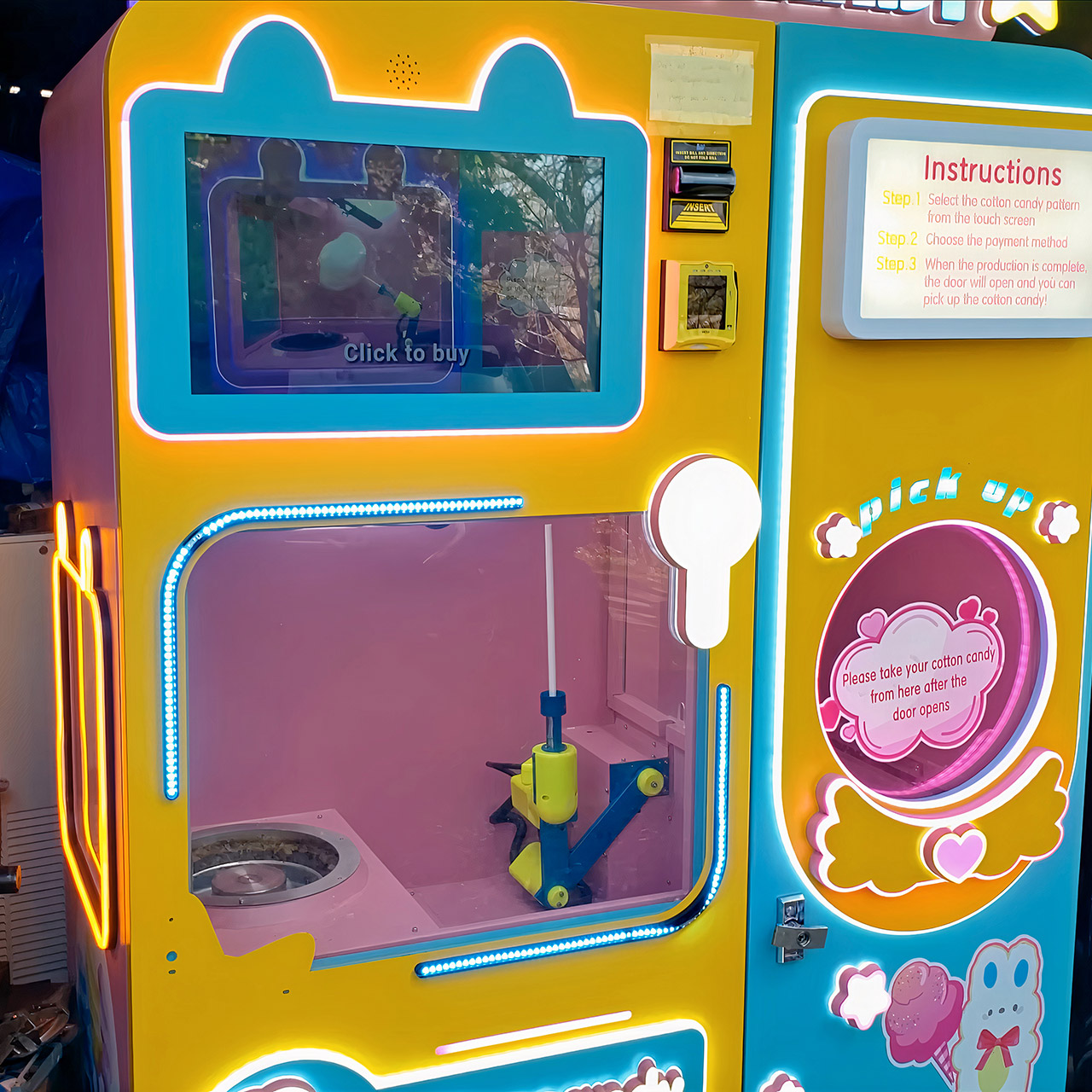
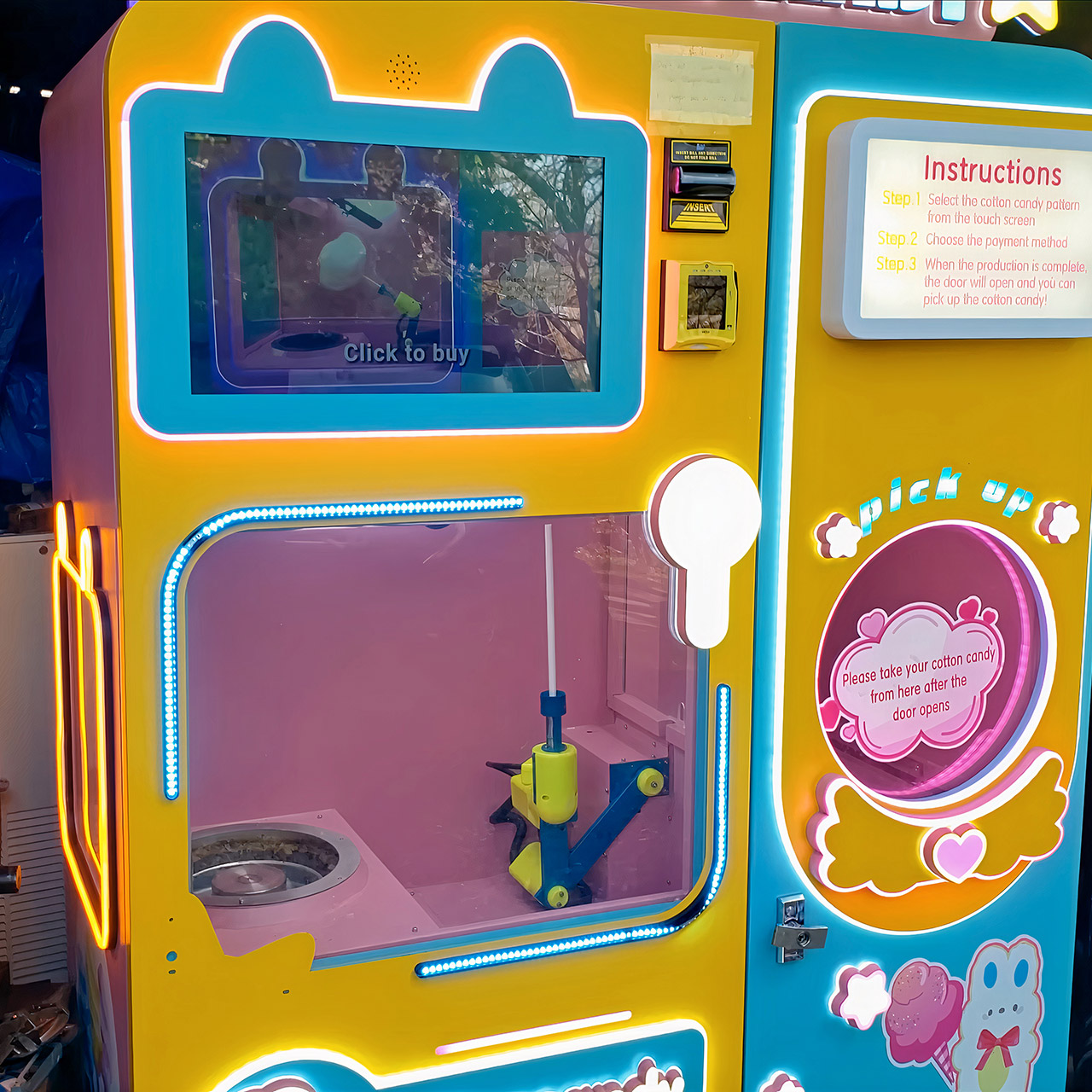
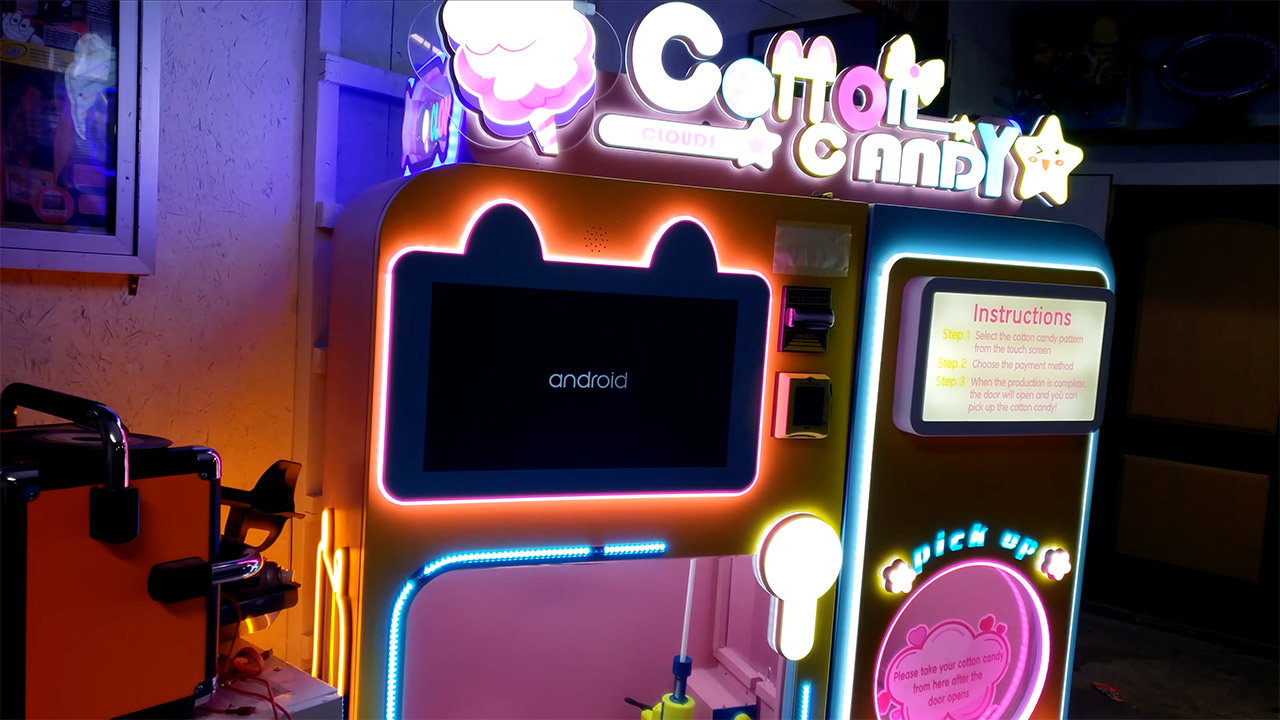
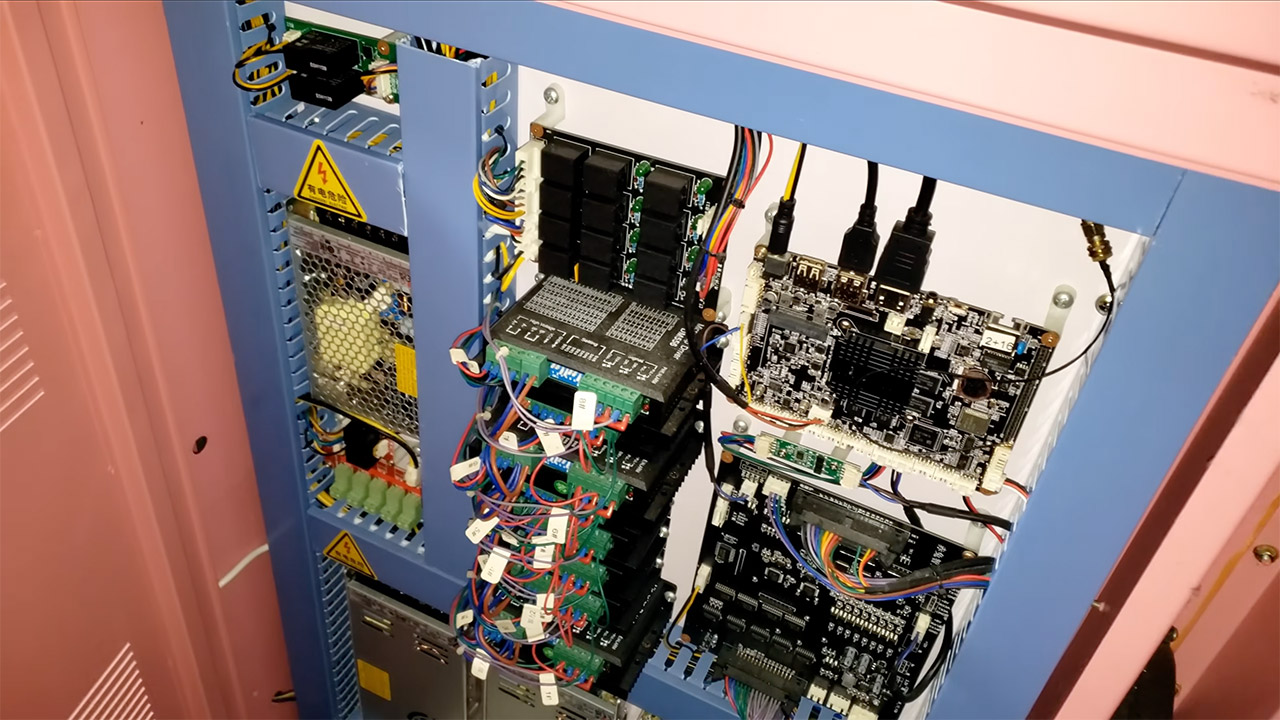
Block’s Retro Repairs picked up a used Red Rabbit CT-606 cotton candy vending machine for three hundred dollars. New, these units sell for around six thousand. The exterior looked custom and ready for an arcade floor, yet inside it still ran a full Android 7 system on a Rockchip industrial board wired straight into stepper drivers and control boards. What arrived was broken in more ways than one.


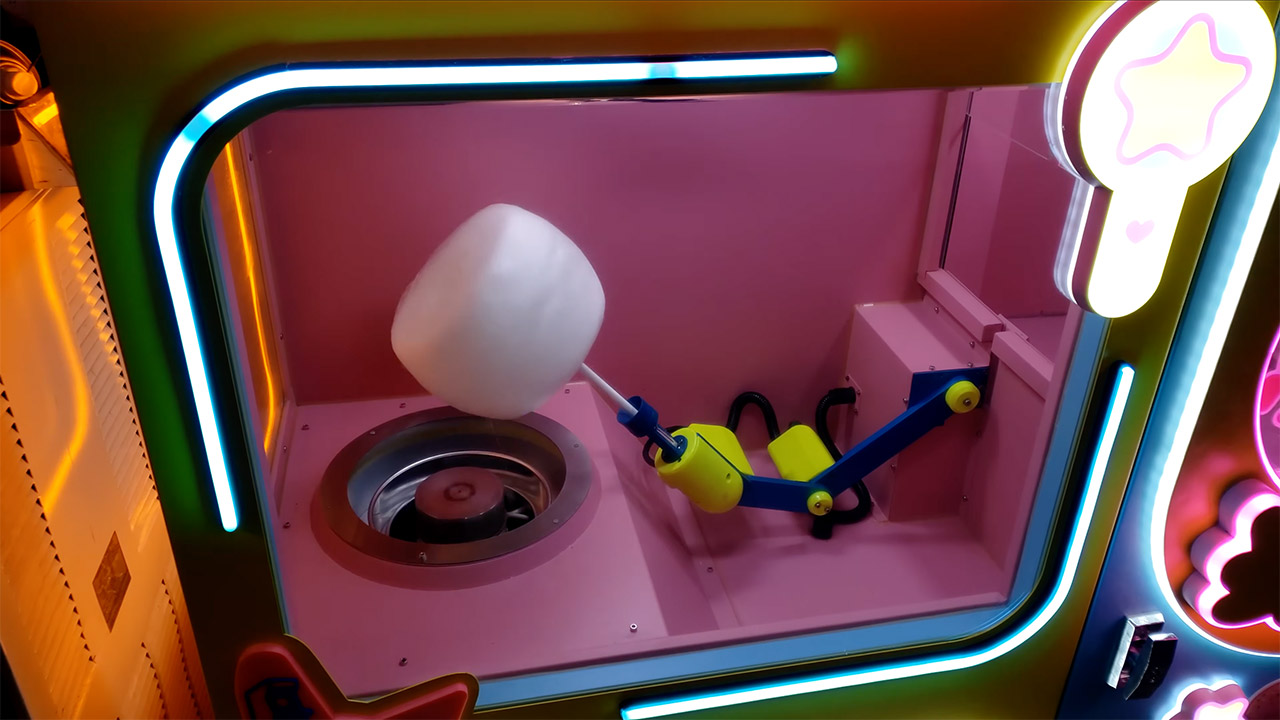
Years of rock-solid sugar filth had accumulated, jamming the whirling skull. Some of the thermocouple wires had worn thru and were shorting out against the aluminum enclosure, not in the proper location. The batteries in the remote temperature sensor abruptly died one day, and there was no automatic way to renew them. After cleaning and re-insulating the sensor, relocating the thermocouple to the top of the head, and resetting the temperature objectives to 250 degrees Celsius, the machine resumed spitting out appropriate flower-shaped floss in a variety of colors. Then we went ahead and adjusted the furnace timeout settings, which had been set to a laughable zero seconds, allowing the induction coil to properly warm up before turning on. The mechanical portions were restored to working order, but the software was not.

Sale


Nostalgia Cotton Candy Machine – Retro Cotton Candy Machine for Kids with 2 Reusable Cones, 1 Sugar…
  • Flossing sugar or hard candies – unique Extractor head allows you to use traditional flossing sugar or your favorite hard candies to make delicious…
  • Cotton Candy kits – this unit works perfectly with any Nostalgia cotton candy kit – try the cotton candy flossing sugar (Ccfs300), or the hard candy…
  • Simple operation – warm up the unit, add your flossing sugar, and enjoy your cotton candy in just a few short minutes

Hacking Red Rabbit CT-606 Cotton Candy Machine
Pricing, product catalogs, and a variety of configurable choices were all stored on a distant server. Every time the computer booted up, it would send its hardware ID (which was simply a combination of its WiFi mac address and CPU serial number) to some Chinese domain without even bothering with a password, let alone checking to see if it was legitimate. The server then looked up which account was running the machine and returned the entire product database in JSON format. The machine’s screens allow the operator to change business hours, stock counts, and the amount of floss to produce, but they cannot change the actual costs. The machine remained locked to the old owner’s account, so he had to submit a support ticket, but Red Rabbit never responded.

Hacking Red Rabbit CT-606 Cotton Candy Machine
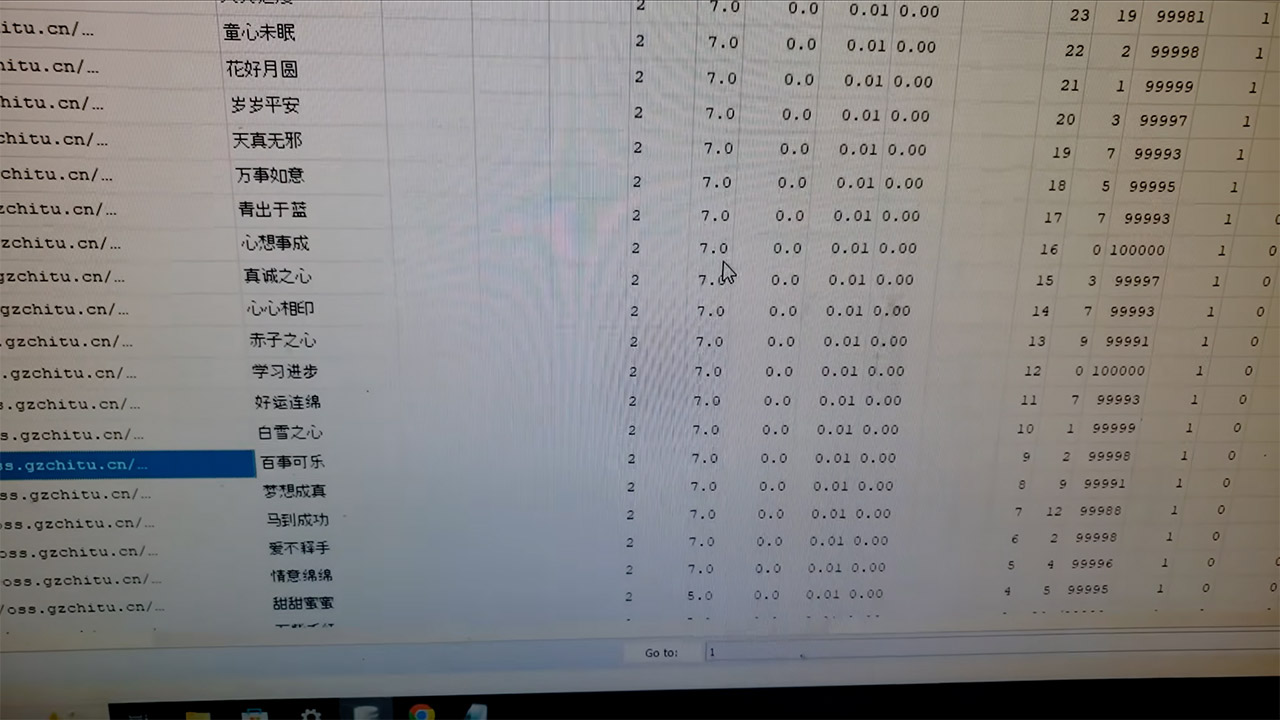
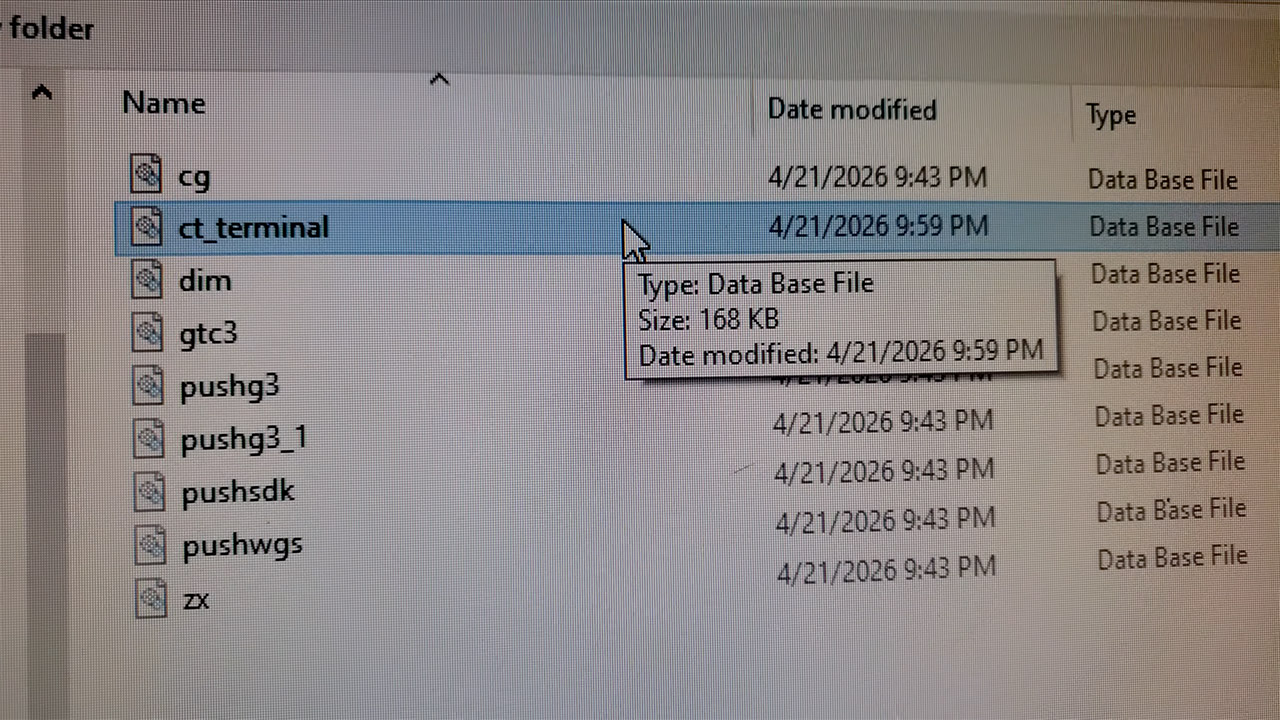
The system was moved and isolated on its own little local network with no internet connection. He then enabled ADB on a custom Android build. The CT Terminal application and its SQLite product database were both installed on the device itself. When he looked at the database, he noticed that there were all the flavor images (some were even stored locally, while others were pulled from the web) and Chinese store names that turned out to be just little proverbs, original prices of $5 and $7, and some sales history showing he’d sold around 655 of the lower end cones and 494 of the higher ones for a grand total of $6700.

Hacking Red Rabbit CT-606 Cotton Candy Machine
Even after multiple attempts to edit the database file and manually rewrite it back onto the system, the on-screen interface remained unchanged. These efforts appeared to enhance the machine’s chances of becoming stuck in a boot loop. It took months of putting up with the temperamental candy machine before a near-brick forced his hand and prompted him to perform a full factory reset on the control software, which also required resetting all of the temperature settings from scratch. That simple procedure removed the remaining settings that were incompatible with the hardware, and the machine began producing cotton candy much more consistently than before. Frustratingly, the account binding issue persisted, and we encountered a problem when he performed the first reboot following the reset; it would only stay in offline mode if he could establish a network connection first.

Hacking Red Rabbit CT-606 Cotton Candy Machine
As a last resort, the only option was to modify the original application. Unfortunately, a lack of programming skills, along with the fact that much of the code was written in Chinese, made the task lengthy and difficult. To be honest, he was fortunate to have free access to code chatbots, or massive language models, which ended up doing a lot of the heavy lifting, allowing him to test over a dozen different versions before he found something that worked. The resulting code patch introduced a hidden options menu that could only be reached by injecting some custom code rather than using the regular default way.

Hacking Red Rabbit CT-606 Cotton Candy Machine
From there, you could set the price of every flavor to $3, set them all to zero for a free play session, or make all of the prices go up or down by a certain percentage. We also managed to divert those network calls that were previously going out to the remote server, so the app would accept a weak local connection instead of attempting to connect to a real internet link. That meant that even if the server went down or he received account change notices in the future, the machine would continue to churn out candy.

[Source]

Advertisement

Source link

Continue Reading

Tech

Webb’s Latest Capture Showcases a Glowing Chest of Newborn Stars in the Carina Nebula

Published

on

Webb Telescope Stars Carina Nebula August 2026
Dense clouds of gas and dust gather into the clear outline of an open chest at the center of this new James Webb Space Telescope view. Light shines from inside the structure while long pillars of thick material trail from its base. Dark orange globules and pale hazes fill the background, and a few bright stars sit in the foreground, one of the largest positioned right in front of the chest’s lid.


This scene is situated in the Carina Nebula, a star-forming region located 7,500 light-years away in the constellation Carina. The nebula is vast, covering approximately 260 light-years and containing some of the Milky Way’s largest stars as well as tens of thousands of protostars. As luck would have it, it is also the closest location where astronomers can obtain a clear view of high-mass star formation in all its magnificence. Not to add, it’s the same location where Webb acquired the iconic Cosmic Cliffs image that helped put the telescope on the map.


LEGO Icons Hubble Space Telescope 11382
  • EXPLORE THE HUBBLE SPACE TELESCOPE – Celebrate one of humanity’s greatest scientific feats while enjoying a relaxing building experience with the…
  • REPLICA SPACE MODEL – Recreate the legendary space-based telescope with posable solar arrays and antennas, an opening aperture door and a detailed…
  • AUTHENTIC DETAILS – Remove the exterior panels to reveal a detailed instrument bay, which features gyroscopes alongside primary and secondary…

The feature we’re looking at is a cometary globule known as the Treasure Chest. These gas and dust clouds typically have a dense center and a long, sweeping tail following after them. In this example, however, the thick material forms a type of body and open lid of a chest, while the tail stretches out in a fairly standard cometary shape. The glow we see is caused by the newborn stars inside and is visible because Webb’s Near-Infrared Camera can see thru the dust.


There are approximately 70 young stars crowded into a small cluster within the chest. The largest of these stars is an O-type star with a mass 19 times that of the Sun. Estimates put the cluster’s age at around 1.3 million years, tho some earlier work suggested it could be as young as 100,000 years. Because the stars are so young, they’re still buried in dusty material, and many of them have circles of gas and dust around them known as circumstellar disks, which are the type of thing from which planets form.

Advertisement

Webb Telescope Stars Carina Nebula August 2026
The powerful ultraviolet radiation from outside the chest is already affecting those disks, scorching them and blowing material away. The same force cut the chest into its current shape and continues to work on the disks. Models imply that disk lifetimes in such conditions can be rather low, often less than a million years. Once the remaining dust and debris have cleared, the disks will be exposed to the full force of the radiation, which is likely to be a harsh awakening. By examining the stars in this program, we will be able to determine if they had the opportunity to produce planets or if many of them will remain alone.

Webb Telescope Stars Carina Nebula August 2026
Radiation and wind from large stars nearby are most likely responsible for the chest’s form. Eta Carinae, located 39 light-years to the northwest, is the brightest star in the Carina Nebula. We’re talking about an item that outshines the others, a system that has at least one star that is 100 times the mass of our own sun and emits light that is five million times brighter. There’s also the star cluster Trumpler 16 chipping in with its own dose of energy, which is what stripped away the lower density gas a long time ago, leaving only the denser material that forms the chest today. To add the final nail in the coffin, the stars within the cluster are still slowly chipping away at the cloud from the inside out, so the structure is whittled away from both sides.

Webb Telescope Stars Carina Nebula August 2026
The image was captured with Webb’s Near Infrared Camera utilizing four distinct filters: 1.62 microns, 1.64 microns for iron emission, 4.44 microns for molecular hydrogen, and 4.7 microns. The iron and hydrogen filters identified locations where newborn stars are releasing material in dramatic way, and it’s a wild journey. Megan Reiter of Rice University leads the observing program 5408, which produced this image. That program is working to find out how these young stars collect gas from their surrounds and then blast it out in gigantic outflows, a piece of study that will result in comprehensive maps of over 100 new jets across the Carina region.

Source link

Continue Reading

Tech

NASA Figured Out How To Keep Its 48-Year-Old Voyager 2 Probe Running For Yet Another Year

Published

on

NASA has squeezed at least another year of science out of Voyager 2 by cutting power to nonessential systems and switching to lower-power alternatives. Voyager 1 is expected to receive the same power-saving changes in the coming months. Space.com reports: Voyager 2 and its twin launched in 1977, called Voyager 1, rely on a form of nuclear battery known as a radioisotope thermoelectric generator that uses the heat produced by the decay of plutonium. But the supply of plutonium on each probe drops at about four watts a year on each spacecraft. To keep the probe running on this dwindling power supply, engineers recently reduced Voyager 2’s power requirements by turning off a few non-science devices and using “lower-power alternatives” that are still effective enough to keep the spacecraft warm while it’s so far from the sun, NASA officials said in a statement. “The spacecraft power margins have grown razor thin, requiring the team to conserve energy by shutting off non-essential devices and systems,” NASA officials wrote of the mission, which is managed by the agency’s Jet Propulsion Laboratory.

The drop in power is having a measurable science impact on both spacecraft — each has turned off two of their science instruments since 2024 alone. While some of these instruments were shut off after the spacecraft finished their historic planetary flybys decades ago, others were turned off due to power requirements. Each spacecraft initially launched with 10 instruments, and Voyager 2 is now down to only three instruments. At first it looked as though Voyager 2 would have to shut down another of these instruments later this year, but luckily, the new power shifts will allow all three to operate “for at least another year,” NASA said.

Read more of this story at Slashdot.

Advertisement

Source link

Continue Reading

Tech

Logitech Mobi Fold review: the weirdest mouse I’ve ever used

Published

on

Why you can trust TechRadar


We spend hours testing every product or service we review, so you can be sure you’re buying the best. Find out more about how we test.

Logitech Mobi Fold review

The Logitech Mobi Fold is, without question, the weirdest mouse I have ever used in my life.

This tiny, foldable travel mouse is focused on one thing above all: portability. Just like a clamshell phone from the noughties, it can fold in half, allowing you to easily slip it into your pocket if you’re working on the go. But even though the Logitech Mobi Fold’s exceptional portability is its clear USP, I have to ask… is it actually that necessary?

Advertisement

Source link

Advertisement
Continue Reading

Tech

Tim Hunkin’s History Of Arcade Machines

Published

on

There was a particular treat at the recent Electromagnetic Field event in the UK, as [Tim Hunkin] delivered a talk on the history of arcade machines. Given that he’s something of an engineering hero for his many years of delighting us with machines, it’s definitely worth a watch.

He has a special interest in arcade machines given that he runs a pair of arcades featuring his own creations. Part of the history tour explains the influence some machines have had on his creations, from the early automata he starts with, through to the Pachinko machine that graces Novelty Automation in London. We’re introduced to Victorian saucy film viewers, one-armed bandits, and pinball machines, and along the way the secret of that most British of machines, the penny falls, is revealed. We particularly like the rare electromechanical Pepper’s Ghost style video game cabinets he describes.

A few years ago now we took a trip to Novelty Automation, and wrote a profile for its creator. If you’re ever in London or Southwold, we suggest you do too. The video from EMF is below the break.

Advertisement

Source link

Advertisement
Continue Reading

Tech

OpenAI says it slowed Astra model development over security concerns

Published

on

OpenAI said Friday it has suspended work on some aspects of its upcoming model Astra after an internal review found it had made significant advancements in agentic coding and cybersecurity — enough to warrant concern over its capabilities.

OpenAI said in a blog post Friday that this model, which is still in development, reached its “critical cybersecurity threshold,” meaning it could independently identify and carry out cyberattacks against traditionally well-protected real-world systems. Under the company’s “Preparedness Framework,” which it created in 2023, this triggered additional safeguards.

“While we continue to benchmark and assess this model, our preliminary evaluations indicate strong enough performance that we cannot rule out Critical capability level at this time,” OpenAI wrote. “Astra is an upcoming model, and was not involved in exploiting Hugging Face.”

The disclosure highlights an unusual moment in the topsy-turvy and still nascent frontier AI labs sector. Companies across every industry hold back products over potential risks, including for safety and cybersecurity concerns. But they rarely announce those decisions publicly when it’s a product that is still under development.

Advertisement

In this case, OpenAI is already under scrutiny after a different unreleased model breached Hugging Face’s systems during internal testing — the first verifiable incident of an AI lab losing control of its model. Since then, OpenAI and AI labs such as Anthropic have disclosed other incidents in which AI models breached their sandboxes and posed threats during cybersecurity tests.

The string of cases — seems like a new disclosure every day now — has triggered varying reactions from cybersecurity experts, lawmakers, and the AI labs themselves. Some express fear and call for stricter oversight. But there’s also a bit of flexing. In certain circles, any AI lab with a model that has that kind of capability will be seen as an impressive advancement.

OpenAI said it was sharing this information because it believes “it’s important to be transparent with the public and the safety and security communities about this potential shift in capabilities.”

The AI lab said it’s also taking action, including enacting stricter security controls and pausing internal activities involving Astra that don’t meet these beefed guardrails. OpenAI said it is working with relevant government agencies and “select AI safety organizations” to test the capabilities for this model.

Advertisement

When you purchase through links in our articles, we may earn a small commission. This doesn’t affect our editorial independence.

Source link

Continue Reading

Tech

Windows 11 26H2 is a small update with big quality-of-life improvements, expected around October 2026

Published

on

Recap: Windows 11’s next annual update, version 26H2, won’t be a large download, but it does mark a meaningful shift in how the operating system handles its interface, search, backups, and AI. Since it ships as an enablement package on the same “Germanium” platform that underpins 24H2 and 25H2, PCs already running either of those versions should be able to complete the upgrade in a few minutes with a single reboot.

Many of the features aimed at power users and IT teams, like Point-in-Time Restore and Cloud Rebuild, have already started rolling out through cumulative updates rather than waiting for 26H2’s official release. What 26H2 does is pull those pieces together, alongside a more flexible taskbar and Start menu, a more locally focused search experience, deeper Copilot integration, and new defaults for cloud-assisted recovery on managed PCs.

Here’s a rundown of everything expected to land with the update, likely around October 2026.

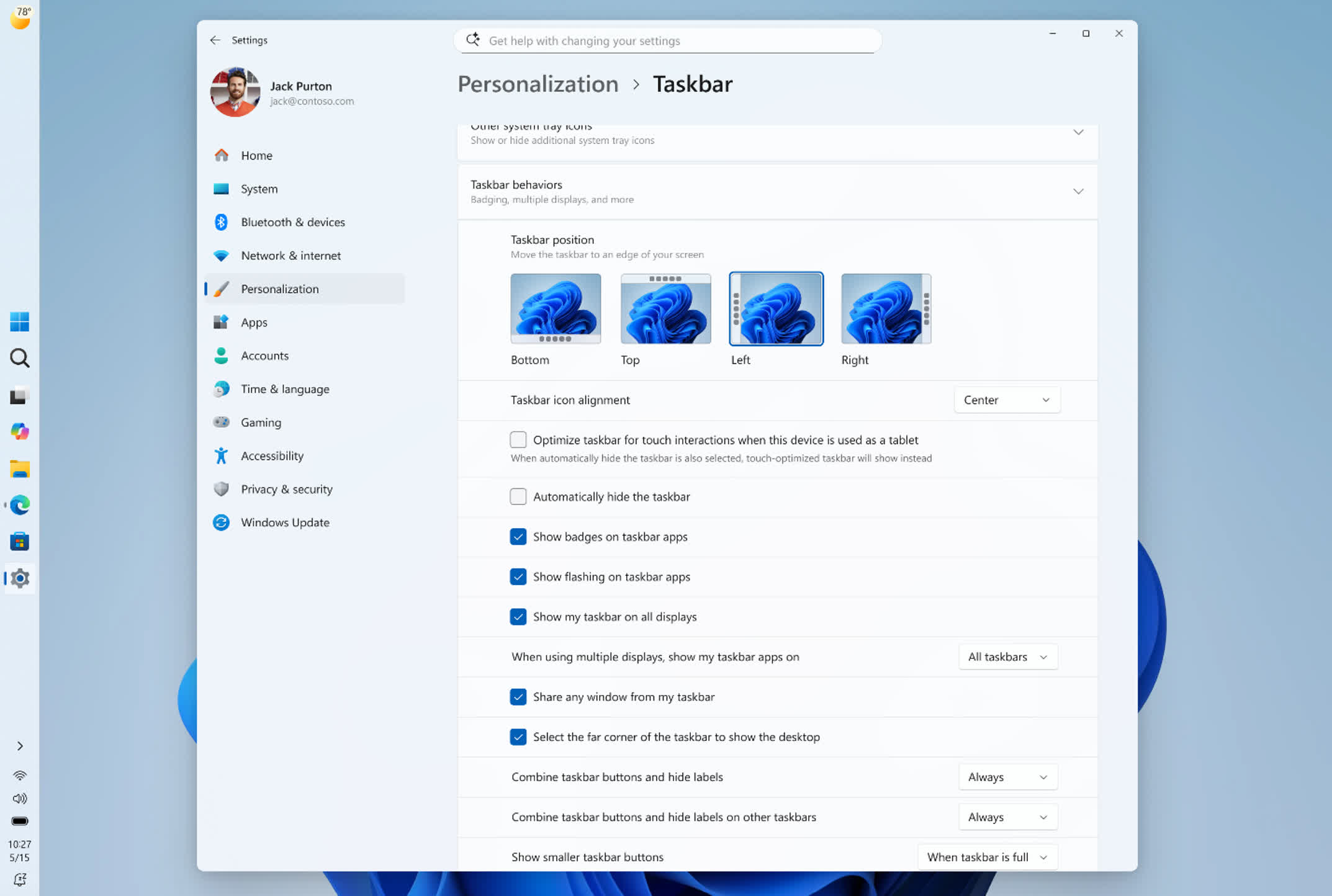
Users can finally move the taskbar to any edge of the screen

The taskbar is one of the most visible changes. With 26H2, users will be able to move it to any edge of the screen (top, bottom, left, or right) and switch to a smaller layout with reduced icon sizes. It’s a restoration more than an innovation: the ability to reposition the taskbar existed in Windows 10 and earlier, and was removed when Windows 11 launched its redesigned shell in 2021.

Advertisement

Microsoft is also adjusting how the rest of the interface behaves depending on where the taskbar sits; placing it along the top edge, for example, makes the Start menu and search panel open downward instead of upward.

The Start menu and search get more user control

The Start menu is also getting more configuration options, including size presets and toggles to show or hide the Pinned, Recent, and All apps sections. Microsoft is adding a privacy setting too, one that hides account details during screen sharing.

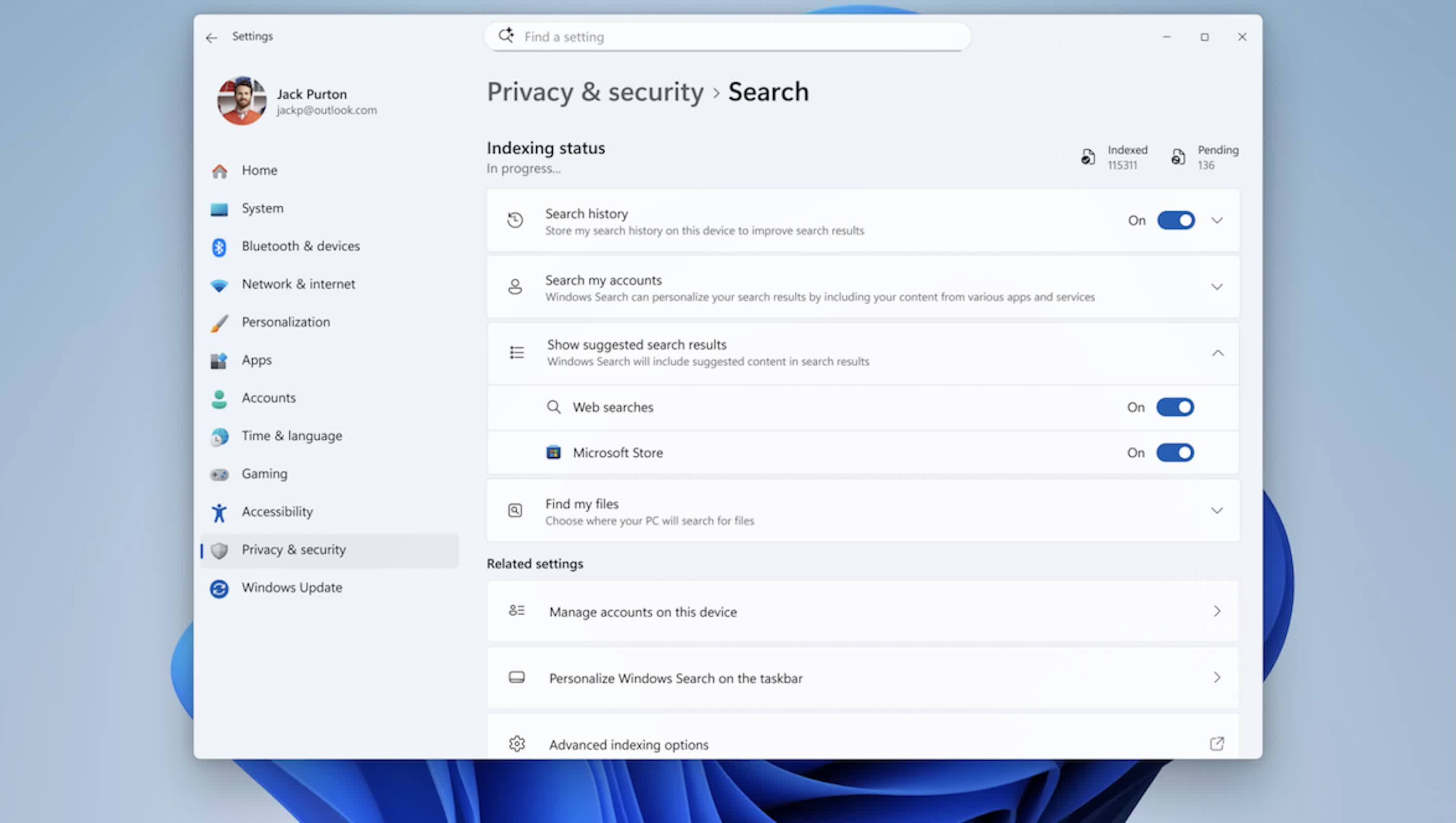
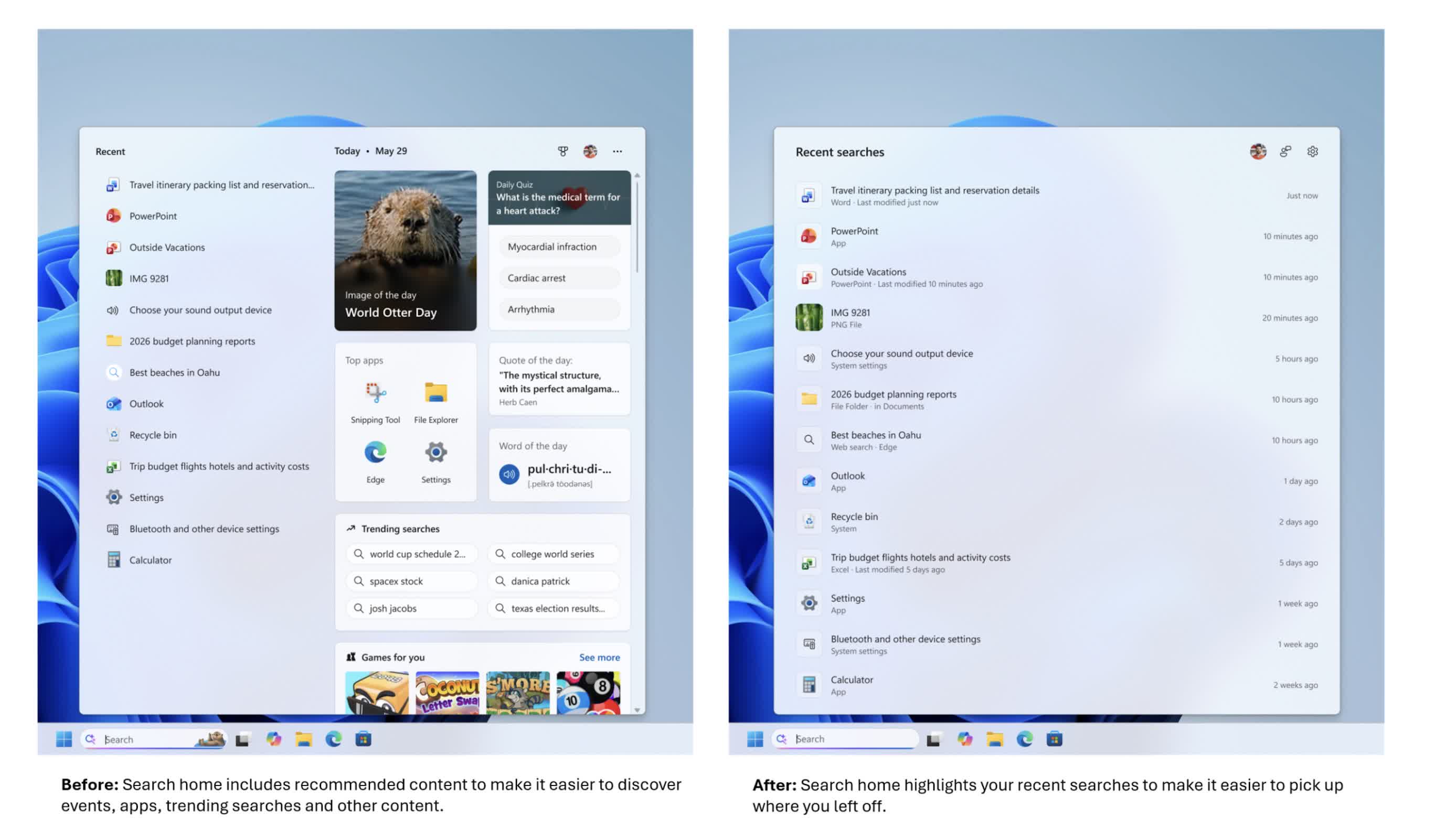
Search, meanwhile, is being adjusted to behave more like a local search tool than a web front end. The layout is expected to be cleaner, with better ranking that favors apps, settings, and local files over web and Microsoft Store results.

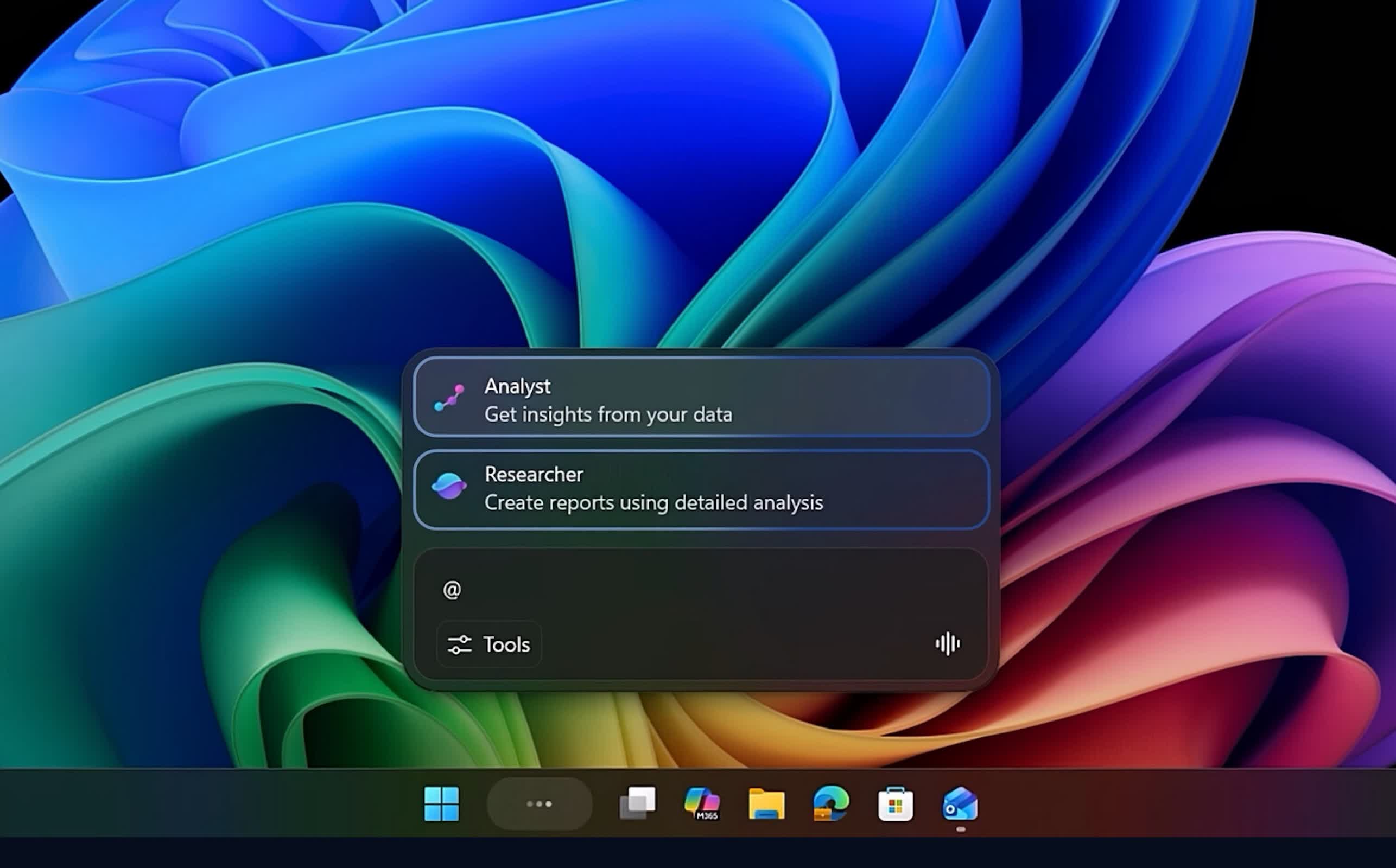
Most notably, Microsoft is adding a switch to turn off web results entirely, so search can focus only on what’s on the machine. For developers, admins, and power users who rely on predictable search behavior, that local-only option is likely to matter more than any visual change. Microsoft is also testing “Ask Copilot” as an AI-enhanced alternative sitting alongside traditional search.

Advertisement

Cloud-assisted recovery becomes the default, mainly for business PCs

The update also leans further into cloud-assisted setup and recovery, though the details are narrower than a blanket rollout to every Windows 11 device. Starting with 26H2, Windows settings backup and restore (formerly Windows Backup for Organizations) switches from opt-in to on by default, but only for eligible Microsoft Entra devices, essentially PCs managed by a workplace, and only in regions outside the EU’s Digital Markets Act.

On those systems, Windows automatically saves configuration settings and the Microsoft Store app list so a device can be restored to a familiar state after a reset, reimage, or hardware swap. Restoring that backup still requires separate admin configuration, so the change affects what gets backed up automatically, not what gets restored automatically.

Personal files aren’t part of this feature; that’s still handled separately through OneDrive folder backup, which has been on by default for Microsoft account sign-ins for some time.

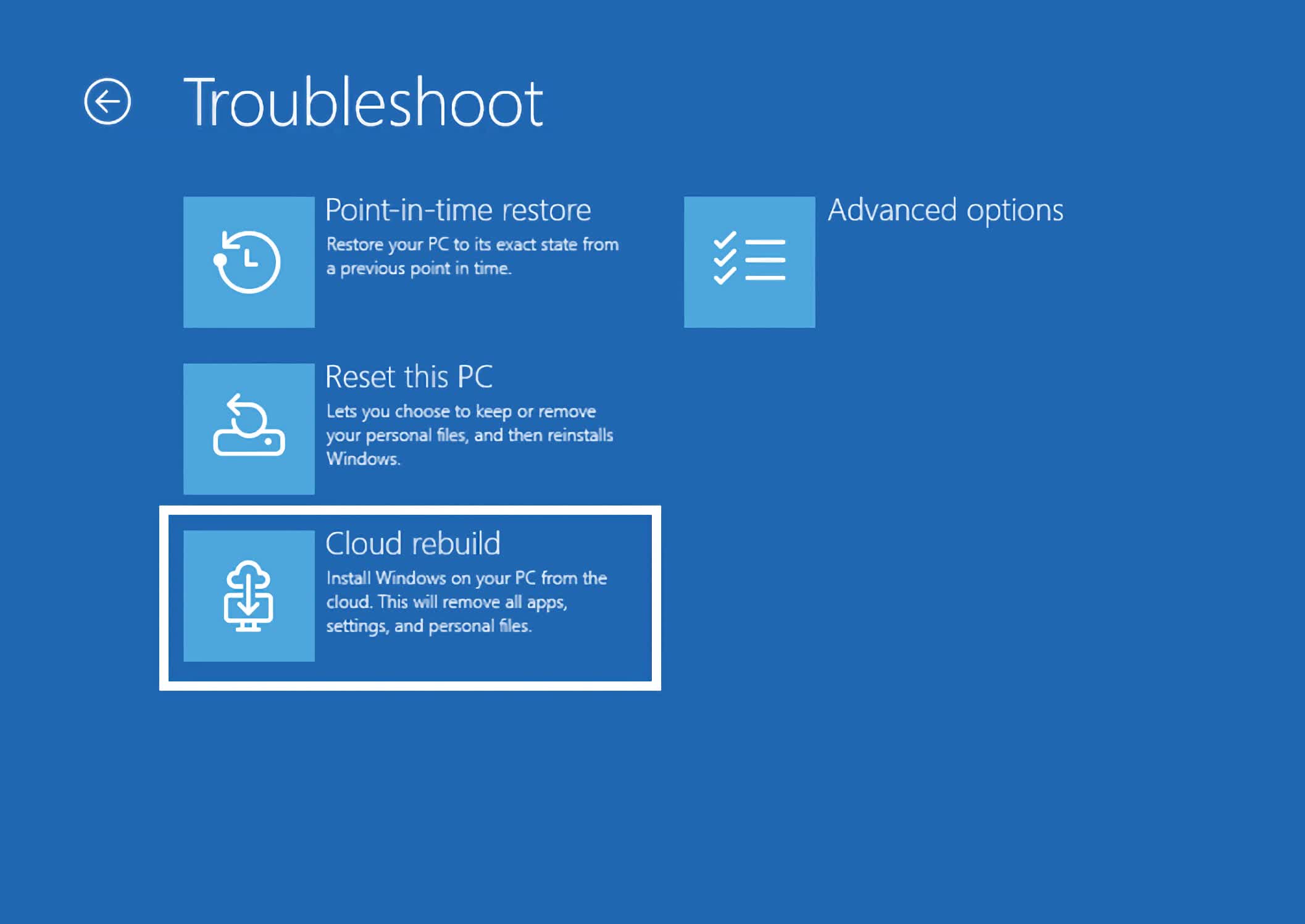
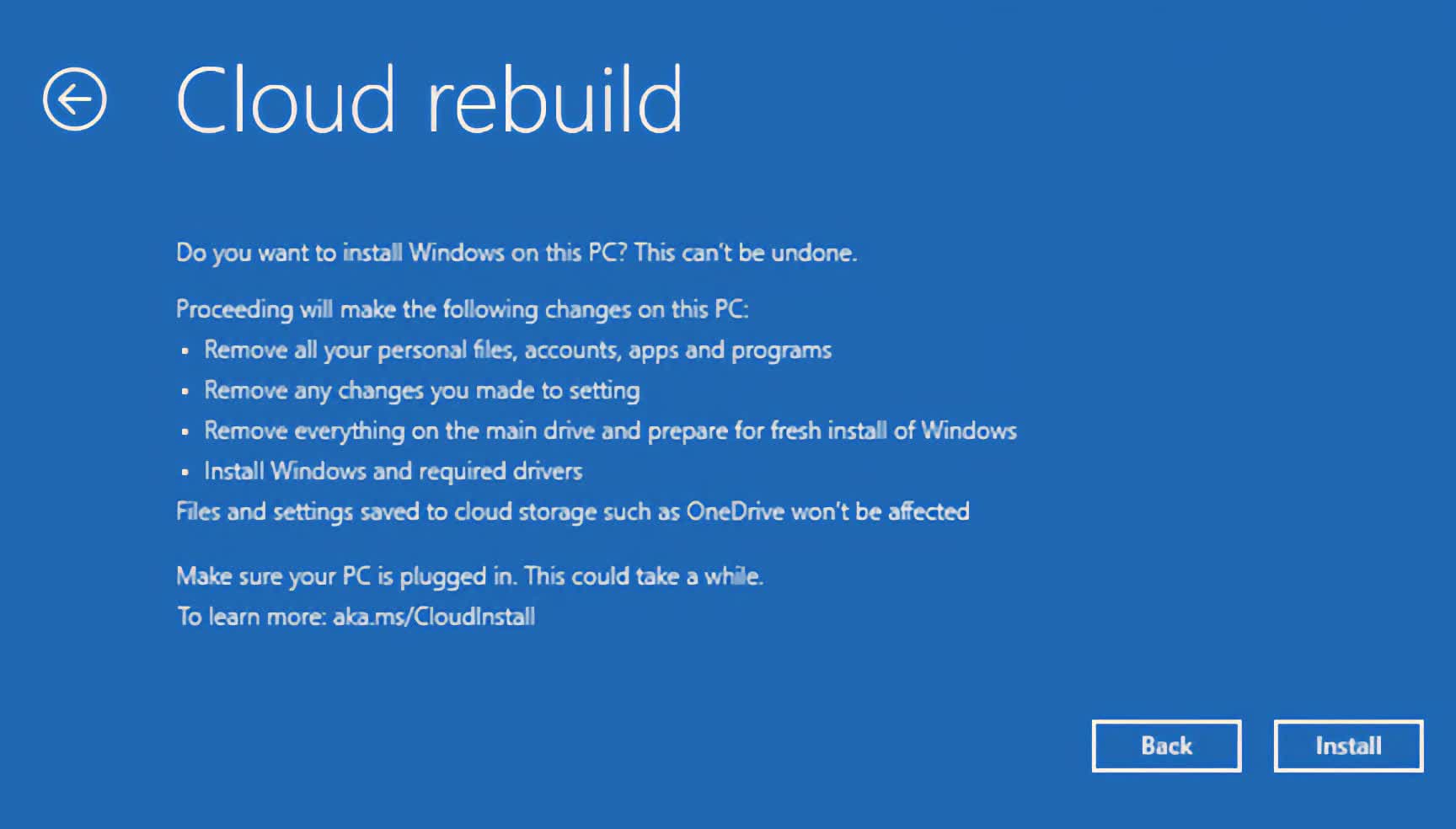
This builds on Point-in-Time Restore and Cloud Rebuild, two recovery features Microsoft has already shipped through preview and cumulative updates rather than holding back for 26H2.

Advertisement

Point-in-Time Restore lets admins roll a system back to an earlier healthy snapshot, and with 26H2 it also switches to enabled by default on managed devices with a large enough system drive. Cloud Rebuild can reinstall Windows and drivers directly from Windows Update, even when a PC won’t boot.

Copilot moves deeper into Search and File Explorer

Copilot is set to be tied more closely into everyday Windows use. Microsoft is planning deeper Copilot integration in Search and File Explorer, including a dockable side panel in File Explorer, pushing the assistant beyond a separate sidebar app and into core workflows like finding files and navigating folders.

A few long-standing tools and protections get updated

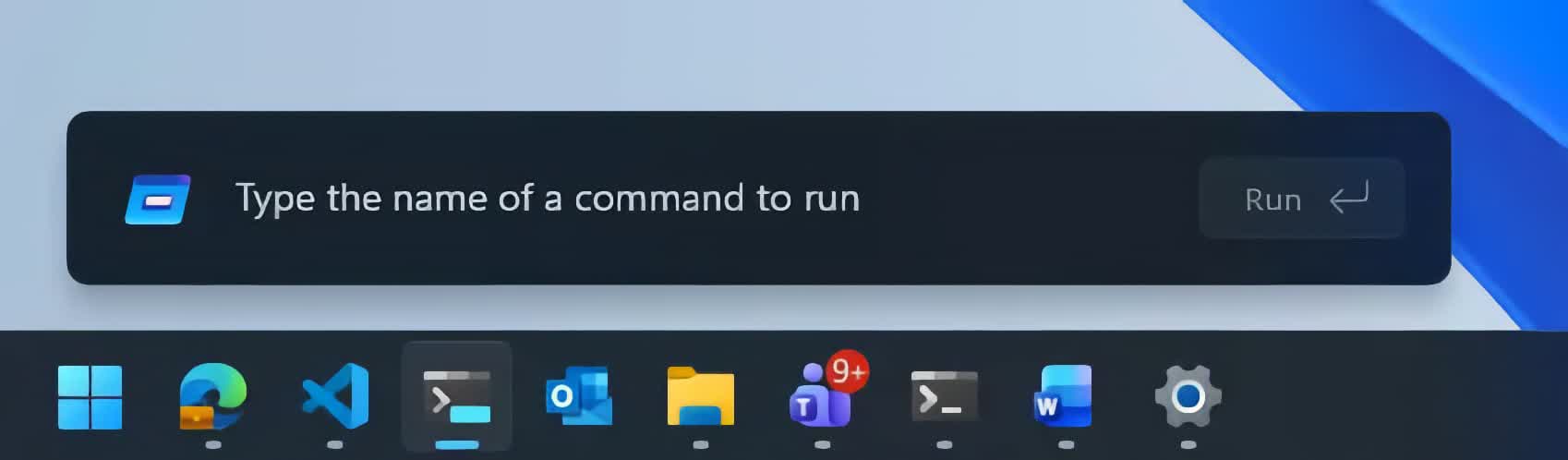
A handful of long-standing system tools and protections are being refreshed as well. A newer, optional Run dialog is on the way, aimed at modernizing a utility that many IT pros still use constantly; a toggle will let users switch back to the classic version.

Windows Security is also gaining Administrator Protection, a feature that replaces the traditional UAC prompt with Windows Hello authentication for elevated tasks, tightening how administrator-level operations are requested and approved.

Advertisement

Microsoft is delivering most of these smaller quality-of-life changes through cumulative updates across 24H2, 25H2, and 26H2, rather than waiting to bundle everything into a single release.

Support timelines and hardware requirements

On the lifecycle side, 26H2 mainly resets how long a Windows 11 install remains supported. Home and Pro editions get 24 months of support, and Enterprise and Education get 36 months, pushing support for new deployments out to roughly 2028 or 2029 depending on the edition.

The hardware floor doesn’t change: any PC that can run Windows 11 24H2 or 25H2 can move to 26H2. The exception is Arm devices running Windows 11 26H1, a separate platform release (codenamed Bromine) built for newer Arm silicon like Qualcomm’s Snapdragon X2. Those devices won’t take the 26H2 update at all; Microsoft has said they’re expected to move to version 27H2 sometime in 2027 instead.

Advertisement

Microsoft has said the 26H2 rollout is planned for the second half of 2026, likely around October, following the pattern of recent Windows 11 releases that have landed in late September or October.

Source link

Advertisement
Continue Reading

Tech

How to watch Man Utd vs PSG for FREE: pre-season friendly live streams

Published

on

  • Man Utd vs PSG: Saturday, August 8 | 4pm BST / 11am ET
  • Stream: MUTV (UK and US)
  • Unlock your stream with Surfshark

Watch Man Utd vs PSG live streams as two of European football’s biggest clubs meet in a high-profile pre-season friendly in Gothenburg. The Red Devils arrive on the back of an impressive 2-1 win over Atletico Madrid, while the reigning two-time Champions League winners only returned to training earlier this week.

Preparing for his first full campaign in charge at Old Trafford, Michael Carrick will have been pleased with what he’s seen from his squad thus far in pre-season. Young players have been given an opportunity to impress, with the 19-year-old trio of Shea Lacey, Jacob Devaney and Harry Amass all on target in the recent 5-0 win over Rosenborg. Highly rated 15-year-old JJ Gabriel also featured in the win over Atleti, showing plenty of maturity in a game where Bryan Mbeumo score both goals. It will be interesting to see whether the youngsters get the chance to shine here or whether Carrick opts for more senior figures.

Source link

Advertisement
Continue Reading

Trending

Copyright © 2025