Connect with us
DAPA Banner
DAPA Coin
DAPA
COIN PAYMENT ASSET
PRIVACY · BLOCKDAG · HOMOMORPHIC ENCRYPTION · RUST
ElGamal Encrypted MINE DAPA
🚫 GENESIS SOLD OUT
DAPAPAY COMING

Tech

NBA will put AI in charge to tackle bad ref calls and fan fury

Published

on

Bad referee calls have become one of the NBA’s most frustrating recurring storylines, especially during the playoffs when every possession gets dissected online within seconds. Now, the league appears ready to lean much harder into artificial intelligence in an attempt to reduce controversial officiating decisions and calm growing fan anger around inconsistent calls.

According to recent comments from Adam Silver, the NBA is actively exploring how AI can improve officiating, replay analysis, and decision-making during games. The discussion comes at a time when criticism surrounding referees has intensified across the league, particularly as social media clips and slow-motion replays make every missed whistle instantly visible to millions of fans.

The NBA wants AI to assist officials instead of replacing them

Speaking about the future of officiating, Silver suggested AI could eventually help identify incorrect calls in real time and support referees during games rather than fully replacing human officials. The league reportedly sees artificial intelligence as a tool that could improve consistency, reduce human error, and make officiating decisions more accurate under pressure.

The NBA already relies heavily on technology through replay centers, player tracking systems, and advanced analytics. However, AI integration would take that much further by potentially analyzing movement patterns, contact, positioning, and foul situations instantly during live gameplay.

Advertisement

One of the league’s biggest concerns appears to be maintaining trust in officiating. Referee criticism has exploded in recent years as fans increasingly accuse officials of inconsistency, bias, or simply missing obvious calls during critical moments. The rise of sports betting has also intensified scrutiny around officiating decisions, since controversial calls can directly affect wagers alongside game outcomes.

Silver acknowledged that officiating remains one of the most difficult parts of professional basketball because referees must make split-second decisions while tracking ten players moving at extreme speed. AI, according to the NBA’s thinking, could act as an additional layer of support capable of processing far more visual information simultaneously than a human crew.

At the same time, the league does not appear interested in removing referees entirely. Instead, AI would likely function more as an intelligent assistant integrated into replay systems, game reviews, and real-time officiating support.

Why this matters

The NBA’s interest in AI reflects a much broader trend happening across professional sports. Leagues worldwide are increasingly experimenting with technology to reduce controversy and improve fairness.

Tennis already uses automated line-calling systems, football leagues are heavily dependent on VAR, and baseball continues to expand automated strike-zone testing. Basketball may now be heading toward its own AI-assisted officiating era.

Advertisement

For fans, the appeal is obvious. Fewer missed calls could mean fewer games overshadowed by officiating controversies rather than actual basketball. However, the idea is also controversial. Many fans already complain that replay reviews slow games down too much. Introducing AI into officiating could create concerns around over-analysis, delays, or removing the human element that has always existed in sports.

What happens next

The NBA is still in the early stages of exploring how AI could fit into officiating workflows, and there is currently no timeline for full implementation. Still, the league’s direction is becoming increasingly clear. As AI tools improve, the NBA appears determined to use technology more aggressively to protect the credibility of officiating and reduce fan frustration.

Whether AI can actually solve the referee problem is another question entirely. But for a league constantly battling viral outrage over bad calls, even partial improvements may be enough to justify the experiment.

Source link

Advertisement
Continue Reading
Click to comment

You must be logged in to post a comment Login

Leave a Reply

Tech

National survey of parents identifies barriers to family well-being

Published

on

A new survey shows households with children under age 18 are experiencing economic strain, with parents suffering from depression, burnout, and hopelessness. 

Capita launched the new national survey, Quarterly Insights from American Families, in partnership with YouGov. The survey will be conducted quarterly.

“This is the baseline,” said Elliot Haspel, a senior fellow with Capita. “We really want to be able to ask questions that serve as an early warning system for family well-being.”

Haspel said what stood out to him from the survey is “how much parents are facing precarity right now… I think that it tells us that families are really struggling and they really need support.”

Advertisement

The questions

YouGov, on behalf of Capita, surveyed 1,000 parents with children under age 18 between Feb. 2 and Feb. 16, 2026. North Carolina is one of four states that were oversampled in the survey, meaning the results are especially representative of those facing parents in our state. 

The survey consists of 69 questions (available here) designed to track families across three dimensions: stability, predictability, and quality of life. Capita defines the question underlying each dimension:

  • Stability: Can families meet basic needs without falling into crisis?
  • Predictability: Can they plan their lives without constant disruption?
  • Quality of life: Do they have the time, health, and connection to flourish, not just survive?

Haspel explained that this survey is meant to fill the gap between surveys such as RAPID, which focuses on parents and caregivers of young children, and surveys of all Americans more broadly.

Sign up for Early Bird, our newsletter on all things early childhood.

Advertisement

He said two-thirds of the survey questions will remain the same each time, and another third will shift based on Capita’s specific areas of interest at a given moment.

Haspel pointed out that for all Americans, life can be stressful, and parenting in particular will always come with its own stressors.

Advertisement

“The issue is, what are the artificial, unnecessary stressors that we put on families as a result of policy choices?” Haspel said. 

The answers

One of the main findings from the survey revolves around the economic pressure that families are facing. As the Capita report puts it: “Multiple indicators point to significant and widespread financial stress.”

Here are some of those indicators:

  • More than a third were worried at some point in the last year that food would run out before they had money to buy more — and almost as many actually had that happen. 
  • One in 5 reported skipping out on needed medical care due to costs in the last year, and 15% skipped filling a prescription for the same reason. 
  • In the last three months, 20% of households reported a member losing a job or having their hours cut.
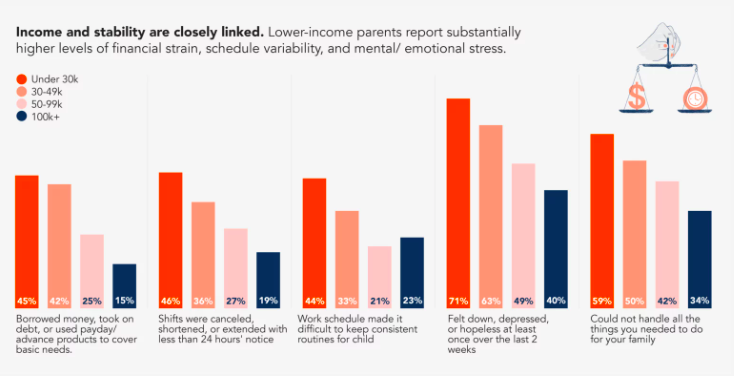
  • In the last month, 25% of respondents said they had a shift canceled, shortened, or extended with less than 24 hours’ notice. The same percentage were required to be “on call” — available without guaranteed hours — during that period. 
Courtesy of Capita

Financial stress can be a leading driver of “toxic stress.” This compounding, long-term stress can do permanent damage to the health of parents and the development of children — and can sometimes lead to Adverse Childhood Experiences (ACEs). 

Evidence shows that safe, stable, and nurturing relationships with adults can protect children from the negative outcomes of ACEs and toxic stress. But the survey suggests most parents are struggling to maintain that kind of relationship with their children. 

Advertisement

Two-thirds of respondents said that in the last month, stress made it hard to be as patient with their children as they wanted to be. And half of parents reported feeling down, depressed, or hopeless in the last two weeks. 

There are several questions in the survey that pertain specifically to work and child care. Here are some related findings:

  • More than 70% of respondents describe their job as family friendly.
  • Almost two-thirds said family life is a top priority, and they want their job to fit around it.
  • In the last year, 27% of respondents missed work or lost pay because of child care problems.
  • One in 5 parents regularly supervise their children while working. 

Despite the challenges presented by scheduling, about 70% of parents report being satisfied with their existing child care situation, whether they have children who are school age or below. And 81% said their communities are welcoming to families with minor children.

But 43% said their work schedules made it hard to keep consistent routines for their children, and that matters. 

“That lack of control over one’s schedule contributes to lack of control over one’s life more broadly, and it can affect parenting relationships,” Haspel said. 

Advertisement

As the Capita report explains:

Volatile schedules make it hard for people to be the kind of parents they want to be. They may have to forego baseball games or dance recitals they planned to attend, skip sitting down to dinner as a family, or miss tucking their kids into bed. Instability also has a significant impact on child development. Consistent routines are the foundation for children’s growth, learning, and feelings of security. Chronically disrupting those routines not only stresses parents but also interferes with their children’s long-term trajectory. Inconsistent or nonstandard parent work schedules are associated with cognitive delays and behavioral outcomes, especially if they begin during a child’s first year of life. 

“Job quality or schedule quality is often thought of as labor policy, it’s not thought of as a family policy,” Haspel said. “If you care about having strong, healthy families, this is a contributing factor.”

The meaning

While this first set of survey results represent the baseline of what Capita plans to measure over time, there are still significant takeaways from this early warning system. 

“A lot of what we’ve been hearing around the issues with affordability, the issues with being able to navigate all the extra challenges of parenting in 2020s America is showing up in family well-being,” Haspel said. 

Advertisement

Here’s what Capita has to say about the initial survey results:

This first survey of Quarterly Insights paints a troubling picture of families feeling economic strain and suffering from depression, burnout, and hopelessness. These conditions reinforce one another, making it harder for parents to show up for their children, their partners, and themselves, maintain routines, and flourish. Ultimately, all of these factors make stability feel perpetually out of reach. While the heaviest burdens often land on those earning the least, working-class and middle-class families also feel the enormous weight of these compounding pressures.

The report goes on to point out that policies supporting the well-being of children and families are most likely to succeed if they address multiple aspects of family hardship and reach all families who are affected. 


Editor’s note: This article was corrected to say that four states were oversampled in the Capita survey.

Katie Dukes

Katie Dukes is the director of early childhood policy at EdNC.

Advertisement
Advertisement

Source link

Continue Reading

Tech

macOS Golden Gate review beta

Published

on

Thank goodness for Siri AI, because if the only updates with macOS Golden Gate were the other ones shown at WWDC, this would be the weakest release in history.

As it is, the new macOS Golden Gate is a significant and even dramatic update, but solely because of how useful Siri AI is. True, there is more to the update than Apple said, but all it mentioned was a Liquid Glass refinement, improved curves on windows, and a reworking of the sidebar.

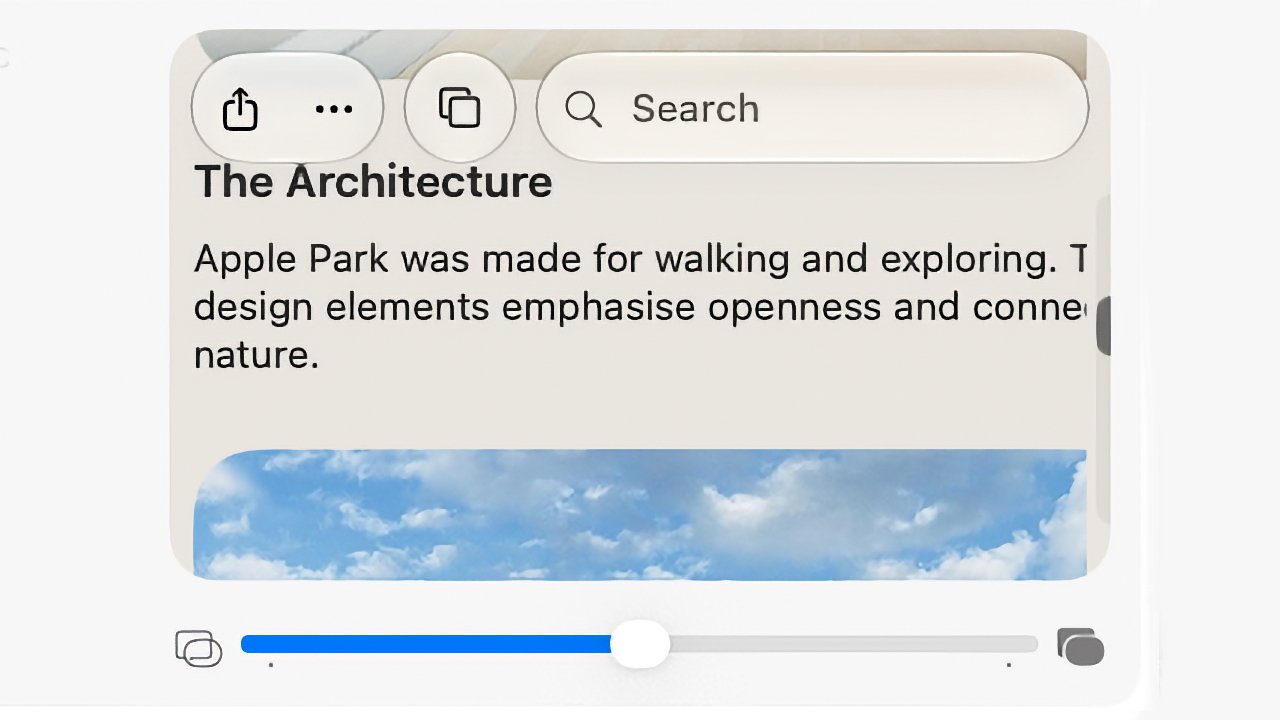
If that sounds like only an incredibly little difference from macOS Tahoe, it’s actually even smaller than you think. That Liquid Glass refinement is a slider to let users control how translucent it is, but it works across such a narrow range that it’s not worth bothering with.

So Siri AI is the star and even in its very first form, it is already so very close to excellent. Every year there comes a moment when the previous macOS seems amazingly old, and this time it’s when you first use Siri AI.

Advertisement
iPhone screen showing an article titled The Architecture about Apple Park, with share and bookmark icons, a search bar, partial text, and a blue sky photo preview underneath

This slider in macOS System Settings controls Liquid Glass, but don’t expect to see much difference.

It’s the feature you immediately adopt and that when you turn to a Mac without it, you miss it. Siri AI truly is a dramatic improvement, although it is far from perfect.

macOS Golden Gate beta review — Siri AI wins

I did wonder whether it would be hard to use the new Siri AI because I’m so used to how it used to work. I’m used to asking one thing at a time, then muttering when Siri gets it wrong, and asking it again, then sarcastically saying thank you.

With the new Siri, though, the first thing I thought of was to ask about a concert I booked a year or more ago. I didn’t remember the date, and I could have searched my calendar, but I also wasn’t sure whether the tickets were being kept at the box office.

Advertisement

So I just asked Siri when I am seeing Dar Williams, and also where the tickets are. It pretty immediately showed me the date, the venue, and the email that had the tickets in.

Open MacBook laptop displaying a macOS desktop with a centered AI assistant window, showing text responses and controls, against a minimalist beige and gray abstract background

It took Siri AI thirty seconds to check my calendar and find a specific email buried deep in my archive.

Just as I could have searched my calendar, of course, I could have searched my emails but I didn’t know if the tickets were there. Plus you know how long it takes to find anything in Mail, so having this close to instant result is a genuinely useful boon.

Similarly, as much as I like Apple Maps, I find it a bit irritating when I’m just looking up a place instead of trying to find a route. But then also when I want a route with multiple stops, it’s not as if it’s hard, but it’s now so much easier to ask Siri AI.

Advertisement

Consequently, I asked it for a route to a venue I have to speak at, arriving at a certain time on a specific day, and also including a stop at a colleague’s home to pick up various things for the event. It just did it.

Apple Maps showing a route chosen by Siri AI.

I have a long drive ahead of me. But Siri AI made finding a multi-stop route very quick.

Or rather, it eventually just did it. No question, Siri AI is superb, but sometimes it has frozen on me, sometimes it has said it can’t do something. It has taken me three goes on occasion, but it has then worked.

macOS Golden Gate beta review — Siri AI failings

Part of the problem is that Siri AI is now in Spotlight. In most ways, that is superb. Instead of being off in some separate Talk to Siri feature, it’s now right there where you might spend much of your time anyway.

Advertisement

But as you type, Spotlight will go through figuring out whether you’re looking for a document, or an application. Sometimes it is poor at realizing that you want to ask Siri AI a question.

For some reason, though, there is a solution. Once you’ve typed your question, you can hold down the Command key and that tells Spotlight you want to Ask Siri.

I have not one thin clue how I stumbled across that, but I’m using it a lot now and it never fails. And I am also using Siri AI much more than I expected. If I want anything that is on my Mac, I’ll ask Siri AI and while this might just be that it’s a new toy, it really feels as if it’s already part of my workflow.

However, if I ask for something that requires what Apple calls “World Knowledge,” Siri AI stops being excellent. It becomes much more like any other AI, and sometimes it isn’t as good as them.

Advertisement

So for instance, when I start researching an article, I will now routinely do a search for every time I’ve written on AppleInsider about the same topic before. Google was never all that use for this, but Claude AI is excellent at surfacing them.

Siri AI is not. It doesn’t always find the articles I want, and sometimes it will find some but not include any links. I’ve seen this with all AI chatbots and am used to sighing and typing “prove it.”

But in the last such search I did with Siri AI, it did provide links but the first one I tried went to the wrong site. It was the right topic, but the article shown wasn’t on AppleInsider and wasn’t written by me.

That is typical of AI search results. Only, that same search did surface notes I’d made on the topic for a previous podcast recording. I’d entirely forgotten those, and Siri AI found them.

Advertisement

If something is on your Mac, iPhone, or iPad, then Siri AI is superb. If it’s on the web, it’s not always so hot.

macOS Golden Gate beta review — more Apple Intelligence

It used to be that there was a section in System Settings called “Siri and Apple Intelligence.” That has now changed to just Siri.

So it appears as if there is no longer a switch to turn off Apple Intelligence. It’s not clear yet whether turning off Siri will do that too.

It is clearer that Apple is trying to put some water between Siri and the rest of Apple Intelligence, because there are AI features that are separate. At present, you have to join a waitlist to get Siri AI, but even before you get the new Siri, there are many Apple Intelligence features in macOS Golden Gate.

Advertisement

For instance, if you open an image in the Photos app, choose Edit, and then click on Tools, you now get the options to reframe or extend the image that Apple demonstrated. With the right sort of image, extension is excellent.

Open laptop displaying a video call with an older man in a suit, sitting in front of wooden cabinets, centered on a light desktop background

The original photograph of me looking grumpy for no reason.

I took a close-up shot of myself against a wooden background, and in moments that background was far wider. Not only did it successfully duplicate the background, it also edited it. So seeing that there was light on one side of my face, it lit that edge of the frame as if there were a window just out of shot.

It also interpreted my stony face as being annoyed, so it gave me folded arms. That felt weird, but it didn’t look wrong.

Advertisement

Reframing of that same image worked, too, or at least mostly. It’s a more limited tool than it seemed in the WWDC keynote, but it did allow me to tilt my head and whole body back, as if I had taken a low-angle shot.

Laptop displaying a video call with an older man in a suit sitting against a wooden wall, shown in a centered window on the screen with controls visible around it

The same shot but with the background greatly extended. Sometimes when I try this, Photos also adds in folded arms.

If I shifted the frame to the left or right, it also worked. But along the way it briefly gave me an extended neck.

So it really does depend on your image, because you are as likely as not to get terrible distortion.

Advertisement

Still, I often create poster images for various projects and being able to extend the background will be a boon. It will mean I can have space to add a headline, for instance.

Open laptop displaying a video call with an older man in a suit against a wooden wall background, centered on the screen with macOS desktop interface visible around it

Photos can now turn the subject to the side, although apparently it can’t make me more cheeful.

That will be an occasional thing I do, it hasn’t so immediately become part of my daily workflow as Siri AI has. But then there is one other macOS feature that has definitely changed how I work, at least most of the time.

It’s the new natural language Shortcuts, the way that you can describe what you want and the Shortcuts app will create it for you. When it works, I cannot see any reason you’d make Shortcuts any other way.

Advertisement

If only it worked all the time.

macOS Golden Gate beta — Shortcuts are mixed

If you open the Shortcuts app on Mac, iPhone, or iPad now, you get a prominent New Shortcut button. Choose that and you are asked to describe what you want.

On the Mac, you practically have to dodge around that button to get anything done manually. It is that prominent and Apple is clearly pushing this verbal Shortcuts.

Open laptop displaying a macOS Shortcuts app window with colorful square shortcut tiles and a right panel asking What do you want your shortcuts to do on a light background

The prompt for you to describe a Shortcut you want is even more prominent the first time you open the app,

Advertisement

But then this is a change that will surely introduce more people to Shortcuts, and it’s only one extra step to go around it to manually writing them as before.

However, the results might also put newcomers off because Shortcuts now has that AI-style certainty of what it’s doing, even when it’s wrong. When it is right, though, it is very impressive.

On my iPhone, for instance, I asked for a Shortcut that would change my wallpaper at 6pm every weekday, and as well as doing that, it also set up the automation to run it.

Then on the Mac, I have long wanted a Shortcut that would do some work on my AppleInsider podcast notes. During the show, I’ll tap on my Stream Deck Pedal whenever there’s to be a new chapter, for instance, and I have that send the current time to a note.

Advertisement

But it’s the current running time in minutes, and I then edit in Final Cut Pro, whose time is in hours, minutes, and seconds. So I keep having to stop to think whether 119 minutes is really one hour 59 minutes, or whatever.

I’ve wanted that shortcut that would take 119 minutes and write it out as 01:59:00, and it has always defeated me. Not any more. I asked Shortcuts to do it, and it did.

Open laptop displaying macOS screen with colorful shortcut tiles and a smaller automation window in front, set against a beige abstract wallpaper on a silver MacBook-style device

Note the large icon to the rear where Shortcuts says what it has done, and then in the foreground, what it’s actually produced.

I then asked for various refinements to get the result copied to the clipboard, and it did that, too.

Advertisement

It is really very good, and so very easy that I initially thought there was no possibility that I would ever again want to write a Shortcut by hand. I was an immediate and total convert to the new way of doing them.

That didn’t last.

For years, I’ve also wanted a Shortcut that would switch Tab Groups in Safari and it’s always been impossible on the Mac. You can do it on iPhone and iPad, there is a Shortcuts action to do it, but it’s always fallen over with an “internal error” on the Mac.

So when Shortcuts next asked me what I wanted, I told it, and it did it. It stopped to ask me which Tab Group I wanted, then it presented me with the finished Shortcut including a full description of what it does.

Advertisement

It doesn’t work. It isn’t even close.

If you go into the Shortcut manually, you can see that instead of anything to do with Tab Groups, it’s trying to turn on Do Not Disturb. It doesn’t even reference the specific Tab Group it asked me about.

Incidentally, if you write a Shortcut manually and include the action to change Tab Groups, it still fails as it now has for years and years. There is progress of a sort, though, as in macOS Golden Gate, instead of an unspecific “internal error,” it says it cannot communicate with the app.

Which is a clue both to my problem and to where Apple is putting its attention. Because what’s probably happening is that behind all of this verbal and even manual Shortcut writing, the app is using AppleScript. This is the decades-old automation that can let you do just about anything on a Mac.

Advertisement

But AppleScript works by every app providing access to its features, specifically by providing what’s called a dictionary. You can open the Safari dictionary in Script Editor, and if you do, you’ll see that there’s nothing there to do with tab groups.

So it appears that Apple’s newest natural language Shortcuts tools fail because Apple’s oldest automation technology hasn’t been updated.

It would also appear that Shortcuts has that curse of AI, that inability to say it can’t do something. Except sometimes, it will say exactly that, such as when you try to use it to fix irritations with the Phone app.

macOS Golden Gate beta — Phone app

With macOS Tahoe, Apple brought the Phone app to the Mac and it seemed like it was going to be so useful. If someone calls, you would just answer it on the Mac as you work. If you need to call someone, you would just do it on the Mac without getting out your iPhone.

Advertisement

I had issues that my Mac Studio wasn’t displaying the phone call notification fast enough to stop people hanging up on me. But even if the on-screen notification had appeared at the same time as the ringing sound begins, the green answer button wouldn’t always react to a click.

Open laptop displaying macOS desktop with beige abstract wallpaper, centered settings or profile window, and various app icons arranged along the bottom dock on a clean white background

Nobody can hear you when you use the Phone app on the Mac, unless you know to look under the Video menu to choose the same audio source you’ve already set everywhere else.

What I’d really like is a keystroke to answer a call, and then another keystroke to end it. There is no such keystroke, and while you can add your own to just about anything on the Mac, you can’t with the Phone app.

You also cannot write or describe a Shortcut that answers for you. If you could, you could attach that Shortcut to, say, a Stream Deck button, but you can’t.

Advertisement

And this is one case where the new Shortcuts says no. “I can’t create shortcuts for physical actions like answering a phone call,” it says.

So there is some error-trapping in the new Shortcuts, but it doesn’t know to say it can’t do other things, like the Safari tab groups.

But then maybe we shouldn’t expect the Phone app to be useful, because with macOS Tahoe, it seemed as if Apple abandoned it part way. By default, for example, no one could hear you when you used it to make or answer a call, which seems fundamental.

It turns out that regardless of any Sound settings you have, you have to expressly tell the Phone app to use a given microphone. And you tell it this via a menu called Video.

Advertisement

A phone app has a video menu. That hasn’t changed with macOS Golden Gate.

macOS Golden Gate beta — visual changes

Something that has changed with the new macOS is how the Mac looks. It’s so subtle with adjustments such as the Liquid Glass slider that it might as well not be there, but it is.

It’s not much more pronounced with app icons, but it does make a difference. App icons in the Dock do seem to pop, and it means that transparent ones are clearer, too.

There’s also how menus have shed their mass of icons. With macOS Tahoe, every menu item had its own icon and the result was a mess, but calmness has now been restored.

Advertisement

All of which is good and all of which is welcome, but overall this really would be an incredibly slight update if it weren’t for Siri AI.

Still, up to now, Siri has felt like it was really just for the iPhone and maybe also the iPad. With the Mac, because your hands are already on the keys, it seemed quicker to just type instead of interrupt your work to talk to Siri.

Now Siri somehow feels much more a part of the Mac, and that by itself means that macOS Golden Gate is a significant update.

macOS Golden Gate beta — Pros

  • Siri AI for any information on your Mac is fantastic
  • Natural language Shortcuts are usually brilliant
  • Photos app improvements can be superb, depending on the image
  • Minor visual updates are welcome

macOS Golden Gate beta — Cons

  • Siri AI World Knowledge is poor
  • Liquid Glass control is very limited
  • Natural language Shortcuts is sometimes just wrong
  • Years-old Shortcuts error remains
  • Phone app still feels abandoned

macOS Golden Gate beta review rating: 4 out of 5

Advertisement

Source link

Continue Reading

Tech

Fed up with constantly installing various updates for Windows 11? Microsoft is making monthly multiple reboots a thing of the past

Published

on


  • Microsoft is changing the way that Windows 11 updates are delivered
  • The likes of .NET, driver or firmware updates will be bundled together with the monthly update
  • This change is now in testing, alongside a lot of work to make Windows 11’s default apps better

Windows 11 is getting some more very useful changes, including an improved process for updates and a raft of tweaks for the default apps in the OS.

Microsoft has just released a new preview in the Experimental channel (build 26300.8687) which packs the changes for Windows Update (which were announced as incoming a while back in April).

Source link

Continue Reading

Tech

When will the iPhone Fold ship?

Published

on

The iPhone Fold has been on and off for years, but now the supply chain is suggesting that Apple will announce it as expected in September 2026, yet not actually ship it for several months.

There are at last positive signs from Apple that it is preparing an iPhone Fold, but there have also been multiple reports that it is delayed. Now according to Economic Daily News, the CEO of Apple lens supplier Largan Precision has hinted at delays.

“Some new opportunities will be announced in the third quarter,” Enping Lin said at a shareholders’ meeting (in translation), “and some will be moved to the beginning of next year.”

By itself, that’s a slim comment to base speculation on, but Enping Lin also specifically referred to new devices. “The fourth quarter of this year will be busier than in previous years due to the scheduling of customers’ new machines,” he said.

Advertisement

Then there have been separate comments by Ruan Chaozong, general manager of Xinrixing, a firm now said to be making bearings for a folding iPhone. Ruan is reported to have said that Xinrixing is only waiting for Apple to decide on its shipping date.

It’s still all far from a concrete leak, but these two different firms are both alluding to some device being rescheduled. More, the fact that one is a manufacturer of bearings, and the other is known for iPhone lenses, makes it sound likely that the new device is from Apple.

Given that and the history of reported delays since the iPhone Fold is believed to have entered manufacturing testing, the rumors seem reasonable.

We’ve been here before so often

There do seem to have been more reports of a September 2026 launch for the iPhone Fold than for any previous year. Yet there have been such rumors every single year since at least 2019, when Samsung launched its first folding phone.

Advertisement

This time the volume of rumors is higher, but they also tend to be contradictory. A possible consensus seemed to be emerging in April 2026 when it was claimed that the iPhone Fold would take longer to ship than expected.

In that case, the rumor was that Apple would announce the iPhone Fold at its September 2026 event, but not ship until October. Even then, it might only ship in small quantities, which is what Apple did with the original AirPods.

Although around the same time as those reports, there were also ones that said no, production issues were delaying the iPhone Fold until 2027.

If it really is delayed until 2027, that might account for how there have been fewer believable leaks of components than might be expected.

Advertisement

Separately, Apple has already been reported to be planning at least one folding iPhone in 2027 and 2028. However, that’s expected to be a second-generation, bezel-free, and perhaps a flip model iPhone Fold.

Source link

Advertisement
Continue Reading

Tech

SVS Champions Affordable HiFi at HIGH END 2026 with $2,200 Sub/Sat System

Published

on

Walking the floor at the world’s largest high end audio show, HIGH END, in Vienna last week, it was easy to get jaded. Hey, here’s a $120,000+ pair of speakers. Ooh, look: a $160,000 pair of speakers. OMG, what is this? a 3.6 Million dollar speaker system? Yep. And that one weighed almost three tons. Not exactly practical for most living spaces.

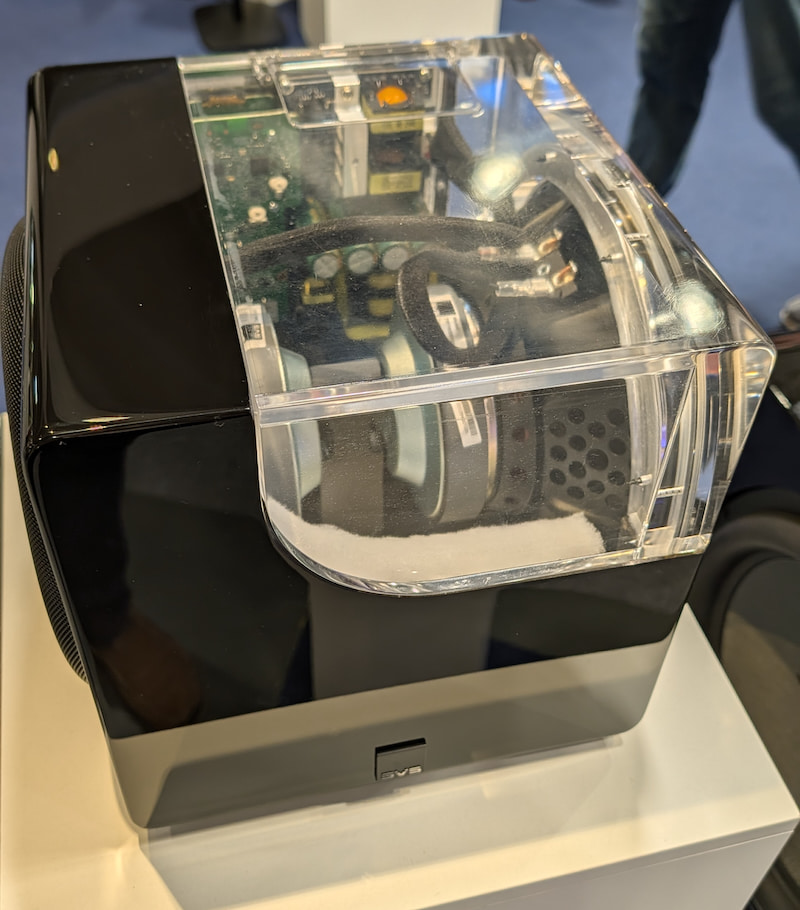
But walking into the secondary exhibition halls, connected to but separate from the main Austria Center Vienna (ACV) space, who do I see but SVS? Had they also crossed into the 6-figure system pricing territory? Nope. In fact, their highlighted product was the new 3000 Micro R|Evolution subwoofer which we previously saw in prototype form at CES 2026 and again in final form at AXPONA. It’s a compact powerhouse capable of reaching all the way down to 20 Hz, for the remarkably reasonable price of $999.

SVS 3000 Micro R|Evolution subwoofer cutaway
SVS had a version of their 3000 Micro R|Evolution subwoofer on display with a transparent cutaway to show off the internal components.

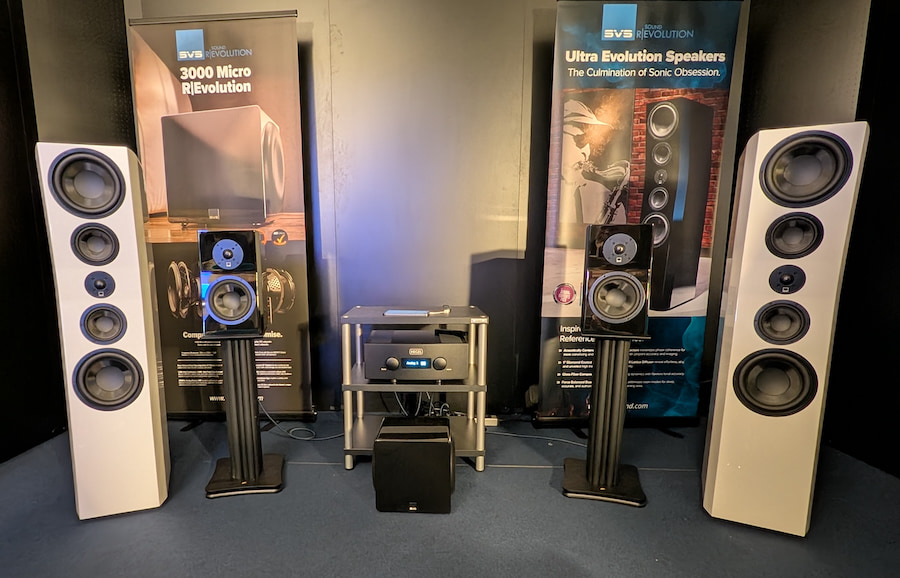
When I first entered their stereo listening room, I thought they were playing music through their Ultra Evolution Pinnacle floorstanding speakers. At $4,998/pair, they’re certainly not “cheap” but they look and sound like something that should have an extra 0 at the end of that price tag. Deep, extended bass, precise imaging, solid vocal presence – overall a supremely musical experience. But it turns out, they were actually playing music through their Ultra Evolution Bookshelf Speakers ($1,199/pair), supplemented with that 3000 Micro R|Evolution sub I mentioned earlier for a total speaker price of $2,198 including the subwoofer.

SVS two-channel demo at HIGH END Vienna 2026
SVS had both their Ultra Evolution Pinnacle towers (outer pair) and Ultra Evolution Bookshelf speakers (inner pair) on display at HIGH END Vienna 2026 for comparison purposes.

The blend between the bookshelf speakers and the sub was so seamless that I thought it must have been coming from the integrated towers which were located right next to the bookshelf speakers. And the soundstage was so wide as to be coming from well beyond both pairs of speakers. But I went up close to verify that we were actually hearing all this great sound from those two little guys and the compact sub in the middle. I’m not sure how many orders these folks got during and after the show. But I’m sure many European show attendees were as impressed as I was by what they heard.

SVS also had a small (5.2.2-channel) Dolby Atmos home theater system set up, featuring the company’s Ultra Evolution Titan towers, Ultra Evolution Center, a pair of Ultra Evolution Bookshelf speakers in the back, two Ultra Evolution Elevation speakers on the ceiling for height effects and two of the larger PB-3000 R|Evolution subwoofers, subs. SVS always manages to put on an impressive home theater demo, but this year things were improved by the ability to run the long-awaited Auto EQ room correction software on the two subwoofers. This helped them to dial in the bass response for the showroom, making it sound more like a professional movie theater with even bass response throughout the room (but without the sticky floors).

SVS Revolution Soundbar and Subwoofer
SVS R|Evolution Soundbar with subwoofer and optional rear speakers.

Also on display in the booth was the company’s upcoming R|Evolution Soundbar, which comes with one of the company’s powered subwoofers pre-paired for quick set-up. This sub is no joke – it features a 12-inch driver and 600 watts of amplification. SVS reps tell us the same can hit that magic 20 Hz low bass response, but we’re not sure how many dB down it will be at that frequency.

Since we first saw this bar at CES, they’ve added DTS:X decoding to the Dolby Atmos that we already saw and heard. The system will have optional rear speakers to those who want their sound a bit more immersive than what Dolby Atmos virtualization can do from a single bar. Pricing on that system has not yet been finalized but SVS says it should be around $1,500 for the soundbar+sub bundle and $1,800 for the bar+sub+rear speakers bundle. The soundbar is expected to being shipping toward the end of this year.

Advertisement

Check out SVS’s own live stream (previously recorded) where they give a quick booth tour from High End 2026.

The Bottom Line

Once again, SVS holds the line on pricing with one of the most impressive budget systems we heard at the HIGH END show. Those looking for an alternative to overpriced soundbar-based systems can put together a fine-sounding two channel or even 5.1.2-channel system featuring the Ultra Evolution Bookshelf and new 3000 Micro R|Evolution subwoofer with enough cash left over for a decent AV Receiver to power it all.

Price & Availability

Advertisement. Scroll to continue reading.
Advertisement

Source link

Continue Reading

Tech

NASA’s X-59 Reaches Speed And Altitude Milestones Ahead Of First Quiet Supersonic Flights

Published

on

The plane will soon be ready to fly over US communities.

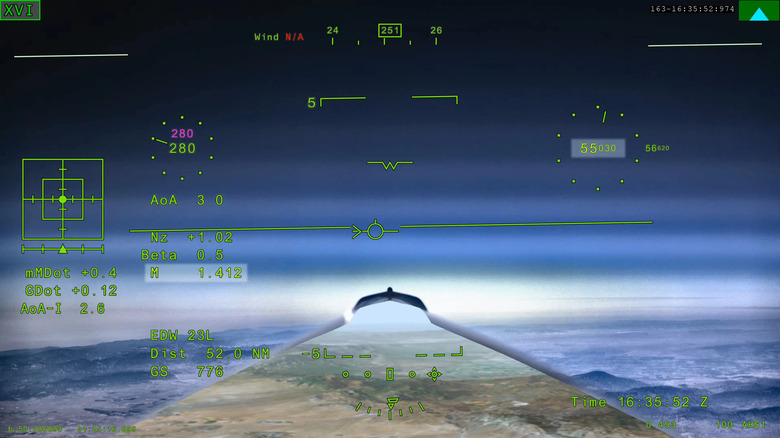
NASA’s X-59 research plane took its first supersonic flight at the beginning of the month, and now it’s demonstrated that it can reach the speed and altitude conditions it’ll need to achieve for planned trips over US communities in the near future. The X-59 is designed to fly at supersonic speeds without producing a loud sonic boom; instead, it’ll make a “quiet sonic thump,” according to NASA. For now, though, it’s flying alongside another research craft that does produce a sonic boom, to obscure whatever noise it makes as it undergoes testing.

In a test flight on Friday, the X-59 flew Mach 1.4, or about 924 mph, and reached an altitude of 55,000 feet. For the previous flight, on June 5, it hit Mach 1.1. 

Advertisement

The space agency says this latest test “was an even more critical step” than the one that preceded it, as it hit key targets that it’ll replicate during its Quesst mission. The Quesst mission, which is still months away, will see the X-59 fly over populated areas so NASA can get feedback from the public on what the sonic thump sounded like to listeners on the ground. Before that, though, the plane will go through an acoustic validation phase, in which the team will measure its supersonic acoustic signature to make sure it is indeed breaking the sound barrier without producing a traditional sonic boom.

Source link

Advertisement
Continue Reading

Tech

The Y2K Bug In BSD 2.11 That Survived 2000

Published

on

A year before the arrival of the brand-new 21st millennium, the Year 2000 Bug was predicted to grind modern society to a halt and ensure that at the dawn of the year 2001, there’d be nothing left but the smoldering wreck of once great societies. Thanks to the concerted efforts of countless engineers, software developers, and many others, we were left with mostly just silly glitches, with one of these surviving bugs apparently just discovered, as [Van Heusden] reported on an NTPd bug in BSD 2.11.

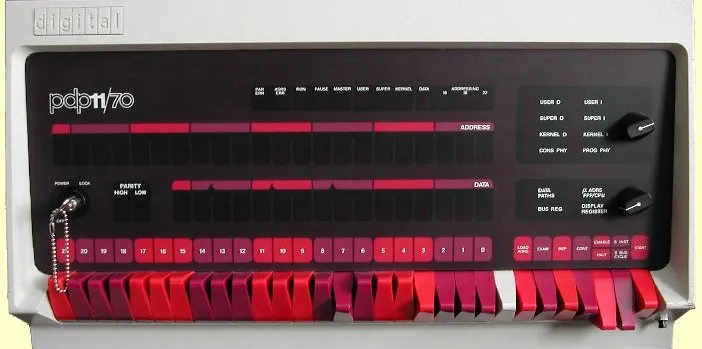
To be fair, it is a pretty obscure one, as the demonstration involves BSD 2.11 on a PDP-11/70 from 1975, so it’s probably not something that still sees much use outside retrocomputing enthusiast circles. In the blog post, the demonstration involves connecting a specific adapter by Traconex, capable of receiving WWV/WWVH time signals, and setting it up for use by the NTPd prior to running the ntpd -a any -d -d -d -d command.

This can create an ‘offset excessive’ error in the log, which, as the attached patch shows, is due to the use of explicit 20th-century numbering. Although not a bug that’ll really affect anyone, it shows that Y2K bugs didn’t just hide in two-digit year fields, but also lazy shortcuts and assumptions when handling years. This will be useful information while we try to avoid society melting down once more, as the Year 2038 problem is now pretty much right around the corner.

Advertisement

Source link

Advertisement
Continue Reading

Tech

These Are The Tesla Models Elon Musk Actually Drives

Published

on


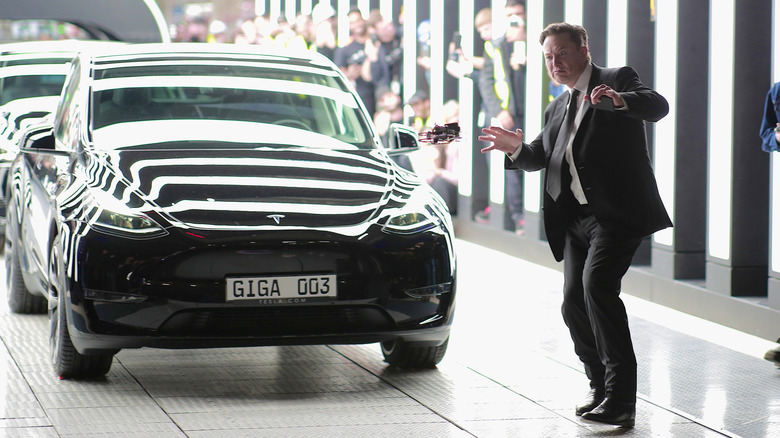
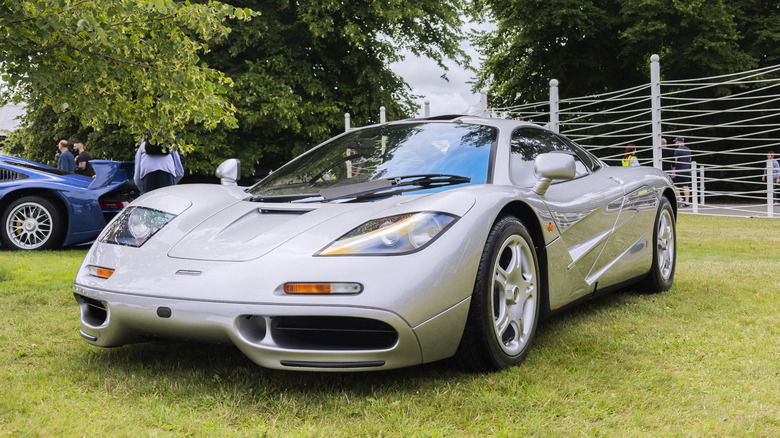
Elon Musk is many things — a billionaire, a rocket builder, a social media provocateur — but first, he’s a car guy. Long before he was running Tesla, he was spending his first big paycheck on a McLaren F1, which he believes is the best car in the world. Since then, his relationship with cars has only grown more complicated and mysterious.

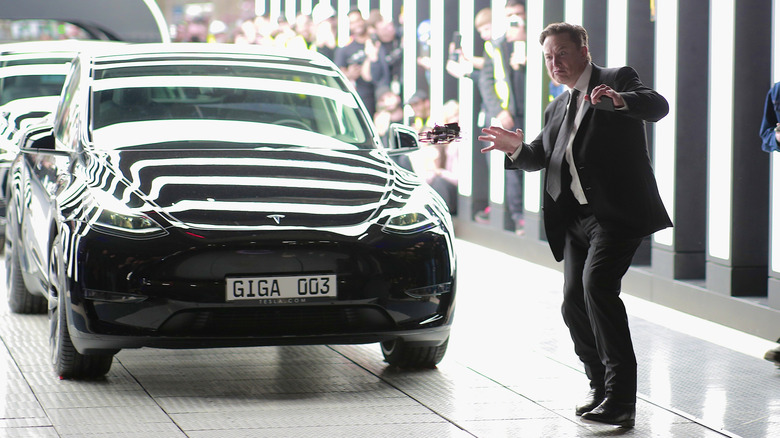
Tesla, the company he joined in 2004 and has led since 2008, has grown from a single-model electric car startup into one of the most influential automakers on the planet. Its lineup has spanned the Model S, Model 3 Model X, Model Y, and the Cybertruck, though Tesla has since discontinued the Model S and the Model X. Regardless, Musk has driven, tested, or been spotted in most of them at one point or another.

So which Tesla vehicles does the CEO actually drive? Back in 2019, Musk revealed on X that his day-to-day rotation included the Model S Performance — equipped with the then-new Raven motor — along with the Model 3 Performance, and the Model X when he had his kids in tow. Since then, he’s been spotted in newer models, including a Cybertruck prototype in Austin.

Advertisement

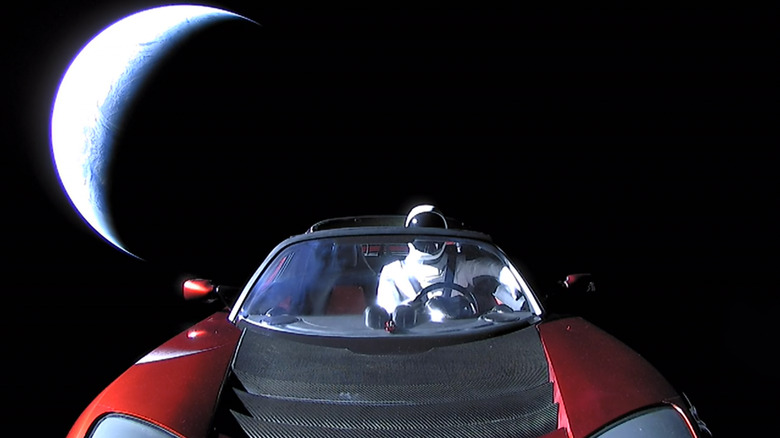
While Musk rarely updates the public on his garage, the Model S remains the Tesla most closely associated with him, alongside more recent appearances in the Cybertruck. His most famous Tesla, however, is still the original Roadster that SpaceX launched into orbit aboard Falcon Heavy in 2018. These are the Tesla models Elon Musk actually drives or has driven.

Advertisement

A closer look at Elon’s Teslas

Musk’s relationship with the Model S goes back further than most people realize. As early as 2015, Time Magazine reported he said at Tesla’s annual shareholder meeting that “I’m testing the latest version of autopilot every week. Typically, two or three builds per week that I’m testing on my car.” By 2018, when he appeared on The Joe Rogan Experience #1169, he confirmed the Model S was still his go-to, saying directly: “Model S P100D. That’s the car that I drive.”

By 2019, he had upgraded. In the aforementioned 2019 post on X, Musk revealed his Model S had been fitted with an adaptive damping suspension in addition to the Raven motor, along with a development version of the FSD computer that had not yet been made available to the public. The Model X is also the Tesla with a most personal backstory behind it. During a 2012 interview with Autoblog, Musk criticized the Audi Q7 he owned at the time for its notoriously difficult third-row access, saying that “you need to be dwarf mountain climber to get into the back seat.”

That frustration directly shaped the Model X. Musk said in the same interview that the Falcon wing doors were his idea, born out of a need for a door that could open in tight spaces while still allowing access to the third row without moving the second-row seat. Although these Falcon doors have proven to be quite problematic, In his 2019 X post, he confirmed the Model X remains his go-to when driving with his kids.

Advertisement

Elon Musk’s car collection

Although information on the Tesla models Elon owns and drives is somewhat limited, his broader car collection is more publicized. Likely the most expensive car in Elon Musk’s collection was the McLaren F1 — and we say “was” deliberately, since Musk no longer owns it. After crashing it while uninsured, watching it catch fire, and having it undergo a complete rebuild by McLaren Special Operations, he sold the car in 2007.

One of the oldest cars in Musk’s collection was the 1920 Ford Model T reportedly gifted to him by one of his friends as a symbol of how it changed the automotive industry and how Musk does the same. A well-known vintage also owned by Musk is the 1967 Jaguar E-Type roadster. Likely one of the coolest cars in his collection is the 1976 Lotus Esprit “Wet Nellie,” a car used in the 1976 “The Spy Who Loved Me” James Bond movie.

Musk’s collection also included a few older German luxury cars like the 1974 BMW 320i (his first car), a Hamman-modified 2005 BMW M5, and the 2010 Audi Q7 he criticized when talking about Model X Falcon doors. Musk’s 2012 Porsche 911 Turbo was actually directly tied with his connection with Tesla. When Musk offered AC Propulsion’s Alan Cocconi $250,000 to convert his Porsche 911 Turbo to electric, Cocconi refused. 

It was then that AC Propulsion’s CEO Tom Gage suggested Musk speak with Martin Eberhard, who had just launched a small electric car startup called Tesla. In the same Joe Rogan podcast we mentioned above, Elon noted that the Jag and the Ford are the only two gasoline cars he owned at the time, meaning that the majority of the collection is no longer his.

Advertisement


Source link

Advertisement
Continue Reading

Tech

IT Workers Are Now Struggling to Find Work, as ‘Picky’ Companies Demand AI Skills

Published

on

“Battered by years of mass layoffs, California tech workers were hoping the job market would rebound this year,” reports the Los Angeles Times. “But things are getting worse.”

The class divide is widening in Silicon Valley as a tiny group of employees is landing unprecedented packages for AI skills, while many others struggle to find work. The have-nots are doing everything that used to guarantee great jobs — refreshing resumes, optimizing LinkedIn profiles and doing interviews — but companies are much more picky these days. The tech jobless are rethinking their lives. Some are taking pay cuts, others are leaving tech. Some are going back to study or launch startups. Some have retired….

Since 2022, more than 815,500 tech workers have been laid off, according to Layoffs.fyi, a website that tracks job cuts. The tsunami of pink slips surged in 2023, when companies that had gone on hiring sprees during the COVID-19 pandemic began to cut back. From January to April, U.S. tech employers announced 85,411 job cuts this year, up 33% from the same period last year, according to global outplacement and executive coaching firm Challenger, Gray & Christmas. The Public Policy Institute of California estimates that the number of information jobs — which includes jobs in hard-hit Hollywood as well as tech — tumbled 17% between the middle of 2022 and this February. The San Francisco Bay Area has been hardest hit, the institute said in a recent report, with the number of jobs declining by 0.4%, compared with 7.5% growth over a similar time span before COVID-19 slammed into the U.S. economy.

Tech layoffs are also spilling over into other industries. Automaker General Motors laid off roughly 600 workers in its information technology department, and Walmart is reportedly laying off or relocating roughly 1,000 workers in its technology and products teams. Recruiters say companies have become much more selective, requiring AI skills, combining different positions and interviewing more people for each job. “You’re seeing elongated hiring cycles,” said Robert Lucido, senior director of strategic advisory at Magnit, a California company that helps tech giants and other businesses manage contractors, freelancers and other contingent workers. “There’s more opportunity to fill the need that they truly want.”

Advertisement

Paul Flaharty, district president at staffing firm Robert Half in Los Angeles, said companies are laying off workers, but also creating new roles tied to AI initiatives. “For individuals that are displaced, it’s really important that they find ways to upskill themselves so that they can make themselves as attractive as possible for these new jobs that are being created,” he said. Kira Martins was already taking on more work in a small team at Snap — the parent company of disappearing messaging app Snapchat — when she was laid off in April. The company said the layoffs were to cut costs as it focuses on profitability, noting how employees are using AI to “reduce repetitive work, increase velocity, and better support our community, partners, and advertisers….” Martins, a 36-year-old Los Angeles resident, views AI as a tool and is optimistic about finding her next role. People still need to decide how to use AI and check the work it generates, she said. “In tech, you want to be a first adopter, because if you don’t move quickly, it’s very easy to become irrelevant,” she said. “Everyone’s kind of hopping on the AI train.”
A former Google worker (laid off more than a year ago) says he’s still job hunting, according to the article, and “he’s learned it’s not enough to just apply in this competitive market. Workers really need to network and leverage their connections to get seen by hiring managers and stand out.”

But when 64-year-old product manager Bruce Bowers lost his job at Oracle — along with thousands of others — he just started his retirement early.

Source link

Advertisement
Continue Reading

Tech

UK Will Ban Social Media For Children Under 16

Published

on

Following a consultation, the UK is banning young people under 16 from social media platforms like TikTok and Instagram, Prime Minister Keir Starmer announced. “This is a line in the sand,” the PM said in a speech at his Downing Street residence. “Tech giants had their chance and failed, but we’re stepping in to protect children, back parents and set a new normal for future generations.” The government aims to pass the legislation by the end of this year and start enforcing it in the spring of 2027.

The plan includes not only a ban from major social media platforms, but also restrictions on gaming apps as well. Those include barring children under 16 from chatting with strangers, live streaming or using romantic chatbots. “These restrictions… go further than any other country,” the government press release states. 

The UK will follow a similar model as the social media ban in Australia. Platforms like Snapchat, TikTok, YouTube, Instagram, Facebook and X will be required to disable access for under-16 users by default. Chat apps like WhatsApp or Telegram will note be affected. The government is also looking at limited restrictions for youths under 18, like overnight curfews and breaks in infinite scrolling. 

Starmer acknowledged that kids will find ways around the ban, but said that wasn’t a good excuse for not enacting a law. “We don’t say, ‘Oh, look, a teenager managed to get a drink somehow, so let’s not bother banning alcohol sales for children,” he said. “Our laws are rules, but they’re also an expression of our values. They shape the social contract, and so this will change the conversations that parents have and the expectations of children over time.”

Advertisement

In January, the UK government launched the “Growing up in the online world” consultation into social media for kids, requesting feedback on whether and how to enforce that limit. The country’s ministers also went to Australia to study the effects of that nation’s social media ban, which went into effect on December 10, 2025. Only a month after it was enacted, Meta had shut down as many as 550,000 Australian accounts to comply with the law. 

The results of the UK consultation showed that nine in 10 parents supported a minimum age of 16 for accessing social media apps, the government said. At the same time, the PM added that the ban doesn’t mean the UK is anti-tech. “I do not accept, and I will never accept that you can’t be both pro tech and AI, and at the same time say we must protect our children,” he said in the speech.

Creation of detailed rules and enforcement of the ban will be conducted by the UK’s tech regulator Ofcom in consultation with lawmakers. “So far, Ofcom has driven some of the strongest changes of any online safety regulation in the world, from widespread age checks to grooming protections for children. But the industry needs to go much further to make people safe,” Ofcom said in an official statement. The government has yet to release details on ID or other enforcement mechanisms. 

Advertisement

Source link

Continue Reading

Trending

Copyright © 2025