Connect with us
DAPA Banner
DAPA Coin
DAPA
COIN PAYMENT ASSET
PRIVACY · BLOCKDAG · HOMOMORPHIC ENCRYPTION · RUST
ElGamal Encrypted MINE DAPA
🚫 GENESIS SOLD OUT
DAPAPAY COMING

Tech

Netflix wiz creates app to slash AI bills, then open sources it

Published

on

As the COOs from both Uber and Microsoft recently learned, encouraging company engineers to use AI aggressively can lead to hefty usage bills, perhaps even offsetting all the gains from laying off employees. 

The AI bills at Netflix may not be so eye-popping thanks to company senior engineer Tejas Chopra, who has created software to prune agent instructions, as measured in tokens, before they hit the LLM. 

Chopra has estimated that as much as 90% of tokens are redundant to the giant thinking machine of your choice. 

Although not an official Netflix project, several teams there already use Project Headroom, and a number of external projects rely on it as well.

Advertisement

In a talk at the Open Source Summit last week, Chopra said that Headroom has saved an estimated $700,000 for its users, who collectively now have 200 billion tokens to spend elsewhere. 

Not bad for an open source application that’s been out only since January. Headroom, currently at a still-raw v0.22, has gathered 2,000 stars on GitHub and has been forked over 120 times.  

“A lot of our users are people who have been really burned by token costs, more than anything else,” Chopra said in his presentation. 

Lossless context compression

A $287 bill from Claude Sonnet first brought Chopra’s attention to the idea of token economization.

Advertisement

The bill was typical home project stuff: a bit of debugging, some refactoring, MCP tools querying a database. At the time, Claude Sonnet’s token-based pricing seemed pretty generous: $3 for every million input tokens, or $6/million if you went over the 200,000 token limit for your context window. Still, that $287 added up quickly. 

Upon deeper inspection, Chopra found a lot of this data was highly redundant to the LLM. By and large, his own hand-crafted instructions were not the culprit. Rather it was all the boilerplate and machine metadata that came along for the ride: Needlessly-verbose JSON schemas, nested templates within API responses, identical database columns. 

“This isn’t prose. This isn’t creative writing. This is compressible data masquerading as text,” Chopra wrote in a blog post introducing his software.  In 2025, a group of researchers found that reading user input accounted for about 76% of all token consumption. 

The model providers have their own tools to save tokens. But to date, the settings on these tools are somewhat oblique to end users. By default, Claude has a prefix cache setting of just five minutes. After five minutes of inactivity, the entire context window needs to be refreshed, even if the LLM needs the exact same data. Another setting is exposed in the API documentation: a one-hour time to live (TTL). But there is a catch. “You pay two times the cost for your writes to get 90% savings for your reads,” Chopra told the audience. It’s up to you to find the sweet spot.

Advertisement

There are also a number of new commercial token barbers popping up, such as YCombinator-funded Token Company, which offers token compression as a service. On the open source side there is RTK (Rust Token Killer), which trims to the output of verbose commands, such as calls to a repository. Another open source project, LeanCTX, is a variant of RTK. 

All these tools are useful, Chopra admitted, but he designed Headroom to keep the operations confined to the developer’s workflow. And it had something none of the apps and services could offer: reversible compression.

Headroom’s job is to compress all the source material that is fed into the user’s context window – not only the conversation history, but also logs, tool outputs, files, chunks of documentation that the RAG found useful – before it arrives at the LLM. 

The context window is the set space for each user session. The latest frontier models are rapidly expanding their context windows upwards towards two million tokens, which holds both input and output.  

Advertisement

Such generosity is a mixed blessing, as Pope Leo might point out. As a unit of measurement, a single token is more or less equivalent to a human word. For pay-as-you go plans, the more you feed the context window, the more you’ll pay. 

Gobbling tokens like Pac-Man

Running on Python and Node, Headroom runs as a proxy (port 8787) on the engineer’s computer. The user wraps their LLM at the command line interface (i.e. “headroom wrap codex”) and it then parses the input.

While Headroom does compress a bit of programming code and human instruction, it is best at chopping server logs (90% of which can be jettisoned), MCP tool outputs (70% redundant JSON), Database outputs (it’s all one schema), and file trees (much repeated metadata).

Headroom’s first step is a process called CacheAligner which looks only for information that has been changed within input that’s already been entered, and ships only the new info, eliminating the need to replace an entire body of mostly unchanged text in KV Cache, the cache where the AI provider stores the user’s context window.  

Advertisement

“If your system prompt contains a date field or contains some UUID that changes per session, you are effectively getting a cache miss every single time,” he told the audience. “That will blow up your costs.”

Then, a router process infers the type of content and sends it to one of a number of compressors. An Abstract Syntax Tree (AST) compressor squishes programming code. JSON and Document Object Model (DOM) compressors snip unneeded JSON and Web boilerplate, respectively.

Headroom also has some “squashers” that look at text or JSON input and decide which bits are actually relevant, based on statistical analysis. These tools learn in a feedback loop if they are over- or under-compressing, based on how often the model has to call back into the original uncompressed prompt.  

The final process, called Compress Cache and Retrieve (CCR), offers that ability for the LLM to look at the original unsquashed data. It puts markers to where the data has been compressed, so if the LLM wishes to get the original context, it can call a Headroom MCP to retrieve the needed material from the user’s machine. The original context is stored on Redis or SQLite.  

Advertisement

There is still work to be done to this software stack, Chopra admitted, particularly on testing accuracy. It should be an easy task because the CCR stores the original prompts. More compressors can also be built for other specific types of data, such as financial data.  

Audio, image, and video will also have to be tackled (one user has already forked the project for video parsing). A related project, which Chopra says will be open source soon, is Headlight. Headlight will keep track of the origin of each token, which could be especially handy for ensuring the accuracy of multi-model work.  

A token saved is a token earned

Minding your tokens does not only save money, it can improve results, research suggests. 

Agents send more context than the model can possibly use, which, in addition to emptying the user’s coffers, can actually make the LLM dumber. 

Advertisement

Like the rest of us, LLMs get confused when presented with too much information. A group of Stanford University boffins found that LLMs tend to pay more attention to the beginning and the end of the context window, and tend to disregard the middle bits. 

Likewise, a set of researchers from data integrator Chroma deduced that, across 18 LLMs, “performance grows increasingly unreliable as input length grows.”

“Context rot,” they called this phenomenon. 

Trimming prompts can also improve latency. In his presentation, Chopra relayed how one of Headroom’s users forked the software for a voice-activated application. With voice, even silence can generate tokens. The user expects a response from the app within 200 milliseconds for the service to sound natural, so the company is using Headroom to help shrink that latency window down as much as possible. 

Advertisement

Headroom also offers some good news for those worrying about data centers heating the world into a fiery inferno with their energy usage. Fewer tokens means a smaller context window, which means less energy use – at least until Jevon’s Paradox kicks in and people find even more power-hungry ways to render their animated cat movies. ®

Source link

Continue Reading
Click to comment

You must be logged in to post a comment Login

Leave a Reply

Tech

Samsung’s upcoming foldables leak in a very interesting size comparison

Published

on

Samsung’s next foldable line-up may have just leaked ahead of schedule. A new image appears to show screen protectors for the upcoming Galaxy Z Flip 8, Galaxy Z Fold 8 and Galaxy Z Fold 8 Ultra side by side.

While leaked screen protectors aren’t usually the most exciting reveal, this one offers an early look at how Samsung could be reshaping its foldable range.

Most notably, the Galaxy Z Fold 8 appears wider and slightly shorter than previous models. Meanwhile, the Fold 8 Ultra looks set to sit in a class of its own.

If the leak is accurate, it suggests Samsung is putting more distance between its standard Fold and Ultra models. The company may no longer treat the Ultra as a simple spec bump. That could help the company better compete. After all, rivals such as Apple, Xiaomi and Vivo continue to push into the foldable market.

Advertisement

The image was shared by well-known tipster Ice Universe and appears to show noticeable differences between the two Fold devices. The standard Fold 8 looks broader than before. This could make the outer display feel more like a traditional smartphone screen. It may also feel less like the narrow panels found on earlier Galaxy Fold devices.

Advertisement

Beyond the redesigned shape, previous leaks have pointed to several upgrades for the Fold 8. These include a less visible display crease, a 4,800mAh battery and a weight of around 201g.

The Galaxy Z Flip 8, meanwhile, is expected to be a more modest update. Rumours suggest Samsung has tweaked the hinge design to make the clamshell foldable slightly thinner when closed. Additionally, the company is also shaving off a little weight. The biggest changes may come under the hood. Reports point to Samsung’s Exynos 2600 chip in Europe and South Korea. In other markets, there may be a Snapdragon 8 Elite Gen 5 for Galaxy processor.

Samsung expects to officially unveil the Galaxy Z Flip 8, Galaxy Z Fold 8 and Galaxy Z Fold 8 Ultra at its next Unpacked event on July 22. The company will reveal these alongside the Galaxy Watch 9 and Galaxy Watch Ultra 2.

Advertisement

Source link

Advertisement
Continue Reading

Tech

How often do the sensors inside the 2026 FIFA World Cup ball record data?

Published

on

The 2026 World Cup ball is basically a flying motion tracker

Read Entire Article
Source link

Continue Reading

Tech

UK AI hiring surges as firms seek people to babysit the bots

Published

on

AI AND ml

PwC says AI hiring jumped 61 percent despite wider slowdown in vacancies, with employers increasingly looking for workers who can use AI rather than build it

Britain’s AI jobs boom is creating a two-track labor market, according to PwC, which just so happens to make a healthy living helping companies navigate AI-driven transformation.

The consulting giant’s latest AI Jobs Barometer found hiring for AI specialists in the UK jumped 61 percent over the past year, rising from 112,000 roles in 2024 to 180,000 in 2025, even as overall job vacancies across the economy fell by 6.6 percent.

Advertisement

That headline figure is the sort of thing consultancies put in press releases, but the more interesting bit comes later.

PwC’s analysis suggests employers aren’t rushing to hire hordes of machine learning engineers and model builders. Instead, they’re increasingly looking for people who can use AI inside existing professions and business functions. The firm found that so-called AI user roles grew by almost 66,000 positions during the year, while AI developer roles increased by just 2,600.

After years of declaring that AI will revolutionize everything from accounting to sandwich-making, companies appear to have reached the awkward stage where somebody actually must make the technology useful.

PwC argues the result is a “two-track” labor market. Jobs where AI helps skilled workers automate repetitive tasks and focus on higher-value work are growing faster than roles where the technology mainly makes tasks easier and lowers barriers to entry.

Advertisement

According to the report, roles most enhanced by AI have grown by 39 percent since 2018, compared with 17 percent growth in jobs where AI is primarily simplifying work.

The firm’s wage data tells a similar story. Jobs requiring AI skills now command an average wage premium of 34.2 percent, up from 11 percent a year ago. Consumer market companies are offering premiums as high as 64 percent, while government and public sector employers top out at 12 percent.

That’s certainly good news for workers with AI skills. It’s also not the sort of conclusion likely to upset a firm that advises clients on AI strategy for a living.

The findings land against a backdrop of growing anxiety about AI’s impact on employment. Recent polling found one in five Britons believes AI-driven layoffs could eventually trigger civil unrest, while another survey found that office workers are already spending nearly six hours every week checking, correcting, or redoing work generated by AI tools.

Advertisement

For all the excitement around AI, the hiring surge appears to be concentrated in a surprisingly old-fashioned category: people who know what they’re doing. ®

Source link

Continue Reading

Tech

Flatpak-NG sounds like bad news for systemd refuseniks

Published

on

SOFTWARE

Linux app packaging rethink could leave alternative-init distros in the cold

Flatpak development has been very quiet for years. Discussions about a next-generation take are happening – and some of the signs are worrying if, like many FOSS folks, you are systemd-intolerant.

In the course of researching our article on MX Linux 25.2, we came across an interesting Reddit discussion from last month, which in turn led us to a Flatpak development blog post from late last year.

Advertisement

It looks like a team is collecting ideas for what is currently called “Flatpak-NG” – as in next generation. If this solidifies into code, this may form the basis of Flatpak version 2.

The blog post isn’t very informative, but the Reddit thread links to the video of a presentation from last month’s Linux App Summit in Berlin, which spells things out more clearly.

The Flatpak-NG idea involves handing off a lot of the isolation in Flatpak from the current bubblewrap layer to an as-yet-unwritten systemd component that the developers are currently calling systemd-appd. This would considerably simplify Flatpak, and enable it to do more isolation, including virtualizing the network stack – but at the price of making Flatpak 2 depend on systemd. A developer who was at the talk, Jorge Castro, later explained and confirmed this in a Fediverse thread.

The teams behind other init systems could, of course, write their own replacement for the notional systemd-appd, but that would be a substantial amount of work. The tool that provides the new init-switching functionality in MX Linux 25.1 and 25.2, init-diversity, currently supports six other init systems besides systemd, and we’ve seen little sign of them cooperating to create an alternative to systemd that provides even a subset of its wider functionality.

Advertisement

Flatpak is widely used and supported. Not all distros include it by default, but it’s the only widely adopted alternative to Canonical’s Snap packaging system.

Snap is more versatile: it works fine with shell programs, and even the kernel can be packaged as a Snap, which is how Ubuntu Core handles it. Snap’s implementation is much simpler and cleaner than Flatpak’s, as is the distribution model – which, as we’ve reported before, is entirely open source. The only proprietary part is Canonical’s Snap Store website. The trouble is, the louder advocates in the peanut gallery rarely even think about things like implementation details; they just get upset about more visible things that are easier to understand – such as who owns a website.

There are other alternatives out there, such as AppImage, 0install, AppDir, and GNUstep’s implementation of NeXT and Apple’s .app format. We have compared these in detail before.

Only two really have wide adoption, though. There’s Snap, which Canonical claims has more users simply because Ubuntu has more users than all the other desktop distros put together, and there’s Flatpak, which is used by every other distro with any kind of cross-distro package support.

Advertisement

The snag is, if Flatpak 2 does arrive in a year or two, and requires systemd, then that could spell the end of Flatpak support on many systemd-free distros. That includes MX Linux, Alpine Linux, Devuan, Slackware, and many other smaller projects. For many of these, Flatpak is a lifeline: the only way to access much of the wider Linux app market.

It’s not so much that the Flatpak-NG team is the “A-Team,” but the only team. In the original A-Team, Colonel John “Hannibal” Smith was wont to say “I love it when a plan comes together.” We suspect a lot of people will not love it if this plan comes together. ®

Source link

Advertisement
Continue Reading

Tech

Fox Is Buying Roku For $22 Billion

Published

on

According to the companies, it would create the third-largest player in US TV.

The Fox Corporation announced it will be acquiring Roku, best known for its streaming device ecosystem. Subject to approval, Fox will pay about $22 billion for Roku, or $160 per share. 

“This is a defining moment for Fox and a natural extension of the deliberate and focused strategy we have been executing for nearly a decade,” CEO and Executive Chair of Fox, Lachlan Murdoch, said in a statement. “Today, we take the next step: bringing together the most valuable live content portfolio in video consumption with the preeminent streaming platform through which America watches it. This combination will transform the scope of our company into high-growth verticals and yield a step change in our overall growth profile.”

The two companies claim that Roku will still operate as its own “partner-friendly platform.” The Roku Channel currently serves over 100 million households worldwide. Fox states that it will have a greater scale with Roku, reaching audiences for live content and streaming. It also gives Fox access to the “high growth” area of advertising and streaming subscriptions. On this note, the company points to the deal enhancing its “long-term growth profile” across streaming and TV.

Advertisement

Fox is paying with a combination of cash and some of its Class A common stock. Roku CEO and founder Anthony Wood said in the release.”I’m incredibly proud of what our team has built and the combination with Fox is an extraordinary opportunity to accelerate our vision, scale faster and innovate more aggressively for viewers, partners and advertisers.” The companies claim that combined, it would create the third-largest entity in US TV based on viewer share and yes, the deal is subject to regulatory approval.

Roku just updated its homescreen last month — the first time it’s done so in a decade. It brought features like increased personalization and a “top picks” section, but overall it doesn’t look hugely different.

Advertisement

Source link

Continue Reading

Tech

India’s Razorpay files for IPO through the confidential route

Published

on

Razorpay, the Bengaluru payments company, has filed draft papers for an initial public offering through India’s confidential route, according to people familiar with the matter. The filing moves one of the country’s larger fintech firms a step closer to the public markets, without yet putting its financials on public display.

The confidential mechanism, which Indian regulators have permitted in recent years, lets a company submit a draft red herring prospectus to the Securities and Exchange Board of India and the exchanges while keeping business, operational, and financial detail out of public view until later in the process. It buys time and discretion, which is why a string of well-known names have used it.

People familiar with the plans put the issue at between Rs 5,000 crore and Rs 6,000 crore, which at the upper end is roughly $700m, and suggest a listing could value the company at Rs 50,000 crore to Rs 60,000 crore.

Those figures come from sources rather than from Razorpay, and the company has not confirmed them. The size and terms can change before the offer is made public.

Advertisement

The 💜 of EU tech

The latest rumblings from the EU tech scene, a story from our wise ol’ founder Boris, and some questionable AI art. It’s free, every week, in your inbox. Sign up now!

Razorpay was founded in 2014 by Harshil Mathur and Shashank Kumar and built out from payment acceptance into banking, payouts, payroll, and lending. It was valued at $7.5bn in a December 2021 round, a mark set during the last cycle of large private fintech valuations.

The listing has a longer backstory in the company’s corporate structure. In 2025, Razorpay completed a reverse flip, shifting its parent’s domicile from the United States back to India, a move that carried an estimated $150m tax bill and is a near-prerequisite for an Indian listing. The confidential filing is the next item on that checklist.

Advertisement

Razorpay would join a run of Indian technology firms that relocated their domicile home before listing, a pattern driven by the depth of India’s retail investor market and by regulators’ preference for domestic incorporation.

The reverse flip is the costly part of that decision, since it crystallises a tax charge, but it is the price of access to the exchange on which these companies increasingly want to trade.

The 2021 valuation is the figure that hangs over the listing. At $7.5bn, it was set at the top of the last funding cycle, and the valuation reports now circulating, at the rupee equivalent of roughly $6–7bn at the upper end, would mark a more sober number than the private peak. That gap, between a late-cycle private mark and what public investors will pay, is the question many of this cohort of fintechs are testing as they come to market.

What comes next is procedural. Under the confidential route, a fuller prospectus and the financials it contains become public at a later stage, before the offer opens. Until then, the headline numbers remain attributed to people who know the plans rather than to the company.

Advertisement

Source link

Continue Reading

Tech

UK latest to ban social media for under-16s

Published

on

‘Children will be given back their childhoods’, the UK government said in a statement.

The UK is the latest to ban social media for underage users, as countries across the world reassess Big Tech’s impact on children’s growth and safety.

“Children will be given back their childhoods…with less time for scrolling and more time for play”, the UK government said in a statement today (15 June).

The government is blanket banning under 16s from a number of large user-to-user platforms that enable social interaction and allow users to post in an algorithmic feed, such as Snapchat, TikTok, YouTube, Instagram, Facebook and X.

Advertisement

Livestreaming and “stranger communication” functionalities are also being banned, although, communication platforms such as WhatsApp and Signal narrowly avoided the government’s hand, despite safety issues associated with them.

“These restrictions – which together with the ban go further than any other country – will apply to a wider range of online services, including on gaming sites,” the government said.

The announcement follows a major public consultation in the country that received more than 100,000 responses submitted by parents, children and experts.

The data showed that 90pc of parents were in support of a social media ban for under-16s, and two-thirds of young people agree that under-16s should not be allowed to use at least some social media platforms.

Advertisement

The UK said that it is expanding on the same model for the ban as Australia, which became the first country to restrict social media for underage users last December.

Age-gating is an industry-wide challenge that often requires the use of AI or sensitive data collection by platforms or third-party services.

An Australian government-authorised report from last year found that age estimation technology also has a “margin of error” – meaning children could be wrongly estimated to be older than they are, while other issues such as VPN usage, joint family accounts or fake accounts also persist.

The UK’s media regulator Ofcom is expected to conduct new research on effective age assurances, review its enforcement capabilities and draft a clear enforcement strategy.

Advertisement

Restrictions will be in place by default for those under 16 and 17 to prevent a cliff-edge at 16, while the government said it will also look into possible overnight curfews and breaks in infinite scrolling for under-18-year-olds.

The government is also enforcing a minimum age of 18 for AI ‘romantic companions’ – chatbots designed to roleplay with users.

“This is a line in the sand. Tech giants had their chance and failed, but we’re stepping in to protect children, back parents and set a new normal for future generations,” said prime minister Keir Starmer, echoing comments made by French counterpart Emmanuel Macron, who told the media in January that “children’s brains are not for sale”.

Alongside the UK, France and Australia, countries such as Austria, Canada, Denmark, Germany, Spain and Greece have also made a similar move to restrict social media usage by children, which comes at a time when social media giants including Meta, Google and X face increasing regulatory scrutiny over child safety on their platforms.

Advertisement

Meanwhile, the EU, which also calls for a bloc-wide minimum age to access social media, video-sharing platforms and AI companions attempts to develop an app to enable anonymous age verification.

Don’t miss out on the knowledge you need to succeed. Sign up for the Daily Brief, Silicon Republic’s digest of need-to-know sci-tech news.

UK prime minister Keir Starmer holding a press conference on children’s online well-being. Image: Number 10 via Flickr (CC BY-NC-ND 4.0)

Advertisement

Source link

Continue Reading

Tech

National survey of parents identifies barriers to family well-being

Published

on

A new survey shows households with children under age 18 are experiencing economic strain, with parents suffering from depression, burnout, and hopelessness. 

Capita launched the new national survey, Quarterly Insights from American Families, in partnership with YouGov. The survey will be conducted quarterly.

“This is the baseline,” said Elliot Haspel, a senior fellow with Capita. “We really want to be able to ask questions that serve as an early warning system for family well-being.”

Haspel said what stood out to him from the survey is “how much parents are facing precarity right now… I think that it tells us that families are really struggling and they really need support.”

Advertisement

The questions

YouGov, on behalf of Capita, surveyed 1,000 parents with children under age 18 between Feb. 2 and Feb. 16, 2026. North Carolina is one of four states that were oversampled in the survey, meaning the results are especially representative of those facing parents in our state. 

The survey consists of 69 questions (available here) designed to track families across three dimensions: stability, predictability, and quality of life. Capita defines the question underlying each dimension:

  • Stability: Can families meet basic needs without falling into crisis?
  • Predictability: Can they plan their lives without constant disruption?
  • Quality of life: Do they have the time, health, and connection to flourish, not just survive?

Haspel explained that this survey is meant to fill the gap between surveys such as RAPID, which focuses on parents and caregivers of young children, and surveys of all Americans more broadly.

Sign up for Early Bird, our newsletter on all things early childhood.

Advertisement

He said two-thirds of the survey questions will remain the same each time, and another third will shift based on Capita’s specific areas of interest at a given moment.

Haspel pointed out that for all Americans, life can be stressful, and parenting in particular will always come with its own stressors.

Advertisement

“The issue is, what are the artificial, unnecessary stressors that we put on families as a result of policy choices?” Haspel said. 

The answers

One of the main findings from the survey revolves around the economic pressure that families are facing. As the Capita report puts it: “Multiple indicators point to significant and widespread financial stress.”

Here are some of those indicators:

  • More than a third were worried at some point in the last year that food would run out before they had money to buy more — and almost as many actually had that happen. 
  • One in 5 reported skipping out on needed medical care due to costs in the last year, and 15% skipped filling a prescription for the same reason. 
  • In the last three months, 20% of households reported a member losing a job or having their hours cut.
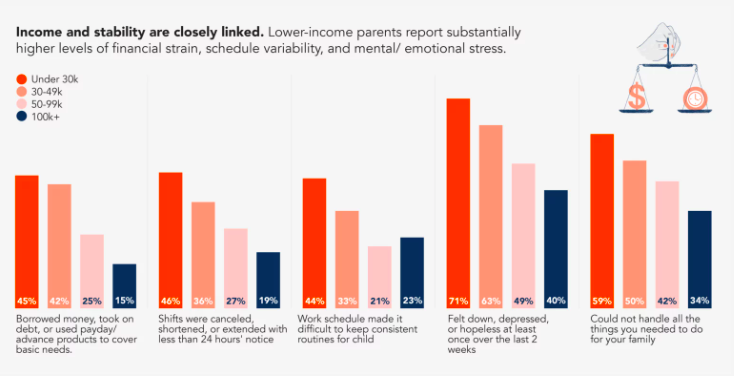
  • In the last month, 25% of respondents said they had a shift canceled, shortened, or extended with less than 24 hours’ notice. The same percentage were required to be “on call” — available without guaranteed hours — during that period. 
Courtesy of Capita

Financial stress can be a leading driver of “toxic stress.” This compounding, long-term stress can do permanent damage to the health of parents and the development of children — and can sometimes lead to Adverse Childhood Experiences (ACEs). 

Evidence shows that safe, stable, and nurturing relationships with adults can protect children from the negative outcomes of ACEs and toxic stress. But the survey suggests most parents are struggling to maintain that kind of relationship with their children. 

Advertisement

Two-thirds of respondents said that in the last month, stress made it hard to be as patient with their children as they wanted to be. And half of parents reported feeling down, depressed, or hopeless in the last two weeks. 

There are several questions in the survey that pertain specifically to work and child care. Here are some related findings:

  • More than 70% of respondents describe their job as family friendly.
  • Almost two-thirds said family life is a top priority, and they want their job to fit around it.
  • In the last year, 27% of respondents missed work or lost pay because of child care problems.
  • One in 5 parents regularly supervise their children while working. 

Despite the challenges presented by scheduling, about 70% of parents report being satisfied with their existing child care situation, whether they have children who are school age or below. And 81% said their communities are welcoming to families with minor children.

But 43% said their work schedules made it hard to keep consistent routines for their children, and that matters. 

“That lack of control over one’s schedule contributes to lack of control over one’s life more broadly, and it can affect parenting relationships,” Haspel said. 

Advertisement

As the Capita report explains:

Volatile schedules make it hard for people to be the kind of parents they want to be. They may have to forego baseball games or dance recitals they planned to attend, skip sitting down to dinner as a family, or miss tucking their kids into bed. Instability also has a significant impact on child development. Consistent routines are the foundation for children’s growth, learning, and feelings of security. Chronically disrupting those routines not only stresses parents but also interferes with their children’s long-term trajectory. Inconsistent or nonstandard parent work schedules are associated with cognitive delays and behavioral outcomes, especially if they begin during a child’s first year of life. 

“Job quality or schedule quality is often thought of as labor policy, it’s not thought of as a family policy,” Haspel said. “If you care about having strong, healthy families, this is a contributing factor.”

The meaning

While this first set of survey results represent the baseline of what Capita plans to measure over time, there are still significant takeaways from this early warning system. 

“A lot of what we’ve been hearing around the issues with affordability, the issues with being able to navigate all the extra challenges of parenting in 2020s America is showing up in family well-being,” Haspel said. 

Advertisement

Here’s what Capita has to say about the initial survey results:

This first survey of Quarterly Insights paints a troubling picture of families feeling economic strain and suffering from depression, burnout, and hopelessness. These conditions reinforce one another, making it harder for parents to show up for their children, their partners, and themselves, maintain routines, and flourish. Ultimately, all of these factors make stability feel perpetually out of reach. While the heaviest burdens often land on those earning the least, working-class and middle-class families also feel the enormous weight of these compounding pressures.

The report goes on to point out that policies supporting the well-being of children and families are most likely to succeed if they address multiple aspects of family hardship and reach all families who are affected. 


Editor’s note: This article was corrected to say that four states were oversampled in the Capita survey.

Katie Dukes

Katie Dukes is the director of early childhood policy at EdNC.

Advertisement
Advertisement

Source link

Continue Reading

Tech

macOS Golden Gate review beta

Published

on

Thank goodness for Siri AI, because if the only updates with macOS Golden Gate were the other ones shown at WWDC, this would be the weakest release in history.

As it is, the new macOS Golden Gate is a significant and even dramatic update, but solely because of how useful Siri AI is. True, there is more to the update than Apple said, but all it mentioned was a Liquid Glass refinement, improved curves on windows, and a reworking of the sidebar.

If that sounds like only an incredibly little difference from macOS Tahoe, it’s actually even smaller than you think. That Liquid Glass refinement is a slider to let users control how translucent it is, but it works across such a narrow range that it’s not worth bothering with.

So Siri AI is the star and even in its very first form, it is already so very close to excellent. Every year there comes a moment when the previous macOS seems amazingly old, and this time it’s when you first use Siri AI.

Advertisement
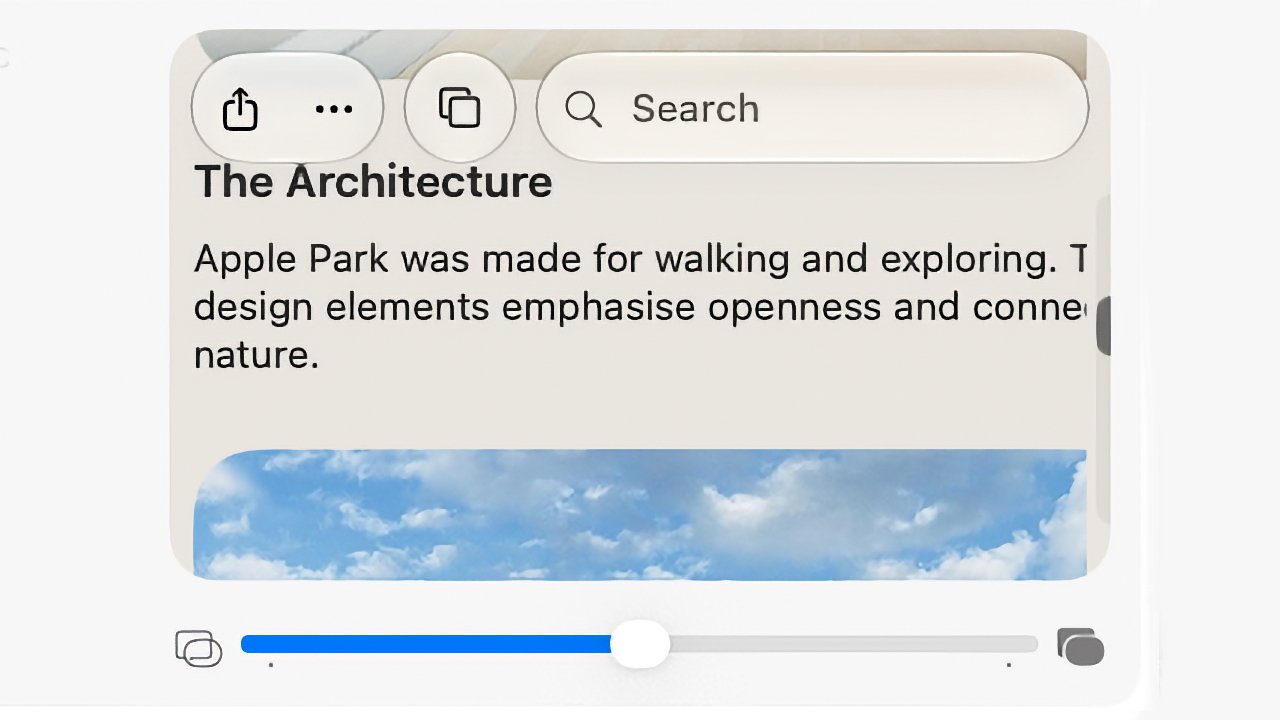
iPhone screen showing an article titled The Architecture about Apple Park, with share and bookmark icons, a search bar, partial text, and a blue sky photo preview underneath

This slider in macOS System Settings controls Liquid Glass, but don’t expect to see much difference.

It’s the feature you immediately adopt and that when you turn to a Mac without it, you miss it. Siri AI truly is a dramatic improvement, although it is far from perfect.

macOS Golden Gate beta review — Siri AI wins

I did wonder whether it would be hard to use the new Siri AI because I’m so used to how it used to work. I’m used to asking one thing at a time, then muttering when Siri gets it wrong, and asking it again, then sarcastically saying thank you.

With the new Siri, though, the first thing I thought of was to ask about a concert I booked a year or more ago. I didn’t remember the date, and I could have searched my calendar, but I also wasn’t sure whether the tickets were being kept at the box office.

Advertisement

So I just asked Siri when I am seeing Dar Williams, and also where the tickets are. It pretty immediately showed me the date, the venue, and the email that had the tickets in.

Open MacBook laptop displaying a macOS desktop with a centered AI assistant window, showing text responses and controls, against a minimalist beige and gray abstract background

It took Siri AI thirty seconds to check my calendar and find a specific email buried deep in my archive.

Just as I could have searched my calendar, of course, I could have searched my emails but I didn’t know if the tickets were there. Plus you know how long it takes to find anything in Mail, so having this close to instant result is a genuinely useful boon.

Similarly, as much as I like Apple Maps, I find it a bit irritating when I’m just looking up a place instead of trying to find a route. But then also when I want a route with multiple stops, it’s not as if it’s hard, but it’s now so much easier to ask Siri AI.

Advertisement

Consequently, I asked it for a route to a venue I have to speak at, arriving at a certain time on a specific day, and also including a stop at a colleague’s home to pick up various things for the event. It just did it.

Apple Maps showing a route chosen by Siri AI.

I have a long drive ahead of me. But Siri AI made finding a multi-stop route very quick.

Or rather, it eventually just did it. No question, Siri AI is superb, but sometimes it has frozen on me, sometimes it has said it can’t do something. It has taken me three goes on occasion, but it has then worked.

macOS Golden Gate beta review — Siri AI failings

Part of the problem is that Siri AI is now in Spotlight. In most ways, that is superb. Instead of being off in some separate Talk to Siri feature, it’s now right there where you might spend much of your time anyway.

Advertisement

But as you type, Spotlight will go through figuring out whether you’re looking for a document, or an application. Sometimes it is poor at realizing that you want to ask Siri AI a question.

For some reason, though, there is a solution. Once you’ve typed your question, you can hold down the Command key and that tells Spotlight you want to Ask Siri.

I have not one thin clue how I stumbled across that, but I’m using it a lot now and it never fails. And I am also using Siri AI much more than I expected. If I want anything that is on my Mac, I’ll ask Siri AI and while this might just be that it’s a new toy, it really feels as if it’s already part of my workflow.

However, if I ask for something that requires what Apple calls “World Knowledge,” Siri AI stops being excellent. It becomes much more like any other AI, and sometimes it isn’t as good as them.

Advertisement

So for instance, when I start researching an article, I will now routinely do a search for every time I’ve written on AppleInsider about the same topic before. Google was never all that use for this, but Claude AI is excellent at surfacing them.

Siri AI is not. It doesn’t always find the articles I want, and sometimes it will find some but not include any links. I’ve seen this with all AI chatbots and am used to sighing and typing “prove it.”

But in the last such search I did with Siri AI, it did provide links but the first one I tried went to the wrong site. It was the right topic, but the article shown wasn’t on AppleInsider and wasn’t written by me.

That is typical of AI search results. Only, that same search did surface notes I’d made on the topic for a previous podcast recording. I’d entirely forgotten those, and Siri AI found them.

Advertisement

If something is on your Mac, iPhone, or iPad, then Siri AI is superb. If it’s on the web, it’s not always so hot.

macOS Golden Gate beta review — more Apple Intelligence

It used to be that there was a section in System Settings called “Siri and Apple Intelligence.” That has now changed to just Siri.

So it appears as if there is no longer a switch to turn off Apple Intelligence. It’s not clear yet whether turning off Siri will do that too.

It is clearer that Apple is trying to put some water between Siri and the rest of Apple Intelligence, because there are AI features that are separate. At present, you have to join a waitlist to get Siri AI, but even before you get the new Siri, there are many Apple Intelligence features in macOS Golden Gate.

Advertisement

For instance, if you open an image in the Photos app, choose Edit, and then click on Tools, you now get the options to reframe or extend the image that Apple demonstrated. With the right sort of image, extension is excellent.

Open laptop displaying a video call with an older man in a suit, sitting in front of wooden cabinets, centered on a light desktop background

The original photograph of me looking grumpy for no reason.

I took a close-up shot of myself against a wooden background, and in moments that background was far wider. Not only did it successfully duplicate the background, it also edited it. So seeing that there was light on one side of my face, it lit that edge of the frame as if there were a window just out of shot.

It also interpreted my stony face as being annoyed, so it gave me folded arms. That felt weird, but it didn’t look wrong.

Advertisement

Reframing of that same image worked, too, or at least mostly. It’s a more limited tool than it seemed in the WWDC keynote, but it did allow me to tilt my head and whole body back, as if I had taken a low-angle shot.

Laptop displaying a video call with an older man in a suit sitting against a wooden wall, shown in a centered window on the screen with controls visible around it

The same shot but with the background greatly extended. Sometimes when I try this, Photos also adds in folded arms.

If I shifted the frame to the left or right, it also worked. But along the way it briefly gave me an extended neck.

So it really does depend on your image, because you are as likely as not to get terrible distortion.

Advertisement

Still, I often create poster images for various projects and being able to extend the background will be a boon. It will mean I can have space to add a headline, for instance.

Open laptop displaying a video call with an older man in a suit against a wooden wall background, centered on the screen with macOS desktop interface visible around it

Photos can now turn the subject to the side, although apparently it can’t make me more cheeful.

That will be an occasional thing I do, it hasn’t so immediately become part of my daily workflow as Siri AI has. But then there is one other macOS feature that has definitely changed how I work, at least most of the time.

It’s the new natural language Shortcuts, the way that you can describe what you want and the Shortcuts app will create it for you. When it works, I cannot see any reason you’d make Shortcuts any other way.

Advertisement

If only it worked all the time.

macOS Golden Gate beta — Shortcuts are mixed

If you open the Shortcuts app on Mac, iPhone, or iPad now, you get a prominent New Shortcut button. Choose that and you are asked to describe what you want.

On the Mac, you practically have to dodge around that button to get anything done manually. It is that prominent and Apple is clearly pushing this verbal Shortcuts.

Open laptop displaying a macOS Shortcuts app window with colorful square shortcut tiles and a right panel asking What do you want your shortcuts to do on a light background

The prompt for you to describe a Shortcut you want is even more prominent the first time you open the app,

Advertisement

But then this is a change that will surely introduce more people to Shortcuts, and it’s only one extra step to go around it to manually writing them as before.

However, the results might also put newcomers off because Shortcuts now has that AI-style certainty of what it’s doing, even when it’s wrong. When it is right, though, it is very impressive.

On my iPhone, for instance, I asked for a Shortcut that would change my wallpaper at 6pm every weekday, and as well as doing that, it also set up the automation to run it.

Then on the Mac, I have long wanted a Shortcut that would do some work on my AppleInsider podcast notes. During the show, I’ll tap on my Stream Deck Pedal whenever there’s to be a new chapter, for instance, and I have that send the current time to a note.

Advertisement

But it’s the current running time in minutes, and I then edit in Final Cut Pro, whose time is in hours, minutes, and seconds. So I keep having to stop to think whether 119 minutes is really one hour 59 minutes, or whatever.

I’ve wanted that shortcut that would take 119 minutes and write it out as 01:59:00, and it has always defeated me. Not any more. I asked Shortcuts to do it, and it did.

Open laptop displaying macOS screen with colorful shortcut tiles and a smaller automation window in front, set against a beige abstract wallpaper on a silver MacBook-style device

Note the large icon to the rear where Shortcuts says what it has done, and then in the foreground, what it’s actually produced.

I then asked for various refinements to get the result copied to the clipboard, and it did that, too.

Advertisement

It is really very good, and so very easy that I initially thought there was no possibility that I would ever again want to write a Shortcut by hand. I was an immediate and total convert to the new way of doing them.

That didn’t last.

For years, I’ve also wanted a Shortcut that would switch Tab Groups in Safari and it’s always been impossible on the Mac. You can do it on iPhone and iPad, there is a Shortcuts action to do it, but it’s always fallen over with an “internal error” on the Mac.

So when Shortcuts next asked me what I wanted, I told it, and it did it. It stopped to ask me which Tab Group I wanted, then it presented me with the finished Shortcut including a full description of what it does.

Advertisement

It doesn’t work. It isn’t even close.

If you go into the Shortcut manually, you can see that instead of anything to do with Tab Groups, it’s trying to turn on Do Not Disturb. It doesn’t even reference the specific Tab Group it asked me about.

Incidentally, if you write a Shortcut manually and include the action to change Tab Groups, it still fails as it now has for years and years. There is progress of a sort, though, as in macOS Golden Gate, instead of an unspecific “internal error,” it says it cannot communicate with the app.

Which is a clue both to my problem and to where Apple is putting its attention. Because what’s probably happening is that behind all of this verbal and even manual Shortcut writing, the app is using AppleScript. This is the decades-old automation that can let you do just about anything on a Mac.

Advertisement

But AppleScript works by every app providing access to its features, specifically by providing what’s called a dictionary. You can open the Safari dictionary in Script Editor, and if you do, you’ll see that there’s nothing there to do with tab groups.

So it appears that Apple’s newest natural language Shortcuts tools fail because Apple’s oldest automation technology hasn’t been updated.

It would also appear that Shortcuts has that curse of AI, that inability to say it can’t do something. Except sometimes, it will say exactly that, such as when you try to use it to fix irritations with the Phone app.

macOS Golden Gate beta — Phone app

With macOS Tahoe, Apple brought the Phone app to the Mac and it seemed like it was going to be so useful. If someone calls, you would just answer it on the Mac as you work. If you need to call someone, you would just do it on the Mac without getting out your iPhone.

Advertisement

I had issues that my Mac Studio wasn’t displaying the phone call notification fast enough to stop people hanging up on me. But even if the on-screen notification had appeared at the same time as the ringing sound begins, the green answer button wouldn’t always react to a click.

Open laptop displaying macOS desktop with beige abstract wallpaper, centered settings or profile window, and various app icons arranged along the bottom dock on a clean white background

Nobody can hear you when you use the Phone app on the Mac, unless you know to look under the Video menu to choose the same audio source you’ve already set everywhere else.

What I’d really like is a keystroke to answer a call, and then another keystroke to end it. There is no such keystroke, and while you can add your own to just about anything on the Mac, you can’t with the Phone app.

You also cannot write or describe a Shortcut that answers for you. If you could, you could attach that Shortcut to, say, a Stream Deck button, but you can’t.

Advertisement

And this is one case where the new Shortcuts says no. “I can’t create shortcuts for physical actions like answering a phone call,” it says.

So there is some error-trapping in the new Shortcuts, but it doesn’t know to say it can’t do other things, like the Safari tab groups.

But then maybe we shouldn’t expect the Phone app to be useful, because with macOS Tahoe, it seemed as if Apple abandoned it part way. By default, for example, no one could hear you when you used it to make or answer a call, which seems fundamental.

It turns out that regardless of any Sound settings you have, you have to expressly tell the Phone app to use a given microphone. And you tell it this via a menu called Video.

Advertisement

A phone app has a video menu. That hasn’t changed with macOS Golden Gate.

macOS Golden Gate beta — visual changes

Something that has changed with the new macOS is how the Mac looks. It’s so subtle with adjustments such as the Liquid Glass slider that it might as well not be there, but it is.

It’s not much more pronounced with app icons, but it does make a difference. App icons in the Dock do seem to pop, and it means that transparent ones are clearer, too.

There’s also how menus have shed their mass of icons. With macOS Tahoe, every menu item had its own icon and the result was a mess, but calmness has now been restored.

Advertisement

All of which is good and all of which is welcome, but overall this really would be an incredibly slight update if it weren’t for Siri AI.

Still, up to now, Siri has felt like it was really just for the iPhone and maybe also the iPad. With the Mac, because your hands are already on the keys, it seemed quicker to just type instead of interrupt your work to talk to Siri.

Now Siri somehow feels much more a part of the Mac, and that by itself means that macOS Golden Gate is a significant update.

macOS Golden Gate beta — Pros

  • Siri AI for any information on your Mac is fantastic
  • Natural language Shortcuts are usually brilliant
  • Photos app improvements can be superb, depending on the image
  • Minor visual updates are welcome

macOS Golden Gate beta — Cons

  • Siri AI World Knowledge is poor
  • Liquid Glass control is very limited
  • Natural language Shortcuts is sometimes just wrong
  • Years-old Shortcuts error remains
  • Phone app still feels abandoned

macOS Golden Gate beta review rating: 4 out of 5

Advertisement

Source link

Continue Reading

Tech

Fed up with constantly installing various updates for Windows 11? Microsoft is making monthly multiple reboots a thing of the past

Published

on


  • Microsoft is changing the way that Windows 11 updates are delivered
  • The likes of .NET, driver or firmware updates will be bundled together with the monthly update
  • This change is now in testing, alongside a lot of work to make Windows 11’s default apps better

Windows 11 is getting some more very useful changes, including an improved process for updates and a raft of tweaks for the default apps in the OS.

Microsoft has just released a new preview in the Experimental channel (build 26300.8687) which packs the changes for Windows Update (which were announced as incoming a while back in April).

Source link

Continue Reading

Trending

Copyright © 2025