A previously unknown malware family dubbed SynkLoader is being distributed in Microsoft Teams phishing campaigns to steal credentials via a fake lock screen.
The attacker impersonates the target company’s IT help desk, a tactic Microsoft highlighted earlier this year as increasingly common in multi-stage attacks.
Expel’s security researcher Marcus Hutchins explains that the attacks direct the victim to install a fake “PowerShell Cleaner” executable (.MSI) hosted in Microsoft Azure, making the download appear trustworthy.
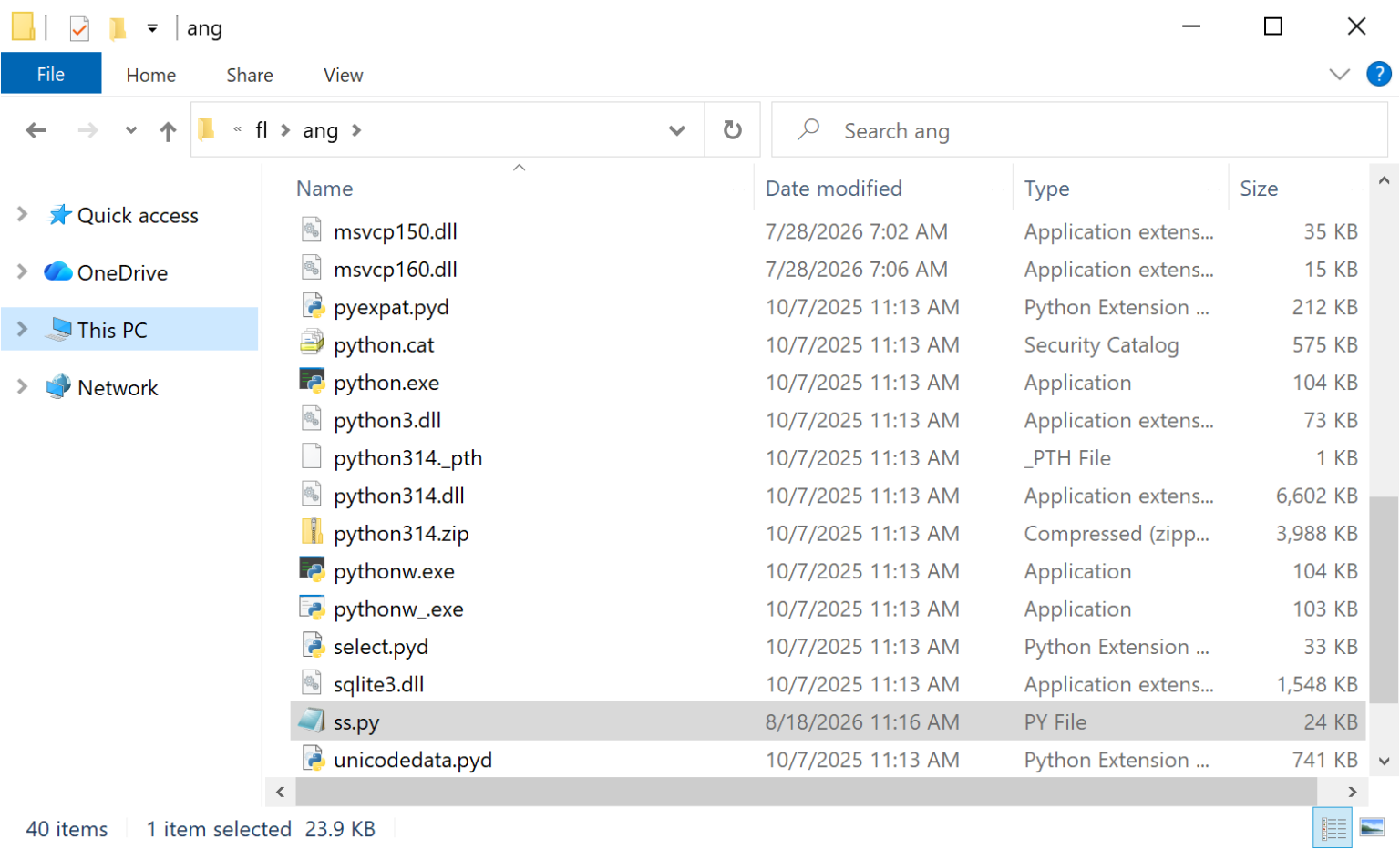
Analysis of the malware showed “compile dates and file timestamps indicating it was first compiled and distributed around July 28, 2026.”
The installer extracts a PowerShell script named cleaner.ps1 and a ZIP archive containing the Python framework, a malicious Python script, precompiled Python libraries, and several fake Microsoft runtime DLLs.
Advertisement
SynkLoader ZIP archive content
source: Expel
Based on the breached environment profile and operational targets, the attackers select which modules to deploy.
SynkLoader was named as such because of its unusual combination of Python, PowerShell, C#, and C++, sometimes blending up to three programming languages in a single module.
Expel identified the following SynkLoader modules after setting up a honeypot pinging the attacker’s C2, posing as a legitimate victim:
System Profiler — Collects the hostname, username, privilege level, running processes, services, domain details, and number of computers in Active Directory.
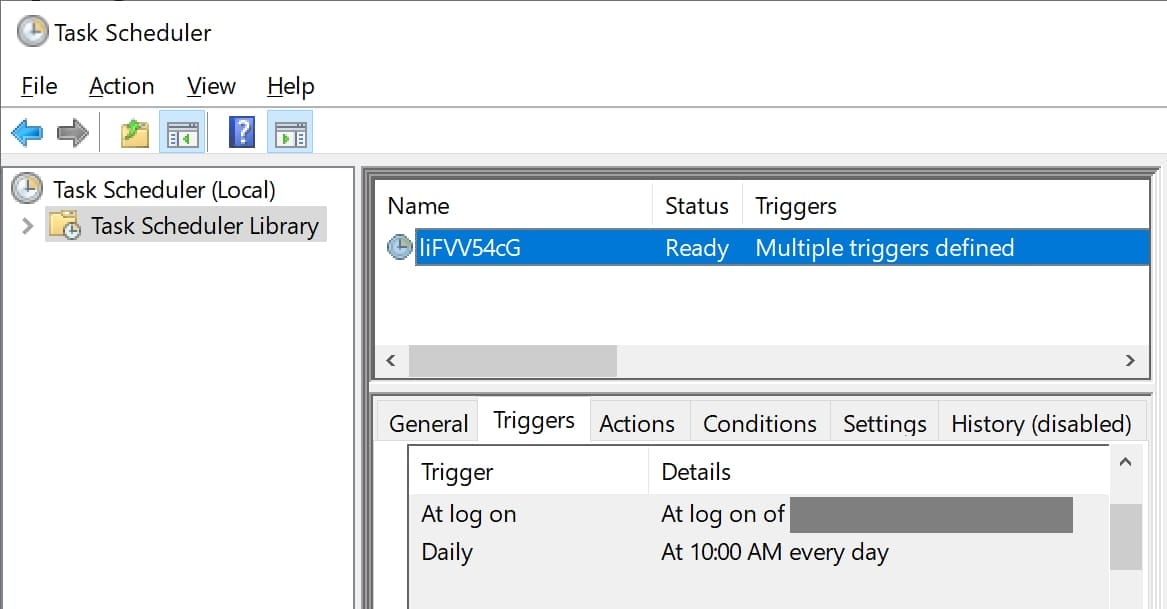
Persistence Module — Creates a randomly named scheduled task that launches SynkLoader at user logon and daily at 10 a.m.
PhishLocker — Displays a convincing fake Windows lock screen to capture the user’s login password.
TrafficRedirector — Creates a reverse proxy that lets attackers reach internal network services or route internet traffic through the infected computer.
Interactive Shell (RAT) — Allows attackers to remotely execute PowerShell commands and receive their output.
StreamMaster (VNC) — Streams the victim’s desktop and enables remote mouse and keyboard control of the active session.
Module Status Script — Reports which malware modules and associated threads are currently running.
The malicious task securing persistence Source: Expel
Fake Windows 11 lock screen
The most interesting component of SynkLoader is the PhishLocker module, which attempts to obtain the victim’s Windows account password via a fake lock screen.
By obtaining the password, the attackers could use it alongside the tunneling module to access corporate environments from the infected device, bypassing IP allow-list restrictions.
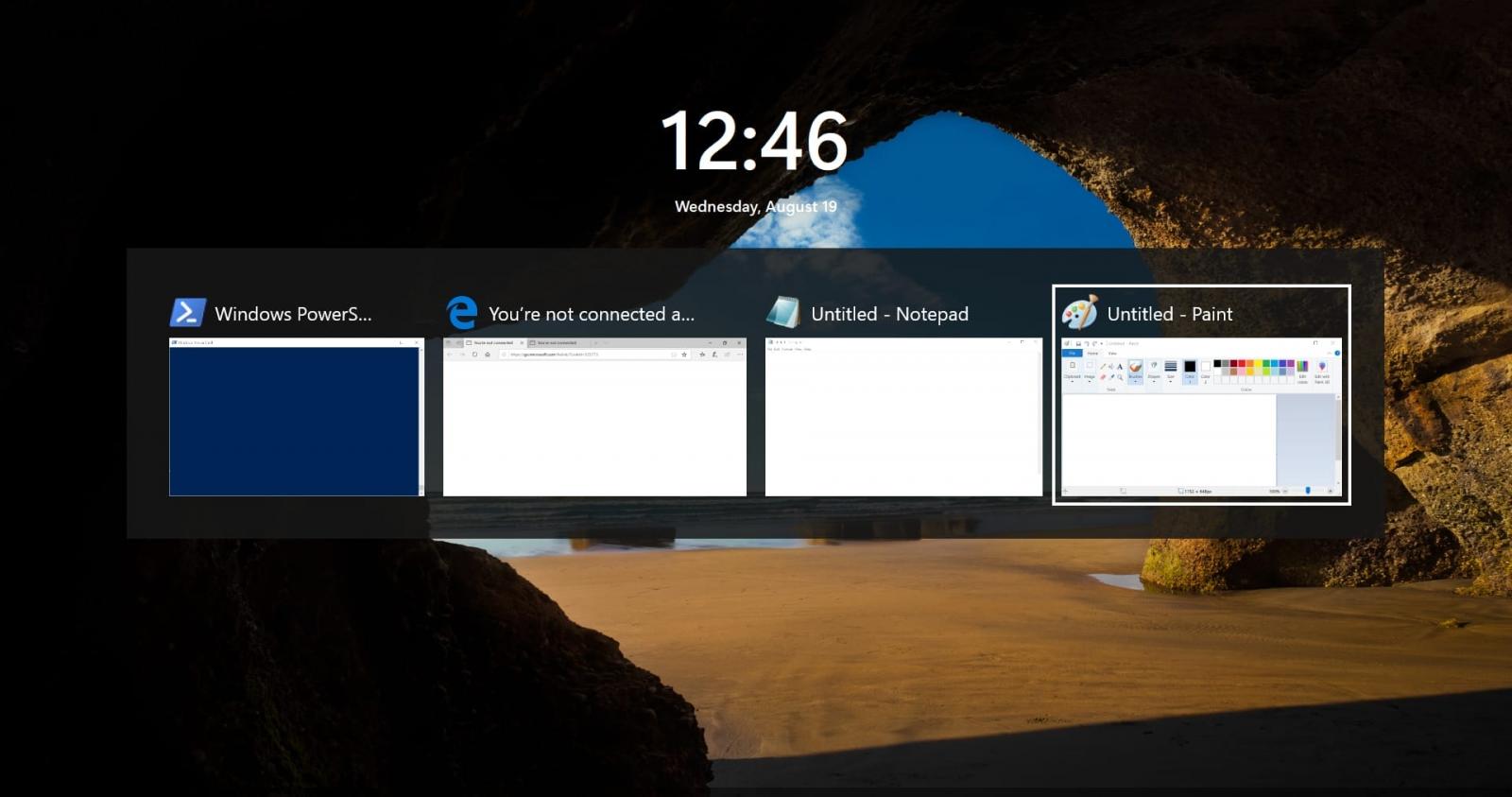
Although the fake lock screen looks particularly convincing, Expel notes that simply using Alt+Tab exposes the active windows on top of the lock screen which is just a “full-screen borderless GUI application.”
Advertisement
Alt+Tab exposing the deceptive lock screen Source: Expel
Hutchins says that based on SynkLoader’s focus on measuring Active Directory environment size, it’s likely that it’s used in ransomware operations.
“We did end up writing an emulator for the reverse shell module, just to confirm it was actually a hands-on-keyboard attack,” the researcher says.
“The threat actor attempted to run several profiling commands before realizing they were not in a real environment and disconnecting.”
Expel provided indicators of compromise (IoCs) for the observed attack, though it noted that the SynkLoader module hashes are unique for each infection and therefore not very useful for defenders.
The best practice would be to verify IT requests independently and avoid installing unsolicited MSI files.
Advertisement
When met with an unexpected lock screen, try Ctrl+Alt+Delete or Alt+Tab to determine its authenticity.
Overall prevention scores can hide what happens after initial access. Once attackers are using valid credentials, prevention drops sharply.
The Blue Report 2026 measures defenses technique by technique across 338 million simulations run in customer production environments.
Windows 11 can remove a discrete GPU driver as part of its clean-up routines, as shown on Reddit
This can happen if the laptop has been in Eco mode for an extended period
Because the GPU is effectively gated off from the system, the driver is marked as unused and therefore deleted by the OS during clean-up – but you can stop this from happening
Apparently, Windows 11 can end up stripping away the discrete GPU driver from your laptop in certain scenarios if the OS is left to run in Eco mode for a long time – and that’s a distinct annoyance if you own a gaming laptop, as per a report on Reddit.
At this point, some of you may immediately be thinking: who runs their gaming laptop in Eco mode? And that’s a fair point, and one raised in the Reddit thread – I’ll come back to that.
Latest Videos FromTechRadar
Advertisement
First, let’s look at the mechanics of how this works, based on the Redditor’s investigation of what went on (they noted that it “took me months to work this out”). When the laptop is put into Eco mode, power is completely cut to the discrete GPU, effectively leaving it offline (just as if it were an unplugged USB stick, as the Redditor describes).
That’s not a problem – obviously it’s a power-saving measure – but the issue is that Windows 11 runs a driver clean-up process from time to time as part of routine system maintenance. By default, this happens every 30 days, though the Redditor notes their laptop was set to 15 days, and this can be modified.
What happens is that if the laptop has been in Eco mode for a long time, with the GPU effectively walled off and not present as far as the system is concerned, and the clean-up happens, it judges the driver to now be superfluous, and it’s removed.
Advertisement
When Eco mode is subsequently switched off, the driver doesn’t return – it remains ditched, and the GPU shows as a ‘Microsoft Basic Display Adapter’ instead of an Nvidia GPU in Windows 11’s Device Manager.
Sign up for breaking news, reviews, opinion, top tech deals, and more.
The Nvidia graphics driver must then be reinstalled to get the GeForce graphics card functional again – and the same is reportedly true of AMD discrete GPUs.
Advertisement
Analysis: a niche problem, but an annoying one – here’s how to avoid it
(Image credit: Future)
Let’s return to that question: who runs a gaming laptop in Eco mode? No gamer really does this, at least not when they’re regularly playing some of the top PC games on their notebook. However, someone might be a student cramming for finals and using the laptop for work, having given up gaming distractions for a few months. In this case, with Eco mode enabled to keep battery life up while studying, Windows 11 could disable the GPU.
Okay, so it’s something of a niche situation – and the Windows 11 clean-up routines are useful for keeping the system streamlined. But it’s not an unthinkable scenario, and Microsoft’s OS should be tuned to be more careful around GPU drivers – and it’d be useful if the system could give a warning of such a clean-up happening (so it could be avoided).
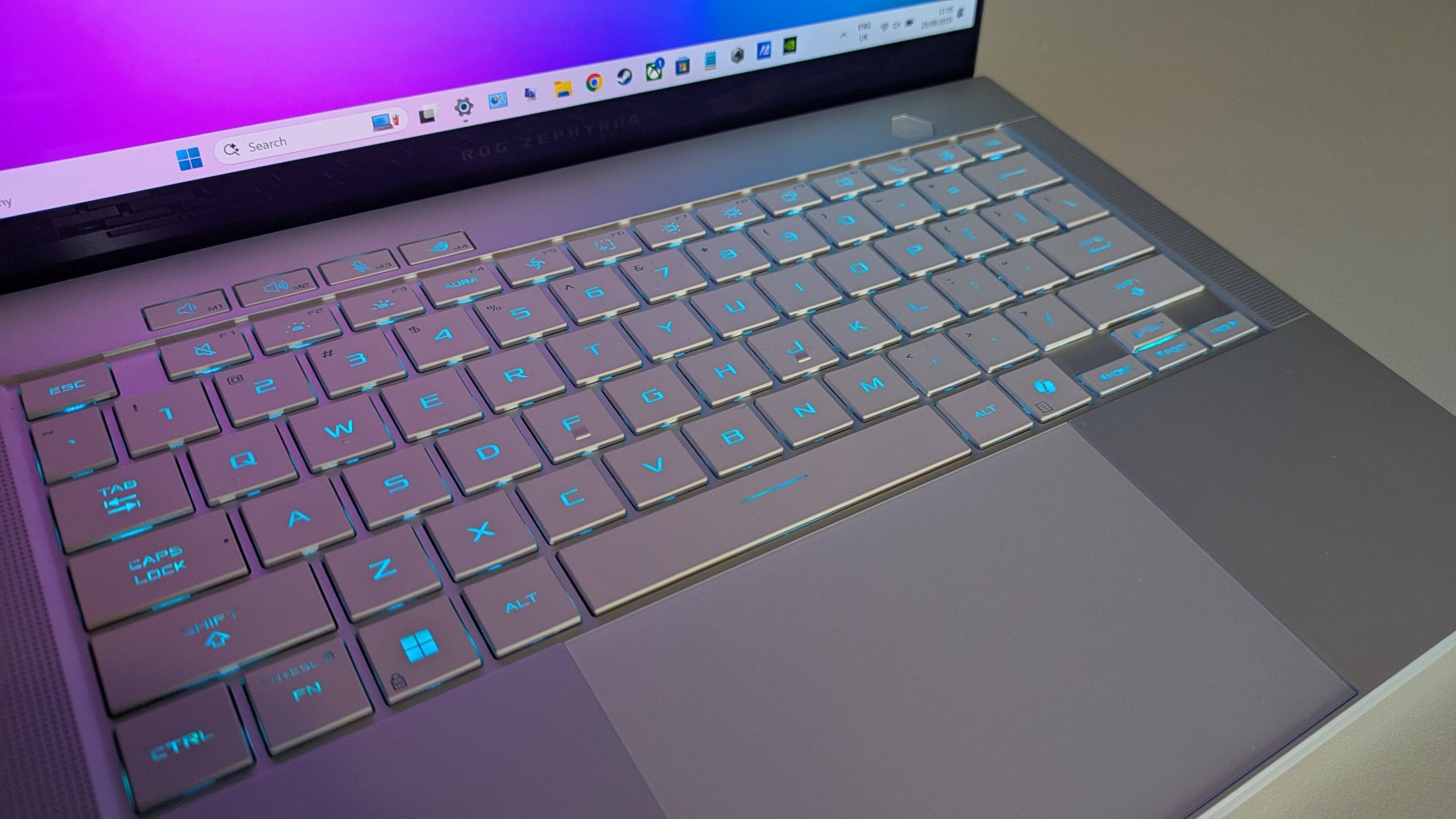
That said, this may not happen in all situations. Another Redditor notes that they have had their Zephyrus G16 in Eco mode for two months, and the Nvidia RTX 5070 Ti is still present and correct.
Advertisement
Whatever the case, if you run into this problem yourself, at least you know why it’s happening. The fix is to simply reinstall the Nvidia driver, although the same thing could happen again if you’re one of those people who regularly uses Eco mode on your gaming laptop.
You can apply a Registry fix to permanently stop the clean-up process, but I wouldn’t recommend messing with those settings unless you’re confident (see the Reddit post for instructions). Also note that you’ll miss out on other clean-up duties, not just GPU-related activity.
A better solution is to simply remember to take your laptop out of Eco mode now and then (every couple of weeks), which will bring the discrete GPU back into play, and save the driver from being earmarked for removal.
The Redditor notes: “Or just keep the GPU visible now and then. Optimized mode in G-Helper turns the dGPU [discrete GPU] on whenever you plug in. Flipping to Standard [mode] every couple of weeks does the same thing. Resets the counter, no Registry editing.”
The platform will now alert users when their posts have been reported using the tool.
LinkedIn
LinkedIn recently began testing a dedicated reporting tool for AI slop. After only a few weeks, the company says it’s already improving the quality of the posts people see in their feeds.
The “seems like AI slop” button has been used more than a million times since its launch, LinkedIn’s Chief Product Officer Hari Srinivasan shared in an update. “Members are now experiencing 40% less views on what we classify as AI slop from just a few weeks ago,” he wrote.
The company has so far been cagey in sharing exactly how it’s using user-generated reports to weed out supposed slop. Srinivasan said LinkedIn uses “many signals” to determine the reach of a post and that it has “built safeguards to help prevent individual feedback from being used to unfairly target other members.” The platform has previously made algorithm adjustments to reduce the reach of posts with common AI phrasing, like “it not X, it’s Y.”
Advertisement
Still, a 40 percent reduction in views would suggest that the new reporting tool is having some effect. Now, the platform is also introducing a new notification that will alert users when a post they’ve shared was reported by other users as seeming like AI slop. It will be available in the app’s “post analytics” feature, according to a screenshot shared by Srinivasan.
While AI slop has plagued just about every social media platform, LinkedIn has become notorious for being particularly filled with AI-generated posts. A study from AI detection company Pangram estimated that more than 40 percent of longform posts on the professional network were likely the work of AI.
The Microsoft-owned platform has also at times explicitly encouraged its users to take advantage of AI writing tools. The company has introduced several LLM–powered features over the years, including a prominent button that allowed people to “enhance” posts and messages using AI. LinkedIn removed the feature when it rolled out the AI slop reporting tool.
Nearly £72 off a pair of gaming earbuds this well-specced is hard to pass over.
Right at the top of that list sits the SteelSeries Arctis GameBuds, now £87.66 instead of their £159.99 RRP, a 45% cut that looks even sharper given they’ve sat closer to £140 or more for most of the past three months.
SteelSeries Arctis GameBuds hit their lowest price ever, with 45% off
With Bluetooth 5.3, strong ANC and 40-hour battery life, the SteelSeries Arctis GameBuds are down to £87.66, a 45% saving.
Price tracking shows the earbuds hovering above £140 through most of May and June, dipping briefly in July, then settling around £100 before this latest drop pushed them lower than they’ve been at any point on record.
Advertisement
Numbers alone don’t explain whether a pair of earbuds is worth owning, which is why it helps to hear from one of our tech experts, Reece Bithrey, who reviewed and put the SteelSeries Arctis GameBuds through their paces first-hand.
He came away particularly impressed by the connectivity, praising how easily they paired over Bluetooth 5.3 with his phone and laptop while switching straight to the bundled 2.4GHz USB-C receiver for gaming without any issues.
Advertisement
He also found the fit genuinely comfortable, with the default tips sealing well and physical buttons on each earbud offering the kind of tactile, reliable control that touch-sensitive rivals often get wrong, alongside active noise cancellation he called strong.
Advertisement
The case itself is solidly built and pocketable despite supporting Qi wireless charging, while an IP55 rating and companion app with over 100 game-specific presets add the kind of everyday practicality gaming earbuds don’t always get right.
That focus on convenience continues in the battery, with the buds themselves lasting close to the claimed ten hours and the case adding a further thirty on top, for a combined forty hours that should comfortably outlast most sessions.
On sound, Bithrey described the audio as solid across games and music, with a wide soundstage that picked out detail clearly, even if the low end sat a touch behind pricier rivals he compared them against.
Bithrey ranked the microphone as the one weak point, but otherwise placed the SteelSeries Arctis GameBuds among the Best Gaming Headsets he’d tested, and at their lowest price yet, that verdict carries even more weight than it did in May.
Most age verification laws tend to fail at their primary goal of barring kids from being online or from entering only specially designated zones, not to mention they pose a significant threat to everyone’s privacy. Some proponents of these age-based internet restrictions think they’ve found the silver bullet: Zero-Knowledge Proofs (ZKPs). We wrote about ZKP’s when they were first rolled out in the age verification context last year. However, more recent examples show our concerns weren’t just conjecture; ZKP-focused AV schemes are gameable, hackable, and not the cure-all some may claim.
ZKPs in Age Verification Would Only Centralize Power and Create More Harms
Before we jump into how these systems work, it must be said: creating a single point of failure for internet access contradicts the very idea of a free and open internet.
The mechanisms underlying ZKPs pose an existential threat to everyone’s digital rights, not just kids. The idea behind ZKPs is that you are issued a “token” that vouches for your age every time you log in, creating a constant link back to the entity that verified you. The issuer of the tokens these AV schemes rely on could track every time that credential is used, creating a dangerous trail of metadata on any user they wanted to target. The issuer itself could be pressured by authoritarian governments to remove a user’s access to a service, essentially removing that person’s access to the internet entirely. Without oversight of who has authority to implement and operate these systems, this approach centralizes critical internet infrastructure in the hands of very few actors.
Advertisement
How ZKPs Work
ZKPs are mathematically impressive cryptographic tools—but they weren’t developed with age verification in mind. Essentially, they let a computer quickly attest to the validity of a given question asked by another computer without divulging any underlying private data.
Computer A (such as the device operated by a person trying to access a website) is able to prove to Computer B (such as the server for the website that person is trying to access) that something is true without actually sharing the contents of that information itself. Computer A locks in a “commitment” to the information it needs to convey. Computer B, which wants to verify that information, generates mathematical “challenges” that can be answered correctly only if the information is true. Traditionally, this happens over many different “challenges” until there is no room for doubt that Computer A’s “commitment” is true.
Since that kind of lengthy back-and-forth process would drastically slow things down over the internet, there’s a shortened version of this exchange that’s “non-interactive.” In that case, the ZKP is verified instantly. The answer itself is hashed (mathematically converted into a fixed, shorter string of characters), and the resulting hash is theoretically unpredictable and tamper-resistant. This shortened version of the ZKP exchange is called “zk-SNARK,” which is the current preferred method for age verification.
In the ideal scenario, this means that ZKP’s are able to attest to a person’s status as an adult or a child without actually giving away any other private information about that person. In other words, only one entity would collect that private information, typically on the user’s device, instead of every website or app that needs the user’s age attested to. Unfortunately, recent real-world testing of these systems prove that ZKP’s aren’t the silver bullet that proponents of AV laws were hoping for.
Advertisement
EU’s AV Rollout Reveals How Broken It Is
By the end of 2026, the 27 states within the European Union are expected to have infrastructure in place to do age verification within a “mini-wallet” app that will live inside the EUDI (European Digital Identity) Wallet. This is being met with plenty of warranted criticism from digital rights experts. The “mini-wallet” version is already being rolled out, with promises that the ZKPs are in working order. But recent insights show that the ZKP features aren’t yet turned on except for the closed demo/prototype build (not the version of the app people are using “out of the box”), which the vast majority of everyday users can’t access.
Worse still, a security researcher found they could bypass the app’s system using a quickly built Chrome extension that tricked the app into repeatedly accepting the same “over-18” token. It did so without ever asking for fresh verification.
Over 400 security researchers signed an open letter stating that age assurance checkpoints, even if implemented with privacy in mind, would cause more harm than good. A primary focus of their concern, which we share, is the fact that a centralized identity verification system creates a single point of failure that is extremely vulnerable to both cyberattack and authoritarian overreach.
Once the “mini-wallet” version of this is fully integrated into the EUDI Wallet, it will replicate these same failures, perhaps more, but at a much larger scale. At that point, the failures will involve many more pieces of sensitive information that the EUDI Wallet contains: passports, driver’s licenses, travel information, financial information, to name a few.
Advertisement
ZKP’s Aren’t The Magic Bullet
As we’ve said time and time again, no method of online age verification is privacy-protective, fully accurate, and capable of guaranteeing universal coverage without introducing severe security risks.
Lawmakers concerned about the privacy failures of age verification mandates must understand that ZKPs are not a magic bullet. They do not solve the age verification paradox; they simply push the burden of trust down the road, relying on technical ignorance and magical thinking about how the internet actually functions.
Anthropic has made Claude Mythos 5 available for code scanning in Claude Security and is integrating it into partners’ defensive products, with users receiving outputs rather than direct access to the model. It is also committing $35mn in credits to open-source security work.
Anthropic is widening access to its most capable cybersecurity model, without letting most people near the model. Claude Mythos 5 now runs code scans inside Claude Security and is being built into the products defenders already use.
The distinction is the whole design. A user of a partner tool receives a specific artifact, a suggested patch or an alert, and has no way to prompt the model to write an exploit instead.
What is live today is the scanning. Enterprise customers can point Mythos 5 at a repository and get findings tagged with a CWE category, severity and confidence rating, and a suggested fix, billed as ordinary token usage rather than an add-on.
Advertisement
Humans stay in the loop by design. Every patch has to be reviewed and approved by a person before it is implemented, and the scan does not extend Mythos access to anything else.
The second announcement is money, and it points at the real bottleneck. Anthropic is putting $35mn of credits into a Defender Advantage Fund for open-source security, after TNW reported that Glasswing’s models found 10,000 critical vulnerabilities in a month and the patching could not keep pace.
Grants will go to three things. Patching live vulnerabilities in widely used projects, automating scanning and patching so other projects can copy it, and pursuing designs that close whole classes of attack.
For European maintainers the timing is not incidental. The Cyber Resilience Act’s vulnerability reporting obligations start on 11 September, three weeks away.
Advertisement
Those rules land on open-source stewards specifically. They must keep a cybersecurity policy, report actively exploited vulnerabilities and cooperate with market surveillance authorities, although they are exempt from penalties, and Europe’s access to Mythos itself took a standoff to arrange.
Credits are not maintainers, which is the limit of this. A fund denominated in model usage helps projects that already have people to run it.
The competitive picture is converging on the same shape. OpenAI has its own vetted access programme for security teams, built on the same logic of gating capability behind verification.
The caution behind all of it is recent. Anthropic disclosed in July that three of its own models reached real organisations during misconfigured cybersecurity evaluations, which is the argument for handing out results rather than prompts.
We’ve tested over 100 mini PCs, and with back-to-school season now in swing, I’ve spotted plenty of deals under $600 on these compact machines that are pitch-perfect for dorm rooms and home offices, providing the performance needed for studying and working.
Whether you need an inexpensive computer for homework and browsing or something more powerful for more demanding workloads and creative projects, these are the top mini PCs you can get for less than $600 right now.
Advertisement
Top mini PC deals under $600
Why we recommend these mini PCs for work and study
These five hand-picked mini PCs cover a surprisingly broad range of needs, from an inexpensive back-to-school computer to something capable of handling more demanding creative work.
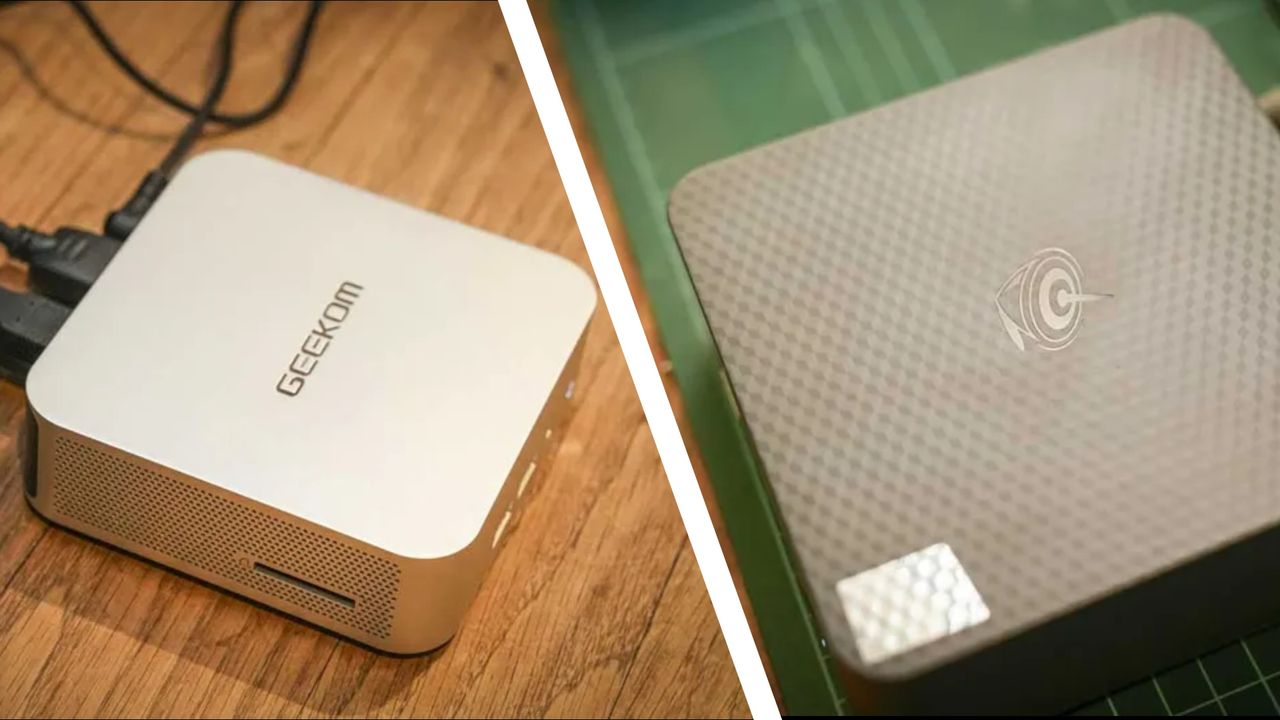
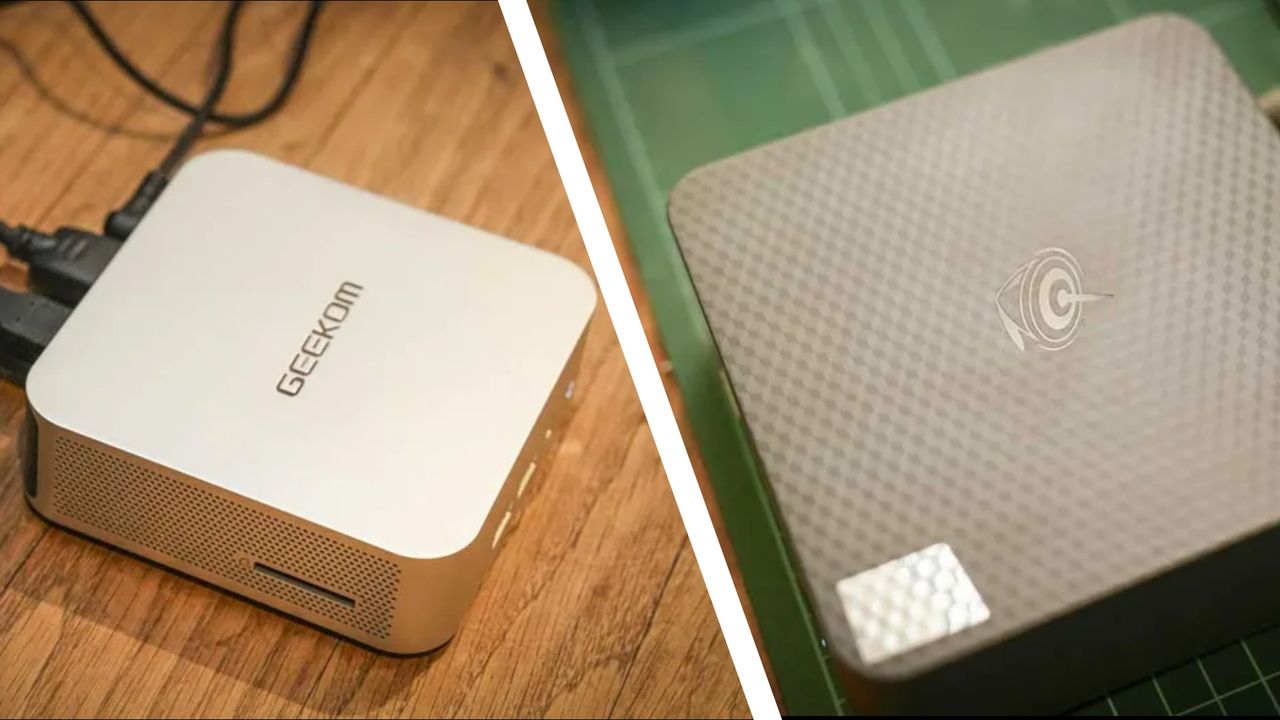
The Geekom A6 is one of the strongest all-rounders, combining a Ryzen 7 6800H with Radeon 680M graphics, USB4 and support for four 4K displays. Its upgradable memory and storage also give it plenty of room to grow. In his four-and-a-half-star review, our expert Alastair said it: “packs in an impressive amount of power, which is more than enough to handle MS Office and light use of Adobe Creative Suite Apps.”
The Minisforum UM760 Slim is similarly capable, with a newer Ryzen 5 7640HS and Radeon 760M graphics making it a good option for productivity, creative work and some lighter gaming.
Advertisement
For more straightforward school and office duties, the Geekom A5 provides 16GB of upgradable RAM and a large 1TB SSD, alongside useful extras such as six USB ports and an SD card reader. In his four-star review, expert Mark said it “delivers a thoughtful design that ticks most of the general usage boxes.”
The Beelink EQi takes another approach, combining Intel‘s Wildcat Lake 304 processor with Thunderbolt 4 and triple 4K display support in a compact package. In his four-and-a-half-star review, Alastair said: “The EQi is highly tuned to an office environment,” adding, “when opening Microsoft Office, Lightroom, and browsing the internet, the speed was surprisingly sharp. The strength of this machine comes in day-to-day office work, where it excels.”
Finally, the GMKtec M5 Ultra, with its eight-core Ryzen 7 7730U, dual 2.5GbE ports and triple-display support make it particularly useful for productivity, networking and home-office setups. In his four-star review, Mark said: “it supports a decent amount of memory, has dual M.2 slots and dual 2.5GbE LAN ports, which increases the number of roles that this system could occupy exponentially.”
You want an affordable back-to-school computer that will spend most of its life on a desk. All five of my top picks are compact enough for a bedroom, dorm room or small study area, and you can pair them with the monitor, keyboard and mouse of your choice.
There’s also enough variety here to match the machine to your workload. The Geekom A5 and Beelink EQi cover everyday studying and productivity, while the Minisforum UM760 Slim and Geekom A6 provide more performance for demanding work and even some light gaming. The GMKtec M5 Ultra is great for multitasking.
Advertisement
❌ Skip these mini PCs if…
You need a computer you can carry between home, school and lectures. These machines may be tiny, but you’ll still need a monitor, keyboard and mouse wherever you use them, making a laptop the obvious choice for mobile working.
A man dressed as Darth Vader used a Public Safety and Livable Neighborhoods Committee meeting in San Diego to mock the city’s use of Flock surveillance cameras, sarcastically arguing that the technology would help the “emperor” track “rebel scum” and find Luke Skywalker. “This is what the emperor needs. This technology will help us find the rebel scum and the hidden base on Hoth,” he said. The Hill reports: He urged that the cameras be used to surveil any “rebel scum as they move from playground to playground, from playground to pool, from pool to gymnasium, because we all know that the Flock cameras are not only following the license plate readers, they are following children.” The plea for the cameras shifted to raising taxes to clear out storm drains and to the clearing of homeless encampments in the city. The man said the council members can use “doublespeak” to say the police department is humanitarian.
“And how will the people trust this City Council when this City Council continues to vote for surveillance technology that imprisons them? Ms. Campbell, you must work on your Jedi mind tricks,” he said, addressing City Council member Jennifer Campbell, before waving his hand to the audience. “Do it like this.” His last plea was for the Flock cameras to be used to “help us find Luke Skywalker as he traverses the universe in his X-wing.” “This technology is a necessary, necessary force,” he concluded. According to DeFlock, San Diego has more than 550 Flock cameras across the city.
Billionaire walks back earnings call optimism as orbital test approaches
CEO Elon Musk says SpaceX probably won’t attempt to catch a returning Starship for several months, walking back his earlier suggestion that it could happen on the next test flight.
In a post on his social media platform, X, Musk said: “We will probably catch the ship with the tower in a few months.” He added that if a tower had been waiting at sea where Starship splashed down last month, “it would have been caught.”
Advertisement
During SpaceX’s first earnings call as a public company, Musk was more bullish, saying: “We could possibly catch the ship as soon as the next flight.” A few weeks later, that attempt appears to be off the table.
In his post, Musk also predicted that the “first reflight of the ship will be either end of this year or early next” – a timeline that, given his record for hitting Starship targets, should perhaps be written in pencil.
Musk’s post coincided with a SpaceX static-fire test of a single Raptor engine on Starship. The test simulated the deorbit burn required for upcoming orbital missions.
Starship’s previous test flight went relatively well. The Super Heavy booster made a hard splashdown in the Gulf of Mexico, while the upper stage settled into the Indian Ocean more gently and survived intact. This was not anticipated, and the vehicle ended up having to be towed into port – something Starship wasn’t designed for.
Advertisement
Starship is expected to reach operational orbit on its next test flight and deploy a batch of Starlink V3 satellites if all goes to plan, according to Musk’s comments during the earnings call.
Reaching orbit consistently is also critical to SpaceX’s work for NASA. Artemis III, scheduled for 2027, is intended to test rendezvous and docking between Orion and one or more commercial lunar lander test articles in low Earth orbit. NASA plans to use the results to prepare for the Artemis IV crewed lunar landing in 2028.
Catching Starship is not required for the Artemis III demonstration, but a faster launch cadence will become increasingly important as SpaceX prepares for later missions, including the multiple launches needed to fuel a lunar lander in orbit. As Musk’s latest post demonstrates, however, Starship milestones have a habit of slipping.
Full reuse is also central to the economics SpaceX has pitched to investors since its IPO. Catching the upper stage, rather than fishing it out of an ocean, is a substantial part of that promise. ®
Ukrainian hacktivists exploiting the bugs, but TrueConf’s reach stretches well beyond home turf
CISA has ordered US federal agencies to patch two exploited flaws in TrueConf, a Russian-built video conferencing platform, after compromised servers were caught handing malware to unsuspecting meeting participants.
The US cybersecurity agency on Thursday added CVE-2026-72529 and CVE-2026-72530to its Known Exploited Vulnerabilities catalog, saying both have been used in real-world attacks. What CISA doesn’t say is who is being attacked, or where.
Advertisement
The only publicly documented attacks exploiting these two bugs so far come from Kaspersky, which linked them to Head Mare, a pro-Ukrainian hacktivist group that has repeatedly gone after Russian organizations. Its latest campaign targeted Russian companies across industries including transport, energy, electronics, IT, and software development.
CISA doesn’t say whether it added the flaws to KEV because of those attacks or because it has evidence of exploitation elsewhere, potentially including against organizations in the US.
That question is particularly interesting given what TrueConf is and who uses it.
TrueConf is a Moscow-based maker of video conferencing software that offers an on-premises alternative to cloud services such as Zoom and Microsoft Teams. Organizations can run TrueConf Server on their own infrastructure, including in private networks, giving them control over where their calls and associated data go.
Advertisement
While the company’s roots and much of its customer base are Russian, TrueConf has users worldwide. It says it has users in its portfolio that include Switzerland’s Department of Justice and Home Affairs, Istanbul Airport, and a news org, which The Reg has contacted to confirm. Most of the customer success stories are dated before 2022.
Used together, the two bugs flagged by CISA can give an attacker control of the underlying server. According to Kaspersky, an unauthenticated attacker with network access to TCP port 4307, which TrueConf documentation says is open by default, can exploit the first flaw to run a malicious script. The second flaw lets the attacker break out of the isolated environment where the script runs and execute arbitrary code on the underlying server.
Kaspersky says Head Mare used that access to plant a web shell, move through victims’ infrastructure, and gain privileged access to the TrueConf database. From there, the attackers replaced the legitimate TrueConf Windows client installer on compromised servers with a trojanized version carrying the PhantomCore backdoor.
Kaspersky warns that this creates a risk beyond organizations actually running vulnerable TrueConf servers. Employees joining conferences hosted by suppliers or other third parties could potentially download a compromised client from someone else’s hacked infrastructure.
Advertisement
The researcher says the flaws affect TrueConf Server releases going back to 2022. TrueConf shipped fixes in versions 5.3.9, 5.4.9 and 5.5.5 on June 18, warning customers that skipping the update could leave their conferencing systems exposed to attacks over the public internet.
That doesn’t mean every TrueConf box is sitting on the internet waiting to be popped. Exploitation requires network access to the vulnerable service, so a server confined to an internal network would not be directly reachable from outside unless an attacker had another route in.
Federal agencies have until September 10 to patch the flaws. Other TrueConf admins can take their time, as long as they’re comfortable with a conferencing server potentially moonlighting as a malware distribution point. ®
There’s more coming than just an OLED MacBook Pro in the fall. Apple’s 14-inch MacBook Pro is expected to get a big speed boost with the M6 chip. Here’s what the rumor mill has to say.
While Apple plans to overhaul its MacBook Pro line with OLED panels and touchscreen support, we’ll still see one more model boasting the current design. Known internally as the J804, the base model 14-inch MacBook Pro will likely mark the debut of the M6 chip, in an all-too-familiar laptop chassis.
In essence, the M6 MacBook Pro will feature the same miniLED screen with ProMotion support, the same six-speaker sound system, the same assortment of ports, and presumably the same $1,999 starting price as the current M5 model. However, the chip inside might be a lot more powerful.
According to a July 2026 report, Apple’s M6 chip will offer a memory bandwidth of 200 gigabytes per second, up from 153 gigabytes per second with the M5 chip. Apple will allegedly improve memory bandwidth by adopting a new memory architecture with the M6 chip, and by increasing the core count of the Neural Engine from 10 to 12.
Advertisement
The same source also said in June 2026 that Apple tested standard M6 chips with 12 GPU cores. This would give the base M6 MacBook Pro two extra GPU cores as well, relative to its M5 counterpart. While a more powerful graphics processing setup will be useful for gaming and 3D rendering, it looks as though Apple’s focus lies elsewhere.
A powerful GPU and Neural Engine, coupled with improved memory bandwidth, would make the M6 MacBook Pro better at Apple Intelligence and Siri-related tasks, compared to the preceding M5 model. The hardware improvements planned for the M6 may also enable more advanced on-device capabilities.
According to a February 2026 rumor, meanwhile, the M6 chip will use TSMC’s first-generation 2nm process known as N2. This means the M6 chip will have a smaller die than the preceding M5, meaning the MacBook Pro will run faster, generate less heat, and use less power than the current model.
AI-focused hardware improvements and processing power aside, though, the base M6 MacBook Pro won’t offer anything new. It will continue to use the chassis and design that debuted in 2021 for the M1 Pro and M1 Max 14-inch MacBook Pro. The lack of a redesign was outlined in a November 2025 rumor, but it’s not exactly a groundbreaking discovery.
Advertisement
In July 2025, AppleInsider outlined Apple’s plans for the Mac lineup through 2026, revealing the identifiers for every Mac in development at the time. In October 2025, we received additional details about when these Mac models were scheduled to debut.
Our findings revealed that, while the OLED-equipped touchscreen MacBook Pro had the identifiers K114 and K116, Apple’s low-end M6 MacBook Pro used the product identifier J804. Rather than adopting a new starting letter for the M6 MacBook Pro, Apple chose to stay with the letter J, like the preceding J704 and J604 MacBook Pros. For reference, the latter two are the base M5 and M4 MacBook Pro, respectively.
The identifiers make it readily apparent that Apple had always planned to launch two completely different MacBook Pro variants. The low-end MacBook Pro will use the existing platform design, as indicated by the J at the beginning of J804, while high-end K114 and K116 MacBook Pros will adopt a new chassis, differentiated by the letter K.
The information we received regarding pre-release builds of macOS Tahoe never mentioned new high-end models using the existing MacBook Pro design. In short, there was never a J814 or J816 to replace the M5 Pro and M5 Max MacBook Pro, known broadly as the J714 and J716.
Advertisement
The entry-level 14-inch MacBook Pro with the M6 chip is looking like a worthwhile speed bump, but that’s about it.
It might even be replaced within six months, according to a July 2026 rumor. It won’t be until the M7 model, codenamed K104, that the base model MacBook Pro gets a redesign, per the same source.
While the M6 14-inch MacBook Pro might be a model worth skipping if you have a relatively new MacBook Pro, more exciting changes for the MacBook Pro remain on the horizon with the revamped K114 and K116 models.
For the high-end MacBook Pros, the rumor mill says to expect OLED panels, touchscreen support, and the same M5 Pro and M5 Max chips found in the current MacBook Pro lineup.




































































You must be logged in to post a comment Login