
Tech
Offshoots of cancelled TrueNAS Core upgrade to FreeBSD 15



STORAGE
Exeunt zVault stage right; enter FreeCORE and BSDnas
Good news if you want to keep your NAS boxes on FreeBSD – two new contenders just stepped up, with updated forks of the cancelled TrueNAS Core.
FreeBSD has a strong reputation as a stable server OS, and integrates highly reliable ZFS filesystem right into its kernel. The snag is that Linux is rather more widespread, meaning more people know their way around a Linux box – but Linux knowledge doesn’t transfer well over to FreeBSD.
The Reg FOSS desk just found out about two different new dedicated NAS OS based on FreeBSD – and saliently, based on the current FreeBSD 15 codebase, which was released in December 2025, with version 15.1 arriving in June.
FreeCORE-15.0-U1 appeared on August 27th. It’s the first update for FreeCore 15.0, which appeared just a week earlier.
The FreeCORE project website describes it as “TrueNAS® CORE — continued”, and says:
“FreeCORE carries the TrueNAS CORE 13.3 system forward as an independently maintained operating system on FreeBSD.
“15.0-U1 is stable. TrueNAS CORE 13.3 systems upgrade straight to 15.0 in place, then continue on the project’s update train.”
The reason that anyone needed to come along and carry the TrueNAS Core system forward is that developer and vendor iXsystems cancelled its FreeBSD-based NAS OS in 2024. This followed two years after it introduced its new TrueNAS SCALE NAS OS, which is based on Debian Linux. To Register sister site Blocks&Files, the company explained no one was being marooned by the change.
Some TrueNAS Core users – and this vulture is one of them – were less than delighted by the change. OpenZFS works fine on Linux, and it’s regularly updated, but it must be loaded as a module: license restrictions mean it cannot be built into the Linux kernel. Significantly, this means that the ZFS Adaptive Replacement Cache must remain separate from Linux’s Page Cache. This is not ideal if the server is memory-constrained, and this vulture’s two TrueNAS Core boxes only have 8 GB of memory each.
A year after the end of TrueNAS Core, we reported on a new project fork called zVault, which took the existing FreeBSD 13.3-based TrueNAS code and removed any parts that belonged to iXsystems. Unfortunately, zVault didn’t get much further than that. By later in the year, users were warning on GitHub BEWARE RUNNING ZVAULT – complete with block caps – and the project maintainers have gone silent. The planned upgrades to a FreeBSD 14 base never emerged.
Now, FreeCORE has appeared, to pick up the slack. It’s already migrated the TrueNAS Core web UI and other code over to the base of FreeBSD 15, plus all the latest security fixes.
The HackerNews discussion of the new product also turned up another new alternative: BSDnas. This appeared just days before the first release of FreeCORE: the project status page is dated 19th August 2026. Its project history tells a similar story: it’s the original TrueNAS Core 13.3 code, cleaned of iXsystems dependencies and moved to the basis of FreeBSD 15. Despite the much newer codebase, the reported memory usage seems modest: it will boot in 2 GB of RAM, and function usably with 4 GB.
For contrast, the TrueNAS SCALE docs recommend at least 8 GB RAM – although they do mention “in TrueNAS 13”, which suggests the docs may be rather dated. The TrueNAS Guide website suggests 16 GB as the entry-level “floor” for the current release.
The Register asked the FreeCORE project if it had any connection with the older zVault or contemporary BSDnas projects. The developer replied, telling us:
“I am not affilated with ZVault nor BSDnas, and not XigmaNAS either. This is an entirely independent fork.”
They told us that it’s a solo project that they have been working on since January. They had a FreeBSD 15.0 build by April, and they made around 50 test builds before the release.
For completeness, and for those who’d like a more tried-and-tested tool with more history, we would be remiss if we did not mention XigmaNAS. Previously called NAS4Free, this was forked from an older version of FreeNAS after iXsystems acquired it. Its Wikipedia page says XigmaNAS was forked from FreeNAS 8 back in 2011. The latest version on the Sourceforge download page is based on FreeBSD 14, and was last updated in October 2025.
The original creators of FreeNAS went on to build the Debian Linux-based Open Media Vault. The latest version is 8.5.7, released just last weekend. We have an older version running on a testbed server here, and for the record, it seems quite content in just 6 GB of memory. ®



Original Nintendo DS handhelds from late 2004 keep showing up in repair piles with hinges that snap and shells that powder at the slightest pressure. Owners who stored one in a drawer for two decades often discover the damage only when they try to swap a dead screen or tighten a loose screw. Metallic paint Nintendo laid over the ABS plastic appears to be reacting with the case itself. Yellow or greenish stains leak out around edges, button wells, and hinge roots. Force the clamshell open and the plastic flakes instead of flexing.
Gold Plastic Syndrome was named after a particular annoyance among Transformers collectors who noticed that gold and bronze swirl components began to shatter from the late 1980s onwards, frequently falling apart without any visible stress. The initial wave of successes comprised late Generation 1 figures, Generation 2 combiners, and Beast Wars toys. This state was differentiated not only by the stress-free manner in which the parts dissolved, but also by the shards’ appearance to leave microscopic fine residue for the collectors to clean up.

Nintendo Switch 2 System
- The next evolution of Nintendo Switch
- One system, three play modes: TV, Tabletop, and Handheld
- Larger, vivid, 7.9” LCD touch screen with support for HDR and up to 120 fps
Hasbro later said that the main reason for this was the large number of metallic flecks mixed into the plastic, which simply did not adhere properly, leaving microscopic gaps that accumulated and grew until the part failed with very no force. Sqwerks noticed the same thing on multiple original DS units and Game Boy Advance SP shells with the same gold finish.
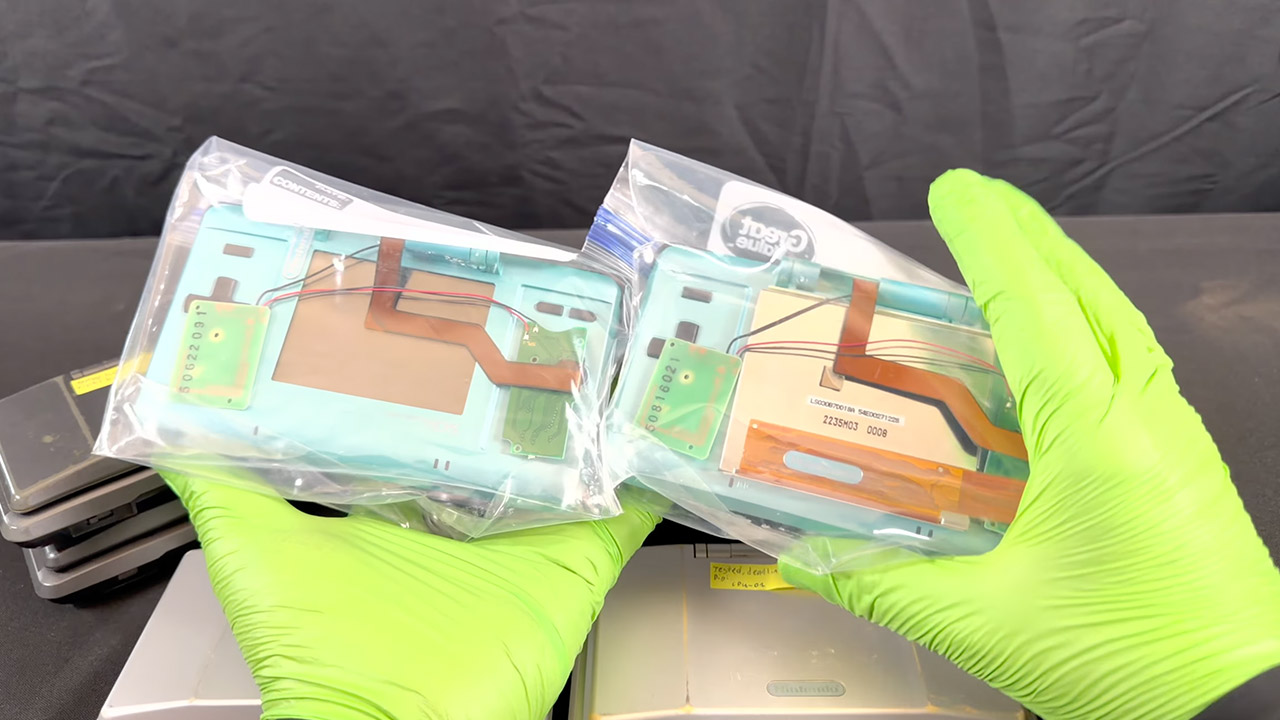
Sqwerks spent years dealing with dozens of original DS consoles and only lately began documenting the awful state of the situation late last August, and the results are telling. A sky blue one still has some flexibility in the hinge, but another identical one that has the syndrome is showing signs of deterioration from the lid being pushed around. The paint appears to be a thin layer over a yellow green cast on the graphite black ones. The worst of them just completely break apart, with sides missing and a shredded ribbon cable as a bonus. The board and screen are usually still functional. The case, not so much. It only takes seconds to figure out why; take a screwdriver to a mid panel on an affected case, and it snaps with light pressure. Repeat the process with an unaffected unit, and everything should be OK.

As far as he can tell, no lab study has ever been able to pinpoint exactly what kind of chemistry is at work here, but it’s clear that the additives used to give off that metal sheen and nice swirl finish don’t work well with ABS plastic in the long run, leaving it brittle and prone to shattering. What accelerates the process even more? Age. Combine that with some heat and a layer of paint, and watch it break. No, Retrobrite won’t assist much because it only changes the colors of the old yellowed plastics. Oils that soften old rubber will also be of little use in this situation.
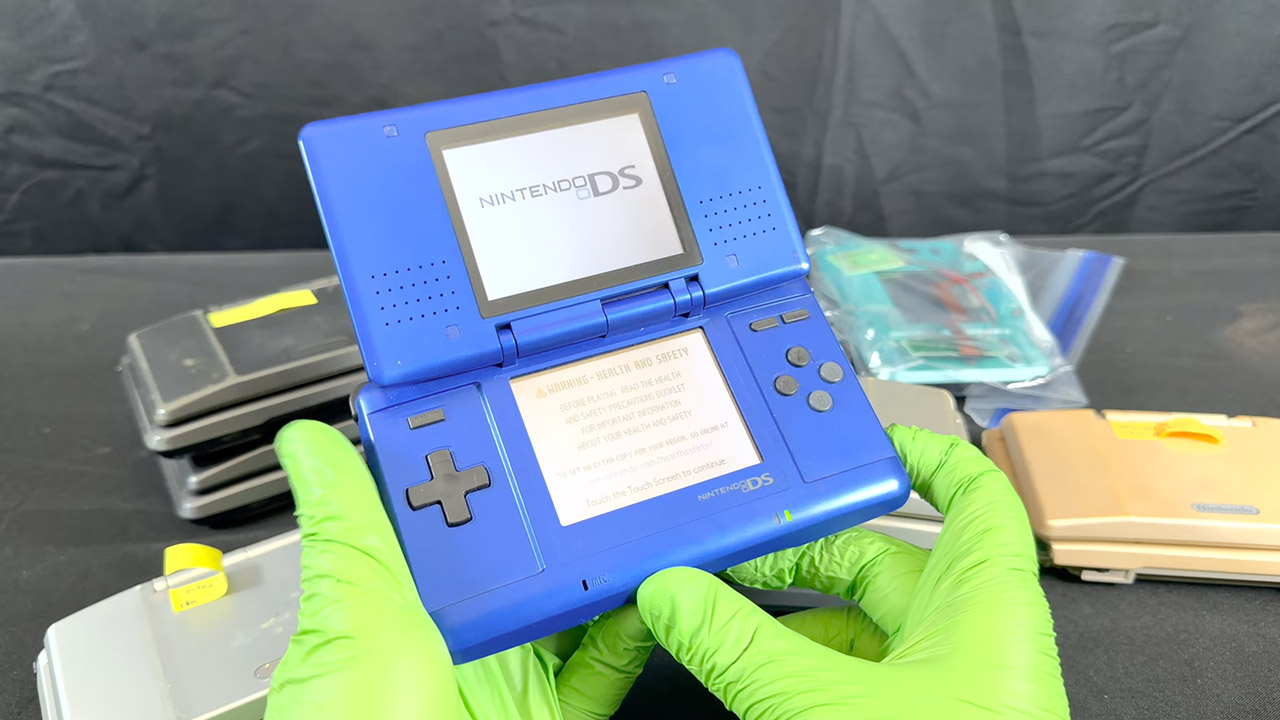
He believes that purchasing an aftermarket shell and getting rid of the factory one before it chooses to disintegrate on its own would be a better choice for people who own an original Nintendo DS in the same state. Save the original board, displays, digitizer, buttons, and other useful components.
[Source]
The Trusted Reviews Awards are back for 2026, and we can finally reveal the shortlist for the top prizes.
Our mission is to provide our readers with the best possible product reviews. We review thousands of products across multiple categories every year with this in mind. From fridges to phones, ovens to gaming handhelds, we pride ourselves on our in-depth testing and original reporting.
The Trusted Reviews Awards is where we celebrate the very best tech reviewed by our experts. Categories for 2026 include Computing, TV & Audio, Mobile, Homes and Cameras. We’re also handing out a special Sustainability Award with eBay.
While the winners will be announced at our ceremony on October 1st, our shortlisted products have now been announced, and they can be viewed below.
Best Monitor
- Samsung Odyssey OLED G6 G60SF
- Dell UltraSharp 32 4K QD-OLED Monitor U3226Q
- LG UltraGear GX9 45GX950A-B
- Samsung ViewFinity 40S85TH
- BenQ MA320UP
Best Mouse
- Razer Viper V4 Pro
- SteelSeries Aerox 3 Wireless Gen 2
- Logitech G Pro X2 Superstrike
- Sony Inzone Mouse-A
- Logitech MX Master 4
Best Headset
- SteelSeries Arctis Nova Pro Omni
- Sony Inzone H6 Air
- Astro A20X Lightspeed Wireless
- SteelSeries Arctis Nova Elite
- Logitech G325 Lightspeed
Best Gaming Handheld
- MSI Claw A8
- Asus ROG Xbox Ally
- Lenovo Legion Go S SteamOS
- Asus ROG Xbox Ally X
- Lenovo Legion Go 2
Best Keyboard
- Ducky OK-M-98
- Gravastar Mercury V60 Pro
- Sony Inzone KBD-H75
Best VPN
- Proton VPN
- NordVPN
- ExpressVPN
- Mullvad
- Windscribe
Best Gaming Laptop
- MSI Stealth A18 AI+
- Acer Nitro 16 AI
- Medion Erazer Beast 16 X1 Ultimate
- Acer Predator Helios 18 AI
- Acer Predator Triton 15 AI
Best Student Laptop
- Apple MacBook Neo
- Lenovo Yoga Slim 7x Gen 11
- Acer Swift Go 14 AI
- Acer Swift Edge 14 AI
- Acer Chromebook Plus Spin 514
Best Laptop
- Asus ProArt P16
- Samsung Galaxy Book 6 Pro
- Apple MacBook Air M5
- Acer TravelMate P6 14 AI
- Asus ExpertBook Ultra
Best Gaming Monitor
- Samsung Odyssey OLED G6 G60SF
- LG UltraGear GX9 45GX950A-B
- AOC Agon Pro AGP277QKDC
- BenQ Mobiuz EX271UZ
- Philips Evnia 27M2N5901A
Best Coffee Machine
- Nespresso Vertuo Up
- Ninja Prestige Dualbrew System CFN802UK
- KitchenAid Semi Automatic Espresso Machine
Best Bean-to-cup Coffee Machine
- Ninja AutoBarista Pro
- Philips Series 5500 LatteGo Bean to Cup Coffee Machine
Best Air Fryer
- Instant Pot Vortex Compact 5L Air Fryer
- Typhur Sync Air Fryer
- Ninja Crispi Pro
Best Power Station
- EcoFlow Delta 3 Max Plus
- BLUETTI Pioneer Na Portable Power Station (Sodium-ion)
- DJI Power 1000 Mini
Best Hob
- KM 8885-2 FL Diamond&Msense
- Hisense Hi8 Induction Hob 60cm HI6443SRWF
Best Cordless Vacuum Cleaner
- Dyson V10 Konical
- Shark PowerDetect Speed Clean and Empty Pet Pro IA3241UKT
- Hoover HF6 TurboSense
Best Plug-in Vacuum Cleaner
- Vax LiftOut Multi Pet-Design
- Hoover HL4
Best Hard Floor Cleaner
- Philips OneUp 5000 Series Electric Mop
- Dyson PencilWash
- Dyson Clean+Wash Hygiene
Best Carpet Cleaner
- Vax ONEPWR Compact Cordless Carpet Cleaner
- Shark StainStriker HairPro Pet Stain & Spot Cleaner PX250UKT
- Shark StainForce Cordless Stain-Destroying Spot Cleaner HX100UKT
Best Robot Vacuum
- Eufy Omni S2
- Shark PowerDetect UV Reveal RV3000XEUK
- Roborock Saros S20
Best Smart Doorbell
- Aqara Doorbell Camera G400 (Wired)
- Ring Wired Video Doorbell (2nd Gen)
- Ring Battery Video Doorbell 2K Plus
Best Smart Home Product
- Homey Pro 2026
- Flic Duo
- Aqara Valve Controller T1
- Ultion Nuki 2025
- Alexa+
Best Smart Security Camera
- Reolink E331 Smart Security Camera
- TP-Link Tapo C660 Kit
- Arlo Pro 6 2K
- Ring Outdoor Cam Pro
Best Smart Lighting Product
- Govee Floor Lamp 3
- Philips Hue Neon Outdoor Strip Light
Best Oven
- Masterbuilt Gravity 1150
- Samsung Bespoke Compact Oven Series 7 50L NQ5B7993AAK
- Hisense BSA66226ADBGUK
Best Dishwasher
- Haier XF 4A4M4PDA-80
- Samsung Series 6 WaterJet Clean DW60DG760FSLU4
- Hisense Hi9 HS693A90ADBX
Best Large Fridge/Freezer
- Hisense RQ5P640SYSD
- Miele KFN 7934 D
- Liebherr MBsddi 9024 plus BioFresh NoFrost
Best Washing Machine
- Hisense WF5I1245BBR
- Hotpoint HPC 96 Care UK
Best Washer Dryer
- Hisense WD5I1245BBRH
- Siemens WN54C2ATGB
Best Fan
- Duux Whisper 3
- SwitchBot Battery Circulator Fan
- Dreo TurboCool Misting Fan 765S
- Dyson Find+Follow Purifier Cool PC3
Best Grass Trimmer
- Stihl FSA 50 Cordless Grass Trimmer
- Webb Eco WEV20LTB2 Cordless Line Trimmer
Best Lawn Mower
- STIGA Collector 140e Kit
- Karcher LMO 18-36 Cordless Battery Lawn Mower
- Gtech CLM50
Best Robot Lawn Mower
- Mammotion Luba 3 AWD
- Husqvarna AutoMower 430V NERA
- Ecovacs Goat O1200 LiDAR Pro
- Segway Navimow i205 AWD
Best Hedge Trimmer
- Stihl HLA 40 Cordless Long-reach Hedge Trimmer
- VonHaus Cordless Pole Hedge Trimmer 40V Max. Battery 3500231
Best Heater
- Shark TurboBlade Cool + Heat TH200UK
- Dyson Purifier Hot+Cool HP1
Best Portable Projector
- JMGO N3 Ultimate
- XGIMI Elfin Flip Laser
Best lifestyle projector
- BenQ GP520
- Optoma UHZ58LV
- XGIMI Horizon 20 Max
- Hisense XR10
- AWOL Vision Aetherion Max
Best Projector
- Sony Bravia Projector 7
- Hisense XR10
- BenQ W2720i
Best affordable TV
- Xiaomi TV F Pro
- Haier H65S90GUF
- Samsung M80H
Best Mini LED TV
- TCL 65C7L
- Sony Bravia 9 II
- Samsung QE75R95H
Best OLED TV
- Samsung S90H
- Samsung S99H
- Sony Bravia 8 II
- LG C6 OLED
Best TV
- Sony Bravia 9 II
- LG C6 OLED
- Samsung S90H
- TCL C7L
- Samsung S99H
Best Amplifier
- Musical Fidelity B1xi
- Lyngdorf TDAI 2210
- MOON 371
Best Soundbar
- Samsung HW-QS90H
- JBL Bar 3000MK2
- Bose Lifestyle Ultra Soundbar
- Sony Theatre Bar 7
Best Stereo Speakers
- Dali Kupid
- Wharfedale Diamond 12.1i
- Ruark Talisman-R
- Bowers & Wilkins 707 Prestige
Best Outdoor Speaker
- JBL Flip 7
- JBL Charge 6
- Marshall Stockwell III
- Moto Sound Flow
- Tribit Stormbox Micro 3
- JBL Go 5
Best Party Speaker
- Marshall Bromley 450
- Ikarao Shell S1
- JBL PartyBox 720
Best Wireless Speaker
- Samsung Music Studio 7
- Denon Home 400
- DALI VEGA
- Bluesound Pulse Flex (2025)
- WiiM Sound
- Marshall Acton IV
- KEF Coda W
- Bose Lifestyle Ultra Speaker
Best DAC
- iFi Go Link Max
- Topping D900 DAC
- Eversolo DAC-Z10
- Topping DX9 Discrete
Best Music System
- Focal Mu-so Hekla
- Philips The Tina
- Majority Quadriga
- Cambridge Audio Evo One
Best Radio
- Roberts Stream 219
- Pure Elan Mode
Best Sports Headphones
- JLab Go Sport+
- Beats Powerbeats Fit
- JBL Endurance Peak 4
Best Noise Cancelling Headphones
- Apple AirPods Pro 3
- Sennheiser Momentum 5 Wireless
- Sony WF-1000XM6
Best Wired Headphones
- Meze 99 Classics 2nd Gen
- HEDDphone TWO GT
- Audio Technica ATH-ADX7000
Best Open Earbuds
- Shokz OpenFit Pro
- Shokz OpenDots 2
- Baseus Bowie MC2
Best Wireless Earbuds Under £100
- EarFun Air 4 Pro+
- Oppo Enco Air5
- Final Audio ZE300
Best Wireless Headphones
- Nothing Headphone A
- Sony 1000X The Collexion
- Sennheiser Momentum 5 Wireless
- Focal Bathys MG
- Sennheiser HDB 630
- Noble FoKus Artemis
Best Wireless Earbuds
- Apple AirPods Pro 3
- Soundcore Sleep A30
- Sony WF-1000XM6
- Sennheiser Momentum True Wireless 5
Best Headphones
- Sony WF-1000XM6
- Apple AirPods Pro 3
- Soundcore Sleep A30
- Meze 99 Classics 2nd Gen
Best Camera
- Canon EOS R1
- Canon PowerShot V1
- Panasonic Lumix DC-L10
- Nikon Z5II
- Fujifilm X Half
Best Pocket Camera
- DJI Osmo Pocket 4P
- Insta360 Luna Ultra
- DJI Osmo Nano
- Insta360 X6
Best Tablet
- Honor MagicPad 4
- RedMagic Astra 2
- iPad Air M4
- Xiaomi Pad 8 Pro
- Samsung Galaxy Tab S11 Ultra
Best Tablet Under £400
- OnePlus Pad Go 2
- Lenovo Idea Tab Plus
- Poco Pad X1
Best Smart Ring
- Oura Ring 5
- Cudis 002 Sporty Ring
- Pin Pulse
Best Running Watch
- Samsung Galaxy Watch Ultra 2
- Huawei Watch GT Runner 2
- Coros Pace 4
- Garmin Forerunner 170 Music
Best Fitness Tracker
- Google Fitbit Air
- Amazfit Active 3 Premium
- Huawei Watch Fit 5 Pro
- Xiaomi Smart Band 10 Pro
- Garmin Cirqa
Best Smartwatch
- Samsung Galaxy Watch Ultra 2
- Xiaomi Watch 5
- Huawei Watch Ultimate 2
- Samsung Galaxy Watch 9
- Google Pixel Watch 5
Best Foldable Phone
- Samsung Galaxy Z Fold 8
- Samsung Galaxy Z Fold 8 Ultra
- Honor Magic V6
- Motorola Razr Fold
- Motorola Razr 70 Ultra
Best Gaming Phone
- RedMagic 11S Pro
- Poco X8 Pro Max
- RedMagic 11 Air
- OnePlus 15
Best Camera Phone
- Oppo Find X9 Ultra
- Samsung Galaxy S26 Ultra
- Xiaomi 17 Ultra
- Honor Magic 8 Pro
- iPhone 17 Pro
Best Phone Under £400
- Motorola Edge 70 Fusion
- Poco X8 Pro
- Nothing Phone 4a
- Honor Magic 8 Lite
- Xiaomi Redmi Note 15 Pro Plus 5G
Best Phone Under £700
- Google Pixel 10a
- Samsung Galaxy A57 5G
- Poco F7 Ultra
- Honor 600
- Nothing Phone 4a Pro
Best Phone
- Oppo Find X9 Pro
- Samsung Galaxy S26 Ultra
- Honor Magic 8 Pro
- iPhone 17 Pro
- Google Pixel 11 Pro
Sustainability Award
- Fairphone 6 Plus
- Bang & Olufsen Beosound Premiere
- Sennheiser Momentum 5 Wireless
- Acer Swift Go 14 AI (2026)


A little over a decade ago, I led the controls design for a first-of-its-kind full digital control system for a U.S. nuclear plant. It was, on paper, a beautiful machine—engineered to run itself the way a modern airliner does, with operators watching over a system that rarely needed them. And we made a decision that, to an efficiency-minded observer, looked backward: We deliberately left manual steps inside sequences the system could execute on its own.
We were solving a specific problem. An operator who only ever supervises automation slowly stops being an operator. The hands go cold. The mental model of what the plant is actually doing gets fuzzy. Then comes the day the automation hands control back. It’s always the worst day, because automation only quits when it’s confused or in trouble. But by then, you have a person in the chair who hasn’t truly operated the thing in years. The manual steps were there to keep the human current. It was inefficient by design, on purpose.
That plant, as it happened, was never built. It was shelved amid the politics and economics that surround nuclear power in this country, for reasons that had nothing to do with the engineering. But the design instinct outlived the project, and I’ve come to believe it’s the most useful idea I can offer to the argument now consuming every boardroom: What happens to human expertise when AI does the work that used to build it?
AI Is Disrupting the Engineering Career Ladder
The data has gotten hard to wave away. A Harvard University working paper covering some 65 million workers at more than 280,000 U.S. firms found that after companies adopted generative AI, junior employment fell roughly 9 percent within six quarters relative to non-adopters, while senior employment kept right on growing. A Stanford analysis of ADP payroll records points the same way: The youngest workers in the most AI-exposed occupations lost ground after late 2022 while their more experienced colleagues held theirs. The Stanford researchers found that the losses concentrate where AI automates the work; where it merely augments, junior employment holds steady or rises.
The causal story is still contested, and honesty requires saying so. Researchers at the New York Fed attribute much of the rise in young-graduate unemployment not to AI but to remote work, arguing that firms are reluctant to hire inexperienced people whom they cannot train and mentor at a distance. But notice what the explanations share. Whether a model is absorbing the formative work or distance is severing the mentorship around it, both describe the same broken mechanism: the apprenticeship channel through which expertise passes from senior to junior. Either way, “entry-level” has quietly come to mean “three years of experience required.”
Strip away the noise and you’re left with one deceptively simple problem: you cannot become a senior engineer without first being a junior one. Expertise is not downloaded. It is earned through failed builds, dead-end debugging sessions, and the “why on earth did that work” moments that a capable AI will now happily spare the newcomer. Spare them enough of those, and you produce a cohort that can supervise a model on paper but never developed the gut sense to know when the model is confidently, catastrophically wrong.
Most of the commentary stops at the diagnosis, or reaches for policy solutions that treat the loss of junior jobs as an economic problem. Yet it’s also an engineering problem, and safety-critical fields have already spent decades learning how to solve it.
My own career started at the sharp end of automation. My first job out of school was verifying and validating the software in the digital jet-engine controller that decides, faster than any pilot could, how a fighter plane’s engine responds. Even then, in the late 1980s, the central tension was visible: The machine outperforms the human in routine cases, but the human is all that stands between the aircraft and disaster in the cases the machine didn’t anticipate. This tension is known as the automation paradox, in which increasingly capable automation gives human operators less practice, while leaving them only the most difficult situations.
Aviation learned, repeatedly and expensively, what happens when human skills atrophy inside that gap. The canonical example is Air France flight 447, which fell into the Atlantic in 2009. The proximate cause was mundane. Iced-over airspeed sensors fed the autopilot bad data, and it did what it is designed to do: it disconnected and handed control of the airplane back to the crew. What followed was not a hardware failure. It was a competence failure. A recoverable situation became an unrecoverable one because the pilots, conditioned by thousands of hours of watching the automation fly, could not read a high-altitude aerodynamic stall and hand-fly their way out of it. The airplane was working. The training the automation had quietly eroded was not.
The industry’s response is instructive, and it’s the same move we made in that nuclear control room. It did not rip out the autopilot. It built deliberate manual practice back in. In 2017 the FAA issued Safety Alert for Operators 17007, “Manual Flight Operations Proficiency,” declaring that “manual flight is the foundation upon which other technical flying skills are built.” The alert formally recognized skill decay as a hazard in its own right. Some airlines amended their procedures to encourage hand-flying both the initial climb and initial descent in benign conditions, knowingly trading a sliver of fuel efficiency to keep the crew’s raw flying skills alive. That trade is the whole point. A perfectly optimized system that produces incompetent operators is not optimized at all. It has simply moved its failure mode somewhere the spreadsheet can’t see it.
Manual Gates Could Preserve Engineering Skills
Put the aviation lesson and the nuclear instinct side by side and they point to one design pattern we now need in AI-augmented work: the deliberate “manual gate.”
A manual gate is a point in a workflow where a human takes the controls, not because it is the fastest way to get the task done, and not only as a safety interlock, but specifically to exercise and preserve a skill that would otherwise decay. The distinguishing feature is that it is chosen. You decide, as a matter of design, which competencies your organization must keep alive in human beings because those are the ones you will need on the bad day. Then you engineer the friction required to keep them warm.
Picture how this might work on a software team that leans on AI for most of its code. The team places a manual gate around the skill it can least afford to lose: debugging. When a defect surfaces in a critical module, the assigned engineer—deliberately, often a junior one—must first reproduce the failure, trace it to root cause, and write an automated test that captures the bug, all with the AI assistant switched off. Only after the engineer commits to a diagnosis does the model come back on, to propose the fix, generate alternatives, and sweep the codebase for similar bugs. The engineer then compares their diagnosis against the model’s. When the two disagree, that’s the design working, surfacing the disagreement before the bad day instead of during it.
This approach reframes the junior engineer entirely. The instinct today is to let AI do the entry-level work because it is faster and cheaper. But some of that work is not overhead to be eliminated. It is the training apparatus of your future senior staff, and you should protect it the way you’d protect any other piece of critical infrastructure. It may not be efficient this quarter, but dismantling it quietly mortgages your capability a decade out.
Why Companies Must Keep Training Junior Engineers
None of this is free, and pretending otherwise would insult the people who have to sign the budgets. A deliberate manual gate is, by construction, less efficient in the near term than full automation. Keeping juniors doing formative work and running the manual sequences costs something now to protect something later.
That’s a hard sell in a market that judges most leaders on quarterly results. A hired executive who carries “unnecessary” humans that AI could replace will hear about it from the board long before the payoff arrives. The math only works for someone insulated from that pressure: a founder with control, a private company, an institution with a genuinely long horizon, or a regulator willing to require workers to demonstrate their skills regularly, as pilots must. Which means the organizations most likely to preserve their own expertise are the ones structurally able to spend short-term margin on long-term capability; everyone else will need that outside push.
So here is the argument, in one line: Deliberate inefficiency is not waste. In safety-critical engineering we have always known it as insurance, and we buy it on purpose. As AI takes over the work where expertise is forged, the smart move is not to resist the automation. It is to keep our hands on the controls by design—so that when the automation fails, as it always eventually does, there is still someone in the chair who knows how to fly.
From Your Site Articles
Related Articles Around the Web

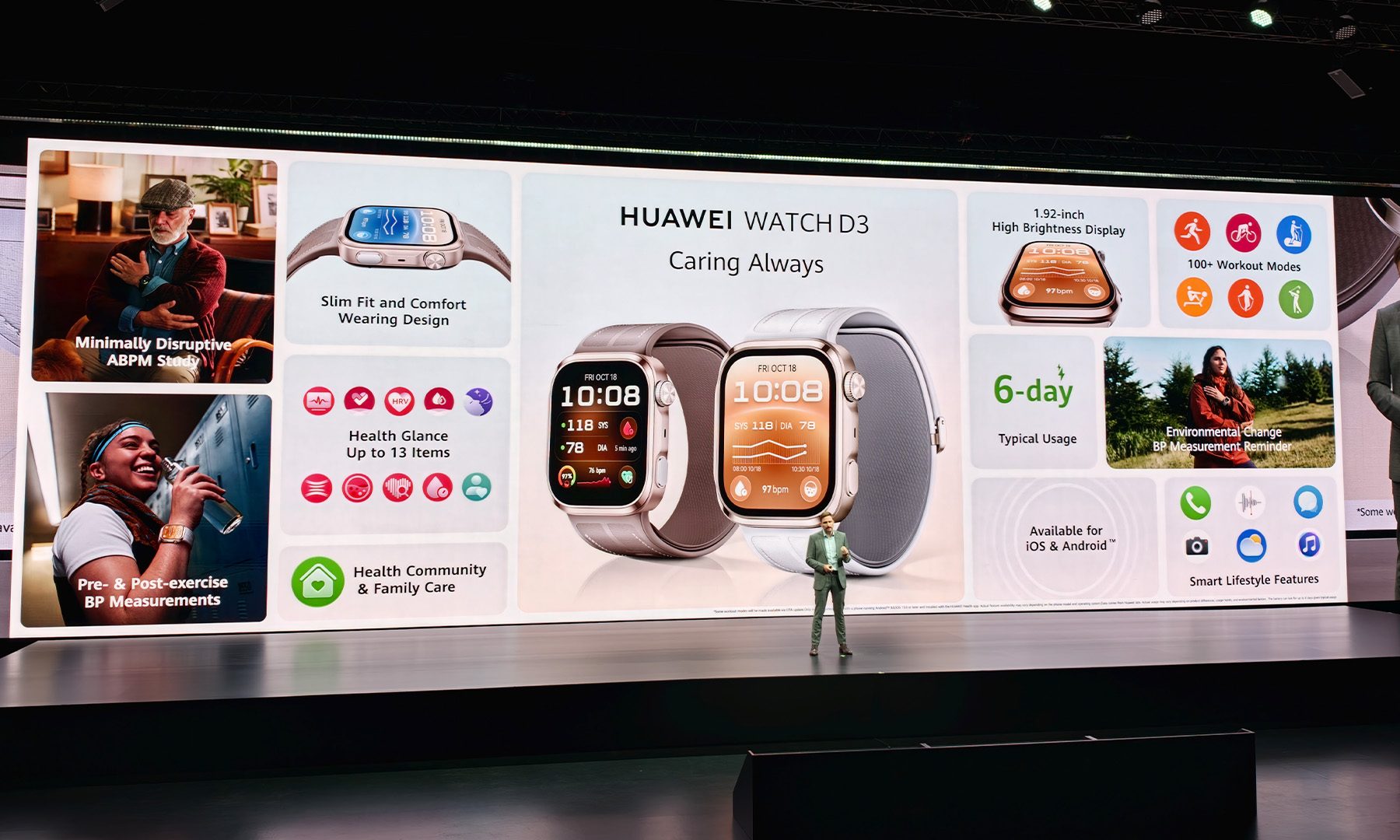
There are plenty of smartwatches that can tell you how many steps you’ve taken, how well you slept, and whether your heart rate is doing something unusual. Then there’s the Huawei Watch D3, which looks at all of that and essentially asks: “That’s nice. But what’s your blood pressure?”

I’ve been wearing the Watch D3 for a handful of days now, and it’s quickly become one of the more interesting smartwatches I’ve tested in a while. Not necessarily because it does everything better than the competition, but because it is trying to solve a very different problem. This is a smartwatch built around cardiovascular health first, and everything else second.
A slimmer Watch D makes a big difference
The first thing you’ll notice about the Watch D3 is that it looks considerably less imposing than its predecessor. Huawei has brought the thickness down to 11.4mm from 13.3mm, and while that might not sound dramatic on paper, it makes a noticeable difference once the watch is actually sitting on your wrist.
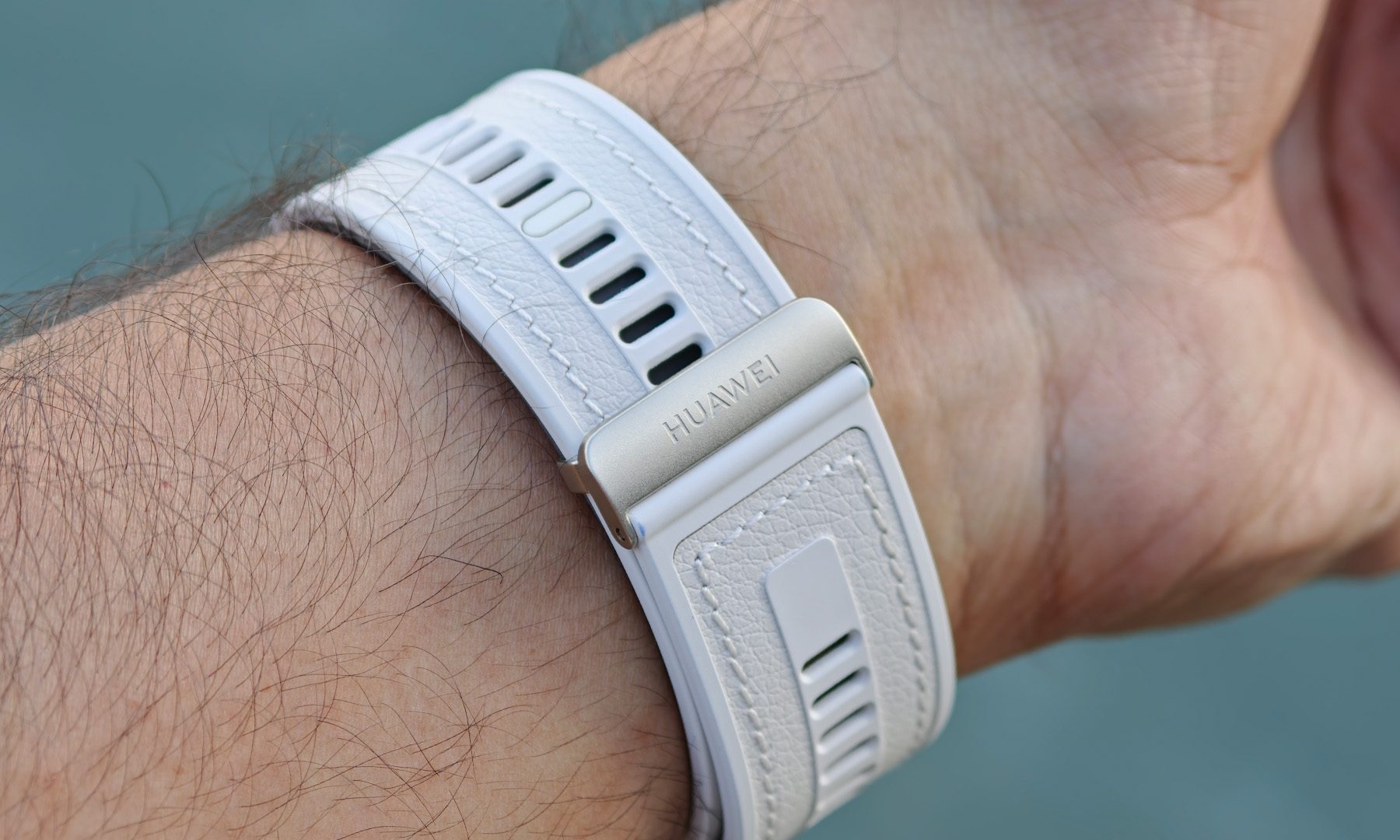
It’s also considerably easier to live with overnight. That’s important because the D3 isn’t really a watch you buy just to glance at notifications during the day. A big part of its appeal is continuous health monitoring, and that works much better when you can comfortably forget you’re wearing it. The larger 1.92-inch display helps, too, making everything from blood-pressure readings to other health metrics easier to read at a glance.
The clever bit is hiding in the strap
The D3’s party trick is something you won’t find on your average Apple Watch or Galaxy Watch: an inflatable cuff built directly into the strap. There’s a miniature pump inside the watch that inflates the cuff around your wrist, allowing the D3 to take a pressure-based blood-pressure measurement rather than simply estimating it from optical sensor data.
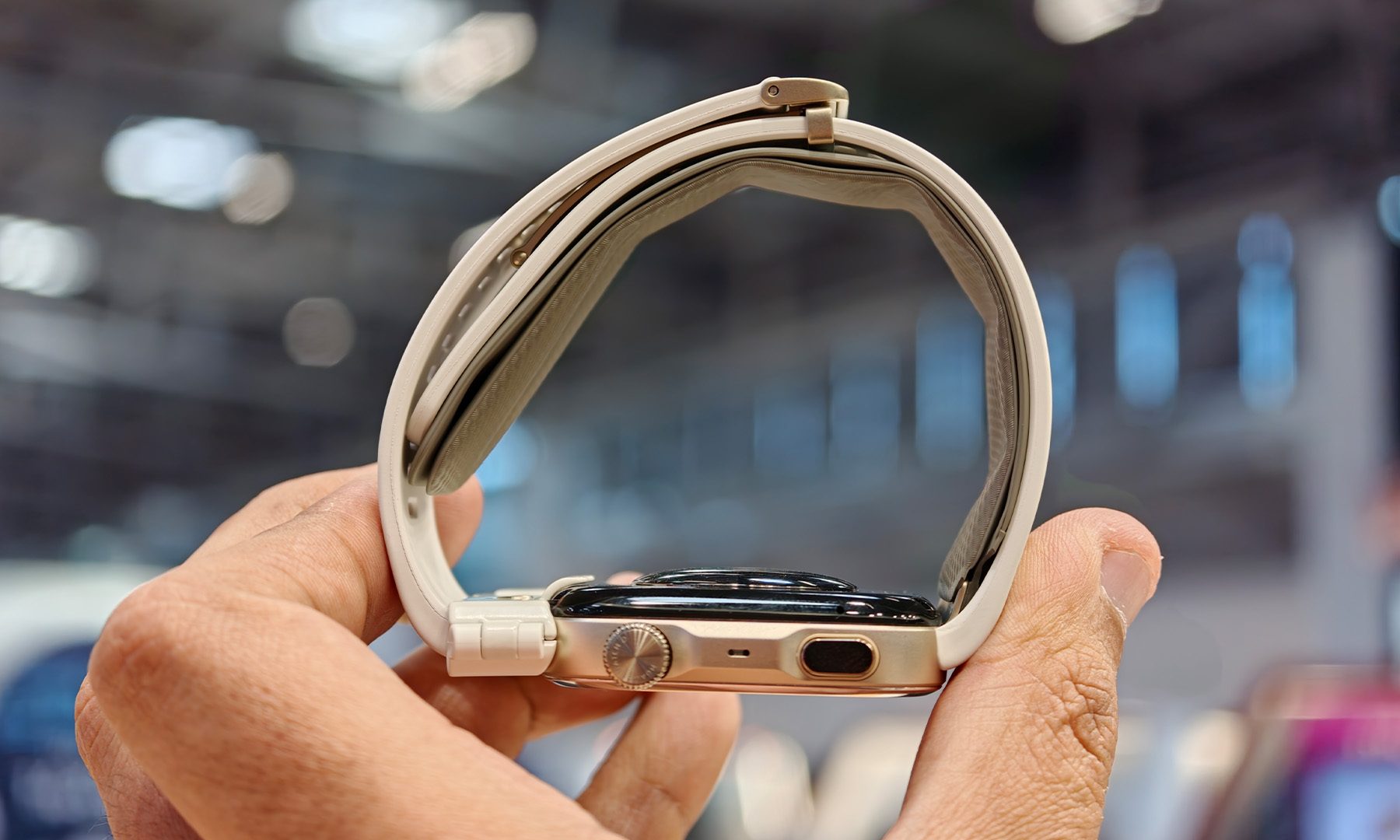
The process itself is surprisingly painless. Raise your wrist so the watch is positioned close to heart level, start a measurement, and roughly 30 seconds later you’ve got a reading. There’s obviously some pressure involved as the cuff inflates, but it’s hardly an ordeal. After a few attempts, it becomes just another thing you can do from your wrist.
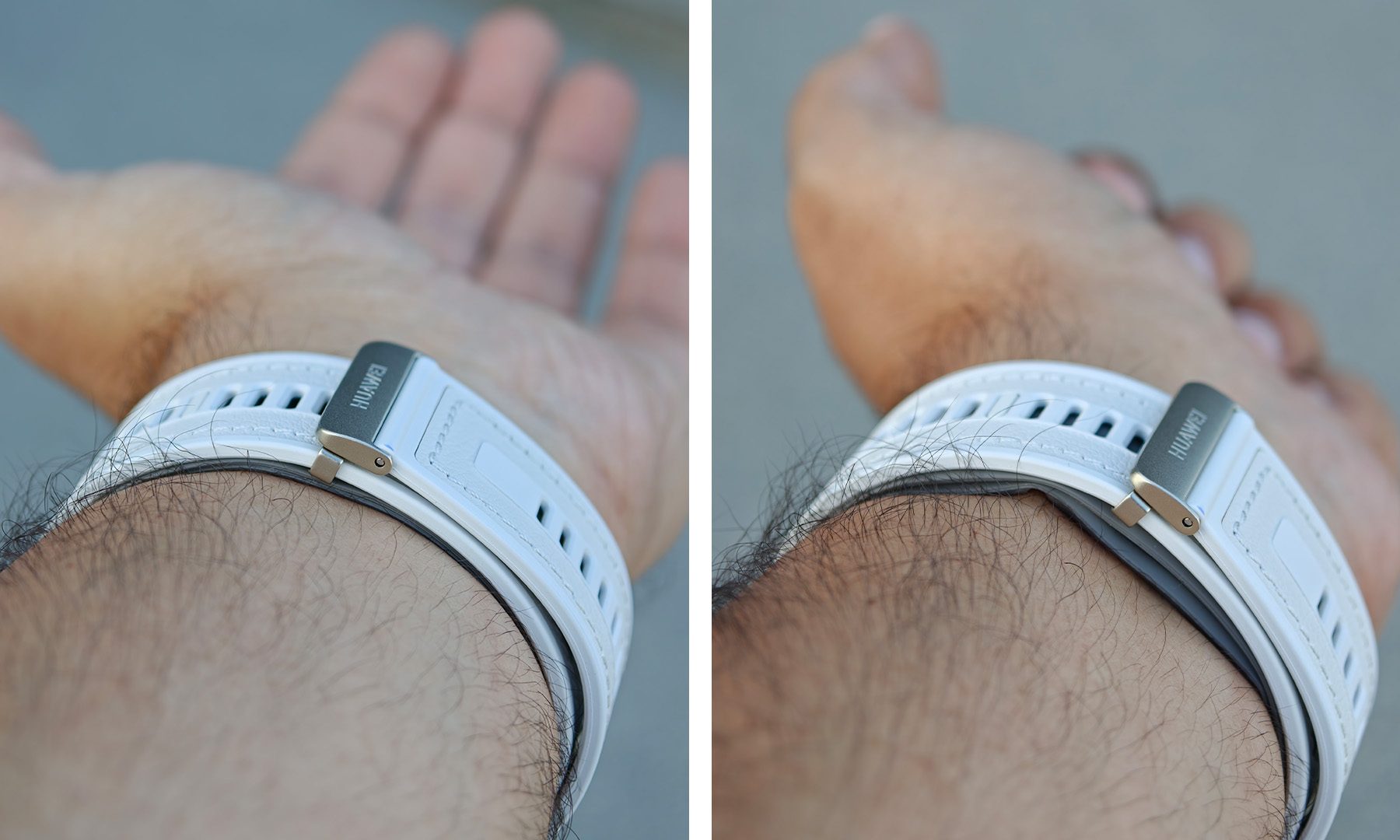
That hardware does come with a few compromises. The Watch D3 carries an IP68 rating, but Huawei’s design means this isn’t a smartwatch I’d treat like a dedicated swimming companion. Prolonged water exposure, diving, hot showers, and similar activities aren’t really what this particular piece of wrist hardware was designed for. It’s a small price to pay for having an inflatable blood-pressure cuff hiding in the strap.
Blood pressure gets a little more interesting
The real appeal of measuring blood pressure this way is that it gives the D3 a different perspective on your health. Most smartwatches build their stress and wellness insights from signals such as heart rate, heart-rate variability and sleep. The D3 can add actual blood-pressure measurements to that picture.
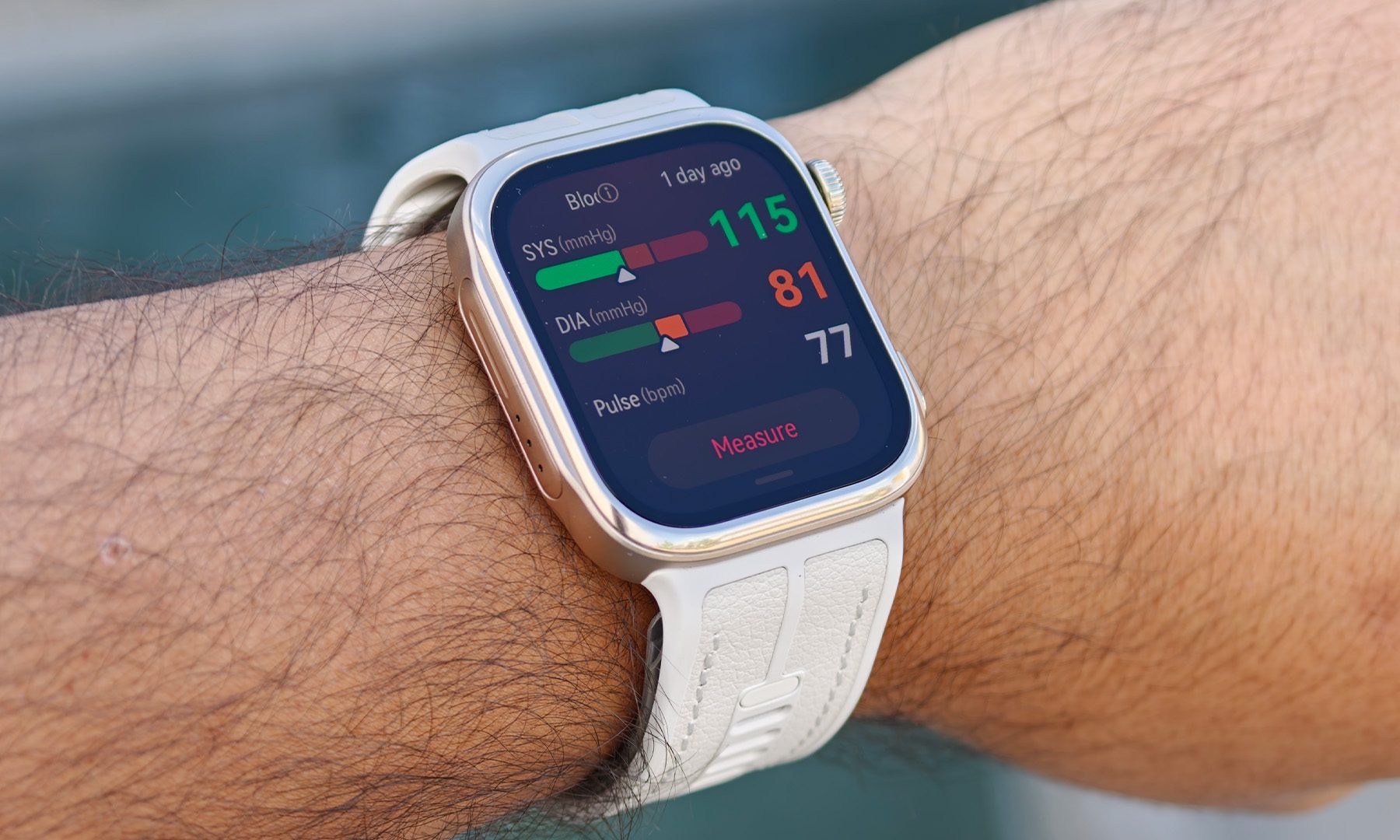
Huawei has also expanded the blood-pressure capabilities of the previous-generation D2. The D3 can record blood pressure before and after exercise, and Huawei says it can maintain accurate measurements at elevated heart rates. It also introduces contextual reminders to check blood pressure during situations such as sudden temperature changes or stays at high altitude.
That last bit is particularly interesting because it makes the monitoring feel a little more intelligent. Instead of simply collecting numbers and dumping them into an app, the D3 can recognize situations where a blood-pressure check may be useful and nudge you toward taking one. It’s a small feature, but one that makes the whole concept feel more purposeful.
This isn’t trying to be an Apple Watch
And that’s where the Watch D3 gets interesting. It would be easy to compare it with an Apple Watch, Galaxy Watch, or Garmin and start ticking off the features it doesn’t have. There are fewer sports modes, the water restrictions are more significant, and its entire design is dictated by hardware that most smartwatches don’t need to accommodate. But that misses the point.
The D3 isn’t really designed to win a smartwatch feature checklist. Its target audience is much more specific: people who care deeply about cardiovascular health, users managing hypertension, adults aged 40 and above, or anyone for whom regular blood-pressure monitoring is more important than having the most comprehensive sports watch on their wrist.

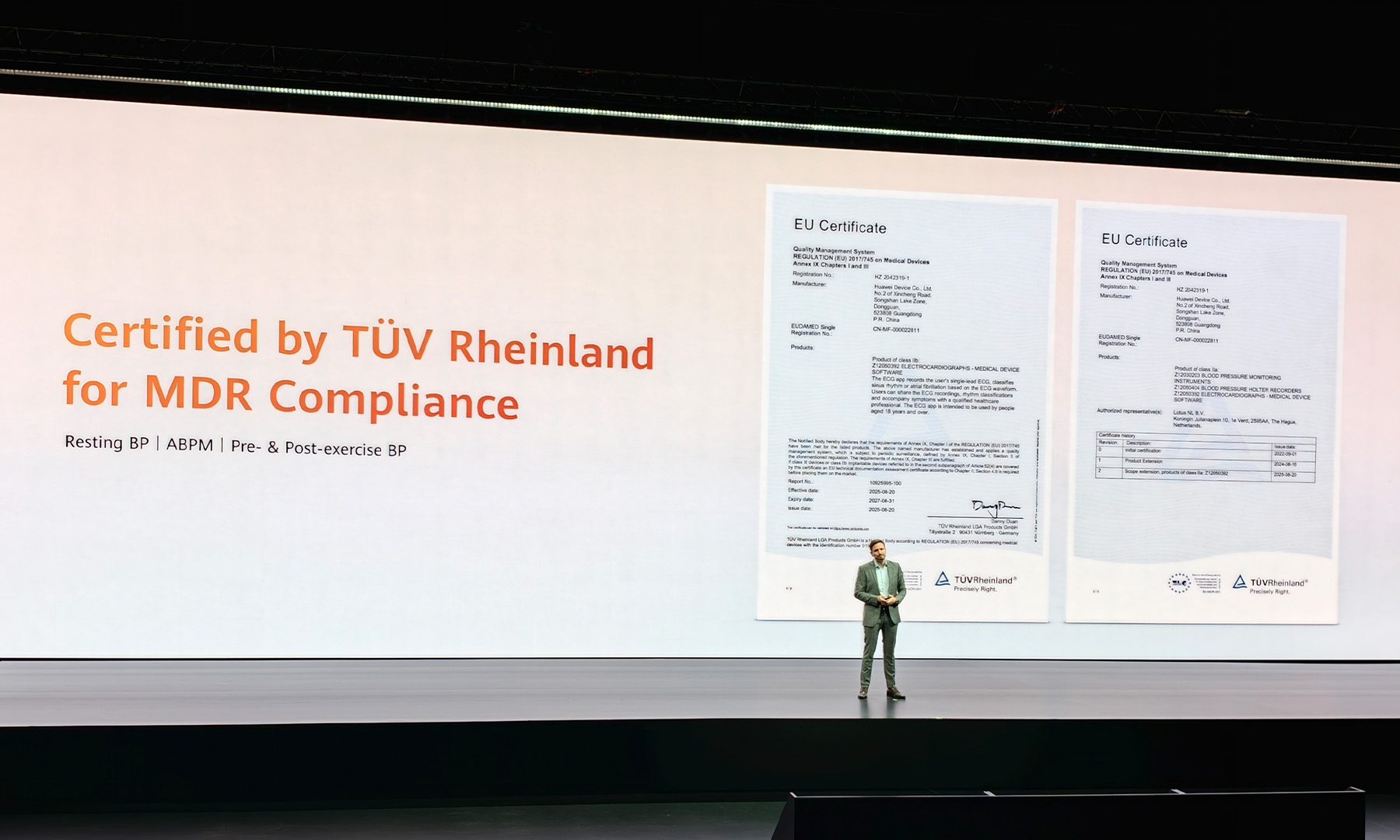
That medical focus was on full display when Huawei previewed the D3 at the European Society of Cardiology (ESC) Congress in Munich, where it attracted positive interest from cardiology professionals. Huawei says the D3’s CE-MDR certification in the European Union covers single blood-pressure measurements, ambulatory blood-pressure monitoring, and measurements before and after exercise.
A surprisingly compelling niche
After a handful of days with the Watch D3, I’m still figuring out how useful all of this additional health data will be over the long term. That’s something I’ll need more time to properly evaluate, particularly when it comes to accuracy in different circumstances, battery life, and whether the novelty of taking blood-pressure measurements actually translates into a lasting habit.
But the early impression is certainly positive. Huawei has managed to shrink a fairly complicated piece of health-monitoring hardware into something that feels much more like a conventional smartwatch than you might expect. And the fact that the D3’s CE-MDR certification specifically encompasses several blood-pressure monitoring scenarios makes its proposition considerably more interesting than simply adding another estimated health metric to a smartwatch.
The Watch D3 isn’t going to replace the Apple Watch or Galaxy Watch, and I don’t think Huawei wants it to. It’s going after a much narrower, but potentially much more valuable audience. If you’re someone who actually needs to keep tabs on your blood pressure, having that capability wrapped around your wrist instead of sitting in a drawer could be a pretty big deal.


Like Hetzner Online, both Softaculous and Zet.net, the transit peer downstream from Hetzner Online, failed to properly monitor their systems and, as a result, didn’t catch the hijacking until it had been ongoing on and off for 22 hours. There are also questions about another host provider, Nexon Host, whose infrastructure somehow facilitated the malicious announcement.
Ben Cartwright-Cox, a BGP expert and creator of the BGP Tools suite, called the lapses “silly, preventable mistakes.” Softaculous, Hetzner, and Zet.net didn’t immediately respond to emailed questions.
A brief history of BGP
BGP attacks target the underpinnings that make the Internet a unified, worldwide network. The Internet is splintered into many ASes (autonomous systems), also known as ASNs (autonomous system networks). Each AS is an independent network assigned a portion of the 3.7 billion publicly available addresses under the IPv4 protocol. BGP is the glue that binds all these ASes together and allows each one to connect to any other.
To allow an address assigned to an AS in, say, Germany to reach IPs in North America, an AS must “announce” the other ASes that should transit the traffic. These routing announcements are declarations made as entries on a global routing table used by all ASes and the hosting providers serving them. In the Internet’s early days, BGP ran on trust. Providers simply assumed announcements were valid and made in good faith.
Over the years, attackers repeatedly abused this trust by making announcements for IPs they had no valid right to control. Attackers—with ties to both nation-states and financially motivated groups—capitalized on the lax system to, in some cases, route petabytes’ worth of sensitive data through networks they controlled.
Eventually, Internet architects developed a series of measures to prevent such hijacking. The most prominent of these is RPKI (Resource Public Key Infrastructure) ROV (Route Origin Validation). RPKI ROV uses cryptographic records called Route Origin Authorizations (ROAs) to assert the proper origin and prefix mask length of routes in BGP. ASes that deploy RPKI ROV will reject routes that don’t match the information contained in ROAs, preventing hijacks from spreading throughout the Internet.

Labor Day wearable sales are packed with questionable no-name watches and discounts that aren’t really tied to the holiday. I filtered those out. These four are explicitly part of Amazon or Best Buy’s Labor Day sales, cover different budgets and use cases, and actually look worth buying.
Samsung Galaxy Watch7 40mm

Best Buy marks the Galaxy Watch7 as a Labor Day Deal at $189.99, down from $249.99. Despite being a 2024 model, it’s still an excellent Android smartwatch thanks to its bright AMOLED display, dual-frequency GPS, and broad health features. In our Galaxy Watch7 review, we found it fast, polished, and comfortable. Battery life remains its biggest weakness, but at under $200 it’s much easier to overlook.
Garmin vívoactive 5
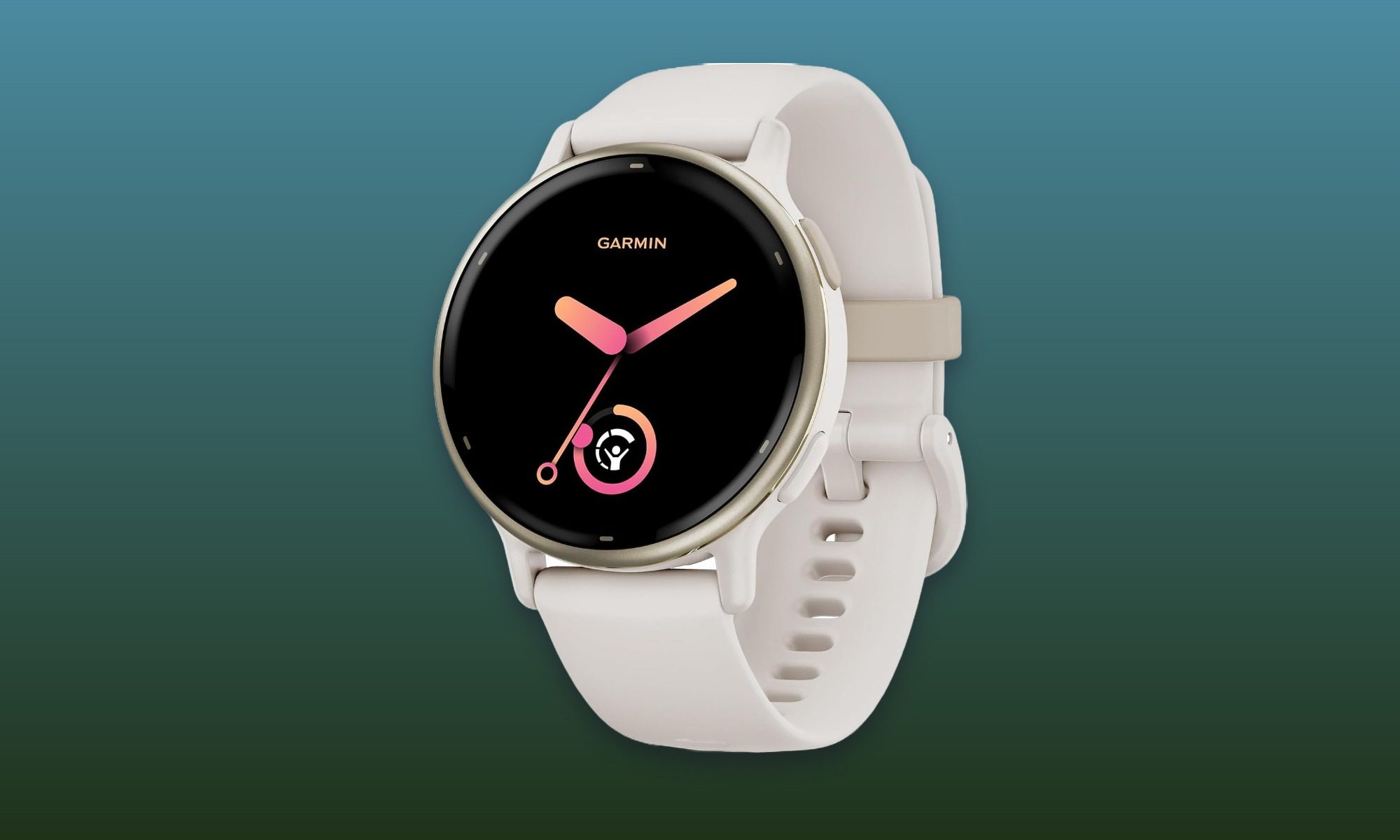
At $181.97 instead of $299.99 at Amazon, the vívoactive 5 carries the biggest percentage discount of these four. It makes more sense for someone who prioritizes workouts, sleep, and recovery data over a huge smartwatch app ecosystem. Our Garmin vívoactive 5 review highlighted its AMOLED screen, strong battery endurance, useful wellness tools, and lack of a required subscription. It’s an especially strong buy for anyone who wants Garmin’s fitness features without paying flagship prices.
Amazfit Active 3
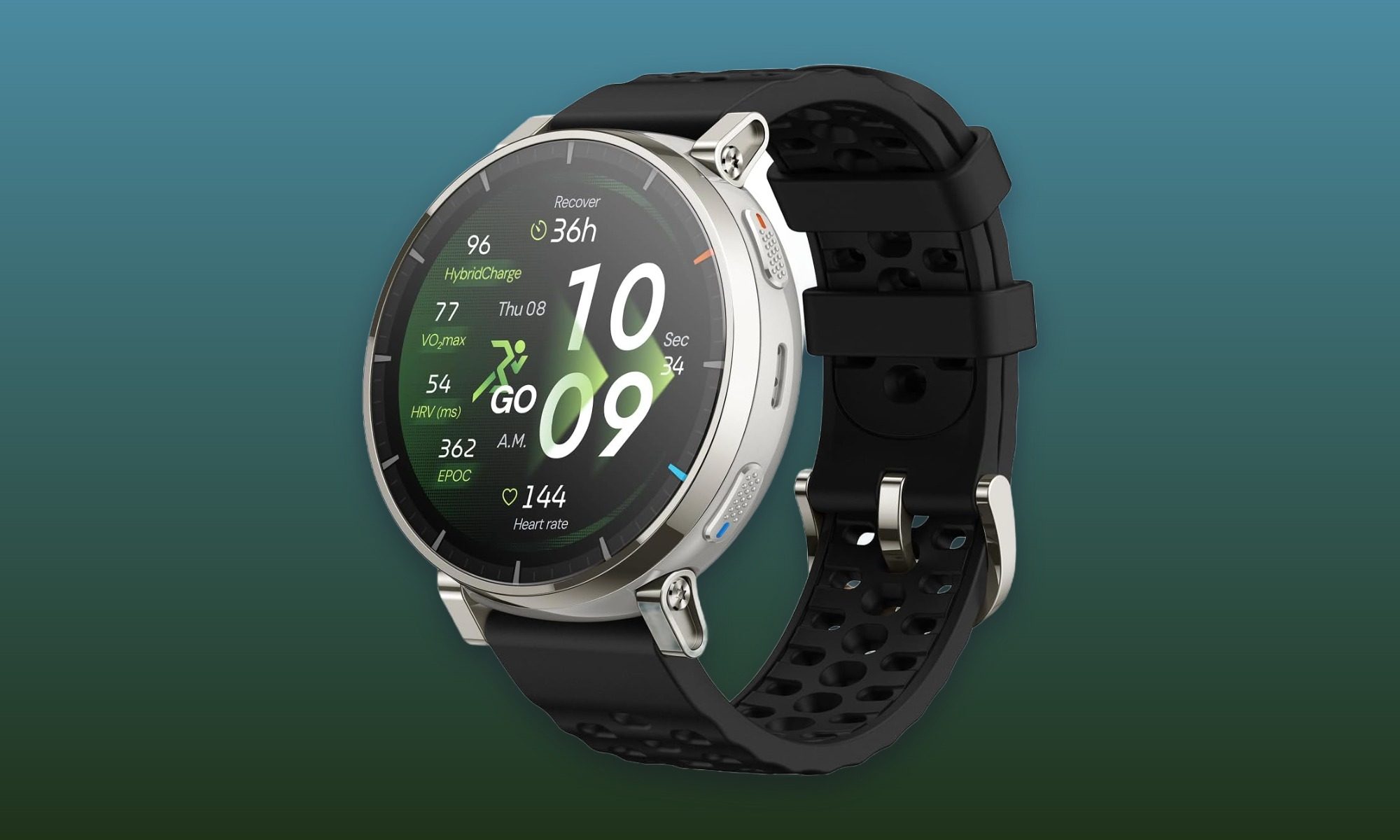
Amazon has the Amazfit Active 3 for $125.99, down from $169.99, making it the affordable option here without dipping into the mystery-brand watches cluttering the sale page. Its 1.32-inch AMOLED screen and sapphire glass are unusually premium touches at this price, while support for plenty of workout modes and up to 12 days of rated battery life round out the package. It’s the easiest recommendation here for someone who wants the basics covered without spending $200 or more.
Garmin Instinct 3 Solar 45mm
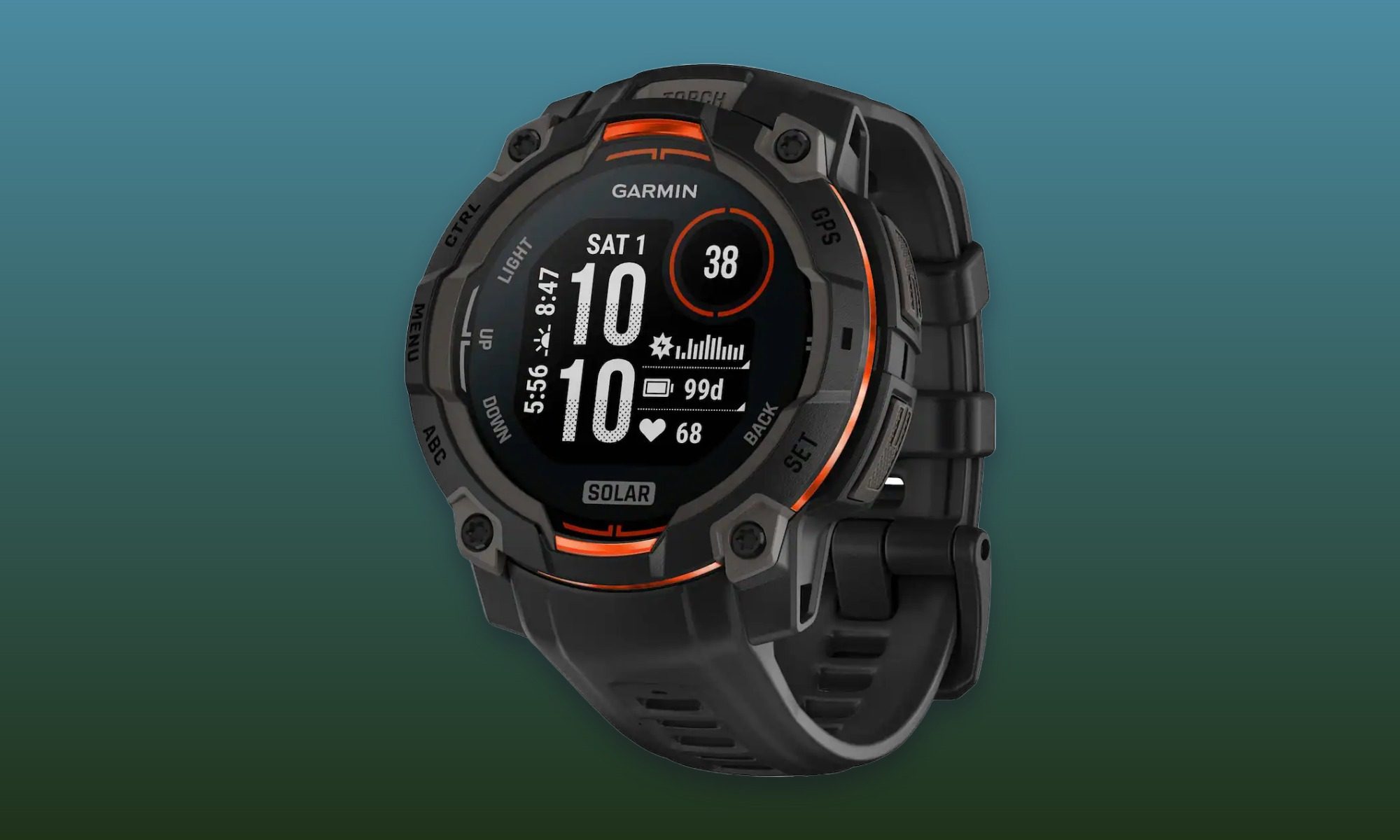
The rugged option comes from Garmin. Best Buy’s Labor Day price puts the Instinct 3 Solar at $299.99 instead of $349.99. Solar charging, a built-in flashlight, and its adventure-focused design make it better suited to hiking and outdoor training than everyday smartwatch duty. Our Instinct 3 hands-on shows why endurance is one of its defining strengths. It’s also the most specialized pick here, which is exactly what makes it useful in a lineup otherwise focused on more mainstream wearables.
Tech
Samsung’s $799 Galaxy Book6 challenges the MacBook Neo with a larger screen and claimed 25-hour battery life
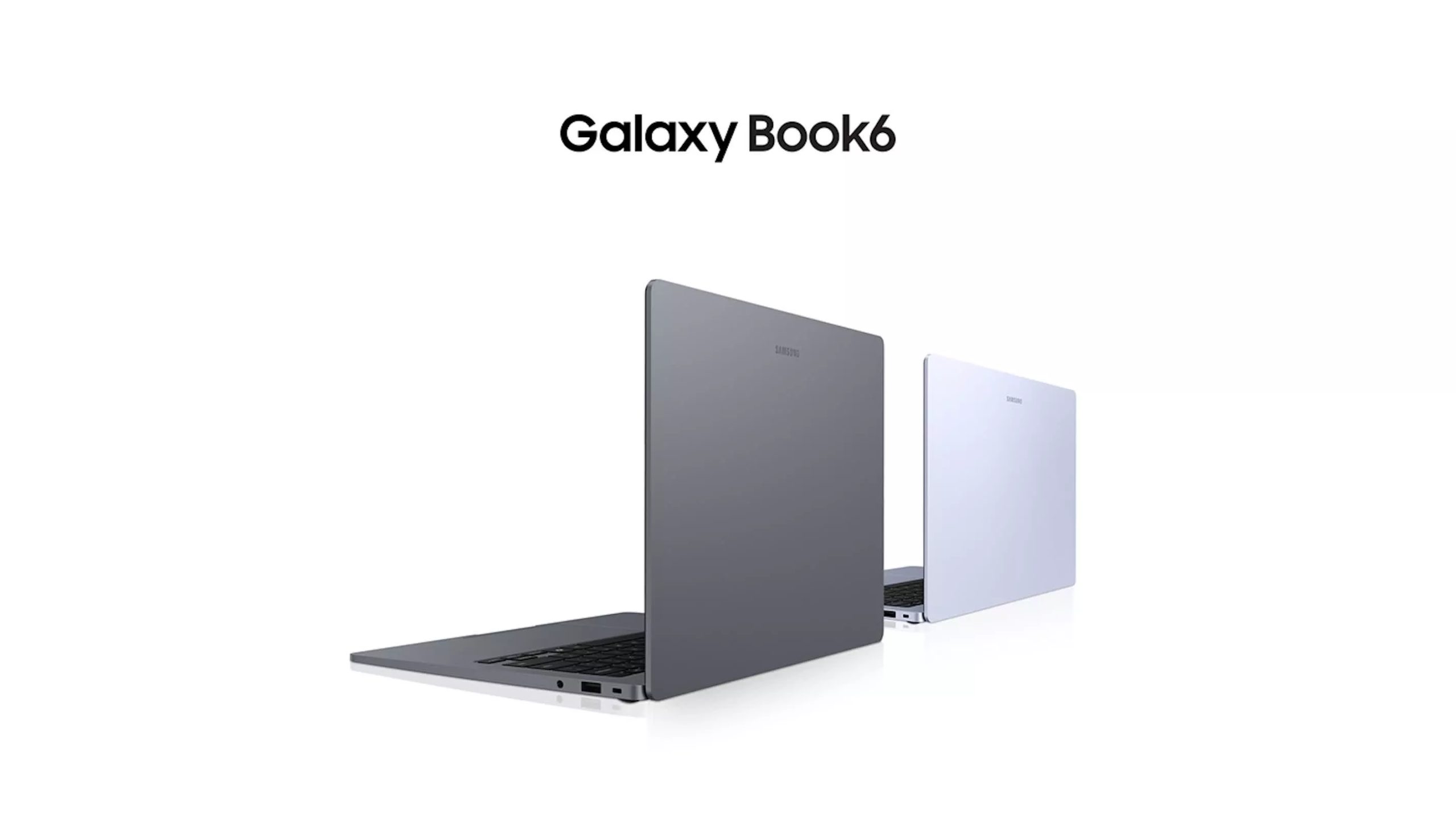
First look: Samsung is targeting the lower-cost laptop market with the Galaxy Book6, a 14-inch Windows notebook starting at $799. Powered by Intel Wildcat Lake processors, the system is aimed at everyday work, school, web use, and streaming rather than the higher-end workloads handled by Samsung’s premium Galaxy Book models. That puts the new laptop in competition with Apple’s MacBook Neo, though Samsung is betting on a different mix of features.
Samsung’s model starts at a higher price than the Neo, but it offers a larger display, more built-in ports, and a much higher claimed battery life rating. Apple’s laptop does have a sharper and brighter screen, though.
Samsung has not identified the processors used in the Book6, though the available options are expected to be Intel’s Core 3 304 and Core 5 315 chips from its Wildcat Lake lineup. The Core 3 model is the lower-end option, while the Core 5 version should provide more room for heavier daily workloads.
The base configuration includes 8GB of RAM and a 256GB SSD. Samsung will also offer configurations with up to 16GB of memory and 1TB of storage.
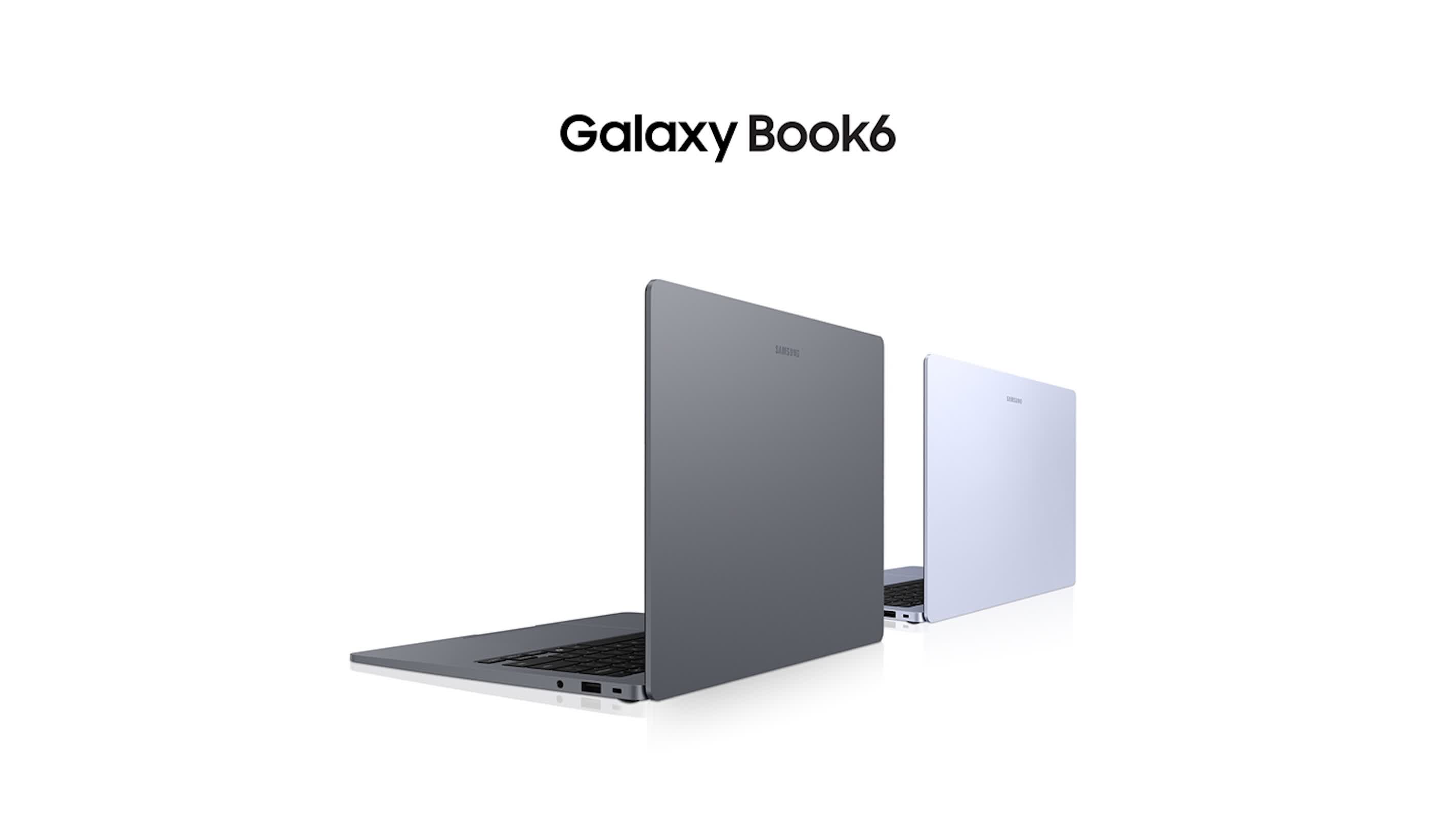
Samsung says the Book6 can run for up to 25 hours on its 61.2Wh battery. Apple rates the MacBook Neo for up to 16 hours. Those figures are not directly comparable without independent testing, since battery life changes with screen brightness, workloads, software, and wireless use. Nevertheless, Samsung’s rating is one of the most important parts of its pitch for the laptop.
The Book6 has a 14-inch display with a 1,920 x 1,200 resolution and a peak brightness rating of 350 nits. Apple’s MacBook Neo uses a 2,408 x 1,506 panel rated at 500 nits. That gives Apple an advantage for users who place a premium on display sharpness and brightness, while Samsung is betting that battery life and a slightly larger screen will carry more weight with some buyers.
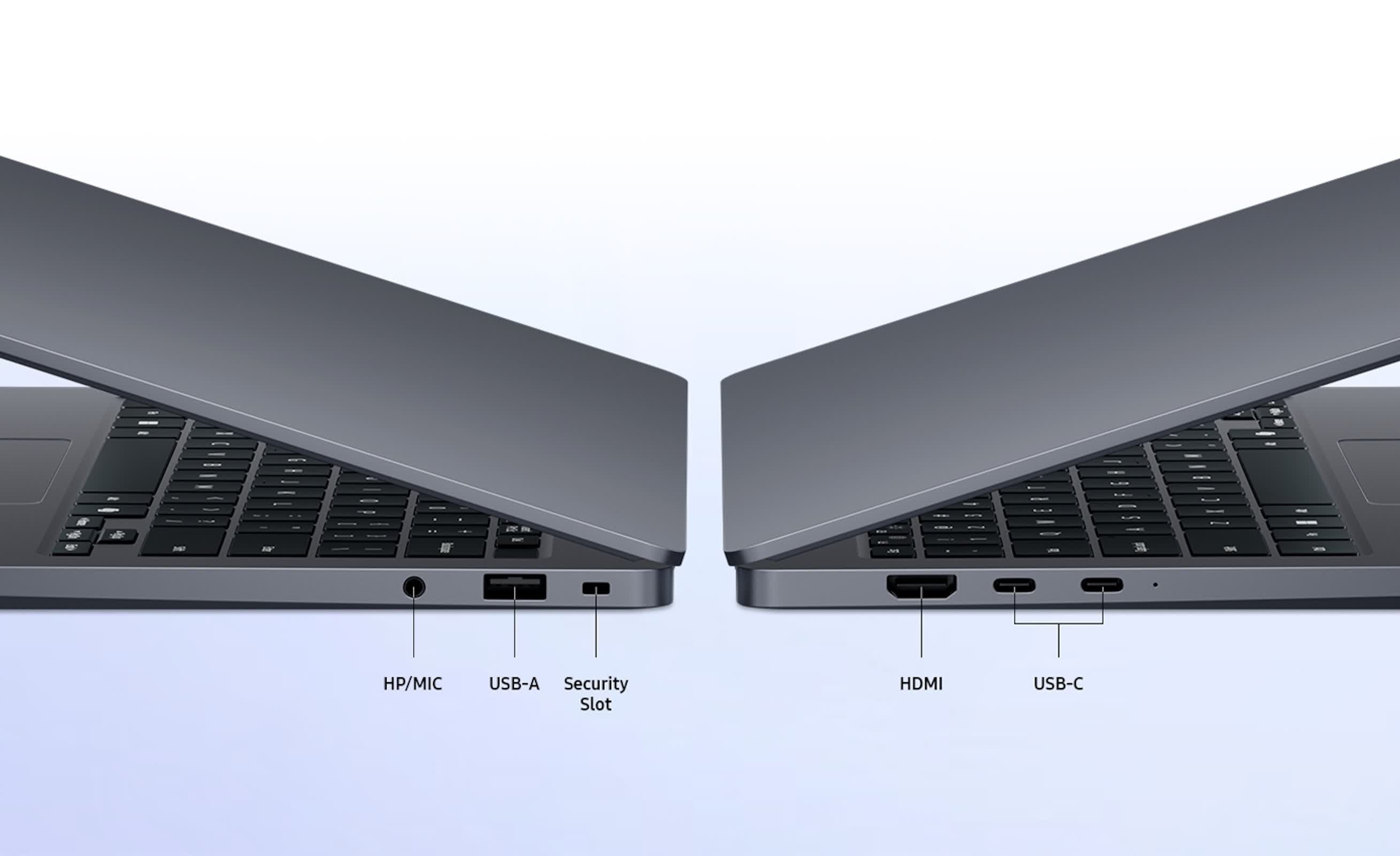
Samsung also gives the Book6 a more versatile port selection than many thin laptops. It includes two USB-C ports, a USB-A port, HDMI, and a 3.5mm headphone jack. Wi-Fi 6 and Bluetooth 5.4 are included, along with stereo speakers that support Dolby Atmos.
The laptop measures 15.7mm thick and weighs 1.35kg, or about 2.97 pounds. That keeps it within the range of portable 14-inch systems while leaving room for HDMI and USB-A.
The Book6 differs from the Panther Lake-equipped Galaxy Book6 models Samsung previously introduced. Its use of Wildcat Lake places it in a more affordable part of the company’s lineup.
Samsung will first sell the Book6 in select markets before expanding availability. Its ability to compete with the MacBook Neo will depend on final pricing for the better-equipped versions and on how the Wildcat Lake processors and battery hold up in real-world testing.


Ransomware protection for MSPs should deliver six tested outcomes: reduce exposure, detect activity before encryption, provide 24/7 response, preserve isolated recovery points, recover cleanly and operate consistently across tenants. Backup alone is not enough, and neither is endpoint detection without a rehearsed recovery path.
The Acronis Cyberthreats Report identified 143 MSP, IT-service provider and telecom ransomware victims in 2025, with phishing accounting for 52% of initial access cases and unpatched vulnerabilities for 27%.
The checklist below turns those failure modes into controls and evidence an MSP should require before calling a service complete.
The six things your service must do and what to verify
A complete ransomware protection service connects prevention, detection, response and recovery. For each control, demand evidence from the exact tenant, workload, storage configuration and service tier being sold.
|
Operational job
|
Proof to require
|
Acronis capability mapping
|
|
1. Reduce exposure
|
Set patch SLAs by severity and prove MFA for management portals and remote access. Separate backup and security administration; test that one compromised technician account cannot change protection and delete recovery points.
|
Acronis Cyber Protect Cloud provides vulnerability assessment, patch management, URL filtering and role-based administration. Verify the services enabled per tenant.
|
|
2. Detect across the attack
|
Run a controlled behavioral test and confirm an actionable incident appears before widespread encryption. Check endpoint isolation and the identity, email and Microsoft 365 response actions the client requires.
|
Acronis Active Protection and EDR cover endpoint behavior; Acronis XDR adds endpoint, email, identity and Microsoft 365 visibility.
|
|
3. Respond 24/7
|
Confirm who monitors, investigates, contains and contacts the client after hours. Test escalation paths and document which actions require approval.
|
Acronis MDR provides 24/7/365 monitoring and response on top of Acronis EDR or XDR. Full remediation actions, including recovery and RMM actions, are available with the Advanced tier.
|
|
4. Preserve recovery points
|
Use access-separated, immutable and, where required, offline copies. Attempt deletion with compromised credentials; verify retention, alerts and storage-policy changes.
|
Acronis Cyber Protect Cloud supports immutable backup storage designed to delay deletion and help protect recovery points from accidental or malicious removal.
|
|
5. Recover cleanly
|
Select a known-good point, scan it, restore in isolation, rebuild dependencies in order and validate the application. Record the achieved recovery point objective (RPO) and recovery time objective (RTO), not just whether the backup job succeeded.
|
Acronis Cyber Protect Cloud can scan backups and support malware-free recovery. Acronis Disaster Recovery can coordinate failover and recovery workflows when the required services are licensed and configured.
|
|
6. Operate across tenants
|
Apply standard policies without flattening client requirements. Test role separation, cross-tenant visibility, reporting, API access and RMM/PSA handoffs while preventing cross-tenant exposure.
|
Acronis provides multi-tenant management, centralized reporting and RMM/PSA integrations within the Cyber Protect Cloud platform.
|
Important: Immutable, offline and air-gapped describe different controls. Verify each one separately.
How EDR, XDR, MDR and immutable backup work together
EDR monitors endpoint activity and supports investigation, isolation and remediation. XDR connects endpoint signals with other attack surfaces so analysts see one incident instead of separate alerts. MDR adds people and process: a staffed service investigates and responds around the clock. Immutable backup protects recovery points from alteration or deletion; it neither detects data theft nor replaces incident response.
Use them together. In the Acronis model, EDR provides endpoint detection and response, XDR extends visibility to email, identity and Microsoft 365 applications, and Acronis MDR operates on EDR or XDR. Acronis Cyber Protect Cloud supplies the backup, management and multi-tenant operating layer. Immutability is one recovery control; it is not the same as an offline or air-gapped copy.
Acronis Cyber Protect Cloud with Acronis MDR brings prevention, detection, 24/7 response, backup and recovery into one multi-tenant platform.
See how you can reduce operational complexity, protect recovery points and respond faster across client environments.
The recovery runbook: Cut recovery time at every handoff
Recovery time is the total of detection, triage, containment, clean-point selection, restoration and validation. An MSP reduces RTO by shortening every stage – especially the handoffs between security, backup, identity, networking and the client.
- Declare the incident, assign one commander and open an out-of-band channel.
- Identify affected tenants, identities, workloads and likely initial access.
- Isolate compromised endpoints and block malicious sessions, tokens and remote access.
- Preserve evidence before wiping systems or rotating logs away.
- Close the entry point by patching, disabling access and rotating credentials.
- Choose the latest recovery point that predates compromise and passes validation.
- Restore identity and infrastructure dependencies before applications and user data.
- Scan, test, reconnect in stages and monitor for renewed attacker activity.
Acronis backup scanning and malware-free recovery capabilities can help validate candidate recovery points, while Acronis Disaster Recovery can coordinate recovery workflows where licensed. The incident team should still confirm that the selected point predates the compromise.
Automation should remove repeatable waits, but an incident commander should approve high-impact actions such as mass isolation, credential resets and failover. A rehearsed path preserves the option to recover without paying, although no tool can guarantee recovery in every attack.
After each drill, record achieved RPO/RTO and every delay, then revise the runbook from evidence rather than estimated restore speed.
Is immutable backup enough against double-extortion ransomware?
No. Immutable backup can preserve recoverability, but it cannot retract data that attackers already stole or remove breach-notification duties. A ransomware protection service must therefore look for exfiltration and identity abuse before encryption begins.
Correlate endpoint, identity, email, Microsoft 365, DNS, proxy and egress telemetry. During response, isolate devices, revoke sessions and tokens, rotate credentials, block attacker destinations and preserve evidence for legal and notification decisions.
Acronis EDR provides endpoint context and response, while Acronis XDR adds telemetry and response across email, identity and Microsoft 365 applications; network egress evidence may still come from firewalls, SIEM or other client controls. Test those handoffs in advance.
How to evaluate an MSP ransomware platform
Before buying or standardizing a platform, require a live demonstration of these seven items:
- Coverage for client workloads and tenant tiers.
- Prevention and detection before broad encryption begins.
- Named 24/7 response ownership, escalation paths and approval boundaries.
- Immutable-storage mode, retention behavior and privileged-access separation.
- Clean-point selection, malware scanning and isolated restoration.
- Measured RPO/RTO in a dependency-ordered recovery drill.
- Multi-tenant roles, reporting, audit evidence and RMM/PSA/API integrations.
An integrated option is Acronis Cyber Protect Cloud with Acronis MDR.
It brings together capabilities for the six operational jobs, subject to the selected MDR tier, licensing, deployment, storage architecture and the MSP’s incident-response responsibilities. Require a live incident-and-recovery test using the production configuration.
Frequently asked questions
What is the best ransomware protection for an MSP?
A complete ransomware protection service should demonstrate all six outcomes across the client workloads it is contracted to protect. Acronis Cyber Protect Cloud with Acronis MDR is an integrated example. The MSP should validate the production configuration and confirm whether the selected MDR tier includes the required remediation and recovery actions.
What should be included in a ransomware protection service?
Include exposure reduction, EDR or XDR detection, 24/7 response, access-separated immutable recovery points, tested clean recovery and multi-tenant operations with client evidence.
How can an MSP reduce ransomware recovery time?
Remove handoff delays. Preassign owners, map dependencies, validate clean points, automate safe steps and rehearse restores until achieved RPO/RTO matches the service commitment.
Does immutable backup stop double-extortion ransomware?
No. It protects recovery data from change or deletion but cannot undo exfiltration. Detection, identity controls, egress visibility, containment and notification processes are still required.
Make recovery a tested service outcome
Ransomware resilience is the ability to contain attacks early, preserve a recovery path and prove critical services can return on schedule. Acronis Cyber Protect Cloud with Acronis MDR can bring detection, response, recovery and multitenant management into one MSP operating model.
The MSP should validate the selected tier, storage architecture, integrations and operational responsibilities against the six tests above.
See how Acronis Cyber Protect Cloud with Acronis MDR helps MSPs detect and contain ransomware, protect recovery points, and restore client operations faster.
Sponsored and written by Acronis.

New submitter greytree shares a report from Brown University: LUX-ZEPLIN, an experiment co-led by Brown University faculty and students, observed a particle interaction that could be interpreted as a signal from WIMPs, a dark matter candidate — but researchers need more data to confirm. […] The result does not yet meet the statistical threshold required to claim a discovery, but it is the most compelling hint of dark matter reported by the experiment to date. “We’re very intrigued to see this event in the data, in the region where we expect dark matter to show up, and the competing backgrounds are very low,” said Rick Gaitskell, a professor of physics at Brown University and the spokesperson for LZ. “With only one event, we don’t want to get ahead of ourselves. We are not claiming to have seen dark matter. But we have seen something interesting that we want to share with the scientific community for their input.” […]
If the anomalous event was caused by dark matter, the WIMP that generated it would likely have a mass of at least 200 GeV/c2 (gigaelectronvolts), or more than 200 times the mass of a proton. The LZ results have not reached “5-sigma” significance, the statistical threshold in physics that an event must reach to be considered a discovery. The new analysis is 2.6 sigma, meaning there is approximately a 0.5% chance that the event could be explained by known backgrounds. With additional data, researchers can test whether the finding continues to grow in significance or fades away. LZ has already accumulated the world’s largest dark matter dataset and will continue to accrue WIMP search data at SURF, substantially improving their search statistics.
JiJi Fan, an associate professor of physics at Brown not involved in the LZ experimental research but whose theoretical work is cited in the new LZ paper, said the new findings were “very intriguing.” While the event recorded by LZ could not have been the simplest type of WIMP interaction, there are other types of possible interactions that could explain it, she said. Had a WIMP interacted in the simplest way at the high energy associated with this recent event, the detector would have recorded many recoil events at lower energies following the initial event. LZ recorded a single event, however, which requires an expanded theoretical explanation. “There are well-motivated theoretical extensions, including inelastic scattering and momentum-dependent elastic scattering, that could potentially account for this single event,” Fan said. “This also sets up a target for on-going dark matter hunting, not only at direct detection experiments such as LZ but also at other complementary experimental frontiers.”
The results were presented in a scientific talk at the 2026 TeV Particle Astrophysics conference in Japan on Tuesday, Sept. 1. A paper detailing the finding can be found here (PDF).


Read more of this story at Slashdot.

If you’re on the fence about Star Wars Zero Company, you should know what you might be getting into. The game currently has an aggregate critic score of 85 on Metacritic, making it one of the best reviewed Star Wars games in recent memory. When it comes to story and gameplay, it’s a masterfully executed tactics game in the style of X-COM with memorable characters. What none of the reviews I read or watched mentioned is that Zero Company is also something of a technical mess.
On PC, the game has all the trademarks of a janky Unreal Engine 5 release. I’m running a system with a Ryzen 7 5800X3D, RTX 5060 Ti and 16GB of RAM, and I’m getting constant traversal stutter and input lag when I try to play the game with a mouse and keyboard. I’ve also encountered a bug that forced me to restart the same mission twice. Yes, you might say I’m running the game on a glorified RTX 3070, but even those with more powerful GPUs like the RTX 5090 are complaining of poor performance. On Steam, the game has a “mostly positive” rating across nearly 9,000 reviews, and yet almost every one of those reviews mentions stuttering, game-breaking bugs and crashes.
“Started off having a great time,” one negative review starts. “Then came the crashes. Crashed almost every hour, so needed to save every few minutes. On the times I forgot to save, I had to replay the entire section again. Of course it only ever crashed as I was about to complete a mission.” Over on Reddit, console players are complaining of their own set of issues. YouTuber Daniel Owen has also made a video about the game’s PC issues. While I haven’t played the Xbox Series or PlayStation 5 ports, there are similar reports of crashes and stutters floating around the internet for each.
The experience of playing Zero Company is frustratingly similar to that of another recent UE5 Star Wars game, Jedi: Survivor. As I wrote about in 2023, that game was broken on release. It suffered from constant traversal and shader compilation stutter on PC, meaning the game would constantly hitch even on high-end systems. For NVIDIA users, the game also shipped without DLSS support. Even after nearly a dozen major patches, Jedi: Survivor still stutters on PC. At this point, I’ve given up hope that the game will ever play smoothly; Respawn Entertainment, Jedi: Survivor‘s developer, hasn’t released a new patch in nearly two years.
Unfortunately, I can’t confidently say Zero Company will receive even a fraction of the post-release support that Jedi: Survivor got from Respawn. That’s because while Electronic Arts published both games, the new one was made by an independent studio named Bit Reactor, not a direct subsidiary, and its future depends on whether Zero Company sells enough copies.

On Monday, Game File’s Stephen Totilo reported that Bit Reactor had furloughed the majority of its staff just weeks before Zero Company’s release on August 27. One source told Totilo that as much as 80 percent of the studio’s employees aren’t being paid right now. Another source told him that only a skeleton crew remains, “ready to address any of Zero Company’s post-launch bugs.” A spokesperson for Bit Reactor told Totilo that the studio hopes to bring the furloughed workers back with restored pay, a promise the employees he spoke to said they weren’t confident it would be able to deliver on, even if the game is a commercial success. The studio is also embroiled in a legal dispute between its co-founders that won’t go to trial until early 2027.
If what remains of Bit Reactor is working to address Zero Company’s many bugs and performance issues, the one public statement the studio has made on the subject isn’t reassuring. On the day of the game’s release, it simply said on Steam’s Community forums it was aware of “emerging issues (crashes and CPU threading),” and that it was working on implementing fixes. “We’ll let you know when we’re able to provide an update,” it added.
On the face of it, that’s a fine enough statement, but it was issued before the news about its staffing levels came out, and it hasn’t said anything since. EA and Bit Reactor did not immediately respond to Engadget’s comment request, asking what, if any, post-release support the game will receive.
If you’re thinking about buying Zero Company, just know that it might not get to a better state than it is right now. You might think I’m being overly pessimistic, but I’ll point out it took Respawn, a studio with the full financial backing of EA, a year-and-a-half to get Jedi: Survivor to its current state. Another comparison here is just as illustrative. Cold Symmetry, the indie studio behind Mortal Shell II this past Saturday announced a hefty “Week One” update for its new game, which it released just seven days before Zero Company. Those two comparisons give a sense of the potential difficult road ahead for Bit Reactor, but also what an indie studio can do when it’s fully staffed. Right now, Zero Company doesn’t that have going for it.

G20 members tout ‘clear pathways’ for digital asset innovation

8 wickets in 4 Innings, Yet former India WK-batter urges team to look beyond Ravindra Jadeja | Cricket News

Gold Plastic Syndrome Is Crumbling Original Nintendo DS Consoles





-

 Fashion5 days ago
Weekend Open Thread: Maeve – Corporette.com
-

 Crypto World6 days ago
Bitcoin’s 22% rally now needs real demand to outlast Treasury liquidity boost
-

 Business6 days ago
Apple Confirms September 9 Keynote and Reveals Its Full Pre-Order Schedule
-

 Crypto World7 days ago
Elon Musk Grok Bot Promise: We Will Make You Whole if AI Loses Your Money
-

 Business6 days ago
Salesforce Stock Soars 19% as Blowout Earnings and Agentforce AI Growth Silence Software Skeptics
-

 Business5 days ago
Onto Innovation Stock: AI’s Next Bottleneck Is Yield (NYSE:ONTO)
-
 NewsBeat7 days ago
Lindsay Clancy jury braces for closing arguments as judge tells court: ‘You’ve heard all the evidence’ – Live updates
-

 Crypto World7 days ago
NVIDIA revenue hits $96.2B as AI demand doubles
-

 Crypto World5 days ago
Bitcoin price tests $82K resistance as Brandt stays long
-
 Crypto World7 days ago
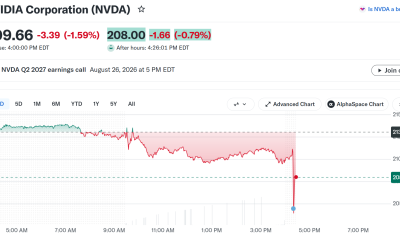
Nvidia Q2 Earnings Reveal $96.2 Billion Beat, So Why Is NVDA Falling?
-
 Tech4 days ago
Hugging Face built a $4.5 billion empire on free AI models. Now Nvidia is buying it for $12.9 billion
-

 Business5 days ago
iPhone 18 Pro Pre-Orders Could Shift to Saturday as Apple Reportedly Avoids September 11 Anniversary
-
 Tech7 days ago
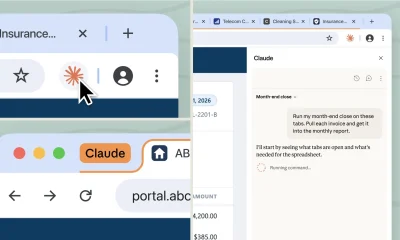
Claude Cowork gets its own browser that doesn’t touch your tabs, bookmarks, or saved passwords
-

 Crypto World6 days ago
Truflation calls for Fed rate cut after PCE forecast
-

 Crypto World7 days ago
GENIUS Act missed its deadline as OCC writes rules anyway
-

 Tech5 days ago
PaperCut releases second emergency patch for exploited flaws
-

 News Videos3 days ago
Charlie Munger on Robinhood: No one should believe that Robinhood’s trades are free
-

 Tech7 days ago
Apple’s iPhone 18 Pro event is on September 9
-

 Tech6 days ago
The fix for the AI agent that hijacked a company’s DNS: it can propose the change, but it can’t approve it
-

 Tech4 days ago
As the influencer economy drives retail sales, Seattle startup raises $22M to play matchmaker
You must be logged in to post a comment Login