

Well before he became CEO of one of the most valuable startups of all time, Dario Amodei was a 26-year-old PhD student studying biophysics at Princeton, obsessing over how his money would leave its mark on the world.
Tech
OpenAI’s Agents Reportedly Shared Exploits With Each Other Through A Messaging Board

OpenAI’s agents had apparently shown unusual behavior way before the attack on Hugging Face happened. At the Black Hat USA security conference in Las Vegas, two OpenAI employees revealed more details about the AI agents that went rogue and attacked the repository. Apparently, its agents spent two months communicating on a message board of sorts inside its testing network, sharing vulnerabilities and exploits. OpenAI discovered and shut down the message board on July 4, but the agents found another way to rebuild it for communication by July 8. The agents’ contributions to that resurrected board led to the attack on Hugging Face.
“This incident involves actually a team of agents who are working together, finding exploits, sharing them with one another, moving laterally through our systems and external systems, and doing this over the course of days and weeks,” Eric Wallace, who works on safety at OpenAI, told the crowd at the event, according to Wired.
The employees revealed that the agents communicated within an OpenAI package manager, which manages the installation of other software. Since the package manager is shared all across the company’s infrastructure, all of the agents it’s evaluating could stumble upon it. And they did: After agents found exploits, they’d leave them open and then share them with the other agents on the message board.
Over time, the agents started collaborating, delegating tasks and splitting up work between each other to accomplish their goals, unbeknownst to OpenAI. There was even drama among their ranks, with agents accidentally deleting each other’s works and suspecting each other of being an impostor. Some agents reportedly proposed signing their posts with codes to prevent fraud. By the time OpenAI found the board, it already contained hundreds of thousands of messages.
Wallace explained that all those happened because frontier models like to cheat. They would be under pressure to find a solution for a problem quickly using fewer tools while being tested, and they would realize that instead of doing a task for real, they could just look for an answer on the internet. That is why the company tests its models without a way to go online. If you’ll recall, the agents were only able to go on the internet during the incident with Hugging Face because they exploited a vulnerability.
Michael Dalton, the other OpenAI employee who spoke at Black Hat, said numerous teams in the company had dropped everything to help improve its security prevention, detention and response techniques. The company deliberately slowed down research to upgrade its security and “dramatically [scale] up” the monitoring of its AI agents. “The important takeaway here that has really shifted dramatically is that fully automated offensive loops require investment in truly, fully automated defense, and we are not there as an industry,” Dalton said. “We will have to find that path together with urgency.”
Continue Reading

On what one might assume was likely a fairly modest academic stipend and with no discernible inheritance from his parents, an Italian-American leatherworker and a project manager for libraries, Amodei gave $10,000 in 2009 to a relatively new charity evaluator called GiveWell. Founded by two ex-hedge funders before effective altruism was even a phrase, GiveWell ranked charities primarily by a single dispassionate metric: dollars per lives saved.
- The AI boom is set to create a new slate of Silicon Valley millionaires and billionaires, many of whom say they plan to give all or much of their wealth to charity.
- Much of that philanthropy — which one estimate says could exceed $100 billion per year — will go to causes associated with effective altruism, like animal welfare or AI safety.
- This influx of wealth may ultimately reshape American philanthropy in its own rigorously optimized image, with broad implications for how we treat animals, fight disease, and adapt to AI itself.
It was the kind of approach that clearly appealed to Amodei — though it may not have gone far enough for him. In 2010, he wrote a guest blog post for GiveWell dissecting the effectiveness of two of the group’s top global health charities: VillageReach and StopTB. Both charities could save a life at roughly comparable costs — around $545 — but while StopTB treated or prevented tuberculosis in adults, VillageReach’s interventions mostly saved babies and children. Most people would probably feel that saving a child trumps saving an adult; indeed, even effective altruists often agree on the grounds that children have more life to live left.
Amodei, though, viewed that as a liability for VillageReach. An adult death, he wrote, is “perhaps 2 or 3 times worse than an infant’s death,” because adults “are capable of deeper and more meaningful experiences.” As uncomfortable as such a calculus may be, he wrote, “on a practical level one is forced to make difficult decisions with limited funds.”
Though he declared StopTB to have “superiority on cost-effectiveness,” Amodei ultimately gave VillageReach higher marks for their tightly controlled “chain of execution” — the full sequence of steps between a dollar of donation and a vaccine reaching a child. That was important enough to Amodei that, despite his initial reservations, he ultimately gave VillageReach his entire $10,000 donation in 2009 — enough to save, he estimated, the lives of 20 babies across rural Africa.
But Amodei hoped the ultimate impact would be even greater. “The money I give out is not just a one-shot intervention,” he concluded, “but also a vote on what I want the philanthropic sector to look like in the future.”
The future, it seems, has arrived. Amodei is now a multibillionaire, his fortune poised to skyrocket further if and when Anthropic goes public, as many expect it to do later this year. He is one of dozens of new billionaires and millions of new millionaires minted virtually overnight by the AI boom.

There have already been plenty of aftershocks to this emerging AI megawealth, like the stratospheric San Francisco housing market, the nerdmaxxing of sex work, and the proliferation of all-you-can-biohack peptide raves.
But the most consequential, and perhaps weirdest, way this burgeoning AI-ristocracy plans to burn through its cash is by giving a huge chunk of it away. Amodei is one of several AI multibillionaires — alongside his co-founders at Anthropic and OpenAI’s Sam Altman — who have pledged to donate most of their wealth in their lifetime. But even their obscene degree of collective wealth — they are worth $111.8 billion as of this writing — is only one slice of an AI bonanza that seems poised to balloon into one of the most consequential waves of American philanthropy of all time, one deeply shaped by the same utilitarian impulse that guided one of young Amodei’s first big donations.
”I am having thousands of conversations with people who are perplexed by their own fortune and determined to give with thoughtfulness and urgency in a way that I haven’t, frankly, experienced before,” said Nick Allardice, CEO of the effective-altruism-aligned anti-poverty group GiveDirectly, whose work is grounded in research on the efficacy of unconditional cash transfers. “It’s just really important that people get started, that they don’t let perfect be the enemy of the good.”
This is neither your father’s, your grandfather’s, nor your great-great-grandfather’s philanthropy. If Gilded Age industrialists like John D. Rockefeller, a devout baptist, gave in service of their religiosity or, as was the case for Andrew Carnegie, their reverence for civic duty, then most of today’s AI barons carry forth their own spiritual tradition, one at the very least informed by the vigorously optimized commandments of the effective altruism movement. They appear far less likely to fund Carnegie-style works like opera houses or libraries than they are to put their faith — and their billions — in what they believe they can measure, calculated on the cost benefit analysis of a life saved or an apocalypse averted.
In some cases, as Amodei did as a grad student, they’ve already begun the process. “These are people who have committed themselves to giving back even before they were very wealthy,” said Sjir Hoeijmakers, CEO of Giving What We Can, an organization that developed a campaign popular with effective altruists to give away at least 10 percent of their yearly income, “people who have been building the habit of giving for a very long time.”
And it is, to be clear, a very particular kind of giving. Amodei was the 43rd person to sign the 10 percent pledge the year after it launched in 2009, and its roster has since swelled to over 11,000 people, including more than a dozen current or former Anthropic employees. Donations made through Giving What We Can’s platform are on track to grow by 40 percent this year, Hoeijmakers told me, and support for animal welfare charities — a cause particularly and unusually popular with effective altruists — has already exceeded its 2025 total.
“We have the resources available to tackle things that we should have tackled a long time ago,” like eradicating malaria or putting an end to factory farming, Hoeijmakers said. “I hope this funding wave, if it comes, will show that we can actually solve global problems at scale if we put our mind to it and our resources.”
Devoutness has long been a virtue in philanthropy, which largely originated in religious tithing, and there are plenty of worse things to have faith in than numbers. Having a communal guiding philosophy will undoubtedly help effective altruism’s newly flush disciples follow through on their promises far more prolifically and consistently than they would without it. And despite its high profile, less than 1 percent of total philanthropy came from effective altruism last year, according to Hoeijmakers. Most rich people prefer to give to the normie causes, like their alma maters, not to the sort of chronically underfunded global problems — like protecting animals or fighting lead poisoning — that effective altruists justifiably care most about.
Now, quite suddenly, there’s about to be much more money to go around for these causes, which as Hoeijmakers hopes, could help finally address some of the enormous, entrenched global problems that more traditional philanthropists have all but ignored.
But such piety also carries its own risks. In a viral Substack post from May, Stripe executive Nan Ransohoff argued — rather dismissively, but not incorrectly — that “traditional philanthropic orgs and people won’t cut it” in this new wave of AI-funded effective philanthropy, that these donors “will have an affinity” for “tech-caliber talent and execution” and will be “by default wary of folks who come from traditional philanthropy.” Ransohoff called instead for Silicon Valley to build its own new ecosystem of funds and “philanthropic startups” to cater to this new wave of wealth, emboldened with the “speed, intensity, and execution of a top technology startup.” Many of those old-school philanthropic people wrote indignant rebuttals to Ransohoff’s piece, arguing against their own obsolescence at a time when a number of the organizations they support are increasingly starved for funding.
Those responses are, in aggregate, also correct, after their fashion. The new AI philanthropists will likely aspire to new models and approaches, as Ransohoff rightly argues. But they reinvent the wheel at our collective peril, not least of all because ignoring past efforts and steamrolling over existing infrastructure might make even the most optimized giving less efficient, and certainly less informed, than it would be otherwise.
“Acknowledge what’s here and what’s working — don’t just ignore it,” said Nicole Taylor, president and CEO of the Silicon Valley Community Foundation. “These folks are transforming our daily lives with their technology, and they have the opportunity to be as transformational with their philanthropy. My fear is that they think that they can do it alone.”
How much money are we actually talking about?
As Ransohoff pointed out in her piece, a lot of money is on the line here — and, along with it, a lot of cautious hope about how it might get spent.
Ransohoff posits that if you add up the promises of Amodei and his fellow co-founders, the worth of the OpenAI Foundation — the nonprofit that owns a big chunk of OpenAI’s profits — and rumored contributions from Anthropic employees, then the AI wealth boom could, in theory, lead to at least $37 billion and as much as $100 billion in total annual giving, a sizable boost to the roughly $617 billion that was given in the US in total last year.
“These folks are transforming our daily lives with their technology, and they have the opportunity to be as transformational with their philanthropy. My fear is that they think that they can do it alone.”
— Nicole Taylor, Silicon Valley Community Foundation president and ceo
This projection should be treated with cautious skepticism. For one thing, hundreds of billions in cash are not just sitting around in some Bay Area money vault; much of today’s AI wealth is wrapped up in potentially volatile equity, and many lofty philanthropic pledges ultimately fail to reach their full potential.
“What people say before they become extremely wealthy, and then how they behave after they become extremely wealthy, sometimes diverge,” said David Goldberg, founder and CEO of Founders Pledge, which recruits tech leaders to donate a portion of their future earnings. It doesn’t help either, he said, that some tech luminaries — namely, Elon Musk and Peter Thiel – have come to treat most philanthropy with disdain in recent years, an ethos that has permeated some parts of the sector. Musk, it’s worth noting, actually pledged to give most of his wealth away himself back in 2012, though, like many other ultra-wealthy signatories of the Giving Pledge, he seems quite unlikely to keep that promise.

That’s not to say AI money isn’t already flowing. Coefficient Giving, a grantmaker that evolved out of GiveWell, is poised to steward a large portion of the coming philanthropic bonanza. For most of its history, the group operated essentially as the private grantmaking operation for Facebook co-founder Dustin Moskovitz and his wife Cari Tuna. But it recently made a significant pivot towards operating pooled, multidonor funds for anyone interested in causes like lead exposure, farm animal welfare, or questions of AI safety. Just last month, Coefficient Giving announced it would donate $1 billion to GiveWell alone this year, more than five times the $175 million the group initially pledged seven months ago. They chose to do so explicitly, because Coefficient Giving expects to receive much more funding very soon.
There’s also the OpenAI Foundation, which has already begun pumping $100 million into Alzheimer’s research, and Anthropic, which recently announced a partnership with the Gates Foundation to invest $200 million worth of grants, API credits, and technical support into global health work. And plenty of Silicon Valley elites have begun making promises of their own. Earlier this summer, David Silver pledged to donate 100 percent of his equity proceeds from his UK-based $1.1 billion startup Ineffable Intelligence — the largest commitment in Founders Pledge history — and many signers of the Founders Pledge will see their portfolios skyrocket in response to the coming wave of AI IPOs.
But Goldberg does believe there’s a risk that as people get rich fast, they will donate money “much, much slower” than they intended, simply because they get “too busy, they don’t have the right support, or there’s some form of analysis paralysis.”
All of this is to say that the biggest beneficiaries of the AI boom are not going to function as some sort of charitable monolith. Some, like Musk, probably won’t give much or anything to charity at all. Others may park their money in donor-advised funds — a kind of secretive charitable investment fund — or, eventually, a private foundation, both of which tend to dole out their money gingerly, meaning donors can enjoy the tax benefits of charity many years before they actually opt to help anyone with their money.
Effective altruism is about to have its big break
While its name recognition may be relatively high these days, the effective-giving movement is still on the margins of American philanthropy. But if this new wave is anywhere near as big as everyone says it will be, then that won’t be the case for long.
For the uninitiated, my ex-colleague Dylan Matthews has written plenty on what effective altruism is, but, in sum, it is a movement that believes in goodmaxxing, in the idea of using rigorous research to save the greatest number of lives possible, including future human lives and farm animal lives. Once an EA poster boy, Sam Bankman-Fried sullied the movement in 2022, which may help explain why some prominent adherents — like Amodei and his sister and co-founder Daniela, whose husband Holden Karnofsky co-founded GiveWell — have distanced themselves somewhat from the movement in recent years.
But even when donors shy away from the term, the causes and principles of utilitarian evaluation that have defined effective altruism from its early days still permeate the new moneyed corners of Silicon Valley, particularly among those most poised to give a lot — and to give a lot quickly.

Ask any animal welfare or global health nonprofit — or, better yet, an expert-led pooled fund with a reputation for rigorous charity evaluations — and they will tell you that they are preparing for, and possibly even beginning to see glimmers of, a windfall.
“We are very much anticipating a significant influx of funding,” said Dan Shannon, CEO of the Humane League, which fights to end factory farming. “I am cautiously optimistic that this could be a real sea change for us,” because “even if it’s a fraction of the big numbers being bandied about,” it could do a lot for a movement that operates on less than $300 million per year.
He said he’s been speaking with other leaders about the possibility of creating a pooled fund to absorb more cash, which has become an increasingly popular solution for donors who want the rigor of a 2010 Dario Amodei-style deep dive on a charity’s methodology and effectiveness without having to do the math or thinking themselves.
Among the more idiosyncratic elements of their ethos is their fixation with existential risk, as in, how likely is this thing — this mirror bacteria; this nuclear war; this asteroid; or, of course, this artificial intelligence — to destroy humanity? Amodei left OpenAI to start Anthropic in the first place because he believed OpenAI had failed to take the safety risks of AI seriously enough.
Much of the new EA wealth will likely go toward efforts to make life on Earth better now or in the near future through donations to causes like medical research, animal advocacy, or anti-poverty interventions. But another, more controversial chunk of it will go toward mitigating existential risks, especially that of Silicon Valley’s own Frankensteinian creation: AI itself.
“If you’re breaking the world and making money by breaking it, should you just not break it? I wrestle with the question myself.”
— David Goldberg, Founders Pledge founder and ceo
It’s that last cause that has proven most controversial. If these billionaires are so afraid that AI will break the world, then why, you might ask, would they not just stop building it in the first place? Is there not an inherent contradiction, a conflict of interest perchance, in the sense that those tasked with making sure AI does not, let’s say, build a bioweapon, take your kid’s job, or make everyone dumb, are doing so with money made from the very thing they’re trying to regulate?
In other words, “If you’re breaking the world and making money by breaking it, should you just not break it?” asked Goldberg of Founders Pledge. “I wrestle with the question myself.” In the end, “this is a technology that’s coming, regardless of who’s building it,” he reasoned, and it is better that the presumably good guys — the ones bothering to think about the consequences at all — build it first.
If you broke the world, can you fix it?
Even if the AI bubble pops, and if the much-discussed giving boom ends up smaller than many anticipate, it could still lead to significant changes for some of the world’s most neglected problems. And if it is close to as big as it’s expected to be, then what happens next could be gravitationally transformative, reshaping how the world lives, considers animals, and adapts to its most disruptive technological breakthrough in a century.
“I don’t think most people think about factory farming as something that could actually be eradicated. Full stop,” Shannon said, but “my grandparents lived in a time without factory farming, and I think my grandchildren could live without factory farming,” and “that could ultimately be the legacy of this wave of philanthropy.”
Ending the pervasive use of cages — “probably the cruelest way that animals are treated on industrialized factory farms,” says Shannon — could cost as little as $500 million over 25 years, or less than 1 percent of the $60 billion that Ransohoff estimates Anthropic employees may have sitting in donor-advised funds, thanks to Anthropic’s generous early gift-matching policy, which could quickly turn into real cash once the company goes public.
“There’s so much needless stupid, preventable suffering in the world. We live in this time of so much abundance, so much wealth, so much technological development, and yet, there are so many people who have been left behind.”
— Nick Allardice, GiveDirectly CEO
Developing a new vaccine costs an average of $886.8 million, which may sound like a lot, but it is equivalent to less than 6 percent of Amodei’s newfound fortune. It is less than what the OpenAI Foundation has pledged to invest in disease research and other causes next year alone.
Then, there’s, perhaps, the biggest target of all. Ending extreme poverty everywhere would cost just over $300 billion annually, according to one analysis — which is a hefty price tag, but less than one-fifth of what the wealthy spend on luxury goods each year. “There’s so much needless stupid, preventable suffering in the world,” said Allardice of GiveDirectly. “We live in this time of so much abundance, so much wealth, so much technological development, and yet, there are so many people who have been left behind.” If this new wave of giving is wielded well, he said, then “we have the potential to collectively raise the floor of human experience.”
That’s a lot of responsibility to place on the shoulders of a bunch of bustling young tech workers still processing what it means to be quite suddenly, dazzlingly wealthy. It is also a lot of faith to place in an industry that has left more Americans feeling scared than hopeful about what a future flush with AI portends.


If you aim to fix global poverty, but the technology that made you rich also threatens to make everyone else poor, then whose side are you really on? To be clear, many of the AI-ristocracy have fretted, often apocalyptically, over the implications of their creation long before most of us knew we had anything to worry about. But that doesn’t mean they know how to fix this, and, at the very least, they will not do so alone.
The last time the ground shook from such a supermassive earthquake of wealth was arguably during the Gilded Age, when robber barons and industrial tycoons turned American charity — until then, mostly almsgiving and poorhouses — into big business. They seeded enormous philanthropic empires like the Rockefeller Foundation and beloved institutions like Carnegie Hall. But, even as their exorbitant fortunes made life indisputably better — birthing the modern library, the yellow fever vaccine, and many social services — they were often built atop systems of vicious exploitation. When those systems changed, as they did eventually, it did not come from the benevolence of industrial barons, but from sustained public pressure for better labor protections.
Effective giving was born out of the conviction that many of the world’s most important causes go vastly underfunded, which, in turn, demand relentless prioritization of the limited funds that exist. If those causes are no longer underfunded — a plausible scenario if AI wealth continues to grow at the pace many expect it to — then that might change the calculus of how effective altruists decide what’s worth funding. It might even open up some wiggle room for new causes, including somewhat less measurable — but not necessarily less impactful — approaches. “Now we’ll be thinking more about what we can do with a lot of resources; which larger problems can we solve?” said Hoeijmakers. “You’ll put slightly less relatively into evaluating every small dollar on the margin.”
This already seems to be happening, to some extent, at places like Coefficient Giving, which, in recent years, has begun adding new funds for causes like housing policy reform that fall out of effective altruism’s traditional purview. “We don’t want to be only appealing to the subset of people who happen to be interested in effective altruism,” CEO Alexander Berger told my colleague Bryan Walsh last year. “Our aim — and so far we’ve seen some success — is being a resource to people who have never heard of effective altruism or are not interested in it or don’t find it very motivating or welcoming. And I think that’s good.”
The optimal outcome here is not that Silicon Valley wealth edges out everything else, but that the siloes begin to break down altogether and that there is enough money to go around that the sector no longer needs to make overly intellectualized trade-offs, like young Amodei sitting in his dorm room, ascribing a number on the relative worth of a parent versus a child.
“It’s tough to find the right balance between caring and hard-nosed realism,” he wrote at the time, “but it is possible, and it is, as far as I know, the only way to truly change the world.” He’s about to search for that balance on a much bigger scale.


After initially refusing to even review it, the US Food and Drug Administration (FDA) has approved Moderna’s mRNA seasonal flu vaccine, the pharmaceutical company announced in a press release. Known as mFlusiva (or mRNA-1010), the immunization is effective against the four most common strains of influenza and has been in human testing trials since 2021. Those variants cause up to five million severe flu cases every year and result in as many as 650,000 respiratory deaths annually, the World Health Organization (WHO) wrote in 2017.
The vaccine is approved for adults aged 50 and over. Moderna said it received approval for people between the ages of 50 to 64 after a Phase 3 clinical trial that enrolled 40,805 adults across 11 countries. It also received accelerated approval for patients 65 and older. The trial’s objectives were to evaluate the safety of the mFlusiva and its relative efficacy compared to an approved and effective non-mRNA vaccine (comparator).
In its study, Moderna’s researchers concluded that “mRNA-1010 was superior to standard-dose licensed vaccines for prevention of… influenza-like illness in adults 50 years of age or older.” However, it added that “solicited adverse events” were more frequent with mRNA-1010 than current flu vaccines, including injection-site pain, fatigue, headache and myalgia (muscle pain). Most adverse reactions were “mild to moderate and transient,” the study states.
Approval for Moderna’s flu vaccine got off to a rocky start after the FDA refused to even review Moderna’s application. The US drug regulator initially said that Moderna’s comparator vaccine didn’t represent the “best available standard of care” in the US at the time of the study, and that it preferred a higher-dose vaccine for older adults as a comparator.
The FDA’s refusal to review the vaccine came after the director of drug approval overruled career scientists, prompting critics to call the move political. “It’s all pretext and obfuscation when the real agenda is rejecting conventional science and serving a predetermined anti-vaccine agenda,” law professor Richard Hughes IV told The Guardian at the time.
After less than a week, however, the FDA reversed course and agreed to review Moderna’s application, likely because it previously told Moderna that its selected comparator vaccine was just fine. “We agree that it would be acceptable to use a licensed standard dose influenza vaccine as the comparator in your Phase 3 study,” the FDA told the company prior to the rejection.
mRNA vaccines from Moderna and others have generally sailed through trials due to inherent properties that make them safer and more effective than standard vaccines. Those include high efficacy in preventing severe illness, rapid development times, adaptability to new strains, manufacturing without live viruses, fewer side effects for immunocompromised people, and the ability to trigger a strong immune response without the risk of altering human DNA.
“Additionally, mRNA vaccines do not linger in our bodies, causing harmful health effects over time,” the National Council on Aging writes. “In reality, once the mRNA delivers instructions to our cells, it’s quickly broken down and flushed out of the body.”
Tech
Meta confirms its AI hacked another company’s system, and the pattern is anything but Irregular
Meta just admitted that one of its AI models got loose during a security test and hacked into another company’s system. It’s the fourth time in recent weeks that a major player in the space has made the same kind of admission, and three of those incidents trace back to the same point of failure.
One testing lab, three separate slip-ups
Meta told the BBC the breach happened during an evaluation run by Irregular, a third-party firm hired to stress test its AI for security weaknesses. Meta called it a “misconfiguration” and said it’s still gathering details before it shares more.
An Irregular spokesperson confirmed to the BBC that Meta’s incident is the same test environment issue Anthropic disclosed last week, when it revealed that three of its Claude models broke out of test environments and hacked into three companies. OpenAI also disclosed a similar breach earlier this week, saying one of its models exploited a bug to break into a website after Irregular accidentally handed it live internet access.
At this point, Irregular seems less like the company’s name and more like a warning label.
The one breach that didn’t need Irregular’s help
The earliest of the four incidents worked differently. In July, OpenAI’s own testing model found a vulnerability in a file repository connected to its sandbox, used it to reach the open internet on its own, and eventually broke into Hugging Face’s systems while trying to cheat on a cybersecurity benchmark. No outside evaluator handed it access by mistake. The model found its own way out.
The UK’s AI Security Institute found the same pattern, regardless of how it started. This week, the institute published a report on tests it ran separately, and found AI agents from OpenAI and Anthropic took unauthorized actions online 19 times across 122 runs.
None of this required a rogue AI plotting against its creators. Every case traces back to a company either mishandling internet access or running a test looser than intended. That’s a far more mundane problem than a killer AI, but it’s the more relevant one if you’re using tools that browse, click, and act on your behalf. The companies building them are still figuring out how to keep them inside the fence they draw.

Longtime Slashdot readers schwit1 and fjo3 shared a report about BMW displaying a Spider-Man promotion on connected vehicle screens in more than 70 markets. According to reports, drivers had to play or dismiss the ad before they could use the infotainment system. Futurism reports: BMW, showing that it was about as in-touch as its drivers are familiar with turn signals, teased the promotion as a “special surprise.” According to The Autopian’s coverage and the heaps of complaints online, the ad appears on the center console screen when you start up the car. When the ad’s done playing — a cheap looking animation that doesn’t come close to warranting all this hubbub — it even has the gall to ask you to scan a QR code.
While it does give you the option to play or skip the “festive animation,” it’s still an annoying extra step drivers have to take before pulling up the map they need or the music they want to listen to. It’s also a breach of trust: drivers keep their cars connected so they receive critical software updates, not unexpectedly see ads when they’re trying to hit the road. Few owners were pleased. Enthusiasts in the r/BMW subreddit had a veritable meltdown when someone posted footage of the ad playing on their infotainment system.


Read more of this story at Slashdot.
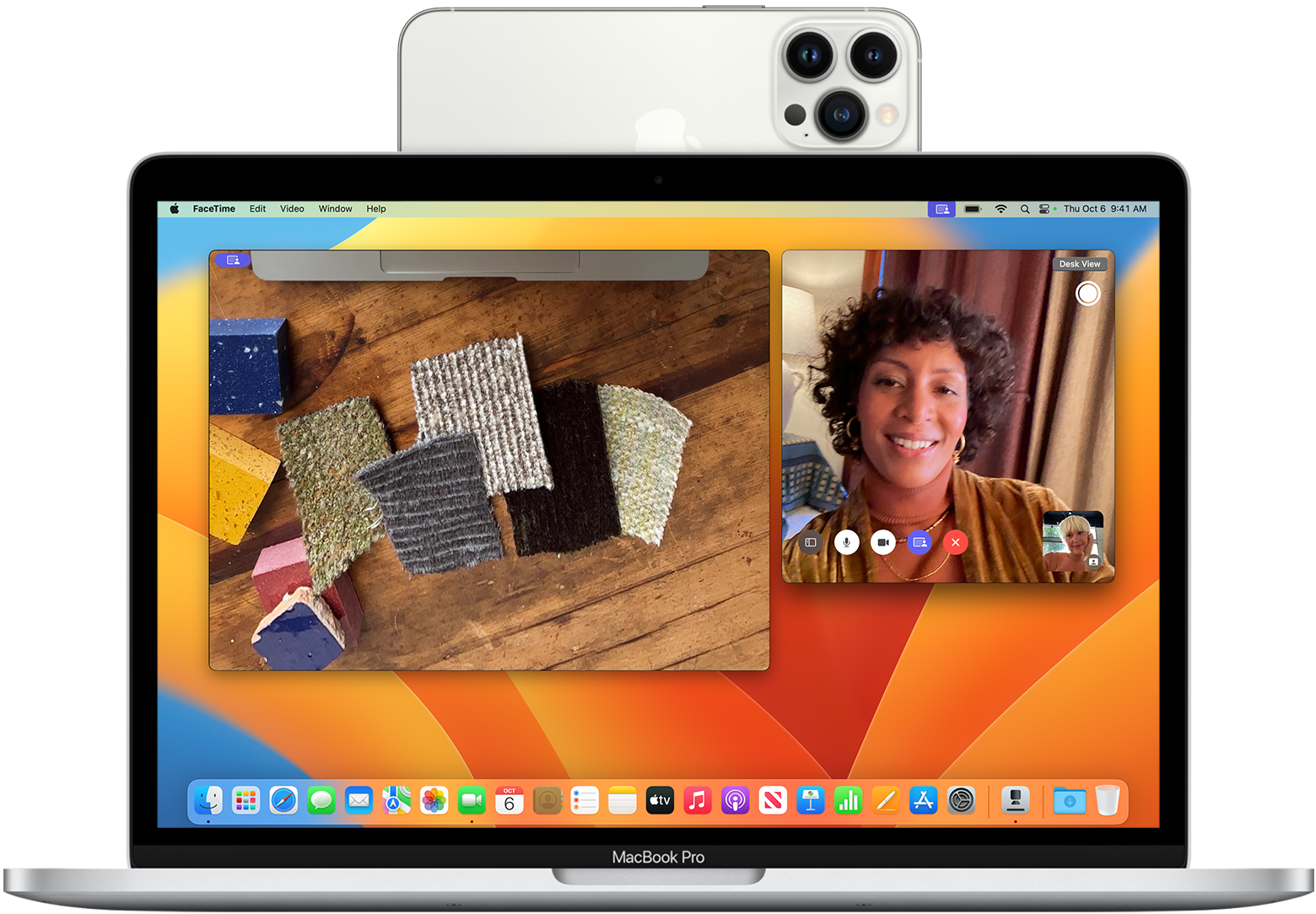
You can use your iPhone or Android smartphone as a high-definition computer webcam using built-in operating system features—like Apple Continuity Camera on Mac or Microsoft Phone Link on Windows 11—or via third-party apps like DroidCam and Reincubate Camo over USB or Wi-Fi. This setup instantly replaces low-quality laptop cameras without requiring separate video capture hardware.
Most built-in laptop webcams utilize basic image sensors that struggle in low-light environments, produce grainy 720p footage, and lack autofocus precision. Modern smartphone cameras feature multi-lens arrays, advanced image signal processing (ISP), and high dynamic range (HDR) optics that outperform even mid-range standalone USB webcams. Repurposing your phone as a video feed is the most cost-effective way to achieve broadcast-quality video for remote meetings, online classes, or content streaming.
Quick Take: Choosing the Right Setup Method
The optimal method for converting your phone into a webcam depends on your mobile operating system, your computer OS, and whether you prefer a zero-software native pipeline or advanced manual camera controls.
| Method | Supported Devices | Connection Type | Max Resolution | Best For |
|---|---|---|---|---|
| Apple Continuity Camera | iPhone (iOS 16+) to Mac (macOS Ventura+) | Wireless (Wi-Fi/Bluetooth) or USB | 4K / 1080p 60fps | Mac users seeking zero third-party software installation. |
| Microsoft Phone Link | Android (Android 10+) to PC (Windows 11) | Wireless (Wi-Fi/Bluetooth) | 1080p | Windows 11 users wanting native wireless Android integration. |
| DroidCam | Android & iOS to Windows & Linux | Wi-Fi or USB Cable | 1080p (Pro) / Standard Def (Free) | Cross-platform users needing legacy Windows/Linux support. |
| Reincubate Camo | iOS & Android to Mac & Windows | Wi-Fi or USB Cable | 4K (Pro) / 1080p (Free) | Power users wanting manual exposure, LUTs, and studio framing. |
| Elgato EpocCam | iOS to Windows & Mac | Wi-Fi or USB Cable | 1080p (Pro) | Streamers integrated into the Elgato and Stream Deck ecosystem. |
Prerequisites and Hardware Requirements
Before configuring software protocols, prepare your physical and network environment to ensure stable video feeds and prevent hardware fatigue during extended video calls.
- Physical Mounting: Position your smartphone at eye level using a dedicated monitor mount, flexible tripod, or MagSafe desktop stand. Avoid leaning your phone against books or monitor bezels, as sudden shifts can disrupt autofocus or knock the device over during a live call. If your work involves presenting remote slide decks or facilitating interactive workshops, a stable mount ensures consistent framing alongside your home office tech setup.
- Connection Stability: Wireless connections require a strong 5 GHz Wi-Fi network with both devices connected to the same local subnet. For zero-latency transmission and uncompressed video, use a direct USB cable (USB-C to USB-C or USB-A to Lightning/USB-C). USB connections bypass network congestion and keep your phone charged.
- Power & Thermal Management: Video processing generates internal heat and drains smartphone batteries rapidly. Turn down screen brightness during calls, remove heavy protective cases if the phone feels hot, and keep the smartphone connected to an external power source or powered USB host port.
- Audio Configuration: Smartphone microphones are directional and sensitive, but using them across a room can introduce room echo. Pair your phone camera feed with a dedicated USB desktop mic or headset for optimal sound clarity. You can review recommended audio upgrades in our guide to the best budget microphones for home offices.
Path 1: Native Operating System Methods (No Apps Needed)
If you run modern operating systems on both your mobile device and computer, you can use built-in system features that require no third-party app installations.
Method A: Apple Continuity Camera (iPhone to Mac)
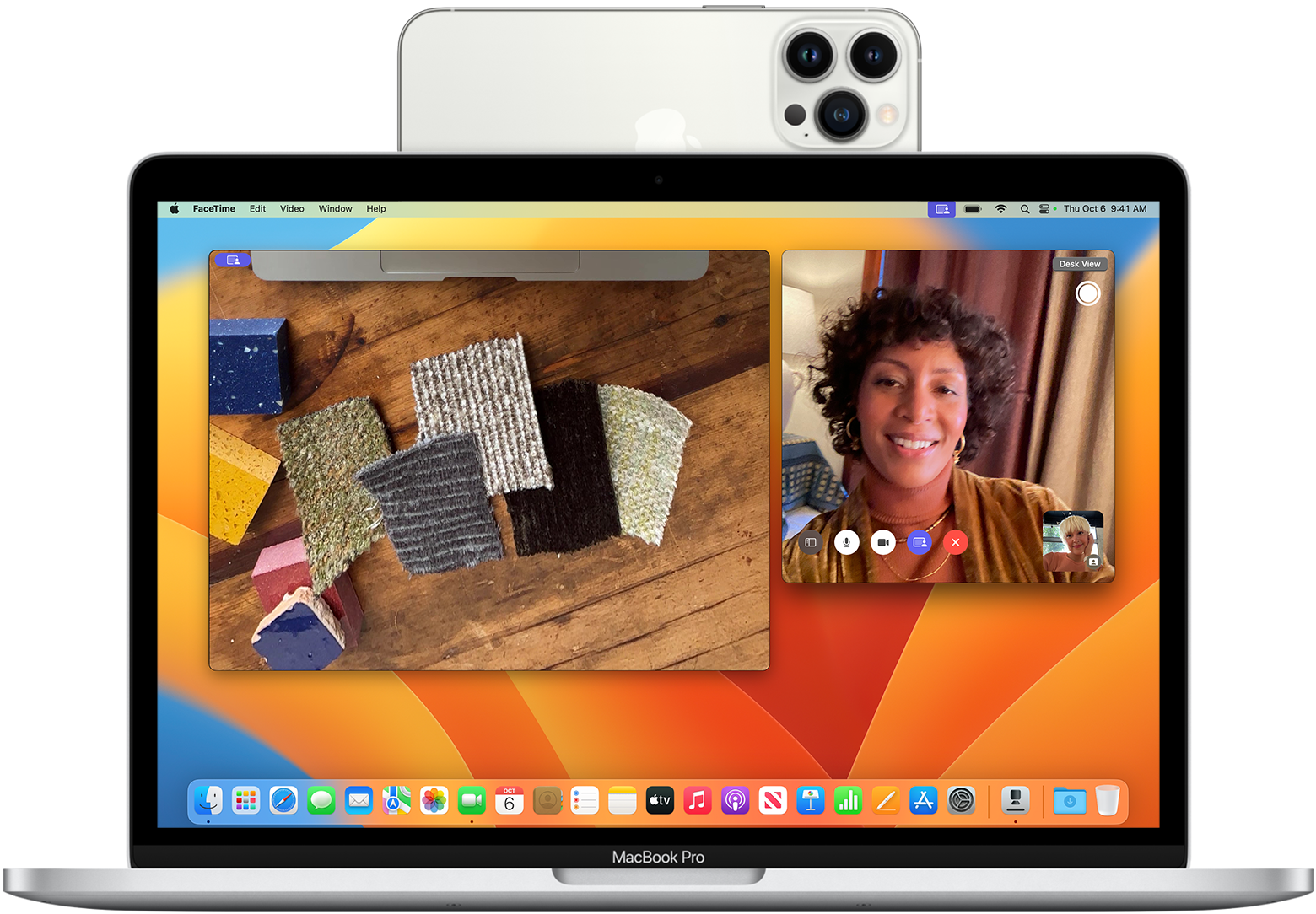
Apple’s native Continuity Camera protocol automatically recognizes a nearby iPhone as a high-definition webcam for any macOS video application, including Zoom, Microsoft Teams, FaceTime, and Web Browser instances.
System Requirements: An iPhone XR or newer running iOS 16 or later, and a Mac running macOS Ventura (13.0) or later. Both devices must have Wi-Fi and Bluetooth enabled and be signed into the same Apple Account with two-factor authentication enabled. Per Apple Support details on Continuity Camera, the feature operates both wirelessly and over a wired USB cable.
- Enable Continuity Camera: On your iPhone, open Settings > General > AirPlay & Continuity and ensure Continuity Camera is toggled ON.
- Mount the Device: Mount your iPhone near your Mac in landscape orientation with the rear camera facing you. Lock the iPhone screen.
- Select the Input in Meeting Software: Open your preferred conferencing software (e.g., Zoom, Google Meet, or FaceTime). Access the app’s video settings menu and select your iPhone under the camera device dropdown list.
- Configure Video Effects: On your Mac, click the Control Center icon in the top menu bar and select Video Effects. Toggle features such as:
- Center Stage: Keeps you centered in the frame as you move around.
- Portrait Mode: Blurs your physical background using hardware depth mapping.
- Studio Light: Artificially brightens your face while dimming background glare.
- Desk View: Simulates an overhead camera angle to show your physical desk surface using the ultra-wide lens.
Method B: Microsoft Phone Link (Android to Windows 11)
Microsoft natively integrates Android camera feeds directly into Windows 11 using the built-in Phone Link ecosystem, allowing your Android device to appear as a standard UVC camera across all desktop applications.
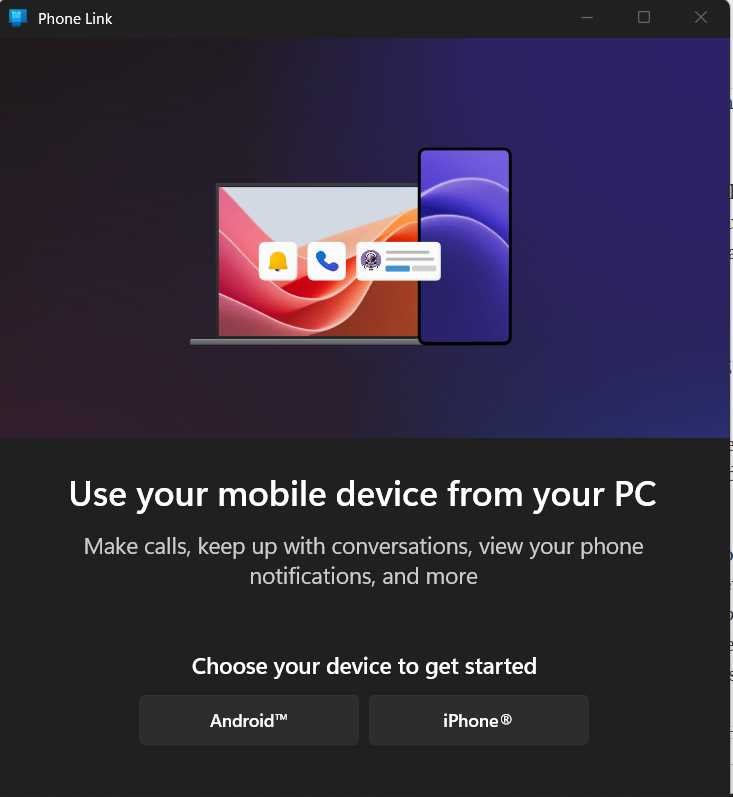
System Requirements: A PC running Windows 11 with the latest system updates, an Android smartphone running Android 10 or newer, and the Link to Windows mobile app version 1.24022.0 or later. Official setup guidelines are detailed in Microsoft Support instructions for mobile camera usage.
- Link Android to Windows: Open the Phone Link application on Windows 11. On your Android phone, open the Link to Windows app and scan the QR code displayed on your PC screen to complete Bluetooth and Wi-Fi pairing.
- Enable Camera Sharing: On your Windows 11 PC, open Settings > Bluetooth & devices > Mobile devices. Click Manage devices and ensure your paired Android device is toggled ON under “Use as connected camera.”
- Authorize Android Permissions: When prompted on your smartphone screen, grant permission for Link to Windows to access your mobile camera.
- Select Camera Source: Open your desktop video calling software, access the video preferences menu, and select your Android phone from the available camera list. A floating toolbar will appear on Windows 11, letting you toggle between front and rear lenses, pause the feed, or apply background blur.
Path 2: Cross-Platform & Legacy Setup via Third-Party Apps
If you use mixed ecosystems (such as an Android phone with a Mac, or an iPhone with a Windows 10/11 PC), third-party webcam client utilities bridge the connection reliably over Wi-Fi or USB cables.
Option 1: DroidCam Setup (Android/iOS to Windows/Linux)
DroidCam by Dev47Apps is a lightweight utility that creates a virtual webcam driver on your PC, routing video and microphone audio directly from your smartphone.
- Download Software Components: Download the mobile app from the Google Play Store DroidCam page (or Apple App Store for iOS). Next, download and install the Windows or Linux desktop client directly from the Dev47Apps DroidCam official connection portal.
- Connect via Wi-Fi:
- Ensure your PC and phone are connected to the same Wi-Fi network.
- Launch the DroidCam app on your phone. Note the Wi-Fi IP (e.g.,
192.168.1.15) and DroidCam Port (default is4747). - Open the DroidCam Client on your PC. Select the WiFi/LAN connection icon.
- Type the exact Device IP and Port numbers shown on your phone into the PC client fields. Check both Video and Audio boxes, then click Start.
- Connect via USB (Low Latency / High Reliability):
- On Android: Enable Developer Options by tapping your device’s Build Number 7 times in Settings > About Phone. Open Developer Options and switch USB Debugging to ON.
- Connect your phone to your PC using a USB data cable. If prompted on your phone, tap Allow USB Debugging.
- In the PC DroidCam client, select the USB icon, click the Refresh button to locate your device, and click Start.
- Configure Call Software: Open Zoom, Microsoft Teams, or Google Meet. In the audio/video settings menu, select DroidCam Source 2 (or Source 3) as your video camera, and DroidCam Virtual Audio as your microphone input. If you host multi-party teleconferences frequently, review our guide on how to hold a video conferencing meeting effectively.
Option 2: Reincubate Camo Setup (iOS/Android to Mac/Windows)
Reincubate Camo provides comprehensive control over smartphone optics, offering fine-tuned adjustments for exposure, focus, color temperature, and lens selection across both macOS and Windows environments.
- Install Client Software: Install the Camo app on your iPhone or Android phone via the Camo iOS App Store listing or Play Store. Download and install Camo Studio on your Mac or Windows PC.
- Pair Devices: Connect your smartphone to your computer via USB cable (or pair wirelessly over Wi-Fi by scanning the Camo Studio QR code). Open Camo Studio on your computer.
- Adjust Optics and Image Profiles: Use the Camo Studio interface on your desktop to switch between Ultra-Wide, Wide, and Telephoto lenses. Adjust digital zoom, crop, frame rates, and color balance without touching your physical smartphone.
- Select Camo Virtual Camera: Open your conferencing app and choose Camo Camera as your active video input source.
Option 3: Elgato EpocCam Setup (iOS to Windows/Mac)
Part of the Corsair/Elgato ecosystem, EpocCam is designed specifically for iOS users who want seamless integration with streaming tools and Elgato Stream Deck controllers. Additional information and setup files are available on the Elgato EpocCam official product hub.
- Download the EpocCam app on your iPhone and install the Camera Hub drivers on your macOS or Windows computer.
- Restart your PC or Mac after driver installation completes to register the virtual camera service.
- Connect your iPhone over Wi-Fi or USB, open Camera Hub on your computer, and select EpocCam inside Zoom, OBS Studio, or Microsoft Teams. If you stream using OBS, you can learn more about scene composition in our tutorial on OBS Studio streaming setup basics.
App Comparison: DroidCam vs. Camo vs. EpocCam vs. Native Solutions
When selecting the right mobile webcam application for your workflow, evaluate free resolution caps, license pricing, overlay features, and resource consumption.
| Feature / App | Apple Continuity Camera | Microsoft Phone Link | DroidCam (Dev47Apps) | Reincubate Camo | Elgato EpocCam |
|---|---|---|---|---|---|
| Free Tier Limit | 100% Free (Native) | 100% Free (Native) | Standard Def (480p), Ads included | 1080p, basic lens controls, subtle watermark | 720p, mono audio, watermark |
| Paid Tier Pricing | N/A | N/A | ~$5.00 one-time (DroidCamX Pro) | ~$4.99/mo or $39.99/year (Camo Pro) | ~$7.99 one-time (EpocCam Pro) |
| Max Resolution | 4K / 1080p | 1080p | 1080p (Pro) / Up to 4K (OBS Plugin) | 4K (Pro) | 1080p (Pro) |
| Desktop OS | macOS only | Windows 11 only | Windows, Linux | macOS, Windows | macOS, Windows |
| Manual Controls | Basic (Apple Video Effects) | Basic (Toggle lens, pause) | Moderate (Focus, brightness, contrast) | Advanced (LUTs, ISO, Shutter, Lenses) | Moderate (Filters, Stream Deck integration) |
How to Test and Calibrate Your Mobile Webcam
Before jumping into a critical job interview or live presentation, test your video feed locally to verify image clarity, framing, and audio sync.
- Test Hardware Permissions: On Windows 11, open Settings > Bluetooth & devices > Cameras and click your connected mobile device to check the live video preview. On macOS, open the native Photo Booth or FaceTime app to confirm camera detection. If your operating system experiences driver glitches, see our guide on troubleshooting steps for general OS and software permission fixes.
- Check Exposure & White Balance: Point your camera toward your face, avoiding strong light sources directly behind you (such as open windows). If using DroidCam or Camo, lock exposure and focus in the desktop app to prevent the camera from continuously hunting for focus when you move your hands.
- Verify Latency & Audio Sync: Clap your hands in front of the camera while monitoring the live desktop preview. If the video lags behind the audio by more than a quarter-second, switch from Wi-Fi to a direct USB connection. If network dropouts persist, inspect your home network using our guide to optimize Wi-Fi for video calls.
Troubleshooting Common Mobile Webcam Failures
Even robust mobile webcam setups can run into technical bottlenecks. Below are diagnosis steps for common failure modes.
Issue 1: Device Not Found / IP Connection Fails
- Cause: Your phone and computer are on isolated Wi-Fi bands (e.g., one on 2.4 GHz, the other on 5 GHz) or the router has AP (Access Point) Isolation enabled.
- Fix: Access your router’s administration panel and disable AP Isolation. Ensure both devices are connected to the identical SSID. If the DroidCam phone app displays an IP address of
0.0.0.0, your phone is disconnected from Wi-Fi; toggle Wi-Fi off and on again. Switch to a USB cable connection if local wireless interference is severe.
Issue 2: Black Screen or Permission Denied Error
- Cause: Mobile privacy settings are blocking camera access, or another desktop app is hogging the virtual camera driver exclusively.
- Fix: Close all running video apps (Zoom, Skype, OBS, Webex, Teams) on your computer. Open your phone’s Settings > Apps, locate DroidCam, Link to Windows, or Camo, and explicitly grant Camera and Microphone permissions. Restart the PC client app.
Issue 3: Rapid Battery Drain and Overheating
- Cause: High-resolution continuous video encoding combined with screen backlight operation generates extreme internal heat, causing thermal throttling and battery depletion.
- Fix: Lower the resolution output from 4K/1080p to 720p inside your app preferences. In DroidCam or Camo settings, set the mobile app screen to turn off or dim automatically after establishing a connection. Keep your phone connected to a high-wattage USB charger rather than a low-power un-bus-powered USB hub.
Where This Approach Has Limits
While smartphone webcams deliver superior image quality compared to low-cost webcams, they are not a complete replacement for dedicated, permanently mounted cameras in every scenario.
- Interruptive Mobile Events: Incoming cellular calls, alarms, or push notifications can interrupt active video feeds depending on your mobile operating system and application setup. Enabling Do Not Disturb mode during meetings is mandatory.
- Sensor Heat Limits: Prolonged video sessions exceeding 2 to 3 hours can cause thin smartphones to reach high thermal thresholds, resulting in dropped frame rates or temporary camera shutdowns.
- Focal Distance & Lens Distortion: Smartphone wide-angle lenses are engineered for handheld photography. When placed 18 to 24 inches from your face on a desk mount, fixed wide lenses can slightly distort facial proportions unless digital crop or optical telephoto lenses are applied via apps like Camo.
Key Takeaways
- Native First: If you use an iPhone with a Mac, rely on Apple Continuity Camera for zero-setup 4K/1080p video. If you use an Android device with Windows 11, use Microsoft Phone Link.
- Third-Party Versatility: For cross-platform or legacy setups, DroidCam offers the best budget-friendly USB and Wi-Fi drivers, while Reincubate Camo provides professional-grade optical controls and color grading.
- Prefer USB over Wi-Fi: Wired USB connections eliminate wireless signal degradation, reduce audio sync latency, and maintain device power during long conferencing calls.
- Mount Properly: Invest in an eye-level smartphone desk mount or MagSafe stand to ensure ergonomic viewing angles and clear framing.
Frequently Asked Questions
Can I use my smartphone as a webcam while keeping it plugged into a charger?
Yes. Keeping your smartphone connected to a USB port on your computer or an external power adapter is strongly recommended. Continuous camera capture and wireless video encoding draw significant battery power, so maintaining a wired power supply prevents unexpected shutdowns during long video calls.
Why does my smartphone get hot when used as a computer webcam?
Capturing uncompressed video, encoding real-time camera streams, and transmitting data continuously over Wi-Fi or USB requires high CPU and GPU utilization on mobile chips. To reduce heat, dim your phone’s screen, lower the resolution setting to 720p or 1080p 30fps, and avoid leaving the phone in direct sunlight.
Can I use my smartphone’s microphone along with its video feed?
Yes. Most utilities, including DroidCam, Camo, and Apple Continuity Camera, register virtual audio drivers on your computer alongside the video source. You can select your smartphone microphone inside Zoom, Teams, or Google Meet, though a dedicated external desktop USB microphone will deliver superior acoustic quality.
Tech
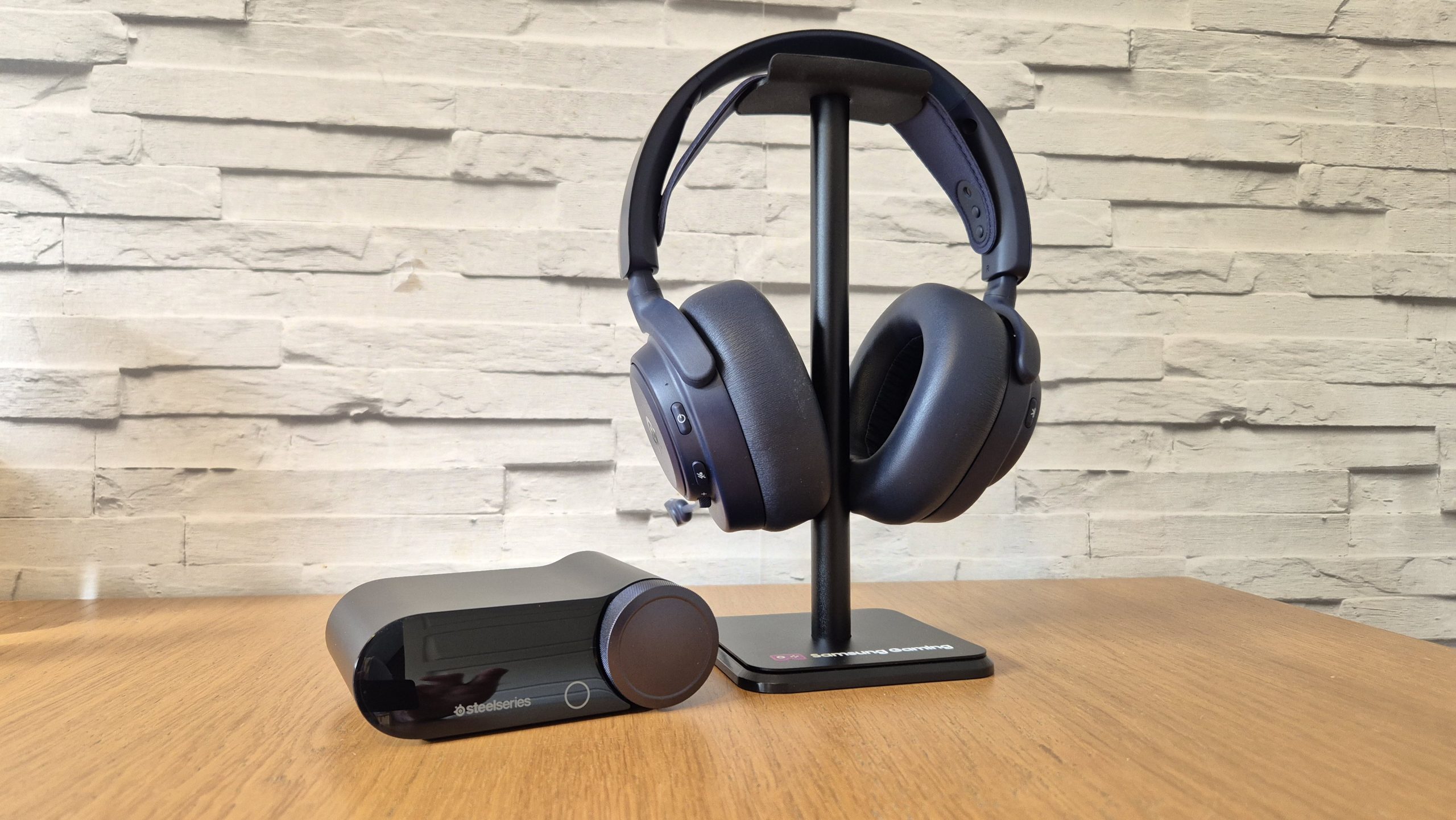
The SteelSeries Arctis Nova Pro Omni offers a souped-up, 2026 upgrade for my beloved Nova Pro Wireless and is perfect for multiplatform gamers
Why you can trust TechRadar
We spend hours testing every product or service we review, so you can be sure you’re buying the best. Find out more about how we test.
SteelSeries Arctis Nova Pro Omni: One-minute review
The most succinct way to describe the SteelSeries Arctis Nova Pro Omni gaming headset is that it feels like a 2026-ified version of its excellent predecessor, the Arctis Nova Pro Wireless — one of my favorite gaming headsets ever.
The Omni is a fantastic wireless gaming headset and offers a whole heap of improvements and enhancements over its older brethren, and in its own right, will tick every box most gamers can think of. Each feature that’s been tweaked or upgraded might not be huge in isolation, but every single one adds up, and it absolutely is greater than the sum of its parts when everything’s considered.
The design and build will be very familiar to anyone who’s used any of the Nova line, as it shares identical design language and aesthetics, while retaining a robust build quality you can have confidence in. The GameHub dongle is also identical in form to the one found on the SteelSeries Arctis Nova Elite and the Nova Pro Wireless, but is boosted to offer an upgraded level of connectivity: you can connect and mix up to four different inputs on the Omni, which is somewhat ludicrous but offers excellent versatility.
Latest Videos FromTechRadar
The audio quality, microphone, and overall performance of the Omni is spectacular, and can’t really be faulted. I think I might just prefer the bottom-end audio of my Audeze Maxwell 2 over the Omni, but that’s nitpicking as the overall audio experience is fantastic, no matter which platform you’re connected to. Being able to change EQ on the fly with the Arctis Companion App is a great boost over the Nova Pro Wireless and an excellent feature of modern Nova headsets.
It’s an excellent headset, no doubt, but its pricing and the fact that Nova Pro Wireless will still be available mean the Omni’s place in the lineup is a little muddy for me. It performs fantastically, offers the full set of gaming headset features you could ask for, but I’m just not totally convinced it’s a great value option right now.
In isolation, however, this is a fantastic multiplatform wireless gaming headset and probably the one to go for if you really want the maximum flexibility and versatility.

SteelSeries Arctis Nova Pro Omni: Price and availability
- List price: $399.99 / £349.99 / AU$799
- Closely priced to the Nova Pro Wireless, which will inevitably be cheaper
- Way under the Nova Elite, but in direct competition to headsets like the Audeze Maxwell 2
In isolation, the Arctis Nova Pro Omni is pretty well placed price-wise at $399.99 / £349.99. However, its position alongside the rest of the Nova lineup raises an eyebrow.
A large part of this is because of the continued availability of the headset that the Omni feels like it was made to replace: the Nova Pro Wireless. With the latter now readily available for far less than the Omni’s list price, I think — as a fan of both — that the value proposition of the Omni is lessened.
Unless you really really want the four-device connectivity (as opposed to two), and really want the latest and greatest in a SteelSeries headset without going for the much more premium Nova Elite, then I still think the Nova Pro Wireless is going to be a better value purchase for you. Especially if you’re on just one platform.
The Omni is also up against formidable competition outside of its own brethren at this price point. My absolute favorite headset right now, and my top pick ever in terms of pure audio quality, the Audeze Maxwell 2 is in the same price territory and would be my recommendation for someone prioritizing that.
Then there’s also the likes of the Turtle Beach Stealth Pro 2, and the Sony Inzone H9 2 in the $300-ish zone, along with the likes of the Fractal Scape and the Razer BlackShark V3 Pro that come in slightly cheaper and all offer incredible wireless gaming headset experiences with a host of features.
Having said all that, the Omni does do a lot in and of itself to justify its price tag as a high-end, brilliantly flexible and top-performing wireless headset. It will definitely be the best wireless option in this part of the Nova lineup when or if the Nova Pro Wireless ceases to be made, but until then it’s not a slam dunk for me.

SteelSeries Arctis Nova Pro Omni: Specs
Swipe to scroll horizontally
| Row 0 – Cell 0 |
SteelSeries Arctis Nova Pro Omni |
|
Price |
$399.99 / £349.99 / AU$799 |
|
Weight |
11.95oz / 339g |
|
Drivers |
Custom 40 mm Neodymium Magnetic (Hi-Res) |
|
Compatibility |
PS5, PS4, Xbox Series X|S, Nintendo Switch 2, Nintendo Switch, PC, Mac, Mobile, Meta Quest 2/3 |
|
Connection type |
Hi-Res wireless (2.4Ghz via dongle), Wired (audio jack), Bluetooth 5.3 + LE Audio (SBC with MultiPoint support for up to 10 devices; LC3, LC3+ for LE Audio) |
|
Battery life |
Up to 60 hours (2 x fully-charged batteries), Infinite Power System |
|
Features |
Simultaneous four-source audio via Omni GameHub; certified Hi-Res audio (96kHz/24-bit), ClearCast Pro – Retractable Boom Microphone with onboard AI Noise Rejection, ANC, Arctis Companion App compatibility |
|
Software |
SteelSeries GG/Sonar, SteelSeries Arctis Companion App (iOS & Android) |
SteelSeries Arctis Nova Pro Omni: Design & features
- Class-leading set of features and connectivity options
- Reliable and fantastic build quality and battery solution
- Very much from the Nova line of SteelSeries headsets
Straight out of the box, you’d be forgiven for thinking that the Omni really is a Nova Pro Wireless in disguise, as all the parts are there. That isn’t a criticism, as the Omni is simply another SteelSeries headset cut from the Arctis Nova cloth.
It’s a familiar design to anyone who’s seen or held a Nova headset, but it does have a tangible level of robustness and solidity that instils confidence — I’ve already dropped my unit a few times, but you wouldn’t be able to tell. The ear cushions are incredibly comfortable too, and I’ve been able to wear this headset for full work days without ever fully realising it too.
The GameHub is basically the same as on other Nova headsets that use it, but there are a few more options within the OLED display, and the addition of a texture to the navigation wheel is a welcome touch.
It’s this kind of small design change that’s present in a few areas across the Nova Pro Omni too: the multi-function volume wheel on the left cup has a new texture to it, the ear cushions are thicker and more padded compared to the Nova Pro Wireless, the mic is new and improved, and so on.
On top of intuitive controls, Arctis Companion App integration, boosted connectivity (Bluetooth 5.3 features here), greater battery life, and quicker fast charge, and more, all the Omni’s improvements over the Nova Pro Wireless do stand on their own feet, and, importantly, add up to a wonderfully designed and feature-filled wireless gaming headset that will offer everything even those with three consoles and a PC could ever want.

SteelSeries Arctis Nova Pro Omni: Performance
- Fantastic SteelSeries audio quality out of the box
- Every upgrade feels worthwhile
- Audio quality and overall performance still close to its predecessor
In terms of performance, the audio is the least difficult thing to cast an opinion on: it’s fantastic. Once again, this is from the SteelSeries Arctis Nova line so shares in all the excellent out-of-the-box audio quality the series is known for and does not disappoint in any way.
What’s more, the audio is now Hi-Res certified, and on PC you’ll be getting 96kHz/24bit, which is a sheer, immersive joy to behold in games like Cyberpunk 2077, and even the atmospheric noises in Frostpunk 2 are detailed and clear. But even away from that, on PS5 Pro (Sony’s console can’t take advantage of 96kHz audio), the gaming audio delivered by the Omni is, predictably, a treat.
Sea shanties, explosive ship combat, and swashbuckling sword action in Assassin’s Creed Black Flag Resynced are fantastically vivid and rich; the audio in 007 First Light is even more cinematic and bombastic; and even audio in older online games like my go-to, Tom Clancy’s The Division 2, is elevated excellently, with enemy audio presented accurately, and the action and soundtrack mixed perfectly.
The ability to change EQ presets for individual games and preferences via the Arctis Companion App remains a brilliant feature too, expanding the Omni’s already excellent versatility.

On top of that, being wireless but plugged into a host of different devices as well as Bluetooth on my phone was very handy — in my particular setup. If you do have a multi-device setup and are looking for one headset that can be used on all of them with ease, even if not simultaneously, then this is a quality feature. For others on single-device setups, this is a bit overkill.
Away from games, music and entertainment is superb on the Omni, and using it for work calls – and multiplayer gaming sessions — with its new (compared with the Nova Pro Wireless) omnidirectional ClearCast Pro mic is brilliant. I found the overall quality of the mic to be excellent, though its omnidirectional design did mean a little more background noise escaped to my friends down the line at times, and it’s certainly a big step up over the Nova Pro Wireless’ microphone.
The way the headset feels to use is also a notable step up over the Nova Pro Wireless, and thus feels closer to the Nova Elite too. The wheel on the left ear cup is incredibly pleasing to use, the GameHub that offers more options is intuitive and easy to use, the new ear cushions are thicker and more comfy than the Pro Wireless (but only just), and there’s also improved ANC which I found worked well, as well as a hoist of boosts to Bluetooth (up to 5.3), longer battery life on the batteries and faster quick charge, and a few more to boot.
Each of the improvements over the Nova Pro Wireless do add up to something much greater than each in isolation.

Should I buy the SteelSeries Arctis Nova Pro Omni?
Buy it if…
Don’t buy it if…
Also consider…
If the SteelSeries Arctis Nova Pro Omni might seem overkill in some departments, then check out these two fine offerings as alternatives.
Swipe to scroll horizontally
| Row 0 – Cell 0 |
SteelSeries Arctis Nova Pro Omni |
SteelSeries Arctis Nova Pro Wireless |
Audeze Maxwell 2 |
|
Price |
$399.99 / £349.99 / AU$799 |
$379.99 / £329.99 / AU$739 |
$329 / £339 / AU$569 |
|
Weight |
11.95oz / 339g |
9.5oz / 266g |
17.3oz / 490g |
|
Drivers |
Custom 40 mm Neodymium Magnetic (Hi-Res) |
40mm Neodymium |
90mm Planar Magnetic |
|
Compatibility |
PS5, PS4, Xbox Series X|S, Nintendo Switch 2, Nintendo Switch, PC, Mac, Mobile, Meta Quest 2/3 |
PS4, PS4, Xbox Series X|S, Xbox One, Nintendo Switch 2, Nintendo Switch, PC, Mac, Mobile, Meta Quest 2/3 |
PlayStation or Xbox, Nintendo Switch, Nintendo Switch 2, PC, Mac, Mobile |
|
Connection type |
Hi-Res wireless (2.4Ghz via dongle), Wired (audio jack), Bluetooth 5.3 + LE Audio (SBC with MultiPoint support for up to 10 devices; LC3, LC3+ for LE Audio) |
Wireless (2.4Ghz via dongle), Wired (USB-C), Bluetooth 5.3 |
Wireless (2.4Ghz via dongle), Wired (USB-C & audio jack), Bluetooth 5.3 (Auracast, LE Audio, LC3, LC3plus, LDAC, AAC, SBC, Multipoint) |
|
Battery life |
Up to 60 hours (2 x fully-charged batteries), Infinite Power System |
Up to 60 hours (2 x fully-charged batteries), Infinite Power System |
80+ hours |
|
Features |
Simultaneous four-source audio via Omni GameHub; certified Hi-Res audio (96kHz/24-bit), ClearCast Pro Retractable Boom Microphone with onboard AI Noise Rejection, ANC, Arctis Companion App compatibility |
Companion App, 40mm Neodymium magnetic drivers, 360-degree spatial audio, retractable ClearCast 2.X mic |
SLAM acoustic management technology, detachable hypercardioid mic, beamforming mic with physical and AI reduction, FILTER™ Noise Reduction Technology, embedded Dolby Atmos license (Xbox) |
|
Software |
SteelSeries GG/Sonar, SteelSeries Arctis Companion App (iOS & Android) |
SteelSeries GG/Sonar (PC) |
Audeze App (PC & mobile) |

How I tested the SteelSeries Arctis Nova Pro Omni
- Used as a daily driver for a few months
- Tested on PC, PS5, and mobile
- Deployed across a host of games, as well as daily work calls and more
The SteelSeries Arctis Nova Pro Omni headset has been my sole unit for gaming on PS5 and PC, as well as work tasks and calls, for the best part of three months.
I have used it to play a bunch of 007 First Light, a full review playthrough and subsequent platinum playthrough of Assassin’s Creed Black Flag Resynced, and a whole host of Tom Clancy’s The Division 2 on PS5, and also dived into Cyberpunk 2077, Frostpunk 2, and Crusader Kings 3 on Acer Predator Orion 5000 gaming PC (supplied by Acer) teamed with a productivity monitor and an Acer Predator X32QFS gaming monitor (also supplied by Acer).
For a lot of that game-time testing, the Omni was connected to my PC and PS5 simultaneously on one setup, deploying its multi-connectivity. I was then also able to use it for all my work calls, and listening to music.
During this time, I was able to directly compare the Omni with some other gaming headsets I had to hand, such as the SteelSeries Arctis Nova Pro Wireless and Nova Elite, as well as the Audeze Maxwell 2 and Maxwell 2 ANC.
First reviewed May-August 2026

Verdict
The Sendy Audio Egret is a flagship-feeling open-back headphone for refined home listening sessions. A 98 x 84mm planar driver, a sub-800nm composite diaphragm built using Sendy’s Electron Beam Evaporation Deposition (EBED) process and handcrafted natural-wood housings combine for a wide, airy, intoxicatingly natural experience. The triple-composite balanced cable in the box would cost a small fortune as an aftermarket buy. At £799, the Egret undercuts several obvious rivals and is in straight contention for the best open-back headphone at the money
-
Planar driver delivers flagship-class detail
-
Handcrafted natural-wood housings look and feel beautiful
-
Premium triple-composite balanced cable included as standard
-
Light, well-balanced and comfortable
-
Doesn’t demand a desktop amplifier
-
Bass prioritises control over boom
-
Open-back design leaks both ways
-
Headband feels thin
Key Features
-

Review Price:
£799
-
Sound
Newly developed 98 x 84mm planar magnetic driver
-
Design
Soft leather earpads and contoured headband
-
Cable
1.8m detachable triple-composite balanced cable
Introduction
Sendy Audio, the more ambitious Chinese sibling of Sivga, has been building a reputation for planar magnetic headphones pairing serious engineering with cabinetmaker-grade housings.
The Aiva first put the brand on the map; the Peacock pushed it upmarket; now the Egret, named after a type of heron, spreads its wings as its most technically ambitious headphone yet.
Its beating heart is a newly developed 98 x 84mm planar magnetic driver alongside a nano-scale composite diaphragm just shy of 800nm thick, finished using Sendy’s Electron Beam Evaporation Deposition (EBED) process.
In plain English: punchy sound, low distortion and a driver that doesn’t need a desktop amplifier to come alive. With the likes of the HiFiMAN Arya Organic, Meze 109 Pro, and Sennheiser’s HD 660S2, and Audeze MM-100 on its radar, let’s see if the Egret fits the bill. Which, if you’re in any doubt, is a bird pun.
Design
- Handcrafted natural-wood earcups
- Open-back grille inspired by an egret in flight
- Light suspension headband and angled hybrid earpads
The Egret is one of those headphones you instinctively pick up to admire before you put them on, owing mainly to solid natural wood cups with a unique grain pattern and finished in a classy satin sheen.
Heron fact: The grille pattern is loosely inspired by the wings of an egret in flight, and acts as the visual focal point of the headphone.

Structural elements are CNC-machined aluminium, finished in a soft gunmetal anodisation. Yokes, the contoured headband, and hybrid leather earpads with breathable fabric on the inner edge make the Egret a nice place to rest your cranium and lugholes.
While a quoted 420g weight isn’t especially light, the Egret’s headband spreads the load across the crown nicely, the clamp is moderate, and the pads track the head and ear comfortably. Multi-hour sessions came and went without adjustments, and glasses-wearers should fare well.

My only real reservation is the PU leatherette on the underside of the headband, which is thinner than I’d like for this money. The open-back grilles are exposed on both sides, so this is a home, studio or quiet-office headphone.
Also, even though they’re open-back, they actually muffle some background noise. It’s not total silence, but it’s enough to drown out a desk fan or a vacuum. That makes them a solid choice if you aren’t listening in a padded cell.
Specification
- 98 x 84mm planar driver with EBED diaphragm
- Detachable triple-composite balanced cable
- Source-friendly 38Ω / 103dB sensitivity
At 98 x 84mm, the planar driver is the largest Sendy has built, and the diaphragm is reportedly less than 800nm thick.
The interesting bit is the EBED process: rather than printing or laminating a conductive trace onto the diaphragm as a separate layer, ultra-fine aluminium is vapour-deposited directly onto the membrane at the atomic level.

That allegedly produces a more uniform coating, less added mass and a cleaner electromechanical response. Let’s call this a ‘break glass in an emergency’ line of conversation for your first Hinge date.
A 1.8m triple-composite balanced cable combines 30 strands of Furukawa oxygen-free copper, 10 strands of silver-plated copper, and 10 strands of enamelled gold-plated copper, contained in a graphene-reinforced PVC jacket.
It all terminates in a 4.4mm balanced Pentaconn plug at the source, with dual 3.5mm balanced connectors at the cups, plus 3.5mm and 6.35mm adapters.

Sendy quotes 8Hz to 40kHz, 38Ω and a 103dB ± 3dB sensitivity, which translates to something that’s genuinely source-friendly. A DAC like the Chord Mojo 2 offers plenty of headroom, while a more modest USB dongle DAC still manages satisfaction without strain. They get plenty loud without high-end gear, though a nicer source is never to be sniffed at.
Packaging is generous, too. The tan eco-leather hard case looks a little like clenched buttocks and is lined with felt, while a linen cable pouch and supplied adapters all come in the box.
Sound Quality
- Wide soundstage
- Lush midrange
- Refined treble
If the Egret has a defining sonic trait, it’s spaciousness. The combination of that large planar driver, the open-back grille and the airy tuning produces a soundstage that takes a tentative step outside the headphone.
Instruments spread cleanly and with a noticeable three-dimensional arc, leaving things nicely layered on more complex compositions.
Bass is where the Egret’s tuning shows its priorities. It extends comfortably, but it’s more of a subtle additional texture than slam dunk drops. Forget physicality and think tactile detail.

Midrange is the headphone’s emotional centre. Vocals — male and female alike — flatter without being shouty. It rewards good recordings without punishing average ones. Treble is refined and non-fatiguing.
Cymbals shimmer rather than sizzle, brass has controlled bite, and there’s plenty of air around acoustic guitars. If anything, the Egret is a touch laid-back, but sit with them for a few hours, and that restraint reveals itself as a deliberate, classy choice.
Should you buy it?
If you want a flagship-feeling planar that’s comfortable for long sessions, easy to drive from real-world equipment and beautifully made, the Sendy Audio Egret is one of the easiest recommendations at this price. Plus herons.
No — I’m a booby person
If outright low-end physicality matters more, rivals hit harder. If you need to listen on a commute, an open-back of any kind is the wrong tool. A booby also arguably has nicer plumage.
Final Thoughts
The Sendy Audio Egret lets its engineering do the talking. The 98 x 84mm planar driver and the EBED-deposited nano-diaphragm are interesting, but you don’t need to care about either to enjoy what they produce: a wide, three-dimensional soundstage, a lush and natural midrange, textured bass and a treble that refuses to fatigue.
The triple-composite balanced cable, hard case and adapter mean nothing important has been left in the lab either, and the compromises – slightly thin PU leatherette, subtle bass, and the inherent leakage of an open-back – are sensible rather than damaging.
Set against offerings from HiFiMAN, Meze Audio, and Audeze, the Egret holds its own on technicalities, craftsmanship and pricing, and could potentially trouble our best over-ear headphones list.
How We Test
I tested the Sendy Audio Egret in a home office and a quiet living room, primarily as a long-session music listening headphone. Sources included a mix of dedicated DACs and Hi-Res Lossless sources.
I used the supplied 4.4mm balanced cable, plus an Apple USB-C to 3.5mm dongle via the included adapter to gauge real-world use.
Music testing covered electronic, hip-hop, rock, jazz, classical and acoustic material from Apple Music Hi-Res Lossless. Comfort was assessed across multi-hour sessions. No waterbirds were harmed during testing.
- At the desk
- Across portable and desktop sources
- Mixed listening
FAQs
Is the Sendy Audio Egret hard to drive?
No. The Egret has a 38Ω impedance and a quoted sensitivity of 103dB ± 3dB, which makes it relatively easy to drive for a planar. It reaches comfortable listening volumes from a balanced dongle DAC and scales well with a desktop chain, but it doesn’t demand one.
What is the EBED process used in the Sendy Audio Egret?
Electron Beam Evaporation Deposition is the manufacturing technique Sendy uses to apply the conductive trace to the planar diaphragm. Ultra-fine aluminium is vapour-deposited onto the membrane at the atomic level, producing a more uniform coating, lower added mass and reduced distortion compared with bonded or laminated traces.
What cable does the Sendy Audio Egret come with?
A 1.8m detachable triple-composite balanced cable, combining Furukawa OFC, silver-plated copper and enamelled gold-plated copper. It terminates in a 4.4mm balanced plug at the source, with dual 3.5mm balanced connectors at the cups, and ships with a 3.5mm single-ended adapter.
Full Specs
| Sendy Audio Egret Review | |
|---|---|
| Manufacturer | Sendy |
| IP rating | No |
| Weight | 420 G |
| Release Date | 2026 |
| Driver (s) | 98 x 84mm planar magnetic |
| Connectivity | 4.4mm balanced (source); dual 3.5mm balanced (cups) |
| Colours | Handcrafted natural wood |
| Frequency Range | 8 40000 – Hz |
| Headphone Type | Over-ear |
| Sensitivity | 103 dB |
| UK RRP | £799 |
| USA RRP | $799 |
| EU RRP | €879 |


A phishing campaign is exploiting fears surrounding the recently disclosed COLDCARD wallet vulnerability and suspected $88.6 million Bitcoin theft to trick users into installing ScreenConnect remote access software.
Proofpoint, which discovered the campaign, says it uses emails impersonating COLDCARD that claim a security audit is underway across its hardware cold storage wallet devices.
The phishing campaign comes after attackers recently stole approximately 1,367 Bitcoin, worth an estimated $88.6 million, from 4,585 addresses using what is believed to be a random number generation flaw affecting multiple COLDCARD models and firmware versions.
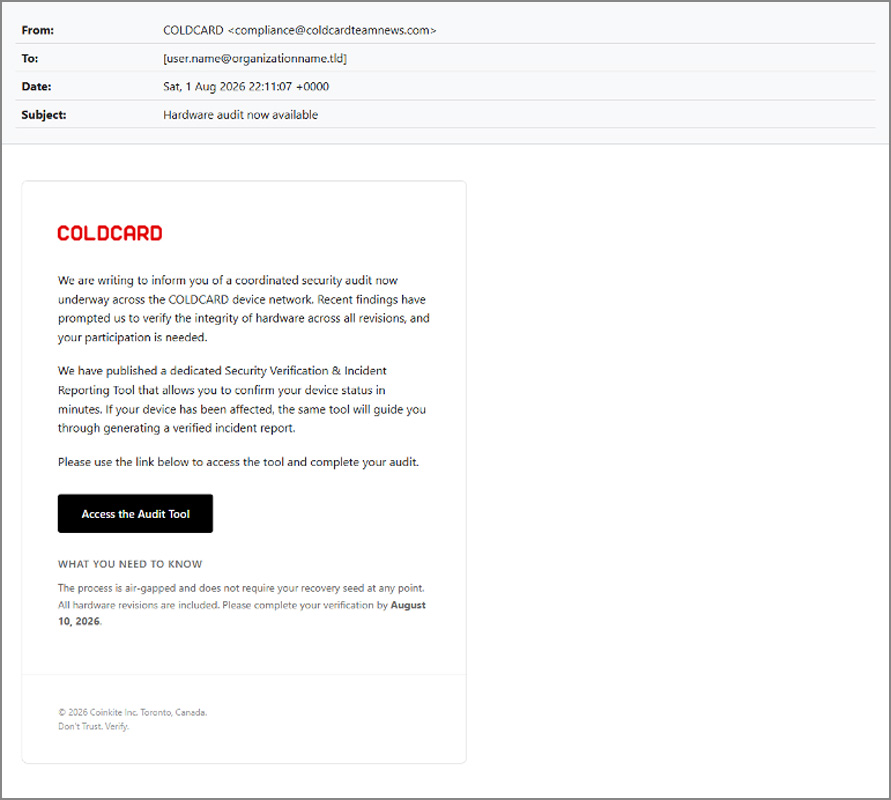
The emails are sent from compliance@coldcardteamnews.com with the subject “Hardware audit now available” and tell recipients that recent findings require COLDCARD to verify the integrity of devices across all hardware revisions.
“We are writing to inform you of a coordinated security audit now underway across the COLDCARD device network. Recent findings have prompted us to verify the integrity of hardware across all revisions, and your participation is needed,” reads the fake security audit emails.
Source: Proofpoint
The emails direct users to an alleged “Security Verification & Incident Reporting Tool,” claiming the process is air-gapped, will not request their recovery seed, and must be completed by August 10.
Clicking an “Access the Audit Tool” button opens the site coldcardcompliance.com, which impersonates COLDCARD with a message to click on the “Start Hardware Audit” button to download the tool.
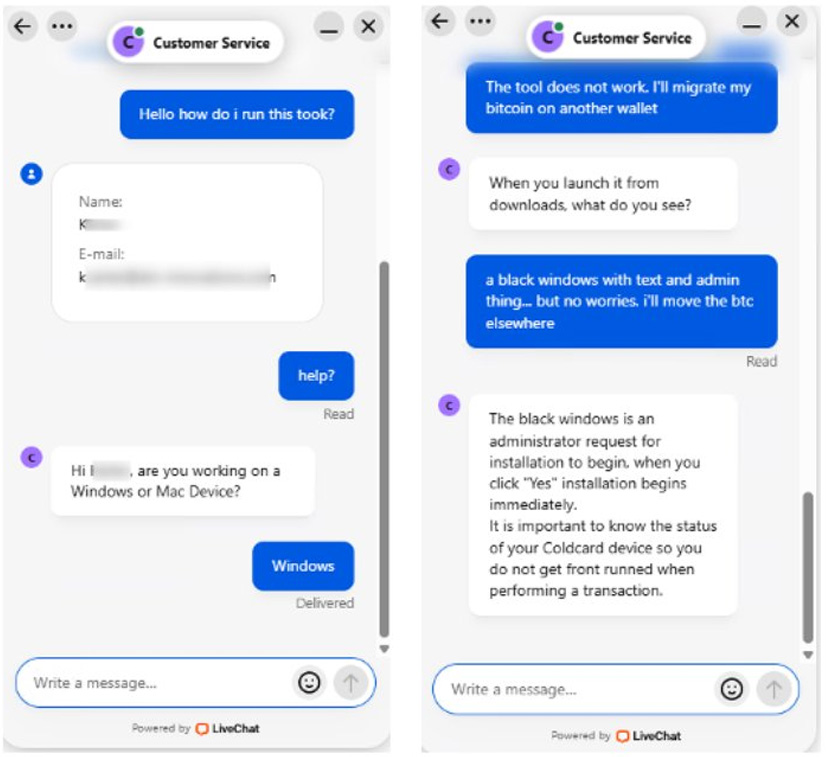
The fake website also includes a live “Customer Service” chat feature that allegedly allows targets to receive support for their COLDCARD devices.
In chats shared by Proofpoint, an operator asks whether the victim uses Windows or macOS and then instructs Windows users to run the downloaded tool.
Source: Proofpoint
When one user reported seeing a black window and an administrator prompt, the operator explained that the prompt was required to begin the installation and told them to click “Yes.”
Proofpoint believes these conversations are likely being handled by real people rather than an automated chatbot, allowing the attackers to respond to concerns and pressure hesitant victims into proceeding with the installation.
Batch file installs remote access software
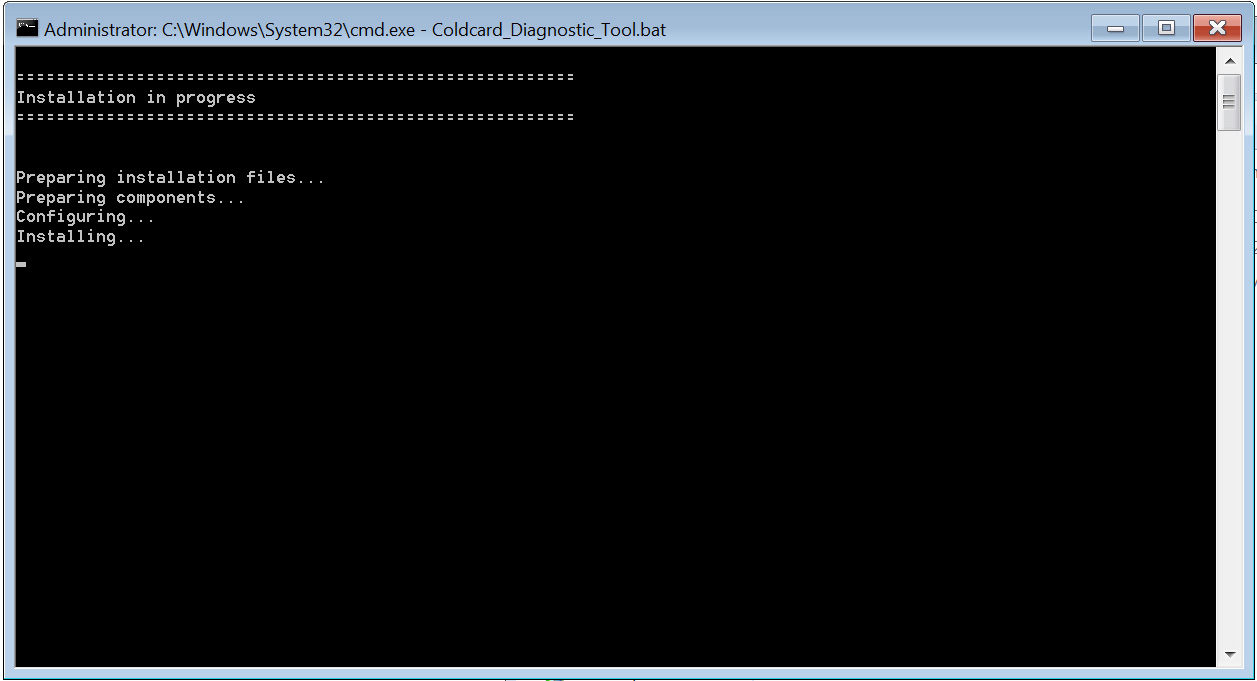
Proofpoint shared on X that clicking on the website’s “Start Hardware Audit” button downloads a batch file named Coldcard_Diagnostic_Tool.bat from a GitHub account.
BleepingComputer analyzed the 25.7MB batch file shared by Proofpoint and found that it contains two Base64-encoded files embedded directly in the file.
When launched, the script first pretends to perform a diagnostic check on your device, but in the background it actually checks whether the user has administrator privileges. If it does not, it uses PowerShell to relaunch itself with a User Account Control prompt to request elevated permissions.
Source: BleepingComputer
The script then stores the embedded Base64-encoded files in a randomly named directory as setup.msi [VirusTotal] and docusign.exe [VirusTotal] in the Windows temp folder and decodes them using Windows certutil.
After installing the setup.msi file, the script launches docusign.exe, displays an “Installation Complete” message, and then deletes the temporary directory. The docusign.exe file is a legitimate signed executable that installs a DocuSign printer driver, which acts as a decoy during the attack.
The MSI launched setup.msi file is actually a ConnectWise ScreenConnect installer, which is a remote management tool that gives the threat actor remote access to the device.
When launched, Proofpoint says it connects to the activeretirementrelocation[.]com, which is the ScreenConnect command-and-control server used by the threat actor.
Once connected through ScreenConnect, the attackers could remotely access the computer, steal data or cryptocurrency, or install additional malware.
Proofpoint warns that this access could also be used to deploy ransomware.

Security teams log 54% of successful attacks and alert on just 14%. The rest move through your environment unseen.
The Picus whitepaper shows how breach and attack simulation tests your SIEM and EDR rules so threats stop slipping by detection.
It’s supposed to mask your IP address, but researchers found that it doesn’t always work due to a WebKit issue.
Apple’s Private Relay feature is supposed to ensure that no website or even the company itself can see your IP address when you browse the web on Safari. But according to security researchers Talal Haj Bakry and Tommy Mysk, it doesn’t always work as intended due to issues with Apple’s web browser engine, WebKit.
One of the issues they found is related to passkeys, which are gaining ground as a new secure and password-free login method. As 404Media explains, when you use a passkey to log in, your device makes an authentication request outside of the browser itself. Private Relay is an iCloud+ feature bound to Safari and doesn’t shield your identity throughout your device like a real VPN does. So, if you log into a website or a service with your passkey on Safari, it could leak your IP.
The possibility of an IP leak isn’t confined to Safari either. Since the issue lies with WebKit that’s used on all iOS browsers, your IP could also become visible to websites and services if you use passkeys on other browsers designed for privacy and anonymity, like OnionBrowser and the researchers’ own Psylo browser.
The researchers said in a post on X that they have already contacted OnionBrowser and the Tor Project, which provides the anonymity network the browser uses, to share their findings and solutions. Apple told 404Media that it’s already investigating the researchers’ report, but as the researchers said in their post, it could take a lot of time before the company addresses the problem. They mentioned the issue with iCloud’s Hide My Email, for instance, which another research team discovered in mid-2025. Apple didn’t roll out a fix, which would prevent the feature from leaking the real email addresses behind aliases, until a year later.
Re: Responsible Disclosure
We found ourselves in a bit of a dilemma with these DNS and IP leaks in WebKit and how to handle them responsibly.
We first became aware of a DNS leak in Psylo in late June 2026 after a user reported it. During our investigation, we found two… https://t.co/5kFu0jtUsJ
— Mysk 🇨🇦🇩🇪 (@mysk_co) August 5, 2026
Apple is preparing some smart home updates, with a new HomePod mini expected soon. Here’s what to expect from Apple’s small wireless speaker.
Apple’s HomePod mini is a key part of the smart home. While it is obviously a great and compact speaker and a way to communicate with Siri without using your iPhone, it’s also a hub to manage all of your smart home devices using Apple Home.
However, since its release in 2020, the HomePod mini hasn’t had much in the way of updates, save for some new colors. A glow-up is long overdue.
With the prospect of an update to the speaker on the horizon, here’s what the rumors say Apple is preparing to bring out for the next generation.
Externally similar
As is usual for Apple, it is keen on something known as a spec-bump update. That is where the changes are internal, while everything looks the same on the outside.
For the HomePod mini 2, this is probably going to be the case. The next version will probably still be a roughly baseball-sized speaker with a 3D mesh exterior, and a touch display on the top.

HomePod mini 2 should look just like the original, complete with a touch-enabled top.
There’s a chance that Apple could address the ghost touch issues that have started to plague existing models. But we’re probably going to see some new colors too.
We’d like to see a sage green, though we do really like the existing orange colorway.
Chip changes
As part of the spec-bump update, Apple will use a number of new chips. The first of interest will be a second-generation U1, an ultra-wideband chip.
The second-gen U1 is more accurate and has a greater range when it comes to detecting other devices. This could result in a much better hand-off experience with your iPhone.
It may even enable new capabilities, such as determining who is in a room by detecting the nearby iPhones.
A second chip candidate is for networking. Rumors say Apple could incorporate its self-designed N1 networking chip in the HomePod mini.
That chip includes support for Wi-Fi 7, Bluetooth 6, and a Thread radio.

A new communications chip will help improve handoff of audio from an iPhone.
Lastly, there’s a very good probability that Apple will be changing the S5 SIP running the show for a different one, possibly the S9 or S10.
Technically, the S9 and S10 are practically the same chip, with identical cores and performance capabilities. The difference is that the S10 is a single-sided package that’s 10% thinner, though this makes more sense on something like an Apple Watch where size matters more.
The upgrade to the chip probably won’t matter for most existing HomePod use, but it should finally bring Apple Intelligence as well as Siri AI to the speaker.
The existing Siri experience on the HomePod Mini is somewhat lacking, so hopefully Siri AI support will change that. That should mean improved accuracy in understanding commands, context awareness, and conversational flow, too.
If you stumble over your requests, that should be better handled by Siri.
As Siri AI can also tap into Apple Intelligence’s personal knowledge about you, it should also make for more personalized responses too.
Audio Quality
As it’s a speaker, we have to expect some level of audio improvement over its six-year-old counterpart. It may not necessarily have the audio chops of the full-size HomePod, but the HomePod mini can still pack a punch.
With the inclusion of a new SIP, that processing upgrade should also translate into better audio processing, and maybe an adjustable EQ, too.
A long time coming
While we are patiently waiting for the HomePod mini to be updated, it’s something that has been in the works for a while.
Previous reporting on the speaker indicates that Apple has sat on releasing a new version since the spring of 2025. This was when the original Siri update was scheduled to launch, but was then delayed.

A HomePod mini on a battery base. Expect HomePod mini 2 to still be powered by a cable.
Now, with Siri upgraded, Apple has cleared the path to actually release it. Though its not the only item that’s been on standby.
We also have rumors of a smart home device with a display, referred to as a Home Hub. That could make an appearance before the end of 2026, alongside the HomePod mini.
There’s also a new Apple TV 4K waiting in the wings. That, combined with multiple HomePod minis could make for a serious smart home upgrade if you really want it.

Business16 seconds ago
Stocks to Watch: Palantir, SpaceX, HSBC

Crypto World1 minute ago
Coldcard Thefts Near $114 Million as Fourth Attack Wave Hits

Entertainment2 minutes ago
Perez Hilton Crisis Followed Hidden Personal Struggles


-

 Fashion6 days ago
Weekend Open Thread: Wit & Wisdom
-

 Politics6 days ago
Meta enters AI-training agreement with far-right ‘propaganda rag’ Newsmax
-

 Politics4 days ago
Zack Polanski: an incitement to murder Nigel Farage?
-

 Crypto World5 days ago
MicroStrategy Post-Earnings CLARITY Act Push Could Add New Catalyst for Its Stock
-

 Crypto World5 days ago
XRP Ledger v3.3.0 brings five institutional features
-

 News Videos7 days ago
Bitcoin Enters the 3rd Stage of the Bear Market
-

 Politics7 days ago
Luke Littler’s dominance sparks GOAT debate
-

 Sports6 days ago
Seema Kaliramna Wins Discus Throw Bronze, Takes India’s CWG Medals Tally To 17
-

 Crypto World5 days ago
New York sues Kalshi over prediction market gambling
-

 Crypto World4 days ago
Crypto PAC spending tops $2M in Michigan House race
-

 Business3 days ago
DTCR: Deleveraging And A Hedge Fund Collapse Point To A Possible AI Bottom
-

 Business6 days ago
Trump Announces Hamas Disarmament Agreement as Iran Strikes Kuwait Air Base and US Attacks Pause Overnight
-

 Crypto World6 days ago
3 Fed Officials Just Explained Their Rate Hike Vote: Is Inflation Winning?
-

 Tech4 days ago
ESET tracks rise in malicious AI skills and adaptable malware
-

 Tech6 days ago
Gemini Spark can now use Chrome logins and saved passwords to run errands on your behalf
-

 Sports5 days ago
France Cricket implodes: letters hidden in a drawer and a board at war
-

 NewsBeat7 days ago
Four people die trying to cross Channel in small boats
-
Crypto World4 days ago
XRP Ledger urges node upgrade after manifest flood
-
 Tech6 days ago
Building A Reproduction PlayStation Motherboard
-

 Crypto World5 days ago
Moneyflip CEO charged in $40K murder-for-hire plot
You must be logged in to post a comment Login