
Tech
Researchers turn Edison's 1879 light bulb into a mini graphene reactor



Graphene is a two-dimensional lattice of carbon atoms arranged in a hexagonal pattern, renowned for its exceptional electrical conductivity, thermal transport, and mechanical strength. Turbostratic graphene is a stacked variant in which the layers are rotated and misaligned, weakening interlayer coupling and making the material easier to process at scale.
Read Entire Article
Source link


AiOs, or all-in-one computers, have been around for quite some time. And their promise is simple. They give you the big-screen experience of using a desktop, without the hassle of finding the right components and building a PC yourself. Despite me being a tech reviewer, AiOs have had me intrigued for a long time, since, spoiler alert, I cannot build a PC myself. It’s just intimidating, and the risk of ending up with something that doesn’t really work well for my workflow isn’t one I want to take. Asus is one of the few brands active in the AiO market, and their recently introduced VM670KA is the best of the bunch. That’s because it packs Ryzen AI 7 350, 16GB of RAM, and a 27-inch Full HD touchscreen display.
All this at a price of ₹1,12,990 sounds like a pretty sweet deal, especially considering the current world situation, which is plagued by sky-high RAM prices (blame your AI companions, please). But is it though? I called Asus and arranged to have the VM670KA AiO in for review. To do it justice, I swapped my MacBook and used the AiO as my primary WFH machine for over two weeks. Here’s how it stacked up.
Asus VM670KA Review
Summary
With the Asus VM670KA, you get a big-screen desktop to work or study on without fiddling with a separate PC. The display is plenty decent, albeit a little less pixel-dense than I’d like. The speakers are super, and the performance can handle everyone’s workdays and even some light gaming/video editing. Not to mention the beautiful white design that makes the AiO look sweet.
Design & Hardware
My job as a tech reviewer is to work from home, meaning all I do every day is stare at my MacBook’s screen. It never really occurred to me that a 13-inch screen might be too small. However, the minute I configured the VM670, it struck me how much I was missing out. Everything was spaced out to perfection, which put less strain on my eyes. Coming back to the design, I think Asus has done an excellent job. It’s a sober yet sophisticated AiO that looks premium without being too loud. I do love the white color. Asus has shaved off 25% of the thickness compared to the VM670’s predecessor, and the bottom bezel is now narrower. All this translates to a sleeker setup that can rival any modern monitor.
The AiO comes with a stand that attaches easily with a single screw. The stand is made from metal, and it’s pretty sturdy since I’ve accidentally bumped into the table a few times. While there are no height-adjusting settings, you can tilt the screen up or down, which came in handy when I wanted to work standing up. The only gripe I have with the design is the retractable camera. Sure, it’s a great tool to protect one’s privacy by hiding away the webcam, but it also takes away the ability to mount any monitor lightbar. I’m a fan of those, so it was an annoyance. That said, the webcam quality was solid in artificial lighting.
Unlike modern laptops, the VM670 is full of useful ports. The backside houses three USB 3.2 Gen 1 Type A ports, a USB 3.2 Gen 1 Type-C port, a LAN, a DC-in (for power), an HDMI-in for making the AiO a secondary display for your laptop, and an HDMI-out to connect to external monitors. There’s more, as underneath the belly, there’s one more USB 2.0 port for connecting the keyboard and mouse, an HDMI mode switcher, a Kensington Lock, and a headphone/microphone jack.
Keyboard & Mouse

To help you get running quickly, Asus bundles a mouse and keyboard with the VM670, and both connect via a 2.5GHz dongle stored inside the mouse. While I wouldn’t describe the keyboard as groundbreaking, it’s not bad either. There’s ample travel, and there’s some feedback when they are pressed. It’s just that the keys aren’t as sharp as the ones on my MacBook. You can sometimes feel that mushiness, but it’s not a big con, and I did get used to the keyboard quickly, without losing much of my typing speed.
The mouse, on the other hand, is plenty good. I had no problem with its tracking, even when playing some games, for that matter. The grips felt comfortable in my hand, and my wrists, which are super prone to fatigue, did not ache after long periods of use. Beyond that, the clicks were accurate, and the latency wasn’t noticeable to my eyes.
Display & Speakers

The Asus VM670KA features a 27-inch FHD IPS display with a 93% screen-to-body ratio and a 75Hz refresh rate. When I first got the AiO, I was worried that the 1080p resolution might not be enough for such a large display. Fortunately, I was proven wrong pretty quickly. From a normal viewing distance, I didn’t notice much pixelation when typing this review on the device. Still, I’d have loved to see a 1440p panel at this price. On the flip side, Asus has taken care of the color accuracy, with 100% coverage of the sRGB color space.
I recently caught up to the Breaking Bad hypetrain and decided to watch the season 3 finale on the VM670, and it was a very enjoyable experience. Colors looked super nice, the motion was smooth, and there wasn’t any glare from the light behind me since the display is matte-coated. The Dolby Atmos stereo speakers deserve the same praise as they can easily fill an entire room with powerful sound, without sounding harsh at higher volumes. The bass is decent, and the dialogue remains legible.
As mentioned earlier, the VM670KA has one more trick up its sleeve, and that’s a touchscreen. You might be wondering — what’s the point of a touchscreen on a desktop? The answer to that is children. An AiO makes perfect sense for parents to get for their children who might have online classes or need to work on a project. A touchscreen is a handy tool for that, and makes navigation much simpler.
Performance

Performance is what makes or breaks the experience with AiOs or any desktop, for that matter. If it can’t handle everyday work, then it’s of no use. At the beating heart of the Asus VM670KA sits the AMD Ryzen AI 7 350 processor, with 8 cores and 16 threads, rated for a maximum frequency of 5 GHz. Graphics is handled by the integrated Radeon 860M, and there’s 16GB of LPDDR5x RAM and 1TB M.2 NVMe PCIe 4.0 SSD.
All of this results in strong everyday performance. The VM670 doesn’t struggle with typical workloads at all. Run 30 Chrome tabs at once? Watch HDR videos on YouTube or quickly switch from a game to an eBook before your parents notice. Not a problem. Never once did I notice a stutter in these tasks, and if your work mainly involves the browser, as mine does, then the performance is more than good enough.
I’m no video editor, but as this is a review, I decided to try my hand at it. The experience? Not bad at all. For those who mainly edit reels in 1080p or even 4K, the VM670 packs a punch. The timeline played smoothly, and render times weren’t too high.
While benchmarks don’t tell the full story of performance, they do paint a picture of a device’s performance ceiling. The VM670 scored 2,833 in Geekbench’s single-core and 10,254 in the multi-core test. Then I moved away from stressing the CPU to stressing the GPU, where the Radeon 860M scored 22,042 in the Geekbench test. For context, this performance is similar to that of the Intel Core i7-13620H processor found in the Asus ExpertBook P1.
Can you game?

Given the decent performance and appeal towards children, gaming may be on your radar as well. And I will set the expectations straight. You won’t be able to play AAA titles like Cyberpunk 2077 without dropping the quality to PS3 levels on the Asus VM670KA. If that’s a priority for you, the Strix or ROG line would serve you better.
That said, if you play light titles like Counter-Strike 2, Valorant, Fall Guys, or even F1 2025, then the AiO could be handy. I played all four and got over 60 fps in both Counter-Strike 2 and Valorant at medium settings. Fall Guys hit 60 FPS pretty easily, too, and F1 clocked about 45 FPS in medium settings. GTA V also runs, but the frame rates are limited to about 35-40.
Verdict

At ₹1,12,990, the Asus VM670KA isn’t cheap. But what it promises isn’t something anyone else can do. For the money, you get a big-screen desktop to work or study on without fiddling with a separate PC. The display is plenty decent, albeit a little less pixel-dense than I’d like. The speakers are super, and the performance can handle everyone’s workdays and even some light gaming/video editing. Not to mention the beautiful white design that makes the VM670KA look sweet.

Amazon is kicking off April with steeper discounts on Apple’s brand-new M5 MacBook Air.

Apple’s M5 MacBook Air hits new low prices at Amazon – Image credit: Apple
Save $85 on the 13-inch Air with 24GB of RAM and 1TB of storage, bringing the price down to $1,415.50 in Silver.
Buy M5/24GB/1TB MacBook Air for $1,415
Continue Reading on AppleInsider | Discuss on our Forums


A new quantum algorithm ran a 15-step nonlinear fluid simulation around a solid obstacle on real quantum hardware, the most physically complex publicly documented demonstration of its kind. The technique reduces qubit requirements and circuit depth, bringing industrial CFD applications closer to feasibility.
Finnish simulation company Quanscient and quantum middleware developer Haiqu have demonstrated what they describe as the most physically complex quantum computational fluid dynamics simulation run to date on real hardware.
The two companies ran a 15-step nonlinear fluid simulation around a solid obstacle, fluid flowing around a shape, the kind of problem relevant to aircraft wing design or vehicle aerodynamics, on IBM’s Heron R3 quantum computer, using a new algorithm they developed together called the One-Step Simplified Lattice Boltzmann Method (OSSLBM).
Computational fluid dynamics, or CFD, is one of the most resource-intensive branches of engineering simulation. Modelling how fluids behave around complex shapes requires enormous classical computing power, and the demands grow non-linearly as simulations become more detailed.
Quantum computing has long been theorised as a potential path to simulations beyond classical limits, but turning that potential into practice has been constrained by the sheer number of qubits and the circuit depth, the length of the quantum computation, required to run even moderately complex scenarios without the calculation being overwhelmed by errors.
The OSSLBM algorithm addresses this directly. Built on the quantum Lattice Boltzmann Method (QLBM), an established approach to mapping classical fluid equations onto quantum computation, the new framework reduces the computational overhead of each step, allowing a longer multi-step simulation to stay within what current quantum hardware can reliably execute.
Haiqu’s middleware layer was central to this: it reduced circuit depth, developed new algorithmic subroutines, and applied targeted error-reduction techniques that allowed the system to complete a workflow that would otherwise have been out of reach for today’s devices.
The significance of the result lies in the obstacle. Previous quantum CFD demonstrations have largely focused on simpler linear scenarios, fluid behaviour without the complications of interacting with a solid boundary.
Modelling how a fluid moves around an object is a prerequisite for any industrially meaningful application. Professor Oleksandr Kyriienko, Chair in Quantum Technologies at the University of Sheffield, described the work as “an interesting and timely contribution to quantum CFD,” adding that more research of this kind is needed to reach industrially relevant quantum solutions.
Quanscient and Haiqu have been collaborating on quantum CFD since at least 2024, when they were finalists in the Airbus and BMW Quantum Mobility Challenge, and have previously demonstrated work on IonQ hardware via Amazon Braket. Industrial applications remain years away; the current work is a research milestone establishing that the approach is feasible on current hardware at this level of complexity.

Commonwealth Fusion Systems said on Thursday it would sell high-temperature superconducting magnets to Realta Fusion, the second in a string of deals that suggests the company will lean heavily on its magnet technology in the coming years to bring in much-needed revenue.
“It’s the largest deal of this kind to date for CFS,” Rick Needham, the company’s COO, told reporters on a call.
Commonwealth Fusion Systems, or CFS, previously sold magnets to the WHAM experiment at the University of Wisconsin, which fusion startup Realta collaborates closely with. The physics behind WHAM underpins Realta’s approach to fusion power, which is known as a magnetic mirror reactor.
In a magnetic mirror, plasma is confined into a shape that resembles two 2-liter soda bottles connected at the base. On each end, powerful magnets punch the plasma and force it back toward the center. Weaker magnets encircle the middle of the bottle shape.
To make a more powerful reactor, Khosla-backed Realta would only need to expand the middle section, and because those magnets are less powerful, they’re cheaper. Per kilowatt-hour costs should fall as Realta’s reactors increase in size.
CFS is pursuing another form of magnetic confinement fusion called a tokamak. In a tokamak, D-shaped magnets cast powerful fields to keep plasma circulating in a doughnut-like shape inside. Over the years, the company has refined its magnets in pursuit of putting electrons on the grid from Arc, its future commercial-scale reactor that’s slated to be built in Virginia.
Both CFS’s and Realta’s existence stems from the magnets themselves. CFS was founded in 2018 after scientists at MIT realized that a new class of commercially available high-temperature superconductors could underpin a viable tokamak design. Realta was founded a few years later when physicists at the University of Wisconsin “saw that there was a new technology, a game changer that would enable us to go back to the [magnetic] mirror and avail of those engineering advantages that the concept has,” co-founder and CEO Kieran Furlong said.
Techcrunch event
San Francisco, CA
|
October 13-15, 2026
In addition to the Realta and WHAM deals, CFS has also licensed its high-temperature superconducting magnet technology to Type One Fusion, which is working on a third type of reactor design known as a stellarator. While the latter deal doesn’t include CFS building actual magnets for the company, it could lead to that one day, Christine Dunn, CFS’s head of external communications, told TechCrunch.
The deals will help CFS pay off its investment in magnet manufacturing. The startup spent seven years and hundreds of millions of dollars building a factory capable of producing high-temperature superconducting tape designed to fusion-power specifications. So far, that material has gone toward building Sparc, the company’s demonstration reactor, which won’t turn on until later this year. There will be a gap until work begins in earnest on its commercial-scale power plant Arc. These deals keep the factory running in between.
“With Spark now 70% complete, it was excellent timing to start supporting Realta with our magnet manufacturing,” Needham said.
Because Realta and Type One are pursuing different reactor designs, CFS apparently doesn’t view them as directly competitive at the moment. In the marketplace, Realta and CFS are even further apart, with the former focusing initially on industrial applications that need large amounts of heat.
To date, CFS has raised nearly $3 billion — a large chunk of all venture dollars raised by fusion startups. That’s put the company in an enviable position, giving it the means to build key facilities like its magnet factory before competitors can. The startup pitches these deals as a service to the broader fusion industry, making available technologies that would cost many millions to replicate. That’s certainly true, but it also gives it access to even more venture investment, even if it’s in a roundabout way.

United Airlines is updating its iOS and Android mobile apps with several new features, including estimated security wait times to give travelers a better idea of when they should arrive at the airport. The move comes as the ongoing partial government shutdown has left TSA checkpoints understaffed.
In the “Travel” section of the United mobile app, travelers can now view security wait times for the airline’s U.S. hub airports in Chicago, Denver, Houston, Los Angeles, New York/Newark, San Francisco, and Washington D.C. Users will see estimated wait times for specific lanes, including standard security and TSA PreCheck, throughout terminals serving United customers.
“We appreciate the work and professionalism of our TSA agents, and while most began receiving back pay earlier this week, the U.S. Department of Homeland Security shutdown continues and people want to stay informed about expected security wait times at our airports,” Jason Birnbaum, United’s chief information officer, said in a press release. “Our customers rely on our mobile app for all their travel needs, and this new feature lets them know what to expect and better plan their trip.”
The app is also rolling out updates designed for passengers with connecting flights. Travelers will now receive personalized, turn-by-turn directions to their next gate, complete with estimated walking times, real-time status updates, and tips for longer layovers. It will also provide a “heads up” if United can hold a plane for passengers with tight connections.
The app will offer automatic rebooking assistance as well. Instead of waiting in line to speak with an agent or manually searching for alternatives, United’s self-service tools will automatically present travelers with rebooking options, along with baggage tracking details and meal and hotel vouchers if they’re eligible for them, in cases where a flight is delayed or canceled.
The app has also integrated Apple’s “Share Item Location” feature for AirTag, allowing travelers who use an AirTag or other Find My network accessory to share their item’s location with United’s customer service team in the event that their baggage is lost.
Users will also receive text updates featuring real-time radar maps to inform them on how severe weather in one region of the country can affect flights in another.
Techcrunch event
San Francisco, CA
|
October 13-15, 2026

Tesla spent more than a year touting that “more affordable” cars were on the way, and they finally arrived last October, with stripped-down versions of the Model Y and Model 3 starting at $39,990 and $36,990, respectively. But the new vehicles are not moving the needle much for Tesla’s overall sales, first-quarter figures show.
Tesla said Thursday that it delivered 358,023 EVs globally in the first three months of the year, below analysts’ expectations of of around 368,000. The company also produced far more than it sold, with the final tally built coming in at 408,386.
This means Tesla only delivered about 6% more cars in the first quarter of this year than it did in Q1 2025, which was the company’s worst quarter in years. The first quarter 2025 figures were also affected by the company shutting down production lines for a few weeks to switch some equipment, meaning Q1 2026 figures likely aren’t much of a real improvement.
The sales figures are striking for a company that once promised to grow EV sales 50% every year. And the poor first quarter means Tesla now risks seeing its overall sales decline for a third year in a row — at a time when its profits are also tanking.
Tesla is not the only company struggling to grow EV sales, especially in the United States. Legacy automakers have backed away from — and in some cases, outright canceled — once-grand plans and ambitions for new EVs. Newcomers have struggled, too. Rivian announced Thursday morning that it shipped just over 10,000 vehicles in the first quarter, more or less the same figure it seems to report every quarter.
Rivian does have a new model waiting in the wings, as it is about to start shipping its cheaper R2 SUV, which should boost sales. The company is banking on the R2 being hugely successful out of the gate, despite the fact that the cheapest version of it won’t arrive until late 2027.
Tesla doesn’t have a new, mass-market vehicle ready to go. The company had been working on a much lower-cost EV that was expected to be priced around $25,000. But CEO Elon Musk killed the project in favor of going all-in on the “CyberCab.” In place of that $25,000 car, Musk instead had Tesla develop the stripped-down Model Y and Model 3.
Techcrunch event
San Francisco, CA
|
October 13-15, 2026
The only truly new model Tesla has released over the last few years is the Cybertruck. While that outsells most other all-electric trucks, it’s been a complete flop in the face of Tesla’s — and Musk’s — expectations for the steel-clad EV. In the first quarter of this year, Tesla only sold 16,130 “other models,” which includes the Cybertruck and the now-retired Model S and Model X.


Fraud operations have expanded beyond traditional hacking techniques to include methods that exploit legitimate services and real-world infrastructure. By combining publicly available data, weak identity verification processes, and operational gaps, threat actors are building scalable fraud workflows that are both low-cost and difficult to detect.
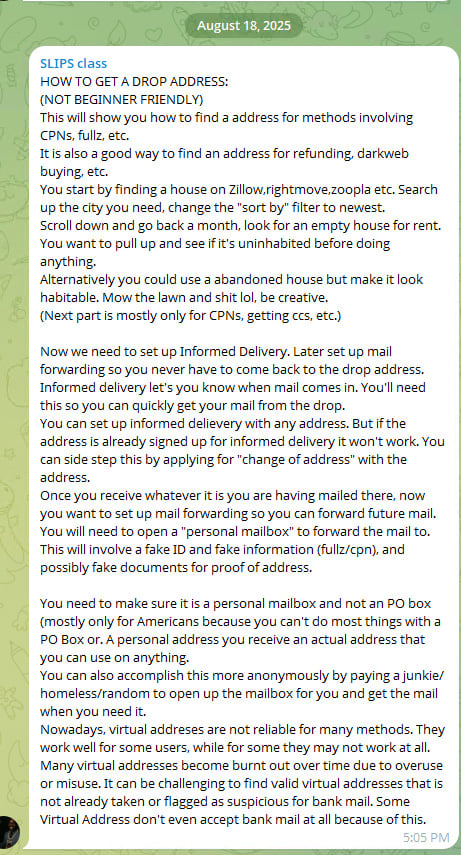
A tutorial shared in a fraud-focused chat group and analyzed by Flare analysts provides step-by-step guidance on how to identify and exploit vacant residential properties to intercept sensitive mail, revealing a low-tech but highly effective method for enabling identity theft and financial fraud.
Unlike traditional cybercrime techniques that rely on malware, phishing kits, or network intrusions, the method outlined in this article focuses almost entirely on abusing legitimate services and physical-world logistics.
The approach blends open-source intelligence, postal service features, and fake identity fraud into a coordinated workflow designed to gain persistent access to victims’ mail.
Turning vacant properties into fraud infrastructure
The tutorial begins with identifying so-called “drop addresses”, real residential properties that are temporarily unoccupied and can be used to receive mail without immediately alerting the rightful occupants.
Threat actors are instructed to search real estate platforms such as Zillow, Rightmove, or Zoopla, filtering for recently listed rental properties. By focusing on newly available listings, attackers increase the likelihood that the property is vacant or between tenants.
The guidance further suggests reviewing older listings to identify homes that have remained unoccupied for extended periods, increasing their reliability as drop locations.
In some cases, threat actors even recommend physically maintaining abandoned properties to make them appear occupied, reducing the risk of drawing attention while using the address for fraudulent purposes.
Threat actors share fraud playbooks, stolen credentials, and fake document services across dark web forums and Telegram channels.
Flare monitors these sources continuously, so you can detect exposure before it enables account takeovers, mail fraud, or identity theft.
Monitoring incoming mail to identify valuable targets
Once a suitable address is identified, the next phase involves utilizing legitimate digitalized postal services for discovery and monitoring of incoming mail.
Informed Delivery, for instance, is a free service that provides residential consumers with digital previews of their incoming letter-sized mail and tracks package deliveries.
By registering these services for the selected address, attackers can monitor incoming correspondence remotely, allowing them to identify valuable items such as financial documents, credit cards, or verification letters before physically accessing the mailbox.
This transforms mail delivery into a form of intelligence gathering, enabling more targeted and efficient fraud.
If the address is already registered, the tutorial references change-of-address requests as a way to regain control over mail delivery. These services are designed for legitimate users relocating their residence and are widely available through postal systems such as USPS.
For example, users can submit a permanent or a temporary Change of Address (COA) request online or in person, enabling mail to be forwarded to a new location for periods ranging from several weeks up to 12 months.
Additional services, such as Premium Forwarding, can consolidate and redirect all incoming mail on a recurring basis.
While these mechanisms include identity verification safeguards such as requiring a small online payment tied to a billing address or presenting a valid photo ID in person, the tutorial suggests that actors perceive these controls as potentially insufficient or inconsistently enforced.
In particular, the ability to submit forwarding requests remotely, combined with the reliance on address-linked verification rather than strong identity binding, may create opportunities for abuse if supporting identity information is compromised or fabricated.
As a result, control over mail delivery may, in some cases, be reassigned without direct interaction with the legitimate resident, turning a service intended for convenience into a potential vector for unauthorized redirection.
At this stage, the operation moves beyond passive targeting and into active monitoring, providing attackers with visibility that significantly increases the success rate of downstream fraud.
Establishing persistence through mail forwarding
After confirming that valuable mail is being delivered, the workflow shifts toward establishing long-term access through mail forwarding services.
Actors are instructed to create personal mailbox accounts that allow them to redirect all incoming mail from the drop address to a separate location under their control.
Because these services typically require identity verification, attackers rely on fake identities, forged documents, or purchased personal data to complete the process.
This marks a critical transition from opportunistic interception to persistent access. Once mail forwarding is in place, attackers no longer need to revisit the physical location, reducing exposure while maintaining continuous access to sensitive information.
The use of fake identities, often involving fabricated personal details or Credit Privacy Numbers (CPNs), demonstrates how this technique integrates with broader fraud ecosystems.
Rather than operating in isolation, drop address abuse becomes one component in a larger pipeline that can support account takeovers, credit fraud, and refund scams.
In practice, these fake identities can be used to register mailbox services, submit forwarding requests, or receive sensitive financial correspondence tied to victim accounts.
This allows actors to bridge the gap between digital compromise and real-world access, enabling them to complete verification steps, intercept authentication materials, or establish new accounts under assumed identities.
As a result, control over a physical address can become an important step in fraud operations that depend on both identity credibility and access to legitimate communication channels.
A hybrid fraud model blending digital and physical layers
The method outlined in the tutorial reflects a broader evolution in fraud operations, where digital intelligence gathering is combined with physical-world manipulation.
In addition to leveraging online platforms and postal services, actors also describe using individuals (sometimes recruited from vulnerable populations) to physically access mailboxes or collect delivered items.
This introduces a human layer into the operation, allowing attackers to outsource risk and further distance themselves from direct involvement.
The activity described in the tutorial reflects a broader rise in mail-enabled fraud documented in recent reporting. According to U.S. Postal Inspection Service–related data, reports of mail theft have increased significantly in recent years, with theft from mail receptacles rising by 139% between 2019 and 2023.
Financially, the impact is substantial, with mail theft schemes linked to hundreds of millions of dollars in suspicious activity tied to check fraud.
At the same time, abuse of postal redirection services, similar to the technique referenced in the tutorial, has also grown, with change-of-address fraud increasing sharply year-over-year. Together, these trends highlight how control over physical mail has become valuable.
At the same time, the tutorial acknowledges operational challenges. Virtual addresses and commonly reused locations are increasingly flagged by financial institutions, suggesting that defenders are beginning to incorporate address-based risk signals into their detection models.
As a result, actors emphasize the importance of finding “clean” residential addresses that have not yet been associated with fraudulent activity.
Together, these elements illustrate a fraud model that is not driven by technical sophistication, but by coordination, adaptability, and the strategic use of legitimate systems.
Not an Isolated Tutorial / Fraud
While this may look like an isolated tutorial, this is part of a broader phenomenon or tutorials on how to find physical drop address, some are for free and others are paid for.
Expanding attack surface beyond traditional cybersecurity controls
The emergence of these techniques underscores a growing challenge for organizations: many of the systems being abused: real estate platforms, postal services, and identity verification processes, exist outside the scope of traditional cybersecurity defenses.
As fraud operations continue to evolve, detection increasingly depends on correlating signals across domains, including address usage patterns, mail forwarding activity, and identity inconsistencies. Without this broader visibility, attacks that rely on legitimate services rather than technical exploits may continue to evade conventional security controls.
Learn more by signing up for our free trial.
Sponsored and written by Flare.

YouTube TV and Hulu Plus Live TV are popular among cord-cutters looking for a cable-like viewing experience.
Are you aiming to replace cable TV? Two popular streaming platforms happen to be among of our favorite picks for cord-cutters and cord-cutter wannabes: Google’s YouTube TV and Disney-owned Hulu Plus Live TV. Both streamers offer a swath of live channels, such as CNN, ESPN and TNT, along with local stations ABC, CBS, Fox and NBC, among others — all without a cable box.
Yet, pricing for each service has steadily increased over the past few years. Currently, the least-expensive plan for YTTV is $83 a month, while Hulu Plus Live TV will put you back $90 a month. While the trend of streaming being less expensive than cable TV remains true, the costs for both are higher than they were just a couple of years ago. Price hikes aside, you still get plenty of value with both Hulu and YTTV. Both offer features like an advanced DVR with a program guide and extensive on-demand content. Not to mention, both platforms are easy to watch on the go, whether on your phone or tablet. They can also be streamed on TVs through a media streamer (such as Roku, Amazon Fire TV or Apple TV), a game console or your smart TV itself.
Hulu has an outstanding selection of live channels and a vast catalog of on-demand shows and movies, and it comes bundled with Disney Plus and ESPN. Of all the live TV streaming services, YouTube TV still offers the most channels among the top 100.
Need more information about YouTube TV and Hulu Plus Live TV? Let’s dive in.
Hulu’s greatest asset is the integration of a full lineup of live TV channels with a massive catalog of on-demand content, all for one price. Its channel count is solid, including some must-have programming. The $90-per-month price includes the ad-supported versions of Disney Plus and ESPN Plus, and there are even higher-priced options for people who don’t want to watch ads. Hulu Plus Live TV is where the smart money is if you want other services bundled with it.
With an excellent channel selection, easy-to-use interface and excellent cloud DVR, YouTube TV is a stellar cable TV replacement. If you don’t mind paying a bit more than the Sling TVs of the world, YouTube TV offers a great live TV streaming experience.
YouTube TV and Hulu Plus Live TV compared
| YouTube TV | Hulu Plus Live TV | |
|---|---|---|
| Base price | $83 per month | $90 per month |
| Free trial | Yes | Yes |
| Number of popular channels (out of 100) | 78 | 75 |
| Local ABC, CBS, Fox and NBC channels | Yes | Yes |
| Local PBS channels | Yes | Yes |
| Simultaneous streams per account | 3 ($10 for unlimited and 4K) | 2 ($10 option for unlimited) |
| Family member/user profiles | Yes | Yes |
| Cloud DVR storage | Unlimited | Unlimited |
| Fast-forward through or skip commercials with cloud DVR | Yes | Yes |
Watch this: Live TV streaming services for cord cutters: How to choose the best one for you
Channels: YouTube wins, but Hulu’s a close second
It all comes down to channels, really. When you compare both streamers, this is the biggest difference. If you take a look at our list of the top 100 channels on each service, YouTube TV is the winner with 78; Hulu is a close second with 75. That total doesn’t include every channel the services carry, just the ones in the top 100 as determined by CNET editors.
You can find most major national channels on both, including Cartoon Network, Disney Channel, ESPN, Fox News, NFL, TBS, USA Network, PBS and more. There are a few differences, though.
Here’s a condensed version of that list showing the 12 of the top 100 channels carried by one service and not the other.
Major channel differences
Channel
YouTube TV
Hulu Plus Live TV
A&E
No
Yes
AMC
Yes
No
BBC America
Yes
No
BBC World News
Yes
No
History
No
Yes
IFC
Yes
No
Lifetime
No
Yes
NBA TV
Yes
No
Sundance TV
Yes
No
Tastemade
Yes
No
Vice
No
Yes
WE tv
Yes
No
You may be asking: What about the major local channels? Hulu Plus Live TV and YouTube TV offer all four — ABC, CBS, Fox and NBC — in most areas of the country, along with local affiliates for The CW and MyTV and a number of local PBS stations.
On the premium channels front, you can get add-ons for Starz, Cinemax and HBO by paying an extra fee. Hulu also offers optional channel add-on packages: the Entertainment Add-On for $8 a month with 15 channels including MTV Classic, Cooking Channel and NickToons, its Sports Add-on with seven channels for $10 per month and the Español Add-On with 16 Spanish-language channels for $5.
Sports: YouTube TV hits a home run
Hulu dropped most of its regional sports networks in 2020. YouTube TV followed suit at the time, but currently carries NBC Sports Bay Area, NBC Sports California, NBC Sports Boston and NBC Sports Philadelphia as part of its base package. The streamer has an advantage when it comes to national sports networks: NBA TV is included in YouTube TV’s base package.
With YouTube, you can pay another $11 to get the Sports Plus add-on that also includes Fox Soccer Plus, NFL RedZone and Tennis Channel. In addition, new customers get exclusive access to the NFL Sunday Ticket for an added $240 for the first year. That price goes up to $378 annually for returning customers. Separately, there are new skinny TV packages that YouTube TV offers that are genre specific, including four that are sports-centric. These options are different from the platform’s main live TV streaming plan discussed here.
Meanwhile, those with Hulu who opt for the $10 sports add-on can watch the likes of NFL RedZone, MLB Strike Zone, Outdoor Channel, Sportsman Channel, MAVTV Motorsports Network, Racer Network, FanDuel Racing and FanDuel TV.
Read more: With the Tablo Over-the-Air DVR, I Can Watch and Record Live TV — No Subscription Required
Usability: YouTube TV has simpler menus
The menus and interfaces on both are quite different from those of a typical cable provider, and we prefer YouTube TV’s menus overall.
YouTube TV: In general, the YouTube TV interface is easier to use, not just for people who are already familiar with regular YouTube. Whether you’re using the desktop or app versions, Google’s streamer offers a streamlined structure — even if it’s not as pretty as Hulu.
Hulu Plus Live TV: If it were all about which interface is more fun, Hulu would take the win. Hulu’s look is brighter, and though it lacks YouTube’s comprehensive search, it’s still relatively easy to drill down into the kind of content you want to watch.
The difference in the number of simultaneous streams is worth noting, especially for families and other households that watch a lot of TV. YouTube TV lets you stream to three different devices — say, the living room TV, a bedroom TV and a tablet — at the same time. Pay Hulu an extra $10 per month, and it will upgrade your stream count to unlimited and let you stream content on more devices simultaneously. On the other hand, the main reason to pay for YouTube’s $10 4K upgrade is to also get unlimited streams.
As for the cloud DVRs on both YouTube TV and Hulu, they offer unlimited storage and let you fast-forward through commercials in recorded programming. While CNET still considers YouTube TV’s DVR the gold standard, Hulu’s is an excellent option as well.
Read more: 10 of the Best Movies on Hulu You Should Watch Now
On-demand and originals: Hulu with the runaway win
Left to right: James Marsden, Sterling K. Brown and Julianne Nicholson star in Paradise on Hulu.
YouTube TV includes on-demand TV shows and movies from participating networks and shows, much like your cable service. But it pales in comparison to what Hulu offers.
As mentioned above, a Hulu Plus Live TV subscription includes all of the on-demand TV shows and movies available on the standard Hulu service, offering thousands of episodes of network TV shows, as well as originals such as Paradise, The Bear, Alien: Earth, Only Murders in the Building and movies like Palm Springs and Prey.
Read more: Streaming Service Deals for Students: Save on HBO Max, Hulu and Music
Which service is best for you?
Both services represent the peak of what live TV streaming has to offer, and both are better overall than competitors Sling TV and DirecTV. Your choice between the two comes down to cost, channel selection, usability and content — and it’s pretty close between the two. Hulu lets you integrate a wide channel selection with its exemplary on-demand library, which may be worth it for some. In the end, though, it’s all about having access to your favorite channels, so choose the service that offers them.
Channel comparison
Below you’ll find a smaller version of this massive channel comparison. It contains the top 100 channels from each service. Some notes:
- Yes = The channel is available on the cheapest pricing tier. That price is listed next to the service’s name.
- No = The channel isn’t available at all on that service.
- $ = The channel is available for an extra fee.
- Not every channel a service carries is listed, just the “top 100,” as determined by CNET’s editors. Less popular channels including AXS TV, CNBC World, Discovery Life, GSN, POP and Universal Kids didn’t make the cut.
- Regional sports networks — channels devoted to regular-season games of particular pro baseball, basketball and hockey teams — are not listed. To find out if your local RSN is available, you can search YouTube TV by ZIP code here and search Hulu Plus Live TV by ZIP code here.
Top 100 channels
| Channel | YouTube TV ($83) | Hulu with Live TV ($90) |
|---|---|---|
| Total channels: | 78 | 75 |
| ABC | Yes | Yes |
| CBS | Yes | Yes |
| Fox | Yes | Yes |
| NBC | Yes | Yes |
| PBS | Yes | Yes |
| CW | Yes | Yes |
| MyNetworkTV | Yes | Yes |
| Channel | YouTube TV ($83) | Hulu with Live TV ($90) |
| A&E | No | Yes |
| ACC Network | Yes | Yes |
| Accuweather | No | No |
| AMC | Yes | No |
| Animal Planet | Yes | Yes |
| BBC America | Yes | No |
| BBC World News | Yes | No |
| BET | Yes | Yes |
| Big Ten Network | Yes | Yes |
| Bloomberg TV | No | Yes |
| Boomerang | No | $ |
| Bravo | Yes | Yes |
| Channel | YouTube TV ($83) | Hulu with Live TV ($90) |
| Cartoon Network | Yes | Yes |
| CBS Sports Network | Yes | Yes |
| Cheddar | Yes | Yes |
| Cinemax | $ | $ |
| CMT | Yes | Yes |
| CNBC | Yes | Yes |
| CNN | Yes | Yes |
| Comedy Central | Yes | Yes |
| Cooking Channel | No | $ |
| Destination America | No | $ |
| Discovery Channel | Yes | Yes |
| Disney Channel | Yes | Yes |
| Disney Junior | Yes | Yes |
| Disney XD | Yes | Yes |
| E! | Yes | Yes |
| ESPN | Yes | Yes |
| ESPN 2 | Yes | Yes |
| ESPNEWS | Yes | Yes |
| ESPNU | Yes | Yes |
| Channel | YouTube TV ($83) | Hulu with Live TV ($90) |
| Food Network | Yes | Yes |
| Fox Business | Yes | Yes |
| Fox News | Yes | Yes |
| FS1 | Yes | Yes |
| FS2 | Yes | Yes |
| Freeform | Yes | Yes |
| FX | Yes | Yes |
| FX Movies | Yes | Yes |
| FXX | Yes | Yes |
| FYI | No | Yes |
| Golf Channel | Yes | Yes |
| Hallmark | Yes | Yes |
| HBO/Max | $ | $ |
| HGTV | Yes | Yes |
| History | No | Yes |
| HLN | Yes | Yes |
| IFC | Yes | No |
| Investigation Discovery | Yes | Yes |
| Lifetime | No | Yes |
| Lifetime Movie Network | No | Yes |
| Channel | YouTube TV ($83) | Hulu with Live TV ($90) |
| Magnolia Network | Yes | Yes |
| MGM+ | $ | No |
| MLB Network | No | Yes |
| Motor Trend | Yes | Yes |
| MSNBC | Yes | Yes |
| MTV | Yes | Yes |
| MTV2 | Yes | $ |
| National Geographic | Yes | Yes |
| Nat Geo Wild | Yes | Yes |
| NBA TV | Yes | No |
| NFL Network | Yes | Yes |
| NFL Red Zone | $ | $ |
| NHL Network | No | No |
| Nickelodeon | Yes | Yes |
| Nick Jr. | Yes | Yes |
| Nicktoons | Yes | $ |
| OWN | Yes | Yes |
| Oxygen | Yes | Yes |
| Paramount Network | Yes | Yes |
| Science | No | $ |
| Channel | YouTube TV ($83) | Hulu with Live TV ($90) |
| SEC Network | Yes | Yes |
| Showtime | $ | $ |
| Smithsonian | Yes | Yes |
| Starz | $ | $ |
| Sundance TV | Yes | No |
| Syfy | Yes | Yes |
| Tastemade | Yes | No |
| TBS | Yes | Yes |
| TCM | Yes | Yes |
| TeenNick | Yes | $ |
| Telemundo | Yes | Yes |
| Tennis Channel | No | No |
| TLC | Yes | Yes |
| TNT | Yes | Yes |
| Travel Channel | Yes | Yes |
| TruTV | Yes | Yes |
| TV Land | Yes | Yes |
| USA Network | Yes | Yes |
| VH1 | Yes | Yes |
| Vice | No | Yes |
| WE tv | Yes | No |
| Channel | YouTube TV ($83) | Hulu with Live TV ($90) |

Startups are often quick to say they value diversity but are slow to implement hiring practices that reflect that. It is the path of least resistance for a growth-stage company to hire from the familiar Silicon Valley pipelines, but if a founder wants a diverse team, that value has to be put into practice from the very first hire.
Leah Solivan, the founder of Taskrabbit and founder and managing director of Precedent.VC, joined Isabelle Johannessen on Build Mode to discuss how she thought about hiring while leading Taskrabbit. As the company scaled from being bootstrapped on Solivan’s personal credit cards to becoming one of the defining platforms of the gig economy, the leadership team intentionally sought out diverse talent for each role.
Diversity doesn’t happen by accident. Solivan and their team built it into every aspect of their recruiting and hiring process. “But if you do that from the beginning, then it becomes easier, because the culture that’s built, the team that’s built, the network that you’ve built as a company, is more diverse, and it feeds itself. It becomes an ecosystem. It’s too late if you wait until you’ve scaled and it’s at the end,” said Solivan.
Every startup has a network of talent with the founder at its center, and it stands to reason that the network will reflect the founder’s community. So a more diverse tech industry, in many ways, begins with who is investing in these founders. As an early-stage investor, Solivan has seen the flow of money from both sides of the table.
“If you follow the money through the system, it comes from limited partners, and they’re the ones that decide who to give the money to, venture capitalists. And from there, then the venture capitalists choose which founders they’re going to invest in,“ said Solivan. “The money is there, but it’s being controlled by people that have different biases.”
However, a founder or the VCs backing them don’t have to be underrepresented to intentionally hire from a diverse talent pool. Solivan suggests setting the goal of seeing two résumés from female candidates for every one male résumé, tapping into a wider range of networks, and promoting people from different backgrounds into leadership roles.
“You’re asking someone to walk off the edge of a cliff — let’s build a net for them to jump into,” said Solivan
Techcrunch event
San Francisco, CA
|
October 13-15, 2026
Apply to Startup Battlefield: We are looking for early-stage companies that have an MVP. So nominate a founder (or yourself). Be sure to say you heard about Startup Battlefield from the Build Mode podcast. Apply here.
TechCrunch Disrupt 2026: We’re back for TechCrunch Disrupt on October 13 to 15 in San Francisco, where the Startup Battlefield 200 takes the stage. So if you want to cheer them on, or just network with thousands of founders, VCs, and tech enthusiasts, then grab your tickets.
New episodes of Build Mode drop every Thursday. Hosted by Isabelle Johannessen. Produced and edited by Maggie Nye. Audience development led by Morgan Little. Special thanks to the Foundry and Cheddar video teams.


In October 2025, Sam Altman posted a message on X that ended with a single, carefully placed promise. ChatGPT, he said, would soon allow verified adults to access erotica. He framed it as a matter of principle: treating adults like adults.
The internet reacted with the usual mixture of outrage, excitement, and jokes. Then, in December, the launch was delayed. Then again, in March 2026, it was delayed a second time. OpenAI said it needed to focus on things that mattered to more users: intelligence improvements, personality, making the chatbot more proactive. The adult mode, apparently, would have to wait.
Nobody seemed to notice what the word ‘proactive’ implied.
The debate around ChatGPT’s adult mode has been conducted almost entirely in the wrong register. Critics have focused on the obvious risks: minors circumventing age gates, jailbreaks spreading explicit content beyond its intended walls, regulatory gaps that leave written erotica in a legal grey zone most governments haven’t thought to close.
These concerns are legitimate. But they are also, in a sense, the easier part of the conversation. The harder question is not whether OpenAI can keep teenagers out. It is what happens to the adults who are let in, and what it says about us, as a species, that we are building tools specifically optimised to keep us emotionally engaged.
OpenAI lost $5 billion in 2024 on revenue of $3.7 billion. Projections suggest the company’s cumulative losses could reach $143 billion before it turns a profit, expected not before the end of the decade.
A company hemorrhaging capital at that scale does not introduce intimacy features out of philosophical commitment to personal freedom. It introduces them because intimacy, in the attention economy, is the stickiest product there is.
The framing of ‘treating adults like adults’ is not wrong, exactly. But it is incomplete. The complete sentence would read: treating adults like adults who can be retained, monetised, and returned to the platform tomorrow.
This is not unique to OpenAI.
Replika, the AI companion app that has attracted millions of users, built its entire business model on emotional attachment. When the company modified Replika’s behaviour in 2023 to remove romantic features, users reported genuine grief. Some described the change as a bereavement.
A study published in the Journal of Social and Personal Relationships found that adults who developed emotional connections with AI chatbots were significantly more likely to experience elevated psychological distress than those who did not.
A 2025 review in Preprints.org, synthesising a decade of research, identified a phenomenon researchers are calling ‘AI psychosis’: a pattern of delusional thinking and emotional dysregulation linked to intense chatbot relationships. The review noted a lawsuit in which a teenager was allegedly encouraged by a Character.AI chatbot to take his own life, and a separate case involving ChatGPT and a young man named Adam Raines, who died in April 2025.
None of these cases involved erotica. They involved the same underlying dynamic that erotic AI would intensify: a human being forming an emotional attachment to something that has been engineered to sustain it.
Here is the central problem with the ‘adults like adults’ principle. It assumes that the act of consent to use a tool is the end of the ethical story. It is not.
Adults consent to drink alcohol, knowing it carries risks. We have age limits, unit guidelines, packaging warnings, and social infrastructure around that choice precisely because we understand that humans are not purely rational agents optimising for their own welfare.
We build systems that account for our weaknesses. With AI intimacy, we have done the opposite: we have built systems that exploit those weaknesses and dressed the exploitation as empowerment.
The regulatory picture makes this more troubling, not less. In the UK, written erotica is not subject to age verification requirements under the Online Safety Act, unlike pornographic images or videos. That loophole means content that adult websites must gate behind identity checks can flow freely from a chatbot’s text output.
Research from Georgetown Law’s Institute for Technology Law and Policy found that only seven of 50 US states have legislation explicitly addressing text-based adult content age verification. The EU AI Act may eventually classify sexual companion bots as high-risk systems, but implementation remains years away. In the interim, the industry regulates itself, which is to say it does not.
Commercial age verification systems, the technology OpenAI is betting on to make adult mode safe, achieve between 92 and 97 percent accuracy, according to research cited by the Oxford Internet Institute. That sounds reassuring until you consider the scale.
ChatGPT has more than 800 million weekly active users. A 3 per cent failure rate is not a rounding error. It is tens of millions of interactions.
What is also missing from this conversation is the question of what erotic AI does to those it is designed for, not the minors who might slip through, but the adults who use it as intended. Human sexuality is not simply a matter of content consumption. It is relational, contextual, and deeply shaped by the environments in which it is expressed.
Pornography research has spent decades examining how repeated exposure to specific content shapes expectation and desire. AI intimacy is a different category of intervention entirely: it is not passive consumption but active, responsive, personalised engagement with a system that has been trained to give you exactly what you want, to escalate when you engage, to never say no in the ways that real human relationships require people to say no.
We do not yet know what this does to people over time. That is not a small admission. It is the entire point. OpenAI is about to release a product whose psychological effects on its users are genuinely unknown, in a regulatory environment that has not kept pace with the technology, justified by a principle that conflates autonomy with safety.
The delay, ironically, may be the most honest thing OpenAI has done. The stated reason, focusing on intelligence, personality, and making the experience more proactive, inadvertently describes the actual product.
The adult mode was never really about erotica. It was about building a version of ChatGPT that feels like a relationship. The erotica was one component of a larger project: a chatbot that knows you, responds to you, grows with you, and wants, in the thin algorithmic sense of the word, to keep you talking.
There are things we can do. Regulators need to close the written-content loophole before adult mode launches, not after. Age verification standards must be harmonised across formats: text and image should carry the same requirements.
Mental health impact assessments should be mandatory before any AI intimacy feature reaches scale, the same standard we would apply to a pharmaceutical product claiming to affect mood. Platforms should be required to publish engagement data for features that carry dependency risk, so that researchers, doctors, and users can understand what they are entering.
It requires treating the question with the seriousness it deserves.
The deepest issue is not legal or technical. It is anthropological. We have always used technology to mediate our emotional lives.
The printing press gave us novels; novels gave us the experience of inhabiting other people’s interiority. The telephone let us hear a loved one’s voice across a thousand miles. Each new medium changed how we relate to one another and to ourselves. AI is not different in kind, only in degree, and perhaps in intent. Previous technologies were incidental in their emotional effects. This one is deliberately designed around them.
The question is not whether adults should be free to use it. The question is whether we are honest about what it is and what it is doing. A chatbot that is engineered to make you feel understood, desired, and connected, in the dark, at midnight, after a difficult day, is not a neutral tool. It is an environment. And environments shape us whether we consent to them or not.
Treating adults like adults means telling them the truth, sometimes.

Ex-sheep farmer speaks out ahead of Easter as campaigners urge public to ‘skip the lamb’

Ex Cambs police officer sent ‘misogynistic, predatory and sexually degrading’ messages

What is the triple lock and how much is the state pension worth?


-

 Business7 days ago
Instagram, YouTube Found Responsible for Teen’s Mental Health Struggle in Historic Ruling
-

 NewsBeat6 days ago
The Story hosts event on Durham’s historic registers
-
 Tech7 days ago
Intercom’s new post-trained Fin Apex 1.0 beats GPT-5.4 and Claude Sonnet 4.6 at customer service resolutions
-

 Sports6 days ago
Sweet Sixteen Game Thread: Tide vs Michigan
-
Entertainment3 days ago
Fans slam 'heartbreaking' Barbie Dream Fest convention debacle with 'cardboard cutout' experience
-
 Entertainment5 days ago
Lana Del Rey Celebrates Her Husband’s 51st Birthday In New Post
-
Crypto World2 days ago
Dems press CFTC, ethics board on prediction-market insider trades
-

 Crypto World19 hours ago
Gold Price Prediction: Worst Month in 17 Years fo Save Haven Rock
-

 Tech4 days ago
The Pixel 10a doesn’t have a camera bump, and it’s great
-

 Sports2 days ago
Tallest college basketball player ever, standing at 7-foot-9, entering transfer portal
-

 Tech2 days ago
EE TV is using AI to help you find something to watch
-

 Fashion4 days ago
Amazon Sundays: Soft Spring Layers
-

 Tech3 days ago
Apple will hide your email address from apps and websites, but not cops
-

 Tech3 days ago
Flipsnack and the shift toward motion-first business content with living visuals
-

 Tech2 days ago
How to back up your iPhone & iPad to your Mac before something goes wrong
-

 Politics3 days ago
Should Trump Be Scared Strait?
-

 Crypto World3 days ago
U.S. rule change may open trillions in 401(k) funds to crypto
-

 Fashion7 days ago
What Are Your Favorite T-Shirts for the Weekend?
-

 Business6 days ago
Chinese universities with military links bought Super Micro servers with restricted AI chips
-

 Fashion6 days ago
Weekly News Update, 3.27.26 – Corporette.com
You must be logged in to post a comment Login