With the RM9L RGB-Mini, TCL doesn’t skimp on HDMI 2.1 ports. There are four total, and each one can support a 144Hz refresh rate for low latency PC gaming or whatever you want to throw at the television. One of the HDMI 2.1 ports is for eARC passthrough audio to powered speakers or a receiver. I added an Xbox Series X and a Google TV for testing and connected Klipsch the Nines II speakers. There are two USB ports (one coaxial), an Ethernet port for a wired connection, and a digital optical port. The TV uses Wi-Fi 6, which is fast and compatible.
I liked the remote for the most part, since it is clean and easy to use. The brightness controls are on the right-hand side, which is a surprisingly brilliant design choice. For late-night gaming sessions you can crank down the brightness quickly or pump it up when the sunlight pours in. Tiny notches on the remote for volume and channels help you locate them without looking. The buttons for free television channels and a few others seemed like overkill. Also, the Home button is not centered, so it’s harder to find. Thankfully at this price, the remote is backlit.
Real-World Testing Results
Two movies I always test right away, especially to see if the contrast and brightness are as exceptional as they should be for a television’s price, are Awake on Netflix and The Creator on the Fandango at Home app. That’s because these movies have extremely dimly lit scenes at night or predawn. Even some OLED models look washed out during a cycling scene in Awake in which the actor Gina Rodriquez passes a guy in a blue shirt. Only after selecting the Vivid picture mode could I see what was going on. I find Mini RGB tech to be fussy at times, requiring picture quality tweaks.
For The Creator, an early scene by the ocean just didn’t have the vividness I would like for the price, looking slightly washed out without enough blue or deep blacks. Even after using Vivid or Dolby Vision IQ picture modes, the scene still looked too grayed out.
Advertisement
For skin tone benchmarks, the RM9L underperformed compared with the LG Micro RGB Evo. I noticed a lack of tonal variation, but in a side-by-side test against the LG television, there was more of a difference. That meant the RM9L matched up more closely with the midrange Sony Bravia 7 Mark II and the Hisense UR9 that also benefited from Mini RGB tech.
In a demo reel benchmark, there is one tough challenge involving white mist over a snowy mountain. The Leica Cine Play 1 projector is admittedly not a fair test (even if it’s cheaper) because that model has such an exceptional lens, but the mist was far more distinct on it. Green grass near a fence in winter was more noticeable and obvious than on the Hisense UR9, and the two televisions were about equal during a segment with buffalo on a field, showing different shades of brown. The LG Micro RGB Evo rendered several scenes with more color, including a yellow flower, a red cactus, a purple butterfly, and dark trees in a nighttime scene.
Enterprise software company LogicGate is establishing a Bellevue, Wash., office and rapidly expanding its Seattle-area executive team, betting on the region’s deep technology talent pool as it embarks on a new chapter under newly appointed CEO Diego Panama.
The Chicago-based governance, risk and compliance software company recently signed a lease in Bellevue with space for up to 25 employees and expects to have about 20 people working there by the end of the year.
It also recently recruited two Seattle-area executives to its leadership team: veteran marketing executive Michael Schultz as chief marketing officer and David Rostov as chief financial officer, whose appointment is being announced today.
“The tech talent market here is really second to none,” said Panama, the former LiveRamp and Microsoft sales leader who took the helm of the company in April. “As we looked to create a hub with a vibrant office culture, Bellevue is really a stand-out option.”
The expansion comes as Panama succeeds co-founder Matt Kunkel in a planned leadership transition that the company hopes will position LogicGate for its next phase of growth.
Advertisement
“We are eyes wide open — this is hard to get right — and really proud/excited about how we are going about it,” said Panama. One of his main goals as CEO is to transform LogicGate from a cloud-based software-as-a-service business into an AI-centric company where agents and humans work seamlessly together.
David Rostov, the newly appointed CFO at LogicGate.
Founded in 2015 and now employing about 200 globally, LogicGate develops governance, risk and compliance software used by enterprises to manage regulatory, cybersecurity and operational risk.
Rostov is a longtime Seattle technology finance executive who previously served as CFO at Avalara and Identity Digital before co-founding Aurion Biotech. Based in Seattle, he will oversee LogicGate’s finance and legal organizations while helping expand the company’s Pacific Northwest operations.
“We have a leadership team that can match the ambition of what we’re creating at LogicGate,” Panama said in a statement.
Rostov said he was drawn by both the market opportunity and the company’s strategy around AI.
Advertisement
“Enterprise GRC is at an inflection point, and companies need a trusted AI-focused platform that scales alongside their risk and compliance demands,” he said in a statement.
The Bellevue office reflects the company’s belief that the Seattle region’s concentration of enterprise software, cloud computing and AI talent can help fuel its next stage of growth as it expands both its leadership team and its AI capabilities.
LogicGate’s investment also adds another enterprise software company to a growing roster of firms choosing the Seattle area as a base for executive leadership, alongside engineering and product talent. GeekWire’s engineering center list now includes more than 100 companies with outposts in the region.
Majority report AI-related security incidents or vulnerabilities
The majority of companies that deploy AI systems end up shooting themselves in the foot with security, according to DigiCert.
Seventy-eight percent of enterprises report “experiencing AI-related security incidents or identifying AI-related vulnerabilities,” the digital identity biz said in a commissioned survey.
Advertisement
Among respondents, 27.7 percent experienced one incident, 21.9 percent experienced multiple incidents, and 28.4 percent had no incidents but identified vulnerabilities, a company spokesperson told The Register. Incident details were not disclosed, but they were caused by AI agents that were unauthorized or misconfigured rather than flaws arising from AI-generated code.
Consistent with its business focus, DigiCert attributes the survey’s findings to lack of AI governance.
“We wouldn’t allow an employee to operate without a verified identity,” said DigiCert CEO Amit Sinha in a statement. “AI agents should be no different.”
That’s become a common refrain. There are several initiatives underway to establish identifiers for bots, such as Private Access Control Tokens (PACTs), Estonia’s digital IDs for agents, and Microsoft’s Agent ID. But bot badging infrastructure remains a work-in-progress, leaving AI agents to run amok in many organizations.
Advertisement
DigiCert’s findings [PDF] echo a similar report two weeks ago from Spacelift that found 93 percent of organizations experienced AI-caused infrastructure incidents while only 19 percent had a governance plan in place.
The survey stands in stark contrast with picks-and-shovels seller Nvidia’s State of AI 2026 report, which gushes, “Across every industry, AI is helping increase annual revenue and drive down annual costs while boosting productivity.”
The DigiCert Q&A involves responses from 1,001 IT and cybersecurity leaders in the US, UK, and Australia, from various businesses. The survey shows that businesses are deploying AI first and asking questions later.
While 90 percent of organizations surveyed have discussed AI governance at the board level, just 50 percent have dedicated AI governance budgets and formal governance programs. This allows operational blind spots to persist. Just 53 percent of respondents said their organization could trace AI decisions back to the models and source data that produced those results.
Advertisement
“That becomes a problem the moment an AI system produces an unexpected or controversial result,” the report says. “Customers, executives, and regulators will all ask, ‘Why did it do that?’”
And perhaps at some point, companies will ask, why did we deploy that? ®
China’s open AI models have been a gift to developers everywhere. Now Beijing may pull them back in.
Chinese officials have discussed limiting who outside the country can use the nation’s best AI models, Reuters reports. The Ministry of Commerce ran the meetings over the past month, and Alibaba, ByteDance, and the startup Z.ai took part. The talks cover the most capable models, including some not yet out.
What is on the table
The plans reach past a simple export ban. They would also catch open-weight models, the freely downloadable systems that made Chinese AI popular abroad, alongside closed ones. Alibaba’s Qwen, ByteDance’s Doubao, and Z.ai’s GLM-5.2 all count among them.
Two other ideas surfaced. One would treat the leak or theft of proprietary AI as a national security crime. The other would limit which investors can fund homegrown AI firms. The sources cautioned that officials have decided nothing yet, that any curbs might apply only to future models, and that no timeline exists.
Reuters could not learn how the curbs would work. One panel of Chinese legal scholars has floated a tiered scheme: a light filing for basic tools, security reviews for stronger ones, and a domestic-only lockdown for the most sensitive models.
Advertisement
Why it matters
The move would mark a sharp turn. China won global goodwill by giving its models away, and European developers leaned on cheap open weights from firms like DeepSeek as an alternative to pricey American systems. Curbing them would thin that supply, and Reuters notes costs could climb for the many businesses that lean on them.
The job of a soundbar used to be simple: make TVs sound better without complicated component systems, multiple speakers and wires strung all over your living room. Over time, soundbars have evolved into complex multi-speaker systems capable of competing with component-based systems in both features and sound quality. But have they become too complicated for their own good?
With the current flagship soundbar system, the HW-Q990H, Samsung believes they can walk the line between simplicity and advanced functionality while offering performance that approaches that of a component system. Are they successful? Let’s find out.
What Is It?
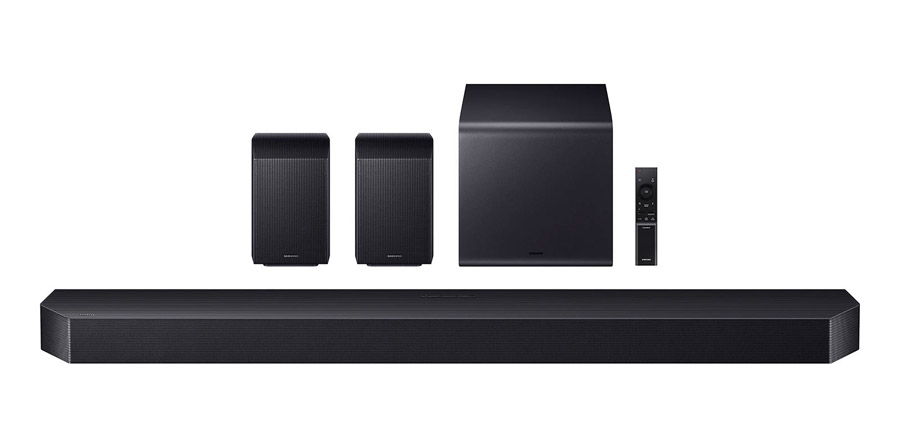
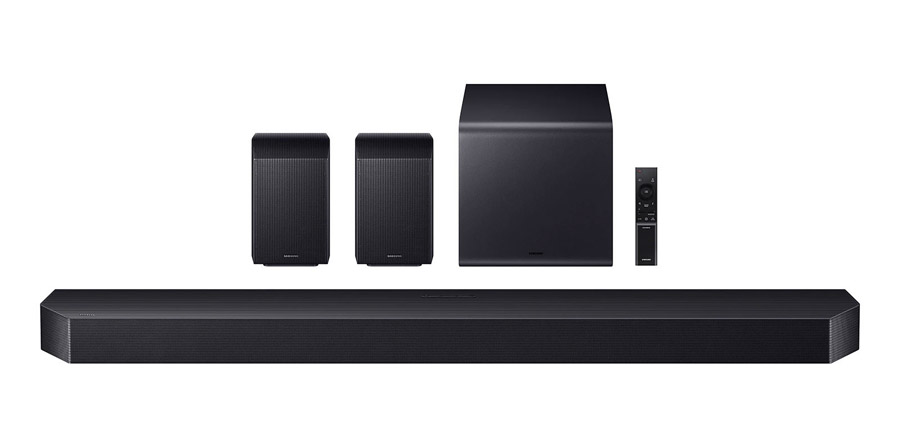
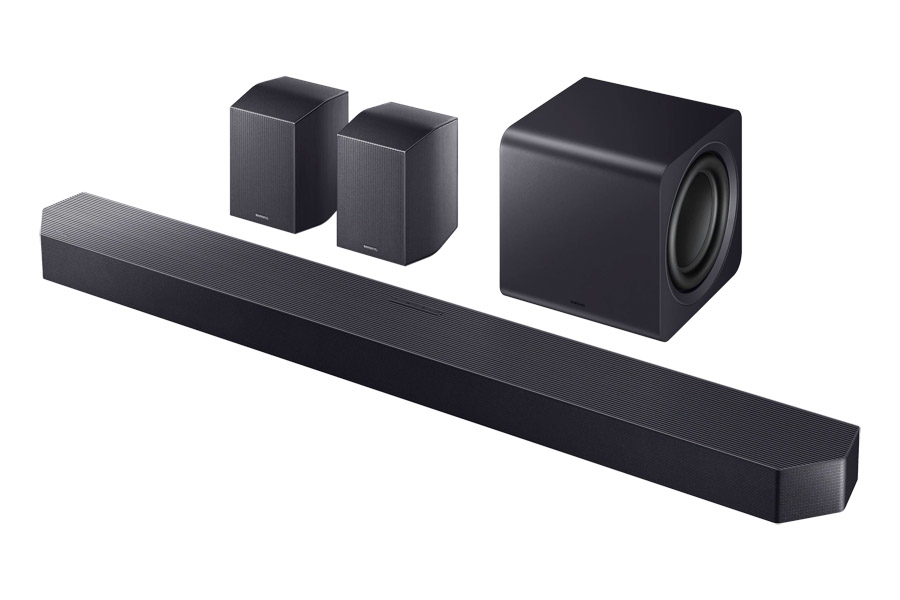
Samsung offers a wide selection of soundbars, from simple one-piece systems like the HW-QS90H to the more robust flagship soundbar system, the HW-Q990H, subject of our current review. The list price of the system is $1,999, but it is typically discounted to around $1,600. Unlike companies like Sony, who sell their flagship soundbar standalone, requiring customers to add expensive subwoofers and/or rear speakers for full performance, Samsung includes everything you need in the box with the Q990H: the soundbar itself, a pair of rear speakers, with both front and up-firing drivers and a compact powered subwoofer.
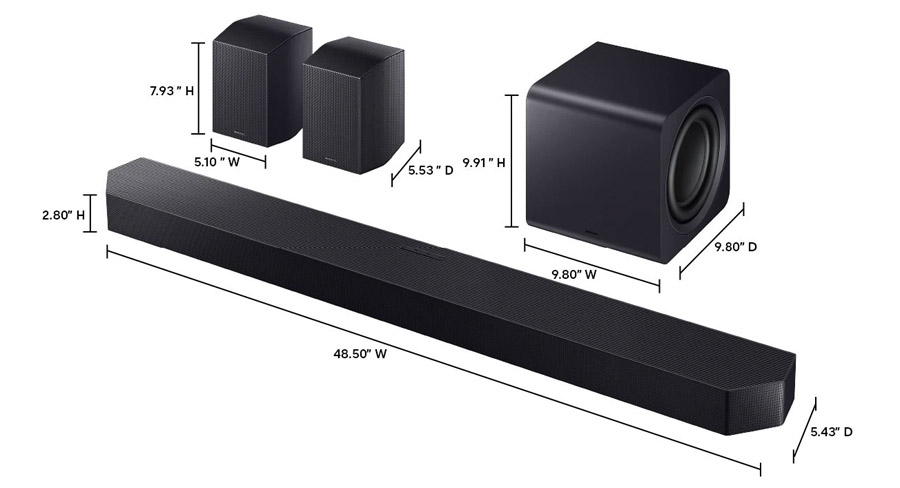
The system features a whopping total of 23 drivers, across all components. The soundbar itself includes fifteen individual drivers pointing in multiple directions: forward, to the sides and angled upward, to reflect height channel sounds off the ceiling. The rear channel speakers include three drivers each, pointing forward, to the side and up for reflective height channels. The system is completed by a very compact powered subwoofer, a cube which measures in at just under 10 inches on each side. The subwoofer uses dual 8-inch drivers in a push-pull configuration and weighs in at a fairly hefty 18.3 lbs.
The HW-Q990H includes physical controls for power/input, volume down/up and microphone/Bluetooth synch.
The HW-Q990H supports the two most common immersive surround sound formats – Dolby Atmos and DTS:X – and one uncommon one – Eclipsa Audio. Eclipsa Audio is an object-based immersive audio format developed by Samsung and Google (among others) as the IAMF (Immersive Audio Model and Formats) open audio standard. Ecplisa Audio is currently the only immersive audio format supported on YouTube, and there is actually a growing collection of content available on that platform in the new format.
Get Connected
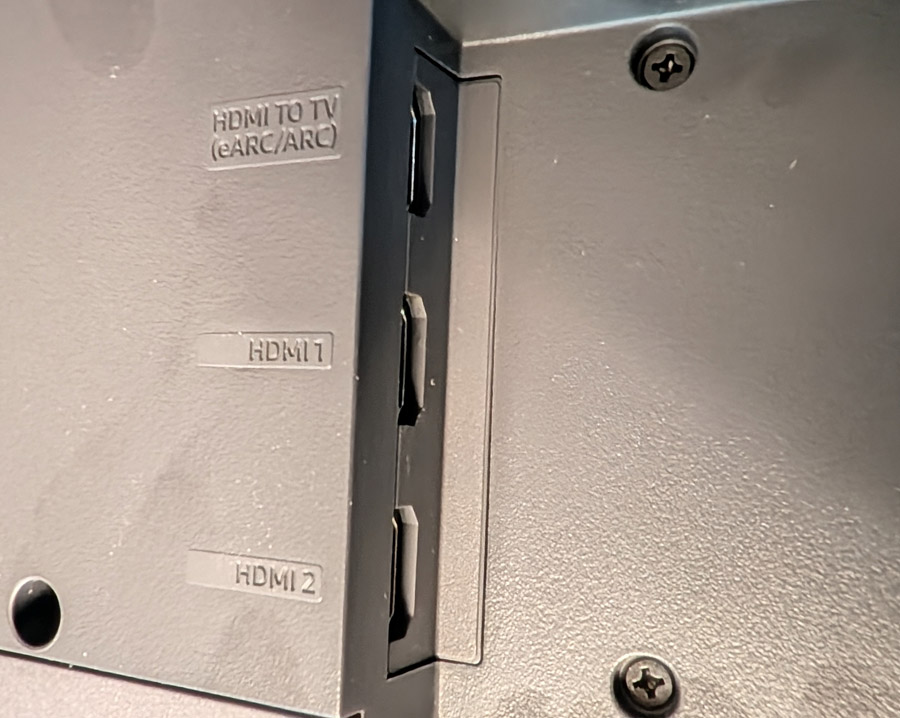
For many owners, the only input you’ll need is the HDMI/eARC port. Use an HDMI cable to connect this port to the corresponding HDMI/eARC on your TV and any devices connected to the TV, as well as the tuner built into your TV and any streaming apps built into your TV will automatically pass audio to the soundbar. If your TV doesn’t have “eARC” (extended Audio Return Channel) but does have an “ARC” (Audio Return Channel) HDMI port, then you can use that port, but just know that the sound quality is a bit limited on this older option. If your TV lacks both ARC and eARC HDMI ports, then Samsung still has you covered with a fiberoptic digital input, though, like ARC, sound quality over fiberoptic digital is limited: you’ll only get 2-channel PCM sound or 5.1 channel Dolby Digital.
Advertisement
The Q990H soundbar also includes not one but two additional HDMI ports. So if you like to listen to movies with DTS:X sound, but your TV doesn’t support DTS passthrough, you can plug a device like a UHD Blu-ray player into the bar directly, and the bar will output the video signal to the TV while directly decoding the audio signal.
The HW-Q990H includes an HDMI ARC/eARC port as well as two additional HDMI inputs on a recessed bay on the bottom of the soundbar.
The HDMI input jacks are a little tight, however, making it tricky if you want to plug in a streaming stick or if your HDMI cables are thicker than average. Still, I appreciate the flexibility here and wish more soundbar makers would follow suit.
An Amazon FireTV stick can fit in the HW-Q990’s soundbar’s HDMI input nook, but only barely.
It’s Got The Look
In terms of build quality and aesthetics, the bar itself feels and looks substantial and its contemporary design blends well with modern TVs. Its height is just under 3 inches which means it won’t interfere with the IR remote control sensor on the bottom of most TVs if placed on a console in front of the TV. The bar comes with a wall mount bracket, but be sure the top of the bar is not blocked by the TV or you will lose some or all of your height channel effects.
The rear speakers are fairly compact at roughly 5″ x 8″ by 5.5″ and include a standard 1/4″-20 UNC threaded mounting hole for a wall bracket or stand. A basic keyhole mount would have been nice but isn’t essential. Be sure to mount the speaker with sides and top unobstructed so the side and top-firing drivers can reflect off side walls and ceiling respectively.
The bar also supports both Bluetooth and WiFi inputs including Apple AirPlay 2 and Google Cast, though it does not support Dolby Atmos sound over Google Cast (few soundbars or components do). Spotify Connect and TIDAL Connect are both supported, but not Qobuz Connect. You’ll need to use Bluetooth or Google Cast if you’re a Qobuz user.
Advertisement. Scroll to continue reading.
The Set-Up
Although you can set-up and use the bar without loading any apps, you’ll get some additional options and settings if you install Samsung’s SmartThings smart home control app and add the Q990H to Smart Things. The subwoofer and rear speakers are pre-paired to the bar, so if you simply connect an HDMI cable from the bar’s HDMI/eARC port to the HDMI/eARC port on your TV, and plug the bar, subwoofer and rear speakers into wall power, you should get sound from all of the speakers.
Advertisement
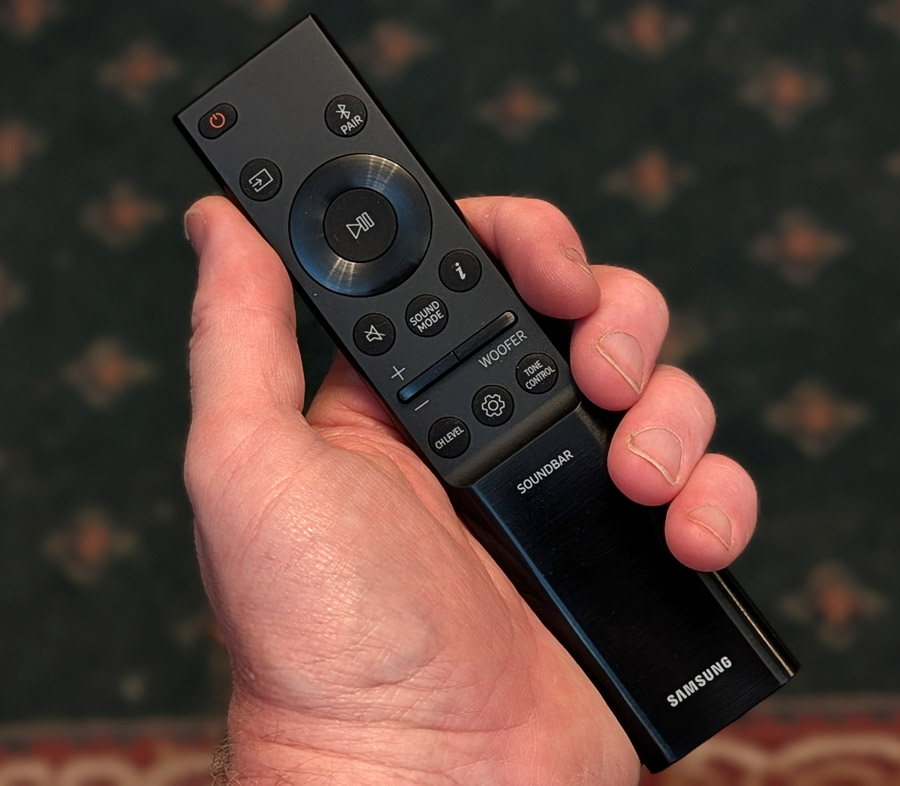
The remote for the Samsung Q990H includes all the essentials (even a direct “Input” button which Samsung TV remotes lack).
After doing the initial set-up, I installed the SmartThings app on my phone, added the bar to the app and hunted around for any sort of calibration option. Most high-end soundbars either use your phone or an external microphone to measure the speakers’ output in your room and adjust the levels and, in some cases, even phase and EQ, to optimize the sound for your specific room. But Samsung does things a little differently.
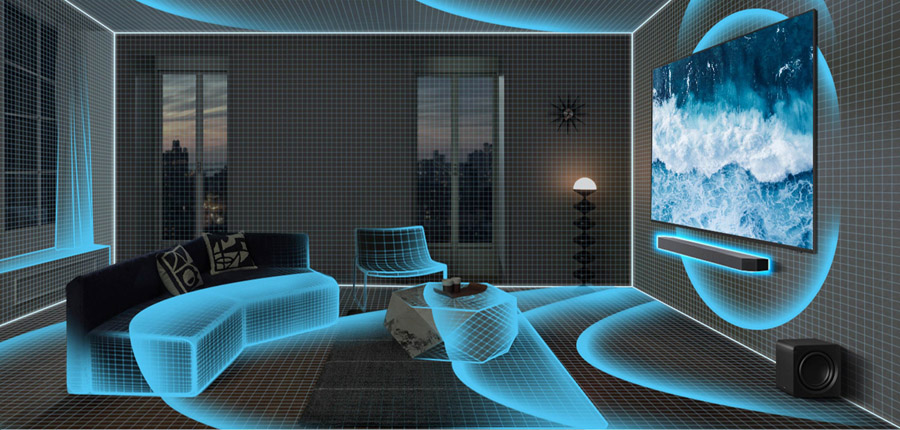
If you enable “SpaceFit Sound Pro” in Smart Things, the bar automatically adjusts its sound to fit your room, without the need to run through a calibration routine. It uses the microphone built into the bar to analyze reflections and frequency response and adjusts itself to correct for any deficiencies in the sound. While I can see the appeal of doing this whole process automatically, it bothers me to think the bar is adjusting sound while I’m listening to it. This makes me feel like maybe it’s not presenting the most accurate reproduction of the sound coming into it at all times.
I asked Samsung for details on how the SpaceFit Sound Pro feature works, but did not receive a reply in time for publication. If we get a more detailed explanation, I will be sure to update this review.
In any case, I will say the SpaceFit Sound Pro setting did appear to improve the sound in my listening room and there weren’t any egregious artifacts of its operation in normal use. I’d say most owners will benefit from having it enabled, and those who prefer not to use it can leave it off. The SmartThings app does offer manual EQ and level settings for each channel for those who wish to tweak the sound manually (though no built-in test tones).
For system review context, I connected the Q990H to a Samsung S95H QD-OLED TV. This way I was able to test out Samsung’s Q-Symphony feature which lets you use the TV speaker as part of the mix. In testing, I preferred the sound without Q-Symphony enabled as it changed the tonal balance of the sound coming out of the center channel. But owners an experiment with this in the TV’s Audio Settings menu. By using a Samsung TV, I was also able to play YouTube videos encoded in the Eclipsa Audio format, which the Q990H was only too happy to decode.
Listening Notes
Before I got too into music tracks and movie scenes, I decided to try a few test tracks, including channel test tone sequences for Dolby Atmos, DTS:X and Eclipsa Audio. All three were decoded properly on the Q990H with excellent test tone placement all around the room. Samsung bills the HW-Q990H as an “11.1.4” channel system, and while I didn’t have a Dolby Atmos 11.1.4 channel test patterns, the system did reproduce a Dolby Atmos 9.1.6-channel test tone sequence with excellent positioning. The phantom middle height channels were nicely positioned between front and rear height channels along the middle of my ceiling and the side surround channels did appear right around the middle of the room on each side, thanks to phantom channels created by wide side-firing drivers in both the soundbar and the rear channel speakers.
Advertisement
I will say the Q990H had the best image positioning of any of the bars I’ve tested to date, including the Klipsch Flexus Core 300 system and the Sony BRAVIA Bar 9 with its much-touted “360 Spatial Sound Mapping” feature.
This performance on test tones carried over to real music. I listen to a lot of immersive music tracks in Dolby Atmos as you can find on my Amazon Music Dolby Atmos playlist. On the EDM track “Alive” by KX5/deadmau5, around 4 minutes in, when the snare roll rotates around the room starting in the front and traveling the full width and depth of the room, the circular motion was fairly seamless, though there were some minor tonal differences as it moved around the room from speaker to speaker. This type of precise motion falls apart on many lesser systems. And the tonal matching across the 20+ speaker drivers was pretty good overall.
Another of my Dolby Atmos favorites, “Rocket Man” by Elton John starts mostly in the front of the room, but when the chorus kicks in, the music just explodes, taking over the entire listening space. This moment was particularly effective and dramatic on the Q990H as the music just inhabited the entire listening space, sucking you right in. Pulling out a few more classic rock tunes remixed in Dolby Atmos, The Who’s “Baba O’Riley” opens with a synth keyboard part that has been expanded to encompass the entire listening space, shimmering from side to side, and front to back, while vocals are placed more traditionally in the front and center of the soundstage. As the instrumental conclusion builds, instruments like violins, guitars and drums make full use of the space leading to a controlled chaos of sound. The Q900H maintains this chaotic build nicely.
There’s also a nice selection of 90s grunge/alternative tracks remixed in Dolby Atmos. On Stone Temple Pilot’s “Creep,” Dolby Atmos is used more to open up the soundstage, rather than make instruments or voices spin around the room. On the Q990H, the simple opening instrumental section offers solid imaging and nice tight extended bass on the bass guitar and kick drum. When Scott Weiland joins in with the first verse, his voice is squarely placed front and center, filling out the wide, deep soundstage. Much better than the stereo mix, IMHO.
Advertisement
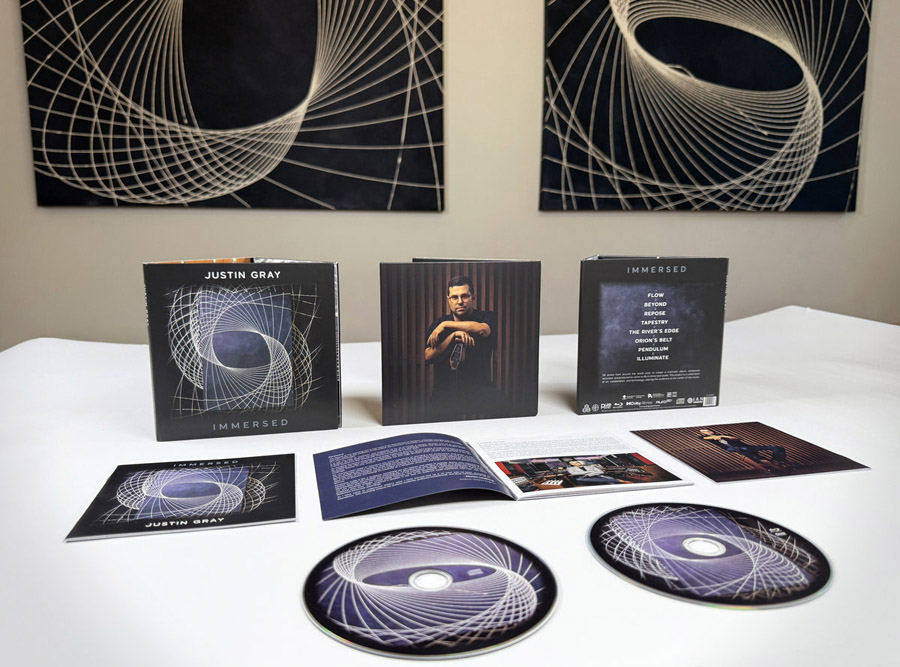
More modern albums, like Justin Gray’s Grammy Award-winning album, “Immersed” take more liberties with instrumental placement. “Immersed” was specifically mixed to put you inside the mix, giving the listener a whole different perspective on the music. The track “Orion’s Belt” leads off with percussive elements starting at the back of the room and slowly swirling, building around the listener while layers of drums and horns bounce around the listener. Through the song, you’re right in the middle of the action, like a fly on the wall, only there is no wall. The immersive nature of “Immersed” is well captured on the HW-Q990H.
Advertisement. Scroll to continue reading.
Justin Gray’s “Immersed” album is available on Pure Audio Blu-ray Disc, in both Dolby Atmos and Auro-3D immersive surround.
Moving onto Dolby Atmos movies and TV shows, I put on the opening scene of “Andor” Season 1. Rain falls convincingly from above as our antihero walks down a boardwalk in Morlana 1 in search of his lost sister. As he enters the night club/brothel, dialog is still clearly audible over the throbbing dance music in the background. And in “Dune” around 1:05 into the film as they are rescuing the doomed spice crawler, Paul Atreides is struck by the spice-infused wind and all sound drops out. The swirling spice, musical score, effects and voices of the Bene Gesserit witches build into a cacophony of sound. As it peaks with the line “Kwizatz Hadderach Awakes” the sound is captured well by the Q990H, not fractured and scattered as it can be on lesser systems.
Testing DTS:X tracks, I loaded up the UHD Blu-ray of “The Blues Brothers.” The mall chase scene was even more chaotic than I remember, with squealing tires and smashing glass coming from all around as police cars chase the Blues Mobile through a crowded shopping mall. When the main performance begins with Cab Calloway, the DTS:X track fills the room with the sounds of a live concert hall. And as Jake’s psychotic ex-girlfriend tries repeatedly to murder him, bullets ricochet menacingly around the room (mostly in the rear). It’s effective use of space and the Q990H captures it well.
I mentioned Eclipsa Audio earlier. In order to get this to work on YouTube content, you do need to match the Q990H up with a recent (2025/2026) Samsung TV with support for Eclipsa Audio, or any TV with support for IAMF audio (the “non-branded” version). Also, make sure the TV’s eARC output is set to “Auto” and Digital Audio is set to “Auto” or “Bitstream” (not PCM). With these TV settings in place, and the TV connected to the Q990H on the HDMI eARC port, you should get Eclipsa Audio from compatible content. And if you have trouble, watch this quick tech tip video on YouTube.
By searching for “Eclipsa Audio” on YouTube (using the Samsung TV’s YouTube app), I was able to find several videos encoded in the format, all of which played back properly in Eclipsa Audio format on the Q990H with discrete sounds coming from all around and above me. If you’re feeling nostalgic for the classic “Deep Note” trailer from THX, you can check out this New Version of THX Deep Note “Spark” Encoded in Eclipsa Audio on YouTube. Other tracks include 4K demo videos and music videos, some of which are pretty entertaining. Over time, we would love to see this format adopted by more hardware vendors and more content creators.
Advertisement
Stereo Music and Notes on Listening Modes
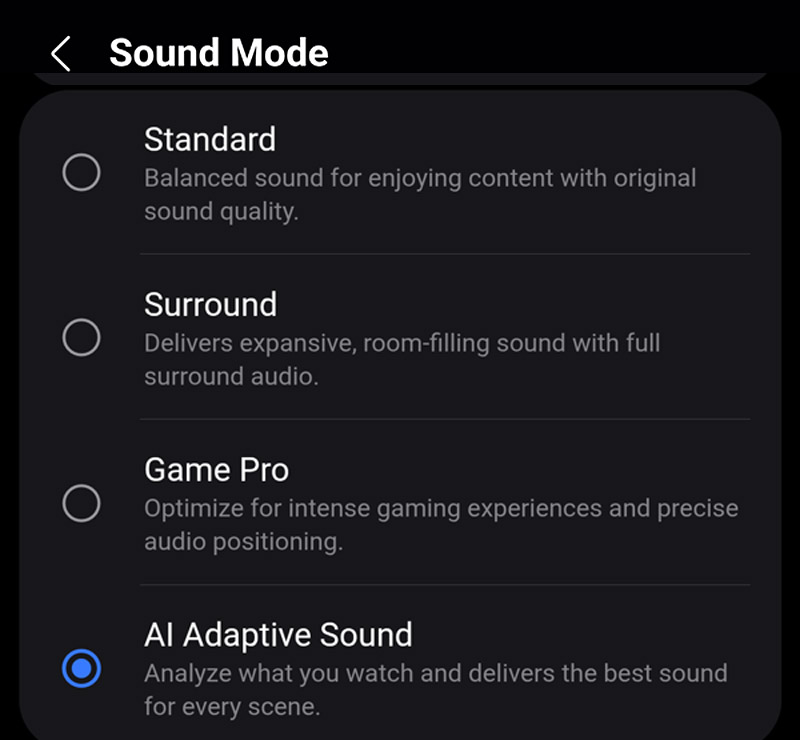
Stereo music had a nice sense of space on the Q990H, particularly when using the Q990H sound modes. There are a few different listening modes from which to choose, which affect how the bar handles both 2-channel and multi-channel content. You can find these by hitting the “Sound Mode” button on the remote or by looking in the Smart Things app.
“Standard Mode” will keep your stereo music unadulterated, using the bar itself and the subwoofer to create a nicely balanced stereo soundstage. “Surround” mode sounds more like a “Multi-channel stereo” mode where sound from the front is cloned to the rear speakers so that the sound fills the room more evenly. This works well for a party when you want background music to fill the room. Personally, I find that the “AI Adaptive Sound” mode works well for most stereo material. It expands stereo music to use all of the speakers, with enhanced spatiality, but without sounding too forced or artificial. But this is a personal choice. It’s nice to have options.
In multi-channel listening (e.g., Dolby Digital, Dolby Atmos), the modes do similar things, but not precisely the same as with stereo sources. Standard mode will be a “pure” representation of the original 5.1 or 7.1.4 mix. In Standard mode, many of the speakers in the system will be silent (such as the front wide and rear side speakers) as a direct representation of the original 5.1 or 7.1.4 channel mix. In “Surround” mode, 5.1 or 7.1 or 7.1.4 content is “upmixed” to 11.1.4 to make full use of all speakers. This fills in the space between the speakers well and improves the overall spatiality of the sound.
For multi-channel sound sources, “AI Adaptive Sound” does what surround mode does, but adds AI-based EQ and localization to enhance the sound based on analysis of the type of content – or scene – being played. Action sequences may have the bass boosted while quiet scenes with whispered dialog will have slight emphasis added to the center speaker while reducing some of the ambient sounds. If you want to keep things “pure” for surround sound movie viewing and music listening, “Surround” mode is a good compromise as it makes full use of all the speakers in the system, without making any artistic decisions, based on AI analysis. Personally I found the AI Adaptive Sound mode to work pretty well overall on most material.
By the way, if you’re a gamer, you might want to check out the “Game Pro” mode, which accentuates some of the directionality of sounds, to make these more pronounced. It also prioritizes latency so you can hear things that might be important (like footsteps behind you) without delay.
Advertisement
Overall, the sound from the Q990H was nicely balanced. Voices were presented naturally with good dimensionality and instruments like bass and snare drum had nice snap and attack. Overall bass response was solid and full, without sounding boomy, though the bass was not quite as deep or extended as I’ve heard it from larger, more powerful subwoofers.
The Bottom Line
When Samsung acquired the revered audio company Harman International several years ago, I was hopeful that this would improve the sound of the company’s audio products. And it seems like Harman’s influence is definitely rubbing off on the Korean tech giant. Earlier Samsung speakers and soundbars that I tested didn’t really stand out in sonic quality. But the HW-Q990H is different. With everything you’ll need in the box, all the essential codecs covered, and surround sound imaging that matches or exceeds the best competitive systems, the HW-Q990H gets a definite recommendation from me and earns our Editors’ Choice for 2026.
Pros:
Supports Dolby Atmos, DTS:X and Eclipsa Audio
Excellent spatial imaging on immersive movies and TV shows
Solid performance on stereo music
Independent speaker level adjustments and EQ
Tight controlled bass with more oomph than you’d expect from a small subwoofer
Fairly affordable for a flagship system with subwoofer and rear speakers included
Cons:
Low bass not as extended as systems with larger subwoofer cabinets
No manual calibration or room correction procedure (automatic “SpaceFit Sound Pro” mode only)
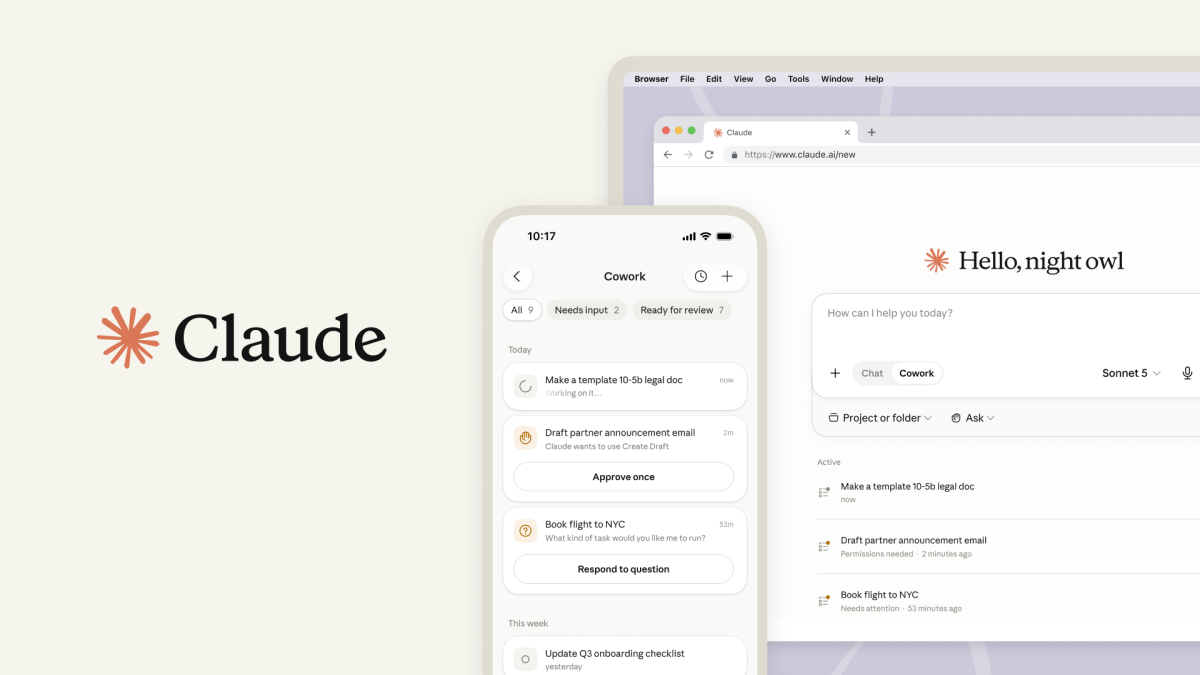
Claude Cowork — Anthropic’s Claude Code-style agent for general knowledge work — is coming to your phone.
Claude Cowork launched as a desktop app in January, but starting Tuesday it is available on web and mobile for Max subscribers. With the update, users can start a task from their desk, get status updates on their phone, and pick up the finished output later — even if their laptop is closed.
The product expansion is a signal that Anthropic wants Cowork to feel less like a coding tool for dummies and more like an agentic administrative coworker: something that can work in the background, tag along across devices, and request human input when a decision pops up only the user can make.
In other words: the coding agent wars are spilling into the rest of the office.
Advertisement
The move comes as AI firms try to push their products beyond chatbots into the everyday surfaces where work actually happens. OpenAI has made a similar move with Codex, which began as a software development tool but is increasingly being used by non-developers for reports, spreadsheets, presentations, research, data analysis and more.
For both labs, the bet is that success will depend less on who has the best chatbot and more on who owns the space where work gets done.
Beyond the benefits of one specific interface, launching Cowork as a multi-platform app means that the agent can continue running tasks in the background without a device online, the company says.
Advertisement
One example from Anthropic reads: “Set Monday’s client prep for 6 am: Claude works through the email threads, transcripts, and recent news, builds the briefing doc, and leaves the follow-up email drafted but unsent. Review it over coffee.”
The desktop app will remain the place for deep work, where Claude can access local files and the browser. But bringing Cowork to web and mobile means people who didn’t install the app can also use it. Anthropic says chat and Cowork will be unified in web and desktop to start, with projects and artifacts living together across both.
Anthropic also released early Cowork data, which suggests the clearest use case for the tool is the “work around the work” that keeps companies functioning, handling what Anthropic calls the “tasks that are part of a broad swath of jobs, but are rarely a person’s core responsibility.”
The study sampled 1.2 million anonymized and aggregated Cowork sessions from more than 600,000 organizations over the last two weeks of May.
Advertisement
The largest category at 33.4% was business process operating: pulling scattered updates into a single report, building onboarding checklists, and reconciling spreadsheets. Anthropic said the tasks are common among roles in finance, HR, and administration.
The next largest category at 16.4% was content creation and copywriting: tasks like drafts, slide decks, social posts, proposals, and other communications work that is usually performed by marketing and management positions. Software development, by comparison, only accounted for 8.7% of Cowork usage.
“While coding is still—understandably—one of the uses of AI that gets the most attention, the use of AI for everyday business work is on the rise, and the kinds of tasks people are finding it most helpful for are coming into focus,” Anthropic said in a blog post. “Our goal is to make this a reference point for people who are figuring out how to integrate AI products into their daily work, and to show where value is most concentrated.”
When you purchase through links in our articles, we may earn a small commission. This doesn’t affect our editorial independence.
A new study suggests multilingualism may slow brain aging, with bilingual people showing brains that appear about six years younger than monolingual speakers and people who speak four languages showing brains that appear up to 13 years younger. Researchers say earlier language learning and higher proficiency appear to strengthen the effect. The Guardian reports: Our brains are made up of billions of nerve cells that communicate with one another. But as we get older, the connectivity in our brains often deteriorates, causing memory and speed of thought to decline. While previous research had observed that people from European countries with greater language proficiency tended to age more slowly, this study measured the impact of speaking languages on individual brains. Scientists in Spain, Chile, Argentina and Dublin compared people living in the Basque region — characterized by high levels of multilingualism — who spoke Spanish, Basque, French and/or English.
To measure neurological age, the scientists used magnetoencephalography to measure the brain activity of 728 people with varying ages and levels of linguistic ability. They then used AI to process the results to calculate a normal level of brain connectivity at any given age. A second unrelated group of 144 people were then scanned and compared, comprising equal numbers of people speaking one, two, three or four languages.
Dr Lucia Amoruso, from the Basque Center on Cognition, Brain and Language in San Sebastian, said: “In simple terms, people who spoke more languages tended to have brains that looked younger than expected for their chronological age. The effect was not only related to the number of languages spoken. Higher language proficiency and earlier acquisition of a second language were also associated with more delayed brain ageing. This suggests that multilingual experience matters as a gradient: it is not simply about being bilingual or not, but about the depth and duration of language experience.”
Everyone else must opt out manually if they don’t fancy settings data shipped off-device
Microsoft is enabling Windows Backup for Organizations by default in Windows 11 26H2 everywhere except the EU, meaning businesses elsewhere with sovereignty and privacy concerns will be forced opt out instead.
Now dubbed “Windows settings backup and restore,” the service backs up a device’s settings and a list of installed Microsoft Store apps, which can then be restored to a new device.
Advertisement
Microsoft gave a use case for the technology: “Imagine a lost laptop, a hardware refresh, or an unexpected reset. These are some of the moments when your users need backup most. And that’s rarely when anyone wants to discover that backup was never turned on.”
However, some organizations might not want it on. Perhaps those with strict privacy or data sovereignty requirements, or those regulated by the EU Digital Markets Act (DMA), for whom the default-on behavior won’t apply. Windows 11 25H2 and earlier are also excluded, as is any device with a backup policy that explicitly disables the setting. Everything else running Windows 11 26H1 will get switched on after a feature update, and the same applies to 26H2, currently with Windows Insiders in the Experimental channel.
Administrators might reasonably be wary of this being opt-out rather than opt-in. Backups are useful, but Microsoft is clear that this is not a comprehensive backup solution, calling it only “one step in a broader Windows resiliency effort.” The implications still need consideration.
An opt-out setting that quietly ships settings data off-device is exactly the sort of thing that adds to administrators’ workloads rather than lightening them.
Advertisement
Microsoft’s recommendation is to leave things as they are. “Eligible devices with the backup policy in a Not Configured state under Windows settings backup and restore will enable backup automatically at general availability of Windows 11, version 26H2.”
Anyone who doesn’t want that must explicitly disable the policy, which “always takes precedence over the default,” Microsoft added.
Before crediting Microsoft for making this feature default to on, consider its stated objectives for Windows Backup for Organizations: to “Help organizations accelerate PC refresh cycle or the transition to Windows 11 or deploying AI-powered PCs,” and to “Allow organizations to transition to a cloud-first approach for managing devices and user settings.” ®
New Zealand’s Education Minister denies any plans to restrict or ban VPNs
Reports previously alleged it was part of the teen social media ban package
Prime Minister Christopher Luxon also confirmed “no plan to ban VPNs”
The New Zealand government has officially denied any plans to restrict or ban VPN apps as part of its upcoming under-16 social media ban, putting an end to intense speculation and a rapid backlash from digital privacy advocates.
The saga began following a report from The Post that Education Minister Erica Stanford said the government was considering any restrictions on VPNs as part of the country’s under-16 social media ban.
Because a Virtual Private Network (VPN)can easily spoof a user’s location and bypass local network blocks, the technology was viewed by some officials as a potential roadblock to enforcing age verification mandates.
Advertisement
New Zealand VPN ban’s privacy backlash
The notion of banning vital encryption software sparked immediate political and public pushback. Coalition partners quickly distanced themselves from the idea, with the ACT party reportedly marking any anti-encryption measures as a strict red line — The Post reported.
The Free Speech Union also lambasted the concept. Critics warned that a VPN ban would undermine digital free speech and put New Zealand in the same category as oppressive regimes that strictly control internet access.
“The Government wants the power to prohibit technologies New Zealanders use every day, because those technologies make it harder for the state to control what we see and say online. That is not child protection, it is censorship infrastructure,” the organisation said in a statement.
Advertisement
Following the uproar, the government changed its tune.
In a recent media stand-up, Prime Minister Christopher Luxon put the rumors firmly to rest. “I can reject that outright. There’s no plan to ban VPNs at all,” Luxon said. “I don’t know where that reporting or where that story came from, but I can reassure you that’s not the case”.
Shortly after the Prime Minister’s remarks, Stanford’s office officially clarified its position, stating that the Government is “not looking at restricting or banning VPNs”. For anyone relying on the best VPN to secure their personal data, the rapid reversal is a significant victory.
Advertisement
(Image credit: BlackJack3D/via Getty Images)
The brief controversy in New Zealand highlights a growing global debate surrounding age verification laws and privacy tools. As governments worldwide attempt to regulate how minors interact with the internet, VPNs have increasingly found themselves in the crosshairs of lawmakers seeking foolproof ways to enforce their legislation.
Because a VPN encrypts your internet connection and masks your IP address, it is commonly used to bypass geo-blocks and content filters. This makes it an obvious workaround for teenagers looking to dodge age gates.
However, treating VPNs purely as circumvention software fundamentally misrepresents what they do. They are essential security tools used by millions of businesses, journalists, and everyday citizens to protect sensitive data from hackers, intrusive ISPs, and mass surveillance.
Ultimately, lawmakers must strike a delicate balance. Enforcing a social media ban should never come at the cost of weakening the cybersecurity infrastructure that protects the wider population.
Imagine your refrigerator sits in another building, 100 metres from your kitchen. Every time you cook, you walk over for each ingredient, then walk back to check that you closed the fridge door. That could be another long walk back if you forgot the milk for your morning coffee.
Until the agentic era, this was the norm. Data could live in that fridge and get pulled when needed. Applications and humans didn’t need millisecond or even live data to make important decisions; humans can work on copies. But that era is ending. Agents think and act in instants, in context. And very soon billions of them will be working 24/7/365. They don’t pull a copy and decide later. They need to be governed in the moment, in the context of that moment, and they need to act fast and at reasonable cost. Agents cannot run to a lakehouse, or a fridge, and still meet those requirements.
That means intelligence has to be where the agents and data are acting.
Think about the exponential rise in digital fraud in payment systems, or the volume of retail returns from digital purchasing. We live in a more complex, integrated data world, and we expect real-time resolutions, solutions, and choices.
Advertisement
The lake was never built to run a business (or agents)
Your AI and your data need to be available the moment an agent acts: Petabyte-scale data, served in real time, live, not copies, without a walk to the fridge every time. You cannot retrofit a lakehouse to deliver that.
Everyone now agrees that the old separation between transactional and analytical systems had to end. The interesting question is what replaces it. This month Databricks offered its answer: LTAP, or Lake Transactional/Analytical Processing. Built on Lakebase, its serverless Postgres®, LTAP puts transactions and analytics on a single copy of data in the lakehouse. It is interesting engineering, but built from the wrong end.
The reason is straightforward: the only gravity that matters is the data. Action happens at the data layer, governance has to happen at the data layer, so the data layer is where you build rather than somewhere you move data to. Pulling transactions up into the lakehouse is like moving the house and kitchen to the building with the fridge.
A lakehouse is, at bottom, built on a data lake, and the lake was built for analytical work: Large scans, append-heavy patterns, eventual consistency, object-storage economics. Transactions want the opposite: Low-latency reads and writes, strict consistency, row-level locking, the hard ACID guarantees that operational applications have relied on for 40 years. You can engineer a transactional layer onto object storage credibly enough, but you are swimming against the substrate the entire way. The lakehouse is a magnificent place to analyze data, but a strange place to run your order book.
Advertisement
The operational database is where transactions already live. It is consistent, governed, the system of record. Agents don’t act on copies. They act on the real thing, live and governed, right where it sits. The durable architecture doesn’t haul that into the analytical world and re-solve consistency from scratch. It starts from the operational core, the place the business actually runs, and extends analytics, vector search, and agents outward from there, against the same live, governed data, without moving it.
The destination everyone is describing is the same: one copy, no pipelines, one governed surface for every workload, whether OLTP, HTAP, or agents. The divergence is the starting point. A lakehouse-first model decides in advance that the data belongs in the lake, then pulls transactions up to meet it. Starting from the operational core presumes nothing: The data stays where it already is, and everything comes to it.
Opposite starting points compound: the gap between the two only widens the further you build.
For regulated enterprises, true sovereignty is nonnegotiable
A lakehouse is a cloud service, on the cloud’s object storage, under the cloud’s control. For an enormous share of the enterprises that most need agentic AI (banks, hospitals, telcos, governments), “move your transactional system of record into our cloud” is not a deployment detail. It is a nonstarter. These organizations operate under data-residency rules, sovereignty requirements, and, in some cases, air-gap mandates that no amount of elegant lakehouse architecture can make go away. You cannot regulate your way around where the bytes physically sit.
Advertisement
This is not only about what regulators permit. Where data does its work should be the enterprise’s choice in the moment, not a destination a vendor decided in advance.
The moment an autonomous agent can act on regulated data, sovereignty stops being a preference and becomes a constraint. An operational core built on open Postgres runs wherever the data has to be: on-premises, hybrid, across clouds, air-gapped if the regulator demands it. A lakehouse, cloud-bound by design, runs where the vendor’s cloud runs. For the regulated enterprise, that single fact settles the question before any benchmark is run.
Govern where the data is, not in a catalog above it
Governance works the same way. The lakehouse model governs through a catalog, a policy layer administered above a collection of engines. That is a reasonable design for a platform assembled from many parts. For an autonomous agent acting directly on data, a governance layer that lives somewhere other than the data is a governance layer with a path around it.
Governance has to be enforced by the database itself, through the same roles, row-level security, and audit trail that already govern human access. Govern where the data is, at the moment of action, not in a catalog hovering above it.
Advertisement
The market is already moving
This is the shift, and the market is confirming it. The most prominent name in the lakehouse world is now racing to embed an operational Postgres core, spending roughly $1 billion to acquire Neon to get there. When the company that defined the lakehousestarts building toward the operational database, the direction of travel is no longer in dispute. The only question left is which end you build from.
The enterprises that get this right will build from the operational core outward, on open Postgres, on infrastructure they own. Transactions, consistency, governance, and sovereignty are the hard constraints; analytics is the part that should come to them, not the reverse. Your AI, your data, your rules, on infrastructure you control.
Probably EarFun’s most impressive budget true wireless yet, delivering good comfort levels, strong noise cancellation and the best sound I’ve heard from one of its true wireless. This is less a box ticking exercise and a pair of earbuds that deliver a consistent strong performance.
Improved sound tuning over previous EarFun earbuds
Strong noise cancellation
Good comfort
AI Translation works well
Well-featured for the money
Call quality is ok outdoors
Sony WF-C710N edges on the sound front
Key Features
Advertisement
AI Transation
Use the app translate languages in real-time
Advertisement
Nano Side-Fitted Acoustic Architecture
Aims to improve sound clarity
Advertisement
Sound
FeatherBA armature/10mm dynamic driver for deeper bass and crisper treble
Introduction
Virtually every area of the headphone market is keenly contested. Time and advances in technology have led to features once found in premium headphones costing as much as £299 trickling down to headphones less than £99.
Advertisement
But is that a case of just ticking the spec box and calling it a day? After all, having the feature is one thing, but actually delivering on the performance is something else.
It’s something the EarFun Air Pro 4+ looks to do. On paper, they’re absurd value with specs that would put Sony’s excellent WF-C710N to shame. But do they sound good? Do they cancel noise well? Do the features work as advertised? I’ve spent plenty of time finding out if these EarFun wireless earbuds deliver.
Advertisement
Design
IP55 rating
Three colour finishes
Touch controls
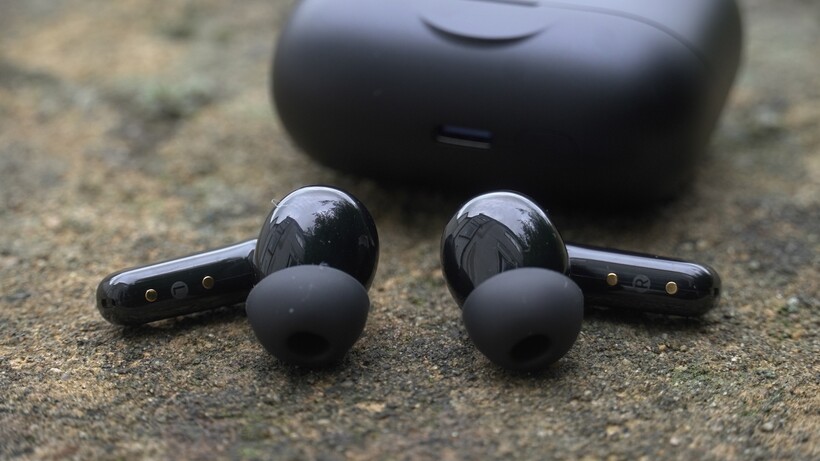
The EarFun Air Pro 4+ aren’t flashy and they do feel their budget price, sporting a glossy plastic coating with a two-tone finish (grey and black) that’s become EarFun’s distinct look. The form factor of earbuds has been well established, and the Air Pro 4+ don’t deviate from the stem design that’s become very popular.
But it’s not all about aesthetics, and function is key, as the Air Pro 4+ provide good comfort levels. I’ve worn them for a few hours, and aside from a slight oiliness (which doesn’t happen all the time), I’ve not had significant issues. The fit doesn’t come loose, and they don’t feel a burden to wear.
Advertisement
Image Credit (Trusted Reviews)
Touch controls work fine but the responsiveness has not always been the best – they can be a bit slow to react and I’ve resorted to using the controls on the phone instead most of the time.
Advertisement
The IP rating is IP55, making them resistant to water and dust. There’s a choice of four ear-tip sizes, from extra-small to extra-large, and the charging case itself is pretty compact, easily pocketable, with an LED on the front to show the headphones’ status.
Black, blue, and white are the choice of colours.
Image Credit (Trusted Reviews)
Features
Bluetooth 6
Snapdragon Sound
AI Translation
What does the EarFun Air Pro 4+ have at its disposal when it comes to features? Bluetooth-wise, they connect over Bluetooth 6, but you’ll only get the advantages if you have a smartphone (or mobile device) that’s compatible with Bluetooth 6.
Sony’s LDAC and Qualcomm’s Snapdragon Sound (aptX Lossless), both of which are rare to see for less than £100 / $100, and they’re joined by SBC, as well as LE Audio and LC3, the latter two aim to deliver higher quality audio than SBC but use less power in the process. There’s no mention of AAC support, which would suggest these are better suited to Android smartphones.
Advertisement
Advertisement
Image Credit (Trusted Reviews)
I haven’t found the Bluetooth connection to fall off, at least when using aptX Adaptive; though I have experienced an odd problem during playback when audio pauses, the earphones revert to transparency mode and then ANC boots back up and music starts. Weird.
If you choose to use LDAC instead of aptX, you can’t get LDAC and Bluetooth multipoint at the same time. The EarFun Air Pro 4+ also support Auracast to broadcast audio to other compatible devices, and Google Fast Pair to connect to Android devices quickly.
Jump into the app (available on iOS and Android), and there’s a Game Mode, EQ adjustments (presets, 10-band custom EQ, sound test, and… Influencers’ Pick).
Image Credit (Trusted Reviews)
You can disable the in-ear detection, disable the controls or customise if you find they’re not quite your speed (volume control is included by default). There’s also a Hearing Health option where you can limit volume levels, and a ‘Find Headphones’ function if you lose them.
Advertisement
Advertisement
Most interesting is AI Translation, which annoyingly seems to be the only feature locked behind account sign-up. Using it is pretty cool.
I can’t tell how accurate it is (I can’t speak Mandarin, or any other language well enough to gauge), but it understands what you’ve said accurately, and fires back a response in the language of choice quickly. For travel overseas, I can see this being useful.
Image Credit (Trusted Reviews)
Battery Life
Long battery life
USB-C and wireless charging
EarFun claims 54 hours in total with the Air Pro 4+, broken down into 12 hours per charge and 42 in the charging case. With noise cancellation, the 12 hours fall to 8.
An hour of streaming a Spotify playlist saw the headphones drop to 90%, which suggests they’re good for about 10 hours per charge (at least on aptX Adaptive).
Advertisement
Advertisement
Image Credit (Trusted Reviews)
The charging case covers USB-C and wireless charging – again, another feature that’s not altogether common at this price. In terms of convenience, the Air Pro 4+ scores big points.
Noise Cancellation
Strong ANC
Average call quality
You’ve a choice of AI Ear Adaptive ANC or AI Environment Adaptive ANC, which both seem to do the same thing. You can choose to manually adjust the noise cancellation and enable Wind Noise Cancelling too.
I’ve tested the EarFun Air Pro 4+’s ANC in several places: on a plane, public transport, in windy conditions, and walking around cities. Throughout all of those various scenarios, it’s been impressively strong.
On a plane, it doesn’t remove every decibel of noise; it does remove a considerable amount to make a plane ride much more comfortable. On buses and trains, the level of suppression applied is strong – traffic is consistently reduced to a hum, and there’s no need to bump the volume up, which is always a good sign of strong ANC.
Advertisement
Image Credit (Trusted Reviews)
On a blustery day it handles wind noise without amplifying it or affecting the sound. Walking around cities and the ANC’s impact is enough that it reduces people’s voices. You’ll still hear some, but conversations are harder to accidentally pick up.
The Transparency mode is fine. It’s not the clearest, but it allows you to hear and be aware of what’s around you. It’s on a similar level to Sony’s WF-C710N.
Advertisement
Call quality is a weaker area. The person on the other end said noises managed to get through and my voice sounds quiet, so the EarFun sound like another pair that work better indoors than outdoors.
Sound Quality
Clear, balanced sound
Not the most energetic or dynamic
One aspect I found about the Air 4 model was that it had a similar level of features, but when it came to a rich, warm sound, it lacked much detail. While it’s great to have features such as aptX and LDAC at this low price, if you’re not hearing the detail because of the way the headphones are tuned, there’s not much point to having them.
Advertisement
The EarFun Air Pro 4+ make a better fist of carrying that detail and clarity over.
It’s a more mature sound than I was expecting, helped by EarFun’s Nano Side-Fitted Acoustic Architecture (NSAA), which apparently reduces interference for clearer treble and more accurate sound.
Advertisement
Image Credit (Trusted Reviews)
Comparing the EarFun to the Sony WF-C710N and the more expensive Cambridge A100, its sonic signature becomes clearer. It’s a balanced sound that’s slightly warm, but less of an energetic, full-bodied listen than the A100 and similar to the Sony in terms of clarity and detail.
You might expect budget earphones to be bassy but the EarFun resist going in that direction fully, bringing power to the lows with Warren G’s Regulate without affecting midrange clarity, though the lows don’t translate as big in size as the A100.
The soundstage isn’t as wide as the Cambridge either, though it’s big enough and the highs sound crisper, clearer than the Sony in some cases.
Advertisement
Image Credit (Trusted Reviews)
Instruments and vocals are clearly communicated on the EarFun, though I’ve heard a slight crispness to the midrange that I can’t quite describe properly, and it might be down to the combination of the dual-driver system with FeatherBA armature and 10mm dynamic driver. When I hear it, it strikes me as sounding just a little artificial in tone.
The Sony strikes a natural tone – things sound as they should, especially in the midrange area, whether it’s instruments or vocals; the Sony offers a little more insight, and that’s where the WF-C710N have the upper hand. But it’s not a massive difference.
Advertisement
The Air Pro 4+ aren’t the most energetic, though they carry a good sense of rhythm with Lakeside Drive’s Hypotheticals, and their dynamism isn’t the strongest.
Regardless, this is the best sound I’ve heard from any EarFun true wireless so far, and it definitely gives the Sony WF-C710N, which I still consider to be the class leaders, a run for their money.
Advertisement
Should you buy it?
Advertisement
If you’re looking to save money
At £10 cheaper than the Sony WF-C710N, they’re a strong rival and the AI Translation feature could be very useful if you go abroad a lot.
Advertisement
You use them for calls a lot
The EarFun sound fine, but the Sony WF-C710N eke out a better performance with calls.
Advertisement
Final Thoughts
It’s all well and good having an impressive spec sheet, but you have to deliver on it, and I feel that with the Air Pro 4+, EarFun has finally delivered on it with the audio performance.
This could have been another box-ticking exercise, but the sound quality is not far off the Sony WF-C710N, and you add that with good comfort levels, strong noise cancellation, and an interesting AI Translation mode, and you have a pair of budget wireless earbuds that are a match for any.
The Sony buds are still, for my money, better and show that you don’t need LDAC or aptX Lossless to deliver impressive sound, and they also feature better call quality.
But the EarFun have some interesting features to differentiate from Sony, such as AI Translation in particular, the convenience of wireless charging, and that slightly lower price may be enough to sway some to take a chance on the EarFun. Very much recommended if you’re looking for a well-featured budget true wireless.
How We Test
Tested for a month with real-world use, and compared to similarly priced wireless earbuds.
Noise cancellation was compared to others in a pink noise test, while battery drain was carried out over an hour.




























































You must be logged in to post a comment Login