The AVEN thrust-vectoring nozzle has been added to the X-BAT AI-piloted fighter with vertical take-off capabilities
Thrust-vectoring allows a plane’s exhaust to be redirected, instead of relying purely on manipulating airflow across the wings for movement
The engine was first trialed on an F-16 fighter in the 1990s
Shield AI has revealed the X-BAT AI-piloted fighter jet relies on a jet engine variation first developed over 35 years ago and tested on a General Dynamics F-16 in the 1990s.
The AVEN – Axisymmetric Vectoring Exhaust Nozzle – essentially replicates the actions of a wing, but instead of manipulating airflow across the airfoil, it directs the exhaust, in a process labeled “thrust-vectoring.”
Developed for the F-16 as part of a dedicated GE Aerospace program investigating Multi-Axis Thrust Vectoring (MATV), the nozzle was proved to work. The technology has recently been revived thanks to GE Aerospace and Shield AI, with the AVEN paired with an F110-GE-129E engine.
Latest Videos FromTechRadar
Advertisement
The VTOL X-BAT needs AVEN
Using the Axisymmetric Vectoring Exhaust Nozzle, the X-BAT is given flight capabilities that would prove demanding for humans to repeatedly endure. It enables hovering, but also superhuman reaction speeds, and removes the risk of G-force induced blackouts. Without pilot fatigue, the X-BAT can commit to extreme maneuvers in aerial combat.
Designed as a Vertical Take-off and Landing (VTOL) aircraft, the X-BAT can be deployed in areas with little or no runway. The Axisymmetric Vectoring Exhaust Nozzle is a key part of this, providing the necessary thrust for the X-BAT to take off. As the craft launches more like a rocket than a standard jet fighter, the AVEN and the F110-GE-129E engine appear to ensure a steady detachment from the launch dock as the X-BAT heads skyward.
It’s a setup that might resemble something out of a 1950s sci-fi comic, but in reality can only work successfully without a human pilot.
AVEN isn’t unique to the X-BAT. While the GE Aerospace project with the F-16 proved the technology worked, it was pursued elsewhere, most notably with the Russian Sukhoi Su-27SM revision of 2002. Earlier craft, like the Harrier variants, use “2D thrust vectoring” where thrust is directed horizontally or vertically via exhausts on either side of the aircraft. Indeed, the notion of thrust vectoring dates back to the V-2 rocket, the long-rang rocket used by Nazi Germany in the final months of World War Two.
Sign up to the TechRadar Pro newsletter to get all the top news, opinion, features and guidance your business needs to succeed!
Advertisement
Modernising the AVEN
Shield AI and GE Aerospace haven’t simply stuck to the original AVEN hardware and attached it to the F110-GE-129E engine. The nozzle has been re-engineered, with modern materials and production techniques. Inevitably, it has also been adapted to work with 21st century guidance systems, and the AI piloting and control systems are also accommodated.
First test flights of the X-BAT are expected to take place in Kansas by late 2026, ahead of a planned 2028 operational validation and full production.
Apple’s child safety toolset is already robust and expanding with iOS 27, but the UK government isn’t happy and continues to threaten legislation.
Apple introduced Sensitive Content Warnings with iOS 17 in 2023 for child accounts and later introduced it as an option for adults. Several new features have been added since, including age verification systems in the UK, plus a comprehensive rethink of child safety with iOS 27 coming soon.
However, according to a report from Bloomberg, these measures aren’t enough and legislation may still be necessary. UK Culture Secretary Lisa Nandy has told the House of Commons that the government would introduce legislation on the matter, but didn’t say when or to what extent.
She’s targeting tech giants like Apple and Google with these legal threats, but both companies have already implemented some level of system-wide parental controls. Apple specifically has increasingly added features targeting parents wanting to further police their children’s activity on their devices and online.
Advertisement
For example, parents can already control what apps they access, who they can communicate with, and when their device can be used. Sensitive Content Warnings already pop up in Messages, FaceTime, and in third-party apps that utilize the API, but they only warn the user of sensitive content instead of blocking it entirely.
“For the children” isn’t always straightforward
Apple announced expanded and rethought parental controls and child safety features during WWDC 2026 that will roll out to the public later in September. Even then, Nandy said these features are a “step in the right direction” but not enough.
Apple already has a child safety website for its new features
The UK legislators haven’t specified how these protections are not sufficient nor how Apple might improve upon them. With iOS 27, parents have control of nearly every minute interaction a child could have on their device, even which websites they visit.
Advertisement
The level of access and control parents have over their children’s accounts is so in-depth that it has led some to be concerned about children’s privacy. Apple argues that it has followed recommendations for how these systems should be in place, and it is up to the parents how far they will take the systems in managing their child.
Those in the LGBTQ community, for example, worry that such controls will isolate a child seeking answers, leaving them unable to do so without alerting their parents to a website they’ve visited. Others worry that such invasive tools will prevent a child from testing boundaries and learning important lessons they otherwise couldn’t in sheltered conditions.
Some speculate that the UK and other governments’ use of “for the children” seeks to erode individual rights by having such OS-level technologies introduced. People fear further encroachment of individual rights and privacy through increased surveillance technologies.
Apple may already comply
Apple can only offer tools for the world to use. It cannot police how those tools are used, and abusive households don’t need technology to enable abuse.
Advertisement
The UK legislators haven’t specified what Apple hasn’t done to satisfy them, yet
However, given the in-depth levels of parent controls and privacy-invading tools already available to parents, it isn’t clear what the UK will demand. Perhaps Apple has already met whatever requirements the UK government will dream up and won’t have to fight with legislators.
There is one potential hole in Apple’s child safety features the UK could attempt to address — the opt-in nature. Apple has advanced tools and APIs for child safety, but developers don’t have to bother implementing them, which renders them useless for that specific app.
To make things more confusing, Nandy said that if tech companies introduce better restrictions, legislation won’t be necessary and a bill won’t be passed.
Advertisement
The UK government is focused on child safety recently and passed one of the world’s strictest social media bans for anyone under 16. While some suggest this is what is best for children’s mental health, others say it pushes children into darker, less regulated portions of the internet to find community.
Thankfully, even though Apple had to implement system-level age verification, it did so without those security-holed ID checker systems. Instead, it uses things like the age of your account, a Face ID scan, and other obvious indicators that don’t invade a user’s privacy.
Like with any tool, there will be people that abuse it. Apple’s child safety tools and parental controls are comprehensive as they are, but the UK could argue for more and force the matter via law if necessary.
We spend hours testing every product or service we review, so you can be sure you’re buying the best. Find out more about how we test.
The GL.iNet Beryl 7 is a travel router that is designed for those on the go who still need control over their networking.
Especially today, it feels like people are more aware of their networking than ever. There’s fear over what people are able to see. There’s fear of what other people can see of your own data, and there are people trying to take control of their own connections. That’s one very real use case for the Beryl 7.
Advertisement
Alternatively, another use case that is possibly more common, or at least more widespread, would be that a lot of people travel with an abundance of gadgets these days. It used to be that people would have their phones, and that would be about the only thing they would connect to Wi-Fi, then maybe a laptop, then maybe an iPad.
Now the average family, to my understanding, travels with several tablets, laptops, phones, and oodles of other internet-connected devices, or perhaps that’s just my family when we travel.
Regardless of which camp you’re in, having a parallel router can actually prove to be incredibly helpful. Personally, I have seen some people use it as a way to connect to a VPN easily and with whatever device they have with them. I’ve seen some people use it as a way to be able to only have to connect to a guest Wi-Fi once and then extend that network to all of their devices.
I personally have used it in the sense of, when traveling, not having to disconnect and reconnect our devices at every stop that we make. Instead, I can connect just once and then keep all the kids’ iPads and devices, as well as my own, on a known and already saved network, just simply for ease of setup.
Advertisement
I’ve also seen people use it as a way to turn Wi-Fi networks into a wired network and vice versa. All around, a little device like the Beryl 7 turns into a Swiss Army knife of networking capabilities.
Sign up to the TechRadar Pro newsletter to get all the top news, opinion, features and guidance your business needs to succeed!
It’s also widely available from online retailers, including Amazon, where I’ve seen it down as low as almost $100.
The Beryl 7 specifically is not as nice as some of its bigger brothers, but for the price, if you’re not changing a ton of settings but more setting and forgetting, this one might just be the perfect little addition to your tech bag.
It’s lightweight, doesn’t take a ton of space, and setup and go is super easy, especially with the ability to run this off of just a single low-powered USB-C.
(Image credit: Collin Probst // Future)
Advertisement
GL.iNet Beryl 7: Unboxing and First Impressions
As a tech lover, I was excited to get my hands on this one. It seems like it’s a solid update and even an upgrade from past models, and I wanted to see just how lightweight it really was. I got the mint green colorway, which is pretty striking, and for something like this, it is a little bit more fun than just a black model.
Normally, I’m an all-black or, these days, maybe even some silver technology kind of person, but I didn’t mind the flash of color for something like a little networking device.
The weight is just as light as I expect it to be, or should I even say how much I hoped it would be. The ports are simple, the mode switch is sleek, and the ability to use USB-C really is just that convenient.
Even as a heavy tech reviewer, I’ve almost made it to where every single thing I carry is USB-C, which has become incredibly helpful for when traveling, working remotely, or at different offices and just going about my day-to-day. Needing to carry multiple cables and multiple different types of cables is a thing of the past… almost.
Advertisement
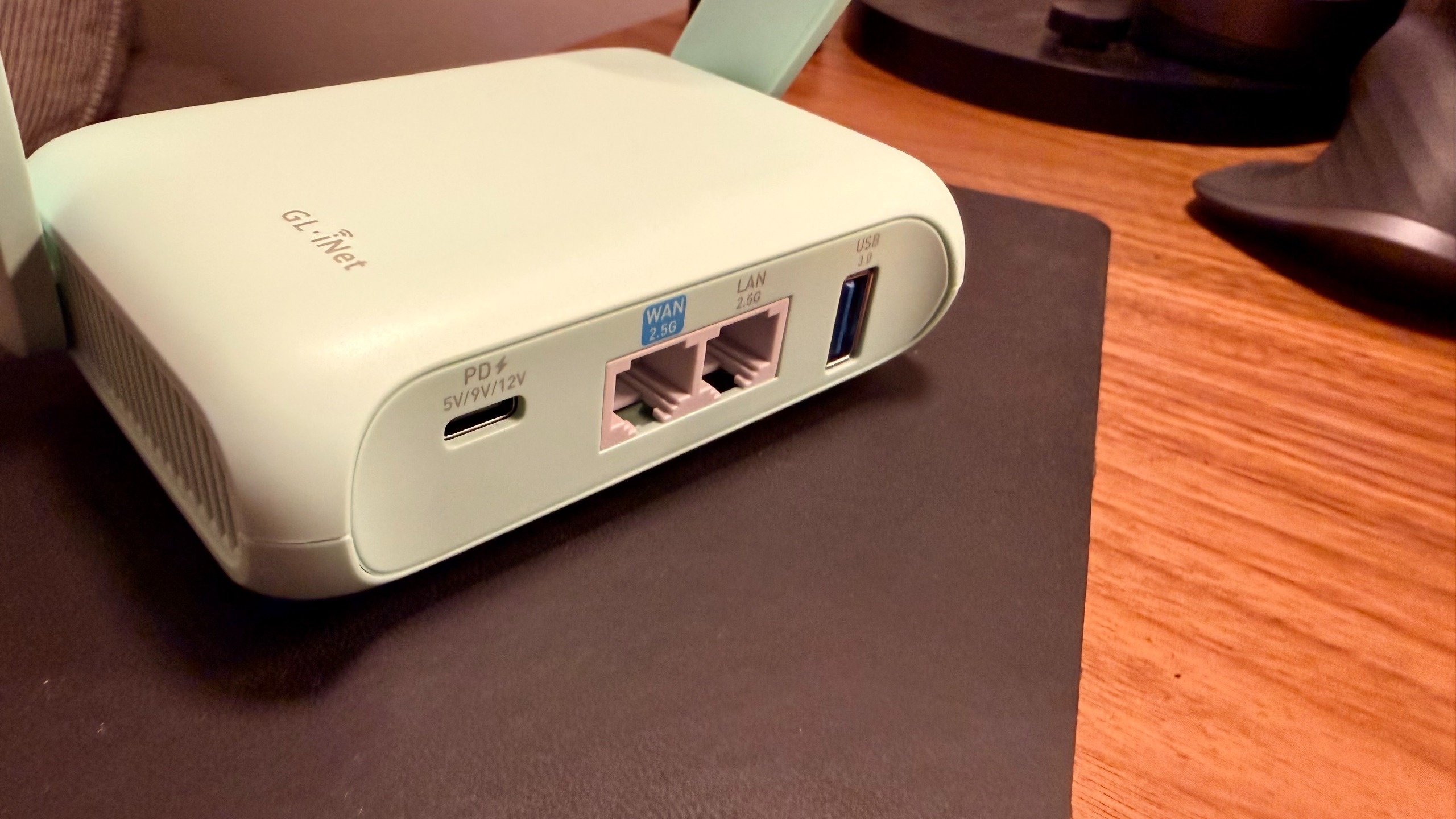
Having USB-C on even my travel router that I’m testing is super convenient. Further, it’s nice to see two 2.5 GHz network ports, a USB 3.0 port (even though it is capped at a pretty slow speed), and two folding antennas that are satisfying enough to be near fidget-toy status.
GL.iNet Beryl 7: Design & Build Quality
Talking specifically about the build quality. While this is plasticky and the folding arms are fun to play with, it does feel like over a couple years, or even just some hard daily use, the arms could get pretty loose and won’t snap open quite as nicely.
I’m also wary of dropping this because it feels like a single drop could crack the entire shell. Cases are available for the device, and if you’re using it for business travel, I recommend picking one up.
Advertisement
With that being said, though, it is really nice to see little rubber feet on the bottom of the portable router, making it so that it’s not just the sound or experience of plastic sliding along whatever I decide to put this down on.
Moving to the ports, they feel pretty well built. Cables snap in pretty easily and feel like they’re a tight connection, and I appreciate the layout and spacing between all the ports.
It makes more sense to spread out even just these four ports than it does to have them all crammed together for a look of minimalism. Having them spread out a little bit on the back side of this unit makes more sense from just a usability standpoint.
Advertisement
GL.iNet Beryl 7: In use
(Image credit: Collin Probst // Future)
I brought this with me on a few different planned trips, and then it’s come in handy at other times as well.
The first trip I brought it on was a quick little family trip. Knowing that we were going to stop at a hotel on the drive and how insane it was to get everything set up for just a few hours in a hotel and then continue driving the next day, zero part of me wanted to spend time connecting my devices to the hotel Wi-Fi. I also needed to spend time setting up pack-and-plays and getting everything squared away.
I made sure to bring this travel router to try out what this would look like in real time. I already had all the devices programmed and ready to go ahead of time to the network I had set on the Beryl 7.
When we got to the hotel, I had to connect one single device to the hotel Wi-Fi, and then I was able to broadcast that signal to all of the devices. It was stable enough for 5 iPads, a laptop, and a couple of phones, and therefore earned its place in my bag for the next trip I went on.
Advertisement
The next trip I went on was a quick work trip where we stayed at an Airbnb. I knew I’d be working pretty heavily, and I did not want to have to deal with potentially sketchy Wi-Fi, connecting to an unknown source, and then again having to connect all the devices I travel with.
On this trip specifically, I had two laptops, two iPads, and my phone, just for my own devices, let alone my team that I helped support technology-wise. I brought the Barrel 7 so that I could connect one device and then broadcast my own network, or at least that was the plan. What I ended up actually doing was connecting directly to an Ethernet port and not even having to connect and then broadcast via Wi-Fi.
One thing that I wish I would have done on that trip is I wish I would have set up the VPN earlier on my Beryl 7. I was able to do it during the trip, realizing how handy it would have been to do ahead of time, but I ended up needing to remote into my network rack back at the office.
While I can do that through VPN connections on my laptop, having one on this portable router, for some reason, just feels so much easier because then I can connect quickly on my iPad as well without having to toggle through things. I can just know that anytime I connect to this router, or if anybody else needs to connect to it, they can all be on the same VPN.
Advertisement
Personally, for me, it was just to change some settings and prep some things for the upcoming week. But, I could see this being super helpful for those who have Home Lab servers that need troubleshooting or other things like that. Further, if you have a work VPN that you need to be connected to, check with your employer.
Potentially, this could be a great option for you to not have to connect several devices, but you can connect one. For some work, that may be a great option. But, one thing to keep in mind is the speed limitations if you are choosing to use VPN. Moving things around on the network that you’re connected to should be fine, but pulling files through the VPN to your device or vice versa will feel very slow.
GL.iNet Beryl 7: Final verdict
(Image credit: Collin Probst // Future)
Whether you’re working out of a coffee shop and don’t want to connect multiple devices, or you have a secure VPN you need quick access to on any device you’re bringing. If you simply want to be able to connect to a Wi-Fi network and turn it into a wired network, or take a wired network and turn it into a wireless signal, a little travel router like this can make things a lot easier.
Advertisement
Or perhaps you’re like me, and you’re starting to learn more and more about how scary network traffic can be, and you want to make sure that you’re never connecting directly to a sketchy Wi-Fi. That’s a great first step, and utilizing something like this and a VPN to help scatter your traffic may be a spectacular solution for you.
If you’re looking for more networking capabilities, more features, and more power, make sure to check out GL.iNet for some of their other spectacular options, or keep an eye out for more reviews coming.
Before you can use the upgraded Clean Up, your iPhone needs iOS 27. If you’ve already installed the update, the next step is to enable Apple Intelligence if it’s not already. That means you need an iPhone 15 Pro or later. If you have an older iPhone, you won’t be able to take advantage of this feature.
Advertisement
Removing objects from your photos with Clean Up
Filipe Espósito for Engadget
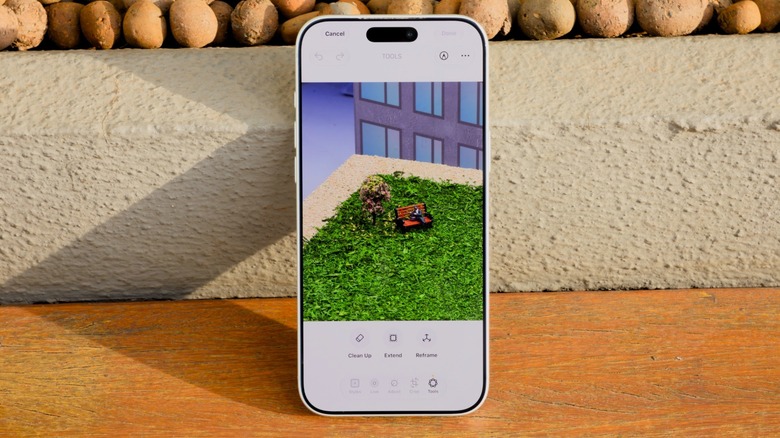
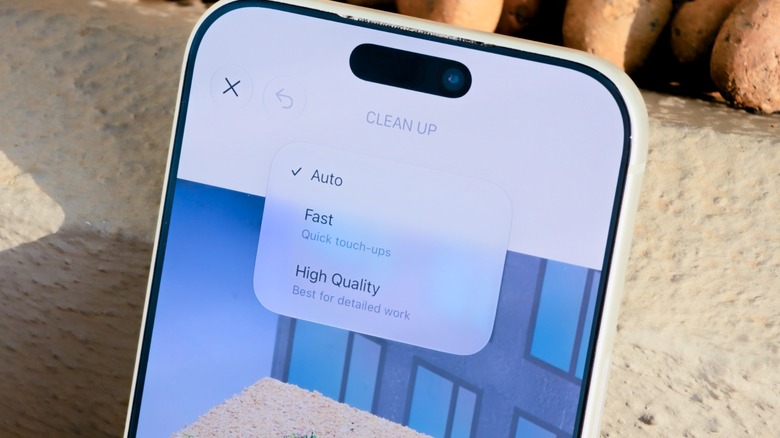
If you’ve used Clean Up before, you’ll know where to find it in iOS 27. The difference is that it now has some extra controls. To start, choose a photo you want to adjust in the Photos app and tap the Edit button at the bottom. Select Tools and choose Clean Up. You’ll see an Auto button at the top, which lets you change the processing type. Leave this set to Auto to have your phone choose between the other two modes depending on how complex the image is.
Fast retouches your photos with a smaller AI model. It gets the job done much faster, but it’s not ideal for more complex retouching. Say you have a photo of a landscape and you want to remove a trash can in the background. Or maybe you need to hide the wiring on the street lights. These are the kinds of edits that the Quick model is most likely to handle well.
But where Apple’s Clean Up feature has always struggled is with more complex edits. When there are a bunch of people behind you ruining your selfie, that’s where the High Quality option comes in. More advanced AI models can better understand the context of an image. But this improved processing comes at the cost of taking longer and using more battery.
Filipe Espósito for Engadget
Clean Up often tries to recognize unknown objects that you’ll want to remove from your photo. This doesn’t always work as it should, so it’s more accurate to circle what you want to remove.
Advertisement
Extending and reframing photos
Filipe Espósito for Engadget
For other cases where a photo didn’t come out like you intended, iOS 27 introduces two extra photo-editing features: Extend and Reframe. Extend uses AI to expand the area around your photo. Imagine you took a selfie, but it’s too close to your face. Extend can fix this by understanding the context to generate more of the image around it, filling in what’s already in the photo. Just pinch to zoom out as much as you want. It may take a while before you see the results, but that’s normal.
Reframe is different: it changes the perspective and angle from which you originally took the photo. For example, maybe you weren’t looking at the camera when the picture was taken. Reframe lets you change that without retaking the photo. The results are hit or miss, though. Some photos appear natural. Others end up looking like AI slop, with the model hallucinating objects or even people who weren’t originally there. It’s worth a try if you really don’t like the original photo, but don’t get your hopes up. Improving your smartphone photography in the first place should have better results.
Artificial intelligence has solved a major mathematics problem, but credit for the accomplishment is murky.
Onurdongel/Getty Images
OpenAI announced today that it has found a solution to the Navier-Stokes problem, one of the longest-standing puzzles in mathematics. It’s a major accomplishment, but the news has been marred by a debate over whether the company acted based on unpublished research from other parties. Additionally, OpenAI has been accused of attempting to influence who will receive credit for the achievement in publication.
Advertisement
The Navier-Stokes problem
First, some background. The Millennium Prize Problems are a group of seven complex questions established by the Clay Mathematics Institute in 2000. The organization is offering a reward of $1 million for solutions to each of these questions, all of which have stymied mathematicians for decades, if not centuries. Since the prize’s creation, only one of the other problems from the collection had previously been solved.
The Navier-Stokes problem centers on fluid dynamics, the rules for analyzing the behavior of both liquids and gasses. The angle that had been posed to mathematicians, in extreme layperson terms, is whether there are any edge cases where the original set of Navier-Stokes equations lead to results that cannot happen in reality.
Having a solution to a second Millennium Prize Problem is a massive accomplishment when it comes to applying artificial intelligence and large language models to solving some of the most perplexing quandaries in mathematics. However, the use of tools made by rival AI businesses in developing those solutions has created friction in the field regarding who gets to claim responsibility for the work and how.
Advertisement
The allegations
Tristan Buckmaster, a mathematician at New York University, and Levent Alpöge, a researcher employed at Anthropic but working in a personal capacity, had been developing their own solution and made use of multiple different LLMs in their efforts, including Anthropic Claude, OpenAI’s Codex tool and its Astra frontier model. According to a statement by Buckmaster, OpenAI may have doubled down on its efforts regarding Navier-Stokes after learning that a team including rival Anthropic was close to a solution. He questioned whether OpenAI had leveraged the work he and his colleague had done with Codex to obtain its own breakthrough.
“I asked whether the model had been trained on, or had access to, our sessions in Codex, into which we had been putting all our drafts for the whole of this project. I was told the model did not look up user data. I asked again, about training, and I did not get an answer,” the statement reads.
Buckmaster then said he spoke with Sebastien Bubeck, a mathematician and AI researcher at OpenAI, and another unnamed party and was offered two options for claiming credit for the work. One was to publish a partial development, with OpenAI to publish its Navier-Stokes solution the following day. The other was to write a solo paper that credited the use of an OpenAI LLM in the Navier-Stokes solution without the inclusion of Alpöge’s name. Buckmaster said he declined both proposals.
Advertisement
Both Bubeck and OpenAI CEO Sam Altman have posted their versions of events to social media in response, with Bubeck specifically refuting the claim that he asked for Alpöge’s name to be removed from a paper. The announcement from OpenAI also stated that the company did not plan to claim the $1 million prize for its solution.
Your average wind turbine has a far lengthier lifespan than the average bird, and yet it’s more than capable of cutting the bird’s life even shorter. Estimates for the United States alone say that wind turbines kill anywhere between a couple hundred thousand and over a million birds a year. It’s fair to assume that wind farms in other countries face similar challenges. Recently, however, there are real efforts to reduce these numbers, and at a handful of these sites, researchers have already watched it happen.
The oldest example is Altamont Pass, a run of grassland hills situated east of San Francisco where roughly 5,400 turbines went up starting in the 1960s. While these hills receive plenty of wind, they’re also famous for being one of the densest golden eagle nesting areas in North America. Enough birds have died here that environmental groups actually sued Alameda County. A 2007 settlement then committed the wind companies to halving turbine deaths among four raptor species. Since then, operators have pulled out many smaller individual turbines researchers had flagged as the worst killers and replaced them, project by project, with a few dozen larger ones that were placed more carefully.
Subsequently, ICF International, the consultancy Alameda County hired to count carcasses under those turbines, reported that the fatalities among those four species went down by roughly half. From this, the rest of the industry realized that the deadliest thing about a turbine is usually where somebody chose to put it up. But there are other factors, too.
Advertisement
Painting the blades to make them more visible to birds
But what if you can’t really move a turbine or replace it, simply because it’s expensive or because they are absolutely necessary? In that case, it becomes important to understand why birds — especially ones known for having incredibly sharp eyesight — keep crashing into these at all. A researcher at England’s University of Birmingham explains that large-eyed birds actually carry a blind patch above their heads. Their eyes are typically glued downward as they spend hours scanning the ground for prey. Things get worse for them when turbine blades are painted white or pale grey, a deliberate design choice to get the machines to vanish against the sky for nearby residents. It’s a case of design prioritizing people rather than wildlife, much like the serrated edges some wind turbine blades carry to soften their whooshing noise. Once these blades start spinning, they turn into a single translucent smear, effectively going invisible to birds.
Advertisement
At a wind farm in Smøla, a wind farm on an island off Norway, a team from the Norwegian Institute for Nature Research decided to fix this problem. Back in 2013, they painted one of three blades black on four turbines while leaving four neighbors untouched. Annual deaths fell a whopping 71.9% at the painted ones.
That said, the same trick does not apply everywhere. Dutch researchers tried to do something similar in 2022, when they painted a single blade black on seven of 14 monitored turbines at Eemshaven. It made little difference, proving that what saves birds at one wind farm can do nothing at the next one.
Advertisement
Teaching a turbine to notice a bird
While paint could genuinely help reduce the problem at a lot of wind farms, it’s not exactly a smart solution that can adapt to its surroundings. And that’s a gap a Colorado firm called Boulder Imaging aims to address, with a system that watches whether a bird is closing in. The system is called IdentiFlight, and it puts camera towers around a wind farm, tracking anything flying within a kilometer. Individual turbines then get an order to stop when a flagged species looks likely to reach the blades, much like how wind turbines already stop themselves in extreme weather. Researchers from The Peregrine Fund, a raptor conservation group, put this tech to the test by comparing two farms about nine miles away from each other in Wyoming. They found the equipped farm saw a notable 82% drop in eagle deaths.
Another route, one that’s more economical too since it doesn’t involve stopping windmills, is speakers. Spanish firm Liquen has come up with a system called DTBird that spots birds the same way, but rather than bringing things to a halt, simply fires off warning sounds from the tower. This system was successful in cutting down the odds of certain birds approaching the blades by 20 to 30% across two American wind farms that the Renewable Energy Wildlife Institute studied. In the end, it’s clear that with the right method for the place and the right species of bird can work wonders. The only thing remaining is a global fix.
Girl Scout cookie season doesn’t start until January, but when it arrives, two new cookies will appeal to groups who likely haven’t been able to indulge in Girl Scout cookies before: people with dietary restrictions, and dogs.
Sparkables, a crunchy, allergy-friendly oatmeal cookie with chocolate chips and rainbow sprinkles, is formulated for those who are nut-free, gluten-free and vegan. They were developed with Partake Foods, and include whole-grain oats, organic brown sugar, semisweet chocolate chips, cassava flour, oat flour, white rice flour and more. See the full ingredient list online.
Sparkables are meant to include people with food allergies in Girl Scout cookie season.Girl Scouts of the USA
Patch Pals, a soft-baked, blueberry muffin-flavored treat specifically for pups, was developed with the pet-product company Bark. The treats, which feature four designs representing iconic Girl Scout patches, are for dogs who weigh more than 5 pounds and are older than 6 months. Nutritional info and other details available online.
Sparkables and Patch Pals will only be sold online, so you can’t order them from Girl Scouts outside your local store. The new varieties will be available for shipping when Girl Scout cookie season launches on Jan. 12. You can sign up now to receive a reminder when that date comes.
CNET editor Gael Fashingbauer Cooper, a journalist and pop-culture junkie, is co-author of “Whatever Happened to Pudding Pops? The Lost Toys, Tastes and Trends of the ’70s and ’80s,” as well as “The Totally Sweet ’90s.” She’s been a journalist since 1989, working at Mpls.St.Paul Magazine, Twin Cities Sidewalk, the Minneapolis Star Tribune, and NBC News Digital. She’s Gen X in birthdate, word and deed. If Marathon candy bars ever come back, she’ll be first in line.
See full bio
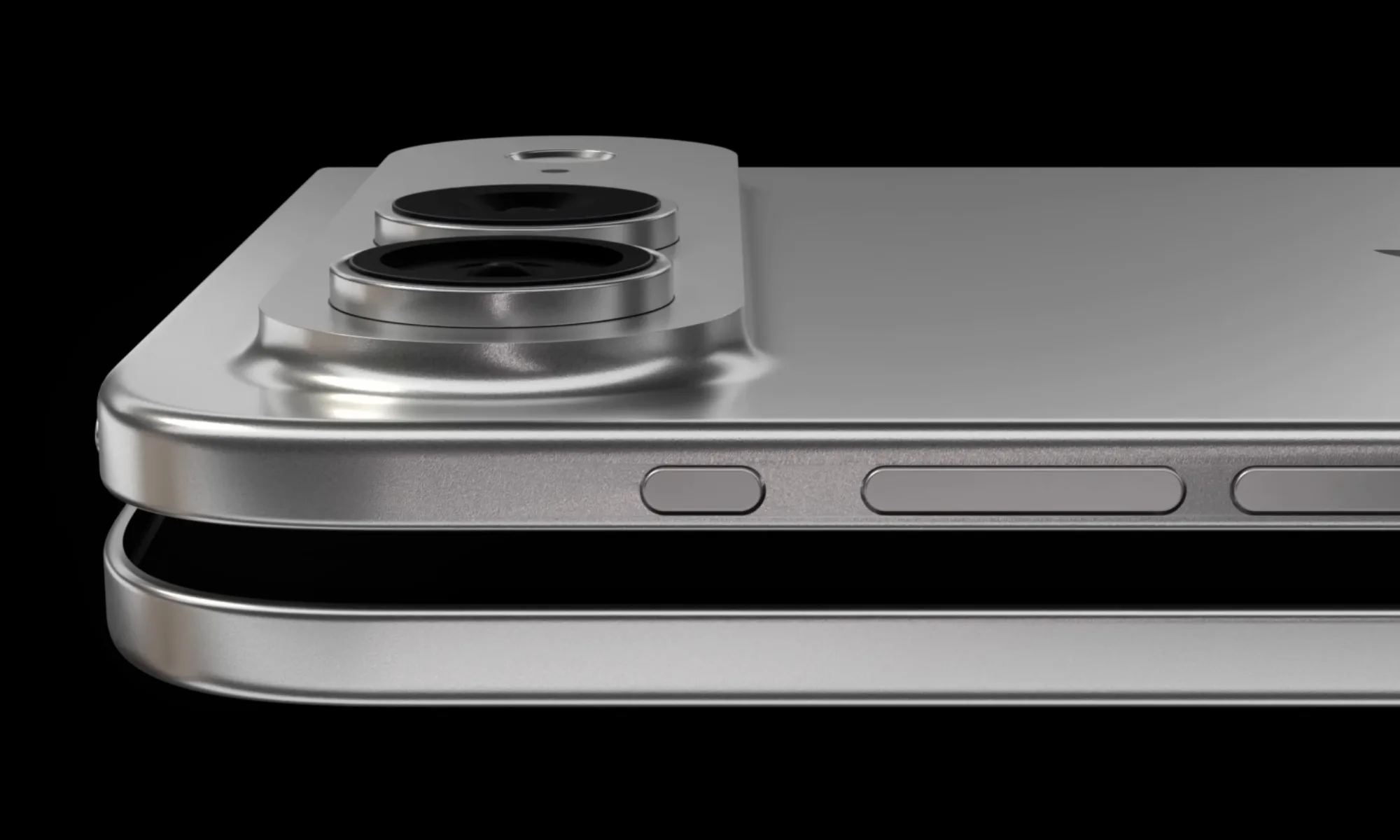
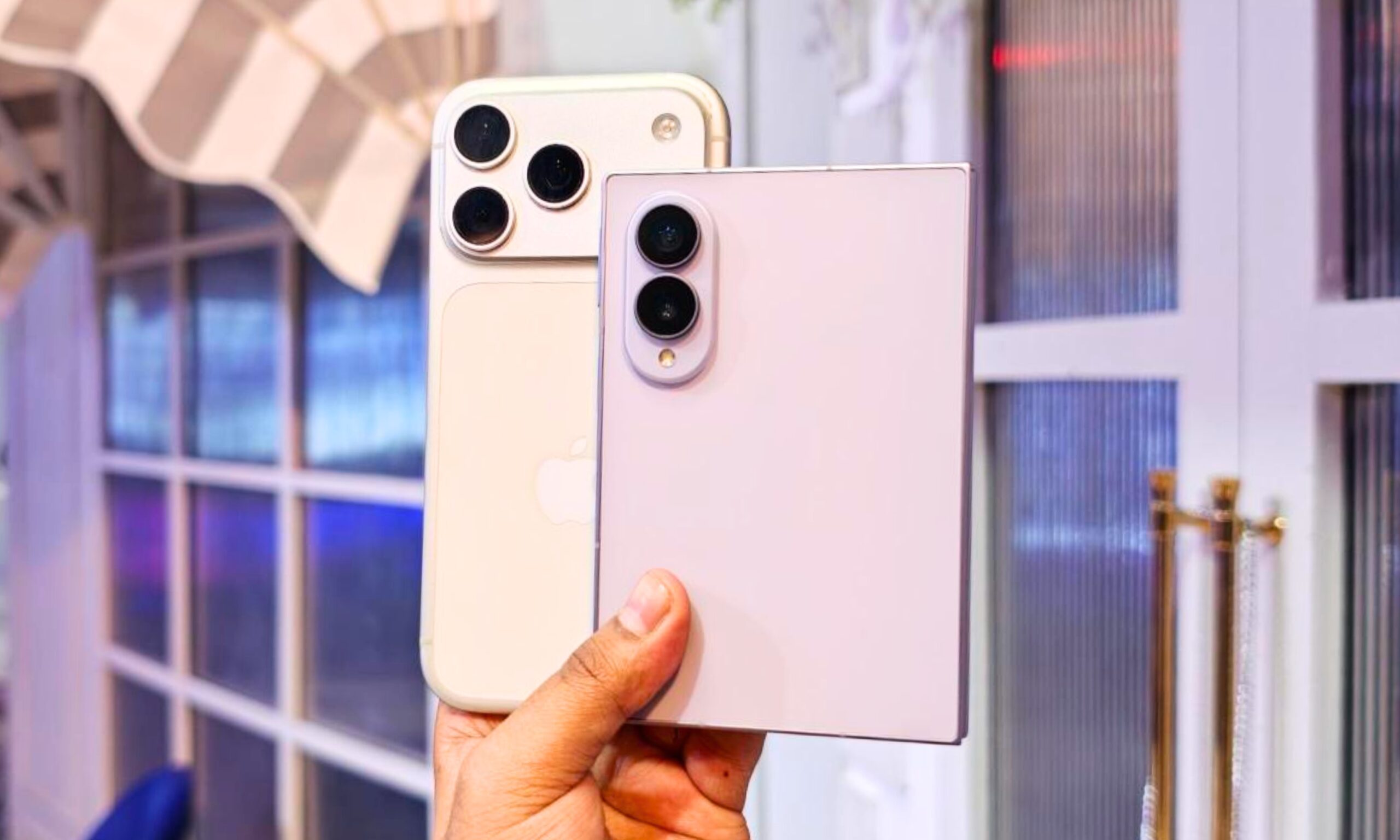
Apple’s first foldable iPhone is almost here, and just hours ahead of the launch, we may finally have a better idea of how much it will cost. According to a new Bloomberg report, Apple has recently discussed pricing the device as high as $2,199, while higher-storage versions could get close to the $3,000 mark
There is no getting around it. $2,199 is a lot of money for a smartphone. However, the figure is also a little lower than some of the estimates we have been hearing over the past few months, which placed Apple’s first foldable somewhere around $2,300 to $2,500.
Front Page Tech
First-generation foldables have never been cheap
Apple entering the foldable market at $2,199 sounds extreme, but first-generation foldables have never been cheap. Samsung’s original Galaxy Fold launched in the U.S. for $1,980 back in 2019.
Samsung has had several generations to refine the formula since then. Its new Galaxy Z Fold 8 starts at $1,899, despite moving to the shorter and wider form factor that has helped make this generation particularly well received.
Nadeem Sarwar / DigitalTrends
Apple, meanwhile, is launching an entirely new iPhone category, and the timing is not exactly helping. Bloomberg says the company initially wanted to keep the starting price at $1,999, but the ongoing memory shortage reportedly pushed costs beyond its original targets.
So while $2,199 is still a huge amount of money for a phone, there is some context behind it. Apple is entering a category that has always commanded high prices, while also dealing with unusually expensive RAM and NAND storage at launch.
Advertisement
Getting one could be the bigger problem
The price may not be the only obstacle at launch. Ming-Chi Kuo previously estimated that Apple would have just 500,000 to 1 million foldable iPhones ready during the third quarter, despite plans to build around 7 million to 8 million units during the second half of 2026.
Kuo also previously pointed to a price of around $2,300 to $2,500, so Bloomberg’s latest figure would actually put the starting price below those expectations.
Front Page Tech
Apple also appears pretty confident in its foldable plans. Bloomberg previously reported that a second-generation model, codenamed V78, is already being lined up for 2027. The first one has not even launched yet, so Apple clearly seems to be treating foldables as something it wants to stick with rather than a one-year experiment.
We should find out soon whether $2,199 is the number Apple finally settles on. The foldable iPhone is expected to debut on September 9, but Apple has not confirmed the price yet.
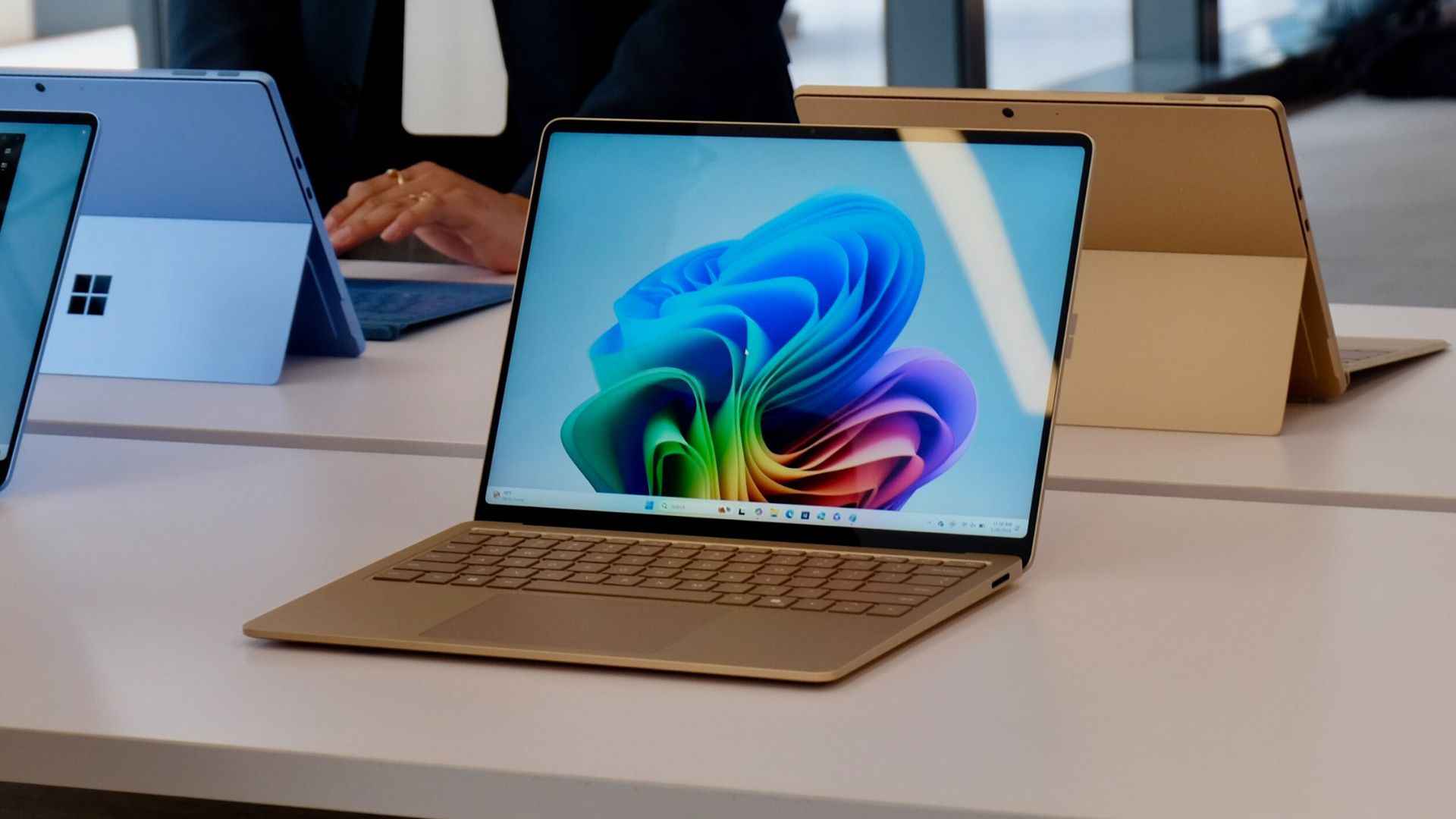
Microsoft is working on performance improvements for Windows 11 that could make the operating system boot faster and feel more responsive. The company says it has already made “significant gains” in startup speeds, although the changes aren’t available to Windows Insiders just yet.
Speaking at IFA 2026, Mark Linton, VP of Windows & Devices at Microsoft, said the company has been improving both boot times and Windows Hello responsiveness. “We’ve made significant gains on things like boot time, Windows Hello responsiveness,” Linton told Windows Latest.
That could mean less time waiting at the lock screen before you can actually start using your PC. Windows Hello is Microsoft’s biometric authentication system, commonly using facial recognition through a compatible infrared webcam, so faster responsiveness should make signing into Windows feel snappier too.
There’s a catch, though: Microsoft hasn’t started testing these particular improvements publicly. The work is currently being refined in internal builds, so there’s no indication yet of when Windows Insiders or the wider Windows 11 user base will get access.
Advertisement
Microsoft’s ambitions also extend beyond simply getting Windows to start faster. The company is working on broader performance improvements designed to make menus more responsive and apps load more quickly. Some of that work is already appearing in Windows 11, including a CPU-boosting feature called Low Latency Profile.
Advertisement
The push could be particularly useful for the growing number of Windows 11 laptops with 8GB of RAM. Rising memory prices have made lower-memory configurations more relevant again, and Microsoft says it is specifically working to make Windows 11 perform better on machines with 8GB.
“We’re continuing to improve on the fundamentals,” Linton said, adding that Microsoft is “optimizing so that 8 gig of RAM runs great on machines as well.”
Advertisement
Microsoft hasn’t put a figure on how much faster Windows 11 could become, so it’s too early to know whether these improvements will be immediately noticeable. Still, with faster startup, quicker Windows Hello authentication and wider performance optimisations in development, Microsoft appears to be putting more focus on making Windows 11 feel faster rather than simply adding more features.
We spend hours testing every product or service we review, so you can be sure you’re buying the best. Find out more about how we test.
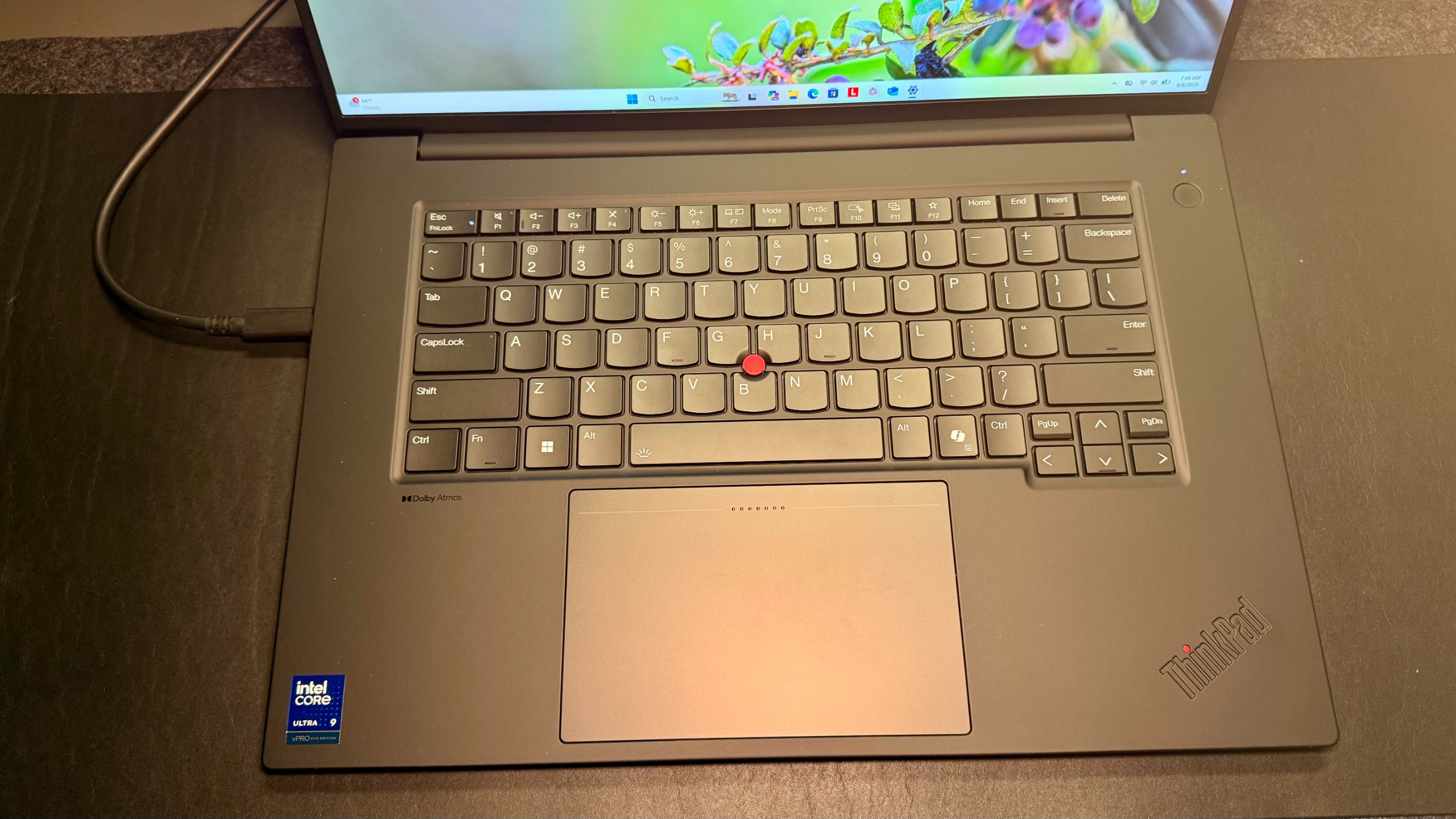
The Lenovo ThinkPad T1g Gen 8 is a powerhouse and a semi-portable shell. It takes on the power of the beloved X1 Extreme, pairing an ultra 9 processor with quick memory, Thunderbolt 5, and decent storage. It’s designed for engineers, creatives, and other power users who need a machine that can do it all while still having that hint of portability.
I think of this quite like the 16-inch MacBook Pro. It’s the bigger choice in the line-up, but you would get it because you want the power and the ability, not necessarily the portability. The people who would get this laptop are the people who need the ports as well.
Advertisement
That’s one of the reasons why I’m thrilled to see USB-A still, though it is just one, which is all that I would want. USB-C, Thunderbolt, an SD card reader, and an HDMI port. It honestly has every port I wish my MacBook Pro had, even as a guy who loves the MacBook Pro.
My tested version of this laptop has an Intel Core i9-285H, an IPX5070 with 8 GB, 32 GB of RAM, and a 1 TB SSD. It’s pretty hefty, and it does the job, that’s for sure. The fact that it has a dedicated GPU shows that this thing is meant to work. The screen is also WQUXGA (3840×2400) with an 800-nit IPS panel.
Advertisement
You can fully inspect this thing out with a loaded Ultra 9 5070 with 64 GB and 4 TB of SSD. That will run you just over $4,000. My unit is not fully spec’d. It was pretty close and comes in at about $3,400 to $3,700, depending on how I look at it. If you get a base level with an entry point of an Intel Ultra Core 7 RTX 5060 and a terabyte of SSD, you can get it for just under $1,700 at $1,688.
So, much like most of Lenovo’s line-up, you can expect this thing to go up and down the price chain however far you want. What’s important to recognize is that they have laptops all across the spectrum for what you’re wanting.
Sign up to the TechRadar Pro newsletter to get all the top news, opinion, features and guidance your business needs to succeed!
Advertisement
Lenovo ThinkPad T1g Gen 8: Unboxing and First Impressions
(Image credit: Collin Probst // Future)
Right off the bat, this is a super sharp machine. I’m a big fan of Lenovo laptops for how they always look uniform yet still have a little taste of differences.
When it comes to being uniform, it still has the matte black that I love, the touchpoint, a generous trackpad, a very comfortable keyboard, a great screen, a physical shutter on the camera, spectacular ports, and all-around really standard and clean branding.
The things that are different, though, are that, unlike a lot of the other models that I’ve tested, this doesn’t have a left and right-click button at the top of the trackpad that’s meant to be used with touchpoint.
It does still have a little bump, though, so that if you know that it’s there, it’s still accessible. I tested it, and the right-click still works just fine. It’s just not a physical button; it’s built into the touchpad.
Advertisement
Outside of that, this still looks super sharp. While it is bigger than some of the other models, it’s by no means too cumbersome to carry. I would happily carry this around every day in my backpack, and it fits even at 16 inches in most standard-size or slightly bigger backpacks. It’s a pretty tight fit in something like a Bellroy Daily Pack, but in my beloved Nomadic or TomToc bags, this fits without any problem.
In the box comes the standard charger and always great packaging to make sure that the laptop stays safe while in transit or in the store. Admittedly, I rarely use the chargers that come with these devices personally, but that’s because I usually opt for more efficient and more useful chargers from Anker, Ugreen, or even Nomad.
For something this size, though, I’ll probably continue to use one of my bigger Anker chargers that have a few ports, phenomenal output, and even Bluetooth capabilities to give me readouts. I can see where my power is going for each port on the plug.
Advertisement
Lenovo ThinkPad T1 Gen 8: Design & Build Quality
As previously mentioned, this is an absolutely spectacular build device. If you’re more familiar with Apple products, this does feel quite a bit like the MacBook Pro. I feel bad constantly comparing it to that, but the reality is that the MacBook Pro is a little more distinguishable and more known in the popular field.
What’s unlike the MacBook Pro, though, is that this also features a trackpoint, a privacy shutter, human presence detection, upgradable memory, and that USB-A port that I wish my MacBook Pro had.
It’s no secret that this is a big machine. It’s a 16-inch powerhouse, so don’t expect it to be as light as a feather or as light as some of Lenovo’s carbon models. That doesn’t mean that it’s wildly uncomfortable either.
Yes, it’s a big laptop, but for its size, it’s so barely portable and relatively thin and light. Especially when you consider that you can get this spec’d out with a tandem OLED 120 Hz screen, massive amounts of storage, 64 GB of RAM, and a dedicated graphics card. That’s pretty insane all around.
Advertisement
Lenovo ThinkPad T1g Gen 8: In use
(Image credit: Collin Probst // Future)
I’ve had this laptop in rotation for my team and myself for the last 163 days as I write this paragraph. Throughout the time, I’ve used it for virtual meetings, projects in Notion, a lot of writing, and emails.
I’m taking over the world one AI at a time, trying to teach myself things through Claude and GPT. I’ve taught myself how to code. I’ve done a lot of website work. I’ve sent a lot of Slack messages and even watched a fair number of tutorials on YouTube.
While working on project management, this executive screen fits a good amount of data, especially with the higher resolution. I can fit quite a bit on this screen. When it comes to basic photo editing, the screen is still pretty sharp and fairly color accurate. It may not be the best photo editing laptop I’ve ever used, but for most this would be just fine.
Advertisement
This machine is powerful enough that I can jump in and run quite a bit of my workload on it without even feeling like it’s slowing down at all. I’ve done a ton of work building out Notion workers utilizing this laptop specifically.
I’ve done a lot of work in VS Code, GPT, Claude, and Notion, running some pretty heavy workflows to get the sinks working the way I wanted them to. It all happened without any problems on this machine, thanks to its robust processor, RAM, and storage.
Beyond that, typing has been an absolute dream on this. I have always said, and probably will continue to say, that Lenovo laptops, specifically the ThinkPad variant, have some of the best keyboards on the market, perhaps ever. Even throughout all their changes over the years, they continue to have a spectacular keyboard.
The best way I can describe this laptop is that it is for people who need a professional machine for workloads to match. These people aren’t the ones that are just working on documents or emails or quick office tasks like that.
Advertisement
It’s the people who need to be able to jump into any kind of work at any time. They’re using a ton of processing power, and they need a lot of ports. They’re the most likely to be more tech-savvy individuals who bounce in and out of what they do.
Lenovo ThinkPad T1g Gen 8: Final verdict
(Image credit: Collin Probst // Future)
All in all, this laptop has been wonderful to use. I have most appreciated the parts and the reliability of this machine. Being able to plug in any device I may need without having to carry a dongle is peace of mind that I do not take for granted.
Also, having enough headroom in your powertrain to take care of all the projects in one’s own busy days is a superpower that many would appreciate.
Advertisement
If you’re the generalist or the specialist of many, if you’re into systems, IT, or you’re just the kind of guy who always has a thousand projects he’s juggling, then this is absolutely a laptop you should consider.
For most people, this would be overkill for them. In my technical world, people I work with would absolutely benefit from this kind of machine. It has the power to run bigger programs and the storage to manage data if that’s part of what they’re doing.
It has ports to jump in and out of whatever they are solving, and it’s portable enough to carry around from place to place (even though they’re not going want to walk around holding this in their hand anytime soon). It’s possible, but it’s just not comfortable.
It’s sharp, it’s sleek, it’s powerful, and it has ports. It’s expandable all around. Lenovo nailed it with this laptop.
Australia is proposing the “My Feed, My Way” initiative that would force social media platforms to let users over 16 turn off algorithmic recommendations and instead see only posts from people and creators they follow. Platforms that fail to comply could face fines of up to $79 million. CNBC reports: The legislation, which is being drafted and released Tuesday for targeted consultation, would require platforms to send notifications to new and existing users so they can choose their default feed. […] The measures, set to be introduced to the Parliament of Australia this year, will also require AI chatbots, online games and other digital services to take action to protect under-18s from addictive design features. “This is not about giving government control. It’s about giving people control. It’s about putting choice back into the hands of Australians online,” said Prime Minister Anthony at a press conference on Tuesday.
“This is sensible, pragmatic, practical reform. It gives users choice, and it will hold the big tech companies responsible for inaction.”

























































You must be logged in to post a comment Login