













Connect with us

Tech

Seattle keeps No. 2 spot in closely watched tech talent ranking, with warning signs

Published

on

Seattle remains a beacon for tech talent, ranking No. 2 in CBRE’s annual report. (GeekWire File Photo / Kevin Lisota)

The Seattle region outranked New York, Austin, Boston and other tech hubs, trailing only the Bay Area, in an annual tech talent scorecard from commercial real estate firm CBRE that weighs factors such as tech worker concentration, wages, education levels and real estate costs.

You may have seen headlines this week that New York overtook the Bay Area for the first time in the CBRE rankings. That was based on a subset of the data: a straight head count in each market. New York’s 394,300 tech workers topped the Bay Area’s 375,730. Seattle ranks seventh on that specific list, with 213,010 tech workers across the region.

But in the broader scorecard, Seattle held onto the No. 2 spot (which it also occupied last year), thanks to the density of its tech workforce, one of the largest concentrations of AI talent in North America, and the second-highest tech wages on the continent.

The market-by-market workforce figures in the report run through 2025, so this year’s layoffs aren’t reflected in the rankings. CBRE does flag the trend nationally: the tech industry accounted for a record 31% of all U.S. job cuts through June, up from 13% for all of last year.

Some of the Seattle region’s specific strengths:

Advertisement

The AI workforce is deep. Seattle is home to 41,591 workers with AI skills, third most in North America, behind the Bay Area and New York. One in five of the region’s tech workers now has AI skills — a higher share than anywhere except the Bay Area.

Tech is a bigger part of the economy here. Tech jobs make up 10.2% of all employment in the metro area, among the top five markets and nearly double the 5.5% average across the 50 markets studied in the CBRE report.

Wages are in a tier of their own. Seattle’s average wage for tech workers at tech companies was $190,050 in 2024, second to the Bay Area’s $211,048, and nearly $50,000 above third-place Boston.

The workforce grew while the Bay Area’s shrank. Seattle added 24,590 tech jobs from 2022 to 2025, a 13.1% increase and the fifth-largest gain of any market. The Bay Area lost 23,900 jobs over the same time period.

Advertisement

However, the report also points to warning signs:

Many offices are sitting empty. The Seattle metro area’s office vacancy rate hit 28.6% in the fourth quarter of 2025 — the highest of the 50 markets in the report. That’s despite 1.9 million square feet leased by AI companies across the region since 2023, according to CBRE.

Costs are near the top. Seattle is the third-most-expensive place to run a 500-person tech company, at $73.9 million a year in wages and office rent, behind the Bay Area at $90.6 million and slightly behind New York, which edged Seattle by about $24,000.

Seattle and the San Francisco Bay Area are the only two markets CBRE rates “exceptional” for software engineering talent. They’re also the two most expensive. (CBRE Graphic, Click to Enlarge, and see full report here.)

Young workers are going elsewhere. Seattle’s 20-something population fell between 2019 and 2024, even as its share of 30-somethings grew to the highest of any market in the report. The region is drawing mid-career but not entry-level talent, which risks creating a thinner pipeline over time.

One counterweight to the pipeline concern: the University of Washington ranks fifth among U.S. universities for its AI program, according to CBRE’s analysis of U.S. News & World Report rankings — the only school outside the Bay Area, Boston and Pittsburgh in the top five.

Advertisement

Access the full CBRE Scoring Tech Talent 2026 report here.

Source link

Continue Reading
Click to comment

You must be logged in to post a comment Login

Leave a Reply

Tech

Game review: Investigate a haunted (?) ’90s PC in Seattle-made mystery adventure ‘Desktop Explorer’

Published

on

(Recurring Dream screenshot)

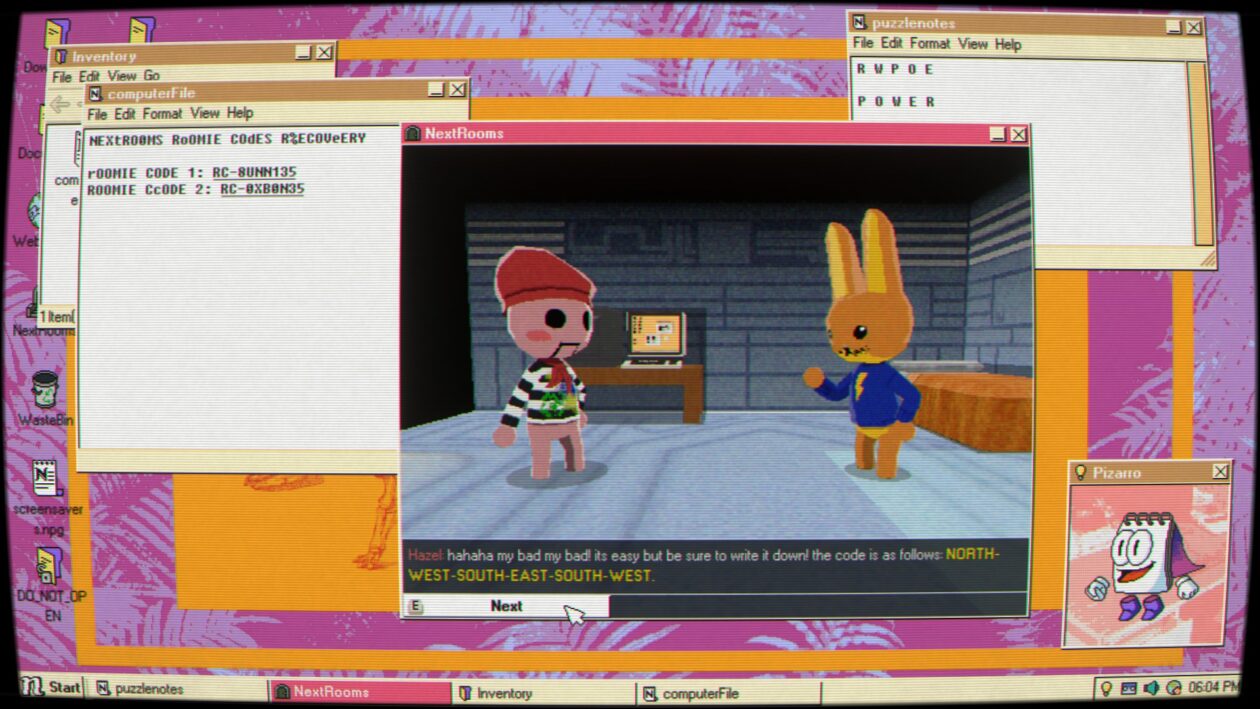
For the first hour or so, Desktop Explorer looks like a nostalgia project. The indie adventure game challenges the player to unravel a mystery by sorting through the files and programs on an old desktop computer.

Many of its puzzles are solved through clever usage of features and tools that will be immediately familiar to anyone who spent any amount of time with Windows 95.

On the other hand, many other puzzles in Desktop Explorer are too immediate and personal to be explained by an old OS on decaying hardware. Part of it comes from the fact that using someone else’s computer can feel like you’re crawling inside their brain, and this PC in particular has a glitchy virtual assistant that seems like it knows more than it should.

Maybe the computer’s actually haunted. Maybe it’s something else.

Desktop Explorer, now available for PC and Mac, is an indie adventure game developed by Recurring Dream, a Mexican-led studio based in Seattle, and co-published by Indienova and Redmond, Wash.-based Outersloth. Recurring Dream, formerly known as Crocodile Company, previously exhibited DE at the 2023 Seattle Indies Expo.

Advertisement
(Recurring Dream screenshot)

DE is a “screenlife” adventure game, in the spirit of earlier releases such as Emily is Away and Her Story. You never leave the protagonist’s perspective, who’s initially only known by her nickname “Guppy,” and she spends the entire game working on her uncle’s half-busted desktop PC. You only ever see Guppy herself through photos stored on the PC.

In August of 2012, Guppy inherits a computer from her uncle Hal, who’s just gone into the hospital for dementia treatment. The first time she boots the PC, she finds a message her uncle left behind that explains why he’s held onto it for so long. The PC used to belong to someone that Hal cared about, who’s since disappeared, and he was convinced that there’s still some information about her whereabouts on the computer. Guppy, who’s a lot more computer-literate than her uncle was, decides to pick up where her uncle left off.

The primary focus of your investigation is Desktop Explorer, an app found on the PC that comes with its own digital assistant. Desktop Explorer initially comes off like it might be a gamified teaching tool for new PC users, as its first couple of puzzles involve basic tasks like renaming and compressing files.

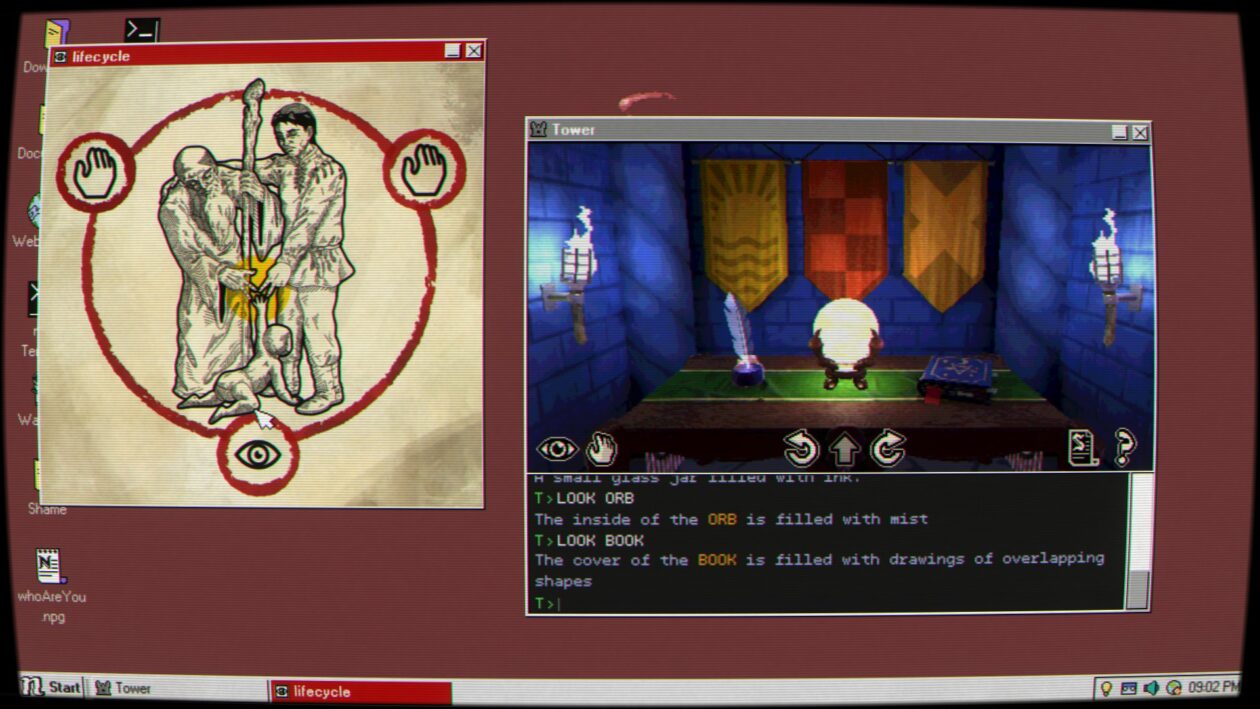
From there, DE‘s challenges rapidly get tougher and more abstract. Some require you to translate encoded messages or search for information via the cached files on the PC’s browser. For others, you need to edit an application’s source code, duplicate files, or change the date on the PC to match a specific point in time. While you can get a couple of hints in-game if you know where to look, Desktop Explorer is surprisingly challenging.

It can also be surprisingly creepy. While it never gets more intense than an average PG-13 thriller, there are a few genuine scares across Desktop Explorer’s 4- to 7-hour running time. Right from the start, it’s obvious there’s more going on inside this old PC than you’re initially allowed to see, and the closer you get to the truth, the more surreal it becomes.

Advertisement
(Recurring Dream screenshot)

Desktop Explorer sits at the center of an odd Venn diagram, between retro computer enthusiasts, people who enjoy mysteries, and the adventure-gaming community. It’s initially a nostalgic experience, but that’s a thin veneer over what becomes a sort of low-key psychological thriller.

As usual with this sort of game, the fun of it comes from being able to figure out its puzzles, which can be extraordinarily hit-and-miss. Some are clever, with just enough information to let you figure out the rest on your own, while others require you to make a big intuitive leap at some point or to have spent an unusual amount of time randomly clicking buttons on the desktop. One late-game puzzle involves looking up the browser history on the PC, which you’re never told how to do and which is never useful before or after that point.

(An accessibility note: I’m red-green color-blind. While Desktop Explorer has a number of puzzles that involve color-matching, there aren’t any options in place to tweak its palette. This is an increasing issue for modern video games, especially ones that were independently produced. DE isn’t the worst offender in that regard that I’ve played in recent memory, but there are a couple of parts of the game where I just had to brute-force a puzzle.)

Those mild issues aside, Desktop Explorer is a solid entry into the unique, narrow field of screenlife detective games. While not all of its puzzles are equally satisfying, it’s a short, memorable experience that rewards you for unconventional thinking. The appeal to nostalgia might get you in the door, but its unpredictability is what keeps you thinking about it until its end.

Desktop Explorer is out now for Windows PC and Mac via Steam for $17.99.

Advertisement

Source link

Continue Reading

Tech

Lenovo Coupon Codes: 15% Off in August 2026

Published

on

Lenovo is currently the biggest PC and laptop company in the world, and they just so happen to make some of our favorite laptops and PC peripherals. In fact, our list of the Best Laptops you can buy include a number of Lenovo devices that we’ve tested and fully recommend, ranging from high-end premium laptops to options for budget-minded shoppers. If you are looking to save a few bucks while shopping for a new Lenovo product, here are the Lenovo coupon codes and special offers you need to know about.

Score Weekly Tech Deals, Price Match Guarantee, and Free Shipping

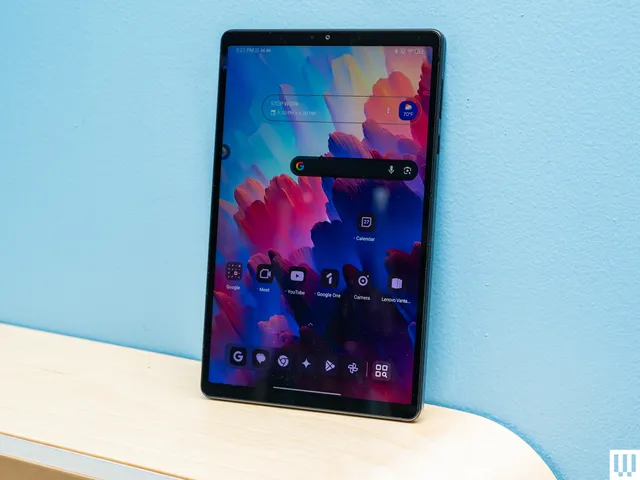
In addition to the deals listed above, Lenovo has a number of other current offers available when shopping through Lenovo.com. There are weekly deals on PCs and tech that include free shipping with no minimums. For certain products, you can even choose to buy online and pick up in-store at Best Buy. If you’re looking for more Lenovo recommendations, we’re big fans of the Lenovo Idea Tab Pro, an Android tablet that’s currently on our Best Tablets list. It’s currently discounted by 26%, bringing the price down to $280.

Lenovo is also offering price-matching on any comparable PC, including from many online retailers. That’s really helpful, as it’s not uncommon to see price discrepancies between different retailers.

  • Photograph: Julian Chokkattu

  • Photograph: Julian Chokkattu

Get Exclusive Savings With Lenovo Discount Programs

Lenovo does offer a fairly generous discount program for certain demographics as well. These include a 5% off Education, Healthcare, First Responder, and Senior (over 55) discount.

Advertisement

You can use this discount on anything you find at Lenovo.com, which includes a lot more than just Lenovo-branded laptops. For example, Lenovo sells one of our favorite laptop docking stations, the Kensington Triple Video Mobile Dock. Despite its tiny size, this tiny device can power up to three 1080p (or two 4K) displays simultaneously. It’s a great example of the wide diversity of products you can use these discounts and coupon codes on.

Back to School: 10% Off for Students at Lenovo

It’s that time of year again—summer is winding down and fall will soon follow, bringing Back-to-School season—which means stocking up on all the tech essentials you (or your child) need to succeed this school year. Lenovo has a robust discount system for students, with a 10% off Lenovo discount for students, along with “Weekly Deals” on student-specific PCs and related accessories. With the Lenovo student discount code, you also get free shipping (with no minimum), price match guarantee, My Lenovo Rewards for rewards towards every purchase, and Lenovo financing to make those big purchases more attainable. There are tons of sales on Lenovo products to make your budget stretch further, including deals on monitors, laptops, tablets, phones, and storage solutions.

Buy More Save More With Lenovo

If you’re looking to buy multiple devices, or are planning to make a big tech purchase soon, I’d recommend buying now to get more savings. Use Lenovo promo code BUYMORELENOVO at checkout to save $15 on purchases of $500-$750, $25 off purchases of $750-$1,000, save $40 on purchases of $1,000-$2,000, and get $100 off when you purchase something $2,000 or more. (Excludes clearance and workstation items.)

Get 35% Off the Lenovo Tab Pro

The Lenovo Idea Tab Pro is a perfect tablet for students, with a vibrant nearly-13 inch 3K touchscreen display which is perfect for every day tasks, like reading, studying, and streaming. It also has a MediaTek processor, 8GB memory, and 128GB storage for seamless multitasking with ample storage for apps and files. Plus, it has dual cameras for Zoom calls. Although the Lenovo Idea Tab Pro is specifically designed with students in mind, it’s versatile enough to be a great fit for a multitude of people wanting a reliable tablet with tons of extra features. Plus, it’s 35% off right now. There’s no better time to buy.

Advertisement
  • Photograph: Julian Chokkattu

  • Photograph: Julian Chokkattu

Students Get More Savings at Lenovo

We all know being a student is expensive, and made even harder when you need pricey tech to thrive in academia. One of the easiest ways to save big on tech at Lenovo is with a student discount. All you need to nab this student discount at Lenovo is to verify your student or employee verification with a valid .edu email address or through ID.me verification. Then, create a Lenovo Education account to unlock benefits for one year, where discounts are automatically applied to eligible products. Once you log in with the verified account, you’ll save 5% off sitewide with your verified Lenovo Education account, and discounts will be automatically applied to eligible products. That means you’ll get 5% off in cart year-round—plus, you’ll be able to unlock even deeper discounts during special promo periods.

Enjoy Perks When You Join My Lenovo Rewards

Lenovo has a My Lenovo Rewards system that can earn you points that can be spent on future purchases from Lenovo.com. Almost everything you buy gets you between 3% and 9% back in the form of reward points, and you can start redeeming points right after signing up for an account. 1,000 points is equal to $1 that you can spend on future purchases. On top of this, you’ll benefit from frequent sweepstakes, exclusive member-only savings, birthday rewards, free expedited delivery, and more. Sign up today—it’s free.

Lenovo Financing and Lease-to-Own Options

Lenovo uses Katapult to offer financing and lease-to-own options on its laptops. That might be useful if you’ve been eyeing one of Lenovo’s higher-end laptops. One of our favorite of these is the Lenovo Yoga 9i, a gorgeous 2-in-1 with a bright OLED screen and a luxurious design. This laptop is currently listed as one of our top recommendations for the Best Laptops and Best 2-in-1 Laptop.

Katapult allows you to buy now and pay over time, without charging late fees. If you put down a $45 initial payment, you can check out the laptop today. Katapult offers up to $3,500 in pre-approved leases and allows you to make minimum payments over time or buyout early.

Advertisement

Source link

Continue Reading

Tech

Golden Axe Swings From Arcade Cabinets to Paramount+ This September

Published

on

Golden Axe Paramount Plus
Arcade floors once filled with the clatter of joysticks as players guided a barbarian, a sorceress, and a dwarf across fantasy landscapes filled with beasts and bandits. SEGA’s 1989 side-scrolling fighter Golden Axe delivered pure power fantasy in short, intense bursts. Now those same characters are returning in a full animated series that puts their personalities under closer scrutiny while keeping the monster-smashing spirit intact.


All ten episodes will premiere on Paramount+ on a Wednesday in September, specifically on the 16th. CBS Eye Animation Productions, Sony Pictures Television, and Original Film collaborated on the new show, which is animated by Titmouse. Mike McMahan and Joe Chandler collaborated to create the series and created the first episode; Chandler also serves as showrunner, and a handful of SEGA executives are on board to ensure the license is handled properly.


My Arcade Streets of Rage Micro Player: Retro Gaming, 2 Sega Games in 1
  • 🎮 Officially licensed SEGA titles. Take on the roles of vigilante heroes battling through waves of enemies to bring down a corrupt crime syndicate.
  • 🎁 Collector’s Item: A must-own for collectors and fans of SEGA games. Titles Included are Streets of Rage, and Streets of Rage 2.
  • High resolution 2.75″ full color display.

We pick up with the classic trio of Ax Battler, Tyris Flare, and Gilius Thunderhead, who are pushed back together since, as you might expect, Death Adder has a horrible habit of remaining alive. Things get problematic as soon as Hampton Squib joins the party; the guy has spent his entire life thinking of adventure, but when the going gets tough, he realizes he is poorly unprepared. Now they must work together and use their various skills to save Yuria.

Golden Axe Paramount Plus
Matthew Rhys adds a lot of snark to Gilius Thunderhead, a foulmouthed combat dwarf with questionable personal habits. Danny Pudi plays Hampton Squib, and the poor guy’s passion greatly exceeds his actual ability. Lisa Gilroy transforms Tyris Flare into a snappy-mouthed fighting sorceress who is equally likely to give you lip as she is to blast you with magic. Liam McIntyre portrays Ax Battler as a hunky barbarian with a code and a heart of gold. Carl Tart plays Chronos “Evil” Lait, a human panther with a theatrical streak that borders on absurd.

Golden Axe Paramount Plus
With Star Trek: Lower Decks and Solar Opposites under his blet, McMahan has already demonstrated his ability to balance large laughs with real passion for the content. Golden Ax never had to be fancy or detailed to be spectacular. Players simply wanted to crush things with a large ax or start fires with their magic. The animated series retains the same simple delights while adding a touch of character conflict to give it some actual depth, and Death Adder is just the type of challenge that keeps you going back for more.

Golden Axe Paramount Plus
So, if you used to pump quarters into the arcade game back in the day, you can rediscover the old crew with fresh voices and fleshed-out personalities, while everyone else can enjoy a comprehensive fantasy adventure that doesn’t take itself too seriously. All 10 episodes are released at once, allowing you to form your own opinion on how well everything works out.

Advertisement

Source link

Continue Reading

Tech

OpenAI chases Anthropic’s biz customers with zero data retention pledge

Published

on

ai and ML

With Private Safety Processing, AI biz promises discreet, automated prompt surveillance

OpenAI appears to have found a way to balance AI model safety with commitments to retain no customer data, a feat rival Anthropic hasn’t yet managed. For orgs concerned about who has access to their data, this could be a game-changer.

The free-spending AI biz on Wednesday announced Private Safety Processing, a mechanism for automatically scanning customer model interactions for safety risks without violating Zero Data Retention (ZDR) commitments.

Advertisement

Anthropic meanwhile has noted that its implementation of ZDR includes a non-zero amount of data retention for covered models – currently Mythos 5 and Fable 5. For commercial customers using  ZDR as of June 9, 2026, “we are requiring limited data retention and review as part of our safety work. Prompts submitted to, and outputs generated by, covered models are retained for 30 days to support our safety work, on every platform where these models are offered.”

OpenAI, Anthropic, and various other AI model makers agree some oversight of rapidly advancing model capabilities is a good idea. The devil is in the details, which in the case of Private Safety Processing have not yet been published.

Generally speaking, both companies have similar policies for commercial customers using lower tier models.

“For Anthropic API users, we automatically delete inputs and outputs on our backend within 30 days of receipt or generation,” Anthropic says, with exceptions for certain services, ZDR agreements, and legal/policy enforcement. 

Advertisement

For OpenAI ChatGPT Business customers, “Your workspace admins can control how long your data is retained. Any deleted or unsaved conversations are removed from our systems within 30 days, unless longer retention is required by law, or is reasonably necessary to protect our services or any third party from harm.” That 30-day policy also applies to OpenAI’s API in most cases.

When Anthropic detects usage violations, it may retain model inputs and outputs for up to two years and trust and safety classification scores for up to seven years. 

The major distinction now is ZDR and how the two frontier AI companies define that concept. 

Anthropic has a ZDR exception for those using its top models.

Advertisement

For OpenAI ZDR deployments, customers may control the infrastructure or they may choose to store data on OpenAI infrastructure, where OpenAI says it will soon provide customer-controlled encryption keys.

“In both cases, automated systems can identify potential misuse and return limited safety signals without exposing the underlying prompts or responses to OpenAI personnel,” the company explains in its post.

Anthropic allows more room for human review when content is flagged by its automated systems. “By default, no Anthropic personnel can read your retained conversations,” the company says in its documentation. “Human review can occur only through a controlled access path—for example, when content is flagged by our automated trust and safety systems for potential harm.”

OpenAI’s human intervention scenario is narrow – in the event child exploitation material is detected. 

Advertisement

With the addition of Private Safety Processing – to be explained in more detail next month, OpenAI insists – whatever data gets stored is unavailable to company personnel.

“Private Safety Processing builds on the automated protections already used in ZDR and other deployments,” the AI biz explains. “Existing ZDR-compatible safety systems evaluate interactions individually. Private Safety Processing extends those protections across related interactions, allowing automated systems to identify patterns without OpenAI personnel having access to retained customer content.”

What’s noteworthy about this beyond the privacy commitment is the company’s expanded interest in “related interactions.” That suggests OpenAI’s safety assessment is looking not just at prompt input and output but tool use and network data signals.

Keeping AI interactions and data flows private has become a major concern. Apple has its Private Cloud Compute. Google has its Private AI Compute. Nvidia offers Confidential Computing. Even Meta, not exactly known for its commitment to privacy, talks up its Private Processing for AI. And much of the interest in running local AI models reflects a desire to keep sensitive data safe from potentially prying service providers and adversaries.

Advertisement

OpenAI may have read the room well with its celebration of private model policing, but as Matthew Green, associate professor of computer science at Johns Hopkins University, observed recently, “private inference isn’t private enough.”

Green notes that AI agents – models connected to tools – often rely on sensitive data when they act on our behalf, and while private inference may protect some part of the data flowing to and from AI agents, there are many other gaps in the system.

“At the risk of saying more obvious things, the difference between a helpful private agent, a corporate advertising bot, and a government spy comes down mainly to a matter of prompting, and maybe a bit of model fine-tuning,” he wrote. “Once you combine private data access and the ability to send messages, there is essentially no technical protection that private inference alone can offer.” ®

Source link

Advertisement
Continue Reading

Tech

Sennheiser’s Momentum True Wireless 5 brings powerhouse sound to your pocket

Published

on

We’ve seen with some headphones releases that some efforts get leaked deliberately, others leak unfortunately, but in the case of Sennheiser, it likes to keep things under wrap.

Much like Gandalf, Sennheiser’s headphones arrive precisely when they mean to, and in this case it’s Momentum True Wireless 5 that’s arrived on the scene, a few months after its bigger over-ear sibling, the Momentum 5 Wireless.

And Sennheiser’s big selling point about its new flagship true wireless is that it’s providing the signature Momentum sound in your pocket, marking them out as its most advanced true wireless earphones yet.

Here’s what the new Momentum True Wireless 5 is bringing to the table.

Advertisement

Dolby Atmos with Head tracking

Not exactly a new feature on the market, but Sennheiser has joined others in its support for Dolby’s spatial audio. This is not, however, Sennheiser’s own take on spatial audio in the vein of Bose’s Immersive Audio, it’s simply Dolby Atmos Music with the option of enabling head-tracking so audio stays attached to your and follows your movement

Advertisement

They arrive in lots of lovely colours

Sennheiser Momentum True Wireless 5 colourwaysSennheiser Momentum True Wireless 5 colourways
Image Credit (Sennheiser)

I do have a moan about headphones arriving in just black and white at launch, but Sennheiser has glitzed up its latest true wireless with a selection of different colours.

There’s a choice of Cream, Graphite, Copper, Denim, and Lavender, all of which look quite swish and stylish.

But that’s not all on the design front. You may have noticed that the overall appearance has change, with the new Momentums taking on a more rounded, oval shape that Sennheiser has told me is there to aid noise isolating fit with a better seal and improved levels of comfort. The earbuds also protrude for the ear less (for those that don’t like bulky earbuds), and the ear-tip nozzle has been redesigned to reduce ear pressure in the ear canal.

Advertisement

These change look to make the Momentum True Wireless 5 the most comfortable in the series, though as always, we’ll have to see if that measures up when we review the new pair.

Sennheiser Momentum True Wireless 5 copperSennheiser Momentum True Wireless 5 copper
Image Credit (Sennheiser)

Advertisement

An all-new ANC system

A new version provides the chance to firm up a few areas that might have been lacking. It’s not as if the Momentum True Wireless 4‘s ANC was bad in any way, but perhaps it wasn’t quite at the level of Sony and Bose. That’s an area of performance Sennheiser would like to redress with these wireless earbuds.

Along with the redesigned ear-tip nozzle, there’s a dedicated four-microphone array “to maximise noise cancelling performance”, while deliver the series most “natural-sounding, real-time transparency mode to date”.

For calls, an area we did think could have been improved, Sennheiser has enlisted the help of all eight system sensors, combining the six mics mentioned above with two bone-conduction voice accelerometers with an AI speech extraction algorithm to isolate your voice in loud and busy areas.

Advertisement

You can replace the batteries

Sennheiser Momentum True Wireless 5 lavenderSennheiser Momentum True Wireless 5 lavender
Image Credit (Sennheiser)

We often hear from audio brands that they’ve made the earbuds so small that they can’t allow for owners to replace the batteries themselves. They have to be sent back for service.

Advertisement

Sennheiser scoffs at that idea.

You can replace the batteries in both the earbuds and the charging case, ensuring these headphones can last as long as you want them to. Battery life without ANC is 12 hours, and with noise cancellation on, you can expect it to be around half as much.

It’s competitively price

Similarly to the Momentum 5 Wireless, the Momentum True Wireless 5 aren’t looking to put too big a hole in your wallet. At £249.99 / €299.90 / $299.95 / $479.95, they cost less (in the UK at least) than the Bose QuietComfort Ultra Earbuds II and the JBL Tour Pro 3, and around the same as the Technics AZ100 and Sony WF-1000XM6 cost when they launched.

Advertisement

SQUIRREL_PLAYLIST_10208698

In the US, they all had an RRP of around the same, but of course, the rest of the competition has been out for a while, so more than likely the Sennheiser will command a higher price while the others get reduced in the usual sales.

Source link

Advertisement
Continue Reading

Tech

Massive supply-chain attack sees terabytes of data belonging to some of the world’s biggest and most sensitive organizations leaked online

Published

on


  • More than 2,500 organizations, including Cisco, Samsung, AWS, Airbus U.S. Space & Defense, Thales, and the London Stock Exchange Group, have credentials harvested during a supply-chain attack on LiteLLM
  • LiteLLM was not directly hacked by the hacking group TeamPCP, which found their way in thanks to a compromised build of an open-source security scanner
  • Some of the credentials still work, nearly five months after the original breach, indicating that there is still a persistent security risk until they are changed

Security firms CloudSEK and Hudson Rock have claimed more than 2,500 organizations have had credentials harvested in a supply-chain attack on LiteLLM.

LiteLLM, an open source gateway which translates API calls for over 100 large language models into a single OpenAI-compatible format, was not directly compromised in the attack, as hackers targeted a known vulnerability in Aqua Security’s Trivy.

Source link

Advertisement
Continue Reading

Tech

I upgraded from the M1 to the M5 MacBook Air, and the speakers got worse

Published

on

I used the M1 MacBook Air as my primary laptop for nearly four years. During that time, I used it for everything from drafting news stories to editing photos for reviews, working from flights to weekend workcations. And if there was one thing that earned more compliments than the slim chassis and overall design, it was the speakers.

Whether I am watching an Apple keynote on YouTube, a stand-up comedy special in my room, a movie with a couple of friends on a workcation, or simply hearing the charging chime and notification sounds, the M1 MacBook Air always sounded remarkably clear and surprisingly loud. Be it the ghosts screaming in The Conjuring, the web-swinging sounds during an intense Spider-Man action sequence, or Chandler’s one-liners from Friends, it never really sounded like audio coming from a laptop.

That changed when my M1 MacBook Air suddenly refused to turn on in June 2026, forcing me to buy the 13-inch M5 MacBook Air with 16GB of RAM and 512GB of storage. Everything about the M5 MacBook Air feels like an upgrade, as it should, considering it’s five generations newer, except the speakers.

The four-speaker “upgrade” that sounds worse than two

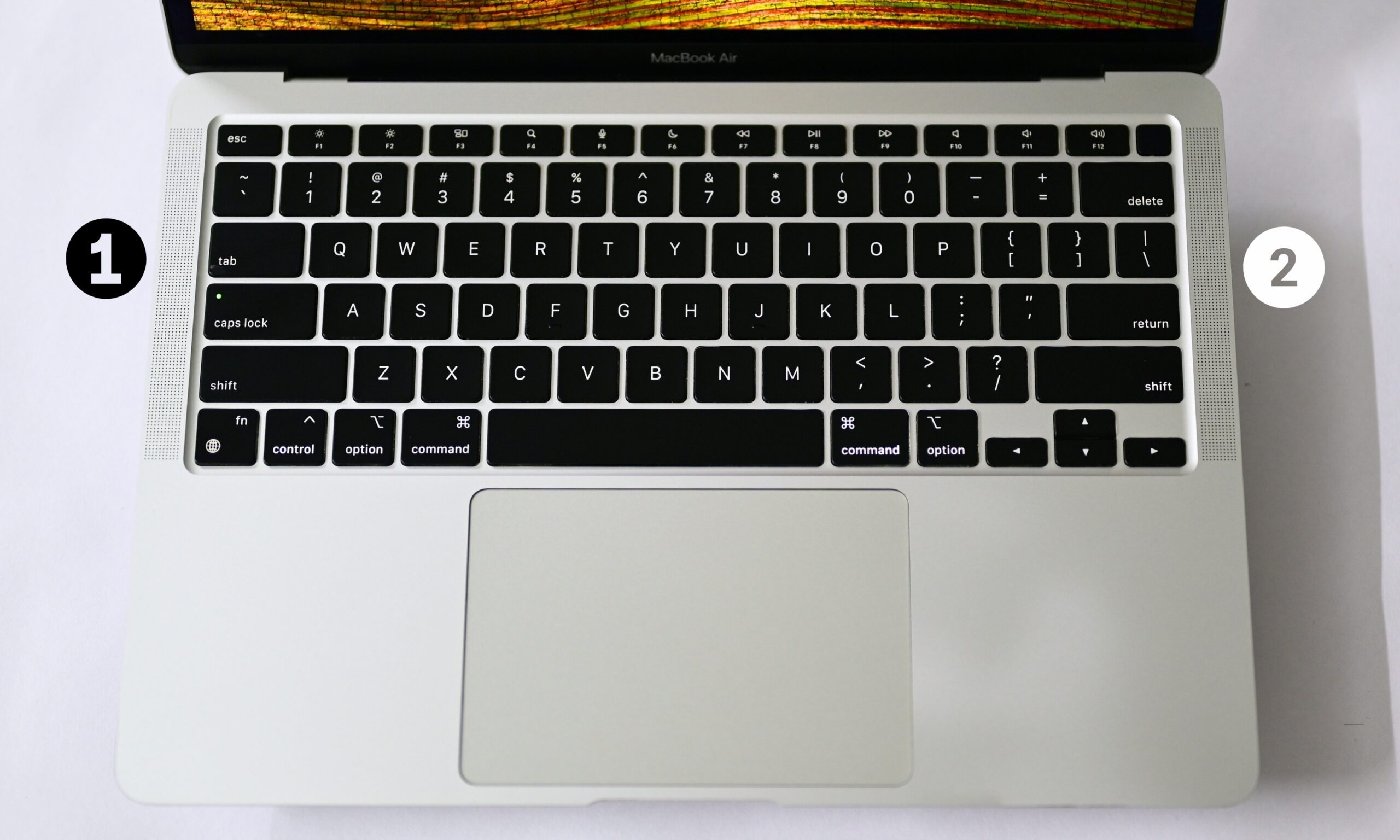
On paper, the M5 MacBook Air should sound better. It replaces the M1’s two-speaker setup with a four-speaker system. In practice, though, it doesn’t sound as loud or as rich as the M1 MacBook Air. 

What you actually get instead is a thin, almost hollow midrange, a shrill emphasis on high frequencies, and minimal low-end presence, the kind of sound signature that makes dialogue clear but leaves music and movies feeling flat and lifeless. There’s no fullness to it, no weight behind a bassline or an explosion, just treble doing all the heavy lifting.

I noticed it almost immediately. During setup, I heard a couple of audio cues and instinctively tried to turn up the volume, only to realize it was already maxed out. A few days later, a friend who had always complimented the M1 MacBook Air’s speakers asked a simple question: “What’s wrong with the speakers?” I told her what I thought might be happening.

Advertisement

What’s happening here?

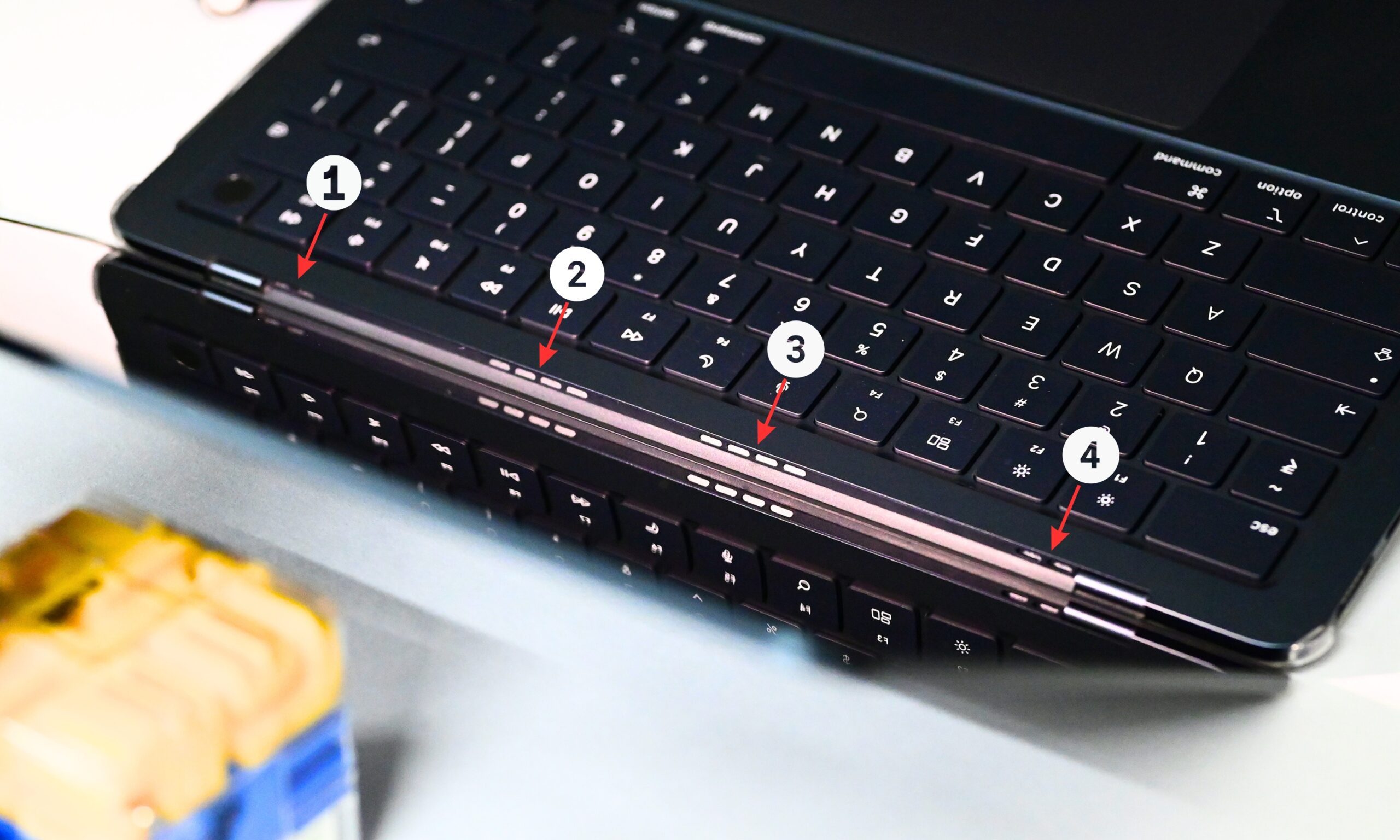
The M1 MacBook Air had two upward-firing speakers, so the sound reached your ears directly. On the newer Air, Apple hides the speaker system inside the hinge, meaning the sound reflects off the display before reaching you. 

That likely contributes to the difference; bouncing sound off a fixed surface instead of firing it directly at you tends to scatter the low frequencies first, which would explain exactly why the bass disappears while the treble stays sharp, even shrill, in comparison.

Sitting across the table, she also felt the speakers didn’t project as well. To make sure it wasn’t just my ears playing tricks on me, I compared my M5 MacBook Air side by side with a friend’s M1 MacBook Air, and the difference was immediately obvious. The M5 sounded clear, but the M1 was noticeably louder and fuller, the kind that you’d want to use to play music in a room.

As it turns out, I wasn’t the only one hearing it. Digging through Reddit, I found several people who’d reached the same conclusion after comparing the two machines side by side. One user on r/macbook, who claims to own four MacBooks, writes that the “M1 actually sounds the loudest of them all.”

Others say the M5 MacBook Air’s speakers sound cleaner, while another user describes them as being “too much optimized for normal speech/dialogue clarity.” That lines up almost perfectly with my experience. Voices sound crisp, but there’s noticeably less low-end punch.

What’s missing is the loudness and richness that made the M1 MacBook Air’s speakers so impressive at full volume.

Can software actually fix this? 

Since the hardware itself isn’t changing, I spent some time seeing whether macOS could compensate for any of that missing warmth and fullness through software, and two built-in tools are worth knowing about, both tucked inside the Music app.

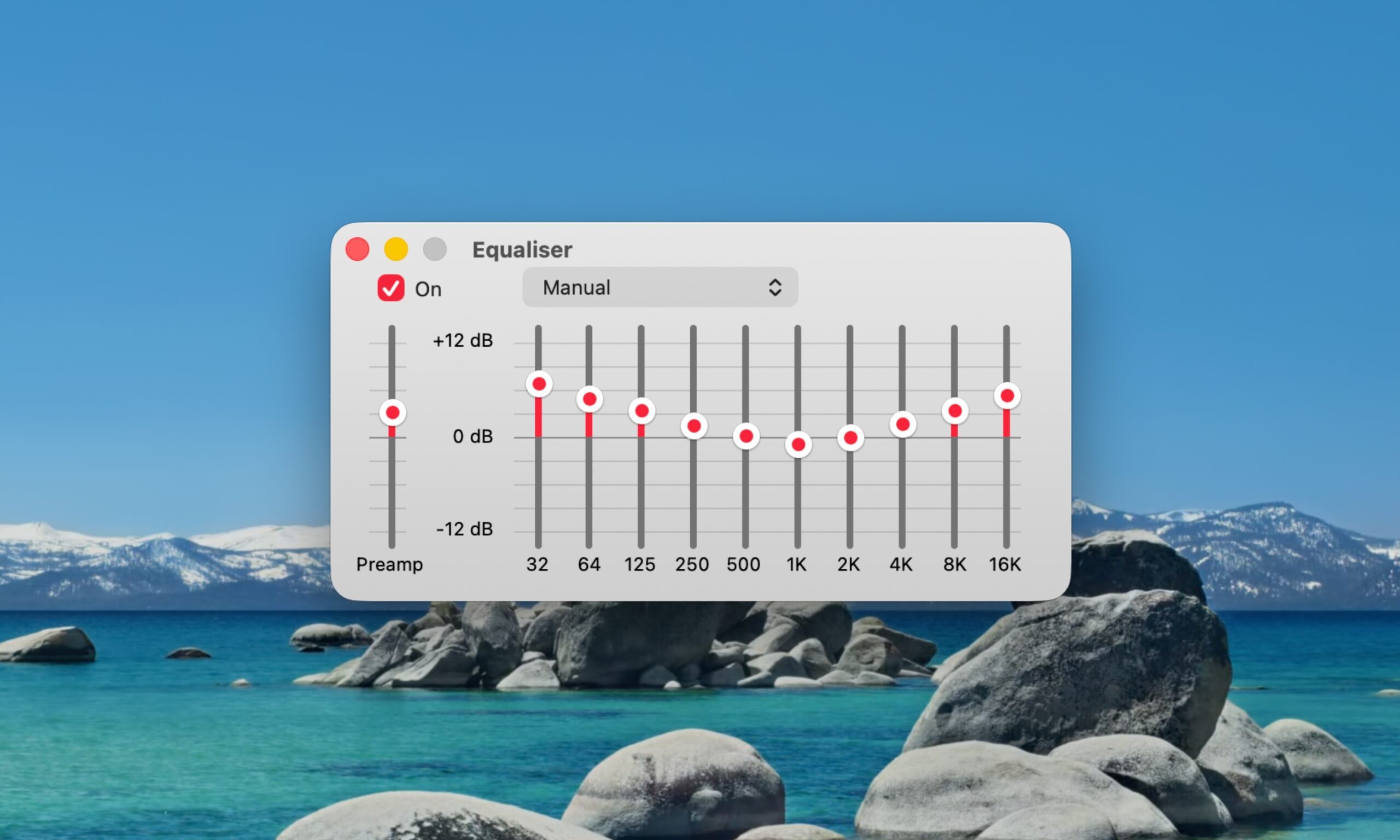
The Equalizer, found in the taskbar under Window > Equalizer, lets you manually boost or cut specific frequency bands, and it includes a Preamp slider at the top that governs overall output level before the individual bands even kick in. Nudging the Preamp up genuinely makes the M5’s speakers sound louder, and pairing that with a boost to the lower-frequency sliders helps mask some of that missing bass presence. 

Advertisement

However, if you push the Preamp too far, especially combined with an already maxed system volume, you’ll start hearing audible distortion and clipping, a crackly, strained quality that’s arguably worse than just accepting the speakers’ limitations. 

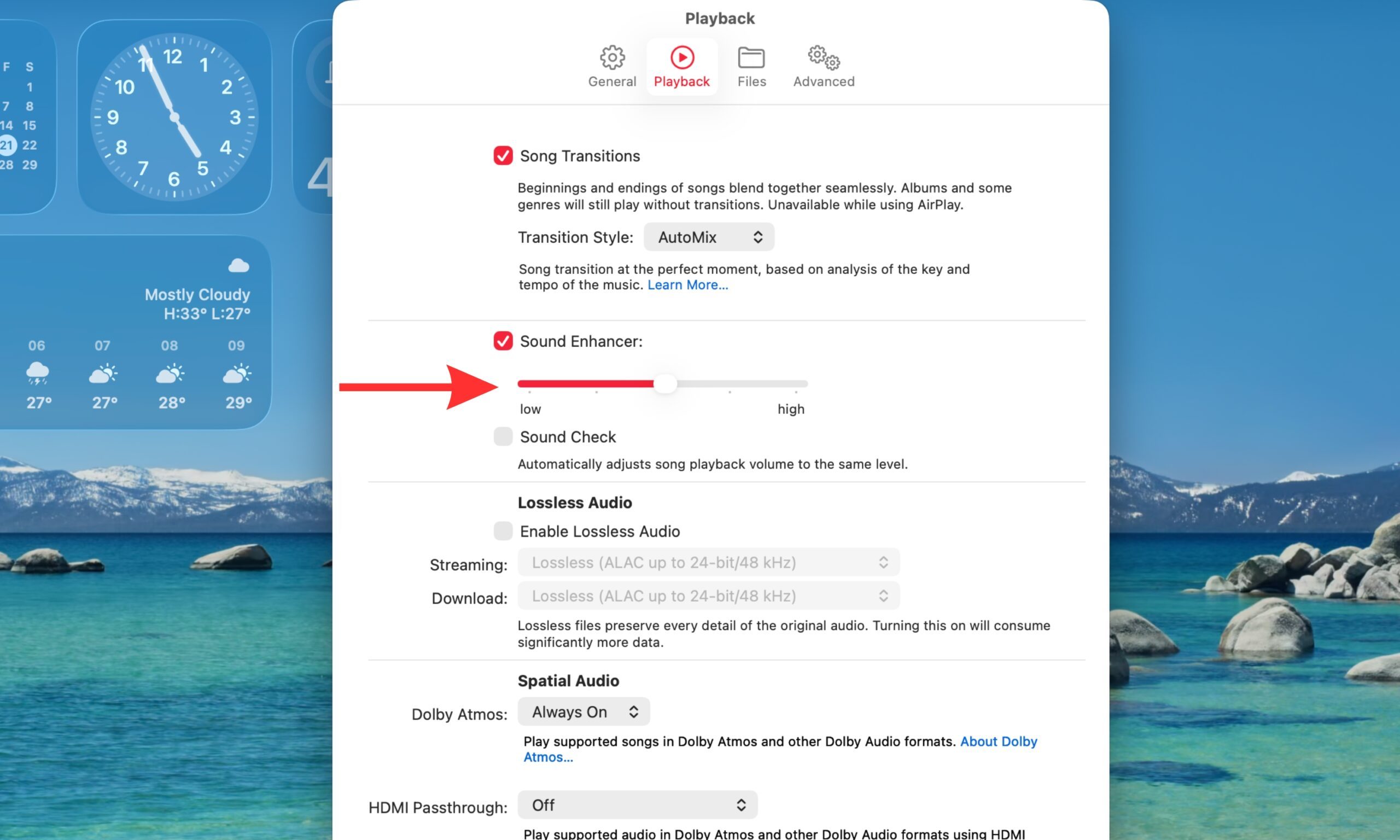
The second tool, Sound Enhancer, lives under Music > Settings > Playback, and it works completely differently from the Equalizer. Rather than adjusting specific frequencies, it widens the perceived soundstage by subtly altering how bass and treble are processed together. Basically, it tricks your ears into hearing a broader, more spacious soundstage than two closely spaced hinge-mounted speakers can naturally produce. 

Turning it on made a noticeable difference for me; music felt less pinched and centered. It won’t add bass weight the way boosting the Equalizer’s low end does, but it meaningfully improves how “big” the sound feels. Between the two, I’d start with Sound Enhancer for everyday listening, then layer in a modest Preamp and bass boost through the Equalizer. 

Just don’t expect either one to fully replace what the M1’s upward-firing speakers did for free.

Is it actually a dealbreaker?

No. Most people probably won’t notice the difference, especially if they’re coming from an older Windows laptop or an entry-level notebook. But if you’re upgrading from an M1 MacBook Air, the difference is surprisingly easy to notice. And once you hear it, it’s hard to ignore.

This is more of a PSA feature. The M5 MacBook Air offers a generational performance upgrade, but while the screen experience is only marginally better, the speakers are a noticeable downgrade. If you’re going with the 15-inch M5 MacBook Air, however, that offers a better six-speaker system. And if upward-firing speakers are a must-have, you’ll need to step up to one of Apple’s MacBook Pro models.

Advertisement

Source link

Continue Reading

Tech

Who’s leading Ireland’s new chip advisory council?

Published

on

The new council will provide independent expert advice to the Government on developing the semiconductor sector.

Ireland is establishing a new advisory council to help align the country’s chip sector with its national strategy, as advancements in AI place unprecedented pressure on the semiconductor industry.

The new council is set up to provide independent expert advice to the Government on developing the sector, and help shape policies that strengthen the industry’s competitiveness on a global scale.

Among its various roles, the council will monitor the implementation of Silicon Island, Ireland’s national strategy aimed at attracting large investments for semiconductor development that is expected to create thousands of high-value jobs.

Advertisement

At the time of the strategy’s launch, the Government believed Ireland could support up to 34,500 new semiconductor roles by 2040.

The newly established council will also advise the Department of Enterprise on developments affecting the semiconductor sector, support collaboration and co-ordination across Government, enterprise agencies, industry and research organisations, and advise on Ireland’s engagement with European semiconductor policy, including the European Chips Act.

The Advisory Council on the Semiconductor Sector – set up to run for three years – is chaired by Intel’s former senior vice-president Dr Ann Kelleher and also includes Mike Morrissey, a senior director at Analog Devices; Qualcomm senior executive Colin Ryan; and Equal1 CEO Jason Lynch, among others.

The advisors are expected to utilise their industry expertise to identify emerging opportunities, challenges and risks affecting the sector, and provide strategic recommendations to support the continued growth and competitiveness of Ireland’s semiconductor ecosystem.

Advertisement

“The [semiconductor] sector is strategically important to Ireland’s economic future, and the council’s expertise will help guide the next phase of growth, innovation and international competitiveness,” said Minister for Enterprise, Tourism and Employment Peter Burke, TD.

“By bringing together leaders from industry, research and investment, we are creating a strong platform to support collaboration, inform policy and ensure Ireland is well positioned to seize emerging opportunities in this rapidly evolving sector.”

Here’s who will sit on the new advisory council:

Ann Kelleher

Advertisement

Dr Kelleher is the former senior vice-president of technology development at Intel. During her 30-year career at the company, she has held senior engineering and leadership roles across its Irish and international operations, including taking charge of the company’s global technology development programmes and advanced semiconductor process technologies.

“Ireland has built world-class capabilities in semiconductors over many decades. I look forward to working with council members and stakeholders across industry, academia and Government to help deliver the ambitions of Silicon Island and further strengthen Ireland’s position within the global semiconductor ecosystem,” Kelleher said.

Mike Morrissey

Morrissey is the senior director of ADI Catalyst at Analog Devices, a collaboration hub for client companies looking to commercialise faster and optimise their revenue generation.

Advertisement

Ruth Cotter

Cotter is a senior vice-president and the chief administrative officer at US chips giant AMD, leading the company’s integrated, enterprise-wide corporate operations.

She has led major acquisitions for the company – including that of Xilinx, the largest semiconductor transaction of its time – and continues to play a key role in company-wide transformation initiatives, according to AMD.

Colin Ryan

Advertisement

Ryan is the executive vice-president and chief strategy and corporate development officer at Qualcomm. In this role, he explores strategies that drive business expansion, and manages mergers and acquisitions as well as the investments Qualcomm makes.

Conor Ryan

Ryan has spent more than 30 years at Applied Materials, across executive positions leading sites around the world. In his current role, he heads applied global services at the company as its group vice-president.

Seán Mitchell

Advertisement

Mitchell is the chairperson and chief commercial officer at Ubotica Technologies, the Irish space-tech building an AI-powered platform used in maritime security. Its technology has been deployed in more than 30 Earth observation models so far and run “hundreds of thousands” of AI inferences in orbit, according to the company.

The company recently raised $11m in a funding round led by Act Venture Capital and Greencode Ventures, with participation from existing investor Atlantic Bridge.

Jason Lynch

Lynch is the CEO of Dublin-based quantum start-up Equal1, the maker behind Bell-1 – the first-ever Irish-made quantum computer and, according to the company, the world’s first silicon-based quantum server designed for data centres and high-performance computing.

Advertisement

Prior to this, Lynch led strategy, venture creation and commercial execution for new growth opportunities at Analog Devices.

Elaine Coughlan

Coughlan is a founder and managing partner at Atlantic Bridge and has 30 years of experience in industry as a founder, executive and investor scaling technology companies. She was previously on the board of Enterprise Ireland and was appointed to British Patient Capital’s £800m Future Fund Breakthrough in 2022.

Leonard Hobbs

Advertisement

Hobbs is the government liaison at MIDAS, the Irish industry association for microelectronics and electronic systems design. He has 25 years of experience at Intel, and previously served as director for research and innovation at Trinity College Dublin.

Denis Doyle

Dr Doyle is the chairperson of Tyndall National Institute and a board member at IDA Ireland. He was formerly a vice-president and general manager at Analog Devices.

Earlier this year, Tyndall launched a new five-year strategy aimed at helping develop Ireland’s semiconductor capabilities.

Advertisement

Ronan Farrell

Farrell is currently the vice-president of academic and registrar functions and a professor in the department of electronic engineering at Maynooth University.

Don’t miss out on the knowledge you need to succeed. Sign up for the Daily Brief, Silicon Republic’s digest of need-to-know sci-tech news.

Advertisement

Source link

Continue Reading

Tech

Key to Data Center Modernization

Published

on

PA-RISC emulation matters for data center modernization because it allows enterprises to decouple mission-critical HP-UX and MPE/iX applications from end-of-life physical hardware, enabling immediate migration to modern x86 servers or cloud infrastructure with zero code changes and minimal operational risk.

Quick Take

Enterprises running legacy Hewlett-Packard hardware face an acute operational bottleneck: the physical chassis powering their core business systems is rapidly failing, yet the underlying software cannot be easily replaced or rewritten. Proprietary hardware lines like HP 3000 and HP 9000 reached end-of-life status years ago, leaving organizations exposed to sudden hardware failure, severe spare-parts scarcity, escalating power overhead, and retiring technical expertise.

Hardware emulation resolves this deadlock by creating a virtual software replica of the original PA-RISC CPU, memory, and I/O architecture on modern x86 servers or cloud virtual machines. This approach eliminates physical hardware risks overnight, slashes data center floor space and cooling demands, and modernizes disaster recovery options while preserving application stability.

The PA-RISC Dilemma in the Modern Data Center

Developed in the 1980s and widely deployed through the 2000s, Hewlett-Packard’s Precision Architecture RISC architecture was a cornerstone of enterprise computing. Powered by the proprietary PA-RISC processor family—including 32-bit and 64-bit CPU designs such as the PA-7000 and PA-8000 series—these systems were engineered for high-availability database management, manufacturing execution, financial clearing, and enterprise resource planning. These environments ran either HP-UX or MPE/iX, operating systems custom-tailored to the underlying silicon.

Advertisement

However, HP officially phased out sales of PA-RISC systems in 2008 and ceased technical support around 2013 as the industry shifted toward Itanium and standard x86-64 server architectures. Today, organizations maintaining physical PA-RISC footprint in their data centers face several compound operational risks:

  • Component Scarcity and System Failure: Physical board-level components—including power supplies, bus backplanes, memory modules, and specialized SCSI host bus adapters (such as LSI 53C8xx controllers)—are no longer manufactured. Maintenance teams are forced to rely on secondary, refurbished markets with uncertain reliability.
  • Unplanned Downtime and Slow Recovery: Thermal degradation in aging silicon and mechanical drive failures increase the frequency of system outages. Without vendor patch support or hot-swappable replacement chassis, MTTR (Mean Time to Repair) stretches from hours into days.
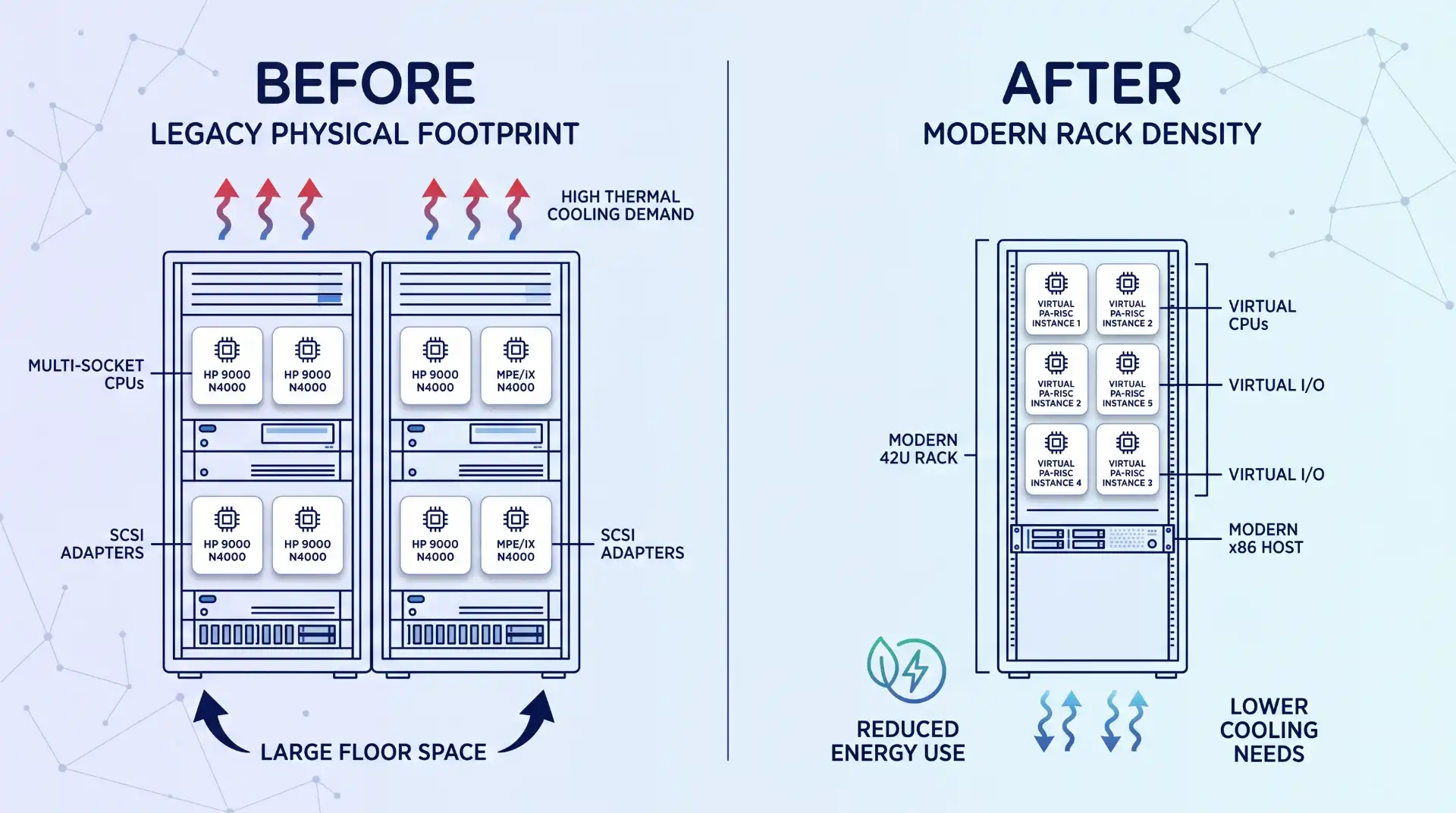
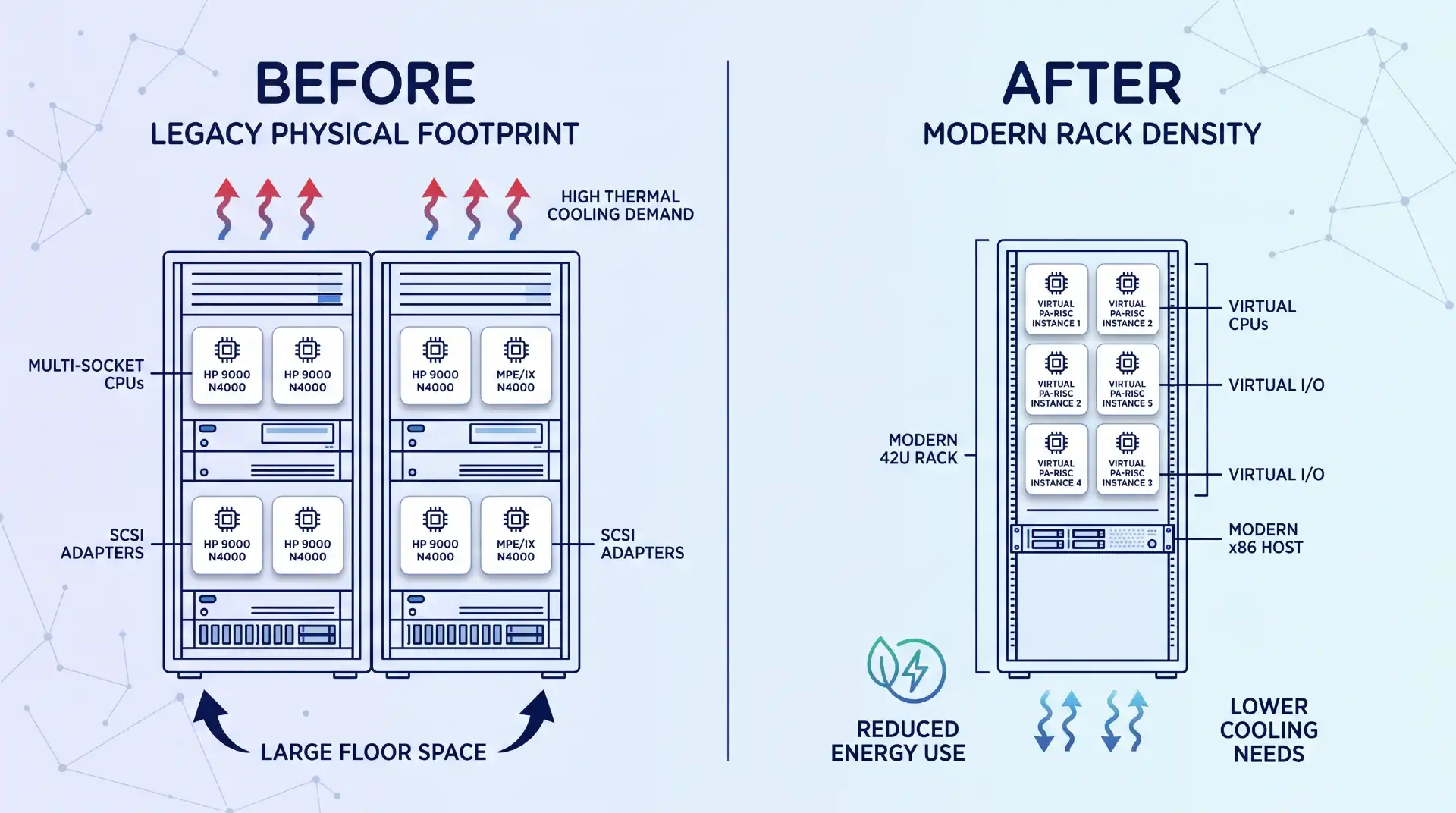
  • Data Center Resource Drain: Legacy multi-cabinet rack units occupy extensive floor space and draw disproportionate amounts of power. In an era where modern facilities prioritize data center power efficiency, maintaining kilowatt-heavy legacy cabinets strains utility budgets and air-handling units.
  • Security and Compliance Gaps: Outdated hardware platforms cannot host modern encryption modules, automated compliance audit agents, or enterprise security monitoring tools required under PCI-DSS, HIPAA, or ISO 27001 standard frameworks.
  • Loss of Institutional Knowledge: System administrators and hardware technicians skilled in vintage enterprise Unix systems and MPE console debugging are retiring, leaving organizations without in-house emergency support.

A vertical split diagram contrasting sprawling legacy PA-RISC racks and high thermal demand ('BEFORE') with a single, consolidated modern x86 rack with reduced energy and cooling ('AFTER'), in a clean line-art style with navy blue text and mid-blue accents.

How PA-RISC Emulation Works Under the Hood

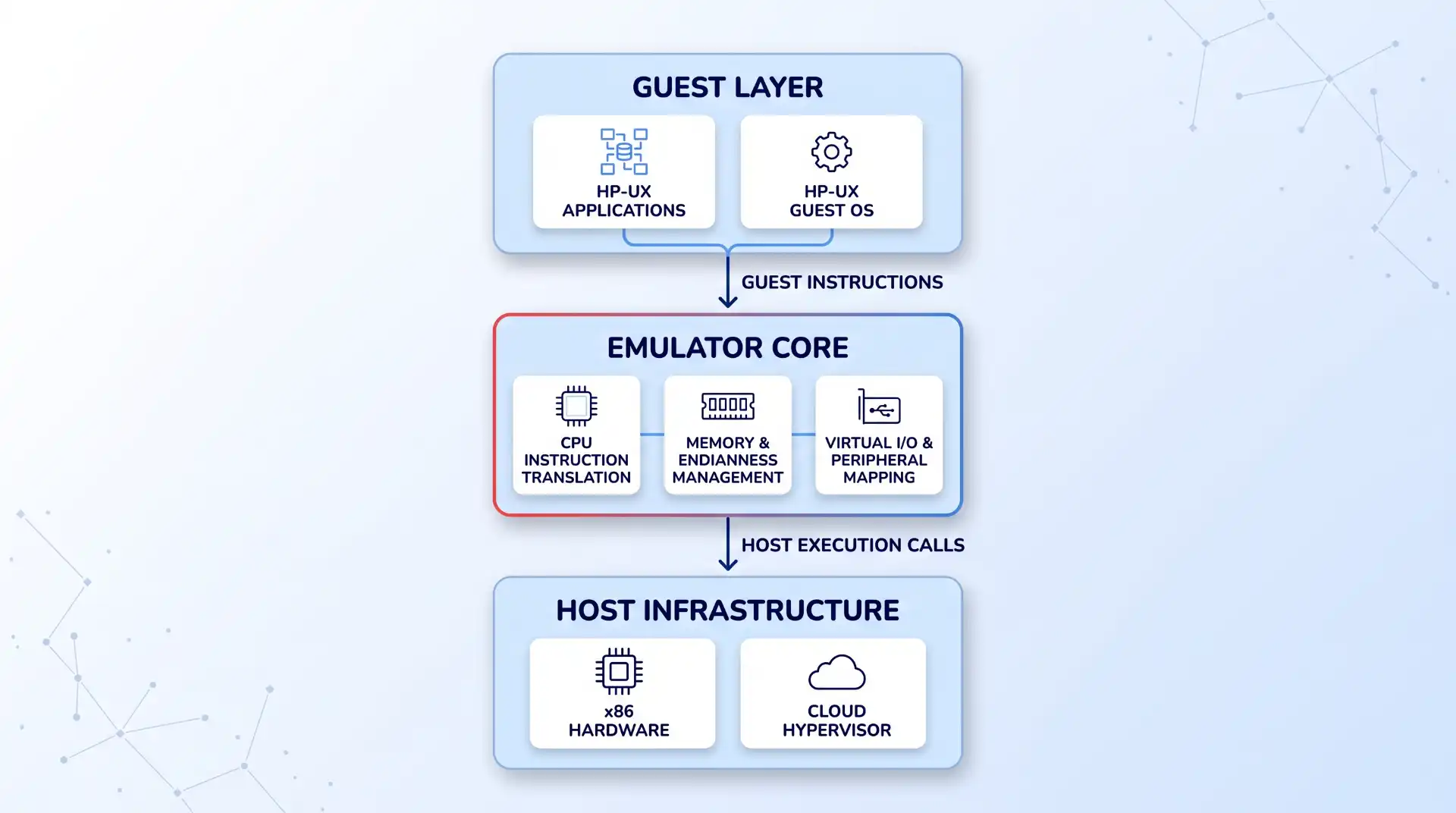
Hardware emulation bridges the gap between obsolete physical systems and modern infrastructure by changing the physical layer beneath the operating system rather than altering the software application. Implementing enterprise-grade PA-RISC emulation creates an instruction translation layer that presents a virtualized PA-RISC hardware platform directly to the guest operating system.

According to digital preservation research, virtualizing or emulating technical platforms allows organizations to preserve exact binary operational behavior while isolating applications from physical hardware decay. The emulation software layer handles instruction translation and hardware mapping through three primary subsystems:

  1. Dynamic CPU Instruction Translation: The emulator intercepts guest PA-RISC machine instructions (PA-1.1 or PA-2.0 execution calls) and dynamically translates them into equivalent x86-64 instruction sequences executed by modern Intel Xeon or AMD EPYC processors.
  2. Memory and Endianness Management: PA-RISC uses big-endian byte ordering, whereas modern x86 CPUs operate on little-endian architecture. The software emulation layer continuously translates memory references, registers, and memory management unit (MMU) address mappings transparently.
  3. Virtual I/O and Peripheral Mapping: Physical disk arrays, tape drives, network interface cards, and serial controllers are mapped to virtual abstractions. For example, legacy SCSI storage controllers are mapped to virtual disk files residing on fast NVMe SAN arrays or enterprise cloud storage.

Because the emulation layer presents an identical virtual hardware abstraction to the operating system, the installed copy of HP-UX 11i or MPE/iX 7.5 booted within the emulator cannot distinguish the software environment from a physical server. The original kernel binaries, custom application code, databases, and configuration files remain completely untouched.

pa-risc-emulation-system-architecture-flow

Core Benefits of PA-RISC Emulation for Modernization

When planning comprehensive data center modernization strategies, IT leadership must weigh speed, cost, and risk. Emulation provides a pragmatic middle path between maintaining fragile legacy hardware and executing high-risk application rewrites.

Advertisement

1. Rapid Infrastructure Consolidation

Emulation allows multiple multi-U physical server towers or heavy cabinet units (such as HP 9000 N4000 series or HP 3000 systems) to be virtualized onto standard 1U/2U rack servers or virtual instances. This physical consolidation frees up valuable data center floor space and enables integration into existing VMware, KVM, or bare-metal Linux host environments.

2. Slashed Energy and Cooling Overheads

Moving workloads from vintage multi-socket PA-RISC servers to dense x86 host hardware drastically lowers power consumption per computing cycle. Heat output decreases in tandem, reducing the load on data center HVAC systems and aligning IT operations with corporate sustainability mandates.

3. Zero Application Rewriting or Retraining

Full software refactoring or re-platforming projects routinely run over budget and take months or years to execute. Emulation executes existing binary code in place. end-users interact with identical application interfaces, workflow commands, and batch processes, eliminating the need for workforce retraining or operational process redesign.

4. Integration with Enterprise Disaster Recovery

Physical legacy servers often lack modern backup capabilities, relying on aging physical tape drives or manual image dumps. Once hosted in an emulated environment, guest operating systems gain immediate access to modern infrastructure tools: live VM snapshots, automated SAN replication, rapid recovery points, and cloud backup vaults.

Advertisement

5. Performance Upgrades via Modern Silicon

While dynamic instruction translation incurs software overhead, the sheer raw speed, higher cache capacity, and elevated clock rates of contemporary x86 CPUs mean emulated workloads often execute faster than they did on 20-year-old physical silicon.

6. Flexible Cloud Deployment Pathways

Modern emulation solutions are not limited to on-premises data centers. As documented in AWS Marketplace documentation for Charon-PAR, emulated PA-RISC platforms can run directly on cloud virtual instances (such as Amazon EC2 running enterprise Linux). This enables hybrid cloud integration without modifying core legacy software stacks.

Evaluating the Strategic Alternatives

Before committing to an implementation pathway, enterprise architects should contrast emulation against alternative legacy system migration strategies. A detailed comparison highlights the distinct trade-offs inherent in each approach:

Evaluation Criterion Status Quo (Maintain Physical PA-RISC) Application Refactoring / Porting Hardware Emulation (e.g., Stromasys)
Implementation Timeline N/A (Immediate ongoing risk) 12 to 36 months Days to a few weeks
Code & Database Changes None Extensive (Rewriting, schema changes) Zero changes required
Capital Expense (Upfront) Low short-term / High emergency cost Very High (Development & testing) Moderate (Licensing & host migration)
Operational Risk Profile Critical (Imminent hardware failure) High (Scope creep, behavioral bugs) Low (Identical software behavior)
Disaster Recovery Integration Legacy tape / Obsolete methods Modern cloud-native DR VM Snapshots, SAN & Cloud DR
Long-Term Strategic Value Unsustainable liability High (Modern codebase) High immediate stability & migration bridge

Technical Trade-offs, Limitations, and Failure Modes

While emulation resolves immediate hardware exposure, engineering teams must evaluate specific technical edge cases during project planning. According to a detailed legacy hardware emulation analysis, understanding host dependencies is vital for a smooth transition.

Advertisement
  • Proprietary Physical Interfacing: If the original PA-RISC server relies on specialized physical expansion cards—such as proprietary serial interface boards or custom non-standard PCI cards—those hardware devices cannot be physically plugged into modern x86 servers. The solution requires converting those hardware channels into network-attached serial gateways or IP-based emulated protocols.
  • Host Sizing and CPU Core Oversubscription: Emulation relies on dedicated CPU resources for dynamic translation. Oversubscribing host CPU cores on hypervisors running heavy concurrent workloads can cause timing latency or degraded I/O throughput in the emulated guest OS. Dedicated CPU pinning or bare-metal host reservation is recommended.
  • Storage Queue and Latency Tuning: Mapping virtual SCSI disks to modern storage requires proper host OS queue depth configuration. If disk image files reside on poorly configured network storage, asynchronous write spikes in HP-UX databases can trigger temporary disk wait timeouts inside the guest kernel.
  • Vendor Licensing Constraints: While the application code remains unchanged, certain third-party software products running inside HP-UX bind their licenses to CPU serial numbers or specific hardware machine IDs. Engineers must audit application licensing mechanisms to ensure smooth re-licensing on virtualized hardware calls.

Understanding these virtualization and emulation techniques enables infrastructure teams to conduct pre-migration host sizing tests, mitigating latency issues before production cutover.

Key Takeaways

  • Hardware Independence: PA-RISC emulation decouples legacy HP-UX and MPE/iX applications from failing physical chassis, placing workloads on modern, reliable x86 host servers or cloud VMs.
  • Zero Code Disruption: Because instruction-set translation operates below the OS level, applications, database structures, user interfaces, and administrative commands require zero modifications.
  • Slashed Footprint and Operating Costs: Physical rack footprint, kilowatt energy consumption, and precision cooling requirements drop significantly, directly improving data center efficiency metrics.
  • Modernized Disaster Recovery: Virtualized PA-RISC instances integrate seamlessly with enterprise backup tools, live hypervisor snapshots, SAN replication, and automated disaster recovery strategies.
  • Strategic Migration Bridge: Emulation immediately neutralizes urgent hardware failure risks, granting enterprise architects time to execute long-term cloud infrastructure optimization on their own timeline.

Frequently Asked Questions

Does PA-RISC emulation require access to the application source code?

No. PA-RISC emulation operates directly on compiled binary code. The emulator translates low-level PA-RISC CPU instructions into x86-64 machine commands at runtime. Because the underlying HP-UX or MPE/iX operating system boots without modification, application source code and compilation tools are not required.

How does emulated performance compare to original physical PA-RISC hardware?

According to Stromasys technical documentation, emulated PA-RISC environments running on contemporary Intel Xeon or AMD EPYC processors generally match or exceed the performance of original physical systems. Modern x86 processors offer higher bus speeds, cache sizes, and memory bandwidth that offset the computational overhead of dynamic instruction translation.

Can emulated PA-RISC environments be deployed in public cloud environments?

Yes. Solutions like Charon-PAR can be deployed on x86-64 cloud instances within Amazon Web Services (AWS) or Microsoft Azure running standard Enterprise Linux host operating systems. This allows organizations to lift and shift legacy Unix workloads into public cloud infrastructure without rewriting software.

What operating systems are supported under PA-RISC emulation?

PA-RISC emulators typically support HP-UX (including versions 10.x and 11i) as well as MPE/iX (version 7.5). The emulator reproduces the CPU, memory management unit, buses, and standard SCSI/Ethernet controllers necessary for these operating systems to boot and function normally.

Is PA-RISC emulation a permanent solution or a temporary migration step?

It can serve as both. For many organizations, emulation acts as a permanent, long-term operational host platform because it permanently eliminates hardware failure risk while preserving proven business logic. For others, it serves as a risk-free interim bridge, stabilizing the infrastructure while cloud-native refactoring is planned and executed.

Advertisement

Source link

Continue Reading

Tech

Go updates may delight diehard gophers but displease AI overlords

Published

on


The keepers of the Go programming language on Wednesday released the latest version, v1.27, and with it come considerable advances in generics. In a nutshell, generics allow developers to write logic where data types are treated as variables, eliminating the need to rewrite (or copy and paste) a separate method for each different data type (int, string, floating point, etc.). It was “absolutely barbaric,” noted one YouTube tutorial creator. Go introduced generics for both functions and custom data types in version 1.18, released in 2022. The v1.27 release expands generics to support methods, which are basically just functions that are bound to a data type. These new generics will save a lot of typing, at least if the programmer has some chops. Golang’s standard random number generator, for example, can produce either a 32-bit integer (int32), 64-bit integer (int64) or whatever integer size the CPU expects (int). Prior to v1.27’s generics, the developer would have to write a method separately to support each numerical data type they wanted to use. Beyond generics, v1.27 allows developers to more easily work with structs, which are composites that collect different data types within a single object. Now, they can set values for nested or embedded fields directly without specifying all the intermediate steps to reach them. This will save time when working with deeply nested structs. This release also gets smarter in its ability to infer data types from functions without the developer explicitly typing them out. Previously, Go required explicit type arguments whenever a generic function was passed into a slice literal, channel send, or type conversion. Save a keystroke, break a brain Go continues to evolve into a programming language capable of tackling tasks as sophisticated as building the new TypeScript language server, but some wonder if it’s losing its approachable charm along the way. Generics and these other time-saving features will come as a relief to the busy Gopher who grows weary of how much identical code they’re typing. But these language shortcuts also make the code on the screen more abstract, which has its own mental overhead. When Google engineers Rob Pike, Robert Griesemer, and Ken Thompson created Go, first released in 2009, they prioritized readability over writability. The designers “recognized that developers spend far more time reading existing code than they do typing it out,” wrote Google Group Product Manager Cameron Balahan and Google Cloud Chief Evangelist Richard Seroter in a blog post earlier this month. Generics and other keystroke-saving measures will create more indirection that can confuse someone trying to understand what the code is doing, others have argued. Generics will “make every code base entirely different,” complained the popular YouTube tech commentator (and former Netflix engineer) known as ThePrimeagen (Michael Paulson). “You’re going to jump into code bases and have no idea how they work. You’re gonna have to go through layers of abstraction and whole new ways in which to express things, which is just gonna be like every other language, just without all the conveniences.” Go’s value is in its simplicity. Adopting higher-level constructs makes it more of a C++ or Rust imitator, he said. “Generics aren’t needed in most of practical Go code,” observed VictoriaMetrics founder Aliaksandr Valialkin in a 2024 Medium post. The downside of these new features is that they make it “harder to understand what’s going on by just reading the code.” Think of the agents And for AI agents, Golang’s easy readability is more than just a personal preference; it’s critical to staying on target. “When code generation is offloaded to AI, the primary bottleneck of software engineering shifts entirely from the speed of writing to the rigor of reviewing, verifying, and maintaining,” the Google execs wrote. The more complicated the language, the more work it’ll take agents to understand. Syntactic magic like generics helps seasoned programmers save coding time, but does it bring any value when agents write all the code? Would learning generics contribute to an agent’s cognitive overhead (possibly leading to context rot) when writing a random number generator method for each data type takes a second or two, and is easier to debug? It’s a question that the maintainers of Go, like those of every other language, will be facing.®

Source link

Continue Reading

Trending

Copyright © 2025